1
HP virtualization
Computing without boundaries or constraints
Enabling an adaptive enterprise
Executive summary...2
What is virtualization? ...3
Definition of virtualization ... 3
HP Adaptive Enterprise vision and the importance of virtualization ... 4
What are the business and IT benefits of virtualization?... 4
HP virtualization strategy ...6
HP virtualization solutions ...8
Server virtualization ...8
HP server virtualization offering for vertically scaled server environments ... 8
HP server virtualization offering for horizontally scaled environments ... 9
HP Virtual Server Environment for HP-UX... 10
Network virtualization ...11
What is network virtualization? ... 11
The key components of network virtualization... 11
The business and IT benefits of network virtualization ... 11
Storage virtualization ...12
Benefits of storage virtualization ... 13
HP storage virtualization solutions... 13
HP StorageWorks Enterprise Virtual Array and HP StorageWorks Virtual Array ... 13
HP OpenView Continuous Access Storage Appliance (CASA)... 13
HP OpenView Storage Virtual Replicator ... 13
Application virtualization...14
What is application virtualization?... 14
Data center virtualization...15
Virtualization in action ...17
Integration of HP virtualization solutions ... 17
Example one: virtual server environment in action—automatic SAP resource adjustment upon failover... 17
Example two: HP partitioning in action—production and test environment on the same server ... 17
Example three: Storage virtualization in action—optimizing storage cost structure ... 19
Example four: Utility Data Center in action—creating a service on-the-fly ... 20
HP virtualization roadmap ...21
Conclusion...22
2
Executive summary
Organizations are operating today in an environment of accelerating change and disruption. Increased competition, higher customer expectations, and growing pressure to reduce costs mean that an organization’s information technology (IT) support services have to respond more quickly than ever to meet volatile business demands. This has a huge impact on the IT infrastructure, which must be built to support the needs of an agile business.
According to most industry observers, increasingly adaptive enterprises will require IT infrastructures that are more like utilities—services we really notice only when they are missing. Focus will shift to utility computing, where the service itself—not how it’s provided—is the most important factor in decisions about computing acquisitions. HP’s vision for the adaptive enterprise is one in which IT service levels match the flow of real-time business activities where low-cost, dependable, reliable, and scalable services are available and dynamically tapped, whenever needed—during peak times, lulls, and anywhere in between. The HP straregy is to provide customers with the means to build and implement such an adaptive enterprise, one with IT services that can react “on-the-fly” to rapidly changing internal and external business circumstances. The HP fundamental to such an enterprise is an infrastructure foundation for continuous, secure computing services that are protected and optimized by the use of automated, intelligent management solutions as well as the capability to discover, allocate, optimize, and de-allocate computing resources such as servers, networking components, storage elements, and application services from predefined “pools” of such components. This infrastructure capability is enabled by HP virtualization technologies.
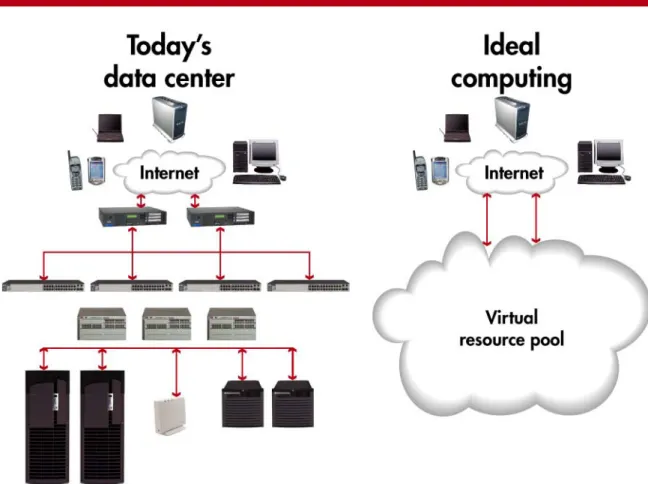
Resource virtualization is the abstraction or virtualization of server, storage, and network resources in order to make them available dynamically for sharing by IT services—both inside and outside your organization. HP’s portfolio of technologies and solutions offers powerful capabilities for a strategic approach to virtualization:
• Server virtualization for horizontally and vertically scaled server environments. Server virtualization enables optimized utilization, improved service levels, and reduced management overhead.
• Network virtualization, enabled by intelligent routers, switches, and other networking elements supporting virtual LANs. Virtualized networks are more secure and more able to support unforeseen spikes in customer and user demand.
• Storage virtualization (server, network, and array-based). Storage virtualization technologies improve the utilization of current storage subsystems, reduce administrative costs, and protect your vital data in a secure and automated fashion.
• Application virtualization enables programs and services to be executed on multiple systems simultaneously. This computing approach is closely related to horizontal scaling, clusters, and grid computing, where a single application is able to cooperatively execute on a number of servers concurrently.
• Data center virtualization, whereby groups of servers, storage, and network resources can be provisioned or re-allocated on-the-fly to meet the needs of a new IT service or to handle dynamically changing workloads. HP offers a unique solution for data center virtualization—the Utility Data Center (UDC).
The power of HP’s strategy, however, lies in the integration of virtualization solutions, controlled by automated intelligent management software,to present a coherent, yet flexible, utility computing environment. The HP Virtual Server Environment (VSE) is a good example of this integration in action. The HP Utility Data Center, with its supporting server, storage, network, and application virtualization, can be seen as today’s ultimate step in building a completely virtualized infrastructure.
So how do organizations benefit from resource virtualization? Customers and industry analysts report
considerable benefits: improved return on IT investments, better asset utilization, operational and administrative cost savings, improved quality of IT service and, best of all, a significant improvement in your organization’s agility and ability to react to unforeseen business events.
Resource virtualization is therefore seen by many senior IT executives, industry analysts, and vendors as a key enabling technology to help organizations build an adaptive IT infrastructure. In other words, it is a critical building block on the path to utility computing.
3
What is virtualization?
In the early 1980s, Joel Birnbaum, at the time HP Vice-President of R&D, envisioned a pervasive and ubiquitous information infrastructure. Information technology services would have attributes similar to those we expect from utilities providing electricity, light, or clean water. IT would, in effect, become a utility, which we would really notice only when it was missing. Today, most industry commentators agree with this vision: billions of people, places, and things will all be connected to each other and to useful computing services through the Internet and World Wide Web. Focus will shift to utility computing where the service itself—not how it’s provided—is the most important factor in decisions about computing acquisitions.
Virtualization is seen by many senior IT executives, industry analysts, and vendors as the key infrastructure technology to enable that next stage of computing.
Definition of virtualization
Virtualization is the abstraction or virtualization of server, storage, and network resources in order to make them available dynamically for sharing by IT services—both inside and outside your organization. The logical functions of the server, storage, and network elements are separated from their physical functions (e.g., CPU, memory, I/O, controllers, disks, switches). In other words, all servers, storage, and network devices can be aggregated into independent pools of resources. Some elements may even be further subdivided (server partitions, storage LUNs) to provide an even more granular level of control. Elements from these pools can then be allocated, provisioned, and managed—manually or automatically—to meet the changing needs and priorities of your business. Virtualization is a key milestone on the road to utility computing and, in combination with other server, storage, and networking capabilities, offers customers the opportunity to build an IT infrastructure without boundaries or constraints.
4
HP Adaptive Enterprise vision and the importance of virtualization
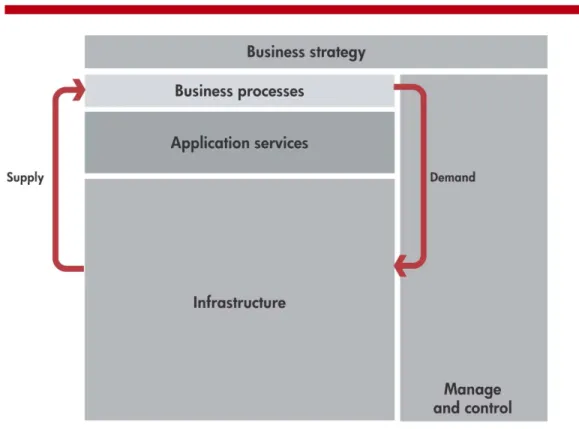
An adaptive enterprise can quickly respond to and capitalize on change for business advantage. It is the ultimate state of fitness: business and IT perfectly synchronized. To ensure the best return on your IT investments and to increase the agility of your business, HP has designed an architecture for an adaptive enterprise—a robust technology foundation that flexibly deploys and assigns your IT resources as your business evolves.
Taking control of your infrastructure requires management software that provides immediate knowledge of what is taking place in your IT environment and the ability to intelligently respond to ongoing changes.
Figure 2. HP’s architectural vision for an adaptive enterprise
HP virtualization technologies play a key role in enabling an adaptive enterprise. Through the integration of virtualization and management software, the HP computing infrastructure can be adjusted quickly by activating or deactivating the appropriate resources from pools of preconfigured virtualized server, storage, and network elements. In other words, HP virtualization solutions ensure that your infrastructure is able to adapt quickly to meet your changing business needs.
You can take advantage of virtualization today by choosing products and solutions that already incorporate these capabilities. By doing this, you’re also creating a foundation that you can augment over time with increasingly more sophisticated and complementary virtualization across multiple systems and multiple data centers, and even across external resources provided as part of a secure managed service.
What are the business and IT benefits of virtualization?
There are three important business and IT benefits of virtualization:
• Better return on IT, achieved by greater asset utilization, increased deployment flexibility, and reduced management overhead. Since servers, storage, and network devices are combined into resource pools, peak demands generated by certain applications can be accommodated by allocating additional resources from the appropriate pool only when they are needed, and then by re-allocating them to other applications once the peaks have passed. Today, most data center managers provide resource capacity application by application, and tend to over-provision each environment in order to meet service-level objectives (SLOs) at times of peak demand. However, allocating capacity as needed from a pool across many applications creates a huge opportunity to reduce the excess and thereby improve the overall utilization of your IT assets.
5
Furthermore, each additional server, storage, or network device adds complexity to your data center and may result in operational and management overhead. Resource virtualization allows you to manage many more resources in a highly automated fashion, with predetermined rules. Furthermore, higher utilization and consolidation of your existing computing assets may allow you to offer IT services with fewer physical devices. Reduce the number of devices and you can reduce your operational costs.
HP believes that resource virtualization can reduce the need for excess (peak) capacity by 50% or more without degradation to your IT service levels.
• Enhanced service levels,achieved by analyzing the IT service’s priorities and adjusting resources quickly to meet agreed service levels. Resource virtualization functionality combines with other in-device and management software to deliver this adaptive IT infrastructure. Most customer workloads today only utilize a small
percentage of the server, storage, and network subsystems actually allocated to them, because data center managers have typically isolated applications and dedicated real physical resources to them on an application-by-application basis in order to ensure that sufficient capacity exists to meet service-level objectives at times of peak demand. Such resources are therefore unavailable to other applications and are effectively wasted. HP and its partners offer additional hardware and software solutions—such as partitioning, software-based resource and workload management tools, SAN software, and VLAN solutions—which can be used to tune server, storage, and network environments to meet service levels and increase overall utilization.
• Increased business agility, achievedby rapidly provisioning IT resources to meet new service demands and by scaling existing IT resources to meet growth objectives. In today’s data centers it can take many weeks to add new server, storage, and network capacity to meet the needs of a new IT service or to reconfigure hard-wired subsystems in order to make them available for new applications. Even adding additional capacity for an existing, growing service can require considerable time and effort. In the virtualized world, new environments can be configured in a matter of minutes or hours by “igniting” spare capacity or repurposing existing or spare resources.
Today’s IT executives are therefore showing an active interest in resource virtualization. They see the clear link between the accelerating demands and challenges of meeting business goals and the need to build an enterprise that can adapt dynamically and cost-effectively to meet those challenges.
6
HP virtualization strategy
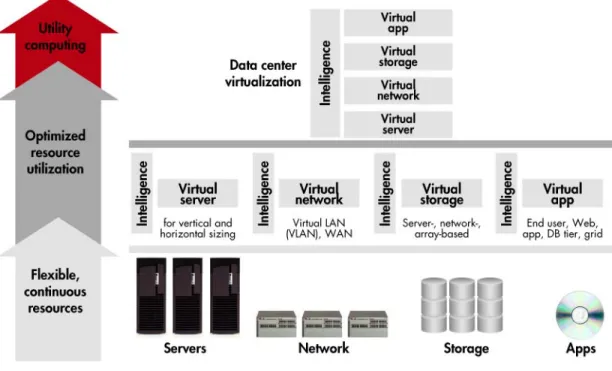
HP offers a broad continuum of virtualization solutions that allows our customers to choose the most appropriate path and timeframe in adding increasing levels of resource virtualization to their IT infrastructures. As we saw earlier, virtualization is a key enabler of an adaptive enterprise. Virtualization allows server, storage, and network resources to be dynamically matched to business demands.
Customers today employ a number of IT optimization strategies, all of which include a varying degree of virtualization. HP defines these strategies in terms of the following:
• Server virtualization. There are multiple server virtualization techniques. Vertically scaled server resource pools contain fewer, more powerful physical servers that are segmented into more granular, virtual servers through server partitioning and on-demand solutions. Resources from this pool are allocated to specific applications using techniques such as dynamic resource management and workload management. Horizontally scaled resource pools are formed by clustering multiple, smaller server elements and virtualizing applications across them. In order to manage virtual server environments easily and efficiently, true multisystem management is needed, including a central point of administration and tools for rapid deployment and fault and configuration management. For HP-UX in particular, HP offers the Virtual Server Environment (VSE), which intelligently grows and shrinks virtual servers based on application service-level objectives and business priorities.
• Network virtualization. This is enabled by intelligent routers, switches, and other networking elements supporting virtual LANs. HP ProCurve and Cisco Catalyst solutions offer rich functionality for network virtualization.
• Storage virtualization. The pooling of physical resources is enabled at various levels in the storage hierarchy. In array controllers, virtualization allows physical capacity to be allocated more efficiently and dynamically. Virtualization of networked storage enables higher availability, better utilization, and centralized management of groups of network storage devices such as SAN-attached array controllers or network-attached storage (NAS) file servers. Server-based virtualization provides pooling of physical capacity for both SAN and direct-attached storage (DAS) within the context of a single server. HP offers a range of storage virtualization solutions as a key part of our ENSAextended storage architecture.
• Application virtualization. This is the ability of application programs and processes to execute either synchronously or asychrononously on more than one computer. This concept, or computing style, is different from client/server, in that this parallelization of computing occurs within the same processing tier—such as the Web tier with HTTP, the application tier with BEA WebLogic, the database tier with Oracle9i RAC, and the single-image multicomputer OS capability of the HP TruCluster operating system. The primary distinction between the aforementioned tiers of application virtualization is the degree of application modification or intelligence that must be instrumented into the program or processes to take advantage of application virtualization. For example, HTTP requires little modification to enable concurrent application processing on one to many computers, as it is designed to allow this type of processing. Another example is grid computing, in which applications are able to simultaneously compute across multiple servers.
• Data center virtualization. Delivered only by HP today, data center virtualization offers a higher-level abstraction of resources in which groups of servers, storage, and network elements can be provisioned or re-allocated on-the-fly to meet the needs of a new IT service or handle dynamically changing workloads. HP offers a unique solution for data center virtualization—the HP Utility Data Center (UDC). The HP UDC is a fully integrated solution consisting of software, hardware, and services that enables provisioning of application environments to optimize asset utilization and reduce operational costs. The HP UDC is unique in offering a master software environment, known as Utility Controller Software, which is capable of managing all of the virtualized environments—server, storage, and networking—in a coherent and integrated manner.
7
Figure 3. HP virtualization continuum—computing without boundaries or constraints
Note that virtualization solutions can be implemented in your data center at any time and will certainly provide significant benefits in improved resource utilization, shorter deployment times, and reduced operational overhead. But it is even more beneficial to deploy virtualized resources as part of a wider data center strategy based on consolidation.Physical and logicalconsolidation of IT assets and services is a critical part of all the virtualization strategies described above. A comprehensive consolidation plan ensures that you have considered the business demands for servers, storage, and network infrastructure and have already taken concrete steps to optimize these resources. Virtualization can then be seen as a way of enhancing your consolidation program to further optimize your return on IT investments (RoIT), improve service levels, and increase the agility of your IT infrastructure. HP offers a number of virtualization solutions for server, storage, and networking environments. The power of the HP strategy, however, lies in the integration of such virtualization solutions to present a coherent yet flexible utility computing environment. The HP Virtual Server Environment (VSE) is a good example of this integration in action. In such a continuum of solutions, the HP Utility Data Center can be seen as today’s ultimate step in building a completely virtualized infrastructure.
8
HP virtualization solutions
In this section we’ll take a more detailed look at the hardware, software, and integrated virtualization solutions that HP can offer for servers, network, storage, and ultimately the whole data center.
Server virtualization
Server virtualization enables administrators to optimize the usage and simplify the management of single- or multiple-server environments by configuring them as reusable pools of resources. As we mentioned earlier, virtualization means that the physical resources are separated from the logical view of the server infrastructure. HP offers a number of solutions for vertically and horizontally scaled environments.
HP server virtualization offering for vertically scaled server environments
Vertical scaling typically means the use of a few consolidated, high-performance servers to run many concurrent, complex applications. This environment offers major opportunities for cost reduction and better utilization of existing assets. HP solutions for server partitioning and resource optimization can help administrators drive server utilization from a typical 15–50% to more than 90% without service-level degradation. The combination of a virtualized server environment with on-demand solutions such as instant capacity on demand (iCOD) and Pay-per-Use (PPU) allows customers to activate additional capacity only when needed and to make payments for server resources based on actual usage.
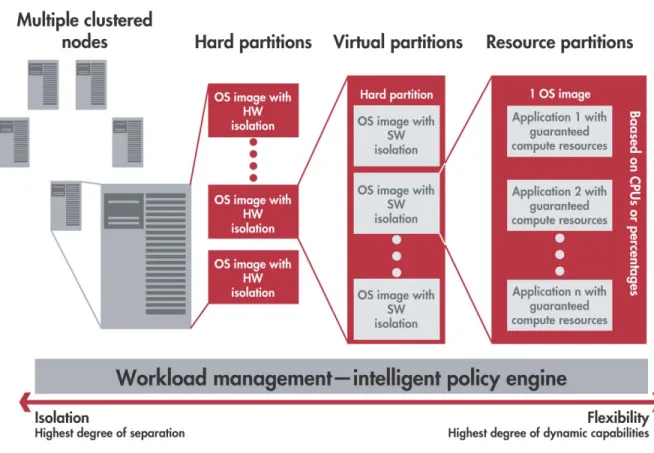
The HP Partitioning Continuum provides a range of hard, virtual, and resource partitioning tools that offer resource virtualization at the server or partition level, improve overall system and subsystem utilization, and lower costs in consolidated environments. Partitions are physical or logical mechanisms for isolating operational environments within single or multiple servers. Partitioning provides IT managers with the flexibility to dynamically resize an application’s resource usage while ensuring that all applications enjoy protection from disruptive events that could cause service interruption or performance degradation.
9
HP offers multiple different types of partitioning solutions, each designed to support a different balance of application isolation and resource optimization.
Hard partitions are designed to isolate application environments from single points of failure (SPOFs). This means that applications running within hard partitions are not affected by hardware or software events occurring in other partitions. Today HP offers hard partitions in its HP-UX server product lines, and future Itanium™-based servers will
offer hard partitions for HP-UX, Linux, and Windows®.
Virtual partitions provide complete software fault isolation within an individual server or hard partition. This means that any application or OS-related failure impacts only the partition in which it is executing—without having any effect on other virtual partitions running on the same system. In a system with virtual partitions, each OS instance is completely independent of all others. Operating systems in different partitions can be different versions or have different tuning parameters. Therefore, virtual partitions are useful for testing new OS versions or applications without the necessity of replicating the deployment environment. HP offers virtual partitions for HP 9000 servers called HP-UX Virtual Partitions (vPars), as well as for HP ProLiant servers for Windows and Linux by supporting third-party solutions such as VMware ESX Server and GSX Server. Connectix, whose virtual machine assets have been just recently acquired by Microsoft®, has a beta product called Virtual Server.
Resource partitions address the need for the dynamic allocation of dedicated resources within a single OS instance, between competing applications in order to avoid resource contention. For HP-UX and Linux
environments, HP offers HP Process Resource Manager, which allows system administrators to control the amount of resources that applications, users, or groups may use during peak system load. The key resource partition solutions for Windows environments are HP ProLiant Essentials Workload Management Pack and Microsoft Windows System Resource Manager (WSRM).
In vertically scaled servers, partitioning can be complemented by HPon-demand solutions to provide a number of options for implementing the infrastructure hardware and software required for rapid expansions and reductions in computing power. Specific solutions for HP servers are instant Capacity on Demand (iCOD) and Pay-per-Use (PPU). iCOD for HP 9000 servers allows customers to activate processors within a partition or server when they are needed. Processors can also be activated temporarily (TiCOD) to meet short-term demand, then deactivated and held again in reserve. iCOD for ProLiant servers offers the capability for servers to be pre-racked and replenished automatically. PPU solutions from HP are usage-based leasing solutions—customers pay only for the actual resources that are used. In terms of virtualization, HP on-demand solutions match expenditures directly to resources that are actually consumed by a specific IT service, and they can be activated only when they are really needed.
HP server virtualization offering for horizontally scaled environments
Horizontal virtualization is the capability of virtualizing and managing very large server farms, such as those typically found in managed service providers and telecommunications environments.
There are a wide variety of clustering and application virtualization solutions available from HP in order to help customers improve the management and resource utilization of environments that often include many hundreds of servers. Clustering solutions, such as Serviceguard (for HP-UX and Linux), TruClusters (for Tru64 UNIX®) and
Microsoft Cluster Server (MSCS), are often used to manage servers in virtualized groups for application protection and high availability. Other solutions, such as Oracle9i RAC provide both dynamic application scaling as well as additional resilience (for more information, compare this with the application virtualization section).
In order to manage horizontally virtualized environments easily and efficiently, true multisystem management is needed, including a central point of administration and tools for rapid deployment and fault and configuration management. Multisystem management solutions are crucial for reducing operational overhead and for ensuring that server configurations, performance levels, and other parameters are maintained in an efficient and automated manner. For HP-UX and Linux servers, the central point of administration for a multisystem environment is
Servicecontrol Manager (SCM). SCM integrates with rapid deployment and software distribution tools, such as Ignite-UX and Software Distributor-UX (SD-UX), to provide a highly efficient and automated server management offering. The HP Distributed Task Facility (DTF) is a grouping function of SCM allowing multiple servers to be simultaneously managed remotely, with a high level of role-based security to avoid unauthorized access to the management environment.
For ProLiant Linux and Windows servers the central point of administration is Insight Manager 7. Tools such as ProLiant Essentials Rapid Deployment Pack provide additional capabilities to automate the management and deployment of multiple servers so the infrastructure can quickly and easily adapt to changing business demands.
10
With our next-generation system-level management tool, HP will combine the power of Servicecontrol manager and Insight Manager to offer one central point of administration for HP-UX, Windows, and Linux environments. The key benefits of this additional level of multi-environment manageability are gains in administrative productivity and increased flexibility in highly dynamic virtualized environments.
HP Virtual Server Environment for HP-UX
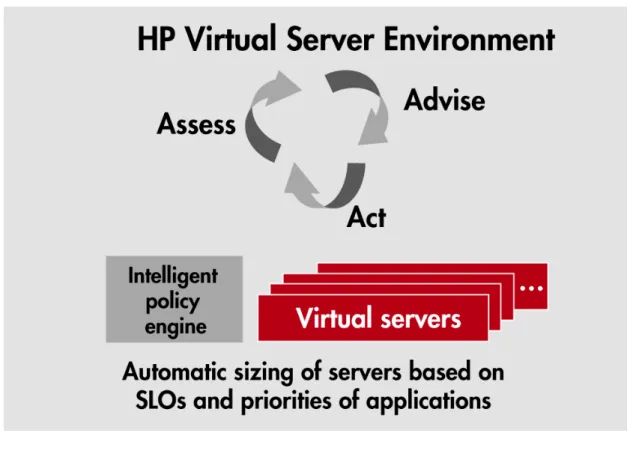
Server virtualization techniques can offer many benefits. However, their effectiveness is maximized when the independent functions described above are combined with a simple method for allocating and optimizing resources across and between virtual servers. For HP-UX environments, the HP Virtual Server Environment offers an intelligent policy-based engine that can seamlessly move resources between virtual servers to ensure that the entire environment is optimized to meet service-level objectives.
Figure 5. HP Virtual Server Environment
At the core of Virtual Server Environment (VSE) is HP-UX Workload Manager (WLM), which acts as the intelligent policy engine and orchestrates virtual server resources such as partitioning, iCOD, PPU, and clustering. For example, Workload Manager can automatically move CPU resources from one virtual partition to another, or it can automatically activate and deactivate TiCOD CPUs to optimize the cost of IT resource utilization. These resource shifts can occur because of response time thresholds, time of day, utilization peaks, or other policies that can be set by an administrator. In addition, in a clustered high-availability environment, WLM can react to the SLO of an application package that has failed-over from another partition or server and allocate the necessary resources on-the-fly to ensure that service levels are maintained.
To facilitate easier implementation of service-level objectives based upon application response times, WLM toolkits are available to measure application-specific metrics. WLM currently offers toolkits to integrate with Oracle®, SAS,
Apache, iCOD, and Pay-per-Use. BEA WebLogic will be added with an upcoming release of WLM in June 2003. HP is the only vendor today to offer such powerful and integrated virtualization technologies with an intelligent policy engine embedded in Virtual Server Environment (VSE). HP will shortly extend this lead by introducing a multisystem policy engine—HP Global Workload Manager (gWLM), which will adjust resources in a multisystem, heterogeneous environment. It will go beyond HP-UX to include Windows and Linux as well.
11
Network virtualization
In this section we define and describe the network virtualization solutions available from HP and its partners.
What is network virtualization?
Network virtualization is achieved by dividing the available network bandwidth into multiple independent and secure channels that may be dynamically and transparently assigned to specific devices without visibility of the actual path. In other words, network virtualization allows a set of devices connected to a single network to be dynamically and securely rearranged into arbitrary logical topologies merely by adjusting the channel—or virtual network segment—to which each device is assigned. These virtual network segments enable efficient, available, and secure communications between groups of devices.
The key components of network virtualization
The local area network (LAN):
• Intelligent virtual LAN (IEEE 802.1q)-aware Ethernet switches and routers
• Virtual LAN (VLAN)-enabled network adapters for VLAN-aware servers (Note: VLAN-aware servers are not mandatory—network virtualization can be implemented without the participation of the server resources; for example, the network virtualization provided by HP UDC does not rely on the participation of the server.)
• Virtual LAN topology management and configuration protocols
• Virtual LAN network management services The wide area network (WAN):
• Wide area virtual circuit technologies (ATM, MPLS, IEEE 802.1q Metro VLANs)
• WAN service provisioning on a virtual circuit basis
All HP ProCurve and Cisco Catalyst switches support the standards-based IEEE 802.1q VLAN capability. Additionally, these devices support GVRP (Group VLAN Registration Protocol) to allow the automatic registration and configuration of the VLAN topology within a complex network, and to enable the secured mode of operation where VLANs may only be allowed to communicate with one another by involving a higher-layer device such as a router or firewall.
Embedded Web agents allow VLANs to be configured in a simple and intuitive fashion. HP network management software (such as HP OpenView) allows simple and efficient configuration, monitoring, and viewing of VLAN topologies. OpenView also monitors and displays VLAN topology on heterogeneous networks including ProCurve switches and other vendors’ products.
The business and IT benefits of network virtualization
The rapid deployment of new network infrastructures results in cost savings due to reduced labor and reduced need to deploy physical equipment, and it minimizes planned downtime during deployment and reconfiguration activities. There is also a huge security benefit: by separating communication devices and isolating the set of communication devices to those with the same policy, goal, or spatial ownership, administrators can limit activity to specific subnets and control access more effectively. There is a management advantage, too—more control over the set of devices communicating with one another and the addressing used within the virtual network. Customers also have the ability to deploy network-wide policies and provision each virtual network with its own quality of service and security parameters.
12
Storage virtualization
Storage virtualization provides an abstraction layer between physical storage devices and the logical volumes consumed by applications. The abstraction hides the details of the storage infrastructure from servers, simplifying the overall management environment. Other key advantages are resource pooling (to hide the physical details of data location), creating subsets of resources (for protection), and aggregating resources (for higher bandwidth, capacity, or availability). Virtualization abstracts storage capacity by mapping “storage capacity providers”— physical devices or logical units (LUNs)—into a logical space and then creating logical devices that are presented to applications. This erases physical boundaries, creating pools of capacity that can be managed and accessed as needed.
Enabled by HP VersaStor technology, HP storage virtualization solutions are encompassed in ENSAextended, a scalable storage architecture that unifies storage components into a storage utility. ENSAextended also includes on-demand storage functionality, which offers customers a range of pricing schemes to pay for storage resources only as they are activated or used.
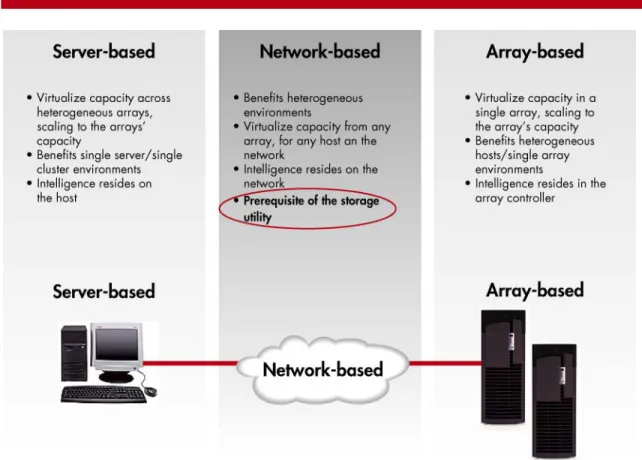
HP defines three types of storage virtualization: array-, network-, and server-based. Array-based virtualization operates within the context of a single array controller to enable more dynamic and efficient allocation of physical capacity. Network-based virtualization solutions can be deployed in SAN appliances, intelligent storage network switches, network-attached storage (NAS) file servers, or a combination of these. These solutions operate at the scale of an entire storage network to enable higher availability, better resource utilization, and centralized management of network storage devices such as SAN-attached array controllers or NAS file servers. Server-based virtualization intelligence resides in the host, and can pool any physical capacity connected to that specific server, including both SAN-attached storage and direct-attached storage (DAS). HP offers a wide range of storage virtualization solutions as a key part of its ENSAextended storage architecture.
Figure 6. Three levels of storage virtualization
Array-based storage virtualization is applied to drives within a storage subsystem. In this approach, the
virtualization component resides within the subsystem. Virtualized LUNs are available to any host connected to the SAN. Storage-based virtualization is host-neutral, and it is provided as securely as non-virtualized storage.
13
Network-based storage virtualization is applied to LUNs presented by storage subsystems attached to a SAN. These LUNs may be provided from virtualized storage subsystems like the StorageWorks Enterprise Virtual Array. In other words, different virtualization approaches may be combined to achieve the desired results (availability, performance, and physical location, for example). Virtual LUNs created within the network can be presented to any host connected to the network, and they are securely presented in a host-neutral manner. When combined with network-based mirroring and other capabilities, network-based virtualization provides a useful basis for migrating data among storage systems.
Server-based storage virtualization can be applied to any volumes (LUNs) visible to the server, regardless of whether they physically reside on direct-attached or SAN-attached devices. A server-based virtualization implementation includes both management software that creates the storage pool by binding LUNs (physical or virtual) together and creating application-usable LUNs from the pool, and driver-level software that presents them for use as LUNs by the host operating system.
Benefits of storage virtualization
HP is the first company to deliver a comprehensive architecture for implementing SAN-based storage virtualization. As the leader in open SANs, HP virtualization solutions:
• Simplify storage management by automating the addition, allocation, and re-allocation of storage resources to the infrastructure
• Improve storage utilization by ensuring that an appropriately configured storage environment maps to the application and its data requirements; as in the server environment, virtualization also removes the need for significant pre-allocation of storage capacity to meet growing or peak demands.
• Enable storage services across heterogeneous environments, which means simpler management and better utilization of your existing assets
HP storage virtualization solutions
With more than 100 virtualization patents, HP currently ships the industry’s broadest portfolio of storage virtualization solutions:
HP StorageWorks Enterprise Virtual Array and HP StorageWorks Virtual Array
HP StorageWorks Enterprise Virtual Array (EVA) and Virtual Array provide the virtualization intelligence in array controllers. In this model, the storage pool is composed of the capacity behind a single array with many servers benefiting from the added efficiency and flexibility enabled by virtualization on the array. The servers attached to the array do not have to be running the same operating systems. All storage environments can benefit from this array-based virtualization.
HP OpenView Continuous Access Storage Appliance (CASA)
HP CASA is a solution that enables heterogeneous storage services, including replication, and snapshot and data migration, and is enabled by network-based virtualization technology. Network-based virtualization enables many servers with different operating systems to perform I/O seamlessly to a storage pool composed of many disparate arrays, allowing enterprise-wide pools of modular storage assets to be easily managed and provisioned, adding greater overall storage functionality and utilization.
HP OpenView Storage Virtual Replicator
HP OpenView Storage Virtual Replicator provides server-based virtualization and replication. As previously discussed, in server-based virtualization the technology resides on an individual host or host cluster. In this model, one server/cluster performs I/O seamlessly to a storage pool composed of many potentially disparate arrays that can be SAN-attached, direct SCSI attached, or both. Small, single server/cluster environments benefit from the capacity utilization capabilities of Storage Virtual Replicator.
14
Application virtualization
In this section we define and describe application virtualization and briefly refer to key solutions that are available from HP and its partners.
What is application virtualization?
Application virtualization is achieved by enabling programs and processes to execute on more than one computer or server. Depending on the type of virtualization employed, the application may require modification to take advantage of available resources. Within a typical five-tier service architecture, there are many examples of application virtualization:
• End user—In this sample, a user is able to interact with the application from any given location. This began with the movement away from direct-attached terminal servers and has continued to now include Internet users and virtual private network users.
• Web tier—From this tier, service is served to end users. It is used to process requests from users in virtually any location. Typically, servers are easily added to this tier, as most applications use this tier as a service collection and distribution point. As the collection and distribution slows, typically due to high traffic patterns, additional Web servers can be added to augment application service demands.
• Application tier—BEA’s Weblogic application is able to accept requests from one to many Web servers and is able to load balance the requests from among its participating one to many Weblogic application computers.
• Database tier—This is perhaps the most difficult application area to virtualize. Most database instances are composed of tablespaces, which are translated to physical files. These tablespaces and the associated data are difficult to move due to this eventual physical translation. Oracle9i RAC is a large step forward in this capability to spread a database among servers and cooperatively execute transactions without requiring
the entire database to reside on a single symmetric multiprocessing (SMP) system.
• Operating system/cluster—HP’s leadership in single-image system clustering allows applications to operate on multiple systems without modification. There are a wide variety of clustering and application virtualization solutions available from HP to help customers improve the management and resource utilization of environments that often include hundreds of servers. Clustering solutions, such as Serviceguard (for HP-UX and Linux), TruClusters (for Tru64 UNIX) and Microsoft Cluster Server (MSCS) are often used to manage servers in virtualized groups for application protection and high availability.
Perhaps the most promising use of application virtualization is in the area of grid computing. Grid computing is built upon the ability to dynamically and temporarily connect geographically distributed resources together to collaborate on a given application. Some early examples of grid computing were in the technical computing space, where compute-intensive activities such as simulations could be concurrently executed on a number of separate servers, and the final result could be computed once all of the participating parts had completed their individual assignments. In many cases, applications must be written to be able to manage a variable number of participating servers, as well as recover from the failure of one or more servers. New infrastructure capabilities that are enabled through efforts such as the Globus Toolkit, Open Grid Services Architecture (OGSA) and Open Grid Services Infrastructure (OGSI), will provide a means by which applications can take advantage of grid resources with dramatically less application intrusiveness and more predictable performance.
The good news here is that grid computing is becoming more mature for commercial applications, such as data mining, where variable numbers of computers can be dynamically brought together to process subsets of information and the final result tallied by a single computer. Clearly, as more and more services are able to rely on application virtualization, the underlying resources, whether storage, servers, or network, can be pooled and shared dynamically, reducing the service reliance on the performance of any single component.
15
Data center virtualization
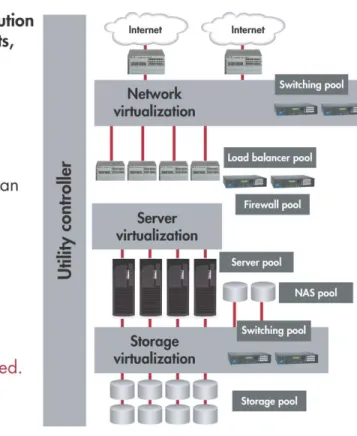
HP is unique in offering the Utility Data Center (UDC)—a complete solution for virtualizing and provisioning the entire data center environment and providing the means to integrate many of the individual virtualization technologies described earlier.
Through the consolidation, standardization, and automation of data center resources, HP UDC enables you to wire everything once and then design, configure/reconfigure, and dynamically allocate and re-allocate resources with drag-and-drop simplicity via a centralized graphical user interface.
UDC allows resources to be simply and dynamically switched between applications to optimize data center utilization. There is no need to move resources physically. No recabling is required. You can configure and activate new IT service environments very quickly and at very low cost.
Figure 7. HP Utility Data Center (UDC)
The UDC is composed of:
• Utility fabric– a ‘wire-once’ solution to connect all data center elements
• Support for HP-UX, Linux, Microsoft Windows, and Solaris server environments (other environments via customized consulting engagements)
• Support for HP XP, EVA, and EMC storage architectures
• Support for HP ProCurve and Cisco networks
• Support for grid/OGSA—Globus Toolkit workloads
• Utility Controller Software—simple user interface allows administrators to architect new systems and activate them using available resources
HP’s unique approach to data center virtualization offers the following benefits:
• Reduced operational costs—there is less need for excess idle data center capacity to handle peak loads, so costs are reduced. Also, by removing the need to physically reconfigure data centers, the UDC reduces the costs of moving equipment, software reconfigurations, and lost resource utilization time.
16
• Support for multiple operating environments—Support for HP-UX, Linux, Windows, and Solaris means you can utilize and extend the life of your existing IT assets.
• Faster time to market—New IT services can be planned and ignited within hours, rather than the weeks it would take to specify, order, install, and configure new resources today.
• Higher levels of availability—Since IT resources are assigned or re-assigned to applications instantly, the UDC incorporates tolerance to failure and application failover in the case of a failing hardware or software component.
• Reduced opportunities for error—Since allocation and reconfiguration of data center components, resource allocation to meet service-level objectives, and high-availability functions are all automated, there is less need for human intervention and possible errors.
As a recent extension to its capabilities, UDC has been enhanced to manage grid applications written for the Globus Toolkit. The UDC adds security (firewall), load balancing, and virtualization features to the toolkit, so customers can confidently begin to consider grid-based solutions for their portfolio of commercial applications. Previously grid solutions have been confined to experimental or scientific workloads.
17
Virtualization in action
Integration of HP virtualization solutions
One of HP’s many unique contributions to the implementation of virtualization solutions is the ability to integrate many of the approaches described above to provide a coherent environment that is applicable to real-world usage patterns.
Example one: virtual server environment in action—automatic SAP resource adjustment upon failover
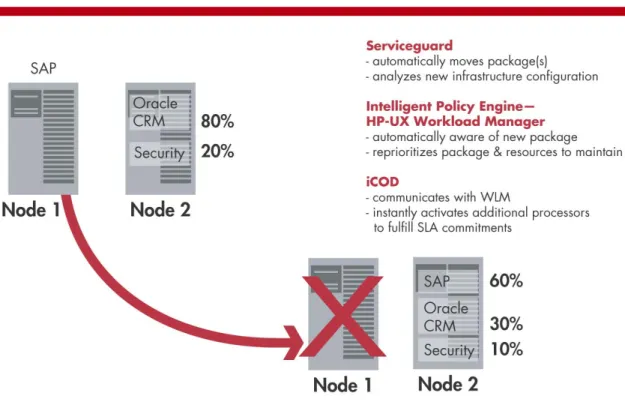
Figure 8 shows how the HP Intelligent Policy Engine orchestrates the virtualized computing resources, along with advanced high availability and Instant Capacity on Demand.
Figure 8. HP Virtual Server Environment for HP-UX
The key element in this example is how HP’s solutions work together to provide a seamless virtualization solution: 1. We show an environment composed of two HP Superdome database servers. Each is configured appropriately
to support SAP, Oracle CRM, and a security solution. The cluster is protected by HP Serviceguard high-availability software.
2. The administrator removes node one for preventive maintenance.
3. Serviceguard moves the SAP “package” to node two without user intervention.
4. HP’s intelligent policy engine (WLM) reconfigures the node to support all three applications in order to meet the appropriate service levels.
5. WLM instantly activates and provisions iCOD CPUs on the second server to meet the resource requirements. The result is automated, continuous, high-performance operations with no operator intervention and no impact on the user community. Resources are automatically optimized for performance and accessibility by intelligent software and the customer continues to pay only for resources that are actually used.
Example two: HP partitioning in action—production and test environment on the same server
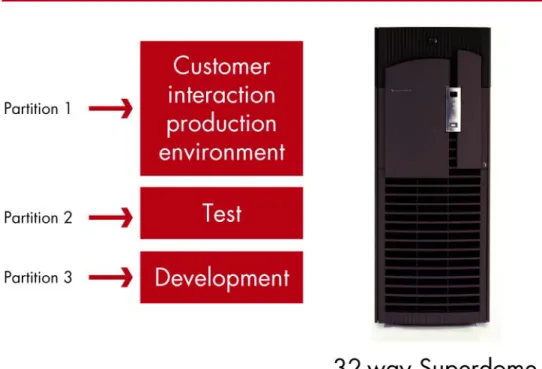
A customer requires a separate production system from test and development. The key virtualization solution is partitioning.
18
For many customers, the key is the performance and the availability of the production system to end users. For critical applications (e.g., an online reservation system), this availability can directly impact a company’s revenue. At the same time, organizations must continue to develop and test new versions of software or applications to stay competitive. In the test and development process, it is not uncommon for programming errors to slow down the performance of other applications on the system or even bring down the operating environment. In addition, a new version of an application may require either changes to the operating system parameters or new versions or revisions of the operating system. As a developer or tester, the user wants to be able to change configurations, debug applications, and even reboot the system easily. As a business, production has to remain available. Therefore, the production environment has to be isolated from any potential impacts from test and development. This avoids any errors in test or development from impacting the end user.
In order to achieve separation between the development and production environments, this customer decided to adopt a virtualization solution that enabled vertical scaling by installing Superdome with hard partitions, removing the need for multiple systems.
The production partition has been allocated the majority of the resources (CPU, memory, I/O) to optimize response time for the application. Each of the three partitions supports its own operating system, applications, peripherals, and networks. As a result, production and test can change parameters in the operating systems or roll-in new versions or revisions of the operating system to develop and test applications without impacting the production environment. Testing tools and rapid development applications are only used in their partitions. In addition, production is completely protected against any potential performance degradation or outages based on problems, configuration changes, or reboots within the test and development environments.
19
The key with hard partitions is that the customer has the equivalent of multiple systems within a box. The equivalent of three systems (production, test, and development) can be set up within a single environment. Production has the isolation that it needs to maintain its high availability. Test and development have the flexibility to make changes to the operating environment and develop and debug without the worries of impacting other users within the company. IT benefits from the lower cost and manageability requirements for one system instead of three.
Example three: Storage virtualization in action—optimizing storage cost structure
In most businesses we find that enterprise-wide databases are almost always stored on expensive high-end storage. High-end arrays offer optional replication functionality, which is used to provide copies of the data for many purposes, such as data mining, backup, and development. Usually these copies reside on the same frame as the primary database. There are, however, additional static copies of the data that are not used for mission-critical purposes. HP has found that most businesses manage between 6 and 8 database copies.
Using high-end arrays for all these copies means that a typical business can spend $1.2M for 10 TB of storage for just 4 copies at current storage prices of $0.12 cents per MB.
Storage virtualization allows customers to keep the primary database on the more feature-rich, expensive, high-end array and create the copies on less costly midrange storage, which means that costs can be reduced to almost half the original implementation.
An additional benefit is that storage space is freed up in the high-end array, which can be used to accommodate data growth, add in new applications, and so forth.
Production data
and copies Price per MB for primary array-based storage
Total cost for non-virtualized storage
Copies in virtualized array with NAS and snapshot technology
Price per MB for network-attached storage
Total cost of virtualized storage
Primary
database—2 TB $0.12 / MB $240,000 Primary database—2 TB $0.12 $240,000
Development
database—2 TB $0.12 / MB $240,000 Development database and primary copy—2 TB $0.04 $80,000
Data-mining
database—2 TB $0.12 / MB $240,000 Data-mining database—0.2 TB $0.03 $60,000
Data processing
database—2 TB $0.12 / MB $240,000 Data processing database—0.2 TB $0.05 $100,000
Backup
database—2 TB $0.12 / MB $240,000 Backup database—0.2 TB $0.04 $80,000
Total storage—10 TB $1,200,000 Total storage—4.6 TB $660,000
Space-efficient data snapshot technology can further increase the efficiency of storage utilized. The original data capacity was calculated at 10 TB, based on each copy being 2 TB. Space-efficient snapshots only require additional physical storage space to accommodate pointers and changed data, which is usually about 10% of the capacity required for a full copy. Space-efficient snapshots can still provide the integrity and functionality of a full copy but with a significant additional cost saving.
20
Example four: Utility Data Center in action—creating a service on-the-fly
In this example, we show the elegance and simplicity of the Utility Data Center.
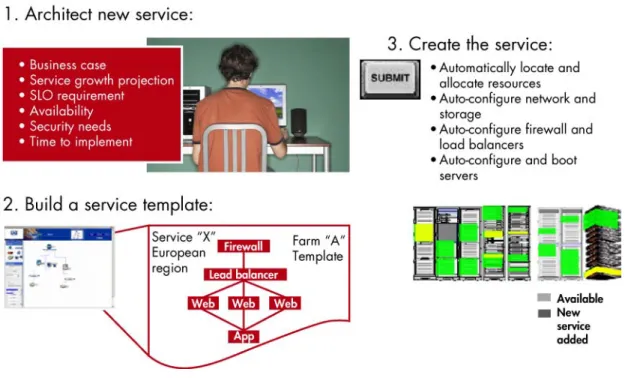
Figure 10. Creating a service with the Utility Data Center
Instead of taking weeks or months to build or reconfigure your infrastructure to support a new IT service, the UDC allows IT administrators to build and activate new configurations within minutes—all enabled by virtual server, storage, and network pools.
1. The new service is defined and configured in terms of its business characteristics and priorities. 2. The administrator builds a service template with the aid of HP utility controller software.
3. The UDC automatically locates and provisions resources, auto-configures network and storage, auto-configures firewalls and load balancers, and auto-configures and boots servers.
21
HP virtualization roadmap
HP is committed to virtualization as a means of reducing the costs of your computing infrastructure, helping to optimize the use of existing assets and adding tremendous flexibility to meet the needs of your changing business. To enhance its server virtualization solutions, HP plans to introduce a number of new solutions and enhancements. More efficient management for server virtualization environments: The next-generation system-level management tool will provide a common management architecture and application for Windows, Linux, and HP-UX
environments by unifying industry-leading technologies from Insight Manager, Toptools, and Servicecontrol Manager. It will enable HP to deliver tools that provide a consistent approach to server management independent of the operating system running on the managed servers or on the management server.
In addition, there are plans to enhance the functionality of the policy engine of the HP Virtual Server Environment—HP-UX Workload Manager—with the following new functions:
• Improved tracking of actual application resource usage for performance capacity planning and charge back capabilities
• Improved integration with high availability to guarantee that the resources required to meet service-level objectives are available to the application in case of failover with minimum overhead
• A new advisory mode to advise on necessary resource allocation changes to meet service-level objectives HP will extend the Virtual Server Environment beyond HP-UX to include Windows and Linux as well. The multisystem policy engine—HP Global Workload Manager—will adjust and manage workloads across multiple systems and multiple operating environments.
HP storage virtualization allows customers to adapt and scale their storage infrastructure—adding and allocating resources as required—while protecting existing IT investments. HP plans to extend network-based virtualization by integrating HP VersaStor technology into both the CASA platform and an intelligent Fibre Channel switch.
Customers can add CASA today to their SANs to provide replication and data migration services. Later this year, they will be able to increase both the scalability and performance of their environment by implementing into their existing fabrics an HP solution consisting of VersaStor-enhanced CASA with HP VersaStor-enabled switches. The solution will be managed today and in the future through HP OpenView Storage Area Manager software. HP will also continue to advance the virtualization capabilities found throughout our storage subsystems. In addition, the automated provisioning capabilities available today in OpenView Storage Provisioner will be extended to additional storage systems and augmented by lifecycle data management capabilities.
ENSAextended will deliver additional products and virtualization capabilities over the next several years. A key capability is the deployment of a SAN-wide implementation of HP VersaStor technology. Both storage-based and SAN-wide virtualization implementations will be used advantageously by advanced storage provisioning and LCDM (Lifecycle Data Management) applications.
In the area of data center virtualization HP plans to add functions to improve and automate the provisioning of server, storage, and network resources. Improved support for the range of HP high-availability and disaster-tolerance solutions will also be included, and there will be extensions to the number and type of HP and non-HP resources (servers, storage, networking devices) supported by the Utility Controller Software.
22
Conclusion
HP’s vision for the adaptive enterprise is one in which IT service levels match the flow of real-time business activities where low-cost, dependable, reliable, and scalable services are available and dynamically tapped, whenever needed—during peak times, lulls, and anywhere in between. HP’s strategy is to provide customers with the means to build and implement such an adaptive enterprise, one with IT services that can react on-the-fly to rapidly changing internal and external business circumstances. Virtualization solutions are an important means of achieving an adaptive enterprise, and HP’s offerings lead the market in meeting these needs today.
Resource virtualization is the abstraction or virtualization of server, storage, and network resources in order to make them available dynamically for sharing by IT services—both inside and outside your organization. The HP portfolio of virtualization solutions offers powerful and highly functional capabilities for a strategic approach to virtualization:
• Server virtualization for horizontally and vertically scaled server environments
• Network virtualization, enabled by intelligent routers, switches, and other networking elements supporting virtual LANs
• Storage virtualization (array-, network-, and server-based)
• Application virtualization which enables programs and services to be executed on multiple systems simultaneously
• Data center virtualization, which offers a higher-level abstraction, whereby groups of servers, storage, and network resources can be provisioned or re-allocated on-the-fly to meet the needs of a new IT service, or to handle dynamically changing workloads; HP offers a unique solution for data center virtualization—the HP Utility Data Center (UDC)
Customers are beginning to deploy virtualization solutions today, and industry analysts are supportive of HP solutions:
“Of the three major hardware companies,“ Ferengul believes, ”HP has taken the technical lead with its Utility Data Center vision..., “ Corey Ferengul, InfoWorld, October 7, 2002.”
“HP has a hard product... whereas IBM has just got a blueprint,” said Will Cappelli of Giga Group in Vnunet.com, November 21, 2002.
“This marriage of grid computing and HP’s Utility Data Center is a result of HP’s extensive research, which, according to a recent report from Gartner, gives HP up to an 18-month lead in the policy-based computing space.” M2Presswire, April 2002.
The power of HP’s strategy lies in the integration of virtualization solutions, controlled by automated intelligent management software, to present a coherent yet flexible utility computing environment. The HP Virtual Server Environment (VSE) is a good example of this integration in action, and HP storage virtualization solutions further extend the integration to include the management of critical business data. In such a continuum of solutions, the HP Utility Data Center, with its supporting server, storage, network, and application virtualization, can be seen as today’s ultimate step in building a completely virtualized infrastructure.
For more information
www.hp.com/go/virtualization
HP Partitioning Continuum, HP, 2002
HP ENSAextended technical overview, HP, 2003 HP Utility Data Center Overview, HP, 2002
23
© Copyright 2003 Hewlett-Packard Development Company, L.P.The information contained herein is subject to change without notice and is provided “as is” without warranty of any kind.The warranties for HPproducts and servicesare set forth in the express warranty statements accompanying such productsand services. Nothing herein should be construed as constituting an additional warranty. HP shall not be liable for technical or editorial errors or omissions contained herein.
Itanium is a trademark or registered trademark of Intel Corporation in the U.S. and other countries and is used under license. Microsoft and Windows are U.S. registered trademarks of Microsoft Corporation. Oracle is a registered U.S. trademark of Oracle Corporation, Redwood City, California. UNIX is a registered trademark of The Open Group.