Model-based Concerns Mashups for Mobile Hypermedia
*
Cecilia Challiol
1,2Calle 50 y 115, La Plata, Buenos Aires, Argentina.
+54 221 422-8252
[email protected]
Andrés Fortier
1,2,3Calle 50 y 115, La Plata, Buenos Aires, Argentina.
+54 221 422-8252
[email protected]
Gustavo Rossi
1,2Calle 50 y 115, La Plata, Buenos Aires, Argentina.
+54 221 422-8252
[email protected]
Silvia E. Gordillo
1,4Calle 50 y 115, La Plata, Buenos Aires, Argentina.
+54 221 422-8252
[email protected]
ABSTRACT
Mobile (or Physical) Hypermedia combines the navigational style typical of Web applications with the functionality of location and context-aware software. Users explore digital and physical relationships while accessing to information about their actual location, e.g. the object in front of them. Similar to “conventional” Web applications one might suffer usability problems when dealing with multiple informational concerns, but the situation gets worse because of screen size issues, the need to avoid user distraction, etc. In this paper we outline our model-based approach for building mobile hypermedia applications by combining (“mashing up”) information corresponding to multiple concerns in a modular, usable way. Architectural issues are discussed and a simple example is presented together with its implementation.
Categories and Subject Descriptors
D.2.11 [Software Architectures]: Domain-specific architectures.
General Terms
Design
Keywords
Architectures, Mobile Hypermedia, Context-Aware Applications, Mobile Computing.
1.
INTRODUCTION
Physical Hypermedia (PH) [16] introduces the well-known and intuitive navigation-by-links style of Web software into mobile and ubiquitous systems. In a PH application, the mobile user access to information items both physically and digitally. When facing an application-aware real-world object or place, information about that object is presented in the user’s device; this information may also encompass services corresponding to the actual place and links to other related objects (digital and physical). Both types of links connect corresponding nodes in the same way that a hypermedia network does. However two important differences can be noted:
• Some hypermedia nodes are “activated” by the user’s presence. When the user stands in front of a recognized physical object, the digital information about it is displayed.
• Navigating to a physical node is not an atomic operation. Different from the Web, where traversing a link implies opening the target node, a physical link implies traversing a physical area to reach the target. This creates new scenarios, where the user for example may not reach the target because he got lost or changed his mind while walking.
As an example, consider a user visiting a city with the aid of a digital tour guide: when he stands in front of a point of interest (e.g. the Cathedral) the page on his web browser is updated to show information related to it. This means that a digital navigation has been automatically performed by standing in front of a physical object that is known by the application1. While
standing in front of the Cathedral, the user can navigate through a digital information space as in a “standard” hypermedia application. Besides, a PH application may also display anchors for physical links; when the user clicks on the anchor, he expresses his intention to walk to the link target, which is also a physical object. As a result he may get a map showing his current location, the target’s location and a path connecting both places.
1 This can be achieved in many ways by using different sensing
devices (e.g. GPS, Bluetooth Beacons, WiFi access points, etc). However, describing these techniques is out the scope of this paper.
Permission to make digital or hard copies of all or part of this work for personal or classroom use is granted without fee provided that copies are not made or distributed for profit or commercial advantage and that copies bear this notice and the full citation on the first page. To copy otherwise, or republish, to post on servers or to redistribute to lists, requires prior specific permission and/or a fee.
MoMM 2008, November 24–26, 2008, Linz, Austria. (c) 2008 ACM 978-1-60558-269-6/08/0011 $5.00.
1 LIFIA. Facultad de Informática, UNLP, Argentina. 2 CONICET, Argentina.
3 DSIC. Universidad Politécnica de Valencia, Valencia, España. 4 CICPBA, Argentina.
* This paper has been partially supported by the SeCyT under the project PICT-2005, Nro 32536.
In Figure 1 we illustrate this example. In the upper part of the web page we show digital information and in the lower sector the “spatial” information. Figure 1.a shows the information exhibited when the user is standing in front of the Cathedral. In Figure 1.b the user navigates digitally, while still standing in the same place (notice that the spatial information did not change). Finally in Figure 1.c the user decides to walk to Dardo Rocha Museum, which makes the system react by showing a map.
Figure 1. A PH application in action.
The concept of PH was initially defined in [16], and extended in [18]. In [14] we presented a modelling approach for designing PH applications; in [7] we outlined an implementation using a standard Web architecture. In [5] we show how to map PH concepts onto a context-aware architecture and in [6] we discussed the impact of mobility on browsing semantics. Finally, in [4] and following the guidelines given by [19] and [27] we showed how to assign different roles to real-world objects to enrich their behaviours according to the actual user’s needs. In this paper we address the problem of dealing with multiple application concerns in PH. While the software engineering community promotes a clear separation of application concerns from requirements to design and programming to achieve modularity, the impact of separation of concerns in application usability has not been researched so far. In [22] an approach for enriching the navigation experience according to the actual concern has been described. In this paper we show that by clearly identifying and separating application concerns, we can improve the mobile user experience by partitioning the information and services space according to those concerns.
The concrete contributions of the paper are: a modelling and design approach for separating concerns in PH applications during design (and eventually weaving them during application usage), an extensible and scalable support architecture for PH and, as part of the proof of concept, a possible look and feel for PH applications built as concerns mashups.
The structure of the paper is as follows: In Section 2 we briefly enumerate the requirements posed by PH applications which deal with multiple concerns. In Section 3 we outline our approach discussing modelling and architectural issues; a simple example is included at the end of Section 3 as a proof of concept. Section 4 analyzes some related work and in Section 5 we conclude and present our further work in the subject.
2.
DEALING WITH MULTIPLE
CONCERNS IN MOBILE HYPERMEDIA
According to [26] a concern is a “matter of consideration in a software system”. Concerns may be functional or non-functional; functional concerns might encompass sets of coherent requirements referring to the same “theme”, such as guidance in a mobile system, topic areas such as architecture or history in the example of Figure 1, etc. Concerns may be fully defined by developers (e.g. E-government services), or might be defined in an abstract way (e.g. tagging), leaving the definition of concrete concerns to users (e.g. specific tags, as in Flickr). In this paper we are interested in those concerns which are relevant in the navigational structure of the application, i.e. in the exhibited contents, links and services: we call them navigational concerns. For the sake of understanding, we ignore those concerns (e.g. persistence, security, etc.) that do not affect navigation.
Even simple applications, like the one in Figure 1, comprise many different and sometimes unrelated concerns. Some of these concerns are specific of the application and others are typical in all mobile hypermedia software, such as map management, user guidance and assistance, etc. While in the “old” Web it might be possible to combine different concerns in a single page (e.g. in Amazon.com one can find information and operations related to many different concerns in the same product page), the screen size of mobile devices prevents us for doing that, and claims for a strategy to modularize concerns, not only for extensibility and maintenance but also for usability.
As a concrete case of study, consider the example presented in Figure 1: suppose that we can show historical, architectural and religious information about the Cathedral, each one with its own links. How do we manage these three different concerns together with the omnipresent physical concern? Should we mashup information and links from the three concerns onto a single hypermedia? Additionally, how do we combine this information space with the spatial information and links? One possible solution for our example would be to adapt the hypermedia contents and links to the user profile or preferences, like in ubiquitous [20] or context-aware [3] Web software. This strategy might work well when we can determine that some concerns (e.g. the religious one) are not relevant in a particular context (e.g. while analyzing the architecture of a Cathedral) or for some particular user (e.g. an agnostic one); however in the general case we are still faced to the problem of dealing with more than one concern at the same time.
Managing different concerns increases the complexity of the application, since each concern may evolve in an independent fashion. In our previous example, the physical concern not only encompasses managing geometric models, path finding techniques and interaction with third party APIs (e.g. google maps), but also hardware problems related to sensing location and tagging
physical objects. On the other hand, modelling a tourist information system focuses on other issues (such as providing timely information of events, suggesting interesting places, etc), which are orthogonal to those in the physical concern. Thus, to successfully build this kind of applications we need a modelling and architectural approach that allows each concern to evolve independently, while letting the application establish the relations among them and present them in a uniform way.
The key in our approach is to identify and separate the concerns at the application model level. From this model, we derive a navigation model in which information corresponding to different concerns is allocated in separated parts of hypermedia nodes, each one of them holding both attributes and links pertaining to the corresponding concern. From this navigational model we can derive different GUI according to the user’s device, the application’s needs, etc.
3.
AN OUTLINE OF OUR APPROACH
The basis of our approach consists in identifying and separating navigational concerns early in requirements e.g. by using separated User Interaction Diagrams (UIDs), a variant of Use Cases for defining interaction sequences [17], and use the information collected during the OOHDM conceptual modelling stage [25] to build a navigational model in which concerns are clearly decoupled. Two of these concerns are treated especially, the “core” concern (in our example the Tourist one), that contains elements which hold in every other concern (basic attributes, services, etc), and the physical concern as it holds relationships, functionality and services which are in the basis of every mobile application.
Information collected from the conceptual and navigational models is then mapped onto a software architecture which provides computational support for executing context (particularly location)-aware services. A Web-compliant interface can then be built by making the browser aware of physical actions, such as the user movement through real-world objects. In our proof of concept, we show how we profit from a clear separation of concerns, by further separating spatial information (like maps for guidance and physical links) from the rest of, say, informational concerns. However, concern information can be mashed up in different ways according to the specific application’s needs. As an example consider the core concern to be a university information system. In this scenario, timetable information can be mixed with the physical concern to provide a map showing the rooms the student will have to visit during the day, helping newcomers to organize themselves. On the other hand, the list of the students registered in a course can be mashed up with social networks (like Flickr or del.icio.us) to look for similar interests. In the following sub-sections we detail each stage of our approach.
3.1
Modelling Issues
Our approach is a light extension to the OOHDM modelling armoury; instead of building a unique conceptual model, we create a new conceptual model for each relevant navigational concern C, with two distinguished ones: the core and the physical. For the sake of conciseness we avoid explaining requirement specification issues which have been partially discussed in [13, 22]; we also disregard in this explanation non-navigational concerns (such as security or persistence) as their mapping to
running applications has been widely described in the aspect-oriented software literature [11].
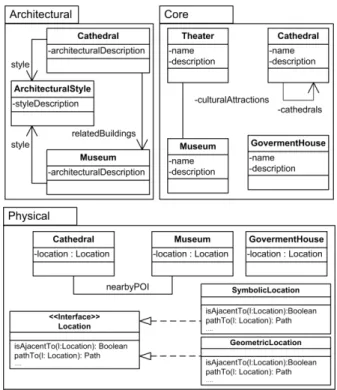
In Figure 2 we show a conceptual model of the tourist application in which we have identified the following concerns: Core (Tourist), Physical and Architectural. In each concern we represent those attributes, relationships and behaviours which make sense in that context. For example, the relationship among Cathedral and Museum in the physical concern indicates that there is a geographical relationship (e.g. being near) which is meaningful in that concern.
Figure 2. Conceptual model of the tourist application with different concerns.
As it is evident in the example, a class A in the core concern might also appear in other concern(s) Ci, representing the specific view
of A in Ci, comprising concern-specific attributes, behaviour and
relationships. Meanwhile, some classes will only make sense in a particular concern, for example those used to manage locations (such as the Location interface and the classes implementing that interface). For example, those objects that will be explored physically by the user must be specified in the physical concern. Additionally, in the physical concern we represent those roles which physical objects play for helping or guiding the user when necessary (not specified in Figure 2 for the sake of simplicity). By weaving the concerns using role objects [1] we are able to derive a unique conceptual model (see Figure 3). To do so the main concern is taken as the “base” conceptual model and extended with the abstractions in the other models. Each class A belonging to a concern Ci is mapped onto a role of the corresponding core
class A’ when it exists, or as independent class if it does not. In Figure 3 we show the conceptual model once roles have been applied (each role is tagged with the concern it originally belongs to). Notice that no new relations have been added or removed with respect to the ones shown in Figure 2.
Figure 3. A unique conceptual model.
3.2
Navigational Specification
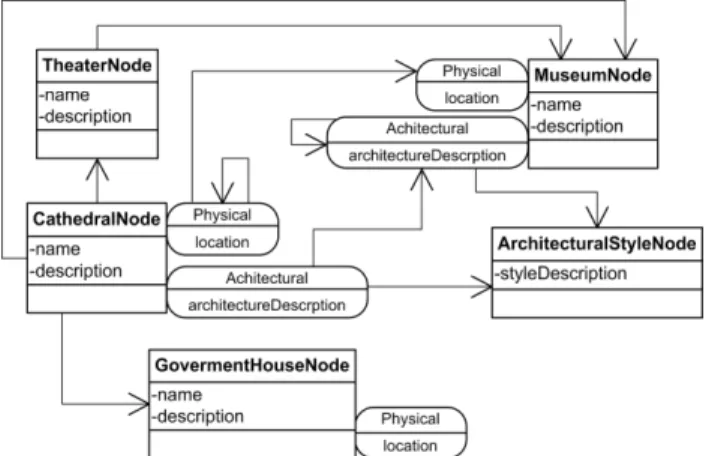
As in OOHDM and other related approaches, during navigational design we specify the structure of nodes and define corresponding links. The contents (nodes’ attributes) are defined by a viewing mechanism from conceptual classes attributes. In our approach, nodes also comprise a core and concern related parts. The core will contain attributes which we want to exhibit regardless the actual concern, and each concern part comprises both attributes and links which are meaningful only when the node is reached in the corresponding concern. The basis for building a navigation model is clearly the conceptual model depicted in Figure 3. However, at this stage the designer can choose to add new navigational links (with respect to the existing relationships among classes and roles) or to exclude a certain relation as a navigational link. Figure 4 shows a representation of the tourist guide example, with concerns represented as roles (using the notation defined in [23]). Links from the Cathedral to the Theatre, the Museum and the Government House were explicitly added by the application designer. On the other hand, the bidirectional relationship (culturalAttractions) between the Theatre and the Museum was converted into a one way link. Notice that other relationships present in the conceptual model have not been included as navigational links and that new navigational links have been added, even though there is no corresponding relationship in the conceptual model. Also, notice that concern-related links use the roles as source and target. Figure 5 shows a detailed view of the Cathedral node instance with its roles.
Figure 4. Navigational model.
Figure 5. Detailed view of the Cathedral node.
In our approach we identify two kinds of links: digital links, which are derived from relationships in the conceptual model and whose navigational semantics are similar to conventional Web links. These links may be defined either in the core part of a node or in one of its concerns. On the other hand, physical links are intended to be walked by the user and should be defined among physical node concerns. The existence of a physical link implies that both the source and the target are physical objects and these objects are “recognized” by the system (i.e. the user can be sensed to be in front of them). Physical links can be defined explicitly or implicitly. Explicit links are specified in the navigation model and derived from conceptual relationships between conceptual objects which possess a physical concern; these relationships might hold between any of the object’s concerns (including the core) and the corresponding physical link represents their counterpart in navigation (in this case walking navigation). On the other hand, implicit links are computed dynamically and derived from the current navigation context. As an example, suppose that the user is navigating in the Physical concern, where the Cathedral has no relationship with the Government House. However the main concern (i.e. the tourist concern) does have a link between the Cathedral and the Government House, thus we can derive a new physical link based on the information of other concerns. In the most general case, if a user is navigating in a digital concern Ck,
the physical concern can be enriched to show implicit physical links from Ck. Since this derivation process is domain and even
application dependent, it is modelled as a function which can be configured by the developer. Thus, the implicit physical links for a node M are represented by a function fM(Core, C, Nc), where
Core is the core application model, C is the concern that the user is currently navigating and Nc is the current node in the navigation
of the C concern.
As a result of having this function, implicit physical links can be derived in many ways. In order to show different example functions let’s assume that Nc is the current node in the digital
navigation of the concern C and that Lc1...Lck are the digital links
whose source is Nc and whose targets are Nc1...Nck (notice that
some Nci may have an associated physical concern while others
not). In this scenario, the simplest case for this function is to return all physical links derived from Lc1...Lck, where Nci has a
physical representation. However, based on the transport medium of the user, we may apply a distance restriction (for example, those nodes that are at least 5km away from Nc). Another possible
variation would be to show only those nodes that match the user’s preferences.
3.3
Navigational Semantics
As we previously stated, PH applications use two different kinds of links: physical and digital. On top of that, the user must be able
to navigate according to his actual concern of interest (e.g. tourist, architecture, history, e-government) in a homogeneous fashion. For example at the GUI level, when a user is browsing a specific node, a list of all those concerns where that node has a counterpart may be shown. As a result the user can switch between different points of view of the same (physical or digital) node without loosing context. At the more conceptual level, this means that the user is “jumping” between different information domains, having a different perception of the same underlying model (i.e. the core model). As we will show, the implementation of this feature is pretty straightforward, since for each object in the core model we can determine the roles it can play and thus the concerns where it has a counterpart. With this scenario the user can be physically standing in front of one object (the “physical” concern) while digitally navigating other concern (e.g. the Architectural one). Notice that we can find the case where the user ends up in a digital node that has no relationship with the core model or that may not have a physical counterpart. Since digital and physical navigation are treated in an independent way this is not a problem in our model as shown in the example.
3.4
Architectural Aspects
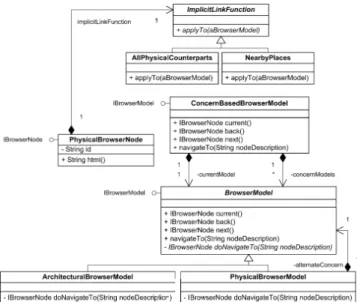
To support the previously described functionality we have combined two of our previous achievements in context-aware architecture. On one hand we see the Web browser as a view, in the MVC [21] sense. This means that we use a Web browser as a platform-independent renderer of the html derived from an underlying model. The controller role of the MVC is decoupled from the web browser by redirecting actions (e.g. user clicks on anchors, service activation, etc.) to the MVC model. Finally, the navigational model is represented by the IBrowserModel interface. This interface defines a simple protocol that any object that wants to be displayed in a Web browser has to implement. Also, this object is in charge of defining the browsing semantics, i.e. deciding how to react to an anchor click, and how the browser’s history is managed (for example what is the meaning of the back, next and home buttons). In Figure 6 we present a simplified class diagram, of this re-interpretation of the Web browser in the spirit of the MVC paradigm (the interested reader can refer to [6] for more details on this subject).
Figure 6. Class diagram of the decoupled browser model.
Using this basic model we can derive a concrete mapping of different navigation concerns, each one with its own set of nodes and navigation semantics. Each navigation model can define its
own classes to represent nodes, as long as they comply with the IBrowserNode interface. Thus, a very straightforward mapping can be achieved from the navigational model to the actual implementation. Also, since the navigation is performed by node descriptions (see the navigateTo message in Figure 6), each navigation model can decide how to encode a reference to its own nodes (notice that in the standard Web case a node description is just its url).
In order to deal with many different navigation models simultaneously we define a main browser model that encompasses all the others and keeps track of the browser model that is currently being displayed. All requests arriving to this browser model are redirected to the current one (see Figure 7). Also, notice that the PhysicalBrowserModel class has a reference to a second browser model. This reference is used to get the current node of that model and use it to calculate the function that returns the implicit physical links. In the most general case, each node may define its own function to calculate its implicit links. For this reason the functions are decoupled from the nodes using the Strategy pattern [12].
Figure 7. A browser model with multiple concerns.
The next step to support PH functionality is to manage the context-dependent behaviour. For this purpose we use some architectural abstractions that we developed previously [5, 24]; the most important principle is that any application object can be “extended” to manage its context, by defining an aware abject. An aware object acts like a dynamic wrapper, enhancing the application model object (its target) with the facilities to manipulate its context. Unless explicitly stated, all the “original” messages of the target are forwarded to it.
In our approach the context is not treated as a whole entity, but it is separated in a collection of context features, each one representing a particular aspect of the context we want to manage. In our application example, the user object is extended with an aware object to keep track of his location. To do so, a new context feature (the location feature) is created and added to the aware object, so that each time the user’s location changes an event will be triggered (for the sake of conciseness, we do not discuss
sensing-related aspects of context-aware applications in this paper. The interested reader can consult [15] for our approach to context sensing).
In Figure 8 we show an instance diagram of a typical situation in the PH application. The user (an aware object) is currently standing in front of the Dardo Rocha Museum (the location feature is the only context information we use for the example). The user is currently navigating the Architectural concern (see the currentModel relationship in the concern-based browser model) and has navigated to the Cathedral node. When the user moves, his location feature triggers an event, which results in the navigation model being updated as previously described.
Figure 8. An instance diagram depicting the application state.
The context-dependent behaviour is materialized in the PH environment, which is configured to receive the change events of the user’s location feature. These events will be captured by a handler, which maps the user’s location to a physical object. In case it succeeds (and if the physical object is not the current node in the physical browser model), the handler reacts by finding the corresponding core object (CoreCurrent) and performing the
following changes:
• If the current browser model is the physical one, it is switched to the core model and the current node is updated to show the core information about CoreCurrent.
• If the user is navigating in a digital concern (e.g. the Architectural) a role corresponding to CoreCurrent in that
concern is searched. If it is found, the current node is updated. In case it is not, the current model is switched to the core model and its current node is set to CoreCurrent
As a result, by following good software engineering practices (such as clear separation of concerns) we are able to build different layers and combine them to give the user a better final application. In particular we are able to create different application concerns, deriving navigation models for each of them, even with their own navigational semantics. On top of that we can improve the user experience by adapting the content displayed in the browser based on the user’s context.
3.5
An Example
To show a practical application of our approach, we elaborate our previous example. The core of the application (the tourist domain) is enhanced with two concerns:
• Physical, in which we allocate functionality for locating objects and providing services like finding paths between two locations.
• Architectural, which contains information about the architectural style of buildings, urban planning or building plans. Other concerns such as History or E-government which crosscut several classes can be easily added by just defining corresponding diagrams and architectural mappings. The Web interface should be designed to weave these concerns in a way that results intuitive to the user. We next show a set of screenshots of an experimental prototype for the proposed system (see Figures 9 and 10). There are two GUI layouts, one text-based and the other map-based. The physical concern is displayed using the map view including the physical links, while the other concerns (e.g. the tourist one) is displayed using the text-based view, including information and links. In Figure 9 the user is standing in front of the Cathedral and has chosen the Tourist view, which results in a description of the Cathedral from a tourist point of view and a set of links of places that are related to the Cathedral in the tourist navigational model.
Figure 9. Tourist view of the Cathedral.
When the user selects the button at the bottom right side, he can see a map with his actual location and two options (Planned routes and Suggestions). The Planned routes display the links which are specified in the navigational model of the physical concern (marked with balloons in the map). Suggestions displays dynamically generated links which are derived from the view that the user has chosen (marked with a star in the map). The function used in this GUI is to list the targets of those links when the user selects the option Suggestion that have a physical concern and that are not already shown as planned routes. In Figure 9, the Tourist view provides three links: Government House, Dardo Rocha Museum and Argentino Theatre. Argentino Theatre does not have a physical representation, thus it can not be located in the map nor added as a suggested physical link. The Dardo Rocha Museum has a physical representation, but since it is already part of the navigation model for the physical concern it is not repeated in the Suggestions option. Finally the Government House has a physical representation and is not part of the physical navigational
model. Thus, the system creates this physical link on the fly and adds it to the suggested paths.
In Figure 10.a and 10.b the user is still standing in front of the Cathedral, but has switched to the architectural concern. When switching to the physical concern the Suggestion option is updated. The star marking the Government House has been removed from the map and has been added a new star marking the Natural Science Museum (which has a physical representation and is not part of the physical navigational model). Neo Gothic Style clearly does not have a physical representation and thus has not been included in the suggestion options. In Figure 10.c and 10.d the user has selected the digital link to the Natural Science Museum. The browser displays information about the Natural Science Museum from an architectural point of view and a link to the Art Museum. The Art Museum has a physical representation and is not part of the physical navigational model. Thus, the system creates this physical link on the fly and adds it to the suggested paths (see the new star in Figure 10.d).
Figure 10. Architectural view of the Cathedral and the Natural Science Museum.
4.
RELATED WORK
In [3] the authors present a conceptual framework to generate context-triggered adaptation actions and a model-driven approach to create Web applications. This approach is based on WebML which enables the automatic generation of adaptive applications by means of a CASE tool. Our work is similar as it supports building mobile and context-aware hypermedia software; it supports also a clear separation of applicative concerns (besides the typical conceptual, navigational and presentation). In contrast we still do not have a full model-driven transformational approach to derive the final application.
In [9] the authors present “mashup personalization”, which consists on applying mashup techniques to combine context information with an existing web application, to enhance the original application. The authors present a tool called MARGMASH to provide this mechanism which collaborates with Yahoo’s pipes to perform the actual mashup. In [8] the authors present a component-based approach to build adaptive web applications. In particular the authors focus on adapting to context by using client-side context information (both from local and remote sensors) and context data found in the server. Each UI component is defined by an XML file (the UISDL descriptor), stating the properties of the component and the events it can trigger. The authors propose an event-based communication between components, managing their connection through listeners, which are configured in another XML document (the XPIL file). It is worth noting that the page processing is done in the client side, by parsing the XPIL file and instantiating the required components. Also in the mashup area, similar to our example application, the authors of [2] present a mashup platform called Telar. The authors implement the mashup client using the Google Web Toolkit, by retrieving the points of interest from the map and looking for them in their mashup up services. To manage different sources of information the mashup server wraps each data provider so that they all conform to the same protocol. Both works share with ours the idea of combining multiple sources of information and services to give the user a better experience. However, these approaches focus on architectural support for connecting already existing components; our project, is more focused on a design approach for conceiving new applications, even though some “legacy” or external ones might be also used. Additionally we stress in this paper the need to clearly separate information and services pertaining to different application concerns to improve usability. Finally, it should be noticed that a full comparison of the complexity of our approach in contrast with other developments is outside the scope of the paper. We plan to make such a comparison in a future publication.
5.
CONCLUSIONS AND FURTHER WORK
In this paper, we have shown how to build physical hypermedia applications by combining multiple concerns, including the physical concern which represents real-world objects explored by the user. Our approach is based on clearly identifying each concern at design time, so that they can be engineered in an independent way, allowing them to evolve without impacting on the other concerns. Also, in every application we identify a core concern, which provides the main functionality of the application. Our approach also follows well known Web engineering practices, emphasizing a clear separation of application, navigation and view models. In the navigation model, links are derived from the relationships found in the application model, to establish connections between nodes. In the case of the physical concern we define two kinds of links: the explicit ones, that are expressed as the other digital links and the implicit ones, which are derived from a function that takes into an account what other concern the user is navigating.
Finally we have shown how to improve the user’s navigation by combining the Web browser (treated as a view in the MVC sense) with multiple navigational concerns and context-dependent
behaviour. To our knowledge this is the first systematic approach that allows to deal modularly with multiple concerns, mashing them together in the context of a browser and to integrate this kind of web functionality with context-aware behaviours.
Our work in the Web browser model is based on template mechanisms, using a custom evaluation engine. Our next step is to adapt these mechanisms to Web frameworks that are not template based, such as Seaside [10]. In these frameworks the content is generated in the same programming language, giving the developer grater flexibility than using templates. Finally we still need to conduct experiences with final users, since our tests so far have been made by the same developers of the project.
6.
REFERENCES
[1] Bäumer, D., Riehle, D., Siberski, W. and Wulf, M.: The Role Object Pattern. In Proc. of Pattern Languages of Program Design (PloP), 1997.
[2] Brodt, A., Nicklas, D., Sathish, S. and Mitschang, B.: Context-aware Mashups for Mobile Devices. In Proc. of WISE 2008 LNCS (forthcoming).
[3] Ceri, S., Daniel, F., Matera, M., and Facca, F. M.: Model-driven development of context-aware Web applications. Journal of ACM Trans. Internet Technol, 2007, Vol. 7, Issue 1, Article 2.
[4] Challiol, C., Gordillo, S., Rossi, G. and Laurini, R.: Designing Pervasive Services for Physical Hypermedia Applications. In Proc. of the IEEE International Conference on Pervasive Services, 2006, pp. 265-268.
[5] Challiol, C., Fortier, A., Gordillo, S. and Rossi, G.: A Flexible Architecture for Context-Aware Physical Hypermedia. In Proc. of UWSI 2007, IEEE Computer Society, 2007, pp. 590-594.
[6] Challiol, C., Muñoz, A., Rossi, G., Gordillo, S.E., Fortier, A. and Laurini, R.: Browsing Semantics in Context-Aware Mobile Hypermedia. In Proc. of CAMS, Sprinver Verlag LNCS, 2007, pp. 211-221.
[7] Challiol C., Rossi,G., Gordillo, S.E. and De Cristófolo, V.: Systematic Development of Physical Hypermedia
Applications ( IJWIS), 2006, Vol. 2. Issue 3/4, pp. 232-246. [8] Daniel, F. and Matera, M.: Mashing Up Context-aware Web Applications: A Component-based Development Approach. In Proc. of WISE 2008 LNCS (forthcoming).
[9] Díaz, O., Pérez, S. and Paz I.: Providing Personalized Mashups Within the Context of Existing Web Applications. In Proc. of WISE 2007, pp. 493-502.
[10]Ducasse, S., Lienhard, A. and Renggli, L.: Seaside: A Flexible Environment for Building Dynamic Web
Applications. IEEE Software, 2007 Vol. 24, Issue 5, pp. 56-63.
[11]Filman, R., Elrad, T., Clarke, S. and Aksit, M.: Aspect Oriented Software Development. Addison Wesley, 2004. [12]Gamma, E., Helm, R., Johnson, R. and Vlissides, J.: Design
Patterns. Addison-Wesley Professional, 1995.
[13]Gordillo, S., Rossi, G., Araujo, J., Moreira, A., Vairetti, C. and Urbieta, M.: Modeling and Composing Navigational
Concerns in Web Applications. Requeriments and Design Issues. In Proc. of LA-Web 2006, IEEE Computer Society Press, 2006, pp. 25-31.
[14]Gordillo, S., Rossi, G. and Schwabe, D.: Separation of Structural Concerns in Physical Hypermedia Models. In Proc. of the CAiSE 2005, Springer-Verlag Berlin Heidelberg, 2005, Vol. 3520, pp. 446-459.
[15]Grigera, J., Fortier, A., Rossi, G. and Gordillo S.: A Modular Architecture for Context Sensing. In Proc. of PCAC 2007, IEEE Computer Society, 2007, pp. 147-152.
[16]Gronbaek, K., Kristensen, J. and Eriksen, M.: Physical Hypermedia: Organizing Collections of Mixed Physical and Digital Material. In Proc. of the Hypertext 2003, ACM Press, 2003, pp. 10-19.
[17]Guell, N., Schwabe, D. and Vilian, P.: Modeling Interactions and Navigation in Web Applications. In Proc. of ER’00 (Workshops), LNCS, 2000, pp. 115-127.
[18]Hansen, F., Bouvin, N., Christensen, B., Gronbaek, K., Pedersen, T. and Gagach, J.: Integrating the Web and the World: Contextual Trails on the Move. In Proc. of the Hypertext 2004, pp. 98-107.
[19]Harper, S., Goble, C. and Pettitt, S.: proximity: Walking the Link. Journal of Digital Information (JODI), British Computer Society and Oxford University Press, 2004, Vol. 5, No 1.
[20]Kappel, G., Pröll, B., Retschitzegger W. and Schwinger, W.: Modeling Ubiquitous Web Applications - The WUML Approach. In Proc. of DASWIS 2001, LNCS, Vol. 2465, pp. 183-197
[21]Krasner, G. and Pope S.: A Cookbook for Using Model-View-Controller User Interface Paradigm in Smalltalk-80. In Journal of Object Oriented Programming, 1988, pp. 26-49. [22]Nanard, J., Rossi, G., Nanard, M., Gordillo, S. and Perez, L.:
Concern-Sensitive Navigation: Improving Navigation in Web Software through Separation of Concerns. In Proc. of CAiSE 2008, LNCS, 2008, pp. 420-434.
[23]Rossi, G., Nanard, J., Nanard, M. and Koch, N.: Engineering Web Applications using Roles. Journal of Web Engineering, 2007, Vol. 6, No 1, pp. 19-48.
[24]Rossi, G., Gordillo, S.E. and Fortier, A.: Seamless Engineering of Location-Aware Services. In Proc. of OTM Workshops 2005, pp. 176-185.
[25]Schwabe, D. and Rossi, G.: An object-oriented approach to web-based application design. Theory and Practice of Object Systems (TAPOS), Special Issue on the Internet, 1998, Vol. 4, pp. 207-225.
[26]Sutton, S. and Rouvellou, I.: Modeling of Software Concerns in Cosmos. In Proc. of ACM Conf. AOSD 2002, ACM Press, 2002, pp. 127–133.
[27]Yesilada, Y., Stevens, R. and Goble, C.: A foundation for tool based mobility support for visually impaired web users. In Proc. of the Twelfth International Conference on World Wide Web, 2003, pp. 422–430.