University of New Orleans University of New Orleans
ScholarWorks@UNO
ScholarWorks@UNO
University of New Orleans Theses and
Dissertations Dissertations and Theses
12-17-2004
Wireless Intrusion Detection Sytem
Wireless Intrusion Detection Sytem
John Louis Vigo Jr. University of New Orleans
Follow this and additional works at: https://scholarworks.uno.edu/td
Recommended Citation Recommended Citation
Vigo, John Louis Jr., "Wireless Intrusion Detection Sytem" (2004). University of New Orleans Theses and Dissertations. 203.
https://scholarworks.uno.edu/td/203
This Thesis is protected by copyright and/or related rights. It has been brought to you by ScholarWorks@UNO with permission from the rights-holder(s). You are free to use this Thesis in any way that is permitted by the copyright and related rights legislation that applies to your use. For other uses you need to obtain permission from the rights-holder(s) directly, unless additional rights are indicated by a Creative Commons license in the record and/or on the work itself.
WIRELESS INTRUSION DETECTION SYSTEM
A Thesis
Submitted to the Graduate Faculty of the University of New Orleans
in partial fulfillment of the requirements for the degree of
Master of Science in
The Department of Computer Science
by
John Louis Vigo, Jr.
B.S., University of New Orleans, 1975 M.S., University of New Orleans, 1979
Table of Contents
List of Figures... iv
Abstract...v
Chapter 1: Introduction...1
Chapter 2: IEEE Standard 802.11... 3
2.1 Overview...3
2.2 Differences between wired and wireless LANs... 3
2.3 802.11 architecture...4
2.4 802.11 services...4
2.4.1 Authentication and privacy...6
2.5 Relationships between services...6
2.6 MAC Frame Format... 7
2.6.1 Frame Control Format...8
2.7 IEEE 802.11i... 9
2.8 Other... 9
Chapter 3: Security problems in wireless networks... 10
3.1 Ease of attack... 10
3.2 Objectives of security... 10
3.3 Security services in IEEE 802.11... 11
3.3.1 Weaknesses in authentication...11
3.3.2 Weaknesses in WEP...11
3.4 Types of attacks... 12
3.4.1 Network discovery...12
3.4.2 Eavesdropping...12
3.4.3 Man in the middle attack (MITM)...13
3.4.4 Denial of service attacks (DOS)...13
3.4.5 WEP key cracking... 14
3.4.6 Other... 15
3.5 Need for Security... 15
Chapter 4: Description of WIDS system...16
4.1 General description... 16
4.2 WIDS architecture...17
4.3 WIDS attack defenses... 19
4.3.1 Network discovery and eavesdropping...19
4.3.2 Man in the middle attack (MITM)...19
4.3.3 Denial of service attacks (DOS)...19
4.3.4 WEP key cracking... 19
5.1 Locating intruders...21
5.1.1 Comparison of WIDS and above experiments... 22
5.2 Intersil Prism 2/2.5 802.11b wireless cards and HostAP driver... 23
5.2.1 PRISM 2/2.5 Host-based Access Point Mode... 23
5.2.2 The PRISM MAC communications frame structure...23
5.2.3 Monitor Mode... 24
5.2.4 HostAP software... 24
Chapter 6: Software implementation of WIDS...25
6.1 WIDS Access Point/Controller Protocol...25
6.2 Intrusion Detection Rules... 26
6.3 Changes/additions to HostAP files... 27
6.3.1 Changes to HostAP files...27
6.3.2 New files added to HostAP... 29
6.4 Other Programs Used in the WIDS System...43
6.4.1 fakeap...43
6.4.2 scoop...43
6.4.3 table-4.3.0...44
6.5 WIDS Controller... 44
6.6 WIDS Simulation...48
6.6.1 Overview...48
6.6.2 WIDS simulated access point...50
6.6.3 WIDS simulated station... 50
6.6.4 WIDS simulation – other...51
Chapter 7: Tests and Tests Result...52
7.1 Test 1 08/25/04... 52
7.1.1 Description of test... 52
7.1.2 Expected results... 52
7.1.3 Results of test... 53
7.1.4 Test Results Conclusion... 55
7.1.5 Screen Shot of Test 1... 55
7.1.6 Hardware used...56
7.1.7 Test Data...56
7.1.8 Details of test results... 57
7.2 Additional comments... 63
Chapter 8: Conclusion and suggestions for future work...65
8.1 Conclusion...65
8.2 Suggestions for further work...65
8.2.1 Expand rule processing...66
8.2.2 Expand controller functions... 66
References... 67
Appendix...70
List of Figures
Figure 1: State variables and services... 7
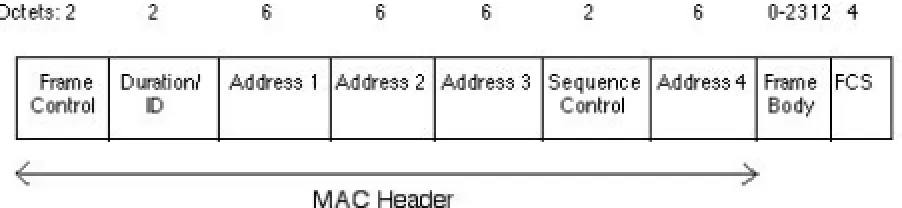
Figure 2: MAC frame format... 7
Figure 3: Frame control format...8
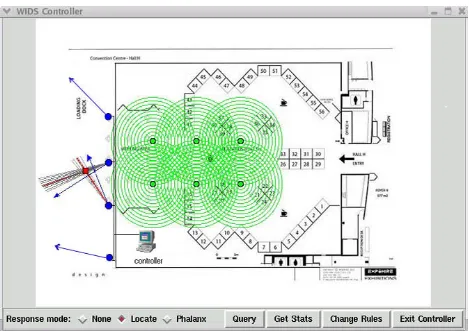
Figure 4: WIDS architecture...18
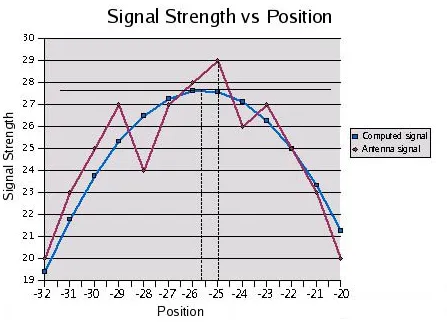
Figure 5: Signal Strength vs. Position...31
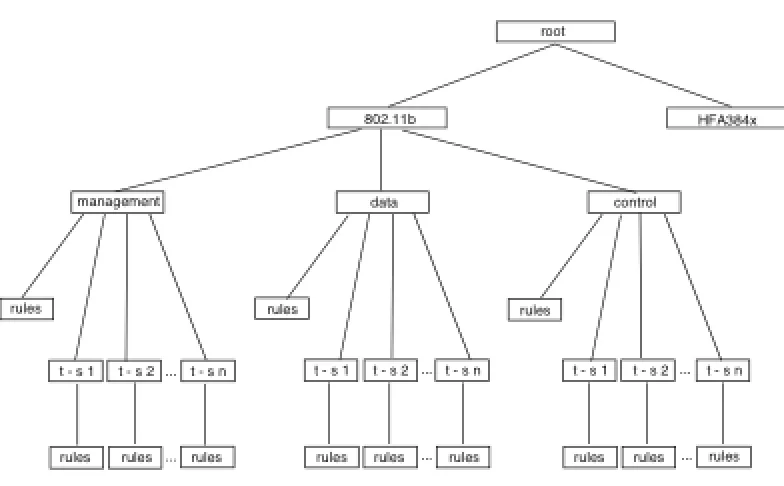
Figure 6: Rules Tree... 40
Figure 7: Change rules file... 45
Figure 8: Show Stats...46
Figure 9: WIDS log...47
Figure 10: Result of query “Agere” on WIDS log...48
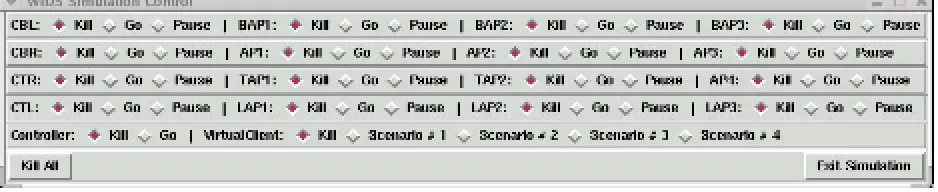
Figure 11: WIDS Simulation Control GUI...49
Figure 12: WIDS simulation with sixteen simulated access points...50
Abstract
The decrease in price and the ease of use of wireless network devices make them an attractive alternative to standard wired networks. However, the intrinsic insecurity of wireless media and weaknesses in the standards for use of wireless media leave wireless networks vulnerable to attacks from unauthorized users. The intrinsic insecurity of wireless media results from radio signals extending beyond the networks intended coverage area and the weaknesses in the
Chapter 1: Introduction
In November 2003, three Michigan men were indicted on federal charges in North Carolina for allegedly breaking into the Lowe’s home improvement chain’s central computer system and attempting to steal credit card numbers. According to the indictment, the men used a wireless computer card to access the wireless network of a Southfield, Michigan Lowe’s store and used that connection to connect to the Lowe’s central computer system in North Carolina and store systems at seven Lowe’s stores around the country. Software used to process credit card transactions was modified to save credit card numbers for later retrieval. Only six credit card numbers were collected. Two of the men told the FBI that they discovered the Southfield, Michigan Lowe’s wireless system while wardriving. The men were operating out of a 1995 Pontiac Grand Prix parked outside the Southfield store. It is not known if the Lowe’s wireless system was using encryption. [1], [2], [3]
Much has been written in recent years about the insecurity of wireless networks and 802.11. Attacks against wireless networks are not just theoretical. Software for attacking 802.11
networks can be downloaded from the Internet and there are numerous types of attacks ranging from simple network discovery to complex WEP key cracking. Attacks can be either active or passive. Searching for wireless networks by driving around in cars equipped with a laptop computer, a wireless card and a network discovery program has become so commonplace that it has been given the name “wardriving.”
Wireless networks are becoming more and more widespread. The cost of wireless access
point/routers, wireless cards and other hardware for a wireless network continues to decrease and is readily available at electronic stores and over the Internet for less than $50 [4]. In September 2004, Comp USA advertised a Netgear 802.11b router and wireless USB adapter for a total price of $19.98 [5]. 802.11 wireless cards are included as standard networking devices on many laptop computers and PDA’s. As the price decreases home, business and governmental use of wireless networks is increasing.
However, the use of a wireless network comes with some built-in insecurities that are not present in wired networks. The wireless medium is broadcast by radio waves, which can be received by anyone within range who has the proper wireless hardware. The radio waves have no absolute boundaries and often extend beyond their area of intended coverage. No physical connection to the wireless network is needed. Those characteristics of a wireless network leave it open to active and passive attacks. Many of these networks use the 802.11b protocol.
in the data to identify intruders [6]. Others just send alerts when a potential intruder is noticed [7]. If the data requires subsequent analysis to identify a potential problem, then the intruder could be gone before anyone knows he was there. An alert requires someone else or another program to take any action.
This paper presents a wireless intrusion detection system (WIDS) that provides additional security not found in other wireless intrusion detection systems. The WIDS provides security around the perimeter of a wireless network and identifies and locates potential intruders before they can connect to the internal network. The WIDS contains access points equipped with directional antennas that operate as intrusion detection devices, and the access points can interact with intruding stations, deny access, ignore frames, react to certain criteria, etc. The WIDS access points connect to a controller computer via a wired network. The controller computer configures the WIDS access points, shows statistics from stations associated with the WIDS access points, logs data sent by the WIDS access points, and locates intruder stations using data from two WIDS access points. The advantage of WIDS over other wireless intrusion detection systems is that WIDS can actively respond to potential threats and can locate the potential intruders before they can attack an interior network.
Chapter 2: IEEE Standard 802.11
2.1 Overview
802.11 is part of a family of standards for local and metropolitan area networks dealing with the Physical and Data Link layers as defined by the International Organization for Standardization (ISO) Open Systems Interconnection (OSI) Basic Reference Model (ISO/IEC 7498-1: 1994). The 802.11 standards describe seven types of medium access technologies and related physical media.
Physical and data link standards for fixed, portable, and moving stations in a local area network (LAN) using the media of air, radio, or infrared are described in ANSI/IEEE Std 802.11, 1999 Edition entitled “Information technology -Telecommunications and information exchange between systems - Local and metropolitan area networks -Specific requirements - Part 11: Wireless LAN Medium Access Control (MAC) and Physical Layer (PHY) Specifications.” [8] The standard includes a protocol for authentication, association, and reassociation services, an optional encryption/decryption procedure, power management, a distributed coordination function, and a point coordination function for the bounded transfer of data.
Wireless devices that communicate by radio can use either a frequency-hopping spread spectrum (FHSS) supporting 1 Mbit/s and an optional 2 Mbit/s data rate or a direct sequence spread spectrum (DSSS) supporting both 1 and 2 Mbit/s data rates using the carrier sense multiple access protocol with collision avoidance (CSMA/CA) medium sharing mechanism. IEEE Std 802.11b-1999 modified IEEE Std 802.11 by extending DSSS to support 5.5 Mbit/s and 11 Mbit/s payload data rates.
2.2 Differences between wired and wireless LANs
There are substantial differences between wired and wireless LANs. IEEE802.11 explains some of these differences and describes ways to handle them. Some of the ways in which IEEE802.11 physical layers are different from wired media are:
• A destination address is not equal to a physical location. In wired LANs, an address
represents a physical location. In 802.11, the addressable entity is a station. Stations are allowed to be mobile, so a station represents a destination that is not the same as a physical location.
• 802.11 media have no absolute or readily observable boundaries and are unprotected from outside signals.
In order to appear as an IEEE 802 LAN to higher layers (logical link control), an 802.11 network must handle station mobility within the MAC layer.
The bottom two layers of the OSI model are the physical layer (layer 1) and the data link layer (layer 2). In 802.11, the data link layer has two sublayers - the Media Access Control (MAC) sublayer and the Logical Link Control (LLC) sublayer. The physical layer handles the physical layer convergence protocol (PLCP) and the physical medium.
2.3 802.11 architecture
The standard describes an 802.11 architecture for a wireless LAN that is made up of interacting components. The 802.11 architecture supports station mobility and is transparent to upper layers. The components of an 802.11 wireless LAN include:
• basic service set (BSS) - a set of stations controlled by a single coordination function. A BSS is the most basic component.
• basic service area (BSA) - the coverage area where the BSS members can communicate with each other.
• independent BSS (IBSS) - the most basic type of 802.11 LAN. It can consist of only two stations communicating with each other. An IBSS is often referred to as an ad hoc network.
• distribution system (DS) - connects multiple basic service sets to create an extended service set.
• extended service set (ESS) - a network of DS and BSSs.
• station (STA) - adevice containing an 802.11 medium access control (MAC) and physical layer (PHY) interface to a wireless medium (WM). Stations include access points.
• access point (AP) - a station that provides access to the DS by providing DS services in addition to acting as a station. Data move between a BSS and the DS via an AP.
2.4 802.11 services
802.11 does not specify how a DS is implemented. It specifies services associated with different components of the architecture. There are two kinds of 802.11 services – station service (SS) and distribution system service (DSS). Both are used by 802.11 MAC sublayer.
The station services are:
• Authentication - The authentication service is used by all stations to establish their identity to stations with which they will communicate. If authentication has not been established between two stations, association will not be allowed. A station may be authenticated with more than one station at a time.
• Deauthentication - The deauthentication service causes the station to be disassociated. Either authenticated party may send a deauthentication notice to the other party. The
deauthentication notice cannot be refused by either party.
• Privacy - The privacy service provides confidentiality of data in the 802.11 LAN.
• MAC service data unit (MSDU) delivery - Information that is delivered as a unit between MAC service access points (SAPs).
The distribution system services are:
• Association - A station must associate with an access point before it is allowed to send a message via the access point. Association is always started by the mobile station and not by the access point. A station may be associated with only one access point at one time. An access point may be associated with numerous stations at one time.
• Disassociation - Either authenticated party may send a disassociation notice. The disassociation notice cannot be refused by either party.
• Distribution - The distribution service delivers medium access control service data units (MSDUs) within the distribution system. IEEE 802.11 does not specify how the message is distributed within the DS.
• Integration - The integration service enables delivery of medium access control service data units (MSDUs) between the distribution system (DS) and a non-IEEE 802.11 local area network. The details of an integration service depend on a specific DS implementation and are not covered by the standard.
another. The mobile station always starts the reassociation.
2.4.1 Authentication and privacy
Access and confidentiality in 802.11 was designed to provide functionality equivalent to that which is inherent to wired LANs. Access and confidentiality in a wired LAN are controlled by the closed nature of the wired media. In a wired LAN, data passes through the wired media and is accessible only by devices physically connected to the network. In a wireless LAN, there is no physical connection to the LAN and any device within range with the correct type of hardware is able to receive data from the wireless LAN. Authentication is used in place of the physical connection to the wired LAN to provide access. Privacy provides the confidentiality of the wired LAN.
Authentication between stations is at the link level and is used to provide a wireless link equal to the assumed physical standards of a wired link. IEEE 802.11 uses authentication instead of a wired physical connection. Message origin to message destination, user to user, or per packet authentications are not provided by IEEE 802.11. Several authentication processes are supported including the open system authentication, which allows any station to become authenticated, and shared key authentication, which uses a shared, secret, wired equivalency privacy (WEP) key.
Privacy is provided by the wired equivalency privacy (WEP) algorithm. According to the
standard, WEP “is designed to satisfy the goal of wired LAN ‘equivalent’ privacy. The algorithm is not designed for ultimate security but rather to be ‘at least as secure as a wire.’” Privacy is provided for data frames and some authentication management frames. Initial data sent to set up the authentication and privacy services is sent in the clear. Unencrypted data frames received by a station expecting encrypted data frames are ignored.
2.5 Relationships between services
Figure 1: State variables and services
Each service is supported by one or more MAC message types. Three types of messages are used by the IEEE 802.11 sublayer - data, management and control. Data messages contain data. Management messages support the IEEE 802.11services. Control messages support the delivery of the other two message types. Messages are sent via IEEE 802.11 frames.
2.6 MAC Frame Format
MAC frames contain a MAC header, a frame body, and a frame check sequence (FCS).
The MAC header is made up of several fields:
• Frame control - details given later in section 2.6.1
• Duration/ID – For power save - poll frame subtype, this field contains the association identity (AID) of station that sent the frame. For all other frames, this field contains a duration value, which depends on the frame type.
• Addresses 1,2,3, and 4 – MAC addresses for sending and receiving messages. These fields are used for BSSID, destination, source, receiver, and transmitter addresses.
• Sequence control – Consists of a four bit fragment number and a twelve bit sequence number.
• Frame body – A variable length field containing information for the individual frame types and subtypes.
• FCS – contains a 32 bit cycle redundancy code (CRC).
2.6.1 Frame Control Format
An IEEE 802.11 frame control field has the following format.
Figure 3: Frame control format
• Protocol version – Identifies frames that are compatible with IEEE 802.11
• Type – Management, control, and data are allowed types
• Subtype – Together with type, identifies function of frame
• To DS – Set to ‘1’ if frame is going to the DS
• More Frag – Set to ‘1’ if there is another fragment
• Retry – Set to ‘1’ if frame is in retransmission
• Pwr Mgt – Set to ‘1’ if sending station is in power save mode
• More Data – Set to ‘1’ if more frames are to be transmitted
• WEP – Set to ‘1’ if WEP encryption is enabled
• Order – Set to ‘1’ if frames are strictly ordered
2.7 IEEE 802.11i
IEEE 802.11i, ratified in June 2004, is an addendum to IEEE 802.11. It was written to eliminate some of the problems with 802.11 such as WEP and authentication. It uses IEEE 802.1x, a port based access control mechanism, for user authentication and encryption key distribution. IEEE 802.11i improves encryption algorithms through the use of the temporal key integrity protocol (TKIP) and the counter mode with CBC=MAC protocol (CCMP). TKIP can be used with existing WLAN hardware and software upgrades. CCMP requires higher processing power and support for the advanced encryption standard (AES), which is available only in the latest WLAN hardware. [9]
802.1x restricts access to a network until the user has been authenticated by the network. 802.1x requires an authenticator, usually the AP in 802.11, a supplicant, the client in 802.11, and an authentication server that performs actual authentication of information provided by supplicant. The authentication server can be a separate device or reside in the authenticator.
IEEE 802.11i and 802.1x are discussed in detail in another paper on WIDS.
2.8 Other
IEEE Std 802.11 presents a lot of information. This paper presents some of the details of the IEEE 802.11 architecture, services, states, messages, and frames needed to design the WIDS intrusion detection rules and actions. It does not attempt to summarize the IEEE Std 802.11. For more details, the reader can find the original IEEE Standards at
Chapter 3: Security problems in wireless networks
3.1 Ease of attack
Attacking a wireless network is easier than attacking a wired network. The radio signals of a wireless network often extend beyond the physical perimeter and can be picked up by anyone who has the correct hardware - a laptop computer and a wireless card are usually sufficient, and is close enough to the transmitter. A wireless network attacker does not have to be physically connected to the network through a wire. This eliminates an important security feature that is built into a wired network.
Wireless cards with the Intersil PRISM chipset can operate in a monitor mode. A station in the monitor mode can show all frames regardless of destination address, source address, FCS result, or WEP decryption result. This allows potential attackers to passively listen to traffic on the wireless network and obtain information such as MAC addresses, IP addresses, and BSSIDS, which can be used in various attacks on the network.
Some of the attacks rely on the weakness in IEEE802.11 that once a station is authenticated, no more authentication of 802.11 frames is done. An intruder can send disassociate or deauthenticate frames to disassociate or deauthenticate someone else. They can be sent to a broadcast address or to individual stations or access points.
Other attacks listen to 802.11 frames in transit and gather information, which can be used in other programs to spoof authorized users and gain access to wireless networks. 802.11 access points send out beacons that are not encrypted and 802.11 frames can be easily changed by software. For example, iwconfig can change essid, and setmac in airjack or ifconfig can change MAC addresses.
3.2 Objectives of security
Security should protect the integrity, confidentiality, non-repudiation, and availability of data. These objectives are defined as follows [10]:
• Integrity – System: performs its intended function in an unimpaired manner, free from deliberate or inadvertent unauthorized manipulation of the system. Data: should be possible for receiver to verify that data has not been modified; intruder should not be able to substitute fake data.
• Confidentiality – Only intended recipient(s) should be able to read data.
• Availability – A third party with no access should not be able to block legitimate parties from using a resource.
802.11 has failed in meeting all of the above objectives. An attacker can easily include false data in an 802.11 frame and send it to an access point. An attacker can see wireless data if he has a wireless card that can operate in a monitor mode. Falsifying data in 802.11 and TCP/IP frames allows an attacker to send data that appears to be from someone else, and the attacker can later deny sending it. WEP has been found to be insecure. Legitimate parties can be denied access as a result of denial of service attacks performed at the physical layer by jamming the radio signals or at the MAC sublayer by sending a flood of deauthenticate or disassociate frames.
3.3 Security services in IEEE 802.11
Authentication services and WEP provide the security services in IEEE 802.11. The security is limited and not sufficient to stop an attacker from obtaining unauthorized access to wireless networks. The attacker then has the ability to read, intercept, change, or inject messages; to decipher encrypted messages; to disrupt or end authorized sessions; and to deny access to authorized users.
3.3.1 Weaknesses in authentication
Open system authentication provides little security since any station requesting Open System authentication may become authenticated if the recipient station is set to Open System
authentication. Shared key authentication using WEP provides limited security due to weaknesses in WEP that allow the secret key to be passively recovered.
One approach to authentication, which is widely used but not required by IEEE 802.11, is MAC address filtering. The access point maintains a list of MAC addresses that are allowed to connect to the wireless LAN. During the connection process, the access point can check the station’s MAC address. If it is not on the access point’s list of MAC addresses, the station is not allowed to authenticate. The problem with Mac address filtering is that addresses identify stations, not users. It is very easy to monitor 802.11 frames in transit and recover valid MAC addresses. Software is available which can change a station’s MAC address.
3.3.2 Weaknesses in WEP
Weaknesses in WEP are well documented. A paper by Nikita Borisov, Ian Goldberg, and David Wagner "Intercepting Mobile Communications: The Insecurity of 802.11" identified some problems with WEP due to key stream reuse and weak message authentication [11]. Jesse R Walker’s paper "Unsafe at any key size; an analysis of the WEP encapsulation" showed that WEP is insecure regardless of the key size because of a weakness in WEP’s initialization vector
Scheduling Algorithm of RC4," identifies weaknesses in the key scheduling algorithm and shows that rc4 is insecure in WEP. The authors describe but do not implement a passive cipher text only attack to recover a secret key [13]. Adam Stubblefield, John Ioannidis, and Aviel D. Rubin implemented the attack described by Fluhrer, Mantin, and Shamir and were able to recover a 128 bit secret key in a production network. Their implementation is described in their paper "Using the Fluhrer, Mantin, and Shamir Attack to Break WEP [14]."
3.4 Types of attacks
There are several basic types of attacks – network discovery, eavesdropping, man in the middle attacks, denial of service attacks, and WEP key cracking. Attacks can be either active or passive.
3.4.1 Network discovery
The purpose of network discovery attacks is to find access points and obtain information about the network. Network discovery can do this actively or passively.
Software available for network discovery:
Netstumbler - actively discovers networks that broadcast their SSID by sending probe requests and receiving probe responses. Netstumbler displays the MAC address, SSID, name, channel, encryption and other information about access points. Global Positioning System (GPS) support is built in.
Wellenreiter - wireless card must be in monitor mode. It displays statistics, MAC address, WEP, and other data for ESSID of broadcasting and non-broadcasting networks. Wellenreiter requires the linux wlan-ng driver. GPS support is built in.
Kismet - wireless card must be in monitor mode. Kismet_server identifies name, BSSID (MAC address), WEP, channel and other information for networks.
3.4.2 Eavesdropping
Eavesdropping attacks listen to messages in transit and display the message data and/or save the message data to a file. Eavesdropping is also known as sniffing.
Software available for eavesdropping attacks:
Kismet – wireless card must be in monitor mode. It separates and identifies different wireless networks in the area. It saves data in a file format that can be read by ethereal.
HostAP - wireless card must be in monitor mode. HostAP has a sniffer called wlansniff, which displays 802.11frame information.
3.4.3 Man in the middle attack (MITM)
In a man in the middle attack, stations connect to a rogue access point instead of the intended access point. The rogue access point intercepts data sent to/from the station from/to the intended access point. The rogue access point can read, change, or insert data.
Software available for man in the middle attacks:
monkey jack - Requires air jack driver. Forces target to deathenticate from real access point and reassociate with attacking machine. The attacking machine associates with the real access point.
kracker-jack - Requires air jack driver. Improves monkey-jack to perform MITM attacks on IPsec connections.
Ettercap - an Address Resolution Protocol (ARP) attack. Ettercap can change the IP/MAC address combination in the target’s ARP cache to allow a MITM attack.
3.4.4 Denial of service attacks (DOS)
Denial of services attacks prevent users from accessing network resources. This is usually accomplished by flooding the network with faulty packets or messages that keep out legitimate traffic. Jamming of radio signals can also be used as a DOS attack.
Several papers on DOS attacks are worth mentioning because of the significance of the effects of attack or the methods used in performing the attack. The first two papers describe attacks for which there is no defense. The third paper describes an attack that alters fields overwritten by the card’s firmware.
At the present time there is no defense against this type of attack other than not using 802.11b devices. The researchers state that 802.11b networking equipment can not be used to detect this attack because the monitor itself can be targeted. More expensive, specialized RF monitoring hardware may be needed for detection. The IEEE 802.11i standard will not prevent this attack since the attack operates at the Physical Layer Convergence Protocol (PLCP) layer and 802.11i protects MAC layer Protocol Data Units (PDUs).
A similar DOS attack used an $89.00 ATV transmitter operating in the same bandwidth as 802.11b and a 14dB gain directional grid antenna to send Radio Frequency Interference (RFI) to an access point [16]. The RFI causes the CCA to report that the current channel is busy just as the continuous DSSS signal did in the Australian attack.
A paper on DOS was presented at the 12th USENIX Security Symposium, August 4-8, 2003 [17]. The authors successfully performed DOS attacks by sending a spoofed deauthentication frame to an access point each time a data or association frame was received from a target station. The attack was carried out using an iPAQ H3600 Pocket PC and a Dlink DWL-650 PCMCIA wireless card. They also attempted a DOS attack that exploits vulnerability in the Network Allocation Vector (NAV), but it was unsuccessful due to the wireless cards improperly
implementing the 802.11 MAC specifications. An interesting part of the NAV attack is that the authors figured out how to modify a frame after the firmware has processed it, but before it is sent. Thus, any field that is overwritten by the firmware can be altered before it is transmitted.
Altering fields overwritten by the firmware is significant because other intrusion detection methods analyze the sequence numbers, which are overwritten by the firmware, to identify frames generated by FakeAP and Airjack and MAC address spoofing [6]. If the sequence numbers can be changed, those detection methods will no longer work.
Software capable of performing DOS attacks
Wlan-jack - deauthentication request flood. Requires airjack driver
Void11 - association/authentication request flood
Fata-jack - sends invalid authentication requests to access point
FakeAP - flood area with beacon packets looking like hundreds of access points
3.4.5 WEP key cracking
WEP key cracking recovers the secret key used for encryption
AirSnort - Implementation of the Fluhrer, Mantin, and Shamir attack on WEP keys exploiting the weaknesses in the key scheduling algorithm of RC4. It requires 5 – 10 million encrypted packets [18]. It can break 40 bit or 128 bit keys. AirSnort requires a card that can operate in the monitor mode.
WEPcrack – Another implementation of the Fluhrer, Mantin, and Shamir attack on WEP keys.
3.4.6 Other
Impersonation or spoofing a valid station or access point in order to gain unauthorized access to the wireless network often uses information obtained from some of the above attacks, or it is part of an attack such as a MITM. Consequently, I did not list it as a separate type of attack.
3.5 Need for Security
As can be seen from the above discussion, an unprotected 802.11 network is vulnerable to many different kinds of attacks and it can sometimes be used as an entry point to a wired network as in the Lowe’s department store case mentioned in the introduction. Some kind of security or
Chapter 4: Description of WIDS system
4.1 General description
The insecurities inherent in a wireless (no absolute or readily observable boundaries) coupled with the weaknesses in 802.11b security (authorization and WEP) make the use of 802.11b networks risky in places where a high level of security is needed.
WIDS is designed to strengthen the security of an internal wireless network by surrounding the physical perimeter of the network with special access points to detect and locate intruders. Radio signals from a wireless network extend out past the physical perimeter of the network and can be received by anyone with the correct equipment. Using information obtained about the wireless network from eavesdropping or by other means, a potential intruder could gain access to the wireless network and possibly a wired network behind the wireless network. There are situations when an entity may not want someone outside of the perimeter of the wireless network to have access to the network. Possible users of WIDS are military bases, ships in port, corporations with sensitive data, etc.
Authorized users connect to the internal network APs from within the perimeter. WIDS assumes that internal security procedures handle authentication inside the perimeter. Using the
assumption that a station will associate with the access point from which it receives the strongest signal, a potential intruder outside the perimeter would associate with a WIDS access point (WIDS AP) on the perimeter and not with an access point in the internal network. The WIDS system would then locate the intruder using the directional antennas on two or more access points. Even if an intruder was able to associate with the internal access point from beyond the perimeter, the WIDS AP system directional antennas should still be able to locate the intruder, because WIDS can work with signals it picks up and association with a WIDS AP is not necessary.
WIDS is designed to give the user control over how it is applied. The user can decide that all stations outside the perimeter are intruders or that some stations outside the perimeter are authorized to connect to the WIDS APs or the internal network APs. Another possibility is for the WIDS APs to be used as honeypots that allow intruders to associate so that an intruder’s activities can be monitored or the intruder can be given false or misleading data. The honeypot scenario is not implemented as part of this paper.
preconfigured arc searching for wireless users. The WIDS AP determines if the remote station is an intruder and it contacts a controlling computer. Other nearby WIDS APs are reconfigured by the controller to modify their areas of coverage. Bearings from multiple WIDS APs are used by the controller to pinpoint the location of the intruder. The rules can trigger actions to interact with the intruder such as denying access, ignoring frames, reacting to IP header data, etc.
4.2 WIDS architecture
The WIDS architecture consists of one or more WIDS access points connected to a centralized controller via a standard wired network. The wired network provides a more secure management of the WIDS AP’s than a wireless network.
WIDS APs use an open-source access point code, HostAP and Linux. HostAP allows an 802.11b wireless Prism 2/2.5 Ethernet card to be used as an access point instead of a remote station. HostAP has been extended to include the additional functions needed by WIDS. The controller is a personal computer running Linux. The controller software is written in Perl-TK.
We investigated several designs and configurations for the WIDS AP hardware and decided that it should be an embedded computer equipped with a rotating directional antenna. The WIDS AP would be built from components including an X-Scale single board computer and wireless networking platform, a directional antenna, a stepper motor to rotate the antenna, and a stepper motor controller. A list of the components is presented in the Appendix of this paper.
Unfortunately, we were not able to obtain financing to build a fully functional WIDS AP equipped with the rotating antenna. A laptop computer without a rotating directional antenna was used in our implementation.
WIDS access point Internal access point Station (possible intruder)
Orientation of a WIDS AP attached directional antenna Estimates of an intruder’s location
Figure 4: WIDS architecture
Figure 4 depicts four WIDS access points, arranged vertically on the left, protecting an internal wireless network installed in an arena. Only one side of a WIDS installation is shown in order to keep the picture simple. (A complete WIDS installation would include WIDS AP’s on all four sides of the arena.) The WIDS access points connect to a controller computer via a wired
4.3 WIDS attack defenses
If WIDS allows authorized users to associate with the WIDS APs or the WIDS APs are used as honeypots, then WIDS needs to protect the APs from the types of attacks mentioned in Chapter 3. This section discusses how WIDS identifies and handles some of those attacks.
4.3.1 Network discovery and eavesdropping
The WIDS AP antennas would not pick up network discovery and eavesdropping that are done passively. If network discovery or eavesdropping is done actively by sending probes or beacons, a WIDS AP with a card operating in the monitor mode could detect the 802.11 frames and
identify the attack based on known fingerprints of the attacking software.
4.3.2 Man in the middle attack (MITM)
Man in the middle attacks need at least two devices in addition to the WIDS AP. Since one station masquerades as the other station, they will both send the same MAC address. The WIDS APs should pick up signals from both stations, even though only one station associates with the WIDS AP. If the two stations are picked up by different WIDS APs, the positions could be computed for each device in the normal manner. If the stations are in the same WIDS AP coverage area, the method used to compute the maximum signal strength position may need to distinguish the readings from each device using sequence control numbers or some other criteria.
4.3.3 Denial of service attacks (DOS)
If the DOS attack is a result of a flood of deauthenticate or disassociate frames, the HostAP software could keep track of how often they are received. A rule containing information such as “if x number of deauthenticate or disassociate frames are received in y time period, do not accept the deauthenticate or disassociate frame” could be implemented.
With regards to the attacks mentioned in section 3.4.4 that cause the CCA to report that the medium is always busy, it is not easy to determine how a WIDS AP would respond without reproducing the attack. The WIDS AP communicates with the WIDS controller via a wired medium so the attacks would not affect their communications. If the WIDS APs are able to interpret the signal strength of the jamming signal and report data similar to that of normal
802.11b DSSS frames, the controller should be able to locate the attacker. If the signal consists of noise that is not decipherable by the WIDS APs, then the WIDS would not be able to take a bearing on the attacker’s position.
4.3.4 WEP key cracking
Chapter 5: Feasibility of WIDS
5.1 Locating intruders
Researchers at Interlink networks performed some experiments with 802.11 cards and access points and documented their results in a paper [19]. The purpose of their research and paper was to determine if it is possible to detect and locate unauthorized wireless clients and rogue access points with off the shelf components and free software. Using a Lucent Orinoco card in monitor mode, tcpdump and ethereal, the researchers were able to detect when a wireless card was powered on within range of a local network, a rogue access point and unauthorized clients.
The paper discussed several methods of locating an unauthorized client. One was to use a directional antenna and scan an area for the strongest signal, move the antenna and scan the area again for the strongest signal and use simple trigonometry to determine the location. Many factors can affect the signal such as terrain, obstructions, reflection, refraction, and atmospheric conditions. The result of these factors is that the apparent location of the strongest signal may not be the location of the signal. The researchers considered more discussion on this topic to be beyond the scope of their paper and no experiments were done using this method. However, the researchers believe the basic theory is sound and can be an effective technique to locate a
transmitter.
Another method to locate a transmitter is to use the relative signal strength at several locations around the area, and if known, the propagation losses and the power of the transmitter. The first step is to compute distance vs. signal strength trends to predict the signal strength drop off rate and derive an equation to approximate indoor losses at 2.4 GHz. The next step is to write the distance-power approximation equation as a function of a position (x,y) and the unknown coordinates (A,B) of the transmitter and an unknown constant C where C is related to the transmitter’s output power.
Using a combination of experimental data and research on indoor radio propagation, the researchers derived the equations described above and tested their equations using three access points in an office suite with an area of approximately 30 by 20 meters. Three tests were presented in the paper. The results of two of the tests computed a location within a couple of meters of the actual position, but the third test computed a location that differed from the actual location by about eight meters. The researchers concluded that the basic theory is sound and that more careful data gathering and more data points would probably give better results. These results address locating an intruder within an indoor space.
An antenna’s signature is computed ahead of time and the intruder’s location is computed by comparing the intruder’s data to the signature data.
Experiments were done with three different types of directional antennas. The test antenna was mounted on a telescope tripod and connected to a portable WIDS access point consisting of a laptop running Linux and HostAP. The antenna’s signature was computed by placing an intruder machine a few hundred feet away from the WIDS access point. The intruder associated with the WIDS access point. The directional antenna was rotated in fixed increments and the signal strength value was recorded. Readings were taken over a 360 degree range.
In order to compute the location of an intruder, several readings of the intruder’s signal strength data were made at different angles of the WIDS access point antenna. The intruder’s data was correlated with the signature data and the computed angle is the angle with the best fit to the known signature data. Two different locations of the WIDS access point were used. The results of the tests computed the location of the intruder within 2 to 4 degrees. The intruder’s location was computed using triangulation with the computed angles and access point locations.
The research showed that it is possible to determine the intruder’s location with reasonable accuracy using low priced off the shelf hardware and free software.
5.1.1 Comparison of WIDS and above experiments
The WIDS system is designed to operate with free software and off the shelf or slightly modified equipment. The above research shows that it is possible to locate 802.11 stations using free software and off the shelf or slightly modified equipment.
While the research in the first paper showed that it is possible to detect unauthorized clients and rogue access points, it has several deficiencies that need to be addressed by an intrusion detection system such as WIDS. One is that detection is not done in real time. The packets are captured to a file and analyzed later with ethereal. Another is that the wireless card used for detection is in monitor mode and it doesn’t communicate with the intruder or access point. Those deficiencies make it difficult to take action against an unauthorized user on a timely basis. The unauthorized user could connect to the wireless network, do whatever he wants and disconnect before anyone knows he was there. Also, the intruder was located in an interior space and WIDS is concerned with locating intruders in external locations. The second paper locates intruders in external locations but requires plenty of data collection for each access point.
5.2 Intersil Prism 2/2.5 802.11b wireless cards and HostAP driver
The WIDS access points require a wireless card using the Intersil PRISM 2/2.5 radio chipset.The PRISM Medium Access Controller (PRISM MAC) has two major operating modes for
supporting access points: firmware based or host-based. The advantage of using a host-based access point is that the developer of the host access point software is able to implement optional features. The WIDS access point software needs additional features to control the sweeping directional antenna, apply a set of intrusion detection rules, and communicate with the WIDS controller. Our approach to implementing the WIDS access point software modifies the host-based access point driver HostAP.
5.2.1 PRISM 2/2.5 Host-based Access Point Mode
In the PRISM 2/2.5 host-based access point mode, the host software performs many functions required to maintain a Basic Service Set (BSS). These functions include authentication,
deauthentication, association, reassociation, disassociation, data transmission between two wireless stations, and all power save queuing. When in host access point mode (hostAP), station firmware performs only packet transfer and low level 802.11 MAC management. Frame
transmission, frame reception and beacon/probe response transmission are implemented in the firmware due to their time critical nature. The remainder of the access point operations is
performed by the host software. The firmware acts as a frame pipe that transmits 802.11 frames from the host and receives 802.11 frames and passes them to the host. The hostAP mode is enabled by setting the PortType for station firmware to hostAP.
For transmitted frames, the host specifies the Protocol Version, Type, Subtype, To DS, From Ds, Pwr Mgt, More Data, WEP, and Order sub fields and the firmware provides the More Frag and Retry subfields of the frame control field. The firmware fills in the Frame Control, Address 2, and Sequence Control fields of the MAC frame.
5.2.2 The PRISM MAC communications frame structure
The PRISM MAC communications frame structure consists of control fields, header information, and data segments. The control fields segment contains frame processing and status information and it is handled by the PRISM MAC controller. The header information and the data segments are transferred to the host. The control fields for a Transmit Frame Structure are the Status, SwSupport, TxRate, RetryCount, TxControl fields. The control fields for a Receive Frame Structure are the Status, Timestamp, Signal, Silence, and Rate fields.
If higher software layers can handle 802.11 frame formats, the host software uses the 802.11 format part of the header info. If higher software layers assume an 802.3 frame format, the PRISM MAC handles the differences between the 802.11 and the 802.3 frame formats without involving the host software.
5.2.3 Monitor Mode
The PRISM 2/2.5 cards can operate in a non-standard monitor mode. The monitor mode is intended to be used for testing and debugging operations. However, it can also be used to monitor wireless networks. If a station is operating in monitor mode, all frames where the physical layer convergence protocol (PLCP) header and the beginning of the frame are successfully received are passed to the host regardless of destination address, source address, FCS result, or WEP
decryption result
5.2.4 HostAP software
HostAP [21] is a Linux driver for wireless LAN cards based on Intersil's PRISM 2/2.5 chipset. It implements the host-based access point functions discussed above. In addition, the HostAP driver has various features for development and debugging in IEEE 802.11 environments,
including access to hardware configuration records, I/O registers, and frames with 802.11 headers.
HostAP includes a utility sniff, for monitoring activities. Sniff shows the data from the
Chapter 6: Software implementation of WIDS
6.1 WIDS Access Point/Controller Protocol
The WIDS access points and the controller communicate over TCP, using the WIDS Access Point/Controller Protocol. This section presents a summary of the communications between access points and the controller. Access Point/Controller Protocol message types are printed in upper case letters.
An access point starts up and attempts to connect to the controller using sockets. If the access point is unable to connect, it retries every 5 seconds. When a connection is made, the access point sends a HELLO message to the controller and waits for a response. The HELLO message contains the name of the access point and its location. The controller replies with a CONFIG message containing the beginning and ending sweep positions for the antenna, the report rate for sending data to the controller and the intrusion detection rules to be used by the access point. The antenna begins sweeping and listening for signals. The report rate specifies how often the access point sends REPORT messages to the controller. The REPORT message contains the access point name, the position (angle) of the antenna, the sweep direction, the time, the signal strength received at that position, and the MAC address of the station sending the signal.
When a signal is received which has the maximum signal strength in a specified number of
readings, the access point sends a POSITION message to the controller. The POSITION message contains the access point name, the position of the antenna when the maximum signal strength was received, the MAC address of the station sending the signal and whether or not the station is associated with the reporting access point.
The controller maintains a hash of POSITIONS received. The keys are the MAC addresses of the stations and the values are strings containing the name of the access point that sent the
POSITION message, an integer indicating whether or not the access point and the station are associated, and another integer indicating whether or not the station has been located.
When a POSITION message is received by the controller, the controller checks the hash for the MAC address. If it is not found, the controller adds it to the hash, and checks if the station is associated with the reporting access point. If it is associated, the controller determines which neighboring access point needs to be reconfigured and sends a RECONFIG message with reconfigured antenna sweep information to the applicable access point.
from both access points to compute the station’s location. The hash is updated to show that this station has been located.
The controller will display a warning message if the same MAC address is associated with more than one access point. This may be an indication that MAC address spoofing has occurred.
When an access point receives a RECONFIG message, it changes the starting sweep position or the ending sweep position in accordance with the RECONFIG message. The antenna sweeps to the new position twice and then returns to its original sweep configuration.
The controller operator can send messages to an access point to change the intrusion detection rules or to collect statistics related to a station associated with the access point. A
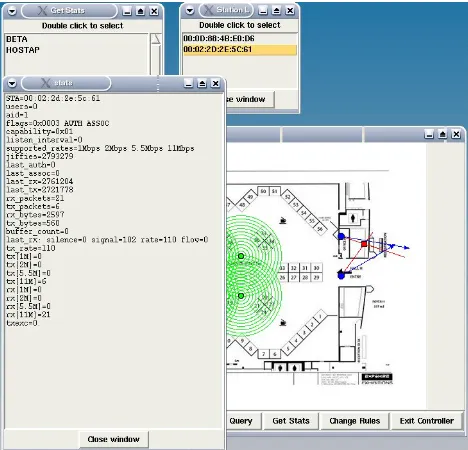
CHANGERULES message is sent to change the intrusion detection rules. When the access point receives a CHANGERULES message, it destroys its current rule tree and processes the new rules sent by the controller. A STATS message is sent to gather statistics from an access point. The access point returns a STATS message containing a list of stations associated with it in response to the controller’s STATS message. The controller operator selects a station and sends a MAC message with the station’s MAC address. The access point reads the applicable
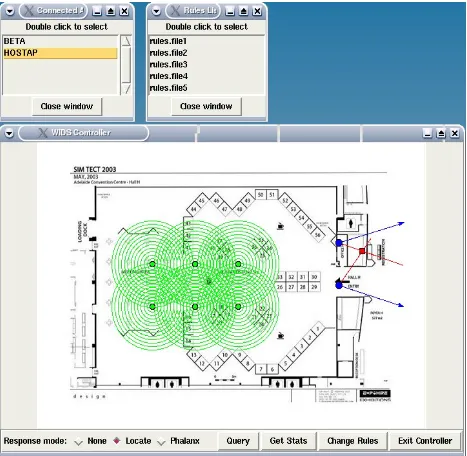
/proc/net/hostap/wlan0/MAC address file and sends the stats info back to the controller in a MACST message. The controller receives the MACST message, opens a new window and displays the stats.
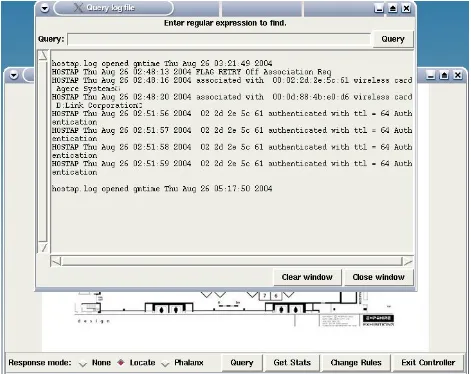
The access point can send a LOGDATA message to the controller. When the controller receives a LOGDATA message, it writes the message to the controller’s log file.
6.2 Intrusion Detection Rules
Each 802.11b frame received by a HostAP access point which is not handled by the wireless card’s firmware can be tested with a set of intrusion detection rules. If the access point also has a wireless card operating in the monitor mode, all 802.11b frame received can be tested with the rules. The results of the rules tests are intended to identify potential intruders.
A rule has the format type-subtype, a test list consisting of one or more pairs of test and test data, and one pair of action and action data. The type-subtype is the 802.11 frame type-subtype, the test is one of the tests defined in the WIDS AP software, the test data is data used in the test, the action is one is one of the actions defined in the WIDS AP software, and the action data gives more information about the action. The action is performed only if all of the tests in the rule are true.
pair is designated by an ‘!’. An action consists of an action keyword and action data pair. The action keyword is separated from the action data by a ‘:’.
The test keyword generally describes an operation on a field in the 802.11 or the IP frame, such as SOURCE_MAC_EQUALS for source MAC address equals, TTL_LESS_THAN for time to live is less than, or FLAG_PWRMGMT for power management is on or off. The value to be tested is given by the rule’s test data. Sample test data for test keywords are 00022D2E5C6a for SOURCE_MAC_EQUALS, 64 for TTL_LESS_THAN and OFF for FLAG_PWRMGMT.
An example of a rule is:
"MGMT_ASREQ, (SOURCE_MAC_EQUALS:00022D2E5C6a! FLAG_WEP:OFF!), LOG, assoc request from 00:02:2D:2E:5D:6a flag wep off"
This rule is testing an association request. It is true if the source MAC address is
00:02:2D:2E:5C:6a and the wep flag is 0. If the rule is true, the WIDS AP will send a message to the controller, which displays the message in a terminal window and logs the message in a file. The message includes the WIDS AP name, date and time of message, and the action data "assoc request from 00:02:2D:2E:5D:6a flag wep off."
6.3 Changes/additions to HostAP files
6.3.1 Changes to HostAP files
The first step in implementing WIDS in HostAP is to modify the struct hostapd_data in
hostapd.h to include information for the directional antenna, the location of the access point, and the shared memory. HostAP defines the typedef hostapd for the struct hostapd_data.
Information added to hostapd_data is:
int controller_sock; /* socket for controller*/
int beginsweep; /* begin sweep position of directional antenna */ int endsweep; /* end sweep position of directional antenna */ int position; /* sweep position of directional antenna */ int x; /* x coordinate of access point location */ int y; /* y coordinate of access point location */ int reportrate; /* frequency of reporting to controller */
int direction; /* direction of antenna sweep-clockwise, counterclockwise */ int semid; /* semaphore id */
int shmid; /* shared memory id */
char *shm_ptr; /* pointer to shared memory */
The sharedinfo structure holds the data shared between the hostapd process and the IP packet monitoring process. It is:
struct sharedinfo{
u8 ttl; /* time to live */
u8 src_mac[6]; /* source MAC address*/ u8 dest_mac[6]; /* destination MAC address*/
u16 seq_number; /* sequence number and fragment number*/ u32 test; /* rule test to be performed */
int testmac; /* MAC address tested */ pid_t pid; /* parent process id */ struct rule_node *ruledetail; /* rule */
char message[MESSAGE_SIZE]; /* additional info, if needed */ };
The struct sta_info in ap.h also has to be modified to include information about the directional antenna. Additions are:
int count; /* number of completed sweeps */ int x; /* x coordinate of access point location */ int y; /* y coordinate of access point location */ int angle; /* sweep position of directional antenna */ int signal; /* signal strength */
int widsassociated; /* associated with wids controller */ time_t *gmt; /* time */
The hostapd configuration file must be changed to include information needed by the access point at start up. This information includes names of files to be read, name and location of log file, name of access point, location of the access point, and IP addresses and ports used by the access point and the controller. A sample of the information added to the configuration file is given below:
valid_mac_file=ouitxt.txt1 /* file containing valid OUI numbers for MAC addresses */ rules_hash_file=80211a.txt /* file containing key(integer) value(text) pairs for rules */ log=log.new /* name of log file for access point logging */
log_directory=/home/jvigo/
hostap-0.0.3/hostapd2new /* directory of log file */
ipaddress=127.0.0.1 /* access point IP address */ port=7000 /* access point port */
x=420 /* x coordinate of access point location */ y=350 /* y coordinate of access point location */
Changes to programs config.h and config.c are needed to handle the above additions to the configuration file. In config.h the struct hostapd_config is modified to include character pointers for each of the above items and config.c is expanded to include code to read the new items included in the configuration file.
The controller needs to know all of the stations associated with an access point, so a function char * ap_list_sta_str(hostapd *hapd) is added to sta_info.c. This function returns a string of all the associated stations for a particular access point.
In order to keep modifications to HostAP files at a minimum, functionality was put into separate files and calls to the functions were inserted into the HostAP files where necessary. The function calls inserted into the main function in hostapd.c initialize the shared memory, connect to the controller, open a log file, and load the hash tables for the MAC addresses and the rule descriptions. Some changes were made to the signal handling functions for SIGTERM and
SIGINT, and a new function was written which is called when a SIGUSR2 signal is received. The file eloop.c, which contains the run loop called by main in hostapd.c, was modified to include a call to antenna_ap() in client.c. antenna_ap() handles the directional antenna.
The next step was to modify HostAP files to apply the intrusion detection rules. Management type/subtype rules are handled by adding a call to applyRules(struct ieee80211_mgmt *mgmt, hostapd *hapd) in each of the following functions in ieee802_11.c.
static void handle_auth(…) static void handle_assoc(...) static void handle_assoc_resp(...) static void handle_disassoc(...) static void handle_deauth(...) static void handle_beacon(...)
Control and data type/subtype rules are handled by adding calls to applyRules(...) to receive.c functions static void handle_frame(hostapd *hapd, char *buf, size_t len) and static void handle_data(hostapd *hapd, char *buf, size_t len, u16 stype).
A rule returns true if all of the rules criteria specified in the tests are met and false if one or more of the criteria are not met. When a rule tests IP packets and a true result is obtained, a SIGUSR2 signal is sent by the process monitoring the IP packets to the HostAP process. The function packetresult() is called when a SIGUSR2 signal is received.
6.3.2 New files added to HostAP
Several new files were written to handle operations not included in Hostap. These files are antenna.c, client.c, ruleslist.c, validmac.c and their related header files.
6.3.2.1 antenna.c
The file antenna.c simulates antenna readings. Since there is no rotating directional antenna connected to the access point, antenna readings are read from an array where the array index represents the antenna position in degrees. Antenna.c tests the signal strength readings and finds the maximum signal strength within a range of readings reported by the sweeping directional antenna.
Some of the more important functions in antenna.c are:
6.3.2.1.1 void maxsignal (int position, int signal, struct pos_sig *max2){…}
Maxsignal finds the maximum signal strength in a range of signal readings. The number of readings needed by the antenna before a maximum signal strength can be determined is designated by the variable POINTS. The maximum signal strength is calculated when there are POINTS/2 signal readings with an increasing trend on one side of a location and POINTS/2 signal readings with a decreasing trend on the other side of the same location. Temporary fluctuations in a range of increasing or decreasing signal strengths do not change the overall trend. For example, if signal strengths readings are 40, 42, 43, 41, 43, 44, the number of increasing signal readings is 6, since 41 is considered a temporary fluctuation and the trend is still increasing.
More than one station in a WIDS AP’s coverage area can be simulated as long as the sets of POINTS used to compute each local maximum do not overlap. The algorithm to compute the maximum signal strength position assumes all signal readings in the range of POINTS come from the same station. In a real WIDS implementation, the algorithm could try to distinguish signals from different stations using MAC addresses or sequence numbers, although either of those could be spoofed by a knowledgeable attacker.
The maximum is stored in the struct pos_sig.
struct pos_sig{
double slope; /* angle position where slope of curve = 0*/ double signal; /* signal strength */
};
POINTS. The maximum signal strength location is the maximum point on the parabola that is the point where the slope of the parabola is equal to zero. The maximum signal strength calculation is performed by calling the function double slope ().
Figure 5: Signal Strength vs. Position
Slope() determines the matrices needed to solve the set of equations needed to fit a least squares parabola through a set of points which includes a maximum signal strength. Slope() calls the function solve (a_data, b_data, parabola) to get the equation of the parabola. Slope() then calculates the maximum point of the parabola by solving the equation where the derivative of the parabola equation equals zero and returns the maximum point. The derivative f ‘(a) = Slope of tangent line to the graph of f at the point (a, f(a)).
Applying the method of least squares to curvilinear relationships gives a regression equation of the form
_
Yx = aX2 +bX + c
_
regression equation. The values of a,b,c may be determined from a solution of the equations [22]:
∑ X2Y = a ∑ X4 + b ∑ X3 + c ∑ X2 ∑ XY = a ∑ X3 + b ∑ X2 + c ∑ X
∑ Y = a ∑ X2 + b ∑ X + nc
The equations can be written in matrix format as:
∑ X4 ∑ X3 ∑ X2 a ∑ X2Y ∑ X3 ∑ X2 ∑ X x b = ∑ XY ∑ X2 ∑ X n c ∑ Y
slope() stores equations in arrays as :
a_data[0] = sumx4; /* ∑ X4 */ a_data[1] = sumx3; /* ∑ X3 */ a_data[2] = sumx2; /* ∑ X2 */ a_data[3] = sumx3; /* ∑ X3 */ a_data[4] = sumx2; /* ∑ X2 */ a_data[5] = sumx; /* ∑ X */ a_data[6] = sumx2; /* ∑ X2 */ a_data[7] = sumx; /* ∑ X */
a_data[8] = POINTS; /* number of points */
b_data[0] = sumx2y; /* ∑ X2Y */ b_data[1] = sumxy; /* ∑ XY */ b_data[2] = sumy; /* ∑ Y */
parabola[0] = a, parabola[1] = b, parabola[2] = c,
and then calls
The derivative of the equation for the parabola ax2 +bx + c is 2ax + b and the maximum point in the parabola is the point x where the derivative = 0.
Slope() then solves the equation 2.0*parabola[0]*x + parabola[1] = 0 for x:
x = -parabola[1] / (2.0 * parabola[0]);
6.3.2.1.2 void solve (double a_data[], double b_data[], double parabola[]){…}
The GNU Scientific Library (GSL) Linear Algebra library is used to solve the set of equations for the least squares parabola solution discussed above. It solves the linear system A x = b using LU decomposition of the matrix A.
The code for solve(double a_data[], double b_data[], double parabola[]) is taken from File: gsl-ref.info, Node: Linear Algebra Examples, in the GSL documentation.
void solve (double a_data[], double b_data[], double parabola[]){
/* The solution is stored in gsl_vector *x */ int s;
gsl_matrix_view m = gsl_matrix_view_array (a_data, 3, 3); gsl_vector_view b = gsl_vector_view_array (b_data, 3); gsl_vector *x = gsl_vector_alloc (3);
gsl_permutation *p = gsl_permutation_alloc (3); gsl_linalg_LU_decomp (&m.matrix, p, &s); gsl_linalg_LU_solve (&m.matrix, p, &b.vector, x); gsl_permutation_free (p);
parabola[0] = x->data[0]; parabola[1] = x->data[1]; parabola[2] = x->data[2]; }
6.3.2.1.3 int fgetangles (char *angles[], int n1, char *name){…}
The function fgetangles reads simulated antenna data from the file ‘name’. The format for an antenna reading is degrees, signal strength, MAC address. The first number represents the angle in degrees. The second number represents the signal strength at that angle and the next 6 numbers represent the MAC address of the station transmitting the signal. Every two digits of the MAC address are separated by a ‘:’. Each reading in the file must be separated by ',' or '\n' and there must be a '\n' before the EOF character. Comments start with '#' and the '#' is allowed only at the start of a line. The following is a valid file for antenna readings.
File1:
-35,10;00:02:2D:2E:5C:61,-34,12;00:02:2D:2E:5C:61,-33,16;00:02:2D:2E:5C:61,- 32,20;00:02:2D:2E:5C:61,-31,23;00:02:2D:2E:5C:61,-30,25;00:02:2D:2E:5C:61,- 29,27;00:02:2D:2E:5C:61,-28,24;00:02:2D:2E:5C:61,-27,27;00:02:2D:2E:5C:61,- 26,28;00:02:2D:2E:5C:61,-25,29;00:02:2D:2E:5C:61,-24,26;00:02:2D:2E:5C:61,- 23,27;00:02:2D:2E:5C:61,-22,25;00:02:2D:2E:5C:61,-21,23;00:02:2D:2E:5C:61,- 20,20;00:02:2D:2E:5C:61,-19,16;00:02:2D:2E:5C:61,-18,14;00:02:2D:2E:5C:61,-17,12;00:02:2D:2E:5C:61
The first antenna reading is angle = -35, signal strength is 10 and the MAC address of the station is 00:02:2D:2E:5C:61.
Simulation of an access point receiving signals from more than one station can be done by using multiple MAC addresses in the antenna data file.
In a non-simulated environment with directional antennas HostAP can get signal strengths from the applicable /proc/net/hostap/wlan0/MAC address file or by using the Linux command iwspy from the wireless tools package [23]. If the WIDS AP has a wireless card in the monitor mode, HostAP can get the signal strength from the rx header.
6.3.2.2 client.c
Client.c handles connecting to and communicating with the controller. It sends and receives messages to/from controller, reports the antenna’s position to the controller, and reports the antenna’s position with the maximum signal strength of a station to the controller. Client.c also does the simulated positioning of the directional antenna.
6.3.2.2.1 int connectToController(hostapd *hapd){ …}
ConnectToController uses sockets to connect to the controller. The access point name and the controller IP address and port are given in the hostapd.conf file and stored in the typedef struct hostapd. When there is a successful connection with the controller, client.c calls the eloop.c function eloop_register_read_sock(int sock, void (*handler)(int sock, void *eloop_ctx, void *sock_ctx), void *eloop_data, void *user_data){…} with the socket file descriptor,
handleControllerMessage, hapd, and NULL as arguments to register handleControllerMessage as a handler for read events.
6.3.2.2.2 int associate(hostapd *hapd, struct sta_info *sta){…}
When a station associates with a HostAP access point, associate(…)calls the function
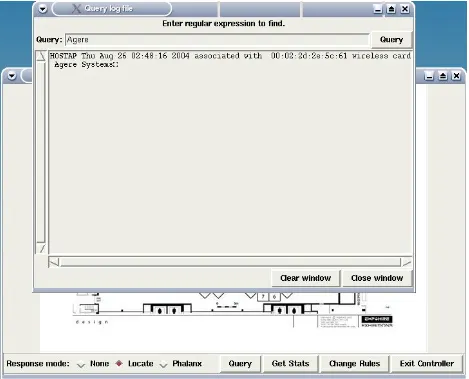
getantennareadings(hapd->beginsweep) to read the simulated antenna data and writes a message to the access point log which lists the access point name, the date and time, the MAC address of the station and the station’s wireless card type. A sample message is:
HOSTAP Thu Aug 26 02:48:20 2004 associated with 00:0d:88:4b:e0:d6 wireless card D:Link Corporation
The HostAP access point sends the same message to the controller.
6.3.2.2.3 void notifyController(int sock,char buffer1[], hostapd *hapd) {…}
NotifyController sends HELLO message to controller and waits for response.
6.3.2.2.4 static void handleControllerMessage(int sock, void *eloop_ctx, void *sock_ctx) {…}
When a message is received from the controller, HostAP’s run loop function calls
handleControllerMessage with the socket file descriptor and two void pointers *eloop_ctx and *sock_ctx as arguments. HandleControllerMessage(…) casts *eloop_ctx as a *hostapd,
inintializes a buffer, and calls int recmesg(int fd, char buffer1[], hostapd *hapd) to read and process the message.
6.3.2.2.5 void antenna_ap(struct hapd_interfaces *ha){…}