An Update to the iLab Shared Architecture for
Mobile Device Support
https://doi.org/10.3991/ijoe.v13i02.6640
Olawale B. Akinwale
Obafemi Awolowo University, Ile-Ife, Nigeria
Lawrence O. Kehinde
Obafemi Awolowo University, Ile-Ife, Nigeria
Abstract—A number of remote laboratories and virtual laboratories have been created which support the mobile devices factor. The focus of a number of researchers at present is on the platforms which supports these online laborato-ries. This paper presents the solution we developed. The platform we developed is a modification of the iLab Shared Architecture (ISA) which was originally created by the Massachusetts Institute of Technology. It was expanded to in-clude SMS services and WebSocket services. The goal was to ensure that it is able to support all mobile phones and tablets. Feature phones can perform ex-periments via SMS and tablets can use HTML5 based applications while per-sonal computers can use the original ISA services.
Keywords—iLab Shared Architecture, WebSockets, Laboratory Server.
1
Introduction
Online laboratories have existed for several years and a number of platforms have been developed for online laboratories. When many of these were in development though, mobile phones were not the computing devices of choice. Much of the e-learning tools were built for and use on personal computers. Since 2012 however the sale of the personal computer has been on the decline and in 2014, the sale of mobile phones exceeded the sale of personal computers for the first time since the personal computer debuted [1, 2]. Most mobile devices run different operating systems from personal computers and much of these do not support a number of the web technolo-gies which were used for personal computer web applications. Hence a number of there has been a push by researchers of resent to develop online learning solutions which are well suited to mobile devices.
from the sensors in mobile devices, a number of other advantages have been identi-fied for the use of mobile devices in education [6, 7, 8, 9, 10, 11, 12]. All these taken into consideration, a number of online laboratories have been developed specifically for mobile devices [13, 14, 15, 16, 17, 18, 19, 20].
This paper adopts the following definitions: the phrase “mobile device” is used to refer to mobile phones and tablets. Smart watches, smart glasses and other wearable technological devices which can also be classified as mobile devices were not consid-ered in this work. The phrase “online laboratory” is used to refer to a laboratory whose experiments are performed over a network. The phrase “remote laboratory” is used to refer to an online laboratory which has physical equipment at the back-end. The phrase “virtual laboratory” is used to refer to a laboratory which uses a mathe-matical model of physical equipment instead of actual equipment and may or may not be performed over a network. A virtual lab can be installed on a user’s phone or com-puter for example [13] or may be accessed over the internet (e.g. Phet Interactive Simulations [21]).
This paper is structured as follows: Section 2 discusses work with has been done by a number of researchers on supporting online experimentation on mobile devices. Section 3 presents the work which we did in modifying the ISA to support online laboratories on mobile devices. Section 4 presents the tests we carried out on the de-veloped platform and Section 5 concludes this paper and makes some recommenda-tions.
2
Previous Works Done
A number of online laboratories platforms have been developed. The most popular of these include the iLab Shared Architecture (ISA) [22, 23] developed by the Massa-chusetts Institute of Technology, USA, and Weblab-Deusto [24, 25] developed at the University of Deusto, Spain. Others include Labshare Sahara [26, 27] primarily de-veloped at the University of Sydney, and VISIR [28] dede-veloped at Blekinge Institute of Technology, Sweden.
institutions of learning. For example, a vendor university (university A) could set up an SB, an LS and an LSS and a user university (university B) would set up its own SB, USS and ESS. The client software would be provided by university A. with this set up, university B would be able to manage its own student, store its own ment results records and schedule how much time each student could use per experi-ment. University A would not need to bother about all these details i.e. the cost of University A of serving multiple universities would not be much higher than the cost of serving one university.
Weblab-Deusto, on the other hand, uses MySQL for its database management, AJAX for the clients and Python for its lab servers. It was originally largely a two tiered system comprising only a client and a laboratory server. Versions 1.0 and 2.0 could support only single experiments. Weblab-Deusto later evolved to become more modular with version 3.0 to support multiple servers and multiple experiment setups at once [29, 30]. Using AJAX for its clients meant that it supported certain mobile devices [31]. Weblab-Deusto also makes SOAP calls to transfer data between ser-vices.
These online laboratory platforms are open-source under the Creative Commons li-cence. Hence, developers are allowed to customize the framework to suit their needs and desires. These online lab systems were however not originally created to cater for mobile device traffic. While they could support mobile devices, they were not opti-mized for them. Hence a developer or university wishing to provide online laborato-ries for mobile devices would often create the services / methods he needs to cater for traffic from mobile devices.
Deaky et al. [15, 32] developed an Android application for the ISA. This was re-portedly the first Android application for the ISA. The client application communicat-ed with the ISA via SOAP calls. Oycommunicat-ediran et al. [18] also developcommunicat-ed an Android client for online laboratories using the architecture of the ISA. The existing ISA software was not used as is. Rather, thinned versions of the SB and LS were used. Both of these works made use of the ISA and both of these works developed the mobile appli-cations from scratch using the Android software development kit (SDK). The benefit of using the SDK of a mobile device’s operating system is that it makes the full power of the operating system available to the developer and with good programming tech-niques, the applications developed can be optimised for the mobile devices. Using the SDK however has one serious drawback: it is difficult to port the developed applica-tions to a different mobile operating system. For example, the Android SDK uses Java while the iOS SDK uses C++. Hence any programs written for Android from scratch using the Android SDK would have to be re-written from scratch for iOS in order to get the iOS version. By implication, modifying the software developed for the differ-ent platforms would also be very tedious.
application to the user is minimal, being only the cost transferring the data between the app and the backend. However updating the software would require the user to download a new version each time which means that logistics must be put in place for informing the user that there is a new version and for supporting a number of versions of the app at the same time since not every user would update soon after the new software rolls out. Hosting the application in a webpage, however, has the advantage that updating the software is a breeze. Once an update is done, everyone that loads up the app in their browser has access to the up-to-date software. It however has the drawback that each time the user launches the app in their browser the entire app is downloaded into the browser which could be a significant increase in data costs to the user.
Instead of using an online laboratory platform, a number of other researchers pro-vided an online laboratory solution by making use of established learning manage-ment systems (LMS). Ruano et al. [33] proposed the use of a Shared Content Object Reference Model (SCORM) for the Learning Management System (LMS). Rochadel et al [17] create a mobile application called RExMobile for experiments in Physics and integrated this into the Moodle LMS. By making use of an existing LMS, these researchers harnessed the advantages of the LMS. Since the LMSs are modular, the developers can focus on just the development of the laboratory modules to fit into these LMS systems. There is also the advantage of the results of the laboratory ses-sions being easily incorporated into the coursework and grading the students since there is no separate online lab system and LMS. The disadvantage however of using a particular LMS is that the online laboratory provided is only application to a universi-ty which uses that LMS. It means that any researcher which decides to develop an online laboratory using any of these LMSs would have to first get his university to adopt that LMS before he can deploy the developed labs.
3
The Services added to the ISA
The platform chosen for this work is the iLab Shared Architecture (ISA) developed as the Massachusetts Institute of Technology [34, 22, 23]. This platform was chosen due to the fact that it is one of the most widely used platforms for online laboratories and the fact that we have experience working with it [35, 36, 37]. This work extended the existing ISA. Two services were created: a WebSockets service to handle traffic between mobile devices and the ISA and an SMS Service to handle SMS traffic. The goal was to have the WebSockets service cater for traffic from smartphones and tab-lets and the SMS service to cater for traffic from feature phones (as SMS). Both ser-vices were created using Visual C#, the language with which the ISA was developed. Microsoft SQL Server was used as the database management system.
The two services created were created to do the same. On receiving data via SMS or WebSockets, the service would check the authorizations of the user and then grant access to the particular services requested. Unlike in the SB in the ISA however, ses-sions were not explicitly used to encapsulate user activity. Each SMS received by the SMS Server effectively begins a new session which terminates with an SMS returned to the user, or an error and discard message. On the other hand, the WebSocket con-nection was the only “session” used by the WebSockets server after authentication of the user. Once a connection was established, the user had a session open via which he could send and receive data. The session ended when the WebSocket connection was closed or broken.
3.1 The SMS Service
The SMS service comprised two databases and a bunch of methods. The acronym DB will be used following to stand for database and the phrase “SMS Experiment” will be used to refer to an experiment to be performed via SMS.
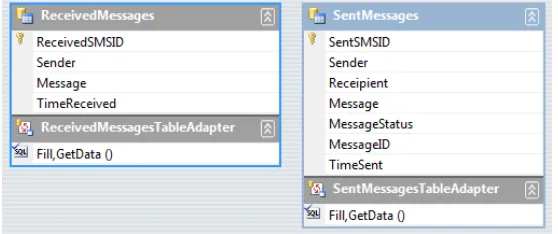
One database, called the TextMessages DB, was used to store all text messages re-ceived and sent. The two tables in the TextMessages DB are shown in Figure 1. The second DB, called the DoneSMSExperiments DB (Figure 2), was created with three tables. The first table was used to store records of all experiments which had been done. The second table was used to store all experiment specifications received via SMS. The third was used as an experiment pointer, to tell which experiments had been carried out and which hadn’t.
Fig. 1. Graphic representation of the TextMessages DB’s XML Schema Document (xsd)
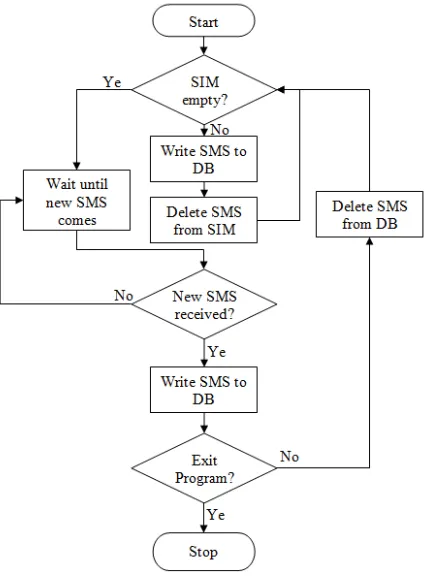
The SMS Service was created to constantly poll the DoneSMSExperiments DB via its ExptPointer table to locate new experiment specifications which had not be dealt with. New text messages arriving on the server however triggered an event. Whenever a new text message is received, the SMS Service sends a query to the ISA to find out if the sender had is registered with the SB. If not registered, the sender is notified via SMS. If registered, the service parses the received message to tell what the text mes-sage was intended for. Any improperly formatted text mesmes-sage is stored in the TextMessages DB and then no further action is taken on it. The flowchart of the all operations carried out when the New Text Message event is triggered is shown in Figure 3.
A writeReceivedSMSToDB method was created to handle writing messages to the TextMessages DB. This method parsed writes the received message into the Re-ceivedMessages table of the TextMessages DB. If the received message is formatted as an experiment specification, it would then call another method, called the writeReceivedSpecsToDB method, to write the received message into the Re-ceivedSMSExperients table of the DoneSMSExperients DB. It does not check the validity of the experiment specification. That is handled by the experiment engine. Text messages which begin with the four characters “EXP:” were read by the SMS Service to be experiment specifications.
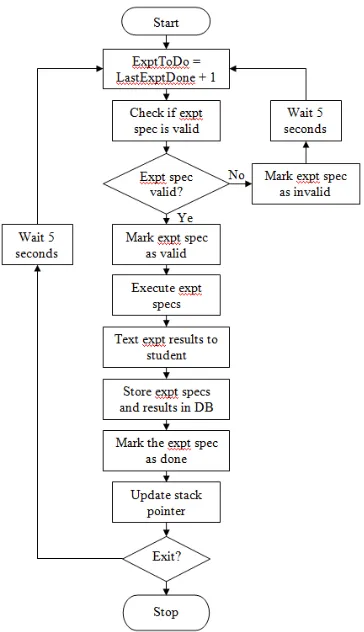
The SMS Service polls the DoneSMSExperiments DB every 15 seconds to deter-mine if there are any new experiment specifications which have not been attended to. On finding a new experiment specification the performExperiment method is called. This method reads the first two characters of the specification received to determine which experiment engine to hand it off to. The relevant experiment engine would then be called to check the validity of the specification received and / or perform the exper-iment. The experiment engine would be expected to return two parameters to the performExperiment method. One parameter would say whether or not the specifica-tion was valid and the second would hold the result of the experiment in a format which can be sent back as is to the user. These two parameters, as well as the time they are received and whether or not the user had been notified of his results via SMS are then stored in the DoneSMSExpts table of the DoneSMSExperiments DB. For successful experiments, the result is also sent to the ESS of the ISA so that these re-sults can also be accessed via a web browser. The two characters used to indicate the experiment engine to be called can be any alphanumeric characters. Hence the service can address up to 1296 different experiment engines. A flowchart showing the se-quence of operations carried out every 15 seconds is shown in Figure 4.
The SMS Service created was made only for performing experiments via SMS. This service could be developed further to include other services like scheduling of experiments, registering new users, and querying the SB for results of previous exper-iments carried out. One goal of the SMS Service was to make it possible to login and submit the experiment specifications with one text message. Since the target of this service is cash-strapped societies or students, the goal was to minimize to cost to them. Hence, the text messages sent by students to perform experiments are formatted as follows:
1.The first four characters represent the task which the user desired to perform. For example, “EXP:” tells the server that the text message contained and experiment specification. “SCH” could be used to tell the server that the text message con-tained an experiment scheduling request.
2.The next two characters following “EXP:” identify the experiment to be performed and hence tell the server which experiment engine to be called.
3.The rest of the text message is the payload of the experiment specification. The server would hand off all of this to the experiment engine which would then parse it for validity and carry out the experiment if valid.
The server authenticated users by their phone numbers. Hence, a student would not be allowed to submit a specification from an unregistered phone line or from a friend’s phone line. Each submission is recorded against the phone number which submitted it and the results are automatically logged to the profile of the owner of the phone line (if the line is registered).
An internet dongle plugged into the SMS server was used by the server to receive text messages. Text messages were sent back to users by means of an online bulk SMSservice. The particular commercial bulk SMS platform used is SMSLive247 [38]. This platform was chosen because of its extensive application program interfac-es (APIs) which made the system fully available to the C# program written, and the fact that they support sending messages to international numbers, and not just local numbers as some other services did. A bulk SMS platform was chosen over sending messages via the internet dongle because bulk SMS services are cheaper.
3.2 The WebSocket Server
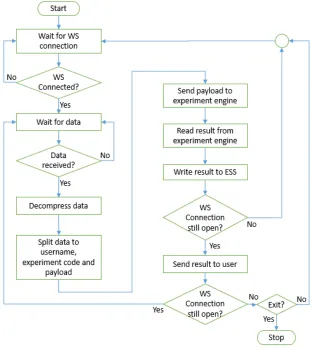
decom-pression, if the data which was sent to the server was compressed before it was sent. As with the SMS Service created, the WS service interacts with the ISA’s databases so that experiments performed are logged into the Service Broker and the results are stored in the Experiment Storage Server. Figure 5 shows the flowchart for the opera-tion of the WS server created.
Fig. 5. Flowchart of readDBAndDoExpts program
4
The Services Added to The ISA
resistors were to be in series or parallel and what the individual resistances were. The student also supplied the input voltage. The virtual lab would then simulate the inputs given to provide the current drawn from the source by the circuit connection speci-fied.
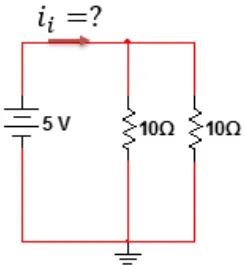
A sample experiment specification which was sent to the virtual lab is: EXP:SC;parallel;Vin=5;R1=10;R2=10
The schematic for this experiment specification is shown in Figure 6. The result which was returned to the user by the lab is shown in Figure 7.
Fig. 6. Schematic of sample Ohm’s Law experiment specification
In the Ohm’s Law virtual lab tested, specifications are sent to the server via text messages. The server checks the phone number which the text message comes from and uses this to identify the sender. Students are not allowed to submit specifications from phones of others.
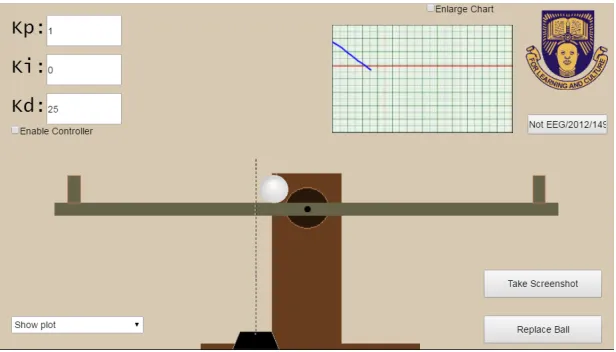
The second lab developed was a remote laboratory, a ball and beam system remote laboratory. This ball and beam system is a control engineering system in which the position of a ball on a beam is controlled by rotating the beam. The objective is typi-cally to get the ball to stop at a desired set point within a given amount of time e.g. 5 seconds or without exceeding a given amount of % overshoot. The ball and beam client was tested on a Blackberry Z10 (smartphone), on a desktop computer and on a Samsung Galaxy Tab 2. WebSockets were used to establish a connection and send data between the client and the WS Server on the Lab Server. The client was devel-oped using HTML5, JavaScript and CSS3 in the Construct 2 program. The client was written such that when a WS connection existed between the client and the server, the laboratory functioned as a remote laboratory and data from the experiment setup was returned to the client. When no connection existed, however, the client notified the user, and entered a virtual lab mode to use a mathematical model of the ball and beam system to compute the results to the user’s inputs. Figure 8 shows the client interface for the ball and beam system remote laboratory. Figure 9 shows the server’s console log showing when a client logged on.
5
Discussion
Making online laboratories available via text messaging makes it possible to per-form an the experiment on feature phones without the need for internet connectivity. The virtual laboratory developed to test the developed system required only a one page text message for the user to submit his specifications. Hence the total cost of performing the experiment to the user was the cost of one text message. This cost also scales linearly with the number of times he performs the experiments. Hence, this online laboratory system would be advantageous for making online laboratories avail-able to students who are not connected to the internet or who cannot afford to connect to the internet to perform the experiments.
There is also a case to be made for the fact that internet chat services would cost less than text messages. Hence a Chat Service could be created for the ISA. The ar-gument against this however is that with the fact that chat engines like WhatsApp, Facebook Messenger and Skype no longer supporting feature phones and Blackberry OS 7.1 phones, anyone who can chat on his phone can most likely also opt for per-forming the experiment either in a web browser or installing the app on his phone and using the WebSockets service created. Hence the authors of this paper did not focus energies on these but we realise that making a chat service available may be of some value.
Fig. 8. Client interface for Ball and Beam Remote Lab
Fig. 9. Server’s log on client connection
from the client and the online laboratory architecture all reside on the server. Hence, clients can be created which can interact with different online lab architectures. All that would be required is that the data sent from the client be formatted in a certain way and then the WebSocket service on server’s end can determine how to route the data through the online lab framework. Hence, the use of WebSockets can make it possible to have cross-platform clients which can work with different online laborato-ry frameworks.
6
Conclusion
7
Acknowledgment
I would like to appreciate the support from Dr Kayode P. Ayodele and Dr Isaac A. Inyang for the help they rendered with some subtleties in the C# programming.
8
References
[1] International Telecommunication Union, "The World in 2014: ICT Facts and Figures," 18 December 2014. [Online]. Available: http://www.itu.int/en/ITU-D/Statistics/Documents/ facts/ICTFacts Figures2014-e.pdf. [Accessed 23 February 2015].
[2] Gartner, Inc., "Gartner Says Declining Worldwide PC Shipments in Fourth Quarter of 2012 Signal Structural Shift of PC Market," 14 January 2013. [Online]. Available: http://www.gartner.com/ newsroom/id/2301715. [Accessed 10 April 2016].
[3] E. Ballester, J. C. Castro-Palacio, L. Velázquez-Abad, M. H. Giménez and L. M. S. R. J A Monsoriu, "Smart physics with smartphone sensors," in 2014 IEEE Frontiers in Education Conference (FIE), Madrid, 2014.
[4] J. C. Castro-Palacio, L. Velázquez-Abad, M. H. Giménez and J. A. Monsoriu, "Using the mobile phone acceleration sensor in Physics experiments: free and damped harmonic oscillations," American Journal of Physics, vol. 81, no. 6, pp. 472-475, 2013. https://doi.org/10.1119/1.4793438
[5] J. A. Sans, F. J. Manjon, A. L. J. Pereira, J. A. Gomez-Tejedor and J. A. Monsoriu, "Oscillations studied with the smartphone ambient light sensor," European Journal of Physics, vol. 34, no. 6, p. 1349–1354, November 2013. https://doi.org/10.1088/0143-0807/34/6/1349
[6] A. Jones and K. Issroff, "Motivation and mobile devices: exploring the role of appropriation and coping strategies," Research in Learning Technology, vol. 15, no. 3, p. 247–258, September 2007. https://doi.org/10.1080/09687760701673675
[7] A. Jones, K. Issroff, E. Scanlon, P. McAndrew and G. Clough, "Affective factors in learning with mobile devices," in Big Issues in Mobile Learning: Report of a workshop by the Kaleidoscope Network of Excellence Mobile Learning Initiative, M. Sharples, Ed., University of Nottingham, 2006, pp. 15-20.
[8] R. Oller, "The Future of Mobile Learning," EDUCAUSE Centre for Applied Research Research Bulletin, pp. 1-7, 1 May 2012.
[9] D. Parsons, "The future of mobile learning and implications for education and training," in Increasing Access Through Mobile Learning, M. Ally and A. Tsinakos, Eds., Vancouver, Commonwealth of Learning and Athabasca University, 2014, pp. 217-229.
[10] N. Y. Asabere, "Benefits and Challenges of Mobile Learning Implementation: Story of Developing Nations," International Journal of Computer Applications, vol. 73, no. 1, pp. 23-27, July 2013. https://doi.org/10.5120/12706-9504
[11] NMC Horizon Project, "NMC Horizon Report: 2012 Higher Education Edition," The New Media Consortium, Austin, Texas, 2012.
[12] Y. Mehdipour and H. Zerehkafi, "Mobile Learning for Education: Benefits and Challenges," International Journal of Computational Engineering Research, vol. 3, no. 6, pp. 93-101, June 2013.
[13] O. O. Satope, L. O. Kehinde, I. O. Boboye, O. B. Akinwale and O. I. Asubiojo, "Development of a suite of virtual experiments for Physics and Chemistry undergraduate laboratories," Computers in Education Journal, vol. XXV, no. 2, 2015.
[15] B.-A. Deaky, D. G. Zutin and P. H. Bailey, "The First Android Client Application for the iLab Shared Architecture," International Journal of Online Engineering (iJOE), vol. 8, no. 1, pp. 4-7, February 2012. https://doi.org/10.3991/ijoe.v8i1.1946
[16] H. M. Al-Otaibi, R. A. AlAmer and H. S. Al-Khalifa, "The next generation of language labs: Can mobiles help? A case study," Computers in Human Behavior, vol. 59, pp. 342-349, 2016. https://doi.org/10.1016/j.chb.2016.02.028
[17] W. Rochadel, J. Shardosim Simao, J. da Silva and A. Vaz da Silva Fidalgo, "Application of mobile devices and remote experiments for physics teaching in elementary education," in Global Engineering Education Conference (EDUCON), 2013 IEEE, Berlin, 2013. https://doi.org/10.1109/educon.2013.6530210
[18] O. S. Oyediran, O. B. Akinwale, K. P. Ayodele and L. O. Kehinde, "Development of a Remote Operational Amplifier iLab Using Android-based Mobile Platform," Computers in Eduction Journal, vol. XXIII, no. 4, pp. 100-110, 2013.
[19] J. B. da Silva, W. Rochadel, R. Marcelino, V. Gruber and S. M. S. Bilessimo, "Mobile remote experimentation applied to education," in IT Innovative Practices in Secondary Schools: Remote Experiments, O. Dziabenko and J. García-Zubía, Eds., Bilbao, University of Deusto, 2013, pp. 281-302.
[20] M. A. Guerra, C. M. Francisco and R. N. Madeira, "PortableLab: Implementation of a Mobile Remote Laboratory for the Android Platform," in 2011 IEEE Global Engineering Education Conference (EDUCON) – "Learning Environments and Ecosystems in Engineering Education", Amman, Jordan, 2011. https://doi.org/10.1109/educon. 2011.5773266
[21] University of Colorado, "Phet Interactive Simulations," 2016. [Online]. Available: https://phet.colorado.edu/. [Accessed 22 April 2016].
[22] V. Harward, J. Del Alamo, V. Choudhary, K. DeLong, J. Hardison, S. Lerman, J. Northridge, D. Talavera, C. Varadharajan, S. Wang, K. Yehia and D. Zych, "iLab: A Scalable Architecture for Sharing Online Experiments," in International Conference on Engineering Education, ICEE2004, Gainseville, Florida, 2004.
[23] J. Harward, T. Mao and I. Jabbour, "iLab Interactive Services – Overview," 2006. [Online]. Available: http://icampus.mit.edu/iLabs/architecture/downloads. [Accessed 7 July 2008].
[24] University of Deusto, "WebLab-Deusto 5.0 Documentation," 2005. [Online]. Available: http://weblabdeusto.readthedocs.org /en/latest/summary.html. [Accessed 6 March 2015]. [25] J. G. Zubía and G. R. Alves, "introduction," in Using Remote Labs in Education: Two
Little Ducks in Remote Experimentation, J. G. Zubía and G. R. Alves, Eds., Bilbao, University of Deusto, 2011, pp. 17-23.
[26] Labshare, "SAHARA Labs," 31 October 2013. [Online]. Available: https://sourceforge.net/projects/labshare-sahara/. [Accessed 22 April 2016].
[27] D. Lowe, H. Yeung, M. Tawfik, E. Sancristobal, M. Castro, P. Orduña and T. Richter, "Interoperating remote laboratory management systems (RLMSs) for more efficient sharing of laboratory resources," Computer Standards & Interfaces, vol. 43, pp. 21-29, 2016. https://doi.org/10.1016/j.csi.2015.07.004
[28] I. Gustavsson, J. Zackrisson, L. Håkansson and I. Claesson, "The VISIR project – an Open Source Software Initiative for Distributed Online Laboratories," in Remote Engineering and Virtual Instrumentation (REV) Conference, Porto, 2007.
[29] J. García-Zubia, P. Orduña, I. Angulo, J. Irurzun and U. Hernández, "Towards a Distributed Architecture for Remote Laboratories," in International Conference of Remote Engineering and Virtual Instrumentation, Deusseldorf, 2008.
[31] D. L. Lopez-de-Ipiña, J. García-Zubia and P. Orduña, "Remote Control of Web 2.0-enabled Laboratories from Mobile Devices," in 2nd IEEE International Conference on e-Science and Grid Computing, Amsterdam, 2006.
[32] B.-A. Deaky and P. H. Bailey, "Towards Android clients for iLab Shared Architecture interactive laboratories," in 15th International Conference on Interactive Collaborative Learning (ICL), Villach, 2012. https://doi.org/10.1109/ICL.2012.6402231
[33] I. Ruano Ruano, P. Cano Marchal, J. Gámez García and J. Gómez Ortega, "PID Control WebLab with LMS Integration Using SCORM," IFAC-PapersOnLine, vol. 48, no. 29, pp. 301-306, 2015. https://doi.org/10.1016/j.ifacol.2015.11.252
[34] J. A. Del Alamo, J. Hardison, G. Mishuris, L. Brooks, C. McLean, V. Chan and L. Hui, "Educational Experiments with An Online Microelectronics Characterization Laboratory," in Proc., International Conference on Engineering Education, Manchester, 2002.
[35] O. B. Akinwale, K. P. Ayodele, L. O. Kehinde and O. Osasona, "Implementing Remote Laboratories with the ILab Architecture: Three Case Studies from Obafemi Awolowo University, Nigeria," Computers in Education Journal, pp. 86-98, 2011.
[36] L. O. Kehinde, K. P. Ayodele, O. B. Akinwale and O. Osasona, "Remote Labs in Education. The Obafemi Awolowo University Experience," in Using Remote Labs in Education: Two Little Ducks in Remote Experimentation, J. G. Zubia and G. R. Alves, Eds., University of Deusto, 2012, pp. 81-111.
[37] L. O. Kehinde, X. Chen, K. P. Ayodele and O. B. Akinwale, "Developing Remote Labs for Challenged Educational Environments," in Internet Accessible Remote Laboratories: Scalable E-Learning Tools for Engineering and Science Disciplines, A. Azad, M. Auer and V. Harward, Eds., 2012, pp. 432-452. https://doi.org/10.4018/978-1-61350-186-3.ch022
[38] iDevWorks Technologies, "SMSLIVE247!," [Online]. Available: http://portal.smslive247.com/public/index.aspx. [Accessed 12 May 2015].
[39] Olivine Labs, "Alchemy Websockets," 2011. [Online]. Available: http://olivinelabs.com/Alchemy-Websockets/. [Accessed 15 November 2015].
9
Authors
Olawale B. Akinwale is lecturer in the Department of Electronic and Electrical
Engineering and a member of the Remote Laboratories Developers Group of the Obafemi Awolowo University, Ile-Ife, Nigeria. Olawale majors in Instrumentation and Remote Laboratories with a keen interest in enhancing pedagogy, mobile devices and machine learning.
Lawrence O. Kehinde, a Professional Engineer, is a Professor of Electronic and Electrical Engineering and the Coordinator of the Remote Lab Development Group of the Obafemi Awolowo University (OAU), Ile-Ife, Nigeria. He worked in Techno-Managerial position as the Director of ICT at OAU for years. His major field is In-strumentation Designs and has designed various equipment. He was the founding Principal Investigator of the University’s iLab research.