Nikola Yonov
Dipl. Eng. Nikola Yonov, PhD Student
University of Architecture, Civil Engineering and Geodesy 1, Chr. Smirnenski Blvd, 1046 Sofia, Bulgaria
Abstract:
The aim of the paper is to describe the technology of creating and adding Augmented Reality to school atlas. No new atlas was created and there is no need of creating one. A current school atlas is used as a base for adding Augmented Reality. Different software, applications and tools for creating AR are presented for Windows, Android and iOS. All of them do not require previous knowledge of programming and are generally easier to use. The steps which a cartographer has to go through are presented, as well as the problems he/she meets and needs to solve in creating an atlas with AR. A classification of Augmented Reality devices is presented. A description of how the use of such technologies act as learning resources for students and its capability to effect learning outcomes is also presented.
Keywords: Atlas, Augmented reality, 3D map, 3D model, Education
1. Introduction
The Augmented Reality (AR) is the inclusion of virtual elements in the vision of the real physical environment for real-time mixed reality creation. Тhe presented content may include 2D or 3D images and models, video and sounds, among others. The virtual objects can be used to display additional information about the real world that are not directly perceived. It increases student engagement and the understanding of learning topics, especially due to effectiveness of spatial visualisation techniques.
In Laboratory of Cartography, University of Architecture, Civil Engineering and Geodesy, Sofia, AR was used for the first time in the process of education. Among the available possibilities for contemporary advanced equipment, the Augmented Reality Sandbox was created. It is elaborated in two UC Davis Centers: Lawrence Hall of Science and ECHO Lake Aquarium and Science Centre. This real-time integrated augmented reality system can physically create topography models by shaping real "kinetic" sand (Bandrova, 2015). In this research another application of the technology AR will be used and on this way educational possibilities will be enriched.
AR provides varying degrees of immersion and interaction that can help students to participate in learning activities. Rather than prohibiting the students from using smartphones and tablets in school lesson, we encourage them to use the modern technology in more useful in terms of education way – AR to become a tool for learning, for better understanding the science, a tool that can strengthen motivation for learning.
2. Augmented Reality
Augmented Reality (AR) is a technology that augments reality with either two or three-dimensional computer generated imagery (CGI), objects and/or information, and allows users to interact with them (Azuma 1997; Carmigniani et al. 2011).
AR can be interpreted “as a view of a physical, real world environment whose elements are integrated with computer-generated sensory input” (Freina & Ott, 2015). The objective is to “see and experience the real world mixed with various virtual objects, without losing the sense of reality” (Persefoni & Tsinakos, 2015)
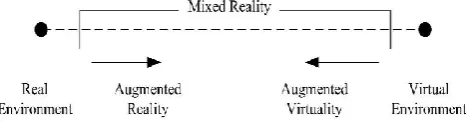
AR is a variation of the Virtual Environment (VE) or Virtual Reality (VR) experience. Ideally, the VE technology immerses the users completely into the virtual world without reference to actuality in the real world. Whereas AR deals with both environments where the user is able to see and experience both the virtual and real world environments simultaneously (Azuma 1997). In 1994, Paul Milgram and Fumio Kishino defined the continuum of Augmented Reality (AR) and Virtual Reality (VR) (Figure 1).
Figure 1: Milgram’s Augmented Reality Continuum, (Azuma, 2001)
reality”. A mixed reality integrates digital information into the real environment. According to Azuma (1997), AR merges both types of objects either in 2D or 3D, leading to an interaction in real time which reflects the mixed reality in Milgram’s AR continuum. Users will begin to experience a virtual surround environment as the point moves to the right leading to the virtual environment. Real objects are added to the virtual ones within the virtual environment to complement the background. Unlike the point on the left side, AR offers a range of digital objects such as audios, videos, haptic touch, and/or images; which can be overlaid onto a real environment.
3.
Types of Augmented Reality
3.1 Marker-based AR (Image recognition)
It requires a special visual object which can be anything, from a printed Quick Response (QR) code to special signs. Marker based applications use a camera on the device to distinguish a marker from any other real world object and it overlays information on top of this marker. Simple patterns (such as a QR code) are used as the markers, because they can be easily recognized and do not require a lot of processing power to read. The AR device also calculates the position and orientation of a marker to position the content, in some cases.
3.2 Markerless AR (Location-based)
It uses the mobile device’s GPS, compass, gyroscope, and accelerometer to provide data based on user’s location. This data then determines what AR content you find or get in a certain area. The wide availability of smartphones and location detection features they provide is in essential significance for the markerless augmented reality technology. It is most commonly used for mapping directions, finding nearby businesses info, and other location-centric mobile applications.
3.3 Projection-based AR
It works by projecting artificial light onto real world surfaces. Projection based augmented reality applications allows human interaction by sending light onto a surface from the real world and then sensing the human interaction of that projected light. Detecting the user’s interaction is done by dissociating between an expected projection and the altered projection caused by the user’s interaction. Another application of projection-based augmented reality utilizes laser plasma technology to project a 3D hologram into mid-air.
3.4 Superimposition-based AR
It partially or fully replaces the original view of an object with a newly augmented view of that same object. In superimposition-based augmented reality, object recognition plays a vital role because the application cannot replace the original view with an augmented one if it cannot determine what the object is. An example of this AR is the IKEA augmented reality furniture catalogue. By downloading their app and scanning selected pages in
their catalogue, users can place virtual IKEA furniture in their own home with the help of AR.
4.
Classification of Augmented Reality devices
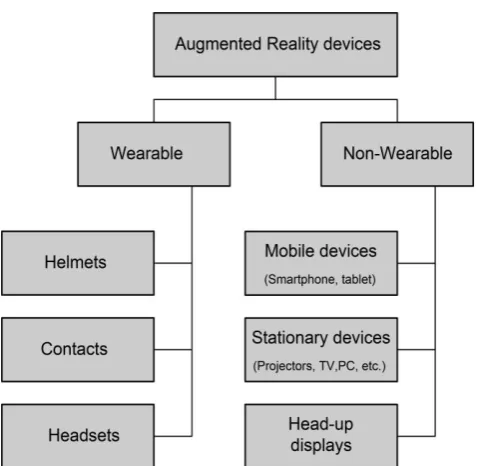
4.1 Devices suitable for Augmented reality
4.1.1 Mobile devices (smartphones and tablets) The most available and best fit for AR mobile apps with the widest range of applications like gaming and entertainment, business analytics, sports, and social networking.
4.1.2 AR glasses (smart glasses)
These units are capable of displaying notifications from your smartphone, access content hands-free, etc. Examples are Google Glasses, Meta 2 Glasses, Laster See-Thru, etc.
4.1.3 AR contact lenses (smart lenses)
Samsung and Sony have announced the development of AR lenses. Respectively, Samsung is working on lenses as the accessory to smartphones, while Sony is designing lenses as separate AR devices (with features like taking photos or storing data).
4.1.4 Virtual retinal display (VRD),
It creates images by projecting laser light into the human eye. Aiming at bright, high contrast and high-resolution images, such systems yet remain to be made for a practical use.
4.1.5 Special AR devices
Devices, designed primarily for augmented reality experiences. An example is head-up displays (HUD), sending data to a transparent display directly into user’s view. Originally introduced to train military fighters pilots, now such devices have applications in aviation, automotive industry, manufacturing, sports, etc.
4.2 Classification of Augmented Reality devices
4.3 Key Components to AR Devices
4.3.1 Sensors and Cameras
Sensors gather a user’s real world interactions and communicate them to be processed and interpreted. Cameras visually scan to collect data about the surrounding area. The devices take this information, which often determines where surrounding physical objects are located, and then make a digital model to determine appropriate output. There are specific cameras to perform specific tasks, such as depth sensing or environment understanding cameras. Other type of camera is a standard several megapixel camera to record pictures, videos, and other information to assist with augmentation.
4.3.2 Processing
Augmented reality devices are basically mini-supercomputers. These devices require significant computer processing power and have components including a central processing unit (CPU), a graphics processing unit (GPU), flash memory, RAM, Bluetooth/Wifi microchip, global positioning system (GPS) microchip, and more. Advanced augmented reality devices, like Microsoft Hololens utilize an accelerometer to measure the speed in which your head is moving, a gyroscope to measure the tilt and orientation of your head, and a magnetometer to function as a compass and figure out which direction your head is pointing to provide for truly immersive experience.
4.3.3 Projection
The projector can turn any surface into an interactive environment. The information taken in by the cameras used to examine the surrounding world, is processed and then projected onto a surface in front of the user; which could be a building, a wall, or even another person. The use of projection in augmented reality devices means that in near future mobile screens will eventually become lesser important.
4.3.4 Reflection
The way your eye views the virtual image in augmented reality devices is connected with the use of mirrors. Some augmented reality devices may have an array of many small curved mirrors and others may have a simple double-sided mirror with one surface reflecting incoming light to a side-mounted camera and the other surface reflecting light from a side-mounted display to the user’s eye. In the Microsoft Hololens, the use of “mirrors” involves see-through holographic lenses that use an optical projection system to beam holograms into your eyes. A so-called light engine, emits the light towards two separate lenses (one for each eye), which consists of three layers of glass of three different primary colors. The light hits those layers and then enters the eye at specific angles, intensities and colors, producing a final holistic image on the eye’s retina. Regardless of method, all of these reflection paths have the same objective, which is to assist with image alignment to the user’s eye.
5.
Tools for creating AR
According to Dodero (2017) AR tools can be classified into three categories.
5.1 Low-level libraries
These tools provide only integration with computer vision algorithms, so require strong programming skills to be able to use them. Some of the best-known libraries and frameworks are Wikitude or Vuforia, which in combination with Unity are very powerful tolls.
Wikitude is a mobile augmented reality technology. The Wikitude software development kit (SDK) includes image recognition & tracking, 3D model rendering, video overlay, location based AR. In 2017 Wikitude launched its SLAM technology which enables object recognition and tracking, as well as markerless instant tracking The idea behind Object Recognition and Tracking is very similar to Image Tracking, but instead of recognizing images and planar surfaces, the Object Tracker can work with three-dimensional structures and objects.
Vuforia is an augmented reality software development kit (SDK) for mobile devices that enables the creation of augmented reality applications. The Vuforia SDK supports a variety of 2D and 3D target types including ‘markerless’ Image Targets, 3D Multi-Target configurations, and a form of addressable Fiducial Marker, known as a VuMark.
Wikitude SDK and Vuforia SDK both provide Application Programming Interfaces in C++, Java, Objective-C++ and the .NET languages through an extension to the Unity game engine.
Unity is a cross-platform real-time engine developed by Unity Technologies. The engine can be used to create both three-dimensional and two-dimensional games as well as simulations for its many platforms. Within 2D games, Unity allows importation of sprites and an advanced 2D world renderer. For 3D games and simulations, Unity allows specification of texture compression, mipmaps, and resolution settings for each platform that the game engine supports, and provides support for bump mapping, reflection mapping, parallax mapping, screen space ambient occlusion, dynamic shadows using shadow maps, render-to-texture and full-screen post-processing effects (source: Unity Technologies).
5.2 High-level programming environments
These tools simplify the development process by providing a supporting environment for building applications. An example of these tools is osgART.
5.3 GUI-based development tools
These tools are in the reach of non-programmers. Several high-level authoring tools exist for building AR applications, such as Quiver, HP Reveal (former Aurasma), Aumentaty, ARCrowd. All of them do not require previous knowledge of programming and are generally easier to use.
often uses colouring pages as markers. This tool is appropriate for kids and can improve their motor skills and hand-eye coordination.
HP Reveal creates AR content based on images or videos. The development can be done through a web page and its visualization is possible in the same tool or in an additional application for mobile devices. The application allows showing 2D, 3D models and videos. To be able to visualize you must pass a link, which is usually QR code, to launch the application installed on the mobile device. ARCrowd is only accessible through the web. The resources allowed are images, sounds, videos and 3D models. The AR objects are grouped in ARbooks. Once developed, the application generates a link to the created ARbook. This application only allows the use of markers as an element of recognition. The playback of AR content is done in the browser but sometimes is quite slow when presenting objects (Dodero, 2017).
Aumentaty is desktop tool, for Windows or Mac OS and enables to include all the options on the same screen. It is based on marks on which the visual elements are arranged. Allows different 2D and 3D image formats but does not support videos or sounds. The software allows modifying the visualization of virtual objects, having options to change size, position, rotation and translation. Another advantage is the possibility of tagging virtual elements, so we can add contextual information to the object represented. This tool has an app for Android and iOS, but tests have shown that it has yet to be improved (Dodero, 2017)..
6.
Applications
Potential areas for AR include:
Education: interactive models for learning and training purposes, from mathematics to cartography;
Tourism: data on destinations, sightseeing objects, navigation, and directions;
Medicine/healthcare: to help diagnose, monitor, train, localize, etc;
Military: for advanced navigation, marking objects in real time;
Broadcasting: enhancing live events and event streaming by overlaying content;
Industrial design: to visualize, calculate or model;
Art / installations / visual arts / music.
AR application in retails facilitates retailers to incorporate more information about the product. AR offer customer enjoyable, convenient and time-saving shopping experience. Retail companies such as Home Depot, IKEA and Sephora already have developed AR apps to provide potential services to customers. AR locates information at the instructions of tourists' fingers, allowing travellers to locate historical information, cafeterias, lodging and other amenities. It helps travellers to save time and better informed (Shimray, Ramaiah, 2018).
7.
Creating and adding Augmented Reality
technology to school atlas
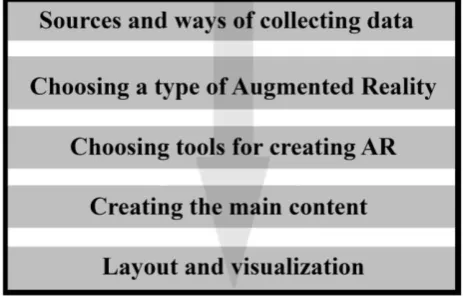
The steps which a cartographer has to go through to create and add Augmented Reality to school atlas are summarized and presented in Figure 3.
Figure 3. Creating and adding Augmented Reality technology to school atlas
7.1 Sources and ways of collecting data
There are unlimited sources for creating an AR like topographic maps, raster images, videos, 3D models, coordinates from geodetic field measurements and more.
7.2 Choosing a type of Augmented Reality
Marker-based AR is most suitable type of AR to add to school atlas. As mentioned above this type of AR use image recognition capabilities to recognize images and overlay information on top of this image. Markers are labels that contain a colored or black and white pattern that is recognized by the AR application through the camera of the device. In this project the different pages of the school atlas are used as different markers.
7.3 Choosing tools for creating AR
GUI-based development tools are very appropriate because they do not require previous knowledge of programming and are generally easier to use and they allow showing 2D, 3D models, photos and videos. But for more elaborate 3D models, animations and simulations in the augmented reality most convenient are Low-level libraries.
7.4 Creating the main content
The main content is the overlay information. In this project different 3D models with complex animations and 3Dgame - like interactions and simulations are created using Vuforia in combination with Unity.
7.5 Layout and visualization Matching all elements
Selection of projection, scale, scene and range
Additional effects and animations
Rendering
8.
Education
There are many factors for quality learning. These include the aptitude and motivation of individual students to learn at their own pace as well as approaches towards learning, including mutual learning. In order to enhance the learning and teaching experience application technologies, domain specific, pedagogical and psychological aspects have to be considered (Markwell, 2003). AR on mobile devices is still relatively new, and consequently there is a lack of research conducted in this field in education, as opposed to AR using computers and goggles (Hamilton 2012). AR environments on mobile devices are evolving and offer a great deal of potential in terms of learning and training. AR has been proven as the tool that can strengthen motivation for learning (Balog and Pribeanu 2010).
In the field of teaching and learning, it is important to assess student satisfaction in relation to student engagement in learning activities with significant material to engender positive interest, learning time and place of choice and individual learning pace (Piccoli et al. 2001).
AR has the potential to revolutionize the place, judgment and effectiveness of studying; by bringing together novel and additional ways of learning approaches. Proficiency in AR technology will make classes more unactive, engaging and information more understandable (Antonioli, Blake, & Sparks. 2014).
Dunleavy and Dede (2014) discovered that AR applications in education are increasingly addressing teamwork skills (thus, saving the social dimension), but cognitive overload and concrete implementation remain a challenge. Di Serio, Ibanez, and Kloos (2013) recruited 69 middle schoolers for executing a set of AR based learning activities finding that their motivation increased more than in the control group. In presenting the Zspace device, Noor and Aras (2015) claim that AR can trigger multimodal and multi-user learning.
In the past few years there were issues related to AR in terms of equipment, the cost of the development, maintenance and conflicts with emerging technologies. In present time these shortages in one way or another have been resolved, but according to Billinghurst and Dünser (2012), this technology is still lacking because of a shortage of non-experts with high skills in developing the content of the subject. High skills are required in terms of 3D modeling, programming knowledge and detailed understanding about the subject for content development (Dunser et al. 2012). Researchers therefore believe that more research and development is needed in the area of AR for education.
9.
Future work
In near future a research with students from 10 to 14 years old and with students from University of Architecture, Civil Engineering and Geodesy in Sofia will be conducted to explore the perception of the atlas with AR. During a period of a week, several analyses will be made and different tasks will be solved by the students
with the help of non-wearable devices – computers, smartphones and tablets. Several variables such as motivation, engagement, perceived learning effectiveness and satisfaction of learning outcomes will be measured. The specific focus will be the potential use of AR in the school system in Bulgaria.
10.
Conclusions
Making an AR app is an extremely complex and labour-intensive process. AR has a rich application and can be of benefit to many different users. The challenges of creating and adding Augmented Reality to school atlas are still not only gathering data, modelling, design and visualization but to use AR in more useful in terms of education way, to become a tool for strengthen motivation for learning, a tool for quality teaching and learning.
11.
References
Antonioli, M., Blake. C.. and Sparks. K. (2014). Augmented Reality Applications in Education. The Journal of Technology Studies.
Azuma, Ronald (1997). "A Survey of Augmented Reality." Teleoperators and Virtual Environments
Azuma, Ronald , Yohan Baillot, Reinhold Behringer, Steven Feiner, Simon Julier, and Blair MacIntyre. (2001). "Recent Advances in Augmented Reality."
Balog, Alexandru , and Costin Pribeanu. (2010). "The Role of Perceived Enjoyment in the Students’Acceptance of an Augmented Reality Teaching Platform: A Structural Equation Modelling Approach." Studies in Informatics and Control.
Bandrova T, M. Kouteva, L.Pashlova, D. Savova and S. Marinova. (2015). Conceptual Framework for Educational Disaster Centre save The Children Life. The International Archieves of the Photogrammetry, Remote Sending and Spatial Information Sciences, Volume XL-3/W3, 28 Sep- 03Oct 2015. La Grande Motte, France
Billinghurst, Mark, and Andreas Dünser. (2012). "Augmented Reality in the Classroom."
Carmigniani, Julie, Borko Furht, Marco Anisetti, Paolo Ceravolo, Ernesto Damiani, and Misa Ivkovic. (2011). "Augmented Reality Technologies, Systems and Applications."Multimedia Tools and Applications. Di Serio, A., Ibáñez M. B., & Kloos, C. D. (2013).
Impact of an augmented reality system on students’ motivation for a visual art course. Computers & Education.
Dodero, J.M., Mota, J.M., Ruiz-Rube, I. and Molina, D. (2017). Learning Augmented Reality in the classroom.
Dunleavy, M., & Dede, C. (2014). Augmented Reality Teaching and Learning. In J.M. Spector et al. (eds.), Handbook of Research on Educational Communications and Technology.
Freina, L., & Ott., M. (2015). A Literature Review on Immersive Virtual Reality in Education: State Of The Art and Perspectives. In Proceedings of eLearning and software for education (eLSE) (pp. 133-141). Bucharest, Romania: ditura Universităţii Naţionale de Apărare „Carol I”.
Hamilton, Karen E. (2012), Research on Effectiveness of Ar in Education.
Markwell, Donald (2003). "Improving Teaching and Learning in University." Business/Higher Education Round Table.
Noor, A. K., & Aras, R. (2015). Potential of multimodal and multiuser interaction with virtual holography. Advances in Engineering Software
Persefoni, K., & Tsinakos, A. (2015). Use of Augmented Reality in terms of creativity in School learning. In Make2Learn 2015 workshop at ICEC’15.
Piccoli, Gabriele, Ahmad Rami, and Blake Ives. (2001). "Web-Based Virtual Learning Environments: A Research Framework and a Preliminary Assesement of Effectiveness in Basic It Skills Training“.