Available Online at www.ijpret.com 1056
INTERNATIONAL JOURNAL OF PURE AND
APPLIED RESEARCH IN ENGINEERING AND
TECHNOLOGY
A PATH FOR HORIZING YOUR INNOVATIVE WORK
SECURING LAPTOP INFORMATION USING MELP SYSTEM
DISHA GUPTA, PRASHANT KHOBRAGADE
Dept. of Computer Sci. & Engi., RGCER, Nagpur-440016
Accepted Date: 05/03/2015; Published Date: 01/05/2015
Abstract: Laptop has become a vital device in our daily life. Because of its mobility characteristics we can used in various place and we can stored our important data in it like office file, photos, bank account numbers etc. But if laptop is stolen then our data can easily access by anyone and that may lead to a serious problem. To overcome this problem we can used Encryption technique except both encryption and decryption key are not stored in laptop. To solve this problem, we can use Mobile Encryption for Laptop data Protection (MELP) system. MELP includes the design of an online server and mobile phone, and Encrypts files. The reason of using a mobile phone is that at least one simple confirmation of execution must be performed by a user, and the reason of using an online server is that if both user’s laptop and mobile phone are stolen, users can still disable the online decryption process on the server. Even if laptop is stolen we didn’t worry about our important data because of MELP system.
Keywords: Laptop, MELP System
Corresponding Author: MS. DISHA GUPTA
Access Online On:
www.ijpret.com
How to Cite This Article:
Available Online at www.ijpret.com 1057
INTRODUCTION
As a benefit from the high-speed computation, large storage and mobility characteristics of laptops, numerous people tend to store their sensitive data on personal laptops at various places.
Examples of sensitive data include
(i) Browser cookies that remember the login credentials or even credit card numbers for financial, shopping and social network sites,
(ii) Personal information is stored in Electronic mail i.e e-mail,
(iii) Chat histories stored in instant messaging applications and personal photos.
(iv) Enterprise employees or managers usually store more sensitive business secrets on their laptops such as financial, operational records or trade secrets of their companies.
Owing to the mobility characteristic, laptops are easily stolen or lost. Given the vast amount of secrets stored on personal laptops, data leakage because of lost or stolen laptops constitutes a major threat to both individuals and enterprises. The destructive consequence of the exposure of confidential data because of lost/stolen laptops warrants the pursuit of a secure and easy-to-use solution to protect the privacy and secrecy of laptop data. The scheme must be resilient to dictionary attacks and password recovery. Right after the loss of a laptop, the secret files on the laptop must be automatically encrypted without user effort and instantly become inaccessible to a thief. Moreover, even if both the laptop and key-storing device are stolen, the user must still be able to disable the process of laptop data decryption. Regrettably, existing solutions for protecting laptop data privacy and secrecy have several drawbacks. For example, the password-based file protection or disk encryption incurs poor security since users tends to choose low-entropy passwords (e.g. ‘123456’) that can be easily reconstructed via dictionary attacks.
In cryptography, encryption is the process of encoding messages or information in such a way
that only authorized parties can read it. Encryption doesn't prevent hacking but it reduces the likelihood that the hacker will be able to read the data that is encrypted. In an encryption scheme, the message or information, referred to as plaintext, is encrypted using an encryption algorithm, turning it into an unreadable ciphertext. This is usually done with the use of
an encryption key, which specifies how the message is to be encoded. Any adversary that can
Available Online at www.ijpret.com 1058 usually requires a secret decryption key that adversaries do not have access to. For technical reasons, an encryption scheme usually needs a key-generation algorithm to randomly produce keys.
Decryption is the process of taking encoded or encrypted text or other data and converting it back into text that you or the computer are able to read and understand. This term could be used to describe a method of un-encrypting the data manually or with un-encrypting the data using the proper codes or keys.
Enterprise employees or business secrets data is of primary importance to the organization. All need to take due care with patient data and ensure that their privacy is not compromised. Mobile devices pose a unique problem as they are easy targets for theft and loss. The data stored on these devices needs to be protected because of this problem. Encryption is a standard solution and is an effective tool to prevent unauthorized access to data. We have put together a list of options based on the operating system and well known, vetted solutions in the information security industry.
Before installing any of the solutions listed below back up your data. If something happens to your password or key, or if the installation goes wrong you could lose all the data on your laptop or mobile device. Once the encryption solution is installed you should routinely back up your data to make sure you have the most current set of data available to you in case something happens to your device.
2. LITERATURE SURVEY
There are mainly three method proposed for protecting information present in the laptop These three methods as follows.
2.1. Keypad: An Auditing File System for Theft-Prone Devices[2]
This method presents Keypad, an auditing file system for theft prone devices, such as laptops and USB sticks. Keypad provides two important properties.
First, Keypad supports fine grained file auditing: a user can obtain explicit evidence that no files have been accessed after a device’s loss.
Second, a user can disable future file access after a device’s loss, even in the absence of device network connectivity.
Available Online at www.ijpret.com 1059 weaving together encryption and remote key storage. By encrypting files locally but storing encryption keys remotely, Keypad requires the involvement of an audit server with every protected file access. By alerting the audit server to refuse to return a particular file’s key, the user can prevent new accesses after theft. We describe the Keypad architecture, a prototype implementation on Linux, and our evaluation of Keypad’s performance and auditing fidelity. Our results show that Keypad overcomes the challenges posed by slow networks or disconnection, providing clients with usable forensics and control for their (increasingly) missing mobile devices.
2.2. Zero Interaction Authentication
Laptops are vulnerable to theft, greatly increasing the likelihood of exposing sensitive files. Unfortunately, storing data in a cryptographic file system does not fully address this problem. Such systems ask the user to imbue them with long-term authority for decryption, but that authority can be used by anyone who physically possesses the machine. Forcing the user to frequently reestablish his identity is intrusive, encouraging him to disable encryption. Our solution to this problem is Zero-Interaction Authentication, or ZIA. In ZIA, a user wears a small authentication token that communicates with a laptop over a short-range, wireless link. Whenever the laptop needs decryption authority, it acquires it from the token; authority is retained only as long as necessary. With careful key management, ZIA imposes an overhead of only 9.3% for representative workloads. The largest cache on our hardware can be re-encrypted within five seconds of the user's departure, and restored in just over six seconds after detecting the user's return. This secures the machine before an attacker can gain physical access, but recovers full performance before a returning user resumes work
2.3. Mobile User Location-specific Encryption (MULE): Using Your Office as Your Password [3]
Available Online at www.ijpret.com 1060 “plug-and-play” solution) and a corporate setting where staff management of a white list of acceptable devices allows a higher level of security. It has implemented both systems and found automatic key derivation introduces a five second delay during the initial access to sensitive files [4].
3. METHODOLOGY
3.1 ALGORITHM USED FOR ENCRYPTION
3.1.1 MD5
The MD5 message-digest algorithm is a widely used cryptographic hash function producing a 128-bit (16-byte) hash value, typically expressed in text format as a 32 digit hexadecimal number. MD5 has been utilized in a wide variety of cryptographic applications, and is also commonly used to verify data integrity.
MD5 was designed by Ron Rivest in 1991 to replace an earlier hash function, MD4. The source code in RFC 1321 contains a "by attribution" RSA license.
The security of the MD5 hash function is severely compromised. A collision attack exists that can find collisions within seconds on a computer with a 2.6 GHz Pentium 4 processor (complexity of 224.1). Further, there is also a chosen-prefix collision attack that can produce a collision for two inputs with specified prefixes within hours, using off-the-shelf computing hardware (complexity 239). The ability to find collisions has been greatly aided by the use of off-the-shelf GPUs. On an NVIDIA GeForce 8400GS graphics processor, 16–18 million hashes per second can be computed. An NVIDIA GeForce 8800 Ultra can calculate more than 200 million hashes per second. These hash and collision attacks have been demonstrated in the public in various situations, including colliding document files and digital certificates.
MD5 processes a variable-length message into a fixed-length output of 128 bits. The input message is broken up into chunks of 512-bit blocks (sixteen 32-bit words); the message
is padded so that its length is divisible by 512. The padding works as follows: first a single bit, 1,
is appended to the end of the message. This is followed by as many zeros as are required to bring the length of the message up to 64 bits fewer than a multiple of 512. The remaining bits are filled up with 64 bits representing the length of the original message, modulo 264.
Available Online at www.ijpret.com 1061 consists of four similar stages, termed rounds; each round is composed of 16 similar operations based on a non-linear function F,modular addition, and left rotation. Figure 3.1 illustrates one operation within a round. There are four possible functions F; a different one is used in each round:
3.2 SIMULATOR
3.2.1 MICROSOFT VISUAL STUDIO
Microsoft Visual Studio is an integrated development environment (IDE) from Microsoft. It is used to develop computer programs for Microsoft Windows superfamily of operating systems, as well as web sites, web applications and web services. Visual Studio uses Microsoft software development platforms such as Windows API, Windows Forms, Windows Presentation
Foundation, Windows Store and Microsoft Silverlight. It can produce both native
code and managed code.
Visual Studio includes a code editor supporting IntelliSense as well as code refactoring. The integrated debugger works both as a source-level debugger and a machine-level debugger. Other built-in tools include a forms designer for building GUI applications, web designer,
class designer, and database schema designer. It accepts plug-ins that enhance the functionality
at almost every level—including adding support for source-control systems (like Subversion and Visual SourceSafe) and adding new toolsets like editors and visual designers for domain-specific languages or toolsets for other aspects of the software
development lifecycle (like the Team Foundation Server client: Team Explorer).
Visual Studio supports different programming languages and allows the code editor and debugger to support (to varying degrees) nearly any programming language, provided a language-specific service exists. Built-in languages include C/C++[5] (via Visual C++), VB.NET (via
Visual Basic .NET), C# (via Visual C#), and F# (as of Visual Studio 2010). Support for other
languages such as M, Python, and Ruby among others is available via language services installed separately. It also supports XML/XSLT, HTML/XHTML, JavaScript and CSS. Individual language-specific versions of Visual Studio also exist which provide more limited language services to the user: Microsoft Visual Basic, Visual J#, Visual C#, and Visual C++.
3.2.2 MICROSOFT VISUAL C#
Available Online at www.ijpret.com 1062 part of the .NET Framework. The Visual C# 2008, 2010 and 2012 compilers support versions 3.0, 4.0 and 5.0 of the C# language specifications, respectively. Visual C# supports the Visual Studio Class designer, Forms designer, and Data designer among others.
3.2.3 MICROSOFT VISUAL WEB DEVELOPER
Microsoft Visual Web Developer is used to create web sites, web applications and web
services using ASP.NET. Either C# or VB.NET languages can be used. Visual Web Developer can
use the Visual Studio Web Designer to graphically design web page layouts.
On April 12, 2010, Microsoft released Visual Studio 2010, codenamed Dev10, and .NET
Framework 4. The Visual Studio 2010 IDE was redesigned which, according to Microsoft, clears
the UI organization and "reduces clutter and complexity." The new IDE better supports multiple document windows and floating tool windows, while offering better multi-monitor support. The IDE shell has been rewritten using the Windows Presentation Foundation (WPF), whereas the internals have been redesigned using Managed Extensibility Framework (MEF) that offers more extensibility points than previous versions of the IDE that enabled add-ins to modify the behavior of the IDE. The new multi-paradigmML-variant F# forms part of Visual Studio 2010. Visual Studio 2010 comes with .NET Framework 4 and supports developing applications targeting Windows 7. It supports IBM DB2 and Oracle databases, in addition to Microsoft SQL
Server. It has integrated support for developing Microsoft Silverlight applications, including an
interactive designer. Visual Studio 2010 offers several tools to make parallel programming
simpler: in addition to the Parallel Extensions for the .NET Framework and the Parallel Patterns
Library for native code, Visual Studio 2010 includes tools for debugging parallel applications.
The new tools allow the visualization of parallel Tasks and their runtime stacks. Tools for profiling parallel applications can be used for visualization of thread wait-times and thread migrations across processor cores. Intel and Microsoft have jointly pledged support for a new Concurrency Runtime in Visual Studio 2010 and Intel has launched parallelism support
in Parallel Studio as an add-on for Visual Studio
4. WORKING OF PROJECT
4.1 MODULES
Laptop encryption
Mobile encryption
Available Online at www.ijpret.com 1063
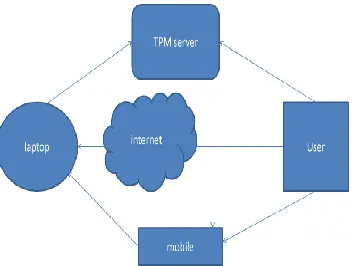
4.2 SCHEMATIC VIEW OF MELP SYSTEM
Fig. 4.2 Design of MELP System
4.3 MODULE DESCRIPTION
LAPTOP ENCRYPTION
Fig. 4.3.1 Main window of Encryption in Laptop
Available Online at www.ijpret.com 1064
MOBILE ENCRYPTION
Fig 4.3.3 Window of Login Page in Mobile
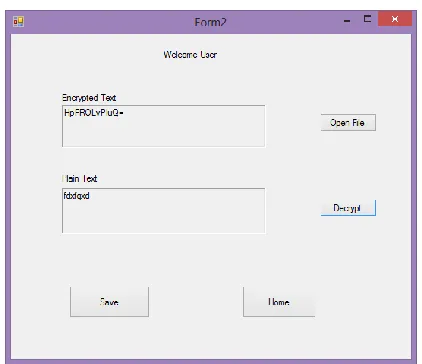
Fig 4.3.4 Window of Decryption in Mobile
Available Online at www.ijpret.com 1065
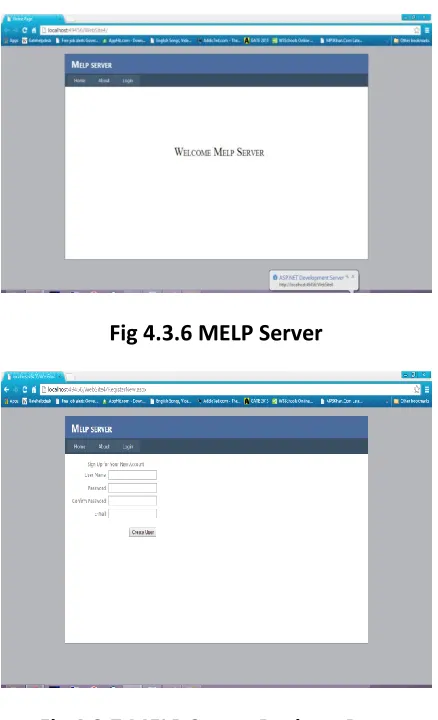
SEVER SIDE
Fig 4.3.6 MELP Server
Fig 4.3.7 MELP Server Register Page
5. RESULT AND DISCUSSION
The comparison of MELP and many related technologies mentioned .The MULE system focused on data decryption at trusted locations, therefore users cannot use it anywhere. The ZIA system focused on the data encryption and decryption scheme rather than the establishment of secure channel. Finally, since all the other solutions require the specific client device or hardware module, only MELP is applicable to be executed on popular laptops and mobile phones.
Based on the proposed system design, a system prototype of MELP is implemented. the laptop secret file encryption mechanism is implemented by the MD5 algorithm which encrypts the file system with a file system encryption key(Default Key).
Available Online at www.ijpret.com 1066
Fig. 5.1 Window of Encryption of File in Laptop
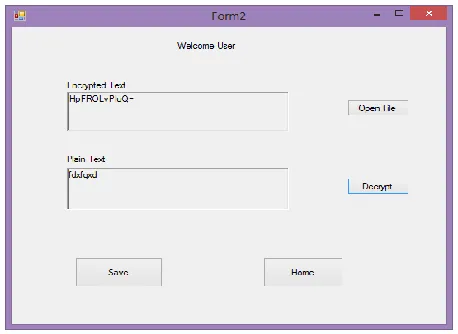
The Same encrypted file is decrypted on mobile device with same MD5 decryption algorithm.
Fig. 5.2 Window of Decryption of File in Mobile
So the sensitive information file is protected even if the laptop is stolen. The user can not worry about leakage of information. User information is safe and sound.
CONCLUSION
Available Online at www.ijpret.com 1067
FUTURE WORK
Apply a more powerful cryptographic algorithm to protect file (like Asymmetric algorithm).
A MELP server is adopted so that if both the laptop and mobile phone are stolen, users can still disable the online decryption process on the server.
QR code is designed so that users can decrypt their files conveniently and securely.
As NFC technology has not been supported by laptops, we currently adopt QR code images and cameras to implement the constrained channel.
In the future, we will replace the QR code with NFC technology once NFC is supported on most laptops or even PCs.
REFERENCES
1. Y.-W. Kao, X. Zhang, A. Studer, A. Perrig,” Mobile encryption for laptop data protection (MELP)” IET Information Security, 22nd June 2012.
2. Geambasu, R., John, J.P., Gribble, S.D., Kohno, T., Levy, H.M.: ‘Keypad: an auditing file system for theft-prone devices’. Proc. European Conf. Computer Systems (EuroSys), 2011, pp. 1–16
3. Studer, A., Perrig, A.: ‘Mobile user location-specific encryption (MULE): using your office as your password’. Proc. ACM Conf. Wireless Network Security (WiSec), March 2010, pp. 151 162
4. Corner, M.D., Noble, B.D.: ‘Zero-interaction authentication’. Proc. Eighth Annual Int. Conf. Mobile Computing and Networking (MobiCom ’02), 2002, pp. 1–11.
5. ANDREA L. FOSTER,” Increase in Stolen Laptops Endangers Data Security”, chronicle, Volume 54, Issue 43, Page A1 July 4, 2008.
6. Florian Michahelles, Frederic Thiesse, Albrecht Schmidt, and John R. Williams,” Pervasive RFID and Near Field Communication Technology”, 1536-1268/07/IEEE