Usability and Performance Measure of a Consumer-grade Brain
Computer Interface System for Environmental Control
by Neurological Patients
Farzin Deravi
1, Chee Siang Ang
1, M A Hannan Bin Azhar
2, Areej Al-Wabil
3, Malcolm Philips
1, 4,
Mohamed Sakel
1, 4, *1
School of Engineering and Digital Arts, University of Kent, UK.
2 Computing, Digital Forensics and Cybersecurity, Canterbury Christ Church University, UK.
3 College of Computer and Information Sciences, King Saud University, Saudi Arabia.
4 Neuro-rehabilitation, East Kent Hospitals University, NHS Foundation Trust, UK.
Received 02 March 2014; received in revised form 07 August 2015; accepted 10 August 2015
Abstract
With the increasing incidence and prevalence of chronic brain injury patients and the current financial
constraints in healthcare budgets, there is a need for a more intelligent way to realise the current practice of
neuro-rehabilitation service provision. Brain-computer Interface (BCI) systems have the potential to address this
issue to a certain extent only if carefully designed research can demonstrate that these systems are accurate, safe,
cost-effective, are able to increase patient/carer satisfaction and enhance their quality of life. Therefore, one of the
objectives of the proposed study was to examine whether participants (patients with brain injury and a sample of
reference population) were able to use a low cost BCI system (Emotiv EPOC) to interact with a computer and to
communicate via spelling words. Patients participated in the study did not have prior experience in using BCI
headsets so as to measure the user experience in the first-exposure to BCI training. To measure emotional arousal of
participants we used an ElectroDermal Activity Sensor (Qsensor by Affectiva). For the signal processing and feature
extraction of imagery controls the Cognitive Suite of Emotiv's Control Panel was used. Our study reports the key
findings based on data obtained from a group of patients and a sample reference population and presents the
implications for the design and development of a BCI system for communication and control. The study also
evaluates the performance of the system when used practically in context of an acute clinical environment.
Keywords: stroke, rehabilitation, brain-computer interface, electroencephalography, emotiv EPOC
1.
Brain—Machine Interface: Closer to Therapeutic Reality?
Brain Computer Interface (BCI) systems are considered one of the innovations that can potentially change the
management of disability for the human race. Global interest in the use of BCI in neurorehabilitation and the ethical challenges
stemming from that encompasses a diverse group of professionals [1]. BCI systems establish a direct link between a brain and a
computer by transforming some measurable neurophysiological signals into computer commands for devices such as computers,
switches or prostheses [2-6] without the use of any motor control by users [7- 8]. The clinical use of BCI consists mainly of
application to patients with substantial deficits in communication and motor function [4, 9-10]. Studies have shown that the use
of BCI systems aid faster recoveries in patients with both mental and physical traumas when compared to those who undergo
traditional rehabilitation methods [11-12]. In BCI systems signals from the brain can be measured by detecting an electric field
(electro-encephalo-graphy-EEG, electro-cortico-graphy –EcoG etc.) or a magnetic field (magneto-encephalo-graphy - MEG),
functional magnetic resonance imaging (fMRI) and several other ways [13-14]. Amongst the various methods EEG has proven
to be a better choice for use in the clinical environment and in real-time systems due to its portability and lower cost [15].
Several studies indicate that patients with severe motor disabilities require alternative means of communication and surface
EEG signals can be used effectively to interact with the outside world by operating external devices [6, 16- 18].Thus BCI has
importance particularly in the context of the rehabilitation of severely limited patients. One of the objectives of our study was to
investigate the viability of low cost BCI systems to assist neurologically disabled patients, we have chosen an EEG based BCI
system for our study which is relatively inexpensive and non-invasive.
Consumer-grade non-invasive BCI systems are available in user-friendly styles such as baseball caps [19] headbands [20]
and headsets [21] and provide both an easy setup process and freedom of postures for users; this makes the application of BCI
systems in both healthcare and the entertainment industry much easier than ever. In this paper, we will investigate the use of a
consumer-grade BCI system as an assistive technology device for communication and control for patients with neurological
conditions. The study was part of a collaborative research program between the University of Kent and East Kent Hospitals’
University NHS Foundation Trust, both in the UK. Participants involved in this HCI research study were patients on the
neuro-rehabilitation unit at the Kent and Canterbury Hospital. Study participants had been diagnosed with a range of
neurological conditions (e.g. Acute Brain Injury, Multiple Sclerosis, Motor Neuron Disease, Cerebral Palsy, Stroke). An
equivalent number of healthy participants were recruited as controls.
The remainder of the paper has been organised as follows: Participant demographics and apparatuses used in the system
are described in Section 2 followed by a description of the experimental procedure in Section 3. Section 4 reports the results.
Section 5 concludes the paper.
Table 1 Demographics of participants
Participant Gender Age Neurological Condition
Patient 1 (P1) Female 74 Right Brain Stroke
P2 Male 67 Multiple Sclerosis
P3 Male 48 Multiple Sclerosis
P4 Female 22 Cerebral Hemorrhage
P5 Male 45 Multiple Sclerosis
Control 1 (C1) Male 37 -
C2 Male 27 -
C3 Male 26 -
C4 Male 25 -
C5 Male 43 -
2.
Participants and apparatuses
The study was piloted with two participants; data from these two pilot sessions was not included in the analysis. Ten
participants took part in the usability sessions; five controls and five patients with neurological conditions with different kinds
of lesion(s) e.g. discrete & diffuse, static vs progressive & diagnostic diversity e.g. MS, Stroke. The inclusion criterion for
patients was that the patient must not have had prior experience in using BCI headsets so as to measure the user experience in the
first-exposure to BCI training and to evaluate the learnability and usability of these BCI systems. Participant Demographics are
Fig. 1 A BCI application system adapted from [22]
Although various types of systems exist, Fig. 1 shows a typical non-invasive EEG BCI system which was used in the study.
The system consists of several core components with specific functions [22]:
Signal recording to capture the EEG
Signal processing, which removes noise and artefacts from the EEG
Feature extraction, which identifies EEG features relevant to the context of application
Classification, which involves training a computer algorithm with a subset of the extracted features and using the trained classifier to classify the rest of the data. This component provides an interpretation of the raw EEG signals
Activation of the chosen application, e.g. a radio, television, video player
Feedback to the user, which in turn reinforces the process. The implementation of a BCI system in a particular context (e.g. in neurorehabilitation) normally involves both an application and a user interface. While a BCI system transforms EEG signals
into an appropriate output to control the selected application (e.g. electronic devices or computers), the activation of the
application converts these control signals into feedback (i.e. stimuli such as audio, visual or haptic), through a user interface.
The usability sessions involved measuring emotional arousal of participants with ElectroDermal Activity Sensors
manufactured by Affectiva, the Qsensor [23] is shown in Fig. 2(a). The Qsensor is comprised of electrodes for measuring
temperature, electro dermal conductance (in microsiemens), and an accelerometer (measuring acceleration in G) with sampling
rates of 2,4,8,16, and 32 Hz. The dimensions of the wrist-worn band are 14.7mm × 56.6mm × 31.8mm (h ×l × w) and weighing
22.7grams. The EEG was measured by the Emotiv EPOC EEG headset [24] with 16 sensors as shown in Fig. 2(b). The
Cognitive Suite of Emotiv's Control Panel software was used for the signal processing and feature extraction of imagery
controls that were used in the session for navigating to the right, navigating to the left, and the action of pushing as shown in Fig.
(a)Qsensor (b) Epoch Headset (c) Video Logging of BCI Training
Measures of Emotional
Arousal Brainwave Activity
Accuracy levels of training the BCI system to navigate left, right and to push
Fig. 2 Experimental apparatus used in the usability sessions
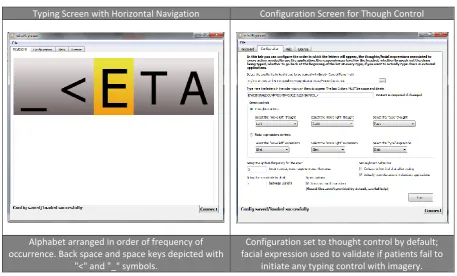
Typing Screen with Horizontal Navigation Configuration Screen for Though Control
Alphabet arranged in order of frequency of occurrence. Back space and space keys depicted with
"<" and "_" symbols.
Configuration set to thought control by default; facial expression used to validate if patients fail to
initiate any typing control with imagery.
Fig. 3 Brainwave typing interfaces
3.
Procedures
The study and the Informed Consent Form (ICF) received approval from the Ethics committee of the University of Kent.
All patients were screened for eligibility; e.g. patients with epilepsy and user of other neuro-stimulators or pacemakers were
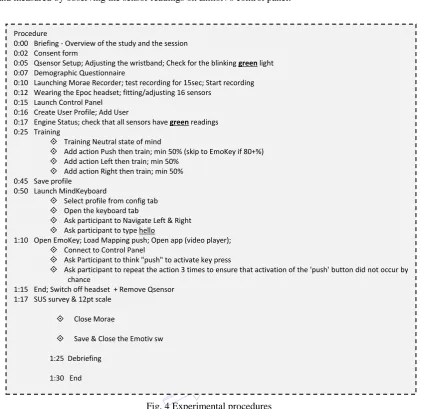
ruled out. Participants were tested individually. The procedure for conducting the usability evaluation sessions for the BCI
system is depicted in Fig. 4. Sessions started with a brief overview of the study's objectives and obtaining informed consent.
Following that, the Qsensor bracelet was setup with Electro Dermal Activity (EDA) sensors placed on the inner part of the
participant's wrist. Time was allocated for the EDA sensors to warm up until the indicator showed a blinking green light. The
demographic questionnaire was presented to participants; patients who needed assistance in completing the demographic
questionnaire were presented with each question verbally and they either answered directly or via their caregiver; responses
were noted accordingly. After completion of questionnaire, the fitting of EPOC headset proceeded by hydrating the 16 sensors
and adjusting the placement of the sensors on the participant's scalp. The Emotiv Control Panel's Headset Setup panel was used
compartments at the front ends of the headband sat comfortably just superior and posterior the participant's ears. The headset
was tilted so that the two lowest, front-most sensors were symmetric on the forehead and positioned 5 – 6 cm above the
participant's eyebrows. The headset was fine-tuned by gently sliding the headset in small increments until an ideal fit had been
achieved and measured by observing the sensor readings on Emtoiv's control panel.
Fig. 4 Experimental procedures
Video logging of the screen interaction was conducted using Morae Recorder [24]. Participants started with the Cognitive
suite of the Emotiv control panel to train the device to recognise their EEG patterns during periods when they were imagining
right and left movements and the 'push' action button as depicted in Fig. 2(c). The training started with training on patterns for
a neutral state of mind, followed by the 'Push' action, then 'Right' or 'Left' depending on the handedness of the participant. When
the accuracy level of the first command, 'push' reached the 95-100% the participant proceeded to the next step to test controlling
an application with this command. The command was to 'Push' the maximize button on a virtual video player launched with the
Emotiv EmoKey application. Following that, training resumed with the navigation buttons, 'Right' and 'Left'. When the training
time reached 30minutes or the accuracy reached 50% for both navigation directions, the participants proceeded to the typing
application. The Mind Keyboard (an Emotive app) was used for this phase of the experimental evaluation and the participants
were requested to type the five-letter word 'hello' by navigating horizontally in the alphabet listing with the 'right' and 'left'
imagery movements and selecting the letter with the 'PUSH' command. Interfaces for this segment of the BCI usability
evaluation is depicted in Fig. 3. Procedure
0:00 Briefing - Overview of the study and the session 0:02 Consent form
0:05 Qsensor Setup; Adjusting the wristband; Check for the blinking green light 0:07 Demographic Questionnaire
0:10 Launching Morae Recorder; test recording for 15sec; Start recording 0:12 Wearing the Epoc headset; fitting/adjusting 16 sensors
0:15 Launch Control Panel 0:16 Create User Profile; Add User
0:17 Engine Status; check that all sensors have green readings 0:25 Training
Training Neutral state of mind
Add action Push then train; min 50% (skip to EmoKey if 80+%) Add action Left then train; min 50%
Add action Right then train; min 50% 0:45 Save profile
0:50 Launch MindKeyboard
Select profile from config tab Open the keyboard tab
Ask participant to Navigate Left & Right Ask participant to type hello
1:10 Open EmoKey; Load Mapping push; Open app (video player); Connect to Control Panel
Ask Participant to think "push" to activate key press
Ask participant to repeat the action 3 times to ensure that activation of the 'push' button did not occur by chance
1:15 End; Switch off headset + Remove Qsensor 1:17 SUS survey & 12pt scale
Close Morae
Save & Close the Emotiv sw
1:25 Debriefing
4.
Results and Discussion
In this section we present the key findings of the research project with a discussion of the measurements examined for
patients and controls and their implications for the design and development of BCI systems for communication and control.
4.1. Proficiency with assistive technology
Participants recruited for this study had a range of neurological conditions. The research study's sample is described with
IDs of C1-C5 for controls and P1-P5 for patients with neurological disorders. Table 2 lists the self-reported comfort-level of
participants with technology in general. Participants in the Patients' group ranged in age between 22 and 74 years (Mean = 51.2
years; Standard Deviation = 20.4 years). Participants in the control group ranged in age between 26 and 43 years of age (Mean
= 31.6 years; Standard Deviation = 7.99 years). Participants were requested to self-report their comfort level of technology on
a scale ranging from 1 to 5 with values of one indicating 'uncomfortable using technology' and five indicating 'very comfortable'.
Since the training of BCI control depends on imagery of navigation in the right and left directions, the participants were
requested to indicate their handedness. All participants in the control group and two participants in the patients' group were
right-handed, and consequently started the imagery training in the right direction. Three participants with neurological disorders
were left-handed and started their imagery training in the left direction. No significant differences in self-reported
comfort-levels with technology were found between the two experimental groups; thus the sample was believed to be
homogenous with regards to proficiency with technology.
Table 2 Technology background of participants P/C Session Date Comfort Level Handedness
P1 Jul 16, 2012 3 Right-handed
P2 Aug 3, 2012 3 Right-handed
P3 Aug 3, 2012 3 Left-handed
P4 Aug 6, 2012 2 Left-handed
P5 Aug 7, 2012 5 Left-handed
M= 3.2 (SD = 1.1)
C1 Jul 12, 2012 3 Right-handed
C2 Jul 12, 2012 3 Right-handed
C3 Jul 17, 2012 4 Right-handed
C4 Jul 17, 2012 5 Right-handed
C5 20 Jul, 2012 3 Right-handed
M= 3.6 (SD = 0.89)
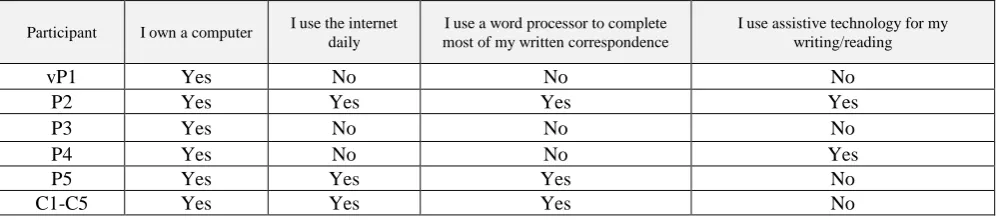
Participants' backgrounds with technology ownership and usage of assistive technology were examined. Participants in
the control group all reported owning at least one computer, using the Internet daily and regularly using a word processor for
typing. None of the reference population reported using assistive technologies for reading or writing. In contrast, participants in
the patient group all reported owning a computer, less than half reported using the Internet on a daily basis or using a word
processor for written correspondence. Two out of the five participants reported using assistive technologies for reading and
writing. Details are shown in Table 3.
Table 3 Assistive Technology Usage
Participant I own a computer I use the internet daily
I use a word processor to complete most of my written correspondence
I use assistive technology for my writing/reading
vP1 Yes No No No
P2 Yes Yes Yes Yes
P3 Yes No No No
P4 Yes No No Yes
P5 Yes Yes Yes No
4.2. User experience in BCI control
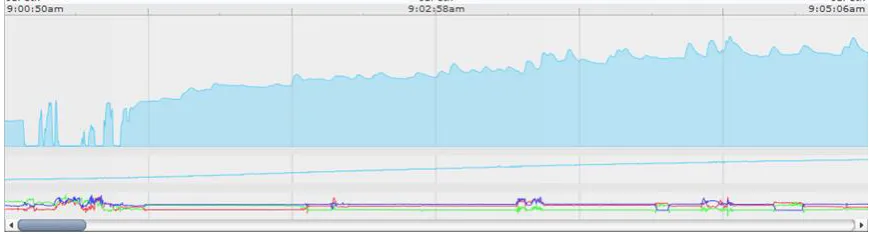
The user experience was examined with quantitative measures of emotional arousal detected by EDA sensors which
monitor body temperature in Celsius, and movement using a 3-axis accelerometer. Spikes in EDA signals were synchronized
with events in the video logs during the training and control sessions. Although regular patterns of emotional arousal were not
found across participants, spikes in emotional arousal were found to be linked with frustration levels in difficult training levels
and with failure in controlling the typing program to type the word in the experimental session. A sample of the EDA readings
(microsiemens) is depicted in Fig. 5.
Fig. 5 Emotional Arousal Sensor Readings (EDA, Temperature, Accelerometer)
4.3. Usability measures of subjective satisfaction
The SUS survey (Appendix A) was used to measure the subjective satisfaction in the first exposure to interactive
technologies. Results ranged from 27.5 to 60 in the control group and from 62.5 to 87.5 in the patients' group. Overall,
participants with neurological conditions reported a higher perceived usability than controls (M=73 and SD=9.91 for patients;
M=46.50 and SD=12.94 for controls). Another survey of subjective satisfaction (Appendix B) was used to examine the
participants' perceived usability of the BCI device in controlling a typing application, controlling a virtual 'Push' button in a
video application. The product evaluation survey completed by the study participants consisted of 12 items with the following
choices of responses: 1 = strongly disagree, 2 = somewhat disagree, 3 = neither agree nor disagree, 4 = somewhat agree, 5 =
strongly agree.
Table 4 shows the variations between the perceived usability of the BCI system between controls (Cs) and the patients (Ps)
on questions #1-5; patients perceived the BCI device as easier to use, more helpful as an assistive technology, and were more
comfortable in using the headset than controls. Table 5 lists the self-reported subjective ratings for perceived safety and
aesthetics' scales. Interestingly, the perceived ease of use, safety, and aesthetics were higher in the patient population but the
perceived negative image of using the BCI headset was stronger in the non-disabled group (scale #8). Patients involved in the
study indicated that they are aware of the degenerative condition and the image reflected in wearing such headsets is not
perceived as a concern as long as the benefit gained from such device is sought with continued control and easier
communication. The final segment of the survey examined the perceived usefulness of the BCI system. The patient group
exhibited more positive views regarding the BCI device when compared to the controls apart from the ease of use. However, it
was noted that patients indicated that this scale applies to their current state of health and is perceived to change as their level of
control deteriorates. Accessibility of the device as indicated in question #12 was a key factor in the enthusiasm exhibited by
Table 4 Perceived Usability of Operating the BCI System
# 1 2 3 4
Survey Question
I could easily complete the task
with the device
The device helped me to complete the
task
It was easy to understand how to operate the device
The device was comfortable to
use
M for Cs 1.80 1.60 4.60 3.40
SD for Cs 0.45 0.55 0.55 0.55
M for Ps 3.20 4.40 4.00 4.40
SD for Ps 0.84 0.55 1.22 0.89
Table 5 Perceived Safety, Aesthetical Quality, Reflective Image of BCI Headsets
# 5 6 7 8
Survey Question
Using the device was easy
Using the device felt
safe
Aesthetically, I like the overall look of the
device
As a "disability product, this device would draw
unwanted attention.
M for Cs 2.60 3.60 4.00 3.00
SD for Cs 0.89 0.89 0.00 0.71
M for Ps 3.60 4.60 4.60 2.60
SD for Ps 1.14 0.55 0.55 1.14
Table 6 Perceived Requirements Matching of the BCI system
# 9 10 11 12
Survey Question
I think the idea behind how the device is meant
to operate provides a good solution to problems I encounter in
everyday life
It was easier to complete the tasks with the device than
it was when using my existing
equipment
Compared to other products to complete the tasks, the actual functionality of this product is
better.
I would be happy to use this device if it
were made available to me.
M for Cs 2.25 2.20 1.80 2.80
SD for Cs 1.50 1.30 0.84 0.45
M for Ps 3.60 1.60 2.80 4.60
SD for Ps 1.67 0.55 0.84 0.55
4.4. Performance measure – Controlling Video-player button
In this section, we describe the performance measures on controlling the video-player button. Sessions ranged in duration
between 65 minutes to 98 minutes. All participants were able to train on the 'Push' command with accuracy ranging between
80-99%. All participants were able to press a virtual button on a video-player application. The button was the maximize-screen
button on the video player. Participants were requested to repeat the action 3 times to ensure that the control was not initiated
inadvertently by imaging a similar movement and the video log was checked to confirm that all actions were in sync with the
'Push' button in the Emotiv Cognitive Suite. The action was set with one rule in the EmoKey application. The trigger condition
for the action was detecting the imagery pattern of 'Push' for duration of more than 0.2s.
4.5. Performance measure – Typing Accuracy
None of the participants were able to complete the task of typing the five-letter word “hello”. Participants in the control
group exhibited more control in navigating the horizontal keypad but were not able to effectively use it to complete the typing
task. Sample words that were typed at the end of the session were 'hhhe' and 'heee l' where the participants attempted to fix the
accuracy in training in general, and the right-left navigation in particular when compared to controls. It was observed that
training became increasingly complex for both groups as participants advanced from single to double commands and accuracy
levels remained at low levels despite allocating the same amount of time for training the system to recognize imagery
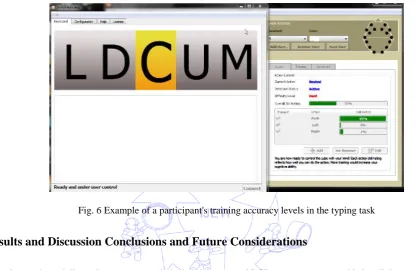
movements in the right and left directions. An example is the patient's session depicted in Fig. 6 in which accuracy for 'Push' was
97%, 'Left' was 0% and 'Right' was 7%. This patient's performance on the typing task resulted in controlling the horizontal
keypad's movement in the right direction with difficulty; however, this participant was not able to reach the letters for
completing the word in the task. Given the small number of patients and their conditions it is possible that the lower accuracy for
the ‘Left’ and ‘Right’ buttons is not an inherent feature of the device but rather due to capabilities and limitations of the
individual patients.
Fig. 6 Example of a participant's training accuracy levels in the typing task
5.
Results and Discussion Conclusions and Future Considerations
From the results and discussion we can conclude that the proposed BCI system was acceptable by all the neurological
patients who participated in the study and they perceived it safe to use. One of the limitations of our study was the sample size
and this was due to the difficulty to find real patients who would voluntarily take part in the experiments. Patients participated
in our study were self-selected and enthusiastic with high motivation and interest in technology. The patient group (M=73;
SD=9.91) generally perceived the BCI device quite positively compared to the control group (M=46.50; SD=12.94). In terms of
tasks performance, all participants in both groups were able to complete the first task successfully. However, none of them were
able to complete the typing task. Participants in the control group exhibited more control in navigating the horizontal keypad but
were not able to effectively use it to complete the typing task. Participants from the patients group exhibited lower accuracy in
training in general, and the right-left navigation in particular when compared to controls. It was observed all participants in the
patient group were able to achieve high accuracy levels in the first phase of the training (i.e. the single command).
It has been reported that consumer-grade BCI systems currently face challenges in producing clear EEG signals for
control [26, 27]. In such systems, EEG signals can be easily contaminated by various noise sources such as power line
interferences and the presence of unwanted physiological signals etc.[28]; this is particularly an issue if there is contamination
(e.g. hair, sweat) at the skin-electrodes-scalp interface. A drop in signal quality can lead to a deterioration in the application’s
To improve the accuracy of the BCI system we evaluated, in future we would like to follow the directions recently
introduced by researchers by incorporating: (1) hybrid signals [29] and (2) adaptive feedback training [30]. First, hybrid signals
composed of two high level parameters such as brain signals (EEG) and other features like facial expressions or eye movements
and in such systems accuracy of the task can be improved by adopting complementary classification [31]. Secondly studies have
shown that [32] by using user adaptation during training, higher accuracy can be achieved in reduced training time. Long-term
training can make users tired and affect user’s mental states and eventually degrade the accuracy of a task. It was observed in our
study that training became increasingly complex for both patients and control groups as participants advanced from single to
double (and triple) commands and accuracy remained low. In future we hope to improve the training by incorporating an
adaptive scheme. Nevertheless, our current study reported in this paper showed the general acceptance of the consumer-grade
BCI device amongst neurological patients. With the suggested improvement, we hope to achieve higher accuracy in future. Our
research demonstrated that when carefully designed the proposed off-the-shelf consumer grade BCI system can be acceptable to
the patients. We propose future studies to utilise patient-reported outcome measures (PROM) to ascertain usability of BCI
devices.
Acknowledgement
The authors are grateful to the patients and carers who participated in this study without any financial inducement.
Authors would also like to thank the East Kent Hospital for granting a competitive student bursary of £2k towards this BCI
study.
References
[1] C. Ang, M. Sakel, M. Pepper, and M. Phillips, “Use of brain computer interface in neurological rehabilitation,” British
Journal of Neuroscience Nursing, vol. 7, pp. 523-528, 2011
[2] W. Wang, J. L. Collinger, M. A. Perez, E. C. Tyler-Kabara, L. G. Cohen, N. Birbaumer, et al., “Neural interface technology
for rehabilitation: exploiting and promoting neuroplasticity,” Physical Medicine and Rehabilitation Clinics of North America, vol. 21, no. 1, pp. 157-178, 2010.
[3] N. Birbaumer and L. G. Cohen. “Brain-computer interfaces: communication and restoration of movement in paralysis,” J
Physiol, vol. 579, no. 3, pp. 621-636, 2007.
[4] R. Scherer, G. R. Müller-Putz and G. Pfurtscheller, “Flexibility and practicality graz brain-computer interface approach,” International Review of Neurobiology, vol. 86, pp. 119-131, 2009.
[5] N. Birbaumer, A. Ramos-Murguialday, C. Weber and P. Montoya, “Neurofeedback and brain computer interface clinical applications,” International Review of Neurobiology, vol. 86, pp. 107-117, 2009.
[6] B. Blankertz, F. Losch, M. Krauledat, G. Dornhege, G. Curio and KR. Müller, “The Berlin Brain-Computer Interface: Accurate performance from first-session in BCI-naive subjects,” IEEE Transactions on Biomedical Engineering, vol. 55, no. 10, pp. 2452-2462, 2008.
[7] N. Birbaumer, A. Kubler, N. Ghanayim, T. Hinterberger, J. Perelmouter, J. Kaiser, et al., “The thought translation device
(TTD) for completely paralyzed patients,” IEEE Transactions on Rehabilitation Engineering, vol. 8, pp. 190-193, 2000. [8] G. Pfurtscheller, G. R. Müller, J. Pfurtscheller, H. J. Gerner and R. Rupp, “Thought'-control of functional electrical
stimulation to restore hand grasp in a patient with tetraplegia,” Neuroscience letters, vol. 351, pp. 33-36, 2003.
[9] DJ. Krusienski and JR. Wolpaw, “Brain-computer interface research at the wadsworth center developments in noninvasive communication and control,” International Review of Neurobiology, vol. 86, pp. 147-157, 2009.
[10] S. Weigelt, L. Muckli, and A. Kohler, “Functional magnetic resonance adaptation in visual neuroscience,” Reviews in the Neurosciences, vol. 19, no. 4-5, pp. 363-380, 2008.
[11] S. Bermudez, A. M. Garcia , H. Samaha, and P. F. M. J. Verschure, “Using a hybrid brain computer interface and virtual reality system to monitor and promote cortical reorganization through motor activity and motor imagery training,” IEEE
[12] M. Gongora, C. Peressutti, S. Machado, S. Teixeira, B. Velasques and P. Ribeiro, “Progress and prospects in
neurorehabilitation: clinical applications of stem cells and brain-computer interface for spinal cord lesions,” Neurological Sciences, vol. 34, no. 4, pp. 427-433, April 2013.
[13] J. J. Daly and J. R. Wolpaw, “Brain-computer interfaces in neurological rehabilitation,” The Lancet Neurology, vol. 7, pp. 1032-1043, 2008.
[14] N. Birbaumer, “Breaking the silence: brain-computer interfaces (BCI) for communication and motor control,” Psychophysiology, vol. 43, pp. 517-532, 2006.
[15] J. M. Belda-Lois, S. Mena-Del Horno, I. Bermejo-Bosch, JC. Moreno, J. L. Pons, D. Farina, et al., “Rehabilitation of gait after stroke: a review towards a top-down approach,” Journal of NeuroEngineering and Rehabilitation, vol. 10, no. 1, 66
pages, 2011.
[16] T. Isa, E. E. Fetz, and K. R. Müller, “Recent advances in brainmachine interfaces.” Neural Netw, vol. 22, pp. 1201-1202, 2009.
[17] J. R. Millan, R. Rupp, G. Mueller-Putz, R. Murray-Smith, C. Giugliemma, M. Tanger-mann et al., “Combining
braincomputer interfaces and assistive technologies: State-of-the art and challenges,” Front Neuro-Prosthetics, vol. 4, no. 161, September, 2010.
[18] J. R.Wolpaw, “Brain-computer interfaces (ICCs) for communication and control: a mini-review,” Clinical Neurophysiology, vol. 57, pp. 607-613, 2004.
[19] T. J. Sullivan, S. R. Deiss, T. P. Jung, and G. Cauwenberghs, “A brain-machine interface using dry-contact, low-noise EEG sensors,” IEEE International Symposium on Circuits and Systems, pp. 1986-1989, May 2008.
[20] L. Liao, I. Wang, C. Chang, B. Lin, C. Lin and C. Kevin, “Human cognitive application by using wearable mobile brain computer interface,” TENCON, pp. 346-351, 2010.
[21] L. Liao, C. Chen, I. Wang, S. Chen, S. Li, B. Chen, J. Chang, and C. Lin, “Gaming control using a wearable and wireless EEG-based brain-computer interface device with novel dry foam-based sensors,” Journal of Neuro Engineering and Rehabilitation, vol. 9, no.5, 2012.
[22] G. Pfurtscheller, G. R. Muller-Putz, R. Scherer and C. Neuper, “Rehabilitation with brain-computer interface systems,”
IEEE Computer , vol. 41, no. 10, pp.58-65, 2008.
[23] Qsensor, http://qsensor-support.affectiva.com/, last visited in August 2015 [24] Emotiv, https://emotiv.com/store/epoc-detail/, last visited in August 2015.
[25] Techsmit, https://www.techsmith.com/morae-features.html, last visited in August 2015,
[26] L. Seungchan, S. Younghak, W. Soogil, K. Kiseon and L. Heung-No, Review of wireless brain-computer interface systems, brain-computer interface systems - recent progress and future Prospects, Dr. Reza Fazel-Rezai (Ed.), 2013, ISBN: 978-953-51-1134-4, InTech.
[27] A. Setare, F. R. Reza, and A. Vahid, “A review of hybrid brain-computer interface systems,” Advances in Human-Computer Interaction, vol. 2013, 8 pages, 2013.
[28] N. S. Diasa, J. P. Carmo, P. M. Mendes, and J. H. Correiac, “Wireless instrumentation system based on dry electrodes for acquiring EEG signals,” Medical Engineering & Physics, vol. 34, pp. 972-981, 2012.
[29] B. Z. Allison, C. Brunner, V. Kaiser, G. R. Müller-Putz, C. Neuper and G. Pfurtscheller, “Toward a hybrid brain-computer interface based on imagined movement and visual attention,” Journal of Neural Engineering, vol. 7, no. 2, March 2010.
[30] P. Shenoy, M. Krauledat, B. Blankertz, R. P. N. Rao, and K. R. Müller. “Towards adaptive classification for BCI,” Journal of Neural Engineering, vol. 3, pp. 13-23, 2006.
[31] C. Brunner, B. Z. Allison, C. Altstätter, and C. Neuper, “A comparison of three brain–computer interfaces based on event-related desynchronization, steady state visual evoked potentials, or a hybrid approach using both signals,” Journal of
Neural Engineering, vol. 8, no. 2, 2011.
[32] C. Vidaurre, A. Schlögl, R. Cabeza, R. Scherer, and G. Pfurtscheller, “Study of on-line adaptive discriminant analysis for EEG-based brain computer interfaces,” IEEE Transactions on Biomedical Engineering, vol. 54, no. 3, 2007.
[33] System Usability Scale - http://www.usability.gov/how-to-and-tools/methods/system-usability-scale.html, last visited in
APPENDIX B – USABILITY QUESTIONNAIRE
The product evaluation survey completed by the study participants consisted of 12 items with the following choices of
responses: 1 = strongly disagree, 2 = somewhat disagree, 3 = neither agree nor disagree, 4 = somewhat agree, 5 = strongly agree.
The items were as follows:

![Fig. 1 A BCI application system adapted from [22]](https://thumb-us.123doks.com/thumbv2/123dok_us/9828282.1968917/3.595.185.439.86.266/fig-bci-application-adapted.webp)