IJSRR, 8(1) Jan. – Mar., 2019 Page 3145
Research article Available online www.ijsrr.org
ISSN: 2279–0543
International Journal of Scientific Research and Reviews
Conducting Research Survey Using Paperless Application
Sk Abul Salam*
Librarian, Shibpur Dinobundhoo Institution (College), 412/1, G.T. Road (South), Shibpur,
Howrah-711102, West Bengal, India
E-mail: [email protected] Mobile: 7003053266
ABSTRACT
In the present day environment with advent of Information and Communication Technologies
and their applications to the different modes and forms the work of the organizations, individual
people, research scholar, teacher, students, etc. can be performed in more time saving, authenticate
and user-friendly manner. Because, with the help of the paperless methods of survey work and other
communications, one can able to handle the large amount of data with efficient manner. This paper
concentrates with the Google Forms application of Google Family to create and use as a paperless
survey tool for research questionnaire data collection from the respondent. This tool would be very
much helpful particularly for the research survey questions and other educational teaching learning
aid.
KEYWORDS
: Paperless Survey, Google Forms, Paperless Questionnaire.*Corresponding Author
Dr. Sk Abul Salam
Librarian
Shibpur Dinobundhoo Institution (College)
412/1, G.T. Road (South), Shibpur,
Howrah-711102, West Bengal, India
E-mail: [email protected]
IJSRR, 8(1) Jan. – Mar., 2019 Page 3146 Research is an important concern area as it is vital for making the researcher of our country
competitive, aggressive, confident, knowledgeable and resourceful. Challenges like lack of
excellence resources and communication barriers are plentiful. This makes the entire researcher as
well as learners more desirable that quality and equality in communication must be ensured to the
society. The solution is always being there particularly in the present day context and of course with
the help of the modern aid of latest tools and ICT applications. Researcher needs time saving tools to
save time and increase in authenticity & accuracy. More time savings means more options will open
to concentrate into the further research activities. Society will be enriched by way more research
output if an individual would have more time and topics to think over as per their convenience.
TYPES OF RESEARCH AND METHODS
There are different types of research viz. Scientific research, Social or descriptive research
and historical research. Scientific research mainly consists of pure or experimental research and
industrial research. There are different methodologies which are concern with these research
branches as per the nature work or activities. Here our matter mainly related with the social or
descriptive research methodologies. There are two main methods of social research one is survey
method another is interview method. In these two cases the important tool is followed and that is the
questionnaire. With the help of the prepared questionnaire we general get responses from the
respondent as per the research requirements on different variables.
QUESTIONNAIRE FOR SURVEY
It generally contains a group or sequence of questions to collect necessary information from
the recipient or respondent. The questionnaire is generally of three types one is structure
questionnaire, semi-structure questionnaire and unstructured questionnaire. In Structure
questionnaire, generally the questions are designed in a precisely way in advance. At the time of
interview to the respondent, the questions are generally asked according to the prepared questions
and as per the sequence as it has been prepared accordingly. Here in this method no questions should
left and not open to the edit in any way. But in the case of unstructured questionnaire there the
interviewer is generally used an appliance with the help of which questions are asked to the
respondent on any subjects. Here in this case no advance determinations on the questions are done
and a guide may be provided to conduct the survey. Semi structured questionnaire is a combination
of two i.e. unstructured and structured questionnaires. A number of the questions and their string
may be determined in advance or predetermined, whereas other questions would grow or may be
IJSRR, 8(1) Jan. – Mar., 2019 Page 3147
PAPER BASED SURVEY METHODS
Paper based method involves the handling of physical manuscript or documents and then
photocopying of the same is another and additional burden. Sometimes archiving of those
paper-based materials are necessary and important. Lastly an archived material needs to be retrieved on
demand by the organized or user of those materials. Many organizations and individual people use to
keep physical documents in the form some sort of file cabinet or almira according to their need. In
the present perspectives the Paper based methods are incompetent, financially loadable and long time
efforts to be given to maintain those materials. There also physical spaces are required to be kept and
maintained to keep those materials for future use. Searching particular documents are also an
additional burden in this method.
In case of an individual who are doing research activities, the data analysis are more
important aspect. We know that in social research or descriptive research there are two important
methodologies are followed. One is survey method and another is interview methods. To conduct a
research using survey method with the help of questionnaire which may be structure and
unstructured, the physical or paper based questionnaire are very complex processes. One has to
prepare a questionnaire in structure or unstructured way. Then the questionnaire needs to be printed
in so many copies depending on the number of population of research sample. In the next step those
printed questionnaire are required to be sent to the recipients who will fill up the questionnaire.
Again, there is another step to collect those filled questionnaire form the respondent. Now the role of
a researcher is to analyze the data on the basis of the collected data from the respondent. We all
know that in the research process one has to indentify the variables and needs to be incorporate into
software to get statistical analysis or findings on the basis of the collected data. In this case the
researcher needs to be added inputs one by one into the system because after getting the input data
system will provide necessary tables and charts for research analysis and findings. Institutions and
researchers those uses paper based methods also sometime face security risks as there are chances to
lost, missing and damaged the physical materials due natural and abnormal calamities. That is why
more and more institutes and individuals are moving towards electronic media to control their
manual activities. It also helps to manage space and increase security.
PAPER LESS SURVEY METHODS
We know that networking is the important aspect in the modern society as far as knowledge
society concern. In the age of fast internet the particular application can be hosted locally and abroad
hosting using cloud server infrastructure and at the same time using that application anyone can
IJSRR, 8(1) Jan. – Mar., 2019 Page 3148 of data and information having a very high security features. Modern tools have been generated to
store the digital content. There are lot of digital library software also freely available. Paper less
documents which are stored in a digital mode can easily be accessed and retrieve and analyze
according to needs. However, the questionnaire or survey can be made with the help of the paper less
system in very easy methods. There are lot of content management system that can be use in live
using different hosting platform. The paper less system increases productivity and optimum output,
minimizes overall time frame. Collaboration efforts are very much useful in this way of
communication. All communicated data with necessary information are stored into a common
platform so the any time of analysis can be done with minimum efforts. If the communication data
are stored via database management system then backup of those data can be kept safely for future
use particularly if the system is damaged if could easily be retrieved by way of restoring the backup
data. In case of cloud platform hosting the utility of backup is even less important. Because, the
chances of data loss or missing is are very low. Electronic medium of communication allow better
access and comfortable submission.
GOOGLE FORMS:
There are plenty of Google Applications and almost all of those applications are freely available. Google Form is one of them. Google form is a free Googleapplication that allows one to quickly create and distribute a form to gather data and information by
way of creating different types of questions. Form responses are generally saved in a Google
spreadsheet in Google drive. After conducting survey one can analyse the data using Spreadsheet
which is inbuilt available with Google Platform and it is another application of Google. The
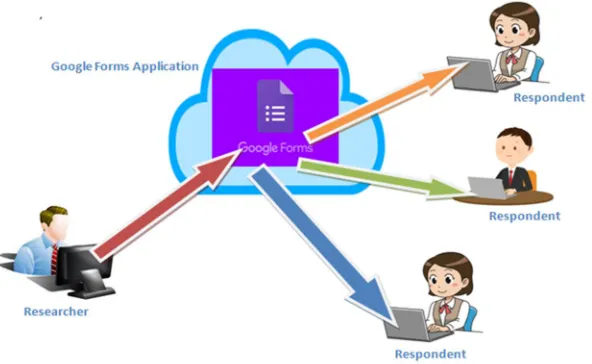
following image shows the way Google Form Works. All of the Google applications are hosted into
the Cloud Platform and many applications are of Software as a Service (SaaS) service model of
Cloud Computing. Following figure shows that the designer of the Google Form is designing the
forms as per the requirements and the respondents are responding using their devices. As the Google
Form is a cloud application and responsive so any device can be used to access the application. That
may be a Desktop Computer, Lap-Top Computers, Tablet and mobile phones. Only thing is there
must have internet connections to those devices. Google Form generates a specific link for a
particular designed form and there is options to create link also for that particular form which may be
linked to any website or blog as per convenient of the researcher or user. To work with the Google
Form one have to have a Google Gmail account.
Deletion and duplicate form creation options are there with the help of which one form can be
IJSRR, 8(1) Jan. – Mar., 2019 Page 3149
SETTINGS
In settings there are three main menus having different submenus:
1. General - in general menu there are three sub-menus such as
a. Collect email address - if this check box is on that means the form will collect the
email address of the respondent
b. Require sign in – if this check box is on that means without singing in to his /her
mail they cannot response to the form.
Figure 1 Google Forms How it Works
IJSRR, 8(1) Jan. – Mar., 2019 Page 3150 respondent to edit his or her response time and again.
2. Presentation - using this menu one can activate for display of the progress bar and shuffle
the question order also as per requirements. Anyone can provide a particular message to the
respondent by writing some words under the sub-menu of confirmation message.
3. Quiz – we know that quiz preparation is very much rigorous work for the creator. Using this
feature the form can play the role of the quiz questions and their evaluations.
CREATE AND EDIT FORMS
The heading of the form contains two words with two tabs. One is questions and another is
responses. With the help of the questions tab one can produce different questions as per needs and by
using the tab i.e. response number of responses and their details can be verified with necessary
analysis. Anyone can create a new form by clicking on the Blank Form. There are many types of
theme and templates which are related with different types of applications such as to collect contact
information one can use the ‘Contact information’ template. Other templates like RSVP, T-Shirt sign
up, etc. are there which can be used as per needs. After creation one has to put the name of the form
or heading of the form at the top. Form title may be given with short description to it to express the
purpose or instructions to the respondents. There are options to add images, videos, audios and
questions. The form may be divided into different sections for easiness.
Anyone has to input or edit questions from the right hand menu bar. There are five main menus
to work with:
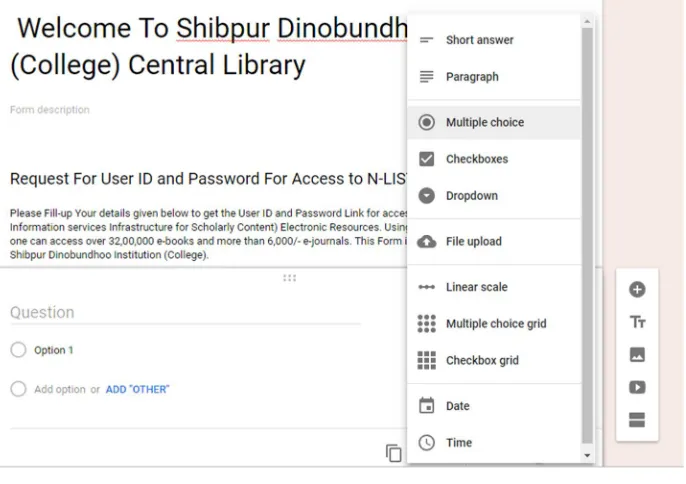
1. Add Questions: with the help of these tools one can add different types of questions to the
form. The types of questions are features with the following sub-menus:
a.Short- answer: using this sub-menu short answer may be demanded from the respondent.
The space is limited here that is why it is called short –answer option.
b.Paragraph – using these sub-menu descriptive questions may be demanded. As the space
is more there.
c.Multiple Choice Questions – we know that these types of question are very famous today
to communicate with the respondent with no headache. This is more popular as the
options are there to selection the answer.
d.Checkboxes – Putting tick mark to the particular checkbox is the procedure of getting
answer from the respondent. Using this feature we can do that.
e.Dropdown - All the options are there in the dropdown menu. Only thing is that we have to
IJSRR, 8(1) Jan. – Mar., 2019 Page 3151 f.File upload – this sub-menu can be used to upload a ready questions in another format so
that the respondent can download it and do the needful as per instructions.
g.Linear scale – scaling system questions also more popular as far as research data collection
concern. Different types of scaling may be created as per the choice of the researcher.
h.Multiple Choice Grid - using this feature one can generate a grid of multiple choice
questions by way of Rows and Columns.
i.Check-box Grid – using this feature one can generate check-box grid as like as Multiple
Choice Grid by war of Rows and Columns.
j.Date & Time - there is options to put the particular date and time recording also for the
specific form.
Figure 3: Menu and Sub-menu of Google Form
2. Add title and description - using this feature one can add the title description of a particular
part of a form under which some questions can be created. This part always has a sub part
which may be used for description of the title.
3. Add image – using this feature one can add any image of his or her choice to the form in any
place. Any link of any image or preloaded image may also be linked here for use.
4. Add video – any uploaded video in YouTube can be linked here with the form as per
requirement.
5. Add section – using this feature another section can be added for long list of questions.
IJSRR, 8(1) Jan. – Mar., 2019 Page 3152 Different papers less methods of preparation of questionnaire to conduct a survey or
interview such as Google Forms, Survey Monkey and any Content Management System (CMS)
based website or blogs such as Word-press, Joomla and Drupal. In case of CMS based survey most
of the systems have plug-ins features to conduct the survey by designing questionnaire. One can also
use survey monkey for readymade questions which can be use to make and design survey work.
There are limitations of survey monkey as they two users policies one part is free and another part is
PRO. PRO features are the paid one and options to use all the features and free access policies are
limited features. However, one researcher, teacher, organization, students and many others who want
conduct their survey should go through the above mention applications as they are very much easy
and user-friendly. We should use it on regular basis so that our regular survey activities can be
performed on smooth and accurate way. And analysis of our collected data would be easier. We can
remember very low level of technological know-how is required to handle these applications.
REFERENCES
1. Stratton, J. Google Forms Essential Training. , 2017.
2. Gupta, G. Mastering Html5 Forms. Packt Publishing, 2013.
3. Paperless: Real-world Solutions with Adobe Technology. Adobe Press, 2010.
4. Sauvé, J. Labour Interview Questionnaire, January 2000: Survey of Labour and Income
Dynamics. Ottawa: Statistics Canada, Income Statistics Division, 1999.
5. Fowler, F. J. Survey Research Methods. London: Sage Publication, 2015.
6. Folz, D. H. Survey Research for Public Administration. Thousand Oaks: Sage Publications,