IJIRT 143225 INTERNATIONAL JOURNAL OF INNOVATIVE RESEARCH IN TECHNOLOGY 754
Navigator Application for Blind Navigation
W.K.S.M Samarasinghe , C.H Wanigasinghe T.C. Sandanayake,
Faculty of Information Technology, University of Moratuwa, Katubedda, Moratuwa, Sri Lanka
Abstract- A person, who has partially or completely lost their capacity to see, has to face some big challenges during his life. Blind navigation is one of the major challenges for their day to day life activities. The sighted population can use vision to get safely across streets, through a grocery store, to and from school. Blind travelers are very effective using canes and using native sensory abilities, like auditory and kinesthetic skills for their navigations. Throughout the human life span, blindness, and particularly the inability to freely navigate, disrupts independence. This leads to decreased competence, economic dependence, depression, even failure of cognitive abilities to develop. Nowadays many people use hand held device with Android operating system. This research solution is an android navigator application to help blind people navigation. It will use GPS (Global Positioning System) and Google Maps technologies to identify locations around the user. User can specify the destination by address, and then our app will help him to reach his destination. Walking directions that are spoken by Google Maps help him to navigate in the physical world. User can listen to the audio instructions given by the application during the navigation and move to the destination and the application informs about any obstacle on the path of the user. Application is using the camera of the device and external sensors for obstacle detection.
Index Terms - Android technology, Navigation, obstacle detector
I. INTRODUCTION
A person with little or no vision will face some big challenges. Those are with a need more effort for doing his day to day life activities, accessing the world of information and navigating through space. These limitations are more serious and it has the greatest negative impact on human development. According to the WHO there are more than 285 million people worldwide who have partially or completely lost their capacity to see: 39 million with complete blindness and 246 million with reduced eye sight [1]. Information and communications technology is available to enable blind persons to participate in school, on the job,
and in leisure activities on a par with sighted peers. An entire cultural, governmental, and institutional infrastructure evolved to address the problem of communications accessibility for the blind learner. This is understandable because access to information is a right in a democratic country. There is no comparable progress in the area of blind navigation. There is less history of coordinated effort to address blind navigation, and less governmental and institutional support to confront this challenge. Technology created reading machines, talking books, and computers that translate Braille. More and more smart machines have expressive and receptive speech. These devices become smaller and less expensive with each passing year. Communications technologies were easier to invent and consequently were brought to market. Navigational technologies are complex and are not yet small enough or inexpensive enough for the mass market.
IJIRT 143225 INTERNATIONAL JOURNAL OF INNOVATIVE RESEARCH IN TECHNOLOGY 755
The research study has developed a mobile application to address the navigation problem of those people with sight problems. The system is a tool for independent travel. Therefore they do not need to buy very expansive electronic travel helper tools. This is a simple mobile application and can be used with their smart phone device. It helps to find places in the physical world and navigation helper for do their day to day navigations. It only used one external hardware circuit for detecting obstacles. Therefore whole system developed with the help of image processing and sensor communication techniques. And also it uses Google services for tracking geographical information about the current location of the user. And application uses those Google services for helping user’s outdoor walking.
II. LITERATUREREVIEW
Blind people can take along a friend or relative on their trips to anywhere they want to go and around our communities. It is easy to teach and easy to use, and it is a very effective tool for traveling through space [4]. The benefits of using a sighted guide increase if the blind traveler continues to personally monitor the environment and maintains orientation vigilance. The sighted guide is the most accurate and reliable way. But it is not possible to have a sighted guide always. And the greatest drawback to the sighted guide technique is that it is not a tool for independent travel. It requires that another human being be present as a substitute vision and navigation system. The control of sensory input is not personal the blind traveler is not directing the sweep and focus of sensory information gathering.
Most popular tool for independent travel is long cane. Used in conjunction with normal sensory monitoring, the long cane allows for travel in both familiar and unfamiliar areas. It is cheap, light, portable, requires little maintenance, and it is easy to learn to use [5]. The primary disadvantage of the long cane is it has limited resolution. It is a near space tool and it does not identify spatial position, or objects. It does not move the blind traveler closer to the abilities offered by sight. Sophisticated navigation technologies cannot compete with the companionship offered by dog guides. Although not as reliable as a sighted guide who can provide voice feedback and who has a cognitive understanding of spatial layouts, the dog guide is a reliable, ever ready tool for travel. The resolution of the dog team
is better than for the cane, and the degree of independence improves. Dog guides also have a few disadvantages. There is cost for dog care and maintenance, and there is a responsibility for taking care of the dog’s needs and welfare.
III. AIM&OBJECTIVES
The major aim objective of this research study is to develop a navigation helper system for the people who are blind or have low vision through android technology. The major objectives of this research study is to develop the navigation application using android technlgy and to develop an obstacle detector which will help the blind people in walking with problems.
IV. RESEARCHMETHODOLOGY The research application specially designs for any person, who has partially or completely lost their capacity to see the outside world. If they need to move independently in the space he or she can use this application. They can do their day today navigations using this system without the help of anyone. Users of this system can input voice commands to the system and then it converts these commands and performs intended action. User can start outdoor or indoor navigation or search around him using voice commands. System performs actions and gives information as voice instructions. System gives full voice guidance to the user during his navigation. It may include information about obstacles, geographical information around his current position. Implemented application consists of three major modules as Communication module, Navigator Module and the Obstacle detector Module. Communication module is responsible for communication handling among user and other modules. Navigator Module is for working with geographical information. And finally Obstacle detector Module is for detecting any obstacle on the path.
IJIRT 143225 INTERNATIONAL JOURNAL OF INNOVATIVE RESEARCH IN TECHNOLOGY 756
actions are handled by voice commands. So a person with little or no vision can use this application very easily. This voice/text converting part is done by the communication module. There are two types of navigations: Indoor navigation can be used inside a building. Outdoor navigation is for outside walking. Navigator module mainly collected data from the GPS reviver of the device and also from Google services. This module identifies the current location of the user using Google map service and GPS reviver. If user needs indoor navigation mode this module mainly needs data from device camera. Based on the information it gathered it give instruction to the user through the communication module. Obstacle detector module is for detecting any obstacle on the user path. Mainly this module collects data from the device camera and the sensors. Application can collect sensor data through the IOIO board. This module collects camera images and do image processing operations to identify obstacles. Sensor data gives good support for getting decisions. Based on the data from both ways, it will identify any obstacle and inform to the user.
The study was mainly target for mobile phones and tablet users. Therefore research has selected Android 4.0 as the android version because Android 4.0 is compatible for both type of devices. The android IOIO v1 board which is compatible for android 4.0 and higher. Two different frameworks can be used when writing an application for Android: SDK – Standard Development Kit and NDK – Native Development Kit.
Android SDK is a set of tools for writing and deploying Android applications written in Java. NDK is an extension of the SDK that lets developers writes performance-critical portions in native code (in C or C++). OpenCVC++ image processing logics into the android application. OpenCV is a cross-platform vision library for real-time image processing. The research has used OpenCV C++ libraries to implement image processing algorithms and finally we embed those algorithms to the application.
Fig 1. High-level architecture of the research
An high-level architecture diagram of our system is given in fig 1.As per given in the Fig 1 the communication module mainly works with the user. It is like an API between user and other modules. User communicates with other modules through the communication module. It hides the complexity of other modules from the user. Communication module does the request/response converting and handling parts for the application. Navigator module is for handling geographical requests of the application. It tracks User’s geographical location works with the Google services for respond user requests. Obstacle detector module works for detecting obstacles on the user path. Then it informs the user about the obstacle and any possible directions for avoiding that obstacle.
Application need communication module for keeping proper communication links with all the parts of the system. While other two modules are working parallel, communication module is responsible for keeping the user updated in every millisecond using information provided by each module. Main task of this module is giving guidance to the user and communicate with the other modules. Any information update from navigation module or obstacle detector normally sends to the broker part of this module and then broker will handle that information as needed finally sends to the user as voice instructions. And also any voice command from the user will come to this module and start the intended module operation using the broker.
IJIRT 143225 INTERNATIONAL JOURNAL OF INNOVATIVE RESEARCH IN TECHNOLOGY 757
reviver of the device, application can collect longitude and latitude of current position of the user. This module also calculates the coordinates of the selected destination and path to the destination. Until user reaches to the destination navigator module performs these operations and give the correct guidance as needed. During the navigation application tracks the user and gives information as needed. Any time user can search around him and know what the special places around him. Application gets the help of Google map service, Google direction service and Google Places service for these tasks.
Obstacle detector module collects real time image data from the camera and sensor data through the IOIO device. The study is using both of these inputs for accuracy of the results. Sensor data will support for getting the correct decision. Sensors emit a wave and collect the reflected wave to do the calculations. Module can calculate the distance of the obstacle using sensor data. Obstacle Detector Module waits for the ultrasonic sensors and if it triggers an event then the module takes an image of the user path using the device camera. Upon completion of image processing algorithms, it will detect the objects on the user path and determine the free space around the obstacle. Then it can identify the correct direction user should go without hitting the obstacle.
V. RESEARCHIMPLEMENTATIONAND RESULTS
Now application can come to a decision and based on that decision application informs the user about his walking path. In the communication module it contains two main features as voice/Text converter and broker. The Voice/Text converter is capable of converting text to voice and vice versa. Converting both ways are possible. When user gives a voice command it should be convert into text and then application can identify the command. Voice to text converter implemented using Android API package android. speech and specifically class android. speech.Recognizer Intent. Basically the research triggers android. speech.Recognizer Intent which shows dialog box to recognize speech input. This Activity then converts the voice into text and send backs the result to our calling Activity.
All the text instructions from the application to the user are converted into voice instructions using text to voice converter. It was implemented using
the android API android. speech.tts. TextToSpeech class. This class Synthesizes speech from text for immediate playback or to create a sound file.
Broker is used for communicating with the other two modules. It collects information from those modules and give responds with the information to the user as needed. It maintains a priority queue and responds to the highest priority request. As an example broker gives high priority for the obstacle detector module other than the navigator module because the most important information are coming from the obstacle detector. It is important to giving the information about an obstacle before geographical information.
Mainly the research is using android location based programming for navigator module. Using the GPS reviver of the device, application can collect longitude and longitude of current position of the user. It needs to get location coordinates for the selected place and identifying locations. Application use the Google map service, Google direction service and Google Places service for handling the user requests. Based on the request of the user, module decides the Google service to be called and then call that service using the REST URL with parameters. Application sends the current location coordinates to Google map service and get map information about the current position. Google map service and Google direction service is used for getting the path information. And user can search his environment for special places using Google places service. Finally module filters and returned the correct results to the user.
A. Ultrasonic sensors and IOIO board
IJIRT 143225 INTERNATIONAL JOURNAL OF INNOVATIVE RESEARCH IN TECHNOLOGY 758
Fig 2. Circuit diagram for the ultrasonic sensor The Android device can be connected to the IOIO board via Bluetooth or USB cable, A Pulse Input has been used for the echo pin of the sensor. And the trigger pin can be connected to any digital output pin of the IOIO board. In the Loop function we trigger a pulse and read the sensor. Then the measured pulse length can be calculated. If the length between the sensor and the obstacle reaches to threshold length this will start the camera to take the image for image processing part.
B. Image processing and obstacle detection
Application will take an image of the user path when the sensor triggers a signal about any obstacle within threshold proximity. Then RGB model image is converted in to Grayscale model because RGB values are correlated and in order to reduce noise factor image should be converted to Grayscalecolor model. Then this image should be enhanced using Histogram Equalization. It is a method that improves the contrast in an image, in order to stretch out the intensity range. Because of the light condition of the environment image may contain high/low contrast area. So Histogram Equalization reduces those kinds of contrast effects in the image. And also it helps to remove shadows effects of the image. The research has applied Canny edge detection algorithm to the image. Edge detection and edge linking algorithms are used to detect boundaries of interesting objects.
C. The Process of noise removal in advance
RGB model image is converted in to Grayscale model because RGB values are correlated and in order to reduce noise factor image should be converted to Grayscale color model. Median blur filter is used to reduce the noise further because it uses median value of neighborhood pixels and it will help to preserve edges while reduce noises. Then this image should be enhanced using Histogram Equalization. It is a method that improves the contrast in an image, in order to stretch out the intensity range.
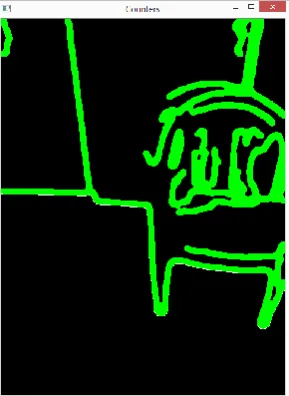
Fig 3. Image after removing the noise Fig 3 show the image after removing the noise. Due to the light condition of the environment image may contain high/low contrast area. So Histogram Equalization reduces those kinds of contrast effects in the image. Also it helps to remove shadows effects of the image
D. Edge detection, edge linking and drawing
edges
Canny edge detection algorithm is used to detect edges/boundaries around the objects in the image. It has an ability to filter relevant edges from irrelevant edges through the process of double thresholding. An edge linking algorithm was implemented by extending unlinked edges while drawing contours around the objects. Each detected counter is filled with unique color and by using that we can identify free space and object area in the image. Fig 4 sows the image after detecting edges of the obstacle.
IJIRT 143225 INTERNATIONAL JOURNAL OF INNOVATIVE RESEARCH IN TECHNOLOGY 759 E. Calculate the free space and define the best
direction
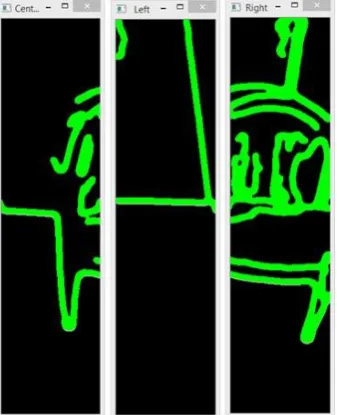
The full image with counters is separated into three regions as left, center and right. It has implemented an algorithm to calculate the mean number of free pixels in each area.The algorithm calculates the number of free pixels in each column before meet the first counter pixel. Algorithm collects all the free pixels in the area below the first counter and calculates average free space height for the given area. It has used the algorithm for calculating average free space height for each area of the image. This gives an idea about free space distribution for each of three areas. Then it can decide what the best direction for avoiding the obstacle is.
The system decide the best direction based on the mean values. There are four types of possible directions. If there is the lowest mean for center region then best direction is center. Same way it deicide right side or left side as the best direction based on the mean values. If three mean values almost equals to each other that means there may be a wall or something which has a straight line edge. Therefore in this situation which cannot predict the direction because user has to turn in order to avoid the wall.
Fig 5. Image regions for calculating the free space When the user needs location based information from the system, it should identify the correct geographical location of the destination and the current location of the user. Precision of the Navigator module mainly depends on those data from the Google services. Therefore the system has
been tested for many input requests and concluded that the system meets expectations. Results may not accurate if the device cannot have good signal strength.
F. Evaluating the Obstacle detector
Precision of detecting obstacles can be analyzed as below. Precision of the obstacle detector mainly depends on sensor detection and image processing detection accuracy. The system has tested sensor detection part and image processing part separately for obstacle detection. Following sections show the results we gathered during the evaluation process
As given in the table I above, the obstacle detector can call for five major states. In the first position the obstacle can be found and detected through the device. Second state is the obstacle can be found but the system cannot detect it. The third state is that non obstacles identified as an obstacle. The forth state is Proportion of correctly detected obstacles from the cases all the detected objects. The last state is proportion of correctly detected obstacles from the cases that obstacles detected and not detected which is call as recall.
Table I : Position evaluation of the obstacle detector
True Positive (TP)
There is an obstacle and that obstacle is detected
True
Negative(TN):
There is an obstacle but the system won’t detect that obstacle.
False Positive (FP)
Non-obstacle is detected as obstacle
Precision: Proportion of correctly detected obstacles from the cases all the detected objects. Precision = TP/(TP + FP)
IJIRT 143225 INTERNATIONAL JOURNAL OF INNOVATIVE RESEARCH IN TECHNOLOGY 760
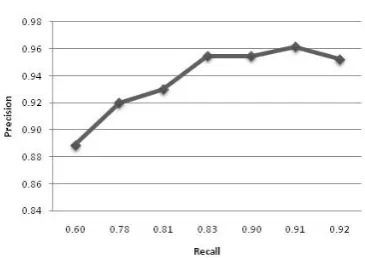
Fig 6. Precision of the sensor detection
Fig 7. Precision of the image processing
The fig 6 shows the precision of the sensor detection. According to Figure 7.2, sensor obstacle detection will maintain average 94 % of precision with respect to recall. Fig 7 shows the Precision of the image processing. According to Figure 7.3, image obstacle detection will maintain average 80% of precision with respect to recall. All the evaluation criteria of the system along with the results gained by evaluations are presented. It further described whether the system achieves the expected outcome of each operation that the user performs.
VI. DISCUSSION
A person, who has partially or completely lost their capacity to see, has to face some big challenges during his life. Blind navigation is one of the major challenges for their day to day life activities. Blind travelers are very effective using canes and using native sensory abilities, like auditory and kinesthetic skills for their navigations. Throughout the human life span, blindness, and particularly the inability to freely navigate, disrupts
independence. This leads to decreased competence, economic dependence, depression, even failure of cognitive abilities to develop. The research proposing software based Blind navigation system because we cannot see a comparable progress in the area of blind navigation. The system comprises of three major modules such as communication module, navigation module and obstacle detection module. The Users of this system can input voice commands to the system ,and then it converts these commands and performs intended action. User can start outdoor or indoor navigation or search around him using voice commands. System performs actions and gives information as voice instructions. System gives full voice guidance to the user during his navigation. It may include information about obstacles, geographical information around his current position,
REFERENCES
[1] WHO Mead Center Visual impairment and blindness,
http://www.who.int/mediacentre/factsheets/fs2 82/en/, Accessed on 20Dec 2015
[2] Aber, J., Harvey, J.,and Inmon. I., GPS and its Emerging Role in Cellular Phones and Car Navigation Systems, http://academic.emporia.edu/aberjame/student/ aber1/, Accessed on 15 Dec 2015
[3] Hersh, M, Johnson, MA, 2012 Assistive Technology for Visually Impaired and Blind People, Chapter-8, 285-287
[4] Loomis, JM., Gollegde RG., Klatzky RL, Navigation System for the Blind: http://www.geog.ucsb.edu/pgs/papers/applied1. pdf., 2013