ISSN (e): 2250-3021, ISSN (p): 2278-8719
Vol. 04, Issue 0 2 (February. 2014), ||V5|| PP 06-11
Cross-Platform Mobile App Development using HTML5 and
JavaScript while leveraging the Cloud
Rijad Halidovic
1, Gunay Karli
21Department of Information Technologies, International Burch University, Sarajevo, Bosnia and Herzegovina 2Department of Information Technologies, International Burch University, Sarajevo, Bosnia and Herzegovina
Abstract: - This article is about the fragmentation in the mobile world; more specifically, about easing the pain of mobile application development. There are many smartphone platforms on the market: Android, iPhone, BlackBerry, Nokia, the Windows 7 Phone, WebOS and Samsung’s Bada and Meego. Developing mobile application (apps) is thus challenging. The good news is that all of the listed platforms have browsers that adhere HTML/CSS3 standards. Because of that, we applied our criteria to the apps that use modern browsers as the platform for building HTML5/CSS3-based applications. We are going to use Icenium in order to develop cross-platform mobile apps that run natively on Android and iOS devices. Furthermore, we are going to compare this cross-platform mobile app to the Android and iOS native apps.
Keywords: - app, Cross-Platform, cloud, Mobile App, SDK
I.
INTRODUCTION
Mobile devices such as smartphones and tablets have dramatically increased in popularity. According to the Infographic’s latest mobile growth statistics for 2013: 91% of all people in the world have a mobile phone, and 51% of people own a smartphone. 50% of mobile phone users, use the mobile device as their primary Internet source. 80% of time on mobile is spent inside apps. The popularity of mobile apps has created huge market opportunity which turned companies focus on mobile app development.
Currently, there are at least four platforms with relevant number of users (Android, iOS, Windows Phone, BlackBerry). For each of these platforms, an app needs to be created separately due to the differences in programming interfaces, libraries, and programming languages. This creates a challenge for the companies since developing an app for all platforms takes a lot of resources. However, not supporting platforms relevant for their customers may be problematic for enterprise. At least Android and iOS support is required for business apps. Cross-platform development approaches emerged to address this challenge by allowing developers to implement their apps in one step for a range of platforms, avoiding repetition and increasing productivity. These approaches need to allow provision on several mobile platforms. In addition, they need to allow developers to capitalize on their specific advantages and possibilities of smartphones.
This paper will analyze and compare cross-platform mobile app development approaches to the Android and iOS app development. The paper is structured as follows: understanding the cross-platform mobile app development in Section 2, Section 3 gives the overview of the cloud, the list of criteria is set in Section, evaluation follows in Section 5, and the conclusion is drawn in Section 6.
II.
UNDERSTANDING
THE
CROSS-PLATFORM
MOBILE
APP
DEVELOPMENT
To understand Cross-Platform Mobile App Development first we need to investigate the challenges of developing mobile application for various platforms.
Imagine company’s developers working around the clock to release the same product on the iPhone, Android, Windows Phone, BlackBerry, WebOS, Symbian and now let's add Samsung Bada to the list. Clearly, this is highly challenging. The OS platforms, starting with their development environments, are very fragmented. For the iPhone, Mac machine is needed; and for BlackBerry, Windows machine is needed. These challenges are what the following sections are about.
2.1 OS Fragmentation
2.2 Consistent User Experience
In order to develop app to be consistent across multiple mobile platforms, your app needs to give similar and consistent user experiences across all of the platforms. Accordingly, this provides your users with the ability to migrate and preserve the experience on every platform they go to.
2.3 Feature Fragmentation
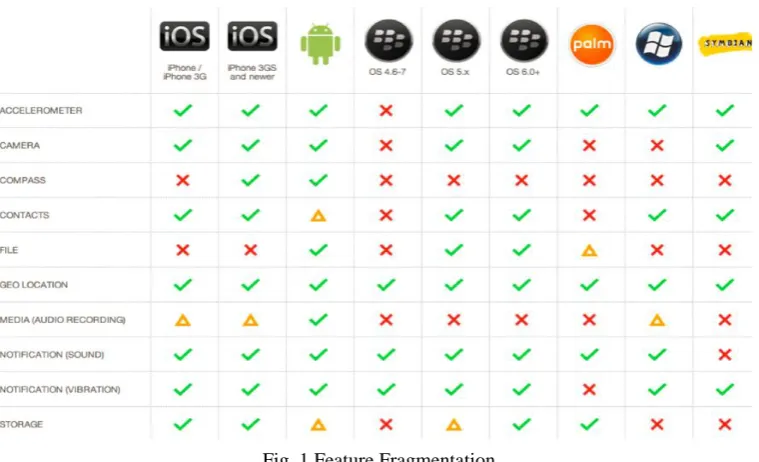
Device features and capabilities vary across platforms. This means that while some Androids and iPhones have an embedded compass to show directions, the other smartphones do not. This could mean that navigation applications on other smartphones may not be able to rotate maps in the way that Android or iPhone application can, as presented in Fig. 1.
Fig. 1 Feature Fragmentation
2.4 Development Environment Fragmentation
To develop on multiple platforms at least two operating systems are required, namely Windows and Mac in order to develop apps targeting following platforms:
iOS
Android
BlackBerry
WebOS
Symbian
Windows
In addition, a variety of IDEs and programming languages, such as Eclipse, Xcode, Java, C++, Objective C will have to be used. Figure 2. shows the full list of development environment fragmentations.
III.
OVERVIEW
OF
THE
CLOUD
Cloud computing is a computing concept which includes a large number of computers connected through a real-time communication network such as Internet. Furthermore, cloud computing presents an ability to run program or application on number of connected computers at the same time.
Business applications are moving to the cloud. Looking ahead, the next decade promises new ways to collaborate everywhere, through mobile devices. Traditional business applications have always been complicated and expensive. The amount and variety of hardware and software required to run them are daunting. A whole team of experts is needed in order to install, configure, run, secure, and update them. When you multiple this effort across dozens or hundreds of apps, it is easy to see why the biggest companies with the best IT departments are not getting all apps they need. With cloud computing, those headaches are eliminated because the hardware and software managing is the responsibility of an experienced vendor. The shared infrastructure works like a utility, where you only pay to use the app, and everything else, including upgrades, is automatic.
Cloud-based apps can be up and running in days or weeks, and they cost less. Many business, large and small, use cloud computing today either directly (e.g. Google or Amazon) or indirectly (e.g. Twitter) instead of traditional on site alternatives. There are a number of reasons why cloud computing is widely used among business today. Some of them are:
Reduction of costs - unlike on-site hosting, the price of deploying applications in the cloud can be decreased due to lower hardware costs from more effective use of physical resources.
Universal access - cloud computing can allow remotely located employees to access applications and work via the Internet.
Up to date software - a cloud provider will also be able to upgrade software, keeping in mind the feedback from previous software releases.
Choice of applications. This allows flexibility for cloud users to experiment and choose the best option for their needs. Cloud computing also allows a business to use, access and pay only for what they use, with a fast implementation time
Potential to be greener and more economical - the average amount of energy needed for a computational action carried out in the cloud is far less than the average amount for an on-site deployment. This is because different organizations can share the same physical resources securely, leading to more efficient use of the shared resources.
Flexibility -– cloud computing allows users to switch applications easily and rapidly, using the one that suits their needs best. However, migrating data between applications can be an issue.
IV.
CRITERIA
In the following section, we are going to create the list of criteria for evaluating cross-platform mobile app development that leverages the cloud. In the next section, the criteria will be used to compare and review the cross-platform mobile app development that leverages the cloud (Icenium) to the Android and iOS mobile app development.
List of criteria has been drawn together with the experts from companies and communities that are closely related to the mobile app development. For a better overview, we have created the list of fourteen criteria, structured into infrastructure and development perspective.
The infrastructure perspective evaluates licensing and costs, supported platforms, access to advanced device specific features, long term feasibility, look and feel, application speed, and the distribution criteria, as shown in table 1. The development perspective evaluates development environment, GUI design, ease of development, maintainability, scalability, opportunities for further development, speed and cost of development criteria, as shown in table 2.
Table 1 List of Criteria from Infrastructure Perspective
License and Costs
This criterion examines whether the framework in question is distributed as free software or even open source, the license under which it is published. Also, it examines if a developer is free to create commercial software, and whether costs for support inquiries occur.
Supported Platforms
Considers the number and importance of supported mobile platforms, with a special focus on whether the solution supports the platforms equally well.
Access to advanced device-specific
features
Long-term feasibility
Especially for smaller companies the decision to opt for a framework might be strategic due to the significant initial investment. Indicators of long-term feasibility are short update cycles, regular bug-fixes, support of newest versions of mobile operating systems, an active community with many developers, and several commercial supporters steadily contributing to the framework’s development.
Look and feel
While the general appearance of an app can be influenced during development, it does matter whether a framework inherently supports a native look & feel or whether its user interface looks and behaves like a Web site. Most users seek apps that resemble native apps. Furthermore, this criterion tries to ascertain how far a framework supports the special usage philosophy and life-cycle inherent to an app. Apps are frequently used for a short amount of time, have to be “instant on”, and are likely to be interrupted, e.g. by a call. When returning to the app, users do not want to repeat their input but wants to continue where they left the app.
Application Speed
Tries to compare the application’s speed at start-up and runtime, i.e. its responsiveness on user-interaction. For evaluation, instead of measuring the performance, we assess the subjective user-experience.
Distribution
Evaluates how easy it is to distribute apps created with the respective framework to consumers. The possibility to use the app stores of mobile platforms, since client’s often want to use this distribution channel. However, solely relying on app stores also has disadvantages; a framework offering additional channels also has merits. Furthermore, this criterion assesses whether updates are possible.
Table 2 List of Criteria from Development Perspective
Development environment
Evaluates maturity and features of the development environment typically associated with the framework, particularly the tool support (IDE, debugger, and emulator) and functionalities like auto-completion or automated testing. The term “ease of installation” summarizes the effort for setting up a fully usable development environment for a framework and a desired platform.
GUI Design
This criterion covers the process of creating the graphical user interface (GUI), especially its software-support. A separate WYSIWYG editor and the possibility to develop and test the user interface without having to constantly “deploy” it to a device or an emulator are seen as beneficial.
Ease of development
This criterion sums up the quality of documentation and the learning-curve. Therefore, the quality of the API and documentation is evaluated. This part of the criterion is well-fulfilled if code examples, links to similar problems, user-comments, etc. are available. The learning curve describes the subjective progress of a developer during his first examination of a framework. Intuitive concepts bearing resemblance to already known paradigms allow for fast success. This can have a significant impact on how fast new colleagues can be trained and how much additional, framework specific knowledge a developer needs to acquire.
Maintainability
The lines of code (LOC) indicator is employed to evaluate the maintainability (Kassinen et al., 2010, p. 53f.). The choice of this indicator is based on the assumption that an application is easier to support when it has less LOC, because e.g. training of new developers will be shorter, source code is easier to read etc. While more sophisticated approaches could also be justified as relevant indicators, these are hard to apply, especially in case of complex frameworks and for apps composed of different programming and markup languages.
Scalability
Scalability is based on how well larger developer teams and projects can be conducted using the respective framework. Modularization of framework and app are highly important as this allows increasing the number of concurrent developers and the scope of the app’s functionality.
Opportunities for further development
Determines the reusability of source code across approaches and thereby assesses the risk of lock-in, which would be increased if a project started with one framework could not later be transferred to another approach.
Speed and Cost of
Development differences in salary of a JavaScript or Java developer.
V. EVALUATION
We have evaluated Icenium, currently yjr only cross-platform mobile app development framework that leverages the cliud. The evaluation represents the results of our own research as well as the opinion from experienced developers. Experience was mainly gathered by developing prototype mobile app while using Icenium and the Android and iOS software development kit (SDK). In addition, we used results from related works in order to compare results and gain further knowledge. For a better readability, we presented results in a tabular format. Two tables are created; one for the infrastructure perspective, and the other one for the development perspective.
Table 3 Evaluation of Architecture Criteria
License and Costs
Icenium has subscription based income model. There are two subscription options: Annual and Monthly subscription. In addition, each of them contains three different subscription options: Developer, Professional and Ultimate. All of the options contains everything needed to create mobile app. The only difference between different subscription options is the customer support limitations.
Supported Platforms
While developing apps natively requires to do so separately for each platform because programming language and APIs are different, Icenium allows us to create app and install it on all supported platforms. Currently, Icenium supports Android and iOS platforms.
Access to advanced device-specific features
Icenium uses PhoneGap to give easy access to advanced device-specific hardware like accelerometer, phonebook, etc. Multi-touch gestures is also available. Other more sophisticated features like scanning of bar-codes can be easily added via plugins. There are no limitations to access device-specific features just like for native development.
Long-term feasibility
Icenium is a relatively young project, with the first version released in March 2013 and long-term feasibility is hard to estimate. What is evidently is that the popularity of the platform drastically increases because the code is stored in the cloud and it accessible at any time from any device, which enables developers to easily modify and update their code. Because of the high popularity of iOS and Android, developers can rely on communities, regular bug-fixes and updates.
Look and feel
Full support of the platforms usage philosophy and the employment of native UI elements are self-evident. By definition, everything that can be done with native approaches is possible cross-platform as well.
Application Speed
Launching a hybrid app is fast and user interaction is smooth. Even a large number of tasks did not influence the prototype performance, which is comparable to a native app.
Distribution
Hybrid app created with Icenium can be distributed on both AppStore and Google Play.
Table 4 Evaluation of Development Criteria
Development environment
Icenium offers multiple IDE solutions. First there is Icenium Graphite, which is a full desktop application that can installed on both Windows and Mac (via Parallels or VMWare). This rich desktop application provides some IDE features that web client does not, such as code navigation, refactoring and the ability to see real time updates on your devices.
The second solutions is Icenium Mist which is web client that runs on all web browsers, enabling you to code and go. The latest solution is the extension for Visual Studio where developers accustomed to VS can use their well-known environment to develop hybrid mobile apps. Icenium builds apps for different platform in the cloud, so that developers do not have to install the platform SDKs. After providing the source of the app, it can be easily downloaded by scanning the QR code.
GUI Design
Ease of development
documentation. Icenium uses Apache Cordova (a.k.a. PhoneGap) which is also well documented. Support provided by Telerik is really good, because even if you do not have an option for opening service tickets, you can still post your problem on their forum and quickly get an answer from the community. No further knowledge is required accept these APIs.
Maintainability
Source code is short and clearly structured due to use of Kendo UI Mobile and jQuery Mobile. Mobile apps do not require more additional code than Web apps, except for the device-specific features.
Scalability
Apps created in Icenium can easily be split into a large number of small files to fit into overall design.
Opportunities for further development
Project build in Icenium can easily be run as a mobile Web site as long as no device-specific features are used. This enables companies to reach for the customers with the smartphones whose operating system is not currently supported by Icenium, so that they can access the information provided by the app.
Speed and Cost of Development
Development tools are technically mature, and because of that, debugging, testing, and design can be done relatively fast.
VI.
CONCLUSION
In this paper we used the list of fourteen different criteria in order to evaluate the most important things related to mobile app development. The results have been compiled to the table which can be used as a reference. The following analysis of several mobile app development solutions shows that Icenium is to be preferred. It offers quick and simple entry into cross-platform development. The results also show that there is no need for native development when implementing mobile information systems. Even if only one platform has to be supported, a cross-platform approach may prove as the most efficient method due to its low barriers. Low barriers include the use of web technologies, html, css, javascript. Combined with others capabilities of mobile devices, they can fulfill the requirements of most mobile scenarios. In addition, we tested how leveraging the cloud can improve the accessibility and maintainability by allowing developers to access their solutions, debug it and update it from any device which is connected to the Internet.
REFERENCES
[1] H. Heitkötter, S. Hanschke and T. A. Majchrzak, Comparing Cross-Platform Development Approaches for Mobile Applications, Webist 2012, 299-311
[2] R. Ghatol and Y. Patel, Begining PhoneGap: Mobile Web Framework for JavaScript and HTML5 (233 Spring Street, 6th Floor, New York, NY: Springer Science+Business Media, LLC, 2012)
[3] http://www.digitalbuzzblog.com/infographic-2013-mobile-growth-statistics/ [4] http://www.icenium.com/
[5] http://developer.android.com/index.html [6] https://developer.apple.com/
[7] http://phonegap.com/about
[8] http://en.wikipedia.org/wiki/Cloud_computing [9] http://www.cloud-lounge.org/why-use-clouds.html
[10] Behrens, H. (2011). Cross-Platform App Development for iPhone, Android & Co. Retrieved Nov. 23, 2011, from http://heikobehrens.net/2010/10/11/cross-platform-app-development-for-iphone-android-co-%E2%80%94-a-comparison-i- presented-at-mobiletechcon-2010/
[11] Charland, A., & Leroux, B. (2011). Mobile application development: web vs. native. Commun. ACM, 54, 49-53.
[12] http://jquerymobile.com/ [13] http://source.android.com
[14] http://www.w3.org/TR/html5/offline.html [15] https://cordova.apache.org/
[16] Kassinen, O., Harjula, E., Koskela, T., and Ylianttila, M. (2010). Guidelines for the implementation of crossplatform mobile middleware. International Journal ofSoftware Engineering and Its Applications, 4(3).