COMPARATIVE STUDY ON CORRECTNESS AND TIME TAKEN OF TEST CASE GENERATION USING EFG AND BXT TECHNIQUES FOR GUI
APPLICATION
MOSTAFA NSER BRKA
A dissertation submitted in partial
fulfillment of the requirements for the award of the Degree of Master of Computer Science (Software Engineering)
Faculty of Computer Science and Information Technology Universiti Tun Hussein Onn Malaysia
ABSTRACT
ABSTRAK
CONTENTS
TITLE i
DECLARATION ii
DEDICATION iii
ACKNOWLEDGEMENT iv
ABSTRACT v
ABSTRAK vi
LIST OF TABLES xi
LIST OF FIGURES xiv
LIST OF SYMBOLS AND ABBREVIATIONS xvii
LIST OF APPENDICES xviii
CHAPTER 1 INTRODUCTION 1
1.1 Background of Study 1
1.2 Problem Statement 3
1.3 Project Objectives 4
1.4 Scope of Project 4
1.5 Thesis Outline 4
CHAPTER 2 LITERATURE REVIEW 5
2.1 Introduction 5
2.2 Graphical User Interface 5
2.3 Software Testing 6
2.4 GUI Testing 7
2.5 Performance Parameters for Testing 7
2.5.1 Complexity 8
2.5.2 Correctness 9
2.6 Test Case Definition 11
2.6.1 Test Case Generation 11
2.6.2 Test Case Generation and Execution 11
2.7 Automated GUI Testing 12
2.7.1 Automated GUI Testing Technique 13
2.7.2 Challenges in Test Automation 14
2.8 Model-Based Testing (MBT) 14
2.8.1 Even Flow Graph (EFG) 14
2.9 Dynamic Event Extraction Technique 17
2.9.1 Behavior Explorer Technique (BXT) 17
2.10 GUI Tester Tool 18
2.11 Eclipse Framework 19
2.12 Cobertura Tool 19
2.13 Related work 20
2.14 Chapter Summary 21
CHAPTER 3 METHODOLOGY 22
3.1 Introduction 22
3.2 Research Methodology 22
3.3 Step 1: Application of the EFG and BXT techniques 23 3.3.1 Step 1-1: Application of the EFG technique 24
3.3.2 Step 1-2: Application of the BXT technique 30
3.4 Step 2: Determination of the complexity of the test case 32 3.5 Step 3: Analyses and comparison of the correctness of
the results and the time taken 33
3.5.1 Analyses and comparison of the correctness of results 33
3.5.2 Analyses and comparison of the times taken to calculate
the results 33
3.6 Case Studies 34
3.6.1 Case study 1: Paint applications 35
3.6.2 Case study 2: Present application 35
3.7 Results Analysis 35
3.8 Chapter Summary 35
4.1 Introduction 36 4.2 Pre-work before applying the techniques 36 4.2.1 First case study (Paint application) 37
4.2.2 Second case study (Present application) 38
4.2.3 Generate Test Cases For EFG and BXT Technique in
Case Studies 39
4.3 Implementation of the EFG and BXT techniques in case
study 1 39
4.3.1 Implementation of the EFG technique in case study 1 39
4.3.2 Implementation the BXT technique in case study 1 47
4.4 Implementation EFG and BXT techniques in case study 2 50 4.4.1 Implementation EFG technique in case study 2 50
4.4.2 Implementation BXT technique in case study 2 59
4.5 Step 2: Calculate complexity and time taken using EFG
and BXT technique in case studies 62
4.5.1 Step 2.1: Calculate the complexity and time taken using
EFG technique in case study 1 62
4.5.2 Step 2.2: Calaculate complexity and time taken using
BXT technique in case study 1 64
4.5.3 Step 2.3: Calaculate complexty and time taken using
EFG technique in case study 2 67
4.5.4 Step 2.4: Calaculate complexty and time taken using
BXT technique in case study 2 69
4.6 Summary 71
CHAPTER 5 RESULTS AND ANALYSIS 72
5.1 Introduction 72
5.2 Magnitude of relative error (MRE) 72
5.3 Analysis of the result in two case studies 72 5.3.1 Analysis of the results in Paint application 73
5.3.2 Discussion the results to Case study 1 78
5.3.3 Analysis of the Results in Present application 79
5.3.4 Discuss the results to case study 2 84
CHAPTER 6 CONCLUSION 86
6.1 Introduction 86
6.2 Objectives Achievement 86
6.3 Conclusion 87
6.4 Future Work 87
6.5 Summary 88
REFERENCES 89
APPENDIX 94 VITA
LIST OF TABLES
3.1 Description of terms in algorithm for event flow graph 26 3.2 Description of terms in algorithm for the execute test cases
generation
27
3.3 Description of terms in algorithm for testing case execution 29 3.4 Description of terms used in algorithm for BXT 32
3.5 Example date for Complexity and Time Taken 34
4.1 Experimental results for File Menu using EFG technique in Paint application
62
4.2 Experimental results for Edit Menu using EFG technique in Paint application
63
4.3 Experimental results for View Menu using EFG technique in Paint application
63
4.4 Experimental result for Image Menu using EFG technique in Paint application
63
4.5 Experimental results for Filter Menu using EFG technique in Paint application
64
4.6 Experimental results for layer Menu using EFG technique in Paint application
64
4.7 Experimental results for File Menu using BXT technique in Paint application
65
4.8 Experimental results for Edit Menu using BXT technique in Paint application
65
4.9 Experimental results for View Menu using BXT technique in Paint application
65
4.10 Experimental results for Image Menu using BXT technique in Paint application
66
Paint application
4.12 Experimental results for layer Menu using BXT technique in Paint application
66
4.13 Experimental results for File Menu using EFG technique in Present application
67
4.14 Experimental results for Edit Menu using EFG technique in Present application
67
4.15 Experimental result for View Menu using EFG technique in Present application
68
4.16 Experimental results for Image Menu using EFG technique in Present application
68
4.17 Experimental results for Filter Menu using EFG technique in Present application
68
4.18 Experimental results for layer Menu using EFG technique in Present application
69
4.19 Experimental results for File Menu using BXT technique in Present application
69
4.20 Experimental results for Edit Menu using BXT technique in Present application
70
4.21 Experimental results for View Menu using BXT technique in Present application
70
4.22 Experimental results for Image Menu using BXT technique in Present application
70
4.23 Experimental results for Filter Menu using BXT technique in Present application
71
4.24 Experimental results for Layer Menu using BXT technique in Present application
71
5.1 Experimental results in term of Correctness using EFG technique in Paint application
73
5.2 Experimental results in terms of Correctness using BXT technique Paint application
74
5.3 Experimental results in terms of Time Taken using EFG techniques in Paint application
5.4 Experimental results in terms of Time Taken using BXT techniques Paint application
77
5.5 Criteria in Paint application for Correctness 78
5.6 MRE Criteria in Paint application 78
5.7 Experimental results in terms of Correctness using EFG technique in Present application
80
5.8 Experimental results in terms of Correctness using BXT technique in Present application
81
5.9 Experimental results in terms of Time Taken using EFG technique in Paint application
82
5.10 Experimental results in terms of Time Taken using BXT technique in Paint application
83
5.11 Criteria in Present application for Correctness 84
LIST OF FIGURES
2.1 GUI is the front-end to the underlying code 6
2.2 Simple GUI in EFG 15
2.3 Event sequence in GUI 16
2.4 Algorithm1: EFG 16
2.5 Algorithm 2 shows the pseudo-code for BXT 18
3.1 Schematic diagram of the research methodology 23 3.2 Details of applying EFG technique (Step 1-1) 24
3.3 Model of generating EFG 25
3.4 Algorithm 2: Execute Test Cases Generation 27
3.5 Algorithm 3: Execution Test Case Generation 28
3.6 Step 1-2 Application of the BXT technique 30
3.7 BXT Algorithm 31
4.1 Case studies in the application under test (AUT) folder 36
4.2 Main interface for Paint application 37
4.3 Main interface for Present application 38
4.4 Import Paint application and GUI Tester tool to Eclipse 39 4.5 Code for creating the graph module in EFG technique 40
4.6 Code to save the graph module 40
4.7 Code for export graph to the graph module 41
4.8 Graph model for components in the Paint application 41
4.9 Code segment for the load graph module 42
4.10 GUI Tester tool creating and saving test case 42 4.11 Generating and saving test case in Paint application 43 4.12 GUI Tester tool save the test cases in result folder 43
4.13 Selection of the test case index 43
4.15 XML report is saved by the GUI tester Tool upon execution 44 4.16 Information In XML after the source code is executed 45 4.17 Determination of the location of test cases in the Paint application 45 4.18 Information in the XML file after execution 46
4.19 Result from an XML Report 46
4.20 Importing the Paint application, a GUI Testr tool and BXT 47 4.21 Debugging the GUI Tester tool and running the BXT technique 48 4.22 Information in XML before the source code is executed 48 4.23 Information in XML after the source code is executed 49 4.24 Code to show the result of XML report after execution 49
4.25 Result from an XML report after execution 50
4.26 Importing Present application and GUI Tester tool to Eclipse 51 4.27 Code for creating the graph module in EFG technique 51
4.28 Code for saving the graph module 52
4.29 Code to export graph to graph module 52
4.30 Graph model for the components of the Present application 53
4.31 Code segment to load graph module 54
4.32 GUI Tester tool creating and saving test cases 54
4.33 Generating and saving the test case 55
4.34 GUI tester tool saves the test cases in the result folder 55
4.35 Selection of the test case index 56
4.36 Selection and execution of some of the test cases 56 4.37 GUI Tester tool saves the XML report after execution 57 4.38 Information in the XML after executing the source code 57 4.39 Determination of the location of test cases 58 4.40 Code for showing the result of the XML report before execution 58 4.41 Result from an XML report from the Present application 58 4.42 Importing the Present application, GUI Tester tool and BXT
technique
59
4.43 Debugging the GUI Tester tool and running the BXT technique 60 4.44 Result after the BXT technique is executed in the GUI Tester
tool
60
4.46 Code for executing and viewing the result from the XML report 61
4.47 Result from an XML report after execution 62
5.1 Average correctness in Paint application 78
5.2 Average time taken in Paint application 79
5.3 Average correctness in Present application 84
LIST OF SYMBOLS AND ABBREVIATIONS
AUT – Application Under Testing BXT – Behavior Explore Testing CPU – Center Processor Unit
CLIs – Command-Line Interfaces
DOS – Disk Operating System
DOM – Document Object Model
ESIG – Event Semantic Interaction Graphs
EFG – Event Flow Graphs
EIG – Event Interaction Graphs GUI – Graphical User Interface
IDE – Integrated Development Environment JDT – Java Development Tools
MRE – Magnitude of Relative Error
Ms – Millisecond
SDLC – Software Development Lifecycle
STL – Software Testing Lifecycle
SFG – State Flow Graph
LIST OF APPENDICES
APPENDIX TITLE PAGE
A Source code for case studies 93
B Test case description for both case studies 136
C Import case studies to Eclipse framework 139
D Source code for first algorithm EFG ripper strategy 141
E Source code for second algorithm EFG test cases generation 151
F GUI tester properties 155
G Source code for EFG based test case execution strategy 156
H
I
Code use to for show the results after execute test cases
Source code for BXT based test cases generation
INTRODUCTION
1.1 Background of Study
The Palo Alto Research Center of the Xerox Corporation designed the first graphical user interface (GUI) in the 1970s. However, this GUI was not as popular as the GUIs launched by Apple Macintosh in the 1980s. The substantial power consumption of the central processing unit, high-quality graphicsand high cost of GUI slowed down its growth. Since 1997, Xerox Star (Aris, 2007) has developed and expanded the use of GUIs.
A GUI is sometimes referred to as “gee-you-eye” or “gooey” in computing. It facilitates user interaction with electronic devices by using graphical icons and visual indicators, such as secondary notation or visual cues, as opposed to text based interfaces, keywords, text linksand text navigation designs (Martinez, 2011). GUIs sharply reduce the use of command line interfaces (CLIs)that use the keyboard to type commands (Melchior et al., 2009). The disk operating system (DOS) is an example of the a typical user–computer interface that used a keyboard’s typed commands before GUIs were designed (Nadira & Sani, 2009). The intermediate step in user interfaces between GUI and CLIs was the non-graphical, menu-based interface, where a user interacts with a device using a mouse instead of typing keyboard commands. GUIs are among the crucial parts of a software (Xie et al., 2006).
underlying logical design of a stored program, a design discipline known as usability. In a user-centered design system, the usage of visual language ensures the efficiency and usability of tasks. Thus, a good user interface depends on the design instead of the system architecture (Shneiderman & Ben, 2003).
In software engineering, testing all the components of GUIs is vital to ensure that the GUI meets written specifications. Using a variety of test cases ensures that the GUI design specifications are fulfilled. Nowadays, software testing is an important stage in software projects (Nah et al., 2001). It is one of the most expensive and time-consuming phases and usually stops after available resources are used or even in the middle of the development process because of the duration of this phase. However, manual testing allows a programmer to pledge each test, interrelate with the test, as well as interpret, investigate and report the collected results.
Software testing is automated with a tester-free mechanism. GUI is used to design various software applications because it interacts directly with users. Thus, the accuracy of the applications can easily meet the quality specification set by users. Other tools, such as capture replay, can be laborious and error-prone in designing software applications. However, GUI is particularly automated for easy management. Hence, substantial research focused on different methodologies to test GUIs, particularly the techniques for automated GUI test case generation (Padmawar & Sarwate, 2014).
1.2 Problem Statement
1.3 Project Objectives
The objectives of this research are as follows:
1. To define steps for generating test cases by using Event Flow Graphs (EFG) and Behavior Explore Testing (BXT) techniques.
2. To apply techniques in (1) to the paint application and Present application. 3. To compare the correctness and time taken of test case generated between both
techniques in (1) for the case studies in (2) .
1.4 Scope of Project
This research uses two case studies and two techniques to investigate the problem of correctness and time taken in GUI applications. The study compares the result of the two techniques for the two case studies to determine the better technique between the two chosen techniques. The two techniques are EFG and BXT. The case studies of the current research are the paint and Present applications.
1.5 Dissertation Outline
2
CHAPTER
LITERATURE REVIEW
2.1 Introduction
This chapter provides an overview of previous research on GUI testing. Research on techniques for generating test cases are also Present ed in this chapter. An introduction of a framework for tools that employ these techniques and some topics related to this study are explained to identify the appropriate approach for investigating the objectives of the project.
2.2 Graphical User Interface
GUIs have three main bases: windows applications, web applications and mobile applications. At Present , software GUIs are one of the most commonly used components. A typical GUI provides degrees of freedom and various facilities to an end-user. A test designer handles particular design challenges, such as enormous input interaction space of the GUI, deals with development and examines the test cases (Huang & Lu, 2012).
Currently, almost 70% of software systems are developed using GUIs. GUIs are primarily used to faciliate an end-user to promote the features of GUIs that provide ease and natural interaction between a system and its users.
of graphical objects where every object has a fixed set of properties. In some cases, GUI properties have separate values that contain a set of constituted GUI states during execution (Memon, 2007).
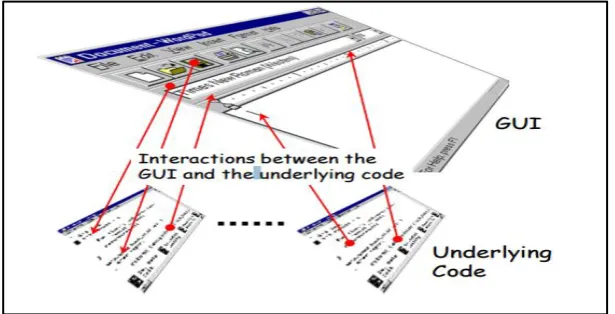
[image:21.595.150.458.214.371.2]GUIs have become nearly omniPresent by interacting with software systems. Figure 2.1 descibes the front-end underlying code for a GUI, where an end-user interacts with the software using the GUI.
Figure 2.1: GUI is the front-end to the underlying code (Memon, 2001)
2.3 Software Testing
Software testing is an important activity in software engineering. It can help people obtain accurate findings for software quality and diagnose errors in software execution (Ref et al., 2011). Software testing helps achieve the required results by evaluating an attribute or capability of a program or system (Choudhary & Kumar, 2011).
2.4 GUI Testing
GUI is crucial in perfecting a software product. Thus, GUI testing ensures software reliability. It is usually performed using a test script that interacts with a GUI through a sequence of actions. Moreover, generating event sequences is always challenging. Thus, the testing phase is divided into GUI testing, logical testing, unit testing and integration testing. These various testing approaches provide effectiveness, efficiency, correctness and accuracy in developing a quality product (Chen et al., 2008).
Testing a GUI is an important and difficult concern in developing quality software. In GUI testing, one of the most challenging considerations is the significantly large or infinite input domain of a non-trivial GUI application. Defining the region of convergence is necessary to help testers select the test cases from the input domain of GUI applications (Zhao & Cai, 2010). GUI testing provides information about the functionality of software for it to meet the design requirements in the GUI and develop the standard required product before being launched in the market.
GUI testing helps ensure that the requirements specified for a particular GUI are met. These specifications contain the navigation path or sequences that will be performed by a normal user and other sequences that a user can freely obtain through the GUI. These sequences can generate faults or failures in the software system. Thus, testing these sequences is crucial (Isabella & Emi, 2012).
2.5 Performance Parameters for Testing
The performance of a GUI is vital aspect in software development. Performance depends on choosing an algorithm that runs quickly and uses available computing resources efficiently. In testing the GUI performance, the time taken has been analyzed by a program and how the program can run on desired speed. Various available design methods can be used to design a test case. These design methods help test the application step by step efficiently and successfully. Thus, time and effort are saved by automating the testing process and the productivity of fault detection is increased as well. Automating the testing process involves different steps of planning. These steps can include effort, time, required resources and criteria for terminating a test case, reporting detected errors and evaluating the data collected.
The project plan must contain a schedule for testing milestones in its entire development period. The schedule will determine the time required for each section of testing milestone. This schedule will be designed effectively when it considers that test cases do fail. Hence, a program along with other test cases is required to ensure that bugs are fixed. This process will help determine more bugs with less effort and consumed time. However, it involves allocating time and resources for testing, running tests and collecting and executing test results (Wasif, 2007).
2.5.1 Complexity
The testing complexity of several classes of programs is measured in terms of the number of test cases required to demonstrate program correctness. Even for very restrictive classes of programs, no commonly used test criteria, namely, statement, branch and path executed at least once, are nearly sufficient to guarantee the absence of errors. A study of testing complexity identifies two new test criteria: one for testing a path and the other for testing a program. These new criteria suggest how test data are selected to obtain confidence in program correctness beyond the requirement of each statement, branch, or path tested at least once (Tai, 1980).
there are many ways to calculate complexity, the easiest method is to add the number of binary decision statements (if, while, for) (Tai, 1980).
2.5.2 Correctness
Testing a GUI is a tedious task because of various reasons. First, vast possibilities of GUI interactions are implied, producing different states based on various sequences of GUI commands. A large number of possible states indicate numerous input permutations. The large number of possible states results in many variations of inputs, which require considerably numerous testing. For instance, Microsoft released approximately 400,000 beta copies of Windows 95 to detect the failures of the program (Boghdady et al., 2011).
The safety, authenticity and usability of a software depends on the functional correctness of its GUIs, which are hierarchical in nature. Testing a GUI for functional correctness is a crucial area of research because testing is a laborious job. This testing also involves extensive resources. A total of 50%–60% of the total cost of software development is purely allotted to software testing. At Present , GUI testing is a quick process because the characteristics of GUIs differ from those of traditional software systems. Hence, functional accuracy significantly contributes to software success. GUI testing is required to provide effectiveness, efficiency and accuracy (Kaur et al., 2010).
The accuracy of GUI assures the accuracy of the overall software system. Hence, comprehensive GUI testing is needed. This process involves all possible sequences of actions that need to be performed by widgets or the end-users using GUIs (Zacharias, 2012). GUI testing is considered a subdomain of software testing; for many reasons, testing the perfectness of a GUI is not an easy task (Memon, 2001). Many studies have identified the problems encountered in testing GUIs. The following are some of the findings of these studies:
(i) Numerous possible interactions are involved in a GUI state; thus, GUI testing requires enormous effort (Navarro et al., 2010).
(iii) GUI testing is a very complicated task because validating GUI states requires the selection of objects and their properties (Navarro et al., 2010).
(iv) GUI states are produced because of events performed in a particular sequence. Thus, not every sequence will produce the same state.
(v) The development and execution of test cases for testing GUIs include actions for validating input event sequences.
(vi) The mechanism for determining the successful execution of a software involves a particular test case for GUI (Memon, 2004).
2.5.3 Magnitude of Relative Error (MRE) for Performance Parameters
To illustrate the problem of magnitude of relative error (MRE), consider two prediction models A and B. If the MRE of model B is significantly lower than the MRE of model A, one can conclude that model B is better than model A (B is “more accurate” than A in the current software engineering
terminology). To determine whether model A or model B is the best model between the two, the model evaluation metric must select the model that is closest to the actual value, considering that MRE < 0.25 is acceptable for prediction MRE ≤ 0.25 as acceptable for prediction models and then obtain the MRE according to the equation (Tron et al., 2002).
∑
2.6 Test Case Definition
Bunin and Schneider (2009) define a test case as“a set of conditions or variables under which a tester will determine whether a system under test satisfies requirements or works correctly.”In developing a test case, problems in the requirements and design of an application can also be identified (Bunin & Schneider, 2009).
2.6.1 Test Case Generation
Test case generation is a critical step in testing because the species of a test case is the effectiveness of the object being tested and the environment of the object also depends on the test inputs or its condition. The collection of test cases is known as a test suite, which is typically associated with an implementation dependency or testing goal. According to Liu (2001), test case generation is not limited to generating only input to implement the software, but also the corresponding output properties.
In 2011, Boghdady et al. proposed that test case generation is considered as the base or fundamental stage of any testing process. However, test data are still required to execute the generated test cases that enhance the test data generation, which is important compared with the test case generation.
2.6.2 Test Case Generation and Execution
Test cases for testing GUIs can be generated and executed in various ways. These methods, which are based on a fundamental idea, are indicated below (Eldh, 2011). (i) Fully Manual: A test case is written manually to describe the step-by-step testing
procedure. This process is time consuming and a test writer may miss some of the steps involved in software testing by mistake.
(iii)Generating test cases manually and running them automatically: This approach allows a user to write test cases manually and testers run the cases automatically to save time and resources in testing. The manually generated test cases are mounted on any testing server that rePresent s GUI testers.
(iv) Fully automated: In this approach, test cases are generated and executed automatically. This process is done by mapping GUI interfaces with testing tools for generating test cases. The testing tools execute test cases automatically. (v) Generating test cases is a crucial part of software testing because testing results
depend on the test cases generated using any of the approaches mentioned above. In this study, the test cases are generated automatically using EFG and BXT techniques.
2.7 Automated GUI Testing
In this method of generating test cases, software testing tools execute automated test cases in the form of scripts of user actions. The purpose of this testing is to apply intensive testing in a short period of time with minimum resources. This process is significantly more convenient and useful compared with numerous quality assurance (QA) team resources. In testing, the automated testing tools execute tests, generate testing results and compare the results with previous test runs. Automated testing can also be performed any time and repeatedly (Fernando et al., 2014).
The following are the significant benefits of automated software testing:
(i) Software development lifecycle (SDLC) is shortened, which facilitates the marketing of software products as early as possible.
(ii) Optimum utilization of hardware resources and efficient testing are achieved. (iii) Utilization of QA manpower resources is reduced, saving software cost. (iv) Software stability and reliability are improved through enhanced testing. (v) Software accuracy is improved.
(vi) Automated software testing is a convenient way to test software with minimum effort that produces high-quality results.
Automated software testing is becoming widely accepted because it helps reduce human interaction, repetitive testing and releases. Automated testing is very practical and easy to use. In this method, testing tools execute the script of testing commands that replicate test procedures and fully control software testing (Yu et al., 2011).
Automated software testing allows testers to implement the entire software testing lifecycle (STL) to improve the efficiency of STL and make it effective using optimizing efforts throughout the entire STL. A major challenge of automated software testing is automating the integration and system testing efforts. The overall objective is to design, develop and deliver an automated test. This process ensures the capability of re-testing to enhance testing efficiency. Compared with traditional testing, if implemented and executed successfully, automated testing reduces the cost of software testing and the overall cost of a software product. This testing not only reduces cost, but also optimizes testing resources and improves product quality at the same time (Karnavel et al., 2013).
The major concern in testing GUI automatically is the need for functionally accurate GUI components. This step includes automating the testing efforts, which are highly resource intensive and error prone. Automating the GUI testing, which is accurate and reliable, saves cost as opposed to manual GUI testing (Latiu et al., 2013). However, whenever test cases are automated, the cases must be prepared according to the latest version of the GUI application. Any changes made in the application should also be replicated in the scripts of the automated test cases.
Test automation is gaining wide acceptance in software development communities. Hence a large number of test automation tools, such as QUITAR, Selenium and GUI Tester, have become available.
2.7.1 Automated GUI Testing Technique
applications and operating systems, such as Windows, DOS and Linux, as well as on programming languages, such as C++, Java and Visual Basic.Net.
2.7.2 Challenges in Test Automation
Completely automation of software testing is impossible because softwares are very complex in nature. However, more than 80% automation of GUI testing can be achieved. The challenges of automating GUI testing are as follows:
i) The name of Windows changes dynamically.
ii) Widgets like text boxes and combo boxes do not have unique identifying names. iii) Produced GUI controls use managed and unmanaged codes.
iv) Applications are developed in different programming languages and operating systems.
v) Applications are developed using third-party controls that include various visual controls such as grid controls and schedule controls (Gandhi et al., 2014).
2.8 Model-Based Testing (MBT)
This technique is based on modules, where a structured testing approach is employed and testing results are based on the models of the system. These models reflect the structure of the application. Thus, when testing any application using MBT, one test case run shows results of the effect on the whole application and the other test case run illustrates the effects on a particular model being tested, such as Event Flow Graphs (EFG) , Event Interaction Graphs (EIG) and Event Semantic Interaction Graphs (ESIG). At the end of the testing process, results are verified by comparing the two executions or runs and viewing the overall execution plan of the model. Thus, any difference in the results of both runs is attributed to the defect in application (Silva et al., 2008).
2.8.1 Event Flow Graph (EFG)
GUI are rePresent ed as events in this graph. These actions can be clicking on a button or selecting an option in a list box, whereas edges rePresent the association between events. For example, T is an event that follows event S. Event T needs to be performed immediately after event S. The initial event is “click on button Exit,”
which initiates another GUI that consists of events (Yes, No) for confirmation from the main page, as shown in Figure 2.2.
The entity flow diagram provides a way to map GUI for generating test cases systematically and automatically. The event sequence of a test case is generated by walking on the EFG with a graph traversal algorihm (Gautam & Sharma, 2014). The EFG diagram shows events and their association with other events and trigger vector. A dedicated event for initiating the flow of events is called a start event, whereas an event for terminating an application is called an exit event.
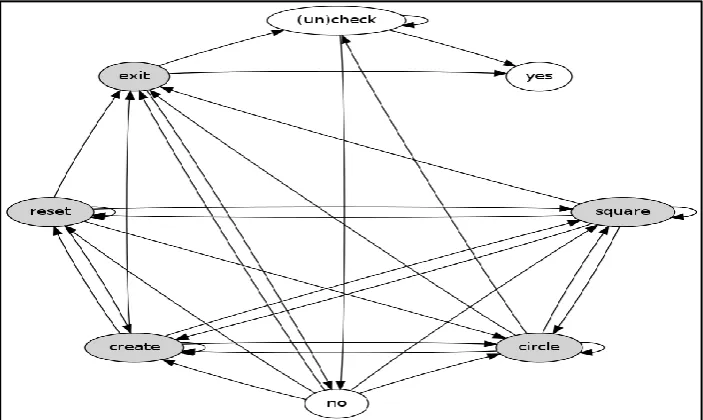
In an EFG, circles rePresent events, while arrows denote the dependencies among events. This research proposes an EFG that is different from the testing GUI. The proposed EFG shows all possible events along with their interdependencies among interesting events, as shown in Figure 2.3. EFG is built using user interactions after the events and their associations are analyzed (Singh, 2011).
[image:30.595.119.498.206.363.2]Figure 2.3 depicts the components in the GUI illustrated in Figure 2.2. These components are create, select, reset and exit.
Figure 2.3: Event sequence in GUI (Singh, 2011)
[image:31.595.116.524.422.730.2]Figure 2.4 shows the step-by-step algorithm of creating EFG for an AUT. In this algorithm, vertex G=(V,E) rePresent s an event. An event follows , which may be performed immediately after . Edge ( , ) ∈ E. The event follows the event .
Figure 2.4: Algorithm1: EFG (Bae et al., 2012) Input : an application p
Output : an event flow graph G= ( V,E ) and a set of initial nodes I 1 V← { }
2 E← { }
3 SeenEvents ← { }
4 WorkList ← new Queue ( ) 5 WorkList.add ( <> )
6 While WorkList is not empty do
7 EventSeq = < e1,e2…..en-1,en > ← WorkList.remove ( ) 8 AvailableEventsn ← RunNCapture ( p,EventSeq ) 9 For each e ≠ ϵ AvailableEventsn do
10 V← V U ex
11 If EventSeq =< > then
12 | I ← I U ex
13 else
14 | E←E U (en, ex)
15 end
16 If ex
ϵ
SeenEvents then17 SeenEvents ← SeenEvents U ex
18 WorkList.add ( < EventSeq, ex >)
19 end
20 end 21 end
This research also uses an EFG that employs an algorithm and applies the step-by-step algorithm in the two case studies. This process is done to generate various test cases and test all the events in a GUI.
2.9 Dynamic Event Extraction Technique
This technique, which is based on GUI testing, does not require a model creation phase. Moreover, it does not separate the phases of test case suite generation and execution. In this technique, test cases are generated for a test case suite and are simultaneously executed and generated (Bertolini et al., 2009).
2.9.1 Behavior Explorer Technique (BXT)
Figure 2.5 describes the pseudo-code algorithm for BXT in two main parts. The first part includes the decision to be made for selecting the screen to focus and the second part involves the stresses of the application from a selected screen. The second part performs the various steps for a given number of times or until the application fails or crashes because of the reasons stated below:
i) Identification of enabled events displayed on the current screen, such as the events that active components can process.
ii) Random selection of one event from all possible events.
Figure 2.5: Algorithm 2 shows the pseudo-code for BXT (Bertolini et al., 2009)
A testing technique based on dynamic event extraction (DEE) will be used in this study (Bertolini et al., 2010).
2.10 GUI Tester Tool
2.11 Eclipse Framework
Eclipse framework is an integrated development environment (IDE) that contains an extensible plugin system for customizing the environment and a base workspace. Eclipse is mainly defined in Java language for it to be used in developing applications with various plugins. This framework may be helpful in developing various applications in other programming languages, such as C, Ada, Fortran, ABAP, C++, JavaScript, COBOL, Natural, Haskell, PHP, Lasso, Ruby (including Ruby on Rails framework), Perl, Prolog, Python, R, Scala, Clojure, Groovy, Scheme and Erlang. The software package Mathematica is also one of the framework’s developed program. Eclipse Java development tools (JDTs) are used as development environments, which includes Eclipse CDT for C or C++, Eclipse PDT for PHP, Java, Scala and many others (DesRivieres & Wiegand, 2004). Java language has numerous advantages when used with Eclipse IDE. These advantages are as follows: i) With the assistance provided by IDE, writing Java code is easier than in a text editor. Hence, more time can be allotted for learning Java than for typing and looking up documentation.
ii) For a detailed execution of the Java code, the IDE debugger and scrapbook provide excellent output, which helps users to “see” the objects and easily understand the working steps of the Java program.
iii) IDE provides full support to users for the development practices of agile software (Dexter, 2007). An example is Test Driven Development.
2.12 Cobertura Tool
Moreover, it can sort HTML results in ascending or descending order based on the percent of lines covered, class name and percent of branches covered.
2.13 Related work
Different approaches are used for GUI testing; however, the model-based testing is better than the other approaches and such an automated technique can be used to generate test cases. This automated technique Present s a model for GUIs, named the event flow model, which is mostly used for the different aspects of GUI testing. For the effectiveness of GUI faults, the event flow model helps generate the GUI test cases in a large number quickly and efficiently. Additionally, this model can be recycled or re-used because it can be converted to generate additional test cases for the same or modified version of GUI (Kanchan & Sharma, 2014).
By contrast, an AJAX application user interface and transitions described by dynamic analysis are used to construct a state flow graph (SFG) between the models of two states. An equivalent static pages set is generated from this model, which can be used for different applications, such as the application of search engines to their content and state-based test performance. The approach to detect the clickables is a Crawljax that is completely reliant on a heuristically based approach, such as the elements of DOM, which can correspond to active user interface components and crawls application randomly exercising these clickables (Mesbah Bozdag, 200 ).
Dynamic analysis can construct an SFG that models the states of the user interface and interstate transitions of the AJAX application. From this model, a set of equivalent static pages can be generated for use in various applications (e.g., applying search engines to their content and performing state-based testing). Crawljax relies on a heuristically based approach to detect clickables, which are
elements of the document object model (DOM) that may correspond to active user interface components and crawl the application by exercising the clickables in random order (Mesbah Bozdag, 200 ).
2.14 Chapter Summary
3
CHAPTER
METHODOLOGY
3.1 Introduction
This chapter describes the research methodology of applying EFG and BXT techniques to test the graphical user interface (GUI) for the two case studies analyzed in this research. This chapter is organized into four subsections. Section 3.2 presents an overall view of the research methodology and Section 3.3 thoroughly describes each procedure. Section 3.4 discusses the two case studies explored in the investigation and Section 3.5 summarizes this chapter.
3.2 Research Methodology
Figure 3.1: Schematic diagram of the research methodology
The steps shown in Figure 3.1 are thoroughly explained in the succeeding sections.
3.3 Step 1: Application of the EFG and BXT techniques
3.3.1 Step 1-1: Application of the EFG technique
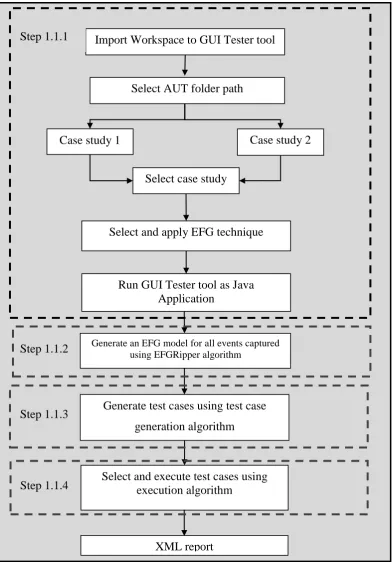
As previously mentioned, the preliminary step of the research methodology is the application of the EFG technique to the case studies, which are the Paint and Present applications of the GUI tester tool working in the Java language platform. This step, however, incorporates four other processes, as shown in Figure 3.2.
Select case study
Select and apply EFG technique
Select and execute test cases using execution algorithm
Case study 1 Case study 2
Run GUI Tester tool as Java Application
Generate an EFG model for all events captured using EFGRipper algorithm
Import Workspace to GUI Tester tool
Generate test cases using test case generation algorithm
XML report Select AUT folder path Step 1.1.1
Step 1.1.2
Step 1.1.3
[image:39.595.115.508.206.769.2]Step 1.1.4
REFERENCES
Aris, K. A.( 2007). Development of motor control using graphical user interface. University Malaysia Pahang, Ph.D. Thesis.
Alferez, M., Santos, J., Moreira, A., Garcia, A., Kulesza, U., Araujo, J., & Amaral, V. (2010). Software Language Engineering. Berlin Heidelberg : Springer. Boghdady, P. N., Badr, N., Hashem, M., & Tolba, M. F. (2011). Test Case
Generation and Test Data Extraction Techniques. International Journal of Electrical and Computer Sciences, 11(03), pp. 87-94.
Bunin, G., & Schneider, A. (2009). U.S. Patent No. 7,523,425. Washington, DC: U.S. Patent and Trademark Office.
Bertolini, C., Peres, G., d'Amorim, M., & Mota, A. (2009). An empirical evaluation of automated black box testing techniques for crashing guis. InSoftware Testing Verification and Validation, 2009. ICST'09. International
Conference on IEEE . pp. 21-30.
Bae, G., Rothermel, G., & Bae, D. H. (2012). On the relative strengths of model-based and dynamic event extraction-model-based gui testing techniques: An empirical study. InSoftware Reliability Engineering (ISSRE), 2012 IEEE 23rd International Symposium on (pp. 181-190). IEEE.
Chen, W. K., Shen, Z. W., & Chang, C. M. (2008). GUI test script organization with component abstraction. In Second International Conference on Secure System Integration and Reliability Improvement, 2008, IEEE. pp.128-134.
Choudhary, D., & Kumar, V. Software testing. Journal of Computational Simulation and Modeling. 2011. 1(1): 01-09.
DesRivieres, J., & Wiegand, J. (2004). Eclipse: A platform for integrating development tools. IBM Systems Journal, 2004. 43 (2): 371-383.
Eldh, S. (2011). On Test Design. Doctoral dissertation, Vasteras: Malardalen University. Ph.D. Thesis.
Gandhi, G. M. D., & Pillai, A. S. (2014). Challenges in GUI Test Automation.
International Journal of Computer Theory and Engineering, 6(2),pp 192.
Gautam and Sharma (2014). An Approach to Generate the Test Cases for GUI Testing, IJISET - International Journal of Innovative Science, Engineering and Technology, Vol. 1 Issue 6, August 2014.
Di Lucca, G. A., & Fasolino, A. R. (2006). Testing Web-based applications: The
state of the art and future trends. Information and Software
Technology, 48(12), pp.1172-1186.
Huang, Y., & Lu, L. (2012). Apply ant colony to event-flow model for graphical user interface test case generation. IET software, 6(1), pp.50-60.
Fernando, S. G. S., & Perera, S. N. (2014). Empirical Analysis of Data Mining
Techniques for Social Network Websites. Compusoft, 3(2), pp.582
.
Isabella, A., & Retna, E. (2012). Study Paper on Test Case generation for GUI Based Testing. arXiv preprint arXiv:1202.4527,3(1).pp 139-147
Kanchan, G., & Sharma, P.M. (2014). An Approach to Generate the Test Cases for GUI Testing, International Journal of Innovative Science, Engineering and Technology, 1 (6).
Karnavel, K., & Santhoshkumar, J. (2013). Automated software testing for application maintenance by using bee colony optimization algorithms (BCO). In IEEE International Conference on Information Communication and Embedded Systems (ICICES ) 2013,pp.327-330.
Kaur, M., Sharma, N., & Kaur, R. K. (2010). Xml Schema Based Approach for Testing of Software Components. International Journal of Computer Applications, 6(11),PP, 7-11.
Latiu, G. I., Cret, O., & Vacariu, L (2013).Graphical user interface testing using evolutionary algorithms. In IEEE 8th Iberian Conference on Information Systems and Technologies, 2013.pp.1-6.
Liu, S. (2001). Generating test cases from software documentation; McMaster University. Ph.D. Thesis
Melchior, J., Grolaux, D., Vanderdonckt, J., & Van Roy, P. (2009). A toolkit for peer-to-peer distributed user interfaces: concepts, implementationand applications. In Proceedings of the 1st ACM SIGCHI symposium on Engineering interactive computing systems, pp.69-78.
Memon, A. M. . (2001). A comprehensive framework for testing graphical user interfaces.University of Pittsburgh;. Ph.D. Thesis
Memon, A. M. (2004). Developing testing techniques for event-driven pervasive computing applications. In Proceedings of The OOPSLA 2004 workshop on Building Software for Pervasive Computing, (BSPC 2004).pp.1-3. Memon, A. M. (2007). An event‐flow model of GUI‐based applications for
testing. Software Testing, Verification and Reliability.. 17(3),pp. 137-157. Memon, A. M., Pollack, M. E., & Soffa, M. L. (2001). Hierarchical GUI test case
generation using automated planning. IEEE Transactions on Software Engineering.. 27(2),pp. 144-155.
Mesbah, A., Bozdag, E., & Van Deursen, A. (2008). Crawling Ajax by inferring user interface state changes. In Web Engineering,. ICWE'08. Eighth International Conference on. IEEE. pp. 122-134.
Nadira, I., & Sani, A. (2009). Voice Recognition Technology To Control Electronic/Electrical Appliances. UTeM, Melaka,Malaysia. Ph.D. Thesis
Nah, F. H., Lau, J. L. S., & Kuang, J. (2001). Critical factors for successful implementation of enterprise systems. Business process management journal,. 7(3): 285-296.
Navarro, P. L. M., Ruiz, D. S., & Pérez, G. M. (2010). A proposal for automatic testing of GUIs based on annotated use cases. Advances in Software Engineering.pp 8.
Padmawar, N. V., & Sarwate, D. A. (2014). Impact of Test Automation and Test Case Design Techniques-Challenges. International Journal of Innovative Research in Computer Science & Technology.. 2(4): 40-42
Rauf, A., & Alanazi, M. N. (2014). Using artificial intelligence to automatically test GUI. In IEEE 9th International Conference on Computer Science and Education.. pp. 3-5.
Silva Simao, A. L., Moura, A. V. & Bonifácio, A. (2008). A generalized model-based test generation method. InSoftware Engineering and Formal Methods, 2008. SEFM'08. Sixth IEEE International Conference on (pp.
139-148). IEEE.
Tai, K. C. (1980). Program testing complexity and test criteria. IEEE Trans. Software Engineering.,6(6), 531-538
Tron F, Stensrud, E, Barbara K, & Ingunn M (2002). An empirical validation of the relationship between the magnitude of relative error and project size.
In Software Metrics, 2002. Proceedings. Eighth IEEE Symposium on (pp.
3-12).
Xie., Qing., & Memon A.M. (2006). Model-based testing of community-driven open- source GUI applications. Software Maintenance, 22nd IEEE International Conference on IEEE. 2006.pp :145-154
Xie, Q., & Memon, A. M. (2006,). Studying the characteristics of a" Good" GUI test suite. InSoftware Reliability Engineering, 2006. ISSRE'06. 17th International Symposium on (pp. 159-168). IEEE.
Wasif Afzal. (2007). Metrics in Software Test Planning and Test Design Processes. School of Engineering Blekinge Institute of Technology
Yu, H., Lan, Y., & Ren, H. (2011). The Research about an Automated Software Testing System RunTool. In IEEE 3rd International Workshop on Intelligent Systems and Applications, 2011. pp.1-4.
Yuan, X., & Memon, A. M. (2010). Generating event sequence-based test cases using GUI runtime state feedback. Software Engineering, IEEE Transactions. 36(1),pp. 81-95.
Zacharias, B. (2012).Test Case Generation and Reusing Test Cases for GUI Designed with HTML. Journal of Software.7(10): 2269-2277.