© 2017, IRJET | Impact Factor value: 5.181 | ISO 9001:2008 Certified Journal | Page 3642
Location Based Task Reminder System Using Android
Neha S Gouranna
1, Arpita A Chitragar
2, Kumar Byakod
3, Gururaj L Kulkarni
41,2,3
UG Student, Dept. of Information Science and Engineering, KLSGIT ,Karnataka, India.
4
Assistant Professor ,Dept. of Information Science and Engineering, KLSGIT ,Karnataka, India.
---***---Abstract -
In today’s era of smart phones everybody isconnected to the smart phones, there are so many applications on Android smart phones to complete user’s necessary task in daily life as we consider the task of user that he or she has to perform some task on particular location as soon as user will reach at that specific location, normally user forgets these kind of stuff in daily busy life to remember the location and what task he or she has to do. It is very complicated for the user who has to travel through several locations in daily life. In order to solve this problem we developed the system called “Location Based Task Reminder System Using Android Mobile” in this system we are fetching the user’s current location through android mobile phones using Google Map, GPS and allow them to set reminder about that task on that specified location. In this way user can add multiple task reminders at multiple locations this will make effective for the users.
Key Words – Android, Google Map, GPS, Reminder, Smart phones.
1. INTRODUCTION
Nowadays to remember what task to do at what location is very tedious job for everyone because there are so many task that everyone has to perform in their day to day life. Nowadays android smart phones are everywhere and it provides Google Map, Google Location services to the smart phones through which we can easily get the location detail but Google does not provides the facility to add the task reminder on specific location. By using their services of Map, GPS and Location we developed the system called as “Location Based Task Reminder System Using Android Mobile”.
This system plays very important role in user’s daily life to set task reminder at several locations through which user can make idea and alert of tasks he has to perform on specific location. There are so many applications on smart phones which provide location based services but they are allow us to set multiple reminder at multiple location through our implemented system we can add multiple reminders on one location. This will help user to improve their daily important activities such as meeting conference, wedding, party, exam and many more. For marketing and business oriented users it is very beneficial system. We implemented this system using Android Programming language on Android operating system as Android provides more flexibility and ease of installing any application developed on it . We included some permission for fetching the location of the user from Android SDK. “Location Based
Task Reminder System Using Android Mobile” focuses on following features.
1) Provides ease of access 2) Quick and easy to handle 3) Provides better reliability
4) Faster access to the location and easily customizable 5) Provide efficient output to the user in terms of reminder of tasks.
To meet all these features we used the following tools and techniques in Features Requirement of the System section.
1.1
Existing Approach
In previous existing approach there was provision to add reminder on a specific location but in that user is able to add the task reminder on the basis of time and date the problem with system was when user crossed the specified location but he was unable to get the task reminder about the location and if he is on another location then task reminder alert is displayed in this way there was no proper synchronization between task reminder and specified location. There was a provision to add one task reminder at one location only which is quite difficult to the user if he has many other tasks to complete on same place.
There are some following drawbacks of existing system: 1) Less reliability
2) Less location accuracy
3) Only one task reminder on one location 4) No user friendly and customizable
5) Less Ease of access to the application and location To overcome these drawbacks we proposed the system called “Location Based Task Reminder System Using Android Mobile” which is discussed in the proposed approach.
1.2 Proposed Approach
© 2017, IRJET | Impact Factor value: 5.181 | ISO 9001:2008 Certified Journal | Page 3643 the Android application. This all activities will be done by
using Google map and GPS services.
We used Android programming and operating system for this system which allows easy installation of application. Our proposed system allow user to add many task reminder on the same location and can add multiple task reminder in the application. In our proposed system it doesn’t provide continuous reminder to the user it just simply display the task reminder until and unless the user decline that notification, searching of location from current location is very effective in our system when user will search any location and add task reminder on that searched location it will be stored in the Android smart phones database and if user got the alert from application about task reminder and user decline it or cancel it that will delete from Android smart phones database. It doesn’t collect any used records user can add new location task reminder and if he wants to continue with the same location he can also set same task reminder for same location without cancelling it.
2. IMPLEMENTATION AND WORKING
We used android programming language and Android operating system to implement this system, for connectivity with GPS we used Google API . Google map provides service to Android application for adding task reminder on specific location using “Location Based Task Reminder System Using Android Mobile”.
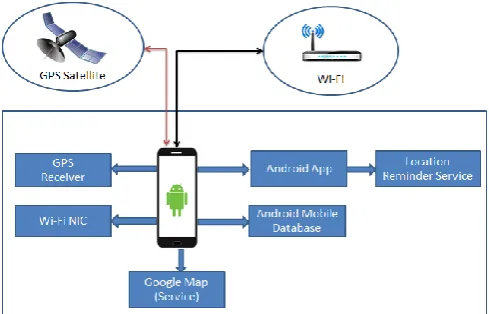
In given fig.1 there is complete structure of “Location Based Task Reminder System Using Android Mobile”.
[image:2.595.39.284.574.731.2]When user will connect to the GPS or Wi-Fi an application installed on users Android mobile phone will try to connect to the GPS service. It will fetch location of the user based on users query. There is synchronization with Google Map with our Android application. There is GPS receiver to receive service from GPS and Wi-Fi provides connectivity to the mobile through which user can access any location. Android application allows adding reminder.
Fig -1 Architecture of “Location Based Task Reminder System Using Android Mobile”
In given fig.2 there is flow of “Location Based Task
Reminder System Using Android Mobile”. For adding task reminder user need to install our Android application in their mobile phones. User will ask to certain permission while installing it, once it is accepted by the user the Android application is ready to give service to the user. Following are the permissions we add in implementation.
-> Android.permission.ACCESS_FINE_LOCATION -> Android.permission.ACCESS_COARSE_LOCATION -> Android.permission.ACCESS_NETWORK_STATE -> Android.permission.ACCESS_MOCK_LOCATION -> Android.permission.ACCESS_WIFI_STATE -> Android.permission.BIND_INPUT_METHOD -> Android.permission.BIND_DEVICE_ADMIN -> Android.permission.BIND_NFC_SERVICE -> Android.permission.BIND_TEXT_SERVICE -> Android.permission.BIND_NFC_SERVICE
-> Android.permission.CHANGE_NETWORK_STATE -> Android.permission.ACCESS_WIFI_STATE
-> Android.permission.CONTROL_LOCATION_STATE -> Android.permission.INSTALL_LOCATION_PROVIDER
These permissions we need to add in AndroidManifest.xml file in Android programming development. This will give service based on their work. When user will install the application in their Android mobile phones and when user will open it then it will requires location services provided by the Google. User can browse any of location through the Android application and set task reminder on that specified location when user will reach on that location in the future the service installed in users mobile phone provided by our system will match that latitude and longitude and if that specified task reminder’s locations latitude and longitude matches with the current location after reaching by the user will be generate an alert as reminder through the Android application in the user’s Android mobile phones.
© 2017, IRJET | Impact Factor value: 5.181 | ISO 9001:2008 Certified Journal | Page 3644
Fig-2 Flow of “Location Based Task Reminder System Using Android Mobile”.
2.1 Requirement Specifications
Hardware Interface: Development side:
Processor : Pentium IV 2.0 and above
RAM : 512 MB or Above
Hard Disk : 40 GB
User side:
Device : Android OS Devices (API level 8 & above)
Software Interface:
Development side :
Front End : Eclipse Galileo
Tool : Android SDK 2.1
Back End : SQLite Manager
External API : Google Map API
User side:
OS : Android OS 2.1 & above.
2.2 Experimental Results
We got the following experimental result after implementing and executing our system. When user will install our Android application, the splash screen will be shown to user for about 5 seconds , and then later it needs some input in the form of string as a location.
User has to give some location input in the form of string on which location he has to input his task as a reminder. After that it will fetch his current location and destination location in the form of latitude and longitude and matches it from current location to the destination location of the user, which is shown in next result. Given result is the current location of the user with latitude and longitude. User can also view his current location and he can browse also the destination location.
User needs to input his required location and just simply press Go to view the location for creating note or adding task reminder on that place. Below result is the adding of Task reminder on specific location as shown in given experiment. From above result user can create a note or add the task reminder on the specific location.
© 2017, IRJET | Impact Factor value: 5.181 | ISO 9001:2008 Certified Journal | Page 3645 Given figure is the update of required location distance in the
form of latitude and longitude from his current location. User can view his required location from his current location in the form of latitude and longitude from which he can guess our location is nearby from current location.
Given fig.8 is the final result of task reminder as shown. This will be the final result of our system from this user will get the notification along with the vibration until user decline it. If user cancelled it, that reminder will be deleted from the system’s database.
2.3 Functional requirement
R1: Get current location
Description: Application will get the Latitude and Longitude points on the device and will show the current location on Map.
R2: Plan Journey
Description: User can plan his journey by entering following details.
Name of the plan.
Source and Destination of the journey.
Expected arrival time at destination.
Add milestones at which user has some task to do.
Expected time to reach the milestone.
Expected time to leave the milestone.
R3: View existing plans
Description: User can view all created plans as well as he can update or delete any plan.
R4: Activate/Deactivate Plan
Description: Before starting the journey, user will activate the plan from the list of created plans. Later on, if journey is postponed, user can deactivate that plan too.
R6: Alert
Description: Application will automatically trigger the during the journey when device reaches within 100m of specified location in the plan.
2.4 Detailed non functional requirement
Availability : The system is user friendly.
Fault tolerance : In case of GPS failure due to weather conditions, location information can be retrieved using Location Based Service which is capable of getting location information from the mobile place inside the college.
Scalability : The system works with same efficiency for any number of registrations.
Reliability : The system works in any of the critical conditions. The recovery from the failure is faster.
Portability : The application is applicable on all versions of android.
2.5 Future Requirements
Application also can be merged with some information gain applications like, location of the nearest restaurants, hotels, shopping malls, etc.
It is also possible to make more efficient and user friendly GUI for the application.
3. CONCLUSIONS
© 2017, IRJET | Impact Factor value: 5.181 | ISO 9001:2008 Certified Journal | Page 3646 work we have to do on that specified location. “Location
Based Task Reminder System Using Android Mobile” helps to remind all these kind of activity we have to do on that specific location. It allows user to set location and set reminder on specific location by which he can easily add location of everywhere and add the task on that location through which need not to remind that location and task. It is very useful system through which user can improve their daily work efficiently and effectively without any worries.
REFERENCES
[1] Mohammad Salah Uddin, S. M. Allayear, N. C. Das, and F. A. Talukder “A Location Based Time and Attendance System”.
[2] T. Sohn, et al., "Place-Its: A Study of Location- Based Reminders," in UbiComp, 2005, p. 19. [3] U. Government. (1999), Global Positioning System. www.gps.gov.
[4] Reto Mier, “Professional Android Application Development”.
[5] Ruchika Gupta and BVR Reddy GPS and GPRS Based Cost Effective Human Tracking System Using Mobile Phones.
[6] Location Based Services by Valerie Bennett [7] Amit Kushwaha, Vineet Kushwaha “Location Based Services using Android Mobile Operating System” International Journal of Advances in Engineering & Technology, Mar 2011. ISSN: 2231-1963.