Flexible Physical Interfaces
by
Nicolas Villar
B.Sc. Hons. Computer Science with Multimedia (Lancaster University), 2002
Submitted in part fulfilment of the requirements for the degree of
Doctor of Philosophy
in
Computer Science
in the
COMPUTING DEPARTMENT
of
LANCASTER UNIVERSITY
ABSTRACT
Flexible Physical Interfaces
Nicolas Villar
Human-computer interface devices are rigid, and afford little or no opportunity for
end-user adaptation. This thesis proposes that valuable new interaction possibilities
can be generated through the development of user interface hardware that is
increas-ingly flexible, and allows end-users to physically shape, construct and modify physical interfaces for interactive systems.
The work is centred around the development of a novel platform for flexible user
in-terfaces (calledVoodooIO) that allows end-users to compose and adapt physical control structures in a manner that is both versatile and simple to use. VoodooIO has two
main physical elements: a pliable material (called the substrate), and a set of physical user interface controls, which can be arranged on the surface of the substrate. The sub-strate can be shaped, applied to existing surfaces, attached to objects and placed on
walls and furniture to designate interface areas on which users can spatially lay out
controls.
From a technical perspective, the design of VoodooIO is based on a novel
architec-ture for user interfaces as networks of controls, where each control is implemented as a
network node with physical input and output capabilities. The architecture overcomes
the inflexibility that is usually imposed by hard-wired circuitry in traditional interface
devices, by enabling individual control elements that can be connected and
disconnec-ted ad hoc from a shared network bus. The architecture includes support for a wide
and extensible range of control types; fast control identification and presence
detec-tion, and an application-level interface that abstracts from low level implementation
details and network management processes.
The concrete contributions to the field of human-computer interaction include a
motivation for the development of flexible physical interfaces, a fully working example
of such a technology, and insights gathered from its application and study.
PREFACE
This dissertation has not been submitted in support of an application for another
degree at this or any other university. It is the result of my own work and include
nothing which is the outcome of work done in collaboration except where specifically
indicated.
Excerpts of this thesis have been published in journal, conference and workshop
manuscripts, most notably in:
Nicolas Villar and Hans Gellersen. "A Malleable Control Structure for Soft-Wired User Interfaces" In Proc. Tangible and Embedded Interaction (TEI '07). Baton Rouge, USA. January 2007.
Wolfgang Spiessl, Nicolas Villar, Hans Gellersen and Albrecht Schmidt. VoodooFlash: Authoring across Digital and Physical Form" In Proc.Tangible and Embedded Interaction (TEI '07). Baton Rouge, USA. January 2007.
Nicolas Villar, Florian Block. "Distributed and Adaptable Home Control." In Adj. Proc.ACM Sym-posium on User Interface Software and Technology (UIST '06). Montreux, Switzerland. October 2006.
Nicolas Villar and Hans Gellersen. "The Friday Afternoon Project: A Two-Hour Prototyping Exer-cise" In Proc. Mobile and Embedded Interactive Systems (MEIS'06). Dresden, Germany. October 2006.
Florian Block, Nicolas Villar, Mike Hazas, Dave Molyneaux and Hans Gellersen. "Locating Physical Objects on Interactive Surfaces" In Proc. Mobile and Embedded Interactive Systems (MEIS'06). Dresden, Germany. October 2006.
Nicolas Villar, Kiel Gilleade, Devina Raymundy-Ellis and Hans Gellersen. “The VoodooIO Gaming Kit: A Real-Time Adaptable Gaming Controller.” In Proc. ofACM Advances in Computer Entertain-ment (ACE '06). Los Angeles, USA. June 2006.
John Bowers and Nicolas Villar. “Creating Ad Hoc Instruments with PPP”. In Proc.New Interfaces for Musical Expression (NIME ‘06), Paris, France. June 2006.
Yasue Kishino, Tsutomo Terada, Nicolas Villar and Shojiro Nishio. A Position Detection Mechanism using Camera Images for Pin-Shaped Input/Output Devices. In Adj. Proc.International Conference on Ubiquitous Computing (UbiComp). Tokyo, Japan. September 2005.
Nicolas Villar, Adam Lindsay and Hans Gellersen. "A rearrangeable tangible interface for musical composition and performance." In Proc.New Interfaces for Musical Expression (NIME '05), Vancouver, Canada. May 2005.
Nicolas Villar, Kristof Van Laerhoven, Hans Gellersen. "A Physical Notice Board with Digital Logic and Display". In Adj. Proc.European Symposium on Ambient Intelligence (EUSAI '04). Eindhoven, Netherlands. November 2004.
Kristof Van Laerhoven, Nicolas Villar and Hans Gellersen. "Pin&Mix: When Pins Become Interac-tion Components." In Proc.Workshop on Real World User Interfaces (PI03) at the Fifth International Symposium on Human Computer Interaction with Mobile Devices and Services (MobileHCI 2003). Udine, Italy. September 2003.
Kristof Van Laerhoven, Nicolas Villar, Albrecht Schmidt, Hans Gellersen, Maria Hakansson, and Lars Erik Holmquist. "Pin&Play: The Surface as Network Medium" In IEEE Communications Magazine, Vol.41 No.4, IEEE Press: pp. 90-96.April 2003.
"...So now you see what I meant about Lego blocks. They have more or less the same properties as those which Democritus ascribed to atoms. And that is what makes them so much fun to build with. They are first and foremost indivisible. Then they have different shapes and sizes. They are solid and impermeable. They also have 'hooks' and 'barbs' so that they can be connec-ted to form every conceivable figure. These connections can later be broken again so that new figures can be constructed from the same blocks.
The fact that they can be used over and over is what makes Lego the most ingenious toy in the world. Each single Lego block can be part of a truck one day and part of a castle the day after. We could also say that Lego blocks are 'eternal.' Children of today can play with the same blocks their parents played with when they were little..."
TABLE OF CONTENTS
1. Introduction ... 1
1.1 Flexible Physical Interfaces ... 2
1.2 VoodooIO ... 3
1.3 Thesis Contributions and Overview of Work ... 5
2. Background ... 7
2.1 A Language of Controls ... 7
2.2 The Right Tools for the Job ... 8
2.2.1 Space-Multiplexing ... 9
2.2.2 Specialised Input Devices ... 9
2.3 The Role of Physicality ... 10
2.3.1 Tangible Objects ... 11
2.3.2 Use of Space ... 12
2.4 Room for Change ... 13
2.4.1 Adaptive and Adaptable Interfaces ... 13
2.4.2 End-User Development ... 14
2.4.3 Physical Flexiblity ... 15
2.5 Discussion ... 17
3. An Architecture for Networked Controls ... 20
3.1 Hard-Wired vs. Networked Controls ... 21
3.2 Issues in Networking Controls ... 23
3.3 Enabling Network Technology ... 24
3.3.1 The 1-Wire Communications Bus ... 25
3.3.2 1-Wire Components ... 25
3.3.3 Conditional Device Searches ... 26
3.3.4 Activity Detection ... 27
3.3.5 Read/Write Operations ... 27
3.3.6 Benefits and Issues of 1-Wire for Networked Controls ... 28
3.4 Blueprint for Controls as Network Nodes ... 29
3.4.1 Hardware Design ... 29
3.4.2 An Example Control Type ... 30
3.4.3 Control Description ... 31
3.5 System Architecture ... 31
3.5.1 Detecting User Interaction ... 33
3.5.2 Process Scheduler ... 33
3.5.3 ControlAddedEvent ... 35
3.5.4 ControlRemovedEvent ... 36
3.5.5 ControlChangedEvent ... 38
4. System Response Time ... 42
4.1 Experimental Setup ... 43
4.1.1 Tester Board ... 44
4.1.2 Stimulus/Event Logger ... 44
4.2 SRT Performance ... 45
4.2.1 SRT for Control Addition and Removal ... 46
4.2.2 SRT of Control Manipulation ... 48
4.3 Scalability Performance Results ... 50
4.3.1 Scaling of Control Addition and Removal ... 50
4.3.2 Manipulating a control ... 52
4.4 Human Performance ... 54
4.4.1 Limits of Human Perception ... 54
4.4.2 Measuring Human Perception of Delay ... 55
4.4.3 Experimental Procedure and Results ... 56
4.5 Effect of SRT Delays and Variability ... 57
4.6 Discussion ... 59
5. Physical Design ... 61
5.1 Key Concepts ... 61
5.2 Physical Attachment = Digital Connectivity ... 63
5.3 Substrate Material ... 64
5.3.1 Isolative Layers ... 65
5.3.2 Conductive Layers ... 66
5.3.3 Bonding Process ... 67
5.4 Substrate Material Properties ... 68
5.4.1 Electrical Considerations ... 70
5.5 Coaxial Pin Connectors ... 71
5.6 Control Set ... 72
5.6.1 A Selection of Input Controls ... 74
5.6.2 Output Controls ... 75
5.6.3 Substrate Connector ... 76
5.7 User Experience ... 76
5.8 Discussion ... 79
6. Application Support Tools ... 82
6.1 Application Infrastructure ... 82
6.1.1 Service/Proxy Implementation ... 83
6.2 Developer Tools ... 85
6.2.1 Example Library: Adobe Flash ... 86
6.3 End-User Mapping Tools ... 88
6.3.1 InputMapper ... 88
6.3.2 MIDIMapper ... 89
6.3.3 Mapping by Example ... 89
6.3.4 Example: GoogleEarth Interface ... 92
7. Exploring User Benefit ... 100
7.1 Product Prototyping ... 101
7.1.1 The Munich Experience ... 101
7.1.2 The Delft Workshop ... 105
7.1.3 Discussion ... 107
7.2 Make-Your-Own-Interface Experiment ... 109
7.2.1 Procedure ... 110
7.2.2 Experiment Results ... 112
7.2.3 Participant Feedback ... 116
7.2.4 Discussion ... 117
7.3 Music Production ... 118
7.3.1 Reference Application ... 119
7.3.2 Evaluation ... 121
7.3.3 Discussion ... 122
7.4 Playing Games ... 124
7.4.1 Building a Mech Cockpit ... 124
7.4.2 Example Scenario: Arranging Character Abilities ... 127
7.4.3 Discussion ... 130
7.5 Study of Control Presence as an Interaction Technique ... 131
7.5.1 Experimental Setup ... 132
7.5.2 Experiment Results ... 133
7.5.3 Discussion ... 134
7.6 Ad Hoc Musical Instruments ... 135
7.6.1 An Ad Hoc Mixer ... 137
7.6.2 An Ad Hoc Synthesiser ... 139
7.6.3 Performance Experience ... 140
7.6.4 Discussion ... 142
7.7 Analysis ... 143
7.7.1 Learnability ... 143
7.7.2 Flexibility ... 145
7.7.3 Robustness ... 147
8. Conclusion ... 150
8.1 Summary of Contributions ... 150
8.2 Initial Impact and Future Work ... 152
8.3 Closing Remarks ... 154
Bibliography ... 155
LIST OF FIGURES
Figure 1.1: VoodooIO is a human-computer interface that users can shape, construct and modify. (Page 4)
Figure 3.1: Traditional hard-wired interface hardware (left) vs. a network-based design (right). (Page 22)
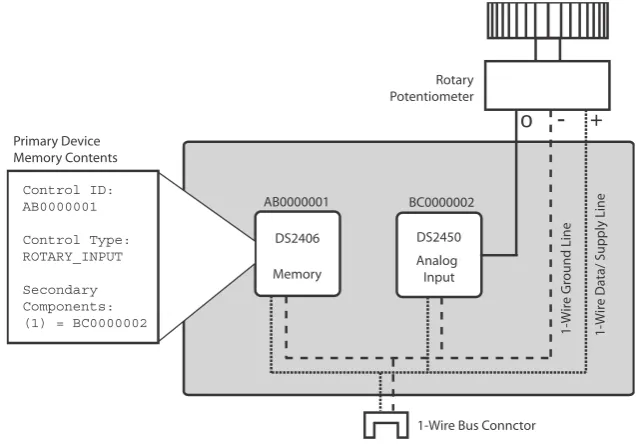
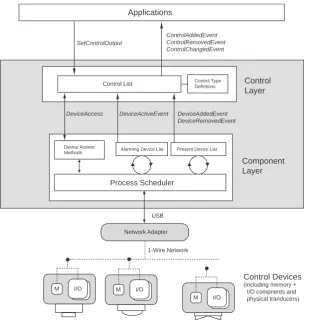
Figure 3.2: Conceptual diagram of an interface control as a network node. (Page 22) Figure 3.3: Generic design for control devices using 1-Wire components. (Page 29) Figure 3.4: Example implementation of a "Rotary Input" -type control. (Page 30) Figure 3.5: Overview of the architecture, with a focus on the software stack. (Page 32) Figure 3.6: Example message protocol configuration. (Page 34)
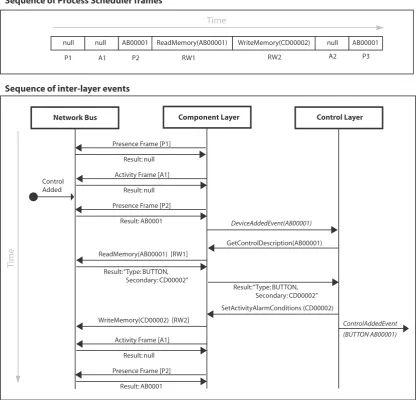
Figure 3.7: Sequence of events leading up to the ControlAddedEvent being raised. (Page 36)
Figure 3.8: Sequence of events leading up to the ControlRemovedEvent being raised. (Page 37)
Figure 3.9: Sequence of events leading up to the ControlChangedEvent being raised. (Page 39)
Figure 4.1: Diagram of the closed-loop test rig used to measure system response time. (Page 43)
Figure 4.2: Example P-to-A frame-ratio configurations, 5:1 (top) and 1:5 (bottom). (Page 45)
Figure 4.3: Time to detect addition of a control, across varying protocol configurations. (Page 46)
Figure 4.4: Time to detect removal of a control, across varying protocol configurations. (Page 47)
Figure 4.5: Time to detect analog control manipulation, across varying protocol configurations. (Page 48)
Figure 4.6: Time to detect digital control manipulation, across varying control configurations. (Page 49)
Figure 4.7: Example presence detection cycles with varying numbers of present controls. (Page 50)
Figure 4.8: Time to detect control addition, given a varying number of controls present on the bus. (Page 51)
Figure 4.9: Time to detect control removal, given a varying number of controls present on the bus. (Page 52)
Figure 4.10: Time to detect a single control manipulation, given a varying number of present controls on the bus. (Page 53)
Figure 4.11: Time to detect manipulation of a single control, given an increasing number of simultaneously manipulated controls. (Page 53)
Figure 4.12: Test apparatus to measure human perception of SRT (Page 55) Figure 4.13: Experimental results. (Page 57)
Figure 4.14: Comparison of base SRT for control presence and manipulation. (Page 59)
Figure 5.1: An example deployment of the substrate material and control set. (Page 62)
Figure 5.2: A traditional cabled network (left) vs. a surface-based network medium (right). (Page 63)
Figure 5.3: Pin&Play uses a pin-like connector to pierce through the surface and make contact with the conductive layers embedded within. (Page 63) Figure 5.4: The Pin&Play technique uses a network medium made of conductive
layers embedded within insulating layers (right) – a planar equivalent to the wires embedded inside the insulated cables traditionally used in networking (left). (Page 64)
Figure 5.5: Substrate composition: conductive layers are embedded within an isolative material. (Page 64)
Figure 5.6: Silicone foam rubber sheets of varying thickness. (Page 65)
Figure 5.7: The conductive layers are made from a conductive fabric. (Page 66) Figure 5.8: Substrate bonding process: layers of silicone foam rubber are alternated
with layers of the conductive fabric, and bonded together using a silicone adhesive. (Page 67)
Figure 5.9: The substrate material is highly flexible. (Page 68)
Figure 5.10: The substrate is self-healing and resistant to punctures by the pin connectors. (Page 69)
Figure 5.11: The white surface of the substrate serves as a writing and projection surface. (Page 69)
Figure 5.12: The adhesive backing can be used to stick areas of subsrate to existing surfaces. (Page 70)
Figure 5.13: Coaxial pin connector design. (Page 71)
Figure 5.14: The outer and inner sections of the pin connector make independent contact with the top and bottom conductive layers of the substrate, respectively. (Page 71)
Figure 5.15: Examples of everyday interface devices and constituent physical controls. (Page 72)
Figure 5.16: Controls categorised by their dimensionality of input. (Page 73)
Figure 5.17: Basic control types can be combined into compound controls. (Page 73) Figure 5.18: Some of the implemented control types included in the control set:
button (top left), dial (top right), slider (bottom left) and joystick (bottom right). (Page 74)
Figure 5.19: Some output controls: a numeric display (top) and a RGB LED (bottom). (Page 75)
Figure 5.20: The substrate connector. (Page 76)
Figure 5.21: The substrate can be flexed and cut to shape. (Page 76) Figure 5.22: Augmenting surfaces with the substrate material. (Page 77) Figure 5.23: Connecting substrate areas. (Page 77)
Figure 5.24: Interconnecting substrate sections. (Page 78) Figure 5.25: Adding and removing controls. (Page 78)
Figure 5.26: Rearranging the control configuration and layout. (Page 79)
Figure 5.27: Physical flexibility allows users to appropriate the interface and integrate it into their environment in interesting ways (e.g integrated into a notice board, right). (Page 80)
Figure 6.1: The application interface follows a service/proxy model. (Page 82)
Figure 6.2: Service implementation: the Software Stack is coupled with an TCP/IP server to propagate interaction events to connected proxies. (Page 84)
Figure 6.3: Typical Proxy implementation, providing a platform- and application-specific interface to a Service. (Page 84)
Figure 6.4: An object-oriented library representation (Page 85)
Figure 6.5: The Adobe Flash development libraries extend the graphical stage and controls with a physical equivalent. (Page 86)
Figure 6.6: Physical controls (top) vs. Flash components (bottom). (Page 87)
Figure 6.7: Users interact with controls as they do with any other Flash component. (Page 88)
Figure 6.8: The configuration panel of the InputMapper end-user configuration tool. (Page 89)
Figure 6.9: Mapping-by-example. (Page 90)
Figure 6.10: The Google Earth graphical user interface. (Page 92) Figure 6.11: Our sketch for a physical interface (right). (Page 93) Figure 6.12: Testing the system after deployment in the lab. (Page 93)
Figure 6.13: The layout of controls as originally sketched (left) and interface occlusion (right) (Page 94)
Figure 6.14: The zoom dial quickly repositioned (left) and trying out a slider for panning (right) (Page 95)
Figure 6.15: Adding a second scroll slider for panning (left) and removing the buttons (right). (Page 96)
Figure 7.1: The participants for the Munich study were two expert Flash developers. (Page 102)
Figure 7.2: The participants initially moved from paper design and physical interface layout to work within Flash (top), and at later points introduced
graphical elements first and then reflected and tested them on the physical stage (bottom). (Page 103)
Figure 7.3: Sketching interface labelling using a paper insert. (Page 104) Figure 7.4: Integrating graphics by overhead projection (left) and a window
cut-out (right). (Page 105)
Figure 7.5: Participants were asked to develop two versions of the Etch-a-Sketch toy. (Page 106)
Figure 7.6: Participants in the the Delft workshop explored appropriation of the physical components (Page 107)
Figure 7.7: Screenshot of the "cannon" game used for the experiment. (Page 109) Figure 7.8: Experiment setup: test subjects sit in front of a large projection of the
game screen. Each user is provided with a "game pad" made of substrate material, on which to arrange a selection of controls to play the game. (Page 110)
Figure 7.9: Choice of "angle" control in rounds 2 and 3. (Page 112) Figure 7.10: Choice of "power" control in rounds 2 and 3. (Page 113) Figure 7.11: Choice of "fire" button colour. (Page 114)
Figure 7.12: Some resulting layouts of controls on substrate pads. (Page 114) Figure 7.13: Sequential layout of controls. (Page 115)
Figure 7.14: Layout of controls to match projected display. (Page 115)
Figure 7.15: The Reason GUI emulates the look and feel of audio equipment hardware. (Page 119)
Figure 7.16: Reason's "MIDI Remote" mapping window. (Page 120) Figure 7.17: Reason extended with a VoodooIO interface. (Page 120) Figure 7.18: Creating an ad hoc crossfader. (Page 122)
Figure 7.19: Cockpit design - notice how interface areas extend beyond the desktop to the monitor bezel and chair armrest. (Page 126)
Figure 7.20: An example arrangement of abilities and skills around the edges of the World of Warcraft GUI. (Page 128)
Figure 7.21: Controls are arranged to depict the intended use-sequence. Note the use of a paper sheet between controls and substrate to label their function and annotate the use sequence. (Page 129)
Figure 7.22: Experimental setup: participants interact with a software percussion machine. (Page 132)
Figure 7.23: Experimental conditions: "Button," "Dial," and "Presence." (Page 132) Figure 7.24: The MIDILink tool was used to forward VoodooIO events via MIDI
interface
to MAX/MSP, which ran on a separate machine. (Page 137) Figure 7.25: An example performance sequence using the mixer. (Page 138)
Figure 7.26: Performing with the synthesiser. (Page 139)
Figure 7.27: Ad hoc instrument performance at Circuits of Malpractice (2005). (Page 141)
Chapter 1
Introduction
The design of user interfaces has been a subject of active investigation over the last
three decades, ever since personal computers popularised the experience of direct
hu-man-computer interaction. In this time, user interface design has advanced
consider-ably, and modern interfaces are significantly better than the original text-based
ter-minals of early PCs. In their seminal book "The Psychology of Human-Computer
Interaction," published in 1983, the authors Card, Moran and Newell wrote:
"[The] radical increase in both the computer's power and its performance/cost ratio has meant that an increasing amount of computational resources have become available to be spent on the human-computer interface itself, rather than on purely computational tasks. This increase of de-ployable resources exacerbates the novelty of the area, since entirely new styles of interaction become available coincidentally. These new styles often lead to completely new interfaces, which are then even more ragged than before. At the same time, opportunities for the invention of good interfaces also increase rapidly, accounting for the leaps and bounds we have seen in terms of major improvements in functionality and ease of use." [17]
The work presented in this thesis explores the interaction possibilities created by the
development of a novel user interface paradigm, which is enabled by recent advances
in technology and inspired by pioneering human-computer interaction (HCI) research
from the past thirty years. The focus of the research are user interfaces that are
charac-teristically flexible, being able to accommodate a high degree of user configuration and physical adaptation.
From a technical standpoint, the work is levered by the advent of low-cost
embed-ded computing devices, improvements in networking techniques, and the availability
of novel materials. The theoretical motivation for the research is based on previous
work on novel interaction methods, alternative interface designs and established HCI
principles.
The research efforts documented in this thesis follow a largely pragmatic approach: a
novel interface technology is developed into a robust research platform, which is then
are illustrated through a number of prototypical application scenarios, and the value of
the interaction concepts is evaluated through formal user studies and other experiential
methodology. The concrete contributions to the field of human-computer interaction
include a motivation for the design of flexible user interfaces, a fully working example
of such a technology, and insights gathered from its application and study.
1.1 Flexible Physical Interfaces
The degree of flexibility of an the interface is determined by how effectively it can
support explicit adaptation to particular user interaction requirements. Display screens
and graphical user interfaces (GUIs) are inherently flexible interface elements, being,
in essence, flat surfaces that can render any number of virtual controls and
visualisa-tions. The flexibility of GUIs makes them the focus of attention of most modern user
interfaces, where they play an essential role in accommodating a continually evolving
variety of computer applications, each with its own interface requirements. The
soft-ware that controls the behaviour of the interface – the application code and underlying
operating system – is also, in principle, infinitely flexible in its functionality. Some of
this flexibility is often exposed through user-configurable options and parameters,
tended to accommodate individual user preference. In fact, the only elements of the
in-terface that are not inherently flexible are the hardware devices necessary for physical
user control.
The area of physical user interface flexibility has received relatively little attention
from the research community. Perhaps the fundamental explanation for this lies in the
lack of readily available technologies that afford users the ability to freely define, shape
and configure the control structures of a human-computer interface. Current interface
devices are inherently rigid in their design: the product of technical, mechanical
ma-terial choices are devices that do not readily lend themselves to be modified after their
manufacture. Take as an example the most ubiquitous interface device of today: the
computer keyboard. Once a keyboard has been assembled at the factory – its circuit
board laid out, electronic components soldered, keys fixed in place and encased by a
plastic housing – it is no longer possible to alter its physical configuration without the
use of specialist tools and expert knowledge. Even when practicable, any modifications
to the keyboard (say, a forcible augmentation with an additional bank of keys) would
not necessarily be supported by the rest of the interface. The interface software would
likely need to be reprogrammed in order to accommodate any new functionality that
the physical alterations are intended to supply.
The motivation behind this work is to make the physical elements of the user
inter-face as flexible as software applications and graphical user interinter-faces. Following the
ex-ample of the keyboard, it is envisioned that with a truly flexible interface the user
should be able to effortlessly change the arrangement of the keys, add new keys if
ne-cessary, and remove extraneous ones if desired. The user should be able to exchange
keys for some other type of controls if appropriate – input sliders, for example – and
even change the shape and size of the keyboard itself. The result should be a readily
us-able, fully functioning interface that remains continually modifiable.
In order to extend flexibility across the physical interface to this degree, it is first
ne-cessary to rethink current interface design using a holistic approach to the problem: at
the low level, the design of electronic interface devices needs to be reconsidered,
in-cluding their materials and form-factors; at the high level, it is important to take into
account how the technology will integrate into the software elements of the interface,
and consider what mechanisms need to be in place for the user to be able to make
fun-ctional use of the added flexibility. Only then is it possible to explore application
pos-sibilities, refine design decisions, and evaluate the benefits, limitations and possible
pit-falls of giving people the ability to modify the physical control structures that allow
them to interact with their computers.
1.2 VoodooIO
The core contribution of this thesis is the development of a new technology for
flex-ible user interfaces, which is called VoodooIO (short for Voodoo-Input/Output, and
sometimes abbreviated as VIO). The technology supports the ad hoc composition and
modification of physical user interface elements, in a manner that is both versatile and
simple to use. In addition, the VoodooIO implementation includes a set of software
drivers and tools that facilitate its integration with a wide range of applications.
VoodooIO has two main physical elements: a pliable, sheet-like material – called
the substrate – that acts as the underlying physical layer on which the interface is
con-structed; and a set of physical user interface controls, which can be arranged on the
surface of the substrate. Sections of substrate material can be shaped, placed on
exist-ing surfaces, attached to objects, walls, furniture or other elements of the architecture
to create physical interface areas. Deployed substrate areas serve as the physical
equi-valent of graphical displays, framing the interaction by defining areas on which users
can spatially lay out interface controls (Figure 1.1).
Figure 1.1: VoodooIO is a human-computer interface that users can shape, construct and modify.
Users of VoodooIO are supplied with a control set that includes a wide variety of
basic control devices, both input (e.g buttons, switches, sliders and knobs) and output
(e.g. lights and indicators). Each control is equipped with small pin-like connectors at
its base, which can pierce into the soft substrate material to securely fasten it in place;
controls can be plucked back out of the substrate in order to be removed, reoriented or
rearranged. The interface can be physically modified at any time, supporting smooth
transitions between configuration and use.
The technical design of VoodooIO is based on a novel concept of implementing
user interface devices as networks of controls. Each physical control is a network
node – a minimal, embedded computer – that can be connected and disconnected
from a network bus. Controls are equipped with a "Pin&Play" connection mechanism,
whereby the act of attaching a control to the substrate connects it to a network bus,
which is built into the material as internal conductive layers that extend across its area.
The connector mechanism uses pins act as coaxial connectors that require no
pre-defined sockets on the substrate; rather, the pins create their own sockets on
attach-ment. The substrate acts as a two-dimensional network cable, able to transmit network
signals across its surface between controls and a network master, which drives the
net-work and monitors the state of connected controls. When a control is connected, its
presence is quickly detected on the network and identified by a unique ID. VoodooIO
controls can be used by applications as personal interface devices on a single computer,
as a privately shared resource on a local network, or as a public user interface service
over the Internet.
1.3 Thesis Contributions and Overview of Work
The need to support some form of interface personalisation, tailoring or adaptation
is well understood, and is, to some degree, common practice in user interface design.
What is less well understood is how interface flexibility can be extended to include the
physical parts of the human-computer interface so that they too can be changeable,
reconfigurable and enabled with some of the versatility usually afforded only by
soft-ware programs and graphical user interfaces.
This thesis presents the following contributions to the area of human-computer
inter-action research:
. A novel design for flexible physical interfaces, which includes:
a. A system architecture for physical interface devices as reconfigurable networks
of controls.
b. Innovative materials and mechanisms to support physical user interface
modification.
c. Programming libraries and end-user configuration tools that act as software
"glue" between the physical interface and software applications.
. A characterisation of the technology, in terms of:
a. Its technical capabilities and limitations.
b. Its user-related properties and novel interaction techniques it enables.
. Insights into the applicability of the technology and associated interaction
tech-niques, collected through:
a. Self-generated application examples, used to illustrate the envisioned style of
interaction.
b. User studies, focused on evaluating the novel interaction techniques afforded
by the technology.
c. Expert feedback in a number of application areas, commenting on the
per-ceived benefits of greater interface flexibility applied to current practice.
The work is presented in a bottom-up approach: Chapter 2 lays the theoretical
foundations for the work, and discusses previous research in related areas. Chapter 3
presents an architecture developed to support runtime physical interface
reconfigura-tion, which implements interface equipment as networks of controls. The implications
of the design on the performance of the physical interface (and how this relates to the
user experience) are then characterised in Chapter 4.
Having described a generic architecture for networked controls, Chapter 5 describes
how the concept of networked controls is applied to a concrete physical design, called
VoodooIO. The VoodooIO design, including some software application tools discussed
in Chapter 6, is then applied as a research platform to investigate the end-user benefit
of physical interface flexibility. Chapter 7 collects a series of expert evaluations, formal
user studies and application experiences that illustrate and inform the interaction
pos-sibilities of flexible interfaces in a variety of application areas, including product
proto-typing, game-playing and music production and performance.
Chapter 2
Background
In 1983, the first ACM Computer Human Interaction (CHI) conference marked
an important milestone for a nascent research field; in 2007 a second milestone has
been reached as the conference series celebrated its twenty-fifth year anniversary,
pub-licised under the banner of "Look how far we have come. Imagine how far we can go."
Admittedly, the human-computer interface is more usable today than it was
twenty-five years ago, but it remains that much of the valuable knowledge and experience
ac-cumulated over this intense period of research is still underrepresented in mainstream
user interface designs. In the practice of enabling new interaction possibilities through
technological application, it remains important to apply the lessons learnt over the past
quarter century, in parallel with observing current practice and looking to the future
for inspiration. This chapter looks at work in the field of human-computer interaction
and related areas that has shaped, inspired and motivated our vision for the
develop-ment of a novel user interface paradigm, and its realisation in the VoodooIO
technology.
2.1 A Language of Controls
At the first ever CHI conference in 1983, Nakatani and Rochlich presented a paper
titled "Soft Machines: A Philosphy of User-Interface Design" [63]. At the time, the
authors were expressing a concern with the overwhelming complexity that
general-purpose computer interfaces can present to a user, compared with the simplicity of
more traditional "machines" that are "...special-purpose, have forms suggestive of their
functions, are operated with controls in obvious one-to-one correspondence with their
actions, and the consequences of the actions on visible objects are immediately and
readily apparent." Nakatani and Rohlich envisioned a solution that allowed computers
to be operated in a more machine-like way, which they demonstrated by using a
switches, keys and pushbuttons) that could be used to directly manipulate application
functions. The "soft-machine" design capitalised on what Chapanis called the
"lan-guage of controls" (Chapanis in [63]): a semantic significance attached to machine
control artefacts, learnt and evolved from several generations of machine interface
design and use. It is this language that lets us simply recognise and inherently "know"
that buttons are for pressing and dials are for turning; that rotating a knob in the
dir-ection of the arrow is going to have a gradually increasing effect on something, and
that turning the opposite way will likely reverse the action. The presence (or absence)
of controls can give an indication of the underlying capabilities of a system. The use of
labelling, clustering and arrangement of controls can further reinforce what the
pur-pose of the interface is, and how we are expected to use it.
The concept of a language of controls is closely related to Gibson's idea of
afford-ances [33], in particular Norman's application of the term to the field of HCI [66] and
Gaver's notion of "perceptible affordances" in technological objects [32]. It is also
present in Scheiderman's motivation for the use of real-world metaphors in
direct-ma-nipulation user interface designs [77]. However, neither the concept of affordance or
the use of metaphors encapsulate the way a designer can communicate an idea to the
user through their interface design choices: affordances, in the strict sense of the word,
cannot be "added" to an interface [67]. Perhaps the most thorough understanding of
the language of controls can be found in the field of human-computer semiotic
engin-eering, which studies exactly how semantic meaning can be intentionally encoded into
an interface design as a way for designers to communicate their vision and intentions
to the user at the time of interaction [81].
2.2 The Right Tools for the Job
Beyond instilling a sense of familiarity and ease of use through their design, there
exists further motivation for the use of multiple, specialised controls that can be
dir-ectly grasped and manipulated by users in a multi-handed fashion (like machine
trols), rather than virtual control representations that are operated serially and
sequentially via a generic proxy device, such as the computer keyboard or mouse.
2.2.1 Space-Multiplexing
The concepts of space-andtime-multiplexedcontrol were coined by Fitzmaurice, Ishii, and Buxton through their work in "Graspable User Interfaces" [29]. Time-multiplexed
control is characteristic of the way a user operates a graphical interface with a mouse:
using that single physical control device, the user sequentially selects and manipulates
virtual elements on the screen. The actual function of the mouse is constantly redefined
over time, its function determined by its graphical context at a particular point in time.
In contrast, a computer keyboard operates in a space-multiplexed manner, with each
keyboard key being permanently associated with a single function. Each key provides
dedicated access to a single interface function, readily accessible on the physical space
that the keyboard occupies.
Through a series of empirical studies, Fitzmaurice et al. demonstrated some of the
advantages of time-multiplexed over space-multiplexed control [28]. In their
experi-ments, users usually performed better when operating interfaces which used dedicated
physical control devices to manipulate graphical objects on the screen, compared to
conditions where time-multiplexed control schemes were used. The results provided
quantifiable evidence for the role of space-multiplexing in interface design, the benefits
of which had been vocalised in even earlier work by Bill Buxton, who proposed that
"distinct controls for specific functions provide the potential to improve the directness
of the user's access, such as through decreased homing time and exploiting motor
memory." [11].
2.2.2 Specialised Input Devices
The experiments reported in [28] also provided an insight into the advantage of
us-ingspecialiseddevices in the interface: objects that are specifically devised to carry out a particular kind of interaction task. Buxton identified this same concern in [14], when
he expressed his belief that "the quality of human input can be greatly improved
through the use of appropriate gestures... [that] pay more attention to the "body
guage" of human computer dialogues." As a simple illustration of this, Buxton shows
how the use of one of two very similar devices – a joystick and a trackball – can have a
drastic effect on the user's ability to effectively operate the interface, even though they
both afford continuos two-dimensional system input. The benefits of using the right
tools for the job are further highlighted in Card et al's morphological analysis of input
devices [16]. Beyond providing a comprehensive taxonomy of interface devices, the
work takes into account human performance metrics, and illustrates how the subtle
operational properties of a particular device can make it more or less suitable for a
specific interaction task.
Fitzmaurice et al. conclude that we might want to design interfaces that "...[allow]
for space-multiplexed, rapidly reconfigurable, specialised, input devices" in order to
ac-commodate the individual needs of users engaged in a variety of different tasks [28].
The mention of support for "rapid reconfigurability" as a desirable property in a user
interface is relevant to this work, and the thought will be paid particular attention later
in the discourse. First, however, it is worth focusing on another factor which has only
implicitly be mentioned so far: the use of physical objects and space in the interface.
2.3 The Role of Physicality
There are solid grounds from which to argue the benefits of space-multiplexed and
specialised interface tools. However, the application of these principles is more an
ex-ception than the norm in current user interface design practice. The more established
paradigm is the use of graphical user interfaces (GUIs), which follow the principle of
Direct Manipulation [77] where virtual interface elements (such windows, widgets,
icons, images and text) are operated like physical objects, but indirectly and
sequen-tially, through a generic proxy device such as mouse or keyboard. There are clear
ad-vantages to this approach: GUIs are portable, compact and are infinitely
reconfigur-able. Even so, there exists a body of research which specifically argues for making the
interface elements more real and less virtual, as solid objects which can be directly
grasped, touched, and moved around real-world space.
2.3.1 Tangible Objects
In 2004, Fishkin contributed a taxonomy to a growing area of investigation –
col-lectively known as "tangible" interfaces – that he generalised as: "interfaces where the
user uses their hands to manipulate some physical object(s) via physical gestures; a
computer system detects this, alters its state, and gives feedback accordingly" [26]. The
term was originally coined by Ishii and Ullmer in [47], where it was used to describe
interfaces where the physical "atoms" (objects) are tightly coupled with digital "bits" of
information. Some of the early motivation for investigating these types of interfaces
was originally articulated in [29], where it was suggested that making the interface out
of "graspable" interface elements would be beneficial for the user, given that it:
• "[encourages] two handed interactions;
• shifts to more specialised, context sensitive input devices;
• allows for more parallel input specification by the user, thereby improving the expressiveness of the communication capacity with the computer;
• leverages off our well developed, everyday skills of prehensile behaviours for physical object manipulations;
• externalises traditionally internal computer representations'
• facilitates interactions by making interface elements more "direct" and more "manipulat-able" by using physical artefacts;
• takes advantage of our keen spatial reasoning skills;
• offers a space multiplex design with a one to one mapping between control and controller; and finally,
• affords multi-person, collaborative use."
A similar line of reasoning has been followed by a number of different research
ap-proaches, which elaborate on the same basic concern. All have identified some
desir-able quality in interface designs which are characteristically "physical" [37],
"token-based" [45], "manipulative" [42] or "embodied" [27].
Many compelling examples of physical interfaces have been investigated in recent
HCI research, demonstrating a variety of advantages that physical interface objects can
have over graphical ones controlled with mouse and keyboard. For example, physical
affordances can be utilised for ease of use [18], physicality of interface objects can
make for more engaging user experiences ([36], [69]), and embedding in the physical
environment can facilitate interaction and collaboration away from the desktop [40],
[64].
2.3.2 Use of Space
When interface elements exist as tangible physical objects – rather than virtual
ele-ments on a screen – it is interesting to consider how their location in real-world space
can play a role in the interaction. David Kirsh, in an essay titled "The Intelligent Use of
Space," [51] elaborates on the premise that:
"...in having a body, we are spatially located creatures: we must always be facing some direction, have only certain objects in view, be within reach of certain others. How we manage the spatial arrangement of items around us is not an afterthought; it is an integral part of the way we think, plan and behave."
Kirsh brings attention to the way we reconfigure the environment – and in
particu-lar, the way we organise objects within it – as a way to provide semantic cues for
ourselves: such as laying out tools on a workbench in the sequence they are intended to
be used; or clustering paper documents together to indicate a relationship between
them.
The ability to spatially arrange tangible interface objects within the environment has
been the focus of research by Patten and Ishii, which is reported in [68]. The results of
the study illustrated some promising interaction advantages over a graphical user
in-terface, resultant from being able to use of the environment as a way to spatially
or-ganise interface concepts (embodied by physical tokens, rather than graphical icons). It
is interesting to note the particular observation that "...it can be useful for an interface
to provide ways for the user to move and organise objects without these operations
be-ing interpreted by the [interface]." This is in contrast to many designs for tangible user
interfaces that include the ability to track object movement and position, and can
at-tach (explicit or implicit) causality to the act of modifying their relative arrangement
to other objects; their location on a surface, or their position within in the
environment [83].
2.4 Room for Change
A present concern in user interaction research is an awareness that it is simply not
possible to design generic systems and interfaces that are appropriate for all individual
users, taking into account different settings and possible contexts of use [59], [15],
[50]. Earlier, the discourse touched on the benefits of designing user interfaces that are
specific to a particular task, rather than generic to all of them. Given the many
genera-tions of machine-control design practice, the design of such interfaces should be well
understood. However, a problem arises when the underlying functionality of the
sys-tem is subject to change, as is the case with any general-purpose computing platform –
how can the interface remain specific, if the underlying purpose of the machine can
change?
The same problem can be formulated from a different perspective. As discussed
pre-viously, people adapt and modify their environment to suit their needs and optimise
their interaction with the world. In addition, individuals may have particular needs and
opinions that may dictate a unique interface design that is specific to their individual
requirements, raising the question: how can an interface design remain appropriate for
different users, given individual preference and requirements?
A number of different approaches to accommodate individual user preference and
support task conformance have been reported in the research literature. The scope of
the research is broad, but shares the common motivation of exploring how (and to
what extent) it is possible to include some room for change in the design of a user
in-terface in a way that affords users the flexibility to tailor, adapt, reconfigure and
per-sonalise their interaction environments.
2.4.1 Adaptive and Adaptable Interfaces
It is important to make a distinction between user interfaces that are adaptive, and those that are described as being adaptable. Both terms are sometimes used inter-changeably in the research literature to refer to interfaces that can somehow be
per-sonalised in their configuration, and can be tailored to changing circumstances [21]. In
a stricter definition, adaptive interfaces can be said to be self-adapting, i.e. the system
plays an active role in altering the interface configuration. In contrast, adaptable
inter-faces provide some form of customisation mechanism, but expect the user to explicitly
carry out the adaptation.
An initial occurrence of the notion of adaptable user interfaces can be found in [49],
which discusses support for alternative interaction dialogues to achieve the same task.
Early work in the area has been motivated by the need to support different user
inter-action practices [59]. Motivated by the problem of applications that are increasingly
"bloated" with features, and that any one user only ever uses a small subset of these
features, Findlater and McGrenere report on a comparative study of static, adaptive
and adaptable user interfaces [25]. Their results indicate that users prefer to explicitly
adapt their interface, rather than using a static or self-adaptive design. The authors
conclude that users can carry out customisation tasks effectively, and that the majority
of users want a personalised interface. However, the point is made that users are less
likely to customise their design if the mechanisms for adaptation are difficult to learn
and use, and that users need to be guided in the process by way of example. The same
feeling is echoed in work by MacLean et al. [59], which purports the need to create a
"tailoring culture" where users are comfortable performing interface customisations,
and have access to the support and tools necessary to do so.
2.4.2 End-User Development
Related to the notion of user-adaptable software is the idea of end-user
develop-ment (EUD), which aims to allow non-technical computer users (who that have little
or no knowledge of computer programming) to create their own software applications.
Research in EUD began with the development of the Pygmalion visual programming
environment, which was released in 1975 [79]. Pygmalion introduced the concept of
programming-by-example, by editing graphical artefacts rather than writing code.
Later research has focused on developing simplified programming notations such as
HyperTalk (the programming language behind the Apple Computer's HyperCard
hy-permedia application program); graphical development languages such as Visual
Agent Talk [73], and other environments that encourage programming by
demonstration [19].
More recent developments have been enabled by the widespread use of the internet.
The Koala system allows users to record actions performed on a web page, and then
re-play them on demand [58]. Marmite is an end-user programming tool that allows
users to create web "mashups" by combining disparate internet data sources and
ser-vices [96]. Other projects have focused on allowing users to manage interactive
sys-tems and appliances in a home scenario. Rodden et al. report on a system that allows
users to build simple programs by dynamically assembling jigsaw pieces that represent
ubiquitous computing components [75]. Targeting the same design space are the
Me-dia Cubes programming language [6], the iCAP context-aware prototyping system
[80] and the a CAPella environment for developing context-aware applications by
demonstration [20].
2.4.3 Physical Flexiblity
Finding some level of end-user adaptability is increasingly common in graphical
user interface designs; it can range from support for cosmetic tailoring (such as the
ability to apply different interface "skins" or "themes") to functional extensibility (e.g.
tools for recording or programming custom macros). Enabling physical interface
flex-ibility is a growing area of research, and, whether coincidentally or explicitly, it is a
concern touched upon by a number of different research efforts.
There are a number of toolkit and infrastructure contributions intended to simplify
the development and deployment of physical interfaces. The Phidgets platform
intro-duced the concept of "physical widgets": physical sensors and actuators that can be
easily connected to a computer and programmed like graphical widgets [37]. The
Phidgets shield interface designers from low-level device management and interfacing
details, and expose their functionality through a high-level application programming
interface (API). A particular use of the Phidgets platform is presented in [38], where
the authors introduce a notion of customisable physical interfaces, and provide a
tem of "widget taps" that let user bind physical controls to graphical controls in
con-ventional applications.
The Arduino [1] and Gainer [31] kits include general-purpose I/O boards that
ab-stract from the low-level complexity involved in working with electronics and
mi-crocontrollers, and are programmable from graphical and object-oriented development
environments. They are widely used by researchers, designers and artists who wish to
embed interactivity into their design, but have limited programming or embedded
sys-tems development experience. The Calder [56], Papier-Mâché [53] and d.tools [43]
projects focus on supporting interface designers in the process of developing rapid
pro-totypes of their ideas., and allow designers to embed working controls in their models
at an early stage in the design cycle. The Behavior Construction Kits [74] and
Elec-tronic Blocks [97] provide simple interactive physical building elements that can be
easily assembled and programmed, and are aimed children for playful learning.
The iStuff framework supports the development of physical interfaces in ubiquitous
computing scenarios, where users interact with multiple networked, distributed and
heterogeneous computing platforms [4]. The the iStuff PatchPanel component enables
runtime re-mapping of interface devices to application functions; similarly, the ICON
toolkit provides a mechanism for input adaptability, allowing heterogeneous input
devices to be mapped onto personal computer GUIs [23].
The research literature includes several examples of physical interfaces that allow
users to modify the interface configuration during use. In some cases, the intention is
provide a mechanism for customisation, and afford personalisation of the user
inter-face. This is the case with Ungvary and Vertegaal's design for the SensOrg
cyber-mu-sical instrument, which supports a high degree of interface flexibility in order to
ac-commodate individual user's ergonomic and cognitive requirements [84]. A separate
example is the the development of a system that allows a touch sensitive tablet to be
partitioned into discrete virtual controls [11]. By placing interchangeable cardboard
templates on the tablet, users can partition the surface of the tablet into a set of
crete control areas and "virtual" input devices, which can then be assigned to dedicated
interface functions.
One final category includes designs where the act of constructing and assembling
physical objects is meaningful: the process of adapting the interface configuration,
bringing together different interface elements, or arranging them in space forms part
of the interaction. The Triangles system supports information access through
explora-tion of interface configuraexplora-tions [36]. Block Jam allows users to arrange blocks to
con-struct musical con-structures [64]. Also in the musical domain, the reactTable allows
musi-cians to program a complex synthesiser by arranging and manipulating physical tokens
on an interface surface [48].
2.5 Discussion
The design for the VoodooIO interface is deeply influenced by the train of thought
behind the work discussed in "A Language of Controls". Whenever possible, the
design intentionally makes use of interface elements that are intended be familiar to
users of technology, and which are suggestive of their function through their form. An
example of this is the choice of machine-like user controls described in Section 5.6, or
the the way controls connect to the substrate material via a sharp pinlike connectors
-reminiscent of everyday interaction with notice boards and pushpins.
With respect to the discussion about the "Right Tool for the Job": interaction with
VoodooIO typically follows a space-multiplexed scheme, where users interact with
multiple and discrete controls, and each control can be coupled to an individual
soft-ware function. The ability add more controls to the interface, as they become necessary,
obviates the need to reuse controls in a time-multiplexed manner. In addition,
Voo-dooIO supports a wide variety of different control types, providing users with a wide
range of specialised tools with which to carry out the interaction.
The focus of the user experience with VoodooIO is on the physical elements of the
interface: the substrate material and control objects. The design aims leverages the user
interaction experience on the advantages of making the interface increasingly physical,
and is motivated by the same line of reasoning that has inspired tangible user interface
(TUI) research. Interaction with VoodooIO makes extensive use of the ability to
ar-range objects (controls) in space (substrate areas). Spatial arar-rangement of controls is
not normally tracked or interpreted by the system; rather, it is intended simply as a
mechanism that allows users to arrange controls in meaningful and practical ways.
Nonetheless, related work has explored extensions to the VoodooIO technology to
support tracking of control arrangements on rectangular substrate areas ([52], [7]).
VoodooIO is not a classic example of a TUI in that it lends itself to be used as a
more traditional peripheral to a graphical user interface (e.g. the application examples
described in sections 7.2 and 7.3). In this sense, the interface does not inherently
provide a "close coupling between bits and atoms," any more than a computer
key-board provides a close coupling between physical keys and digital characters. However,
this does not prevent the use of VoodooIO as a platform to develop novel forms of
TUIs, enabling scenarios where the interaction takes places exclusively with physical
objects and without graphical displays. Sections 7.5 and 7.6 of this thesis present two
examples of such interfaces.
Finally, the work discussed under the heading of "Room for Change" is of particular
relevance to the efforts of realising a flexible physical interface through the
develop-ment of VoodooIO. When end-users are given the ability to construct and modify the
interface configuration, they are also exposed to design decisions and choices that are
normally reserved for expert interface designers. Informed by previous practice,
Voo-dooIO addresses these concerns by providing end-users with accessible and
under-standable mechanisms for physical construction (c.f. Chapter 5, Physical Design) and
software configuration (c.f. Chapter 6, Application Support Tools).
The remainder of this thesis documents the development of a user interface
paradigm (a novel interface design and associated style of interaction) that brings
to-gether many of the design philosophies and research findings that have been discussed
in this chapter. The VoodooIO design takes into account the importance of developing
interfaces that are suggestive of their function through their form; the benefits of
sup-plying users with the right tools to carry out specific interaction tasks, the advantages
of interaction via manipulation of physical objects that can be arranged in real-world
space, and the ability to change that arrangement as part of the interaction. The goal of
the work is to explore a style of interaction that is characteristically flexible, where
users play a central role in constructing, adapting and modifying the physical control
devices that constitute the human-computer interface.
Chapter 3
An Architecture for Networked
Controls
Computer interface equipment has evolved into a wide array of devices with
differ-ent form factors and capabilities. Some device types, such as PC keyboards and mice,
are fairly generic to many types of computing application. Others – such as joysticks,
graphics tablets and mixing desks – are aimed at more specific applications, from
game-playing through to graphic design or music production. In some cases – such as
the keypad on a mobile phone, a machine control panel or a vehicle dashboard – the
interface devices are unique and permanent to a particular instance of a system.
We tend to think of these devices as indivisible interface elements: a keyboard, a
gamepad, a mixing desk. In some cases, devices are interchangable as a result of a
standardized protocol or connection mechanism. A keyboard can be unplugged from a
USB port on a PC and replaced by a more ergonomic version, and a TV remote
con-trol can be swapped for another model that emits compatible infrared codes. In
gen-eral, this is as far as modularity and reconfigurability in the physical human computer
interface extends to: swapping one device for another of the same type, with some
de-gree of variation between form factors, control composition or input/output
capabilites.
Conceptually, it is possible to desconstruct individual examples of interface devices
into even smaller interactive units than we normally perceive them to be: a keyboard
into a set of keys, a gamepad into a joystick and some buttons, a mixing desk into rows
of sliders and feedback lights. At this level of granularity, it is possible to see a large of
overlap between what would normally be considered disparate and specialized devices:
fi-nite types, both input (e.g. buttons, sliders, dials, knobs, switches) or output (e.g.
dis-plays, buzzers, vibrators, lights) in a given arrangement.
This chapter deals with the technological paradigm shift which is involved in
deconstructing interface equipment beyond what we traditionally consider to be a
device as a whole and into its constituent interactive elements: basic input/output
con-trols. The goal of this deconstruction is to enable interface equipment that is
reconfig-urable and modular at the control level. Each control element becomes an interface
device in its own right, and collections of such controls can be brought together in an
ad hoc manner to create composite control devices which are continuously
reconfigur-able in their composition.
3.1 Hard-Wired vs. Networked Controls
In traditional interface device design, individual controls are hard-wired: soldered to
a printed circuit board, connected to controlling circuitry via conductive traces and
fixed in place by a rigid casing. In terms of cost and complexity this design is suitable if
we consider the device as a whole – rather than the individual controls it is composed
of – as an atomic and indivisible unit.
Embedded systems – special-purpose computers designed for a specific and
pre-de-fined task – are continually becoming smaller in size and more cost effective to develop
due to advances in manufacturing and the increasingly widespread use of
microcon-trollers, integrated circuits (IC) and other electronic components. It is now possible to
embed processing, memory and communication capabilities into increasingly smaller
devices, giving rise to such technologies as distributed sensor networks that are
com-posed of large numbers of minimal, self-contained and low-cost network nodes,
cap-able of autonomous and decentralised operation.
Given the ready availability of the same technologies that enable sensor networks, it
it becomes possible to consider an alternative design for interface equipment. Rather
than being hard-wired to a fixed circuit configuration, controls can be implemented as
embedded network nodes. In this approach, the interface circuitry is replaced by a
work bus, and individual controls to be added or removed from the network
constella-tion in a modular way (cf. Figure 3.1).
Figure 3.1: Traditional hard-wired interface hardware (left) vs. a network-based design (right).
The interface architecture presented in this chapter distributes the complexity
to-wards the outer edges of the control structure. Each control becomes a user interface
device in its own right, embedding all the circuitry necessary to power it, drive it, and
give it a common network interface. The design affords a high degree of control-level
modularity, with the implication of enabling reconfigurability of the control structure
without the limitations imposed by predefined designs.
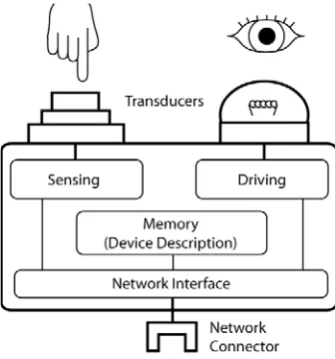
Figure 3.2: Conceptual diagram of an interface control as a network node.
Figure 3.2 illustrates a generic design for an interface control as a network node: one
or more transducers (which can be manually manipulated and electronically sensed)
provide a physical way for users to perceive output or effect input; IC modules with
in-put/output capabilities are used to sense and drive the state of the transducers;
[image:40.595.232.400.463.643.2]