Citation:
Smith, MB and Head, J and Ellis, RCT and Dickinson, I and Larkman, B (2006) Virtual reality learning resources in building pathology.
Link to Leeds Beckett Repository record: http://eprints.leedsbeckett.ac.uk/733/
Document Version: Article
The aim of the Leeds Beckett Repository is to provide open access to our research, as required by funder policies and permitted by publishers and copyright law.
The Leeds Beckett repository holds a wide range of publications, each of which has been checked for copyright and the relevant embargo period has been applied by the Research Services team.
We operate on a standard take-down policy. If you are the author or publisher of an output and you would like it removed from the repository, please contact us and we will investigate on a case-by-case basis.
Virtual reality learning resources in building pathology
Smith, M., Dickinson, I., Ellis, R.C.T. and Head, J.
Corresponding Author: Melanie Smith
School of the Built Environment Leeds Metropolitan University
The Northern Terrace Queen Square Court
Leeds LS1 3HE
email: [email protected]
Abstract
Building surveying students must be capable of analysing the condition of buildings and their components and, where this falls below an agreed standard, make
recommendations for their repair. Hence university courses must provide opportunities for students to learn about the main causes of deterioration. Fieldwork
exercises are essential but there are often problems locating appropriate buildings, programming visits to satisfy course timetables and complying with health and safety
requirements.
Whilst virtual surveys of existing buildings are not considered to be a substitute for real-life educational visits, this paper critically examines the development of a novel building pathology educational resource. Alternative technologies for creating digital panoramas are examined, prior to the development of an interactive case study, which enables students to conduct an on-line survey of a Grade 1 listed 16th Century hunting lodge. 360 degree panoramic scenes are linked with hot spots to create an interactive
virtual tour of the building.
The paper considers how virtual resources can be embedded within the curriculum, gauges tutor reaction to case study materials and identifies opportunities for the
development of a suite of building pathology educational media-rich learning materials.
1. Introduction
Concern that tutors become fascinated with technology and lose sight of the key educational goal – to stimulate cognitive development – is seldom far from the minds of academics when they hear of some new e-wizardry that purports to offer solutions
to assessment, learning and teaching problems. Whilst they are right to be cautious, there is no denying the advances made in educational technology and the
opportunities that e-learning now has to offer. However, e-learning must not stand in isolation. Blended learning is advocated, bringing together traditional physical classes with elements of virtual education (Motterham, 2006). This case study reports on the rationale for and implementation of a virtual reality (VR) system to enhance the learning experience of building surveying and architectural technology students in the School of the Built Environment at Leeds Metropolitan University.
2. Rationale
An important component within construction-related programmes is the site visit. Students are able to experience first-hand the activity, working conditions and excitement that characterise a busy construction project. However, as Frank (2005) observes, it is surprisingly difficult to witness the actual process of construction that lead to a building’s existence. In a review of the teaching approaches and learning opportunities that students consider most valuable in built environment education, she notes that some aspects of built environment education are difficult to visualise. Realising that it is not always possible or feasible to organise site visits with large groups of students, student feedback suggested that images and graphic
representations are effective aids which enhance the learning experience - hence the need to create a simulated construction site environment.
were sceptical that a virtual survey would enable them to learn about building pathology, whereas practising surveyors thought that the tool was appropriate for inexperienced surveyors to learn.
Virtualsite, a National Teaching Fellowship project, draws upon the experiences of
Shelbourn (ibid) and seeks to extend the concept in a variety of contexts. Moreover, the project evaluates recent developments in digital technology which enable
panoramic scenes to be created efficiently and adopts software applications that offer users visual prompts to assist in navigating through virtual environments.
3. Creating Digital Panoramas
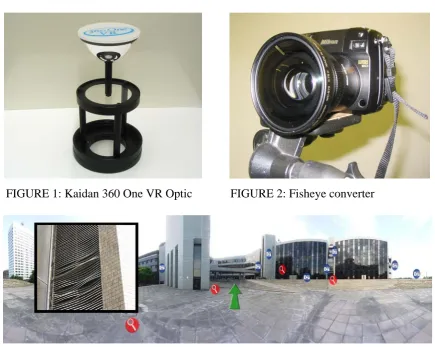
Early attempts to create 360 degree panoramas relied on stitching together a series of digital images taken at set intervals. The process was time consuming and the quality of the final scenes was dependent upon the accuracy of the stitching process. Today photo warping software can be used to generate panoramas from either a single ‘do-nut’ image, shot using a bespoke panoramic optic attached to a digital camera e.g. Kaidan’s 360 One VR Optic (see Fig. 1), or two fisheye images (see Fig. 2).
The panorama shown in Figure 3 used a Kaidan Optic to capture the image.
Photowarp software transformed the ‘do-nut’ image into a panoramic strip and icons, created in Adobe Photoshop, were inserted. Finally, the scene was converted into a QuickTime VR (QTVR) movie, using VRWorx software, to allow users to navigate around the movie and explore other scenes via a series of hotspots. Unfortunately the resolution of the original image – a reflection from the optic’s mirrored surface - was insufficient to allow users to make full use of the zoom functionality available in QTVR. To compensate, hotspots were provided enabling students to see close-ups of
FIGURE 1: Kaidan 360 One VR Optic FIGURE 2: Fisheye converter
FIGURE 3: QuickTime VR panorama
IPIX is also acknowledged as being one of the sector’s leading providers of digital panoramic virtual reality photography software (VRP, 2005), produces excellent results and would have lent itself to this type of application. However IPIX is
normally preferred for large volume work. An annual license fee to use the software inflates the costs for low-end users and precluded its use on this project.
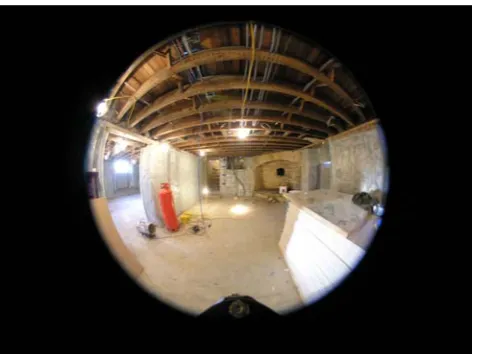
In order to overcome the twin problems of low image resolution and restricted fields of view, spherical panoramas were created by stitching together two high quality
FIGURE 4: Fisheye image of the building interior
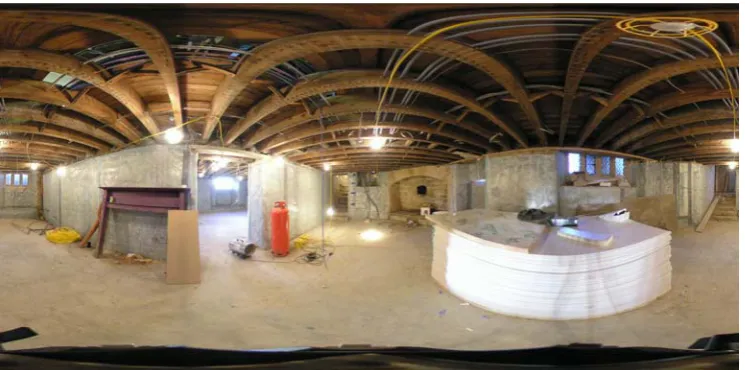
A Nikon Coolpix 8400 8MB digital camera with Nikon FCE9 183 degree fisheye convertor, positioned on an Agnos M rotator head screwed to a regular tripod pan head, were trialled – the rotator enabling an accurate through 180 degrees. Software settings allow adjustment of the centre X, Y co-ordinates and the radius size to ensure a good stitch before the image is published as a .jpg file (see Fig. 5).
4. Navigation
Rebelsky et al. (1999) state that most movies have relatively low viewer interactivity and there is need, in an educational context, to enhance the interactive quality by creating different story-lines, characters or camera angles. However, tension exists between too little and too much freedom when navigating through learning material (Benyon et al., 1997). Too much freedom, they suggest, results in students becoming bewildered or lost. Hence, users must remain in control if they are to explore new virtual environments with confidence. The concept of learner control regularly appears in the literature (Wild and Quinn, 1998; Stoney and Wild, 1998) both in the context of the user interface and the instructional design. Attention to navigation and
feedback in computer-aided learning applications, Wild and Quinn (ibid) argue, will reap educational rewards as learners develop deep approaches to the tasks being presented.
FIGURE 5: 360 degree scene created from 2 fisheye images
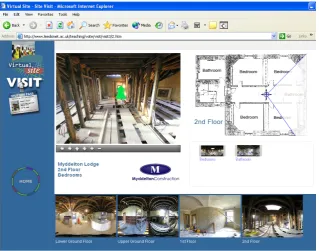
Tourweaver software was found to possess many features that lent itself to the proposed building pathology application, namely an interactive map with compass effect and customised walkthrough (EasyPano, 2006). Students can navigate via a floor plan, a series of hotspots embedded within the virtual tour or thumbnails. Not only did the compass highlight the direction in which the user was travelling but it also showed the field of view – as the user zoomed in to see a particular construction defect, so the field of view narrowed. Moreover, the application could accommodate several floor plans, presented either within one skin or on a number of different screens.
Drawing on images of a 16th Century hunting lodge restoration, which involved lime pointing, dry rot eradication, wall stabilisation, stained glass repairs and specialist joinery, a virtual tour of the building was compiled. Each fisheye image was
processed in Tourweaver and a simple design, chosen from a variety of pre-designed skin styles (which define the viewer size, format of the map and thumbnails) was used to create the tour. Panoramas, together with complementary icons created the visual
cue in each of the 3D scenes. The field of view, the opening view in each scene, and the minimum and maximum zoom capabilities were adjusted in Tourweaver.
FIGURE 6: Virtual tour of building interior (created in Tourweaver)
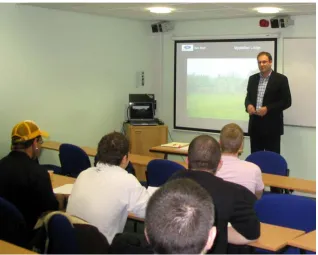
Early reaction to the resource has been positive from tutors and students, although the application has currently only been used in a formal classroom setting (see Fig. 7). One tutor stated:
These visuals will make a step change to my presentations. Whilst I can see
how students will be able to benefit from using these resources at a PC, they
also give me the flexibility in a lecture to react to the students – they ask me
about traditional lime mortar and I can point straight to it.
5. Discussion
Frank (ibid) identifies five factors that comprise good learning experiences: hands-on
practice-relevant education; seeing things with your own eyes; teacher enthusiasm and experience; team working; and tactile emotional experiences.
FIGURE 7: Virtual tours embedded within PowerPoint presentations
is understandable that they might initially be sceptical or indeed cynical about the motivations for developing such materials. Maximum benefit, it is suggested, will be gained by using VR materials in a holistic teaching and learning approach which values existing approaches. Aspen and Helm (2004) argue that this mix or blend of approaches can be of considerable benefit to students, leading to effective engagement in a range of situations.
Kirkley and Kirkley (2005) suggest that old technologies are unlikely to go away. They see them being incorporated with the newer technologies into the overall learning environment and suggest that the challenge will be to bring together teams with multiple roles and tasks. The experience gained from this project, however, suggests that tutors are keen to embrace new technologies, are excited by the potential
applications they offer and welcome the opportunity to work together to create new learning resources.
6. Future Development
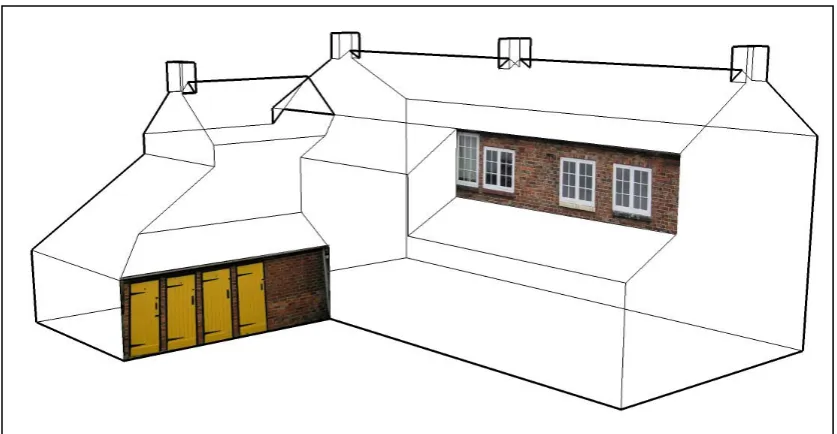
FIGURE 8: Rendering CAD model in SketchUp
will enhance further the delivery of the building pathology curriculum. In the example shown in Figure 8, a CAD model imported into SketchUp is being rendered with photographic textures. Exported graphics of the model, rotated at pre-defined intervals will then provide the media necessary to create a QuickTime VR object movie of existing properties.
Alternative methods of producing these movies are also being explored – principally by creating 3D virtual models in SketchUp directly from photographic images. The rationale being that increased use of visuals and graphics can only serve to enhance the student learning experience, provided that they are introduced into the curriculum in an appropriate and sensitive manner.
Acknowledgements
References
Aspen, L. & Helm, P. (2004) Making the connection in a blended learning environment, Educational Media International, September, 41(3), pp.245-252.
Benyon, D., Stone, D. & Woodroffe, M. (1997) Experience with developing
multimedia courseware for the World Wide Web; the need for better tools and clearer pedagogy, International Journal of Human-Computer Studies, 47, pp.197-218.
EasyPano (2006) Tourweaver, Internet
http://www.easypano.com/product_31_79.html
Frank, A. (2005) What do students value in Built Environment education? CEBE Transactions, 1(3), December, pp.21-29.
Kirkley, S.E. & Kirkley, J.R. (2005) Creating next generation blended learning environments using mixed reality, video games and simulations, TechTrends: Linking Research and Practice, May/June, 49(3).
Motterham, G. (2006) Blended education and the transformation of teachers: a long-term case study in postgraduate Higher Education, British Journal of Educational Technology, 37(1), January.
Rebelsky, S.A., Ford, J., Makedon, F. & Owen, C. (1999) Multimedia publishing systems. In Furht, B. ed. (1999) Handbook of internet and multimedia: systems and application. CRC Press.
Shelbourn, M., Aouad, G. and Hoxley, M. (2003) Computer-aided learning for Building Surveyors – a prototype application, In Building Education and Research (BEAR) Proceedings, The University of Salford, April.
Stoney, S. & Wild, M. (1998) Motivation and interface design: maximising learning opportunities, Journal of Computer Assisted Learning, 14, pp.40-50.
Virtual Reality Photography (2005) Case Study: QTVR vs. IPIX Comparison (Production costs, film vs. digital), Updated March 05, Internet
http://www.vrphotography.com/data/pages/casestudies/qtvrvsipix.html
Wild, M. & Quinn, C. (1998) Implications of educational theory for the design of instructional media, British Journal of Educational Technology, 29(1), pp.73-82.