Release 4
Switch Integration with System 25
585-310-258
Every effort was made to ensure that the information in this book was com-plete and accurate at the time of printing. However, information is subject to change.
Your Responsibility for Your System’s Security
Toll fraud is the unauthorized use of your telecommunications system by an unauthorized party, for example, persons other than your company’s employees, agents, subcontractors, or persons working on your company’s behalf. Note that there may be a risk of toll fraud associated with your tele-communications system and, if toll fraud occurs, it can result in substantial additional charges for your telecommunications services.
You and your system manager are responsible for the security of your sys-tem, such as programming and configuring your equipment to prevent unauthorized use. The system manager is also responsible for reading all installation, instruction, and system administration documents provided with this product in order to fully understand the features that can introduce risk of toll fraud and the steps that can be taken to reduce that risk. Lucent Technologies does not warrant that this product is immune from or will pre-vent unauthorized use of common-carrier telecommunication services or facilities accessed through or connected to it. Lucent Technologies will not be responsible for any charges that result from such unauthorized use.
Lucent Corporate Security
Whether or not immediate support is required, all toll fraud incidents involving Lucent products or services should be reported to Lucent Corpo-rate Security at 1 800 821-8235. In addition to recording the incident, Lucent Corporate Security is available for consultation on security issues, investigation support, referral to law enforcement agencies, and educational programs.
Lucent Technologies Fraud Intervention
If you suspect that you are being victimized by toll fraud and you need tech-nical support or assistance, call the Lucent Technologies National Customer Care Center Toll Fraud Intervention Hotline at 1 800 643-2353.
Federal Communications Commission Statement
Part 15: Class A Statement. This equipment has been tested and found to
comply with the limits for a Class A digital device, pursuant to Part 15 of the FCC Rules. These limits are designed to provide reasonable protection against harmful interference when the equipment is operated in a commer-cial environment. This equipment generates, uses, and can radiate radio-fre-quency energy and, if not installed and used in accordance with the instruction manual, may cause harmful interference to radio communica-tions. Operation of this equipment in a residential area is likely to cause harmful interference in which case the user will be required to correct the interference at his own expense.
Part 68: Network Registration Number. This equipment is registered
with the FCC in accordance with Part 68 of the FCC Rules. It is identified by an FCC registration number.
Part 68: Answer-Supervision Signaling. Allowing this equipment to be
operated in a manner that does not provide proper answer-supervision sig-naling is in violation of Part 68 Rules. This equipment returns answer-supervision signals to the public switched network when:
• Answered by the called station • Answered by the attendant
• Routed to a recorded announcement that can be administered by the CPE user
This equipment returns answer-supervision signals on all DID calls for-warded back to the public switched telephone network. Permissible excep-tions are:
• A call is unanswered • A busy tone is received • A reorder tone is received
Le Présent Appareil Nomérique n’émet pas de bruits radioélectriques dépassant les limites applicables aux appareils numériques de la class A préscrites dans le reglement sur le brouillage radioélectrique édicté par le ministére des Communications du Canada.
Trademarks
See the section titled “About This Book.”
Ordering Information
Call: Lucent Technologies Publications Center
Voice 1 800 457-1235 International Voice 317 322-6791 Fax 1 800 457-1764 International Fax 317 322-6699
Write: Lucent Technologies Publications Center 2855 N. Franklin Road
Indianapolis, IN 46219
Order: Document No. 585-310-258 Comcode 108196551 Issue 1, May 1998
You can be placed on a standing order list for this and other documents you may need. Standing order will enable you to automatically receive updated versions of individual documents or document sets, billed to account infor-mation that you provide. For more inforinfor-mation on standing orders, or to be put on a list to receive future issues of this document, contact the Lucent Technologies Publications Center.
Warranty
Lucent Technologies provides a limited warranty on this product. Refer to the “Limited Use Software License Agreement” card provided with your package.
European Union Declaration of Conformity
Lucent Technologies Business Communications Systems declares that the equipment specified in this document conforms to the referenced European Union (EU) Directives and Harmonized Standards listed below:
EMC Directive 89/336/EEC Low-Voltage Directive 73/23/EEC
The “CE” mark affixed to the equipment means that it conforms to the above directives.
Comments
To comment on this document, return the comment card at the back of the document.
Acknowledgment
About This Book
ix■ Purpose ix
■ Intended Audiences ix
■ Release History ix
■ How to Use This Book x
■ Conventions Used in This Book x
Terminology x
Keyboard and Telephone Keypad
Representations xiii
Screen Displays xiii
Data Entry Conventions xiv Safety and Security Alert Labels xiv
■ Trademarks and Service Marks xv
■ Related Resources xvii
Documentation xvii
Training xvii
Technical Assistance xvii
■ How to Comment on This Book xviii
1
System 25 Integration Overview
1-1■ Overview 1-1
■ Purpose 1-1
■ Lucent INTUITY Features 1-2 ■ Switch Integration Concepts 1-3 ■ Lucent INTUITY Feature Operation 1-6 INTUITY AUDIX Voice Mail Services 1-6
Call Answer 1-6
Voice Mail 1-6
Automated Attendant 1-7 Bulletin Board Service 1-8
■ General Call Handling by the
Business Schedule 1-10
Holiday Schedule(s) 1-11
■ Functionality Differences for the System 25 Switch 1-13
2
Planning the Integration
2-1■ Overview 2-1
■ Purpose 2-1
■ System 25 Switch Integration Planning 2-2
Completing the Worksheets 2-2 Coverage Options/Maintenance Access
(Worksheet A) 2-3
Voice Messaging Systems
(Worksheet B) 2-5
Floating Personal Dial Code List
(Worksheet C) 2-9
System Dial Plan
(Worksheet D) 2-11
SMDR Parameters for CAS
(Worksheet E) 2-13
Direct Group Calling Groups (DGC Groups)
(Worksheet F) 2-15
Voice Station Records
(Worksheet G) 2-17
Voice Stations – Single Line Generic Example
(Worksheet H) 2-21
Voice Stations – Multiline Generic Example
(Worksheet I) 2-23
■ Lucent INTUITY System Integration Planning 2-25 Completing the Worksheets 2-25
INTUITY AUDIX System Parameter Features:
Transfer Considerations (Worksheet J) 2-27 Assigning Extension Ranges on the
Lucent INTUITY (Worksheet K) 2-29 Channel Information for Installation
(Worksheet L) 2-31
Assign Services to Called Numbers
(Worksheet M) 2-35
Automated Attendants,
Automated Attendants,
(Worksheets N, O, and P) 2-39 Automated Attendants,
(Worksheets N, O, and P) 2-41
3
Implementing the Integration
3-1■ Overview 3-1
■ Purpose 3-1
■ Perform the Initial Lucent INTUITY System Installation 3-2
■ Perform the Initial System 25 Administration 3-2 ■ Lucent INTUITY System Initial Administration and Test 3-3
■ Lucent INTUITY System Initial Administration Checklist 3-4 Perform Acceptance Tests 3-5 Administer/Test Optional Lucent INTUITY Packages 3-6 Test Automated Attendants 3-7
■ Perform Cut-to-Service Administration 3-7 ■ Test for Validating the Port Connectivity 3-8
■ Test Busy Extensions 3-8
■ Test Call No Answer 3-8
■ Test for Validating Transfers 3-9 ■ Test for Validating Call Disconnection 3-9 ■ Test for Validating MWI Updates 3-9 ■ Test for Validating the Automated Attendant 3-9 ■ Test for Validating the Outcalling Feature 3-10 ■ Test for Validating the Fax Transmission 3-10 ■ Test for Validating MWI Updates 3-10 ■ Test for Viewing the System Monitor 3-11 ■ Perform Networking Administration and Test 3-12
4
Connectivity
4-1■ System 25 Voice Port Requirements 4-2 ■ Lucent INTUITY System Connections 4-2
IVC6 Connections 4-2
Connecting IVC6 Cards Using an 885A Adapter 4-3 ConnectingIVC6 Cards Using a
104A Connecting Block 4-4 Connecting Serial (COM/tty) Ports 4-6
Connectivity Based on Distance Between
Machines 4-6
Connecting Serial (COM/tty) Ports Within 50 feet,
Same Power Outlet 4-7
Connecting CAS to the First Available Serial Port on a Multi-Port Serial Card
Within 50 Feet, Same Power Outlet 4-10 Connecting Serial (COM/tty) Ports More
than 50 Feet, Different Power Outlet 4-11 Connecting the Modem 4-13 Connecting CAS via SMDR Ports More Than
50 Feet, Different Power Outlet 4-14 Connecting CAS to the First Available Serial Port
on a Multi-Port Serial Card More Than 50 Feet, Different Power Outlet 4-16
Networking 4-19
Remote Access 4-21
Dedicated Line Access 4-22 Connecting Dedicated Lines Within
50 Feet (15 meters) 4-22 Connecting Dedicated Lines Beyond
50 Feet (15 meters) 4-23 Remote Access (Dial) Connections 4-28
5
System 25 Switch Administration
5-1■ Overview 5-1
■ Purpose 5-1
■ Modifying Multiple User Extension
Numbers to a Consistent Dial Plan 5-6
■ Setting Coverage Options 5-7 ■ Administering Tip/Ring Ports for
Use with the INTUITY AUDIX Application 5-8
■ Assigning Personal Lines to Phantom Extensions 5-10 ■ Send Special Disconnect Code 5-12 ■ Administer CAS Features 5-13 ■ Creating a DGC for the INTUITY AUDIX Application 5-14 ■ Assigning Members to Group Coverage 5-16 ■ Assigning Station Coverage 5-18 ■ Administering Multi-Line Features 5-19 ■ Allowed/Disallowed Lists 5-22 ■ Saving Switch Changes to File 5-23
6
Lucent I
NTUITYSystem Administration
6-1■ Overview 6-1
■ Purpose 6-2
■ Administering the Lucent INTUITY
System for Switch Integration 6-2 Setting the Country and Switch 6-2 Setting the Message Waiting Indicator (MWI)
Device Assignments 6-6
Setting the Dial Plan Translations 6-8
Examples 6-11
Setting MWI Parameters 6-11 Stopping and Starting the Voice System 6-15
■ Administering the Routing Table 6-17
7
Integration Validation and Troubleshooting
7-1■ Overview 7-1
■ Purpose 7-1
■ Before You Begin 7-2
■ Integration Validation 7-2
Validating the Tip/Ring Mapping 7-2 Viewing the Switch Integration Logs 7-2 Switch Integration Log Entries 7-5
CHDIP — Raw Data 7-7
SWINDIP — Parsed and Translated Data 7-8 MWIDIP— MWI Updates 7-9
■ Integration Troubleshooting 7-10
GL
Glossary
GL-1Purpose
This book, Lucent INTUITY Messaging Solutions Release 4 Switch Integration with
System 25, Issue 1, 585-310-258, contains the information necessary to integrate a Lucent INTUITY™ system with a System 25 Switch.
Intended Audiences
This book is for the installer who will integrate the Lucent INTUITY system with a System 25 switch.
Secondary audiences include:
■ The project manager who is planning for the installation ■ Remote services personnel.
Release History
This is the first release of this book. It supports the release of the Lucent INTUITY
How to Use This Book
Installers should use:
■ Chapter 1, "System 25 Integration Overview", to get an overview of the
system
■ Chapter 2, "Planning the Integration", to identify information required for
the installation
■ Chapter 3, "Implementing the Integration", as an overview of the
installation process and as an installation guide
■ Chapter 4, "Connectivity", for connectivity information specific to the
System 25 switch
■ Chapter 5, "System 25 Switch Administration", for administering the
System 25 switch
■ Chapter 6, "Lucent INTUITY System Administration", for administering the Lucent INTUITY system for the integration
■ Chapter 7, "Integration Validation and Troubleshooting", for integration
validation and troubleshooting.
Conventions Used in This Book
This section describes the conventions used in this book.
Terminology
■ The words “subscriber” and “user” are interchangeable terms that
describe a person administered on the Lucent INTUITY system. The word “user” is the preferred term in the text; however, “subscriber” appears on most of the screens and is the command word you must type at the command line, for example, change subscriber “Jane Doe”.
■ The word “type” means to press the key or sequence of keys specified.
For example, an instruction to type the letter “y” is shown as Type y to continue.
■ The word “enter” means to type a value and then press . For
example, an instruction to type the letter “y” and press is shown as Enter y to continue.
■ The word “select” means to move the cursor to the desired menu item and
then press . For example, an instruction to move the cursor to the Start Test option on the Voice Equipment screen and then press
is shown as
Select Start Test.
ENTER ENTER
ENTER
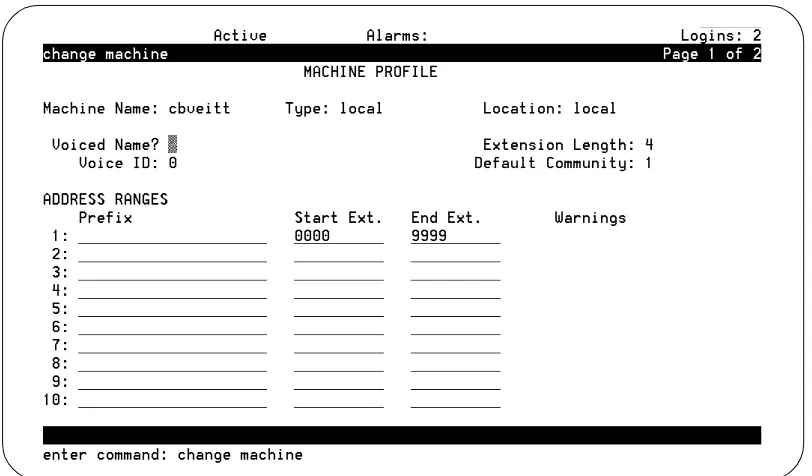
■ The Lucent INTUITY system displays windows,screens, and menus. Windows show and request system information (Figure 1 and Figure 2, respectively). Screens request that you enter a command at the enter command: prompt (Figure 3). Input is either a value or other specific information you must input through a field (Figure 2) or a command you must enter from the enter command: prompt (Figure 3). Menus (Figure 4) present options from which you can choose to view another menu, or a screen or window.
Figure 1. Example of a Lucent INTUITY Window
Figure 3. Example of a Lucent INTUITY Screen with a Command Line
Keyboard and Telephone Keypad
Representations
■ Keys that you press on your terminal or PCkeyboard are represented as
rounded boxes. For example, an instruction to press the enter key is shown as
Press .
■ Two keys that you press at the same time on your terminal or PC keyboard
(that is, you press and hold down the first key and then press the second key) are represented as a series inside a rounded box. For example, an instruction to press and hold while typing the letter “d” is shown as
Press .
■ A combination keystroke is a series of keystrokes that combines the two
key functions described above plus a third key. That is, you press and hold down the first key, then press the second key, then release those keys and press a third key. For example, an instruction to press and hold while typing the letter “d” and then typing the number “1” is shown as
Press .
■ Function keys on your terminal, PC, or system screens, also known as soft
keys, are represented as rounded boxes followed by the function or value of that key enclosed in parentheses. For example, an instruction to press function key 3 is shown as
Press (Save).
■ Keys that you press on your telephonekeypad are represented as square
boxes. For example, an instruction to press the first key on your telephone keypad is shown as
Press to record a message.
Screen Displays
■ Values, system messages, field names, and prompts that appear on the
screen are shown in typewriter-style Courier type, as shown in the following examples:
Example 1:
Enter the number of ports to be dedicated to outbound traffic in the Maximum Simultaneous Ports: field.
Example 2:
■ The sequence of menu options that you must select to display a specific
screen or submenu is shown as follows:
Start at the Lucent INTUITY main menu and select
:
In this example, you access the main menu and select the line item Customer/Service Administration. From the
Customer/Service Administration menu that the system then displays, you select the line item Alarm Management.
■ Screens shown in this book are examples only. The screens you see on
your computer will be similar, but not exactly the same in all cases.
Data Entry Conventions
■ Commands and text you type in or enter appear in bold type, as in the
following examples: Example 1:
Enter change-switch-time-zone at the enter command: prompt. Example 2:
Type high or low in the Speed: field.
■ Command variables are shown in italic type when they are part of what
you must type in, for example:
Enter ch ma machine_name, where machine_name is the name of the call delivery machine you just created.
Safety and Security Alert Labels
This book uses the following symbols to call your attention to potential problems that could cause personal injury, damage to equipment, loss of data, service interruptions, or breaches of toll fraud security:
!
CAUTION:
Indicates the presence of a hazard that if not avoided can or will cause minor personal injury or property damage, including loss of data.
> Alarm Management
!
WARNING:
Indicates the presence of a hazard that if not avoided can cause death or severe personal injury.
!
DANGER:
Indicates the presence of a hazard that if not avoided will cause death or severe personal injury.
!
SECURITY ALERT:
Indicates the presence of a toll fraud security hazard. Toll fraud is the unauthorized use of a telecommunications system by an unauthorized party.
Trademarks and Service Marks
The following trademarked products are mentioned in the various books in the Lucent INTUITY document set:
■ 5ESS is a registered trademark of Lucent Technologies. ■ AT is a trademark of Hayes Microcomputer Products, Inc. ■ AUDIX is a registered trademark of Lucent Technologies.
■ cc:Mail is a registered trademark of cc:Mail, a subsidiary of Lotus
Development Corporation.
■ COMSPHERE is a registered trademark of Lucent Technologies Paradyne
Corp.
■ CONVERSANT Voice Information System is a registered trademark of
Lucent Technologies.
■ DEFINITY is a registered trademark of Lucent Technologies. ■ DMS-100 is a trademark of Northern Telecom Limited. ■ Dterm is a trademark of NEC Telephones, Inc.
■ Equinox is a trademark of Equinox Systems, Inc. ■ INTUITY is a trademark of Lucent Technologies.
■ Lotus Notes is a registered trademark of Lotus Development Corporation. ■ Lucent is a trademark of Lucent Technologies.
■ Microcom Networking Protocol is a registered trademark of Microcom, Inc. ■ Microsoft is a registered trademark of Microsoft Corporation.
■ MS is a registered trademark of Microsoft Corporation. ■ MS-DOS is a registered trademark of Microsoft Corporation. ■ Mitel is a trademark of Mitel Corporation.
■ Motorola is a registered trademark of Motorola Inc. ■ NEAX is a trademark of NEC Telephone, Inc.
■ NEC is a registered trademark of NEC Telephone, Inc. ■ Netware is a registered trademark of Novell, Inc.
■ Netware Loadable Module is a registered trademark of Novell, Inc. ■ Northern Telecom is a registered trademark of Northern Telecom Limited. ■ Novell is a registered trademark of Novell, Inc.
■ Paradyne is a registered trademark of Lucent Technologies. ■ Phillips is a registered trademark of Phillips Screw Company. ■ Rolm is a registered trademark of International Business Machines. ■ Siemens is a registered trademark of Siemens Aktiengellschaft. ■ SL-1 is a trademark of Northern Telecom Limited.
■ softFAX is a registered trademark of VOXEM, Inc. ■ SUPERSET is a trademark of Mitel Corporation. ■ SX-100 is a trademark of Mitel Corporation. ■ SX-200 is a trademark of Mitel Corporation. ■ SX-2000 is a trademark of Mitel Corporation.
■ Telephony OneStop is a trademark of Lotus Development Corporation. ■ TMI is a trademark of Texas Micro Systems, Inc.
■ UNIX is a registered trademark of UNIX Systems Laboratories, Inc. ■ VB-PC is a trademark of Voice Technologies Group, Inc.
■ Voice Bridge is a registered trademark of Voice Technologies Group, Inc. ■ VOXEM is a registered trademark of VOXEM, Inc.
Related Resources
This section describes additional resources available for the Lucent INTUITY
system installation.
Documentation
The following books contain information about installing the Lucent INTUITY
system:
■ Lucent INTUITY Messaging Solutions Release 4 System Description, 585-310-235, for general descriptions of the applications available with the Lucent INTUITY system, hardware available, and connectivity
■ Lucent INTUITY Messaging Solutions Release 4 Alarm Logs and Messages, 585-310-566, for alarm and administrative log information
■ Lucent INTUITY Messaging Solutions installation books for information about the installation:
— Lucent INTUITY Messaging Solutions Release 4 MAP/5P Installation,
585-310-185
— Lucent INTUITY Messaging Solutions Release 4 MAP/40P
Installation, 585-310-196
— Lucent INTUITY Messaging Solutions Release 4 MAP/100
Installation, 585-310-173
Training
The following training class is available for Release 2 Lucent INTUITY Lodging and
earlier administration:
■ Course No. BTT506H Lucent INTUITY Messaging Solutions Installation and
Maintenance
For more information on Lucent INTUITY training, call the BCS Education and
Training Center at one of the following numbers:
■ Lucent Technologies customers and all others in the US and Canada:
(800) 255-8988
■ Organizations within Lucent Technologies: (904) 636-3261
Customers in other locations should contact their sales representative for information.
Technical Assistance
■ For Lucent technicians only:
Call 1-800-628-8888, and when prompted to do so, enter extension 33715.
■ For customers only:
Call 1-800-242-1212, and when prompted to do so, enter extension 82475.
■ Within Canada:
— For all systems, call 1-800-242-1234.
■ Within any other country:
— For all systems, call your local distributor.
How to Comment on This Book
We are interested in your suggestions for improving this book. Please complete and return the reader comment card that is located behind the title page. If the reader comment card has been removed, send your comments to:
Lucent Technologies Product Documentation Room 22-2H15
11900 North Pecos Street Denver, Colorado 80234
You may also tax your comments to the attention of the Lucent INTUITY writing team at (303) 538-1741.
Please be sure to mention the following name and order number of this book:
Lucent INTUITY Messaging Solutions Release 4 Switch Integration with
1
Overview
This chapter explains how the Lucent INTUITY™ system, the Lucent INTUITY
messaging applications, and the System 25 switch work together.
Purpose
Lucent I
NTUITYFeatures
The Lucent INTUITY system uses the following messaging packages to provide business- oriented, computerized voice and fax messaging services in support of a telecommunication system:
■ INTUITY AUDIX messaging system
The INTUITY AUDIX voice messaging software application offers the means to record and exchange voice messages with telephone recipients. The application contains stored voice prompts that guide users in creating, sending, retrieving, answering, saving, or forwarding spoken messages. It also answers calls for users who are busy or unavailable. The INTUITY AUDIX application can be used as a personal answering service, a messenger to individuals or groups, an information service, an office receptionist, and as an automated attendant service.
■ INTUITY FAX Messaging
The Lucent INTUITY FAX messaging application gives the ability to handle faxes using Lucent INTUITY messaging capabilities.
Besides sending, receiving, and printing a fax over the telephone, a user can also forward a fax, annotate a fax with a voice message, send a fax, broadcast a fax to multiple telephone users, and otherwise handle a fax message just as they would a voice message.
■ The INTUITY Advanced Administration System (AAS)
The Lucent INTUITY system comes with an added standard application that enables you to administer the System 25 switch using the same
administrative interface you use to administer the INTUITY AUDIX
application. This application works with the administrative interface and displays as an additional menu option on the main Lucent INTUITY
Administration menu.
Additionally, there are optional software applications that provide
expanded or enhanced feature capability for the end user and the system and switch administrators:
— Lucent INTUITY Message Manager 4.5
Lucent INTUITY Message Manager is a software application that runs on a Windows-based PC and connects with the INTUITY AUDIX application through a TCP/IP LAN.
The program uses a graphical interface to enable customers to view a list of their messages on the screen of their PC.
Lucent INTUITY Message Manager 4.5 is the current release. However, since R4.5 is only compatible with a WIN95 or a WINNT application, our R4.3 version is also available for those customers with a different version of Windows.
— Lucent INTUITY Call Accounting System
Lucent INTUITY Call Accounting System (CAS) is a comprehensive software package designed to track and report telephone
expenses and facility usage. — Lucent INTUITY Lodging
Lucent INTUITY Lodging is a voice mail system designed especially for lodging establishments such as hotels. It supplies guests with electronic mailboxes that store voice messages. Lodging is like having private answering machines that take messages for guests when they are unavailable.
— Internet messaging for INTUITY AUDIX allows users to send and
receive voice, fax, text (e-mail), and file attachments to individuals over the internet.
Switch Integration Concepts
Switch integration is the sharing of information between a voice messaging system and a switch to provide services to callers and users.
A fully integrated messaging system uses information sent from the switch to determine how to process each incoming telephone call.
Callers reaching an integrated system for call answer do not have to enter telephone extension numbers to leave a message.
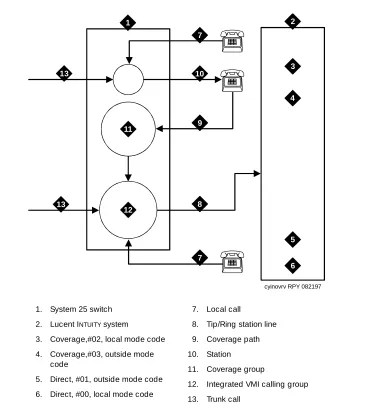
Figure 1-1. Call Routing with Switch Integration
The Lucent INTUITY system also interprets switch-hook flashes and call progress
tones.
The following information may help you to understand how Lucent INTUITY system
applications are integrated with the System 25 switch. More detailed definitions are provided with the System 25 Switch):
cyinovrv RPY 082197
1 2
3
4
5
6 7
7
8 9 10
11
12 13
13
1. System 25 switch 2. Lucent INTUITY system
3. Coverage,#02, local mode code 4. Coverage,#03, outside mode
code
5. Direct, #01, outside mode code 6. Direct, #00, local mode code
7. Local call
8. Tip/Ring station line
9. Coverage path 10. Station
11. Coverage group
12. Integrated VMI calling group
■ Coverage path
When a call is not answered because the called station is busy or because the called station did not answer within a specified number of rings, the call is sent to the next point in the coverage path. This may be a secretary, an attendant, etc. The last, or possibly only, coverage point is a calling group that sends calls to the INTUITY AUDIX application.
■ The INTUITY AUDIX calling group
An INTUITY AUDIX calling group has the following characteristics: — When calls arrive, the system searches for an available calling
group member starting with the port after the last port to receive a call. This is called linear hunt.
NOTE:
If there are enough ports in a calling group, assign the last port to build a phantom station for message waiting updates. — Trunks can be set to “ring in” to the calling group so that an
incoming trunk call goes directly to the first available port. — Each member of a calling group is administered as a voice
messaging port.
— The calling group can be administered as the receiver for coverage calls so that unanswered calls automatically go to the first available port for coverage.
— An INTUITY AUDIX calling group provides call information to the voice port receiving each call. The call information allows the Lucent INTUITY system to determine if the:
■ Call being processed is a direct call or a coverage call ■ Call is a direct inside call (to the calling group number) or a
direct outside call (on any of the trunks assigned to ring into the calling group)
■ Coverage is for one extension calling another, or for a call
made from an outside (trunk) to an extension
Coverage for calls is provided by assigning a direct call calling group (or INTUITY
AUDIX calling group)as the last point of each extension’s coverage path. Additional information required for coordination of the Lucent INTUITY system and the System 25 switch is passed in both directions by touchtones. The Lucent INTUITY system and the System 25 switch also communicate by switch-hook flashes and call progress tones.
NOTE:
Lucent I
NTUITY
Feature Operation
This section describes the operation of the features of most interest for customers integrating a System 25 switch with a Lucent INTUITY system.
I
NTUITYAUDIX Voice Mail Services
The INTUITY AUDIX application can be administered to provide the kinds of services described below.
Call Answer
When callers dial an extension that is busy or does not answer, the INTUITY AUDIX Call Answer feature allows them to leave a message, transfer to another
extension, or transfer to an attendant. System users may record a personal greeting to inform their callers that he or she is unavailable, or select a standard system greeting that callers will hear. Users can record up to nine different greetings for different call types, for example, a call received after business hours or when a user is out of the office.
Users set up a password to protect against unauthorized access to their messages. With this password, messages can be picked up from the office or from an outside telephone.
An optional INTUITY AUDIX feature known as outcalling allows the INTUITY AUDIX application to call a user when a new message arrives. The user can specify the telephone or pager number to be called.
The call is passed from the System 25 switch to the Lucent INTUITY system with call information. This information indicates the covered extension number and whether the call was from an internal station or received on a trunk from outside. Based on this information and on caller actions indicated by pressing touchtone buttons, the Lucent INTUITY system can accept a message for the called
extension’s voice mailbox or provide other special processing.
The system administrator can decide, for security or other reasons, to disable the outcalling feature on a system-wide basis or for selected users.
Voice Mail
Voice mail services allow users to send voice messages to other users, listen to received messages, forward messages received with comments attached, reply to messages, and return calls to other users who left messages. Users can create and edit group lists and send messages to one or more groups. Voice mail services also allow the system manager to send broadcast messages to
When users receive voice messages in their mailbox, voice mail turns on the message waiting indicator (MWI) on their telephone.
Voice mail can be accessed from internal telephones by dialing the extension for the calling group that contains the Lucent INTUITY system voice ports. From outside, users call in on a trunk that is administered to ring at the Lucent INTUITY
system voice port calling group.
Automated Attendant
An automated attendant is an interactive telephone answering system that answers incoming calls with a prerecorded announcement. and routes them based on the caller’s response to menus and prompts.
An automated-attendant is set up so that callers hear a menu of options. Callers then press the button on their telephone keypad that corresponds to the menu option they want and the automated-attendant executes the selected option. Callers who do not have touchtone telephones are typically told that they can hold or call another number to speak with a live attendant.
You can design an automated-attendant menu system, or menu tree, to contain subordinate layers of menus or bulletin boards. These sub-menus, or nested menus, play additional options that can include a choice leading to another nested menu.
The voiced menu options that callers hear are actually personal greetings that the INTUITY AUDIX system administrator records for the automated-attendant’s extension. The message can be changed as easily as a personal greeting. The Multiple Personal Greetings feature can also be used to provide different menus and options for different types of calls (for example, non-English-language menu options).
The automated-attendant feature can be implemented as a single attendant, that is, as a single extension. A business can also use multiple automated-attendants to handle a variety of call destinations (for example, sales department,
accounting department, etc.) and call times (for example, during business hours, during lunch, and after hours).
A phantom multi-button extension has to be created for the automated attendant feature. If you do not want the telephone to ring, and want all calls to be directly transferred to the automated attendant, remove the system-access buttons from the telephone station and give the telephone an automated-attendant class of service.
■ In primary call handling mode, the incoming calls are answered directly by
the automated-attendant. A receptionist backs up the
automated-attendant by handling overflow calls and calls from people needing assistance (for example, time-outs and dial 0).
■ In secondary call handling mode, a receptionist answers as many calls as
possible and the automated-attendant handles any overflow calls.
Bulletin Board Service
Bulletin Board service (also called Information service) is a mailbox used as a call-in information facility. The caller hears a prerecorded, informational message and is then disconnected. As with an automated-attendant, the informational message is the personal greeting that the INTUITY AUDIX system administrator records for the bulletin board’s extension. The message can be changed as easily as a personal greeting.
The call is passed from the System 25 switch to the Lucent INTUITY system with call information. This information allows the Lucent INTUITY system to provide information service processing based on the covered extension on which the call is received.
Alternately, Bulletin Board service can provide multiple messages by using a menu within an automated-attendant.
General Call Handling by the
Lucent I
NTUITY
System: Routing Table
Calls for the INTUITY AUDIX application are processed through DNIS_SVC. The INTUITY AUDIX application then processes the call based on the called number as follows. If the called number is defined as a(n):
■ Regular voice mailbox, call answer service is provided. ■ Bulletin Board extension, bulletin board service is provided. ■ Auto-attendant mailbox, automated-attendant service is provided.
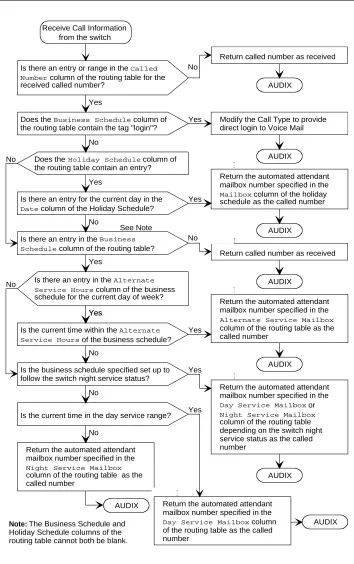
To expand upon the possibilities for incoming calls, a special table is used. The following discussion describes the process illustrated in Figure 1-2.
■ Routing Table
The routing table is provided to:
— Specify automated-attendant menus for calls on trunks or specified covered extensions
— specify different call handling by automated-attendants based on a business, holiday, or alternate service schedule
The routing table can have up to 25 entries. Each entry has the following columns:
■ Incoming Called Number (or range) ■ Business Schedule
■ Holiday Schedule
■ Alternate Service Mailbox
Incoming Called Number
Each incoming call is matched to the Incoming Called Number column in the routing table. The called number is either the telephone extension of the covered extension number of the automated-attendant, a direct trunk (999). The called number is analyzed as follows:
1. If an incoming call is to one of the numbers in the table, further examination is made of the Business Schedule and Holiday Schedule columns. Otherwise, the call is passed directly to the INTUITY AUDIX application.
2. If the specific tag login is found in the Business Schedule column, the call receives INTUITY AUDIX login service.
3. The current date is matched against the Date column of the holiday schedule, if any, specified in the Holiday Schedule column of the routing table. If the date matches a holiday, the automated-attendant extension specified in the Mailbox column of the holiday schedule is substituted for the original called number. The call is then passed to the INTUITY AUDIX application.
NOTE:
The substitution is from the holiday schedule.
4. If a holiday match is not found, the current time is matched against the Alternate Service Hours columns for the current day of the week in the business schedule, if any, specified in the Business Schedule column of the routing table. If the current time is within the specified range, the automated-attendant extension specified in the Alternate Service Mailbox column of the routing table is substituted for the original called number. The call is then passed to the INTUITY AUDIX application.
NOTE:
5. Finally, if the current time is during the day service hours, if any, specified in the Business Schedule column of the routing table, the
automated-attendant extension specified in the Day Service Mailbox column of the routing table is substituted for the original called number. The call is then passed to the INTUITY AUDIX application.
NOTE:
The substitution is based on the business schedule, but it is from the routing table, and not from the business schedule.
Business Schedule
A maximum of four business schedules can be defined. The name or number of one of these business schedules is placed in the Business Schedule column of the routing table. This associates the particular business schedule with a called number or range specified in the Incoming Called Number column of the routing table.
Each business schedule has the following fields and columns:
■ Business Schedule (name) ■ Day of Week
■ Day Service Hours Start ■ Day Service Hours End ■ Alternate Service Hours Start ■ Alternate Service Hours End
NOTE:
These fields and columns are used for matching only. The automated -attendant extensions associated with a match are taken from the routing table.
The Business Schedule name is arbitrary and can be changed to indicate the use of the specific schedule. It can contain up to eight letters or digits. The default names are “bus1” through “bus4”.
The Day of Week column is fixed. To specify night service 24 hours a day, leave the start and end times blank. To specify day service 24 hours a day, use 00:00 as the start time and 23:59 as the end time.
Holiday Schedule(s)
A maximum of four holiday schedules can be defined. Each holiday schedule can have up to 26 entries. The name or number of one of these holiday schedules is placed in the Holiday Schedule column of the routing table. This associates the particular holiday schedule with a called number or range specified in the Incoming Called Number column of the routing table. Each holiday schedule has the following fields and columns:
■ Holiday Schedule (name) ■ Holiday Name
■ Date ■ Mailbox
NOTE:
The Date column is used for matching. The automated-attendant extension associated with a match is taken from the Mailbox column of this same table. The Holiday Name column is for documentation only.
Figure 1-2. Call-processing Flow Chart AUDIX
Note: The Business Schedule and
Holiday Schedule columns of the routing table cannot both be blank.
Return the automated attendant mailbox number specified in the
Day Service Mailbox column of the routing table as the called number
No
Yes
Does the Business Schedule column of the routing table contain the tag "login"? Is there an entry or range in the Called Number column of the routing table for the received called number?
Yes Modify the Call Type to provide direct login to Voice Mail
Does the Holiday Schedule column of the routing table contain an entry?
Is there an entry for the current day in the
Date column of the Holiday Schedule?
Yes No
Return called number as received
AUDIX
AUDIX No
Yes Return the automated attendant mailbox number specified in the
Mailbox column of the holiday schedule as the called number
AUDIX No
Is there an entry in the Business Schedule column of the routing table?
Return called number as received
AUDIX No
Yes
Is there an entry in the Alternate Service Hours column of the business schedule for the current day of week?
Return the automated attendant mailbox number specified in the
Alternate Service Mailbox
column of the routing table as the called number
AUDIX Yes
Yes
Is the current time within the Alternate Service Hours of the business schedule?
Yes
No No
Is the business schedule specified set up to follow the switch night service status?
Return the automated attendant mailbox number specified in the
Day Service Mailbox or
Night Service Mailbox
column of the routing table depending on the switch night service status as the called number
AUDIX Yes
No
Is the current time in the day service range?
No
Return the automated attendant mailbox number specified in the
Night Service Mailbox
column of the routing table as the called number
AUDIX Yes
See Note Receive Call Information
from the switch
P
P
P
P
Functionality Differences for the
System 25 Switch
The process of integrating the Lucent INTUITY system with the System 25 switch differs from integrations with other switches in the following ways:
■ The System 25 switch does not differentiate between busy and no answer.
Therefore, it is not possible to play different greetings based on whether the person is out of their office or just on another call.
■ High-speed digital networking is not supported. ■ DCS networking is not supported.
■ Coverage interval is set on a system-wide basis. This has an impact on the
2
Overview
Before you integrate the Lucent System 25 switch with the Lucent INTUITY™
system, you must plan the process. This chapter provides information about the information needed to integrate the two systems, including the settings on the System 25 switch and the settings on the Lucent INTUITY system.
Purpose
System 25 Switch Integration Planning
To plan for the System 25 switch side of the integration, complete the following worksheets:
■ Worksheet A: Coverage Options/Maintenance Access ■ Worksheet B: Voice Messaging Systems
■ Worksheet C: Floating Personal Dial Code List ■ Worksheet D: System Dial Plan
■ Worksheet E: SMDR Parameters for CAS ■ Worksheet F: DGC Groups
■ Worksheet G: Voice Station Records
■ Worksheet H: Voice Stations – Single Line Generic Example ■ Worksheet I: Voice Stations – Multiline Generic Example
!
CAUTION:
Planning and administering toll restrictions options, such as Automatic Route Selection (ARS) and allowed/disallowed lists, is beyond the scope of this document. However, to successfully integrate the System 25 switch with the Lucent INTUITY system, these items must be addressed.
Completing the Worksheets
Coverage Options/Maintenance Access
(Worksheet A)
Write in a number that is compatible with your business needs.Normally, three or fourrings are allowed before a call is sent to coverage.
NOTE:
Coverage is set on a system-wide basis. This affects station coverage and automated-attendants.
Typically, coverage ringing on internal calls should be left at its default setting of Yes.
Worksheet A:
Coverage
Options/Maintenance Access
Customer: Prepared by: Telephone Number: Date:
Lucent INTUITY Location/Name:
DEFAULT MODIFY Allow coverage ringing on internal calls (scroll)? Yes
Voice Messaging Systems
(Worksheet B)
Voice ports used for communication between the System 25 switch and the Lucent INTUITY system must be assigned on a Tip/Ring or Analog Line Module (ZTN78, TN742, or TN746B). Write the Carrier/Slot/Port and the PDC in the appropriate columns.
The VMS port is typically dial accessible. Write Yes in the Make VMS Port Dial Accessible? column. Dial accessibility allows the technician to dial a specific port and is useful for testing.
Write No in the Make Port an Extended Station? column.
Typically, the display ID is AUDIX and a port number. Write this in the Display ID column.
Typically, outward toll calls are restricted and you would write Yes in the Toll Outward Call Restriction column. However, if your site has outcalling, AMIS Analog networking, or fax messaging, write No in the appropriate row.
The toll restriction class depends on how ARS is implemented at your site. Write the applicable class in the Toll Restriction Class column.
Write the ARS facility restriction level in the far right column.
!
CAUTION:
the Inte g ra tio n u e
1 M
a y 19 98
e
t B:
V
o
ice M
e
ss
a
g
in
g
m
s
C/SS/PP PDCFloating Personal Dial Code List
(Worksheet C)
Floating Personal Dial Codes (FPDCs) are used primarily to implement
automated attendants on systems that have DID trunks. If you do not plan to use automated-attendants, skip the Floating Personal Dial Code List worksheet. FPDCs are virtual extensions that can be logged into any station set. FPDCs can be assigned to DID numbers but cannot terminate trunks. An FPDC does not have its own coverage; it follows that of the station to which the FPDC is logged on.
To use FPDCs with the INTUITY AUDIX application effectively, the FPDC must be logged onto an unused host extension that covers to the INTUITY AUDIX
Worksheet C:
Floating Personal
Dial Code List
Customer: Prepared by: Phone Number: Date:
Lucent INTUITY Location/Name:
NOTE:
If DID trunks are used, we recommend that the PDCs be less than or equal to the number of digits sent by the central office.
System Dial Plan
(Worksheet D)
Fill out the worksheet according to your System 25 switch parameters, using the following integration-specific discussion.
Worksheet D:
System Dial Plan
Customer: Prepared by: Phone Number: Date:
Lucent INTUITY Location/Name:
DEFAULT MODIFY ARS access code (1–9999 or 0 for “None”): 9
Central office trunk pool access code (0–9999): 100 Night service access code (0–9999):
Modem request code (1–9999 or 0 for “None”):
Number of DID digits used by PDCs (scroll): 3 Disallow busy of ground start trunks (scroll): No Allow incoming LS trunks transferred out (scroll): No Name for attendant: Attendant Name for DID trunks: Outside Name for no DID trunks: No DID in Dial tone for incoming tie trunks (scroll): Yes Return time (seconds) for parked calls (0–240) 120
Send special disconnect code ##99 to VMS port (scroll) Yes No
PDCs used to access parked calls (1–9999 or 0 for “None”)
SMDR Parameters for CAS
(Worksheet E)
Call Accounting System (CAS) is an optional application. If your configuration includes CAS, fill out the worksheet according to your System 25 parameters. If your site does not have CAS, skip this worksheet.
Lucent INTUITY serial ports need a multi-port serial card.
To ensure that the System 25 switch collects the required call information and formats it in a manner that CAS can use:
Write yes to send SMDR records to the SMDR port
Write 10 as the minimum number of seconds the call must last before
incrementing the peg count. This setting allows the System 25 switch to reject calls to busy numbers or calls resulting from a misdialed number.
Worksheet E:
SMDR Parameters
for CAS
Customer: Prepared by: Phone Number: Date:
Lucent INTUITY Location/Name:
DEFAULT MODIFY Allow SMDR records to be sent to SMDR port (scroll)? Yes Yes Minimum duration of call (in seconds) before recording: 40 15 Number of digits used for account codes (1–15): 15
Direct Group Calling Groups (DGC Groups)
(Worksheet F)
Fill out the worksheets according to your System 25 parameters, using the following integration-specific discussion.
You must have at least one calling group and possibly several calling groups that contain the voice ports that connect the System 25 switch to the Lucent INTUITY
system. To define each calling group, assign available numbers.
Typically, DGC group 10 is used for the INTUITY AUDIX calling group. Write the number for the calling group in the Group # field. (If using DGC group 10, 110
would be the group coverage number for extensions covered by the INTUITY
AUDIX application.)
The AUDIX Access # should be defined by the INTUITY AUDIX system administrator.
Typically, the Name of this DGC group is AUDIX.
Worksheet F:
DGC Groups
Customer: Prepared by: Telephone Number: Date:
Lucent INTUITY
Location/Name:
Group # Access # Name Location Disable Q Msg Waiting
(Use what has been defined on the Voice Messaging Systems worksheet.)
GROUP MEMBERS
Voice Station Records
(Worksheet G)
NOTE:
The Voice Station Records worksheet has been customized to facilitate the integration of a System 25 switch with a Lucent INTUITY system.
Fill out the worksheet according to your System 25 parameters, using the following integration-specific discussion.
PDCs must be three or four digits, but not both. Write this in the PDC/DDC column.
If this station is to be covered by the INTUITY AUDIX application, write Yes in the Covered by AUDIX? column.
NOTE:
Worksheet G:
Voice Station Records
Customer: Prepared by: Phone Number: Date:
Lucent INTUITY Location/Name:
Employee Name
Terminal Location
Terminal Type
PCD/ DDC
Port Assigned1
1. From System 25 Installer
Jack Number 2
SIP Number1
Covered by AUDIX?
Continued on next page NOTE: Write the
telephone extension of the remote
Employee Name
Terminal Location
Termina l Type
PCD/ DDC
Port Assigned1
1. From System 25 installer
Jack Number 2
2. From wiring installer
SIP Number1
Voice Stations – Single Line Generic Example
(Worksheet H)
Fill out the worksheet according to your System 25 parameters, using the following integration-specific discussion.
Write:
■ 100 + the DGC group number for the INTUITY AUDIX application (typically 10) for the group coverage number
■ Yes to allow call coverage ring on no answer
Worksheet H:
Voice Stations –
Single Line Generic Example
Customer: Prepared by: Phone Number: Date:
Lucent INTUITY Location/Name:
PDC (1-9999) PORT # (1-3/1-12/1-8): / /
NAME (LAST, FIRST) LOC
TYPE (scroll): SINGLE LINE
BUTTONS CLASS OF SERVICE
Class of Service: DEFAULT MODIFY
Group coverage number (1–32, 101–132, 0 for “None”) 1 110 Allow call coverage ring on no answer (scroll)? Yes Yes Allow call coverage ring on busy (scroll)? Yes No Extended, out-of-building for off-premises station (scroll) No
PDC to hunt to next (1–9999, 0 for “None”) 0 DDCs that can dial for this station (RETURN key)
Call Waiting (scroll)? No
F7 [NEXT]
Restrict access to CO trunk pool (scroll)? No Restrict access to all other trunk pools (scroll)? No Force account code entry administration (scroll)? 0 Number of internal retries (0–15) 2 Number of rings per try for internal calls (2–15) 3 Number of outgoing retries (0–15 2 Number of rings per try for outgoing calls (2–15) 3 Automatic queueing for internal calls (scroll)? No Automatic queueing for outgoing calls (scroll)? Yes Member of call pickup group number (1–16, 0 for none) 0 Total outward call restriction (scroll) No Toll restriction class (scroll) None ARS facility restriction level (scroll) 0,1,2,3 Allow personal speed dialing (scroll)? Yes Answer these directed night service trunks (RETURN key)
Voice Stations – Multiline Generic Example
(Worksheet I)
One generic multiline worksheet is included with this book. If your site has more than one type of multiline set, make copies of this worksheet and fill out as required.
Fill out the worksheets according to your System 25 parameters, using the following integration-specific discussion.
Write:
■ 100 + the DGC Group Number for the INTUITY AUDIX application (typically 10) for the Group Coverage Number
■ Yes to allow call coverage ring on no answer
Worksheet I:
Voice Stations –
Multiline Generic Example
Customer: Prepared by: Phone Number: Date:
Lucent INTUITY Location/Name:
PDC (1-9999) PORT # (1-3/1-12/1-8): / /
NAME (LAST, FIRST) LOC
TYPE (scroll): MULTI-LINE
BUTTONS CLASS OF SERVICE
Class of Service: DEFAULT MODIFY
Group coverage number (1–32, 101–132, 0 for “None”) 1 110 Allow call coverage ring on no answer (scroll)? Yes Yes Allow call coverage ring on busy (scroll)? Yes No Extended, out-of-building for off-premises station (scroll) No
PDC to hunt to next (1–9999, 0 for “None”) 0 DDCs that can dial for this station (RETURN key)
Call Waiting (scroll)? No
F7 [NEXT]
Restrict access to CO trunk pool (scroll)? No Restrict access to all other trunk pools (scroll)? No Force account code entry administration (scroll)? 0 Number of internal retries (0–15) 2 Number of rings per try for internal calls (2–15) 3 Number of outgoing retries (0–15) 2 Number of rings per try for outgoing calls (2–15) 3 Automatic queueing for internal calls (scroll)? No Automatic queueing for outgoing calls (scroll)? Yes Member of call pickup group number (1–16, 0 for none) 0 Total outward call restriction (scroll) No Toll restriction class (scroll) None ARS facility restriction level (scroll) 0,1,2,3 Allow personal speed dialing (scroll)? Yes Answer these directed night service trunks (RETURN key)
Remote call forwarding for this station (scroll)? No
Lucent I
NTUITY
System Integration
Planning
To plan for the Lucent INTUITY system side of the integration, complete the following Lucent INTUITY system planning worksheets:
■ Worksheet J: INTUITY AUDIX System Parameter Features: Transfer Considerations
■ Worksheet K: Assigning Extension Ranges on the Lucent INTUITY ■ Worksheet L: Channel Information for Installation
■ Worksheet M: Assign Services to Called Numbers
NOTE:
Worksheet L: Channel Information for Installation and Worksheet M:
Services for Assign Services to Called Number are numbered in the order that the information must be entered into the Lucent INTUITY
system. They are discussed in reverse order because it makes the explanation easier.
The remaining three worksheets deal with planning for automated-attendants on systems that have DID trunks.
If you do not plan to use auto-attendants, skip the following worksheets:
■ Worksheet N: Business Schedule ■ Worksheet O: Holiday Schedule ■ Worksheet P: Routing Table
Completing the Worksheets
I
NTUITYAUDIX System Parameter Features:
Transfer Considerations (Worksheet J)
The Lucent INTUITY system features required for the System 25 switch are
recorded on Worksheet J. The following parameters should be set:
■ Digits in Dial Plan – The Lucent INTUITY system requires a fixed length dial
plan. You can use either a three-digit or four-digit dial plan, but not both.
■ Transfer Type = basic
■ Transfer Restriction = subscribers
Worksheet J:
I
NTUITY
AUDIX System
Parameter
Features: Transfer Considerations
Customer: Prepared by: Phone Number: Date:
Lucent INTUITY Location/Name:
Param eter V alid V alues Installer’s Entry
N um b e r of d ig its in d ia l p lan 3 or 4
(Th is va lue is e ntere d in th e exten sion le ng th field on th e
Sw itc h Interfac e Ad m inistration sc ree n) Tra n s fe r c o n s id e ra tio n s :
Transfer typ e no ne, b asic ,
en ha nc e d _no_c over_0 , en ha nc e d _0
b a sic
Transfer re stric tion sub sc rib e rs, d ig its su b sc rib e rs C ove ring exten sion syste m c on sole o r
op erator exten sion A n n o u n c e m e n t s e ts :
Syste m A d m inistratio n
Re sc h e d u lin g in c re m e n ts: D ays H ours M inu tes D ays H ou rs M inute s Inc rem e nt 1 D efau lt 0 D efa ult 0 D e fa ult 5
Inc rem e nt 2 D efau lt 0 D efa ult 0 D e fa ult
1 5
Inc rem e nt 3 D efau lt 0 D efa ult 0 D e fa ult
3 0 Inc rem e nt 4 D efau lt 0 D efa ult 1 D e fa ult 0
Inc rem e nt 5 D efau lt 0 D efa ult 2 D e fa ult 0
Inc rem e nt 6 D efau lt 0 D efa ult 6 D e fa ult 0
Inc rem e nt 7 D efau lt 0 D efa ult 6 D e fa ult 0
Inc rem e nt 8 D efau lt 0 D efa ult 6 D e fa ult 0
Inc rem e nt 9 D efau lt 0 D efa ult 6 D e fa ult 0
Assigning Extension Ranges on the
Lucent I
NTUITY(Worksheet K)
You will have to administer the extension ranges on the Lucent INTUITY that are valid extensions for your site. Use the following guidelines when filling out Worksheet K.
■ Prefix
Prefixes can be used on the local machine, but they limit the functionality and are not recommended.
■ Starting extension
These are the starting extensions for the ranges of telephone numbers used on the local system (a block of switch extensions that can be used at the local system when assigning users). For example, if your system uses extensions between 2000 and 3000, enter 2000 in the Starting Extension field.
Up to 10 different ranges can be specified to pinpoint the exact set of extension blocks used by the local system. The length of the starting and ending extension must agree with the Extension Length field.
■ Ending extension
Worksheet K:
Assigning Extension
Ranges on the Lucent I
NTUITY
Customer: Prepared by: Phone Number: Date:
Lucent INTUITY Location/Name:
Digits in Dial Plan
Address Ranges Notes
Prefix Starting Extension Ending Extension
Channel Information for Installation
(Worksheet L)
For Lucent INTUITY to operate properly, it must know what extension has been assigned to each of its channels (voice ports) and how incoming calls on that channel are to be processed. Worksheet L provides columns for Channel Number, Extension, Initial Service, and Optional Dedicated Service.
For each channel, you must fill in the extension number. All channels that are part of an INTUITY AUDIX calling group should be assigned DNIS_SVC.
For those channels dedicated to a specific INTUITY IVR (Introactive Voice
Worksheet L:
Channel Information
for Installation
Customer: Prepared by: Phone Number: Date:
Lucent INTUITY Location/Name:
Use this worksheet to assign the extension numbers to the channel. The initial
service will be *DNIS_SVC.
Channel
Number
Extension
Initial Service
Optional Dedicated
Service
1
*DNIS_SVC
2
*DNIS_SVC
3
*DNIS_SVC
4
*DNIS_SVC
5
*DNIS_SVC
6
*DNIS_SVC
7
*DNIS_SVC
8
*DNIS_SVC
9
*DNIS_SVC
10
*DNIS_SVC
11
*DNIS_SVC
12
*DNIS_SVC
13
*DNIS_SVC
Worksheet L: Channel Information for Installation - continued .
Channel
Number
Extension
Initial Service
Optional
Dedicated Service
14 *DNIS_SVC
15 *DNIS_SVC
16 *DNIS_SVC
17 *DNIS_SVC
18 *DNIS_SVC
19 *DNIS_SVC
Assign Services to Called Numbers
(Worksheet M)
All calls not assigned to a specific INTUITY IVR (Introactive Voice Response) application directly are processed by the *DNIS_SVC. In order for *DNIS_SVC to function with both INTUITY AUDIX and INTUITY IVR applications defined in a shared port group, the installer must fill out a table in the system that tells the DNIS_SVC which called number should receive a particular service.
Worksheet M provides a Service Name column and a Called Number column. The worksheet should contain an initial entry with AUDIX in the Service Name column and ANY in the Called Number column.
Worksheet M:
Assign Services to
Called Numbers
Customer: Prepared by: Phone Number: Date:
Lucent INTUITY Location/Name:
Instructions
:The service name is either AUDIX, AUDIX+Ldgn (if Lodging is installed), or a unique INTUITY Introactive Voice Response application name. The IVR application names are for planning purposes only. They may not be assigned as a service until after the IVR application is loaded onto the system.
The called number is either the word ANY or the specific extension number that has been assigned to support a particular service.
Field Service Name Called Number
1 AUDIX ANY
2
3
4
5
6
7
8
9
10
11
12
13
14
15
16
Automated Attendants,
(Worksheets N, O, and P)
An automated attendant is an interactive telephone answering system that answers incoming calls with a prerecorded announcement and routes them based on the caller’s response to menus and prompts.
An automated-attendant is set up so that callers hear a menu of options. Callers then press the button on their telephone keypad that corresponds to the menu option they want and the automated-attendant executes the selected option. Callers who do not have touchtone telephones are typically told that they can hold or call another number to speak with a live attendant.
Worksheet N:
Business Schedule
Customer: Prepared by: Phone Number: Date:
Lucent INTUITY Location/Name:
NOTE:
Make one copy for each business schedule (to a maximum of four).
Business Schedule:
Day of Week
Day Service Hours Alternate Service Hours
Start Time (hh:mm)
End Time (hh:mm)
Start Time (hh:mm)
End Time (hh:mm)
Monday
Tuesday
Wednesday
Thursday
Friday
Saturday
Automated Attendants,
(Worksheets N, O, and P)
An automated attendant is an interactive telephone answering system that answers incoming calls with a prerecorded announcement and routes them based on the caller’s response to menus and prompts.
An automated-attendant is set up so that callers hear a menu of options. Callers then press the button on their telephone keypad that corresponds to the menu option they want and the automated-attendant executes the selected option. Callers who do not have touchtone telephones are typically told that they can hold or call another number to speak with a live attendant.
Worksheet O:
Holiday Schedule
Customer: Prepared by:
Phone Number: Date:
Lucent INTUITY Location/Name:
NOTE:
Make 1 copy for each holiday schedule (to a maximum of four).
Holiday Schedule:
Automated Attendants,
(Worksheets N, O, and P)
An automated attendant is an interactive telephone answering system that answers incoming calls with a prerecorded announcement and routes them based on the caller’s response to menus and prompts.
An automated-attendant is set up so that callers hear a menu of options. Callers then press the button on their telephone keypad that corresponds to the menu option they want and the automated-attendant executes the selected option. Callers who do not have touchtone telephones are typically told that they can hold or call another number to speak with a live attendant.
Worksheet P:
Routing Table
Customer: Prepared by: Phone Number: Date:
Lucent INTUITY Location/Name:
NOTE:
The incoming called number is #999 for direct trunk or the telephone number of the covered extension.
Incoming Called Number
Business Schedule
Holiday Schedule
Day Service Mailbox
Night Service Mailbox
3
Overview
This chapter explains how to implement the integration between the Lucent System 25 switch and the Lucent INTUITY™ AUDIX system. It includes all steps
necessary to get the system up and running for both acceptance testing and cut-to-service.
Purpose
Perform the Initial Lucent I
NTUITY
System Installation
Complete the following tasks before perform