XML
FOR
DUMmIES
‰4
TH EDITION
XML
FOR
DUMmIES
‰4
TH EDITION
by Lucinda Dykes and Ed Tittel
XML
FOR
DUMmIES
‰4
TH EDITION
XML For Dummies®, 4th Edition
Published by
Wiley Publishing, Inc.
111 River Street Hoboken, NJ 07030-5774
www.wiley.com
Copyright ©2005 by Wiley Publishing, Inc., Indianapolis, Indiana Published by Wiley Publishing, Inc., Indianapolis, Indiana Published simultaneously in Canada
No part of this publication may be reproduced, stored in a retrieval system or transmitted in any form or by any means, electronic, mechanical, photocopying, recording, scanning or otherwise, except as permit-ted under Sections 107 or 108 of the 1976 Unipermit-ted States Copyright Act, without either the prior written permission of the Publisher, or authorization through payment of the appropriate per-copy fee to the Copyright Clearance Center, 222 Rosewood Drive, Danvers, MA 01923, (978) 750-8400, fax (978) 646-8600. Requests to the Publisher for permission should be addressed to the Legal Department, Wiley Publishing, Inc., 10475 Crosspoint Blvd., Indianapolis, IN 46256, (317) 572-3447, fax (317) 572-4355, or online at
http://www.wiley.com/go/permissions.
Trademarks:Wiley, the Wiley Publishing logo, For Dummies, the Dummies Man logo, A Reference for the Rest of Us!, The Dummies Way, Dummies Daily, The Fun and Easy Way, Dummies.com, and related trade dress are trademarks or registered trademarks of John Wiley & Sons, Inc. and/or its affiliates in the United States and other countries, and may not be used without written permission. All other trademarks are the property of their respective owners. Wiley Publishing, Inc., is not associated with any product or vendor mentioned in this book.
LIMIT OF LIABILITY/DISCLAIMER OF WARRANTY: THE PUBLISHER AND THE AUTHOR MAKE NO REP-RESENTATIONS OR WARRANTIES WITH RESPECT TO THE ACCURACY OR COMPLETENESS OF THE CONTENTS OF THIS WORK AND SPECIFICALLY DISCLAIM ALL WARRANTIES, INCLUDING WITHOUT LIMITATION WARRANTIES OF FITNESS FOR A PARTICULAR PURPOSE. NO WARRANTY MAY BE CRE-ATED OR EXTENDED BY SALES OR PROMOTIONAL MATERIALS. THE ADVICE AND STRATEGIES CON-TAINED HEREIN MAY NOT BE SUITABLE FOR EVERY SITUATION. THIS WORK IS SOLD WITH THE UNDERSTANDING THAT THE PUBLISHER IS NOT ENGAGED IN RENDERING LEGAL, ACCOUNTING, OR OTHER PROFESSIONAL SERVICES. IF PROFESSIONAL ASSISTANCE IS REQUIRED, THE SERVICES OF A COMPETENT PROFESSIONAL PERSON SHOULD BE SOUGHT. NEITHER THE PUBLISHER NOR THE AUTHOR SHALL BE LIABLE FOR DAMAGES ARISING HEREFROM. THE FACT THAT AN ORGANIZATION OR WEBSITE IS REFERRED TO IN THIS WORK AS A CITATION AND/OR A POTENTIAL SOURCE OF FUR-THER INFORMATION DOES NOT MEAN THAT THE AUTHOR OR THE PUBLISHER ENDORSES THE INFORMATION THE ORGANIZATION OR WEBSITE MAY PROVIDE OR RECOMMENDATIONS IT MAY MAKE. FURTHER, READERS SHOULD BE AWARE THAT INTERNET WEBSITES LISTED IN THIS WORK MAY HAVE CHANGED OR DISAPPEARED BETWEEN WHEN THIS WORK WAS WRITTEN AND WHEN IT IS READ.
For general information on our other products and services, please contact our Customer Care Department within the U.S. at 800-762-2974, outside the U.S. at 317-572-3993, or fax 317-572-4002. For technical support, please visit www.wiley.com/techsupport.
Wiley also publishes its books in a variety of electronic formats. Some content that appears in print may not be available in electronic books.
Library of Congress Control Number: 2005923240 ISBN-13: 978-0-7645-8845-7
ISBN-10: 0-7645-8845-1
Manufactured in the United States of America 10 9 8 7 6 5 4 3 2 1
4O/QT/QV/QV/IN
About the Author
Lucinda Dykesstarted her career in a high-tech area of medicine, but left medicine to pursue her interests in technology and the Web. She has been writing code and developing Web sites since 1994, and also teaches and develops online courses — including the JavaScript courses for the International Webmasters Association/HTML Writers’ Guild at www.
eclasses.org.
Lucinda has authored, co-authored, edited, and been a contributing author to numerous computer books; the most recent include Dreamweaver MX 2004 Savvy (Sybex), XML for Dummies(3rd Edition, Wiley), Dreamweaver MX Fireworks MX Savvy (Sybex), XML Schemas (Sybex), andMastering XHTML
(Sybex). When she can manage to move herself away from her keyboard, other interests include holographic technologies, science fiction, and Bollywood movies.
Ed Tittelis a 23-year veteran of the computing industry. After spending his first seven years in harness writing code, Ed switched to the softer side of the business as a trainer and talking head. A freelance writer since 1986, Ed has written hundreds of magazine and Web articles — and worked on over 100 computer books, including numerous For Dummiestitles on topics that include several Windows versions, NetWare, HTML, XHTML, and XML.
Ed is also Technology Editor for Certification Magazine, writes for numerous TechTarget Web sites, and writes a twice-monthly newsletter, “Must Know News,” for CramSession.com. In his spare time, Ed likes to shoot pool, cook, and spend time with his wife Dina and his son Gregory. He also likes to explore the world away from the keyboard with his trusty Labrador retriever, Blackie. Ed can be contacted at [email protected].
Dedication
To the heroes at the W3C and OASIS, sung and unsung, especially members of the many XML working groups who have made the world (or the Web, at least) a better place through their tireless efforts, and to all those Web pio-neers who generously offered help and support to those of us trying to figure out how to make our contribution to the Web in the early ‘90s.
Author’s Acknowledgments
Lucinda Dykes: Thanks to everyone on the scene and behind the scenes who has contributed to making this project possible.
First, I’d like to thank Ed Tittel for giving me not only the opportunity to be involved in this book, but who also played a major role in my entry into the world of technical writing. Ed and I share a long-term interest in language, computers, and markup languages. I’d also like to thank everyone involved in any edition of this book for the excellent foundation they made for this edi-tion to build on.
Next, thanks to the team at Wiley, especially Katie Feltman for her vision and support of this project, Paul Levesque for quiet and steady guidance in addi-tion to excellent editing, Allen Wyatt for insight and outstanding technical editing, and Barry Childs-Helton for superb copy-editing as well as a delight-ful sense of humor. And thanks to Carole McClendon, my agent at Waterside Productions, who made it possible for me to lead this project.
On a personal note, special thanks to my mother, Doris Dykes, who instilled and supported a lifelong interest in learning and in books. She claims that I’m the first child she lost to the Internet — but that makes me easy to find. Mom: I’ll be in front of the nearest computer screen. Thanks and love always to Wali for making it possible for me to spend all these late nights tapping away at the keyboard, and for always making me remember the things that are really important. Thanks to our dear friends, Rose Rowe and Karmin Perless, who walked softly and made room for having a writer around. And finally, thanks to Wendy Fries and Cheryl Kline for great conversation, good advice, and lots of laughter at our monthly writers’ session at the Coffee Grove.
Publisher’s Acknowledgments
We’re proud of this book; please send us your comments through our online registration form located at www.dummies.com/register/.
Some of the people who helped bring this book to market include the following:
Acquisitions, Editorial, and Media Development
Project Editor:Paul Levesque
Acquisitions Editor:Katie Feltman
Copy Editor:Barry Childs-Helton
Technical Editor:Allen Wyatt, Sr.
Editorial Manager:Leah Cameron
Permissions Editor:Laura Moss
Media Development Specialist:Kit Malone
Media Development Manager:
Laura VanWinkle
Media Development Supervisor:
Richard Graves
Editorial Assistant:Amanda Foxworth
Cartoons:Rich Tennant (www.the5thwave.com)
Composition Services
Project Coordinator: Maridee Ennis
Layout and Graphics: Andrea Dahl, Stephanie D. Jumper, Julie Trippetti
Proofreaders: Leeann Harney, Joe Niesen, Carl William Pierce, TECHBOOKS Production Services
Indexer: TECHBOOKS Production Services
Publishing and Editorial for Technology Dummies
Richard Swadley,Vice President and Executive Group Publisher
Andy Cummings,Vice President and Publisher
Mary Bednarek,Executive Acquisitions Director
Mary C. Corder,Editorial Director
Publishing for Consumer Dummies
Diane Graves Steele,Vice President and Publisher
Joyce Pepple,Acquisitions Director
Composition Services
Gerry Fahey,Vice President of Production Services
Debbie Stailey,Director of Composition Services
Contents at a Glance
Introduction ...1
Part I: XML Basics ...9
Chapter 1: Getting to Know XML ...11
Chapter 2: Using XML for Many Purposes ...23
Chapter 3: Slicing and Dicing Data Categories: The Art of Taxonomy ...33
Part II: XML and the Web ...45
Chapter 4: Adding XHTML for the Web ...47
Chapter 5: Putting Together an XML File ...65
Chapter 6: Adding Character(s) to XML ...83
Chapter 7: Handling Formatting with CSS ...95
Part III: Building In Validation with DTDs
and Schemas ...109
Chapter 8: Understanding and Using DTDs ...111
Chapter 9: Understanding and Using XML Schema ...135
Chapter 10: Building a Custom XML Schema ...157
Chapter 11: Modifying an Existing Schema ...173
Part IV: Transforming and Processing XML ...195
Chapter 12: Handling Transformations with XSL ...197
Chapter 13: The XML Path Language ...215
Chapter 14: Processing XML ...235
Part V: XML Application Development ...245
Chapter 15: Using XML with Web Services ...247
Chapter 16: XML and Forms ...259
Chapter 17: Serving Up the Data: XML and Databases ...271
Chapter 18: XML and RSS ...285
Part VI: The Part of Tens ...299
Chapter 19: XML Tools and Technologies ...301
Chapter 20: Ten Top XML Applications ...313
Chapter 21: Ten Ultimate XML Resources ...321
Glossary ...329
Table of Contents
Introduction ...1
About This Book ...1
Conventions Used in This Book ...2
Foolish Assumptions ...3
How This Book Is Organized ...4
Part I: XML Basics ...4
Part II: XML and the Web ...4
Part III: Building in Validation with DTDs and Schemas ...5
Part IV: Transforming and Processing XML ...6
Part V: XML Application Development ...6
Part VI: The Part of Tens ...7
Glossary ...7
Icons Used in This Book ...7
Where to Go from Here ...8
Part I: XML Basics ...9
Chapter 1: Getting to Know XML . . . .11
XML (eXtreMely cooL) ...12
Mocking up your own markup ...12
Separating data and context ...12
Making information portable ...13
XML means business ...13
Figuring Out What XML Is Good For ...14
Classifying information ...14
Enforcing rules on your data ...15
Outputting information in a variety of ways ...16
Using the same data across platforms ...17
Beyond the Hype: What XML Isn’t ...18
It’s not just for Web pages anymore ...19
It’s not a database ...20
It’s not a programming language ...20
Building XML Documents ...21
Chapter 2: Using XML for Many Purposes . . . .23
Moving Legacy Data to XML ...23
The Many Faces of XML ...24
Creating XML-enabled Web pages ...24
Using XML for business forms ...28
Incorporating XML into business processes ...29
Serving up XML from a database ...31
Alphabet Soup: Even More XML ...31
Chapter 3: Slicing and Dicing Data Categories:
The Art of Taxonomy . . . .33
Taking Stock of Your Data ...33
Looking at business practices and partners ...34
Gathering some content ...34
Checking whether a DTD or schema already exists ...35
Searching for a schema repository ...36
Breaking Down Data in Different Ways ...37
Winnowing out the wheat from the chaff ...38
Types of data that can be stored in XML ...39
Developing Your Taxonomy ...39
Testing Your Taxonomy ...41
Using trial and error for the best fit ...41
Testing your content analysis ...42
Looking Ahead to Validation ...43
Part II: XML and the Web ...45
Chapter 4: Adding XHTML for the Web . . . .47
HTML, XML, and XHTML ...47
What HTML does best ...48
The limits of HTML ...49
Comparing XML and HTML ...50
Using XML to describe data ...51
The benefits of using HTML ...53
The benefits of using XML ...53
XHTML Makes the Move to XML Syntax ...54
Making the switch ...55
Every element must be closed ...56
Empty elements must be formatted correctly ...56
Tags must be properly nested ...57
Case makes a difference ...57
Attribute values are in quotation marks ...58
Converting a document from HTML to XHTML ...59
The Role of DOCTYPE Declarations ...62
Chapter 5: Putting Together an XML File . . . .65
Anatomy of an XML File ...65
The XML declaration ...67
Marking up your content ...68
Playing by the Rules: Well-Formed Documents ...74
XML For Dummies, 4th Edition
xii
Adding Style for the Web ...76
Seeking Validation with DTD and XML Schema ...78
Why describe XML documents? ...79
Choosing between DTD and XML Schema ...80
Chapter 6: Adding Character(s) to XML . . . .83
About Character Encodings ...84
Introducing Unicode ...85
Character Sets, Fonts, Scripts, and Glyphs ...87
For Each Character, a Code ...88
Key Character Sets ...89
Using Unicode Characters ...91
Finding Character Entity Information ...93
Chapter 7: Handling Formatting with CSS . . . .95
Viewing XML on the Web with CSS ...96
Basic CSS Formatting: CSS1 ...97
The Icing on the Cake: CSS2 ...98
Building a CSS Stylesheet ...98
Adding CSS to XML ...99
A simple CSS stylesheet for XML ...101
Dissecting a simple CSS stylesheet ...102
Linking CSS and XML ...106
Adding CSS to XSLT ...107
Part III: Building In Validation
with DTDs and Schemas ...109
Chapter 8: Understanding and Using DTDs . . . .111
What’s a DTD? ...112
When to use a DTD ...113
When NOT to use a DTD ...113
Inspecting the XML Prolog ...114
Examining the XML declaration ...115
Discovering the DOCTYPE ...116
Understanding comments ...116
Processing instructions ...117
How about that white space? ...117
Reading a DTD ...118
Using Element Declarations ...119
Using the EMPTY element type and the ANY element type ...120
Adding mixed content ...121
Using element content models ...122
Declaring Attributes ...123
Discovering Entities ...125
General entities ...126
Parameter entities ...128
xiii
Table of Contents
Understanding Notations ...130
Calling a DTD ...131
Internal DTDs ...131
External DTDs ...132
When to use an internal or external DTD ...133
Chapter 9: Understanding and Using XML Schema . . . .135
What’s an XML Schema? ...136
So Many Datatypes, So Little Time ...138
XML Prolog ...139
Document Structures ...141
Element declarations ...141
</confirmOrder> Attribute declarations ...144
Attribute groups ...144
What about that white space? ...145
Datatype Declarations ...148
Simple datatypes ...148
Complex datatypes ...149
Defining constraints and value checks ...149
Dealing with Entities, Notations, and More ...150
Annotations ...151
Deciding When to Use a Schema ...152
Referencing XML Schema Documents ...153
The inside view: Referencing a schema in an XML document ....153
Calling for outside support: Referencing external schemas in your schema ...153
Double-Checking Your Schemas and Documents ...155
Chapter 10: Building a Custom XML Schema . . . .157
Doing the Validity Rag ...157
Step 1: Understanding Your Data ...159
Step 2: Being the Root of All Structure: Elements ...159
Step 3: Building Content Models ...161
Step 4: Using Attributes to Shed Light on Data Structure ...163
Step 5: Using Datatype Declarations to Define What’s What ...164
Tricks of the Trade ...167
Creating a Simple Schema ...168
Using a Schema with an XML File in Word 2003 ...170
Chapter 11: Modifying an Existing Schema . . . .173
Trading Control for Flexibility ...174
Eliciting Markup from an XML Schema ...174
Modifying a Schema ...176
Using Datatypes Effectively ...177
Using datatypes with data-intensive content ...177
Using datatypes with text-intensive content ...179
XML For Dummies, 4th Edition
xiv
Making Elements Work Wisely and Well ...180
Creating crafty content models ...180
A matter of selection ...181
Mixing up the order ...183
Using Complex Datatypes ...183
When XML Schemas Collide: Namespaces ...185
Including External Data ...188
Including/Excluding Document Content ...188
Converting DTDs to Schemas ...190
Part IV: Transforming and Processing XML ...195
Chapter 12: Handling Transformations with XSL . . . .197
The Two Faces of XSL ...198
XSLT ...198
XSL-FO ...200
XSL Stylesheets Are XML Documents ...201
A Simple Transformation Using XSLT ...202
An XSLT Stylesheet for Converting XML to HTML ...202
The pieces of the stylesheet puzzle ...205
Processing element content ...207
Dealing with repeating elements ...209
Creating an XSLT Stylesheet with XSLT Editors ...210
Chapter 13: The XML Path Language . . . .215
Why Do You Need Directions? ...216
XPath document trees ...217
Understanding XPath nodes ...218
XPath Directions and Destinations ...220
XPath Syntax ...221
Some simple location paths ...222
Adding expressions ...223
Taking steps along the XPath ...223
Looking at attributes ...224
Going backward ...224
Reversing direction ...225
Null results ...225
Getting back to your roots ...226
XPath functions ...226
Using XPath with XMLSpy ...226
The Short Version ...228
Child-axis abbreviations ...229
Attribute-axis abbreviation ...229
Predicate and expression abbreviations ...229
Some more abbreviations ...230
What’s New in XPath 2.0? ...231
Where to Now? ...233
xv
Table of Contents
Chapter 14: Processing XML . . . .235
Frankly, My Dear, I Don’t Give a DOM ...235
Keeping in touch with the family ...238
Understanding DOM structure ...238
What Goes In Must Come Out: Processing XML ...240
So many processors, so little time ...242
Which processor is right for you? ...243
Part V: XML Application Development ...245
Chapter 15: Using XML with Web Services . . . .247
What’s Up with Web Services? ...248
A Web Services Architecture ...251
Transport: Moving XML messages ...252
Packaging/Extensions: Managing information exchange ...253
Description: Specifying services and related components ...254
Discovery: Finding what’s available ...255
Where Will Web Services Lead? ...256
Chapter 16: XML and Forms . . . .259
Collecting Information with Forms: The Basics ...260
HTML Forms ...260
XML Forms ...261
XForms ...261
InfoPath ...267
Chapter 17: Serving Up the Data: XML and Databases . . . .271
Using Databases with XML ...272
Text-intensive XML ...272
Data-intensive XML ...273
Creating XML from Database Files ...273
Using Word 2003 ...274
Using InfoPath ...275
Using XMLSpy ...278
Using XML with Access 2003 ...281
Chapter 18: XML and RSS . . . .285
Introducing RSS ...286
Sorting Out the Versions ...286
RSS 0.9x ...287
RSS 2.0/2.01 ...290
RSS 1.0 ...291
Validating an RSS Feed ...295
Creating RSS Feeds ...296
Get Syndicated! ...297
Using an RSS Reader ...298
XML For Dummies, 4th Edition
xvi
Part VI: The Part of Tens ...299
Chapter 19: XML Tools and Technologies . . . .301
Creating Documents with Authoring Tools ...301
Epic Editor ...302
Turbo XML v2.4.1 ...303
XMetaL Author 4.5 ...303
XML Pro v2.0.1 ...303
XML Spy 2005 ...304
Checking Documents with Parser Tools ...304
Ælfred ...305
expat ...306
Lark ...306
Viewing with XML Browsers ...307
Amaya ...307
Internet Explorer 6 ...307
Mozilla ...308
Firefox 1.0 ...308
Opera ...308
Using XML Parsers and Engines ...309
XML C Library for Gnome ...309
Java XML Pack ...310
Xerces ...310
Employing Conversion Tools ...311
HTML Tidy ...311
Extensible Programming Script (XPS) ...311
The Ultimate XML Grab Bag and Goodie Box ...312
Microsoft does XML, too! ...312
webMethods automates XML excellence ...312
Chapter 20: Ten Top XML Applications . . . .313
XHTML = XML + HTML ...314
XML Style Is a Matter of Application ...314
Wireless Markup Language (WML) ...314
DocBook, Anyone? ...315
Mathematical Markup Language (MathML) ...315
Scalable Vector Graphics (SVG) ...316
Resource Description Framework (RDF) ...316
Synchronized Multimedia Integration Language (SMIL) ...317
Servin’ Up Web Services ...317
XQuery ...318
Create XML Applications with Zope ...319
Chapter 21: Ten Ultimate XML Resources . . . .321
XML’s Many and Marvelous Specs ...321
An XML Nonpareil ...322
Top XML Tutorial Sites ...322
xvii
Table of Contents
XML in the Mail ...323
Excellent XML Examples at zvon.org ...323
XML News and Information ...323
XML Training Options ...324
Building a Bodacious XML Bookshelf ...325
Studying XML for Certification ...326
Serious Searches Lead to Success ...327
Glossary ...329
Index...347
XML For Dummies, 4th Edition
xviii
Introduction
W
elcome to the latest frontier of Web technology. In XML For Dummies,4th Edition, we introduce you to the mysteries of eXtensible Markup Language (XML).XML is helping developers capture, manipulate, and exchange all kinds of documents and data, ranging from news feeds to financial transac-tions. In fact, many experts believe XML represents a kind of “lingua franca” that can represent information in just about any imaginable form, more accessi-bly than ever before — not only to human readers, but also to all kinds of com-puter applications and services.
We take a practical and straightforward approach to telling you about XML and what it can do for your data and document capture, management, and exchange efforts. We try to keep the amount of technobabble to a minimum and stick to plain English as much as possible. We also try to keep the focus on practical applications of XML technology, including desktop applications such as Office 2003. We have carefully chosen what we feel are the most rele-vant XML technologies for developers today. Besides plain talk about XML — and the many special-purpose applications that XML supports for document designers and authors, graphics developers, and many other communities of technical and business interests — we include lots of sample markup to help you put XML to work in your organization, business, or personal life. (No per-sonal life is quite complete without a little XML.)
The Web page for this book is available at www.dummies.com/go/xmlfd4e. This Web page includes all the XML example files from this book, as well as numerous XML authoring tools, parsers, development kits, and other goodies for you to download. We hope you’ll find it helpful for your own projects!
About This Book
Think of this book as your friendly, approachable guide to using XML for all kinds of interesting purposes. Using XML is a bit trickier than using HTML, so this book is organized to make it easier to grapple with XML’s fundamentals, wrestle them to the ground, and use them well. We also document volumi-nous additional sources of information, both online and offline. Here are some of the topics we include:
An overview of XML’s capabilities, terminology, and technologies Tips for styling XML with CSS and XSLT
Hands-on practice in developing DTDs and XML Schema for validating XML documents
A beginner’s guide to XPath
An introduction to XForms and InfoPath
A guide to XML application development, including Web services, data-bases, and news feeds
Because XML is essentially a markup language used to create other XML-based markup languages — or what we also call XML applications — it’s not exactly accurate to call a document based on one particular XML application or another an “XML document.” It really makes more sense to call it an “XML-based document” because the document itself contains markup defined using XML. But for brevity’s sake, we call such documents XML documentsin this book. After all, such documents must adhere to the rules of XML syntax and structure if they are to work properly. We could get all fussy and always refer to them (more correctly) as “XML-based documents” or “documents based on such-and-such an XML application.” But that makes us squirm too.
Although you might think that using XML requires years of training and advanced technical wizardry, we don’t think that’s true. If you can tell some-one how to drive across town, you can certainly use XML to build documents that do what you want them to. The purpose of this book isn’t to turn you into a true-blue geek, complete with pocket protector. Rather, XML For Dummies,
4th Edition shows you which design and technical elements you need so you can get a practical handle on what XML is and how it works. We also provide numerous examples and case studies to illustrate how XML behaves, so you can gain the know-how and confidence to use XML to good effect!
Conventions Used in This Book
Throughout this book, you see lots and lots of markup. All XML markup appears in monospace type, like this:
<Greeting>Hello, world!</Greeting>. ..
When you type XML tags or other related information, be sure to copy the information exactly as you see it between the angle brackets (<and >), because that’s part of the magic that makes XML work. Other than that, we tell you how to marshal and manage the content that makes your pages spe-cial, and we tell you exactly what you need to do to mix the elements of XML with your own work.
Because the margins in this book can’t accommodate some long lines of XML markup and still stay legible, sometimes we have to break lines of code. That tends to happen in designations for Web sites (called URLs,for Uniform
Resource Locators) or special XML identifiers for namespaces and other information objects (called URIs,or Uniform Resource Identifiers) and also in the odd monstrously long line of markup that wraps to the next line. On your computer, these wrapped lines would appear on-screen as a single line of XML or as a single URL or URI — so don’t insert a hard return when you see any such lines wrap in the book. Here are some examples of wrapped lines:
www.infomagic.austin.com/nexus/plexus/lexus/praxis/ this_is_deliberately_long.html
and
<Item>Scientists have developed a robot that “learns” to walk like a toddler, improving its step and balance with every stride.</Item>
XML is sensitive to how element text is entered. If you’re following our exam-ples from the comfort of your living room, keep in mind that you have to use uppercase, lowercase, or other characters exactly as they appear in the book (or, more important, as they’re defined in the document description that gov-erns any well-formed, valid XML document — be it an XML Schema or a Document Type Definition, or DTD). To make your work look like ours as much as possible, enter all element text exactly as it appears in this book. Better yet, download the file from the Web page for the book (www.dummies.
com/go/xmlfd4e)!
Foolish Assumptions
Someone once said that making assumptions makes a fool out of the person who makes them and the person who is their subject. Even so, we’re going to make a few assumptions about you, our gentle reader:
You’re already familiar with text files and know how to use a text editor. You have a working connection to the Internet.
You’re hip to the difference between a Web browser and a Web server. You want to build your own XML documents for fun, for profit, or
because it’s part of your job.
Also, we assume that you have a modern Web browser — one that can sup-port XML directly. As we write this, that elite includes Internet Explorer 5.5 (and higher), Netscape Navigator 6 (and later), Opera, Firefox, Mozilla, and
3
Introduction
Amaya — all have decent XML parsing and rendering capabilities. Don’t worry, though, if you don’t have such a browser. Part of what you find in these pages and on the Web page for the book is a collection of pointers to help you obtain the tools you need to work directly with XML on your own computer. You don’t need to be a master logician or a programming whiz to work with XML; all you need are the time required to discover its ins and outs and the determination to understand its intricacies and capabilities.
Even if you were one of those who fled English Composition in school and hid out in the computer lab, take heart: If you can write a sentence and you know the difference between a heading and a paragraph, you can build and publish your own XML documents. If you have an imagination and the ability to com-municate what’s important to you in an organized manner, you’ve already mastered the ingredients necessary to build useful, information-rich XML doc-uments and data collections. The rest is details — and we help you with those!
How This Book Is Organized
This book contains six major parts; each part contains three or more chapters; each chapter has (in all modesty) lots of good stuff. Any time you need help or information, pick up the book and start anywhere you like, or use the table of contents and index to locate specific topics or keywords. This section of your friendly intro offers a preview of the six parts and what you find in each one.
Part I: XML Basics
Part I sets the stage. It begins with an overview of XML’s special capabilities and discusses what XML is and what XML is not. We tempt you toward the XML side of the Force (hopefully) by exploring the many uses for XML — and checking out the applications to which it’s so well suited. We also briefly dis-cuss the relationships between and among the many XML languages and let you know which ones we think are particularly useful for today’s developer. We conclude Part I with a look at techniques for analyzing and classifying your data so that you can make XML documents meet your data require-ments. You also get to see how XML documents gain their structure and content — from a thorough analysis of requirements and examples.
Part II: XML and the Web
In Part II, you find out all about displaying XML content on Web pages. First, we cover what’s involved in converting HTML to its XML-based equivalent, XHTML, as a way of introducing XML’s syntax and structure.
Chapter 5 picks up that thread, and you find out how to construct an XML document piece by piece while playing by the rules of XML. We show you how to create well-formed documents and discuss how XML documents and data can be made subject to formal descriptions (a great way to define a set of rules that humans and computers can follow with equal ease). You find out why you might (or might not) want to validate your XML documents with a DTD or XML Schema.
In Chapter 6 we explore character sets and related entities that XML depends on to represent content and explain how to use them in your documents.
We conclude Part II with an explanation of what’s involved in bringing XML documents to the Web and talk about the best ways to use styles to make their contents more presentable. To that end, we explore ways to use Cascading Style Sheets (CSS) to make native XML documents (or XML content trans-formed into HTML) easier to read and appreciate online.
Part III: Building in Validation
with DTDs and Schemas
In Part III, we explain the purpose and functions that Document Type Definitions (DTDs) can play in describing XML documents. We use a DTD to teach you about the XML markup that it enables. We explain how to read a DTD to recognize the elements, attributes, and content models it contains.
After that, we look at an “all-XML, all the time” alternative to DTDs called XML Schema — an application that provides even more capabilities to describe, use, and control XML documents. One part of XML Schema’s appeal derives from its basis in XML itself. Because XML Schema is just another XML application (albeit one that allows you to describe other XML applications), you’ve got a leg up if you already have a working knowledge of XML: You can apply that knowledge to describing XML applications without having to learn yet another markup language. DTDs (on the other hand) are based on SGML, not XML; you have to have XML under your belt before you can use, cus-tomize, or create DTDs that describe XML applications. Another major part of XML Schema’s appeal derives from its broad selection of built-in datatypes and support for user-derived datatypes; you can be as specific as you want (or need) to be in describing your data.
We explain how to create elements, attributes, datatypes, and content models to work in XML Schemas. We provide details on how to construct a valid XML Schema document and show you how to use this document to create new XML documents in Word 2003.
5
Introduction
We conclude Part III by explaining how to combine XML Schemas and how to mix and match XML Schema contents or components to maximize this tech-nology. We also introduce XML namespaces and take a look at converting DTDs to XML Schemas.
The four chapters in this part represent some of the most important nuts and bolts in the entire book.
Part IV: Transforming and Processing XML
In Part IV, we jump into the ins and outs of the eXtensible Stylesheet Language
(XSL)that can be used to turn XML-based data or documents into just about any form or format imaginable. After that, we explore the details of transform-ing an XML document into different formats — and dispel the mysteries involved in putting XSL to work for you when you change things around.
Next, we show you how to use XPath to describe the precise location of ele-ments, attributes, and their values in an XML document.
To conclude Part IV, our final stop is inside the machinery that makes XML usable, as we explore what’s involved when a computer reads and absorbs an XML document and list what kinds of capabilities the necessary software (usually called an XML processor) can deliver.
Part V: XML Application Development
In Part V, we explore what you can do with XML when you’ve got some ready to work with — and show you many possible ways to get things done with a little help from XML.
First, we take a look at an exciting set of XML-based applications designed to advertise, locate, and use so-called “Web services” — a software and messag-ing architecture that enables service providers to advertise their services on the Web and users to locate and use such services. Web services can involve anything from access to proprietary databases, remote storage or process-ing, or even access to basic productivity applications (word processprocess-ing, spreadsheets, e-mail, and so forth) that users normally see on their own desktops but often show up running elsewhere on the Internet. There’s plenty of hype and hope for the future of Web services, and you explore the reasons why this is the case.
Next, you find out all about using forms to collect XML data and take a close look at two very different ways to use forms with XML: XForms, the W3C’s “next generation” of Web forms, and InfoPath, Microsoft’s visual XML forms editor.
In Chapter 17, you explore using XML with databases and how to import and export XML data using Word, InfoPath, XMLSpy, and Access.
To conclude Part V, we explain how to use XML on the Web for syndicating content with RSS news feeds. You get the word on how to create an RSS file, as well as how to validate your file and submit it for syndication.
Part VI: The Part of Tens
Part VI introduces our picks of the best XML tools, applications and resources. We begin this part with a brief survey of popular, widely used XML tools and technologies. These include special-purpose XML editors and authoring tools, XML-based management tools, XML-capable browsers, parsers and engines, and conversion tools.
In Chapter 20, you have a chance to observe some of the best and brightest uses of XML and to understand why a certain set of XML applications is of such great interest to so many content designers and developers. Finally, in Chapter 21, you can read about some of the most appealing and useful sources of information about XML and related applications known to man and woman.
Glossary
In the glossary, you can find definitions for all terms that make you go “Huh?” We did our best to choose the ones that really need an explanation and to define them in a way that’s easy to understand.
The materials on the XML For Dummies,4th Edition Web site (www.dummies.
com/go/xmlfd4e/) are designed to help you match up the markup and
exam-ples that appear within the pages of the book to their electronic counterparts on the Web site. In addition, we’ve provided links to as comprehensive a col-lection of tools and programs for XML as we could gather here for your delec-tation and use.
Icons Used in This Book
This icon signals technical details that are informative and interesting but not critical to writing XML. Skip these if you want (but please, for the sake of your inner geek, come back and read them later).
7
Introduction
This icon flags useful information that demystifies (and helps uncomplicate) XML markup, Web-page design, or other important stuff.
This icon points out information that you shouldn’t pass by — don’t overlook these gentle reminders (the life you save could be your own).
Be cautious when you see this icon. It warns you of things you shouldn’t do; the bomb emphasizes that the consequences of ignoring these bits of wisdom can be severe.
Where to Go from Here
To keep up with the latest version of these references, please visit the related
XML For Dummiessite at www.dummies.com/go/xmlfd4e/. Here, you find the results of our best efforts to keep the information in the book current and a list of errata to straighten out any mistakes, boo-boos, or gotchas that we weren’t able to root out before the book went to publication. We hope you find this a convincing demonstration that our hearts are in the right place (we already know we’re not perfect).
Please share your feedback with us about the book. We can’t claim that we’ll follow every suggestion or react to every comment, but you can be pretty certain that suggestions that occur repeatedly — or that add demonstrable value to the book — will find a place in the next edition!
Good luck on your journey, and don’t forget to keep your eyes on the road and your hands on the wheel as you cruise the information highway.
Enjoy!
Part I
In this part . . .
H
ere you get a gentle-but-formal introduction to the eXtensible Markup Language, also known as XML. Starting in Chapter 1, you get a look at XML’s capabilities, strengths, and versatility. You get tips on the best uses of XML, and draw a bead on the other pieces that may be necessary for an XML solution. In Chapter 2, we introduce you to the options for XML output — including Web pages, print documents, forms, spreadsheets, and data-bases. Then the wide variety of XML languages comes to light. Finally, Chapter 3 rounds out your basic toolkit with a close look at how to develop and test a classification scheme for your data.Chapter 1
Getting to Know XML
In This Chapter
Introducing XML
Examining the many uses of XML
Deciphering what XML is and what XML isn’t
Building an XML document
H
ave you ever needed a document format that you could use to exchange data — either across the Internet or across an intranet? Well, eXtensible Markup Language (XML) may be just the solution. In fact, many different indus-tries have discovered the wonders of XML — and use it extensively to help organize and classify their data.XML is a markup language— it uses tags to label, categorize, and organize information in a specific way. Markupdescribes document or data structure and organization. Content,such as text, images, and data, is that part of the code that the markup tags contain; it’s also what’s of greatest interest to most everyday humans who read or interact with data or documents. XML isn’t limited to a particular set of markup — you create your own markup to suit your data and document needs. The flexibility of XML has led to its wide-spread use for exchanging data in a multitude of forms.
And that’s not all! With XML, you can send the same information to various locations — say, to a person using a mobile phone and a person using a Web browser — at the same time. In addition, you can customize the information sent out so it’s displayed appropriately on the various devices.
Getting started with XML isn’t difficult. Just check out this chapter, and you’ll get the skinny on what markup languages are, what XML is, and what you can use XML to do.
XML (eXtreMely cooL)
If you take a close look at the use of XML in today’s business world, you soon recognize that pinning down a single, definitive use for XML is nearly impossi-ble. In fact, it is precisely the open-ended nature of XML that makes it so useful for many different things — and so difficult to put into a single, small box. Read on to see what we mean.
Mocking up your own markup
You may be familiar with Hypertext Markup Language (HTML), the markup language used to display information on Web pages. Both XML and HTML are derived from the “mother of all markup languages,” Standard Generalized Markup Language (SGML) — but any similarity ends there.
HTML includes a set of predefined tags that format information for display on the Web. XML has no predefined tags — instead, you can create your own XML tags to structure your XML document so its content is in a form that meets your needs. Basically, you design your own custom markup language (actually an XML application) to do data exchange in a way that works for you.
Although XML doesn’t include predefined tags, it does include very specific rules about the syntax of an XML document. You’ll get a chance to explore those rules (and use said rules to create your own XML document) in Chapter 5.
XHTML is yet another markup language — designed as a transition language between HTML and XML. In a nutshell, XHTML is a version of HTML that fol-lows the strict syntax rules of XML. After you’ve used it for a while, you’re well prepared to use XML. (We uncover the mysteries of XHTML in Chapter 4 — where you also get a chance to create an XHTML file to view on the Web.)
Separating data and context
Among the many benefits of using XML is that it automatically separates data from context(presentation). An XML document by itself includes no instruc-tions about how to display the content contained in the document — it only defines the structure of the document. You can then add styles— formatting instructions for displaying the content — in a separate document called a
stylesheet.This separation is actually pretty handy; you can change the dis-play instructions without having to make any changes to your XML docu-ment. If the same style sheet is used with more than one document, you can make uniform style changes in all those documents simply by making changes in the stylesheet. All the associated XML documents follow the stylesheet’s orders.
12
Part I: XML Basics
XML can be combined with both two different types of stylesheets — Cascad-ing Style Sheets (CSS) and/or Extensible Stylesheet Language Transformations (XSLT) — for extra versatility. This makes it possible to view XML documents on the Web as more than just raw document markup — and you can change this display easily to accommodate different output devices. For example, you can use one stylesheet for display on a PDA and a separate one for print-out.
We’ll have more to tell about the world of CSS formatting in Chapter 7, where (lucky you) we even show you how to create and link a CSS stylesheet to an XML document. XSLT gets the same treatment in Chapter 12, where you get a chance to explore the power of XSLT stylesheets for formatting the display of an XML document.
Making information portable
XML is all about managing your data — using the best possible format avail-able to you. To talk about how XML can handle your data as discrete bits of information, what better format is there to use than a bulleted list? Check out the following items:
XML enables you to collect information once and reuse it in a variety of ways.
XML data is not limited to one application format. You can design an XML document that allows you to collect data online for use in other documents, databases, and spreadsheets.
For example, suppose your business collects sales information on a group of products by using an XML document to contain the data. The same XML data could be used to create customer purchase records, commission reports, and product-sales graphs.
Making information portable does require planning and design before the information is collected. (You get a chance to explore the art of developing strategies for data collection in Chapter 3.)
XML means business
XML provides an easy way for businesses to manage and share information. Although XML was originally created by the World Wide Web Consortium (W3C) as a way to disseminate complex, structured data and documents over the Web, its use has expanded. Now no longer a Web-only format, XML is right at home on the business desktop.
13
Chapter 1: Getting to Know XML
Microsoft Office 2003 is one notable application package that includes XML tools for office applications. Using Office 2003, office documents can be cre-ated in XML format and information tagged and collected for re-use in other office applications as well as on the Web. We highlight some uses of XML in Office 2003 throughout this book.
Figuring Out What XML Is Good For
Case studies of XML never fail to mention new and exciting possibilities where XML adds value to existing environments — or solves previously intractable problems. That’s probably why XML applications are widely used for everything from displaying chemical formulas to setting up a family tree. So how can youuse the power of XML?
Classifying information
One of the most useful functions of XML involves classifying information. To see how this would work, imagine yourself in the business of selling books.
Books can be classified in many ways, but we kind of like the following classi-fication scheme:
Title Author Publisher Price
Content Type (Fiction, Nonfiction) Format (Paperback, Hardback) ISBN
Using XML, you can create tags to classify this information. The following code shows a possible XML format for one book:
<book>
<title>Night Fall</title>
<author>Demille, Nelson</author> <publisher>Warner</publisher> <price>$26.95</price>
<contentType>Fiction</contentType> <format>Hardback</format>
<isbn>0446576638</isbn> </book>
14
Part I: XML Basics
Giving your tags meaningful names that actually reflect the content makes it easier to work with the information.
Classifying the information as shown here makes it possible for you to search for — and retrieve — any item with ease. For example, after the information on all the books for your imaginary book business is collected and tucked away in XML format, you can create a list of all the authors — or authors and titles, or titles and ISBNs, whatever information you want to access. (Talk about power at your fingertips!)
We go over all the gory details of classifying information in Chapter 3, but do keep this imaginary book business in mind as you make your way through the other chapters of this book: For the sake of illustration, you get to become the next giant (imaginary) bookstore chain. We expand the book-business exam-ple in later chapters to demonstrate how you can use XML to collect and use information about inventory, customers, stores, and sales, however massive a success you become.
Enforcing rules on your data
XML excels at allowing you to create rules for the format of your data. Using either Document Type Definitions (DTDs) or XML Schemas to validate your data gives you two immediate advantages:
It helps ensure the accuracy of the information you collect. It helps ensure that the information gathered is in the most usable
format for your business needs.
Not sure what a DTD is? Check out the “Getting to know markup-language lingo” sidebar, later in this chapter.
Taking another look at the XML we came up with in the previous section for your imaginary book business, you can see several items for which you might want to include rules to govern how the data is formatted, such as
A currency format for the price A number format for the ISBN
A restricted selection for content type (Fictionor Nonfiction) A restricted selection for format (Paperbackor Hardback)
You get a detailed look at creating and using DTDs and XML Schemas in Part III of this book.
15
Chapter 1: Getting to Know XML
Outputting information
in a variety of ways
Outputtingyour data means releasing it from its storage locker — presumably somewhere inside the guts of your computer — and getting it to some other place where it can be a bit more useful. The great thing about XML documents
16
Part I: XML Basics
Getting to know markup-language lingo
You don’t have to be a markup pro to read this book or to use XML. If you’re new to the markup world (or if you need to brush up on your vocab-ulary), the following list should help you out.
These terms are the most common ones you run into in the XML world. As you get to know them, you also get a handle on markup languages in general (including XML):
Attribute: In XML, a property associated with an XML element that’s also a named characteristic of the element. An attribute also provides additional data about an ele-ment, independent of element content. For example:
<book location=”GatewayMall”>Whiteout </book>
In this case, the element (book) content is
Whiteout, but the attribute (location)
provides additional data (GatewayMall). Document Type Definition (DTD):This is a
statement of rules for an XML document — based on SGML (the ancestor of XML) — that specifies which elements (markup tags) and attributes (names and values associated with specific elements) are allowed in your documents. A DTD also governs the order in which the elements and attributes may appear — or (if you want to get strict) must appear.
Element:A section of a document defined by start and end tags (or an empty tag), including any associated content.
Metalanguage:A language used to com-municate information about a language itself; many experts consider both SGML and XML to be metalanguages because they can be used to define other markup languages.
Nesting: An ordering of elements that opens and closes a child element before its parent element is closed. (Child elements
nest within parent elements.)
Schema:An XML-based statement of rules that represents how an XML document models its data and defines its elements (or objects), their attributes (or properties), and relationships between elements.
Syntax:The rules that govern the correct construction of intelligible statements in a markup language.
Tag; empty tag:The markup used to enclose an element’s content. An empty element
employs a single tag; a regular element
(which isn’t empty) has an opening and a closing tag.
Valid:Said of a document if it adheres to the rules outlined in an associated DTD or schema document.
Well formed: Said of a markup-language document that adheres to the syntax rules for XML — which are explicitly designed to make documents easy for a computer to interpret.
is that they’re not limited to any particular form of output; they can end up in a variety of different places, in whatever form is appropriate — for example, in a database, a computer monitor, a printer, or a PDA.
XML documents are at home in a wide range of processes. The phrase post-processingwas practically tailor-made for XML; it means taking information from a document and using it in some other process or program. For exam-ple, suppose you receive a purchase order in the form of an XML document. An application that understands XML purchase orders can use that data to determine which items (and in what quantities) have been ordered — and can even send instructions to another piece of software to generate a pick list so the order can be picked, packed, and shipped from the warehouse. (Now,
that’sour kind of post-processing!)
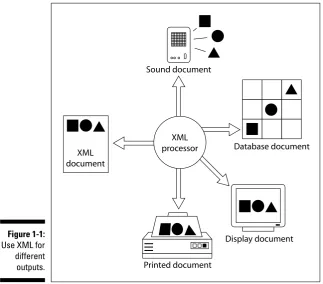
In many cases, XML documents are used with stylesheets to provide high-quality output on-screen. You can use the same data, however, to send infor-mation to a speech-synthesis program that reads the text to a person who is vision impaired. Alternatively, that same data might also create output on a Braille reader. The same document with a layout program and a stylesheet also might be used for high-quality printouts. (Figure 1-1 gives you an idea of the infinite variety of output choices that XML makes available to you.)
The beauty of this concept is that you never need to fuss and fidget with the XML data to create output for different devices. You need only use different pieces of software that can read XML and can provide the output for a partic-ular format or output device.
Using the same data across platforms
The good news looks, at first, like no news: XML documents are not specific to any particular platform or programming language. Okay, why is that some-thing to e-mail home about? Think versatility. Suppose you want to exchange database information across the Web — say, use a Web browser to send infor-mation from a user questionnaire back to a Web server. To accomplish this task (and many others), you need a document format that is
Extensible:An extensibleformat is one that can be tailored or customized for specific applications.
Open:It’s well documented and widely available.
Nonproprietary:It’s expressed in an accepted or standard form of nota-tion that isn’t the exclusive property of some individual, company, or organization.
These characteristics enable the document to adapt to changing conditions, to take best advantage of the work of others, and to avoid incurring extra expense or legal liability.
17
Chapter 1: Getting to Know XML
Guess what? XML meets all three requirements for a document format for exchanging data — it’s open, extensible, and nonproprietary. No surprise, then, that XML is the best choice for data exchange; those three magic char-acteristics make it a handy, consistent way to hand data around among multi-ple applications and multimulti-ple platforms with the most efficiency and least hassle.
Check out Chapter 2 for additional information and examples of the many uses of XML, as well as an introduction to the world of XML technologies.
Beyond the Hype: What XML Isn’t
The previous section spells out what XML is — an extensible markup lan-guage that allows you to create your own tags to develop XML applications. Now it’s time to clarify what XML is not.
XML processor XML
document
Printed document
Display document Database document Sound document
Figure 1-1:
Use XML for different outputs.
18
Part I: XML Basics
It’s not just for Web pages anymore
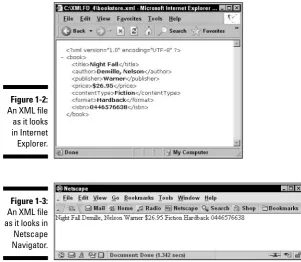
Although the World Wide Web Consortium (W3C) developed XML, it’s not specifically designed only for Web pages. In fact, if you display an XML docu-ment on the Web in its raw form (without adding styles to format the dis-play), all you’ll see is the XML markup itself. Figure 1-2 shows an XML file in Internet Explorer — not much to look at! And there’s even less to see when this same file is displayed in Netscape Navigator, as shown in Figure 1-3.
So banish this Web-only idea from your thoughts. XML is a markup language that allows you to organize information by creating tags to construct a spe-cific document structure. XML documents can be viewed on the Web, but unlike HTML documents, they’re not limited to the Web.
Browser support for XML is limited and variable. Hopefully this will change in the next generation of browsers, but for now XML works well in Web pages only when combined with another language (CSS) or XML technology (XSLT) to format the display of the XML information. Figure 1-4 shows our XML file when it’s combined with simple CSS style instructions — now, that’s more like it!
Figure 1-3:
An XML file as it looks in Netscape Navigator.
Figure 1-2:
An XML file as it looks in Internet Explorer.
19
Chapter 1: Getting to Know XML
It’s not a database
Whether XML “is” a database depends on your definition of database.If you’re defining a database as a collection of data, then yes, XML qualifies as a database. If you’re defining a database as a Database Management System (DBMS) program, such as Microsoft Access, XML has some DBMS features (storage, queries, programming interfaces) but doesn’t have others (queries across multiple documents, security, indexes). So, okay, you coulduse XML as a database for a small amount of data — but it wouldn’t be efficient to use XML as a database for large amounts of data. (Why would you want to, when DBMS programs are designed to do exactly that?)
That’s not to say XML is in any way database unfriendly. XML documents work well for both input and output, going to and from a database — and you can also use them to display database information in print or on the Web. (You get a closer look at how to use XML effectively with databases in Chapter 17.)
It’s not a programming language
One of the most common misconceptions about XML is that it’s a program-ming language. Although XML can be used with programprogram-ming languages for certain types of application development, it’s a markup language, not a pro-gramming language. A markup language is essentially descriptive; a program-ming language is for issuing logical commands. Programprogram-ming languages include (for example) variables, datatypes, operators, loops, functions, and conditional statements. XML doesn’t include any of these features, so it’s no programming language.
Figure 1-4:
An XML file with an attached CSS stylesheet, shown in Internet Explorer.
20
Part I: XML Basics
Part of the confusion here is that some XML document types do include some features foundin programming languages. For example, XML Schemas (which are themselves XML documents) include several built-in datatypes and also allow user-defined datatypes. But wait a minute: Although XML Schema docu-ments can include datatypes — one feature of programming languages — that doesn’t make them full-fledged programming languages with all the fea-tures just listed here. They remain XML documents — with an XML document structure, created with a markup language (XML). You can get XML to
describe how a document will look; you can’t get it to dim your house lights or start your car — at least, not without some help from an actual program-ming language.
Building XML Documents
When it comes to actually getting your XML tags in a row, regular old-fashioned text editors (such as Notepad) can do the job if you’re just getting your feet wet with XML. If you’re using Windows, you can access Notepad by choosing Start➪Programs➪Accessories➪Notepad. A new Notepad window opens. You can save the files just as you would in a word processor — and do simple functions such as copy and paste. Aside from that, though, Notepad is a pretty bare-bones program — you must insert all the markup yourself when you use a text editor such as Notepad.
Avoid using the WordPad text editor to create an XML document; it won’t let you save a file with the .xmlextension.
If the bare-bones approach just isn’t good enough, you may want to check out text editors that are built specifically for XML. (We think they are defi-nitely the way to go if you plan on using XML regularly.) These editors often look like a blend of traditional word processors and HTML editors. In fact, most XML editors work so much like word processors that you could easily forget you’re working with XML.
XML editors can make your job easier and help keep those creative juices flowing! (Tracking tags and cleaning up structures can interrupt — even completely destroy — the creative train of thought.) XML editors have two distinct features that are essential for creating good XML documents:
Ease of markup:XML editors, such as XMLSpy, Turbo XML, and XML Pro, can add markup to text as simply as you can turn text boldin today’s word processors. All XML editors provide the capability to select text with a cursor and choose which markup you want to apply from a menu of selections. (See Chapter 19 for more on XMLSpy, Turbo XML, XML Pro, and other XML-authoring tools.)
21
Chapter 1: Getting to Know XML
Automatic enforcement of XML document rules:For many applications, XML editors can determine which element types can appear in certain contexts. In this way, the editor helps you avoid making syntax or struc-ture mistakes. For example, if you specify that the ChapterTitleelement is valid only at the beginning of a chapter and never within an ordinary paragraph, the editor can make sure that your rule is enforced if you acci-dentally break it.
XML is a subset of SGML, so many authoring tools and editors previously used for SGML have been recast and are now ready to take on XML.
22
Part I: XML Basics
Chapter 2
Using XML for Many Purposes
In This Chapter
Moving your data into XML
Making use of XML for the Web, print media, forms, and databases
Introducing the many flavors of XML
B
usinesses generate, store, and share information in a variety of ways, including text-based reports, forms, spreadsheets, and databases. Often, this important data is not collected and saved in a format that makes it possible for anyone to reuse, index, or search this information. For example, business data in a text document may be available only in that document; a spreadsheet program that could create a graph from this same information may not be able to get at it — and that means typing in the data all over again. Duplicate entry of the same data is not only inefficient, but also creates more opportunities for errors.XML makes it possible to collect information once — and then access and use that data in as many different formats as you need. Although it requires some planning up front (and a close look at the kinds of data you actually col-lect), XML is not difficult to implement as a solution for data collection, stor-age, and exchange,
You don’t have to be a technical whiz to start using XML. XML is accessible to users at all levels, from beginners creating their first XML documents in Word 2003 to the more technically savvy users out there entrusted with the task of constructing XML schemas to validate those documents.
Moving Legacy Data to XML
Using XML for your data doesn’t necessarily land you back on Square One; you don’t have to start collecting and processing your data all over again. You may be able to import, export, and otherwise shape-shift your current data into an XML format. Here’s a glimpse of what’s possible:
Is your data in spreadsheets?You can transform this data into XML format by creating an XML schema for the data and then using that schema in Excel 2003 to create a map that connects the spreadsheet cell data and the schema. You can then export the spreadsheet file as an XML document. (See the “Getting started in Excel” section later in this chapter for more details on using XML with Excel 2003.)
Is your data in database tables?In Access 2003, you can export data in XML format from one or more tables. Access can create and export an XML document — along with an XML schema and an XSLT stylesheet that creates an HTML document to display the data on the Web — automati-cally. You can also use XMLSpy (an XML editor) to import and convert database information from various databases — including Microsoft SQL Server, Oracle, MySQL, IBM DB2, Sybase, Access, or any ADO (ActiveX
Data Objects) or ODBC (Open DataBase Connectivity) source — into XML format. See Chapter 17 for more information on using XML with databases.
Is your data in CSV (comma-separated values) text files?You can use XMLSpy to import and convert these text files into XML format.
Even if your current data isn’t in any of these formats, you can take stock of your data and organize it for efficient use in XML — if you follow the advice we offer in Chapter 3, that is.
The Many Faces of XML
After your data is in XML format, you have many ways you can present and share it. The same data can be accessed through Web pages, print docu-ments, forms, spreadsheets, and databases.
Creating XML-enabled Web pages
All this XML versatility does require just a little extra tweaking: Your content (that is, the data) is separate from its context (the way you present it) in XML documents. That means you have to add some formatting information if you want to display more than just “raw” XML markup on a Web page.
When it comes to actually adding formatting information, you have a couple of options. You can link an XML document to a CSS (Cascading Style Sheets) stylesheet — which would (hopefully) make the information easier to read as well as visually interesting. Figure 2-1 shows (on the left) an unformatted XML file in a Web browser.
24
Part I: XML Basics
If you use an XSLT (eXtensible Stylesheet Language Transformations) stylesheet with your XML document, voilà! You can generate an HTML page with a formatted display — with almost no effort. As you can see at right in Figure 2-1, the information is now in a much more usable form for the Web. And by the way — this XML file and XSLT stylesheet were both generated from a database table in Access 2003!
We show you all the details about how to create a CSS stylesheet and link it to an XML document in Chapter 7 — and do the same for XSLT in Chapter 12.
Print publishing with XML
Okay, suppose you want a hard copy of your XML data. No problem: SGML, the parent language of HTML and XML, was developed to meet the publishing industry’s need for a language that could mark up electronic documents so they could be edited, reused, and shared. XML documents are well suited for creating printed documents — especially technical manuals and other large, organized collections of information in text form.
Microsoft Office 2003 includes features that take full advantage of XML and give it an expanded role on the desktop. All versions of Word 2003 and Excel 2003 can save documents in XML format. The professional version of Office 2003 takes this a step further, offering a way to add customized XML schemas to your documents. Result: XML is now even easier to use with print documents.
At heart, XML files are text files — you can open, modify, or create them in any text editor. If you prefer to use a word processor, Word 2003 includes fea-tures designed to make XML documents easy to create and use in Word.
Word 2003 uses a built-in schema document called WordML for XML docu-ments. If you’re using the professional version, you can also add any schema to any XML document in Word.
Figure 2-1:
An XML file in Internet Explorer.
25
Chapter 2: Using XML for Many Purposes
When you open an XML document in Word, you can display the document in one of two ways:
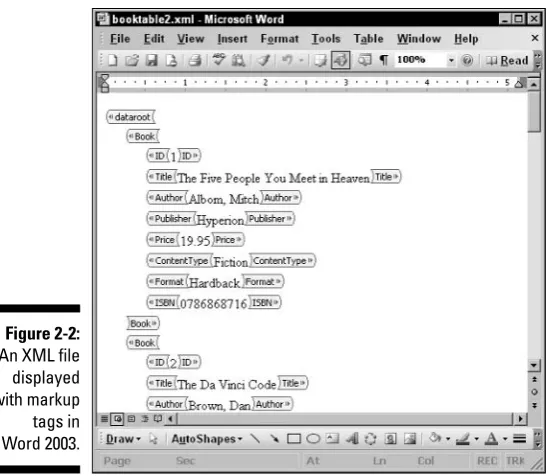
As XML markup with visible XML tags, as shown in Figure 2-2. As content without tags, as shown in Figure 2-3.
You can toggle back and forth between these views by using the Show XML Tags in the Document check box in the XML Structure task pane (located to the left of the main window). To open the task pane, select View➪Task Pane, and then select XML Structure from the drop-down menu at the top of the task pane.
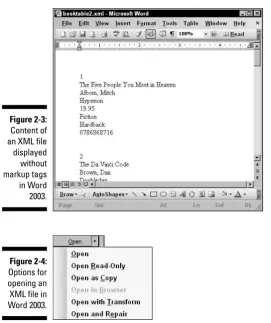
If you have an XSLT stylesheet for your XML document, you can open the “transformed” XML document in Word by using the drop-down menu from the Open button (File➪Open, as shown in Figure 2-4), selecting Open with Transform, and then browsing to the location of your XSLT file. XML files used to print documents are similar to the XML files used with Web pages — they are