Site Requirements
The selection of a suitable location is essential when installing the key service unit (KSU). The area should be clean, dry, static-free, temperature controlled, and accessible only to authorized personnel. When selecting a site, give careful consideration to the following:
♦ Ample space must be allowed to mount the cabinet(s) and MDF (Main Distribution Frame) and to allow for removal of the KSU covers to access assemblies and cards within the cabinet(s).
♦ A well-ventilated and well-lighted area having with a temperature range of 32-100° F (0-40° C) and 10%-90% relative, noncondensing humidity. The area must not be exposed to direct sunlight, heat or dust. Optimal temperature range is 40-70° F.
♦ A dedicated 110/220 Volt AC, 15 Amp, 50/60 Hz, single phase, 3 wire, parallel blade with ground power outlet should be located within 6 feet of the KSU. Additional outlets for music source, paging amplifier, etc. as needed. The AC receptacles must be third-wire grounding type. The third-wire ground must be connected to an approved earth ground through the single-point grounding circuit at the power distribution panel.
♦ Avoid areas that produce radio frequency interference (RFI) or electro-magnetic interference (EMI). (eg. electric welding equipment, radio frequency transmitters, magnets, refrigerators, copy machines, microwave ovens, etc.)
♦ Locate the KSU and stations so as to minimize cable length. All station cables must be 2-pair twisted-pair cable and must be home run. The Digital Keyphone may be wired differently. Cabling lengths must not exceed the following:
Analog Keyphones: Diameter Distance
26 gauge 460 feet 24 gauge 750 feet 22 gauge 1150 feet
Single-Line Telephones: 800 ohms using 22 gauge – 5000 feet
♦ The CO/PBX line terminations should be within 5 feet of the cabinet/main distribution frame. ♦ Make sure there is a good earth ground utilizing #12 AWG or larger standard, copper wire
within 25 feet of the KSU. A metallic COLD water pipe usually provides a reliable ground path. Carefully check that the pipe does not contain insulated joints that could isolate the ground. (The pipe must be metallic from the point of ground to the connection to the water main outside the building).
♦ Recommended: use a surge/spike protector.
AC: Innovative Technology Equalizer II or equivalent. CO: Innovative Technology MDF 6/12/24 or equivalent.
KDX-500
The KDX-500 system consists of up to 4 cabinets. One Main KSU cabinet (with 3 slots for the 3 common control cards and 5 slots for peripheral cards) and up to 3 Expansion KSU cabinets (each with 8 slots for peripheral cards).
The current peripheral cards are:
♦ COU-A Analog loop start trunks (8 circuits)
♦ STU-A Analog Keyphone stations (8 circuits)
♦ DSU-16 Digital Keyphone stations (16 circuits)
♦ SLU-16 Analog Single Line telephones (16 circuits)
Future peripheral cards are: ♦ T-1 / PRI Trunk card
♦ BRI card
INSTALLATION
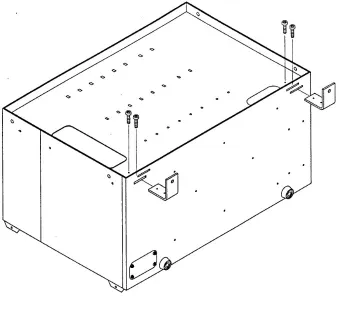
The KXD-500 KSU can be installed “free-standing” or wall mounted. For wall mounting remove the two screws on the front of the cabinet securing the top. Lift up the top panel from the front and remove it. Remove the two “L” brackets (each secured by two screws) and reinstall them as shown in Fig. 1.
Fig. 1
enough to allow sufficient space for the MDF connecting blocks and optional equipment to be mounted and serviced conveniently.
POWER TRANSFORMER ASSEMBLY
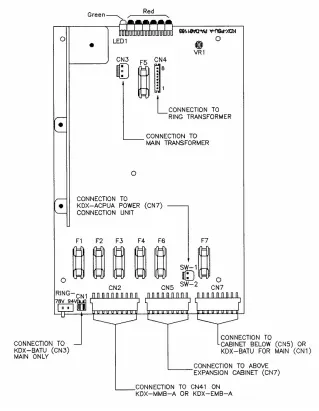
Once the cabinet is in place, install the KDX-ACPU-A1 Power Transformer Assembly (see Fig. 2) into the main KSU. The cables from this assembly plug into the PSU-A Unit. (See Fig. 3)
• Remove cover plate on left side of KSU
• Connect 8-wire connector from Ringing Transformer to CN4 on PSU-A Unit
FUSES (PSU-A UNIT) (See Fig. 3)
LED INDICATION FUSE
n Steady Green
n Steady Red F2 3A 250V
n Steady Red F3 1A 250V
n Steady Red F1 3A 250V
n Steady Red F6 6A 250V
n Steady Red F4 .5A 250V
n Very Fast Flashing Red F5 .5A 250V
Note: 1) An unlit LED indicates a blown fuse. Be sure to replace the fuse with the same type
and rating.
2) Fuse F7 (6A / 250V) is for the built in trickle charger for external batteries that may be
attached to the BATU Unit. There is no LED Monitoring this fuse.
BATU UNIT
The BATU Unit provides the capability to connect external batteries to the system to provide for complete system operation in the event of local power failure. Attach batteries
( 24VDC ) to the BATU Unit at the appropriate terminals. (See Fig. 4) The system applies a trickle charge to the battery when it is not in use.
Keep the battery(s) dry and clean. Avoid damp wet areas or areas where the battery may be easily damaged. Wires should run from the battery(s) to the terminals on the BATU Unit. When connecting to the BATU, pay particular attention to matching the positive and negative connections. Improper connection will damage the power supply. When operating from the battery, the system will automatically cut off the power supply from the battery when the voltage gets too low, so that the battery can be recharged.
CAUTION!!!! To reduce the risk of fire or injury please note the following:
Do not dispose of the battery(s) in a fire. The cell may explode. Check with local codes for special disposal instructions.
Exercise care in handling the battery(s) in order not to short the battery with
conducting materials such as rings, bracelets and keys. The battery may overheat and cause burns.
Observe proper polarity orientation between the battery(s) and BATU Unit.
Do not mix battery(s) of different sizes or from different manufacturers in this product.
COMMON CONTROL CARDS
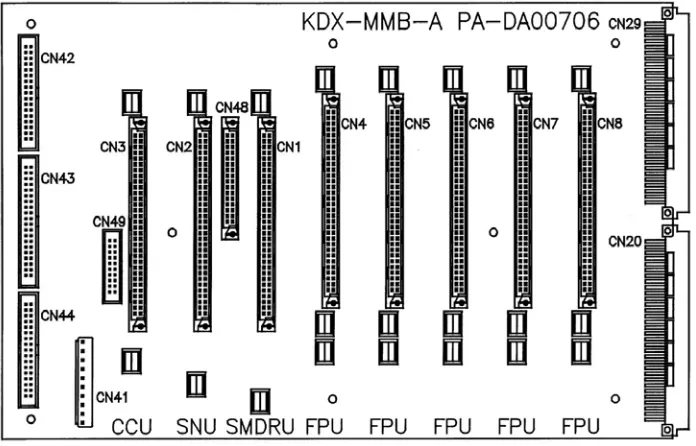
See Fig. 5 for card locations. Slots labeled FPU are for Peripheral Cards (Stations /
Trunks). The 3 Common Control Cards are 1) CCU-A Card (Central Processor), 2) SSU-A Card (System Services Card) and 3) SMDRU Card (SMDR and Serial Ports).
Main KSU Layout
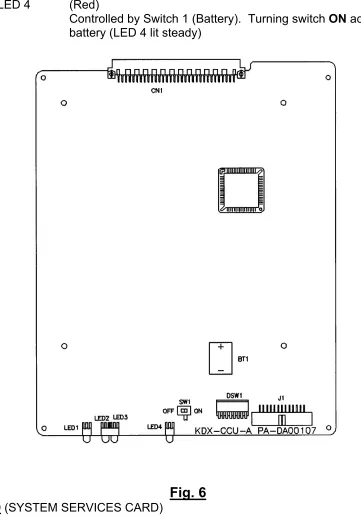
The CCU Card is the main controller for the system. There are 4 LED’s on the card:
LED 1 (Very Fast Flashing Green)
LED 2/3 (Alternating Slow Flashing Red)
LED 4 (Red)
Controlled by Switch 1 (Battery). Turning switch ON activates the
battery (LED 4 lit steady)
Fig. 6
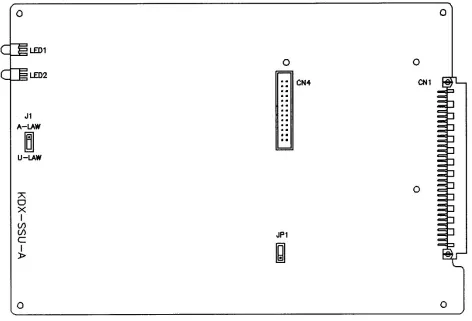
The SNU Card provides the common service features for the system. There are 2 LED’s on the card:
LED 1 (Slow Flashing Red)
LED 2 (Steady Red)
Jumper J1 should be set to the U-LAW position. A-LAW setting is for Europe
ESNC CARD (EXPANSION SWITCHING NETWORK CARD)
The ESNC Card is required when the 2nd
and 3rd
expansion cabinets are used. It adds the additional 256 X 256 switching channel array required for these cabinets. The ESNC Card is plugged into CN4 on the SSU Card and secured with the screws provided.
Fig. 8
SMDR CARD
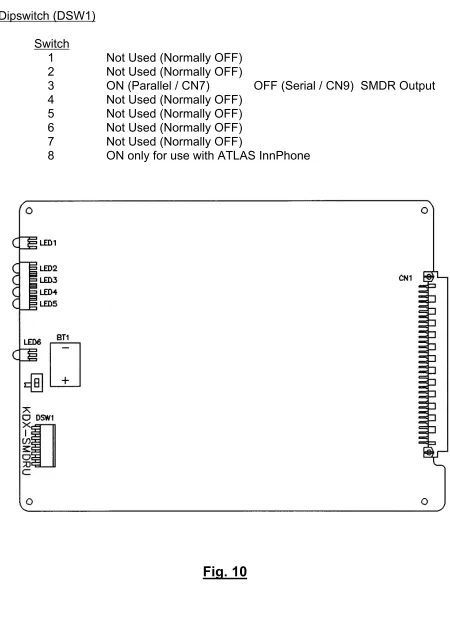
The SMDR Card provides for 1 Parallel Port connection (CN7) on the MDF-F1 (see Fig. 14). This provides interface for a standard parallel printer (SMDR). This card also provides for 4 RS-232 connections to specific external devices. These connections are made through 4 DB-9 connectors on the MDF-F1 card located on the right side of the main KSU. The 4 ports are assigned as follows:
Port 1 (CN8) is for PC Programming (Future Feature)
Port 2 (CN9) is for Call Records & Reporting (SMDR)
Port 3 (CN10) is for Voice Mail Interface (SMDI)
Port 4 (CN11) is for InnFone Integration
There are 6 LED’s on the SMDR Card:
LED 1 (Fast Flashing Green)
LED 2-5 (Red) These flash whenever data is transmitted through CN8 - CN11
LED 6 (Red) Controlled by Switch 1 (Battery). Turning switch ON activates the
Dipswitch (DSW1)
Switch
1 Not Used (Normally OFF)
2 Not Used (Normally OFF)
3 ON (Parallel / CN7) OFF (Serial / CN9) SMDR Output
4 Not Used (Normally OFF)
5 Not Used (Normally OFF)
6 Not Used (Normally OFF)
7 Not Used (Normally OFF)
8 ON only for use with ATLAS InnPhone
INTERFACE CARDS
All Interface Card Slots (FPU) in the KSU are universal. Any type of interface card can be installed in any Interface Card Slot. It is recommended that all station cards be installed first. Install trunk cards after station cards have been installed to allow for easier expansion in the future.
SLU-16 Single Line Telephone Card (16 Ports)
Each port requires a 1-pair connection. The SLU-16 provides 16 ports for single line telephone connections. There is an LED (Red) for each port to indicate the status of that
port. ON means the port is in use. (the station is off-hook) Connection is made through the
amphenol connector on the MDF located on the right side of the main and expansion KSU(s).
STU-A Analog Keyphone Card (8 Ports)
Each port requires a 2-pair connection. The STU-A provides for connection of 8 analog
keyphone sets. There is an LED (Red) for each port to indicate the status of that port. ON
means the port is in use. (the station is off-hook) Connection is made through the amphenol connector on the MDF located on the right side of the main and expansion KSU(s).
DSU-16 Digital Station Card (8 Ports)
Each port requires a 2-pair connection. The DSU-16 provides for connection of up to 16 Digital Keyphone sets, digital DSS units, or an analog terminal interface (ATI). There is an
LED (Red) for each port to indicate the status of that port. ON means the port is in use.
Connection is made through the amphenol connector on the MDF located on the right side of the main and expansion KSU(s).
COU-A Analog Trunk Card (8 Circuits)
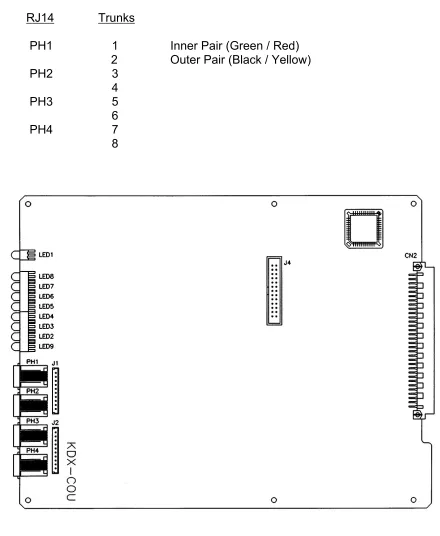
Each trunk requires a 1-pair connection. The COU-A provides for connection of 8 loop start
interface circuits. There is an LED (Red) for each port to indicate the status of that port. ON
means the port is in use. Connection is made through RJ-14 Modular jacks mounted on the front edge of each COU-A card. (See Fig. 11)
FUTURE INTERFACE DEVICES
T-1 Trunk / PRI Card
BRI Card
CARD INSTALLATION
COMMON CONTROL CARDS
The CCU (Central Processor), SNU (System Services) and SMDR Cards MUST ONLY BE
INSERTED OR REMOVED when power to the Main KSU is OFF! These cards are installed
in the appropriate slots (CCU / SNU / SMDR) in the Main KSU (see Fig. 5)
PERIPHERAL CARDS
The Peripheral Cards (Trunks / Stations) may be removed and reinstalled at any time with power ON. An example of this would be for troubleshooting or replacing a known defective card. Peripheral cards are installed in the balance of the slots (Labeled FPU) in the Main KSU and all slots of all Expansion KSUs.
When expanding the system (adding additional trunk or station cards) the system needs to be powered down, the card inserted and the system powered up again.
Before powering down, verify (on the CCU Card) that the battery switch (SW1) is ON, LED 4 is lit (indicating that SW1 is ON) and dipswitch 1 (in DSW1) is ON.
Failure to do this will result in loosing previously programmed information.
CABLE CONNECTIONS
COU-A (TRUNK) CARD CABLE CONNECTIONS
RJ14 Trunks
PH1 1 Inner Pair (Green / Red)
2 Outer Pair (Black / Yellow)
PH2 3
4
PH3 5
6
PH4 7
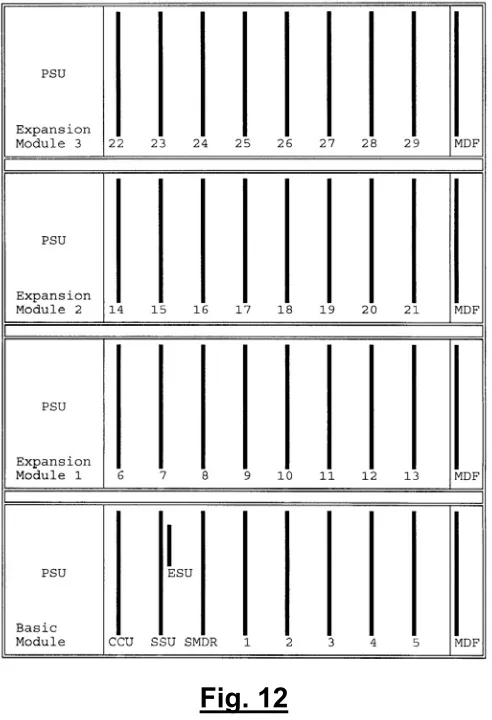
The system allows for a maximum of 12 COU Cards. All FPU slots are universal, however for most efficient use of cabling, COU Cards should be installed after station cards in each cabinet.
(See Fig. 12)
Fig. 12
STATION CARD CABLE CONNECTIONS
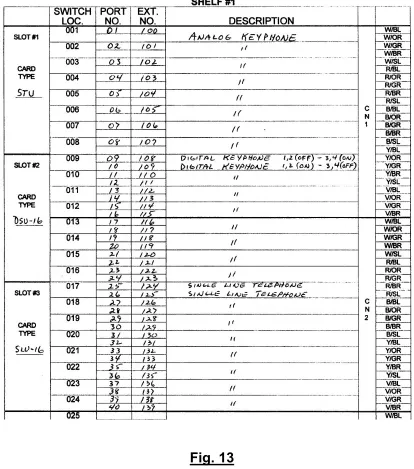
All station card connections are made through the MDF Units located on the right side of the Main and Expansion KSUs. The MDF in the Main KSU (MDF-F1) has 4 amphenol connectors labeled CN1 – CN4. (See Fig. 14)
The STU-A Card provides for 8 Analog Keyphones. Port one is connected to the White/Blue pair and White/Orange pair (2 pair connection).
The DSU-16 card provides for 16 Digital Keyphones on 8 ports. Each of the 8 positions on this card can have 2 Digital Keyphones attached to it. The phones are connected in parallel. Remove the desk/wall mount adapter from the base of the Digital Keyphone. This will reveal 4 dipswitches. The phone with the switches set: 1,2 OFF / 3,4 ON will be port 17 and the phone with the switches set: 1,2 ON / 3,4 OFF will be port 18. Both port 17 and 18 are connected to the white/blue and white/orange pair (2 pair connection). The phones are wired in parallel but there are some limitations that must be observed. (See Fig. 22)
Examples:
1) A single Digital Keyphone can be connected to a cable run up to 3000’ in length.
2) A cable run of up to 1500’ can be terminated in two parallel runs (2 pair) up to a maximum of 50’. One phone uses the B1 channel (1,2 OFF / 3,4 ON). The other phone uses the B2 channel (1,2 ON / 3,4 OFF).
3) 2 parallel cables (2 pair) can be run a maximum of 600’ from the MDF but the difference in length between the two cables cannot exceed 50’.
The SLU-16 card provides for 16 single line devices. The first SLT on this card is port 25. It is connected to the red/brown pair (1 pair connection).
MDF-F1
The MDF in the Main KSU provides for many connections to external devices as well as for the station cards in this cabinet (See Fig. 14)
CN1-CN4 25 pair amphenol cable connections for stations
CN7 DB25 connector for standard parallel printer cable for SMDR Printer.
CN8 DB9 connector for PC Programming.
CN9 DB9 connector for call records and reporting
CN10 DB9 connector for Voice Mail Interface (SMDI)
CN11 DB9 connector for caller ID, InnFone, ACD Interface or PMS Interface.
CN13 6 pairs of screw terminals for connection to devices which can be controlled
by relays.
The Main and Expansion KSU MDFs are all equipped with 25 pair female type amphenol connectors. The installer should run 25 pair cables with male amphenol connectors from his own MDF (eg: 66 type block).
EXPANSION KSU(s)
Expansion KSU(s) are mounted on top of the Main KSU. First remove the top panel of the Main KSU. Then place the expansion KSU on top of the Main KSU. (See Fig. 15) The original top of the Main KSU is then installed as the top of the Expansion KSU.
Connect the flat ribbon cables between the backplanes of the two KSUs as shown in Fig. 16. Connect the multi-conductor cable between CN5 of the Main KSU and CN7 of the Expansion KSU. CN5 and CN7 are located on the PSU-A Power Boards as shown in Fig. 17.
Expansion KSU #1
Main KSU
POWER TRANSFORMER ASSEMBLY
MDF-F2
Fig. 19
STATION WIRING
♦ Twisted pair station cable is required for all keyphones. It is recommended that 2 or
3-pair, twisted pair 24 gauge station cable be used throughout the system.
♦ The following guidelines should be observed when running station cable:
♦ AVOID cable runs parallel to fluorescent light fixtures of AC lines not in conduit. If
these obstacles are unavoidable, run the cable across them at right angles.
♦ DO NOT run station cables inside electrical conduit already occupied by AC power
cable. To do so is a violation of the National Electrical Code.
♦ DO NOT run station cables near equipment with electric motors or past strong
magnetic fields such as copy machines, heavy motors, welding equipment, etc.
♦ DO NOT place station cables where they can be stepped on or be rolled over by
office chairs or any other equipment.
Each Keyphone is supplied with a modular line cord. A 625A type jack assembly or equivalent should be mounted where each telephone is to be installed. Cable pairs should not be crossed or reversed during installation. Correct polarity must be maintained for correct operation of
Keyphones. Please see the following Fig. 20 and Tables 1-3 for correct wiring orientation.
TYPICAL MODULAR JACK WIRING DETAILS FOR KEYPHONE AND SINGLE LINE STATIONS
WHT/ORN BLU/WHT
RED WHT BLK
GRN BLU YEL
STATION CABLING – LENGTH LIMITATIONS
See Fig. 21 and Fig. 22 for maximum cable lengths for installation of Analog Keyphones, Digital Keyphones and Single Line Phones.
TO WALL MOUNT A KEYPHONE
♦ Remove the base stand from the bottom of the keyphone. (See Fig. 23). Press in on
the large wedge to disengage it from the housing.
♦ Position the base stand on the wall where the telephone is to be located with the large
wedge down, and mark on the wall the location of the small opening in each of the two keyhole slots.
♦ Install a #8 x ½ inch pan-head screw at each marked location. Partially tighten the
screws leaving approximately ¼ inch protruding.
♦ Reattach the base to the keyphone with the large wedge down.
♦ Position the keyphone with the base stand over the two mounting screws with the
screws inserted into the large slots in the keyholes.
♦ Slide the keyphone down until it is tight and stable.
♦ Lift and turn the handset cradle tab so the tab is up. (See Fig. 24)
Fig. 23
Fig. 24
DSS INSTALLATION
The DSS unit requires a keyphone port just as the keyphone does.
The DSS is always installed in the next highest physical Keyphone port from the Keyphone that will work with it. (E.g. Keyphone port 10 / DSS must be port 11. Keyphone port 33 / DSS port must be port 34)
It is possible to install more than one DSS with one Keyphone. (E.g. Keyphone port 23 / DSS (1) must be port 24, DSS (2) must be port 25)
OPTIONAL EQUIPMENT CONNECTIONS
♦ Music Source(s)
The system can use either an internal or two different external music sources. The application of the sources is selected in programming
Connect the music source output leads to the correct terminal pair as indicated on the MMDF-F1 card (Fig. 14) in the Main KSU.
The internal music source is a music chip. The external music source impedance must be less than 32 ohms, and the power should be approximately 100 mW.
♦ External Paging Amplifier
Connect the Paging Amplifier input leads to the correct terminal pair as indicated on the MMDF-F1 Card (Fig. 14) in the Main KSU. This provides paging output for Zone 8 only.
♦ Facsimile / Answering Machine / Cordless Phones / Etc.
Facsimile Machines / Answering Machines / Any Analog Tip & Ring Device can be connected to the Single Line Telephone Ports (SLU-16). Incoming calls can be assigned to ring these ports so that the machines can answer the calls or calls can be transferred to these ports if answered at another station.
Through programming, a specific line or group of lines can be set to ring the device and/or be accessed by the device for outgoing calls.
PARALLEL PORT CONNECTION
The Parallel Port (CN7) on the MDF-F1 (See Fig. 14) provides connection to a parallel printer through a standard parallel printer cable.
SERIAL PORT CONNECTIONS
The 4 Serial Ports on the MDF-F1 (See Fig. 14) provide connections for the following options:
Port 1 (CN8) is for PC Programming
Port 2 (CN9) is for Call Records & Reporting
Port 3 (CN10) is for Voice Mail Interface (SMDI)
Port 4 (CN11) is for Caller ID / InnFone / ACD / PMS
Fig. 25
MEMORY BACKUP SWITCH
♦ The memory backup switch (SW1) is located on the front of the CCU-A Card (See Fig.6)
Turning this switch ON will insure that the KSU will retain all stored programming in the event of a power outage.
♦ ONCE THE SYSTEM IS INSTALLED, SET THE MEMORY BACKUP SWITCH TO THE ON POSITION to prevent the loss of stored information.
♦ When the Memory Back-up switch is ON, the LED on the CCU-A Card (LED 4) will be
lit.