THE OFFICE OF ENTERPRISE TECHNOLOGY STRATEGIES
Statewide Technical Architecture
Implementation Guideline:
Enterprise Application Development
S T A T E W I D E T E C H N I C A L A R C H I T E C T U R E
Implementation Guideline:
Enterprise Application Development
Guidelines for the Microsoft
.Net
Framework
Revised Date: Version: 1.0.0
Revision Approved Date:
Date of Last Review: March 6, 2003
Date Retired:
Architecture Interdependencies: Reviewer Notes: August 1, 2003
2003 State of North Carolina Office of Enterprise Technology Strategies
PO Box 17209
Raleigh, North Carolina 27699-7209 Telephone (919) 981-5510
All rights reserved. No part of the material protected by this copyright notice may be reproduced or utilized in any form or by any means, electronic or mechanical, including photocopying, recording or by any informational storage
Table of Contents
INTRODUCTION...34
SUPPORT MECHANISMS ...34
REFERENCE ARCHITECTURE DESIGN...67
PHYSICAL VIEW ...67
.
NET SECURITY...89LOGICAL VIEW ...89
Component Types...89
GENERAL DESIGN RECOMMENDATIONS FOR APPLICATIONS AND SERVICES ...1213
Designing User Interface Components...1314
User Interface Component Functionality...1415
Windows Desktop User Interfaces...1617
Mobile Device User Interfaces...1920
Web User Interfaces...1920
Smart Device User Interfaces ...2021
Document-based User Interfaces...2021
Designing User Process Components...2324
Separating a User Process from the User Interface...2627
DESIGNING BUSINESS TIERS...3233
Designing Business Components...3435
Implementing Business Workflows with BizTalk Server...4142
Service Interface Characteristics...4546
Using Business Facades with Service Interfaces...4546
Transaction Management in Service Interfaces...4748
Representing Data with Custom Business Entity Components...4849
Recommendations for Business Entity Design...5051
DESIGNING DATA TIERS...5152
LANGUAGE ADOPTION...6465
UPGRADING FROM VISUAL BASIC 6.0...6465
Micro Issues: ...6566
Macro Issues: ...6667
Reasons for upgrading:...6667
INTEROPERATION WITH JAVA BASED APPLICATIONS ...6768
INTEROPERATION WITH COM+ AND ENTERPRISE SERVICES ...6768
AUTHENTICATION FOR THE STATE OF NORTH CAROLINA...6869
Introduction
he intent of this document is to outline the implementation guidelines that the State of North Carolina has adopted to ensure uniform and consistent implementations of Microsoft.NET based solutions across the enterprise. Microsoft.NET is a multifaceted and extremely flexible platform framework. Therefore, to ensure that application development is structured and consistent, development teams must adopt uniform policies and procedures that reflect enterprise implementation guidelines. To assist in this effort, there are tools provided within the platform that simplify the creation and adoption of these policy and procedures.
Detailed aspects of Microsoft.NET development will not be covered in this document. There are resources listed in the following section that outline further support mechanisms for gaining greater depth and knowledge about the Microsoft.NET framework. Also Microsoft has published prescriptive architecture guidance documents that are available on the Internet at
http://msdn.microsoft.com/library that will cover the topics mentioned in this document in much greater detail. In fact, it should be noted that much of the material in this document has been derived from the PAG (Prescriptive Architecture Guidance) documents.
The key goal of this document is to outline implementation guidelines that when followed by the solution developers will lead to a well-designed Microsoft.NET solution that has the flexibility to grow with changes in technology and can be maintained in an efficient and effective manner, which is a fundamental principle of the North Carolina Statewide Technical Architecture.
This document in no way indicates or implies a preference in a vendor or technology by the State. It is provided to ensure that agencies implementing Microsoft.Net have the resources necessary to successfully deploy their systems in the most advantageous manner to both the agency and the State of North Carolina.
Support Mechanisms
The creation of enterprise class applications is complex and requires an in-depth knowledge and diverse skill set in areas such as application design, application programming, as well as a general understanding of networking and database technologies. To address this complexity, there are a number of support mechanisms that the State of North Carolina can leverage to create an enterprise application when using the Microsoft.NET framework. To best assist the State of North Carolina in the utilization of these support mechanisms Microsoft has assigned two Account Executives that can bring together the right Microsoft resources and/or partners to help in different phases of the creation of a .NET
enterprise application. Below is a list of the specific resources that are available and how and when they may be leveraged:
• Microsoft Account Executive (State of North Carolina) - Microsoft has two
Account Executives for the State of North Carolina. Account Executives should be viewed as key strategic resources for Microsoft products and services. They focus on fostering a positive relationship between Microsoft and the State; and can leverage internal Microsoft resources as well as partners for guidance and support for Microsoft.NET development efforts. As of this publication,
the Microsoft Account Executives assigned to the State of North Carolina are:
o Jim Lorenz: Phone: 919.474.4919;
email [email protected]
o Bill Durham: Phone: 678-908-7544;
email [email protected]
Bill Durham is the primary contact. However, if your agency has already established a relationship with Jim Lorenz, he will remain as your primary contact.
• Microsoft Developer Network (MSDN) - MSDN is offered as both a web
site and as a subscription.
o The MSDN website (http://msdn.microsoft.com/) is one of the
premier sites for information on the latest developments for web services and Microsoft.NET. This document leverages material from
the MSDN website.
o The subscription essentially provides a developer with all the Microsoft
tools and software necessary to craft a .NET enterprise application. Products include: Visual Studio.NET, SQL Server 2000, BizTalk Server 2002, etc. The products are delivered in CD or DVD media and are to be used for development purposes only – and may not be used for production systems. Licensed versions of the products must be purchased when it comes time to deploy. Contact one of the Microsoft Account Executives for more information.
• MCS (Microsoft Consulting Services) - MCS is the consulting side of
Microsoft and is made up of highly skilled developers and architects that can help in the different phases of the application development process. Contact one of the Microsoft Account Executive for more information.
• .NET Developer Quick Starts – This Microsoft program offers customers all
the required resources - Software, Technical Training, and consulting hours from MCS - to do a pilot on .NET. It’s a great way to jump start development projects. Contact one of the Microsoft Account Executive for more
information.
• Two Day .NET Developer Training - This two-day training can deliver
on-site developer training at no cost. Course materials and trainers are provided. Contact one of the Microsoft Account Executive for more information.
• Partners - There are many partners that provide consulting services based on
the Microsoft.Net framework. Like MCS, these partners can provide the
necessary skill set to help get customers up and running in all phases of development. Contact one of the Microsoft Account Executives for more information.
• Product Support Services (PSS) - For questions regarding specific
programming and/or product issues, Microsoft PSS should be utilized. This is offered at various levels including subscription-based contracts that guarantee turnaround time for question and or issues. The knowledge base, provided by PSS (http://support.microsoft.com), can be used as an effective research tool.
• Microsoft Certified Technical Education Centers (CTEC's) - These are
Microsoft partners who deliver technical training in the form of Microsoft Official Curriculum (MOC). Microsoft approved and designed courses guarantee a high quality of training. These courses are usually offered over a one-week period and will go into considerable technical depth. Courses are available for the Microsoft.NET platform. For up to date information on the
courses that are available and the centers that offer them, please visit:
http://www.microsoft.com/traincert/training/.
• Books and Magazines - There are many books and magazines that are
devoted to enterprise application development and/or Microsoft.NET.
MSDN Magazine is a great resource for finding how to articles and keeping up with the latest developments with Microsoft.NET.
• Local and Regional Architect Roundtables - The goal of the Roundtable is
to establish a dialogue with systems architects, designers and technology decision makers in the Carolinas. The Roundtable is made up of a small group of senior architects who are interested in having in-depth and confidential discussions on how to better architect business critical solutions using Microsoft technology. The membership of the roundtables represents influential companies in the community who are interested in improving the architecture of their business. Microsoft looks to this group to provide feedback on current Microsoft offerings, publications, and events and to provide direction on how to improve these offerings to better enable customers to meet the needs of their businesses. The local roundtables occur quarterly while regional events are annual.
• As of this publication a roundtable is being developed. Call your Microsoft Account Executive for more details.
Reference Architecture Design
The architecture of any enterprise application can be thought of in two different ways: Physical View and the Logical View. The Logical View addresses entities (components) that perform a certain function in the overall architecture - it is platform agnostic. The logical components that make up the Logical View map to the real world platform on which they live, gives rise to the Physical View. Both views will be presented for the Reference Architecture.
Physical View
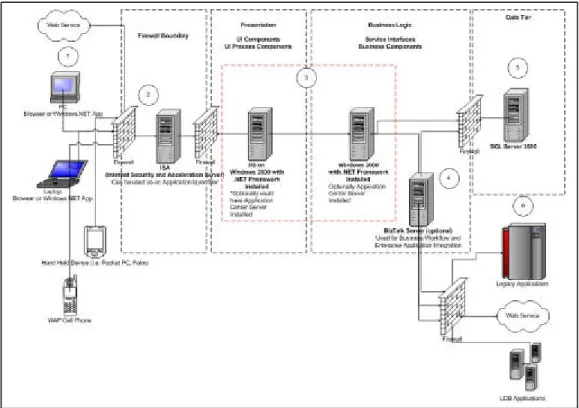
Figure 1 illustrates the Physical View of the Reference .NET Architecture. It should be noted that this proposed architecture is offered as a best practice and will sometimes need to be deviated from the Statewide Technical Architecture (STA) as the application environmental factors demand, and with prior approval from ETS. The following annotated diagram is described below.
1. Clients: The Architecture should be able to support the widest variety of clients. These include:
• Standard PC browsers on laptops, desktops, workstations, and tablets.
• Mobile Devices such as Pocket PC, Palm, WAP enabled phones, etc.
• Web Services that need access to information provided by the application. The programming design points concerning the different types of clients will be addressed later in this document.
2. Firewall Boundary: For the edge firewall (FW), an existing FW may be used if
already in place. In this scenario, the Internet Security and Acceleration (ISA) Server shown will provide application tier filtering and additional packet scanning capabilities. While this scenario has the ISA Server functioning as both an edge FW and application filter, the State’s Technical Architecture requires a firewall independent of an ISA Server.
3. Presentation and Business Tier: The architecture shown here has these tiers
on separate physical systems. This is a more secure approach than hosting both tiers on the same machine. The tradeoff is performance versus a more secure application. The programming design points concerning the different types of services provided in this tier will be addressed later in this document.
4. Data Tier: Microsoft SQL Server 2000 is the usual database of choice for
Microsoft.NET architecture. However any database can be used provided it has either a Managed Provider to the database (currently as of this publication, SQL 2000 and Oracle 9i provide this functionality; DB2/UDB will be available in early to mid 2003) or an OLE/DB provider for legacy access. The programming design points concerning the data tier will be addressed later in this document.
Stored Procedures:
To retain some level of database portability it is recommended that stored procedures only be used when there is a viable design goal that can only be solved by them. Otherwise, SQL statements for data access should be maintained in the business logic tier.
Database Security:
Moving forward .NET applications must adhere to the state’s Identity and Access Management Service (IAMS) authentication model for database security. IAMS will complement the existing database security using a role-based access control methodology and provide cross platform integration for users.
5. External Applications: Usually a distributed application will need to access
legacy systems, LOB applications, and/or other web services. To achieve this, Microsoft provides BizTalk Server for the .NET platform or, as noted in item
Note:
Remaining up-to-date on database service packs, patches, and hot fixes will help to ensure overall database security. Please review the IRMC policy – “Vulnerability Management Standard” for additional information.
4, an existing middleware/EAI solution may be leveraged. This is provided that it has a programmatic interface to provided messaging capabilities to and from the internal application and the external application.
.
NET Security
The .NET Framework delivers a rich security infrastructure, which can be tiered on top of IAMS. IAMS is currently available to state agencies, see the “Authentication for the State of North Carolina” section of this document for more information. Complementary to IAMS, the .NET Framework provides developers a well-defined security model called role-based security in which all code runs on behalf of the invoking user/group. Permissions on these roles dictate whether or not they are able to execute or are explicitly unable to execute this code. Additionally, the .NET Framework provides security on this code (referred to code-access or evidence based security). Code-access security facilitates scenarios in which a user/group may be trusted to execute a component, but if this component is not trusted by the system, then access to the resource will be denied. This facility determines what permissions to grant to the executing code and checks that all code on the stack (in the caller chain) has the necessary permissions to execute the code. Additional details on .NET security and writing secure code in the .NET Framework can be found on http://msdn.microsoft.com/ and http://www.microsoft.com/security.
Logical View
In the following section, we will address the architectural design consideration of the Logical View. This section is targeted more toward developers and architects and is taken from the Architecture and Design of Distributed .NET Applications Prescriptive Architecture Guidance document available at:
http://msdn.microsoft.com/library/default.asp?url=/library/en-us/dnbda/html/distapp.asp?frame=true
Component Types
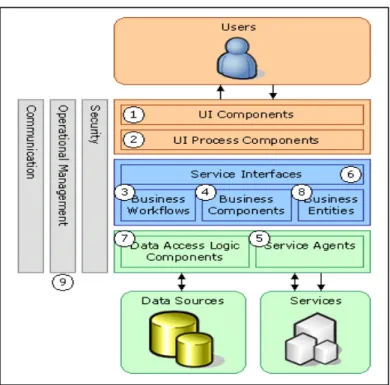
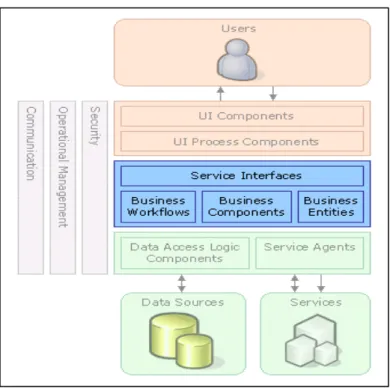
An examination of most business solutions based on a tiered component model reveals several common component types. Figure 2 shows these component types in a comprehensive illustration that adheres to the state of North Carolina’s existing technical architecture.
Although the list of component types shown in Figure 2 is not exhaustive, it represents the common types of software components found in most distributed solutions. These component types are described in depth throughout the remainder of this section.
Note:
The term component is used in the sense of a piece or part of the overall solution. This includes compiled software components, such as Microsoft .NET assemblies, and other software artifacts such as Web pages.
Figure 2 – Component types in the sample scenario
For the purpose of outlining the technologies involved in distributed architecture within the .NET platform, we have chosen a typical multi-tier Internet solution. In this solution, a user/citizen interacts through a user interface (UI), which in turn accesses business logic and data on behalf of the user/citizen. Also, in this design there are agency workers within the state domain that access the application via windows based UI’s. The component types identified in the sample scenario design are:
1. User interface (UI) components. Most solutions need to provide a way
for users to interact with the application. An example of a distributed application with multiple user interfaces is a Web site that lets customers view products and submit orders, and a Windows Forms-based application that lets agency representatives enter data. User interfaces are implemented using Windows Forms, Microsoft ASP.NET pages, controls, or any other technology used to display data for users and to acquire and validate incoming data.
Proper UI design is an issue that should be addressed when developing an enterprise class application. There are many benefits for having a consistent look and feel across applications, especially within the same governmental entity. It is recommended that detailed and specific UI standards be defined for the following types of application design:
• Web Forms • Windows Forms • Mobile forms
Basic design goals of a good UI do not overload the user with too much information and utilize consistent placement of controls. The State of North Carolina is working with Microsoft to develop Enterprise Templates (standard routines and class modules) and the Visual Inheritance features of the Visual Studio.NET environment. Enterprise Templates offer the opportunity to wrap policy around the design/development environment, and encourages sharing the organization’s knowledge, experiences, and assets at design time. The use of these templates removes the blank slate problems that plague the efficiency of many development projects. The Visual Inheritance features of Visual Studio.NET allow web and Windows Forms to inherit their look/feel from “base” forms. This inheritance allows changes to a “base” form to be propagated throughout the application.
2. User process components. In many cases, a user interaction with the
system follows a predictable process. To help synchronize and orchestrate these user interactions, it is useful to drive the process using separate user process components. This prevents the process flow and state management logic from being hard-coded in the user interface elements themselves. The same basic user interaction "engine", therefore, can be reused by multiple user interfaces. For example, in a distributed application a procedure could be implemented for viewing product data that has the user select a category from a list of available product categories and then select an individual product in the chosen category to view its details. Similarly, when the user makes a purchase, the interaction follows a predictable process of gathering data from the user, in which the user first supplies details of the products to be purchased, then provides payment details, and then enters delivery details.
3. Business workflows. After a user process collects the required data, the
data can be used to perform a business process. For example, after the product, payment, and delivery details are submitted to the distributed application, the process of taking payment and arranging delivery can begin. Many business processes involve multiple steps that must be performed in the correct order and orchestrated. For example, the distributed application system would need to calculate the total value of the order, validate the credit card details, process the credit card payment, and arrange delivery of the goods. This process could take an indeterminate amount of time to complete, so the required tasks and the data required to perform them would have to be managed. Business workflows define and coordinate long-running, multi-step business processes, and they can be implemented using business process management tools that perform Orchestration functions.
4. Service interfaces. To expose business logic as a service, create service interfaces that support the communication contracts (e.g. message-based communication, formats, protocols, security, exceptions, etc.) that its different consumers require. For example, the credit card authorization service must expose a service interface that describes the functionality offered by the service and the required communication semantics for calling it. Service interfaces are sometimes referred to as business facades.
5. Business components. Regardless of whether a business process consists
of a single step or an orchestrated workflow, the application will probably require components that implement business rules and perform business tasks. For example, in a distributed application, functionality would need to be implemented that calculates the total price of the goods ordered and adds the appropriate delivery charge. Business components implement the business logic of the application.
6. Service agents. When a business component needs to use functionality
provided in an external service, code may need to be provided to manage the semantics of communicating with that particular service. For example, the business components of the distributed application described earlier could use a service agent to manage communication with the credit card authorization service, and use a second service agent to handle conversations with the courier service. Service agents isolate the idiosyncrasies of calling diverse services from the application, and can provide additional services, such as basic mapping between the format of the data exposed by the service and the format the application requires.
7. Data access logic components. Most applications and services will need
to access a data store at some point during a business process. For example, the distributed application needs to retrieve product data from a database to display product details to the user, and it needs to insert order details into the database when a user places an order. It makes sense to abstract the logic necessary to access data in a separate tier of data access logic components. Doing so centralizes data access functionality and makes it easier to configure and maintain.
8. Business entity components: Most applications require data to be passed
between components. For example, in the distributed application a list of products must be passed from the data access logic components to the user interface components so that the product list can be displayed to the users. The data is used to represent real-world business entities, such as products or orders. The business entities that are used internally in the application are usually data structures, such as DataSets, DataReaders, or eXtensible Markup Language (XML) streams, but they can also be implemented using custom object-oriented classes that represent the real-world entities the application has to work with, such as a product or an order.
9. Components for security, operational management, and
communication: The application will probably also use components to
perform exception management, to authorize users to perform certain tasks, and to communicate with other services and applications.
General Design Recommendations for
Applications and Services
When designing an application or service, consider the following recommendations:
• Based on your agency’s business needs, identify the components needed in your application from the list above. Some applications do not require certain components. For example, smaller applications that don't need to integrate with other services may not need business workflows or service agents. Similarly, applications that have only one user interface with a small number of elements may not require user process components.
• Design all components of a particular type to be as consistent as possible, using one design model or a small set of design models. This helps to preserve the predictability and maintainability of the design and implementation for all teams. In some cases, it may be hard to maintain a logical design due to technical environments (for example, if developing both ASP.NET- and Windows-based user interfaces); however, strive for consistency within each environment. In some cases, a base class for all components can be used that follows a similar pattern, such as data access logic components.
• Understand how components communicate with each other before choosing physical distribution boundaries. Keep coupling low and cohesion high by choosing remote communication components that are not chatty.
• Keep the format used for data exchange consistent within the application or service. If data representation formats are mixed, keep the number of formats low. For example, data may be returned in a DataReader from data access logic components to do fast rendering of data in Microsoft ASP.NET, but use DataSets for use in business processes. However, be aware that mixing XML strings, DataSets, serialized objects, DataReaders, and other formats in the same application will make the application more difficult to develop, extend, and maintain.
• Keep code that enforces policies (such as security, operational management, and communication restrictions) abstracted as much as possible from the application business logic. Try to rely on attributes, platform application programming interfaces (APIs), or utility components that provide "single
line of code" access to functionality related to the policies, such as publishing exceptions, authorizing users, and so on.
• Determine the degree of tiering to enforce. In a strict tiering system, components in tier A cannot call components in tier C; they always call components in tier B. In a more relaxed tiering system, components in a tier can call components in other tiers that are not immediately below it. In all cases, try to avoid upstream calls and dependencies, in which tier C invokes tier B.
Designing Presentation Tiers
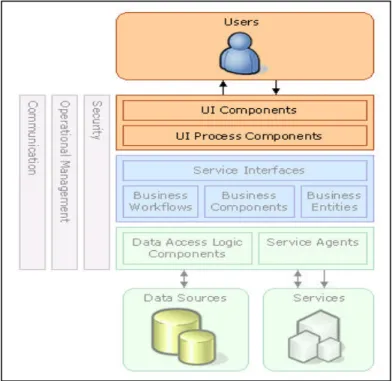
The presentation tier contains the components that are required to enable user interaction with the application. The most simple presentation tiers contain user interface components, such as ASP.NET Web Forms. For more complex user interactions, design user process components to orchestrate the user interface elements and control the user interaction. User process components are especially useful when the user interaction follows a predictable flow of steps, such as when a wizard is used to accomplish a task. Figure 3 shows the component types in the presentation tier.
Figure 3 – Presentation tier
Figure 3 – Presentation Tier
Designing User Interface Components
User interfaces can be implemented in many ways. For example, our application requires a Web-based user interface and a Windows Forms-based user interface.
Other user interfaces include voice rendering, document-based programs, mobile client applications, etc. User interface components manage interaction with the user. They display data to the user, acquire data from the user, and interpret events that the user raises to act on business data, change the state of the user interface, or help the user progress in his task. The State of North Carolina’s Standard Technical Architecture recommends implementing web-based user interfaces, rather than forms-based interfaces. This decreases client-side management while increasing platform selectivity.
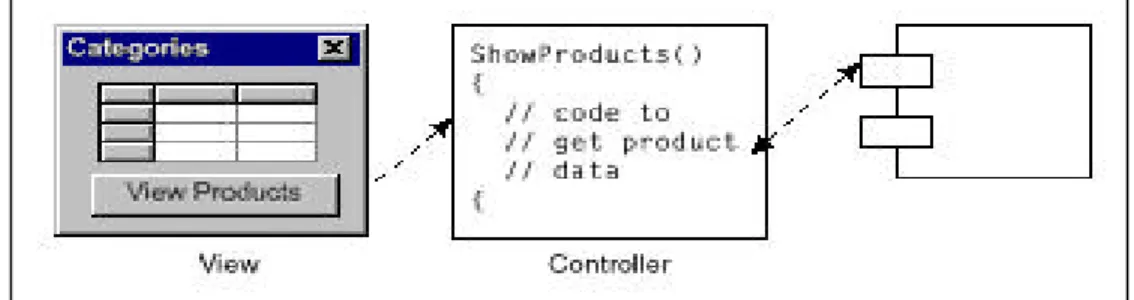
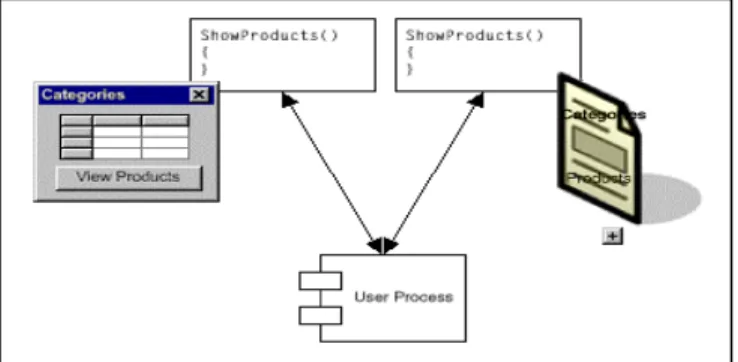
User interfaces usually consist of a number of elements on a page or form that display data and accept user input. For example, a web-based application could contain a DataGrid control displaying a list of product categories, and a command button control used to indicate that the user wants to view the products in the selected category. When a user interacts with a user interface element, an event is raised that calls code in a controller function. The controller function, in turn, calls business components, data access logic components, or user process components to implement the desired action and retrieve any necessary data to be displayed. The controller function then updates the user interface elements appropriately. Figure 4 shows the design of a user interface.
Figure 4 – User interface design
User Interface Component Functionality
User interface components must display data to users, acquire and validate data from user input, and interpret user gestures that indicate the user wants to perform an operation on the data. Additionally, the user interface should filter the available actions to let users perform only the operations that are appropriate at a certain point in time.
User interface components:
• Do not initiate, participate in, or vote on transactions.
• Have a reference to a current user process component if they need to display its data or act on its state.
When accepting user input, user interface components:
• Acquire data from users and assist in its entry by providing visual cues (such as tool tips), validation, and the appropriate controls for the task.
• Capture events from the user and call controller functions to tell the user interface components to change the way they display data, either by initiating an action on the current user process, or by changing the data of the current user process.
• Restrict the types of input a user can enter. For example, a Quantity field may limit user entries to numerical values.
• Perform data entry validation, for example by restricting the range of values that can be entered in a particular field, or by ensuring that mandatory data is entered.
• Perform simple mapping and convert information provided by the user controls to values needed by the underlying components to do their work (for example, a user interface component may display a product name but pass the product ID to underlying components).
• Interpret user gestures (such as a drag-and-drop operation or button clicks) and call a controller function.
• Cache the output of the user interface to avoid re-rendering it each time. In ASP.NET, specify caching on the output of a user interface component to avoid re-rendering it every time. If the application contains visual elements representing reference data that changes infrequently and is not used in transactional contexts, and these elements are shared across large numbers of users, cache them.
When rendering data, user interface components:
• Normally acquire and render data from business components. Very rarely will you render data from the data access logic components in the application.
• Perform formatting of values (such as formatting dates appropriately).
• Perform localization work on the rendered data (for example, using resource strings to display column headers in a grid in the appropriate language for the user's locale).
• Typically display data that pertains to a business entity. These entities are usually obtained from the user process component, but may also be obtained from the data components. UI components may render data by data-binding their display to the correct attributes and collections of the
entity components, if the entity is already available. Managing entity data as DataSets, is very simple to do. If custom business entity objects are implemented, it may be necessary to implement extra code to facilitate the data binding.
• Provide the user with connection status information. In the case of applications which use disconnected datasets (for example Mobile applications), the application needs to provide the user with status information, for example by indicating when an application is working in "disconnected" or "connected" mode. When the user connects to the network, the application notifies the user that data has been synchronized and whether there were any collisions.
• Customize the appearance of the application based on user preferences or the kind of client device used.
• Provide “undo” functionality. Many applications need to let a user undo certain operations. This is usually performed by keeping a fixed-length stack of "old value-new value" data for specific data items or entities. When the operation involves a financial process, do not expose the compensation as a simple undo function, but as an explicit operation.
• Provide clipboard functionality. In many Windows-based applications, it is useful to provide clipboard capabilities for more than just scalar values— for example, it may be necessary to let users copy and paste a full customer object. Such functionality is usually implemented by placing XML strings in the Clipboard in Windows, or by having a global object that keeps the data in memory if the clipboard is application-specific.
• Show long lists of data as paged sets. It is common, particularly in Web applications, to show long lists of data as paged sets. Use a helper component that will keep track of the current page the user is on and thus invoke the data access logic component paged query function with the appropriate values for page size and current page. Paging can occur without interaction of the user process component.
Windows Desktop User Interfaces
Windows user interfaces are used to provide disconnected or offline capabilities or rich user interaction, or even integration with the user interfaces of other applications. Windows user interfaces can take advantage of a wide range of state management and persistence options and can access local processing power. There are three main families of standalone user interfaces: "full-blown" Windows-based applications, Windows-based applications that include embedded HTML, and application plug-ins that can be used within a host application's user interface:
• "Full-blown" desktop/tablet PC user interfaces built with Windows
Forms
Building a Windows-based application often involves building an application with Windows Forms and controls where the application provides all or most of the data rendering functionality. This provides a great deal of control over the user experience and total control over the look and feel of the application. However, it is tied to a client platform, and the application must be deployed to the users (even if the application is deployed by downloading it over an HTTP connection.). Also, if there is any business logic or functionality within the Windows-based application, they must be deployed the same way. This must be considered when a large number of users will be accessing the application. For this and other reasons related to deployment and maintenance, web-based applications are typically preferred by the state.
• Embedded HTML
The entire user interface may be implemented using Windows Forms, or additional embedded HTML in the Windows-based applications may be selected. Embedded HTML allows for greater run-time flexibility (because the HTML may be loaded from external resources or even a database in connected scenarios) and user customization. However, carefully consideration must be exercised regarding how to prevent malicious script from being introduced in the HTML. In addition, coding is required to load the HTML, display it, and hook up the events from the control with application functions.
• Application plug-ins
Use cases may suggest that the user interface of an application could be better implemented as a plug-in for other applications, such as Microsoft Office, AutoCAD, Customer Relationship Management (CRM) solutions, engineering tools, etc. In this case, leverage all of the data acquisition and display logic of the host application and provide only the code to gather the data and work with the business logic.
Most modern applications support plug-ins as either Component Object Model (COM) or .NET objects supporting a specified interface, or as embedded development environments (such as the Microsoft Visual Basic® development system, which is widely supported in most common Windows-based applications) that can, in turn, invoke custom objects. Some embedded environments (including Visual Basic) even provide a forms engine that enables an extension to the user interface experience beyond that provided by the host application. For more information about using Visual Basic in host applications, see "Microsoft Visual Basic for Applications and Windows DNA 2000" on MSDN
( http://msdn.microsoft.com/library/default.asp?url=/library/en-us/dndna/html/vba4dna.asp).
For information about working with .NET from Microsoft Office, see "Microsoft Office and .NET Interoperability" on MSDN
( http://msdn.microsoft.com/library/default.asp?url=/library/en-us/dnofftalk/html/office11012001.asp).
When creating a Windows Forms-based application, consider the following recommendations:
• Rely on data binding to keep data synchronized across multiple forms that are open simultaneously. This alleviates the need to write complex data synchronization code.
• Try to avoid hard-coding relationships between forms, and rely on the user process component to open them and synchronize data and events. Special care should be given to avoid hard-coding relationships from child forms to parent forms. For example, a product details window can be reused from other places in the application, not just from an order entry form; avoid implementing functionality in the product details form that links directly to the order entry form. This makes the user interface elements more reusable.
• Implement error handlers in forms. Doing so prevents the user from seeing an unfriendly .NET exception window and having the application fail if exceptions were not handled elsewhere. All event handlers and controller functions should include exception catches. Additionally, it may be desirable to create a custom exception class for the user interface that includes metadata to indicate whether the failed operation can be retried or canceled.
• Validate user input in the user interface. Validation should occur at the stages in the user's task or process that allow point-in-time validations (allowing the user to enter some of the required data, continue with a separate task, and return to the current task). In some cases, proactively enable and disable controls and visually cue the user when invalid data is entered. Validating user input in the user interface prevents unnecessary round trips to server-side components when invalid data has been entered.
• When creating custom user controls, expose only the public properties and methods that are actually needed. This makes the components more maintainable.
• Implement controller functions as separate functions in Windows Forms or in .NET classes that will be deployed with the client. Do not implement controller functionality directly in control event handlers. Writing controller logic in event handlers reduces the maintainability of the application,
because it may be required to invoke the same function from other events in the future.
Mobile Device User Interfaces
Mobile devices such as handheld PCs, Wireless Application Protocol (WAP) phones, and iMode devices are becoming increasingly popular, and building user interfaces for a mobile form factor presents its own unique challenges. Therefore a strong business case for the development, implementation, and support for this type of interface should be justified before deciding to utilize this UI option. In general, a user interface for a mobile device must be able to display information on a much smaller screen than other common applications, and it must offer acceptable usability for the devices being targeted. Because user interaction can be awkward on many mobile devices, particularly mobile phones, design mobile user interfaces with minimal data input requirements. A common strategy is to combine the use of mobile devices with a full-sized Web- or Windows-based application and allow users to pre-register data through the desktop-based client, and then select it when using the mobile client. For example, an e-commerce application may allow users to register credit card details through the Web site, so that a pre-registered credit card can be selected from a list when orders are placed from a mobile device (thus avoiding the requirement to enter full credit card details using a mobile telephone keypad or personal digital assistant [PDA] stylus).
Web User Interfaces
A wide range of mobile devices support Internet browsing. Some use micro browsers that support a subset of HTML 3.2, some require data to be sent in Wireless Markup Language (WML), and some support other standards such as Compact HTML (cHTML). The Microsoft Mobile Internet Toolkit can be used to create ASP.NET-based Web applications that send the appropriate markup standard to each client based on the device type as identified in the request header. Utilization of the toolkit allows for the creation of a single Web application that targets a multitude of different mobile clients including Pocket PC, WAP phones, iMode phones, and others.
As with other kinds of user interface, try to minimize the possibility of users entering invalid data in a mobile Web page. The Mobile Internet Toolkit includes client-side validation controls such as the CompareValidator, CustomValidator, RegularExpressionValidator, and RequiredFieldValidator controls, which can be used with multiple client device types. The properties of input fields can also be used such as Textbox controls to limit the kind of input accepted (for example by accepting only numeric input). However, always allow for client devices that may not support client-side validation, and perform additional checks after the data has been posted to the server.
For more information about the Mobile Internet Toolkit, see the Microsoft Mobile Internet Toolkit page on MSDN
(http://msdn.microsoft.com/vstudio/device/mitdefault.asp).
Smart Device User Interfaces
The Pocket PC is a feature-rich device based on the Windows CE operating system on which both disconnected and connected user interfaces can be developed. In most cases Pocket PCs utilize wireless connections to communicate with the application). The Pocket PC platform includes handheld PDA devices and smart phones, which combine PDA and phone features.
Microsoft provides the .NET Compact Framework for Pocket PC and other Windows CE platforms. The compact framework contains a subset of the full .NET Framework and allows the development of rich .NET–based applications for mobile devices. Developers can use the Smart Device Extensions for Visual Studio .NET to create applications that target the .NET Compact Framework.
As with regular Windows-based user interfaces, provide exception handling in the mobile device to inform the user when an operation fails and allow the user to retry or cancel it as appropriate.
No input validation controls are provided in the Smart Device Extensions for Microsoft Visual Studio® .NET; therefore, implement client-side validation logic to ensure that all data entry is valid.
For more resources for Pocket PC platform development and the .NET Compact Framework, see the Smart Device Extensions page on MSDN
(http://msdn.microsoft.com/vstudio/device/smartdev.asp).
Another mobile form factor for rich clients that may be considered is the Tablet PC. Tablet PCs are Windows XP–based portable devices that support user interaction through a "pen and ink" metaphor in which the user "draws" and "writes" on the screen. Since the Tablet PC is based on Windows XP, the full .NET Framework can be leveraged. An additional API for handling "pen and ink" interactions is also available. For more information about designing applications for the Tablet PC, see Design Recommendations for Exploiting the Pocket PC on MSDN
(
http://msdn.microsoft.com/library/en-us/tpcsdk10/html/whitepapers/designguide/tbconuxdgformfactorpenandink.asp).
Document-based User Interfaces
Rather than build a custom Windows-based desktop application to facilitate user interaction, it may make more sense in some circumstances to allow users to interact with the system through documents created in common productivity tools such as Microsoft Word or Microsoft Excel. Documents are a common metaphor
for working with data. In some applications, it may be beneficial to have users enter or view data in document form in the tools they commonly use. Consider the following document-based solutions:
• Reporting data. An application (Windows- or Web-based) may provide
the user with a feature that lets him or her see data in a document of the appropriate type—for example, showing invoice data as a Word document, or a price list as an Excel spreadsheet.
• Gathering data. Agency representatives may enter information for citizens
who telephone via Excel spreadsheets to create a customer order document, and then submit the document to a business process.
There are two common ways to integrate a document experience in an application, each broken down into two common scenarios: gathering data from users and reporting data to users.
Working with Documents from the Outside
Documents "from the outside" may be treated as an entity. In this scenario, code operates on a document that has no specific awareness of the application. This approach has the advantage that the document file may be preserved beyond a specific session. This model is with "freeform" areas in the document that the application doesn't need to deal with but may need to preserve. For example, choosing this model allows users to enter information in a document on a mobile device and take advantage of the Pocket PC ActiveSync capabilities to synchronize data between the document on the mobile device and a document kept on the server. In this design model, user interfaces perform the following functions:
• Gathering data. A user can enter information in a document, starting with
a blank document, or most typically, starting with a predefined template that has specific fields.
The user then submits the document to a Windows-based application or uploads it to a Web-based application. The application scans the document's data and fields through the document's object model, and then performs the necessary actions.
At this point, it may be decided to either preserve the document after processing or to dispose of it. Typically, documents are preserved to maintain a tracking history or to save additional data that the user has entered in freeform areas.
• Reporting data. In this case, a Windows- or Web-based user interface
provides a way to generate a document that shows some data, such as a report. The reporting code will usually take data from the ongoing user process, business process, and/or data access logic components and either call macros on the document application to inject the data and format it, or
save a document with the correct file format and then return it to the user. The document may be returned by saving it to disk and providing a link to it (the document must be saved in a central store in load-balanced Web farms), or by including it as part of the response.
When returning documents in Web-based applications, decide whether to display the document in the browser for the user to view, or to present the user with an option to save the document to disk. This is usually controlled by setting the correct MIME type on the response of an ASP.NET page. In Web environments, follow file-naming conventions carefully to prevent concurrent users from overwriting each other's files.
Working with Documents from the Inside
When providing an integrated user experience within the document, embed the application logic in the document itself. In this design model, the user interface performs the following functions:
• Gathering data. Users can enter data in documents with predefined forms,
and then specific macros can be invoked on the template to gather the right data and invoke business or user process components. This approach provides a more integrated user experience, because the user can just click a custom button or menu option in the host application to perform the work, rather than having to submit the entire document.
• Reporting data. Custom menu entries and buttons in documents that
gather some data from the server and display it may be implemented. Smart tags may also be used in documents to provide rich inline integration functionality across all Microsoft Office productivity tools. For example, a smart tag that lets users display full customer contact information from the CRM database whenever an agency representative types in a citizen name in the document.
Regardless of whether working with a document from the inside or from the outside, provide validation logic to ensure that all user input is valid. This is achieved in part by limiting the data types of fields, but in most cases custom functionality must be implemented to check user input, and display error messages when invalid data is detected. Microsoft Office–based documents can include custom macros to provide this functionality.
For information about how to integrate a purely Office-based UI with business processes, see "Microsoft Office XP Resource Kit for BizTalk Server Version 2.0" (http://msdn.microsoft.com/downloads/default.asp?url=/downloads/sample.asp?url=/m sdn-files/027/001/743/msdncompositedoc.xml).
For more information about working with Office and .NET, see MSDN. The following two articles will help with getting started with Office and .NET-based application development:
• "Introducing .NET to Office Developers"
( http://msdn.microsoft.com/library/default.asp?url=/library/en-us/dnofftalk/html/office10042001.asp)
• "Microsoft Office and .NET Interoperability"
( http://msdn.microsoft.com/library/default.asp?url=/library/en-us/dnofftalk/html/office11012001.asp)
Document-based workflows can be managed by taking advantage of the services provided by Microsoft SharePoint Portal™. This product can manage the user process and provides rich metadata and search capabilities.
Designing User Process Components
A user interaction with an application may follow a predictable process; for example, the application may require users to enter product details, view the total price, enter payment details, and finally enter delivery address information. This process involves displaying and accepting input from a number of user interface elements, and the state for the process (which products have been ordered, the credit card details, and so on) must be maintained between each transition from one step in the process to another. To help coordinate the user process and handle the state management required when displaying multiple user interface pages or forms, create user process components.
User process components are typically implemented as .NET classes that expose methods that can be called by user interfaces. Each method encapsulates the logic necessary to perform a specific action in the user process. The user interface creates an instance of the user process component and uses it to transition through the steps of the process. The names of the particular forms or ASP.NET pages to be displayed for each step in the process can be hard-coded in the user process component (thus tightly binding it to specific user interface implementations), preferably they can be retrieved from a metadata store such as a configuration file (making it easier to reuse the user process component from multiple user interface implementations). Designing user process components to be used from multiple user interfaces will result in a more complex implementation in order to isolate device-specific issues, but can help distribute the user interface development work between multiple teams, each using the same user process component.
User process components coordinate the display of user interface elements. They are abstracted from the data rendering and acquisition functionality provided in the user interface components. Design them with globalization in mind, to allow for
Note: Implementing a user interaction with user process components is not a trivial task. Before committing to this approach, carefully evaluate whether or not the application requires the level of orchestration and abstraction provided by user process components.
localization to be implemented in the user interface. For example, endeavor to use culture-neutral data formats and use Unicode string formats internally to make it easier to consume the user process components from a localized user interface. Separating the user interaction functionality into user interface and user process components provides the following advantages:
• Long-running user interaction state is more easily persisted, allowing a user interaction to be abandoned and resumed, possibly even using a different user interface. For example, a customer could add some items to a shopping cart using the Web-based user interface, and then call an agency representative later to complete the order.
• The same user process can be reused by multiple user interfaces. For example, in the application, the same user process could be used to add a product to a shopping basket from both the Web-based user interface and the Windows Forms-based application.
An unstructured approach to designing user interface logic may result in undesirable situations as the size of the application grows or new requirements are introduced. If a specific user interface must be added for a given device, the data flow and control logic may need to be redesigned.
Partitioning the user interaction flow from the activities of rendering data and gathering data from the user can increase the application's maintainability and provide a clean design to which seemingly complex features can easily be added such as support for offline work. Figure 1.4 shows how the user interface and user process can be abstracted from one another.
Another good reason for properly separating/designing user interaction is for security and performance reasons. For example, user interfaces should be design to only require SSL when necessary such as for a shopping cart or HIPPA related information.
Figure 5 – User interfaces and user process components
• Handling concurrent user activities. Some applications may allow users to perform multiple tasks at the same time by making more than one user interface element available. For example, a Windows-based application may display multiple forms, or a Web application may open a second browser window.
User process components simplify the state management of multiple ongoing processes by encapsulating all the state needed for the process in a single component. Each user interface can be mapped element to a particular instance of the user process by incorporating a custom process identifier into the design.
• Using multiple panes for one activity. If multiple windows or panes are
used in a particular user activity, it is important to keep them synchronized. In a Web application, a user interface usually displays a set of elements in a same page (which may include frames) for a given user activity. However, in rich client applications, several non-modal windows affecting just one particular process may be necessary. For example, a product category selector window floating in the application that to specify a particular category, the products in which will be displayed in another window. User process components help implement this kind of user interface by centralizing the state for all windows in a single location. Synchronization can be further simplified across multiple user interface elements by using data bindable formats for state data.
• Isolating long-running user activities from business-related state.
Some user processes can be paused and resumed later. The intermediate state of the user process should generally be stored separately from the application's business data. For example, a user could specify some of the information required to place an order, and then resume the checkout process at a later time. The pending order data should be persisted separately from the data relating to completed orders, allowing business operations to be performed on the completed order data (for example, counting the number of orders placed in the current month) without having to implement complex filtering rules to avoid operating on incomplete orders.
User activities, just like business processes, may have a "timeout" specified, when the activity has to be cancelled and the right compensatory actions should be taken on the business process.
Design user process components with the ability to be serialized, or to store their state separately from the application's business data.
Separating a User Process from the User Interface
To separate a user process from the user interface:
1. Identify the business process or processes that the user interface process will help to accomplish. Identify how the user sees this as a task (this can usually be done by consulting the sequence diagrams that are created as part of the requirements analysis).
2. Identify the data needed by the business processes. The user process will need to be able to submit this data when necessary.
3. Identify additional states needed to maintain throughout the user activity to assist rendering and data capture in the user interface.
4. Design the visual flow of the user process and the way that each user interface element receives or gives control flow.
Implement code to map a particular user interface session to the related user process:
• ASP.NET pages will have to obtain the current user process by getting a reference from the Session object, or by re-hydrating the process from another storage medium, such as a database. This reference is needed in event handlers for the controls on the Web page.
• Windows or controls need to keep a reference to the current user process component. Keep this reference in a member variable. Do not keep it in a global variable; composing user interfaces will become very complicated as the application user interface grows.
User Process Component Functionality
User process components:
• Provide a simple way to combine user interface elements into user interaction flows without requiring redevelopment of data flow and control logic.
• Separate the conceptual user interaction flow from the implementation or device where it occurs.
• Encapsulate how exceptions may affect the user process flow.
• Should not start or participate in transactions. They keep internal data related to application business logic and their internal state, persisting the data as required.
• Maintain internal business-related state, usually holding on to one or more business entities that are affected by the user interaction. Keep multiple entities in private variables or in an internal array or appropriate collection type. In the case of an ASP.NET-based application, references to this data may be kept in the Session object. However, doing so limits the useful lifetime of the user process.
• May provide a "save and continue later" feature by which a particular user interaction may be restarted in another session. Implement this functionality by saving the internal state of the user process component in some persistent form and providing the user with a way to continue a particular activity later. Create a custom task manager utility component to control the current activation state of the process. The user process state can be stored in one of a number of places:
• If the user process can be continued from other devices or computers, store it centrally in a location such as a database.
• If running in a disconnected environment, the user process state will need to be stored locally on the user device.
• If the user interface process is running in a Web farm, store any required state on a central server location, so that it can be continued from any server in the farm.
• May initialize internal state by calling a business process component or data access logic components.
• Typically will not be implemented as enterprise services components. The only reason to do so would be to use the enterprise services role-based authorization capabilities.
• Can be started by a custom utility component that manages the menus in the application.
User Process Component Interface Design
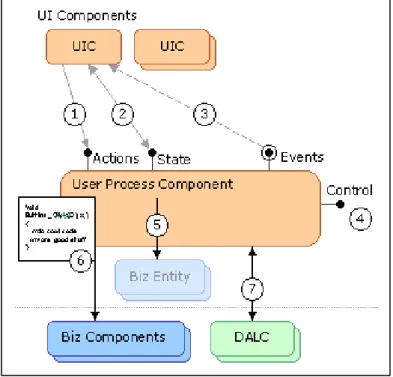
The interface of the user process components can expose the following types of functionality, as shown in Figure 6.
• User process "actions" (1). These are the interface of actions that
typically trigger a change in the state of the user process. Actions are implemented in user process component methods, as demonstrated by the ShowOrder, EnterPaymentDetails, PlaceOrder, and Finish methods in the
code sample discussed earlier. Encapsulate calls to business components in these action methods where possible (6).
• State access methods (2). Access the specific and
business-agnostic state of the user process by using fine-grained get and set properties that expose one value, or by exposing the set of business entities that the user process deals with (5). For example, in the code sample discussed earlier, the user process state can be retrieved through public DataSet properties.
• State change events (3). These events are fired whenever the
business-related state or business-agnostic state of the user process changes. It may be necessary to implement these change notifications manually. In other cases, data may be stored through a mechanism that already does this intrinsically (for example, a DataSet fires events whenever its data changes).
• Control functions that allow start, pause, restart, and cancel a
particular user processes (4). These functions should be kept separate,
but can be intermixed with the user process actions. For example, the code sample discussed earlier contains SaveToDataBase and ResumeCheckout methods. Control methods could load required reference data for the UI (such as the information needed to fill a combo box) from data access logic components (7) or delegate this work to the user interface component (forms, controls, ASP.NET pages) that needs the data.
General Recommendations for User Process
Components
When designing user process components, consider the following recommendations:
• Decide whether to manage user processes as components that are separate from the user interface implementation. Separate user processes are most needed in applications with a high number of user interface dialog boxes, or in applications in which the user processes may be subject to customization and may benefit from a plug-in approach.
• Choose where to store the state of the user process:
• If the process is running in a connected fashion, store interim state for long-running processes in a central SQL Server database; in disconnected scenarios, store it in local XML files, isolated storage, or local Microsoft SQL Server™ 2000 Desktop Engine (MSDE) databases. On Pocket PC devices, store state in a SQL Server CE database. Confidential information needs to be properly secure both during transmission and while being stored on the client. Encryption, Secure Sockets Layer and proper database security (no guest users and blank passwords) can achieve this.
• If the process is not long running and does not need to be recovered in case of a problem, persist the state in memory. For user interfaces built for rich clients, keep the state in memory. For Web applications, store the user process state in the Session object of ASP.NET. If In a Web farm, store the session in a central state server or a SQL Server database. ASP.NET will clean up SQL Server-stored session to prevent the buildup of stale data.
• Design user process components with the ability to be serialized. This will help implement any persistence scheme.
• Include exception handling in user process components, and propagate exceptions to the user interface. Exceptions that are thrown by the user process components should be caught by user interface components and published as described in the “Security, Operational Management, and Communications Policies.”
Network Connectivity and Offline Applications
In many cases, an application will require support for offline operations when network connectivity is unavailable. For example, many mobile applications, including rich clients for Pocket PC or Table PC devices, must be able to function when the user is disconnected from the corporate network. Offline applications must rely on local data and user process state to perform their work. When designing offline applications, follow the general guidelines in the following discussion.
The online and offline status should be displayed to the user. This is usually done in status bars or title bars or with visual cues around user interface elements that require a connection to the server.
The development of most of the application user interface should be reusable, with little or no modification needed to support offline scenarios. While offline, the application will not have:
• Access to online data returned by data access logic components.
• The ability to invoke business processes synchronously. As a result, the application will not know whether the call succeeded or be able to use any returned data.
If the application does not implement a fully message-based interface to the servers but relies on synchronously acquiring data and knowing the results of business processes (as most of today's applications do), do the following to provide the illusion of connectivity:
• Implement a local cache for read-only reference data that relates to the user's activities. Then implement an offline data access logic component that implements exactly the same queries as the server-side data access logic components but accesses the local storage. Implement the local cache as a desktop MSDE database. This enables the reuse of the design and implementation of the main SQL Server schemas and stored procedures. However, MSDE affects the global state of the computer it is installed on, there may be trouble accessing it from applications configured for semi-trust. In many scenarios, using MSDE may be overkill for state persistence requirements, and storing data in an XML file or persisted dataset may be a better solution.
• Implement an offline business component that has the same interface as business components, but takes the submitted data and places it in a store-and-forward, reliable messaging system such as Message Queuing. This offline component may then return nothing or a preset value to its caller.
• Implement UI functionality that provides a way to inspect the business action "outbox" and possibly delete messages in it. If Message Queuing is
used to queue offline messages, set the correct permissions on the queue to do this from the application.
• Design the application's transactions to accommodate message-based UI interactions. Take extra care to manage optimistic locking and the results of transactions based on stale data. A common technique for performing updates is to submit both the old and new data, and to let the related business process or data access logic component eventually resolve any conflicts. For business processes, the submission may include critical reference data that the business logic uses to decide whether or not to let the data through. For example, product prices can be included alongside product IDs and quantities when submitting an order. For a more detailed discussion of optimistic locking, see "Designing Data Tier Components and Passing Data Through Tiers" on MSDN
( http://msdn.microsoft.com/library/?url=/library/en-us/dnbda/html/BOAGag.asp?frame=true).
• Let the user persist the state of the application's user processes to disk and resume them later.
The advent of mobile devices based on IP networking, wireless security standard evolution, the 801.11 standard, IPv6, the Tablet PC, and other technologies will make wireless networks more popular. The issue with wireless networks is that with today's technology, they cannot guarantee connectivity with high confidence in all areas. For example, building structure, nearby machinery, and other factors may cause permanent and transient "dark zones" in the network. If designing an application for use in a wireless environment, consider designing it as a message-based, offline application, to prevent an experience full of exceptions and retries. For example, an application could be designed so that an offline user can enter data through the same user interface as when connected, and the data can be stored in a local database or queued and synchronized later, when the user reconnects. SQL Server supports replication, which can be used to automate the synchronization of data in a loosely coupled fashion, allowing data to be downloaded to the offline device while connected, modified while disconnected, and resynchronized when reconnected. Microsoft Message Queuing allows data to be encapsulated in a message and queued on the disconnected device for submission to a server-side queue when connected. Components of the server will then read the message from the queue and process it. Using local queues or SQL Server replication to handle communication of user input to the server can help mitigate connectivity issues, even when the application is nominally connected. Where a more tightly coupled approach is required, use transactions and custom logging to ensure data integrity. When data synchronization occurs between a disconnected (or loosely coupled) application and a server, the following are security considerations: