UNIVERSIDADE T´
ECNICA DE LISBOA
INSTITUTO SUPERIOR T´
ECNICO
Web Content Management Systems
Experiences and Evaluations with the WebComfort FrameworkJo˜ao Leonardo Vicente do Carmo (Licenciado)
Disserta¸c˜ao para obten¸c˜ao do Grau de Mestre em Engenharia Inform´atica e de Computadores
Orientador: Doutor Alberto Manuel Rodrigues da Silva
J´uri
Presidente: Doutor Alberto Manuel Rodrigues da Silva Vogais: Doutor Jo˜ao Carlos Amaro Ferreira
Doutor Jos´e Luis Brinquete Borbinha
Abstract
A web-oriented Content Management System (CMS) is a class of software platform critical for the success of organizational web sites and intranets. Focused on content management, a CMS provides end-users an abstraction layer of the technological details allowing them to focus on the most important web portal asset: content management.
In the context of this work, effort has been spent with the objective to design and develop a web-oriented CMS framework,WebComfort, fully developed with Microsoft technologies, namely ASP.NET 2.0 (C#) and SQL Server 2005, in order to study and explore new features and approaches in the CMS area.
During the study and analysis of the state of the art in the CMS area it became clear that these were going to be difficult tasks to perform. This is due to the fact that an analysis and comparison method for CMSs doesn’t appear to exist, or is simply based on ambiguous and overlapping side-by-side features comparison. Consequently, it became evident the need for a better way to analyse and compare CMSs. This dissertation proposes a CMS reference model, which is then used and applied to compare the WebComfort framework against some of the most popular CMSs as well as to identify and discuss possible evolution issues to be developed in future work.
iii
Keywords
WebComfort, CMS, Content Management System, Enterprise Portal Management, Web Portal Management, ASP.NET, Framework.
Resumo
Um Sistema de Gest˜ao de Conte´udos (CMS) orientado para a web ´e uma classe de plataformas de software cr´ıtica para o sucesso de web sites e intranets organizacionais. Focado na gest˜ao de conte´udos, um CMS providencia aos seus utilizadores uma ca-mada de abstrac¸c˜ao dos detalhes tecnol´ogicos, permitindo-lhes dirigir a sua aten¸c˜ao para a mais importante caracter´ıstica de um portal web: a gest˜ao dos seus conte´udos. O objectivo de desenhar e desenvolver uma plataforma CMS para permitir o es-tudo e explora¸c˜ao de novas caracter´ısticas e abordagens na ´area dos CMS foi con-cretizado pela implementa¸c˜ao do WebComfort, que ´e uma plataforma CMS baseada em tecnologia Microsoft, nomeadamente ASP.NET 2.0 (C#) e SQL Server 2005.
Durante o estudo e an´alise do estado da arte na ´area dos CMS, tornou-se claro que estas iriam ser tarefas complicadas de realizar. Isto deve-se ao facto de n˜ao existir um m´etodo de compara¸c˜ao e de an´alise de CMS, ou os que existem s˜ao sim-plesmente baseados em compara¸c˜oes de caracter´ısticas muitas vezes amb´ıguas e com sobreposi¸c˜oes de conceitos entre elas. Consequentemente, tornou-se evidente a neces-sidade de uma melhor forma de an´alise e compara¸c˜ao de CMS. Esta disserta¸c˜ao prop˜oe e discute um modelo de referˆencia de CMS, que ´e posteriormente utilizado e aplicado para comparar o WebComfort com alguns dos CMS mais populares, assim como por forma a identificar e discutir poss´ıveis pontos de evolu¸c˜ao a serem desenvolvidos.
vi
Palavras-chave
WebComfort, CMS, Sistema de Gest˜ao de Conte´udos, Gest˜ao de Portais Empresariais, Gest˜ao de Portais Web, ASP.NET, Plataformas de Software.
Acknowledgments
I would like to thank my coordinator Prof. Alberto Silva for the challenge given to me with this project and for all his crucial guidelines that kept me on track.
I would also like to show my gratitude to INESC-ID and SIQuant, two institutions that provided me with the necessary resources and working conditions to develop my ideas.
To Microsoft, thank you very much for the financial support provided, allowing my participation in IVNET’06.
I would also like to thank my parents and my brother for all their support through-out my entire academic path. I am ever grateful for their counseling that has kept me in the right direction even when things seemed bleak.
Finally, to all the people that helped me during the writing process of this disser-tation, thank you.
Contents
Abstract ii
Resumo v
Acknowledgments viii
Table of Contents x
List of Figures xiii
List of Tables xiv
Listings xv
Table of Contents xvi
1 Introduction 1
1.1 Blogs and Wikis . . . 2
1.1.1 Blogs (Web Logs) . . . 2
1.1.2 Wikis . . . 3
1.1.3 Comparing Blogs and Wikis . . . 3
1.2 Web Portal Management Systems . . . 4
1.3 Content Management System Definition . . . 6
1.4 WebComfort . . . 6
1.5 Thesis Contributions . . . 8
1.6 Thesis Organization . . . 9
2 CMS State of the Art 10 2.1 Joomla! . . . 11
2.1.1 System Architecture and Technological Support . . . 11
2.1.2 Extension Capabilities . . . 13
2.1.3 Users and Permissions . . . 14
2.2 Typo3 . . . 14
2.2.1 System Architecture and Technological Support . . . 14
CONTENTS xi
2.2.2 Extension Capabilities . . . 15
2.3 eZ publish . . . 17
2.3.1 System Architecture and Technological Support . . . 18
2.3.2 Extension Capabilities . . . 19
2.4 JBoss Portal . . . 20
2.4.1 System Architecture and Technological Support . . . 21
2.4.2 Extension Capabilities . . . 24
2.5 DotNetNuke . . . 24
2.5.1 System Architecture and Technological Support . . . 25
2.5.2 Extension Capabilities . . . 26
2.6 CMS Benefits . . . 29
3 The WebComfort Project 31 3.1 Overview . . . 31
3.2 WebComfort Architecture . . . 33
3.2.1 Software Architecture . . . 33
3.3 WebComfort Portal Structure . . . 34
3.4 Users . . . 34
3.5 Permissions and Roles . . . 36
3.6 Content Management . . . 36
3.7 WebComfort Advanced Features . . . 38
3.7.1 Role Hierarchy . . . 38
3.7.2 Content Referencing . . . 38
3.7.3 Content Copy . . . 39
3.7.4 Content Import and Export . . . 40
3.7.5 WebComfort Static Content Language Engine (SCLE) . . . . 41
3.7.6 Other Features . . . 45
4 CMS Reference Model 46 4.1 CMS Terminology and Meta-Model proposal . . . 46
4.1.1 Basic Requirements . . . 50
4.1.2 Web Page Management . . . 51
4.1.3 User Management . . . 51 4.1.4 Permission Management . . . 52 4.1.5 Content Management . . . 52 4.2 CMS Features Model . . . 57 4.2.1 System Requirements . . . 58 4.2.2 Performance Features . . . 58 4.2.3 Management Features . . . 59 4.2.4 Interoperability Features . . . 59 4.2.5 Flexibility Features . . . 60
CONTENTS xii
5 Applying the CMS Reference Model 62
5.1 CMS Terminology and Conceptual Model . . . 62
5.1.1 Joomla! . . . 63 5.1.2 Typo3 . . . 65 5.1.3 eZ publish . . . 67 5.1.4 JBoss Portal . . . 69 5.1.5 DotNetNuke . . . 71 5.1.6 WebComfort . . . 73
5.2 Feature Comparison Matrix . . . 75
5.2.1 System Requirements . . . 75 5.2.2 Performance Features . . . 76 5.2.3 Management Features . . . 77 5.2.4 Interoperability Features . . . 77 5.2.5 Flexibility Features . . . 78 5.3 Results Discussion . . . 79
6 Conclusions and Future Work 81 6.1 Discussion . . . 81
6.2 Future Work . . . 83
A CMS Feature Comparison Matrix 86 B Applying the CMS Reference Model: A Simple Case Study 88 B.0.1 A Simple Case Study . . . 88
B.0.2 Joomla! . . . 90 B.0.3 Typo3 . . . 91 B.0.4 eZ publish . . . 92 B.0.5 JBoss Portal . . . 93 B.0.6 DotNetNuke . . . 94 B.0.7 WebComfort . . . 95 References 96 Index 100
List of Figures
1.1 CMS Web Community Systems . . . 5
1.2 A WebComfort screenshot . . . 7
2.1 A Joomla example web site . . . 11
2.2 Joomla back-end administration area . . . 12
2.3 Joomla tiered architecture . . . 13
2.4 A Typo3 example web site . . . 15
2.5 Typo3 back-end administration area . . . 16
2.6 Typo3 architecture . . . 17
2.7 Extending extensions in Typo3 . . . 17
2.8 A eZ publish example web site . . . 18
2.9 eZ publish front-end administration . . . 19
2.10 eZ publish architecture . . . 20
2.11 A JBoss Portal example web site . . . 21
2.12 JBoss Portal front-end administration . . . 22
2.13 JBoss Portal architecture . . . 22
2.14 JBoss Portal Page architecture . . . 23
2.15 JBoss Portal portlet window . . . 24
2.16 A DotNetNuke example web site . . . 25
2.17 DotNetNuke front-end administration . . . 26
2.18 DotNetNuke architecture . . . 27
2.19 A DotNetNuke module . . . 28
3.1 WebComfort Software Architecture . . . 33
3.2 A two-container visual theme . . . 35
3.3 A three-container visual theme . . . 35
3.4 WebComfort high-level domain model . . . 37
3.5 WebComfort’s Role Hierarchy . . . 39
3.6 WebComfort Language Pack structure . . . 43
3.7 A simple multi-language example (image alternate text) . . . 44
4.1 A CMS Meta-Model proposal (Logical Entities) . . . 47
4.2 A CMS Meta-Model proposal (Permissions and Access Entities) . . . 48
4.3 Generic CMS’s Content-based Workflow . . . 53 xiii
LIST OF FIGURES xiv
4.4 Standard Web Portal Architecture . . . 54
4.5 CMS Computational Architecture . . . 55
4.6 CMS generic content life-cycle . . . 57
5.1 The Joomla conceptual model (Structural Entities) . . . 63
5.2 The Joomla conceptual model (Permissions and Access Entities) . . . 64
5.3 The Typo3 conceptual model (Structural Entities) . . . 65
5.4 The Typo3 conceptual model (Permissions and Access Entities) . . . 66
5.5 The eZ publish conceptual model (Structural Entities) . . . 67
5.6 The eZ publish conceptual model (Permissions and Access Entities) . 68 5.7 The JBoss Portal conceptual model (Structural Entities) . . . 69
5.8 The JBoss Portal conceptual model (Permissions and Access Entities) 70 5.9 The DotNetNuke conceptual model (Structural Entities) . . . 71
5.10 The DotNetNuke conceptual model (Permissions and Access Entities) 72 5.11 The WebComfort conceptual model (Structural Entities) . . . 73
5.12 The WebComfort conceptual model (Permissions and Access Entities) 74 B.1 A Joomla environment example . . . 90
B.2 A Typo3 environment example . . . 91
B.3 A eZ publish environment example . . . 92
B.4 A JBoss Portal environment example . . . 93
B.5 A DotNetNuke environment example . . . 94
List of Tables
5.1 CMS System Requirements . . . 76 5.2 CMS Performance Features . . . 76 5.3 CMS Management Features . . . 77 5.4 CMS Interoperability Features . . . 78 5.5 CMS Flexibility Features . . . 785.6 CMS Features Model Results . . . 80
A.1 CMS Feature Comparison Matrix Results . . . 86
A.2 CMS Feature Comparison Matrix . . . 87
Listings
3.1 Module Copy method . . . 40
3.2 Module Import and Export methods . . . 40
3.3 WebComfort XML content file . . . 41
3.4 WebComfort Language Pack XML File . . . 44
Chapter 1
Introduction
“Content Management Systems” (or CMS, for short) is a term used to designate web-site publishing and management systems [Guruge 03,Sum 03,Robertson 03,Boiko 04]. Early content management systems were developed internally at organizations which were doing a lot of content publishing. In 1995, CNET [CNET 06] spun out its internal development offerings into a separate company called Vignette [Vignette 06], which opened up the market for commercial systems. As the market evolved, the scope of content management systems broadened, and the term is now used to refer to a wider range of technologies and techniques. The most commonly referred to areBlogs, WikisandWeb Portal Management Systems, sometimes also referred to as Document, Knowledge or Enterprise Portal Management Systems [Guruge 03, Sum 03, Robert-son 03, Boiko 04].
In this chapter, the CMS context is briefly introduced by discussing its different models, followed by the WebComfort framework developed in the context of this work. Finally, the main objectives and contribution of this thesis are outlined.
1.1 Blogs and Wikis 2
1.1
Blogs and Wikis
Blogs and Wikis are two of the most well-known web community systems. These systems represent the entry point into the CMS scene, providing support to very simple content management operations. They are both described next.
1.1.1
Blogs (Web Logs)
A blog (web log) is a web site where data entries are made according to a journal style and displayed in a reverse chronological order [Wikipedia 06, WebLogs 06].
Blogs often provide comments or news on a particular subject, such as food, politics or sports. Many blogs are basically public personal diaries. A typical blog combines text, images, and links to other blogs, web pages, and other media related to its topic. Most blogs are primarily textual although some focus on photographs (photoblog), videos (vlog), or audio (podcasting), and are part of a wider network of social media.
Blog creation and management is supported via on-line blogging web sites. These blog servers typically provide the blog enthusiast with step-by-step creation wizards in order to facilitate blog creation and proliferation. Content creation and blog man-agement operations are all performed on-line via a simple web browser by the blog owner. The typical operations a blog owner can perform include text and image postings, that can later be commented by other blog users. The blog owner can then decide to accept or reject those comments, allowing them to become visible or not to the blog audience. The blog can also be unmoderated, allowing anonymous comments to be attatched.
1.1 Blogs and Wikis 3
1.1.2
Wikis
Ward Cunningham and Bo Leuf designed the first wiki [FirstWiki 06] because they wanted to make their hypertext database collaborative [Leuf 01]: “a freely expandable collection of interlinked web pages; a hypertext system for storing and modifying information; a database, where each page is easily editable by any user with a forms-capable web browser client”.
From the very beginning, they decided that anyone should be able to edit any page from a simple web form, encouraging other people to participate in the creation of a web site, giving birth to the idea of “community web sites” and thus taking the blog notion on step further in the community interaction ladder. Wiki users, unlike blog users, can take active part in the construction of the web site itself, rather than just post a few comments regarding the administrator’s content. It is possible for all wiki users to contribute with new content to the website, although this is closely monitored by the remaining users and administrators. When a new content is submitted, it is then subjected to be moderated by an administrator, just like comments on a blog.
Empowering community-like web sites, the wiki is a perfect platform for on-line knowledgebases. One of the most well-known is Wikipedia [Wikipedia 06].
1.1.3
Comparing Blogs and Wikis
Due to the increasing popularity of both blogs and wikis, and their consequent com-mercialization, a great deal of ambiguity as to the distinction between the two has been created. Some software marketed as being for the creation of wikis, are little more than partner blogs, some are nothing more than text editors. The key difference to keep in mind is that a true wiki is actively collaborative, that is, anyone can edit the document at any point in the document, whether it’s to insert a comma, strike a
1.2 Web Portal Management Systems 4
sentence, or even to add an additional page. On the other hand, blogs tend to func-tion more like monologues, or pronouncements from the author(s) to which readers may append their own comments without the ability to alter the original blog text.
1.2
Web Portal Management Systems
Nowadays almost every organization has a web site, for the Internet or just in an In-tranet context. These systems will inevitably evolve and expand in a considerable way aligned with their respective organization’s life cycle. Consequently, their involved content should also evolve over the years, but it will most certainly be outdated or incorrect, with no navigation or search capabilities. The maintenance of a web site, once a very simple activity, can easily escalate to a very complex one. Recent web sites tend to scale from tens to thousands of pages. Still, aesthetics and visual at-tractiveness are critical factors for the web site’s success, having to be modified and renewed as many times as necessary.
The worst part of this approach is the effort to manage and administrate these web sites, normally carried out by just one person or by a limited group of people, commonly namedwebmasters. The consequence of this fact is a simple one: it is easy to lose control of the web site’s pages. The entire site’s organizational and logical structures are delegated to the webmaster. It is clear that this web site maintenance workflow is funneling to a single break point in the near future, the webmaster. This can eventually compromise the entire web site and collapse it completely, in a very pessimistic, however, possible scenario.
Given this context, the need to structure and manage these informational units is of the utmost importance. An informational unit can be looked upon as every entity that is responsible for content production, structuring, storage, search, edition
1.2 Web Portal Management Systems 5
and/or usage. These tasks, among others, are usually found along side with the ones delegated to a Web Portal Management System in the heart of an organizational environment.
From this point on, Web Portal Management Systems and Web-based Content Management Systems are looked upon as synonyms. The explanation derives from the fact that their scope is the widest of the three presented in this introduction (blog, wiki, web portal management system). In addition, it supports all the requisites defined below for a web-based Content Management System.
1.3 Content Management System Definition 6
1.3
Content Management System Definition
A CMS can be defined as a software platform that supports the creation, management, search, distribution and publication of organizational contents, such as text, web pages, images, sounds and other types of documents [Guruge 03,Sum 03,Robertson 03, Boiko 04]. The web version of a CMS will only handle contents targeted to be visualized or used mostly through web sites.
A CMS is responsible for a web site’s content life cycle management, provid-ing tools for new content creation, edition and deletion, oriented by a content cre-ation/edition/deletion workflow. Further on, a CMS also enables complete site struc-ture and visual appearance management, while delivering automatically generated and completely integrated web site navigation [Guruge 03, Sum 03, Robertson 03, Boiko 04].
Although the term “CMS” does comprehend more than its “web side” as stated earlier, it is also true that the majority of its current use is precisely for web site management. From this point forward, CMS will be used to refer to web-oriented Content Management Systems.
One obvious but important point to notice is that a CMS doesn’t solve the or-ganization’s informational chaos problem by itself. Its correct implementation and operation, by means of adequate administration policies, however, can lead to a much expected solution for this problem, or at least help to minimize it.
1.4
WebComfort
WebComfort [Carmo 03, WebComfort 06, Carmo 06] is a Content Management Sys-tem Framework developed preliminarily at INESC-ID and currently promoted by SIQuant. WebComfort is fully developed and supported by Microsoft technology,
1.4 WebComfort 7
including ASP.NET 2.0 (C#) and SQL Server 2005. It enables web portal manage-ment operation in an integrated manner, supporting the required portal and content management tools and mechanisms via a simple web browser, without the need to use an additional standalone application.
A WebComfort portal consists in a variable number of tabs (or dynamic pages), hierarchically organized, in which each tab holds different contents through different predefined module types, based on ASP.NET user controls.
WebComfort claims the separation between the content and its presentation on the web site. Content is presented through information modules, whose presentation can be configured without changing the data model and the underlining contents.
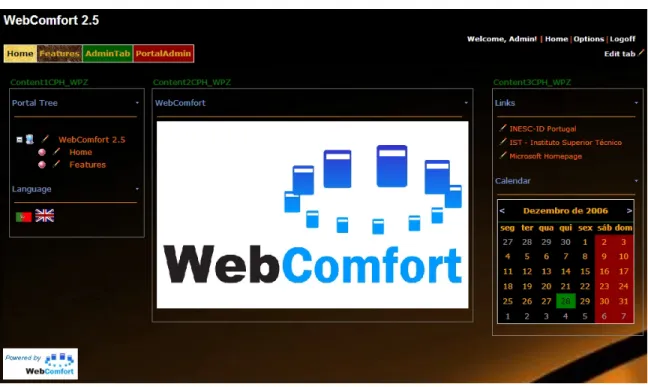
Figure 1.2 A WebComfort screenshot.
WebComfort’s authorization and security policies are defined according to a flexi-ble role-based mechanism. It is possiflexi-ble to create and manage different roles according to different functional and business requirements. There are two main different types
1.5 Thesis Contributions 8
of access at tab and module levels: viewing access and management access.
The “framework” designation comes from WebComfort’s easiness of extension, by allowing adding new module types to manage and display existent information, or even new types of information, supporting the development of new module logic and design through a well-defined module API.
Current available modules support typical web site functionalities, such as An-nouncements, Events, Contacts, Links, Image, Documents, HTML Document, Rich HTML Editor, XML Document, Discussion, Forum, Chat, Navigation Menu and Navigation Tree. Additionally, specific modules for electronic commerce, portal us-age statistics, multi-portal manus-agement, remote licensing and update mechanisms, project management and GIS (Geographic Information Systems) are also available [Pico 06, Alves 06, Lopes 06, Delgado 06, Santos 05, Monteiro 04].
1.5
Thesis Contributions
In order for the WebComfort framework to evolve, it becomes necessary to analyse the current state of the art in the CMS area. The major difficulty in fulfilling this objective is the fact that an analysis and comparison method for CMSs doesn’t appear to exist or is simply based on ambiguous and overlapping side-by-side feature comparison. So, it becomes necessary to propose a CMS reference model to allow a more accurate CMS comparison as well as to apply it to real content management systems. This reference model allows the identification of CMSs’ main features, concepts and strong points. With this information, it will be possible to outline WebComfort’s evolutionary path. In summary, the three main contributions of this thesis are: (1) the WebComfort framework continuous evolution; (2) current CMS’ state of the art analysis; and (3) a CMS reference model proposal.
1.6 Thesis Organization 9
1.6
Thesis Organization
This thesis is structured in six main chapters.
Chapter one introduces the context and basic requirements of Content Manage-ment Systems. It also introduces the WebComfort project and presents the thesis main structure and contributions.
Chapter twopresents an extensive view over the current State of the Art around the CMS area, overviewing its main concepts, features and benefits.
Chapter three is dedicated to the WebComfort project, providing an extensive insight into the project’s foundation and current state.
Chapter four presents the CMS Reference Model based on the state of the art analysis from chapter two and based on the learning process led by the development of WebComfort.
Chapter five explicits the usage of the CMS reference model to compare the current CMS state of the art with the WebComfort framework, revealing its strong points and weaknesses.
Chapter six presents the conclusions for this thesis and future work to be devel-oped around WebComfort, based on the identified evolution points from the analysis conducted throughout this dissertation and on innovative approaches in the CMS area.
Chapter 2
CMS State of the Art
This section presents the current CMS State of the Art, with the objective to iden-tify and capture the main concepts and features of these systems. Only open-source Content Management Systems were considered in this analysis motivated by the free product access for testing purposes and free technical documentation access. For the CMS selection process, criteria like system reviews and popularity were enriched by a heterogeneous technological support requisite. This analysis is structured in two main steps: (1) system architecture and technological support, to iden-tify the underlining system’s architecture and the range of technologies it uses; and (2) extension capabilities, to identify the various system’s extension mechanisms. The result: the main features, concepts, components and architectures of five of the most well-known open-source CMSs from various technological backgrounds are now discussed, namelyJoomla,Typo3,eZ publish,JBoss Portaland DotNetNuke.
2.1 Joomla! 11
2.1
Joomla!
Formerly known as Mambo [Mambo 06], Joomla(!) [Joomla! 06] is a free open-source Content Management System. The name “Joomla” is a phonetic spelling of the Swahili word jumlameaning “all together” or “as a whole”. It was chosen to reflect the commitment of the development team and community to the project. Joomla is the recent winner of the 2006 Open Source Content Management System Award from Packt Publishing. The latest version is 1.5 beta. Joomla is released under the GNU GPL license.
Figure 2.1 A Joomla example web site.
2.1.1
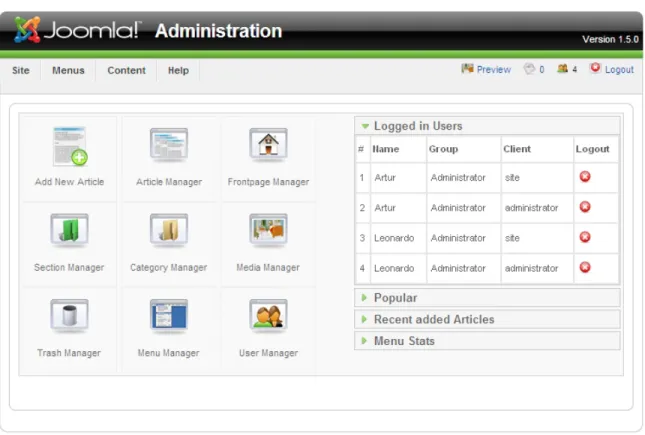
System Architecture and Technological Support
Joomla is developed using the PHP programming language and MySQL provides the database support. Regarding the application server, the only requirements are PHP and MySQL support, although Apache is recommended by the authors. The management process is performed via a back-end administration interface, instead of
2.1 Joomla! 12
a front-end administration (see figure 2.2).
Figure 2.2 Joomla back-end administration area.
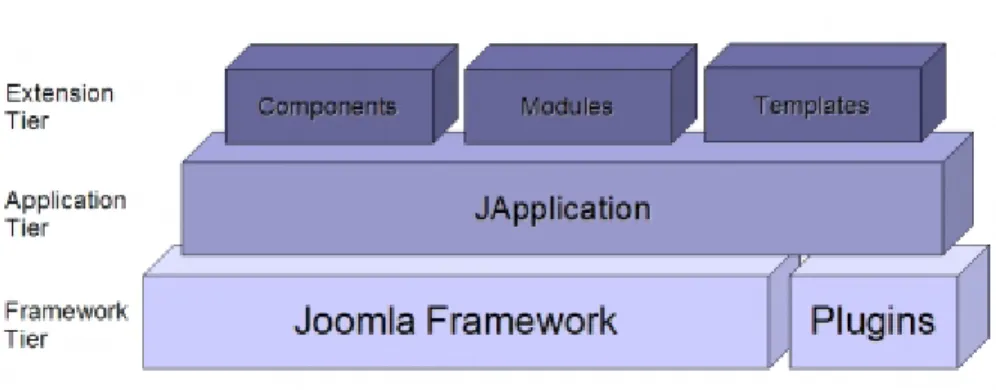
Joomla is a three tiered system as suggested in figure 2.3. The bottom tier is the framework level and consists of the libraries and plugins (formerly known as mambots). The second tier is the application level and consists of the JApplication class. Currently there are three applications that ship with Joomla: JInstallation, JAdministrator and JSite. The application acts as the main controller for the page. The third tier is the extension level. This level is where all component, module, and template logic is executed and rendered.
2.1 Joomla! 13
Figure 2.3 Joomla tiered architecture.
2.1.2
Extension Capabilities
Anextension is used to add capabilities to Joomla that do not exist in its core. There are three types of extensions: (1) Components; (2) Modules and (3) Plugins.
Components
Acomponent is the largest and most complex of the extension types. Components can be viewed as Joomla mini-applications, with an associated operating logic. A compo-nent can also be viewed as a logic and contextualized series of modules (description follows). The core registration component, for example, is the mini-application that handles user registration.
Many of Joomla’s core features are provided by the use of default components such as contacts, newsfeeds, banners or polls.
Components work hand in hand with Modules and Plugins to provide a variety of content display and functionality aside from the standard article and content display.
Modules
A module is a more lightweight extension used in page rendering. Modules are used for small bits of the page that are generally less complex than a component, and can
2.2 Typo3 14
be reused across different components. An example of a Joomla module is the main menu: a simple list of links to the site’s pages.
Plugins
The third extension type for Joomla is theplugin (formerly called a mambot). Along with the development of Joomla 1.5, mambots have been renamed to plugins and their functionality has been expanded. A plugin is a section of code that runs when a pre-defined event happens within Joomla. Rich text editors are plugins, for example. Plugins can be used inside modules and components.
2.1.3
Users and Permissions
Joomla uses the profile metaphor to provide permissions to its users. The guest profile provides anonymous access (i.e., without user registration) to a Joomla Web Site. Joomla includes other profiles for registered users: (1) registered, (2) author, (3) editor, (4) publisher, (5) manager, (6) administrator and (7) super administra-tor, organized in an ascending scale of management powers. New profiles cannot be created.
2.2
Typo3
Typo3 [Typo3 06] is a free open-source Content Management System powered by PHP and MySQL, released under the GNU GPL license. The latest version is 4.0.2.
2.2.1
System Architecture and Technological Support
Typo3 is developed using the PHP programming language, and MySQL commonly supplies the database support. It is also possible to use PostGreSQL, Oracle and
2.2 Typo3 15
Figure 2.4 A Typo3 example web site.
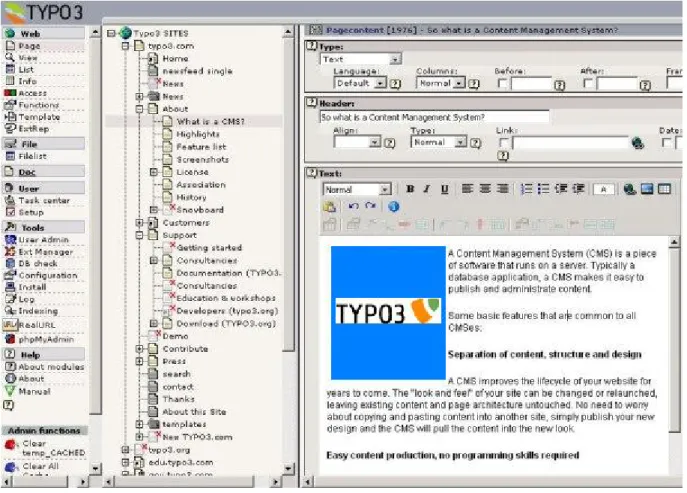
Microsoft SQL Server as database servers. Regarding the application web server, Apache or IIS are supported. The management process is performed via a back-end administration interface, instead of a front-end administration (see figure 2.5).
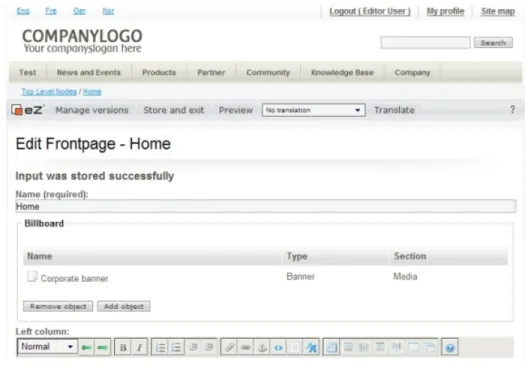
The illustration below shows an annotated version of the TYPO3 architecture. Through the TYPO3 Extension API all extensions connect themselves to the core of TYPO3.
The core is maintained by the TYPO3 Core Group and has a high level of trust and integrity since it is developed by the most experienced TYPO3 developers in the community. Typical core jobs include authentication permission control, database connectivity and initialization, the visual framework (the interface), installation ver-ification and integrity checks.
2.2.2
Extension Capabilities
Anextension is used to add new capabilities to Typo3 via the Extension API, and they provide support to Typo3’s page content components, called page content elements,
2.2 Typo3 16
Figure 2.5 Typo3 back-end administration area.
where all visible page content resides.
Extensions to extensions are also possible. What happens is that the small ex-tension overrides certain methods inside classes of the bigger exex-tension, without the need to modify the method’s interface, ensuring that the API remains stable to old extensions (see figure 2.7).
Extensions provide support to various page content elements, the building blocks of a Typo3 page. They are used to render and manage a block of page content.
2.3 eZ publish 17
Figure 2.6 Typo3 architecture.
Figure 2.7 Extending extensions in Typo3.
2.3
eZ publish
This section describes the internal structure of eZ publish [eZpublish 06] by presenting an brief overview of the different software-layers of the system. This is another free
2.3 eZ publish 18
open-source Content Management System powered by PHP and MySQL, released under the GNU GPL license. The latest version is 3.8.6.
Figure 2.8 A eZ publish example web site.
2.3.1
System Architecture and Technological Support
The underlining programming technology used by eZ publish is PHP. The database support is commonly supplied by MySQL, but it also supports PostGreSQL, Oracle and Microsoft SQL Server. Apache acts as the application web server for eZ pub-lish. The management process is performed on-site directly via the front-end (see figure 2.9).
The system consists of three major parts: (1) Libraries; (2) Kernel and (3) Mod-ules.
The libraries are the main building blocks of the system. These are reusable general purpose PHP classes. The libraries are in no way dependent on the eZ publish
2.3 eZ publish 19
Figure 2.9 eZ publish front-end administration.
kernel. However, some of them are strongly interconnected and thus inseparable. The kernel represents the system’s core, and consists of various engines that build upon and make use of the general purpose libraries. It takes care of all the low level functionality like content handling, content versioning, access control and workflows. Modules represent eZ publish’s extension mechanisms. Figure 2.10 shows how the different parts of the system are connected.
2.3.2
Extension Capabilities
Amodule is used to add new functionalities to eZ publish. It offers an HTTP interface which can be used for web based interaction with the system. While some modules offer an interface to kernel functionality, others are almost kernel independent.
The system comes with a collection of modules that cover the needs of typical everyday tasks. For example, the content module provides an interface that makes it
2.4 JBoss Portal 20
Figure 2.10 eZ publish architecture.
possible to use a web browser to manage content. Other module-enabled functional-ities include user or role management and content search capabilfunctional-ities.
2.4
JBoss Portal
JBoss Portal [JBossPortal 06] provides an open source and standards-based environ-ment for hosting and serving a portal’s Web interface, publishing and managing its content. Written in Java, it is released under the GNU LGPL license. JBoss Portal is currently developed by JBoss Inc. developers, Novell developers and community contributors. The latest version is 2.6 DR1 (Developer Release).
JBoss Portal supports the JSR-168 portlet specification [JSR-168 06], which allows the use of standards-compliant portlets to meet specific portal needs.
The JBoss Portal framework and architecture includes the portal container and supports various features including standard portlets, single sign-on, clustering and
2.4 JBoss Portal 21
internationalization. Portal themes and layouts are configurable. Fine-grained secu-rity administration down to portlet permissions rounds out the secusecu-rity model.
Figure 2.11 A JBoss Portal example web site.
2.4.1
System Architecture and Technological Support
JBoss Portal is a Java Content Management System built on the JBoss application server, which includes the Apache Tomcat Servlet Container with an internal HTTP web server. The database support is commonly supplied by MySQL, but it also supports PostGreSQL, Oracle, Microsoft SQL Server, HypersonicSQL, Derby and MaxDB. The management process is performed on-site directly via the front-end (see figure 2.12).
JBoss Portal supports mutliple portal instances running within one container. A portal instance contains portal objects such as portal pages, themes, layouts and portlet windows. It also manages the relationship between the user and the portal
2.4 JBoss Portal 22
Figure 2.12 JBoss Portal front-end administration.
itself. The hierarchy of portal objects is shown on figure 2.13.
2.4 JBoss Portal 23
Portal Pages
A portal page is an aggregator of Portlet Windows (see figure 2.14). It is generated by the portal, during the reponse phase. During this phase, the portal aggregates all of the HTML markup created the individual portlets, decorates them with window controls, and presents them to the user as a consolidated page.
2.5 DotNetNuke 24
2.4.2
Extension Capabilities
The extension mechanisms in JBoss Portal are called portlet windows, and are used to add new capabilities to JBoss Portal. A portlet window embeds any portlet that conforms to the JSR-168 specification.
Figure 2.15 JBoss Portal portlet window.
2.5
DotNetNuke
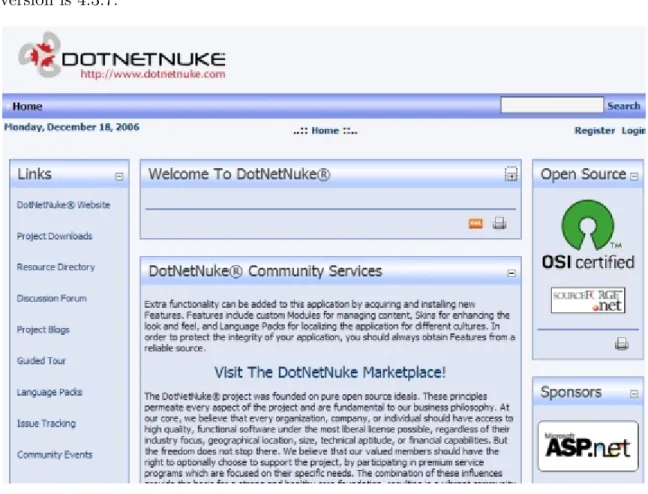
DotNetNuke [DotNetNuke 06] is a free open-source Content Management System written in VB.NET powered by the ASP.NET framework and Microsoft SQL Server (Express 2005 or Desktop Engine 2000 for free deployment). It was originally based on the IBuySpy Portal starter kit released by Microsoft as a sample application for the .NET Framework. It has been expanded and developed and is now in its fourth edition. Version 4.0 or later requires version 2.0 of the .NET Framework, but earlier versions will run on ASP.NET 1.1. It is released under the BSD license. The latest
2.5 DotNetNuke 25
version is 4.3.7.
Figure 2.16 A DotNetNuke example web site.
A single DotNetNuke installation can serve multiple websites, each with its own look and feel and its own user community. The latest versions have multilingual support.
2.5.1
System Architecture and Technological Support
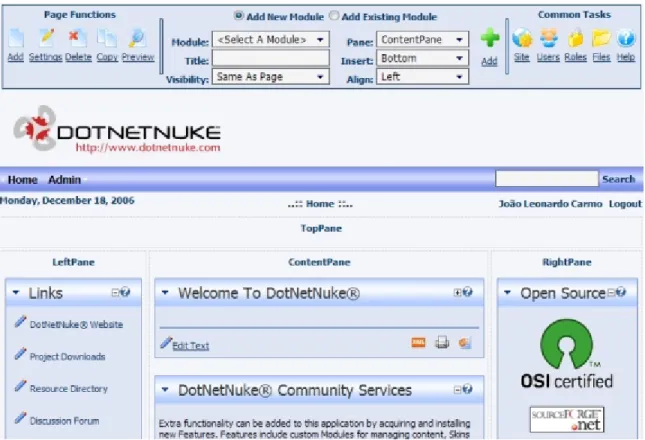
The underlining programming language used to develop DotNetNuke is VB.NET. The database support is supplied by Microsoft SQL Server. IIS act as the application web server in conjuction with the ASP.NET framework. The management process is performed on-site directly via the front-end (see figure 2.17).
2.5 DotNetNuke 26
Figure 2.17 DotNetNuke front-end administration.
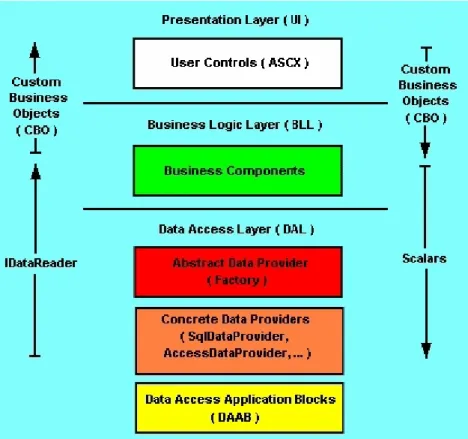
DotNetNuke is built upon three classical layers. The bottom layer is theData Ac-cess Layer, that provides data acAc-cess and data management abstraction mechanisms to the above layers. The middle layer is the Business Logic Layer and represents the entire system’s operational logic. The third layer is the Presentation Layer. This layer supports all of the user interaction operations and provides all web site page presentation mechanisms, based on ASP.NET user controls (ascx).
2.5.2
Extension Capabilities
DotNetNuke has a basic core that can be extended using pluggable extension mech-anisms known asmodules (see figure 2.19), that enable additional functionality. The look and feel of individual sites can be customized usingskins.
2.5 DotNetNuke 27
Figure 2.18 DotNetNuke architecture.
Modules
Modules provide developers with the ability to extend the functionalities of DotNet-Nuke. A module container is provided by DotNetNuke to host a custom module. Module containers provide hosting and interface capabilities to custom modules so they can interact with DotNetNuke.
Modules can be developed in any .NET language, even though DotNetNuke is developed in VB.NET, a C# developer can still create a module that plugs into the core framework provided by DotNetNuke. This multi-language programming feature is not provided directly by DotNetNuke. It was inherited from the .NET framework where DotNetNuke settles.
2.5 DotNetNuke 28
Figure 2.19 A DotNetNuke module.
Skins
DotNetNuke has a skinning architecture which provides separation between design and content, enabling a web designer to develop skins without requiring knowledge of development in ASP.NET. Only a knowledge of HTML and an understanding of how to prepare and package the skins themselves is required. Skins consist of basic HTML files with placeholders for content, menus and other functionality, along with support files such as images, stylesheets and Javascript, packaged in a Zip file.
2.6 CMS Benefits 29
2.6
CMS Benefits
As direct consequences of the adoption and use of a CMS, it is possible to identify the following benefits, when comparing to an ad-hoc or manual web site management:
• Modular structure with a set of base functionalities that may be extended through modules (e.g., web controls, portlets, web parts). This modular ex-tension activity is supported and encouraged, which leads to a large number of available modules, providing the CMS with new and updated functionality.
• Separation between content and presentation. The visual appearance of the content can be easily changed without having to change the content itself. This also allows the same content to be distributed through different channels (e.g., web, phone, PDA).
• Flexible permission management, based on different roles assigned to the sys-tem’s users. This guarantees that a user is only able to view, edit or manage a content for which it has the right set of permissions.
• Easiness of content management: a CMS system doesn’t require a great amount of knowledge for content production and management; besides, this can be per-formed rather quickly and in a decentralized way. It is important to remember that most CMSs provide an alternative and very flexible content management system via a simple web browser (e.g., rich on-line text editor), available every-where from a public web access point, PDA or smart phone.
• Parallel content production process (several simultaneous content producers), using a centralized or distributed policy.
• Simpler and more efficient web site changes, both in content and in visual layout terms.
2.6 CMS Benefits 30
• Consistent and improved web site navigation system.
• Web site flexibility and adaptability, being able to quickly integrate with new scenarios, accompanying the organization’s dynamism over time.
• Integrated security and access control system, with the identification of all the actors that interact with the CMS.
• Information redundancy and duplication minimization. Overall web site con-sistency is privileged with the CMS’s content reuse systems.
• Increased web site’s expansion capabilities (see all the previous points)
• Overall cost reduction and easier web site maintenance.
Other than these fundamental benefits, the CMS is still able to provide important foundations for the strategic objectives of the organization’s business, by easily sup-porting, for example, an on-line sales system, powering the final users’ satisfaction levels, while reducing the “gap” that separates them from the organization.
Chapter 3
The WebComfort Project
In the context of this work, effort has been spent with the objective to design and develop a web-oriented CMS framework, WebComfort, fully developed with Mi-crosoft technologies, namely ASP.NET 2.0 (C#) [ASP.NET 06] and SQL Server 2005 [SQLServer 06], in order to study and explore new features and approaches in the CMS area.
This chapter describes the WebComfort project, providing an extensive insight into the project’s foundation and current state.
3.1
Overview
WebComfort is a web-oriented CMS framework based on the IBuySpy Portal starter kit released by Microsoft as a sample application for the .NET Framework [Carmo 03, WebComfort 06, Carmo 06]. This kit has been discontinued, because it has evolved to several different ASP.NET starter kits [ASP.NETsk 06]. Current version of We-bComfort is 2.5. It is developed using Microsoft’s ASP.NET 2.0 technology. The programming language used by WebComfort is C#, and its database support is
3.1 Overview 32
vided by Microsoft’s SQL Server 2005.
WebComfort’s first version was completed in 2003 as part of the author’s Final Degree Project [Carmo 03], and has been evolving ever since, not only by the author, but also by several other final degree projects from other students supervised by the author and Prof. Alberto Silva [Pico 06, Alves 06, Lopes 06, Delgado 06, Santos 05, Monteiro 04].
WebComfort claims the separation between the content and its presentation on the web site. Content is presented through information modules, whose presentation can be configured without changing the data model and the underlining contents.
WebComfort’s authorization and security policies are defined according to a flexi-ble role-based mechanism. It is possiflexi-ble to create and manage numerous roles accord-ing to different functional and business requirements. There are two main different types of access, tab-wise and module-wise: viewing access and management access.
The “framework” designation comes from WebComfort’s easiness of extension, by allowing the addition of new module types to manage and display existent informa-tion, or even new types of informainforma-tion, supporting the development of new module logic and design through a well-defined module API.
Current available modules support typical web site functionalities, such as An-nouncements, Events, Contacts, Links, Image, Documents, HTML Document, Rich HTML Editor, XML Document, Discussion, Forum, Chat, Navigation Menu and Navigation Tree. Additionally, specific modules for electronic commerce, portal us-age statistics, project manus-agement and GIS (Geographic Information Systems) are also available [Pico 06, Alves 06, Lopes 06, Delgado 06, Santos 05, Monteiro 04].
3.2 WebComfort Architecture 33
3.2
WebComfort Architecture
WebComfort was developed to be used primarily from a web browser without the need to install any type of components or additional software in the client’s machine. It also provides limited mobile support for various portable devices (e.g., mobile phone, PDA, smart phone), through Microsoft Mobile Internet Toolkit for ASP.NET, generating HTML 3.2, cHTML 1.0, WML 1.1 or WML 1.2, in accordance with the mobile device used [MobileToolkit 03].
3.2.1
Software Architecture
WebComfort was developed using a three-layer application architecture: (1) data, (2) logic and (3) presentation, as shown in figure 3.1.
The first layer,ASP.NET, consists on a set of components executed and supported in the context of IIS web server. This layer is responsible for the system’s visual inter-face definition. The second layer, Business Logic, consists on the set of components responsible for executing actions directly related to the application’s logic. The third layer, Data Access, consists on a set of components that perform all database access operations.
3.3 WebComfort Portal Structure 34
3.3
WebComfort Portal Structure
A WebComfort portal consists in a variable number of tabs (or dynamic pages), hierarchically organized, in which each tab holds different contents through different predefined module types, based on ASP.NET user controls. The module is the element responsible for managing and displaying content within a tab (e.g., links, text, images, HTML code). Each module has a title, a content editing area and a possible help page. The module’s content editing area is only revealed to users with editing permissions to the referred module. Modules are deployed in one of the tab’s containers. The number and position of these containers can be configured to meet the administrator’s needs, supporting various web portal designs.
The visual aspect of WebComfort can be customized according to the administra-tor’s preferences. Besides the spatial organization of the page’s elements through the container placement, it is also possible to define a set of visual parameters, such as colors and fonts, that will be used throughout the site, in a per-page basis or even in a per-module basis. This aggregation of visual configurations is called avisual theme (see figures 3.2 and 3.3).
3.4
Users
Each user as an identity within the portal (with the exception of the “anonymous” user), represented by a user account identified by the typical username and password pair. Other than his personal identity, a user needs permissions to gain access to private tabs, or to be able to perform management tasks within the portal.
3.4 Users 35
Figure 3.2 A two-container visual theme.
3.5 Permissions and Roles 36
3.5
Permissions and Roles
In WebComfort permissions are not granted directly to users. Instead, permissions are granted to roles. This way, it is possible to associate a user with one or more roles, granting them the respective permissions. Permissions can be issued on modules or tabs.
There are two types of roles: system roles and local roles. A system role has a scope that spans through the entire portal’s tabs, whereas a local role’s scope is confined to a specific tab. Module management can be delegated to a local role, but tab management is only available through a system role. These and other concepts from WebComfort are illustrated in the high-level domain model shown in figure 3.4.
3.6
Content Management
A user manages content by editing the tab’s modules, if the right set of permissions is present. Content Management is very simple and does not have any publication work-flow specified. This means that when the user submits the content, it is automatically available to whoever possess viewing permissions to it.
A very useful and critical WebComfort feature is content management delegation. Using management delegation, the web portal administrator can delegate a system role the task of managing an entire tab, without giving it the rest of the administration capabilities, like user registration or tab creation. This is called a Responsible Role. When empowered by a Responsible Role, the user can perform almost every action the portal administrator can, with the exceptions of not being able to remove the tab from the portal and not being able to define a new Responsible Role to it.
WebComfort modules are organized by module categories, and these categories have instantiation permissions. A Responsible Role can only instantiate modules in
3.6 Content Management 37
Figure 3.4 WebComfort high-level domain model.
the tab that belong to authorized instantiation module categories.
With WebComfort’s management delegation feature, it is possible to free the portal administrator from all tabs’ management details, allowing for more flexible, easy and distributed web site management. The administrator will still have full control over the entire portal. It is also important to refer that only a system role can become a Responsible Role, and that only a portal administrator can empower a system role with Responsible Role capabilities.
3.7 WebComfort Advanced Features 38
3.7
WebComfort Advanced Features
WebComfort supports several important and useful advanced features that facilitate typical portal management operations. Some of these features are detailed in this section.
3.7.1
Role Hierarchy
WebComfort provides a flexible and easy role management feature called role hierar-chy, which allows the definition of role hierarchies within the portal.
To better explain this feature, suppose that there are two roles in the portal with associated permissions, Father and Mother. Using WebComfort’s role hierarchy feature, it is possible to create a third role, Son, which inherits the permissions of both Father and Mother roles. This way, any user that becomes associated with the Son role will have the same permissions that a user associated to both Father and Mother roles.
As a final note on role hierarchy, it just needs to be said that a local role can be inherited by a system role, but the opposite is not allowed, for obvious security reasons, as a local role could “escape” its tab-contained scope.
3.7.2
Content Referencing
Content referencing between modules allows that a module’s content to be referenced by another module, acting as a direct pointer to the content of the targeted module. This way, every time the content of the referenced module is updated, these changes will automatically be reflected to all the modules referencing it.
Content referencing promotes content reuse and helps minimize duplicate infor-mation within the portal. When a module is displaying referenced content, it looses
3.7 WebComfort Advanced Features 39
Figure 3.5 WebComfort’s Role Hierarchy.
the ability to edit its content, since the original content belongs to the module being referenced. Content referencing doesn’t delete the original module contents. When the reference is removed, the original module content is reinstated.
One important aspect about WebComfort’s content referencing is the fact that it is only allowed between two “compatible” modules (i.e., two instances of the same module type). This way, WebComfort prevents a Tree module to reference a Text one, for instance.
Content referencing is available to all WebComfort modules natively, even for upcoming modules. The programmer doesn’t have to interact with WebComfort’s API in order to enable content referencing.
3.7.3
Content Copy
Content copy between modules is very similar to content referencing. The main difference lies in the fact that in content copy, the source module content is copied to the destination module, creating an independent instance of the same content. Then it can be altered without worrying about changing the original content. Once again, this operation can only be applied between two compatible modules.
3.7 WebComfort Advanced Features 40
In order to enable a module to support content copy between its instances, a public method namedmoduleCopy with two integer arguments representing the source mod-ule and the destination modmod-ule must be developed by the programmer. This provides the appropriate content copy programmatic support to interact with WebComfort. A simple example is shown in listing 3.1.
1 public class HelloWorldCopy
2 { public void moduleCopy (int sourceModuleID, int destinationModuleID) 3 { /* Module Copy Logic here */ }
4 }
Listing 3.1 Module Copy method
3.7.4
Content Import and Export
Content import and export are very useful features that allow a module’s content to be exported or imported via a XML file. In order to enable a module to support content export and import features, two public methods named moduleExport and moduleImport with two arguments each (source module and file name) must be devel-oped by the programmer. This provides the appropriate content export and import programmatic support to interact with WebComfort, exemplified in listing 3.2.
1 public class HelloWorldImportExport
2 { public void moduleExport (int sourceModuleID, string fileToExport) 3 { /* Module Export Logic here */ }
4 public void moduleImport (int sourceModuleID, string importFile) 5 { /* Module Import Logic here */ }
6 }
3.7 WebComfort Advanced Features 41
A WebComfort XML Content File has a very simple structure. It consists on a module tag that provides the support for the name and the title of the module, and on several element tags, that basically represent the module’s elements via a tuple
<element name, element text>(see listing 3.3).
It is also possible to export and import a whole tab’s contents to and from a single WebComfort XML Content File. WebComfort basically makes recursive calls to the tab module’s export and import features to accomplish this.
1 <Tab TabName="my Web Page">
2 <Module ModuleName="Links" ModuleTitle="my links"> 3 <Elements>
4 <Element ElementName="Microsoft Link"> 5 <Text>http://www.microsoft.com</Text> 6 </Element>
7 </Elements> 8 </Module> 9 </Tab>
Listing 3.3 WebComfort XML content file
3.7.5
WebComfort Static Content Language Engine (SCLE)
WebComfort supports static content multi-language through its Static Content Lan-guage Engine or SCLE. This way it is possible to incorporate several lanLan-guages into the module’s static content (i.e., labels, buttons) without having to develop the same module in another language. The words and phrases from the different languages are stored in XML files called WebComfort Language Packs (WCLP), whose underlining structure is shown in figure 3.6.
3.7 WebComfort Advanced Features 42
A WCLP represents a collection of packages, that are no more than logical ag-gregations for a specific logical domain, like “Sales”, for a collection of sales modules, or “Hello World”, for a collection of testing modules. This organization criteria is the responsibility of the language pack developer. Each package can contain several pages and several modules. The logical notion of a module includes, typically, (1) the module file itself, (2) the module’s edition page for module content editing, (3) the module’s help page, and (4) other auxiliary components. Each module is rep-resented within a module tag, while its supporting pages are represented within a page tag. The internal elements that possess a textual field of each module or page are represented by an element tag. Finally, the textual field is defined using atext tag within an element. It is also possible to define the name and title of a page, or a module’s name, using the respective page and module attributes provided by the WCLP.
When a new module is developed, the programmer can now provide it with multi-language support by creating a new WebComfort Language Pack for it. To activate the multi-language feature, the programmer just has to make a call to the WebCom-fort API to activate the SCLE for his module. The module will automatically be rendered in sync with the actual portal language.
In fact, just the standard and most common web controls are rendered automati-cally by the SCLE (i.e., buttons, labels, links, textboxes, validators, images (alterna-tive text)). If the module is composed with more complex web controls, like datagrids, the programmer must access the SCLE manually to be able to apply multi-language to its modules.
For simplicity reasons, a very small example with portuguese language is shown in listing 3.4, for the Hello World module alone (i.e., without its editing and help pages). An identical language pack for the english language also exists, and the only
3.7 WebComfort Advanced Features 43
Figure 3.6 WebComfort Language Pack structure.
change to the portuguese version is the text between the text tags of an element. The corresponding behavior of changing from english to portuguese language packs is shown in figure 3.7.
3.7 WebComfort Advanced Features 44
1 <WebCoMFORTLanguagePack Language="Portuguese" Version="1.0"> 2 <packages>
3 <Package PackageName="Hello World"> 4 <modules>
5 <Module ModuleName="HelloWorld.ascx"> 6 <moduleElements>
7 <Element ElementName="editText"> 8 <Text>Editar o Hello World</Text>
9 </Element> 10 </moduleElements> 11 </Module> 12 </modules> 13 </Package> 14 </packages> 15 </WebCoMFORTLanguagePack>
Listing 3.4 WebComfort Language Pack XML File
3.7 WebComfort Advanced Features 45
3.7.6
Other Features
WebComfort v2.5 main advanced features list also include:
• Online Visual Style editor. With the online Visual Style editor it is possible to create and edit visual styles easily and without the hassle of manual cod-ing. The editor also promotes a much more error-free visual style development environment.
• WebParts technology integration. ASP.NET 2.0 WebParts have provided a boost to WebComfort module semantics, providing them with inter-module communication and drag-and-drop functionalities within the tab.
• Multi-Language Dynamic Content. WebComfort also provides support for multi-language dynamic content, allowing a module’s dynamic content language to match the portal language, just like static content does. This way it is possible to write a piece of text in several languages, and the correct version is shown according to the portal’s language definition.
Chapter 4
CMS Reference Model
As stated before in this dissertation, there are many available CMSs. Nevertheless, despite this diversity, it doesn’t seem to exist a common way to analyse and compare two or more of these systems. The most common methods are based on side-by-side feature comparison [CMSMatrix 06, OpenSourceCMS 06, OSCOM 06]. The problem resides in the fact that it is not clear on how these features or requirements where achieved, and sometimes it is possible to detect several overlapping features, leading to a very confusing and vague global view of a CMS. In order to be able to discuss, analyse and compare different content management systems, it is necessary to define the typical requirements for these systems, and unify their underlining concepts, from both technical and empirical approaches. This knowledge can then be summarized, resulting in a CMS reference model.
4.1
CMS Terminology and Meta-Model proposal
CMS technology gathers a set of concepts and terminologies that need to be unified by a standard definition. This section presents a proposal for a possible CMS terminology
4.1 CMS Terminology and Meta-Model proposal 47
Figure 4.1 A CMS Meta-Model proposal (Logical Entities).
and the correspondent CMS Meta-Model, that illustrates the relationships between each of the identified CMS concepts, shown in figures 4.1 and 4.2:
• CMS (Content Management System): A web-based software system
fo-cused on content management; providing an abstraction layer of the technolog-ical details for the end user, allowing him to focus on the most important web portal asset: it’s content.
• WebSite: A logical and contextualized set of web pages managed by different approaches, but in particular by a CMS. Typically the involved web pages include navigation structures and associated visual style.
4.1 CMS Terminology and Meta-Model proposal 48
Figure 4.2 A CMS Meta-Model proposal (Permissions and Access Entities).
• DynamicWebPage: A logical set of components (designated byWeb
Compo-nents, description follows), grouped in logical spaces (designated by Contain-ers, description follows), in the context of a WebSite. Typically the components will also include an associated visual style. Alternative names: Page, Section, Tab.
• Container: A logical space within a DynamicWebPage where
WebCompo-nents are deployed and grouped. It allows the WebSite to have different spacial WebComponent dispositions in its various DynamicWebPages according to dif-ferent container layouts. It is also used to define the spacial disposition of a VisualStyle (description follows). Alternative names: Region, Placeholder.
• WebComponent: A visual component with associated business logic to
man-age a certain type of content. It is responsible for storing and presenting content information with a determined visual style. It can also provide support to per-forms certain actions on the corresponding content, such as editing, removal or
4.1 CMS Terminology and Meta-Model proposal 49
search. Alternative names: Module, Web Part, Portlet.
• VisualStyle: A set of container layout settings (i.e., content spatial disposition information) and of visual themes (i.e., content appearance information (colors, fonts, sizes, etc.)). Alternative names: Template, Theme.
• WebPageWorkflow: A logical sequence of publishing steps associated to a
WebPage, supported by a static workflow engine or by a dynamic workflow creation and management system.
• WebComponentWorkflow: A logical sequence of publishing steps
associ-ated to a WebComponent, supported by a static workflow engine or by a dy-namic workflow creation and management system.
• User: The WebSite internal representation of identity. The user provides the entry point to the WebSite. In order to access certain areas of the WebSite, or to gain access to management capabilities, it may be necessary to associate a user with a role (description follows). The user identification is typically carried out using the tuple <username, password>.
• Role: The WebSite internal representation of user types. A role is defined by a set of permissions (description follows) that it possesses. A role is associated with one or more users in order to empower them with the desired set of per-missions to the various WebSite artifacts. A role group or hierarchy can also be achieved, using a role to aggregate one or more roles, inheriting the full set of permissions defined in the set of aggregated roles. Typically, several roles are predefined within every WebSite, and are characterized by a predefined set of permissions. It is also possible to extended these predefined roles and create new ones, by empowering them with a set of ad hoc permissions, specified during
4.1 CMS Terminology and Meta-Model proposal 50
WebSite’s lifetime. When a role is defined at a DynamicWebPage level instead of a WebSite level, it is said to be a local role, because it is only visible in the context of that DynamicWebPage. Roles are completely arbitrary in number and in the permissions that characterizes them.
• Permission: The WebSite internal representation of a permission type (e.g., view permission, write permission, install permission). It allows one to define the rights of a user, by giving the correct set of desired permissions to the user’s role or roles. It is used to allow or deny actions over WebSites, DynamicWeb-Pages and WebComponents.
4.1.1
Basic Requirements
A CMS is mostly known for its portal management capabilities, but this is too vague to be able to allow a complete description of a CMS. Instead, it is necessary to iden-tify the basic set of requirements that a CMS should comply to. These are: (1) web page management; (2) user management; (3) permission management and (4) content management. The term “management” includes the typical three operations: (1) cre-ation; (2) edition and (3) deletion. Some additional and more advanced requirements can also be identified, like page layout and visual style management, multi-language support, publication workflow management or multi-portal management, but these are not relevant for the basis of the reference model. Like so, it is assumed in this reference model that a CMS is primarily responsible for the management of a single web portal with a fixed visual style and a fixed publication workflow. All of the operational information regarding the CMS (e.g., users, permissions, web pages, content) is stored in theCMS repository (see 4.1.5 Content Storage).
4.1 CMS Terminology and Meta-Model proposal 51
4.1.2
Web Page Management
The web page is the building block of a CMS-managed web site. The web page, in turn, is responsible for aggregating content, like text, links or images. A CMS must provide the necessary tools to allow the creation, edition and deletion of web pages and the respective content.
The CMS should also provide web site structural management mechanisms. These mechanisms are used to move pages around the web site, organizing them in hier-archical page structures. This also shows the flexibility of the CMS, which can do this and automatically reorganize its entire link and navigation structure in order to reflect the changes made to the site’s structure.
Finally, automatic web site navigational components like navigation banners, menus or trees should also be delivered out-of-the-box by a CMS.
4.1.3
User Management
Virtually anyone with a web browser should be able to access the public pages of a CMS-managed web site, using the anonymous user metaphor. The user is the entry point into the CMS management capabilities and private pages. It represents the iden-tity of a person or eniden-tity within the CMS, typically using a <username, password>
pair. With the user concept, it is possible to keep a rigorous track of all the changes made to web pages and respective content, while providing access control features to the various components of the web site. The CMS must provide the usual user management capabilities (creation, edition and deletion).
4.1 CMS Terminology and Meta-Model proposal 52
4.1.4
Permission Management
A CMS user without permissions is like a hunter without his weapon: all he can basically do is watch and not act. In order to allow a user to act (e.g., create web pages, create content, manage other users), it needs to be given a set of permissions. These permissions will enable the user to perform several tasks within the CMS, from content producting to full web site and user management. The role metaphor is the most common way to give permissions to CMS users. Just to give a brief example, a user that is associated with the “Author” role will have permissions to write new content, but he cannot manage other users. On the other hand, a user associated with the “Administrator” role can perform all sort of management operations. Most CMSs do not allow new roles to be created, and are based in a fixed set of predefined ones: the predefined roles. Other CMSs allow the creation of an arbitrary number of roles, called extended roles. In this case, the CMS must also provide a way to define which permissions a particular role possess. The CMS must provide basic permission management capabilities (e.g., association and dissociation between users and roles).
4.1.5
Content Management
CMSs are primarily responsible for content management. Like so, it is relevant to analyze the several stages of a content life cycle, which can be divided in three main phases: (1) Content Creation; (2) Content Storage; and (3) Content Publication and Presentation, as suggested in figure 4.3.
To support each phase it is key to identify specific roles in the CMS-supported organizational context. Although diverse roles with even more diverse functions can exist, the most important ones are: (1) Content Authors; (2) Content Managers; (3) Publication and Presentation Managers; and (4) Administrators.