Paper Dreams: an Adaptive Drawing Canvas Supported by Machine Learning
by Lily Zhou
S.B., E.E.C.S. M.I.T., 2017
Submitted to the
Department of Electrical Engineering and Computer Science in Partial Fulfillment of the Requirements for the Degree of
Master of Engineering in Electrical Engineering and Computer Science at the
Massachusetts Institute of Technology June 2019
© 2019 Lily Zhou. All rights reserved.
The author hereby grants to M.I.T. permission to reproduce and to distribute publicly paper and electronic copies of this thesis document in whole and in part in any medium now known or
hereafter created.
Author:
Department of Electrical Engineering and Computer Science May 24, 2019
Certified by:
Pattie Maes, Professor of Media Arts and Sciences, Thesis Supervisor May 24, 2019
Accepted by:
Paper Dreams: an Adaptive Drawing Canvas
Supported by Machine Learning
by
Lily Zhou
Submitted to the Department of Electrical Engineering and Computer Science on May 24, 2019, in partial fulfillment of the
requirements for the degree of
Master of Engineering in Electrical Engineering and Computer Science
Abstract
Despite numerous recent advances in the field of deep learning for artistic purposes, the integration of these state-of-the-art machine learning tools into applications for drawing and visual expression has been an underexplored field. Bridging this gap has the potential to empower a large subset of the population, from children to the elderly, with a new medium to represent and visualize their ideas. Paper Dreams is a web-based canvas for sketching and storyboarding, with a multimodal user interface integrated with a variety of machine learning models. By using sketch recognition, style transfer, and natural language processing, the system can contextualize what the user is drawing; it then can color the sketch appropriately, suggest related objects for the user to draw, and allow the user to pull from a database of related images to add onto the canvas. Furthermore, the user can influence the output of the models via a serendipity dial that a↵ects how “wacky” the system’s outputs are. By process-ing a variety of multimodal inputs and automatprocess-ing artistic processes, Paper Dreams becomes an efficient tool for quickly generating vibrant and complex artistic scenes. Thesis Supervisor: Pattie Maes
Acknowledgments
To Professor Pattie Maes, for the resources and inspiration to guide this project throughout the course of my research, and for the insights provided on this thesis.
To Guillermo Bernal, for his unfailing assistance and determination into bringing this project to fruition, and for his keen eye for detail and design.
To Haripriya Mehta, for always pulling through to help with last-minute code emer-gencies, and the entire Paper Dreams team, for helping collect the data and build the tools needed.
To my parents and my sister for their constant support and encouragement through my undergraduate and graduate years.
To my friends in Edgerton House and East Campus and elsewhere, for their ca-maraderie, late-night calls, postcards, and web development advice.
To the MIT Electrical Engineering and Computer Science Department, and my aca-demic advisors Professor Tamara Broderick and Professor Yen-Jie Lee, for the counsel and advice they have given to me over the years.
Contents
1 Introduction 13
2 Background 17
2.1 Drawing and User Interfaces . . . 17
2.2 Current Artistic Aids . . . 18
2.2.1 Graphics Editors . . . 19
2.2.2 Machine Learning for Art . . . 20
3 Web-Based Canvas Application 23 3.1 User Interface . . . 23 3.2 Architecture . . . 24 3.2.1 Modalities . . . 26 3.2.2 Control Buttons . . . 27 3.2.3 Serendipity Wheel . . . 28 3.3 System Context . . . 30 3.3.1 Drawing Capabilities . . . 31
3.4 Canvas Generated Image . . . 31
4 Integration with Machine Learning 37 4.1 Sketch Recognition . . . 37
4.2 Style Transfer / Adaptive Texturization . . . 40
4.2.1 Pix2Pix via ml5.js . . . 41
4.3 NLP and Associated Concepts . . . 42 5 Future Work 45 5.1 User Studies . . . 45 5.2 Online Deployment . . . 46 6 Conclusion 49 A List of Classes 51
List of Figures
2-1 NVIDIA’s GauGAN . . . 22
3-1 Overall User Interface . . . 24
3-2 System Architecture . . . 25
3-3 Modalities within the User Interface . . . 26
3-4 Control Buttons on the User Interface . . . 27
3-5 Serendipity Wheel within the User Interface . . . 29
3-6 Serendipity Wheel and Associated Concepts . . . 30
3-7 Word Association Graph, Labeled . . . 30
3-8 Drawing Capabilities . . . 32
3-9 Canvas Generated Image, variable scale . . . 33
3-10 Canvas Generated Image, constant scale . . . 34
3-11 Comparison between Canvas Generated Images and Dataset . . . 35
4-1 Relationship Between Machine Learning Models . . . 38
4-2 Partial Sketch Dataset Examples . . . 39
4-3 Adaptive Coloring Models . . . 40
4-4 Pix2Pix via ml5.js Output . . . 41
List of Tables
A.1 Sketchy Dataset Classes . . . 52 A.2 Paper Dreams Dataset Classes . . . 53
Chapter 1
Introduction
Art has always been a important method of communication and expression, from the 20,000-year-old Altamira cave drawings to current-day picture books for children. With the rise of artificial intelligence (AI) and machine learning (ML) in many in-dustries, it is logical that these state-of-the-art technologies would be applied toward aiding cognitive and visual expression.
Current research in AI and art has been focused on using machine intelligence to “create” art, from the transfer learning of artistic styles [1] to the generation of dream-like images [2]. However, there is relatively little research in applying these state-of-the-art machine learning algorithms and multimodal inputs toward aiding users to visually express their ideas in a dynamic back-and-forth collaboration. Giving people a sophisticated medium that helps them quickly generate and build on their ideas can be empower them to create a wider variety of diverse artistic sketches that can be generated by either the user or the algorithms alone.
In addition to empowerment, there are substantial concrete benefits to such a system that encourages creative expression. For children, encouraging creativity from a young age is correlated with mood improvement and development of crucial social skills [3]. For many elderly populations, encouraging creative activity is associated with emotional and physical responses such as increased optimism, alertness, and perceptions of self-worth [4]; furthermore, for older people with dementia, art therapy is associated with positive changes in mood and increased sociability [5]. With all
these potential benefits in mind, this project was born.
Paper Dreams is a web-based multimodal creative platform for drawing that com-bines human-drawn sketches and a variety of machine learning algorithms to facilitate user expression. It uses sketch recognition, adaptive style transfer, and natural lan-guage processing to calculate high-level semantic information and context about the user’s intentions and generate the appropriate response from the system. For example, if a person draws a cat, Paper Dreams recognizes they are drawing an cat, colors it in cat-like colors, and then suggests related terms such as “dog” and “mouse,” which the user can then easily add to the canvas. The user can also use a knob to adjust the “wackiness” of the system, increasing the randomness of the suggested terms. Because the user can either draw their own sketches or pull from Paper Dream’s large database of sketches, it is accommodating of a variety of drawing capabilities, from expert artists to “haven’t drawn in years”. Paper Dreams allows users to quickly generate vibrant and complex sketches and provides functionalities dedicated towards enabling an under-represented subset of population, such as children and the elderly, who might not be able to use the currently available artistic tools.
I conducted my work in a joint e↵ort with the Paper Dreams team in the Fluid Interfaces Lab in the MIT Media Lab, and my team members Guillermo Bernal and Haripriya Mehta were instrumental in the implementation and training of the machine learning models. While a fair amount of the work was collaborative, I will focus on my individual contributions in this thesis.
In the following chapters, I will:
• Provide a review of the current tools available for artistic expression and discuss their use cases (Chapter 2).
• Detail the implementation of the multimodal user interface and server back-end, and discuss relevant design decisions (Chapter 3).
• Highlight my contributions to the machine learning tools in the back-end, from generating a custom database for the sketch recognition to comparing the results of di↵erent natural language processing implementations (Chapter 4).
• Discuss unresolved issues in implementation and suggest directions for future research (Chapter 5).
For a video demo and more information about this project, please visit:
Chapter 2
Background
Drawing is one of the oldest methods of communication and artistic expression, even predating written language [6]. It is a natural and essential form of visualization [7], from children doodling their closet monsters to architects creating building plans. The incorporation of a drawing modality to user interfaces for design and art has inherent benefits in aiding a user’s ability to express their ideas.
2.1
Drawing and User Interfaces
In 1963, Ivan Sutherland pioneered research into the field of communication between the user and an interface with his Sketchpad program [8]. Using a “light pen”, a user could draw lines and circles directly onto the interface, and save combinations for use in future drawings. It was a novel method of interaction, preceding the invention of finger-based touchscreens and even computer mice, on the first interactive graphical user interface (GUI). While the Sketchpad itself was impossible to release publicly (it ran on customized hardware), the ideas introduced in Sutherland’s thesis regarding Sketchpad are still widely used today to shape the development of drawing user interfaces.
In 1996, Mark Gross and Ellen Do, recognizing the importance of freehand draw-ing for creative design, created Electronic Cocktail Napkin [9], a user interface that allowed users to quickly draw diagrams and then recognized and processed those
diagrams into a higher level understanding of the drawing. However, given the com-putational difficulty of recognition at that time, Ambiguous Intentions focused on diagramming rather than sketching, as lower-level diagrams (“box”) were easier to process than higher-level sketches (“horse”). Similar technologies were developed for a variety of purposes: engineering design (ASSIST - A Shrewd Sketch Interpretation and Simulation Tool [10]), user interface design (SILK - Sketching Interfaces Like Krazy [11]), and garment design (KnitSketch [12]). All these programs incorporate some form of sketch recognition, i.e., generating higher-level semantic information such as a “square” or “chair” from user strokes. However, most of these systems use a rule-based system for their sketch recognition and manipulation, limiting the variety of sketches that could be drawn and understood, and thus limiting the scope of what the user could draw.
Current machine learning sketch recognition models eliminate the need for these rule-based systems and are easily adaptable to a wider variety of sketches. Paper Dreams expands on this previous research on graphical drawing user interfaces, incor-porating current state-of-the-art machine learning to create a more dynamic system for artistic expression.
2.2
Current Artistic Aids
Some publicly available artistic applications integrate a sketching capability in their interface, similar to those discussed in the previous section, while many others are click/command-focused for optimized usability with the classic mouse and keyboard modalities. Most current electronic technologies available for creating visualizations are either very low-level, allowing the user a high amount of control over the output, or are fully automated, giving the user relatively little control over the output. In comparison, Paper Dreams allows the user to think about their sketch on a higher conceptual level, in the form of ideas and objects and their relationships, input their ideas via a drawing capability, and generate the visual output accordingly.
2.2.1
Graphics Editors
Graphics editors are low-semantic-level aids, i.e. they do not have a context or internal understanding of what the user is creating. Many of them are command-based (“trace the path of my mouse in red” or “put a red line from here to there”), which means that users can make very customized outputs but the creation process can be very slow.
Canvas Focused Software
Microsoft Paint (and the wide variety of similar pixel-based drawing canvases- even macOS’s Preview) are often the first graphics editors that people are exposed to. They’re extraordinarily simple to learn given their intuitive similarity to drawing and painting in real life; the user can usually pick a color and begin drawing right away. With options ranging from di↵erent paintbrushes to layers, a user can slowly build up a complex image. Paper Dreams uses the intuitive user interface of the drawing canvas, but incorporates higher level semantic understanding of what the user is drawing to automate some parts of the creation process, such as coloring (adaptive texturization).
Vector Focused Software
Adobe Photoshop and Adobe Illustrator are some of the most well known graphics editors- the former is based on pixel manipulation, while the latter used for vector-based image generation. Other similar editors include Inkscape and GIMP. These applications a↵ord a immense amount of control to the user while creating and ma-nipulating objects. This class of graphics editors has implemented a large variety of algorithms for manipulating the objects on the canvas in various ways; in exchange, they often have a steeper learning curve for the user. Paper Dreams uses the semantic information it has to automate some of the processes that might be harder for users to understand, such as creating custom gradients to color an object.
Digital Art Focused Software
Some software specialized for creating digital art, such as Artweaver and Corel Painter, combine many of the features of a canvas-based application with the higher-level fea-tures of a Photoshop-type application. These programs a↵ord a large amount of control to the user for creating their artistic vision, but require the user to execute each step to build toward their ideas (e.g., painting each stroke, choosing layers, adding objects). Other applications that focus on creating art such as comics and cartoons (e.g. Clip Studio Paint and Toondoo) simplify this process to a drag-and-drop of images and icons, but can thus be limiting for the user. In comparison to these technologies, Paper Dreams’s automation of certain artistic steps, but focus on user control and an intuitive drawing/canvas based input, enables the user to rapidly generate sketches and ideas with a high degree of personalization.
2.2.2
Machine Learning for Art
In contrast to the design of a user interface and set of tools to enable the user’s visual expression, machine learning models focus on the generation of artistic output based on user input. Paper Dreams is the union of these two approaches- an intuitive user interface for input and an intelligent set of system models for output.
Google - Magenta
Google’s Magenta project [13] focuses on the applications for machine learning on art and music, with everything from a magic sketchpad that attempts to finish what the user is drawing based on Sketch-RNN [14], to a deep learning network that attempts to generate a mixed musical style based on two di↵erent user-inputted tracks. Sketch-RNN was a critical inspiration for the back-and-forth dynamic of Paper Dreams- with Sketch-RNN, the user first draws a set of strokes, and then the system draws a series of strokes on top of the user drawing. The user can then draw on top of the combined user-and-system drawing. However, this implementation means the user has little direct control over the system drawing and thus the final output image, except asking
the system to try again. Paper Dreams o↵ers the user more control over their drawing, while still enabling the user to create quickly.
Paper Dreams builds on the concepts from the Magenta projects, integrating many models (sketch recognition, style transfer, natural language processing) together to increase the accuracy of each model for the user. In addition, Paper Dreams hopes to make these tools more accessible to the general public by creating an incorporative platform for the user to create via an interactive back-and-forth dynamic, similar to that of Sketch-RNN.
NVIDIA - GauGAN
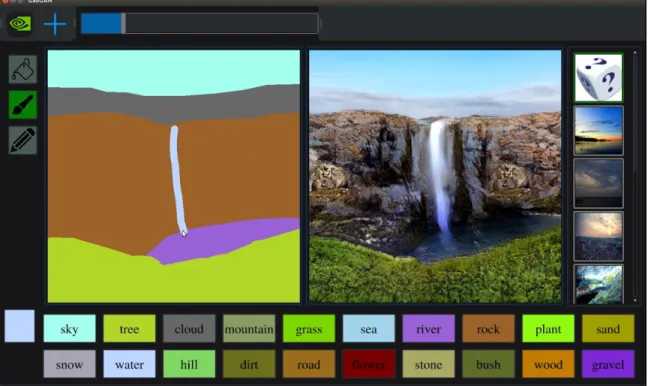
During the course of this thesis, NVIDIA announced GauGAN, a machine learn-ing algorithm that can generate photorealistic landscapes from user pixel paintlearn-ings in almost real-time using semantic information [15], as seen in Figure 2-1. These algorithms have great potential to further enhance the quality of visual expression (imagine being able to draw anything, such as zebra, and produce a photograph-like image output!) By leveraging these machine learning innovations and incorporating them into user-focused applications such as Paper Dreams, users can create fantastic scenes from simple mouse and pen strokes.
Figure 2-1: Using NVIDIA’s GauGAN, a Microsoft Paint-like drawing (left) can produce a photo-realistic output (right). Image from Matt Burn’s TechCrunch article about GauGAN [16].
Chapter 3
Web-Based Canvas Application
3.1
User Interface
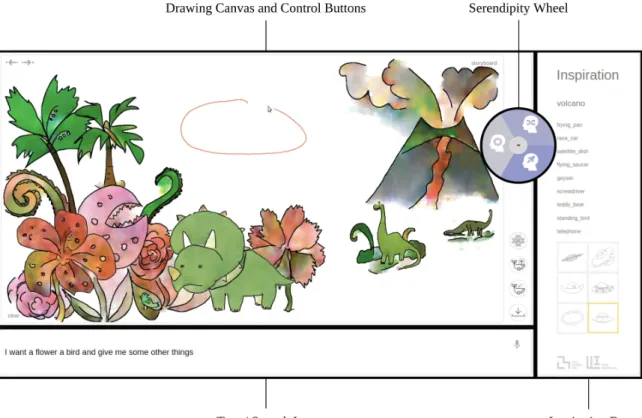
Many of the publicly available artistic tools, such as Adobe Illustrator, often take many hours of regular use before the user can learn to create what they are visualizing, despite the plethora of tutorials and 30-day crash courses available online. In contrast, Paper Dreams contains a minimalistic interface (Figure 3-1), with its main focus on the canvas and available space for sketching. Preliminary user tests suggest that users often feel comfortable with the interface in under half an hour of use, potentially due to the natural ease of human expression through drawing and sketching.
We opted for a web-based application over a native application (i.e., one down-loaded directly onto a device) to increase accessibility to a larger subset of our target population. Our application can be used by anyone with access to an electronic device with internet and a browser, such as a laptop or tablet. In addition, this circumvents the need to develop distinct apps for di↵erent mobile devices, e.g., a Swift-based app for iOS and a Java-based app for Android, and allows us to collect data on what users are drawing in order to improve our database.
Figure 3-1: Overall user interface, with important subsections marked.
3.2
Architecture
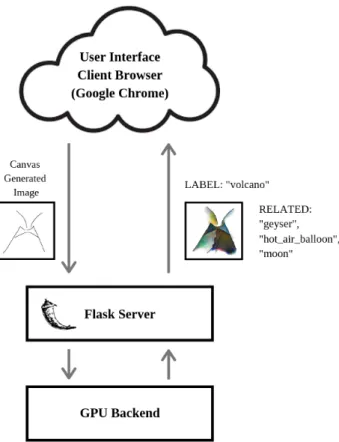
The system is a client-server architecture, with the front-end client side browser (op-timally Google Chrome) making requests to and from a back-end web server. The web server was built using Flask [17], a lightweight and easily customizable Python server framework. As seen in Figure 3-2, the browser passes the user-drawn sketch (referred to as a Canvas Generated Image) to the server, which can return one or more of the following:
1. A label from the sketch recognition, identifying the current sketch. There are 125 possible classes for the label to be chosen from, as the sketch recognition was trained on the 125-class Sketchy dataset. A list of the classes can be found in Appendix A.
2. A texture from the adaptive coloring (style transfer), based on the current Canvas Generated Image and the label from the sketch recognition.
3. Other classes associated with the current label, e.g. [“orange”, “pear”, “pineap-ple”] for the label “apple.”
The user interface on the browser was built with HTML, Javascript, and CSS, with an HTML5 canvas being used as the drawing surface. The Flask server currently runs locally on a computer with a GPU (Graphics Processing Unit), allowing the server to use the GPU for the powerful computing needed for the adaptive texturization. As will be discussed in Section 5.2, this need for computing means the application is currently not deployable online. Either a cloud computing service such as Amazon Web Services (AWS) will need to be incorporated, or our adaptive coloring model must be adapted to work with TensorFlow.js [18], a streamlined Javascript-based data processing library.
Figure 3-2: The browser passes the Canvas Generated Image to the server, and the server returns the associated label from the sketch recognition, the texture from the style transfer, and the associated words to the label.
3.2.1
Modalities
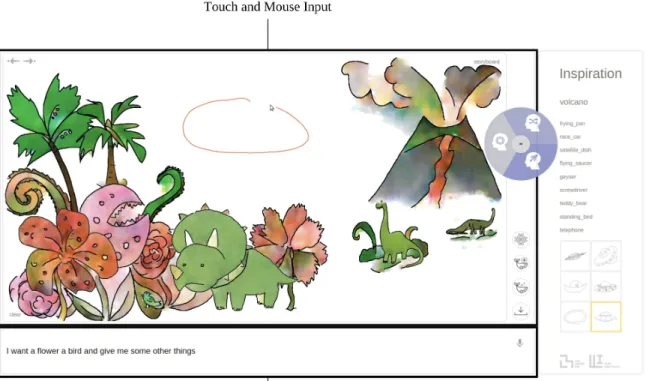
Through perceptual modalities such as sight, touch, hearing, and other senses, hu-mans regularly interact with the world in a multimodal manner. Through the combi-nation of these separate inputs, humans can create a more sophisticated perceptual model of their environment and surroundings [19]. By incorporating modalities such as touch and speech in addition to the standard keyboard and mouse input, individ-uals can customize how they interact with Paper Dreams. For example, a user on a laptop might default to using mouse and text, but a user on an iPad might prefer to draw with a stylus (touch) and speak to the system instead. In both cases, the user makes use of their modality options to create an enriched input into the system. Figure 3-3 shows where the various modalities might be used.
Figure 3-3: While the entire canvas is touch and mouse-responsive, the touch modality is especially crucial for potential users who want to draw on the canvas with a stylus or similar pen-type implement.
Touch
While the user can draw on the canvas with a mouse, the interface is also touch-responsive. This allows direct manipulation in the case of children via finger drawing, or for those who desire a more accurate drawing experience, the use of a stylus on a touch surface (e.g. iPad or drawing tablet.)
Speech and Text
The user can also enter speech or text input into the system; the system then uses natural language processing (via spaCy, a Python-based natural language processing library) to pull the classes closest to what the user requested. For example, the user can request “a forest filled with birds and flowers”, and Paper Dreams will return examples of the classes “tree”, “songbird”, and “flower,” which the user can then add to their drawing in whatever location and at whatever scale they prefer.
3.2.2
Control Buttons
The user interface contains four main control buttons, as can been seen in Figure 3-4. The “Turn On Coloring” button turns the coloring on and o↵, and the “Download” button allows the user to get a PNG version of their current drawing. Two of the buttons (“Sketch Recognition” and “Add New Object”) temporarily resolve issues that will be discussed below.
Sketch Recognition
The sketch recognition model currently works best on a finished sketch; however, Paper Dreams cannot tell when the user has completed their drawing. Therefore, the user must press the “Sketch Recognition” button to allow the system to know when the user is finished with their current sketch. However, as will be discussed in Section 4.1, we are currently working on a partial sketch recognition system that can potentially recognize a sketch before it is completed, removing the need for this button in future iterations of Paper Dreams.
Add New Object
Similarly, Paper Dreams cannot tell when the user is finished with their current sketch and would like to start a new one. The “Add New Object” button that tells the system that the user is ready to start drawing and coloring a new sketch, and to not change the sketches that are already on the canvas.
3.2.3
Serendipity Wheel
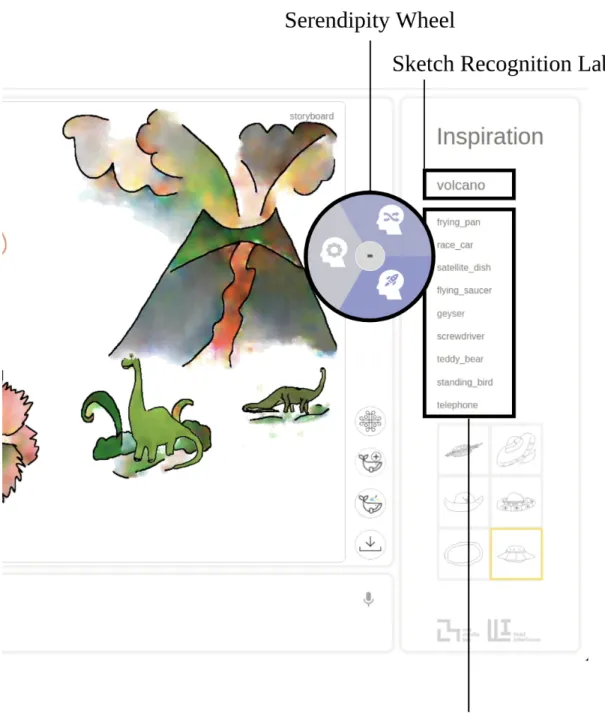
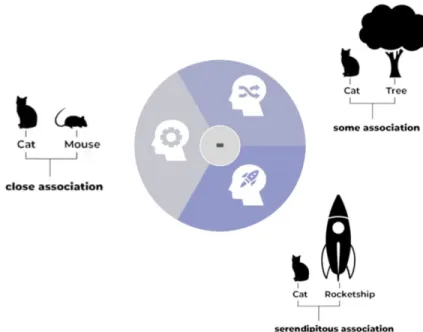
The serendipity wheel, as seen in Figure 3-5, uses the label from the sketch recognition to generate a list of classes that the user can add to their sketch and allows the user to control how closely associated the list is to the current drawing. The three tabs in the wheel in Figure 3-6 correspond to increasing unrelatedness (lighter being closely related, darker being less related.) For example, from the label “cat”, a closely related list could contain [“dog”, “mouse”, “squirrel”] and a relatively unrelated or serendipitous list could contain [“rocket”, “ship”, “teapot”]. These lists are generated from the similarity map (Figure 3-7) for the label; if the user requests classes that are very related to the label, the system will pull objects with high similarity values to the label. The generation of this map will be discussed in Section 4.3.
Figure 3-5: The serendipity wheel controls the related words in the inspiration bar and is generated from the sketch recognized label “volcano”.
Figure 3-6: Serendipity Wheel, with an example of the associations it would suggest for each tab when given the label “cat”.
Figure 3-7: An example of the relationship between “cat” and eight other various classes, with example association regions labeled. High values under each class cor-respond to high “similarity” between the label and that class.
3.3
System Context
Integrated into the user interface and program is the system context: what Paper Dreams believes is the current focus of the user. It could be the most recently drawn
sketch or the most recently typed sentence; the system will process it di↵erently depending on what the user is doing. For example, if the last input were a text input, the system would generate related words from the text rather than from the image on the canvas. If the user were exploring options in the inspiration bar, the program would generate further options from the classes there.
3.3.1
Drawing Capabilities
Paper Dreams supports a variety of drawing capabilities, from an creator who prefers to draw their entire sketch by hand to an individual who might have no experience drawing animals. Users can draw everything from detailed landscapes with a variety of animals and background features to an abstract set of squares and circles. As shown in Figure 3-8, the user can select from the list of related objects, pulling up a database of images from the server that they can then put onto the canvas. They can select the precise location and size for the object by drawing a circle on the canvas. Paper Dream’s database of images is currently composed of images from the Sketchy Dataset [20], the TU Berlin Sketch Dataset [21], and images generated by our team. In the future, the database will be user-adaptable; users will be able to draw and label sketches and classes that do not currently exist in our database. Other users can then use those drawings in their sketches, and we can train and improve our own models based on what users are drawing.
3.4
Canvas Generated Image
As seen in Figure 3-2, Paper Dreams generates an Canvas Generated Image of what is currently on the canvas to pass to the Flask server for processing. However, the Canvas Generated Image need to be either exactly 512 by 512 pixels, or 256 by 256 pixels, for the trained machine learning models; the canvas itself is usually around 2000 pixels large. Because the user can draw at any size, the image from the canvas needs to be scaled and cropped appropriately to fit into the 512 by 512 pixel image. In addition, because the user does not necessarily draw in the center of the canvas,
Figure 3-8: The user can click on any of the related terms, pull a series of images from our database, and add any image from that series to the canvas by drawing a circle in the location and size they would like the image to be.
the image needs to be re-centered in the Canvas Generated Image as well.
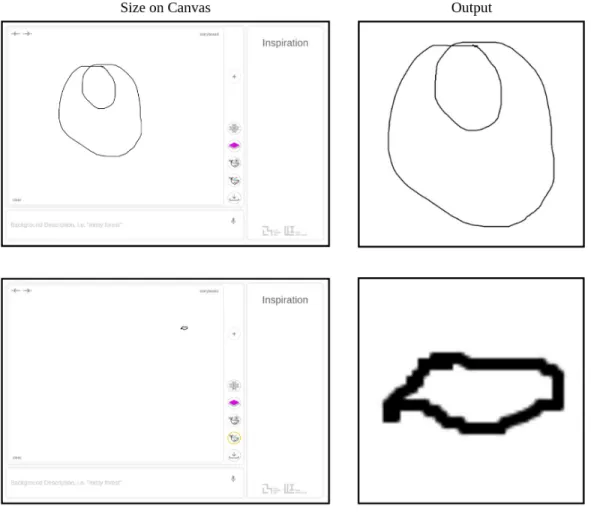
Paper Dreams originally grabbed the image from the canvas directly by calculating the bounds based on the size of the image, and then cropping the appropriate part of the canvas. However, there was an unexpected issue with this approach- the resulting image did not resemble the images on which the sketch recognition was trained. The Paper Dreams canvas returned images with di↵erent line widths (see Figure 3-9) because the line widths were also scaled along with the image itself; however, the sketch recognition training set always had constant line widths (Figure 3-11).
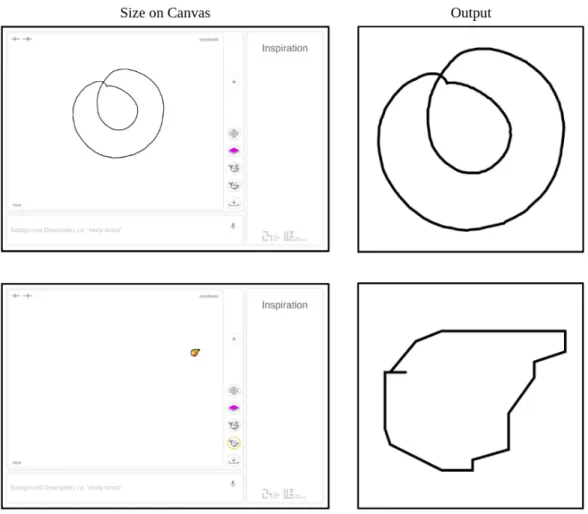
I resolved this issue with an SVG-inspired approach- I saved the paths being drawn, and redrew them onto a constant 512 pixel by 512 pixel canvas as paths, which allowed me to set a custom line width on the 512 by 512 canvas. After analyzing the
Figure 3-9: Canvas Generated Image, using the raw image from the canvas. Because of the especially large di↵erence in scale, the final images vary in line thickness and pixelation.
training dataset for the sketch recognition, I calculated the correct line widths and produced the Canvas Generated Images in Figure 3-10. A comparison of the outputs from both methods to the images from the sketch recognition training set can be found in Figure 3-11.
Figure 3-10: Canvas Generated Image, using the path save method for constant line width. Despite the large di↵erence in scale, the final image has constant line width.
Figure 3-11: The Canvas Generated Image pulled from paths (bottom right) resembles the Sketchy Training set (top) more closely than the images pulled from the canvas (bottom left).
Chapter 4
Integration with Machine Learning
Sketch recognition has been a critical component of Paper Dreams from the conception of this project. By understanding what the user is drawing, the system gathers the contextual information that a↵ects the output of the other integrated machine learning models (as shown in Figure 4-1). Paper Dreams incorporates three routes of intelligent modeling: sketch recognition, style transfer based on the recognized object (adaptive texturization), and generating associated classes via natural language processing (NLP) similarity on the recognized object. The integration of these models is dependent on utilizing information from one model (such as a sketch recognition label) in another (such as texturization) to get an accurate output from the latter model.
4.1
Sketch Recognition
Paper Dreams currently performs sketch recognition on a completed user drawing. Our present recognition architecture is based on the deep learning network Sketch-a-net, which claims one of the highest accuracy rates on human sketches [22]. The Paper Dreams team trained the eight-layer convolutional neural net (CNN) from Sketch-A-Net on the 125 classes in the Sketchy Dataset, and found that we had a 75% accuracy rate across those 125 classes. However, while we can use our architecture for recognizing incomplete or “partial” sketches, the resulting labels are often incorrect
Figure 4-1: From an image of the current canvas, the system can generate the appro-priate label, texture, and associated classes. Note that the sketch recognition a↵ects the output of both other models.
until enough defining features are drawn.
Paper Dreams currently has no way of detecting when the user has drawn enough features for a positive sketch identification. The system temporarily resolves this issue by having the user click a button to call the recognition after they finish their sketch, but the Paper Dreams team is working on incorporating a more sophisticated partial recognition system based on DeepSketch 2 [23] that will allow us to predict what a user is drawing at various stages of completion, which allows for a full real-time im-plementation of sketch recognition. The partial sketch recognition uses information from the order and placement of the most recently drawn strokes to make its pre-dictions; for example, if the head of a horse is commonly the first body part drawn,
then the partial sketch recognition system will associate head-like strokes to a higher probability of being a horse.
In order to generate a training set for this partial sketch recognition architecture, I parsed the SVG images from the Sketchy and TU Berlin databases into a series of “progressive” partial sketches that represent the drawing at these various stages of completion (20%, 40%, 60%, 80%, 100%). Because SVGs are made up of a variety of path elements in the order they were drawn, I split the number of paths into five approximately equally spaced sections, and drew each section progressively onto each image. The final partial sketch dataset contains approximately 400,000 images from 186 classes, some of the results of which can be found in Figure 4-2.
Figure 4-2: A series of five generated progressive sketches, given an original SVG image, for the partial recognition.
4.2
Style Transfer / Adaptive Texturization
Paper Dreams currently supports coloring 186 distinct classes, including the 125 classes from the Sketchy Dataset (a full list of the included classes can be found in Appendix A). It would be impractical to train and store a single style-transfer model for all 186 classes, or a single model for each individual class. Therefore, the classes are separated into fifteen di↵erent models, each encompassing a relevant subset of the classes. For example, “butterfly”, “scorpion”, “hedgehog”, and “cat” are all processed by the “animal” model; other models include “plants”, “buildings”, “transportation”, and “fruit”. The sketch-identified label is associated with a model, and the Canvas Generate Image is processed by that model to return an appropriate texture (as shown in Figure 4-3.)
Figure 4-3: Using the Canvas Generated Image and the label from the Sketch recog-nition, the texturization model passes the image through the appropriate model to get an appropriate texture.
4.2.1
Pix2Pix via ml5.js
Because of Paper Dream’s web-based interface, it would be ideal to use a Javascript-based machine learning framework such as Tensorflow.js that is optimized for deploy-ment on web applications. The ml5.js library [24] is built on top of Tensorflow.js, and contains an implementation of Pix2Pix, a Pytorch-based adversarial net designed for image-to-image translation [25]. However, I found that the images would often ap-pear to “bleed” outside the lines of the sketch, as shown in Figure 4-4. This made it difficult to draw more than one object on the canvas; the textures would often overlap between di↵erent objects. In addition, each model often took a few seconds to load, making it difficult to seamlessly switch from one model from another (and causing a noticeable delay on the user side.)
Figure 4-4: Pix2Pix via ml5.js: Input sketch and corresponding output texture. Note that the texture is not contained within the sketch.
4.2.2
Pix2PixHD
The Paper Dreams team then looked into Pix2PixHD [26], NVIDIA’s Pytorch im-plementation of image-to-image translation. Pix2PixHD uses a deep learning neural network to calculate object boundaries and incorporates that semantic information
into creating more realistic and higher definition textures [27]. Pix2PixHD generates textures with significantly less “bleeding” than Pix2Pix via ml5.js, which we then filter further to remove some of the extra pixels in our current iteration of Paper Dreams. While Pix2PixHD is a significant improvement in texturization (as can be seen Figure 4-3, where there is a wide variety of di↵erent objects in the scene), it unfortunately requires some sort of GPU (Graphics Processing Unit) on either a lo-cal computer or via a cloud-based computing service. This currently limits us to using the application on a computer with a GPU, and prevents us from deploying the application online.
4.3
NLP and Associated Concepts
In natural language processing (NLP), cosine similarity is a classic metric for mea-suring the similarity between two words [28]. Each of the words (or concepts) is first turned into an n-dimensional vector, based on its frequency in the training set of documents. The value of n is dependent on the model used, but generally is in the hundreds or thousands. The similarity between two word vectors, A and B, can then be calculated according to Equation 4.1, where ||A||and ||B|| are the L2 norms of A~
and B~ respectively.
Similarity(A,~ B~) = A~·B~
||A|| · ||B|| (4.1)
Because the speech/text modality in the user interface is build with the spaCy software library [29], we originally used spaCy’s vectorization for each word to calcu-late the similarity between words/labels.
However, there was an issue: spaCy is built to process on the single word level. Approximately 15% of our labels are compound words, i.e. multi-word phrases such as “hot air balloon” that have a single meaning that is more than “hot”, “air”, and “balloon” by themselves. (For reference, a full list of the available classes in the Paper Dreams dataset can be found in Appendix A.) This can have a significant impact on the overall results; the relationship between “mouse” and “cat” is very di↵erent from
the relationship between “computer mouse” and “cat.” The spaCy library would return two values for the relationship between “computer mouse” and “cat”: one for “computer” and “cat” and another for “mouse” and “cat.”
To resolve this, I attempted to use the Natural Language Toolkit (NLTK) library [30], which does support some bi and tri-gram words (such as “computer mouse” and “hot air balloon”, respectively), but found that it was not robust enough to process a significant portion of our compound word classes (as the words have to be defined in the NLTK library.) For example, “t shirt” is not in the NLTK library.
Finally, I used sense2vec [31], a Python library trained on Reddit comments de-signed to extract multiple possible meanings (or “senses”) and subsequent embeddings from the input word/label [32]. Sense2vec was able to calculate similarity values for nearly all classes in our dataset, with the exception of unusual noun phrases such as “person walking.” I then calculated the cosine similarities between the main label and all other classes in order to generate a mapping such as the one seen in Figure 4-5, where 9 is the mostly closely related value and 0 is unrelated. This graph is then used for the serendipity wheel, as discussed in Section 3.2.3.
Figure 4-5: An example of the relationship between “cat” and eight other classes of varying similarity (9 being most closely related). In practice, there are 185 total other classes in each graph for a label.
Chapter 5
Future Work
Beyond our current work on partial sketch recognition, the Paper Dreams team feels that evaluation of and feedback for our current user interface is critical for under-standing how users interact with our system. Therefore, we plan to conduct user studies for in-person feedback and are building towards an online deployment of our web application.
5.1
User Studies
We received approval from the MIT Committee on the Use of Humans as Experi-mental Subjects (COUHES) for working with children and parents and are beginning the process of designing our user study and reaching out to the community. We have run two informal pilot studies on approximately 50 individuals, and found that users overall found Paper Dreams very engaging and interactive. Nearly all users gave positive feedback regarding the automatic coloring and related class suggestions, and many users (approximately 75%) wanted to know whether the application would be available from their own devices. However, we also found that there is room for im-provement in the user interface (UI) design- the images for the control buttons and on the serendipity wheel were often unintuitive for small children, and many users wanted to drag images from our database onto the canvas (rather than drawing a circle to select the size and location of the image).
In our future studies, we hope to address the following questions:
• How quickly can new users learn to use the application? (How intuitive is the interface? Are there potentially confusing UI features that can be improved?)
• What do users think the various buttons do vs what do they actually do? For instance, what do users think is changing when they turn the serendipity wheel?
• Do users feel that they can put ideas onto the storyboard more quickly and easily compared to other methods? If not, what medium would they prefer to use and why?
• What new features would be helpful/useful for users? Is there something they wish they could do, but cannot with the current interface and system?
5.2
Online Deployment
As discussed in Section 4.2.2, the Pix2PixHD high-definition adaptive texturization is currently running locally on a computer with GPU processing power, and thus restricts our web application to running on a local server on that same computer. In order to make Paper Dreams fully deployable and available to the public as a web application, the adaptive texturization must be modified such that it either:
1. Runs on a cloud-based computing service, such as Amazon Web Services (AWS) or Microsoft Azure, with the GPU power to handle a high volume of requests. 2. Runs on the Javascript-based Tensorflow.js, which requires balancing
optimiza-tions in memory and data processing with the quality of the output texture. 3. Makes calls to the local GPU via a web-based API, e.g., WebSockets.
The Paper Dreams team is currently exploring the latter two options, as the former is too cost-prohibitive for our purposes. After the application is available online, we will implement functionalities for users to dynamically add classes and sketches to
our sketch database, thus increasing the size and scope of what Paper Dreams can provide for users and providing more data for us to improve our machine learning models.
Chapter 6
Conclusion
While there has been an explosion of artificial intelligence-based software for art in the last few years, individuals such as children and the elderly often do not have access to these state-of-the-art machine learning models that are currently being developed. Paper Dreams takes one step toward filling this gap by creating an intuitive interface and application that is customized for aiding the user in their visual expression. Users are empowered to quickly create diverse artistic sketches in a collaborative e↵ort between the user and the system, and an integrated set of machine learning models allows for an intelligent response from the system.
In order to facilitate this interaction, I implemented a web-based application for generating complex artistic scenes from a higher semantic level (idea-focused rather than individual command-focused) using HTML, Javascript, CSS, and Flask. I then integrated this interface with background machine learning models, which allows cru-cial information such as labels to be passed from sketch recognition to other ML models for a more accurate system response. To support these models, I generated a variety of data collecting and data processing algorithms, starting with producing a path-based Canvas Generated Image and culminating in the creation of a partial sketch recognition database for use in future research. I explored ml5.js for image-to-image style transfer for hand-drawn sketches and applied a variety of di↵erent natural language processing libraries for determining similarities between classes, thus creat-ing a representation for their relationship that can then be controlled by the user via
a “serendipity wheel.” Paper Dreams is a platform filled with user functionalities, and presents the user with a variety of ways to control and influence their output.
Preliminary studies suggest a strong engagement with users, and the solid po-tential for Paper Dreams as an e↵ective medium for sketching and visual expression. The work performed in this thesis provides a base for future versions of Paper Dreams and for research on the augmentation of user expression and creativity via human-computer interfaces and machine learning.
Appendix A
List of Classes
Table A.1: The 125 Classes in the Sketchy Dataset, used for sketch recognition.
airplane chicken hedgehog pistol songbird
alarm clock church helicopter pizza spider
ant couch hermit crab pretzel spoon
ape cow horse rabbit squirrel
apple crab hot air balloon raccoon starfish
armor crocodilian hotdog racket strawberry
axe cup hourglass ray swan
banana deer jack o lantern rhinoceros sword
bat dog jellyfish rifle table
bear dolphin kangaroo rocket tank
bee door knife sailboat teapot
beetle duck lion saw teddy bear
bell elephant lizard saxophone tiger
bench eyeglasses lobster scissors tree
bicycle fan motorcycle scorpion trumpet
blimp fish mouse sea turtle turtle
bread flower mushroom seagull umbrella
butterfly frog owl seal violin
cabin geyser parrot sedan volcano
camel gira↵e pear shark wading bird
candle guitar penguin sheep wheelchair
cannon hamburger piano shoe windmill
castle hammer pickup truck skyscraper window
cat harp pig snail wine bottle
Table A.2: The 186 Classes in the Paper Dreams Dataset, used in NLP and coloring.
airplane computer monitor ice cream cone raccoon strawberry
alarm clock computer mouse jack o lantern race car submarine
ant couch jellyfish racket sun
ape cow kangaroo radio suv
apple crab key rainbow swan
armor crocodilian keyboard ray sword
axe cup knife rhinoceros t shirt
backpack deer laptop rifle table
banana dinosaur lion rocket tank
basket dog lizard rooster teapot
bat dolphin lobster sailboat teddy bear
bear door megaphone satellite telephone
bee dragon microphone satellite dish tent
beetle duck microscope saw tiger
bell elephant monkey saxophone toilet
bench eyeglasses moon scissors tomato
bicycle fan motorcycle scorpion tractor
blimp fish mouse screwdriver train
brain flower mushroom sea turtle tree
bread flying bird octopus seagull trombone
bridge flying saucer owl seal truck
bulldozer frog palm tree sedan trumpet
bus frying pan panda shark turtle
bush geyser parachute sheep tv
butterfly gira↵e parrot ship umbrella
cabin guitar pear shoe violin
cactus hamburger penguin skyscraper volcano
camel hammer person sitting snail wading bird
candle harp person walking snake walkie talkie
cannon hat piano songbird wheelchair
carrot hedgehog pickup truck space shuttle windmill
castle helicopter pig speed boat window
cat hermit crab pineapple spider wine bottle
cell phone horse pistol sponge bob zebra
chair hot air balloon pizza spoon
chicken hotdog potted plant squirrel
church hourglass pretzel standing bird
Bibliography
[1] L. A. Gatys, A. S. Ecker, and M. Bethge. “Image Style Transfer Using Convo-lutional Neural Networks”. In:2016 IEEE Conference on Computer Vision and
Pattern Recognition (CVPR). June 2016, pp. 2414–2423. doi: 10.1109/CVPR.
2016.265.
[2] Alexander Mordvintsev, Christopher Olah, and Mike Tyka.Inceptionism: Going
Deeper into Neural Networks. url: https://ai.googleblog.com/2015/06/
inceptionism-going-deeper-into-neural.html.
[3] Jennifer Drake and Ellen Winner. “How children use drawing to regulate their emotions”. In: Cognition & emotion 27 (Sept. 2012). doi:10.1080/02699931. 2012.720567.
[4] Colin Greaves and Lou Farbus. “E↵ects of creative and social activity on the health and well-being of socially isolated older people: Outcomes from a multi-method observational study”. In: The journal of the Royal Society for the
Pro-motion of Health126 (June 2006), pp. 134–42.doi:10.1177/1466424006064303.
[5] J. Rusted, L. Sheppard, and D. Waller. “Multi-centre Randomized Control Group Trial on the Use of Art Therapy for Older People with Dementia”. In:
Group Analysis39(4) (Dec. 2006), pp. 517–536.doi:10.1177/0533316406071447.
[6] Barbara Tversky. “Visualizing Thought”. In: Topics in Cognitive Science 3 (2010).
[7] Neil Cohn. “Explaining ’I Can’t Draw’: Parallels between the Structure and De-velopment of Language and Drawing”. In:Human Development (2012), 55:167– 192. doi: 10.1159/000341842.
[8] Ivan E. Sutherland. “Sketchpad: A Man-machine Graphical Communication System”. In: Proceedings of the May 21-23, 1963, Spring Joint Computer
Con-ference. AFIPS ’63 (Spring). Detroit, Michigan: ACM, 1963, pp. 329–346. doi:
10.1145/1461551.1461591. url: http://doi.acm.org/10.1145/1461551. 1461591.
[9] Mark Gross and Ellen Do. “Ambiguous Intentions: a Paper-like Interface”. In: (May 2019).
[10] Matthias Delafontaine, Seyed Hossein Chavoshi, and Nico Van de Weghe. “Rep-resenting Moving Point Objects in Geospatial Sketch Maps”. In: (May 2019). [11] James A. Landay. “SILK: sketching interfaces like krazy”. In: CHI ’96. 1996. [12] Cui-Xia Ma et al. “KnitSketch: A Sketch Pad for Conceptual Design of 2D
Gar-ment Patterns”. In: Automation Science and Engineering, IEEE Transactions on 8 (May 2011), pp. 431–437. doi: 10.1109/TASE.2010.2086444.
[13] Google Brain. Magenta. Version 1.0.1. Jan. 31, 2019. url: https://github. com/tensorflow/magenta.
[14] David Ha and Douglas Eck. “A Neural Representation of Sketch Drawings”. In: CoRR abs/1704.03477 (2017). arXiv: 1704.03477. url: http://arxiv.org/ abs/1704.03477.
[15] Taesung Park et al. “Semantic Image Synthesis with Spatially-Adaptive Nor-malization”. In:CoRR abs/1903.07291 (2019). arXiv:1903.07291.url:http: //arxiv.org/abs/1903.07291.
[16] Matt Burns. NVIDIA GauGAN Example. Mar. 2019.
[17] Armin Ronacher. Flask. Version 1.0.2. May 2, 2018. url: http : / / flask . pocoo.org.
[18] Google Brain Team. TensorFlow.js. Version 1.1.0. Feb. 25, 2019. url: https: //www.tensorflow.org/js.
[19] M. Turk. “Multimodal interaction: A review”. In: Pattern Recognition Lett (2013).
[20] Patsorn Sangkloy et al. “The Sketchy Database: Learning to Retrieve Badly Drawn Bunnies”. In:ACM Transactions on Graphics (proceedings of SIGGRAPH) (2016).
[21] Mathias Eitz, James Hays, and Marc Alexa. “How Do Humans Sketch Objects?”
In: ACM Trans. Graph. (Proc. SIGGRAPH) 31.4 (2012), 44:1–44:10.
[22] Yongxin Yang and Timothy M. Hospedales. “Deep Neural Networks for Sketch Recognition”. In:CoRRabs/1501.07873 (2015). arXiv:1501.07873.url:http: //arxiv.org/abs/1501.07873.
[23] Omar Seddati, St´ephane Dupont, and Mahmoudi Sa¨ıd. “DeepSketch2Image: Deep Convolutional Neural Networks for Partial Sketch Recognition and Image Retrieval”. In: Oct. 2016, pp. 739–741. doi:10.1145/2964284.2973828.
[24] ml5. Version 0.2.3. Mar. 29, 2019.url: https://ml5js.org/.
[25] Phillip Isola et al. “Image-to-Image Translation with Conditional Adversarial Networks”. In: CoRR abs/1611.07004 (2016). arXiv: 1611.07004. url: http: //arxiv.org/abs/1611.07004.
[26] NVIDIA. Pix2PixHD. Dec. 5, 2017. url: https : / / github . com / NVIDIA / pix2pixHD.
[27] Ting-Chun Wang et al. “High-Resolution Image Synthesis and Semantic Ma-nipulation with Conditional GANs”. In: CoRR abs/1711.11585 (2017). arXiv:
1711.11585. url: http://arxiv.org/abs/1711.11585.
[28] Faisal Rahutomo, Teruaki Kitasuka, and Masayoshi Aritsugi. “Semantic Cosine Similarity”. In: Oct. 2012.
[29] Explosion AI, various. spaCy. Version 2.1.3. Mar. 23, 2019. url: https : / / spacy.io/.
[30] Team NLTK. Natural Language Toolkit (NLTK). Version 3.4. Nov. 17, 2018.
url: https://www.nltk.org/.
[31] Explosion AI.sense2vec. Version 1.0.0. Apr. 8, 2018.url:https://explosion. ai/demos/sense2vec.
[32] Andrew Trask, Phil Michalak, and John Liu. “sense2vec - A Fast and Accu-rate Method for Word Sense Disambiguation In Neural Word Embeddings”. In: CoRR abs/1511.06388 (2015). arXiv: 1511.06388. url: http://arxiv.org/ abs/1511.06388.