Final
RFC Archive Database/Files System
Design
November 30, 2001
Prepared by the Archive Database/Files System Design Team
Victor Hom Arleen Lunsford Juliann Meyer James Paul Randy Rieman Steve Shumate Monica Toth
Table Of Contents
I. Executive Summary . . . 4 II. Introduction . . . 5 A. Background . . . 5 B. Purpose . . . 5 C. Scope . . . 6D. Current Approaches Considered . . . 7
1. ABRFC . . . 7
2. APRFC . . . 7
3. CBRFC . . . 9
4. Other - data warehousing . . . 10
III. Design . . . 12 A. Design Objectives . . . 12 B. Hardware . . . 12 1. Accessibility . . . 12 2. System Requirements . . . 12 3. RAID . . . 13 4. Storage Space . . . 13 C. Software . . . 13 1. LINUX . . . 13 2. INFORMIX . . . 14 3. SHEF . . . 14
D. Database Migration/Population Procedures . . . 14
1. Migration . . . 14 2. Population Pathways . . . 15 3. Responsibilities . . . 15 4. Data Sources . . . 16 Local . . . 16 National . . . 17 Other Agencies . . . 18
IV. Database Access . . . 19
A. Methods . . . 19
B. Features . . . 19
C. Limitations . . . 19
D. Security . . . 20
V. Maintenance and Support . . . 21
A. Performance . . . 21
C. Documentation . . . 22
VI. Backup and Recover Strategy . . . 23
A. Introduction . . . 23
B. Informix Backup and Recovery . . . 23
C. Linux File System Backup and Recovery . . . 24
D. Hardware Recovery . . . 25
E. Moving Data Off-Line . . . 25
F. Storage of Tapes and DVDs . . . 25
VII. Development Schedule . . . 26
A. Priorities . . . 26 B. Timeline . . . 27 Appendices . . . 29 A. Requirements Document . . . 29 B. Comparison of Prototypes . . . 30 C. Data Warehouse . . . 35
D. History of Past Archive Efforts . . . 37
E. Constraints and Assumptions . . . 38
F. Technical Specifications . . . 40
Tables Figures 1 Proposed Flat File Directory Structure References . . . 48
Abbreviations & Acronyms . . . 49
Acknowledgments . . . 52
I. Executive Summary
‚ The design team recommends a PC with a Linux operating system and Informix rdbms to support the RFC Archive Database/Files System. This system will reside inside the AWIPS firewall and be part of each RFC’s local AWIPS network. Estimated hardware and software cost for each system is $25,100 per RFC. (Reference Section III.B and C for detailed information.)
‚ After a review of the three prototypes, it was found by team consensus that CBRFC’s Fastetc database satisfied the most features specified in the Requirements Document (Appendix A). Thus, the Fastetc database has been selected for the next team to use as the starting point in the design of the Archive Database/Files System. (Reference Section II.D and Appendix B for detailed information.)
‚ The primary data feed to the archive system’s database will be in parallel to the operational database, IHFS DB. The Archive DB will have its own SHEF parse & post software. Data that is revised in the IHFS DB will be extracted, SHEF encoded and then passed to the RFC Archive DB. (Reference Section III.C.3, D.4 for additional information.)
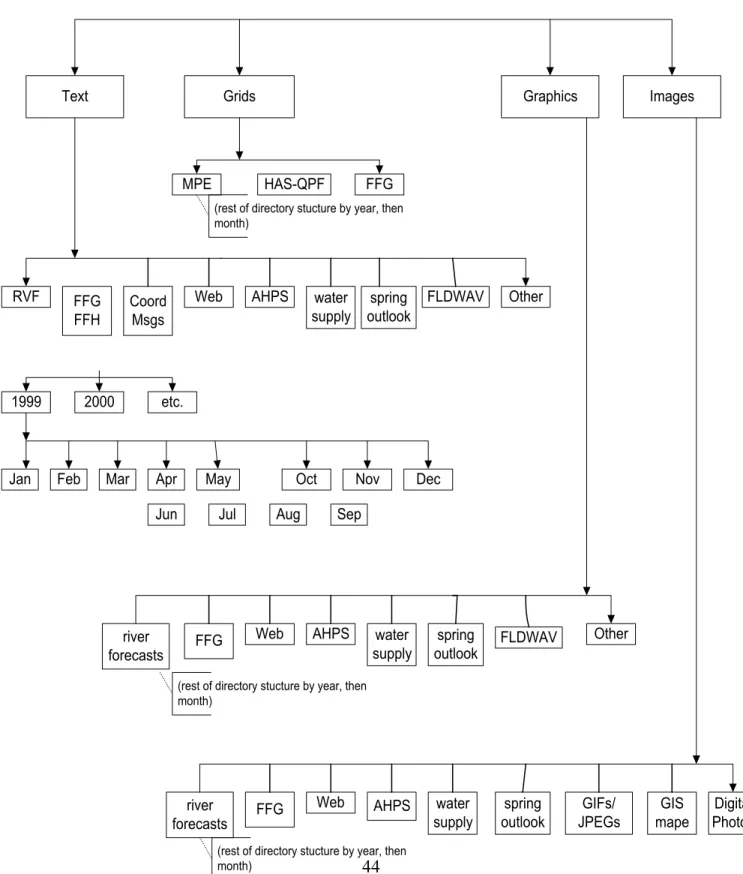
‚ A scheduled script will run under a specified account (oper) on the AWIPS Data Server to move selected flat files from the operational system to the designated location on the archive system. Flat files will be stored under the recommended file directory structure in the Linux operating system environment, illustrated in Fig. 1 of Appendix F.
‚ A suite of applications to allow various display, output and editing of data will be provided with the Version 1 implementation. (Reference Section IV for additional information.)
‚ Scripts will be provided for backup and recovery of both the Linux and Informix environment. (Reference Section VI for additional information.)
1 See Appendix D for history of past efforts.
II. Introduction
A. BackgroundThe current effort1 to develop a design for a common River Forecast Center (RFC)
hydrology archive database grew out of discussions started at the Hydrology Science Conference held in August 2000. The project was selected by Region Hydrologic Service Divisions (HSD) and RFCs as one of the top priority issues for the newly created RFC Development Manager (RDM). As part of the RDM process, a team was formed whose mission was to develop a design for a common archive system for all River Forecast Centers. This team was responsible for the first part of a three part project which includes: (1) design, (2) implementation and (3) operational maintenance of an RFC Archive Database/Files System. During the fall of 2000 several conference calls took place discussing the purpose of this team and the type of information the team needed to collect. The team was formally defined in early January 2001. This team included personnel from the RFCs, Office of Hydrologic Development (OHD) and Office of Climate, Water and Weather Services (OCWWS)/HSD. There was at least one team member from each of the Regions which has an RFC. Team members were/are Donna Page (RDM, OHD), Victor Hom (NERFC & team leader), Kevin Hlywiak (MARFC), Arleen Lunsford (APRFC), Steve Shumate (CBRFC), James Paul (ABRFC), Juliann Meyer (MBRFC), Randy Rieman (OCWWS/HSD), Daniel Urban (OHD/HL), and Monica Toth (OHD/HL).
The first step taken by this team was to survey the RFCs on what an archive would be used for, the information needed to be stored and what interfaces to that information would be needed. The survey responses formed the basis of the Requirements Document (Appendix B) that was completed in May 2001 and reviewed by all of the RFCs in June 2001. The Requirements Document provides the basic backbone of the design for an RFC Archive Database/Files System.
B. Purpose
As stated in the Requirements Document, this Archive Database/Files System will store “data” (observations and model information) that will enable the River Forecast Centers to perform the following:
< verification
< studies to improve current and future products
< channel routing development
< unit graph development
< case studies
< operational forecast assistance
< applied research
< customer inquiry support.
Many of these applications will require additional development (beyond the scope of this project) on either the local or national level.
The design of the Archive Database/Files System will allow data to easily be accessible and transportable across the AWIPS and office LAN environment. In addition, the Archive Database/Files System will give the RFCs a common environment which will be conducive to sharing of information. The system will accommodate the varying needs of each RFC, and be expandable and up-gradable. It will have a backup procedure and disaster recovery process, as well as a change management procedure, to accommodate future needs. The system will be implemented in stages, with the highest priority allocated to providing data and capabilities listed in section VII. A. for the initial release and additional data plus functions for subsequent releases.
The purpose of this Design Document is to define all the components of the Archive Database/Files System, i.e., hardware platform, operating system, relational database management system (rdbms), database design itself and any other core software that needs to be purchased or developed.
C. Scope
The scope of this document is to provide a framework from which the Implementation Team can develop and implement an Archive Database/Files System as described in the Archive Database/Files System Requirements document. The scope of this database/files system is to fulfill those requirements addressed by the Archive Database/Files System Requirements Document. The scope of this project is not to design a Hydrology Weather Event Simulator (WES), to duplicate storage of model data in a D2D/DRT, nor to store data on an event basis, but to allow for the possibility that an archive database could be used as a data resource for a future WES system. This system is also not intended to replace the operational database.
D. Current Approaches Considered 1. ABRFC
The ABRFC archive database consists of both flat files and data within a relational database. The flat file system consists of all products issued by the ABRFC, including text-based and graphic-based products. The directory structure used is by date first, then data or product type. For example, to find a 16Z precipitation image for August 28, 1995, the image would be found under /archives/1995/aug/1hr_images. The file names for most of the files within each directory have a date-time stamp as their filename or in the filename suffix. In the above example, the filename would be ‘08289516Z.gif’. Beginning in 1999, filenames were created with full centuries.
The ABRFC archive relational database uses a subset of tables found in the Integrated Hydrologic Forecast System (IHFS) database on AWIPS. It initially consists of the individual physical element tables and a location table. It could easily be expanded to include other tables from the IHFS database. There were several reasons for doing it this way. One is familiarity with the IHFS database structure. Another reason is that the transfer of data from the IHFS database to the archive database is relatively straightforward. Finally, the ABRFC has several applications that extract data from the IHFS database that could be easily modified to extract data from the archive database. A mirror of the archive database on AWIPS was implemented on a PC running MS SQLServer. This serves as both a backup and another resource for the staff to use.
2. APRFC
The Alaska-Pacific River Forecast Center (APRFC) has a locally developed operational/archive database and data access system called “HydroDisplay”. HydroDisplay was developed to allow archiving and display of observational data
from a wide variety of sources in a uniform manner. HydroDisplay also calculates and archives some derived data and statistics. HydroDisplay does not archive any model or forecast data. APRFC also stores all issued products as text files in a product archive directory.
HydroDisplay was developed when APRFC switched from Prime computers to UNIX-based workstations. Key considerations in the development of HydroDisplay included:
< portability - to be able to move the database and code to a new platform with minimal redevelopment
< quick and easy data storage/retrieval
< easy data editing/entry
< easy modification of stored data - i.e., adding a new station file or adding new data variables to an existing data file.
HydroDisplay uses a command-line driven interface, primarily due to the requirement for BBS access to the program. This requirement has eased in the last 2-3 years, but the effort has not yet been made to add a GUI interface. At the current time HydroDisplay does not have a means of directly displaying graphical data.
File types considered in the development of HydroDisplay included Informix, netCDF, and flat (ASCII) files. While some data (e.g., station data, data notes/observer remarks) are stored in flat files, the observational data are stored in netCDF files. This choice was based on:
< observed station data fit naturally into arrays, and netCDF is designed for easy array storage and manipulation
< low overhead, netCDF files are stored in regular disk space
< ease of programing and debugging programs using netCDF subroutines for C
< experience on the workstations that data retrieval was faster from netCDF files than from the Informix database (subjective experience).
C programs and shell scripts have been developed to store, manipulate, and display the data in the HydroDisplay database. HydroDisplay can be used to (partial list):
< display data from different types of stations in a consistent, tabular format (e.g., data from automated HADS station and METAR weather data)
< display data from one or more stations, and display all variables or a subset of variables
< display data from any specified time period
< enter data (primarily river observations phoned in each day)
< print data tables out or store as ASCII files
< access station location/name information
< calculate and display “climatological” and selected statistical information
< display “yearly” table of data
The observational data is stored in netCDF files organized by year and station. The station files are stored in directories by year. Utility programs allow station files to be added in any year, and allow additional data variables to be added to any station file.
The data notes/observer remarks are stored in flat files organized by year and station. The station location and ancillary data are stored in a flat file and a netCDF file. The data in the netCDF file is pulled from Informix tables.
The “climate” data for each of the preceding 12 months for each station are calculated and then stored in flat files in a separate directory structure.
Utility programs store water-year-to-date data in flat files and a netCDF file in a separate directory structure. Additional utility programs display precipitation data on state maps, enable users to perform some data quality checking, and allow users to calculate stage from slope data and flow from stage data.
Data is ingested into the HydroDisplay database in parallel with data ingestion into AWIPS (with the exception of river observer data, which is entered through HydroDisplay, coded in SHEF, and sent to AWIPS). Data edited in HydroDisplay is encoded in SHEF and sent to AWIPS, but at the current time data edited in AWIPS (e.g., through Mountain Mapper) is not sent back to HydroDisplay.
3. CBRFC
For more than a decade now, the CBRFC has chosen to operate with a database of it’s own design called fastetc. Fastetc is not only an operational database for the CBRFC but an archival database as well. Fastetc differs from the more widely used RFC database in several respects with regard to structure, content, and syntax. The structure of tables storing values include pseudo arrays (i.e., columns named as array elements) to allow for multiple values per record. For example, hourly values are stored in a record consisting of 24 columns, one for each hourly value
within a given day. Advantages are savings in space and retrieval/posting time. Regarding space, the overhead of metadata is reduced by the number of columns stored in a record – in the example of the 24 hourly values per record, the metadata is stored only one time instead of 24 times. As for access speed, normally, data are requested in series, a few days worth of hourly values, for example. With the hourly scenario, if three days of data were selected in a normal form database, the engine would have to process and serve 72 rows. Contrast this with fastetc’s 3 records and you can see where the speed advantage is manifested. Compounding this effect is the increased likelihood that the specific record can be accessed with a prime key search rather than with a (less resolved) indexed search. Disadvantages can include the increased difficulty in ad-hoc queries/modifications and increased complexity of retrieval software. With some exceptions, it has been the CBRFC’s experience that pseudo arrays are worth the costs as long as the arrays will be (nearly) filled. Fastetc also differs by way of content. In particular, a large emphasis is placed on storing the data and processing information that is uniquely created in the RFC environment: the intermediate renditions and versions of data that result from processing and interpretation. To this end, the duration specific values tables have been sorted into three broad categories: raw, processed and calibration, per the paradigm of pre-processed, processed, and historical databases in NWSRFS. Raw data is considered to be that directly observed/reported, as in data coming from a DCP – accumulated precipitation (PCIRGZZ), for example. That accumulated precipitation is processed into incremental precipitation, which is stored for various durations into the processed tables. Along the paths of incremental quality control and application processing, that same value will be assessed and stored many times, identified by a new processing level and quality flag each time. Finally, externally and locally conducted analyses of the same data yielding archive quality renditions are stored in the calibration (historical) tables. Fastetc also has structures for storage of NWSRFS model data – SACSMA and SNOW-17 states, parameters, and definitions, for example. Time-series data from NWSRFS are also stored in fastetc.
Finally, fastetc differs in it's degree of reliance on SHEF as the means of describing the data, to the point that SHEF has gradually been extended to deal with special cases of, for example, numeric TS's (levels), areal/basin data, ESP forecasts, and statistical quantities. Using such extended connotations, the identifiers for stations, areas, segments, groups, and the like have been mapped to SHEF to allow for consistent exchange of information when multiple versions of station sensors, areas, and segments exist.
4. Other - data warehousing
Another option briefly considered for the design of the RFC Archive Database was data warehousing. Data Warehousing has evolved out of efforts to provide a
consistent, consolidated view of various types of data that can be easily accessed by end users within an organization. A data warehouse is designed as a new enterprise view of the data that is related to, but managed separately from, the operational data found in production systems. This balance between operational and decision support systems (DSS) is typically accomplished by applying a set of tools and disciplines that extracts data from its sources in operational data stores and then systematically builds the consolidated enterprise view. Important design issues to consider in building a data warehouse include data sources, data loading procedures, data storage, query tools, and metadata.
The data warehouse approach was originally explored to allow for a "completeness check" during the gathering of requirements for the Archive Database. It also seemed to help provide a life cycle view to the movement of data that will be needed for the archive project, and to raise the awareness that some commercial-off-the-shelf (COTS) products could be found in the marketplace that might have a potential fit in a warehouse operation.
After some consideration and discussion within the Archive Database Design team, the Data Warehouse approach was not chosen for two primary reasons. First, since financial resources are currently constrained, it was considered unlikely that the funds to develop a data warehouse for all the RFC's would be available. Second, since several of the other alternatives considered have already demonstrated some success in fulfilling the requirements of the Archive Database/Files System, it was considered more effective to build upon the existing solutions. For further details, see Appendix C.
III. Design
A. Design ObjectivesBecause of the significant number of requirements which fastetc already fulfills, the CBRFC prototype was chosen as a starting point for the design of the Archive Database/Files System. Though fastetc encompasses a great deal of work which will not have to be redone, there are some requirements which are not met by fastetc. Some modifications will be necessary to satisfy all requirements for all RFC’s. The initial design and initial implementation of the Archive Database/Files System will account for all requirements identified at the highest priority with additional requirements being included in subsequent releases.
B. Hardware
1. Accessibility
The system will be installed on the AWIPS twisted pair Ethernet network via a 100 Mbit Plaintree card (cost: <$1000). For maximum system performance, the database should exist on a machine that does nothing else in order to eliminate I/O contention. The system will be accessible via telnet over the network and/or transparently through applications running the X-windows environment of AWIPS. 2. System Hardware Requirements
Recommended minimum system hardware:
< Dedicated system running Linux Red Hat 7.1
< Pentium III 1.13 GHz dual cpu capable, single cpu installed
< 1 GB RAM
< RAID 5 capable (Ultra 160 SCSI) (e.g. PERC3-DI), 64 bit PCI bus
< Four 36 GB drives (with RAID 5, 108 GB available), capable of six
< 10/100 Ethernet adapter
< DDS-4 tape drive (DDS-4 was chosen for compatibility with existing AWIPS tape drives.)
A system with the above specifications costs $6100.00 from Dell’s web site (Dell PowerEdge 2500SC, August 27, 2001)
3. Redundant Array Independent Disks (RAID) A. What is RAID-5?
Raid-5 stores data on 75% of a drive and uses the remaining 25% to store what are called “parity bits”. These “parity bits” allow for the reconstruction of data on other drives should the data become unavailable on the primary drive. The “parity bits” for an individual drive are written across the other drives on the system. Raid-5 allows for a single drive to fail at any given time. In a multiple disk failure situation data will be lost, thus the importance of having a backup strategy.
B. Why RAID? Why run with no logging?
Through field experience with INFORMIX, transaction logging has been deemed too costly in terms of maintenance and performance. Without logging, data held in memory buffers may be lost upon power interruption, for example, but the team notes that use of UPSs will minimize this risk and any one single piece of data is usually of very little importance. Additionally, the Linux operating system has proven to be very stable, drastically reducing the likelihood of losing buffered data because of a machine check. In contrast, the entire store of data is extremely important. Hard disk failure is the single most likely cause of losing the entire store of data. Frequent tape backups minimizes this risk but at the cost of significant system resources. Although occasional tape backups are recommended, RAID minimizes the risk of disk failure on a continual basis without significant system impact.
4. Storage Space - Why So Much Disk Space?
It is recognized that the specified available 108 GB is considerably more than the current AWIPS allotment of 16 GB. But even this copious amount of disk space will eventually be used in the absence of purging. The team recognizes the need for intelligent purging software (e.g. software that deletes hydrologically insignificant forecasts). Observation data will not be purged. This amount of disk space will essentially buy time for this software to be developed/implemented while allowing archiving to begin.
C. Software
Given the choices of Windows 2000 and Linux, Linux was chosen because of corporate knowledge of Unix. Linux is very similar to HP-UX in terms of system administration and user interface. The team also recognized the direction of the AWIPS program in moving toward Linux as a solution.
2. Why INFORMIX?
Along with corporate knowledge, economy of effort was considered here. The existing base of database applications will require little to no modification to work with the archive database. This is in contrast to the significant modifications that would be required had we chosen a different database. For example, MySQL was examined and found to be superior in terms of speed and efficiency of disk space but was dismissed because of the reasons listed above.
The database will be accessible from any machine/OS on the network through the INFORMIX SERVER environment, enabling applications running on HP’s to access the INFORMIX database on this Linux machine. INFORMIX 9.20 with development versions of esql-c and isql, 10 user license/1 cpu (cost: approx. $18K)
3. Will SHEF parsers/posters be available?
SHEF parsers/posters will reside locally (compiled under Linux).
D. Database Migration and Population Procedures 1. Migration
The RFC Archive Database/Files System will contain scripts to migrate certain static Informix tables contained in the IHFS database, such as those used in Hydrobase and in particular, the location table. The implementation team shall identify the necessary tables to be migrated into the Archive database. The web-link (http://205.156.54.206/er/nerfc/ archive/workshop2 /DB-Structure/id1.htm) contains a list of all Informix tables and their structures used in IHFS and other databases AWIPS Build 5.2.2 will contain these scripts, as they are the key building blocks to the RFC Archive Database/Files System.
Developing a data migration plan to move existing archived data into the Archive Database/Files System for each RFC is beyond the scope of this team. There are different databases and/or archiving approaches in use at each RFC. The data migration plan will be the responsibility of the individual office. A survey of methods the RFCs are currently using to archive data is listed in Appendix F Section E and provided to the RFCs for facilitating coordinated development efforts to migrate existing local archives into RFC Archive Database/Files System.
2. Population Pathways
For hydrologic data, the primary data population pathway into the RFC Archive Database/Files System will be through AWIPS. Incoming unprocessed data will be sent in parallel to the data server (DS) and RFC Archive Database workstation. Unprocessed data on the RFC Archive Database/Files System shall be processed with Linux versions of shef and hdp decoders, similar to those used in the Hydro Ingest processes on the DS. Processed data shall be posted simultaneously to the “raw” and “processed” RFC Archive Databases.
A second pathway will handle the transfer of edited data from the operational IHFS AWIPS database into the RFC Archive Database. This feed will occur through an FTP process, where data for reposting will be transferred to the RFC Archive Database/Files System workstation for reprocessing into the RFC Archive Database/Files System.
A third pathway, similar to the second, shall handle the transfer of flat files across the AWIPS LAN from the application and data servers, such as the text products, grids, graphics, or images. These flat files could be stored in a directory structure, recommended in Appendix F - Technical Specifications.
A fourth pathway will be the posting of data from various local, national, and other sources of data. Version 1 will not contain software, utilities, or tools to handle this pathway. Since there are many sources of data, such as USGS, COE, NRCS, BLM, and NCDC, the means to harness these data will be addressed by the OCWWS/OHD Hydrology Requirements Process or Local/Regional Applications Development Process. In the Requirements Process or Local/Regional Applications Development Process, the RFCs will identify key sources of data, important to the RFC business processes, for importation into the RFC Archive Database/Files System. From this identification, OCWWS/OHD could direct their attention and resources to develop the proper tools to filter, check, clean, and import the data into the RFC Archive Database/Files System. However, data from the existing National Verification DB will be migrated to the RFC Archive Database.
3. Responsibilities
The RFC Archive Database Implementation team will work with AWIPS to develop a process which concurrently funnels hydrologic and hydro-meteorological data and files to the AWIPS Data Server and the RFC Archive Database/Files System workstation, as briefly discussed in the first three pathways. The team shall work with OHD to develop software to decode and post the data into the RFC Archive Database/Files System, as described in the primary pathway. In addition, this team shall develop processes which pass data that has been edited, transformed, accumulated, or aggregated on the AWIPS data server’s (DS) IHFS database into the local RFC Archive Database, as referred to in the second pathway. The team
will deliver a file structure to accept AWIPS texts, grids, graphics, and images with procedures to transfer these items into the RFC Archive Database/Files System flat files. The team’s contributions will culminate in the delivery of products to be included with AWIPS Build 5.2.2.
RFCs shall be provided an opportunity to beta-test version 0 of the RFC Archive Database/Files System and communicate any software design issues with the Implementation team. Version 0, along with documentation written by the AWIPS Implementation team, will be distributed with AWIPS Build 5.2.2.
When implemented at the RFCs, the RFC Archive Database/Files System Focal Point and Development Operations Hydrologist (DOH) shall work with the Electronic System Analyst (ESA) to ensure that all hardware, software, and network gear, have been delivered in working conditions, prior to AWIPS Build 5.2.2. Those RFCs performing the beta-test of version 0 shall be responsible to setup the workstation and software by April 1, 2002. During AWIPS Build 5.2.2, national software supplied through AWIPS shall be loaded onto the RFC Archive Database/Files System workstation. Configuration and software adjustments shall also be made on the AWIPS data servers, during this build upgrade.
Data not supplied via the Hydro Ingest will be captured in later versions, as identified through the OCWWS/OHD Requirements Process or Local/Regional Applications Development Process. The Implementation Team will not port existing dynamic data from the RFC’s collected archives into the RFC Archive Database/Files System, however, the design team has recommended that RFCs with similar systems/approaches pool their resources to migrate their archive data to the RFC Archive Database. The survey of methods the RFCs are currently using to archive data is listed in Appendix F Section E. It was provided to the RFCs for facilitating coordinated development efforts.
In the operational setting, the RFC Archive Database Focal Point will be responsible for insuring that data is reaching the archive database/file system and will take steps to restart the population should the data flow stop. The RFC Archive Database Focal Point will also attempt to determine what data failed to reach the RFC Archive Database and then retrieve this data from the best possible source.
4. Data Sources
Information in the database will come from many sources and potentially have varying characteristics which may require different methods for populating to the Archive Database/Files System. Sources of data include locally generated data, nationally transmitted data, and supplied data from other agencies.
Whenever possible, data will be fed to the Archive Database/Files System in parallel with the AWIPS ingest feed and immediately written to both the raw and processed
databases. The raw data in the Archive Database/Files System is essentially the values that have not been derived, edited, or transformed by the RFC. The processed data in the Archive Database/Files System contains all data which have been transformed from its original, such as erroneous DCP transmitted river stages that have been corrected. A processed table is considered the “latest/best” edited table. Essentially, internal data collected by the National Weather Service to handle the RFC’s needs will be found in both raw and processed “latest/best” tables, such as two sets of precipitation and stage tables.
Data which did not originate from an ingest process, previously described as the first pathway, shall be pulled from AWIPS operational database tables and also placed in the processed database. It is possible that some values may only be found in a processed table, in particular data from outside sources, for example, a CD-ROM of USGS data or aggregated data such as monthly tallies.
a. Local
Data that are locally derived include:
< locally entered and/or edited observation data, including but not limited to river stages called in by observers
< other COOP data that is received and processed by a local system (i.e., ROSA, LDAD, local applications)
< automated gauges called locally (e.g. through LDAD or another system)
< locally generated forecasts
< model states.
Local data can be considered the data which has originated from a local RFC or respective WFOs within an RFC’s HSA and in which that RFC has the responsibility to locally store it for future research and development purposes. It is likely the data, if not stored, will not be readily available from any other backup channel or sources. In some cases, it may be possible to feed the AWIPS IHFS database and the Archive Database/Files System in parallel as local data is received via AWIPS ingest process. In other cases, it may be necessary to extract the data from the local AWIPS IHFS or NWSRFS database and migrate the data to the Archive Database/Files System. If there is the potential for local data that is not stored in AWIPS (data notes/observer comments might be an example), subsequent versions of the Archive Database/Files System software needs to consider how this data will
be entered into the database. Ideally, ad hoc data will be processed through the shef ingest which will guarantee its inclusion in a pathway to the RFC Archive Database.
b. National
Observation data that is received from national sources includes:
< METAR weather observations over the AWIPS Satellite Broadcast Network (SBN)
< HADS/RAWS data over the SBN.
This data will be fed into the Archive Database/Files System in parallel with its feed into AWIPS, when possible. This data shall be found in both the processed and raw tables. Data derived or modified from its original value and stored in IHFS shall be extracted from AWIPS into the processed tables.
Additional data available from national sources may include the current thirty year climatological means and historic data from NCDC. These data will be fed into the database using utility programs and likely found in various sets of processed tables. c. Other Agencies
Observation data that is obtained/received from other agencies includes:
< Published USGS data
< Other historic data such as is available from NRCS, BLM, USACE, USBR,...
These data will also likely be fed directly into the Archive Database/Files System using utility programs and written to various sets of processed tables.
IV. Database Access
A. MethodsDatabase access will be a combination of direct access through Informix (SQL) and programmed interfaces.
B. Features
Access into the Archive Database/Files System is described by the “Functional-Dynamic” and “Interface” sections of the Requirements Document. These sections list the requirements for data input, output, editing, transformation, accumulation/aggregation, characterization, and analysis. The initial release of the Archive Database/Files System will include most, but not all, of the requirements listed in the Requirements Document.
C. Limitations
Limitations will depend on the access method and the release version of the Archive Database/Files System. Direct access through INFORMIX will be limited by users familiarity with the INFORMIX interface, SQL, and the database structure. Limitations for access via various programmed interfaces will depend on the particular program. Most of the database access features, listed under the Interface requirements (IN), will be available in the initial release, but a few features will not be available until later releases.
Another potential limitation is the relationship between the existing NWS firewall technology and ready access through each office LAN. For example, currently for NERFC, the desktop PCs are outside of AWIPS and it is inconvenient to get data through the firewall. Data users must currently ftp the data to a common computer to which AWIPS has access and can be seen by the LAN. To improve access (A) the desktop PCs need to be inside the AWIPS firewall,or (B) the AWIPS firewall should be relaxed to the office IP subnet, or (C) the AWIPS firewall should be relaxed and restrictions increased at the regional firewall. APRFC remains concerned that an RDBMS may not be the appropriate method to efficiently store long periods of observational data. APRFC is also concerned that using an RDBMS to store the archived observational data may make retrieval of the data into programs unnecessarily complicated. Staff and programs at APRFC most often use data in a block of time (i.e., a year, a month, a day). This action is very easily performed in a program when the data is already stored in an array structure related to these time periods. Depending on how the RDBMS is set up, access to a simple block of data from a station could be much more complex.
However, APRFC also recognizes the need to provide a baseline National Archive Database to the field in a reasonable amount of time. APRFC therefor agrees that the initial implementation of a National Archive Database should be based primarily upon the FASTETC model. APRFC requests that after the initial implementation, the database/file system be objectively reviewed to determine if the originally selected storage solution for each data type (observational, model, forecast, etc.) is the most reasonable solution, so that any necessary changes can be made while there is relatively little data to migrate to a new format.
D. Security
Database security will be provided by use of Informix database and table permissions, Linux owner/group/user permissions, and program access.
Informix permissions will be set so that certain tables and indices cannot be altered or deleted. In most cases the data in the tables can be inserted, updated, or deleted; an exception would be the raw data tables, which should only have insert permissions. Any field level limitations/security will be controlled programmatically.
Flat file security will be handled through either program access and/or Linux owner/group/user read/write/execute permissions.
V. Maintenance and Support
A. PerformanceOne can classify performance into two needs: design performance criteria and acceptable operational performance. The latter can further entail how to operate/maintain the system, as indicated in the documentation at an acceptable level, before system repair or overhaul is needed, and what are the minimally acceptable restore times to return a system to a performing level.
The RFC Archive Database/Files System should be structured to allow for efficient retrieval of data. The performance/speed of queries for data is expected to vary according the different data categories and data set requested. Current expectations of RFCs are that response times should take from a few seconds for simple tasks, a few minutes for moderate tasks and several minutes for difficult tasks. Further details on minimally acceptable standards shall be developed and cultivated from the RFCs, during the beta-test of version 0, and applied on Version 1 until performance standards have been met. Since the RFC Archive Database/Files System workstation will be fed with a continuous source of power via a Universal Power Supply (UPS) and equipped with RAID technology, it is anticipated that its performance and ability to store data should be fairly reliable. If system performance and degradation continue to exist despite carrying out the maintenance chores spelled out by the Implementation team or those recommended by AWIPS, performance upgrades should be requested through OCWWS and OHD in concert with other RFCs through the AWIPS program.
Any performance problems which lead to a failed system shall be restored to minimal system operations within 6 hours, and full operation within 24 hours. If the system is delivered with a fail-over backup, the primary system must be restored to full operations within 5 business days.
B. Maintenance Plan
After the delivery of these products, the RFC Archive Database/Files System Focal Point and DOH shall be responsible to report any software problems and discrepancies to the AWIPS Network Control Facility (NCF). If the problem is deemed to be software, it shall be handled by the OCWWS/HSD RFC Field Support Group. The database shall be maintained by the local RFC, in accordance with guidance provided in the documentation supplied by the Implementation team. Changes to the system such as adding storage capacity or a technical refresh of the operating platform shall be coordinated with OCWWS, OHD, and/or the NCF.
Part of the normal responsibilities of the RFC Archive Database/Files System Focal Point will include making sure that the Informix tables are kept orderly and optimally efficient for queries. The responsibilities will also include making sure backups are being created and stored, such that recovery of files would not be compromised.
C. Documentation
The Implementation team shall develop a document for the RFC Archive Database/Files System intended for the needs of hydrologic modelers, hydrometeorologists, application developers, and the end users. This document shall include a complete data dictionary and data relationship diagrams and/or definitions, which specify required and optional directory structures, files, formats, and tables. It shall describe in detail the procedures and software, used to move data and decode data from its AWIPS sources into the RFC Archive Database/Files System. In addition, it shall identify and describe any software written or COTS software purchased to provide quality control or querying interface with the database, in particular on how it interacts with the RFC Archive Database/Files System. Subsequent teams shall keep this document current and available through electronic and paper media, as new utilities are added.
VI. Backup and Recovery Strategy
A. Introduction
There are several types of problems that can happen to a system. These are:
< user error
< system-staff error
< disk drive failure
< system-wide failure
< software failure
< electronic break-ins, vandalism, etc.
< natural and man-made disasters
When designing the backup plan, one must determine which of these problems will be covered but also must have an understanding of the hardware, operating system, and Relational Database Management System (rdbms) that will makeup the RFC Archive Database/Files System. This section assumes the hardware and software recommended in section III, parts B and C. The backup plan described in the following sections will take into account disk drive failure, system-wide failure, software failure and to a limited extent user error and system-staff error. It is assumed that due to the system configuration and the fact that the system will sit behind a firewall that the problem of electronic break-ins, vandalism, etc will be adequately taken care of through that avenue and, therefore, is not specifically addressed here. Natural and man-made disasters such as tornados, hurricanes, flooding, earth quakes, or plane crash will not be addressed by this plan. It is assumed that whatever plan each facility has in general for all its computer systems will cover these types of problems. Since the goal is to lose no data, the data/file population strategy will need to be taken into account when determining the frequency for the various backups.
Once a backup and recovery plan is designed and all the associated scripts have been written, testing of both the backup and recovery procedures must be done prior to incorporation in to AWIPS Build 5.2.2. It does no good to be creating backup tapes on a routine basis, if when a restore of lost data is required, if backup tapes are unusable or important information about system configuration was not documented.
B. Informix Backup and Recovery 1. Backups
A script will be provided to each RFC to enable them to do a level-0 archive of the Informix RDBMS. Although initially the Informix IDS may only need one tape to do this level-0 archive, eventually it will require multiple tapes. It is recommended that
a level-0 archive be performed at a minimum of once per week. An office may choose to perform backups at a more frequent interval. This should adequately protect for rdbms failures, single disk drive failure and most other hardware failures. It will not always provide protection from user errors and system-staff errors.
A. Why ontape command and not the onbar command?
The collective experience in the NWS is with the ontape command. It is the simplest and easiest of the two commands and does not require the Informix Storage Manager to be used.
This type of backup allows for the restore of the entire rdbms or individual dbspaces. Ontape does not allow for the restore of individual tables. To prevent the accidental dropping of tables/databases, it is recommended that in the configuration of the database and its tables, that extensive use of Informix permissions be utilized. In addition a script should be provided that will allow an office if it so desires to perform another type of Informix backups utilizing the onunload command. This command should NOT be used in place of a level-0 archive using the ontape command.
B. Why onunload command and not the dbexport command?
Although dbexport is probably more familiar to NWS personnel, it has several disadvantages over onunload. Dbexport requires an exclusive lock on the database, converts the data to ascii text file format and can be very slow. Onunload requires only a shared lock, similar to other backup commands and writes the data out in binary format and because of how it performs this write is much faster.
2. Recovery
A set of scripts will be provided to each RFC to enable either a full restore from the backup tapes or a partial restore from tape. Scripts should take into account restore from both types of backups mentioned in the previous section. In the case of a partial restore, some editing of the script will be required to target the database, dbspace and table of interest. It is highly recommended that the procedure take into consideration the information provided in the book “Unix Backup & Recovery, Chapter 14 Informix Backup and Recovery”, in particular pages 428 - 454,
C. Linux File System Backup and Recovery 1. Backups
once per week. An office may choose to perform backups at a more frequent interval. There are three different commands within Linux which can be used to do backups, tar, cpio and/or dump. Each has it own strengths and benefits. The person developing the backup procedure will determine which of these will be used. Initial comparison of the three native utilities indicates that for ease of use and speed that the dump command may be preferable. In addition to routine backups up of files, the metadata, i.e., how the system is physically configured for the Linux system needs to be documented. This type of information will be needed in the case of a system wide failure.
2. Recovery
A script will be provided to the RFCs to enable a recovery of file(s) from the backup tapes. The Linux command used for recovery will be dependent upon the command chosen to perform the backup. If the dump command is used for the backup script, then the companion command, restore, will be used to retrieve files and directories from the backup tapes.
D. Hardware Recovery
A recommendation was made that the system be available 24 hours X 7 days and a restoration within 6 hours would be ideal for any crisis but is dependent on the resources at each local office. Hardware recovery may also be influenced by the program under which the original hardware is purchased. At this time, efforts are under way to procure and maintain the hardware under the AWIPS Program.
E. Moving Data Off-Line
Two different media are available for moving data off-line, DVD and tape. Scripts will be provided to allow an office to move flat files off-line to the medium of their choice.
F. Storage of Tapes and DVDs
Make sure your media is clearly labeled and stored properly. It will be difficult to do a recovery if you don’t know where or which tape(s) to use. A fire-resistant cabinet should be available for storage of tapes and DVDs. But remember that even with a fire proof cabinet, this protection is only temporary and does not protect against long term exposure to high temperatures.
VII. Development Schedule
A. PrioritiesThe first release must include capabilities already available at RFCs which have local archive databases in use. The Version 1 Archive Database/Files System will have the capability to store the following type of information (Reference the RFC Archive Database/Files System Requirements Document, Appendix A).
For the relational database: FS-1
1) Point Data, sections a-e, with a few exceptions for sub-bullets under a & d
2) Areal Data, sections b-f FS-2 FS-3 FS-4 FS-5 FS-6 FS-8
For the flat file storage: FS-1
3) Model Data, sections a & c 4) Text Products 5) Grids 6)Graphics 7) Images Applications to be provided: FD-1 1. Parse/post SHEF 2. Parse/post DATACARD 3. Manual data entry FD-2 Editing options 2& 3
FD-3 Transformation options 2-5
FD-4 Output options 1, 2 a, b, d & e, 3, 5, 6, 8, 9 FD-5 Accumulation/aggregation
B. Timeline
Having been identified as a requirement for AWIPS Build 5, the Archive Database/Files System is to be delivered with AWIPS Build 5.2.2. This was a critical factor in the development of this timeline.
Prioritization criteria:
< consideration of requirements document
< amount of work
< importance to entire scheme
Tasks and deadlines in prioritized order:
Version 0 (the intent is to first get a data structure in place and begin migration of maintenance data):
< Develop inventory of tables Nov 1 2001
< Develop schema and implement Dec 15 2001
< Implement flat file storage plan
< Develop maintenance migration plan/software Feb 1 2002
< Develop/implement SHEF parsers/posters Feb 15 2002
< Develop/implement DB maintenance (housecleaning) utilities – including flat file maintenance Mar 1 2002
< Deliver Version 0 of archive DB Apr 1 2002
Version 1, a more complete version, will include: For the relational database:
< everything in Version 0
< Incorporate the currently used vfy_db For applications:
< Data ingest (D/I) data display software
< D/I data extraction software
New features to be part of subsequent versions: For the relational database:
FS-1 item d, various statistical data
FS-7 Storage of ESP-ADP information and time series For applications:
FD-2 1 full quality control editing capability FD-3 Transformation, item 1
FD-4 Output, item 4 FD-6 Characterization FD-7 Analysis
Appendix A - The Archive Database/Files System Requirements Document
The Archive Database/Files System Requirements Document may be viewed at
http://205.156.54.206/er/nerfc/archive/research/require1.html. This document has been previously distributed and reviewed by the field offices.
Appendix B - A Comparison of the Prototypes Considered
An analysis was done to determine which of the three considered prototypes met the most of the requirements listed in the RFC Archive Database/Files System Requirement Document.
(See also http://205.156.54.206/er/nerfc/archive/prototype/default.htm)
Requirements Description ABRFC APRFC CBRFC 1.0 Functional
1.1 Structural
FS-1Data types
1) Point Data obs P
2) Areal Data Y P 3) Model Data Y P 4) Text Products Y fcsts 5) Grids Y 6) Graphics Y 7) Images Y
8) Outside the scope
FS-2 Y ~ Y FS-3 Y Y Y FS-4 Y P FS-5 ~ Y FS-6 Y Y FS-7 Y
FS-8 Y FS-9 1.2 Dynamic FD-1Input 3 Y Y FD-2Editing Y P FD-3Transformation Y P
FD-4Output (reporting/querying) 1, 2, 3, 9, 10 all but graphics P
FD-5Accumulation/aggregation Y Y- w-y-t-d FD-6Characterization ~ P FD-7Analysis P 2.0 Performance Requirements PE-1 Y Y PE-2 Y Y 3.0 Interface Requirements IN-1 Y Y IN-2 Y
IN-3 Y IN-4 Y P IN-5 ~ Y IN-6 Y IN-7 Y Y - disk,tape Y 4.0 Resource Requirements RS-1 RS-2 RS-3 RS-4 5.0 Verification Requirements VE-1 6.0 Acceptance Testing Requirements
AT-1 AT-2 7.0 Documentation Requirements DO-1 0 DO-2 DO-3 DO-4 DO-5 DO-6 DO-7 8.0 Quality Requirements QU-1 Y Y QU-2 Y QU-3
QU-4 QU-5 Y 9.0 Reliability Requirements RL-1 RL-2 RL-3 RL-4 RL-5 10.0 Maintainability Requirements MA-1 MA-2
Notes: Y means Yes, the prototype does satisfy the requirements. Y-W-Y-T-D means Yes, Water Year to Date
N means No, the prototype does not satisfy the requirements.
P means possible, the prototype possibly satisfy requirements in it entirety but missing.
~ means possible, the prototype possibly satisfy some of the requirements but not its it entirety but missing.
Appendix C - Data Warehouse Discussion
Another option briefly considered for the design of the RFC Archive Database/Files System is an approach known as data warehousing.
The concept of Data Warehousing has evolved from efforts to provide a consistent, consolidated view of various types of data that can be easily accessed by end users within an organization. Because the various data sources used in operational systems are often inconsistent with one another, it is often necessary to first design a new consolidated view of the data which resolves any discrepancies found in the operational data stores, before the data warehouse can be built.
Thus, the data warehouse is designed as a new enterprise view of the data that is related to, but managed separately from, the operational data found in production systems. This balance between operational and decision support systems (DSS) is typically accomplished by applying a set of tools and disciplines that extracts data from its sources in operational data stores and then systematically builds the consolidated enterprise view.
Important design issues to consider in building a data warehouse include : Source of Data
All sources of data from both inside and outside the organization need to be identified and analyzed for their compatibility with the consolidated enterprise view of the data model. Mapping strategies need to consider any differences in the data models and how best to provide the warehouse with consistent quality for both data and metadata.
Data Loading Procedures
Warehouse loading procedures must consider whether all or parts of certain data sources are to be included in the warehouse. Rules for extracting subsets of data from it's source, and rules to either transform the data structures or to improve the data quality must be identified explicitly. Loading and reloading procedures for warehouse data must consider timing, frequency and efficiency.
Data Storage
Warehouse data may be either consolidated in one central location or distributed across a network. Raw warehouse data is typically stored in simple relational database tables. More complicated, multi-dimensional views of the raw data may be either calculated on-the-fly each time they are needed, or stored in derived tables
and views for more convenient access. Some consideration must also be given to managing the "life cycle" of the data to determine if any data is ever to be considered obsolete, and as a result, purged from the warehouse.
Query Tools
End-users must be provided with adequate tools and training to properly access and interpret the data found in the data warehouse. Additional tools may be needed to develop in-depth analysis of the data or to search the archived data for historical patterns.
MetaData
Precise definitions of the data must consider all data elements at the source, explicit rules for loading and/or transforming the data, and accurate definitions for all structures found in the warehouse.
The data warehouse approach was originally explored to allow for a "completeness check" during the gathering of requirements for the Archive Database/Files System. It also seemed to help provide a life cycle view to the movement of data that will be needed for the archive project, and to raise the awareness that some commercial-off-the-shelf (COTS) products could be found in the marketplace that might have a potential fit in warehouse operation.
A quick survey of vendors promoting their products at a recent data warehouse conference indicates that nearly 100 vendors claim to have some form of data warehouse product. This group includes major industry names such as IBM, Microsoft, Informix, and Oracle, as well as more specialized vendors such as MicroStrategy and Arbor. An in-depth investigation of current offerings in the marketplace has not been conducted.
After some consideration and discussion within the Archive Database Design team, the Data Warehouse approach was rejected for two primary reasons. First, since financial resources are currently constrained, it was considered unlikely that the funds to develop a data warehouse for all the RFC's would be available. Second, since several of the other alternatives considered have already demonstrated some success in fulfilling the requirements of the Archive Database/Files System, it was considered more effective to build upon the existing solutions.
Appendix D - The History of Past Archive Efforts
late 70's FHYDO, hydrologic database for AFOS, discussed but nothing happened 1978 -1983 NPDB (national precipitation database) no agreement, no talent,
technology?, window of opportunity closed
1982 -1983 NHMDB (national hydrometeorological database) partial agreement, no talent, no technology, window of opportunity disappears of planning for PROTEUS and AWIPS-90 occurs
1985 -1991 PROTEUS (super mini’s) no agreement, marginal talent, marginal technology, window of opportunity as pre-AWIPS rolls out
1992 - 1995 PROTEUS/Pre-AWIPS no agreement, marginal talent, adequate technology, window of opportunity closes as AWIPS rolls out
1995 - 2000 various efforts take place in the field, assortment of prototypes developed 2000 - present AWIPS, have agreement, the talent and technology
Appendix E - Constraints & Assumptions
1. Resources
OHD is working to secure funding for the RFC Archive Database/Files System platform by January 2002 by means of the AWIPS Program. OHD is working with representatives from the regions to identify development resources.
The Implementation team, composed of software development personnel, will work with OHD personnel to develop the RFC Archive Database/Files. Version 0 will be delivered to AWIPS for Build 5.2.2 with additional development of Version 1 delivered shortly thereafter.
2. Database and Software Development
As inferred from the requirements, the first priority is to establish a working RFC Archive Database/Files System to capture incoming real-time stream of data and flat files, so that we are building towards the future.
Backfilling the RFC Archive Database/Files System with historical data is not the priority of Version 1.
RFCs wishing to backfill the RFC Archive Database/Files System may do so using the structure delivered with Build 5.2.2. Additional changes to the structure or tools requested to be incorporated in subsequent build versions will be coordinated through OCWWS via the Hydrology Requirements Process or Local/Regional Applications Development Process.
Small modifications to SHEF format will need to be adopted prior to version 0.
3. Timeframe
A prototype RFC Archive Database/Files System workstation, equipped with peripherals, software, and network capability, shall be delivered to AWIPS for Build 5.2.2.
The RFC Archive Database/Files System Focal Point, Development Operations Hydrologist,and Electronics System Analyst should perform Build 5.2.2 preparation and resolve any problems prior to the Build 5.2.2. installation.
In Version 0, the RFC Archive Database/Files System will only be accessible on AWIPS machines. Access to the data from outside the AWIPS firewall will be considered in later versions.
Administration of permissions shall be maintained by the local RFC Archive Database/Files System Focal Point, per instructions from the Implementation Team.
Appendix F- Technical Specifications
A. Database Tables
The initial database design is based on the database structure found in the fastetc system being used as a starting point for the overall design of the Archive Database/Files System Project. Fastetc was chosen because it already meets many of the requirements for Version 1. The following tables are found in fastetc:
Help (Support) Tables (1) a1_help (table help) table
Location Tables (7) stn (station) table sens (sensor) table
huc_sens (huc sensor) table alias_id table
SHEF P (1st letter of Physical element) qualifier table SHEF PE (Physical Element) qualifier table
SHEF PEDTSEP (full 7 letter parameter code) qualifier table SHEF data quality code interpretation table (locally extended)
Location Attribute Tables (8) agency table huc_2 table huc_4 table huc_6 table huc_8 table goes table gage_p table gage_h table
Location Derivatives & Composites Tables (11) rattbl table
ratshift table sensgroup table sensgroup_sens table
prod table prod_stn table idgroup table idgroup_stn table fcst_pt table damcat table usgsmap table
Data Preparation Tables (3)
sensok (sensor quality ok control) table est (missing station estimator) table qadjust (natural flow adjustment) table
Data (Values) Tables (14) fval (future values) table
rawval96 (raw value 96 element) table rawval (raw value single element) table rawmonly (raw monthly) table
prohrly (processed hourly) table proqtrly (processed quarterly) table prodly (processed daily) table
promonly (processed monthly) table maqtrly (mean areal quarterly) table calhrly (calibration hourly) table calqtrly (calibration quarterly) table caldly (calibration daily) table
calmonly (calibration monthly) table
calmaqtrly (calibration mean areal quarterly) table
Recordset Characteristic Tables (2) avg (average) table
huc_avg (huc average) table peak (peak flow) table
Statistical Water Supply (SWS) Tables (5) wsn (water supply equation) table
wsh (water supply output (historical)) table wsp (water supply period statistics) table
sws_mail (statistical water supply document mailing list) table
NWSRFS Tables (20) area table area_sens table area_sens_stn table area_avg table tsheader table cal_history table cgroup table fgroup table fgroup_seg table seg table seg_oper table oper_type table oper_rsnwelev table oper_snow17 table oper_sacsma table oper_unithg table states_rsnwelev table states_snow17 table states_sacsma table states_unithg table
Specific issues which need to be addressed very carefully at the time of implementation because of differences between ihfs_db and fastetc are: how the latitude/longitude is being stored, the capturing of the SHEF duration code, the capturing of the shef_qual_code, the capturing of the shef revision code, and the handling of the product_id. Also, there currenlyt is not a paired values/vector table. Consideration must be given for this table in the Archive Database/Files System.
To satisfy the Verification “process” needs, the vlocation, vrivergageloc, and vaddadjust tables should be included in the implementation of the Archive Database/Files System.
B. Flat Files
Several issues surrounding the archiving and storage of flat files were discussed. One item was that the configuration management of the directory structure should be based first on file type then on time. Another was the retention of raw data so that files for graphics and images could be recreated though it was mentioned that this sometimes takes a
considerable amount of time and is not always effective in paralleling what the customer is looking at. Each RFC will determine which files will be archived and which will not be, except for a small set to be determined by National Headquarters. A template script will be provided to the RFC’s for customizing according to the needs of that location. This script will move files across the network from the operational system to the archive system. How frequently this script runs will be determined by each RFC. National files/products should carry the same naming conventions as is used in the operational system with a date/timestamp concatenated. It is important that national standards be upheld to facilitate sharing of information. One possible exception to this national standard is the handling of digital photos. These should be named using the location identifier with a data/timestamp. Files that are not national products/standard files can be named how each RFC determines is necessary.
See Figure 1 for a diagram of the recommended directory structure for the archiving of the flat files.
Text Grids Graphics Images HAS-QPF FFG MPE RVF 1999 FLDWAV spring outlook water supply AHPS Web Coord Msgs FFG FFH Other etc. 2000 Dec Nov Apr Feb Jan Aug Jul Jun Oct Mar Sep May river forecasts FFG
Web AHPS water
supply spring outlook FLDWAV Other river forecasts FFG
Web AHPS water
supply spring outlook GIFs/ JPEGs GIS mape Digital Photos (rest of directory stucture by year, then
month)
(rest of directory stucture by year, then month)
C. Spatial Data
Presently, the NWS is in the early stages of determining its geo-spatial data policies. It has been very common for the RFCs to use various GIS software packages, such as ESRI Arcview, ArcGIS, and Spatial Analyst, to create graphical images for display purposes and distribution to the web. These images, such as stage iii, precipitation maps, snow maps, or flood-outlook potential maps, are usually saved in jpeg or gif files, containing no embedded topology or attributes within the file. In addition, new GIS products, services, and data standards may require the implementation of new data storage methods. Since there has not been a common standard in place across the RFCs and most spatial images can be recreated from raw data, storage of spatial data will not be delivered in Version 1 of the RFC Archive Database/Files System. Because spatial data storage is expected to be an important aspect of an RFC Archive and a significant consumer of storage resources, considerable care and attention should be placed in designing this part of a RFC Archive Database/Files System. One of the reasons the team chose Informix 9.2 is its ability to manage spatial data.
D. Storage Plan 1.RDBMS
The amount of storage necessary for the RDBMS is developed by analyzing the record size of each table and estimating the amount of data expected in a given period of time and the rate at which new data will be added to the table. A rough estimate for the fastetc tables is 2 GB per year for this table structure.
2.Spatial Data
Storage of spatial data will be determined as overall requirements for spatial data are developed.
3.Flat Files
As with the development of the storage utilization for the RDBMS, the development of the flat file storage requirements consists of analyzing record and file sizes for given periods of time in addition to the rate at which new data are added to the file structure. A rough estimate for this file configuration is about 1 GB per year. 4.Others
Allowances for storage of other types of data and/or hydrologic products will be determined on an as needed basis using a similar approach as was used for the database and flat file storage.
E. Current Archiving Efforts at each RFC
A survey was conducted in the hope that multiple RFC’s were approaching archiving in a similar enough manner that there may be some efficiency gained in the effort to ultimately migrate data into the Archive Database/Files System. It was generally found that few similarities existed and that each RFC should develop its own migration plan for any existing local archiving into the nationally designed Archive Database/Files System.
RFC Database Flat Files*
MBRFC & NWRFC archive data based with the obsvalue/fcstvalue table approach
short-term and/or long-term archiving of selected flat files
CBRFC & CNRFC archive data based on CBRFC fastetc db structure (note no archiving from IHFS_db done)
short-term and/or long-term archiving of selected flat files
NCRFC no db archiving taking
place short-term archiving ofselected flat files OHRFC & NERFC no db archiving taking
place
short-term and/or long-term archiving of selected flat files
MARFC unloads selected columns
from selected tables short-term and/or long-term archiving of selected flat files
ABRFC & WGRFC local archive db based on ABRFC design
short-term and/or long-term archiving of selected flat files
SERFC only archive db is one
used for SR verification program; local archive db based on ABRFC design
short-term archiving of selected flat files
LMRFC archiving selected data
into db with table
structures that are different than IHFS_db
short-term and/or long-term archiving of selected flat files
APRFC archive db is based on net-cdf and data is stored to it in parallel to IHFS_db
short-term and/or long-term archiving of selected flat files
References
Carlton Doe, “ADMINISTERING INFORMIX DYNAMIC SERVER on WINDOWS NT”, Prentice Hall PTR, 1999.
David Pitts & Bill Ball, “Red Hat Linux Unleashed”., 3rd edition, SAMS, 1998.
Informix, “Archive and Backup Guide for Informix Server”, 2000.
Joe Lumbley, “INFORMIX DBA Survival Guide”, 2nd edition, Prentice Hall PTR, 1999.