Decentralized user group assignment in Windows NT
q
Gail-Joon Ahn
a,*, Ravi Sandhu
baLaboratory for Information Security Technology, Information and Software Engineering Department, George Mason University,
4400 University Dr., MNS 4A4, Fairfax, VA 22030, USA
bISE Dept., George Mason University, USA
Received 10 August 1999; received in revised form 12 November 1999; accepted 25 January 2000
Abstract
The notion of groups in Windows NT is much like that in other operating systems. Rather than set user and ®le rights indi-vidually for each and every user, the administrator can give rights to various groups, then place users within those groups. Each user within a group inherits the rights associated with that group. In this paper, we describe an experiment to extend the Windows NT group mechanism in two signi®cant ways that are useful in managing group-based access control in large-scale systems. The goal of our experiment is to demonstrate how group hierarchies (where groups include other groups) and decentralized user-group as-signment (where administrators are selectively delegated authority to assign certain users to certain groups) can be implemented by means of Microsoft remote procedure call (RPC) programs. In both respects the experimental goal is to implement previously published models (RBAC96 for group hierarchies and URA97 for decentralized user-group assignment). Our results indicate that
Windows NT has adequate ¯exibility to accommodate sophisticated access control models to some extent. Ó 2001 Elsevier Science
Inc. All rights reserved.
Keywords:Security; Role-based access control; Windows NT
1. Introduction
Groups have been used for access control ever since the ®rst time-sharing systems were implemented in the early 1970s. A group is a collection of users and serves as a convenient unit for granting and revoking access. Membership in a group is presumably determined by the need to share resources and information so the group provides a suitable unit for access decisions. A user or administrator can make a resource available to an entire group without having to explicitly provide access to every member. Similarly, access can be revoked from a group without explicitly revoking each member's access. Also new users can be made members of appropriate groups, thereby obtaining access to a number of re-sources.
Every account in NT's user database contains a group membership list indicating which groups the ac-count belongs to (Sutton, 1997; Rutstein, 1997). Users belonging to a group are explicitly displayed with the User Manager program. Windows NT notably lacks a facility for including one group in another.1In practice,
it is often desirable that groups bear some relationship to each other. For instance, consider a project divided into several independent tasks assigned to dierent teams. We can de®ne a group for each task team so its members have common access to ®les relevant to the task. Since some ®les may pertain to the entire project we can de®ne a project group such that members of the individual task groups are thereby also members of the project group. The project wide ®les are then made ex-plicitly available to the project group alone. This is certainly more convenient than having to explicitly make such ®les available to every task group.
It is also more convenient than explicitly making every member of a task group a member of the project group. By allowing membership in a group to automatically
www.elsevier.com/locate/jss
qA preliminary version of this paper appeared under the title
``Group Hierarchies with Decentralized User Assignment in Windows NT'' in Proceedings of the International Association of Science and Technology for Development (IASTED) Conference on Software Engineering, Las Vegas, Nevada, 28±31 October, 1998, pp. 352±355.
*Corresponding author. Present address: College of IT, unc char-lotte, 9201 University City Blud., Charchar-lotte, NC 28223-0001, USA; Tel.: +1-704-687-3783; fax: +1-704-687-3516.
E-mail address:[email protected] (G.-J. Ahn).
1Even though a local group can include global group(s) as a member, Windows NT does not support the hierarchical relationship between global groups or between local groups.
0164-1212/01/$ - see front matter Ó 2001 Elsevier Science Inc. All rights reserved. PII: S 0 1 6 4 - 1 2 1 2 ( 0 0 ) 0 0 0 8 4 - 4
imply membership in some other groups we can reduce the number of explicit access decisions that need to be made by users and administrators. Many commercial database management systems, such as Informix, Oracle and Sybase, provide facilities for hierarchical groups (or roles). Commercial operating systems, however provide limited facilities at best for this purpose.
Let x>y signify that group x is senior to y, in the sense that a member ofxis also automatically a member ofy but not vice versa. Note that a member ofxhas the power of a member ofyand may have additional power, hence a member ofxis considered senior to a member of
y. It is natural to require that seniority is a partial or-dering, i.e., > is irre¯exive, transitive and asymmetric. The irre¯exive property is obviously required since every member of x is already a member of x. Transitivity is certainly an intuitive assumption and perhaps even in-evitable. After all, ifx>yandy>zthen a member ofx
is a member ofy and so should also be a member of z. The asymmetric requirement eliminates redundancy by excluding groups which would otherwise be equivalent. We writexPyto meanx>yorxy. Ifxis senior toy
we also say thatyisjuniortox. For convenience we use the term hierarchy to mean a partial order.
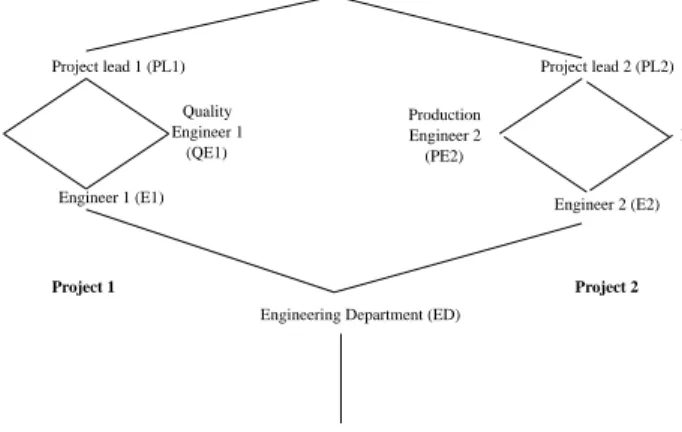
An example of a group hierarchy for a hypothetical engineering department is shown in Fig. 1. By conven-tion, senior groups are shown toward the top and junior ones toward the bottom. Transitive edges from seniors to juniors are omitted. In this example there is a junior-most group E to which all employees in the organization belong. Within the engineering department there is a junior-most group ED and senior-most group DIR.2In
between there are groups for two projects within the
department, project 1 on the left and project 2 on the right. Each project has a senior-most project lead group (PL1 and PL2) and a junior-most engineer group (E1 and E2). In between each project has two incomparable groups, production engineer (PE1 and PE2) and quality engineer (QE1 and QE2). We will use this example throughout this paper.
This example can be extended to dozens and even hundreds of projects within the engineering department. Moreover, each project could have a dierent structure for its groups. The example can also be extended to multiple departments with dierent structure and poli-cies applied to each department.
Another limitation of Windows NT groups is that membership is exclusively controlled by built-in admin-istrator groups such asAccount operators,Administrators
andDomain admins(Sutton, 1997; Rutstein, 1997). This is a centralized model which does not scale gracefully to systems with large numbers of groups and users. More generally, it is possible to decentralize user-group as-signment by allowing administrators to selectively dele-gate authority to assign certain users to certain groups. Our decentralization philosophy is motivated by the principle that a manager who can assign a user to work on a particular task should also have the authority to enroll that user in appropriate groups which confer the necessary permissions to work on that task. Eective decentralization of user-group assignment is one step towards making security more acceptable to end users as an enabling and empowering technology, rather than as the general nuisance it is often perceived to be.
In this paper, we describe an experiment to extend the Windows NT group mechanism to include group hier-archies and decentralized user-group assignment can be implemented by means of Microsoft RPC programs. A Microsoft RPC program runs with the permissions of the user associated with the program, rather than with permissions associated with the user who invokes the program (Grimes, 1997). This feature allows the access
(QE2) Quality Engineer 2 (PE1) Engineer 1 Production Quality Engineer 1 (QE1)
Engineering Department (ED)
Employee (E) Director (DIR) Project lead 1 (PL1) Engineer 1 (E1) Project lead 2 (PL2) Engineer 2 (E2) Project 1 Project 2 Production (PE2) Engineer 2
Fig. 1. An example group hierarchy.
2For purpose of our example it is convenient to have a powerful senior-most group DIR. We emphasize that, in general, our model allows arbitrary hierarchies so it isnotrequired that there be such a senior-most group. In many cases we would not want to have such a group. Similar comments apply to the junior-most group E.
control behavior of Windows NT to be extended in a controlled and protected manner.
One of the diculties inherent in the kind of experi-ment we describe here is that we need models for group hierarchies and for decentralized user-group assignment before the experimental implementation on Windows NT can be attempted. If these models are designed as part of the experiment there will always be a question as to whether the model was designed (deliberately or inadvertently) to facilitate a Microsoft RPC-based im-plementation. Fortunately we were able to use previ-ously published models for our experiment to avoid this possibility of bias in model design. Our model for group hierarchies is based on the RBAC96 model for role-based access control (Sandhu et al., 1996).3The model
for decentralized user-group assignment, called URA97, is adapted from (Sandhu and Bhamidipati, 1997). Nei-ther model was designed with Microsoft RPC programs in mind. There are numerous papers in the literature on hierarchical groups and alternate models for this purpose including (Fernandez et al., 1995; Hu et al., 1995; Nyanchama and Osborn, 1995; Rabitti et al., 1991; Sandhu, 1988).
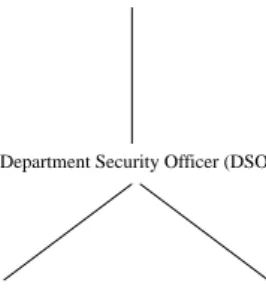
The example of Fig. 1 is taken from (Sandhu and Bhamidipati, 1997). URA97 distinguishes between reg-ular groups and administrative groups. Fig. 2 shows a hierarchy of administrative groups. The senior-most group is the senior security ocer (SSO). Junior to SSO is a department security ocer group (DSO) and two project security ocer groups (PSO1 and PSO2). These administrative groups are authorized to grant and re-voke membership of users in the regular groups of Fig. 1, as we will see shortly. (For simplicity, URA97 assumes that control of membership in the administrative groups is centralized.)
The rest of the paper is organized as follows. In Section 2, we discuss how to implement group hierar-chies in Windows NT. In Section 3 we review the URA97 model and discuss its implementation in Win-dows NT. Implementation details are described in Sec-tion 4. SecSec-tion 5 concludes the paper.
2. Group hierarchies
As we have mentioned Windows NT does not have the notion of hierarchy between groups. We show how group hierarchies can be simulated in Windows NT. The basic idea is that when a user added to a senior group the assign program automatically adds the user to all junior groups. Similarly, when a user is removed from a
senior group the revoke program automatically removes the user from appropriate junior roles.
Each account in Windows NT has a symbolic name that identi®es it. When adding a new user account to the system, the User Manager generates a security identi®-cation number (SID) which should be unique. Inter-nally, the SID is the system's way of identifying an account. We assume that each account has a single hu-man user associated with it. In practice, a single user could have multiple accounts and a single account could be shared by multiple users. We assume the system administrator enforces a single user per account and a single account per user policy. Therefore, we will use the terms user and account as essentially synonymous.
The administrator assigns each user to one or more groups with User Manager program. 4The User
Man-ager program displays all de®ned groups which is public information; all users may read it, but only adminis-trator groups are allowed to modify it. Group mem-bership is given in account database.
Table 1(a) shows the ®le account database corre-sponding to the list of groups in Fig. 1. Each row gives the group name and a list of group members. For con-venience we enumerate group members by symbolic name. This structure is not the real structure in Win-dows NT. We just use this table to show how group hierarchies can be simulated in Windows NT. The
account database®le shows the group membership of each user. To maintain the group hierarchy we use the ®le grouphr.txt to store the children and parents of each group. The group hierarchy of Fig. 1 is represented ingrouphr.txtas shown in Table 1(c). The ®rst column gives the group name, the second column gives the (immediate) parent groups of that group, and the third column gives the (immediate) children. The null symbol ``±'' means that the group has no parent or child as the case may be. In Table 1(c), the ®rst row has the null symbol because the group director (DIR) does not have any parent. The grouphr.txt ®le can be easily con-structed for any group hierarchy.
Project Security Officer 1 (PSO1) Project Security Officer 2 (PSO2) Department Security Officer (DSO)
Senior Security Officer (SSO)
Fig. 2. An example administrative group hierarchy.
3The notion of a role is similar to that of a group, particularly when we focus on the issue of user-role or user-group membership. For our purpose in this paper, we can treat the concepts of roles and groups as essentially identical.
4The User Manager is the primary user con®guration tool in Windows NT.
Using grouphr.txt, we can ®nd all seniors and juniors for a group by respectively chasing the parents and children. For example for the PE1 group of Table 1(c) we can construct the seniors and juniors list as follows:
We say a user is anexplicitmember of a group if the user is explicitly designated as a member of the group. A user is an implicitmember of a group if the user is an explicit member of some senior group. A user can si-multaneously be an explicit and implicit member of the same group.5 For example, Alice can be an explicit
member of ED and PL1, in which case she is also an implicit member of ED (by virtue of membership in PL1). To simulate a group hierarchy we use information about explicit and implicit membership in account database. If Alice belongs explicitly or implicitly to a group she will be added to that group's member list in
account database. However,account databaseis not sucient to distinguish the case where Alice is both an explicit and implicit member of some group from the case where she is only an implicit member of the group. For this purpose we introduce another ®le explic-it.txt that keep information about explicit member-ship only. An example is shown in Table 1(b). Each row gives the group name and a list of group members. For convenience we enumerate group members by symbolic name. Alice has explicit memberships for PL1, ED and E. Alice also has implicit membership for all groups junior to PL1, i.e., PE1, QE1, E1, ED, and E, as shown in Table 1(a). If Alice's explicit membership is revoked from E there will be no change inaccount databasebut
explicit.txt will be changed to remove her from E. Suppose after that Alice is further revoked from PL1 we will have the following result.
The implementation of group hierarchy by explicitly assigning a member of a senior group to be a member of all junior group in account database may raise a Group Seniors Juniors
PE1 PL1, DIR E1, ED, E
account database(after revocation) DIR:: PL1:: PL2:: PE1:: PE2:: QE1:: QE2:: E1:: E2:: ED:: Alice
E:: Alice, Dave, Eve
explicit.txt(after revocation) DIR:: PL1:: PL2:: PE1:: PE2:: QE1:: QE2:: E1:: E2:: ED:: Alice
E:: Dave, Eve
Table 1
The example group hierarchy of Fig. 1 (a)account database
DIR:: PL1:: Alice PL2:: PE1:: Alice PE2:: QE1:: Alice QE2:: E1:: Alice E2:: ED:: Alice
E:: Alice, Dave, Eve
(b)explicit.txt DIR:: PL1:: Alice PL2:: PE1:: PE2:: QE1:: QE2:: E1:: E2:: ED:: Alice
E:: Alice, Dave, Eve
(c)grouphr.txt
Group name Parent group(s) Child group(s)
DIR ) PL1, PL2
PL1 DIR PE1, QE1
PL2 DIR PE2, QE2
PE1 PL1 E1 QE1 PL1 E1 PE2 PL2 E2 QE2 PL2 E2 E1 PE1, QE1 ED E2 PE2, QE2 ED ED E1, E2 E E ED )
5This is a property of the RBAC96 and URA97 models on which our experiment is based. There are other models, such as Ferraiolo and Barkley (1997) and Nyanchama and Osborn (1995) which do not allow this.
scalability issue. For example, many Unix implementa-tions limit the number of groups activated in a process to a fairly small number such as 32 or 16, so this ap-proach does not scale for Unix. We conducted a small experiment to ascertain how many group can be acti-vated in a process on Windows NT. Our experiment indicated that Windows NT can accommodate up to 993 groups simultaneously activated in a single process.6
This is a sizable number so large group hierarchies can be accommodated by means of this approach.
In summary, to simulate group hierarchies in Win-dows NT, we use account database, explicit.txt, and grouphr.txt ®les. The account database ®le shows all group membership including implicit and ex-plicit group memberships. The explicit.txt ®le just has information about explicit group membership and the grouphr.txt ®le keeps the structure of the group hierarchy. Modi®cations to these ®les are made by Mi-crosoft RPC programs as discussed in Section 4. The above example illustrated why we need the explic-it.txt®le in addition toaccount database.
3. Decentralized groups
Windows NT centralizes user-group assignment and revocation entirely in hands of built-in administrator groups. However, this simple approach does not scale to large systems. Clearly it is desirable to decentralize user-group assignment to some degree so that expensive system administrators do not need to spend valuable time on routine tasks. In particular we can use admin-istrative groups for this purpose. For convenience we de®ne administrative groups as distinct from regular groups.
Sandhu and Bhamidipati (1997) recently introduced the URA97 model for decentralized administration of user-role membership (URA97 stands for user-role as-signment 1997). Since the notion of a role is similar to that of a group, particularly when we focus on the issue of user-role or user-group membership, we will adopt this model. This section reviews URA97 and the next one describes our approach to implementing it in Win-dows NT. In our review of URA97 we will use the term group rather than role. Our description of URA97 is informal and intuitive. A formal statement of URA97 is given by Sandhu and Bhamidipati (1997). We emphasize that URA97 was de®ned in earlier work independent of any consideration of its implementation in NT.
3.1. User-group assignment
There are two issues that need to be addressed in decentralized management of group membership. Firstly, we would like to control the groups that an administrative group has authority over. Recall Figs. 1 and 2 which, respectively, show the regular and ad-ministrative groups of our example. We would like to say, for example, that the PSO1 administrative group controls membership in project 1 groups, i.e., E1, PE1, QE1 and PL1. Secondly, it is also important to control which users are eligible for membership in these groups. URA97 addresses these two issues, respectively, by means of a group range 7 and a prerequisite group or
more generally a prerequisite condition. URA97 has a
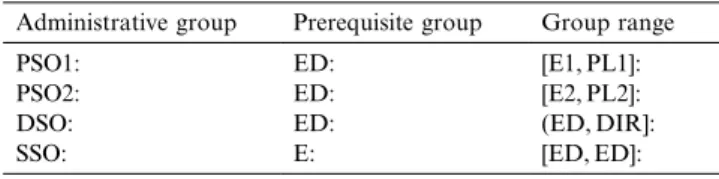
can_assign relation which we store in the ®le can_ as-sign.txt. An example of can_assign.txt with pre-requisite groups is given in Table 2. We put a colon between the columns to indicate the boundary. The ®rst row authorizes the administrative group PSO1 to assign users to groups in the range [E1, PL1]. A group range is speci®ed by giving a junior and senior group. The range includes all groups between these two endpoints. The ``['' and ``]'' brackets indicate that, respectively, the ju-nior and seju-nior end point are included in the range, whereas the ``('' and ``)'' brackets indicate the end point is excluded. Thus [E1, PL1] consists of E1, PE1, QE1 and PL1, while [E1, PL1) omits PL1. The prerequisite group speci®es which users can be assigned by PSO1 to groups in the authorized range. Only those users who are already members of ED can be assigned by PSO1 to [E1, PL1]. The other rows of Table 3 are similarly interpreted.
Table 3 illustrates the more general case of can_
assign.txt with prerequisite conditions. Let us consider the PSO1 rows. The ®rst row authorizes PSO1 to assign users with prerequisite group ED into E1. The second one authorizes PSO1 to assign users satisfying the prerequisite condition that they are members of ED but not members of QE1 to PE1. Taken together the second and third rows authorize PSO1 to put a user who is a member of ED into one but not both of PE1 and QE1. The fourth row authorizes PSO1 to put a user who
Table 2
Example ofcan_assign.txtwith Prerequisite groups
Administrative group Prerequisite group Group range
PSO1: ED: [E1, PL1]:
PSO2: ED: [E2, PL2]:
DSO: ED: (ED, DIR]:
SSO: E: [ED, ED]:
6It is actually possible to assign a user up to 1000 global groups but this causes logon failure due to too many SIDs. As we reduced the number of groups, we found that the Windows NT system works successfully with 993 groups simultaneously assigned to a user. This result must depend on the internal data structure ofaccount database in the NT kernel.
7In our actual implementation, we use group set which is identical to group range. i.e., group set for group range [E1, PL1] is E1, PE1, QE1, PL1.
is a member of both PE1 and QE1 into PL1. Note that, a user could have become a member of both PE1 and QE1 only by actions of a more powerful administrator than PSO1. The rest of Table 3 is similarly interpreted. Assignment of a user to a group in URA97 means explicit assignment. Implicit assignment to junior groups happens as a consequence and side-eect of explicit assignment. In other words can_assign.txt
applies only to explicit membership.
3.2. User-group revocation
URA97 authorizes revocation by the can_revoke re-lation which we store in the can_revoke.txt ®le. An example is shown in Table 4. The meaning of each row in can_revoke.txt is that a member of the adminis-trative group can revoke membership of a user from any regular group in group range. We would typically expect some correlation between the range authorized for an administrative group in can_assign.txt and in
can_revoke.txt, but this is not required by the model. URA97 de®nes two notions of revocation calledweak
andstrong. Weak revocation is straightforward and has impact only on explicit membership in the group in question. Strong revocation requires revocation of both explicit and implicit membership. Strong revocation of a user U's membership in role x requires that U be re-moved not only from explicit membership inx, but also from explicit (or implicit) membership in all groups se-nior to x. Strong revocation therefore has a cascading eect upwards in the group hierarchy. In URA97 strong revocation is eectively equivalent to a series of weak revocations. Strong revocation is a convenient operation
for administrators even though it can logically be accomplished by multiple weak revokes.
Let us consider the example shown in Table 4 and interpret it in context of the hierarchies of Figs. 1 and 2. Let Bob be a member of PSO1, and let this be the only administrative group he has. Bob is authorized to re-voke membership of users from groups E1, PE1 and QE1. Table 5(b) illustrates whether or not Bob can strongly revoke membership of a user from group E1 based on Table 5(a). The eect of Bob's strong revoca-tion of each of these users from E1 is shown in Table 5(c). Bob is not allowed to strongly revoke Eve and Frank from E1 because they are members of senior groups outside the scope of Bob's revoking authority. If Bob was assigned to the DSO group he could strongly revoke Eve from E1 but still would not be able to strongly revoke Frank's membership in E1. In order to strongly revoke Frank from E1, Bob needs to be in the SSO group. The general rule is that strong revocation takes eect within the revocation range authorized for an administrative group.
URA97 further de®nes two options for strong revo-cation. The options are called drop and continue. In Table 5(a), Bob is not allowed to strongly revoke Eve and Frank from E1 because they are members of senior groups outside the scope of Bob's revoking authority. At this step, we can choose one of two options. With the drop option strong revocation takes no eect. Otherwise we can strongly revoke a user from groups inside the scope of Bob's revoking authority. For example assume that we choose drop option for strong revocation of Eve from E1 and choose continue for strong revocation of Frank from E1. The result will be as shown in Table 6. The strong revocation of Eve from E1 takes no eect because we chose the drop option but the strong revo-cation of Frank from E1 takes partial eect. Frank still has group membership for PL1 and DIR groups outside the scope of Bob's revoking authority. We emphasize that the eect of strong revocation can be achieved by a series of weak revocations, but it is a convenient oper-ation to have in both varioper-ations (drop and continue).
4. Implementation details
We use Microsoft RPC to enforce desired behavior of URA97 with respect to dierent administrative groups. The RPC mechanism is the simplest way to implement client-server applications, because it keeps the details of network communications out of the application code. The security of RPC is part of the operating system that uses it. Therefore, Microsoft RPC on Windows NT can use the Windows NT security built in as part of the operating system. The Windows NT security model is designed for C2-level security, as de®ned by the US Department of Defense (MicrosoftPress, 1997b). One of
Table 3
Example ofcan_assign.txtwith Prerequisite conditions Administrative group Prerequisite condition Group range
PSO1: ED: [E1, E1]:
PSO1: ED^QE1: [PE1, PE1]:
PSO1: ED^PE1: [QE1, QE1]:
PSO1: PE1^QE1: [PL1, PL1]:
PSO2: ED: [E2, E2]:
PSO2: ED^QE2: [PE2, PE2]:
PSO2: ED^PE2: [QE2, QE2]:
PSO2: PE2^QE2: [PL2, PL2]:
DSO: ED: (ED, DIR):
SSO: E: [ED, ED]:
SSO: ED: (ED, DIR]:
Table 4
Example ofcan_revoke.txt
Administrative group Group range
PSO1: [E1, PL1):
PSO2: [E2, PL2):
DSO: (ED, DIR):
the most important requirements of C2-level security is that the owner of a resource (such as a ®le) must be able to control access to the resource. In order to use this aspect, we use named pipes as RPC's transport mecha-nism, and since pipes are part of the ®le system, we can
use NT security mechanisms using Microsoft RPC. We reiterate, the security is implemented by the OS (Win-dows NT) and not by the RPC mechanism. 8
The main mechanism is illustrated in Fig. 3. In Fig. 3, let us assume that Alice owns the RPC server program and two ®lesassign.exeandexplicit.txt. The RPC server program can be executed by everyone and Alice can execute the executable ®leassign.exewhich should referexplicit.txt®le to accomplish its function. Alice also can read and write the text ®le explicit.txt. We can summary the permission lists for these ®les as follows.
Table 5
Example of strong revocation
(a)account databaseandexplicit.txtprior to strong revocation
account database explicit.txt
DIR:: Frank DIR:: Frank
PL1:: Frank, Eve PL1:: Frank, Eve
PL2:: PL2::
PE1:: Frank, Eve, Dave,
Cathy PE1:: Frank, Eve,Dave, Cathy
PE2:: PE2::
QE1:: Frank, Eve, Dave QE1:: Frank, Eve, Dave
QE2:: QE2::
E1:: Frank, Eve, Dave,
Cathy E1:: Frank, Eve,Dave, Cathy
E2:: E2::
ED:: ED::
E:: E:
(b) Status prior to strong revocation
User E1 PE1 QE1 PL1 DIR Bob can revoke
user from E1
Cathy Yes Yes No No No Yes
Dave Yes Yes Yes No No Yes
Eve Yes Yes Yes Yes No No
Frank Yes Yes Yes Yes Yes No
(c)account databaseandexplicit.txtafter strong revocation
account database explicit.txt
DIR:: Frank DIR:: Frank
PL1:: Frank, Eve PL1:: Frank, Eve
PL2:: PL2::
PE1:: Frank, Eve PE1:: Frank, Eve
PE2:: PE2::
QE1:: Frank, Eve QE1:: Frank, Eve
QE2:: QE2::
E1:: Frank, Eve E1:: Frank, Eve
E2:: E2::
ED:: ED::
E:: E:
Table 6
Result of strong revocation with options account database explicit.txt
DIR:: Frank DIR:: Frank
PL1:: Frank,Eve PL1:: Frank,Eve
PL2:: PL2::
PE1:: Eve PE1:: Eve
PE2:: PE2::
QE1:: Eve QE1:: Eve
QE2:: QE2::
E1:: Eve E1:: Eve
E2:: E2::
ED:: ED::
E:: E:
8Usually, a protocol sequence in RPC contains options for network communications protocols. Named pipes (ncacn_np) is one option of transport protocols for communications.
According to this list, no one can access assign.exe
and explicit.txt, except for Alice. However, by means of using Microsoft RPC named pipes, any user can executeassign.exeand accessexplicit.txt. This allows us to provide users access tp explicit.txt
but only by way of assign.exe. In other words,
assign.exe is a protected subsystem which runs with dierent permissions than the user who invokes it.9
When the RPC Server program is executed, the eective user of the process is the owner (Alice) of the ®le, ac-quiring that user's access rights for duration of the program contained in this ®le. Therefore, a user who is executing RPC server program can invoke assign.exe
and accessexplicit.txt. Using this feature a user who is working as an administrative group can read and write reference ®les: explicit.txt, grouphr.txt,
can_assign.txtandcan_revoke.txt. Thereby we can enforce desired behavior of URA97 with respect to dierent administrative groups.
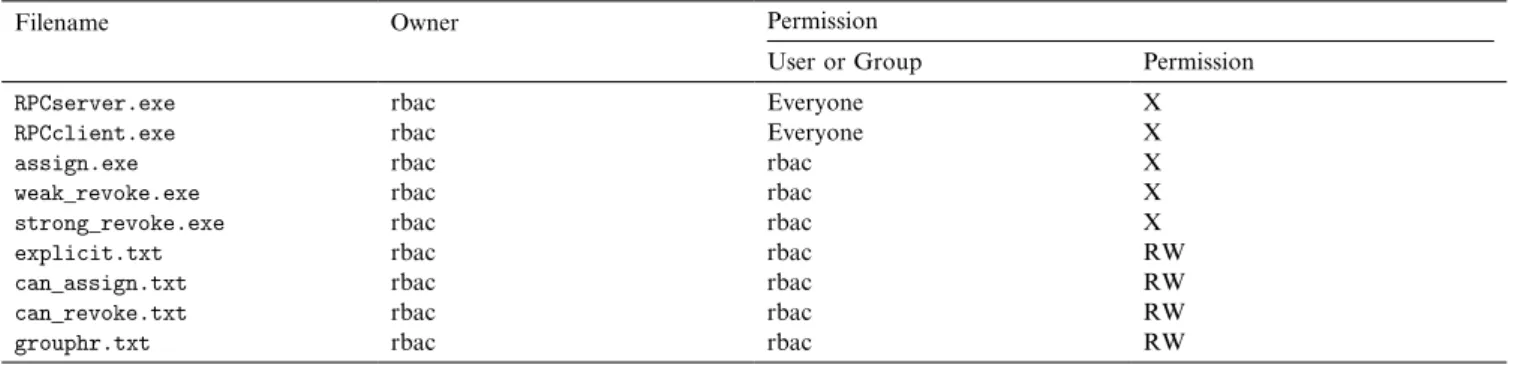
To implement URA97 in Windows NT we also use several reference ®les introduced in the previous sections and set their permission bits as shown in Table 7.10
These procedures can read and write the four reference ®les. We previously described the structure of ®les ex-plicit.txt and grouphr.txt in Section 2, and
can_assign.txtandcan_revoke.txtin Section 3. For simplicity all these ®les in our implementation are owned by user rbac.
There is one procedure each for assigning a user to a group, doing a weak revoke of membership and doing a strong revoke of membership. In our implementation, a user invokes the procedure call to grant or revoke a group from or to another user. The procedure calls are as follows.
· assign(user, tgroup)
· weak_revoke(user, tgroup)
· strong_revoke(user, tgroup, option)
The parameters user and tgroup (target group) specify which user is to be assigned to tgroup, or to be weakly or strongly revoked from tgroup. If the strong_revoke operation fails because it is not autho-rized bycan_revoke.txtthe drop or continue options will be applied as discussed earlier. In our implementa-tion this opimplementa-tion is designated as part of the command line call to strong_revoke, so that it might be called from within programs.
All three procedures follow the basic steps shown in Fig. 4. The diagram shows the data ¯ow and the rela-tionship between functions and ®les. Each procedure call include several functions. The description for each function is as follows.
· findgrp(): returns a list all groups to which the user belongs (explicitly or implicitly). It is command line utility provided by Microsoft Resource kit
· authorization(): checks the invoker's authorization with respect tocan_assign.txtorcan_revoke.txt
· prerequisiteTest(): checks whether the user satis-®es the prerequisite condition
· grouphr(): return the senior and junior list for tgroup
· rangecheck(): checks if strong_revoke is authorized and oers option of drop or continue
· updategrp(): generates batch ®le to updateaccount database and updatesexplicit.txt®les as appro-priate 11
In general authorization needs to be tested for mul-tiple rows in can_assign.txt or can_revoke.txt. In such cases the authorization and prerequisiteTest pro-cedures are called repeatedly for each row.
These procedures are called at the Windows NT command line prompt (which is actually DOS prompt) as follows.
[usage] assign username target_group [usage] weak_revoke username target_group [usage] strong_revoke username target_group option.
Filename Owner Permission User or
Group Permission
RPCserver.exe Alice Everyone X
assign.exe Alice Alice X
explicit.txt Alice Alice RW
RBAC GUI
Client side
return
RPC named pipes(ncacn_np)
RPC Client
RPC Server
call remote procedure : assign.exe explicit.txt Server side assign.exe Fig. 3. RPC Mechanism.9The Unix operating system has a similar feature by means of setuid and setgid programs (Bach, 1990). NT provides support for such protected subsystems only by means of RPC. It should be noted that Microsoft RPC can be local in that the client and server can be the same machine, so is a general mechanism for this purpose.
10Each entry has the name of either a user account or a group, and a set of permissions that apply to that account or accounts in that group. R W Xstand forREAD,WRITE, andEXECUTE, respectively.
11There is command line utility to assign a user to group(s) such as net.exe. Theupdategrp()function generates batch ®le including this command line utility with several parameters according to its syntax.
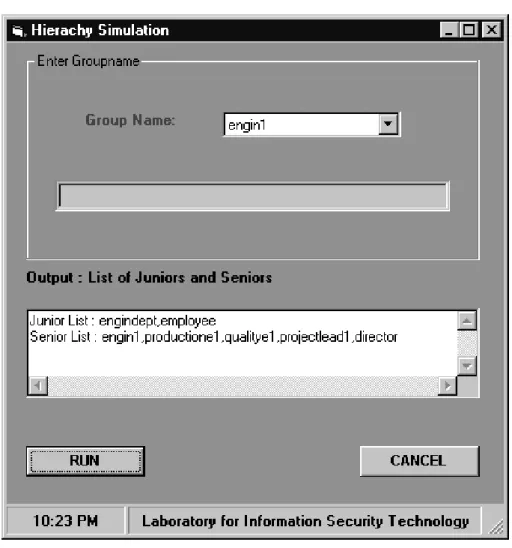
In order to make our implementation more convenient we developed graphical user interfaces which interact with these procedures to do user-group assignment and revocation. The graphical user interfaces are illustrated
in Figs. 5 and 6 and are called RBACGUI and RBACHR, respectively. They were developed using Visual Basic programming (MicrosoftPress, 1997a). RBACGUI is used to initiate user-group assignment
Table 7
The permission of reference ®les and procedures
Filename Owner Permission
User or Group Permission
RPCserver.exe rbac Everyone X
RPCclient.exe rbac Everyone X
assign.exe rbac rbac X
weak_revoke.exe rbac rbac X
strong_revoke.exe rbac rbac X
explicit.txt rbac rbac RW
can_assign.txt rbac rbac RW
can_revoke.txt rbac rbac RW
grouphr.txt rbac rbac RW
assign revoke findgrp() preprequi-siteTest() grouphr() account database grouphr.txt explicit.txt FUNCTION FILE READ WRITE CALL account database authorization() rangecheck() updategrp() account database explicit.txt can_assign.txt can_revoke.txt
Fig. 4. Data ¯ow diagram.
and revocation instead of typing the above as command line procedure calls. There are three buttons for doing user-group assignment and revocation; ASSIGN, W-REVOKE (weak revoke), and S-W-REVOKE (strong revoke). RBACHR is an interface which displays all junior and senior lists according to the group hierarchy. This implementation is convenient for administrative groups since they only need to de®ne the group hierar-chy and the relations can_assign and can_revoke. As discussed in Section 2 our implementation is scalable to large group hierarchies, since a single user can be assigned to as many as 993 groups in NT.
5. Conclusion
In this paper, we have described our experiment to provide two useful extensions to the Windows NT group mechanism by means of Microsoft RPC programs. First we have added hierarchical groups by means of explicit assignment to junior groups. When a user is assigned to a senior group the systemautomaticallyadds the user to
all junior groups. Similarly, when a user's membership is revoked from a group, revocation from appropriate junior groups isautomaticallycarried out. This behavior is adapted from the RBAC96 model. Second, we have adapted the URA97 model for decentralized user-group assignment and implemented it in Windows NT. Our implementations use Microsoft RPC programs to en-force authorization to add and remove users from groups. Our results indicate that Windows NT has ad-equate ¯exibility to accommodate sophisticated access control models to some extent. We also indicated that the Windows NT has better scalability in simulating group hierarchies by explicit assignment to junior groups, as compared with Unix.
Acknowledgements
This work is partially supported by grant CCR-9503560 from the National Science Foundation and by the University Research Program of NSA at the Labo-ratory for Information Security Technology at George Mason University.
References
Bach, M., 1990. The Design of the UNIX Operating System. Prentice-Hall, Englewood, NJ.
Fernandez, E.B., Wu, J., Fernandez, M.H., 1995. User group structures in object-oriented database authorization. In: Biskup, J., Morgernstern, M., Landwehr, C. (Eds.), Database Security VIII: Status and Prospects. North-Holland, Amsterdam. Ferraiolo, D., Barkley, J., 1997. Specifying and managing role-based
access control within a corporate intranet. In: Proceedings of Second ACM Workshop on Role-Based Access Control. ACM, Fairfax, VA, 6±7 November, pp. 77±82.
Grimes, R., 1997. Professional DCOM Programming. Wrox Press. Hu, M.-Y., Demurjian, S.A., Ting, T.C., 1995. User-role based
security in the ADAM object-oriented design and analyses envi-ronment. In: Biskup, J., Morgernstern, M., Landwehr, C. (Eds.), Database Security VIII: Status and Prospects. North-Holland, Amsterdam.
MicrosoftPress, 1997a. Microsoft Visual Basic 5.0 Programmer's Guide. Microsoft Press.
MicrosoftPress, 1997b. Microsoft Windows NT Server Networking Guide. Microsoft Press.
Nyanchama, M., Osborn, S., 1995. Access rights administration in role-based security systems. In: Biskup, J., Morgernstern, M., Landwehr, C. (Eds.), Database Security VIII: Status and Prospects. North-Holland, Amsterdam.
Rabitti, F., Bertino, E., Kim, W., Woelk, D., 1991. A model of authorization for next-generation database systems. ACM Trans-actions on Database Systems 16 (1).
Rutstein, C.B., 1997. Windows NT Security. McGraw-Hill, New York.
Sandhu, R.S., 1988. The NTree: a two dimension partial order for protection groups. ACM Transactions on Computer Systems 6 (2), 197±222.
Sandhu, R., Bhamidipati, V., 1997. The URA97 model for role-based administration of user-role assignment. In: Lin, T.Y., Qian, X. (Eds.), Database Security XI: Status and Prospects. North-Holland, Amsterdam.
Sandhu, R.S., Coyne, E.J., Feinstein, H.L., Youman, C.E., 1996. Role-based access control models. IEEE Computer 29 (2), 38±47. Sutton, S.A., 1997. Windows NT Security Guide. Addison-Wesley
Developers Press, UK.
Gail-Joon Ahnis an assistant professor of Computer Science Depart-ment at University of North Carolina at Charlotte. His principal re-search and teaching interests are in information and systems security. Ahn received PhD and MS degrees from George Mason University, Fairfax, Virginia, and BS degree in Computer Science from SoongSil University, Seoul, Korea. He was a research associate at the Labora-tory for Information Security Technology, George Mason University. His research interests include access control, security architecture for distributed objects, and secure e-commerce systems. Ahn is a member of ACM and IEEE Computer Society.
Ravi Sandhuis professor of Information and Software Engineering at George Mason University, Fairfax, Virginia; and director of the Laboratory for Information Security Technology at GMU. His prin-cipal research and teaching interests are in information and systems security. Sandhu received PhD and MS degrees from Rutgers Uni-versity, New Jersey, and BTech and MTech degrees from IIT Bombay and Delhi, India, respectively. Sandhu charis ACM's Special Interest Group on Security Audit and Control.