Ubiquitous Interaction - Using Surfaces in Everyday
Environments as Pointing Devices
Albrecht Schmidt, Martin Strohbach, Kristof van Laerhoven, and Hans-W. Gellersen
Computing Department, Lancaster University Lancaster, LA1 4YR, UK
E-mail: {albrecht, strohbach, kristof, hwg}@comp.lancs.ac.uk http://ubicomp.lancs.ac.uk
Abstract. To augment everyday environments as interface to computing may lead to more accessible and inclusive user interfaces, exploiting affordances existing in the physical world for interaction with digital functionality. A major challenge for such interfaces is to preserve accustomed uses while providing unobtrusive access to new services. In this paper we discuss augmentation of common surfaces such as tables as generic pointing device. The basic concept is to sense the load, the load changes and the patterns of change observed on a surface using embedded load sensors. We describe the interaction model used to derive pointing actions from basic sensor observations, and detail the technical augmentation of two ordinary tables that we used for our experiments. The technology effectively emulates a serial mouse, and our implementation and use experience prove that it is unobtrusive, robust, and both intuitively and reliably usable.
1 Introduction
To use our everyday environments as interface to computer-based services is an intriguing vision toward more accessible and inclusive user interfaces. The principal idea is to augment common structures and everyday artifacts as interaction devices that inherit design affordances from the physical world for interaction with the digital realm. The key motivation is to yield interfaces that are experienced as familiar, natural and fitting in our environments, to the extent that they become peripheral to everyday activity. The design challenge for such interfaces is therefore to preserve the original appearance, purpose and function of augmented structures and artifacts, and to exploit their affordances rather than break with accustomed use.
illustrative examples demonstrating the combination of ‘real world’ affordances with access to the digital world. However these examples tend to be highly application specific, while there appears to be no notable work on more generic interfaces embedded in everyday environments.
In a recent publication we have discussed augmentation of common surfaces in everyday environments such as table-tops, shelves and floor space with load sensors to render them responsive to activity occurring on them. We have demonstrated that surface-based load sensing is a very robust and versatile source of information that can be used as context for ubiquitous computing applications [21]. More specifically, we have shown that three basic types of context can be obtained from events on a load-sensitive surface. These are the measured overall force (corresponding to the weight of an object or to explicitly applied pressure), the position on the surface at which a change in force is observed (corresponding to where an object is placed or removed), and the type of interaction expressed in the signal waveforms (corresponding to how an object is placed). We have further shown that more elaborate context can be obtained by combining observations over time (tracking activity) or space (relating activity across multiple surfaces). The use of such context in computer applications effectively constitutes implicit human-computer interaction [22] as it is based on human activity but not created as explicit input to the application.
In this paper we extend our work on load-sensitive surfaces to demonstrate their use for explicit human-computer interaction. We do this by considering use of ordinary surfaces as generic pointing device. The guiding scenario is that we might simply use the surface of a coffee table in the living room as track pad to navigate the Web on the TV screen. The challenges are interesting: obviously we do not wish a coffee table to appear wired and instrumented, and more importantly we expect the placement of cups and other items not to be prohibited by the new function of the table.
Our contribution is organized as follows. In section 2 we analyze the challenges of implementing of a pointing device on a common surface. This is followed by an introduction of our technology concept in section 3, and of recorded sensor data in section 4, illustrating how our approach works. In section 5 we provide further detail on the implementation of two tables that we augmented as wireless trackpads, and in section 6 we briefly relate use experience. The final sections 7 and 8 reflect on related research, future work and our main conclusions.
2 Analysis of Everyday Surfaces as Interaction Device
2.1 Challenges
The following four points are particularly critical for a successful implementation of a ubiquitous pointing device.
Preserving the Original Functionality of the Surface. When adding functionality to objects of everyday life it is important that the original functionality of the artefact is not sacrified. In the case of a table – augmenting the coffee table with a pointing functionality should not enforce a different way of using the table while it is used in its usual way. Even when it is used for pointing it should still be usable for its original purpose. In other words pointing should be still feasible when the table is occupied with objects.
Many Surfaces – one Pointing Device. It is obvious that an interface that is ubiquitous can not be bound to a specific place or artefact. In an ideal case, interaction is possible from everywhere without switching interfaces. In the case of surfaces the challenge is to realise a seamless transition from surface to surface when interacting. The anticipated implementation would allow the user to use any surface – that is convenient at this moment in time – to be used as a pointing device.
Unobtrusive Realisation. Building a ubiquitous interface should not make the table look like a computer. The appearance of artefacts is often one of their main properties. Especially in personal environments furniture and artefacts are an essential part of the interior of a home. Introducing the technology should no require a change in the appearance of a table or shelf. The interface should be a part of a invisible computer – because the interface is often what people perceive as their computer.
Robust and Reliable Implementation. When including sensing capabilities into surfaces it has to be done in a robust and reliable way. The different ways in which surfaces are being used have to be taken into account, e.g. it has to be anticipated that people may sit on a table. Especially when considering home environments reliability and zero maintenance becomes a crucial issue. When designing a solution one should be aware that calibration and maintenance are hindering the deployment of such technologies.
2.2 Load Sensing as Approach to Surface Augmentation
The basic idea of the approach is to interpret the shift in load distribution on the surface as pointing and clicking action. The change in the load distribution is induced by the user’s interaction on the surface. Pressing a finger onto the surface and moving it will change the load distribution on the surface. The assumption is that this change can be measured and converted into a pointing action. The hypothesis is that by these means pointing – tracking a finger – anywhere on the surface can be converted into a relative change of a pointer. If during the pointing action there is an increase in pressure followed by a release in pressure at the same position this can be interpreted as a clicking action.
Having the load on each corner it becomes possible to calculate the centre of pressure on the surface and also the absolute weight on the surface. The centre of pressure moves when a users tracks the finger across, but it also moves when objects are placed onto the surface.
The further assumption is that detecting the manual interaction and converting these relative moves of the centre of pressure should allow the generation of relative moves of a pointer. The overall weight represents all the items on the surface (in some cases the weight of the surface itself) and also the manually applied pressure. By analysing the changes to the overall pressure in context of the interaction taking place it becomes possible to determine when there is a click operation performed.
These assumptions made here are tested with experiments gaining data sets as described in section 4.
2.3 Problems arising with Load Sensing
To realise the idea of using load sensing technologies to add pointing capabilities to a surface further obstacles have to be overcome.
Changing Load on the Surface.The load on the surface is changing also without it being used as a pointing device. E.g. what is on a table changes over time, objects are moved, taken away, and put down. These events have to be discriminated from the user interaction that is made to interact with the computer. The algorithms have to take into account that the base load may change.
Recognising Start and End of User Interaction. The user interacts with the surface in two different ways – using the original functionality and using it as a pointing device. E.g. it is essential to recognize whether someone puts a cup of tea on the table or someone is pointing.
Distributed Sensing. Using more than one surface makes it necessary to have distributed sensing. Each surface is a load sensing platform, but the resulting interaction should be coherent as coming from one input device. Communication between the backend – e.g. the computer the pointer is attached to – and the various sensing devices is required.
Sampling Speed and High Resolution. To acquire the user interaction with high precision it is necessary to sample the load cells output very quickly and also with a high resolution of the analog-digital conversion. Most commerciality available solutions for scales and weighing technologies sample with high resolution but very slow just a few readings a second.
3 Load Sensing to detect Point and Click Interactions
In order to realise pointing and clicking on a surface based on load sensing technology it must be possible to calculate changes in position and other actions from the forces measured.
3.1 Acquisition of the 2D Position
The anticipated setup consists out of a flat surface (e.g. the top of a table) that is supported by four load cells, one in each corner. Load cells are sensors that measure the force that is applied; they are typically used in scales to indicate the weight. Here the obvious rule summing the forces from all 4 load cells are equal to the force created by the weight of the surface and the objects on to of the surface. Scales typically offer a mechanism to subtract a base weight (tare) so that only the object placed on the surface are considered. Applying manual pressure onto the surface, will increase the forces on the corresponding load cells.
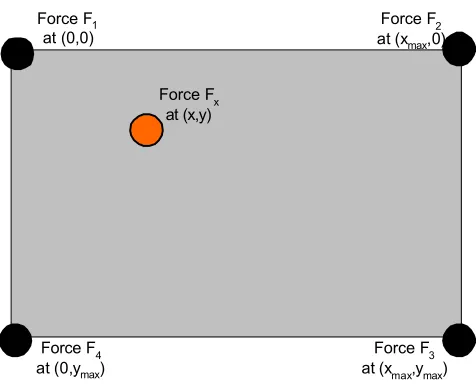
Depending on the position of the surface where an object is placed or where pressure is applied the forces measured at the individual load cells are different. To find the point where the object is placed or pressure is applied it is necessary to map the load measured at each corner onto the 2d layout of the surface, see figure 1.
Assuming a static force Fx is applied at position x, y on a surface of the size xmax by
ymax forces in each corner F1, F2, F3, and F4 can be measured. Using the following
equation the position can be calculated:
Force Fx at (x,y) Force F1
at (0,0)
Force F3 at (xmax,ymax) Force F4
at (0,ymax)
[image:5.595.173.411.470.662.2]Force F2 at (xmax,0)
4 3 2
1
F
F
F
F
F
x=
+
+
+
(Equation 1)x
F
x
F
F
x
max 3 2)
(
+
=
(Equation 2)x
F
y
F
F
y
max 4 3)
(
+
=
(Equation 3)Summing up the forces of all load cells gives the total, see equation 1. Knowing the forces and the overall size of the surface (or more precise the corners where the surface touches the load cells), the centre of pressure can be calculated, see equations 2 and 3. When more than one object is placed in the surface or when pressure is applied at more than one point, the calculation results in a point in between.
As mentioned earlier usually the surface itself has a weight, too. For calculating the position of an object or a point of pressure this has to be taken into account, see equations4, 5 and 6. In an environment where objects are placed and removed from the surface this tare-weight is changing. By keeping track of changes that became stable, e.g. typically objects that have been placed on the surface, or objects that have been removed; it is possible to dynamically adjust the tare-weight. Knowing the pre-load it is still possible to find the position of objects or interaction. These pre-pre-loads to the surface result in forces denoted as F01, F02, F03, and F04. The sum of the pre-load
is F0x. To calculate the position where pressure is applied in a setting where already
load is on the surface equation 4, 5, and 6 can be used.
4 3 2
1
0
0
0
0
0
F
F
F
F
F
x=
+
+
+
(Equation 4))
0
(
))
0
(
)
0
((
max 3 3 2 2 x xF
F
x
F
F
F
F
x
−
−
+
−
=
(Equation 5))
0
(
))
0
(
)
0
((
max 4 4 3 3 x xF
F
y
F
F
F
F
y
−
−
+
−
=
(Equation 6)3.2 Interacting with Surfaces
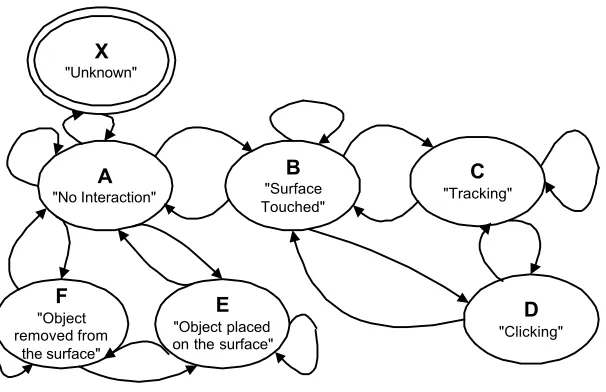
To understand and model interaction with a surface we looked at the states that occur and events that can happen. The resulting state diagram, depicted in figure 2, becomes the foundation for the software that translates changes recorded by the load cells into mouse movements and events.
In the following, we characterize the states and also some of the transitions. The variable used to explain are the forces here as discrete values over time: F1(t), F2(t),
F3(t), F4(t). Representing the load measured by each of the load cells on which the
surface is resting at time t. The coordinates of the position of the centre of pressure at time t is denoted p(t) or as its components x(t) and y(t).
zero (ε instead of 0 to overcome problems with noise), see Equation 7. This means that the only transition takes place when the forces on the surface do not change.
∑ ∑
= = − −<
−
4 ..1 ( )..( 1)
)
)
(
)
(
(
i j t n t
i i
t
F
j
F
ε
(Equation 7)
The system stays in state A as long as this condition is true. The value for ε may be slightly greater than for entering the state so minimal change in the load distribution on the surface are not overlooked. The state A is independent of the pre-load that is applied to the surface; as long as forces are static – e.g. from objects that have been placed onto the surface previously – they have no influence. When the system is in state A also the values for the pre-load F0i, and F0x. are set. The equation assumes
noise-free data. However, to deal with noise instead of the raw values for Fi(t) a
filtered value can be used, see the next section. From state A transitions to B, E, F, and X are possible.
The state B is reached when the system recognizes that the user has put her finger onto the surface. The transition from A into B is characterized by a monotonous increase in the sum of load over all load cells over the transition time. This leads to the first derivative being greater or equal 0. Instead of calculating the first derivative the simple condition Fx(t)<Fx(t+1) can be used to check whether or not this criteria is
met. Furthermore, the sum of the forces has to be in a certain interval (Dmin, Dmax), see
equation 8.
)
)
(
0
)
(
(
)
)
(
0
)
(
(
max minD
t
F
t
F
D
t
F
t
F
x x x x<
−
∧
>
−
(Equation 8) A "No Interaction" B "Surface Touched" C "Tracking" D "Clicking" E "Object placed on the surface" [image:7.595.148.451.149.345.2]F "Object removed from the surface" X "Unknown"
The transition from B to A, e.g. when lifting the finger off the surface is similar, only the derivative is less or equal 0 in this case.
As long as the position is not changing over the last n readings and the force is in the interval used in equation 8, the system stays in this state. As there is manual interaction on the surface the forces are not quite stable and therefore a further condition can be stated: the square of sums of changes of the forces over the last n discrete time steps is greater than a threshold δ, see equations 9.
ε
δ
<
−
>
−
∑
∑
− − = − − = ) 1 )..( ( ) 1 )..( ()
)
(
)
(
(
)
)
(
)
(
(
t n t j t n tj x x
j
p
t
p
j
F
t
F
(Equations 9)From state B transitions to C, D, and A are possible. When in the state tracking (C) it is assumed that the user is moving a finger on the surface resulting in a change of the measured centre of pressure (
δ
p), see equation 10. Other features are similar to the state B. When the user stops moving, a transition to B occurs.p t n t j
j
p
t
p
−
>
δ
∑
− − =( )..( 1)
)
)
(
)
(
(
(Equation 10)While the surface is touched an increased pressure at the same point is resulting in a change to state D (clicking). This transition occur when the system is in state B or C. The state clicking is characterized by the fact that within a given time span (e.g. about a second) the overall load is first increased and then decreased. The position of the centre of gravity however stays roughly the same. The increase must be in a predefined interval stating a threshold which separates clicking from the changes that occur while tracking. It also should not exceed a maximum force.
When objects are placed on the surface or removed from the surface while a tracking action or a click action is performed (in state C or D) this becomes much harder to recognize. Initial data analyses shows, that it may be possible, but we excluded these case in our first implementation.
4 Analysis of Load Sensor Data
[image:9.595.131.464.307.591.2]We build an experimental data acquisition setup, using 2 different types of load cells and two table tops (see the implementation section for details). Various data sets have been recorded and plotted to gain an understanding of the load data measured during typical interaction. We were particularly interested in events such as putting down
objects, removing objects, moving the finger over the surface, and increasing pressure at a certain point while tracking.
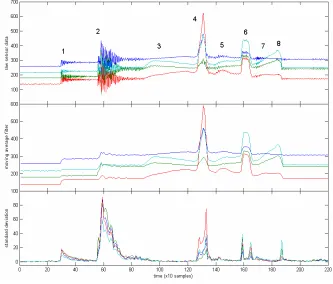
The dataset presented here contains typical sensor data from the load cells that has been gathered to demonstrate the feasibility of the approach. Our particular interest was in investigating tracking and clicking on a populated surface as well as putting down different objects onto the surface. The dataset is from a small 80x80cm coffee table, on which two objects were placed, after which it was used to track the movement direction of the finger, plus the force that was used on it to identify a ‘clicking’ event.
Figure 3 shows the time series plot of the dataset, where the raw sensor data is plotted in time against its filtered moving average and standard deviation (See the figure caption for a concise description of the events). The interval over which these statistics were evaluated was experimentally verified at 10 samples.
We have also recorded data sets using considerably larger surfaces (such as a dining table, 135x75 cm approximately) and less sensitive load cells. Although there is a less distinguishable response for events in the standard deviation plot, peeks remain present, albeit with a significant difference between objects being placed onto the surface, and the user directly touching it.
The basic statistics based on averaging and standard deviation can effortlessly be implemented on small microprocessor. This approach proved to be sufficient in our first prototypes to let the user control a mouse cursor on a nearby computer screen. This can also be deduced from Figure 3, where standard deviation of the raw sensor signals gives distinct peaks whenever new pressure points are introduced, whether they are from an object that has been placed on the surface, or from explicit user interaction.
Although the moving average filter over 10 samples produced satisfactory results for our initial tracking purposes, we believe that using more elaborate tracking algorithms (such as a Kalman filter, see [20] for an excellent introduction ) could enhance performance even more, with a negligible cost in implementation.
The dataset presented here and other datasets are available for download at the project website at [11].
5 System Implementation
Based on the experience gained we implemented a distributed ubiquitous pointing system. It incorporates two tables that offer pointing capabilities and that are connected over a wireless link to a device that is attached to a PC emulating a serial mouse.
5.1 Tracking Tables
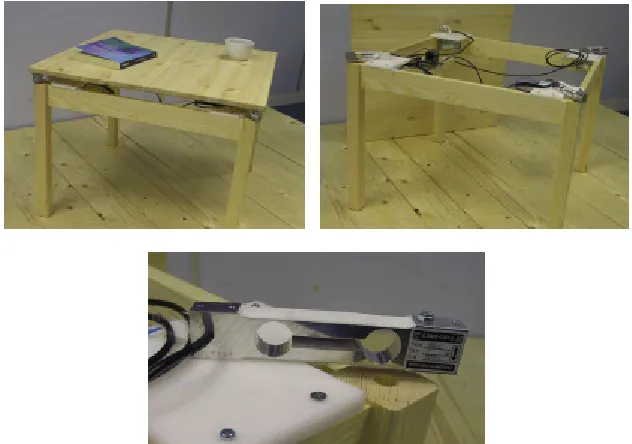
The coffee table is equipped with load cells that measure a maximal load of 1kg each, so that the surface can reliably measure 4kg of load, see figure 5. A mechanical overload protecting is build into the table. If the table is in overload state (e.g. someone is sitting on the table) pointing is suspended.
For the dining table we used 4 load cells each capable of measuring load up to 50kg, resulting into an overall load of 200kg. Each load cell is robust against overload up to 100kg to ensure the system will not break under exceptionally high load. The load cells are mounted to the table top and on the legs of the table frame there are planes where the load cells rest. See figure 4 and the accompanying video for details.
5.2 Data Acquisition and Communication
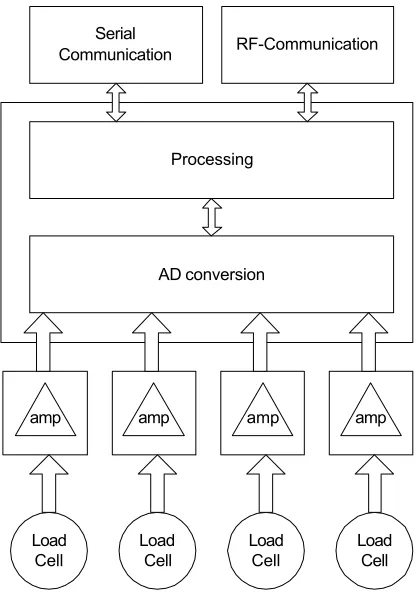
The load cells used on the small table are essentially a wheat stone bridge providing a maximal output signal of 20mV when the driving voltage is 5V. This output signal is amplified by a factor of 220, resulting in a output signal of 0 to 4.4V (different values apply for the larger table). The amplified output voltage of each of the load cells is then converted into a digital value using the AD converter in the MCU, sampling each at 250Hz. The four input values correspond to F1(t), F2(t), F3(t), and F4(t).
The microcontroller (PIC16F876) is initialized with the size of the table and calculates the position of the centre of pressure. If it is recognized that the table is in the “no interaction” state (A) the values for F01, F02, F03, and F04 are updated with
[image:11.595.139.455.151.373.2]
the average over the last 16 readings. Whenever the state “tracking” (C) is recognized the relative change is calculated and is communicated. When the state “clicking” (D) is recognized by the software on the microcontroller this is also communicated as a button press event.
The communication is done wireless using a RF transceiver module (Radiometrix BIM2) that offers up to 64kbit/s. As the amount of data to communicate is very small and in order to get a better error performance, we run the protocol at 19200 bits/s. Events, either tracking or clicking, are communicated in one packet, which consists of a preamble, followed by a start-byte, the identifier of the objects (coffee table or dinning table), an identifier stating that it is a mouse event, and then the offset in x, the offset in y, and the click state. Finally two bytes of 16-bit CRC are attached to ensure that the transmitted data is correct. The unit only transmits data, no acknowledgement for packets are performed, using a lower transmission speed proved very reliable and also loosing a mouse movement or a button state is generally uncritical.
The block diagram of the system is depicted in figure 6 and a labelled photo is shown in figure 7. The full schematic and further information on the components are available from the project web page [11].
5.3 Mouse Emulation
The ubiquitous pointing device is attached to a PC via serial line. On the PC no extra software is needed. The protocol used is the Microsoft mouse protocol, consisting of three 7 bit words coding the button states and the relative movement since the last packet was sent. The same hardware as for data acquisition with different software is used as a base station receiving the pointing operations from the tables and converting
them into the serial Microsoft mouse format. When no packets are received the units sends from time data that indicates zero movements to the PC. When receiving the packets from the RF-transceiver and converting them into a mouse data stream it is not differentiated from where the events have come from. For the PC it looks as a stream of mouse movements and events from a single mouse.
5.4 Access Control
In the implementation we omitted to enforce access control. When on two surfaces tracking and clicking actions are performed they are multiplexed into one stream of events. In longer time intervals that is very reasonable, e.g. using the coffee table to switch to another TV program and walking over to get some food and switching off the TV from the dining table. However, in competitive situations where more people are pointing at the same time the outcome is not meaningful. As the envisioned use cases are in spaces where people communicate with each other we decided to leave access control to be a social factor.
Load Cell
Load Cell
Load Cell
Load Cell
amp amp amp amp
AD conversion Processing
RF-Communication Serial
[image:13.595.204.412.149.447.2]Communication
In case where a strict access/token control is required an implementation using locking mechanism are straight forward. Whenever tracking or pointing action from one device is received all other devices are locked out till the device communicates a “no interaction” state or a timeout has passed.
6 Use experience
The described system has been fully implemented and installed in the Innovative Interactions Lab at Lancaster. This is an environment designed to flexibly recreate domestic settings with everyday furniture, facilitating research into augmented everyday environment. Part of this lab has been fully augmented with load sensing as described in an earlier publication [21].
Following the initial installation of the trackpad-enabled tables we first conducted trials to establish reliability and robustness of the technology under simulated real-world conditions. This involved use of the surfaces for controlling a web browser on an adjacent screen, in the presence of other interactions on the surface, such as placement and removal of books, use of coffee cups, and so on. The technology proved to be perfectly reliable in detecting the correct interaction state, ie. not mistaking object placement as click for example. Some of these test sessions have been video taped for closer inspection of sensor-level observation and signal analysis in relation to carried out interactions.
A second set of tests involved a larger number of users from other research groups at the Department. These users were all highly familiar with the use of the mouse as pointing device. The test was aimed to establish whether a regular user of mouse or trackpad devices would experience any difficulty in using our embedded technology.
All of these users found our system intuitively usable, and were instantly able to control a mouse on a screen, and to apply this in conjunction with our web browsing scenario. An interesting observation though was that the surface quality influenced use experience. One of the tables had a nicely polished wood finish whereas the wood grain on the other could still be felt. Tracking on the first surface was much more pleasant than on the second. On the second surface we could also observe that people tried using objects that where on the table, such as a book or a lighter, instead of their finger for pointing. In some instances, we covered the rough surface with a glass plate halfway through the test, and feedback from users generally indicated that the smoother surface greatly improved usability.
As an installation in the Innovative Interactions Lab, the trackpad-enabled tables continue to be used spontaneously in particular with visitors. Spontaneous use without particular maintenance or preparation further supports our claim that the technology is robust, reliable, and intuitively usable.
7 Related Work
Interaction in non-desktop environments is a central research question addressed in many projects recently. In [9] a number of issues are addressed that arise from putting computing into everyday surroundings. Ethnographic research carried out in such environments, which differ significantly from work desktop environments, suggests that tables often are the centre of interaction [5].
Tables have been investigated as computing and CSCW platform in various projects. In most projects the focus is to integrate input and output media into the table and create a new interactive experience. An advanced system of this type of user interface is described in [6]. In our work we deliberately concentrated on using tables as input devices only while preserving their original properties and expression. The InteracTable [15] is a table that offers both input and output. A touch screen technology is used for the input, however, which makes the table rather an additional computing device than a table with additional capabilities, as objects can not be placed on the table surface.
A different approach to realize ubiquitous pointing is to provide the user with an additional device. An example of a generalized contextual remote control is presented in [2]. The FieldMouse is an approach to realizing ubiquitous interaction as well [14]. Its extension, using barcode tagging offers a general mechanism for interaction that is related to physical objects [12]. In contrast to our work the interface is a device that the user carries along rather than a direct interaction opportunity within the environment.
In [4], issues and techniques that are relevant in the process of designing touch sensitive input devices are presented. A comprehensive directory of input devices is also maintained at [3] by the same author.
reaction forces are different between people and can therefore be used to discriminate them. The tiled floor was also used as input device to a computing game [8]. For measuring the ground reaction force, especially in biometrics, commercial products such as the Kistler Plate [10] are available as well. Using load cells in our prototype we exploit the same phenomenon, however the forces introduced are intended to be from explicit manual interaction rather than from walking or jumping.
7 Discussion and Future Work
The implementation and use of the trackpad-enabled tables leads to some interesting observations and considerations for future work.
The implementation of the state transitions requires selection of threshold values. In general a trade-off between two approaches, defensive or optimistic, exists. In the defensive version actions and events are only performed when the recognition algorithm is absolute sure that the event was performed. This usually introduces some delay or the interaction is not performed at all. The optimistic approach performs actions and events even when the recognition algorithm is not quite sure if the event has really occurred.
The sensor pattern created when putting an object onto the surface, for instance, is often similar to the initial phase of the tracking. In a defensive approach the system waits till it can reliably discriminate the two actions and only performs tracking when it is sure that the action is tracking, as opposed to it being an object that has been put down. In an optimistic approach, the data is used from the very start to move the pointer and when it is recognized that it was an object pointing is suspended. Our experience showed that immediate reaction is a critical feature for novel users, and therefore our implementation leans towards an optimistic pointing behavior, risking displacement of the pointer when the system gets it wrong. For the clicking we implemented a defensive approach, as clicks tend to be unacceptable at the wrong location.
In casual settings we also realized that people often put their elbows onto the edges of the table, while no pointing takes place. This can easily be detected using position information, also providing a means to adjust to the orientation of the user that is sitting in front of the surface. This could also offer a solution to the table top orientation problem discussed in [7]. We assume as a rule that during pointing the elbows are not placed on the surface. The current implementation showed also that the captured data is most critical for determining the user interaction. The second hardware generation will therefore contain increased precision amplifiers and 24bit A/D converter to increase the quality of the sensor data.
8 Conclusions
This paper proposes the use of load sensors on the corners of a surface as an affordable alternative to traditional pointing methods, using infrastructure that is present in every home and office environment.
Both experiments and prototype implementations indicate that it is feasible to add pointing capabilities to traditional tables without scarifying or interfering with the original properties and intended use. Initial experiences while running the prototypes in our living lab environment show a potential and suggested also further improvements.
Acknowledgements
This research was made possible with funding from the UK Engineering and Physical Sciences Research Council for the Equator IRC (EPSRC GR/N15986/01, http://www.equator.ac.uk/), and from the Commission of the European Union for the Smart-Its project (IST-2000-25428, http://www.smart-its.org/).
References
1. Addlesee, M.D., Jones, A., Livesey, F., and Samaria, F. ORL Active Floor. IEEE Personal Communications, Vol.4, No 5, Oct 1997, pp. 35-41.
2. Beigl, M.. Point & Click - Interaction in Smart Environments, Proc. 1st Intl
Symposium on Handheld and Ubiquitous Computing (HUC99), Karlsruhe, Germany, October 1999, Lecture Notes in Computer Science No. 1707, Springer-Verlag, pp 311-314.
3. Buxton, B. A directory of sources for input technologies. 2002. http://www.billbuxton.com/InputSources.html
4. Buxton, W., Hill, R. and Rowley, P., Issues and Techniques in Touch-Sensitive Tablet Input in Proceedings of Siggraph ’85 (July 22-26, San Francisco), ACM/Siggraph, 1985, pp. 215-224
5. Crabtree, A., Hemmings, T. and Rodden, T.. Pattern-based Support for Interactive Design in Domestic Settings. Technical Report Equator-01-016, University of Nottingham, The School of Computer Science and IT, December 2001. http://www.equator.ac.uk/papers/Authors/crabtree.html
7. Hancock, M.S. Mandryk, R. L. Scott, S. D, Inkpen, K. M. Determining User-Location at Interactive Tabletops. Submitted to CHI 2002
http://www.sfu.ca/~mhancock/portfolio/tableaware.html
8. Headon, R. and Curwen R. Ubiquitous Game Control. In UBICOMP Workshop on Designing Ubiquitous Computing Games. Atlanta, 2001.
9. Kidd, Cory D., Robert J. Orr, Gregory D. Abowd, Christopher G. Atkeson, Irfan A. Essa, Blair MacIntyre, Elizabeth Mynatt, Thad E. Starner and Wendy Newstetter. The Aware Home: A Living Laboratory for Ubiquitous Computing Research. In the Proceedings of the Second International Workshop on Cooperative Buildings - CoBuild'99. Position paper, October 1999.
10. Kistler force plate. http://www.kistler.com/
11. Lancaster University, Embedded load sensing project http://www.comp.lancs.ac.uk/~albrecht/load/
12. Masui, T., Siio, I.. Real-World Graphical User Interfaces. In Proceedings of the International Symposium on Handheld and Ubiquitous Computing (HUC2000), pp.72-84, , 2000.9.25-27.
13. Orr, R. J. and Abowd G. D. The Smart Floor: A Mechanism for Natural User Identification and Tracking. In Proceedings of CHI 2000 Human Factors in Computing Systems (April 1–6, 2000, The Hague, Netherlands), ACM/SIGCHI.
14. Siio, I., Masui, T., Fukuchi, K. "Real-world Interaction using the FieldMouse" CHI Letters, Vol.1, Issue 1 (Proceedings of the UIST'99), pp.113-119, ACM Press, Nov. 7-10,1999
15. Streitz, N.A., Geißler, J., Holmer, T., Konomi, S., Müller-Tomfelde, C., Reischl, W., Rexroth, P., Seitz, P., and Steinmetz, R. i-LAND: An interactive Landscape for Creativitiy and Innovation. Proc. CHI '99, Pittsburgh, PA, U.S.A., May 15-20, 1999. ACM Press, New York, pp. 120-127.
16. Ishii, H. and Ullmer, B., "Tangible Bits: Towards Seamless Interfaces between People, Bits and Atoms," Proceedings of Conference on Human Factors in Computing Systems (CHI '97), ACM, Atlanta, March 1997, pp. 234-241.
17. Elin Rønby Pedersen, Tomas Sokoler: AROMA: Abstract Representation of Presence Supporting Mutual Awareness. CHI 1997: 51-58
18. M. Weiser, "The Computer for the 21st Century," Scientific American265, No. 3, 94-104 (September 1991).
20. Welsch, G. and Bishop G. An introduction to the Kalman Filter. TR 95-041, Department of Computer Science, University of North Carolina at Chapel Hill. March, 2002.
21. A. Schmidt, M. Strohbach, K. Van Laerhoven, A. Friday and H.W. Gellersen. Context acquisition based on Load Sensing. Proc. Ubicomp 2002, Gothenburg, Sweden, Sept. 2002.