Technology(IJRASET)
A Graphical User Interface to a Web Crawler
Parli B. Hari
Asstt. Professor, Department of Computer Science & Applications, Indira Gandhi University, Meerpur, Rewari (Haryana)
Abstract : The number of web pages is increasing into millions and trillions around the world. To make searching much easier for users, web search engines came into existence. Web Search engines are used to find specific information on the World Wide Web. Without search engines, it would be almost impossible to locate anything on the Web unless or until a specific URL address is known. This information is provided to search by a web crawler which is a computer program or software. Web crawler is an essential component of search engines, data mining and other Internet applications. Scheduling Web pages to be downloaded is an important aspect of crawling. Previous research on Web crawl focused on optimizing either crawl speed or quality of the Web pages downloaded. While both metrics are important, scheduling using one of them alone is insufficient and can bias or hurt overall crawl process. This paper is all about design a new Web Crawler using VB.NET Technology.
Keywords: Web Crawler, Visual Basic Technology, Crawler Interface, Uniform Resource Locator.
I. INTRODUCTION
A web-crawler is a program/software or automated script which browses the World Wide Web in a methodical, automated manner. The structure of the World Wide Web is a graphical structure; the links given in a page can be used to open other web pages. Actually Internet is a directed graph, webpage as node and hyperlink as edge, so the search operation could be abstracted as a process of traversing directed graph. By following the linked structure of the Web, we can traverse a number of new web-pages starting from a starting webpage. Web crawlers are the programs or software that uses the graphical structure of the Web to move from page to page. Such programs are also called wanderers, robots, spiders, and worms. Web crawlers are designed to retrieve Web pages and add them or their representations to local repository/databases. Web crawlers are mainly used to create a copy of all the visited pages for later processing by a search engine that will index the downloaded pages that will help in fast searches. Web search engines work by storing information about many web pages, which they retrieve from the WWW itself. These pages are retrieved by a Web crawler (sometimes also known as a spider), which is an automated Web browser that follows every link it sees. Web are programs that exploit the graph structure of the web to move from page to
page. It may be observed that `crawlers' itself doesn’t indicate speed of these programs, as they can be considerably fast
working programs. Web crawlers are software systems that use the text and links on web pages to create search indexes of the pages, using the HTML links to follow or crawl the connections between pages.
II. EVALUATION OF CRAWLERS
Technology(IJRASET)
It is clear that we are simplifying issues by moving from queries to topics. For example, we loose any clues to user context and goals that queries may provide. However, this approach of starting with seed
URLs is increasingly common in crawler research. We assume that if a page is on topic then it is a “good” page.
There are obvious limitations with this assumption. Topicality, although necessary, may not be a sufficient condition for user relevance. For example, a user who has already viewed a topical page may not consider it relevant since it lacks novelty. While we do not underrate these criteria, given the reasons stated above we choose to focus only on topicality as an indicator of relevance for the extent of this research.
III. BASIC CRAWLING TERMINOLOGY
Before we discuss the algorithms for web crawling, it is worth to explain some of the basic terminology that is related with crawlers.
Seed Page: By crawling, we mean to traverse the Web by recursively following links from a starting URL or a set of starting URLs. This starting URL set is the entry point though which any crawler starts searching procedure. This set of starting
URL is known as “Seed Page”. The selection of a good seed is the most important factor in any crawling process.
Frontier: The crawling method starts with a given URL (seed), extracting links from it and adding them to an un-visited list of URLs. This list of un-visited links or URLs is known as, “Frontier”. Each time, a
URL is picked from the frontier by the Crawler Scheduler. This frontier is implemented by using Queue, Priority Queue Data structures. The maintenance of the Frontier is also a major functionality of any Crawler.
Parser: Once a page has been fetched, we need to parse its content to extract information that will feed and possibly guide the future path of the crawler. Parsing may imply simple hyperlink/URL extraction or it may involve the more complex process of tidying up the HTML content in order to analyze the HTML tag tree. The job of any parser is to parse the fetched web page to extract list of new URLs from it and return the new un-visited URLs to the Frontier.
A. Simulator Design
This section covers the high level design and detailed design of the Web Crawler. Next section presents the high level design of the Web Crawler in which summarised algorithmic view of proposed crawler is presented. And after high level section, next section describes the General architecture of the Web Crawler Simulator, technology and programming language used, user interface of simulator or crawler and performance metric concepts.
B. High Level Design
The proposed crawler simulator imitates the behaviour of various crawling scheduling algorithms. This section briefly describes the overall working of simulator in an algorithmic notation. Algorithm describes below presents the high level design of Web Crawler Simulator
Step 1. First of all accept the URL and use this URL as the Seed or Acquire URL of processed web document from processing queue.
Step 2. Add it to the Frontier.
Step 3. Now pick the URL from the Frontier for Crawling.
Step 4. Use this URL and Fetch the web page corresponding to that URL and store this web document.
Step 5.Parse this web document’s contentand extract set of URL links.
Step 6. Add all the newly found URLs into the Frontier.
Step 7. Go tostep 2 and repeat while the Frontier is not empty.Step 8. Output desired statistics.
Step 9. Exit.
Technology(IJRASET)
V. GENERAL ARCHITECTURE OF THE SIMULATOR
Below figure shows the flow of the crawler simulation architecture [Ard¨o A]. The simulator is designed so that all the logic about any specific scheduling algorithm is encapsulated in a different module that can be easily plugged into the system specified at the configuration file. Besides the frontier, the simulator contains a queue. It is filled by the scheduling algorithm with the first k URLs of the frontier, where k is the size
of the queue mentioned above, once the scheduling algorithm has been applied to the frontier. Each crawling loop involves picking the next URL from the queue, fetching the page corresponding to the URL from the local database that simulates the Web and determining whether the page is relevant or not. If the page is not in the database, the simulation tool can fetch this page from the real Web and store it into the local repository. If the page is relevant, the outgoing links of this page are extracted and added to the frontier, as long as they are not already in it. The crawling process stops once a certain end condition is fulfilled, usually when a certain number of pages have been crawled or when the simulator is ready to crawl another page and the frontier is empty. If the queue is empty, the scheduling algorithm is applied and fills the queue with the first k URLs of the frontier, as longas the frontier contains k URLs. If the frontier doesn’t contain k URLs, the queue is filled with all the
URLs of the frontier.
Web Pages
URLs
Scheduler Multithreaded Downloader
Text & Metadata URLs
Queue
Database Fig.5.1
All crawling modules share the data structures needed for the interaction with the simulator. The simulation tool maintains a list of unvisited URLs called the frontier. This is initialized with the seed URLs
VI. PERFORMANCE METRICS
During the implementation process, we have taken some assumptions in to account just for simplifying algorithms implementation and results. The basic procedure executed by any web crawling algorithm takes a list of seed URLs as its input and repeatedly executes the following steps:
Technology(IJRASET)
In this implementation of algorithms, we have made some assumptions related to steps (4) and (5) of the above procedure.
A. Relevancy Calculation
In the algorithms, the relevancy is calculated by parsing the web page and matching its contents with the desired key-words. After matching, a Relevancy Value corresponding to that page is generated by the Relevancy Calculator component. B. Crawler User Interface
The foremost criterion for the evaluation of crawling algorithm is the number of relevant pages visited that are produced by each crawling algorithm under same set of Seed URLs. Than simulator has been designed to study the behavior pattern of different crawling algorithms for the same set of starting URLs. Page rank, relevant pages visited and the order in which a set of pages is downloaded are considered to evaluate the performance of crawling policy and crawler. During the implementation process, we have taken some assumptions in to account just for simplifying algorithms implementation and results.
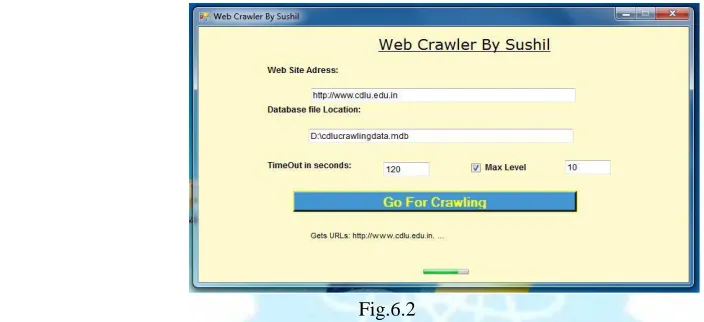
[image:5.612.78.430.288.449.2]Figure shown below is the snapshot of the main user interface of the Web Crawler simulator, which is designed in the VB.NET using ASP.NET Window Application project type, for crawling a website or any web application using this crawler internet connection must required and as input use URL in a format like: http://www.google.com orhttp://google.com and set location and name of database for saving crawling results data in MS-Access database.
Fig.6.2
At each simulation step, the scheduler chooses the topmost Website from the queue of Web sites and sends this site's information to a module that will simulate downloading pages from the Website. For this Simulator uses the different crawling scheduling policies and save data collected or downloaded in MS Access Database in a table with some data fields which are ID, URL and Data.
C. Crawling Result
[image:5.612.194.444.544.706.2]The best way to compare the result of different policies is to present them in form of table depicting the result in the form of Rows and columns. Output of first simulated algorithm, Breadth First algorithm is shown below as a snapshot.
Technology(IJRASET)
The simulator uses the breadth first algorithm and crawled the website for the URL http://www.cdlu.edu.in . The working of any Breadth-First algorithm is very simple. It simply works of first come first serve. Crawling start with URL http://www.cdlu.edu.in. After processing this URL, its child link inserted into the Frontier. Again the next page is fetched from the Frontier and is processed, its children inserted into Frontier and so on. This procedure continues until the Frontier gets empty.
Breadth-First is used here as a baseline crawler; since it does not use any knowledge about the topic, and its performance is considered to provide a lower bound for any of the more sophisticated algorithms.
Second optimal algorithm is Best First; in this the preference of next page to be approached depends upon the relevancy of that page. Best First traversing from the same URL as Breadth First algorithm for http://www.cdlu.edu.in. Its relevancy is set highest (2 in this case). Now the relevancy of seed children comes out to be 0.1 and 1.0 respectively. Along with respective relevancies, seed children are inserted in frontier. Every time, the page with highest relevancy value is picked from the Frontier. The parent relevance decides which page will be selected next. The page with the highest parent relevance value is selected from the Frontier every time. Third crawling algorithm is Breadth First with time constraints and crawled result using this algorithm for the same seed URL. It is analysed from the produced results that each policy behaves differently with same seed URL.
D. Result Format
Downloaded data page by page after crawling from the website http://www.cdlu.edu.in and store in the database
table’s Data Column field using the format shown below:
<!DOCTYPE html PUBLIC “-//W3C//DTD XHTML 1.0 Transitional//EN”
“http://www.w3.org/TR/xhtml1/DTD/xhtml1-transitional.dtd”>
<html xmlns=”http://www.w3.org/1999/xhtml”> <head> <meta http
-equiv=”Content-Language” content=”en-us” /> <meta http-equiv=”X -UA-Compatible” content=”IE=7” />
<meta http-equiv=”Content-Type” content=”text/html; charset=windows-1252” /> <meta name=”verify
-v1” content=”uNh2/LFAVip3xI8N/LIVD63/1YquyPWEy zegOUv80Ls=” /> <title>Welcome to CDLU,
Sirsa</title>
<meta name=”keywords” content=”Chaudhary Devi Lal University, CDLU, University in Sirsa,
Distance education, Sirsa university, university in aryana, devi Lal university, CDLU Sirsa, Sirsa university, Tau aryana , choudhary Devi lal, university of aryana, MCA in sirsa, Mass communication in sirsa, M.A.
in Sirsa, M.Com in sirsa” />
…..
….. …..
</body> </html>
This format shows the crawled data for the home page of the website.
Technology(IJRASET)
market. This paper also shows the user interface of a Web Crawler which are designed using ASP.NET Window application and VB language. The job of a web crawler is to navigate the web and extract new pages for the storage in the database of the search engines. It also involves the traversing, parsing and other considerable issues.
REFERENCES
[1] http://en.wikipedia.org/wiki/Web_crawler#Examples _of_Web_crawlers. [2] http://www.chato.cl/papers/castillo04_scheduling_algorithms_web_crawling.pdf. [3] http://ieeexplore.ieee.org/iel5/2/34424/01642621.pdf.
[4] http://citeseerx.ist.psu.edu/viewdoc/download?doi =10.1.1.1.9569&rep=rep1&type=pdf [5] http://dollar.biz.uiowa.edu/~pant/Papers/crawling. pdf
[6] Marc Najork, Allan Heydon SRC Research Report 173, “High-Performance Web Crawling”, published by COMPAQ systems research center on September 26, 2001.
[7] Sergey Brin and Lawrence Page, ”Theanatomy of a large-scale hyper textual Web search engine”, In Proceedings of the Seventh International World Wide Web Conference, pages 107–117, April 1998.
[8] [Ard¨o A]. (2005). “Combine Web crawler,” Software package for general and focused Web-crawling. http://combine.it.lth.se/.
[9] Brin, S. and Page, L. 1998. The anatomy of a large-scale hypertextual Web search engine. In Proceedings of the Seventh international Conference on World Wide Web 7, 107-117
[10] Heydon, A. and Najork, M. 1999. Mercator: A scalable, extensible Web crawler. World Wide Web 2, 4 (Apr.1999), 219-229