Abstract— This paper summarizes the work towards building a computerized attendance system for a university. It minimizes the paperwork and reduces the time used for capturing the attendance, thereby making it easier to manage the records related to the same. A commercial barcode scanner is used to supply input to the system. LAMP (Linux, Apache, MySQL and PHP) has been used for hosting and maintaining the database and server. The system allows instructors and administrators to monitor the attendance as needed.
Index Terms—Apache Server, Automation, Barcode Scanner, MySQL, PHP.
I. INTRODUCTION
TTENDANCE is captured and recorded on a daily basis in a variety of organizations and institutions, typically ranging from schools to universities and even offices. In most academic institutions, the attendance is taken using primitive techniques, such as calling out names of registered students and placing a mark against their names. These records would later need to be transferred manually to a central repository or database for archiving for future reference. In addition to being cumbersome, this technique leaves scope for human error. If the archiving is also primitive, the retrieval of information becomes inefficient. The purpose of this paper is to present a solution to make the entire process of taking, storing and retrieving the attendance more efficient. More specifically, the solution targets academic institutions, such as colleges and schools, where students have unique identification numbers.
Manuscript received December 28, 2014; revised February 3, 2015. This work was supported by the Birla Institute of Technology and Science, Pilani, Dubai Campus.
G. Madan is a Final Year undergraduate student at the Department of Computer Science at BITS Pilani, Dubai Campus, Dubai International Academic City, P.O. Box 345055, Dubai, UAE. (Phone:+971552933164, e-mail: [email protected])
Y. Vedula is a Final Year undergraduate student at the Department of Computer Science at BITS Pilani, Dubai Campus, Dubai International Academic City, P.O. Box 345055, Dubai, UAE. (Phone:+971555244246, e-mail: [email protected])
A. Varshney is a Final Year undergraduate student at the Department of Computer Science at BITS Pilani, Dubai Campus, Dubai International Academic City, P.O. Box 345055, Dubai, UAE. (Phone:+971555260389, e-mail: [email protected])
R. Sharma is a Final Year undergraduate student at the Department of Computer Science at BITS Pilani, Dubai Campus, Dubai International Academic City, P.O. Box 345055, Dubai, UAE. (Phone:+971552129311, e-mail:[email protected] )
B. Vijayakumar is with the Department of Computer Science at BITS Pilani, Dubai Campus, Dubai International Academic City, P.O. Box 345055, Dubai, UAE. (Phone:+971503607683, e-mail: [email protected])
The web application is scripted using PHP and hosted on an Apache server which, in turn, runs on a Linux computer. The records are stored in a MySQL database, which is also hosted on the same Apache server. Thus, the system utilizes the LAMP (Linux, Apache, MySQL and PHP) [1] framework. This allows the system to be robust and dynamic. [2]
The purpose of the presented system is to:
1. Provide instructors and administrators with an efficient and interactive interface for managing attendance.
2. Deliver a time-saving approach to access the attendance database.
3. Reduce the paperwork involved in the attendance capture and record process.
4. Maintain a back-end service that can be used with any input mechanism, thus reducing the dependency on any single input source, such as biometrics or RFID.
This paper is organized into seven sections followed by the appendix and references. Section 2 throws light on the infrastructure requirements. Section 3 deals with integrating the components of LAMP. Section 4 describes the workflow pertaining to the attendance system, Section 5 discusses the various output modes. Section 6 deals with the practical considerations which have been taken into account while implementing this system and Section 7 summarizes and concludes the paper.
II. INFRASTRUCTURE REQUIREMENTS
The eAttendance system requires various components for its functioning. These are as follows -
A. Input Devices
[image:1.595.313.544.659.706.2]During the attendance capture process, the system takes its input in the form of a unique identification for each student. This can be in a variety of forms, including biometrics, RFID cards or facial recognition. For the purpose of testing this application, a student ID card with the student ID number encoded into a barcode, as shown in Fig. 1 is used.
Fig. 1. Barcode embedded into the ID card representing the ID number of the student
B. Classroom Computer
Each instructor must have access to a computer at the time of capturing the attendance. This computer should be connected to the server hosting the application over a
eAttendance System for Academic Institutions
Gaurav Madan, Yashasvi Vedula, Anubha Varshney, Ranoo Sharma, B Vijayakumar
network. This connection could be made either over the internet through a publicly accessible domain or by using the Local Area Network. In addition to having basic browsing capabilities, the computers should be capable of being interfaced with the input devices mentioned above. Typically, this requires either a USB or PS/2 port.
C. Server Computer
The system requires a server to host the web application. The scripts, written in PHP, are hosted on an Apache server running on a Linux machine, though the same results could be achieved by running it on any other operating system, such as Windows or Macintosh. The MySQL database is also hosted on this server.
Fig. 2 shows the major components of the overall system and subsystem interconnections.
Fig. 2 Diagrammatic Representation of the Components involved
III. INTEGRATING COMPONENTS OF LAMP The web application is run on a central Apache server hosting a MySQL database. PHP allows developers to write scripts to perform SQL queries on the MySQL database by allowing connections through its ‘mysql_connect’ function [3][4]. The following lines of code open a connection between the PHP application and the database:
$con = mysql_connect(DB_SERVER, DB_USER, DB_PASSWORD) or die(mysql_error()); // Connecting to host with credentials
$db = mysql_select_db(DB_DATABASE) or die(mysql_error()) or die(mysql_error()); // Selecting database
Now, the database can be queried in the following manner
IV. WORKFLOW
The primary tasks performed by the user on the system can be majorly divided into two categories: taking the attendance and viewing it.
A. Take Attendance 1. Login
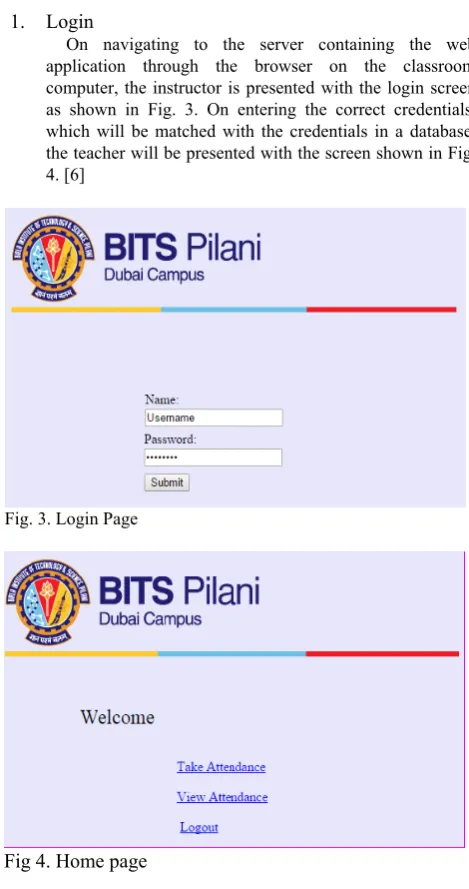
[image:2.595.310.545.119.564.2]On navigating to the server containing the web application through the browser on the classroom computer, the instructor is presented with the login screen as shown in Fig. 3. On entering the correct credentials, which will be matched with the credentials in a database, the teacher will be presented with the screen shown in Fig. 4. [6]
Fig. 3. Login Page
Fig 4. Home page
2. Select “Take Attendance”
From the options presented before the teacher, he/she must click on “Take Attendance” to take the attendance for a particular class.
3. Take the Attendance
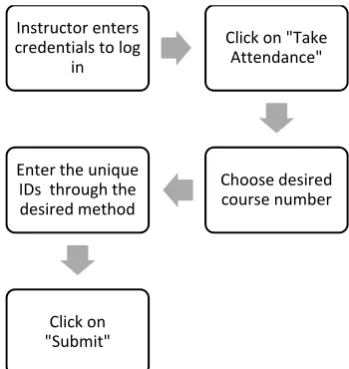
[image:2.595.53.287.254.401.2]all the values are inserted into the table of attendance for the particular date and course.
Fig. 5. Flowchart for taking attendance
B. View Attendance 1. Login
As mentioned above in IV.A.1. 2. Click on “View Attendance”
From the options presented before the teacher, as shown in the screen in Fig. 4., he/she must click on “View Attendance” to take the attendance for a particular class.
3. Select Viewing Options
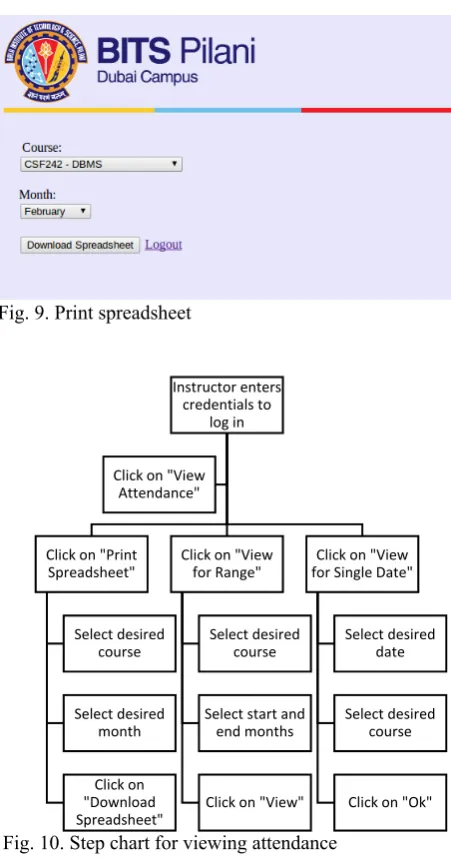
Here, the teacher could choose to view the attendance of a single date, view the attendance for a range of months or even download the monthly attendance in the form of a spreadsheet. The selection can be made by clicking on the appropriate option from the screen presented before the user, as shown in Fig. 6. On choosing to view the attendance for a single date, the teacher is presented with the screen shown in Fig. 7. Here, the teacher chooses the desired course number and date to retrieve the attendance. To view the attendance for a range, the teacher chooses the start and end months from the screen shown in Fig. 8. The teacher can also choose to download a spreadsheet of the attendance records of all months leading to a particular month by clicking on the “Print Spreadsheet” option. Here, the teacher must select the desired course number and the terminal month from the screen, as shown in Fig. 8.
[image:3.595.78.253.84.269.2]Fig. 6. View Attendance page
Fig. 7. View for a single date
Fig. 8. View for range Instructor enters
credentials to log in
Click on "Take Attendance"
Choose desired course number Enter the unique
IDs through the desired method
[image:3.595.311.538.432.610.2]Fig. 9. Print spreadsheet
Fig. 10. Step chart for viewing attendance
V. GENERATION OF OUTPUT
[image:4.595.317.494.50.126.2]The attendance for a range of months and a single date is displayed as an HTML table, as shown in Fig. 11 and Fig. 12 respectively. In addition, the system allows the instructor to download the attendance for a range of months as a spreadsheet. The code snippet shown in Fig. 13 allows the download of a spreadsheet with the content in the table stored in the associated array contained by the variable $csv_output.
Fig. 12. View attendance for single date
Fig.13. Code snippet for downloading a CSV file [7]
VI. PRACTICAL CONSIDERATIONS
The system should be secure enough to disallow proxy attendance, while simultaneously not compromising on speed and ease of use. For instance, while it may be tempting to use biometric devices as input devices as a means to prevent proxy attendances, one must take into account the associated costs, both temporal and monetary. The monetary expense, in addition, includes both high purchase and maintenance costs.
One possible low-cost solution is the use of a tablet computer for every teacher. This tablet can be passed around, allowing a student to click on a button corresponding to his/her ID number. This, however, would make the system more vulnerable to proxy attendance.
The use of an ID card with an embedded barcode, on the other hand, balances the pros and cons involved with the two aforementioned solutions. While the monetary cost of a typical barcode reader is significantly less than that of a biometric input device, such as a fingerprint sensor, the possibility of proxy attendance is also greatly reduced. This can be achieved by placing the barcode scanner in a location where a vigilant teacher can monitor the students. The speed of taking input is also greatly increased, as a typical barcode scanner is capable of scanning up to 200 barcodes every second.
The database hosting server must be capable of handling multiple queries simultaneously, as in most cases, several classes would be running at the same time, and may be taking their respective attendances simultaneously.
VII. CONCLUSION Instructor enters
credentials to
log in
Click on "Print
Spreadsheet"
Select desired
course
Select desired
month
Click on
"Download
Spreadsheet"
Click on "View
for Range" Select desired
course
Select start and
end months
Click on "View"
Click on "View
for Single Date" Select desired
date
Select desired
course
Click on "Ok" Click on "View
[image:4.595.55.292.646.727.2]the implementation of the application in a real-world context. The work presented by this paper can be further extended to allow student accounts to be created, where students can log in to check their attendance as desired.
APPENDIX
Following is a list of the acronyms used throughout the paper:
LAMP – Linux Apache MySQL PHP. PHP – Hypertext Preprocessor. SQL – Structured Query Language. HTTP- HyperText Transfer Protocol RFID- Radio Frequency Identification HTML- Hypertext Markup Language
REFERENCES
[1] IBM. “Introduction to LAMP Technology” [Online]. Available: http://www.ibm.com/developerworks/web/tutorials/wa-lamp/wa-lamp.html [Accessed: Oct. 2, 2013]
[2] Bernhardt, Emily S., et al. "Synthesizing U. S. river restoration efforts." Science (Washington) 308.5722 (2005): 636-637.
[3] PHP. “PHP: mysql_connect – Manual” [Online]. Available: http://php.net/manual/en/function.mysql-connect.php [Accessed: Oct 10, 2013]
[4] W3Schools. “PHP Connect to MySQL” [Online]. Available: http://www.w3schools.com/php/php_mysql_connect.asp [Accessed: Oct 10, 2013]
[5] MySQL. “MySQL :: MySQL and PHP :: 5.5.40 mysql_query” [Online]. Available: http://dev.mysql.com/doc/apis-php/en/apis-php-function.mysql-query.html [Accessed: Oct 22, 2013]
[6] Welling, Luke, and Laura Thomson. PHP and MySQL Web development. Sams Publishing, 2003.