----~.-. ,
Using
TCPIIP
Network
Applications
008667-AOO
Using TCPIIP Network
Applications
Apollo Computer Inc. 330 Billerica Road Chelmsford, MA 01824
Confidential and Proprietary. Copyright © 1988 Apollo Computer, Inc., Chelmsford, Massachusetts. Unpublished -- rights reserved under the Copyright Laws of the United States. All Rights Reserved.
First Printing: July 1988
This document was produced using the Interleaf Technical Publishing Software (TPS) and the InterCAP Illustrator I Technical Illustrating System, a product of InterCAP Graphics Systems Corporation. Interleaf and TPS are trademarks of Interleaf, Inc.
Apollo and Domain are registered trademarks of Apollo Computer Inc.
ETHERNET is a registered trademark of Xerox Corporation.
VT100 Is a registered trademark of Digital Equipment Corporation.
UNIX is a registered trademark of AT&T in the USA and other countries.
3DGMR, Aegis, D3M, DGR, Domain/Access, Domain/Ada, Domain/Bridge, Do-main/C, Domain/ComController, Domain/CommonLlSP, Domain/CORE, Domain/De-bug, Domaln/DFL, Domain/Dialogue, Domain/DQC, DomainllX, Domain/Laser-26, Domain/LISP, Domain/PAK, Domain/PCC, Domain/PCI, Domain/SNA, Domain X.25, DPSS, DPSS/Mail, DSEE, FPX, GMR, GPR, GSR, NLS, Network Computing Kernel, Network Computing System, Network License Server, Open Dialogue, Open Network Toolkit, Open System Toolkit, Personal Supercomputer, Personal Super Workstation, Personal Workstation, Series 3000, Series 4000, Series 10000, and VCD-8 are trade-marks of Apollo Computer Inc.
Apollo Computer Inc. reserves the right to make changes in specifications and other information contained in this publication without prior notice, and the reader should in all cases consult Apollo Computer Inc. to determine whether any such changes have been made.
THE TERMS AND CONDITIONS GOVERNING THE SALE OF APOLLO COMPUTER INC. HARDWARE PRODUCTS AND THE LICENSING OF APOLLO COMPUTER INC. SOFTWARE PROGRAMS CONSIST SOLELY OF THOSE SET FORTH IN THE WRITTEN CONTRACTS BETWEEN APOLLO COMPUTER INC. AND ITS CUSTOMERS. NO REP-RESENTATION OR OTHER AFFIRMATION OF FACT CONTAINED IN THIS PUBLICA-TION, INCLUDING BUT NOT LIMITED TO STATEMENTS REGARDING CAPACITY, RESPONSE-TIME PERFORMANCE , SUITABILITY FOR USE OR PERFORMANCE OF PRODUCTS DESCRIBED HEREIN SHALL BE DEEMED TO BE A WARRANTY BY APOLLO COMPUTER INC. FOR ANY PURPOSE, OR GIVE RISE TO ANY LIABILITY BY APOLLO COMPUTER INC. WHATSOEVER.
IN NO EVENT SHALL APOLLO COMPUTER INC. BE LIABLE FOR ANY INCIDENTAL, INDIRECT, SPECIAL OR CONSEQUENTIAL DAMAGES WHATSOEVER (INCLUDING BUT NOT LIMITED TO LOST PROFITS) ARISING OUT OF OR RELATING TO THIS PUBLICATION OR THE INFORMATION CONTAINED IN IT, EVEN IF APOLLO COM-PUTER INC. HAS BEEN ADVISED, KNEW OR SHOULD HAVE KNOWN OF THE POS-SIBILITY OF SUCH DAMAGES.
Preface
Using TCP//P Network Applications describes how to use
SRI0-based TCP/IP network applications to communicate with other computers over a network. These applications allow you to get information about your network, login to another computer, copy files between computers, or remotely execute a program on another computer.
We've organized this manual as follows:
Chapter 1
Chapter 2
Chapter 3
Understanding TCP/IP Network Ap-plications explains what TCP/IP is, what computers you can communicate with, and what kinds of tasks you can perform.
Getting Information about the Net-work describes how to use the pro-grams that provide information about your network.
Chapter 4
Chapter 5
the only command that can execute a commanq on a remote computer with-out explicitly logging in.
Using TELNET for Remote Login describes the TELNET program for logging in remotely to another com-puter on your network.
Using FTP for File Transfer de-scribes the FTP file transfer program, which allows you to copy files back and forth between your computer and a remote computer on the network. A Glossary and Index follow Chapter 5.
Related Manuals
The file /install/doc/apoll%s. v.latest software release number _manuals lists current titles and revisions for all available
manuals. For example, at SRI0.0 refer to /install/doc/apollo/ os.v.l0.0_manuals to check that you are using the correct ver-sion of manuals. You may also want to use this file to check that you have ordered all of the manuals that you need. (If you are us-ing the Aegis environment, you can access the same information through the Help system by typing help manuals.)
Refer to the Domain Documentation Quick Reference (002685)
and the Domain Documentation Master Index (011242) for a
com-plete list of related documents.
For detailed reference information on the commands described in this book, see the BSD Command Reference (005800), SysV Com-mand Reference (005798), or Aegis Command Reference
(002547) .
For introductory information on Domain/OS and the available op-erating environments and shells, see Getting Started with Domain/
For information on differences between SR10 TCP/IP and previous versions, see Making the Transition to SRIO TCP/IP (011717).
For information on planning, configuring, and managing TCP/IP in-ternets, see Planning Domain Networks and Internets (009916), Managing Domain Routing and Domain/OS in an Internet
(005694), and Configuring and Managing TCP/IP (008543).
For reference information on BSD socket calls, the transport inter-face used to implement the applications described in this book, see the BSD Programmer's Reference (005801).
References of the form foo(N), where N is a number or a number followed by a letter, refer to pages in the BSD Command Reference
or the BSD Programmer's Reference.
Problems, Questions, and Suggestions
We appreciate comments from the people who use our system. To make it easy for you to communicate with us, we provide the Apollo Product Reporting (APR) system for comments related to hardware, software, and documentation. By using this formal channel, you make it easy for us to respond to your comments.
You can get more information about how to submit an APR by con-sulting the appropriate Command Reference manual for your envi-ronment (Aegis, BSD, or SysV). Refer to the mkapr (make apollo product report) shell command description. You can view the same description online by typing:
$ man mkapr (in the SysV environment)
% man mkapr (in the BSD environment)
$ help mkapr (in the Aegis environment)
Documentation Conventions
Unless otherwise noted in the text, this manual uses the following symbolic conventions.
literal values
user-supplied values
sample user input
output
{ }
< >
CTRLI
Bold words or characters in formats and command descriptions represent commands or keywords that you must use literally. Pathnames are also in bold. Bold words in text indicate the first use of a new term.
Italic words or characters in formats and command descriptions represent values that you must supply.
In examples, information that the user enters appears in color.
Information that the system displays appears in this typeface.
Square brackets enclose optional items in formats and command descriptions. Square brackets also have special meaning to some ftp commands. Braces enclose a list from which you must choose an item in formats and command descriptions. Braces also have special meaning to some ftp
commands.
A vertical bar separates items in a list of choices.
Angle brackets enclose the name of a key on the keyboard.
8 8
-Vertical ellipsis points mean that irrelevant parts of a figure or examples have been omitted.
Chapter 1
Contents
Understanding
TCP/IP
Network
Applications
1.1 What is TCP/IP? . . . 1-1 1.2 What Kinds of Computers Can I
Communicate with? ... 1-5 1.3 What Kinds of Tasks Can I Perform? ... 1-7 1.4 How Do I Access the Network
Applications? . . . 1-8 1.5 Getting Started. . . .. 1-11
Chapter 2
Getting Information about the
Network
2.3 The netstat Command. . . .. 2-6 2.3.1 Displaying Active Sockets. . . .. 2-8 2.3.2 Examining System Data Structures ... 2-9 2.3.3 Monitoring Network Statistics. . . . .. 2-10
Chapter 3
Using Shell-Level TCP/IP
Commands
3.1 Establishing Remote Access . . . .. 3-2 3.1.1 The hosts.equiv File ... 3-2 3.1.2 The .rhosts File ... 3-3 3.1. 3 Specifying a Remote User Account . . . . .. 3-4 3.1.4 Error Messages. . . .. 3-4 3.2 The rlogin Command ... 3-5 3.3 The rep Command ... 3-7 3.4 The rsh Command ... : . . . .. 3-8 3.5 The tftp Command. . . .. 3-10
Chapter 4
Using TELNET for Remote Login
4.1 Getting Started - The telnet Command .... 4-2 4.1.1 Input Mode and Command Mode. . . .. 4-2 4.1.2 The Escape Character ... 4-3 4.1.3 Invoking telnet ... 4-4 4.1. 4 Exiting telnet . . . .. 4-6 4.2 Using tel net Commands ... 4-7 4.2.1 Connecting to a Remote Host
with open ... 4-7 4.2.2 Closing a Connection with close ... 4-8 4.2.3 Exiting telnet with quit. . . .. 4-8 4.2.4 Suspending Operation with z ... 4-8 4.2.5 Setting Input Mode Type with mode. . . .. 4-8 4.2.6 Getting Help on telnet Commands
4.2.7 4.2.8 4.2.9 4.2.10 4.2.11 4.3
Chapter 5
5.1 5.2 5.2.1 5.2.2 5.2.3 5.2.4 5.2.5 5.2.6 5.2.7 5.3 5.3.1 5.3.2 5.3.3 5.3.4 5.3.5 5.4
Displaying Current Status with status ... . Displaying Settings with display ... . Sending Commands to the Remote
Host with send ... . Setting Parameters with set ... . Toggling Parameters with toggle ... . An Example tel net Session ... .
Using FTP for File Transfer
The ftp Shell Command ... . Establishing and Closing Connections ... .
Connecting to a Remote Host
with open . . . . Logging into a Remote Host with user '" Specifying an Account with account ... Allowing Port Commands
with send port ... . Resynchronizing Communications
with reset . . . . Disconnecting from a Host:
close and disconnect ... . Exiting ftp: bye and quit ... . Transferring Files . . . .
Sending a File to the Remote:
put and send . . . . Sending Multiple Files with mput ... . Getting a File From the Remote:
get and recv . . . . Getting Multiple Files with mget ... . Appending to a Remote File
with append . . . . Using Directory and File Control
Chapter 5
Using FTP for File Transfer
(cont.)
5.4.2 Changing the Remote Working
Directory with cd ... 5-17 5.4.3 Reporting the Remote Working
Directory with pwd . . . .. 5-17 5.4.4 Listing Remote Files: Is and dir.. . .. ... 5-17 5.4.5 Listing Multiple Remote Files:
mls and mdir ... 5-18 5.4.6 Creating a Remote Directory
with mkdir ... 5-19 5.4.7 Removing a Remote Directory
5.4.8 5.4.9 5.4.10 5.5 5.5.1 5.5.2 5.5.3 5.5.4
with rmdir ... , Renaming Remote Files with rename ... . Deleting Remote Files with delete ... . Deleting Multiple Files with mdelete .... . Controlling Filename Interpretation ... . Toggling Filename Expansion with glob .. Toggling Case Translation with case ... Setting Filename Character
Translation with ntrans ... . Setting Character Pattern Mapping
with nmap ... . 5.5.5 Toggling Unique Local Filenames
5-19 5-19 5-20 5-20 5-20 5-21 5-23 5-23 5-24
with runique ... , 5-25 5.5.6 Toggling Unique Remote Filenames
with sunique ... 5-26 5.6 Setting File Transfer Parameters. . . .. 5-26 5 . 6. 1 Specifying Transfer Type with type . . . . .. 5 - 26 5.6.2 Specifying Transfer Type: ascii,
binary and tenex . . . .. 5-27 5.6.3 Setting File Structure with struct . . . .. 5-27 5.6.4 Setting Transfer Mode with mode. . . .. 5-28 5.6.5 Setting Transfer Format with form ... 5-28 5.6.6 Toggling Carriage Return Stripping
5.7 5.7.1 5.7.2 5.7.3 5.7.4 5.7.5 5.7.6 5.7.7 5.8 5.8.1 5.8.2 5.8.3 5.8.4 5.8.5 5.8.6 5.8.7 5.8.8
Glossary
Index
Displaying Help and Status Information ... Reporting Status Information
with status ... . Toggling Verbose Mode with verbose ... . Toggling Prompt Mode with prompt .... . Reporting on Blocks Transferred
with hash ... . Toggling Completion Bell with bell ... . Getting Local Help with help or ? ... . Getting Remote Help with remotehelp .. . Using Advanced ftp Features ... . Toggling Packet Tracing with trace ... . Setting Debug Mode with debug ... . Sending a Command with quote ... . Executing a Local Shell with ! ... .
Executing a Macro with $ . . . .
Defining Macros with macdef ... . Controlling Secondary Connections
with proxy ... . Specifying Auto-Login Parameters
5-29 5-29 5-29 5-29 5-30 5-30 5-30 5-30 5-31 5-31 5-31 5-31 5-32 5-32 5-32 5-33
Figures
1-1 An Apollo Token Ring Network. . . .. 1-2 1-2 An ETHERNET Network. . . .. . . .. . . . .. 1-2 1-3 An Internet. . . .. 1-4 1-4 Operating Environments . . . .. 1-9
Tables
1-1 TCP/IP Application Summary. . . .. 1-6 1-2 Available TCP/IP Applications by
Environment. . . .. 1-10
4-1 Summary of tel net Commands. . . .. 4-3
Chapter 1
Understanding
TCP/IP
Network Applications
This chapter explains what TCP/IP is, what computers you can communicate with using the TCP/IP network applications, what kinds of tasks you can perform, and how to get started using the ap-plications.
1.1 What is TCP/IP?
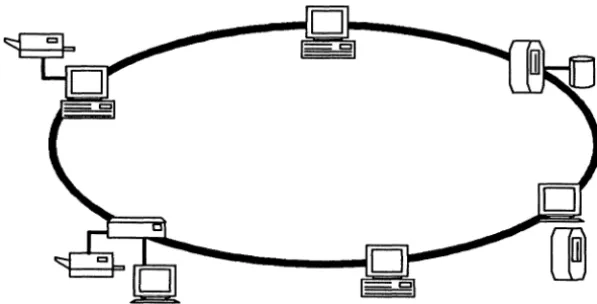
Figure 1-1. An Apollo Token Ring Network
Figure 1-2 shows an IEEE 802.3, or ETHERNET·, network, which supports communications among many different kinds of computers. Almost any kind of computer may be connected to an ETHERNET network. Such a network, with many different kinds of computers on it, is referred to as a heterogeneous network.
o
o
Figure 1-2. An ETHERNET Network
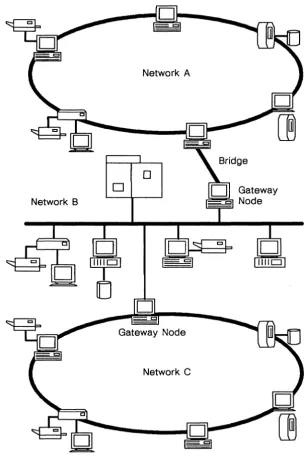
An internet consists of two or more networks connected together by gateways and/or bridges, which route data between different net-works. A gateway is a computer that is directly connected to two dissimilar networks and that is running software that can accept data from one network, repackage that data using the protocols prescribed by the second network, and send the data on to its final destination on the second network.
A bridge is a network connecting two computers, each of which is also connected to another, primary, network. A computer on one end of the bridge can accept and send data from its primary net-work across the bridge netnet-work to the computer at the other end of the bridge, which then sends it on to its destination. The networks connected by a bridge must be of the same type, as no protocol translation is done. In actual practice, however, many bridges have gateways at one or both ends and thus can connect dissimilar net-works.
Network A
o
o
Network B
[image:19.435.78.382.66.537.2]Network C
SR10-based TCP!IP is a collection of software programs that pro-vide data communications services over Apollo Token Ring or ETHERNET networks and internets. It provides the following:
• System software responsible for the actual transmission and reception of data
• Programming tools useful for developing specialized appli-cations that communicate over a network
• A set of applications that allow users to copy files from one computer to another, login to another computer, or exe-cute a command on a remote computer
The user applications provided by TCP/IP are the subject of this book. They provide Domain users with the ability to communicate with remote computers over heterogeneous networks and internets, such as the internet shown in Figure 1-3. They are especially use-ful for communicating with non-Apollo computers.
1.2 What Kinds of Computers Can I Communicate
with?
The TCP/IP applications can communicate with any other comput-er on your network or intcomput-ernet, including Apollo nodes, provided the remote computer supports TCP/IP protocols and applications.
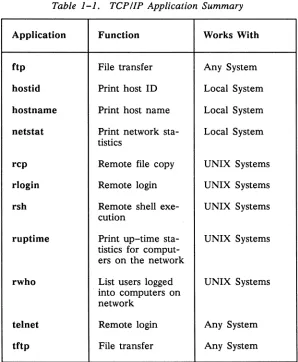
For most operations. you must have a user login account on the re-mote computer you wish to communicate with. Exceptions are tftp and the commands that provide only information about the network (hostid. hostname. netstat. ruptime. and rwho). Your system administrator can provide information about user login accounts.
Table 1-1. TCPI/P Application Summary
Application Function Works With
ftp File transfer Any System
hostid Print host ID Local System
hostname Print host name Local System nets tat Print network sta- Local System
tistics
rep Remote file copy UNIX Systems
rlogin Remote login UNIX Systems
rsh Remote shell exe- UNIX Systems
cution
ruptime Print up-time sta- UNIX Systems tistics for
comput-ers on the network
rwho List users logged UNIX Systems . into computers on
network
telnet Remote login Any System
[image:21.432.84.382.150.512.2]1.3 What Kinds of Tasks Can I Perform?
There are four general categories of tasks you can perform with the TCP lIP applications:
• Getting information about the network • Logging in to another computer
• Copying files to or from another computer • Executing a program on another computer
Several commands provide information about the network. Infor-mation about computers on the network, including your own com-puter, and about users on those computers, can be displayed. Some of these commands will provide information only about other UNIX systems. Getting such information about the network is dis-cussed in Chapter 2.
You can login to a remote computer with either the rlogin com-mand or the tel net program. The rlogin command is simpler and easier to use. The tel net command is able to communicate with more kinds of computers, and provides more control over commu-nications parameters. Chapter 3 contains a description of rlogin; tel net is discussed in chapter 4.
Three commands allow you to copy files between your computer and another computer. The rep command allows you to copy files without explicitly logging in to the remote computer. The tftp com-mand allows file transfer to or from computers that you do not have a login account on. The ftp command can communicate with a wider range of computers, and offers much greater control over file transfers. The rep and tftp commands are discussed in Chapter 3. The ftp command is described in Chapter 5.
Remote program execution under TCP/IP is provided only by the
rsh command, discussed in Chapter 3. This command allows you
1.4 How Do I Access the Network Applications?
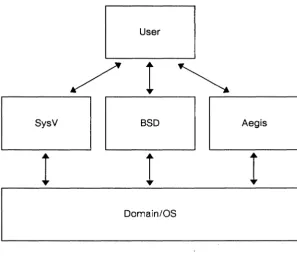
Domain/OS provides three operating environments in which you can work. Each operating environment is distinct from the Do-main/OS operating system, which controls your workstation's hard-ware and provides a set of basic system services for the operating environments to use. An operating environment provides the user with the following facilities:
• A directory tree containing standard system directories • A set of commands that provide basic computing functions
• One or more shells, the command interpreting programs that prompt you for commands and then execute them
• Other administrative and programming facilities The available operating environments are:
Aegis
BSD SysV
This is the Apollo proprietary operating environ-ment.
This provides a BSD4.3 UNIX environment. This provides an AT&T UNIX System V Release 3 environment.
User
/
1~
r---~ r---,
SysV BSD Aegis
I
I
I
Domain/OS
Figure 1-4. Operating Environments
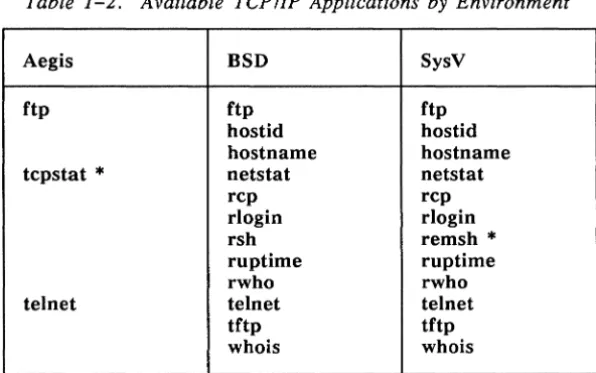
[image:24.435.84.381.69.332.2]Table 1-2. Available TePl!p Applications by Environment
Aegis BSD SysV
ftp ftp ftp
hostid hostid
hostname hostname
tepstat
*
nets tat netstattelnet
rep rep
rlogin rlogin
rsh remsh
*
ruptime ruptime
rwho rwho
telnet telnet
tftp tftp
who is whois
NOTE: Commands marked with an asterisk per-form the same function as the equivalent command in the same row of the BSD column, but have been given different names so as not to conflict with existing commands of the same name. Where a command name appears in a chapter or section title of this manual, the BSD name is used. Where a command's us-age differs between environments, an ex-ample is provided for each environment.
The rules for accessing commands vary with your operating envi-ronment, but the default command location rules for each environ-ment should provide access to the available TCP/IP commands. You should also be aware that different shells evaluate command lines differently. Conventions and methods for quoting arguments and evaluating variable expressions and pattern matching characters in filenames differ from shell to shell. Where there are significant differences, examples of each are provided. See Getting Started with Domain/OS for more information on operating environments
[image:25.435.91.389.73.259.2]1.5 Getting Started
Before getting started, make sure you are at an Apollo workstation connected to an Apollo Token Ring or ETHERNET network, and that the appropriate operating environment(s) and SR10-based TCP/IP are installed and configured correctly on your workstation.
If you are unsure about your network or software, or if you experi-ence unexpected results when you try to use the TCP/IP applica-tions, consult your system administrator.
---88---Chapter 2
Getting Information
about the Network
This chapter describes the TCP/IP applications for getting informa-tion about your network. Some of these commands provide infor-mation about your local computer, others provide inforinfor-mation about other computers on the network and about users logged in to computers on the network.
It is important to understand how TCP/IP identifies computers. Each computer on the network has a unique set of identifier num-bers, known as its address, or hostid. This address is in a form known as Internet dot format. It consists of four numbers sepa-rated by dots; for example, 192.54.3.9 is a valid internet address.
2.1 The hostid and hostname Commands
Two commands, hostid and hostname, tell you the network ad-dress and hostname, respectively, of the computer you are working on. They can also be used to set the address or hostname of your computer, provided you have appropriate access on your computer. This use of the commands is described in Configuring and
Manag-ing TCPIIP.
These commands are typed directly at your shell prompt. When the command completes, the results are shown on your screen, and a new prompt is displayed. The output looks like this:
$ hostid
192.89.7.2 $ hostname
pymatuning $
2.2 The ruptime and rwho Commands
The ruptime and rwho commands provide information about com-puters on the network. You may want to find out if a particular computer is running and communicating normally with the network, or whether a particular user is logged on, and if so, to what comput-er or computcomput-ers.
These commands are, generally speaking, useful only for getting information about UNIX computers on your network. UNIX im-plementations of TCP/IP usually arrange to broadcast certain infor-mation to the network once a minute, and to collect the informa-tion provided by other computers. Most non-UNIX implementa-tions of TCP/IP do not provide appropriate information to the net-work.
NOTE: ruptime and rwho provide information only about computers on your local
net-work, not about computers on the entire
2.2.1 Using
ruptime
internet. See Chapter 1 for a discussion of networks and internets.
To find out what computers are up-running and communicating
normally with the network-use the ruptime command. This com-mand prints a list of all computers it knows about, including such information as how long the computer has been up (or down), and how many users are currently logged in. Computers from which no status reports have been received in the previous 11 minutes are assumed to be down.
The output of ruptime contains five fields:
name
up/down
uptime
users
This field lists the hostname of the computer for which information is given.
This field tells whether the given computer is up or down.
This field tells, in days, hours, and minutes, how long the computer has been up, or down.
If the computer is up, this field lists the number of users who are logged in and active on the specified computer, otherwise this field is not displayed. If
the -a flag is used, users who have been idle for an hour or more, and who would thus not ordinarily be listed, are counted as well.
The example below shows what the output of ruptime typically looks like:
$ ruptime
abacus up 4+20:28, 1 user
griffin down 1+02:00
hal 9000 up 6+17:35, 0 users
python up 3+02:50, 1 user
moment up 2+19:51, 1 user
In the example. the machine griffin has been down for 1 day and 2 hours; abacus has been up for 4 days. 20 hours. and 28 minutes and has one user logged on.
Several options can be used with ruptime. most of which vary the order in which computers are listed. The -a option forces all logged-in users to be counted in the output. By default. users that have been idle for .an hour or more are not listed. The available options are:
-a
-r
-t
-u
2.2.2 Using rwho
This option forces ruptime to count users who have been idle for an hour or more when it displays the number of users logged into a computer. Nor-mally. only active users are counted.
Reverse the order in which output is sorted. By de-fault the listing is in alphabetical order by machine name. This option may also be used in conjunc-tion with any of the opconjunc-tions below.
Sort the listing by up time.
Sort the listing by number of users.
The rwho command provides information about users logged in to computers on the network. The output is similar to the output of the UNIX who command. but lists users on other nodes. Like ruptime. this command depends on information broadcast by the other nodes on the network. and will not include information about users on computers that have not been heard from in the previous five minutes.
The example shows what output might look like:
$ rwho
john abacus: display Jan 21 09:19
henry moment: display Jan 21 10:57 user hal_9000:display Jan 21 11:45
user yo:display Jan 21 08:22
This output does not necessarily show all users logged in to comput-ers on the network. Uscomput-ers who have been idle for an hour or more are not shown in the listing. The output contains three fields:
user This gives the name under which the user is logged into a node. Note that the same user name may appear more than once on the same or different nodes. It is possible for two different users on dif-ferent nodes to have the same login name, or for the same user to be logged in more than once on the same node. In the example, user is logged in twice.
node: device This field gives the hostname of the machine the user is logged into, followed by a colon and the port on hostname that the user is logged into. The form that this port name takes varies with the type of system, and indicates the particular terminal line", communications port, etc., that the user is us-ing. In the example, all users are logged into the display port of their respective machines.
date/idle time The last field gives the date and time that the user logged in. If the user has not typed into the systeOm for a minute or more, this field shows how long he or she has been idle. If a user has been idle for an hour or more, that user will not be displayed at all, unless the -a option is used. There are no idle us-ers shown in the example.
2.3 The
nets tat
Command
The netstat command provides detailed information about the state of TCP/IP software on your node, based on the contents of various network-related data structures. This information is generally used for administrative and troubleshooting purposes, but can be used by anyone to check the status of TCP/IP, or as a first line of inquiry when network applications do not appear to be functioning prop-erly.
In the Aegis operating environment, this command is called tcpstat, but functions in exactly the same manner as oetstat in the UNIX environments.
If you are not concerned with administrative or troubleshooting functions for TCP/IP, you may want to skip this section. If you continue, you should be familiar with the information in Configur-ing and ManagConfigur-ing TCPIIP.
Several types of information are available from netstat. Three forms of the command can be used:
oetstat [ -Aaog] [-f addr Jam]
oetstat [ -himorstT] [-f addr Jam ]
netstat [ - 0 ] [-I interface] interval
The -T option prints all available information. Use the other op-tions singly or in various combinaop-tions to print specific subsets of the available information.
Valid command line options are:
-A
-a
With the first form of the command, show the ad-dress of any protocol control blocks associated with the sockets; this is used primarily for debug-ging purposes.
-g With the first form of the command, show the first gateway used.
-h With the second form, show the state of the IMP host table. This table contains a mapping of Inter-net addresses (hostids) to physical addresses. The Address Resolution Protocol (ARP) is used to ac-quire physical addresses when only an Internet ad-dress is known.
-i With the second form, show the state of interfaces which have been enabled with the ifconfig utility. These are the physical network interfaces that can be used to send and receive data.
-I interface With the third form, show information only about this interface. This option is used with an interval;
current statistics are printed every interval seconds.
-m With the second form, show statistics recorded by the network-private memory management rou-tines.
-n With all forms, show network addresses as numbers (normally netstat attempts to interpret addresses and provide the appropriate host- or portnames.
-s With the second form, show per-protocol statistics.
-r With the second form, show the routing tables. When -s is also present, show routing statistics in-stead.
-t With the -i option, show a timer column. This in-dicates whether the given interface has timed out.
-T Show all possible status information ..
2.3.1 Displaying Active Sockets
The first form of the netstat command displays a list of active sock-ets. A socket is an endpoint for a connection between two proc-esses; these processes may be on the same machine, or, as in the case of communications protocols, on different machines. The de-fault output shows sockets for connections to processes on remote machines. The output may be altered by specifying an address family. The default output does not display sockets used by the TCP/IP server processes, which listen for incoming connect re-quests; you can request that netstat display these sockets with the -a flag. The output of netstat used in this manner might look like this:
$ netstat -a
Active connections (including servers)
Proto Recv-Q Send-Q Local Address Foreign Address (state)
tcp 0 0 *. ftp *. * LISTEN
tcp 0 0 *.exec *.* LISTEN
tcp 0 0 *. shell * . * LISTEN
tcp 0 0 *.login * * LISTEN
tcp 0 0 *.telnet *.* LISTEN
udp 0 0 *. tftp * . * LISTEN
$
The output shows that only server processes have active sockets. They are all currently listening for requests from any foreign ad-dress; none have any data queued for sending or receiving. The addresses shown are of the form
host.port
if a host is known, or
network.port
2.3.2 Examining System Data Structures
The second form of the nets tat command provides various kinds of information culled from system data structures. The descriptions of the valid flags explain in detail the specific information presented. As an example, netstat -r displays the current state of the routing tables:
$ netstat -r
Routing tables
Destination Gateway Flags Hops Refcnt Use Interface
abacus serenity UG 1 0 0 dro
smith serenity UG 4 0 0 dro
griffin hal_gOOO UG 2 1 12 ethO
yo moment UG 1 0 0 etho
$
2.3.3 Monitoring Network Statistics
The third form of the netstat command continuously displays net-work traffic statistics for a given interface, at specified intervals. The command shown generates current information every five sec-onds:
$ netstat 5
input (drO) output input (Total) output packets errs packets errs colls packets errs packets err colls
34842 0 6558 15 0 34842 0 6558 15 0 1 0 0 0 0 1 0 0 0 0 1 0 0 0 0 1 0 0 0 0
0 0 0 0 0 0 0 0 0 0 0 0 0 0 0 0 0 0 0 0
1 0 0 0 0 1 0 0 0 0 3 0 2 0 0 3 0 2 0 0 0 0 0 0 0 0 0 0 0 0 2 0 0 0 0 2 0 0 0 0 1 0 0 0 0 1 0 0 0 0 $
The display consists of two parts: in the five left-hand columns, statistics for the primary network interface (drO) appear; the de-fault interface may be changed with -I. In the five right-hand columns, totals for all interfaces appear. The number of input packets and errors, and the number of output packets and errors, along with the number of collisions, are displayed for both the given interface and for totals.
The first row of output contains totals accumulated since the system was booted. Subsequent rows are generated at intervals; this inter-val is given on the command line. In these rows, the numbers reflect incremental statistics since the last row was generated.
For more information on netstat, see Configuring and Managing TCP/IP.
---88---Chapter 3
Using Shell-Level
TCP/IP Commands
TCP/IP provides four shell-level commands used for communica-tion primarily with other UNIX machines. These commands pro-vide three basic capabilities:
• Remote login, provided by r10gin
• File transfer, provided by rcp and tftp. • Remote program execution, provided by rsh
We refer to these commands as shell-level because they do not have their own interactive environment. The teinet and ftp com-mands offer robust and comprehensive remote login and file trans-fer capabilities by providing an environment in which the user is prompted to enter commands from a command set specific to the particular program. A telnet or ftp session may last a long time, and involve communications with several remote computers.
3.1 Establishing Remote Access
With the exception of tftp, all programs described in this manual require that you have a login account on every remote host you want to communicate with. (You are not required to use the same username or password for each login account.) The rlogin, rep, and rsh commands also use the files hosts.equivand .rhosts to es-tablish remote access.
Because these commands execute at the shell level and do not ne-gotiate an interactive login, the remote host must have some way to assure itself that you are authorized to access its resources. In the case of the rep and rsh commands, if this authorization can't be es-tablished, the command fails. Behavior in the case of rlogin is im-plementation dependent: if authorization can't be established, you must go through the normal login sequence to gain access; however, some remote hosts require you to do this even if authorization could be established.
Even though an interactive login does not take place, access to a re-mote machine is always granted through a login account, using an automatic login procedure. The remote machine assumes you en-tered a valid password when you logged into your local machine, and checks hosts.equiv or .rhosts to see if your local hostname, and possibly your local username, are listed. If so, access is granted.
3.1.1 The hosts.equiv File
The hosts.equiv file, found in the fete directory of the remote ma-chine, contains a list of hostnames, one to a line. The machines that appear in this file are considered to be trusted, or equivalent, by the remote host. A user trying to login to the remote host from a trusted host is granted access without a password, if the user's local username is the same as that of the login account he or she is trying to access on the remote machine.
If a user is trying to login with a different usemame, or the local machine is not listed in hosts.equiv, the file .rhosts is checked.
3.1.2
The
.rhosts
File
The .rhosts file resides on the remote machine, in the home direc-tory of the user account you are logging into, and contains a list of machines and users that are authorized to login to that account without specifying a password. A user can thus grant login privi-leges, on a case by case basis, in addition to those granted by the hosts.equiv file. A user may also elect not to have a .rhosts file, or to have an empty .rhosts. For security reasons, .rhosts must be owned by the user who owns the account, or by root. (root is a special UNIX user with access to all system resources.)
NOTE: In the SysV and BSD environments, and on remote UNIX machines, files begin-ning with a period (.) do not appear in default file listings. To see if .rhosts is present in a directory, use the -a option of the Is command. This causes all files to be listed.
Here is an example .rhosts file, assumed to be in the home direc-tory of user john on host smith:
vaxl
sereni ty hopkins serenity kathleen
yo henry
This file allows access to the login account by a user john from the host vaxl, by the users hopkins and kathleen from the host seren-ity, and by the user henry from the host yo.
3.1.3 Specifying a Remote User Account
By default, the shell-level commands try to log you into the remote host using the username you are logged into your local machine with. For example, if you are logged into serenity as kathleen, and execute the rcp command to copy a file to a remote host, rcp tries to log you into the remote host using the username kathleen.
The rlogin. rcp, and rsh commands allow you to specify an alter-nate username to login to the remote machine with. If you are logged into machine abacus as henry, and want to access the re-mote account of hopkins, you can indicate that on the command line. Specific information on how to specify an alternate user ac-count is given with the description for each command.
3.1.4 Error Messages
If you receive an error message that says:
Login Incorrect.
while using rcp or rsh. then you are trying to login to a non-exis-tent account, or one that has not granted you access through hosts.equiv or .rhosts.
The message:
Permission Denied.
3.2 The rlogin Command
Remote login capabilities are provided by the rlogin command. This command is typed at your shell prompt, with a hostname as an argument. If you are communicating with a non-UNIX machine, you may want to use the Domain VT100* terminal emulator pro-gram:
$ vt100
$ rlogin vax_host
Connected to vax host. Login: henry
Password: [your password is not displayed as you type it]
*** Welcome to vax_host! ***
System going down for backups at 6:00pm
$
In this example, henry was able to login successfully to vax_host. The system's login message was displayed, followed by a system prompt.
You may also specify a login name on the command line. If the re-mote computer accepts this, it prompts you only for a password. For example:
$ rlogin vax_host -1 henry Connected to vax host.
Password: [your password is not displayed as you type it]
*** Welcome to vax host! ***
System going down for backups at 6:00pm
If you are logging into a UNIX host, you may not need to enter your login name and password. See Section 3.1, "Establishing Re-mote Access," for a discussion of how UNIX hosts establish login authorization for rlogin.
When you have finished your work on the remote computer, log out normally. In most cases, you are disconnected from the remote host automatically, and returned to your local shell prompt. If this does not happen, you must explicitly disconnect following logout. Do this by entering the sequence tilde/period (-.). For example:
[normal login session]
$ logout Login: -.
Connection closed. $ [local system prompt]
The tilde (-) character is an escape character that tells rlogin to di-rectly interpret the characters that follow, instead of sending them on to the remote host. See rlogin in the SysV or BSD command reference for more information.
NOTE: You can disconnect using -. without log-ging out of the remote host. The remote host mayor may not log you out
3.3
The rep Command
The rep command allows you to copy a file between any two ma-chines on your internet. This means that you can copy files be-tween two remote machines, as well as bebe-tween a remote machine and your local node. The syntax is very similar to the UNIX ep command. The general form of the command is as follows:
rep [ -p ] file 1 file2
rep [ -p ] [ -r ] file 1 ... directory
The first form of the command copies a file from one machine to another; the second form copies several files and/or directories to a directory on another machine. The command line arguments are:
-p
-r
filel
This flag directs rep to try and preserve in copies the modification times and permission modes of the source files. By default, rep preserves the at-tributes of file2 if it already existed, or otherwise uses the default file creation attributes on the re-mote host.
If any of the specified source files are directories, this flag causes the entire directory. tree to be cop-ied. In this case, the destination must be a direc-tory.
This is the source file (or files) for the copy. If the
-r flag is used, either directory or file names may be used. The name is either an absolute or relative local pathname, or is a name taking one of the fol-lowing forms:
host:pathname user@host:pathname
file 2
directory
This is a destination filename, specified in the same manner as filel.
This is a destination directory name, specified in the same manner as filel.
For example, the following command:
$ rcp -p yo:/usr/henry/report henry_rpt
copies the file lusr/henry/report from the host yo to the file henry _rpt in your current directory on your local host, preserving the file modification times and permissions of the original file. The command:
$ rcp -r henry@yo:src_dir henry@yo:prog john@smith:yo_dir copies the directory tree src_dir and the file prog, both found in henry's home directory on the host yo, to the directory yo_dir in john's home directory on the host smith.
3.4 The rsh Command
The rsh command provides remote command execution, in a man-ner similar to the UNIX sh command. In the SysVenvironment, this command is called remsh to distinguish it from the SysV rsh command (a restricted shell).
The function of rsh is to connect to a remote host and execute a given command on that host. The standard input, standard output, and standard error output of the rsh command are passed to the remotely executing command. Interrupt, quit, and terminate sig-nals are also passed to the remote command. Normally, rsh exits when the remote command does.
The general form of the command is as follows:
The allowed arguments are:
host
-I
-n
command
The hostname of the computer you want to execute command on.
This flag, if present, must be followed by a user-name to use when logging in to the remote ma-chine. See the discussion under "Establishing Re-mote Access" in this chapter. No provision is made for specifying a password, if one is needed.
Redirect standard input from /dev/null. This is useful mostly with the C shell (csh). If you run an rsh as a background process in the C shell, the process blocks even though the remote process does not post any reads. This problem can be avoided through the use of -n (or be explicitly re-directing input from /dev/null or another file).
This argument specifies the command you want to execute. This may consist of multiple words. If
the command contains shell metacharacters, these are evaluated locally, unless quoted. You can not execute interactive programs, such as text editors; use rlogin or tel net instead. If the command is omitted, you are logged into the remote host with r1ogin.
The rsh command is useful when you want to execute a single com-mand line without explicitly logging into the remote computer, and without copying necessary input and output files to the remote. For example, a remote directory can be listed with this command:
$ rsh serenity "Is /usr/public"
You can also offload compute-intensive tasks with rsh. To run the troff text formatter on a remote machine, taking input from a local file and saving output on the remote host, you could use the follow-ing command:
3.5 The
tftp
Command
The tftp program implements the Trivial File Transfer Protocol (TFTP), which allows file transfers between your local node and a remote host without user-level access. This means you can transfer files even if you have no login account on that machine. This is the only TCP/IP application that allows such transfers.
In the interest of security, remote files must be referred to with ab-solute pathnames (that is, a pathname beginning with / or / /), must contain the string /tftp/, and can not contain the string / .. /. This insures that all remote files reside under a directory called tftp. The tftp command is thus useful only in cases where remote files have been specifically placed in a location accessible to trtp.
The syntax of the tftp command is as follows:
tftp -{glg!lplrlw} localJile host remoteJile [ mode]
You must provide exactly one of the flags indicating direction of transfer, and the local_file, host, and remote_file arguments. The mode argument is optional and specifies the type of file transfer you want to make. In more detail, the command line arguments are:
put (-p, -w)
get (-g, -r)
get! (-g!)
Write the local file to the remote file remote file on the remote node. The word put, and the flags -p, and -ware all synonymous.
Read the remote file remote file into the local file local_file. If local_file already exists, tftp fails, and prints an error message. The word get, and the flags -g and -r are all synonymous.
local file
host
remote file
mode
This is the name of the local file that you want to copy to or from. If copying to this file, the file is either created or overwritten, never appended to.
It may be an absolute or relative pathname, with no restrictions placed on it.
This is the hostname of the remote machine you want to exchange files with.
This is the name of the remote file you want to copy to or from. This file is always created, never overwritten or appended to. For security reasons, the pathname is subject to the restrictions outlined at the beginning of this section.
This argument is optional, and specifies the type of file transfer. By default, the mode is netascii, which transfers the file as ASCII characters. The alternative is image mode, which transfers the file in binary, with no character conversion.
This command copies the local file public to a remote host called jackson:
$ tftp put info_file jackson lusr/public/tftp/info_fiIe
To retrieve the same file, overwriting the current copy:
$ tftp get! info file jackson lusr/public/tftp/info_fiIe
---88---Chapter 4
Using TEL NET for
Remote Login
The TELNET protocol is a general communications facility that al-lows you to log into another computer on your network. TELNET uses TCP/IP to establish a connection between two network virtual terminals (NVTs). An NVT is a virtual device that provides a standard representation of a terminal. It has well defined charac-teristics, such as the use of 7-bit ASCII data characters in an 8-bit field.
Each end of the communications connection has software that emu-lates an NVT. This technique eliminates the need for the commu-nicating devices or processes to know each other's characteristics.
It ensures that your node can communicate meaningfully with a re-mote host, even though the rere-mote's software has no knowledge of the nodes's characteristics.
You can use telnet to communicate with any computer on your net-work or internet, provided the computer supports the TELNET protocol. Typically, both UNIX and non-UNIX implementations of TCP/IP support TELNET.
4.1 Getting Started - The telnet Command
Before describing how to invoke the telnet command, a discussion of command mode and input mode (also called normal mode) is in order.
4.1.1 Input Mode and Command Mode
When connected to a remote host, telnet is normally in input mode. This means that all input you type is passed directly to the remote node, just as if you were typing at a terminal directly nected to the remote. When telnet is running but you are not con-nected to a remote host, telnet is in command mode. In command mode, tel net displays this prompt:
telnet>
You may also enter a telnet command while you are connected to a remote machine, by using the escape character described later in this chapter.
Table 4-1. Summary of telnet Commands
Command Function
open Open a connection
close Close this connection
quit Close this connection and exit telnet z Suspend operation (C shell only) mode Set either "line-by-line" input mode
or "character-at-a-time" mode status Show current status of telnet
display Display some or all of set and toggle values
? Display help information
send Send special character sequences to the remote TELNET process set Set one of the telnet variables to a
value
toggle Toggle (between true and false) one of the telnet variables
4.1.2 The Escape Character
The telnet escape character is used to enter a command while you are connected to a remote computer, and are thus in input mode. The escape character is initially CTRLI], but can be changed with the set command.
To enter a telnet command while in input mode:
[image:52.432.91.390.64.407.2]3. Type <RETURN>.
The command executes immediately after you type <RETURN>.
Only the characters between the escape character and the <RE-TURN> are interpreted as a tel net command. The telnet command may even be surrounded by normal mode data. For example, you can use the tel net send ec command to erase a character entered in error, as follows:
$ heloCTRLI] [No <RETURN> is typed, CTRLI] isn't echoed.]
telnet> send ec
p
This is equivalent to typing help in normal mode.
4.1.3 Invoking telnet
You may run telnet in any shell, including a shell that is already running the VT100 emulator. The VT100 emulator provides you with full VT100 functionality over your TELNET connection. If you do not use the VT100 emulator, tel net will emulate a dumb terminal. An example showing the use of the vt100 command ap-pears in Section 3.2 "The rlogin Command" in Chapter 3.
The general form of the telnet command is as follows:
telnet [ remote_host [port ]]
The arguments are:
port Specifying a port number tells telnet to request a connection on a particular port (\fi the remote host. If a TELNET process is not Ii! .ling for connect requests on that port, the attempt will be unsuc-cessful. You may give this argument only if the re-mote host is also specified; if port is omitted, tel-net will try to connect on the default port for that machine.
When you invoke telnet without arguments, your display should look like this:
$ telnet telnet>
You must then use the telnet open command to connect to a re-mote node, usually after using other telnet commands to set com-munications and display options to your liking.
A more typical invocation specifies a remote host to connect to. In this case, telnet informs you that it is trying to connect. If it is suc-cessful, telnet says so, and the remote host's login message appears; otherwise an error message is displayed. The following shows what this sequence might look like:
$ telnet hal 9000 Trying ...
-Connected to hal_9000. Login:
You may also see an error message, if the connect attempt was un-successful. Two of the most common are:
$ tel net hal_9000 Trying ...
Connection timed out. telnet>
$ telnet hal 9000
The first message indicates that tel net was unable to connect to the remote host, and timed out. The other computer may be down, or having communication problems; a gateway node on the route to the other computer may have failed; or there may simply be very high usage of the network resulting in communication delays. The commands described in Chapter 2 may help you determine the rea-son for the message.
The second message indicates that you have tried to connect to a host that does not appear in the /etc/hosts file. Check for typing errors and try again.
Your system administrator can add new hosts to the /etc/hosts file, or help you determine the cause of a repeated connect failure.
4.1.4 Exiting telnet
4.2 Using telnet Commands
You can enter these commands whenever telnet is in command mode (that is, when the telnet> prompt appears at the beginning of the line) or between a tel net command escape character and a <RETURN>.
4.2.1 Connecting to a Remote Host with open
The general form of the open command is as follows:
open [ remote_id [port ]]
The open command initiates a connection to a remote host. If you invoke the open command without a remote id argument, you will be in telnet command mode. The remote host's identifier can be either a TCP/IP host name or an Internet address (in the 'dot' for-mat), e.g. 192.10.9.6.
remote id The remote node you wish to connect to. This identifier may be a TCP/IP host name, or an Inter-net address in 'dot' notation.
Default if omitted: telnet prompts you for re-mote_id with (to).
The following option controls the attempt to connect to the remote node. You can only enter this option if you also specify the re-mote_id argument.
port Specify the port number to which telnet should at-tempt to connect.
4.2.2 Closing a Connection with close
The general form of the close command is as follows:
close
The close command closes a tel net session and returns you to tel-net command mode.
4.2.3 Exiting telnet with quit
The general form of the quit command is as follows:
quit
The quit command causes telnet to exit and control to return to the shell level. If a connection is open to the remote, telnet closes it before quitting.
4.2.4 Suspending Operation with z
The general form of the z command is as follows:
z
This command suspends the operation of telnet temporarily and re-turns control to the local shell process. The command is similar to the CTRLlZ sequence in the C Shell and you must be running tel-net in a C Shell (csb) for it to work. To re-enter teltel-net command mode after a z command, type a per cent sign (%), followed by a <RETURN>, after the C Shell prompt. See csh(1) for further de-tails.
4.2.5 Setting Input Mode Type with mode
The general form of the mode command is as follows:
The type argument is one of the following:
line
character
Enter "line-by-line" input mode. In this mode, your local node does not send your input to the re-mote mode until you have typed a complete line and entered it with a carriage return. You may perform editing on the line locally, before it is sent. Enter "character-at-a-time" input mode. In this mode, your local node sends each character as you type it.
If the remote host is capable of entering the requested mode, it does so.
4.2.6 Getting Help on telnet Commands with?
The general form of the ? command is as follows:
? [command]
The ? command displays brief descriptions of the telnet commands.
If you omit the command argument, a list describing all the avail-able commands appears. If you enter a command, only the line describing that command appears.
command Specify the command for which you want help. You only need to enter enough characters to uniquely identify the command.
Default if omitted: displays descriptions of all available telnet commands.
4.2.7 Displaying Current Status with status
The status command displays the current status of the tel net con-nection, including the remote host's identifier, and the current mode.
4.2.8 Displaying Settings with display
The general form of the display command is as follows
display [ argument ... ]
The display command shows the current value of all arguments specified, or of all arguments if none are specified. An argument is one of the variables set with the set or toggle commands de-scribed later in this chapter.
4.2.9 Sending Commands to the Remote Host with send
The general form of the send command is as follows:
send argument ...
The argument is a TELNET command. This command is sent to the remote host. The following are legal commands:
escape
synch
brk
ip
Sends the current telnet escape character (set with the set command, initially CTRL/]).
Sends the TELNET SYNCH sequence. This causes the remote system to discard all previously sent (but not yet read) input characters. The SYNCH is sent as TCP urgent data. It may not work if the remote system is a 4.2 BSD UNIX sys-tem-if it doesn't work, a lower case 'r' may be echoed on the display.
ao
ayt
ec
el
ga
nop
?
Sends the TELNET AO (abort output) sequence, which could cause the remote system to flush all output from the remote system to the user's dis-play.
Sends the TELNET AYT (are you there) se-quence, to which the remote system mayor may not choose to respond.
Sends the TELNET Ee (erase character) se-quence, which should cause the remote system to erase the last character sent to it.
Sends the TELNET EL (erase line) sequence, which should cause the remote system to erase the line currently being entered.
Sends the TELNET GA (go ahead) sequence, which likely has no significance to the remote sys-tem.
Sends the TELNET NOP (no operation) sequence. Prints out help information for the send command.
4.2.10 Setting Parameters with set
The general form of the set command is as follows:
set argument value
The set command sets the given argument, which is a variable con-trolling some aspect of telnet's operation, to value. The special value off turns off the function associated with the variable. You
can use the display command to find the current value of a vari-able. The possible arguments are:
informa-escape
interrupt
quit
flushoutput
erase
kill
eof
This is the telnet escape character (initially CTRL/]) . The escape character causes tel net to interpret characters typed after it as a command. when in input mode. A <RETURN> is used to end the command.
Sets the interrupt character. If tel net is in local-chars mode (see toggle locallocal-chars below), and the interrupt character is typed, a TEL NET IP se-quence (see send ip above) is sent to the remote host.
Sets the quit character. If telnet is in localchars mode and the quit character is typed, a TELNET BRK sequence is sent to the remote host.
Sets the flush character. If telnet is in localchars mode and the quit character is typed, a TELNET AO sequence is sent to the remote host.
Sets the erase character. If telnet is in localchars mode and is operating in character-at-a-time mode, then typing the erase character generates a TELNET EC sequence to the remote host. Sets the kill character. If telnet is in localchars mode and is operating in character-at-a-time mode, then typing the kill character generates a TELNET EL sequence to the remote host. Sets the eof character. If telnet is operating in line-by-line mode, entering this character as the first character on a line causes an EOF to be sent to the remote system.
The initial settings for all of these characters. except the escape character, are taken from the user's environment when telnet is in-voked.
4.2.11 Toggling Parameters with toggle
The general form of the toggle command is as follows:
This command toggles the value of the boolean variable argument between true and false. Multiple arguments can be specified. The current values of these variables can be seen with the display com-mand. Valid arguments are:
localchars
autoflush
autosynch
crmod
debug
If this variable is true, then the flush, interrupt, quit, erase, and kill characters (see set above) are recognized locally, and transformed into appropri-ate TELNET control sequences. The initial value for this variable is true in line-by-line mode, and false in character-at-a-time mode.
If auto flush and localchars are both true, then when flushoutput, interrupt, or quit characters are recognized (and transformed into TELNET se-quences), telnet refuses to display any data on the user's terminal until the remote system acknowl-edges that it has processed those TELNET se-quences. The initial value for this variable is true if the terminal user had not done an stty noflsh prior to running telnet, and false otherwise (see stty(l)).
If autosynch and local chars are both true, then when either the interrupt or quit characters is typed, the resulting TELNET sequences are fol-lowed by the TELNET SYNC sequence. This pro-cedure should cause the remote system to begin throwing away all previously typed input until both of the TELNET sequences have been read and acted upon. The initial value of this variable is false.
This variable controls the interpretation of carriage returns received from the remote host. If crmod is true, carriage returns are changed to carriage re-turn/line feed combinations. Car