A Comparison between Cluster, Grid, and Cloud
Computing
Namer Ali Al Etawi
Al-Balqa’ Applied University
ABSTRACT
Three of most well-known computing paradigms are considered throughout this research. These are: cluster, grid, and cloud computing paradigms. Each of the three paradigms is defined, architecture is considered, areas of applications of each paradigm are explored, and advantages and disadvantages are listed. At the end of the research some factors are set to distinguish between the three types of paradigms; all these factors are expressed deeply throughout the research. At the end, the research concludes that the three paradigms have too much in common, but they also have a lot of differences, these made no preference of one over another.
Keywords
Cluster Computing, Grid Computing, Cloud Computing, Computing Paradigms, comparative study, advantages and disadvantages.
1.
INTRODUCTION
Living in a world crowded of knowledge and information, connected through the Internet, and open for access to all knowledge seekers, with a great emphasis on the pace of information exchange and the innovations and new trends in the IT industry, we find ourselves stuck, unable to move a step forward due to misperception of a small definition of a new technology or a trend that leads to innovative jump from one place to another. This leads us to conducting this research as a means of putting the things straight and unveiling the uncertainty and the foggy image of three paradigms important paradigms, these are: cloud computing, grid computing, and cluster computing.
No doubt, cloud computing has become a ubiquitous technology that nobody can ignore, and many businesses, enterprises, and computer professionals are moving towards it and its applications [1]. However, Cluster computing is the oldest technology amongst the three. It made a debut with the early ages of mainframes in the sixties of the last decade [2]. Grid computing is a newer technology and it gained a lot of momentum [3].
In cluster computing, a set of homogenous computers work together in synergy to solve a complicated problem; computers and devices in a cluster are configured to run in the same physical location. This is different in principle to grid computing where computers and devices are either physically or logically distributed [24]. Whilst local-area connection is used to connect nodes in a cluster, Internet could be used to connect nodes and resources that run in a grid.
Cloud computing is one of the latest technologies in the IT industry. It’s based on the ideas of service provisioning and tenancy [1]. In cloud computing, service-level agreements (SLAs) are set to control the tenancy of services between the clouding company and the tenant (beneficiary) [23].
Each of the three paradigms has its own architecture, application scope (domain), and advantages and disadvantages; these were reviewed during this research.
The remainder of this paper is arranged as follows: in section 2 some review of the literature is presented; section 3 shows the research methodology used; section 4 starts with cluster computing; in section 5 grid computing is explored; section 6 discusses cloud computing. In section 7 findings are discussed and in section 8 conclusions are presented.
2.
RELATED WORK
K. Kaur and A. K. Rai [2] conducted a comparative analysis between grid, cluster, and cloud computing. They considered the advantages and disadvantages of each paradigms and compared between them.
E. R. Kaur [4] studied the three main types which are cluster, grid, and cloud. The author also added a study about each of the distributed and the utility paradigms.
A. APOSTU et al. [22] tried to deliver an analysis based on advantages and disadvantages of Cloud computing technology, to help organizations fully understand and adopt this new computing technology.
3.
RESEARCH METHODOLOGY
We start by defining each type of the computing paradigms in hand. Secondly, each paradigm’s architecture is explored. Afterwards, we consider some areas of application of each paradigm. Then the advantages and disadvantages of each paradigm are listed. Finally, an overall comparison is made between the three technologies together.
4.
CLUSTER COMPUTING
Cluster computing is a type of computing in which several nodes are made to run as a single entity [3]. All nodes on the system may set to run the same application simultaneously. It’s a configuration in which computers (processing elements) are set to work together to perform tasks. Clustering is an old trend in the field of computing. It started in the sixties during the life time of mainframes, and gained momentum in the eighties due to factors including [2]: (1) high-performance microprocessors (killer microprocessors), (2) high-speed high networks (killer networks), (3) standard tools for performance distributed computing (killer tools), and (4) the increasing need of computing power for computational science and commercial applications coupled with the high cost and low accessibility of traditional supercomputers (killer applications).
4.1
Architecture
Typical cluster architecture is shown in
Error! Reference
Figure 1 Typical cluster architecture [2].
4.2
Classification of Clusters
Clusters can be classified into three parts [4]:1. High-Availability (HA) Clusters: aka failover clusters. It’s a configuration in which a number of computers work together so as if a server (or computer) fails, all requests to that computer are redirected to another computer (or computers) in the network resulting in a zero-time down time.
2. Load-Balancing Clusters: as its name implies, requests to a certain server are redirected to another servers working in collaboration to minimize the load on a server and distribute the load, thus obtaining higher speeds. 3. High-Performance-Computing (HPC) Clusters:
synergetic computers that work together to provide higher speeds, storage, processing power, and larger datasets.
One of the most well-known methods of data transfer between computers in the cluster is the Message-Passing Interface (MPI). One can think about the MPI as a library with a set of functions that allow the interchange of information between processors. Dedicated hardware, high-speed interconnects, and MPI provide clusters with the ability to work efficiently on “fine-grained” parallel problems, including problems with short tasks, some of which may depend on the results of previous tasks [4].
4.3
Areas of Application
Clustering is tightly related to High-Performance Computing (HPC). Clustering is widely used in the industry. It’s used in Meteorology, pharmaceutical companies, oil companies, financial markets, aerospace vehicle design, special effects in movies and commercials [6].
Cluster computing can be used in the following areas [7]: weather forecasting, oceanography, modeling and simulation, astrophysics, computational aerodynamics, remote-Sensing applications, image processing, pattern recognition, computer vision, speech understanding, CAD/CAM, intelligent robotics, nuclear reactor safety, medical imaging, quantum mechanics
problems, polymer chemistry, nuclear weapon design, computer-generate graphics, films and animations, and data visualization.
As shown already, cluster computing main point of focus is on large-scale applications with very high precision and accuracy which requires higher and ultra-capabilities of computing power. Cluster computing is found heavily in the industrial sector, research centers, health care, and centers that offer services on the nation-wide level; it’s not used widely in the commercial sector.
4.4
Advantages and Disadvantages
Some of the advantage of cloud computing are: (1) easy to implement, (2) manageability [3], (3) Single System Image (SSI) [3]: the underlying architecture is transparent to the user, i.e. user’s view of the whole system as if it is a single processing unit, while it actually comprises a number of components (processors, network devices, applications, drivers, etc.), so the user need not to worry about the infrastructure, (4) high availability [3], (5) can be constructed using free (open source) software, like operating systems, applications, etc., (6) can be made of less powerful computers; these computers can be regular client workstations with low CPU power and RAM, and (7) can be easily expanded to include more and more nodes.On the other hand, disadvantages of cluster computing may include: (1) not too much suitable for commercial and business use, (2) needs special programming skills and knowledge of systems and programming languages that are not widely used commercially, like Fortran, C++, Python, Ada, etc., (3) needs specialized technician with special technical skills to work with and administer [3], (4) not suitable to be operated by novice, and (5) no free resources in the manner that the user has to submit the intended job to a queue (scheduler) and wait to obtain the results [8].
5.
GRID COMPUTING
Grid computing is the segregation (separation) of resources from multiple sites to solve a problem that can’t be solved by using the processing of a single computer [3]. The term grid computing takes us back to the concept of power grids and that’s where the naming came from. To turn on an electrical machine, device, or appliance, you just need to plug it to the nearest power outlet (wall socket), the result is that you can operate your machine and get the benefit of it, regardless where the power came from or what paths electrical current flows through, where it was generated from, and the operations done to deliver the electricity to your device. Things are the same with grid computing; users can access computer resources with no or little knowledge of where these resources are located and what are the underlying infrastructures, operating systems, hardware, or software [9].
Unlike clusters where they have to be on-premises, girds are scattered all over the globe; that is, they utilize the power of Internet to connect resources together regardless their physical and geographical location. This moves the emphasis from performance, in the case of cluster computing, to an emphasis on resource sharing, and eliminates the need of Single System Image (SSI) as long machines on the grid are heterogeneous and geographically dispersed [10].
5.1
Architecture
A grid architecture consists of the following components:
2. Connectivity Layer: specifies the protocols for secure and easy access.
3. Resource Layer: specifies the protocols for operating with shared resources.
4. Collective Layer: coordinates sharing of resources. 5. Application Layer: applications that will run on the gird.
[image:3.595.76.259.166.355.2]Architecture of a grid is shown in Figure 2.
Figure 2 Grid Architecture [11]
5.2
Types of Grids
Grids can be classified into the following three types [12]:
Computational Grids: In these types of grids the emphasis is on the computation. This means that problems assigned to this type of grids require high computation and performance.
Scavenging Grids: used to locate and exploit machine cycles on idle servers and desktop computers for use in resource, compute intensive task [13].
Data Grids: which provide a unified interface for all data repositories in an organization, and through which data can be queried, managed, and secured.
5.3
Areas of Application
Both cluster and grid computing have the same areas of application but with different potentials. Each type has its own advantages over the other one, plus it its own disadvantages (drawbacks). Grid computing is used in research and education [9].
Some areas of applications of grid computing are [11]. computational aerodynamics, artificial intelligence and automation, remote sensing applications, pattern recognition, computer vision, image processing, polymer chemistry, medical imaging, nuclear weapon design, quantum mechanics, flood warning, weather forecasting, astrophysics, simulation, oceanography, human genome sequencing, nuclear reactor safety, computer-generated graphics, films and animations, and data visualization
5.4
Advantages and disadvantages
Some of the advantages of grid computing are: (1) ability to run your application on one of the idle machines in the grid rather than running it on the same intended machine which could be busy at the request time [9], (2) utilization of disk storage [9]. Instead of having large areas of unused space on hard disk drive, they can be all utilized as a single virtual storage device, (3) parallelization of CPUs [9]. Applicationscan be written as sub-jobs, each can be assigned to a processor, just minimizing the time required to run the whole job. This increases the performance, and (4) lower cost due to resource sharing and utilization on the levels of capital and operating costs [10].
Some of the disadvantages of grid computing include: (1) it requires a high-speed access to the Internet [3], (2) security could be a problem. Users are accessing the grid via the Internet, this makes working with the grid vulnerable, (3) not easy to build. Compared to cluster computing, it also needs more and more capabilities and skills to create a grid or to join one, (4) administration is difficult compared to cluster computing, and (5) if the operation currently executed depends on the previous tasks, then processing cannot be done in parallel on distributed resources so that the application cannot benefit from the grid advantages in terms of high performance computing [10].
6.
CLOUD COMPUTING
Cloud computing is a model for enabling ubiquitous, convenient, on-demand network access to a shared pool of configurable computing resources (e.g., networks, servers, storage, applications, and services) that can be rapidly provisioned and released with minimal management effort or service provider interaction [14]. The term “cloud computing” itself likely comes from network diagrams in which cloud shape are used to describe certain types of networks, either the Internet or internal networks [15]. It’s the Internet-based computing in which everything (like hardware, software, and platform) is provided as services on demand [16]. Cloud computing has also been called utility computing or IT-on-demand.
It is a style of computing whose foundation is the delivery of services, software and processing capacity using private or public networks [17]. Commonly, three cloud service models are defined based on different abstraction layers of the underlying computing resources [18].
Unlike cluster or grid computing, where the emphasis is on the computation power to solve problem, cloud computing is concerned with the provisioning of services on demand. These services may include software applications, development tools, or even infrastructure.
6.1
Architecture
Figure 3 shows the architecture of cloud computing which consists of the following:
1. Fabric: similar to grid computing; the shared resources; heterogeneous.
2. Unified Resource: heterogeneous resources which are usually in the form of virtualized resources [19]. 3. Platform: can be looked at as a set of tools or middleware that are used to develop or deploy applications on the cloud.
Figure 3 Cloud Computing Architecture [19]
6.2
Service Levels
Generally, there are three main service levels for cloud computing [14], these are shown in Figure 4:
1. Infrastructure as a service (IaaS): as its name implies, IaaS provides beneficiaries with the required resources whether physical or virtual such as network servers, storage, and networks etc. The consumer does not manage or control the underlying cloud infrastructure but has control over operating systems, storage, and deployed applications. This level is dedicated to IT specialist working as systems engineers, infrastructure engineers, or network administrators.
Figure 4 Cloud Computing Service Layers [20]
2. Platform as a Service (PaaS): this level can be looked at as a conceptual level, in a way it’s concerned with
creating software applications, products, systems, tools, etc. using sets of tools provided to users at this level such as Integrated Development Environments (IDEs), databases, middleware, compilers, etc. Users at this level are also given access to configuration tools and system settings to enable them to adjust, tune, or scale the environment.
3. Software as a Service (SaaS): this means the provisioning of application running on top of the cloud infrastructure to end users. Users at this level don’t have any control over the applications or the underlying infrastructure, nor can they make any modifications to the program codes or the databases.
6.3
Classification
According to [14], clouds are categorized into four major types in regard to their deployment models:
1. Public Clouds: The cloud infrastructure is provisioned for exclusive use by a single organization comprising multiple consumers (e.g. business units).
2. Private Clouds: The cloud infrastructure is provisioned for open use by the general public.
3. Community Clouds: The cloud infrastructure is provisioned for exclusive use by a specific community of consumers from organizations that have shared concerns (e.g., mission, security requirements, policy, and compliance considerations).
4.
Hybrid Clouds: the cloud infrastructure is a composition of two or more distinct cloud infrastructures (private, community, or public) that remain unique entities, but are bound together by standardized or proprietary technology that enables data and application portability (e.g., cloud bursting for load balancing between clouds).6.4
Areas of Application
Some of the areas of application of cloud computing are: banking, insurance, weather forecasting, space exploration, and commercial and business uses.
6.5
Virtualization
By virtualization we mean the ability of a hardware system to run multiple operating system instances concurrently on the same machine. System virtualization adds a hardware abstraction layer, called the Virtual Machine Monitor (VMM), aka hypervisor, on top of the hardware [21]. Virtualization became a key in cloud computing [20].
6.6
Advantages and Disadvantages
Some of the advantages of cloud computing may include: Security.
Reliability and availability.
Cost Efficient.
Server consolidation by installing multiple operating systems virtually on one machine that may not have superior specifications [21].
Adaptability to workload variations.
Load balancing.
Legacy applications.
Services are measured.
Pay as you Go: payment is based upon usage.
Expandability.
Suitable for businesses and commercial use.
Heterogeneity.
[image:4.595.56.266.475.731.2] Users need not to worry about reinstalling, updating, licensing, or configuring software. Also, they don’t need to worry about management, maintenance, backup and recovery, or upgrade or the systems. All of this is the responsibility of the hosting company.
On the other hand, some disadvantages of cloud computing are: (1) it requires a stable internet connection, (2) non-interoperable [3] in a way that data (of different types) stored
for a user on a certain cloud cannot be moved or used by the same user on another cloud, (3) security [22]. When moving to a cloud solution, you are moving your data from your premises to another, so a careful selection of the service provider is required, and (4) lack of flexibility [22]. Users are bounded to the operating systems, utilities, application software, formats, etc. provided by the hosting company.
7.
DISCUSSION
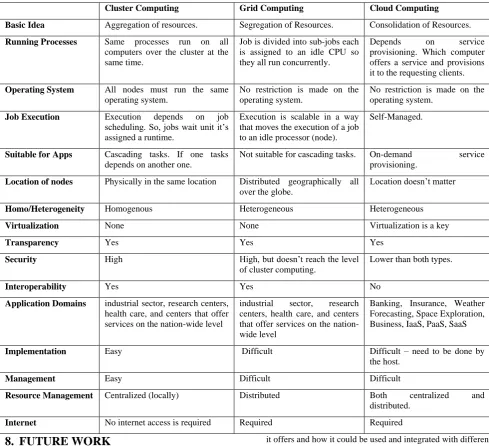
Table 1 summarizes the differences and similarities of each of [image:5.595.49.539.207.653.2]the three computing paradigms.
Table 1 Summary of cluster, grid, and cloud computing paradigms
Cluster Computing Grid Computing Cloud Computing
Basic Idea Aggregation of resources. Segregation of Resources. Consolidation of Resources.
Running Processes Same processes run on all computers over the cluster at the same time.
Job is divided into sub-jobs each is assigned to an idle CPU so they all run concurrently.
Depends on service provisioning. Which computer offers a service and provisions it to the requesting clients.
Operating System All nodes must run the same operating system.
No restriction is made on the operating system.
No restriction is made on the operating system.
Job Execution Execution depends on job scheduling. So, jobs wait unit it’s assigned a runtime.
Execution is scalable in a way that moves the execution of a job to an idle processor (node).
Self-Managed.
Suitable for Apps Cascading tasks. If one tasks depends on another one.
Not suitable for cascading tasks. On-demand service provisioning.
Location of nodes Physically in the same location Distributed geographically all over the globe.
Location doesn’t matter
Homo/Heterogeneity Homogenous Heterogeneous Heterogeneous
Virtualization None None Virtualization is a key
Transparency Yes Yes Yes
Security High High, but doesn’t reach the level of cluster computing.
Lower than both types.
Interoperability Yes Yes No
Application Domains industrial sector, research centers, health care, and centers that offer services on the nation-wide level
industrial sector, research centers, health care, and centers that offer services on the nation-wide level
Banking, Insurance, Weather Forecasting, Space Exploration, Business, IaaS, PaaS, SaaS
Implementation Easy Difficult Difficult – need to be done by the host.
Management Easy Difficult Difficult
Resource Management Centralized (locally) Distributed Both centralized and distributed.
Internet No internet access is required Required Required
8.
FUTURE WORK
As a future work we will try to compare more types of computing paradigms, such as: utility computing, fog computing, and jungle computing. We also intend to compare between different services of cloud computing, SaaS, PaaS, and IaaS. Another field of interest for future work would be the study of applications of cloud computing and how differently vendors and service providers look at cloud computing and what services they offer. Hadoop can also be studied and analyzed in terms of the services and applications
it offers and how it could be used and integrated with different kinds of computing paradigms.
9.
REFERENCES
[1] A. Al-Shaikh, H. Khattab, A. Sharieh and A. Sleit, “Resource Utilization in Cloud Computing as an Optimization Problem” International Journal of Advanced Computer Science and Applications(ijacsa), 7(6), 2016.
High-42 Performance, High-Availability, and High-Throughput
Processing on a Network of Computers," in Handbook of Nature-Inspired and Innovative Computing: Integrating Classical Models with Emerging Technologies, A. Zomaya, Ed., New York, Springer Science+Business Media Inc., 2006, pp. 521-551.
[3] K. Kaur and A. K. Rai, "A Comparative Analysis: Grid, Cluster and Cloud Computing," International Journal of Advanced Research in Computer and Communication Engineering, vol. 3, no. 3, pp. 5730-5734, 2014 . [4] E. R. Kaur, "A Review of Computing Technologies:
Distributed, Utility, Cluster, Grid and Cloud Computing," International Journal of Advanced Research in Computer Science and Software Engineering, vol. 5, no. 2, pp. 144-148, 2015 .
[5] "Grid and Cluster Computing: Options for Improving Windows Application Performance," Digipede Technologies, 2003.
[6] "Introduction to Parallel Computing," The Cyprus Institute, 31 January 2011. [Online]. Available: http://supercomputing.cyi.ac.cy/index.php/practical-hpc/supercomputing-basics#hpc-cluster-usage. [Accessed 2 February 2018].
[7] R. S. Morrison, Cluster Computing. Architectures, Operating Systems, Parallel Processing & Programming Languages, 2003 .
[8] M. M. Resch and E. Gabriel, "Supercomputers in Grids," in Cloud, Grid and High Performance Computing: Emerging Applications, IGI Global, 2011, pp. 1-9. [9] Jacob, Bart; Brown, Michael; Fukui, Kentaro; Trivedi,
Nihar;, Introduction to Grid Computing, IBM, 2005 . [10] G. MARIN, "Grid Computing Technology," Database
Systems Journal, vol. 2, no. 3, pp. 13-22, 2011 .
[11] P. Dabas and A. Arya, "Grid Computing: An Introduction," International Journal of Advanced Research in Computer Science and Software Engineering, vol. 3, no. 3, pp. 466-470, 2013 .
[12] Minoli, A Networking Approach to Grid Computing, Wiley Interscience, 2005 .
[13] M. D. Bhavsar and S. N. Pradhan, "Scavenging Idle CPU Cycles for Creation of Inexpensive Supercomputing Power," International Journal of Computer Theory and Engineering, vol. 1, no. 5, pp. 602-605, 2009 .
[14] Mell, Peter; Grance, Timothy;, "The NIST definition of cloud computing. Recommendations of the National
Institute of Standards and Technology," NIST Special Publication, 2011.
[15] Gorelik, Thesis: Cloud Computing Models, Composite Information Systems Laboratory - Sloan School of Management - Massachusetts Institute of Technology, 2013 .
[16] A. Prathibha, D. B. Latha and D. G. Sumathi, "Issues in adapting cluster, grid and cloud computing for HPC applications," International Journal of Concepts on Computing and Information Technology, vol. 2, no. 1, pp. 12-16, 2015 .
[17] "The Benefits of Cloud Computing. A new era of responsiveness,effectiveness and efficiency in IT service delivery," IBM, 2009.
[18] S. Haag, A. Eckhardt and J. Krönung, "From the Ground to the Cloud – A Structured Literature Analysis of the Cloud Service Landscape around the Public and Private Sector," in 47th Hawaii International Conference on System Science, 2014 .
[19] J. Pourqasem, S. Karimi and S. Edalatpanah, "Comparison of Cloud and Grid Computing," American Journal of Software Engineering, vol. 2, no. 1, p. 2014, 8-12 .
[20] M. S. Pérez, "Grid and Cloud Computing," [Online]. Available:
http://laurel.datsi.fi.upm.es/_media/docencia/asignaturas/ ccg/gridcloud.pdf. [Accessed 2 February 2018].
[21] D. A. Menasc´, "Virtualization: concepts, applications, and performance modeling," in Computer Measurement Group Conference, Orlando, 2005 .
[22] A. APOSTU, F. PUICAN, G. ULARU, G. SUCIU and G. TODORAN, "New Classes of Applications in the Cloud. Evaluating Advantages and Disadvantages of Cloud Computing for Telemetry Applications," Database Systems Journal, vol. 1, no. 1, pp. 3-14, 2014.
[23] E. Aljoumah, F. Al-Mousawi, I. Ahmad, M. Al-Shammri and Z. Al-Jady, " SLA in Cloud Computing Architectures: A Comprehensive Study," International Journal of Grid Distribution Computing, vol. 8, no.5, pp.7-32, 2015.
![Figure 1 Typical cluster architecture [2].](https://thumb-us.123doks.com/thumbv2/123dok_us/9298966.428179/2.595.58.269.82.311/figure-typical-cluster-architecture.webp)
![Figure 2 Grid Architecture [11]](https://thumb-us.123doks.com/thumbv2/123dok_us/9298966.428179/3.595.76.259.166.355/figure-grid-architecture.webp)
![Figure 3 Cloud Computing Architecture [19]](https://thumb-us.123doks.com/thumbv2/123dok_us/9298966.428179/4.595.56.266.475.731/figure-cloud-computing-architecture.webp)