A Venture to Build a CNC Machine
Kuo-pao Yang, Andrew Burningham, Kaleb Champagne, Damodar Dahal, John Hernandez
Department of Computer Science Southeastern Louisiana University
Hammond, LA 70402 USA
Abstract — This project takes a venture to build a Computer Numerical Control (CNC) machine, capable of drawing images onto a sheet of paper using a writing utensil. This CNC machine is coded in Python programming language. It is controlled by a graphical user interface on a Raspberry Pi. This system implements voice recognition capabilities to do a Google search for Scalable Vector Graphics (SVG) from the world wide web, parse the SVG images, and then draw them onto a sheet of paper.
Keywords — CNC Machine, Raspberry Pi, Voice Recognition, Image Processing
I.INTRODUCTION
Computer Numerical Control (CNC) machines are popular modern technologies in the professional world. Many companies have their own CNC machines to draw in two-dimension or cut in three-dimension objects. A CNC machine can process a piece of material by following a coded programed instruction without a manual operator. Instructions are loaded to a CNC machine in the form of a sequential program of machine control instructions and then executed. The CNC machine allows to design and change the drawing and cutting pieces for different purposes and materials such as metal, plastic, wood, and ceramic.
This project has been a great learning experience by recreating a CNC machine. To complete this project, we create the structure of the product through self-made, custom pieces to best accommodate the size and functionality of the machine, parse SVGs found on Google images, and then produce a real physical copy of the image on a piece of paper printed out by the CNC machine. This project also incorporates a voice recognition API [1] to search for Scalable Vector Graphics (SVG) [2] images of a desired theme and implements Python’s graphical user interface elements [3] to allow users to choose which images fit their needs.
In the following sections, we review the related work on CNC machines. This paper describes the implementation to perform the functionality of the CNC machines such as the platform and operating system to run the product, the hardware and software to record and translate voice inputs, the language to write the code and important libraries affiliated with them. Finally, this paper shows the results of what
this CNC machining system has achieved and provides ideas for future areas of research.
II.BACKGROUND
The CNC machining has been a part of the industrial world for decades. These machines have been used to help companies produce certain parts for their developing projects. They are also quick options for prototypes when working on research projects or any kind of hobby. The CNC machines are able to fabricate two-dimensional and three-dimensional objects [4]. These machines are useful since they allow artists, for instance, to design more art rapidly. Artists can investigate new avenues of creating art. In a similar way, hobbyists can use CNC machines to quickly create more parts for their projects.
Piccolo is a pocket-sized open source CNC machine [5]. This tiny CNC bot is an Arduino compatible system, which interprets digital design into machine executable commands, using a computer-controlled framework to move extrusion heads or cutting implements to fabricate parts. Piccolo is an end-user-oriented CNC machine. It has adopted Arduino as the default control board such that no prior experience with CNC systems or programming is required. Experienced programmers can also write programs to build their own application with Arduino and Piccolo libraries.
The CNC machines can be used for many different research projects. These machines are used to cut out pieces for prototypes, which can produce anything from parts for a robot to models of a final research product. The ability to create models and parts swiftly speeds up the researching process, which requires researchers or those working on robotics to go through many iterations. The flexibility of CNC machines draw/cut [6] gives their users more time to pursue a deeper dive into research or development of their final product.
III.SOFTWAREIMPLEMENTATION
We now discuss the implementation of this CNC machine and explain the steps to how voice recognition application finds the SVG images, which are parsed and eventually drawn.
The voice recognition application is made using two key components: Python’s speech recognition library [7] and Google Cloud Speech API [8]. Using both sources in conjunction allows the users to save their dialogue into an audio input file. This application then converts the audio input into actual text format. SVG images [9] from Google Images are searched, retrieved, and downloaded on the system. The downloaded images are stored and ready to be parsed.
In Fig. 1, the Python code shows important libraries that are imported into the script. The speech_recognition is used for taking an input from a microphone function and storing it to be used later by the Google API, which takes the stored audio and uses it to find images related to the subject. The import OS is used to start certain functions in the Python before any functionality of the script begins.
Fig. 1. Speech Recognition Library and Google Assets
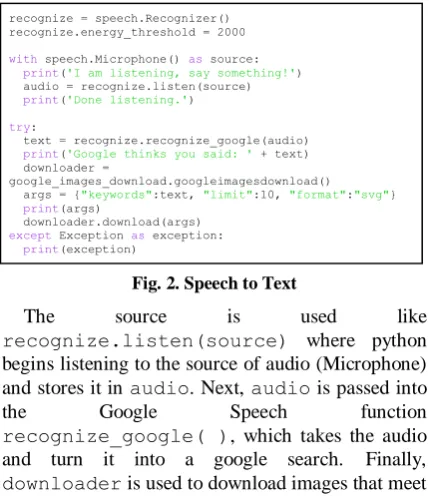
Fig. 2 represents the actual functions of the Python script. The variable recognize is used to collect the audio input from users. The Microphone function takes from speech_recognition library and uses it as a source of input.
Fig. 2. Speech to Text
The source is used like
recognize.listen(source) where python begins listening to the source of audio (Microphone) and stores it in audio. Next, audio is passed into
the Google Speech function
recognize_google( ), which takes the audio and turn it into a google search. Finally, downloader is used to download images that meet
the criteria made in the following variable args, which googles text and find 10 images of SVG formats. Once downloaded, the images are ready for parsing.
In the following sections, we discuss the image parsing, the graphical user interface, the voice recognition, and the physical drawing.
A. Parse Image
Once the users select the SVG image they want to draw, the selected image is downloaded to the file system. The file is fed into a Python standard package named svgpathtools [10]. The svgpathtools module is primarily structured around four path segment classes: Line, QuadraticBezier, CubicBezier, and Arc. There is also a fifth class, Path, whose objects are sequences of connected or disconnected path segment objects. This package reads in a SVG file and is able to read the data attribute ("d") of <path> tags in the SVG. Any SVG files can be read in just a single line using
_paths, attrs =
svgpathtools.svg2paths(path)
The _paths is a Python list of Path instances. A sample output of print(paths)for a simple rectangle looks like this:
[Path(
Line(start=(103.5+74j), end=(439.5+74j)), Line(start=(439.5+74j), end=(439.5+248j)), Line(start=(439.5+248j),end=(103.5+248j)), Line(start=(103.5+248j),end=(103.5+74j)) )]
After these paths are read, the next step is to reduce the paths down to simple points. The parser code for converting SVG paths to x + yi coordinates is shown in the Fig. 3.
Fig. 3. Converting SVG Paths to x + yi Coordinates
The package uses complex numbers to represent coordinates (x is real, y is imaginary). The following code is used to map the complex numbers into a 2-tuple representing (x, y). It converts x + yi coordinates to (x, y) coordinates.
res_paths = [list(map(lambda c: (c.real, c.imag), path)) for path in res_paths]
The final part of the parser is to normalize the coordinates. In Fig. 4, the parser rescales all the
for path in _paths: for p in path:
if isinstance(p, svgpathtools.CubicBezier): P0, P1, P2, P3 = p.start, p.control1, p.control2, p.end
points = []
for t in np.arange(0, 1, 0.01):
B = ((1 - t)**3) * P0 + 3 * ((1-t)**2) * t * P1 + 3 * (1-t) * (t**2) * P2 + (t**3) * P3
points.append(B) res_paths.append(points) elif isinstance(p, svgpathtools.Line): res_paths.append((p.start, p.end)) else:
print('unsupported SVG type found: ', type(p))
import speech_recognition as speech
import os
from google_images_download import
google_images_download os.system("jack_control start") os.system("pulseaudio --start")
recognize = speech.Recognizer() recognize.energy_threshold = 2000
with speech.Microphone() as source: print('I am listening, say something!') audio = recognize.listen(source) print('Done listening.')
try:
text = recognize.recognize_google(audio) print('Google thinks you said: ' + text) downloader =
google_images_download.googleimagesdownload() args = {"keywords":text, "limit":10, "format":"svg"} print(args)
downloader.download(args)
points such that x and y coordinates are bounded between (0.0, 0.0) and (1.0, 1.0).
Fig. 4. Recaling the Coordinates
B. Draw the Coordinates
By the method above, the list of the Paths looks like List<(x, y)>. Note that all the coordinates up to now are absolutely defined in the range of 0.0 to 1.0 across both X- and Y- axes. We begin by converting these coordinates according to the page height and width, as defined in PAGE_HEIGHT and PAGE_WIDTH variables. The next part of program is to convert the absolute coordinate system to a relative coordinate system, and then produce pen movement vectors accordingly.
In Fig. 5, the code does the coordinate enlargement, relative coordinating as well as converting the coordinates into the actions of the CNC drawing machine pen motors.
Fig. 5. Converting Coordinates to Actions of Pen Motors
The pen motor will be able to do the following three actions: MOVE, DOWN, and UP
{'type': 'MOVE', 'distance': (x, y)} to move the motors in the two axes
{'type': 'DOWN'}
to bring the pen down in contact with paper for drawing {'type': 'UP'}
to bring the pen away from paper to disable drawing
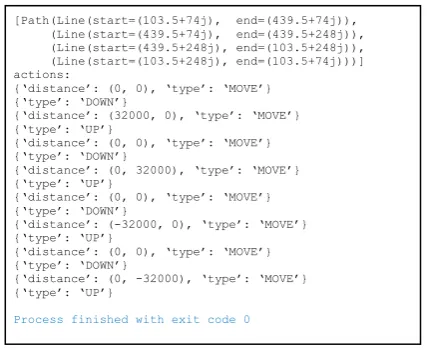
In Fig. 6, these actions are executed sequentially in order to make the motors move. When trying to draw a SVG with a simple rectangle, the parser writes the following content to stdout.
Fig. 6. Parser Outputs for a SVG Rectangle
C. GUI Interface and Command-line Instruction This CNC machine provides a small graphical user interface to allow the user to choose an item via a file dialog and run the voice commands. The device can also use the command-line instruction. It requires the voice activation to be run in sudo, for example:
sudo python main.py item.svg pageWidth pageHeight
Note that all values are in inches since the parser automatically converts into inches.
D. Motor Control and Image Drawing
This project uses the Pigpio to control the General Purpose Input Outputs (GPIO) pins on Raspberry Pi. The Pigpio library is a Python module for the Raspberry which talks to the Pigpio daemon to allow control of the GPIO. This project does not use any other libraries that would normally be used by other projects such as PyGCode, a low-level GCode interpreter for python [11]. The hardware controlled by the Raspberry Pi consists of two stepper motors and a servo motor. The stepper motors control x and
y axes, while the servo motor controls the pen mechanism, also known as z. Since the stepper motor has 4 different possible states, the linked list is designed to incorporate clockwise and counterclockwise single steps. For the servo motor control, the Pigpio library is used for direct frequency control. It is able to specify two specific frequencies to alternate between a pen_up and a pen_down state.
After the normalized coordinates are converted into physical dimensions, each command is parsed in the resultant Python Dictionary, called actions. Every action needs some calculations. The screws have 3.175 threads per inch. The stepper motors have 200 steps per full revolution. Therefore, a single step is 1 / (3.175 * 200) = 1/635 inches, which is also the theoretical limit on accuracy. However, the ball-pen to physically draw with produces a line
[Path(Line(start=(103.5+74j), end=(439.5+74j)), (Line(start=(439.5+74j), end=(439.5+248j)), (Line(start=(439.5+248j), end=(103.5+248j)), (Line(start=(103.5+248j), end=(103.5+74j)))] actions:
{‘distance’: (0, 0), ‘type’: ‘MOVE’} {‘type’: ‘DOWN’}
{‘distance’: (32000, 0), ‘type’: ‘MOVE’} {‘type’: ‘UP’}
{‘distance’: (0, 0), ‘type’: ‘MOVE’} {‘type’: ‘DOWN’}
{‘distance’: (0, 32000), ‘type’: ‘MOVE’} {‘type’: ‘UP’}
{‘distance’: (0, 0), ‘type’: ‘MOVE’} {‘type’: ‘DOWN’}
{‘distance’: (-32000, 0), ‘type’: ‘MOVE’} {‘type’: ‘UP’}
{‘distance’: (0, 0), ‘type’: ‘MOVE’} {‘type’: ‘DOWN’}
{‘distance’: (0, -32000), ‘type’: ‘MOVE’} {‘type’: ‘UP’}
Process finished with exit code 0
chainable = sum(res_paths, [])
max_x = max(chainable, key=lambda c: c[0])[0] min_x = min(chainable, key=lambda c: c[0])[0] max_y = max(chainable, key=lambda c: c[1])[1] min_y = min(chainable, key=lambda c: c[1])[1]
return [
list(map(lambda r: ((r[0] - min_x)/ (max_x - min_x), (r[1]-min_y) / (max_y - min_y)), r)) for r in res_paths ]
paths = list(map(lambda path: [(int(x * PAGE_WIDTH), int(y * PAGE_HEIGHT)) for x,y in path], paths)) for path in paths:
if len(path) == 0: continue
else:
for i, point in enumerate(path):
distance = (point[0] - pos[0], point[1] - pos[1])
pos = pos[0] + distance[0], pos[1] + distance[1] actions.append({'type': 'MOVE', 'distance': distance})
if i == 0 and i == len(path) - 1: continue
if i == 0:
actions.append({'type': 'DOWN'}) if i == len(path)-1:
that is far thicker than 1/635 inches. Since the pen is thicker than the steps, it is less of an issue. The larger value referenced in actions always runs rounded into the nearest whole number.
In Fig. 7, delta is the ratio from the larger coordinate to the smaller coordinate, rounded to the nearest integer. The distribution is how many steps to add every delta iteration. To calculate both logically and computationally, all the coordinates are put into a complex form with x being real and y being imaginary. In short, every delta iteration and every distribution move a single step for the smaller coordinate.
Fig. 7. Image Drawing Calculation
IV.HARDWAREIMPLEMENTATION
This project controls the CNC machine using a Raspberry Pi 3 Model B [12]. This project codes in Python, uses a High Definition Multimedia Interface (HDMI) cable connected to a monitor for a GUI, and takes advantage of the General Purpose Input Output (GPIO) pins on Raspberry Pi [13]. The GPIO pins are connected to control the board. The Raspberry Pi can handle the voltage needed to run the stepper motors, which control the x-axis and y-axis movement.
With the Raspberry Pi Wi-Fi capability [14], this CNC machine performs a Google search for voice recognition, which will allow users to quickly find images that they would like to print on the machine. To handle voice recognition, a microphone is used to capture the user’s voice input.
This project uses Nema-17 stepper motors set to their bipolar mode in conjunction with L298N control boards for both the x-axis and the y-axis of the machine. To power the control boards and the stepper motors, a generic computer power supply is used. Stepper motors work by having electromagnets
in a shell and a permanent magnet in center by which the item moves. In the full step sequence, two coils are energized at the same time and motor shaft rotates. The order in which coils needs to be energized is given in the table below.
TABLE I. 4-STEPOFSTEPPERMOTORS
Step A B C D
1 1 0 0 1
2 1 1 0 0
3 0 1 1 0
4 0 0 1 1
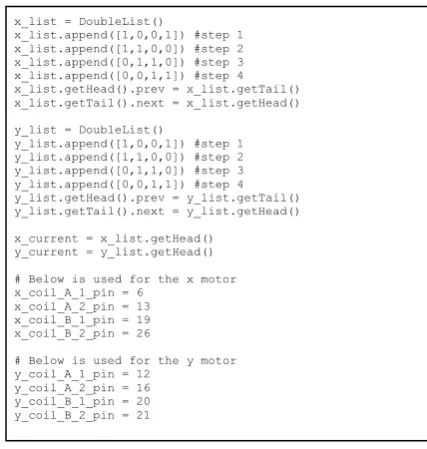
There are four possible state positions which correspond to which electromagnets are on or off, traditionally referred to as ―high‖ and ―low‖ [15]. Therefore, the electromagnets literally force the inner magnet into place at 4-step iterations. By designing a doubly-linked circular list, motors go back and forth completely independently shown in Fig. 8.
Fig. 8. Implementation of Stepper Motors
In Fig. 9, this machine is set up with the Raspberry Pi. Many of the parts of the CNC machine had to be custom made to fit our purposes.
Fig. 9. Set Up with the Raspberry Pi
delta = 1 y_leftover = 0 x_leftover = 0
if (abs(gradient.imag) > abs(gradient.real)): delta = int(round(gradient.imag / gradient.real)) x_leftover = int(abs(gradient.imag)) %
int(abs(gradient.real))
elif (abs(gradient.imag) < abs(gradient.real)): delta = int(round(gradient.real / gradient.imag)) y_leftover = int(abs(gradient.real)) %
int(abs(gradient.imag)) else:
delta = 1 x_leftover = 0 y_leftover = 0
num_x_steps = int(round((abs(gradient.real) / delta))) y_moved = 0
x_moved = 0
num_y_steps = int(round((abs(gradient.imag) / delta))) if (abs(gradient.real) > abs(gradient.imag)): if y_leftover == 0:
distribution = 0 else:
distribution = abs((int)(round(abs(gradient.real) / y_leftover)))
elif (abs(gradient.real) < abs(gradient.imag)): if x_leftover == 0:
distribution = 0 else:
distribution = abs((int)(round(abs(gradient.imag) / x_leftover)))
else:
leftover_steps = 0; distribution = 0;
x_list = DoubleList()
x_list.append([1,0,0,1]) #step 1 x_list.append([1,1,0,0]) #step 2 x_list.append([0,1,1,0]) #step 3 x_list.append([0,0,1,1]) #step 4 x_list.getHead().prev = x_list.getTail() x_list.getTail().next = x_list.getHead() y_list = DoubleList()
y_list.append([1,0,0,1]) #step 1 y_list.append([1,1,0,0]) #step 2 y_list.append([0,1,1,0]) #step 3 y_list.append([0,0,1,1]) #step 4 y_list.getHead().prev = y_list.getTail() y_list.getTail().next = y_list.getHead() x_current = x_list.getHead()
y_current = y_list.getHead() # Below is used for the x motor x_coil_A_1_pin = 6
x_coil_A_2_pin = 13 x_coil_B_1_pin = 19 x_coil_B_2_pin = 26
# Below is used for the y motor y_coil_A_1_pin = 12
V.EVALUATION
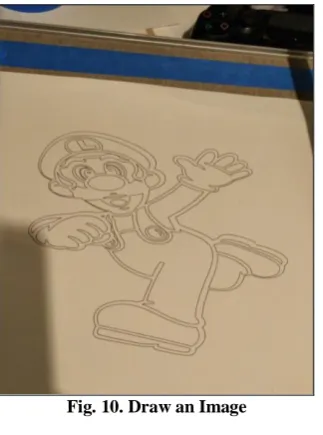
We tested the solution by building the machine and having it draw multiple different images. The imager has to parse out an integer value for how many steps to move, since we can only move one step at a time with the stepper motors. This takes away from the accuracy of the image when it is printed out. The longer an image takes to be drawn out, the more off the image will get. This project is not yet to the level of a professionally built CNC machine. However, it has gotten very close to producing the images given to the machine shown in Fig. 10. We built our machine from scratch by custom milling parts and coding all of the movement functionality of the machine.
Fig. 10. Draw an Image
VI.CONCLUSION
Our solution for CNC machines is worth considering since it achieves greater affordability by providing voice recognition, searching images, parsing images, and then drawing objects. By building our own CNC machine, we can add and customize features instead of buying a complete kit. This project is good for technology and engineering enthusiasts. Good modifications could be used to completely convert into a fully professional grade machine.
REFERENCES
[1] T. Agus, C. Suied, , S. Thorpe, and D. Pressnitzer, ―Characteristics of Human Voice Processing,‖ Proceedings of 2010 IEEE International Symposium on Circuits and Systems (ISCAS), pp. 509 – 512, 2010.
[2] D. Bogaard, R. Vullo, and C. Cascioli ―SVG for Educational Simulations,‖ CITC5’04 Proceedings of the 5th Conference on Information Technology Education, pp. 43 – 49, 2004.
[3] D. Letscher, M. Goldwasser, ―Teaching Objected-Oriented Programming in Python,‖ Proceedings of the 12th Annual SIGCSE Conference on Innovation and Technology in Computer Science Education (ITiCSE’07), pp. 365-366, 2007.
[4] J. Li, J. Jacobs, M. Chang, B. Hartmann, ―Direct and Immediate Drawing with CNC Machines,‖ Proceedings of the 1st Annual ACM Symposium on Computational Fabrication (SCF ’17), Article 11, 2017.
[5] G. Saul, T. Rorke, H. Peng, and C. Xu, ―Make Your Own Piccolo,‖ Proceedings of the 7th International Conference on Tangible, Embedded and Embodied Interaction (TEI ’13), pp. 439 – 442, 2013.
[6] A. Sata, ―Error Measurement and Calibration of Five Axis CNC Machine using Total Ball Bar Device,‖ Proceedings of the International Conference and Workshop on Emerging Trends in Technology (ICWET ’10), pp. 660-662, 2010.
[7] S. Dey, K. Kashyap, ―VAANI--A Voice-based
Authentication System for Linux Using Dynamic Threshold and Positive Selection,‖ Proceedings of the 10th Annual ACM India Compute Conference (Compute ’17), pp. 49 – 59, 2017.
[8] A. Meliones, C. Duta, ―SeeSpeech: An Android Application for the Hearing Impaired,‖ Proceedings of the 12th ACM International Conference on PErvasive Technologies Related to Assistive Environments (PETRA ’19), pp. 509 – 516, 2019.
[9] C. Seel-audom, W. Naiyapo, and V. Chouvatut, ―A Search for Geometric-Shape Objects in a Vector Image: Scalable Vector Graphics (SVG) File Format,‖ 2017 9th International Conference on Knowledge and Smart Technology (KST), pp. 305 – 310, 2017
[10] A. Yassine, J. Abdelaziz, E. Ahmed, ―SVG Image Comparison Using Commands of Element Path,‖ Proceedings of the Mediterranean Symposium on Smart City Application (SCAMS ’17), Article 14, 2017. [11] M. Hanifzadegan, R, Nagamune, ―Contouring Control of
CNC Machine Tools Based on Linear Parameter-Varying Controllers,‖ IEEE/ASME Transactions on Mechatronics, 21 (5): 2522 – 2530, October, 2016.
[12] K. P. Yang, G. Kiepper, B. Henry, and R. Hunter, ―Modular Architecture for IoT Home Automation and Security Surveillance,‖ Journal of Multidisciplinary Engineering Science and Technology (JMEST), ISSN 2458-9403, 5(11): 8978-8982, November, 2018.
[13] K. P. Yang, R. Dejean, C. Clapp, R. Banks, D. Raygadas, and I. Bendanas, ―Network Security Practical Concepts, Importance, and Potential Implications,‖ Journal of Multidisciplinary Engineering Science and Technology (JMEST), ISSN 2458-9403, 4(10): 8318-8322, October, 2017.
[14] K. P. Yang, N. Moran, I. Bendana, S. Champagne, and T. Becker, ―LOPEZ: A Bilingual Robotic Car,‖ International Journal of Research in Advent Technology (IJRAT), E-ISSN 2321-9637, 4(12): 51-55, December, 2016. [15] L. Zhang, L. Liu, J. Shen, J. Lai. K. Wu, Z. Zhang, J. Liu,