Data Migration
Simanta Shekhar Sarmah
Business Intelligence Architect, Alpha Clinical Systems, USA
Abstract
This document gives the overview of all the process involved in Data Migration. Data Migration is a multi-step process that begins with an analysis of the legacy data and culminates in the loading and reconciliation of data into new applications. With the rapid growth of data, organizations are in constant need of data migration. The document focuses on the importance of data migration and various phases of it. Data migration can be a complex process where testing must be conducted to ensure the quality of the data. Testing scenarios on data migration, risk involved with it are also being discussed in this article. Migration can be very expensive if the best practices are not followed and the hidden costs are not identified at the early stage. The paper outlines the hidden costs and also provides strategies for roll back in case of any adversity.Keywords
Data Migration, Phases, ETL, Testing, Data Migration Risks and Best Practices1. Introduction
Migration is a process of moving data from one platform/format to another platform/format. It involves migrating data from a legacy system to the new system without impacting active applications and finally redirecting all input/output activity to the new device. In simple words, it is a process of bringing data from various source systems into a single target system. Data migration is a multi-step process that begins with an analysis of legacy data and culminates in the loading and reconciliation of data into the new applications. This process involves scrubbing the legacy data, mapping data from the legacy system to the new system, designing the conversion programs, building and testing the conversion programs conducting the conversion, and reconciling the converted.
2. Need for Data Migration
In today’s world, migrations of data for business reasons are becoming common. While the replacement for the old legacy system is the common reason, some other factors also play a significant role in deciding to migrate the data into a new environment. Some of them are
Databases continue to grow exponentially that requires additional storage capacity
Companies are switching to high-end servers
To minimize cost and reduce complexity by migrating to consumable and steady system
* Corresponding author:
[email protected] (Simanta Shekhar Sarmah) Published online at http://journal.sapub.org/scit
Copyright © 2018 Scientific & Academic Publishing. All Rights Reserved
Data needs to be transportable from physical and virtual environments for concepts such as virtualization
To avail clean and accurate data for consumption Data migration strategy should be designed in an effective way such that it will enable us to ensure that tomorrow’s purchasing decisions fully meet both present and future business and the business returns maximum return on investment.
3. Data Migration Strategy
A well-defined data migration strategy should address the challenges of identifying source data, interacting with continuously changing targets, meeting data quality requirements, creating appropriate project methodologies, and developing general migration expertise.
The key considerations and inputs for defining data migration strategy are given below:
Strategy to ensure the accuracy and completeness of the migrated data post migration
Agile principles that let the logical group of data to be migrated iteratively
Plans to address the source data quality challenges faced currently as well as data quality expectations of the target systems
Design an integrate migration environment with proper checkpoints, controls and audits in place to allow fallout accounts/errors are identified/reported/resolved and fixed
Solution to ensure appropriate reconciliation at different checkpoints ensuring the completeness of migration
Should be able to handle large volume data during migration
Migration development/testing activities should be separated from legacy and target applications
In brief, the Data Migration strategy will involve the following key steps during end-to-end data migration:
Identify the Legacy/source data to be migrated
Identification any specific configuration data required from Legacy applications
Classify the process of migration whether Manual or Automated
Profile the legacy data in detail
Identify data cleansing areas
Map attributes between Legacy and Target systems
Identify and map data to be migrated to the historical data store solution (archive)
Gather and prepare transformation rules
Conduct Pre Migration Cleansing where applicable.
Extract the data
Transform the data along with limited cleansing or standardization.
Load the data
Reconcile the data
4. SDLC Phases for Data Migration
The Migration process steps will be achieved through the following SDLC phases.
4.1. Requirement Phase
Requirement phase is the beginning phase of a migration project; requirement phase states that the number and a summarized description of systems from where data will be migrated, what kind of data available in those systems, the overall quality of data, to which system the data should be migrated. Business requirements for the data help determine what data to migrate. These requirements can be derived from agreements, objectives, and scope of the migration. It contains the in scope of the project along with stakeholders. Proper analysis gives a better understanding of scope to begin, and will not be completed until tested against clearly identified project constraints. During this Phase, listed below activities is performed:
Legacy system understanding to baseline the migration scope
Migration Acceptance Criteria and sign-off
Legacy data extraction format discussion and finalization
Understanding target data structure
Legacy data analysis & Profiling to find the data gaps and anomalies
Firming up Migration Deliverables and Ownership
4.2. Design Phase
During design phase i.e. after Analysis phase, High-level
Approach and Low-level design for Migration components are created. Following are the contents of the design phase.
Approach for end to end Migration
Master and transactional data handling approach
Approach for historical data handling
Approach for data cleansing
Data Reconciliation and Error handling approach
Target Load and validation approach
Cut-over approach
Software and Hardware requirements for E2E Migration
Data model changes between Legacy and target. For example – Change in Account structure, Change in Package and Component structure
Data type changes between Legacy and target
Missing/Unavailable values for target mandatory columns
Business Process specific changes or implementing some Business Rules
Changes in List of Values between Legacy and target
Target attribute that needs to be derived from more than one columns of Legacy
Target Specific unique identifier requirement
The detailed design phase comprises of the following key activities:
Data Profiling - It is a process where data is examined from the available source and collection of statistics and other important information about data. Data profiling improves quality of data, increase the understanding of data and its accessibility to the users and also reduce the length of implementation cycle of projects. Source to Target attribute mapping
Staging area design
Technical design
Audit, Rejection and Error handling
4.3. Development Phase
After completing the Design phase, Migration team works on building Migration components as listed below:
ETL mappings for Cleansing and Transformation
Building Fallout Framework
Building Reconciliation Scripts
target definitions and to check the connection strings, validation of data types and ports, etc.
4.4. Testing Phase
The objectives of the data migration testing are
All required data elements have been fetched/moved.
Data has been fetched/moved for specified time periods as per the requirement specification document.
Data has originated from the correct source tables.
Verify if the target tables are populated with accurate data.
Performance of migration programs and custom scripts.
There has been no data loss during data migration, and even if there is any loss, they are explained properly.
Data integrity is maintained.
The Migrated data will be tested by reconciliation process. The reconciliation scripts will be developed to check the count between the source system and staging area where the data extracted from the source, to check the count between source staging area, target staging area, and rejection tables. For example:
Count of source records = Count of target records + count of rejected records in rejection table.
All functional check validations will be verified depends on the business rules through functional scripts. The various ways to do the reconciliation and functional checks, it can be a manual process or automated process. Automation Process includes creating one procedure to check reconciliation which returns the records in the error table if any of the scripts fail and creating one procedure to check the functionality which returns the records in the error table if any of the functionality fails or creating macro to execute the reconciliation and functional scripts in one shot.
4.5. Delivery
The migrated data will be moved to QA environment to
check the quality of data. During this phase, the cutover activities will be performed, and migrations from the legacy systems into Target Systems will be carried out. After the data is loaded, reconciliation of the loaded records will be verified. Reconciliation identifies the count of records which are successfully converted. It identifies those records that failed during the process of conversion and migration. Failed records are analysed to identify the root cause of the failures and they are fixed in order to load them into the target database. The cutover phase includes conversion and testing of data, changeover to the new system, and also user training. This phase is the final phase of the volume move.
In the cutover phase, synchronization of source volume data and the destination volume data takes place. From the project perspective, the final preparation for cutover phase includes:
Critical issue resolution (and document it in the upgrade script).
Creation of the cutover plan, based on the results and experiences of the tests.
Based on the cutover plan, an optional dress rehearsal test can be performed.
Cutover phase requires intense coordination and effort among various teams such as database administrator, system administrator, application owners and project management team. All these team must coordinate the effort closely on every step of the process. Acknowledgement of accomplishment of each step must be communicated to the all the teams so that all are on the same page during the phase.
5. Phases of Data Migration
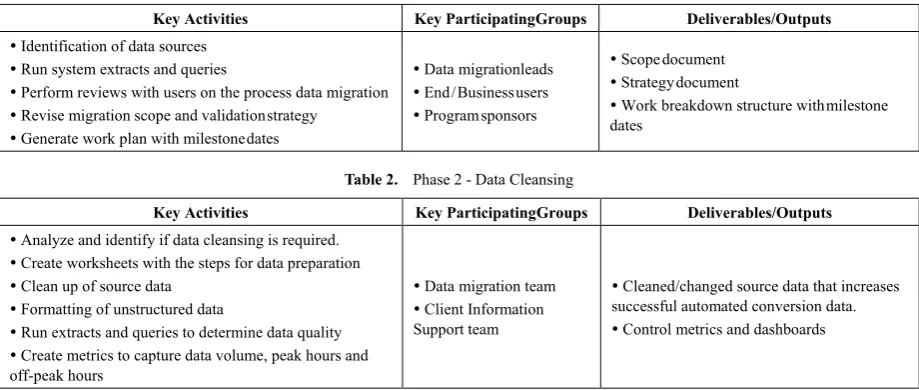
Following tables describes the different phases of the data migration along with the participating groups and also the deliverables and output associated with each of the phases.
Table 1. Phase 1 - Data Assessment
Key Activities Key Participating Groups Deliverables/Outputs
Identification of data sources
Run system extracts and queries
Perform reviews with users on the process data migration
Revise migration scope and validation strategy
Generate work plan with milestone dates
Data migration leads
End / Business users
Program sponsors
Scope document
Strategy document
Work breakdown structure with milestone dates
Table 2. Phase 2 - Data Cleansing
Key Activities Key Participating Groups Deliverables/Outputs
Analyze and identify if data cleansing is required.
Create worksheets with the steps for data preparation
Clean up of source data
Formatting of unstructured data
Run extracts and queries to determine data quality
Create metrics to capture data volume, peak hours and off-peak hours
Data migration team
Client Information Support team
Cleaned/changed source data that increases successful automated conversion data.
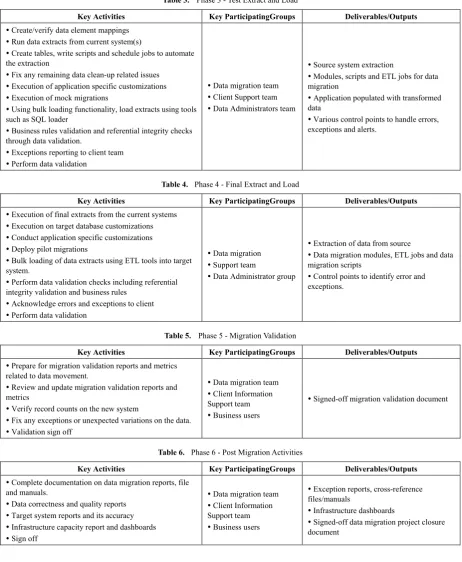
Table 3. Phase 3 - Test Extract and Load
Key Activities Key Participating Groups Deliverables/Outputs
Create/verify data element mappings
Run data extracts from current system(s)
Create tables, write scripts and schedule jobs to automate the extraction
Fix any remaining data clean-up related issues
Execution of application specific customizations
Execution of mock migrations
Using bulk loading functionality, load extracts using tools such as SQL loader
Business rules validation and referential integrity checks through data validation.
Exceptions reporting to client team
Perform data validation
Data migration team
Client Support team
Data Administrators team
Source system extraction
Modules, scripts and ETL jobs for data migration
Application populated with transformed data
Various control points to handle errors, exceptions and alerts.
Table 4. Phase 4 - Final Extract and Load
Key Activities Key Participating Groups Deliverables/Outputs
Execution of final extracts from the current systems
Execution on target database customizations
Conduct application specific customizations
Deploy pilot migrations
Bulk loading of data extracts using ETL tools into target system.
Perform data validation checks including referential integrity validation and business rules
Acknowledge errors and exceptions to client
Perform data validation
Data migration
Support team
Data Administrator group
Extraction of data from source
Data migration modules, ETL jobs and data migration scripts
Control points to identify error and exceptions.
Table 5. Phase 5 - Migration Validation
Key Activities Key Participating Groups Deliverables/Outputs
Prepare for migration validation reports and metrics related to data movement.
Review and update migration validation reports and metrics
Verify record counts on the new system
Fix any exceptions or unexpected variations on the data.
Validation sign off
Data migration team
Client Information Support team
Business users
Signed-off migration validation document
Table 6. Phase 6 - Post Migration Activities
Key Activities Key Participating Groups Deliverables/Outputs
Complete documentation on data migration reports, file and manuals.
Data correctness and quality reports
Target system reports and its accuracy
Infrastructure capacity report and dashboards
Sign off
Data migration team
Client Information Support team
Business users
Exception reports, cross-reference files/manuals
Infrastructure dashboards
Signed-off data migration project closure document
6. Approach for Test Runs
Following are some of the best practices followed as test approach for mock runs/test runs to test the data migration activities before the crucial conversion to the production environment. Before entering the mock conversion phase following criteria’s must be met
Tested the developed data conversion, cleansing and data validation programs
Data Cleansed & transformed the legacy data for mock runs
Developed & tested target system’s load scripts/components
Target system technical experts, subject matter experts’ availability for Mock runs data loads into the target system & verification/validation
Each mock run data load will be followed by validation and sign off by respective stakeholders for confirmation of validation and acceptance.
6.1. Mock Run 1/ Test Run 1
Cleansed &converted representative legacy sample data (~40%) for mock run
Execution, reconciliation and load errors reports
Conversion findings report & validation report for mock run 1
Data & business SMEs verification & certification
6.2. Mock Run 2 / Test Run 2
Fixes to the code / revise conversion approach from mock run1 observations
Cleansed &converted representative legacy sample data loading (~80%) for mock run
Execution, conversion reconciliation and load error reports
Conversion findings report & validation report for mock run 2
SIT will be conducted as part of this test run. Data & business SMEs verification & certification
6.3. Mock Run 3 / Test Run 3
Fixes to the code / revise conversion approach from mock run two observations
Cleansed & converted complete legacy data loading for mock run 3 (similar to production run)
Execution, conversion reconciliation and load error reports
Conversion findings report & validation report for mock run 3
UAT will be conducted as part this test run, data & business SMEs verification & certification
Following methods shall be utilized for validation of mock runs
Visual check of data in the target system based on samples (comparison of legacy data and data loaded in target system
Testing of end to end processes with migrated data & system response
Run target system specific standard reports/Queries for some of the transactional data
Verification of load reconciliation reports and error reports
7. Migration Approach
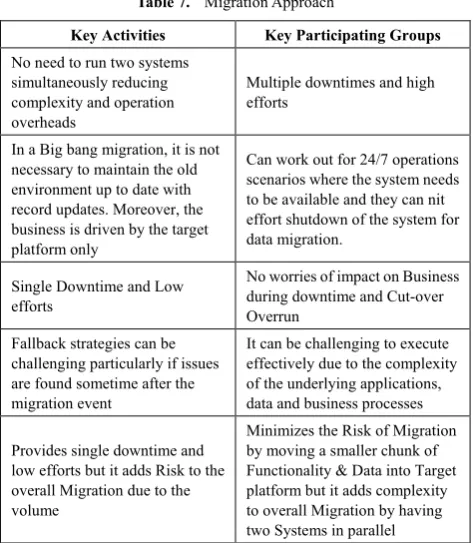
Data Migration which is a subset of overall Migration can be achieved either using either Big-Bang approach or Phased Approach. Comparison of Big-Bang vs. Phased Migration is listed below:
Table 7. Migration Approach
Key Activities Key Participating Groups
No need to run two systems simultaneously reducing complexity and operation overheads
Multiple downtimes and high efforts
In a Big bang migration, it is not necessary to maintain the old environment up to date with record updates. Moreover, the business is driven by the target platform only
Can work out for 24/7 operations scenarios where the system needs to be available and they can nit effort shutdown of the system for data migration.
Single Downtime and Low efforts
No worries of impact on Business during downtime and Cut-over Overrun
Fallback strategies can be challenging particularly if issues are found sometime after the migration event
It can be challenging to execute effectively due to the complexity of the underlying applications, data and business processes
Provides single downtime and low efforts but it adds Risk to the overall Migration due to the volume
Minimizes the Risk of Migration by moving a smaller chunk of Functionality & Data into Target platform but it adds complexity to overall Migration by having two Systems in parallel
8. Common Scenarios of Testing
Below are the common scenarios which we can test during Data migration activities.
8.1. Record Count Check
Data in the staging will be populated from different source systems in general scenarios. One of the important scenarios to be tested after populating data in the staging is Record count check. Record count checks is divided into two sub-scenarios namely
Record count for Inserted Records: The number of records identified from source system using requirement document should completely match with the target system. i.e., Data populated after running the jobs.
Record count for updated records: The number of records which are updated in the target tables in the staging using data from source tables must match the record count identified from the source tables using requirement document.
For example, SELCT count(*) from table would give us the number of number of records at the target which is a quick and effective way to validate the record count. 8.2. Target Tables and Columns
8.3. Data Check
Data checking can be further classified as follows.
Data validation for updated records: With the help of requirement specification document, we can identify the records from the source tables where data from these records will be updated in the target table in the staging. Now take one or more updated records from the target table, compare the data available in these records with the records identified from source tables. Check that, for updated records in the target table; transformation has happened according to the requirement specification using source table data.
Data validation for inserted records: With the help of requirement specification document, we can identify the records from the source tables, which will be inserted in the target table available in the staging. Now take one or more inserted records from the target table, compare the data available in these records with the records identified from source tables. Check that, for populating data in the target table transformation is happened according to the specification using source table data.
Duplicate records check: If the specification document specifies that target table should not contain duplicate data, check that after running the required jobs, target table should not contain any duplicate records. To test this, you may need to prepare SQL query using specification document.
For instance, following simple piece of SQL can identify the duplicates in a table
SELECT column1, COUNT (column2) FROM table
GROUP BY column2
HAVING COUNT (column2) > 1
Checking the Data for specific columns: If the specification specifies that particular column in the target table should have only specific values or if the column is a date field, then it should have the data for specific data ranges. Check that data available for those columns meeting the requirement.
Checking for Distinct values: Check for distinct values available in the target table for any columns, if the specification document says that a column in the target table should have distinct columns. You can use a SQL query like “SELECT DISTINCT <COLUMN NAME> FROM <TABLE NAME>.”
Filter conditions: When the job is completed, and data is populated in the target able, one of the important scenarios to be tested is identifying the criteria used to retrieve the data from the source table using specification/any other documents. Prepare SQL query using that criterion and execute on the source database. It should give the same data, which is populated in the target table. Filter conditions used to retrieve the data
from source tables must match the criteria identified above.
Let’s assume that the source table has both male and female customer information and based on requirement, the target table has been populated with the records having the male customers only. In this scenario, a SQL query can be written with a filter condition to select only the male customers and thereby verify the record counts of the male customers in the target table to the source table.
Many source rows to one target rows: Sometimes requirement specifies that, from many similar records identified from source, only one record has to be transferred to the target staging. For example, If the criteria used to retrieve the records from source tables gives 100 records, i.e., 10 distinct records are there, and each distinct record is having nine similar records, so total is 10*10=100. In such case, some requirement specification enforces that only ten distinct records have to be transferred to a target table in the staging. This condition needs to be verified, and it can be tested by writing SQL statements. In some cases, certain requirements specify that all the records identified from source have to be transferred to the target table instead of 1 distinct record from several similar records, In this case, we have to check the data populated in the target table to verify the above requirements.
Check the data format: Sometimes data populated in the staging should satisfy certain formats according to the requirement. For example, date column of the target table should store data in the format ‘YYYYMMDD’. This kind of format transformation has to be tested as mentioned in the requirements.
Check for the deleted Records: In Certain scenarios, records from the source systems, which were already populated in the staging, may be deleted according to the requirements. In this case, corresponding records from the staging should be marked as deleted as per the requirements.
8.4. File Processing
In few scenarios, it is required that data in the staging has to be populated using flat file which is generated from a source system. Following tests are required to conduct before and after executing jobs to process the flat file.
Check for the directories where the flat file has to be placed for processing.
Check for the directories where the flat file should be placed after processing is completed.
Check that file name format is as expected.
Check for the record count in the target table. It should be as specified in the requirement.
8.5. File Generation
Sometimes batch jobs will populate the data in a flat file instead of tables in the database. This flat file may be used as input file in other areas. There is a need to verify the correctness of the file generated after running the batch jobs. Following steps need to verify as part of the testing.
Check that target directory is available to place the flat file generated. This check needs to be conducted before running the job.
Since the generated flat file will be used as an input file to another system in the integrated environment, check that generated flat file format and file name format meets the requirement.
Check that data populated in the flat file meets the requirement. Validate the data populated in this file against source data.
Check that number of records populated in this file meets the specification.
9. Data Migration Risk
Risk management should be a part of every project where various risks must be identified and lay out a plan to resolve them. There are various data migration related risks such as completeness, corruption, stability etc which should be identified and mitigated at the various levels of migration. 9.1. Data Quality
There is high risk associated with the understanding of business rules & logic related to flow of information between the source and target systems. Data from the source system may not map directly to Target system because of its structure, and multiple source databases may have different data models. Also, data in source databases may not have consistent formatting or may not be represented the same way as the target system. There will be lack of expertise in source data formats. Understanding how data has been formatted in the source system is critical for planning how data entities will map to Target.
9.2. Extraction, Transformation, and Load Tool Complexity
Business systems, now a days consist of many modules and have more functionalities. In the past, simple commands were executed and data were directly loaded into the database, but with the evolvement of business systems, the systems become more complex. Hence, ETL have to use APIs which is not a recommended to perform Extraction, transformation, and loading of data.
9.3. Performance of Systems (Extraction and Target System Persistence)
The poor performance of application could lead delay in a load of data, hence through testing with multiple runs and cycles are essential to figuring out the exact performance of
the system. Load test and stress tests need to be carried out to check the feasibility of the application to run on a high volume of data during peak hours. Hence IT managers should ensure that the best performance people are monitoring the load process and can tune the systems properly. From database perspective, it may require to increase the memory allocated or to turn off archiving or altering the indexing.
9.4. Project Coordination
Most data migration projects will be strategic for the organization and will be used to apply the new business system. This involves multiple roles to be played during analysis, design, testing, and implementation. It requires dedication and well-planned coordination to meet the schedule of data migration as any slippages in any of the phase will impact the overall project.
10. Data Migration Challenges and
Possible Mitigations
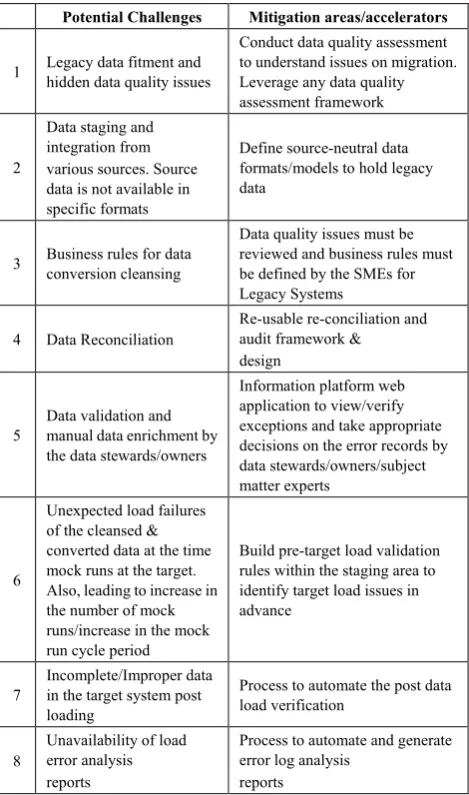
Table 8. Data Migration Challenges and Mitigations Potential Challenges Mitigation areas/accelerators
1 Legacy data fitment and hidden data quality issues
Conduct data quality assessment to understand issues on migration. Leverage any data quality assessment framework
2
Data staging and integration from various sources. Source data is not available in specific formats
Define source-neutral data formats/models to hold legacy data
3 Business rules for data conversion cleansing
Data quality issues must be reviewed and business rules must be defined by the SMEs for Legacy Systems
4 Data Reconciliation Re-usable re-conciliation and audit framework & design
5 Data validation and manual data enrichment by the data stewards/owners
Information platform web application to view/verify exceptions and take appropriate decisions on the error records by data stewards/owners/subject matter experts
6
Unexpected load failures of the cleansed & converted data at the time mock runs at the target. Also, leading to increase in the number of mock runs/increase in the mock run cycle period
Build pre-target load validation rules within the staging area to identify target load issues in advance
7 Incomplete/Improper data in the target system post loading
Process to automate the post data load verification
8 Unavailability of load error analysis reports
Process to automate and generate error log analysis
Data migration activities are no longer a threat to IT organization. IT manager’s uses best practices followed in the industry, technology-driven focus, and domain experience to tackle the task of data migration. Data migration process can be divided into the smaller tasks by which the process and procedures are controlled and will help the organization in reducing the cost and time to completion. Below are the few challenges that might pose a risk to the data migration activities.
11. Performances and Best Practices
11.1. Performance
Performance of the migration can be optimized for both staging area and ETL jobs. Some of the best practices followed in the industry are given below.
11.2. General
Best practices should be followed by ETL tools for better performance must be adopted for jobs development. Each ETL tool has few tips to increase the performance which can be reused with an understanding of the tool’s capabilities can aid in this. Parallel processing and pipelining and allow data to be partitioned are few tips that can improve the speed or performance.
It is important to keep in mind that ETL tools have been designed to deal with large volumes of data. A join in the database query across multiple tables with large volumes embedded inside a source/SQL stage in the tool can prove to be ‘expensive’ and may take time to return results. Instead, use the stages provided by the ETL tool to split this query and fully utilize the application database as well. In this case, you can use a join stage so that the database merely fetches data from each table leaving the heavy processing to the ETL tool. 11.3. Extract Phase
Breaking down the jobs into small technical components to enable a maximum number of jobs in parallel.
Creation of a special table on the legacy system to maintain the list of customers, contracts, accounts, connection objects and meters that have to be migrated. This would have enhanced performance.
11.4. File Generation Stage
Creation of indexes to optimize the creation of these flat files.
12. Best Practices
Some best practices for an ETL tool and staging database project are as follows:
12.1. ETL Tool
Parallel Threads in Query
Degree of Parallelism of flow of data
Parameterization: Use the Substitution Parameters instead of Global Variables for constants whose values change only with the environment.
Temporary tables: Temporary tables which are created during the runtime and then act as normal tables will help in converting complex business logic into multiple dataflows and populate template tables, which can be used for lookups and joins.
Monitor Log
Collect Statistics 12.2. Database
Indexes
Table Space: Use different table spaces for creating tables as per data volumes, which helps in distributed data storage
Avoid using ‘NOT IN.’
A number of loaders: The number of loaders can be increased while loading data during jobs as it improves loading performance.
Avoid use of Select *
Database utilities: Use the built-in utilities to extract table definitions from the staging database.
13. Hidden Cost Involved in Data
Migration Activity
There are both apparent and hidden costs associated with data migration. There should be a proper plan for effective migration as all the stakeholders should understand and appreciate the hidden costs involved in migration.
13.1. Planned & Unplanned Downtime
Scheduled & Unscheduled downtime is expensive due to non-availability of applications or data. This will eventually hit the profits of the organizations. We must ensure that both the application and data are available throughout the migration to avoid any costs associated due to downtime. As a mitigation plan, IT managers can plan to migrate minimal disruptive operations.
13.2. Data Quality
element of data through data profiling, validation, and cleansing processes.
It is recommended to invest on data quality software as this could save lot of time and also remove the bottlenecks for the data analysts team.
13.3. Man Hours
Staff time is more precious, and it is safer to schedule the migration activities during holidays or weekends to have minimal impact on the businesses. This will certainly reduce the downtime needed during critical hours. To reduce the overtime cost, business should look ways to zero downtime migration. There is no guarantee that all the steps will reduce the necessity for overtime, but certainly, it will also better place the IT department to deal with certain problems without the need for disruptive and expensive unscheduled downtime. It also helps IT department to troubleshoot and fix errors by avoiding unscheduled downtime.
13.4. Loss of Data
One of the common problems faced in data migration process is the data loss and the frequency of the data loss. Migration strategies should be formulated to mitigate any risk associated with loss of data. Best mitigation policy is to use full data backup of the source system before migrating to the target system.
13.5. Failure to Validate
Many organizations do not involve in proper data validation of their migrations. They purely trust on the validations done by users instead of the data migrated during migration. This will have a series of effects regarding a delay in the identification of problems and these results in either expensive unscheduled downtime during business hours that can extend up to evenings and weekends. Organizations should research and implement a solution which can offer validation capabilities.
13.6. Under Budgeting
Adequate planning on areas such as man hours, downtime, etc. are required for arriving at the cost of data migration to avoid any surprises on the cost involved in the data migration Sometimes it will be either over budgeted or under budgeted and according to industry analysts in two thirds of the migrations companies calculate wrong man hours/downtime requirements.
14. Roll Back Strategy
Rollback strategy is mandatory for any data migration process as a mitigation plan to restate the application activities in case of any unforeseen situations or failure during migration activities. This has to be planned between initial pilot phase and throughout the entire phases of actual migration. This has to be planned for every level specified in
the migration planning. This strategy will help in describing all the activities to be executed If a process fails or does not produce an acceptable result.
On a broader note, we should plan for the following activities
Plan to clean the target system data when the target is also in a production environment.
How to push the transactions during the migration / cut-over window into legacy applications?
Plan to minimize the impact on downstream/upstream applications.
Restore the operations from existing or legacy systems
Communication plan to all stakeholders.
15. Reconciliation
Data audit and reconciliation is a critical process which ascertains a successful data migration. Reconciliation is a phase where target data is compared with the source data to make sure that data has been transformed correctly. It is essential in keeping migration on track and also ensure the quality and quantity of the data migrated at each stage. At the extract and upload levels, Validation programs have to be implemented to capture the count of records. Analysis and Reconciliation (A&R) checks for accuracy and completeness of the migrated data and deals with quantity/value criteria (number of objects migrated etc.). A&R does not include verification of the data that has been migrated to make sure that the data supports the business processes. Reconciliation requirements are driven by both the functional teams -Process Owners requirements and the Technical reconciliation requirements. Following are the tasks related to A&R process.
Run reports at source: A&R reports can be executed at legacy and number of records extracted will be validated against the legacy system. Hash counts for key columns are noted.
Extract Validation: Data Extracts can then be validated against the Data Acceptance Criteria. This will also include validation of count of records and hash count mentioned in Source A&R reports
Run intermediate reconciliation in transformation layer: For some objects, intermediate reconciliation can be run at the data transformation layer.
Run reports at target: Target A&R reports must then be executed to validate the record count and hash counts.
16. Conclusions
data that is stored on out dated formats are evaluated and migrated to newer or more cost-effective & reliable storage Area. Data migration depends on the need of target, data will be transformed from legacy systems and will be loaded into the target. Data migration is a regular activity of IT department in many organizations. It often causes major issues due to various reasons like the staff, downtime of the environment, the poor performance of the application and these will, in turn, affect the budgets. To prevent these types of issues, organizations need a reliable and consistent methodology that allows the organizations to plan, design, migrate and validate the migration. Further, they need to evaluate the need for any migration software/tool that will support their specific migration requirements, including operating systems, storage platforms, and performance. To keep in check all the points, an organization needs robust Planning, Designing, Assessment and proper execution of the Project and its variables.
REFERENCES
[1] Bisbal, J., Lawless, D., Wu, B., Grimson, J., Wade, V., Richardson, R., & O'Sullivan, D. (1997, December). An overview of legacy information system migration. In Software Engineering Conference, 1997. Asia Pacific... and International Computer Science Conference 1997. APSEC'97
and ICSC'97. Proceedings (pp. 529-530). IEEE.
[2] Gupta, A., Katz, N. A., Stern, E. H., & Willner, B. E. (2006).
U.S. Patent No. 7,065,541. Washington, DC: U.S. Patent and
Trademark Office.
[3] Thota, S., 2017. Big Data Quality. Encyclopedia of Big Data, pp.1-5. https://link.springer.com/referenceworkentry/ 10.1007/978-3-319-32001-4_240-1.
[4] Maatuk, A., Ali, A., & Rossiter, N. (2008, September). Relational database migration: A perspective. In International Conference on Database and Expert Systems
Applications (pp. 676-683). Springer, Berlin, Heidelberg.
[5] Wyzga, W., Oliver, W., & Williams, M. (2002). U.S. Patent
Application No. 10/068,318.
[6] Terada, K. (2007). U.S. Patent No. 7,293,040. Washington, DC: U.S. Patent and Trademark Office.
[7] Wyzga, W., Oliver, W., & Williams, M. (2005). U.S. Patent
Application No. 11/036,778.
[8] Young, W., & Platt, J. (2003). U.S. Patent Application No.
09/922,032.
[9] Padmanabhan, R., & Patki, A. U. (2016). U.S. Patent No.
9,430,505. Washington, DC: U.S. Patent and Trademark
Office.
[10] Fehling, C., Leymann, F., Ruehl, S. T., Rudek, M., & Verclas, S. (2013, December). Service Migration Patterns--Decision Support and Best Practices for the Migration of Existing Service-Based Applications to Cloud Environments. In Service-Oriented Computing and Applications (SOCA), 2013
IEEE 6th International Conference on (pp. 9-16). IEEE.
[11] Mullins, C. (2002). Database administration: the complete
guide to practices and procedures. Addison-Wesley
Professional.
[12] Wu, B., Lawless, D., Bisbal, J., Grimson, J., Wade, V., O’Sullivan, D., & Richardson, R. (1997, October). Legacy system migration: A legacy data migration engine. In Proceedings of the 17th International Database Conference
(DATASEM’97) (pp. 129-138).
[13] Gutti, S., & Pulleyn, I. (2013). U.S. Patent No. 8,364,631. Washington, DC: U.S. Patent and Trademark Office. [14] Webb, S. S., Harris, K. R., & Devulapalli, R. R. (2006). U.S.
Patent No. 7,024,412. Washington, DC: U.S. Patent and
Trademark Office.
[15] Padmanabhan, R., & Patki, A. U. (2016). U.S. Patent No.
9,430,505. Washington, DC: U.S. Patent and Trademark
Office.
[16] Subash Thota, (2017). Analytics – Life Cycle. International Journal of Multidisciplinary Research and Development, pp. 117-126. http://www.allsubjectjournal.com/archives/2017/ vol4/issue12/4-12-33.
[17] Shiga, K., & Nakatsuka, D. (2008). U.S. Patent No. 7,334,029. Washington, DC: U.S. Patent and Trademark Office. [18] Matthes, F., Schulz, C., & Haller, K. (2011, September).
Testing & quality assurance in data migration projects. In Software Maintenance (ICSM), 2011 27th IEEE International
Conference on (pp. 438-447). IEEE.
[19] Bangia, A., Diebold, F. X., Kronimus, A., Schagen, C., & Schuermann, T. (2002). Ratings migration and the business cycle, with application to credit portfolio stress testing.
Journal of banking & finance, 26(2-3), 445-474.
[20] Lu, C., Alvarez, G. A., & Wilkes, J. (2002, January). Aqueduct: Online Data Migration with Performance Guarantees. In FAST (Vol. 2, p. 21).
[21] Paygude, P., & Devale, P. R. (2013). Automated data validation testing tool for data migration quality assurance.
Int J Mod Eng Res (IJMER), 599-603.
[22] Bisbal, J., Lawless, D., Wu, B., Grimson, J., Wade, V., Richardson, R., & O'Sullivan, D. (1997, December). An overview of legacy information system migration. In Software Engineering Conference, 1997. Asia Pacific... and International Computer Science Conference 1997. APSEC'97
and ICSC'97. Proceedings (pp. 529-530). IEEE.
[23] Inmon, W. H., & Hackathorn, R. D. (1994). Using the data
warehouse (Vol. 2). New York: Wiley.
[24] Wu, B., Lawless, D., Bisbal, J., Grimson, J., Wade, V., O'Sullivan, D., & Richardson, R. (1997, December). Legacy systems migration-a method and its tool-kit framework. In Software Engineering Conference, 1997. Asia Pacific... and International Computer Science Conference 1997. APSEC'97
and ICSC'97. Proceedings (pp. 312-320). IEEE.
[25] Matthes, F., Schulz, C., & Haller, K. (2011, September). Testing & quality assurance in data migration projects. In Software Maintenance (ICSM), 2011 27th IEEE International
Conference on (pp. 438-447). IEEE.
[26] Kalaimani J. (2016). Approach to Cut Over and Go Live