The State of the Art in End-User Software Engineering
ANDREW J. KO
The Information School, University of Washington ROBIN ABRAHAM AND LAURA BECKWITH Microsoft Corporation
ALAN BLACKWELL
The Computer Laboratory, University of Cambridge
MARGARET BURNETT, MARTIN ERWIG, AND JOSEPH LAWRANCE School of Electrical and Engineering and Computer Science, Oregon State University
HENRY LIEBERMAN MIT Media Laboratory BRAD MYERS
Human-Computer Interaction Institute, Carnegie Mellon University MARY BETH ROSSON
Information Sciences and Technology, Penn State University GREGG ROTHERMEL
Department of Computer Science and Engineering, University of Nebraska at Lincoln
CHRIS SCAFFIDI AND MARY SHAW
Institute for Software Research, Carnegie Mellon University SUSAN WIEDENBECK
College of Information Science and Technology, Drexel University
________________________________________________________________________ Most programs today are written not by professional software developers, but by people with expertise in other domains working towards goals supported by computation. For example, a teacher might write a grading spreadsheet to save time grading or an interaction designer might use an interface builder to test some user interface design ideas. Although these end-user programmers may not have the same goals as professional developers, they do face many of the same software engineering challenges, including requirements gathering, de-sign, specification, reuse, testing, and debugging. This article summarizes and classifies research on these activities, defining the area of End-User Software Engineering (EUSE) and related terminology. The article then discusses empirical research about end-user software engineering activities and the technologies designed to support them. The article also addresses challenges in de-signing EUSE tools, including the power of surprise in affecting tool use and the influence of gender.
Categories and Subject Descriptors: D.2 [Software Engineering], D.3 [Programming Languages], H.5 [ In-formation Interfaces and Presentation], K.4 [Computers and Society], J.4 [Social and Behavioral Sci-ences]
General Terms: Reliability, Human Factors, Languages, Experimentation, Design
Additional Key Words and Phrases: end-user software engineering, end-user programming, end-user develop-ment, visual programming, human-computer interaction.
2
1. INTRODUCTION
From the first digital computer programs in the 1940’s to today’s rapidly growing soft-ware industry, computer programming has become a technical skill of millions. As this profession has grown, however, a second, perhaps more powerful trend has begun to take shape. According to statistics from the US Bureau of Labor and Statistics, by 2012 there will be more than 55 million people using spreadsheets and databases at work in the USA, many writing formulas and queries to support their job [Scaffidi et al. 2005]. There are also millions designing websites with Javascript, writing simulations in Matlab [Gul-ley 2006], prototyping user interfaces in Flash [Myers et al. 2008], and using countless other platforms to support their work and hobbies. Computer programming, almost as much as computers use, is becoming a widespread, pervasive practice.
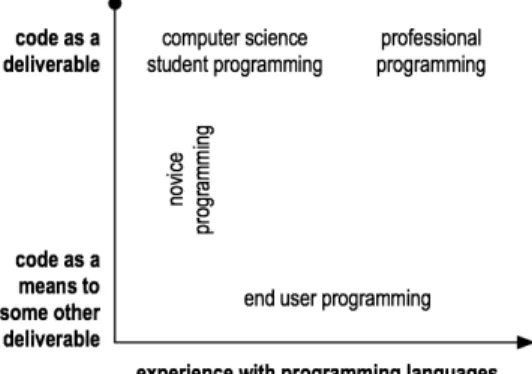
What makes these “end-user programmers” different from their professional counter-parts is their goals: professionals are paid to ship and maintain software over time; end users, in contrast, write programs to support some goal in their domain of expertise. End-user programmers might be secretaries, accountants, children [Petre and Blackwell 2007], teachers [Wiedenbeck 2005], interaction designers [Myers et al. 2008], and anyone else who finds themselves writing programs to support their work or hobbies. Programming experience is an independent concern, as shown in Figure 1. For example, despite their considerable skill, many system administrators view programming as a means to keeping a network and other services online [Barrett et al. 2004]. The same is true of many re-search scientists [Carver et al. 2007, Segal 2007].
Despite this difference in priorities from professionals, end-user programmers do face many of the same software engineering challenges. They must choose which APIs, librar-ies, and functions to use [Ko et al. 2004]. Because their programs contain errors [Panko 1998], they test, verify and debug their programs. They also face critical consequences to
failure. For example, a Texas oil firm lost millions of dollars in an acquisition deal through an error in a spreadsheet formula [Panko 1995]. The consequences are not just financial. Web applications created by small-business owners to promote their businesses do just the opposite if they contain bad links or pages that display incorrectly, resulting in loss of revenue and credibility [Rosson et al. 2005]. Software resources linked by end users to monitor non-critical medical conditions can cause unnecessary pain or discom-fort for users who rely on them [Orrick 2006].
Because of these quality issues, researchers have begun to study end-user program-ming practices and invent new kinds of software engineering technologies that collabo-rate with end users to improve software quality. This research area is called end-user software engineering (EUSE). There have been some surveys on end-user programming [Kelleher and Pausch 2005, Sutcliffe and Mehandjiev 2004, Lieberman et al. 2006], but to date, none has focused specifically on the topic of end-user software engineering.
In this article, we aim to define and organize this research area. We start by proposing definitions of programming, end-user programming, and end-user software engineering. We follow with a lifecycle-oriented treatment of end-user software engineering research, organizing more than a decade of research on requirements, design, testing, verification, and debugging. We then discuss issues surrounding the design of EUSE tools, including the power of surprise in affecting tool use and the influence of gender. We conclude with a discussion of open questions in EUSE research.
2. DEFINITIONS
A contribution of this paper is to identify existing terms in EUSE research and fill in terminology gaps, creating a well-defined vocabulary upon which to build future research. In this section, we start with a basic definition of programming, ending with a definition of end-user software engineering.
2.1. Programming and Programs
We define programming as the process of planning or writing a program. This leads to the need for a definition of the term program. Some definitions of “program” are in terms of the language in which the program is written, requiring, for example, that the notation be Turing complete, and able to specify sequence, conditional logic and iteration. How-ever, definitions such as these are heavily influenced by the type of activity being auto-mated. To remove these somewhat arbitrary constraints from the definition, for the pur-poses of this paper we define a program as a collection of specifications that can be
exe-4 cuted by a computational device at some future time, on input values that can vary. This definition captures general purpose languages in wide use, such as Java and C, but also notations as simple as VCR programs, written to record a particular show on a schedule, and markup languages like HTML, which are interpreted to produce a specific visual rendering of shapes and text. Our definition also captures related terms such as customi-zation and tailoring [Eagan and Stasko 2008], which imply parameterization of existing programs.
2.2. End User Programming
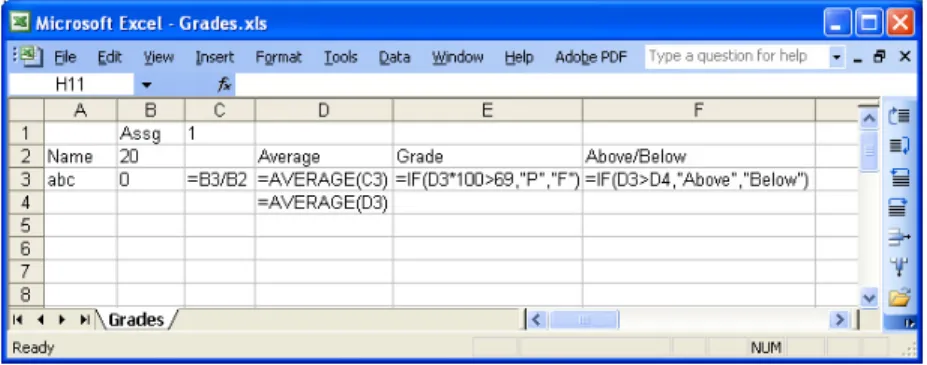
We now turn to end-user programming, a phrase perhaps popularized by Nardi [1993] in her investigations into spreadsheet use in office workplaces. An end user is simply a computer user. We define end-user programming as programming to achieve the result of a program, rather than the program itself. For example, a teacher may write a grades spreadsheet to track students’ test scores and a photographer might write a Photoshop script to apply the same filters to a hundred photos. In these situations, the program is a means to an end and only one of many tools used to accomplish a goal. In contrast, in professional software engineering, the goal is to produce the program itself for sale, for contract, for fun, or as a service.
An end-user programmer is someone who uses a program to achieve some goal other
Class of people Kinds of programs and tools and languages used
System administrators Write scripts to glue systems together, using text editors and scripting languages Interaction designers Prototype user interfaces with tools like Visual Basic and Flash
Artists Create interactive art with languages like Processing (http://processing.org) Teachers Teach science and math with spreadsheets [Niess et al. 2007]
Accountants Tabulate and summarize financial data with spreadsheets
Actuaries Calculate and assess risks using financial simulation tools like MATLAB Architects Model and design structures using FormZ and other 3D modelers Children Create animations and games with Alice [Dann et al. 2006] and BASIC Middle school girls Use Alice to tell stories [Kelleher and Pausch 2006, Kelleher and Pausch 2007] Webmasters Manage databases and websites using Access, FrontPage, HTML, Javascript Health care workers Write formal specifications to generate medical report forms
Scientists/engineers Use MATLAB and Prograph [Cox et al. 1989] to perform tests and simulations E-mail users Write e-mail rules to manage, sort and filter e-mail
Video game players Author “mods” for first person shooters, online multiplayer games, and The Sims Musicians Create digital music with synthesizers and musical dataflow languages VCR and TiVo users Record television programs in advance by specifying parameters and schedules Home owners Control heating and lighting systems with X10
Apple OS X users Automate workflow using AppleScript and Automator
Calculator users Process and graph mathematical data with calculator scripting languages Table 1. Classes of people who write programs and the kinds of programs they write.
than the program itself. This definition captures a variety of people and their work; Table 1 gives just a glimpse of the diversity of people’s computational creations. The phrase “end-user programmer” should be used with some caution, however: because the goal of programming is the key difference between end-user programming and other kinds of programming, it is not appropriate to say a particular individual is an end-user program-mer. Instead, end-user programming is a role and a state of mind (and when we use the phrase “end-user programmer” in this paper, we mean it in this sense). This is a departure from previous literature’s definitions of “end-user programmer” as an identity [Nardi 1993].
Because end-user programming is a role, one person can be both an end-user pro-grammer and a professional propro-grammer in different situations. For example, a profes-sional programmer may create a spreadsheet to manage a start-up company’s business plan, viewing the spreadsheet as a means to an end, and not applying the usual standard practices that they use at work to program, even though the quality of the spreadsheet formulas is critical to the business planning. Similarly, an end-user programmer can shift into the role of a professional programmer simply by making the program the primary goal, for example, by deciding to sell a program and thus maintain it and debug it for customers. In fact, whole communities have been formed around such peoples’ work (e.g. http://applescriptcentral.com).
Given the somewhat inconsistent use of phrases in this research area, it is worth men-tioning other phrases related to end-user programming. End user development [Lieber-man et al. 2006] has the same basic meaning as end-user software engineering, but also implies user participation in the software development process. Visual programming re-fers to a set of interaction techniques and visual notations for expressing programs. The phrase often implies use by end-user programmers, but these notations are not always targeted at a particular type of programming practice. Domain-specific languages are programming languages designed for writing programs for a particular kind of work or practice. End-user programming may or may not involve such languages, since what de-fines end-user programming is the intent, not the choice of languages or tools.
2.3. End User Software Engineering
With definitions of programming and end-user programming, we now turn to end-user software engineering. According to IEEE Standard 610.12, software engineering is
6 (1) the application of a systematic, disciplined, quantifiable approach to the devel-opment, operation, and maintenance of software, that is, the application of engi-neering to software, and (2) the study of approaches as in (1).
Although there is still much debate about the meaning of this phrase and its implica-tions, we define end-user software engineering as end-user programming involving sys-tematic and disciplined activities that address software quality issues (such as reliability, efficiency, usability, etc.). In essence, end-user programming focuses mainly on how to allow end users to create their own programs, and end-user software engineering consid-ers how to support the entire software lifecycle and its attendant issues. Professional and end-user software engineering differ in how they are structured. In professional software engineering, the engineering concerns and customer needs structure the work, resulting in requirements, design, testing, issue trackers, version control systems, and other formal tools and processes. Software developers can be informal within these phases [Ko et al. 2007], but this informality is usually confined within a systematic process. In end-user software engineering, the end-user programmers’ goals structure the work. Engineering concerns and their formalities occur, if at all, in the process of accomplishing other goals.
3. END-USER SOFTWARE ENGINEERING
End-user software engineering research is interdisciplinary, drawing from computer sci-ence, software engineering, human-computer interaction, education, psychology and other disciplines. Therefore, there are several dimensions along which we could discuss the literature in this area, including tools, language paradigm, research approach, and so on. We chose to organize the literature by major software engineering activities, framing the discussion from the perspective of an end user:
1. Requirements. What a program accomplishes, as opposed to how. 2. Design and specifications. How a program meets the requirements.
3. Reuse. Using preexisting code to save time and avoid errors (including integration, extension, and other perfective maintenance).
4. Testing and verification. Gaining confidence about correctness and identifying er-rors.
We discuss each of these, examining both empirical and technical research across a variety of application domains, language paradigms, and research approaches. We do not discuss implementation issues surrounding language design or code editors (which would go between 2 and 3), since these topics have already received attention in end-user pro-gramming literature [Sutcliffe and Mehandjiev 2004, Kelleher and Pausch 2005, Lieber-man et al. 2006].
3.1. What Should My Program Do? — Requirements
The term “requirements” refers to statements of what users would like a program to do, as opposed to how the program should do it. For example, a requirement for a tax pro-gram might be “Fill in my 1040 tax form automatically with salary numbers from my bank account.” This is a statement of a desired result, but not of how the result is achieved.
In professional software engineering, projects usually involve a requirements gather-ing phase that results in requirements specifications. These specifications can helpful in anticipating project resource needs and for negotiating with clients. For end-user software engineering, however, the notion of requirements has to be reinvented. Because of their motivations, end users may not tolerate overhead that is not rewarded in the short term. This means they may be less likely to learn formal languages in which to express re-quirements or to follow structured development methodologies. Furthermore, in many cases, end users may not know the requirements at the outset of a project; the require-ments may become clear in the process of implementation [Costabile et al. 2006] [Fischer and Giaccardi 2006][Mørch and Mehandjiev 2000].
Another difference between requirements in professional and end-user software engi-neering is the source of the requirements. In professional settings, the customers and us-ers are usually different people from the developus-ers themselves. In these situations, re-quirements analysts use formal interviews and other methods [Beyer and Holtzblatt 1998] to arrive at the requirements. End-user programmers, on the other hand, are usually pro-gramming for themselves or for a friend or colleague. Therefore, end-user software engi-neering is unlike other forms of software engiengi-neering, where the challenge of require-ments definition is to understand the context, needs and priorities of other people and organizations. For end users, requirements are both more easily captured (because the requirements are often their own) and more likely to change (because end users may need to negotiate such changes only with themselves).
8 The situation in which an end user programs also affects the type of requirements. For example, at the office the goal is often to automate repetitive operations, such as transfer-ring or transforming pieces of information such as customer names, products, accounts, or documents. A decision to write a program at all corresponds directly to real invest-ment, since time is money. Therefore, end users must estimate the costs of programming and compare those to the cost of continuing repeated manual operations [Nardi 1993]. In these contexts, end users who become successful at automating their own work often find that their programs are passed on to others, whether by simple sharing of tools between peers [MacLean et al. 1990], or as a means for managers to define office procedures. These social contexts start to resemble the concerns of professional software developers, for whom requirements analysis extends to the definition and negotiation of work prac-tices [Ko et al. 2007].
At home, end-user software engineering is seldom about efficiency (except in the case of office-like work that is done at home, such as taxes). Instead, typical tasks include automation of future actions, such as starting a cooker or recording television. It is often the case that one member of a household becomes expert in operating a particular appli-ance, and assumes responsibility for programming it [Rode et al. 2005][Blackwell 2004]. In this context, requirements are negotiated within the social relations of the household, in a manner that might have some resemblance to professional software experiences. Sometimes there are no requirements to start with; for example, there is a long tradition of “tinkering,” in which hobbyists explore ways to reconfigure and personalize technol-ogy with no definite end in mind [Blackwell 2006]. Even though these hobbyists might have envisioned some scenario of use when they made the purchase [Okada 2005], these motivations may be abandoned later. Instead, requirements evolve through experimenta-tion, seeing what one can do, and perhaps motivated by the possibility of exhibiting the final product to others as a demonstration of skill and technical mastery.
In online contexts, end users must often consider the users of the web site or service they are creating [Rode et al. 2006]. In some situations, requirements are shared and ne-gotiated, as happens with professional software developers. For example, Scaffidi et al. interviewed six Hurricane Katrina site developers and found that three relied on team-mates for evaluating what features should be present and whether the site was viable at all [Scaffidi et al. 2006]. In this same study, requirements were derived from beliefs about the users of the program. One writer on the aggregators' email distribution list recognized that this “loosey goosey data entry strategy” would provide end users with
maximal flexibility. Unfortunately, the lack of validation led to semantic errors that soft-ware propagated into the new database.
In educational contexts, programming is often used as a tool to educate students about mathematics and science. What makes these classroom situations unique is how require-ments are delivered to and adapted by students. For example, Rosson et al. [2002] de-scribe a participatory design workshop in which pairs of students and senior citizens cre-ated simulation projects to promote discussion about community issues. In this situation, requirements emerged from interpersonal communication in conversation and then were later constrained by the capabilities of the simulation tool. This contrasts with a class-room study of AgentSheets [Ioannidou et al. 2006], in which small groups of elementary school students followed a carefully designed curriculum to design biological simula-tions. In this situation, the instructions set the scope of the programming and students chose the detailed requirements within this scope. In other contexts [Neiss 2007], the teachers and the students are end-user programmers. The degree to which the teachers understood the abilities and limitations of spreadsheets affected not only the requirements they developed in lab activities, but also the degree to which the students understood the abilities and limitations of spreadsheets.
3.2. How Should My Program Work? — Design and Design Specifications In software engineering, design specifications specify the internal behavior of a system, whereas the requirements are external (in the world). In professional software engineer-ing, software designers translate the ideas in the requirements into design specifications. These specifications can be helpful in coordinating implementation strategies and ensur-ing the right prioritization of software qualities such as performance and reliability. De-sign processes can ensure that all of the requirements have been accounted for.
The challenge of translating one’s requirements into a working program can be daunt-ing. For example, interview studies of people who wanted to develop web applications revealed that people are capable of envisioning simple interactive applications, but cannot imagine how to translate their requirements into working applications [Rosson et al. 2005].
Further, in end-user software engineering, the benefits of explicit design processes and specifications may be unclear to users. Most of the benefits of being explicit come in the long term and at a large scale, whereas end users may not expect long-term usage of their programs, even though this is not particularly accurate. For example, studies of
10 spreadsheets have shown that end users are creating more and more complex spread-sheets [Shaw 2004], with typical corporate spreadspread-sheets doubling in size and formula content every three years [Whittaker 1999].
3.2.1.Design Processes. Software design processes constrain how requirements are translated into design specifications and then implementations. Such processes are often used to ensure quality goals such as reliability and maintainability and are learned through experience or training in software engineering practices. Many end-user pro-grammers, however, are “silent designers” [Gorb and Dumas 1987], with no training in design and often seeing no benefit to ensuring such qualities.
Some have proposed dealing with this lack of design experience by enforcing particu-lar design processes. For example, Ronen et al. propose a design process that focuses on ensuring that spreadsheets are reliable, auditable, and safe to update (without introducing errors) [Ronen et al. 1989]. Powell and Baker define strategies and best practices for spreadsheet design to improve the quality of created spreadsheets [Powell and Baker 2004]. Outside of the spreadsheet domain, Rosson et al. tested a design process with end-user web programmers based on scenarios and concept maps, finding that the process was useful for orienting participants towards particular design solutions [Rosson et al. 2007]. One problem with dictating proper design practices is that end-user programmers often design alone, making it difficult to enforce such processes.
An alternative to enforcing good behavior is to let end users work in the way they are used to working, but inject good design decisions into their existing practices. One cru-cial difference between trained software engineers’ and end users’ approaches to problem solving is the extent to which they can anticipate design constraints on a solution. Soft-ware engineers can use their experience and knowledge of design patterns to predict con-flicts and dependencies in their design decisions [Lakshminarayanan et al. 2006]. End-user programmers, however, often come to understand the constraints on their programs’ implementations only in the process of writing their program [Fischer and Giaccardi 2006].
Because end-user programmers’ designs tend to be emergent, requirements and de-sign in end-user software development are rarely separate activities. This is reflected in most design approaches that have been targeted at end-user programmers, which are largely designed to support evolutionary and exploratory prototyping, rather than up-front design. For example, DENIM, a sketching system for designing web sites, allows users to leave parts of the interface in a rough and ambiguous state [Newman et al. 2003]. This
characteristic is called provisionality [Green et al. 2006], where elements of a design can be partially, and perhaps imprecisely stated.
Another approach to dealing with end users’ emergent designs is to constrain what can be designed to a particular domain. The WebSheets [Wolber et al. 2002] and Click [Rode et al. 2005] environments both strive to aid users in developing web applications at a level of abstraction that allows the environment to generate database-driven web appli-cations, rather than write the necessary code at a lower level.
Supporting emergent designs under changing ideas of requirements can also be done by supporting asynchronous or synchronous collaborations between professional software developers and end-user programmers. Approaches that emphasize synchronous aspects view professional developers and end-user programmers as a team (e.g., [Costabile et al. 2006, Fischer and Giaccardi 2006]). On the other hand, in strictly asynchronous ap-proaches, the professional developer provides tailoring mechanisms for end-user pro-grammers, thereby building in flexibility for end-user programmers to adjust the software over time as new requirements emerge [Bandini and Simone 2006, Dittrich et al. 2006, Letondal 2006, Stevens et al. 2006, Won et al. 2006, Wulf et al. 2008]. As Pipek and Kahler point out, tailorability is a rich area, including not only issues of how to support low-level tailoring, but also numerous collaborative and social aspects [Pipek and Kahler 2006].
Figure 2. Links between web site content, sketched in DENIM, an informal web site sketching tool. Reprinted from [Newman et al. 2003] with permission from authors.
12 3.2.2.Writing Specifications. In professional software engineering, one way to ensure that requirements have been satisfied is to write explicit design specifications and then have tools check the program against these specifications for inconsistencies. In applying this idea to end-user software engineering, one approach is for a tool to require up-front design. For example, ViTSL separates the modeling and data-entry aspects of spreadsheet development [Erwig et al. 2005]. The spreadsheet model is captured as a template [Abra-ham et al. 2005] like the one in Figure 3. The ellipsis under row 3 indicates that the row can be repeated downwards; each row stores the scores of a student enrolled in the course. These templates can then be imported into a system called Gencel [Erwig et al. 2005, Erwig et al. 2006], which can be used to generate spreadsheets that are guaranteed to conform to the model represented by the template. For example, an instance of the template in Figure 3 is shown in Figure 4. The menu bar on the right allows the user to perform insertion and deletion, protecting the user against unintended changes.
Other researchers have developed end-user specification languages for privacy and
Figure 3. A ViTSL template, specifying the underlying structure of a grading spreadsheet. The names appear in rows and the assignments appear in columns, with the ellipses indicating repetition. Reproduced from [Abraham
and Erwig 2006c] with permission from authors.
Figure 4. An instance of the grade sheet template from Figure 3 loaded into Excel. The operations in the toolbar on the right utilize the spreadsheet’s underlying structure to help users avoid introducing errors into the
security. For example, Dougherty et al. [2006] describe a framework for expressing ac-cess-control policies in terms of domain concepts. These specifications are stated as “dif-ferences” rather than as absolutes. For example, rather than stating who gets privileges in a declarative form, the system supports statements such as “after this change, students should not gain any new privileges.”
3.2.3.Inferring specifications. One approach to the problem of how to support a de-sign process is to eliminate it, replacing it with technologies that can translate require-ments automatically through various forms of inference.
Several systems have used a programming by example approach to this problem (such systems are described in detail in [Lieberman 2000]). These systems allow users to ex-press multiple examples of the program’s intended behavior and the tool observes the behavior and attempts to generalize from it. For example, Abraham and Erwig developed an approach for automatically inferring the templates discussed in the previous section from a spreadsheet [Abraham and Erwig 2006a], allowing users more flexibility in rede-fining the spreadsheet template as requirements change. In the domain of simulations, the AgentSheets environment [Repenning and Perrone 2000] lets the programmer specify that a new type of “part” is just like an existing part, except for its icon; the tool will then generate all of the instructions necessary for the new part. McDaniel and Myers [1999] describe an approach to inferring interaction specifications, allowing users to click and drag objects from one part of the screen to another. One problem with these approaches is that the specifications inferred are difficult to reuse in future programs, since most sys-tems do not package the resulting program as a reusable component or a function (though see [Smith et al. 2000] for a counter-example).
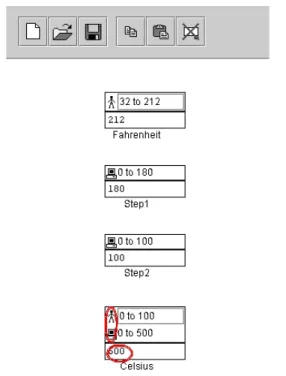
14 Another way of inferring specifications is to elicit them directly from end users. Burnett et al. [2003] describe an approach for spreadsheets, attaching assertions to each cell to specify intended numerical values. In this approach, seen in Figure 5, users can specify an intended range of a cell’s value at any time. Then, the system propagates these ranges through cell formulas, allowing the system to further reason about the correctness of the spreadsheet. If a conflict is found between a user-generated assertion and a system-generated assertion, the system circles the two assertions to indicate the conflict. This assertions-based approach has been shown to increase people’s effectiveness at testing and debugging [Wilson et al. 2003, Burnett et al. 2003]. Scaffidi describes a similar ap-proach for validating textual input [Scaffidi et al. 2008]; we describe this apap-proach in Section 3.3.4.
Other inference approaches take natural language descriptions of requirements and at-tempt to translate them into code. For example, Liu and Lieberman [2005] describe a system that takes descriptions of the intended behavior of a system and generates Python declarations of the objects and behaviors described in the descriptions. Little and Miller [2006] developed a similar approach for Chickenfoot [Bolin et al. 2005] (a web scripting language) and Microsoft Word’s Visual Basic for Applications. Their approach exploits Figure 5. An assertion conflict in Forms/3. The user wrote the assertion on the Celsius cell (0 to 100), which conflicts with the computer generated assertion (0 to 500). This prompts the user to check for errors in the cells’
the user’s familiarity with the vocabulary of the application domain to express commands in that domain. Users can state their goals in terms of the domain keywords they are fa-miliar with and the system generates the code.
3.3. What Can I Use to Write My Program? — Reuse
Reuse generally refers either a form of composition, such as “gluing” together compo-nents APIs, or libraries, or modification, such as changing some existing code to suit a new context or problem. The motivations for these various types of reuse depend on the goals of the software development activity. In professional software engineering, compo-sition saves time and avoids the risk of writing erroneous new code [Ye and Fischer 2005, Ravichandran and Rothenberger 2003]. In practice, most of the code that profes-sional developers write involves reuse of some sort, whether copying code snippets, adapting example code, or using APIs [Bellon et al. 2007].
In end-user software engineering, reuse is clearly is often what makes a project possi-ble, since it may be easier for an end user to perform a task manually or not at all than to write new functionality [Blackwell 2002a]. This additional constraint leads to several unique reuse challenges, which we discuss in detail in this section.
3.3.1.Finding Code to Reuse. One fundamental challenge to reuse is finding code and abstractions to reuse, or knowing that they exist at all [Ye and Fischer 2005]. For example, Ko found that students using Visual Basic.NET to implement user interfaces struggled when trying to use search tools to find relevant APIs, and instead relied on their more experienced peers for finding example code or APIs [Ko et al. 2004]. This is similar to Nardi’s finding that people often seek out slightly more experienced coworkers for programming help [Nardi 1993]. Example code and example programs are one of the greatest sources of help for discovering, understanding, and coordinating reusable ab-stractions, both for professional programmers [Rosson and Carroll 1996, Stylos and Myers 2006] and for end-user programmers [Wiedenbeck 2005, Rosson et al. 2005]. In many cases the examples are fully functional, so the programmer can try out the exam-ples and better understand how they work [Rosson and Carroll 1996, Walpole and Burnett 1997].
Researchers have also invented a number of tools to help search for both example code and APIs. For example, the CodeBroker system watches the programmer type code and guesses what API functions the programmer might benefit from knowing about [Ye and Fischer 2005]. Other systems also attempt to predict which abstractions will benefit a
16 professional programmer [Mandelin et al. 2005, Bellettini et al. 1999]. Mica [Stylos and Myers 2006] lets users search using domain specific keywords. While all of these ap-proaches are targeted at experienced programmers, many of the search techniques may be useful in bringing similar support to end-user programmers.
3.3.2.Reusing Code. Even if end users are able to find reusable abstractions, in some cases, they may have difficulty using abstractions that were packaged, documented, and provided by an API. One study of students using Visual Basic.NET for user interface prototype showed that most difficulties relate to determining how to use abstractions cor-rectly, coordinating the use of multiple abstractions, and understanding why abstractions produced certain output [Ko et al. 2004]. In fact, most of the errors that the students made had more to do with the programming environment and API, and not the programming language. For example, many students had difficulty knowing how to pass data from one window to another programmatically, and encountered null pointer exceptions and other inappropriate program behavior. These errors were due primarily to choosing the wrong API construct or violating usage rules in the coordination of multiple API constructs. Studies of end-user programming in other domains, such as web programming [Rode et al. 2003, Rosson et al. 2004], and numerical programming [Nkwocha and Elbaum 2005], have documented similar types of API usage errors.
There are several ways of addressing mismatch between code and the desired func-tionality. For example code, one way is to simply modify the code itself, customizing it for a particular purpose. A special case of adapting such examples is the concept of a template. For example, Lin and Landay [2008], in their tool for prototyping user inter-faces across multiple devices, provide a collection of design pattern examples [Beck 2007] that users can adapt, parameterize, and combine. Some end-user development plat-forms, such as Adobe Flash, implement user interface components as modifiable tem-plates. The most extreme types of templates are tailoring interfaces, where behavior can only be parameterized [Eagan and Stasko 2008].
Modifying APIs, libraries and other kinds of abstraction is more difficult, since the code for the abstraction itself is not usually available. The programmer can sometimes write additional code to adapt an API [DeLine 1999], but there are certain characteristics of APIs and libraries, such as performance, that are difficult to adapt. Worse yet, when an end-user programmer is trying to decide whether some API or library would be suitable for a task, it is difficult to know in advance whether one will encounter such difficulties (this is also true for professionals [Garlan et al. 1995]).
Another issue for API and abstraction use is whether future versions of the abstraction will introduce mismatch because of internal changes. For example, ActionScript [DeHaan 2006] (the programming language for Adobe Flash) and spreadsheet engine upgrades often change the semantics of existing programs’ behavior. In the world of professional programming, one popular approach to detecting such changes is to create regression tests [Onoma et al. 1988]. Another possibility is to proxy all interactions with the API and log the API’s responses; then, if future versions of the API respond differently, the system can show an alert [Rakic and Medvidovic 2001]. Regression testing has been used in relation to spreadsheets [Fisher et al. 2002b]; beyond this, these approaches have not been pursued in end-user development environments.
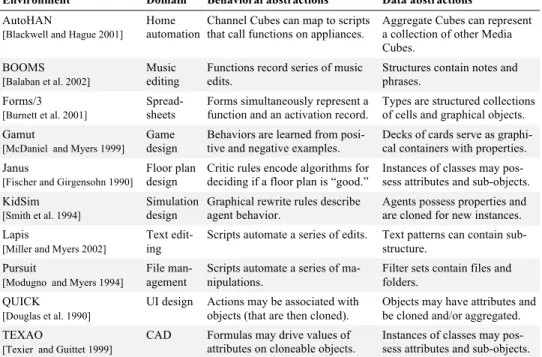
3.3.3.Creating and Sharing Reusable Code. Thus far, we have discussed reusing ex-isting code, but most end-user development environments also provide ways for users to create new abstractions. Table 2 lists several examples of reusable abstractions, distin-guishing between behavioral abstractions and data abstractions. Studies of certain classes of end users suggest that data abstractions are the most commonly created type [Rosson et al. 2005, Scaffidi et al. 2006].
Although end users have the option of creating such reusable abstractions, examples are the more common form of reusable code. Unfortunately, it is extremely time-Environment Domain Behavioral abstractions Data abstractions
AutoHAN
[Blackwell and Hague 2001]
Home automation
Channel Cubes can map to scripts that call functions on appliances.
Aggregate Cubes can represent a collection of other Media Cubes.
BOOMS
[Balaban et al. 2002]
Music editing
Functions record series of music edits.
Structures contain notes and phrases.
Forms/3
[Burnett et al. 2001]
Spread-sheets
Forms simultaneously represent a function and an activation record.
Types are structured collections of cells and graphical objects. Gamut
[McDaniel and Myers 1999]
Game design
Behaviors are learned from posi-tive and negaposi-tive examples.
Decks of cards serve as graphi-cal containers with properties. Janus
[Fischer and Girgensohn 1990]
Floor plan design
Critic rules encode algorithms for deciding if a floor plan is “good.”
Instances of classes may pos-sess attributes and sub-objects. KidSim
[Smith et al. 1994]
Simulation design
Graphical rewrite rules describe agent behavior.
Agents possess properties and are cloned for new instances. Lapis
[Miller and Myers 2002]
Text edit-ing
Scripts automate a series of edits. Text patterns can contain sub-structure.
Pursuit
[Modugno and Myers 1994]
File man-agement
Scripts automate a series of ma-nipulations.
Filter sets contain files and folders.
QUICK
[Douglas et al. 1990]
UI design Actions may be associated with objects (that are then cloned).
Objects may have attributes and be cloned and/or aggregated. TEXAO
[Texier and Guittet 1999]
CAD Formulas may drive values of attributes on cloneable objects.
Instances of classes may pos-sess attributes and sub-objects. Table 2. Behavioral and data abstractions in various end-user development environments.
18 consuming to maintain a well-vetted repository of code. For example, Gulley [2006] de-scribes the challenges in maintaining a repository of user-contributed Matlab examples, with a rating system and other social networking features. For this reason, many organi-zations do not explicitly invest in creating such repositories. In such cases, programmers cannot rely on search tools but must instead share code informally [Segal 2007, Wieden-beck 2005]. This spreads repository management across many individuals, who share the work of vetting and explaining code.
Although it is common for end-user programmers to view the code they create as “throw away,” in many cases such code becomes quite long-lived. Someone might write a simple script to streamline some business process and then later, someone might reuse the script for some other purpose. This form of “accidental” sharing is one way that end-user programmers face the same kinds of maintainability concerns as professional pro-grammers. In field studies of CoScripter [Leshed et al. 2008, Bogart et al. 2008], an end-user development tool for automating and sharing “how-to” knowledge, scripts in the CoScripter repository were regularly copied and duplicated as starting points for new scripts, even when the original author never intended such use [Bogart et al. 2008].
3.3.4.Designing Reusable Code for End Users. One way to facilitate reuse by end us-ers is to choose the right abstractions for their problem domains. This means choosing the right concepts and choosing the right level of abstraction for such concepts. For example, the designers of the Alice 3D programming system [Dann et al. 2006] consciously de-signed their APIs to provide abstractions that more closely matched peoples’ expectations about cameras, perspectives, and object movement. The designers of the Visual Ba-sic.NET APIs based their API designs on a thorough study of the common programming tasks of a variety of programmer populations [Green et al. 2006].
In other cases, choosing the right abstractions for a problem domain involves under-standing the data used in the domain. For example, Topes [Scaffidi et al. 2008] is a framework for describing string data types unique to an organization, such as room num-bers, purchase order IDs, and phone number extensions (see Figure 6). By supporting the design of these custom data types, end-user programmers can more easily process and validate information, as well as transform information between different formats. This is a fundamental problem in many new domains of end-user programming, such as “mashup” design tools [Wong and Hong 2007] and RSS feed processors (http://pipes.yahoo.com).
Of course, as with any design, designing the right abstractions has tradeoffs. Special-izing abstractions can result in a mismatch between the functionality of a reusable ab-straction and the functionality needed by a programmer [Ye and Fischer 2005, Wieden-beck 2005]. For example, many functional mismatches occur because specialized abstrac-tions often have non-local effects on the state of a program [Biggerstaff and Richter 1989]. In addition to functional mismatch, non-functional issues can cause abstractions not to mesh well with the new program [Ravichandran and Rothenberger 2003, Shaw 1995]. End-user software engineering research is only beginning to consider this space of API and library design issues.
3.4. Is My Program Working Correctly? —Verification and Testing
There is a large range of ways to gain confidence about the correctness of a program, whether through verification, testing, or a number of other approaches. The goal of much of the work on this problem is to enable people to have a more objective and accurate level of confidence than they would if they were left unassisted. In this section we first discuss issues of overconfidence about program correctness, and then describe technolo-gies that help end-user programmers overcome such overconfidence.
3.4.1.Oracles and Overconfidence. A central issue for any type of verification is the decision about whether a particular program behavior or output is correct. The source of Figure 6. The Topes pattern editor [Scaffidi et al. 2008], allowing the creation of string data types that support
20 such knowledge is usually referred to as an oracle. Such oracles might be people, making decisions about the correctness of program behavior with varying degrees of formality, or can be stored known results.
People are typically imperfect oracles. Professional programmers are known to be overconfident [Leventhal et al. 1994, Teasley and Leventhal 1994, Lawrance et al. 2005], but such overconfidence subsides as they gain experience [Ko et al. 2007]. Some end-user programmers, in comparison, are notoriously overconfident: many studies about spreadsheets report that despite the high error rates in spreadsheets, spreadsheet develop-ers are heedlessly confident about correctness [Panko 1998, Panko 2000, Hendry and Green 1994]. In one study, overconfidence about the correctness of spreadsheet cell val-ues was associated with a high degree of overconfidence about the spreadsheets’ overall correctness [Wilcox 1997]. In fact, for spreadsheets, studies report that between 5% and 23% of the value judgments made by end-user programmers are incorrect [Ruthruff et al. 2005a, Ruthruff et al. 2005b, Phalgune et al. 2005]. In all of these studies, people were much more likely to judge an incorrect value to be right than a correct value to be wrong.
These findings have implications for creators of error detection tools. The first is that immediate feedback about the values a program computes, without feedback about cor-rectness, leads to significantly higher overconfidence [Rothermel et al. 2000, Krishna et al. 2001]. Second, because end users' negative judgments are more likely to be correct than positive judgments, a tool should “trust” negative judgments more. One possible strategy for doing so is to implement a “robustness” feature that guards against a large number of positive judgments swamping a small number of negative judgments, e.g., as in [Ruthruff et al. 2005b]. This approach was empirically tested in [Phalgune et al. 2005] and was found to significantly improve the tool’s feedback.
3.4.2.Detecting Errors with Testing.One approach to helping end-user programmers detect errors is supporting testing. Testing is judging the correctness of programs from the correctness of program outputs. Systematic testing—testing according to a plan that defines exactly what tests are needed and when enough testing has been done—is crucial for success. Without it, the likelihood of missing important errors increases [Rothermel et al. 2001]. Furthermore, stronger (and more expensive) systematic testing techniques have a demonstrated tendency to outperform weaker ones [Frankl and Weiss 1993, Hutchins et al. 1994]. Unfortunately, being systematic is often in conflict with end-user program-mers’ goals, because it requires time on activities that they usually perceive as irrelevant to success. Therefore, research on testing tools for end-user programmers has focused on
testing approaches that are integrated with users’ work and are incremental in their feed-back.
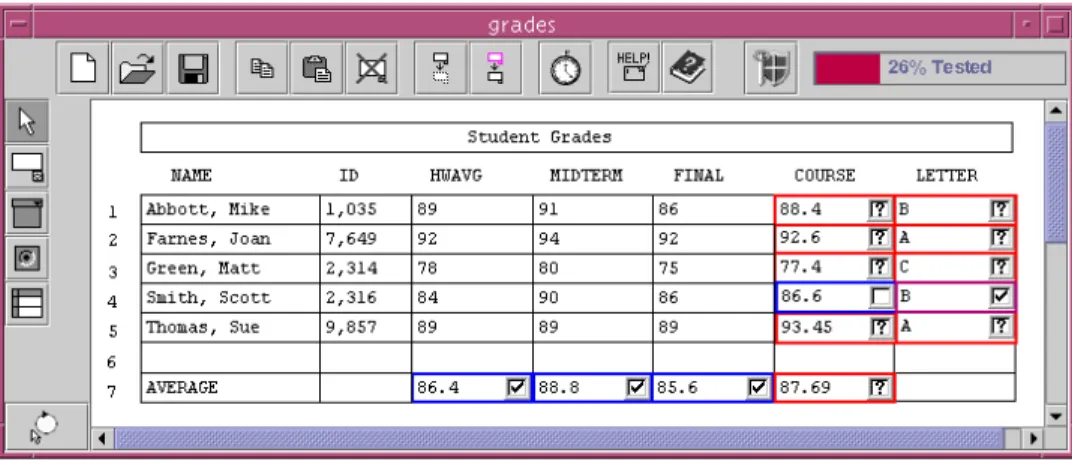
The most notable of these approaches is the “What You See Is What You Test” (WYSIWYT) methodology for doing “white box” testing of spreadsheets [Rothermel et al. 1998, Rothermel et al. 2001, Burnett et al. 2002]. With white box testing, the code is available to the tester [Beizer 1990]; in the case of spreadsheets, the formulas are the source code. Since testing most programs would require an infinite number of test cases in order to actually prove correctness, most white box approaches include a test adequacy criterion, which measures when “enough” testing has been done according to some code-based measure. Some criteria include branch coverage (test cases that exercise every branch), and statement coverage (exercising every statement in an imperative program) [White 1987]. With WYSIWYT, the criterion used is definition-use coverage, which (in the spreadsheet context) involves exercising every data dependency that could feasibly execute [Rothermel et al. 1998, Rothermel et al. 2001].
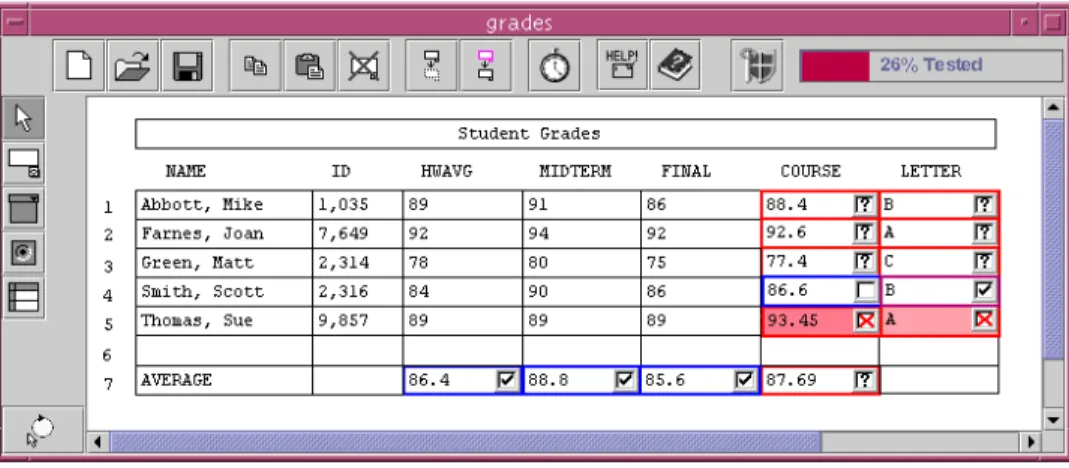
With WYSIWYT, as users develop a spreadsheet, they can also test that spreadsheet incrementally and systematically. At any point in the process of developing the spread-sheet, the user can validate any value that he or she believes is correct (the issues of ora-cles and overconfidence aside). Behind the scenes, these validations are used to measure the quality of testing in terms of a test adequacy criterion based on data dependencies. These measurements are then projected to the user using several different visual devices, to help them direct their testing activities.
22 For example, suppose that a teacher is creating a student grades spreadsheet and has reached the point shown in Figure 7. During this process, whenever the teacher notices that a value in a cell is correct, she can check it off in the decision box in the upper right corner of that cell. A checkmark appears in the decision box, indicating that the cell’s value has been validated under current inputs. The validated cell’s border also becomes more blue, indicating that dependencies between the validated cell and cells it references have been “exercised” in producing the validated values. Red borders mean untested, blue borders mean tested, and any color in between means partially tested. From the bor-der colors, the user is kept informed of which areas of the spreadsheet are tested and to what extent. The tool also supports more fine-grained access to testing the data depend-encies in the spreadsheet, as well as a “percent tested” bar at the top of the spreadsheet, providing the user with an overview of her testing progress.
To help users think of values to test, users can invoke the “Help Me Test” utility to automatically generate suitable test values [Fisher et al. 2002a, Fisher et al. 2006b]. This approach finds values that follow unexplored paths in the spreadsheet’s dataflow, as well as reuse prior test case values for regression testing after a spreadsheet has changed. Abraham and Erwig describe an alternative approach to generating test values by back-propagating constraints on cell values, showing that it can be more effective in terms of efficiency and predictability [Abraham and Erwig 2006b].
WYSIWYT is the most mature error-detecting approach for end-user programmers. It includes support for reasoning about regions of cells with shared formulas [Fisher et al. 2006b, Burnett et al. 2002] and also interacts with assertions (covered in Section 3.2), Figure 7. The WYSIWYT testing approach. Checkmarks represent decisions about correct values. Empty boxes indicate that a value has not been validated under the current inputs. Question marks indicate that validating the
fault localization, debugging (covered in Section 3.5), reuse of prior test cases [Fisher et al. 2002b], and the “Help Me Test” functionality mentioned earlier. There has also been research into how WYSIWYT can be applied to visual dataflow languages [Karam and Smedley 2002] and to the kind of “screen transition” programming being developed for web page design [Brown et al. 2003].
3.4.3.Checking Against Specifications. Another approach to detecting errors in pro-grams is by checking values computed by the program against some form of specifica-tion; these specifications then serve as the oracle for correctness. For example, as dis-cussed in Section 3.2, one form of specifications that can be entered is assertions about the values that a spreadsheet cell can have. Such assertions can be propagated to infer new assertions, using interval arithmetic [Ayalew and Mittermeir 2003, Burnett et al. 2003]. Assertions that conflict with one another are also highlighted, showing errors in the assertions or the formulas through which they propagated. Other approaches validate string input against flexible data type definitions [Scaffidi et al. 2008]. In all of these ap-proaches, values that do not conform to the assertions are highlighted.
Elbaum et al. [2005] describe an approach for capturing user session data from users who utilize web applications, and using this data to distill relevant testing information. The approach can be abstractly thought of as identifying specification information about a web application in the form of an operational abstraction of usage of that application. By focusing on usage, the approach allows verification relative to an (often shifting) op-erational profile; this can detect errors not foreseen by developers of the application, who often have unrealistic expectations about application usage.
24 3.4.4.Consistency Checking. Instead of using a human oracle or external specifica-tions, some systems define correctness heuristics about the internal consistency of a pro-gram’s code. One approach for spreadsheets is a form of type inference called “unit in-ference and checking systems” [Abraham and Erwig 2004, Abraham and Erwig 2007b, Ahmad et al. 2003, Antoniu et al. 2004, Coblenz et al. 2005]. These approaches are based on the idea that users’ layout of data, especially the labeled row and column headers, of-fer a form of user defined type called a unit [Erwig and Burnett 2002]. For example, the label (column head) “apples” would represent entries of type apple. The “apples” label gets propagated to other formulas that use this value, and the labels are combined in dif-ferent ways depending on the operator. The program can then be checked against these units for consistency. To illustrate, consider the spreadsheet in Figure 8, using the UCheck system [Abraham and Erwig 2004, Abraham and Erwig 2007a]. Because a col-umn is labeled “Apples,” the entries in that colcol-umn can be considered of unit Apples. The approach begins with an analysis of spatial layout, also taking into account referenc-ing relationships in formulas, to determine the relationships among header labels for rows and columns, their relationship to data entries, and how far in the spreadsheet these labels apply. Because the row labeled “Total” contains sums of the “Apples” entries, the sys-tem decides that “Total” marks the end of the “Apples” column.
The system can also reason about transformations that happen through formula opera-tors/function calls, such as inferring that the sum of two Apples entries is also of type
Figure 8. The UCheck system for inferring units from headers. The arrows represent unit inferences based on the column and row labels [Abraham and Erwig 2007b].
Apples, even if it is not in the Apples column. These inferences can be crosschecked for contradictions, and, just as in type inference, these contradictions are strong indications of logic errors. For example, if the sum of two Apples entries occurs in the middle of the Oranges column, the system could consider this to be a case of conflicting type informa-tion and generate a unit error. Empirical studies suggest that end users are successful at user these features to detect errors [Abraham and Erwig 2007b].
Another form of internal consistency checking is statistical outlier finding, which in-volves identifying invalid data values that are mixed among a set of valid values. Miller and Myers[2001] used this approach to help detect errors in text editing macros. Scaffidi [2007] developed a similar algorithm with higher precision and recall that infers a format from an unlabeled collection of examples that may contain invalid values. The generated format is presented in human-readable notation, so end-user programmers can review and customize the format before using it to find outliers that do not match the format. Raz et al. [2002] used anomaly detection to monitor on-line data feeds incorporated in web-based applications for possible erroneous inputs. All of these approaches use statistical analysis and interactive techniques to direct end-user programmers’ attention to poten-tially problematic values.
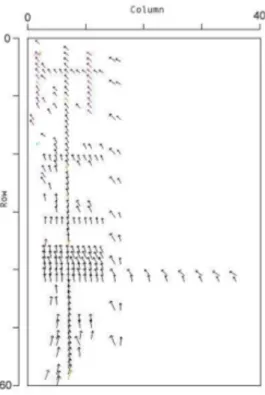
26 3.4.5.Visualizations. Another way to check the correctness of a program is to visual-ize its behavior. Visualization tools enable end-user programmers to apply their knowl-edge of correctness to certain features of their program’s behavior. For example, Igarashi et al. present comprehension devices that can aid spreadsheet users in dataflow visualiza-tion and editing tasks, and finding faults [Igarashi et al. 1998]. More recent spreadsheet visualization approaches include detecting semantic regions and classes [Clermont 2003, Clermont and Mittermeir 2003, Fisher et al. 2006b], ways to visualize trends and “big picture” relationships in spreadsheets that elide a number of low-level details [Ballinger et al. 2003] (see Figure 9); and visual auditing features in which similar groups of cells are recognized and shaded based on formula similarity [Sajaniemi 2000]. This latter technique builds on earlier work on the Arrow Tool, a dataflow visualization device pro-posed by Davis [1996]. All of these approaches support end-user programmers in their search for potential errors.
3.5. Why is My Program Not Working? —Debugging
Whereas verification and testing detect the presence of errors, debugging is the process of finding and removing errors. Debugging continues to be one of the most time-consuming Figure 9. A “data dependency flow” of a spreadsheet’s dependencies. Reproduced from [Ballinger et al. 2003]
aspects of both professional and end-user programming [LaToza et al. 2007, Ko et al. 2005, Ko et al. 2007]. Although the process of debugging can involve a variety of strate-gies, studies have shown across a range of populations that debugging is fundamentally a hypothesis-driven diagnostic activity [Brooks 1977, Littman et al. 1986, Katz and Ander-son 1988, Robillard et al. 2004, Gugerty and OlAnder-son 1986, Wiedenbeck 2004, Ko and Myers 2004b].
What makes debugging difficult in general is that programmers typically begin the process with a “why” question about their program’s behavior, but must translate this question into a series of actions and queries using low-level tools such as breakpoints and print statements [Ko and Myers 2008b]. A number of issues make debugging even more problematic for end-user programmers. Many lack accurate knowledge about how their programs execute and, as a result, they often have difficulty conceiving of possible ex-planations for a program's failure [Ko and Myers 2004b]. Furthermore, because end users often prioritize their external goals over software reliability, debugging strategies often involve “quick and dirty” solutions, such as modifying their code until it appears to work. In the process of remedying existing errors, such strategies often lead to additional errors [Ko and Myers 2003, Beckwith et al. 2005a].
Researchers have explored a number of techniques for addressing these challenges, beyond the traditional breakpoint debuggers and print statements common in both profes-sional and end-user development environments. Although many of these techniques par-allel research on debugging for professional programmers, there are a number of differ-ences.
3.5.1.Analyzing dependencies. Dependencies in a program’s execution can involve control dependencies (such as a statement only executing if a particular condition is true) and data dependencies (such as a variable’s depending on the sum of two other variables) [Tip 1995]. Such dependencies are the basis of a number of end-user debugging tools.
28 One approach in the spreadsheet domain is an extension to the WYSIWYT testing framework, which was discussed in Section 3.4 [Ruthruff et al. 2005b]. To illustrate, see Figure 10 and recall the grades spreadsheet example. Suppose in the process of testing, the teacher notices that row 5’s Letter grade (“A”) is incorrect. The teacher indicates that row 5’s letter grade is erroneous by “X'ing it out” instead of checking it off. Row 5’s Course average is also wrong, so she X’s that one, too. As Figure 10 shows, both cells now contain pink (gray in this paper), but Course is darker than Letter because Course contributed to two incorrect values (its own and Letter’s) whereas Letter contributed to only its own. These colors reflect the likelihood that the cell formulas contain faults, with darker shades reflecting greater likelihood. Although this example is too small for the shadings to contribute a great deal, users in empirical work who used the technique on larger examples did tend to follow the darkest cells and were better at finding bugs than those without the tool [Ruthruff et al. 2005a].
To determine the colors from the X marks, three different algorithms have been used to calculate the WYSIWYT-based fault likelihood colorings [Ruthruff et al. 2006]. All three are based on variants of program slicing [Tip 1995]. The most effective algorithm is based on the sheer number of successful and failed test cases that have contributed to a cell's outcomes [Ruthruff et al. 2006]. Ayalew and Mittermeir [2003] devised a similar method of fault tracing in spreadsheets based on “interval testing” and slicing. This strat-egy reduces the search domain after it detects a failure, and selects a single cell as the “most influential faulty”. It has some similarities to the assertions work presented in Sec-tion 3.2.3 [Burnett et al. 2003], but it not only detects the presence of possible errors, but also what cells are most likely to contain faulty formulas.
Figure 10. After the teacher marks a few successful and unsuccessful test values, the system helps her narrow down the most likely location of the erroneous formula [Ruthruff et al. 2005b]. Original figure obtained from
A new class of tools based on question asking rather than on test outcomes has re-cently emerged and has proven effective. The first tool to take this approach was Ko and Myers’ Whyline [2004a], which was prototyped for the Alice programming environment [Dann et al. 2006] and is shown in Figure 11. Users execute their program, and when they see a behavior they have a question about, they press a “Why” button. This brings up a menu of “why did” and “why didn’t” questions, organized by the 3D objects in the pro-gram and their properties and behaviors. Once the user selects a question, the system ana-lyzes the program’s execution history and generates an answer in terms of the events that occurred during execution. In a user study, the Whyline reduced debugging time by a factor of 8 and helped users get through 40% more tasks, when compared to users with-out the Whyline [Ko and Myers 2004a]. In a similar approach, Myers et al. [2006] de-scribe a word processor that supports questions about the document and the application state (such as preferences about auto-correction and styles). This system enabled the user to ask the system questions such as “why was teh replaced with the?” The answers were given in terms of the user-modifiable document and application state that ultimately in-fluenced the undesirable behavior.
3.5.2.Change Suggestions. An entirely different approach to debugging goes a step
30 further in automation. GoalDebug is a semi-automatic debugger for spreadsheets [Abra-ham and Erwig 2007a] that allows the user to select an erroneous value, give an expected value, and get a list of changes to the spreadsheet’s formulas that would result in the cell having the desired value. Users can interactively explore, apply, refine, or reject these change suggestions. The computation of change suggestions is based on a formal infer-ence system that propagates expected values backwards across formulas. Empirical re-sults so far showed that the correct formula change was the first suggestion in 59% of the cases, and among the first five in 80% of the cases [Abraham and Erwig 2007b]. Of course, there are bound to be situations with such tools where the necessary change is far too complex for the system to infer. This approach also suffers from the oracle problem (Section 3.4.1), because it assumes that users can specify correct values.
3.5.3.Sharing Reasoning. Given the variety of debugging tools that both detect and locate errors in spreadsheets, recent work has developed ways to combine the results of multiple techniques. For example, Lawrance et al. [2006] developed a system to combine the reasoning from UCheck [Abraham and Erwig 2004] and WYSIWYT [Ruthruff et al. 2005b]. The combined reasoning demonstrated both the importance of the information base used to locate faults and the mapping of this information into visual fault localiza-tion feedback for end-user programmers, replicating the findings of [Ruthruff et al. 2005a]. They found that UCheck's static analysis of the spreadsheet effectively detected a narrow class of faults, while WYSIWYT (which was driven by a probabilistic model of users derived from previous work [Phalgune et al. 2005]) detected a broader range of faults with moderate effectiveness, and that certain combinations of the two were more effective than either alone. Additionally, by manipulating the mapping, they were able to improve the effectiveness of the feedback.
3.5.4.Social and Cognitive Support. Aside from using tools to help end users debug, there are other approaches that take advantage of human and social factors of debugging. For example, a study of end-user debugging found that when end users worked in pairs rather than alone, they were more systematic and objective in their hypothesis testing [Chintakovid et al. 2006]. This approach was inspired by similar research on the benefits of pair programming for professional programmers.
Kissinger et al. [2006] categorized people’s comments during a debugging task in the lab, finding a number of questions that people ask of themselves, including “Am I smart enough?” “Is this the right value?” and “What should I do next?” These questions dem-onstrated the importance of supporting the individual’s questions about planning and
their meta-cognitive strategies, not just their questions about the debugging problem it-self. These findings led to a video-based approach to teaching debugging strategies, in which a user could ask for help from videotaped human assistants [Subrahmaniyan et al. 2007, Grigoreanu 2008]. In the study of this approach, participants chose better debug-ging strategies as a result of viewing the videos in the context of their problems, and had correspondingly more success at debugging.
4. MOTIVATIONS AND PERCEPTIONS
One reason that end-user software engineering is unique is that the programming is often optional. If one needs to calculate a set of values, one can either do this manually, or one can write a program. Because of this difference, end-user programmers’ perceptions about a problem and the tools that may be used to solve it, and even their perceptions about their ability to solve the problem, can influence how they use end-user software engineering tools. In this section, we discuss three areas of work covering these issues, in an effort to characterize some unique design decisions that must be made when designing end-user development environments.
4.1. Attention Investment
The first step in any end-user programming activity is deciding whether or not to under-take it. For example, web content developers may find that they need to master a style sheet language to add styles to their HTML files. For many computer users, programming does not seem to be an option. The costs involved in learning how to automate a task are so high that it always seems more economical to find a manual alternative (or to persuade someone else to write the program for you). However, for those who do undertake pro-gramming, they do so in the expectation that this investment will be rewarded and repaid through future automation. Unfortunately, this return on investment is contingent on a variety of risks. For example, it is possible that a program written to automate one task may be insufficiently general to automate the next. This is a failure of requirements engi-neering, of a kind that (in professional software engineering) should be avoided by more careful thought and analysis in advance.
Blackwell’s Attention Investment model [Blackwell and Green 1999, Blackwell 2002] provides a cognitive model of these insights. It describes individuals’ allocations of attention as cognitive “investments.” According to the model, a user weighs four factors (not necessarily explicitly) before taking an action:

![Figure 6. The Topes pattern editor [Scaffidi et al. 2008], allowing the creation of string data types that support recognition of matching strings and transformation between formats](https://thumb-us.123doks.com/thumbv2/123dok_us/1027386.2635831/19.756.111.650.109.448/figure-pattern-scaffidi-allowing-creation-recognition-matching-transformation.webp)
![Figure 8. The UCheck system for inferring units from headers. The arrows represent unit inferences based on the column and row labels [Abraham and Erwig 2007b]](https://thumb-us.123doks.com/thumbv2/123dok_us/1027386.2635831/24.756.110.646.636.971/figure-ucheck-inferring-headers-arrows-represent-inferences-abraham.webp)