
CHAPTER 2
THEORETICAL FOUNDATION
2.1 Electronic Commerce (E-Commerce)
E-Commerce according to Laudon, K. C., and Traver, C. G can be defined as “the use of Internet and the Web to transact business” [1]. To
elaborate the definition further, something can be considered as an E-Commerce if it has two characteristics. First, transactions must be done or mediated using digital technology such as Internet or Web. Second, transactions must be commercial. This means transactions must involve the exchange of value, such as money, between and among organizations and individuals in return for products or services [1].
Although similar, Commerce is different from Business. E-Commerce focus on the external boundaries of the business, such as customers and activities that directly generates revenues, while E-Business focus on the internal transactions and activities within the business, such as inventory control and document transfers [1]. Because the concepts of E-Commerce and E-Business intersect, the two concepts are often merged thus often E-Commerce also includes the concepts of E-Business or vice versa. For example, George Beekman and Michael J. Quinn describe E-Commerce as using telecomunication networks to conduct the sharing of business information, maintaining of business relationships, conducting business transactions, reorganizing internal business process and external business alliances, and creating new consumer oriented products [2].
In general, E-commerce has eight unique dimensions that differentiate itself with traditional business. The eight unique dimensions are [1]:
1. Ubiquity 2. Global Reach 3. Universal Standards 4. Information Richness 5. Interactivity 6. Information Density 7. Personalization/customization 8. Social technology
2.1.1 Components of Electronic Commerce
E-commerce has typical components or functionalities that sets-up and build a website into an e-commerce. There are several common components and functionalities for e-commerce including [1] [3]:
2.1.1.1 Registration/ Login and Customer Database
Customer should be prompted with registration before making transaction online through the e-commerce. The purpose is for authentication and storing customer information for business purpose. Registration process has to be straightforward and easy for the customer. Optional registration/log in such as using Facebook Connect is recommended to provide alternative and convenience for customers that do not want to manage many accounts [3].
Although registration is widely recognized as a common feature that every e-commerce must have, there had been arguments that registration should be made optional. The reason is because there are customers that feel insecure in sharing their personal information to a business. In addition, customer can be discouraged to register and buy when they found the registration process is too complex. To solve these issues, some solution are designed such as to make registration optional with customer able to purchase without registering and request the customer registration after a customer make a purchase [4].
Information on registered customer should be stored in a customer database. Information that should be stored might include name, address, phone address, and e-mail address [1].
2.1.1.2 Product Catalog and Database
Product catalog should provide product information to customers who can be presented in the form of text or graphics [1]. A product catalog should be used when the e-commerce is selling multiple product or services. Customer should be able to navigate through the product catalog through a well designed user interface. The objective is for customer to be able to find the product that they are looking for. Therefore, customer should be provided with the capability to search for product based on specific keywords or tags [3].
Product database is functioning as storage for product catalog information. It should store information such as product description, stocking number, and inventory level [1].
2.1.1.3 Admin Area
Admin area refers to the back end of the e-commerce which handled by employees and function as a place to manage the e-commerce. Management might include
managing customer details, managing product inventory and details, or sales order processing. [3].
2.1.1.4 Sales Database
Sales database refers to the storage of sales transactions when customer purchases a product. It contains information related to sales such as customer information, product purchased, date, and payment details. Sales information stored can then be used for multiple purposes by the business such as to provide after-sale customer support for customer [1].
2.1.2 Types of E-Commerce
2.1.2.1 Business-to-Business (B2B)
Business-to-Business (B2B) e-commerce refers to the use of e-commerce by businesses to sell or conduct transaction to other businesses [1]. It is the largest form of e-commerce with huge growth potential and the highest revenue generated
when compared to other e-commerce types. B2B has two primary business models:
1. Net marketplace. In net marketplace customers and suppliers are gathered into a single Internet platform for them to conduct trade [1]. For example: alibaba.com
2. Industry consortia. Industry owned vertical market that enables buyer to purchase from a limited set of invited participants [1]. This business model is focusing on creating long-term relationships between suppliers and buyers. For example: Exostar, SupplyOn.
Another form of B2B is Business-to-Government (B2G) where businesses conduct transaction with government institutions. However, B2G can also be considered as B2B because in most cases the government acts as an independent business unit when conducting transaction [1].
2.1.2.2 Business-to-Consumer (B2C)
Business-to-Consumer (B2C) e-commerce refers to the use of e-commerce by businesses or companies to sell
products or services to individual consumers [1]. This type of e-commerce is the most common type encountered by
consumer. Consumer access online product catalog provided by businesses, search and select the products they wish to purchase, and make product purchases. To help consumer purchase experience, B2C often use the shopping cart feature
of e-commerce. Shopping cart in e-commerce works the same way as shopping carts in real life. Customers can select multiple products through the online catalog, store it into their shopping cart, and then purchase all the products in their shopping cart in one transaction [1].
Revenue wise, B2C e-commerce did not generate high revenue when compared to B2B e-commerce. However the growth of B2C e-commerce is very fast and it has been growing exponentially making it one of the booming e-commerce types [1].
Example of B2C e-commerce: Amazon.com, Play-Asia.com.
2.1.2.3 Consumer-to-Consumer (C2C)
Consumer-to-Consumer e-commerce refers to the use of e-commerce by consumer to sell or conduct transactions to each other and often conducted through the help of online market or auction sites. C2C involve platforms where consumer can place their products to sale or auction. The platforms will then create product catalogue from consumers’ products and allows other consumer to search and make purchases through the platform [1]. In C2C, the business only provides the platform for customers to do transactions in which it is mostly internet based, while data and information for product catalogs are all came from customers. To certain extent, some businesses also provide catalog search engine,
payment system, and delivery service that aid customer in buying and selling products.
Examples of C2C e-commerce: E-Bay, Craiglist, Tokobagus, Yahoo Auctions.
2.1.3 Samples of E-Commerce in Hosting Service Provider
Hosting service providers (HSP) are businesses or individuals that provide hosting solution and services to its customers. HSPs often make use of e-commerce to publicize and offer their hosting products and services to customers [5]. E-commerce enable customers to conduct various business activities such as browsing through HSP product catalog, compare hosting packages and price information, make purchases, get live support, and requesting for hosting renewal.
2.1.3.1 Godaddy.com
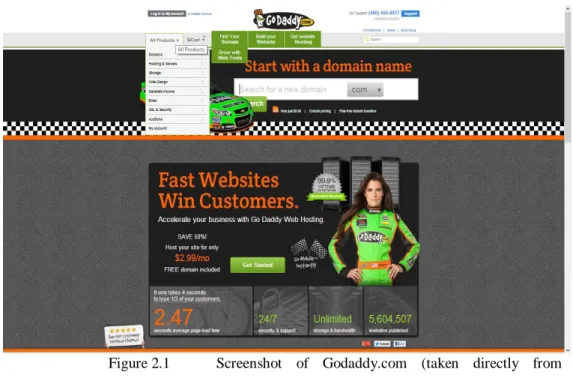
Figure 2.1 Screenshot of Godaddy.com (taken directly from
Godaddy.com is one of the leading hosting service providers from United States. Mainly providing hosting needs, Godaddy.com differentiate itself and well known for its complete web hosting solution. In addition to hosting, Godaddy.com also web design service to help people that does not have web building skills. Customers simply only need to purchase the product package and Godaddy.com will handle the whole web development, hosting needs, and maintenance.
2.1.3.2 Masterweb.net
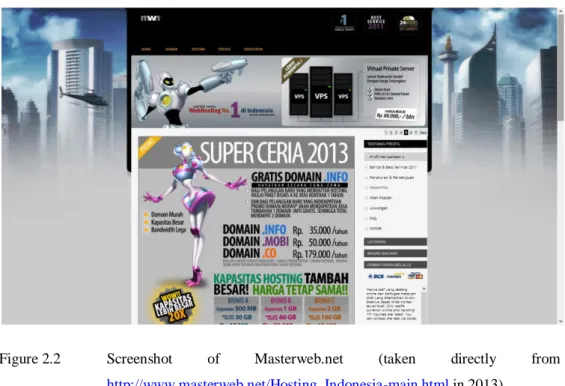
Figure 2.2 Screenshot of Masterweb.net (taken directly from
http://www.masterweb.net/Hosting_Indonesia-main.html in 2013)
Masterweb.net is currently the leading hosting service provider in Indonesia with the highest market share in web hosting compared to other Indonesia hosting provider [6]. Owning 19.4829% market share of web hosting in Indonesia based on data from www.webhosting.info taken on 28
February 2013. Masterweb.net provides variety of hosting needs that includes domain name ordering, web hosting, shared hosting, virtual private server, server hosting, and digital/SSLcertificate.
Masterweb.net uses its e-commerce mainly as a place to sell their hosting solutions, where customer can seek product information, make order, and seek for 24 hours customer support. They also provides its own knowledge base for customer to learn about the details of products they are offering which really helps non technical users that are not familiar with hosting concepts.
2.2 Hosting Service
Hosting is service where business or vendor is providing storage space for housing, serving, and managing customer files or data, typically for website. The businesses that provides hosting service is called Hosting Service Provider (HSP) [5].
2.2.1 Types of Hosting Services
2.2.1.1 Domain Name
Any devices connected to Internet are called host and uniquely identified by its Internet Protocol (IP) address which are series of numbers separated by dots (.) for example: 69.10.25.46. IP address can be hard for people to memorize thus it is often represented in natural language called Domain Name, for example: www.google.com [1].
Domain names are unique which means there cannot be two same domain names exist. Because of this, many domain names are registered by user so that it cannot be used by other people. Hosting service provider often provides domain registration service for customer to name the space they are renting.
2.2.1.2 Dedicated Server
Dedicated hosting, or dedicated server, is a hosting service in which customer server space and system resources is not shared with other customer [7]. This is done by having the customer lease an entire server. Dedicated hosting provides the customer with several benefits such as greater capacity, increased security, improved reliability through no interaction with other website, and complete control over the configuration [8]. However it comes with drawbacks including higher cost compared to share hosting and higher technical requirement to manage the server.
2.2.1.3 Shared Hosting
Shared hosting is type of hosting where the server space is used to serve multiple clients. Server space is partitioned into smaller space which customer rent and when configured properly the clients will not be able to see the other clients in the server. The purpose of shared hosting is to reduce the cost of leasing the server space and make server
space more affordable for customers. It is very affordable that there are hosting providers offering shared hosting for free [9].
However, shared hosting brings several drawbacks such as performance issue due to shared resources, heavily dependent on the host to manage the server, and security issues such as hackers that may come from the other clients in the server [9].
2.2.1.4 Virtual Private Server
Virtual Private Server (VPS) is a type of shared hosting with each server partition runs its own operating system or virtual server. This gives the illusion as if the client is running a dedicated server since client will have full control of its virtual server.VPS make use of virtualization software to manage and distribute computer resources to its clients. This technology also allows a virtual server to take resources from multiple machines [9].
2.2.1.5 Virtual Private Network
Virtual Private Network (VPN) is a network technology that provides secure access for user to access internal network via the Internet. VPN make use of Point-to-Point Tunneling Protocol (PPTP), an encoding mechanism that securely wraps the delivered message to shield it from external interception. The term virtual is used because user did not actually have dedicated secure communication line, the VPN
only establish temporary secure communication line between networks [1]. Hosting service provider often provides VPN connection for its customers to connect to their server space securely.
2.2.1.6 Cloud Hosting
Cloud hosting is a type of hosting where customer website is not necessarily stored in a single server space but it is distributed through cloud (internet) to different server spaces across the network. The main benefits provided by cloud hosting are cost, scalability, and reliability. Customer only needs to pay for the amount of resource they use, unlike other hosting types where customer needs to pay for a fixed amount of resource packages. Cloud hosting has high scalability because customer can easily increase the resource space they needed. Cloud hosting is also more reliable because it is distributed and does not have any single point of failure since a failure in one machine can be replaced with other server on the network [7].
2.2.1.7 Anonymous Hosting
Anonymous hosting refers to hosting services that are privately registered and booked using third party name via Proxy ID or ID Protection. The purpose is to keep the information of the customer secret and untraceable, which is useful to keep sensitive information from competitors and hackers [10].
There are two types of anonymous hosting providers. One is provider that request customer details for record this way customer can still be identified by the provider but it will remain anonymous from the public. The other type is provider that does not require any customer identification at all thus the customer is anonymous to both the provider and public [10].
Example of anonymous hosting provider: anonymoushosting.in, ccihosting.com, shinjiru.com.
2.2.2 WhoIs
WhoIs is a searching protocol for submitting queries to database specifically with specific use of getting details on ownership of domain name, IP network, or Autonomous System Number (ASN). When a server receive WhoIs query, the server will process the query and reply with owner information such as e-mail addresses, contact numbers, and other related metadata [11].
One common use of WhoIs is to check domain name registration and expiry information. Since domain names must be unique and there can be no duplicate, availability checking becomes is reqired during domain purchase since people cannot buy reserved domain. One way to buy reserved domain is by making use domain owner’s information provided by WhoIs to contact the owner and negotiate to buy and transfer domain name ownership. Domain name also has expiry dates and the owner can will lose its ownership if its
not extended. Owner can check domain expiry date using WhoIs and be reminded when they should extend their domain name.
2.3 Business Model
According to Alexander Osterwalder and Yves Pigneur, a business model describes the understanding on how an organization or business creates, delivers, and capture values [12]. A business model is vital in order to create a good business strategies, because it act as a blueprint that explains the required activities and resources needs to be done to run the business.
2.3.1 Business Model Canvas
Business Model Canvas is a concept introduced by Alexander Osterwalder and Yves Pigneur as a method to build and analyze a business model. The concept has been applied and tested internationally, and it has been used by various international organization such as IBM and Deloitte [12].
The Business Model Canvas suggest nine building blocks of creating a solid business model and a business model can be considered good if it is be able to clearly defined the nine blocks. The nine building blocks of business model canvas are [12]:
Customer Segments (CS) : the customer segments being served by the business.
Value Propositions (VP) : how the business is going to solve problems and satisfy customer needs.
Channels (CH) : the way organization deliver its value proposition to customers.
Customer Relationship (CR) : the relationships established and maintained to each customer segments.
Revenue Streams (R$) : how the value proposition generate revenue when succesfully offered to customer.
Key Resources (KR) : the asset required to create, offer, and deliver the value proposition.
Key Activities (KA) : activities performed to transform the key resources to value proposition.
Key Partnerships (KP) : resources and activities that acquired form outside of the business.
Cost Structure (C$) : the cost inccured to the business from running the business model.
Figure 2.3 Business Model Canvas (taken from [13])
2.4 System Development Life Cycle
According to Satzinger et al [14] Systems development life cycle (SDLC) is the process of building, deploying, using, and updating an information systems. SDLC is the one of the key fundamental concepts in information system development. There are 5 phases in SDLC which are:
Planning Phase: identifying the scope, ensuring feasibility, and developing schedule, resource plan, and budget for the project. In common organizational situation, the plan created during this phase might require approval from top management. Key activity in this phase is to precisely define the business problem and the scope of the required solution.
Analysis Phase: the objective of analysis phase is to understand and document the business needs and the processing requirements of the new system. Can be achieved through information gathering, analyzing information, and building prototype.
Design Phase: transforming the requirements defined and decisions made during analysis into the design of system based solution. Designs might include, network design, application architecture design, user interfaces design, system interfaces design, database design, system controls design, and prototypes.
Implementation Phase: during this phase the final system are built, tested, and installed. The objective also includes the training for users and the organization.
Support Phase: the objective of this phase is to keep the system running after the system is installed. This may be done through activities such as system maintenance, system enhancement, and providing user support.
There are two classifications of SDLC: predictive approach and adaptive approach.
2.4.1 Predictive Approach
Predictive approach is SDLC approach where project planning and organization is conducted in advance, and that the new system will be developed according to plan [14].
Predictive SDLC benefits most when used for building systems that are well understood and well defined.
Waterfall model is an example of predictive SDLC approach. Waterfall model handle project in sequential method. One phase is to be completed before moving into the next phase. After completing a phase, the phase is frozen therefore it is not possible to return to previous phases [14].
Predictive approach has the advantage of low technical risk because project and specification are planned carefully. However, the inability to return to previous phase is a problem, considering human can always make error and going back might be required. Because of this, pure predictive or waterfall approach is rarely used and many have used a modified waterfall model [14].
2.4.1 Adaptive Approach
Adaptive approach is the more flexible SDLC approach that assume project cannot be planned in advance and must be modified as it progresses [14]. Adaptive approach is best used for projects where requirements and needs are uncertain.
Spiral model is an example of adaptive SDLC. Spiral model handle project in iteration. SDLC phases are repeated over and over on each different system components, with each phase refining the result of the previous phase, until the system
is closer to what is ultimately needed. One way of doing spiral approach is by creating prototypes on every iteration [14].
Adaptive approach has the advantage of flexibility being able to cope with changes of requirement in the middle of development. However the flexibility comes with high risk due to not well defined requirements.
2.5 Unified Modeling Language Diagrams
Unified Modeling Language (UML) is a modeling language developed by the Object Management Group (OMG) in 1997 with the objective of providing common design language for building of computer system and applications. It provides visual frameworks, such as diagrams and notations, which can be used to visualize and describe system blueprints. It is widely used and it has become the standard modeling notation for system application development [15].
2.5.1 Activity Diagram
Activity diagram is an UML diagram that describes the sequence of activities conducted by users in a transaction or a business process [14]. The purpose of creating activity diagram is to help describing workflow of a transaction using visualization, particularly when it is difficult to be done written or verbally.
Activity diagram is built on symbols such as:
Swimlane, which is a rectangular area that represents the user doing the activities.
Oval shape, which represent a single activity in the workflow.
Arrows, that represents the sequence of activities.
Diamonds shape which act as decision point that branch out the activities path.
Black circles that represent the start and end of a workflow.
Figure 2.4 Sample Activity Diagram [14]
2.5.2 Event Table
Event table is a collection of use cases that lists events in rows and key pieces of information about each event in columns [14]. There are six key pieces of information in event table which are: event, trigger, source, use case, response, and destination. Event table will become the basis for data flow diagram and use case diagrams for further analysis.
Figure 2.5 Sample Event Table [14] 2.5.2 Use Case Diagram
Use case diagram is diagrams that visualize different user roles and how the user roles interact with the system [14]. Use case itself is a term that refers to an activity that is carried out by the system which could be the result of a trigger from the user. The purpose of creating a use case diagram is to get visualization on the functional requirement of the systems, which includes the relationship between the user (or actors) to the system, and the relationship between one use case to another use case [15].
In use case diagram, actors or user role is represented as stick figure. Use case is represented as oval shape. Actor participation in a use case is connected using line, and the system boundary is represented by rectangle area.
Figure 2.6 Sample Use Case Diagram [14]
Use case diagram is often come together with a use case description that provides the detailed information of each use cases. Use case description list and describe in detail how each use case are processed. A use case description contains the following information: use case name, scenario, triggering event, brief description, actors, related use cases, stakeholders, preconditions, postconditions, flow of activities for both actor and system, and exception conditions.
2.5.3 Entity Relationship Diagram
Entity Relationship Diagram (ERD) is a model used to define data storage requirements. Data storage requirements include the data entities, data attributes, and relationships between data entities. Data entities are things such as objects or data that the system needs to store information [14].
ERD consist of three main notations: rectangle that represents data entities, connecting line that represents relationship between data entities, and “crow’s feet” that represent cardinalities between data entities. Cardinalities describe the type of relationship and constraints between entities. There are three types of relationships between data entities:
One-to-One
One-to-Many
Many-to-Many
Figure 2.7 Sample Entity Relationship Diagram [14]
2.5.4 Data Flow Diagram
Data flow diagram (DFD) is a graphical system model that visualizes all of the main requirements of an information system in terms of input/output, process, and data storage [14]. It shows the flow of data from external agent to the system, show how data is moved from one process to another, and show how data is stored in the logical database.
Figure 2.8 Data Flow Diagram Notations [14]
The detail of information presented by a DFD depends on the level of abstraction of the DFD. At the most abstract (high level) view of a system, a DFD is called as Context Diagram. Context diagram is a DFD that provide summary of all processing activity within the system. A high level DFD, such as context diagram, can be decomposed into lower levels which give more details, and a decomposed DFD can be further decomposed to provide more details when needed [14].
Figure 2.9 Sample Context Diagram [14] 2.6 Database
“Shared collection of logically related data, and a description of this data, designed to meet the information needs of an organization.” [16]
Database by definition refers to a collection of related and organized data that is used primarily to support organizational informational needs. Logically related data in the context refers to entities, attributes, and relationships of an organization’s information [16]. Database provides the organization with capabilities such as enabling data to be shared to multiple users, enabling user to quickly query/search for data, and provides the user with well processed and meaningful information. Database is usually managed through software called Database Management Systems (DBMS),
which enable user to define, create, maintain, and control access to database [16].
2.6.1 Relational Database System
One of the most common methods to organize data in database is to use Relational Model. Database stored in this method is called Relational Database. In Relational Database, data are organized into tables (relation), consisting rows (record) and column (attribute) [16]. Every record must contain unique attribute (or set of attributes) called Primary Key which is used to uniquely identify a record within a relation and to link a relation with other relations [17]. The collection of tables with rows and columns are the ones that made up relational database.
Relational database is managed by Relational Database Management System. In managing database, RDBMS follows three main fundamentals [18]:
Information is stored in the form of table
Value found in table column should not be repeated
Structured Query Language (SQL) must be used
2.7 Interaction Design and User Interface
Sharp et al [19] describe interaction design as designing interactive products that enhance and augment, the way people communicate and interact in their everyday lives. Although interaction design can encompass interaction with different varieties of medium, it is commonly associated with
interaction between human and computers. Interaction design is the umbrella term that emphasizes different designing activities in which one of them includes User Interface Design.
The focus of interaction design concerned with user experiences. User experience is how people feel about a product when they are using the product [19]. What people feel may include their pleasure, satisfaction, and the sensual effect from the product they use. User experience cannot be designed by people, what people can do is to create design features that evoke the user experience.
The process of interaction design consists of four basic activities [19]:
1. Identifying needs and establishing requirements for user experience.
2. Developing alternative designs that meet the requirements.
3. Building interactive versions of the designs to be communicated and assessed by user.
![Figure 2.3 Business Model Canvas (taken from [13])](https://thumb-us.123doks.com/thumbv2/123dok_us/9725055.2462999/16.892.175.811.98.478/figure-business-model-canvas-taken-from.webp)
![Figure 2.4 Sample Activity Diagram [14]](https://thumb-us.123doks.com/thumbv2/123dok_us/9725055.2462999/20.892.295.721.409.797/figure-sample-activity-diagram.webp)
![Figure 2.5 Sample Event Table [14]](https://thumb-us.123doks.com/thumbv2/123dok_us/9725055.2462999/21.892.247.789.96.337/figure-sample-event-table.webp)
![Figure 2.6 Sample Use Case Diagram [14]](https://thumb-us.123doks.com/thumbv2/123dok_us/9725055.2462999/22.892.222.815.95.492/figure-sample-use-case-diagram.webp)
![Figure 2.8 Data Flow Diagram Notations [14]](https://thumb-us.123doks.com/thumbv2/123dok_us/9725055.2462999/24.892.292.723.91.528/figure-data-flow-diagram-notations.webp)
![Figure 2.9 Sample Context Diagram [14]](https://thumb-us.123doks.com/thumbv2/123dok_us/9725055.2462999/25.892.177.784.96.609/figure-sample-context-diagram.webp)
