170 | P a g e
SURFACE COMPUTING: A MULTIPOINT AND MULTI
TOUCH TECHNOLOGY
1
Anjna,
2Vikas yadav
1, 2
Lecturer, Department of Computer science and Engineering, TMU, Moradabad, (India)
ABSTRACT
Surface computing is based upon multi touch, multi user and tangible user interface technology. Microsoft Surface is a software
+ hardware technology that allows people to interact with digital content as they interact with everyday items. The tabletop
technology provides a central place where digital content, such as photos, can be easily archived, managed and viewed known as
Surface. One of the key feature of Surface is object recognition and the ability of objects placed on the surface to trigger
different types of digital responses, including the transfer of digital content. The table can be built with a variety of wireless
transceivers, including Bluetooth, Wi-Fi and (eventually) radio frequency identification (RFID) and is designed to sync instantly
with any device that touches its surface. Surface computing is a major advancement that moves beyond the traditional user
interface to a more natural way of interacting with digital content. Does it make sense to allow—or expect—users to interact
with multiple objects at once? Should we design for users having two hands available for their interactions? Both the
mouse-oriented desktop and the physical world have constraints that limit the ways in which users can interact with multiple objects and
users come to the tabletop very accustomed to both of these.
In this paper we will study how the horizontal orientation makes it easy for several people to gather around surface computers
and Object recognition Users can place physical objects on the surface to trigger different types of digital responses.
Keywords: Multi Touch, Wi-Fi, User Interface
[3],Surface, Gestures, Object, IR Camera.
I INTRODUCTION
Today’s computers allow you to have multiple applications in multiple windows. But they may have only one key board and one
mouse. And only one person can operate at a time. A table top[5] computer from Microsoft[1] that incorporates multi touch, hand
gestures[2] [11]and optical recognition of objects placed on the screen that have identification tags similar to bar codes.
It supports multiple touch points –"dozens and dozens" -- as well as multiple users simultaneously, so more than one person
could be using it at once, or one person could be doing multiple tasks. The Surface's 30" touch screen is used without a mouse
and keyboard is large enough for group participation. Surface computing[6][7] is a new way of working with computers that
moves beyond the traditional mouse-and-keyboard experience. It is a natural user interface[8] that allows people to interact with
digital content the same way they have interacted with everyday items such as photos, paintbrushes and music their entire life:
with their hands, with gestures and by putting real-world objects on the surface. Surface computing opens up a whole new
category of products for users to interact with. In Essence, it’s a surface that comes to life for exploring, learning, sharing,
creating, buying and much more. Currently available in select in restaurants, hotels, retail establishments and public
171 | P a g e
Users can actually ―grab digital information with their hands and interact with content through gesture, without the use of a
mouse or keyboard.
We can interact with the Surface by using our fingers. No other input device is needed to give input. This provides a natural interface effect
In surface more than one touch can be recognized at the same time.
II HISTORY
In 2001, Stevie Bathiche of Microsoft Hardware and Andy Wilson of Microsoft Research started talking about an idea for an
interactive table that could understand the manipulation of physical pieces. This conversation was the beginning of an idea that
would later result in the development of Surface and over the course of the following year, various people at Microsoft involved
in developing new product concepts, including the gaming-specific Play Table. Then in October 2001 a virtual team was formed
to fully pursue bringing the idea to the next stage of development; Bathiche and Wilson were key members of the team.
In early 2003, the team presented the idea to Bill Gates, Microsoft chairman, in a group review. The virtual team expanded, and
within a month, through constant discussion and brainstorming, the first humble prototype was born and nicknamed T1. By
viewing physical and virtual worlds comes idea to design a natural user interface.
Fig1: Natural user interface
The model was based on an IKEA table with a hole cut in the top. A variety of early applications were also built, including
pinball, a photo browser and a video puzzle.
As more applications were developed, the team saw the value of the surface computer beyond simply gaming and began to favor
those applications that took advantage of the unique ability of Surface to recognize physical objects placed on the table. Over the
next year, the team grew significantly, including the addition of Nigel Keam, initially software development lead and later
architect for Surface, who was part of the development team eventually tasked with taking the product from prototype to a
shipping product. By late 2004, the software development platform of Surface was well-established and attention turned to the
172 | P a g e
rounded plastic shell, a desk-height model with a square top and cloth-covered sides, and even a bar-height model that could be
used while standing
Fig2: An IKEA Table Fig 3: Tub prototype
After extensive testing and user research, the final hardware design (seen today) was finalized in 2005. In early 2006, Pete
Thompson joined the group as general manager, tasked with driving end-to-end business and growing development and
marketing.
Today Surface has become the market-ready product once only envisioned by the group, a 30-inch display in a table-like form
factor that’s easy for individuals or small groups to use collaboratively. The sleek, translucent surface lets people engage with
Surface using touch, natural hand gestures and physical objects placed on the surface. Years in the making, Microsoft Surface is
now poised to transform the way people shop, dine, entertain and live.
III
COMPONENTS OF SURFACE COMPUTING
Essentially, Microsoft Surface[1] is a computer embedded in a medium-sized table, with a large, flat display on top that is
touch-sensitive. The software reacts to the touch of any object, including human fingers, and can track the presence and movement of
many different objects at the same time.
(1) Screen: A diffuser turns the Surface's acrylic tabletop into a large horizontal "multitouch" screen, capable of processing
multiple inputs from multiple users. The Surface can also recognize objects by their shapes or by reading coded
"domino" tags.
(2) Infrared: Surface's "machine vision" operates in the near-infrared spectrum, using an 850-nanometer-wavelength LED
light source aimed at the screen. When objects touch the tabletop, the light reflects back and is picked up by multiple
infrared cameras with a net resolution of 1280 x 960.
(3) CPU: Surface uses many of the same components found in everyday desktop computers — a Core 2 Duo processor,
2GB of RAM and a 256MB graphics card. Wireless communication with devices on the surface is handled using WiFi
173 | P a g e
operating system is a modified version of Microsoft Vista.(4) Projector: Microsoft's Surface uses the same DLP light engine found in many rear-projection HDTVs. The footprint of
the visible light screen, at 1024 x 768 pixels, is actually smaller than the invisible overlapping infrared projection to
allow for better recognition at the edges of the screen.
Fig4: Components of Surface Computing
IV
FEATURES
4.1. Multi Touch Contact [4]
Surface computing recognizes many points of contact simultaneously, not just from one finger as with a typical touch screen,
but up to dozens and dozens of items at once. Ordinary touch screens provide only single touch sensing. In surface more than
one touch can be recognized at the same time.
Fig 5: Multi Touch Contact Fig 6: Multi Touch
Screen
Infrared
CPU
Projector
174 | P a g e
4.2. Multi - User Experience
The horizontal form factor makes it easy for several people to gather around surface computers together, providing a
collaborative, face to face computing experience. A single touch screen can support more than one user. Each user can interact
independently with the surface as shown in Fig 7.
4.3. Object Recognition
Users can place physical objects on the surface to trigger different types of digital responses, including the transfer of digital
content. The objects can be recognized by the domain tags. The infrared sensing cameras can able to read the object placed on
the surface of the screen. If any two mobiles are placed on the surface screen then the entire features are displayed, through this
the mobile features can be known. No requirement to have any external wires .Object recognition is done in the surface by using
special bar codes called Domino tags as shown in Fig 8.
Fig 7: Multi User Experience Fig 8: Object Recognition
4.4 Tangible user interface (TUI)
In Surface object recognition incorporates TUI .Microsoft Surface aims to provide a physical form to digital information. one
can draw on the Surface with any (physical) paint brush. And Hand gestures are preferred to physical instruments that make it
differ from GUI.
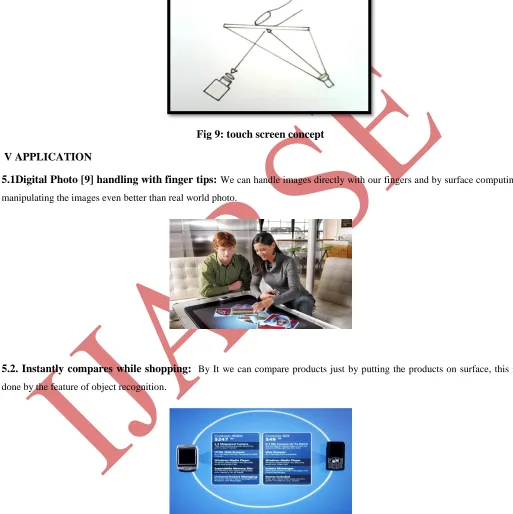
4.5 CAMERA (IR pass filter)
The Camera[10] is used for the capturing process.Images are displayed onto the underside of the screen. Fingers, hand gestures
175 | P a g e
image processing system which detects, fingers, and objects such as paint brushes. These objects are then recognized and the
correct application begins running. It is a computer with different look & feel
.
Fig 9: touch screen concept
V
APPLICATION
5.1Digital Photo [9] handling with finger tips:
We can handle images directly with our fingers and by surface computing manipulating the images even better than real world photo.5.2. Instantly compares while shopping:
By It we can compare products just by putting the products on surface, this is done by the feature of object recognition.176 | P a g e
5.4. Downloading images and videos to mobile:
Just place a mobile on the screen the different images can be viewed and directly it can be loaded into a mobile device. Similarly videos can also be downloaded. It’s an easy process of downloading5.5music player audio tracks:
The songs can be downloaded and also we can listen the songs by placing the mobile on the surface of the screen and selecting the tracks and forwarding it to the mobile device. This reduces the process of using the USBcables, because the downloading and uploading process is done directly and also in an easy manner.
a) Downloading and uploading of music files is simple
b) The process of selecting the audio tracks to play can be done and video songs can be played just by clicking the play
option on the surface screen.
c) As the display screen is large in size various processing can be performed
177 | P a g e
5.6 Dining:
The application allows diners to preview the entire menu by choosing a category (drinks, appetizers, main courses, and so forth) and then scrolling left and right through the available options. Items can be dragged into a central "ordering area"and when everyone is satisfied with their choices, a single tap on the Order button sends the list out to the waiter. This could
potentially save service people huge chunks of time and would be very useful for busy restaurants. The software can display the
daily specials, and for regular customers with their own identification cards, it could display a list of "favorites" to make ordering
even easier. Combine this with entertainment activities for the kids (perhaps Paint?) and you can see how many restaurants could
view this compelling application Surface Computing.
5.7 Paint:
Paint programs have been a natural demonstration application for new platform. There are three draw modes that can be toggled by touching an icon on the bottom of the toolbar: brush, paint, and reveal, the last of which is kind of a negative brushthat shows a background bitmap underneath. The brush mode is a bit spotty and tends to skip, but the paint mode is smooth and
fun. You can draw using one finger, all your fingers at once (good for drawing hair), the palm of your hand, or using any natural
object such as a regular paintbrush. Using the program is like having a flashback to finger painting back in kindergarten (minus
the mess), and certainly children will have tons of fun with this kind of application.
VI ADVANTAGES
a) 1 Multi users: it supports collaborative efforts for more than one user at a time.
b) 2 Seamless: it have no USB or other devices so free of wires and can be installed any where.
c) 3. Instant process of images: We can download or upload images, can transfer images by putting cell phone on surface.
d) 4. User has more control: user can order food on a restaurant easily and can share photos.
178 | P a g e
VII FUTURE SCOPE
As form factors continue to evolve, surface computing will be in any number of environments— schools, businesses, homes —
and in any number of form factors — part of the countertop, the wall or the refrigerator.
Computers with touch screens have been around for years and have already found niches in ATMs, ticket ordering machines,
and restaurant. Like most projects, Surface takes existing technology and presents it in a new way. It isn't simply a touch screen,
but more of a touch-grab-move-slide-resize-and-place-objects-on-top-of-screen [6] and this opens up new possibilities that
weren't there before. it also felt like a more natural and enjoyable method of doing certain computing tasks.. The retail
applications, particularly the dining application, show how businesses could use the technology to really stand out from
competitors, though one wonders how diners will react when their table locks up and needs a reboot.
Playing with Surface, one gets the sense that although not every computer will work like this someday, many of them will. More
importantly, computers running Surface-like software will end up in places that never had computers before, and the potential
applications are exciting. Imagine a multiplayer real-time strategy game where you and another human opponent can move units
around as quickly as you can point to them.
VIII CONCLUSION
Surface computing is a more innovative way of working with computers. It moves beyond the traditional and the conventional
forms of computing experience. Surface Computing can be referred to as a natural user interface that allows people to interact
with digital content with their hands, with gestures and by putting real-world objects on the surface. It is the possible invention
enabling the physical and the virtual world to combine into one experience.
A Surface computer is able to recognize physical objects from a paintbrush to a cell phone and allows hands-on, direct control of
content such as photos, music and maps. Surface turns an ordinary tabletop into a dynamic surface that provides interaction with
all forms of digital content through natural gestures, touch and physical objects. The new product is aimed directly at hotels,
retail establishments, restaurants and public entertainment venues and should be commercially available towards the end of the
year.
REFERENCES
[1]The History of Microsoft Surface, The making of Microsoft’s first commercially available surface computer
[2] Baudel, T. and Beaudouin-Lafon, M. (1993) Charade: Remote control of objects using free-hand gestures.Communications
of the ACM 36 (7), 28-35.
[3] Beringer, N. (2002) Evoking gestures in SmartKom - Design of the graphical user interface. Int'l Gesture Workshop 2001,
LNCS vol. 2298. Heidelberg: Springer- Verlag, 228-240
[4] Wu, M., Shen, C., Ryall, K., Forlines, C. and Balakrishnan, R. (2006) Gesture registration, relaxation, and reuse for
multi-point direct-touch surfaces. Proc. TableTop '06. Washington, D.C.: IEEE Computer Society, 185-192.
[5] Wilson, A.D. (2005) PlayAnywhere: A compact interactive tabletop projection-vision system. Proc. UIST '05. New York:
179 | P a g e
[6]Larsen, Larry, ―First Look: Microsoft Surface Computer!‖ May 30 2007, onTen.net.http://on10.net/blogs/larry/first-look-microsoft-surfacing-computing/
[7]Microsoft.com/surface, 2008 Microsoft Corporation. http://www.microsoft.com/surface/about.html
[8.]Terrenghi, L., et al. Affordances for manipulation of physical versus digital media on interactive surfaces. In Proceedings of
CHI '07. ACM, New York, NY, 1157-1166.
[9]Apted, T., Kay, J., and Quigley, A. 2006. Tabletop sharing of digital photographs for the elderly. In Pro-ceedings CHI '06).
[10] Voida, S., Podlaseck, M., Kjeldsen, R. and Pinhanez, C. (2005) A study on the manipulation of 2D objects in a
projector/camera-based augmented reality environment. Proc. CHI '05. New York: ACM Press, 611-620
[11] Kendon, A. (1988) How gestures can become like words. In Crosscultural Perspectives in Nonverbal Communication,
F. Poyatos (ed). Toronto: C. J. Hogrefe, 131-141
[12] Liu, J., Pinelle, D., Sallam, S., Subramanian, S. and Gutwin, C. (2006) TNT: Improved rotation and translation