
Optimizing MetaFrame 1.8 GUI Settings
8
0
0
Full text
(2) Revision History. Revision 1 2 3 4 5 6. Change Description Original document Modified to current template. Updated By Jo Harder Drew Robbins. Optimizing MetaFrame 1.8 GUI Settings. Date 2/9/2001 3/6/2001. Page ii Citrix Confidential.
(3) Table of Contents 1 2. Overview ..................................................................................................................................... 1 Citrix Server Administration ........................................................................................................... 2 2.1 ICA Browser Settings .............................................................................................................. 2 2.2 Information ........................................................................................................................... 3 3 Citrix Connection Configuration ...................................................................................................... 4 3.1 Advanced Connection Settings................................................................................................. 4 3.2 ICA Settings........................................................................................................................... 5. Optimizing MetaFrame 1.8 GUI Settings. Page iii Citrix Confidential.
(4) 1 Overview MetaFrame 1.8 contains a myriad of Graphical User Interface (GUI) settings that can be modified to optimize the functionality of the server(s) and user requirements. Of course, the purpose and functionality of MetaFrame servers may vary, and each of these settings should be reviewed in conjunction with the current or planned environment. Please note that the modifications recommended in this white paper represent generalities, not specific suggestions that are applicable to every MetaFrame environment. Note: Items marked with an asterisk (*) are most commonly modified to optimize the MetaFrame 1.8 server environment.. Optimizing MetaFrame 1.8 GUI Settings. Page 1.
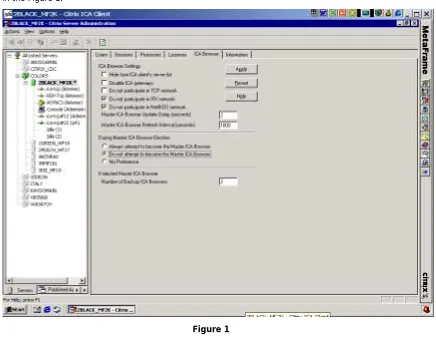
(5) 2 Citrix Server Administration Many User Interface modifications can be implemented with the Citrix Server Administration Tool shown in the Figure 1.. Figure 1. 2.1 ICA Browser Settings The following list contains modifications that can be made to the ICA Browser tab of the Citrix Server Administration tool: !. Hide from ICA client’s server list – Use this box when hiding the MetaFrame server is desired, such as for a dedicated ICA master browser or backup browser server(s) that do not host application.. !. Disable ICA Gateways – The purpose of this box is to ensure that ICA gateways are not unknowingly established with this MetaFrame server. Keeping unnecessary gateways open could present a security risk. If ICA gateways are not used within the environment, disabling ICA gateways is a precautionary measure. For any gateways that are maintained, if Service Pack 1 is installed, it is recommended that license pooling be enabled across gateways by choosing the box “Current ICA Gateways with License Pooling Enabled” under the ICA Gateways tab. Enabling license pooling across gateways further extends Citrix MetaFrame licenses by pooling from remote servers as necessary.. !. Do not participate in an ICA Gateway – Since a Master Browser and associated traffic is generated for each protocol used, disabling IPX where unnecessary is beneficial. If the IPX protocol is not used in the environment, then IPX should be turned off.. Optimizing MetaFrame 1.8 GUI Settings. Page 2 Citrix Confidential.
(6) !. * Do not participate in IPX network – Since a Master Browser and associated traffic is generated for each protocol used, disabling IPX where unnecessary is beneficial. If the IPX protocol is not used in the environment, then IPX should be turned off.. !. * Do not participate in NetBIOS network – Since a Master Browser and associated traffic is generated for each protocol used, disabling NetBIOS where unnecessary is beneficial. If the NetBIOS protocol is not used in the environment, then NetBIOS should be turned off.. !. * During Master ICA Browser Election – The ICA Master Browser can be a dedicated ICA Master Browser or a MetaFrame server that hosts applications and also serves as the ICA Master Browser. A dedicated ICA Master Browser does not host applications and does not need to be a high-powered server. A switched Ethernet or Fast Ethernet port connection should be used if possible to avoid collisions. In all but small environments, it is suggested that a dedicated ICA Master Browser be utilized to support the additional ICA traffic requirements. A MetaFrame server that will be designated as a Dedicated ICA Master Browser should be marked “Always attempt to become the Master ICA Browser.” A dedicated ICA Master Browser does not host applications and does not need to be a high-powered server. Of course, dedicated ICA Master Browsers require either a workgroup or domain base license, which should be pooled to ensure that all licenses are effectively utilized. A MetaFrame server that will be designated as a Backup ICA Master Browser should be marked “No Preference,” and all member servers hosting applications should be marked “Never attempt to become the Master ICA Browser.”. !. If Elected Master ICA Browser – In small environments, one backup browser is sufficient; however, in medium and large environments, two backup browsers should be allocated. The main dependency for ICA browser information, e.g., server loads, is maintained on the Master ICA browser, so the criticality of the Backup ICA Browser is not as high as the Master ICA Browser.. 2.2 Information Service pack levels for MetaFrame servers should be consistent across the server farm. Both the Microsoft Windows service pack level and the MetaFrame service pack level can be viewed, and inconsistencies across the server farm can create instability. Use the Information tab to access this information.. Optimizing MetaFrame 1.8 GUI Settings. Page 3 Citrix Confidential.
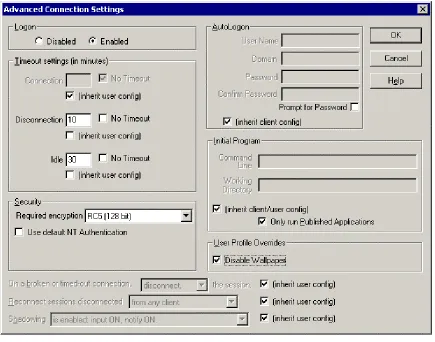
(7) 3 Citrix Connection Configuration In addition to the Citrix Server Administration tool, additional optimization settings can be located within the Citrix Connection Configuration tool shown in Figure 2.. Figure 2. 3.1 Advanced Connection Settings The following modifications can be made through the Advanced Connection Settings portion of the Citrix Connection Configuration tool. !. * Security – If either MetaFrame Feature Release 1 or SecureICA are licensed on the server, then more stringent options are available and should be set.. !. Timeout Settings – Not setting a timeout setting for disconnected or idle sessions leaves an ICA session open on the MetaFrame server. Maintaining open sessions needlessly will increase server load and consequently decrement the number users per MetaFrame server, in addition to utilizing a MetaFrame license.. !. Connection – Generally, this setting is left to “No Timeout”.. !. * Disconnection – This setting should be modified to reflect the amount of time that a disconnected session should be left open. The specific time allotment for a disconnection session that continues to process data on the server or one that is required to remain open so that users can resume after a break or meeting is discretionary. It is recommended that disconnected sessions be set to time out once every 24 hours.. Optimizing MetaFrame 1.8 GUI Settings. Page 4 Citrix Confidential.
(8) !. * Idle – This setting should be modified to reflect the amount of time that an idle session should be left open. In general, idle sessions indicate that the user has left the MetaFrame session open but not logged out. It is recommended that idle sessions be set to time out once every 24 hours.. !. * Initial Program – Only Run Published Applications is recommended and should be checked if the MetaFrame environment does not offer the entire desktop to the user. Running only Published Applications ensures greater security.. !. * User Profile Overrides – Disable wallpaper is recommended and should be checked to reduce the ICA traffic associated with graphical wallpaper. Since most wallpaper is highly graphical, not disabling this feature could needlessly increase ICA traffic.. 3.2 ICA Settings In addition to the Advanced Connection Settings portion of the Citrix Connection Configuration tool, users can optimize ICA connections using the ICA Settings form found within the same tool. This portion only modifies the following setting: !. Client Audio Quality – Client Audio Quality should be set to Low if Audio is not used. Many applications send .wav files, including Windows startup, which require additional bandwidth. Thus, if audio is sent from the MetaFrame server, it will only utilize an additional 16Kbps of bandwidth on the Low setting.. Optimizing MetaFrame 1.8 GUI Settings. Page 5 Citrix Confidential.
(9)
Figure
Related documents
However, if we look at wom- en's work relative to men, we can see that although the percentage of women working in the aforementioned industries is high, the most
Basic features of images such as colour of pixel in image, texture of image, shapes in images and edges of shapes present in image are extracted from image and
social stuffoutside the organic circle." In summing up the importance ofthe organic community, one woman ex- plained: "That's the nature of organ- ics-being there
Ik voorzie de reactie al, die weinig zal verschillen van die op het initiatief van Conrad Leemans, bijna 150 jaar geleden: "Bemoei je met je eigen zaken, Zeeland zorgt wel
The first question asked about each site was, “What is your initial impression of the site? What do you like? What do you dislike?” Though responses varied widely between
SP Browser IDP.. umantis provides a default IDP for “conventional” logins where requested user and password credentials are checked against a database managed within its
After authentication verified, your company’s Identity Management system will send request to the Brightidea Assertion Consumer Service endpoint, passing SAML Response.. This is the
Here’s the setting you need to configure your email client to send and receive email, using the same example domain as the above steps - naturally you’ll need to replace this with
