ABSTRACT
COLON, MICAH. A New Operating System and Application Programming Interface for the EvBot Robot Platform. (Under the direction of Dr. Edward Grant.)
A New Operating System and Application Programming Interface for the EvBot Robot Platform
by Micah Colon
A thesis submitted to the Graduate Faculty of North Carolina State University
in partial fulfillment of the requirements for the Degree of
Master of Science
Computer Engineering
Raleigh, North Carolina 2010
APPROVED BY:
Dr. Alexander Dean Dr. Troy Nagle
BIOGRAPHY
TABLE OF CONTENTS
List of Tables . . . vi
List of Figures . . . vii
List of Abbreviations . . . viii
Chapter 1 Introduction . . . 1
1.1 Motivation . . . 1
1.2 Thesis Outline . . . 1
1.3 Thesis Goals . . . 3
Chapter 2 Literature Review . . . 4
Chapter 3 EvBot Operating System . . . 7
3.1 History, EvBots, and Operating Systems . . . 7
3.2 Goals and Considerations . . . 8
3.2.1 General Guidelines . . . 8
3.2.2 Considerations . . . 10
3.2.3 Desired Feature Set . . . 11
3.3 Design Choices . . . 12
3.3.1 Stripping an Existing Distribution . . . 13
3.3.2 Buildroot with uClibc . . . 13
3.3.3 Linux From Scratch . . . 15
3.3.4 OpenEmbedded . . . 16
3.4 Design Implementation . . . 17
3.4.1 Initial Buildroot/uClibc Build . . . 17
3.4.2 LFS Build . . . 18
3.4.3 OpenEmbedded Build . . . 19
3.4.4 General Issues . . . 21
3.4.4.1 Cross Compiling . . . 21
3.4.4.2 PCMCIA Support . . . 21
3.4.4.3 Additional Hardware Drivers and Software . . . 22
3.4.4.4 GRUB versus LILO . . . 22
3.4.5 Changes During Development . . . 23
Chapter 4 EvBot Abstraction Layer . . . 24
4.1 EAL Design and Overview . . . 25
4.2 The Hardware Connection: EAL Resources and Plugins . . . 26
4.2.1 Resources . . . 26
4.2.1.1 EAL Resource API . . . 27
4.2.1.2 create<Resource Name> and destroy<Resource Name> 28 4.2.2 Plugins . . . 29
4.2.2.1 EAL Plugin API . . . 29
4.3 A Middle Skeleton: The EAL Framework . . . 29
4.3.1 EALConfigManager . . . 30
4.3.2 EALPluginManager . . . 30
4.3.3 EALResourceManager . . . 31
4.4 The Front End: The EAL User API . . . 31
4.4.1 Connection . . . 32
4.4.2 Resource Knowledge . . . 33
4.4.3 Structured Resource Access . . . 33
4.4.3.1 Direct Resource Access . . . 34
4.5 Moving Further Away: The EAL Network Layer . . . 35
4.6 EAL Data Encapsulation . . . 36
4.7 Getting Dirty: Sample Code using the EAL API . . . 37
4.7.1 Sample Resource Header . . . 37
4.7.2 Sample Resource Code . . . 38
4.7.3 Sample Plugin . . . 40
4.7.4 Sample User Code . . . 41
Chapter 5 Operating System Results . . . 42
5.1 OS Build System . . . 42
5.1.1 Hardware . . . 43
5.1.1.1 PC/104 MZ104 . . . 43
5.1.1.2 PC/104 SBC1496 . . . 44
5.1.1.3 BeagleBoard . . . 44
5.1.2 Build Setup and Configuration . . . 45
5.1.2.1 Platform Specification . . . 46
5.1.2.2 Kernel Configuration . . . 46
5.1.2.3 Image Definition . . . 47
5.1.3 Build Times . . . 47
5.2 Octave Benchmarks . . . 48
5.2.1 Matlab vs. Octave . . . 48
Chapter 6 EAL Experiments . . . 50
6.1 Robotic Hardware . . . 50
6.1.1 EvBot II . . . 50
6.1.2 EvBot III . . . 51
6.1.3 Mote Roomba . . . 52
6.2 Experiments . . . 53
6.2.1 Drive Test . . . 53
6.2.2 Image Capture with Remote Sensor . . . 54
6.2.3 Multiple Robot Control . . . 56
Chapter 7 Conclusion and Further Development . . . 59
7.1 Concluding Remarks . . . 59
7.2 Further Development . . . 60
References . . . 62
Appendices . . . 65
Appendix A OpenEmbedded and the EvBot Operating System . . . 66
A.1 Introduction to OpenEmbedded . . . 66
A.2 File Structure Overview . . . 67
A.3 Distribution Configuration . . . 68
A.4 Using BitBake . . . 69
A.4.1 Environment Setup . . . 69
A.4.2 BitBake Commands . . . 70
A.5 After Successful Compilation . . . 70
Appendix B EAL Programmer’s Guide . . . 73
B.1 EAL Data Types . . . 73
B.1.1 EALDataInfo t . . . 73
B.1.2 Constructor Function . . . 75
B.1.3 EALData t . . . 77
B.2 EAL Programmer Reference . . . 78
B.2.1 Connection Functions . . . 78
B.2.2 Resource Knowledge Methods . . . 79
B.2.3 Resource Access . . . 81
B.2.4 Direct Access . . . 85
B.3 EAL Plugin Programmer Reference . . . 86
B.3.1 Plugin Accessor Functions . . . 86
B.3.2 EAL Plugin Creation . . . 87
B.3.3 Sample Plugin Code and Compiling Instructions . . . 88
LIST OF TABLES
Table 3.1 Failed Octave Example Results . . . 18
Table 4.1 Resource types and purpose . . . 27
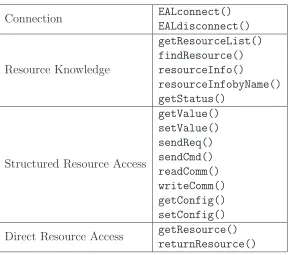
Table 4.2 The EAL API by Category . . . 32
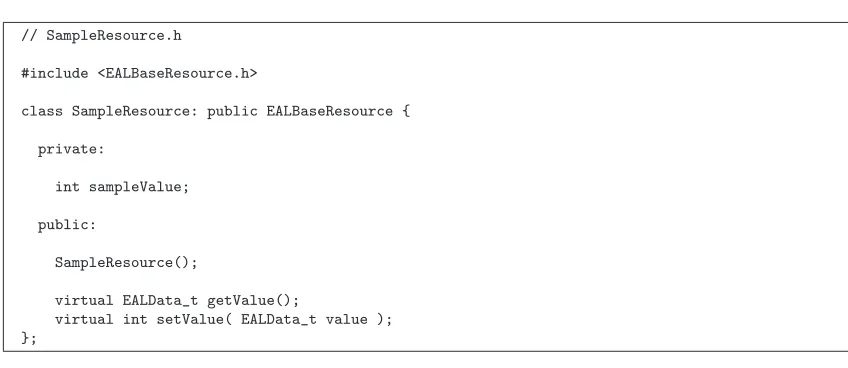
Table 4.3 SampleResource header . . . 38
Table 4.4 Beginning of SampleResource Code . . . 39
Table 4.5 Defining getValue() . . . 39
Table 4.6 Defining setValue() . . . 40
Table 4.7 Sample Resource Plugin . . . 40
Table 5.1 Build Times for Base Image (time in hour:min:sec) . . . 48
Table 5.2 Matlab vs. Octave on MZ104 (time in seconds) . . . 49
Table 5.3 Octave on MZ104, SB1496, and BeagleBoard (time in seconds) . . 49
Table 6.1 EAL Code for Driving a Square . . . 54
Table 6.2 EAL Code for Camera Capture While Rotating . . . 57
Table 6.3 EAL Code for Robot Dance . . . 58
Table A.1 Useful BitBake Options . . . 71
Table A.2 Partition Commands . . . 72
LIST OF FIGURES
Figure 3.1 Some Linux Distributions . . . 14
Figure 3.2 The Different Build Systems . . . 16
Figure 3.3 EvBotOS Build Steps . . . 20
Figure 4.1 EvBot Abstraction Layer Overview . . . 25
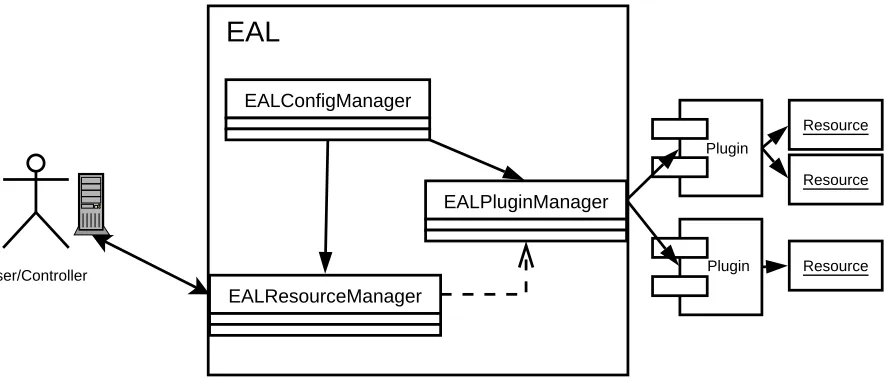
Figure 4.2 EAL Organization . . . 30
Figure 4.3 The EAL Network Layer . . . 35
Figure 5.1 The MZ104 Board . . . 43
Figure 5.2 The SB1496 Board . . . 44
Figure 5.3 The BeagleBoard . . . 45
Figure 6.1 The EvBot II . . . 51
Figure 6.2 The EvBot III . . . 52
Figure 6.3 The Mote Roomba . . . 53
Figure 6.4 Square Drive Motion . . . 55
LIST OF ABBREVIATIONS
ALFS = Automated Linux From Scratch API = Application Programming Interface
CBSE = Component-Based Software Engineering
CORBA = Common Object Request Broker Architecture CPU = Central Processing Unit
CRIM = Center for Robotics and Intelligent Machines DHCP = Dynamic Host Configuration Protocol DoC = Disk on Chip
DSP = Digital Signal Processor EAL = EvBot Abstraction Layer GNU = GNU’s Not Unix
GRUB = GRand Unified Bootloader IDE = Integrated Drive Electronics LFS = Linux From Scratch
LILO = LInux LOader
MIRO = MIddleware for RObots OS = Operating System
PCMCIA = Personal Computer Memory Card International Association RAM = Random Access Memor
SSH = Secure SHell
TCP/IP = Transport Control Protocol/Internet Protocol URI = Uniform Resource Identifier
Chapter 1
Introduction
1.1
Motivation
The autonomous mobile evolutionary robot platforms at NC State University, originally developed by John Galeotti and further refined by Leonardo Mattos are still used for experiments and research in robotics in the Center for Robotics and Intelligent Machines (CRIM). Continued support for these platforms is becoming more difficult as the oper-ating system and control methods have become increasingly outdated and incompatible with current needs. Updated support for newer sensor and acutator hardware is required, as well as a new method of accessing and using these platforms.
1.2
Thesis Outline
and the motivation for their adoption. In Chapter 3 the operating system needs are evaluated for support of existing hardware and future updates, as well as the longevity desired for support and applicability. The considerations and desired feature set are presented and the justifications for the continued use of Linux on the EvBots. Several methods are explored to find a repeatable system of creating the needed operating system and associated development tools and software, customized specifically for the needs of the lab. Chapter 4 presents the details of the Evbot Abstraction Layer (EAL), the control system developed. The EAL framework separates the need for the user to be aware of the details of the hardware on the robot, yet still able to access the full array of sensors and actuators through a simple interface. The EAL (EvBot Abstraction Layer) framework has the added design benefit of allowing the same control method to be used with different hardware without additional modification. This allows research to be conducted with multiple platforms or sensors and actuators to be upgraded with little to no impact to control algorithms. With only 17 total system calls, the EAL framework is also very easy to learn and use.
1.3
Thesis Goals
The objectives of this thesis are to describe:
• Design decision for long term support of an operating system for the EvBots
• Design and implementation of a new control method, EAL.
• Demonstration of the flexibility of the OS and the associated build system.
Chapter 2
Literature Review
The design and building of robots has created numerous hardware and software platforms over the years, from the very simple to the extremely complex [16] [18] [28]. Much work has gone into the control systems and architectures of these robots. Increasingly, the focus has centered on making these systems re-usable. [37] [14]
There are several characteristics that have been noted as highly desirable in the design of robot architectures. Programmability and modularity are useful to ensure that a robot is applicable to more than one task [33]. A level of hardware abstraction provides portability, as does extendibility of the architecture, allowing new components to be added over time. Additionally, the complexity of the architecture should be reduced to enable simple itegration of new components and ease debugging. [22].
and extendibility [15], though some have found that the hardware requirements are large enough to limit it to off-board processing [27]. MIRO (MIddlware for RObots) is another framework for mobile robot control which uses CORBA (Common Object Request Bro-ker Architecture) to facilitate distributed communication in a network environment [36]. The use of CORBA has been seen in othermiddleware frameworks as well [13] [29] [39]. CORBA is a collection of specifications created by Object Management Group (OMG), defining a communication standard for programs. It provides portable distributed appli-cations across heterogeneous systems in a network environment [6]. Gowdy [24] found, in his review of networking layers, that CORBA could solve almost any issue, current or future, that a developer might encounter, but is so comprehensive that it is very diffi-cult to master. A similar review of several networking layers for robotics use found that CORBA was the ”largest consumer of computing resources” but also the ”most flexible, modular, portable, and extensible” [17]. It was also noted that it took nearly a year for developers to become familiar with most aspects of the COBRA/MIRO system they chose.
Researchers have developed a variety of full robotic software architectures, includ-ing development systems and simulation environments. Some of these have built on the
A layered approach, allowing for complex access for expert users while still providing simplicity for new users is explored in robots designed to be used for both teaching and research [26]. A related layered approach in a robotic framework are used in a Java-based system [32], though it and the strongly typed programming framework used in ROCI [19] are intended for cooperative multi-robot systems. Despite attempts to remain simple, these architectures still remain fairly complicated.
At least one system has been seen that uses QNX as the operating system and there are others that use Windows XP [12]. A larger majority of the robotic platforms looked at, however, chose to use Linux as their primary operating system [21] [23] [31] [26]. The OpenHRP [28] architecture uses Linux with real-time extensions. Winfield [38] specifically describes his reasons for using the Linux operating system, including the modest hardware requirements.
Chapter 3
EvBot Operating System
The autonomous mobile Evolutionary Robot platform at NC State University has proven to be a useful hardware and software platform, that has enabled researchers to investigate a variety of mobile robot areas [23] [31]. However, as more use was made of these platforms, some of the initial systems and design decisions have become out-dated, or found limiting to certain degrees. One of the major limitations has been the hardware of the EvBots, which has been rapidly rendered obsolete. Another important part of the EvBots that needs revision periodically is the operating system. This chapter researches requirements of, and creation of, a new operating system for the EvBots.
3.1
History, EvBots, and Operating Systems
memory for the operating system and user data. Based on evaluations at the time, Linux was chosen, and a modified distribution with further customizations was used. [23]
The EvBot II revision updated the hardware, focused primarily on extending the sensor capabilities, but did not change the operating system. The most significant change was an increase in the size of the flash PCMCIA cards. [31]
Currently work is underway on producing an entirely new hardware base for the EvBots. This new mobile robot platform, the EvBot III, requires a new operating system. The operating system described in this chapter will be used with the EvBot III when the hardware is ready, but will also be compatible with the older hardware platforms.
3.2
Goals and Considerations
There are many things to consider when designing an operating system, especially when dealing with limitations associated with hardware and resources. Some things, such as lack of hardware support, immediately rule out certain possibilities such as DOS, or older, smaller operating systems. Other considerations, however, can be met, in varying degrees, by any number of operating system choices including various flavors of Microsoft Windows, multiple distributions of Linux, and others [25]. A proper set of requirements and preferences is instrumental in making a final choice. Guidelines are given below.
3.2.1
General Guidelines
• A current, working, modifiable operating system
• Consistency across hardware platforms
• Stability
• Free or Open Source
An operating system that does not work is obviously useless. However, a competely out-dated operating system that no longer supports user needs is similarly useless. Being able to modify the operating system does present some potential security issues, but this is acceptable given the intended limited scope. Having the ability to keep things current is of much greater value for the mobile robot platforms. The new EvBot III is a completely new mechatronic system hardware design. As such, changes and modifications will be required in the short-term, and long-term, as needed.
Consistency across platforms is also important. Within current hardware platforms there are differences and there will be further changes in the future. While there may need to be some changes in the operating system to account for these mechatronic system changes, the user should not generally be aware of any changes, except where absolutely necessary. This should hold true for all general mechatronic systems upgrades, though not necessarily for backwards compatibility.
Finally, the operating system should be completely free and/or open source. It is a common misconception that open source means free software. This is not always the case. Open source specifies only that all of the source code for the system is, depending on the specific licensing, modifiable and distributable. Here, the option of sharing the resulting operating system with other researchers should be achieved without worry or cost.
3.2.2
Considerations
There are a few things that must be taken into consideration when choosing and customiz-ing the operatcustomiz-ing system for mobile robots. For our purposes, the main considerations are the computer system hardware limitations of the EvBots themselves and also the ability to perform software development.
The EvBots are relatively computer systems hardware limited, especially when com-pared to the computing power of current desktop systems. Hardware limitations include financial constraints during their development, and the design constraints of size and power consumption. Of particular importance, with the EvBot I & II, was the startup from the DiskOnChip module, coupled with the main drive being a flash PCMCIA card. This specific hardware configuration presents booting challenges that must be addressed here. In addition, the slower CPU (in comparison to desktop systems) encourages the design to place as few demands on the processor as possible, leaving it to be utilized fully by user programs.
and Matlab/Octave scripts. For speed, compiled code is often preferable, although it can be more difficult to write and debug. As a counterpoint, Matlab or Octave (an open source alternative to Matlab) provides some flexibility and possibly faster algorithm development. The new operating system should be able to support both these modes of software development.
3.2.3
Desired Feature Set
Reflecting on the general guidelines and the considerations discussed, a specific set of capabilities for the operating system was determined. These capabilities are expected to be heavily utilized during both the development of software, and possibly hardware and also during final testing and use of the EvBots.
The following features are desired:
• Minimal hard disk use
Compared to memory, hard drive access is slow. In addition, as the primary drive capacity is flash memory, the lifetime of the primary drive can be extended if excessive usage can be reduced.
• USB auto-mounting and auto-configuration
• Networking and dynamic configuration
As a well known standard, general TCP/IP networking should be available, provid-ing the hardware capability exists. This should be dynamically configured, most likely with DHCP, to allow for use and testing outside of a known enviroment (such as the labratory).
• Remote access capabilities
In conjunction with the networking capabilities, the EvBots should be accessible from a remote workstation. The primary method is intended to be a remote shell using SSH.
• DoC startup
As noted earlier, the hardware of the current EvBots (version II), has constraints, requiring that they start from a DiskOnChip (DoC) module. Being able to do so and then transfer to a different primary ’drive’ is required.
• Logging
System events which may help in debugging should be recorded and logged. In general, keeping these logs between boot cycles of the EvBots is not required. However, some logs may need to be persistent. Balancing this against the minimal hard disk use may be required.
3.3
Design Choices
and their capabilities leads to the choice of Linux for the OS [11]. The decision to use Linux, however, requires a further decision making process to determine how Linux will be implemented on the EvBot III. There were several options explored, with respective advantages and disadvantages.
3.3.1
Stripping an Existing Distribution
There are over a hundred easily available distributions of Linux with many different goals, hardware requirements, or intended users [8]. Of the many available distributions, very few meet the minimal hard drive space limitations imposed by the EvBot computer system hardware, even with their most basic installation. To use almost any Linux distribution it would have to be stripped of any excess not required for the EvBot use.
One advantages to using an existing Linux distribution is the generally large selection of available, generally well tested packages, which can easily be installed or un-installed. Additionally, development can take place on an installation of the same distribution (of the same hardware architecture).
On the negative side, some distributions do not provide support for older architectures and distributions occasionally change management or stop being developed. Significantly, Linux distributions are often targeted for desktop systems. A lot of work must be done to get a distribution small enough to fit on the EvBots, while still working properly.
3.3.2
Buildroot with uClibc
Figure 3.1: Some Linux Distributions
that comprise the core of the Linux system. For smaller systems with limited space, an alternative to the larger GNU C Library (glibc) is available, known as uClibc. uClibc provides most of the functionality of glibc, but is much smaller, making it ideal for many embedded systems. [10]
final OS is mostly automated, and the resulting, fully functional, OS is very small. It is very easy to build a custom system with only the required software included.
The main disadvantages to using this type of system and resulting OS are the need for a specific development system or environment and occasionally, incompatibilities between glibc and uClibc.
3.3.3
Linux From Scratch
At the most basic, Linux from scratch is the process of compiling all the required libraries and programs from sources in a very specific order, resulting in a bare-bones Linux system. There are several guides and on-line books available which can guide a user through the process in great detail. The one referenced in this endeavor is named simply, Linux From Scratch. [7]
Even with a fast machine, the process of following all the directions can be tedious and time consuming. There have been some efforts to automate Linux From Scratch (LFS) builds, known as ALFS (Automated Linux From Scratch), which make the process much easier. [1]
One main advantage of building and using an LFS system is that only what is needed is added to the system. In addition, since the system uses glibc, development can occur on almost any system with a compatible version of glibc (assuming any additional libraries needed exist on both systems as well).
Figure 3.2: The Different Build Systems
3.3.4
OpenEmbedded
OpenEmbedded is a build framework for embedded Linux, designed to accomodate mul-tiple hardware platforms [9]. Essentially a massive collection of scripts, OpenEmbedded, once configured from a central file, will perform all the steps needed to build a full operating system from scratch. Additionally, OpenEmbedded can make use of parallel computing using multiple processors or distributed compiler systems to reduce system development time.
There are similarities between OpenEmbedded and buildroot and some significant differences. The most notable difference, however, is that in OpenEmbedded, there are several libc options available, including glibc, uClibc, and eglibc. Buildroot is limited to
uClibc only.
3.4
Design Implementation
The implementation of the EvBot Linux OS has currently been through three develop-ment cycles. Some limitations, discovered only at the conclusion of the first cycle of development, required re-evaluation. The second cycle of development provided a fully working system but the process was not maintainable. The third development cycle pro-duced a similar system to that from the second cycle of development, but in an automated and easily reproducible manner.
3.4.1
Initial Buildroot/uClibc Build
Initially, the build system and small size of a buildroot/uClibc system made it the most attractive option. Getting a basic working system together was fairly easy. Likewise, further customizations and setup scripts to get things booting properly were generally straight-forward, if requiring a fair amount of testing to get things working as needed.
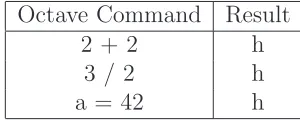
Problems arose when attempting to compile and install Octave on the system. Ini-tal attempts to integrate this into the build system were not successful, so additional tools were installed on the developed OS in order to build Octave. Eventually, Octave completed compilation without complaint. However, testing revealed that there was an obvious issue, as the only answer returned was ’h.’ Further attempts of variations in the methods used to compile Octave failed to change this behavior in the resulting binary. It is believed this was a library incompatibility due to the use of uClibc.
Table 3.1: Failed Octave Example Results Octave Command Result
2 + 2 h
3 / 2 h
a = 42 h
guideline of open source, it is a tool used, and not an integral part of the OS. There was also some demand for a system that could be used immediately by various members of the lab for projects involving the EvBots.
A development environment which can be used on faster desktop systems is provided for this version of the EvBot OS. This consists of both an image that can be used in QEMU (an open source processor emulator) to boot a virtual machine as well as a copy of the root file system. The root filesystem can be utilized using the Linuxchroot command, allowing a user to work within the constraints of that specific file system. Details are provided in appendix A.
3.4.2
LFS Build
With the eventual difficulties encountered using uClibc, later development switched to a LFS glibc based system. Fortunately, some of the work and tweaking involved in the previous iteration was applicable in this phase of the research.
capa-bilities exist [4]. In an effort to keep size down, use was made of BusyBox for most of the core system, using full versions of utilities when needed. BusyBox has some association with the uClibc and buildroot projects and was also used in the uClibc/buildroot version of the EvBot OS.
Using some portions of the automated LFS tools, some additional scripts written, and a considerable amount of hands-on development, a base system was assembled. Going through many of the same issues previously, Octave was successfully compiled. Now, Octave worked as expected, producing valid results. The total size of the system is larger than the uClibc/buildroot system, but still within the limitations imposed by the Evbot hardware.
3.4.3
OpenEmbedded Build
Despite having a working system using LFS, the process involved was very cumber-some, even using scripts to automate as much as possible. Use of an ARM processor development board (the BeagleBoard [2]) led to direct exposure to projects using Open-Embedded. Further investigation proved that it would be a good option to build the EvBotOS and all associated SDKs.
The flexibility and convenience of OpenEmbedded was further proved by building the same system for a different hardware platform (namely the BeagleBoard mentioned previously). There was only one issue encountered during that process, and that due to an incomplete script for building Octave.
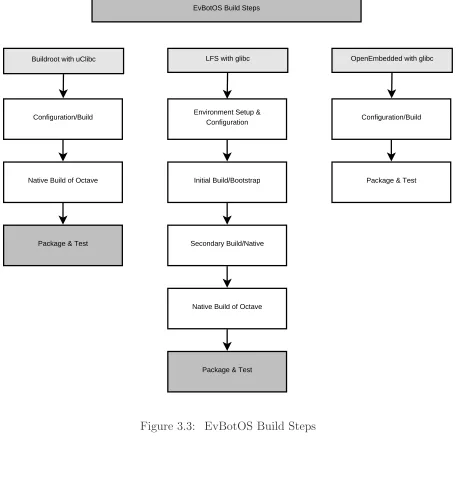
Buildroot with uClibc LFS with glibc OpenEmbedded with glibc
Configuration/Build
Native Build of Octave
Package & Test
Configuration/Build
Initial Build/Bootstrap
Secondary Build/Native
Native Build of Octave
Package & Test
Package & Test EvBotOS Build Steps
Environment Setup & Configuration
3.4.4
General Issues
A few general issues that either affected the development or will affect use of the EvBot OS are important to note.
3.4.4.1 Cross Compiling
Most development for the EvBot OS occured on newer and faster desktop machines running several different distributions and versions of Linux. In order for the resulting OS to run on the EvBot hardware, cross-compiling played a major role. Cross-compiling is the method by which a compiler is capable of creating output binaries for a specified architecture while running on a completely different architecture. Reasons behind this have been alluded to or mentioned previously (see section 3.2.2), but center on the fact that effective development can be difficult or impossible with the limitations of the current EvBot hardware.
Cross compiling also plays a role in software development for the EvBot OS. Direct development on the EvBots themselves is less desirable, due to longer compilation times, repeated writes to flash drives, and additional aspects of both software and hardware limitations. This does not mean that direct development on the EvBots themselves is strictly ruled out, but that it is intended as a final debugging or possibly emergency fix measure.
3.4.4.2 PCMCIA Support
boot process, as the main drive is a PCMCIA flash card. Crafting an appropriate kernel and start-up scripts required a fair amount of testing and tweaking to get everything running smoothly.
3.4.4.3 Additional Hardware Drivers and Software
Some hardware intended to be used with the EvBots required additional work to be supported. Drivers and occasionally supporting software had to be added, as default support was not available in the chosen kernel. The hardware requiring the most effort was USB cameras, not only in terms of drivers, but also the utilities necessary to access and make use of the cameras. With newer kernels, much of this support will be included, though upgrading to newer hardware may continue to cause issues.
3.4.4.4 GRUB versus LILO
Two of the common bootloaders (which start the process of getting the operating system loaded) are LILO and GRUB. LILO (LInux LOader) is an older boot loader that was used with many distributions before GRUB became popular. GRUB (GRand Unified
Bootloader) is currently a very popular choice, with some impressive features.
effort. GRUB, on the other hand, provides a small shell when it encounters configuration file issues which a user can use to recover or boot the system easily.
While GRUB is indeed very nice, there are some instances when dealing with specific hardware that it will not work. One particular instance is the DiskOnChip on the EvBot II; to get things working properly LILO had to be used.
3.4.5
Changes During Development
Technology continues to develop over time, rapidly making hardware obsolete. During the development of the EvBot OS there have been significant changes affecting future use. Increased capacity and dramatically lowered prices for flash drives reduce the hard drive constraints imposed on the overall operating system size. In addition, the current increased use of solid state devices as hard drives in many systems affects the imposed limitations on hard drive use. While usage on the current hardware platforms still impose these constraints, future use of the OS on newer hardware may not.
3.5
Final Results
Chapter 4
EvBot Abstraction Layer
The EvBot Abstraction Layer (EAL) concept was developed over a series of discussions with various members of the CRIM research group at North Carolina State University, involved in various projects using the common EvBot platform. Some of the major requirements or desires that arose from these discussions were:
• An interest in making a modular system, allowing a user to plug together the
necessary modules, and add a controller or ’brain’ to make it work.
• A desire for standardized interfaces to similar hardware to avoid re-coding
con-trollers if or when hardware changed.
• The need to simulate EvBots without controller modification (or requiring very
minimal modification).
4.1
EAL Design and Overview
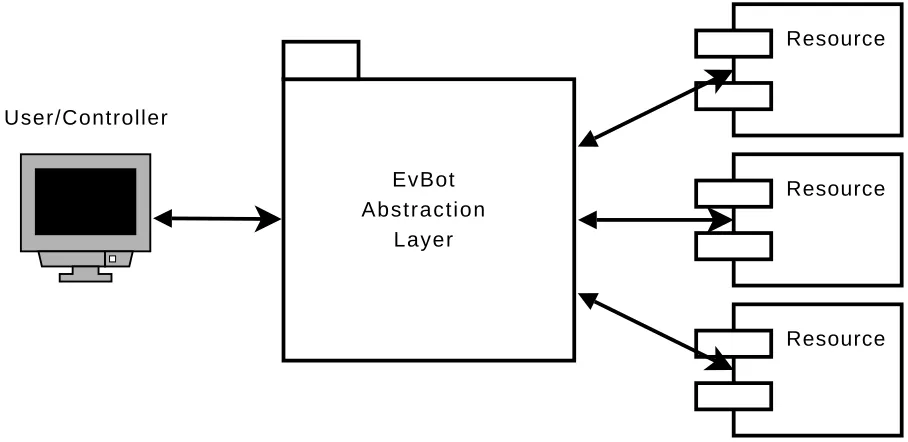
The EvBot Abstraction Layer is composed of two ’ends’: that of the controller and that of the resources. The controller is the realm of the user, the AI, or whatever control architechture is in charge of the EvBot. The other end, that of the resources, is the connection to physical or simulated hardware. What lies between these two ends is the EAL framework, facilitating communication and simplifying access. The EvBot Abstraction Layer is designed to be flexible enough to handle most needs, at both the controller level and the resource level.
Resource Resource Resource User/Controller
EvBot Abstraction
Layer
In this chapter we will present some details of the EvBot Abstraction Layer (EAL), working our way from resources through the framework and then to the user API. We will discuss some additions which allow EAL to be used over a network, without change to the controller, and touch briefly on some important aspects of data transfer and use within EAL. Finally, we will present sample code that puts together a small working system using EAL.
4.2
The Hardware Connection: EAL Resources and
Plugins
The back end of EAL is where all connections to hardware, computational modules, or simulation takes place. Resources are the access points to specific EAL API calls while plugins are a collection of one or more resources with a minimal library wrapper. It is this wrapper which allows EAL to know what resources a plugin provides as well as get access to the resources within a plugin.
4.2.1
Resources
Resources are the EAL interface link, or wrapper, which manage the work of translating EAL API commands into access of machine hardware, simulation, or any other device or possibly software. There are a few rules which govern the way EAL communicates with resources as well as some guidelines which must be followed in order for EAL to be able to use a provided resource.
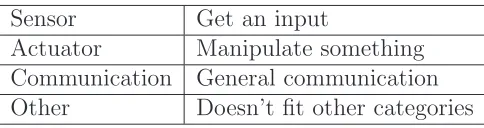
types provide a path for general data flow, and Other is reserved for anything that falls outside the scope of the other types. A resource must define itself to be one of these types, or a combination thereof, depending on what it provides.
Table 4.1: Resource types and purpose
Sensor Get an input
Actuator Manipulate something Communication General communication Other Doesn’t fit other categories
The type, or types, a resource is defined as does affect which API calls would be used with a resource. For example, a resource providing access to a simple bump sensor, specified as only a Sensor type would be able to get a value, as it is reactive only. A modified bump sensor which is extended on an arm to test some distance ahead would be both a Sensor and an Actuator, while a lever simply sweeping back and forth on command would likely be specified as only an Actuator.
4.2.1.1 EAL Resource API
The most basic resource provides these methods:
• a resource class constructor
• a resource class destructor
• create<Resource Name>()
Obviously, providing just these methods isn’t very useful, as it only allows an instance of
the resource to be created and destroyed. Resources also provide some or all of the following
methods from the EAL user API, with appropriate options (not shown here), described in more
detail in section 4.4:
• getStatus()
• getValue()
• setValue()
• sendReq()
• sendCmd()
• readComm()
• writeComm()
• getConfig()
• setConfig()
4.2.1.2 create<Resource Name> and destroy<Resource Name>
There is a naming constraint for the create and destroy calls, which requires that the functions
be the words ’create’ or ’destroy’ followed by the resource name. This allows other parts of
EAL to create and destroy instances of this resource only knowing its name. Providing the
4.2.2
Plugins
An EAL plugin is a library of one or more resources. The plugin provides the EAL framework
with the list of resources it contains, which the framework uses to access individual resources.
The EAL framework requires that a resourcemustbe placed in a plugin in order to be accessible.
4.2.2.1 EAL Plugin API
• connect()
• disconnect()
• listResources()
The creator of a plugin is responsible for specifying which resources the plugin provides. If
additional resources are included but not explicitly named, EAL will not be able to use them.
It is not possible to have two resources with the same name in the same plugin. However, there
is not a requirement that all resource names be unique across all plugins. This case is discussed
in section 4.3.2.
4.3
A Middle Skeleton: The EAL Framework
The EAL framework is the portal through which all messages between the user and resources
passes. All loading of plugins and handling of associated resources takes place inside the EAL
framework. Any configuration changes, setup or EAL behavior changes, have their basis here.
The interfaces in and out of the EAL framework are handled by the EALResourceManager
EALConfigManager
EALResourceManager
EALPluginManager
Plugin
Plugin
Resource
Resource
Resource
EAL
User/Controller
Figure 4.2: EAL Organization
4.3.1
EALConfigManager
The purpose of the EALConfigManager is to read all configuration files, handle any
configura-tion changes, and make all necessary informaconfigura-tion available to other parts of EAL. At this point,
the EALConfigManager is little more than a defined interface, as the methods simply return
hard-coded values instead of accessing dynamic information. Further design or extension of
EAL may expand the EALConfigManager capabilities.
4.3.2
EALPluginManager
The EALPluginManager is in charge of all the dynamic library issues associated with plugins
and resources, making use of the EALConfigManager to determine appropriate directories and
other configurations. It communicates with the EALResourceManager to provide requested
resources from plugins and is ultimately responsible for returning those resources, when the
One of the features of the EALPluginManager is resource renaming. If two plugins provide
resources with the same name, resources will be renamed within the EAL framework to make
them distinct to the user. This can possibly affect user code when plugins are added, as the
renaming occurs as resources are found. Renaming is handled through the concatenation of the
plugin name, so intelligent handling of similarly named resources is feasible.
4.3.3
EALResourceManager
The EALResourceManager keeps track of all the resources requested or in use, makes requests
to the EALPluginManager for resources as needed, and, with some sanity checks, passes on
accesses to the specified resources.
As a part of of keeping track of resources, the EALResourceManager assigns resources
numeric identifiers. All EAL methods that deal directly with a known resource require this
numeric resource identifier, unless the method explicitly uses the resource name. This identifier,
of typeEALResourceId_t, is assigned when a resource is initially requested.
4.4
The Front End: The EAL User API
It is the user API that is of the most interest to a user of EAL, provided a system with existing
plugins and associated resources exists that meets their needs. The API methods fall into
four categories: connection, resource knowledge, structured resource access, and direct resource
access.
All EAL methods which deal specifically with a single known resource require a numeric
identifier, the type specified asEALResourceId_t, unless the method explicitly provides access
Table 4.2: The EAL API by Category
Connection EALconnect()
EALdisconnect()
Resource Knowledge
getResourceList() findResource() resourceInfo()
resourceInfobyName() getStatus()
Structured Resource Access
getValue() setValue() sendReq() sendCmd() readComm() writeComm() getConfig() setConfig() Direct Resource Access getResource()
returnResource()
resources are initially requested. There is no guarantee that this identifier will be the same for
different connections to the EAL framework.
4.4.1
Connection
It is necessary to connect to EAL before any access is possible; users should also close the
connection when done using the interface.
• EAL* EALconnect()
4.4.2
Resource Knowledge
The resource knowledge methods allow the user to determine what resources are available, get
more information about resources, find a resource identifier, or get the status of a resource.
EALResourceId_t, as discussed in section 4.3.3, is a numeric identifier andEALResourceInfo_t
is a structure containing more details about a resource.
• list<string>* getResourceList()
• EALResourceId_t findResource( const char *resourceName )
• EALResourceInfo_t* resourceInfo( EALResourceId_t id )
• EALResourceInfo_t* resourceInfobyName( const char *resourceName )
• getStatus( EALResourceId_t id )
4.4.3
Structured Resource Access
Structured resource access methods are used to get data to and from resources. Not all resources
will provide all of these methods, instead, providing the ones that make the most sense for the
resource.
EALData_t is a data encapsulation structure used in EAL, discussed in further detail in
section 4.6.
• EALData_t getValue( EALResourceId_t id )
• int setValue( EALResourceId_t id, EALData_t data )
• EALData_t data sendReq( EALResourceId_t id, const char *req )
• int readComm( EALResourceId_t id, EALData_t data, unsigned int length )
• int writeComm( EALResourceId_t id, EALData_t data, unsigned int length )
• EALData_t data getConfig( EALResourceId_t id, const char *config )
• int setConfig( EALResourceId_t id, const char *req, EALData_t data )
Some resources, simple sensors or actuators, do not require or allow anything other than
”get this” or ”do that.” The getValue() and setValue() methods are the simplest resource
access calls.
ThesendReq()andsendCmd()methods offer the most flexibility of the structured resource
access methods. Most needs can probably be handled through these methods, if the resource
is complicated enough to require them.
readComm() and writeComm() are provided, as their names imply, primarily for
communi-cation resources. Reading and writing to a serial port is a likely candidate.
Finally, not all resources can, or should, be used without some user specified configuration.
ThegetConfig()andsetConfig()methods are essentially the same as the flexiblesendReq()
andsendCmd() methods, but use a different naming scheme to enhance readability of user and
resource code.
4.4.3.1 Direct Resource Access
The direct resource access methods allow the user to access a resource object directly. This
provides a way for the user to access available resources without the overhead of methods
passing through the EAL framework or use methods provided by a resource that cannot be
accessed by the EAL interface. It can also be used for debugging purposes for developers of
• EALResource* getResource( const char* resourceName )
• int returnResource( EALResource **resource )
The EALResourceManager keeps track of which resources are ’checked’ out with thegetResource()
method, much like a librarian. It is important to note that any resource that is accessed using
thegetResource()method must be returned to the EAL framework using thereturnResource()
method or the program will be unable properly to disconnect from EAL.
4.5
Moving Further Away: The EAL Network Layer
Early in the design of EAL, network was an integral part of the framework. Over time, the
design changed as various implementation details were worked out and network was moved out
of the core framework. Instead, network access is provided as a layer between the user and the
EAL framework, using the standard client/server model.
User/Controller
Network
EALClient EALServer
EAL
Resource Plugin
The EALClient and EALServer working together make the existence of the network as
invisible to the user as possible. In general, this succeeds. There are only two changes to the
API for the user.
1. EALconnect() adds two parameters, server and port. Respectively, these indicate the
hostname of the server and the port number of the EALServer to connect to.
2. ThegetResource()andreturnResource() methods are not available when connecting
to the EAL framework using the network. This includes connections established on the
same machine which use the EALClient/EALServer connection.
The overhead involved in making the network layer transparent to the user, when using
the main API methods, is significant enough that even simple programs will notice the delay.
However, the additional processing power of a remote controller may be worth the delays,
depending on the application.
4.6
EAL Data Encapsulation
In order for EAL to accomodate different resources and the near infinite variety of data types
from both resources and users, it must generalize the flow of data in some way. The simplest
way of doing this would be to use the void *construct of C and C++. This works fairly well
in many instances, with one end of data flow interpreting the data as needed. However, it is
no longer adequate with the addition of network layers or multiple unique accesses to the same
resource.
The main drawback to using void * is that the size of the data is unknown. This is
especially important when it comes to the network layer as all of the data must be transfered
successfully from one side of the connection to another. To get around this, as well as some
The primary construct is a specific data structure,EALDataInfo_t, which incorporates the
data payload plus some additional information specifying what type of data is in the payload.
Using this data a user (or resource) can determine the size and type of the data, or act as
needed. A constructor function is provided that makes working with this data structure easier.
The general data construct is a generic type, EALData_t. This is the main data type used
for general data transfers in the EAL framework. To avoid copying the overhead of a large data
structure through successive function calls, this is defined as a pointer to a EALDataInfo_t
structure.
4.7
Getting Dirty: Sample Code using the EAL API
The following code examples include a sample resource, a plugin with that resource, and some
user code that uses EAL to access the sample resource.
4.7.1
Sample Resource Header
The sample resource header provides the class definition for SampleResource, which we will
define as both Sensor and Actuator types. It uses the simple getValue() and setValue()
EALResource methods.
Not all of the EALResource methods have to be defined in SampleResource because it is
using EALBaseResource, which implements methods for them. The implemented methods in
Table 4.3: SampleResource header
// SampleResource.h
#include <EALBaseResource.h>
class SampleResource: public EALBaseResource {
private:
int sampleValue;
public:
SampleResource();
virtual EALData_t getValue();
virtual int setValue( EALData_t value ); };
4.7.2
Sample Resource Code
The resource code implements the class SampleResource and also includes the necessary
re-source functions createSampleResource() and destroySampleResource() as required (see
section 4.2.1.2).
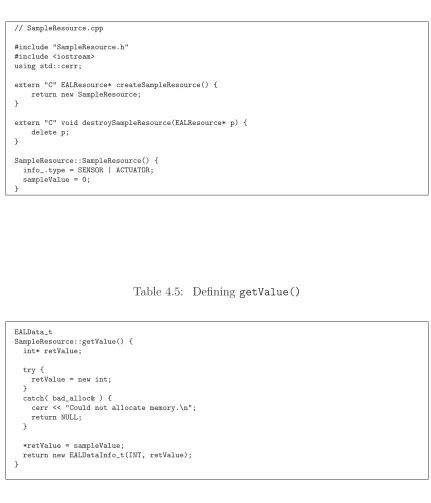
You can see that the create and destroy functions are defined as well as the resource
con-structor. The type of the resource is set to be both SENSOR and ACTUATOR and the initial
value sampleResource is set to zero. Additionally, the getValue() and setValue() methods
Table 4.4: Beginning of SampleResource Code
// SampleResource.cpp
#include "SampleResource.h" #include <iostream> using std::cerr;
extern "C" EALResource* createSampleResource() { return new SampleResource;
}
extern "C" void destroySampleResource(EALResource* p) { delete p;
}
SampleResource::SampleResource() { info_.type = SENSOR | ACTUATOR; sampleValue = 0;
}
Table 4.5: Defining getValue()
EALData_t
SampleResource::getValue() { int* retValue;
try {
retValue = new int; }
catch( bad_alloc& ) {
cerr << "Could not allocate memory.\n"; return NULL;
}
*retValue = sampleValue;
Table 4.6: Defining setValue()
int
SampleResource::setValue( EALData_t value ) {
if( value ) {
if( value->type == INT ) {
// type cast the data pointer from void* to int*, // then dereference
sampleValue = *((int*)(value->data)); return 1;
} }
// failure return -1; }
4.7.3
Sample Plugin
Table 4.7: Sample Resource Plugin
// pluginSampleResource.cpp
#include <EALPlugin.h>
extern "C" EALPlugin* connect() {
return new EALPlugin("SampleResource", NULL);
// The alternate form is to specify the number // of resources without the final NULL parameter: //
// return new EALPlugin(1, "SampleResource"); //
}
extern "C" void disconnect( EALPlugin* p ) { delete p;
4.7.4
Sample User Code
// sampleUserCode.cpp #include <EAL.h> #include <iostream> #include <list> #include <string> using namespace std;int main( int argc, char *argv[] ) {
EAL* eal;
EALResourceId_t id; EALData_t value;
list<string>* resourceList;
eal = EALconnect(); if( !eal ) {
cerr << "Could not connect to EAL\n"; exit(0);
}
resourceList = eal->getResourceList(); while( !resourceList->empty() ) {
cout << "Available resource: " << resourceList->front() << "\n"; resourceList->pop_front();
}
id = eal->findResource("SampleResource"); if( id < 0 ) {
cout << "Could not find SampleResource\n"; }
else {
value = eal->getValue( id ); if( value ) {
cout << "SampleResource value = " << *((int*)(value->data)) << "\n"; *((int*)value->data) = 42;
eal->setValue( id, value ); delete value;
}
value = eal->getValue( id ); if( value ) {
cout << "SampleResource value is now = " << *((int*)(value->data)) << "\n"; delete value;
} }
EALdisconnect( eal );
Chapter 5
Operating System Results
An operating system meeting the feature set originally described in section 3.2.3 was suc-cessfully created using OpenEmbedded. The ability of the build system to do the same for multiple hardware platforms was tested using several systems. Additionally, verifica-tion of Octave as a Matlab replacement was conducted and some hardware performance benchmarks were conducted using Octave.
5.1
OS Build System
5.1.1
Hardware
5.1.1.1 PC/104 MZ104
The PC/104 MZ104 from Tri-M is a Pentium/586 class motherboard with integrated keyboard, mouse, floppy, hard disk, serial, parallel interfaces, and USB 1.1 interfaces. The CPU runs at 100MHz and the there is 64MB RAM. The MZ104 was also stacked with a PCMCIA PC/104 module to add support for wireless networking and a mass storage device for the operating system. The networking is provided by a Cisco Airo 340 PCMCIA card and the the flash drive is a 96MB Kingston Technology PCMCIA card.
For the tests, an additional PC/104 module providing IDE access to a CompactFlash card was added to the stack, allowing for full testing before the DoC was modified to support the new OS.
5.1.1.2 PC/104 SBC1496
The PC/104 SBC1496 motherboard is made by Micro/Sys and contains an Atlas 486DX processor running at 133MHz, integrated keyboard, mouse, floppy, and serial interfaces. It provides six USB ports, two support USB 1.1 and the remaining four support version USB 2.0. Mass storage is provided via a CompactFlash connector. Memory is limited to 64MB of onboard RAM. Networking is provided by a USB network adapter.
Figure 5.2: The SB1496 Board
5.1.1.3 BeagleBoard
TMS320C64x+ DSP. The board includes 128MB RAM and support for SDHC mass storage, as well as integrated USB 2.0 support. The board also has 256MB NAND flash, but it was not utilized during these tests. Networking is provided by a USB network adapter.
Figure 5.3: The BeagleBoard
5.1.2
Build Setup and Configuration
5.1.2.1 Platform Specification
OpenEmbedded requires a configuration file that describes the platform being targeted for the build and the build method chosen. The minimum requirements are the processor and the OS type (specifically, Linux with a choice of glibc, uClibc, or eglibc). As noted in section 3.3.4, OpenEmbedded can make use of multiple processors. The configuration file is where the number of processors to use is specified, though it should be limited to the number of processors actually available.
The specific processor and generic x86 hardware configurations were chosen for the MZ104 and SBC1496 platforms. The BeagleBoard is a known hardware configuration in OpenEmbedded so the default configuration for it was used.
5.1.2.2 Kernel Configuration
Building a proper Linux kernel that contains all the necessary support for a particular hardware platform is relatively easy if you choose to include all the drivers available. However, this bloats the kernel and increases build times. The other extreme of kernel building is to include just the bare minimum of drivers needed for the intended hardware. For the tests, a mostly generic kernel configuration was chosen, removing support for some broad hardware categories (such as SCSI hardware). Generic IDE support was marked to be built in and a broad category of networking and USB drivers were marked to be built as modules. PCMCIA support was added for the MZ104.
5.1.2.3 Image Definition
The image definition is where the software that is to be installed on the target system is specified. There is a base-image definition that includes everyting necessary to boot the system and remote access it via ssh. This definition was expanded to include any other necessary system tools as well as the development packages.
The base-image definition does not expect the primary network device to be wireless, so the wireless-tools package needed to be added (including the command iwconfig). Additionally, PCMCIA devices are getting older, and the required pcmciautils package was also required for the MZ104 definition. Other packages specified added octave and several image libraries (jpeg, png, tiff) to the final OS image.
5.1.3
Build Times
Build times will vary depending on the additional packages requested and their avail-ability, as well as the speed of the machine doing the build. All recipes specify their source file location via a URI, and are downloaded when needed. For slow connections this can take some time, but once everything is downloaded, this does not contribute any additional time for subsequent builds.
Table 5.1: Build Times for Base Image (time in hour:min:sec) Two 3.00GHz cores Eight 2.66GHz cores
MZ104 7:38:51 1:13:00
SBC1496 7:42:41 1:13:29
BeagleBoard 7:50:27 1:18:38
5.2
Octave Benchmarks
One of the prime goals of the operating system build was to have Octave compiled and running. While this was accomplished, some testing of Octave was required to determine whether it was a valid replacement of Matlab. A benchmark written for Matlab and clones by Derek O’Connor [3] was modified slightly for this purpose and used as both a test to compare Matlab and Octave as well as a general performance guideline.
5.2.1
Matlab vs. Octave
Table 5.2: Matlab vs. Octave on MZ104 (time in seconds)
Matlab Octave
1000x1000 Creation 3.23 5.61
Multiplication 927.22 1157.30
LU Decomposition 398.77 380.58
Inverse 1190.38 1142.08
Singular Value Decomposition 1537.18 1488.04
QR Factorization 699.50 680.46
Eigenvalues and Eigenvectores NA 3574.38
Compute Rank NA 403.51
5.2.2
Octave Performance Measurement
The same Octave benchmark was run on the SBC1496 and the BeagleBoard as well. Table 5.3 lists the results. Considering the difference in processors and speeds, the results are fairly predictable, with the SBC1496 486DX processor, though running at a higher clock rate than the MZ104, achieving the slowest results and the BeagleBoard the best results.
Table 5.3: Octave on MZ104, SB1496, and BeagleBoard (time in seconds)
MZ104 SBC1496 BeagleBoard
1000x1000 Creation 5.61 6.75 0.51
Multiplication 1157.30 1460.95 272.19
LU Decomposition 380.58 462.66 105.51
Inverse 1142.08 1412.69 317.17
Singular Value Decomposition 1488.04 1851.99 420.96
QR Factorization 680.46 850.86 203.85
Eigenvalues and Eigenvectores 3574.38 4433.89 1103.65
Compute Rank 403.51 498.84 107.41
Chapter 6
EAL Experiments
Some experiments were conducted to prove that EAL can meet the design requirements. These experiments tested the coding ease to control a single robot as well as the ability of EAL to control multiple robotic platforms with different hardware in a similar manner. Additionally, experiments were conducted to indicate the success of EAL as a framework for distributed sensor systems.
6.1
Robotic Hardware
6.1.1
EvBot II
Figure 6.1: The EvBot II
6.1.2
EvBot III
Figure 6.2: The EvBot III
6.1.3
Mote Roomba
The Mote Roomba is a modified iRobot Roomba (model 4100), controlled with serial commands (per the iRobot Serial Command Interface) issued by a connected Berkley Mote IV. The mote on the Roomba accepts radio packets from a secondary mote con-nected to the controlling machine via USB. Commands issued to the mote from the controlling machine are passed to the mote on the Roomba and the requested command is passed to the Roomba.
Figure 6.3: The Mote Roomba
6.2
Experiments
6.2.1
Drive Test
The Drive test is a simple test of the ability to drive the base platform around a square. The only commands issues to the base plugin are ”left”, ”right”, ”go”, ”back”, and ”stop” (coded for simplicity as ”l”, ”r”, ”g”, ”b”, and ”s”). The simplicity of this test requires that the ”Base” plugin commands drive the base the same distance forward and backward and rotates the base 90 degrees either right or left. The code is listed in Table 6.1.
Table 6.1: EAL Code for Driving a Square
// Drive the robot in a square forward and backward #include <iostream>
#include <EAL.h>
using namespace std;
int main( int argc, char* argv[] ) {
EAL* client = 0; EALResourceId_t id = -1; int i = 0;
client = EALconnect(); if( client == NULL ) {
cout << "Error connecting to EAL" << endl; return 1;
}
id = client->findResource( "Base" );
for( i=0; i < 4; i++ ) {
client.sendCmd( id, "g", NULL ); client.sendCmd( id, "r", NULL ); }
client.sendCmd( id, "s", NULL );
for( i=0; i < 4; i++ ) {
client.sendCmd( id, "l", NULL ); client.sendCmd( id, "b", NULL ); }
client.sendCmd( id, "s", NULL );
EALdisconnect( client );
return(0); }
6.2.2
Image Capture with Remote Sensor
Figure 6.4: Square Drive Motion
Figure 6.5: The Robot Dance
6.2.3
Multiple Robot Control
Table 6.2: EAL Code for Camera Capture While Rotating
// Rotate the robot taking pictures periodically #include <iostream>
#include <stdlib.h> #include <EAL.h> #include "frame.h"
using namespace std;
int main( int argc, char* argv[] ) {
EAL* client = 0;
EALResourceId_t baseId = -1; EALResourceId_t cameraId = -1; EALData_t frame;
// argv[1] = hostname // argv[2] = hostname if( argc < 2 ) {
return 0; }
client = EALconnect( argv[1], atoi(argv[2]) ); if( client == NULL ) {
cout << "Error connecting to EAL" << endl; return 1;
}
baseId = client->findResource( "Base" ); cameraId = client->findResource( "Camera" );
for( int i=0; i < 7; i++ ) {
client.sendCmd( baseId, "r45", NULL ); frame = client.getValue( cameraId ); saveFrame( "/tmp/frame", i ); }
EALdisconnect( client );
Table 6.3: EAL Code for Robot Dance
// Group Robot Dance #include <iostream> #include <stdlib.h> #include <EAL.h>
using namespace std;
int main( int argc, char* argv[] ) {
EAL* client[3]; EALResourceId_t id[3]; int i = 0;
const char* dance[] = { "r45", "l90", "r90",
"l10", "r10", "l10", "r360" };
// arguments are hostnames (up to three) if( argc < 2 )
return 0;
// connect to robots
for( i=0; i < argc-1; i++ ) {
client[i] = EALconnect( argv[i+1], 50000 );
if( client[i] ) id[i] = client[i]->findResource("Base"); }
// do the dance
for( int step=0; step < 7; step++ ) { for( i=0; i < argc-1; i++ ) {
if( client[i] == NULL ) continue;
client[i]->sendCmd( id[i], dance[step], NULL ); }
sleep(3); // for slower robots }
// disconnect each client for( i=0; i < argc-1; i++ ) {
if( client[i] )
EALdisconnect( client[i] ); }
Chapter 7
Conclusion and Further
Development
7.1
Concluding Remarks
The goals of the research presented in this thesis were to provide a current, open source, and updatable operating system and a modular and standardized programming interface for the Evolutionary Robotic Platforms.
develop-ment platform and natively on the robot. All parts of the operating system, supporting software, and the build system are free and open source so it can be shared and modified as desired.
The EvBot Abstraction Layer (EAL) framework and API provides a simple and con-sistent interface to a variety of hardware and software resources. The modular system of plugins provides for easy addition and removal of hardware or software systems support with little impact on user control code. With only seventeen methods to learn, and possi-bly only the need to use three or four, users can quickly get their code working with little to no knowledge of hardware. The network layer of EAL makes control code development even faster by allowing algorithms to be developed and debugged on a desktop machine while still acessing the sensors and actuators on the robot using the same interface.
The research work presented in this thesis has resulted in a usable Linux operating system for use by mobile robots as well as an application programming interface and framework that allows for simple control code and great flexibility in sensor and actuator manipulation.
7.2
Further Development
packages or additions, such as additonal Octave toolboxes. It is also possible, however, to use the native development system to provide these directly.
The current implementation of the flexibility and network capability of EAL does have some issues that may affect its scalability and use in some instances.
The early design of EAL did not consider the possibilty of controlling multiple robots. The code is very linear most sections are not thread safe at all. Reworking the framework of EAL as a leaner threaded system would add speed and flexibility when dealing with multiple systems that may be delayed for any number of reasons. Additionally, it would also likely increase the performance and applicability for local applications, especially those dealing with realtime issues.
REFERENCES
[1] Automated linux from scratch. http://www.linuxfromscratch.org/alfs/. [2] Beagleboard. http://beagleboard.org/hardware/.
[3] Benchmarks – Matlab & Clones. http://www.derekroconnor.net/Software/ Benchmarks.htm.
[4] Busybox. http://www.busybox.net/.
[5] Communication with Matt Craver Regarding EvBot III Hardware. [6] Corba faq. http://www.omg.org/gettingstarted/corbafaq.htm. [7] Linux from scratch. http://www.linuxfromscratch.org/.
[8] List of linux distributions on ibiblio.org.http://distro.ibiblio.org/pub/linux/ distributions/.
[9] Openembedded. http://wiki.openembedded.net/index.php/Main_Page. [10] uclibc. http://www.uclibc.org/.
[11] Wikipedia Entry: Comparison of Open Source Operating System. http://en. wikipedia.org/wiki/Comparison_of_open_source_operating_system%s.
[12] Erin Anderson, William Cox, Mike Faircloth, Sterling Greene, and Frankie Myers. SEAWOLF II: Autonomous Underwater Vehicle. Technical report, North Carolina State Univesity, Raleigh, NC, 2006.
[13] Noriaki Ando, Takashi Suehiro, Kosei Kitagaki, Tetsuo Kotoku, and Woo-Keun Yoon. RT-Middleware: Distributed Component Middleware for RT (RobotTechnol-ogy). 2005.
[14] A. Brooks, T. Kaupp, A. Makarenko, S. Williams, and A. Oreback. Brooks, a.; kaupp, t.; makarenko, a.; williams, s.; oreback, a. InIntelligent Robots and Systems, 2005. (IROS 2005). 2005 IEEE/RSJ International Conference on, pages 163–168. IEEE, August 2005. unread.
[16] Rodney A. Brooks. Artificial life and real robots. In Proceedings of the First Euro-pean Conference on Artificial Life, pages 3–10. MIT Press, 1992.
[17] Greg Broten, Simon Monckton, Jared Giesbrecht, and Jack Collier. Software Sys-tems for Robotics: An Applied Research Perspective. Advanced Robotic Systems, International Journal of, 3(1):011–016, 2006. unread.
[18] G. Caprari, K. O. Arras, and R. Siegwart. The autonomous miniature robot alice: from prototypes to applications. InProceedings of the 2000 IEEE/RSJ International Conference on Intelligent Robots and Systems, pages 793–798. IEEE Press, 2000. [19] L. Chaimowicz, A. Cowley, V. Sabella, and CJ Taylor. ROCI: a distributed
frame-work for multi-robot perception and control. In Intelligent Robots and Systems., Proceedings, IEEE/RSJ International Conference on, volume 1, 2003.
[20] Eric Colon, Hichem Sahli, and Yvan Baudoin. CoRoBa, a multi mobile robot control and simulation framework. Advanced Robotic Systems, International Journal of, 3(1):073–078, 2006.
[21] William Cox, Mike Faircloth, Sterling Greene, Frankie Myers, Jim Simpson, and Ryan Sturmer. SEAWOLF I: Autonomous Underwater Vehicle Platform. Technical report, North Carolina State Univesity, Raleigh, NC, 2005.
[22] S. Fleury, M. Herrb, R. Chatila, and T. CNRS. Design of a modular architecture for autonomous robot. In Robotics and Automation., Proceedings, IEEE International Conference on, pages 3508–3513, 1994.
[23] John M. Galeotti. The Evbot: A Small Autonomous Mobile Robot for the Study of Evolutionary Algorithms in Distributed Robotics. Master’s thesis, North Carolina State University, 2002.
[24] Jay Gowdy. A Qualitative Comparison of Interprocess Communications Toolkits for Robotics. Technical Report CMU-RI-TR-00-16, Robotics Institute, Pittsburgh, PA, June 2000.
[25] Steve R. Hastings. Lindows 4.0. Linux Journal, December 2003.
[26] Patrick Hohmann, Uwe Gerecke, and Bernardo Wagner. A Scalable Processing Box for Systems Engineering Teaching with Robotics. In Systems Engineering., International Conference on, Coventry, UK, September 2003.