Application and Assessment of Hansen Software
for
Naval Material Management
A Research Report
Department of Civil Engineering
North Carolina State University
Raleigh, NC
by
Alex Kuriatnyk
and
Dr. William Rasdorf
Biography
Alex Kuriatnyk
I attended the University of Akron during the years 1994 through 1998, and was awarded a Bachelor of Science Degree in Mechanical Engineering in December 1998. During my sophomore year I was accepted in the Navy Civil Engineer Corps collegiate program to pursue a Naval Officer Career in Engineering. After graduation I started Officer Candidate School (OCS) in Pensacola, Fl for 12 weeks of both intensive mental and physical training. After completion of OCS in May of 1999 I received my commissioning as an Ensign in the United States Navy.
My Naval assignments have included Assistant Resident Officer in Charge of Construction (AROICC) and Assistant Public Works Officer during the years 2000 through 2002 in Lakehurst, NJ. In December of 2002, I was sent to Fort Benning, GA to run a design management section for the United States Army. During my tour with the Army I was sent to Kuwait as the Design Chief in anticipation of the Iraq war. I was in the war for seven months and my final station in Iraq was an air field in Tallil which is located about 300 miles south of Baghdad.
After returning from the war I finished my tour with the Army in December of 2004. The Navy offeredme the opportunity to attendgraduate school. I applied to and was accepted at North Carolina State University starting the spring of 2005. I plan to graduate in December of 2005 with a Master’s Degree in Construction Engineering and Management.
Contents
1.0 Introduction
1.1 An Overview of the Hansen Information Technologies Company 1.2 Objectives
2.0 The Hansen Software Enterprise Product Suite
2.1 Citizen Relations Management 2.2 Financial Accounting
2.3 Revenue Management 2.4 Business Intelligence 2.5 Operation Management
2.5.1 Operation Management Sub-Modules Used in the RWW 2.6 Hansen Mobile Solutions
3.0 Case Studies on the use of Hansen Software
3.1 Buffalo, NY 3.1.1 Problem 3.1.2 Solution 3.1.3 Results
3.2 California Department of Transportation 3.2.1 Problem
3.2.2 Solution 3.2.3 Results 3.3 Columbia, MO
3.3.1 Problem 3.3.2 Solution 3.3.3 Results 3.4 Fayetteville, AR
3.4.1 Problem 3.4.2 Solution 3.4.3 Results 3.5 Ft. Lauderdale, FL
3.5.1 Problem 3.5.2 Solution 3.5.3 Results
3.6 Hamilton, Ontario Canada 3.6.1 Problem
3.6.2 Solution 3.6.3 Results 3.7 Las Vegas, NV
3.8 New Castle County, DE 3.8.1 Problem
3.8.2 Solution 3.8.3 Results 3.9 Tulsa, OK
3.9.1 Problem 3.9.2 Solution 3.9.3 Results 3.10 Summary
4.0 Raleigh Water Warehouse
4.1 The Need for Automation 4.2 Material Purchasing 4.3 Material Accountability 4.4 Work Order Management 4.5 Inventory Control
4.6 Hansen Mobile System (HMS)
5.0 Naval Facilities Engineering Command
5.1 Organization
5.2 Engineering Field Divisions (EFD)/Engineering Field Activities (EFA) 5.3 Public Works Centers
5.4 Public Works Departments
5.4.1 Public Works Department Organization 5.4.1.1 Administration
5.4.1.2 Family Housing 5.4.1.3 Planning
5.4.1.4 Engineering 5.4.1.5 Environmental
5.4.1.6 Facilities Management Engineering 5.4.1.7 Maintenance
5.4.1.8 Utilities 5.4.1.9 Transportation
5.4.1.10 Facility Support Contracting 5.4.1.11 Safety
5.4.2 The Procurement Process
5.4.2.1 The Public Works and Supply Department Relationship 5.4.2.2 Public Works Department Material Accountability
5.5 The Acquisition Process
5.5.1 The Analysis of the Existing Business Processes 5.5.2 The Request for Proposal (RFP) Process 5.5.3 Proposal Evaluation
5.5.4 Presenting the Product 5.5.5 Final Selection
5.5.6 Develop and Installation 5.5.7 Training
5.5.8 Maintenance
6.0 Conclusions
7.0 Recommendations
8.0 References
9.0 Appendices
9.1 Appendix 1: Enterprise Production Suite Modules and Sub Modules, Section 2.0 9.2 Appendix 2: Needs Assessment Report by CH2M-Hill, Section 4.1,
9.3 Appendix 3: Sections 3, 4, 5, and 6 of the RFP, Section 4.1
9.4 Appendix 4: Hansen Version 7.7 Screens of the Work Order Management System, Section 4.4
9.5 Appendix 5: Reorder Level Report, Section 4.5
9.6 Appendix 6: Work Order Management Procedure Manual, Section 2.5.1 9.7 Appendix 7: Inventory Control Procedure Manual, Section 2.5.1
9.8 Appendix 8: RWW Business Process Flow Chart 9.9 Appendix 9: Contact List
9.10 Appendix 10: Service Request Example 9.11 Appendix 11: Work Order Example
1.0 Introduction
This section introduces the Hansen Information Technologies Company. It discusses the market sectors served by the company’s products and presents in detail a discussion of their government operations software.
1.1 An Overview of the Hansen Information Technologies Company
Hansen is a leading supplier of application software to assist management operations in governmental agencies. Hansen supports over 500 governmental agencies that include state, county, city and special districts, covering over 80 million people who conduct billions of transaction a year. The company is a privately held company that employs approximately 250 people and is headquartered in Sacramento, California, with other offices located throughout the world. According to Hansen they offer the best solution for enterprise government applications. Their products are constantly rated the best in the industry by their customers and by consulting firms. They have been designing software for over 20 years for the government and their strong financial background makes them a solid partner that is expected to remain solvent for years to come.
Hansen was able to develop a software suite with the one stop shopping concept in mind to integrate all facets of managing the needs of government. Their goal was to provide a single solution from a single vendor for all government information technology requirements. Hansen believes they have accomplished that goal by introducing the software called “Enterprise Product Suite.” This software is comprised of numerous modules offering a pick and choose type customer product selection.
The Hansen software “Enterprise Product Suite” offers five modules to support government operations. These modules include Citizen Relation Management, Financial Accounting, Revenue Accounting, Business Intelligence, and Operations Management. See Appendix 1 for a complete list of subcategories for these modules.
This paper will focus primarily on the Operations Management module because it most closely represents what a Navy Public Works division would encounter. There are seventeen sub-modules in the Operations Management module which are listed and described in the next section. The primary sub-modules addressed in this paper (within Operations Management) will be Work Order Management and Materials Management. These sub-modules were chosen because financial and material management issues are the major concern in a Navy public works environment.
1.2 Objectives
A secondary objective of this paper is to introduce the Navy to the Hansen “Enterprise Application Suite” as a potential means to increasing the efficiency of work order management and warehouse inventory control procedures for the Navy. The Navy can benefit from this software because it provides the control and accountability needed in a Public Works Division. Using Hansen software will eliminate duplicate effort when processing work orders and it will eliminate lost inventory. These are benefits sought in Naval Public Works.
The City of Raleigh Public Works division has been chosen as a model to demonstrate the usability of the “Hansen Application Suite.” The Raleigh Water Warehouse division has achieved tremendous improvements in work order management and inventory control by using this software. These improvements have saved taxpayers thousands of dollars and reduced manpower requirements in the warehouse.
2.0 The Hansen Software Enterprise Product Suite (EPS)
This EPS software applications is designed to assist public sector organizations in performing all of the major business functions typically encountered during day to day operations. The following sections further describe these and present them as five major modules. Appendix 1 summarizes the modules and sub-modules in the entire suite.
2.1 Citizen Relations Management (CRM)
The Citizen Relations Management module automates the process of generating documents that deal with internal and external customers from a customer service point of view. It consists of the following sub-modules.
○ Code enforcement
○ Complaints
○ Dispatching
○ Knowledge Base
○ Service Requests
2.2 Financial Accounting
The Financial Accounting applications provide integrated, flexible full government accounting, payroll, and human resources functionality with reporting solutions in support of a client’s accounting and operational requirements. The following list identifies the sub-modules that are available in this module.
○ Accounts Payable
○ Accounts Receivable
○ Encumbrance Accounting
○ Fund Accounting
○ Fixed Asset Management
○ Grants Management
2.3 Revenue Management
The Revenue Management module tracks all revenue generating processes encountered by a local or state government. The sub-modules consist of the following.
o Assessments o Fines
o Grants
o Property Taxes
o Permits and Licensing
o Special Fees and Utility Billing
2.4 Business Intelligence
The Business Intelligence module provides the metrics needed to analyze a process to gauge whether a resource is being utilized in the most efficient way possible. This module provides various reports to be used at all levels of management. The business intelligence functionality is accomplished by the sub-modules which follow.
o Business Scorecards
o Performance Metrics *
2.5
Operations ManagementThe purpose of the Operations Management module is to deal directly with day to day activities and transactions of public sector organizations. The following is a list of the sub-modules related to operations management.
o Building Permits o Budget Management o Business Licensing o Code Enforcement o Conditions Assessment o Fleet Management
o Material Management *
o Operations & Maintenance o Parks and Recreations o Public Works
o Sanitary Sewer Management * o Storm Water Management * o Transportation
o Timesheet Reporting *
o Treatment Plant Maintenance
2.5.1 Operations Management Sub-Modules Used in the RWW
The asterisks that follow the sub-modules shown in the previous two subsections denote which modules the Raleigh Water Warehouse has implemented. A brief description is now given for these modules. A description of the warehouse itself is given in Section 4.0.
Material Management – This module is used primarily for warehouse and mobile inventory control. Hansen software provides the ability to attach inventory to a work order for tracking and control purposes. The RWW and the mini warehouses use the Material Management sub module for inventory control by creating a database of all material used in the warehouse. The mine warehouses are satellite warehouses located in Garner and Rolesville to offer water and sewer services to those areas. These mini warehouses are set up identically to the main warehouse. When material is check out or returned, the inventory data base is updated automatically when the work order is completed. Each time a work order is closed out the material is updated in the database to indicate, part number, amount available, and reordering levels. It is the work order that triggers the database update process.
There are two mini warehouses located in Garner and Rolsville due the expansion of water and sewer services in the surrounding areas. As the RWW expands their area of operation there will be a need for more mini warehouses. Each mini warehouse is treated individually for material accountability. That is the mini warehouses order and maintain material for their area of responsibility. Each truck assigned to a mini warehouse becomes the responsibility of that warehouse. All material inventories are controlled and maintained by the mini warehouse. The RWW oversees the ordering process of the mini warehouses but only for information purposes and audit control. The Hansen inventory control system handles all material needs through the use of cataloging, security, ordering, purchase ordering, tracking, transactions, repairs, bill of materials, and reporting.
Sanitary Sewer Management – This module tracks all sewer mains in the Raleigh area. Approximately 2200 of miles of sewer main can be identified by age, location, service condition and requirements. This system completely manages the sanitary sewer system network and includes manholes as well as force main and non force main systems.
Timesheet Reporting – This module tracks all employee time sheets through the Work Order Management module. In the RWW timesheet reporting is done automatically when service requests and work orders are generated and completed. This automation process eliminates the manual reporting of employee time records.
Water Distribution Management – This module manages all pressurized potable water services for the Raleigh area. The Raleigh Water Warehouse uses it to identify lines, meter locations, valves, backflows preventors, intersections, and shutoffs for customers so that they may receive the best possible service. It also identifies flushing schedules for the water lines and meter changing schedules.
Work Order Management – The work flow management system is a module that aides a user in understanding the work flow process. This module provides the ability to follow the flow of reviews, approvals, and other requirements as they are needed to be seen by various participants in the process. The RWW uses the Work Order Management module to implement its unique the work order process. The screens available to the user present a systematic display of the sequence of operations and updating work orders that comprise the work flow process. The screens available by Hansen are set up in a tab format to pick and choose the correct ones to perform the desired operation for any business flow situation. These screens can be seen in Section 4.4. RWW personnel have a step by step manual to aide them in this process. Hansen developed the work order management procedure manual and IT Department of the City of Raleigh developed the inventory control manual. Appendices 9.6 and 9.7 present text of these manuals. The actual work orders and service orders can be seen in Appendices 9.10 and 9.11. These documents are accompanied by their respective screen shots to show the reader what the work order and service order actually look like. There are two areas specifically addressed by Hansen in this module. These are work notices and extra customer service.
• Work notices can be inserted during the maintenance process as part of the work request process. Work notices reflect additional requirements needed during the planning process. Hansen uses the example of additional information needed prior to a road closing. The system may require a review of the work activities as they relate to the closure or they may identify alternate routes needed for traffic.
• Customer service is streamlined in the Hansen module to record customer service problem calls, dispatching orders to field personnel, and field inspections and their costs. This tool allows a range of operations to be tracked from the initial customer calls to the personnel going out in the field to respond to the problems identified by the call.
knowledge of database systems. It does, however, effectively package and present data to key personnel.
The RWW uses the Performance Metrics module to supply supervisors with information that enables them to make informed decisions on work histories. This, in turn, enables them to adjust work schedules for better productivity. Professional reports can be generated with graphs and charts for updates and for meetings with presentations to upper management personnel.
2.6 Hansen Mobile Solutions
Hansen Mobile Solutions (HMS) provides a fully functional, field automation solution. HMS enhances the capabilities of the Hansen “enterprise product suite” to provide scaleable, efficient, and cost effective solutions for improving business processes in the field. This is done by using pocket computers or laptop computers installed in vehicles to transmit data in a duplex manner back to the main office. This can be accomplished a number of ways, but the most frequent are wireless communications using transmitters or a computer network system. With the flexibility of Hansen’s field automation, one can collect data and update records without interruption even when roaming in and out of service range.
The RWW uses the HMS system to generate and complete work orders in the field electronically. This is accomplished by the field personnel using laptop computers or PDAs in the service vehicles to transmit and receive real time information. The RWW uses a third party vendor to provide wireless communications between the field and the warehouse. This vendor could be anyone who offers cellular and data communications wirelessly and a broadband width to transfer map data. The RWW uses the third party software called Sprint Net Motion. This software uses pre-existing cell phone towers located throughout the Raleigh area for duplex data transmissions between the field and RWW. The area of coverage is excellent and with no dead areas encounter by the RWW. But on occasion, when dead areas are encountered and the signal is lost, the data will be downloaded immediately back to the warehouse when the signal is reestablished.
The HMS system benefits include:
• Field crew personnel and inspectors can receive daily assignments without visiting the office – often increasing work production. The RWW field personnel will receive a full day’s work when they turn on their computers at the beginning of their shift. The work downloaded to the laptop computer will be in the form of work orders. This enables them to receive their assignments from the warehouse more efficiently since the material is prepared the day before and is available for pickup at the start of the employee’s shift. Employees do not have to come back to the shop for additional work or emergencies since this information can be transmitted to them in real time. The employees are able to accomplish more work because there is less time wasted at the warehouse.
personnel can access this information directly and remotely, it providesmore time to accomplish the work and requires less time gathering information from other sources.
• Finished work descriptions can be transmitted directly back to the database for record keeping and archiving. When the work is received, the Field service personnel finish the work by completing the work order and adding comments or pictures, if necessary, on the laptop. The information is transmitted by means of HMS to a cell tower by hitting a send button located on the keyboard of the laptop.
• New assignments or emergencies can be transmitted immediately to field personnel as they are detected. This is a big advantage offered by the Hansen software. When emergencies or additional work notifications are received by warehouse personnel they can create a work order, immediately locate the nearest field service vehicle using GPS, and transmit the work order to that vehicle and area. The advantages of being able to have this type of system in place are numerous and include quicker response times to an emergency, less maintenance of field service vehicles because fewer miles will have to be traveled, and higher work production.
• Supervisors have the ability to adjust work schedules as they deem necessary. The supervisors in the RWW can adjust work schedules to ensure that everyone is doing their fair share of work. At any time, the supervisors can locate and determine if a field service truck is having difficulty accomplishing their assignments. The supervisors can use HMS to look up any field personnel’s assignments and determine if they can finish that day’s work. If the supervisor determines the assignments can’t be finished, then the supervisor has the option of moving the assignments from one truck to another. This will prevent overtime situations because the supervisors are able to monitor field production by their personnel and shift work among crews during the course of the day to even the workload.
The HMS system provides two primary field applications: “Permit Inspection/Code Enforcement” and ‘Work Management.”
• Permit Inspection and Code Enforcement enables the user to: o Download pending inspections by address or parcel o Submit violations
o Check ordinances o View premise history o Build case log
o Verify existing permits
o Reassign personnel in the field o Order daily work log/route o Print in the field
o Record costs and results of work
o Check other pending work and inspections for an asset o Better manage inventory for real time cost savings
With the flexibility of Hansen HMS applications, working in remote areas without interruption is possible by using the wireless data services. Once the field worker is in range of communications the data is immediately downloaded to the Hansen database system to prevent loss of data. This download is automatically achieved through the use of a batch files and occurs instantaneously with the use of third party vendor software.
3.0 Case Studies on the use of Hansen Software
The nine case studies listed below are actual case studies done by Hansen over the course of fifteen years. The case studies were found on the Hansen website provided in the reference section of this paper [1]. Their purpose is to show the effectiveness of the Hansen software. The majority of the case studies presented below use the Operations Management module.
In reviewing the following case studies it became clear that overwhelmingly the cities, counties, and towns therein described are very satisfied with the various benefits of cost, time, operation, and the ability of using the software right off the shelf. It also became apparent through the case studies that Hansen offered exceptional customer service when working with various local and state governments.
In Section 4, this report will demonstrate similar advantages in the RWW, which is our own intensively investigated case study. From there we postulate that similar results and benefits will be found in Section 5 where the case will be made for use of the software by the Navy.
3.1 Buffalo, NY
3.1.1 Problem
In 1998 the City of Buffalo’s Department of Permit and Inspection Services adopted several computer software programs that were being maintained by an in house software team. With the approach of Y2K, and with their software programs not being compliant, the City had to find an integrated network system that met Y2K requirements. There old system was costly in terms of repair and time.
The new system they wanted had to remove processes and procedures that were redundant. It would also have to support current business practices and be able to view different aspects of the City’s properties.
3.1.2 Solution
The City is using the Hansen system for the permitting, housing inspections, housing courts, plans review, and zoning. The Housing Court Department has jurisdiction of the use of any real property and activities that affect the health, welfare, and safety of any resident, occupant of the general public and which is subject to regulation by local cities and towns under the state building code. The treasury, real estate, and collections department are using the Hansen software on a daily basis in addition to the Permit and Inspections Services department according to the case study.
The software has helped City of Buffalo departments communicate better because everyone is on the same system and speaking the same language. Permits are now being issued in a couple of seconds instead of days.
3.1.3 Results
The Hansen software has provided many platforms for the City to speed up and streamline the growing need for their online processes. According to the case study after six months of application their employees were complaint free, and now the City is looking at other online Hansen products to enhance their efficiency further in other areas.
3.2 California Department of Transportation
3.2.1 Problem
The California Transportation Department (CALTRANS) is responsible for the maintenance of the roads in California. CALTRANS stated in the case study there are so many roads in California they would wrap around the world twice.
Their old computer system was a text based system, with limited capabilities. Information would be passed through several different locations and updated on a monthly basis. This posed two especially serious problems. The first was lost information and the second was that managers were receiving time sensitive information late.
3.2.2 Solution
Hansen software won the government contract and proposed the use of their plants and roadway modules. Using these modules would enable CATRANS to take on the massive job of assett tracking and maintenance.
CALTRANS would have 1,600 users on the system with an estimated 600 to 700 concurrent users. There would also be approximately 650 field crews using the system. These field areas maintain assets such as road signs, signal lights, and roadside rest stops, and of course, the roads themselves.
3.2.3 Results
field personnel. Since the introduction of the new software and Hansen’s customer service group, information queries can be answered and real time data can be updated instantly.
3.3 Columbia, MO
3.3.1 Problem
In the early 1990’s the City of Columbia’s Public Works Department noticed infrastructure problems that were garnering national attention. They decided to use a computer network system for resource management and infrastructure to address these problems. The street management division decided to purchase a computer and software to aide them with this task. It didn’t take them long to realize they were going to need more powerful software than that initially purchased. They needed to inventory their streets and to be able to track costs for paving and seal coating. It seemed logical to City management that is was important to integrate infrastructure management system with a pavement management system.
3.3.2 Solution
In 1994 the City of Columbia purchased their first software from Hansen which was a Maintenance Management product. The City of Columbia’s Public Works Division, along with the aid of Hansen personnel, updated their old tracking system to a new modern database with newly added codes. In 1998 they upgraded to version 7 of Hansen software and continued increasing the size of their database with real time information.
3.3.3 Results
As a result of the Hansen software solution, reports and cost analysis that normally took days or sometime weeks to create now only take a few minutes. The City stated in the case study that the new software has helped the City from a cost saving standpoint as well. The City has implemented the system for the operations of the street, storm water, traffic divisions, and maintenance.
3.4 Fayetteville, AR
3.4.1 Problem
The city of Fayetteville with its 58,000 citizens was looking for a single entry point to access commonly used data. The city wanted to standardize technology as well as have a strategic asset for the city. They were looking for a system that could handle the robust needs of Fayetteville now and in the future.
3.4.2 Solution
27,000 inspections. All of these are recorded, maintained, managed, responded to, and reported on using the Hansen software.
The city was able to replace several non-integrated systems with the Hansen software and can now track work orders, equipment, and inventory items. It has also been able to increase efficiency with both the internal and external customers.
One aspect of the software with which the City was most pleased was the way that Hansen Software could be used “right out of the box.” Furthermore it integrates with other software such as Microsoft Office, the City’s own award winning Geographic Information System (GIS) database, and telecommunications systems.
3.4.3 Result
The new system will give the City of Fayettville and its 200 plus users an immediate interface to track work orders and manage customer calls, and track them to closeout. As a result of using the software the City’s internal communications improved and helped them with external communications with their customers.
3.5 Ft. Lauderdale, FL
3.5.1 Problem
In 1996 the City’s underground sewer and water lines, that support the 300,000 people living in Ft. Lauderdale, was in need of reengineering due to the age of the infrastructure and number of breaks that had been occurring.
3.5.2 Solution
The city adopted the Hansen software to help aid in this task. Initially the City implemented the maintenance software and then in 1999 they progressively added new modules to increase the efficiency of City operations. The “Enterprise Application Suite” was chosen and the Citizens Relations and Operations Management modules were used to help the City with their aging computer infrastructure. They also purchased other enhancements to allow the city to attach graphics, maps, and documents to other companies’ software. This software consisted of various other manufacture databases that the City was using prior to Hansen. Instead of the City having to rebuild the databases, Hansen adapted their software to work with the City’s preexisting software.
3.5.3 Results
Since the implementation of the Hansen software for the Public Works Department, the City Manager’s Office has ordered other modules from Hansen. These will allow enhanced cooperation between departments. The Mayor of Ft. Lauderdale is exploring other modules to help his city improve efficiency. Some of these upgrades include GIS and wireless access to field staff so the main office can communicate through wireless computers for live updating.
3.6 Hamilton, Ontario, Canada
3.6.1 Problem
Ontario Canada’s City of Hamilton in 2001 literally increased its population by 100,000 overnight. The government was merging smaller cities with larger ones. This posed a serious problem to Hamilton because its water and sewer distribution systems were unable to accommodate the merger of the cities.
3.6.2 Solution
The City of Hamilton had been partnering with Hansen since 1998, so the transition to the newer version of its software was not as dramatic. In 1994 the City was using GIS mapping software for mapping all of its water and waste water infrastructure. The City also stated “we don’t do any customizing of the Hansen application. We use it straight out of the box.” According to the City of Hamilton this was one of the selling points for choosing the Hansen software in the first place.
The City of Hamilton purchased the Customer Relations and Operations Management modules for their field service operations. During their day to day work, City inspectors carry laptops in the field and update information automatically in the database. Doing so bypasses the physical process of transferring paperwork from the field to the home office. The City hopes to try a pilot program using wireless technologies in the field to make the transfer of information from the field even easier. The Department is also involved in establishing a new, centralized call center because of the consolidation of Cities. The consolidation of Cities will reduce the number of call centers that are presently being used. This will provide the customers with a single point of contact to address their concerns about public utilities and increase customer satisfaction.
3.6.3 Results
3.7 Las Vegas, NV
3.7.1 Problem
Las Vegas is experiencing enormous growth. It is estimated that 3,000 to 5,000 people move there every month. The City’s manager’s office was faced with 14 different departments using 14 different IT systems that had a minimal relationship with each other. The City Manager knew they needed a more integrated approach to their operations.
3.7.2 Solution
The City investigated the Hansen software system and started working with Hansen personnel to develop a solution for integrating the Department’s IT functions. The City agreed, after attending several meetings, that the Hansen software system could accommodate the city. Las Vegas made a “landmark” decision and acquired an enterprise license from Hansen. Las Vegas was the first city to purchase an enterprise license. Doing so entitled the city the use of all Hansen software modules. The software modules allow integration through all departments. The Hansen software enabled the city to meet its technology requirements as well as to increase interdepartmental relations. These were minimal before implementation of the software.
3.7.3 Results
Since the integration of the Hansen software the City has move to the forefront in municipal government management according to the case study. The City now processes over 1,100 work orders a month without using paper to do so. The City spends approximately 2 to 3 million dollars a year on IT projects. This was the same amount they were spending before, but now they have many other ancillary benefits that have freed up personnel to do other tasks.
According to Joe Marcella, Director of the Information Technology Department, “Not only has the public-private partnership resulted in observable efficiencies, it has facilitated ongoing funding of IT projects.” He also states that it helped them create a “community” culture where the divisions trust the IT manager to work in their best interest.
3.7 New Castle County, DE
3.8.1 Problem
3.8.2 Solution
After an extensive search the County decided to purchase the Hansen system applications. The case study stated “They had a clear understanding of the business and what needed to be done.” With the Hansen system several county offices were able to restructure their business processes and increase efficiency. It used to take weeks to approve a permit, a process that can now be done online almost instantly.
3.8.3 Results
With the new system in place the City of New Castle Technology Department has taken on a business consulting role for the county. New Castle is a success story according to the case study and reflects on Hansen by saying “We think it’s a great company to work with and they take great pride in writing software. I feel there is no company that has produced more reliable products.” The above was quoted by Mr. Tim Westbrook, Information Systems manager.
3.9 Tulsa, OK
3.9.1 Problem
Tulsa is the second largest city in Oklahoma with a population of approximately 380,000. The City went through a major change of government from a Mayor-Commission form of government to a Mayor with a strong City Council. This set the stage for the City Council to develop an automated approach to manage service requests. They first obtained mainframe software that another city was using about 90 miles away. This software adequately met their needs for a short while, but after the end of the mainframe era the software was no longer supported. The City was forced to seek alternative automation software.
3.9.2 Solution
In 1995 the City chose Hansen’s Citizen Relations Management module to help them with their operations. The City found the Hansen software to be user friendly and to meet almost all of their needs. The Public Works Department was particularly looking for software to aide them in the areas of building permits and contractor licensing. Mr VanLandinham, assistant to the Mayor states “They met our requirements well and almost identically replaced what we had.” With the new customization all jobs are logged and track to ensure timely response to the customer.
3.9.3 Results
3.10 Summary
Below is an overall table showing the modules used by the, Cities, Counties and Towns in the 9 case studies described in Sections 3.1 to 3.9. Also included, for comparison, is data from the City of Raleigh.
Error! Not a valid link.
From the information provided in the table above, it can be seen that all of the case studies, including Raleigh, purchased the Citizen Relations Management and the Operations Management modules. During the investigation of the case studies and the RWW the Citizen Relations Management module was made one focal point of study because of its customer service applications. The Operations Management module was made another focal point because of all of the sub-modules offered to help maintain and track work orders and inventory.
A second table is provided on the next page to show the sub-modules used by the case studies as well as the RWW.
Application Areas Addressed by Each Case Study
Error! Not a valid link.
In the above table it can be seen the Hansen software addresses a wide variety of applications areas through the use of its sub-modules. The majority of the case studies use the Citizen Relation and Operation Management modules. The Citizen Relation module focused mainly on relations with the internal as well as external customers of the various Cities, Counties, and Towns. The objective of the Citizen Relation module is to track service requests and service calls from inception to completion. The Operations Management module provided all the necessary management systems for work order management, water, storm water, and waste water distribution systems. Some of the less frequently used modules included the Business Intelligence, Revenue Management, and Financial Accounting. From my research, these modules are used less because other departments either had their own software systems or just didn’t see the need for acquiring additional software. In almost all the cases, it was the Public Works Department that decided to purchase the Hansen software. Most of the case studies, with the exception of Las Vegas, started with only a few applications to determine if the software was going to meet their requirements. Once the software proved to meet their requirements, then they were willing to purchase other modules of the Hansen Enterprise Production Suit. All of the cases investigated herein resulted in the government pursing the possibility of purchasing other software modules from Hansen.
4.0 Raleigh Water Warehouse
is responsible for stocking all material needed for the sewer and water distributions systems. The warehouse has over $2.6 million of materials in inventory at all times.
The warehouse maintains and repairs approximately 2200 miles of water and approximately the same amount in sewer mains. The warehouse has recently expanded its operations to Garner and Rolesville, NC. The “mini warehouses” discussed in Section 2 are located in these Cities. The meter division maintains and replaces hundreds of meters a month and records thousands of meter readings daily.
The RWW used the antiquated database software called Legacy before Hansen. The Legacy system was appropriate for awhile but as the City began to expand and their operations continued to grow it was becoming apparent to warehouse managment that their old computer systems were not able to handle the expansion.
4.1 The Need for Automation
The RWW started investigating automation software in 1993 to integrate their various databases. They hired a consulting firm CMH2 Hill-Raleigh to assist them in determining which software vendor would best suit their needs. In February of 2001 CMH2-Hill prepared A Needs Assessment Report for an Inventory work Order System (Appendix 9.2.) The Needs Assessment Report documented the City’s requirements for an automated work order management system. The City formed a project management team, consisting of nine representatives from various divisions of the City, was assembled to evaluate the prospective vendors.
Through the consulting firm process the City developed a set of questions to ask each vendor. The questions consisted of several different categories to include system requirements, technical requirements, and implementation (Appendix 9.3, Sections 3, 4, 5, and 6 of the RFP.) They sent the questions out in advance so that vendors could prepare their answers in a timely manner. When the vendors returned their response they were evaluated and their five most responsive vendors, based on their answers, were selected. The City requested that these vendors travel to Raleigh and present their product. Each one was carefully evaluated during the visit and graded.
When all the scores were added the Hansen Software group scored highly and was selected. According to then Assistant Project Manger Charles Langston, “Hansen had everything we wanted and then some.” He also stated that Hansen software was selected because it best suited the needs of the City. In fact, it was even more expensive then some of the other vendors. Price wasn’t the primary concern, however, functionality was, according to Mr. Langston.
4.2 Material Purchasing
Materials ordered by the warehouse are determined by the price of the item. The price amount determines which purchasing process the RWW will use.
• Material costs up to $10,000 can be attained by an informal bid process. That is the warehouse supervisor can purchase these items as he deems necessary.
• Material costs over $10,000, on the other hand, must be sent to the City purchasing office in downtown Raleigh to be subject to a formal bid process. This process consists of a request for proposals (RFP) and a response from at least three vendors before the City can purchase the items.
4.3 Material Accountability
Employees are currently responsible for material that is issued to them. Inventories are automatically updated in the Hansen database for each truck as material is checked out of the warehouse. There are periodic spot-checks of the trucks to ensure material accountability. All material is accounted for on each truck; truck-to-truck transfers do occur but employees are careful to update inventories regularly. Surplus materials are returned to the warehouse and are updated in the main database system. This takes the material out of inventory on the truck. Once the HMS is fully functional the employees will not be required to fill paperwork out manually; the HMS will automatically update the system once the work order is closed out in the field.
In the event of an emergency, there is an emergency locker located in the warehouse for personnel to acquire response materials after working hours. When material is taken from this locker the personnel responsible for doing so will turn in a written work order identifying the items taken. This work order will be processed the next business day. When the clerk receives the work order it will be closed out and the inventory database is updated automatically, thus accounting for the use of emerging materials.
Warehouse personnel are held personally responsible for materials that are issued to them. Items such as personal protective equipment (PPE) and tools can be charged to the employee if they are lost. In order for an employee to get a new tool or PPE, the used equipment or tool must be returned and new items are then issued without charge. The warehouse spends approximately $10,000 on tools and PPE, which is a savings of $50,000 from spending in previous years.
The warehouse stores and identifies material with a labeling system. The labeling system identifies the row and bin number where the material is located. This labeling system is used in the Hansen database to identify and track low stocked items. The material is scanned in by the use of barcodes and automatically inputted in the database system.
The warehouse is in the process of expanding their storage yard to keep up with the expanding requirements of the City. The RWW storage yard identifies material by using placards as a labeling system. Material is accounted for in the yard the same way it is accounted for in the warehouse. There are a limited number of people who are authorized to work in the warehouse and access material’s there. This is one way the warehouse maintains accountability of warehouse and yard inventory.
4.4 Work Order Management
Charles Langston is not only the project manager for the Hansen software but he is also the Superintendent for the sewer and water divisions, which consist of a staff of five supervisors and 70-75 employees. This number of employees dictates a formal work management approach. The RWW was the first division in the City to implement the work order management system and through the years it has become an efficient process. At one time, there were clerks entering the same data twice to get the information into another database so that others could use it. The duplication of work was tremendous and was not efficient. The employees in the field would sometimes permit work orders to remain in their trucks for days before submitting them to the clerk. This caused problems with inventory accountability in the warehouse. It also severely limited the ability of the Department to close out work orders. The Citizen Relations Management module, along with the Work Order Management Sub-module, makes this process more streamlined and easier to manage.
The Work Order Management System is controlled by the Work Order Management sub module in the Operations Management module of the Hansen software. The system is designed to provide a user friendly interface when initiating a customer service request or work order. The Work Order Management System is designed to locate the physical address of the customer request by means of GIS and an address look up feature. Once the area is located another section will identify all material located in that area and identify it with name and nomenclature. The user will then assign a vehicle to the service request and issue the work order for further investigation.
The following discussion relates to Figure 1. The discussion itself is a textual description of the items shown in the figure. Each component of the figure is numbered and it is this numbering that is used in the text to direct the reader to the location being discussed. Furthermore, most boxes are also illustrated by another figure that shows the actual screen that a Hansen software user would see or encounter when performing that operation. These are all placed in appendix 9.4.
Figure 4, is a logic chart showing how one would log into the system to create a customer service request and then, if needed, create a work order.
A work order is a repair to be made at a specific time. Usually it is a scheduled repair, but in the event of an emergency, the work order will be prepared at the location of the incident. If it is not an emergency the employee will have the necessary material with him to accomplish the job. There could be special instructions attached to the work order if any were generated by the service request.
When a customer calls the RWW a customer service order is generated and the following information is collected.
• Name and address of person calling the customer service request • Concerns of the customer or the problems identified are entered
• Any other pertinent information that would be used to help with the customer service request is gathered. Pertinent information would include special instructions to the service employee before proceeding to the address in question.
At the time of the customer call the clerk will bring up the Hansen Version 7.7 software system. (box 1 and Appendix 9.4.1)
• The clerk will sign on and enter an identification and password (box 2 and Appendix 9.4.1)
• The clerk enters the information collected above, and at this point has two options. (box 3 and Appendix 9.4.2 and 9.4.3)
o A service order already exists (box 4 and Appendix 9.4.2) o A service order doesn’t exits (box 5 and Appendix 9.4.2)
If a customer service order already exists in the system for a particular address then the new information is entered and the order is updated to include both customers’ calls. When the address is entered into the system a GIS screen pops up to aid the person entering the information. If the address is found in the system an additional window pops up to identify all the assets for that particular location. Once all the information is entered a customer service order is generated and issued to a vehicle and to the individual or crew assigned to that vehicle. If the service request is an emergency the employee is notified immediately by telephone or by computer to expedite the investigation.
If it is determined that a work order should be generated the employee entering the data will generate a work order with all pertinent information entered (box 6 and Appendix 9.4.4.)
The Hansen software Version 7.7 is up and running and working well for the RWW, it has been on line since April 2004. According to Mr. Langston the Hansen software has offered many advantages over the way the RWW used to do business. All work orders are now closed out in fewer than two days and there is no duplication of work. All inventories are updated automatically when a work order is closed out. Reports can be generated for low stock or out of stock ordering.
The warehouse supervisor will generate a reorder level report from the Hansen software (Appendix 9.5) to indicate material that needs to be reordered. This is a completely manual process. When the supervisor receives the report he manually verifies the material that needs to be reordered. The reorder level report will give the following information. The warehouse supervisor will generate this report approximately once every two weeks or sooner if he notices or knows that something needs to be reordered.
• Stock area • Part description • Part #
• Stock location • On hand • Reorder level • Reorder quantity
The Hansen software does an adequate job in tracking material that is used from the warehouse, but lacks the ability to automatically notify the supervisor of low quantities. The supervisor must manually verify the reorder level report before ordering material for the warehouse. This takes a considerable amount of time and effort to accomplish and prevents the warehouse supervisor from doing other work. The RWW has been notified of this discrepancy and it considering how to rectify it.
4.5 Inventory Control
was often the case that inventory reports were off by as much as 50% for inventory control assessment.
The Hansen software has changed all of this. Now field trucks have approximately $60,000 of inventory and employees are held accountable for their stock. This eliminates unnecessary inventory on the trucks and enables better physical control of materials. The new system has become especially useful during audits. Since inventory is now more correctly accounted for, the audits are more accurate. The Local Government Commission (LGC), who oversees all financial matters for the City of Raleigh, will allow up to 2% error in the auditing process. If the RWW goes over that percentage they will allow them to write off the excess amount but only after providing good justification and a plan of action to prevent it from happening again. However, if enough money is written off this could affect the AAA rating the City has with banks, and ultimately, it would increase their interest rates. This would eventually end up costing tax payers more for city water and sewer usage.
All material is tracked in and out of the main warehouse. There are numerous areas throughout the City where material is located in smaller warehouses called “mini warehouses” (Section 4.4) to help with the expanding areas of the City and meet the responsibility of the City to those areas. Crew trucks are also considered to be “mini warehouses” with inventory checked in and out of the main warehouse or the “mini warehouses” located throughout the area. These trucks carry large amounts of inventory and are responsible for their own inventory. As inventory is used it is reported to the main warehouse by updating the inventory through the Hansen database system by closing work orders or purchases requests. This is done manually by warehouse personnel now, but when HMS comes on line everything will be done automatically through data communications provided by a third party vendor using the city’s cell phone towers. The inventory control module offers cataloging, security, ordering, PO sending, transactions, repairs, bill of materials, and reporting.
• The warehouse inventory data was easily integrated into the Hansen database system. All material in the warehouse is cataloged by nomenclature, number, and size for inventory control purposes. The RWW tracks all inventory for accurate recording purposes and to maintain the required amount of inventory needed throughout the City.
• The ordering process has low inventory indicators that are found on the reorder level report (Appendix 9.5.) The ordering process begins when material quantity falls below the reorder level that is set by the supervisor of the main warehouse. The RWW keeps at least one of everything in the warehouse. The warehouse contains material that is never intended to be used, such as a very large water main coupling to repair a major water line break. But the coupling is available in the inventory just in case it is needed. Material used on a daily basis is maintained in a larger supply to meet the demands of the City. The Hansen software enables warehouse personnel to maintain and accurately track all inventory used in the water and sewage departments for accurate inventory control.
• The reporting system offered by the Hansen software gives the warehouse supervisor and superintendent reports and charts to keep them advised of the area and usage of inventory. This helps them to identify possibly problem areas in the City that require more investigation. For instance, if the city is using more than normal amounts of couplings on a section of main line it might indicate the main line should be replaced instead of repaired.
4.6 Hansen Mobile System (HMS)
The Hansen Mobile System will soon be fully functioning at the RWW. It has been used as a pilot program for several months and is getting ready to go on line. The HMS system enables field personnel to close out work orders from the field. Doing so eliminates the need for someone to manually enter the data in the office and close them out. The HMS was found to offer advantages such as better field communications, automatically updating work orders, notifying dispatchers of unfinished work days, and real time GPS tracking of company vehicles.
• Field communications with the RWW have increased because office dispatchers are able to send emergency as well as routine work orders to the field via data communications, making emergency response times better and improving customer service and relations. The data is received form cell phone towers located throughout Raleigh and its surrounding areas. The RWW has selected a third party vendor called Sprint Net Motion which offers a large broadband width to transfer map data. All information is transferred duplex and real time. If dead spots are encountered the data will be transferred as soon as the connection is reestablished. Functionality and price were the primary reasons for selecting the communications vendor for the City of Raleigh. The City’s primary concern was finding a vendor that offered the necessary bandwidth to transfer map data.
the meter department service personnel will have a real time interface with Hansen, enabling them to close or update work orders.
• When field personnel return to the office at the end of the workday they sometimes have unfinished work. In the past this would create problems with scheduling the next day’s work. But presently the HMS system tracks carry over work to allow the dispatcher to move the work and assign it to someone else or to reschedule it for another time. This helps to prevent problems with work not being completed and it simultaneously increases customer satisfaction.
• The final noted advantage of procuring the HMS system was that it gives the RWW the capability of using GPS software for real time tracking of company vehicles. The new interface will offer advantages to the warehouse by locating vehicles at their current position. This will give upper management benchmarks as to driving times in various parts of the City which will help when scheduling a day’s work. It will also allow supervisors to locate company employees in the field in case of work and non-work emergencies. During the pilot program the GPS software interface has already proven to be a beneficial aspect of the HMS system.
The advantages enumerated above, in the various aspects of field communications, work order management, and vehicle tracking, are expected to increase productivity and efficiency of RWW business operations. The RWW is doing more with fewer people and their requirements are expanding as they move into other cities. The use of the Hansen software has proven to be highly beneficial to the City.
The following chart restates the Hansen modules used by the RWW and introduces those proposed for use by U.S. Navy.
box 1 Appendix 9.4.1 Hansen Version. 7.7 box 3 Appendix 9.4.2
1. Clear the Form
2. Enter Problem Code (PopUp Field) 3. Input Address if Known/GIS Help Available
3. Click Search Tab to search for Existing Service Orders Two Options Exist at this point Option 1: If Service Order already exists, update by adding new caller information
Option 2: If no service order exists,
box 4 Appendix 9.4.2
Option 1
1. In the calls tab enter new caller information and call comments 2. Click on the Update Button
box 5
Appendix 9.4.2, 9.4.3, 9.4.4
Option 2
1. Enter Location/ GIS Assisted 2. Accept the entry and create the service request by clicking the add button
3. Enter caller info/comments 4. Click on update to generate new Service order
Box 6
Appendix 9.4.4 and 9.4.5
1. Clear the Form
2. Enter the Asset (Ex. Water, Sewer) 3. Enter Unit ID that is specific to the Asset
4. Add the activity for the work order 5. Add initiated by: Who called in the work order (Inspector)
6. Enter Type of Work Order
"Enterprise Productions Suite Modules" C u s to m e r R e la tion s M a n a g em ent F in a n c ia l A cc o u n ting R eve nu e M a n a g em e nt O p e ra tio n s M an a g em ent B u s in ess I n te llig e n ce H a n se n M o bi le S o lu tio ns
Raleigh Water Warehose X X X X
Navy Public Works Division (Proposed) X X X X
5.0 Naval Facilities Engineering Command
The Naval Facilities Engineering Command also commonly known as NAVFAC, is located in Norfolk VA, and is responsible for facilities, installation, and contingency engineering. NAVFAC experts serve the Navy and Marine Corp. NAVFAC is tasked with offering technical advice and guidance to Chief of Naval Operations (CNO), Major Claimants and activity commanding officers in planning, executing, and appraising the effectiveness of Naval and Marine facility maintenance programs. NAVFAC provides support to the CNO, the operating forces of the Navy, the Marine Corps, and other offices and organizations in regard to shore facilities and related engineering material and equipment. Within the NAVFAC Engineer Programs Group, the Public Works Directorate is the section charged with processes, resources, and assessment for installations management.
5.1 Organization
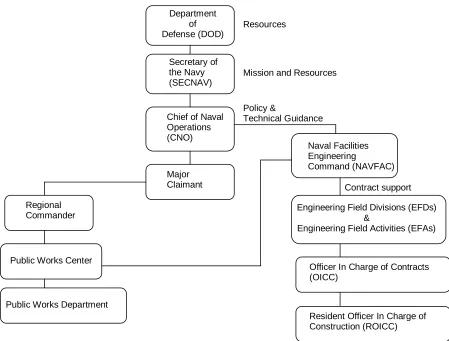
NAVFAC reports directly to the CNO for shore facility management and engineering expertise. The CNO reports to the Undersecretary of the Navy who in turn reports to the Secretary of the Navy (SECNAV). SECNAV works for the Department of Defense which reports directly to the President of the United States. The following chart (Figure 2) shows the chain of command described above. Not shown in the figure is the President of the United States.
Figure 2. NAVFAC Chain of Command
5.2 Engineering Field Divisions (EFD)/Engineering Field Activities (EFA)
Engineering Field Divisions (EFDs) and Engineering Field Activities (EFAs) are tasked by NAVFAC to provide support to the activities, major claimants, and sub-claimants. The divisions are larger staffed and have more resources available to them. They are comprised of professional engineers of all disciplines that specialize in facility management and engineering. Their engineering expertise offers support to the Naval base where the Public Works Officers and Managers are located.
Activities are defined as the Naval base or Installation where the Public Works department resides. It is the Public Works Department that works for the base Commanding Officer as well as for NAVFAC.
A Major Claimant is a command that works directly for the CNO. The major claimant is to provide funding to the Naval installations under is area of responsibility. The Navy just recently consolidated major claimants from 18 to 8 in the hopes of reducing costs.
Department of Defense (DOD) Secretary of the Navy (SECNAV)
Chief of Naval Operations (CNO)
Naval Facilities Engineering
Command (NAVFAC)
Engineering Field Divisions (EFDs) &
Engineering Field Activities (EFAs)
Officer In Charge of Contracts (OICC)
Resident Officer In Charge of Construction (ROICC) Contract support Policy & Technical Guidance Major Claimant
Mission and Resources Resources
Regional Commander
Public Works Center
Claimant support assignments are predicated on geographic location of the claimant. The Claimant support functions performed by the EFDs for the Claimant’s facility manager include those listed below.
• Facility planning, design, and construction • Contract management
• Guidance for developing a budget
• Guidance for developing Annual Inspection Summaries (AIS) • Developing the Claimant’s budget submission to CNO
• Developing the Claimant’s AIS submission to CNO
• Developing the Claimant’s Program Objective Memorandum (POM) issues for submission to CNO
• Providing facilities management program analyses
• Providing Claimant resource distribution recommendation (among Claimant activities)
• Activity assist visits upon request
The EFDs and EFAs are agile, global engineering organizations that provide contingency engineering; shore facilities planning, design and construction; and engineering support for base operations and maintenance. Their locations and capabilities are shown in Figure 3.
The EFDs and EFAs provide facility management support to activities in a defined geographical region. These are shown in Figure 3. This support is generally in terms of assuring that the Facilities Management System is functioning properly and that the activity’s facilities management team is trained and aware of the latest issues in their area. Some of these support functions include:
• Conducting control inspector training • Conducting facilities management training
• Providing special project review/validation (as tasked) • Special project preparation and planning (as tasked) • Reviewing Facilities Support Contracts (FSC) • Conducting FSC training
• Conducting special studies in response to engineering service • Engineering Service Request (ESR)
5.3 Public Works Centers
The Public Works Centers are base support providers to military, federal, state, and local activities located within ten regional areas serviced by the Public Works Centers and their detachments. Currently, Public Works Centers provide services to the Navy, Army, Air Force, Marine Corps, Coast Guard, DOD, National Aeronautics and Space Administration, state, and other federal and nonfederal organizations.
The Navy Public Works Center (PWC) provides facilities maintenance, support, and services to family housing, utilities services, transportation support, weight handling equipment support, and engineering services. Additionally, PWC provides shore activities planning support required by afloat and ashore operation forces and other activities. PWC have a unique Command and Control structure. The PWC operates under the command of the regional Naval Base Commander and also under the technical control of the Naval Facilities Engineering Command. Figure 4 shows the physical location of the PWCs throughout the United States.
5.4 Public Works Departments
The function of Navy Public Works Departments (PWDs) is to provide the same types of services as PWCs in locations where PWCs are not available. PWDs are typically located on Naval bases where PWCs are not available and PWDs are under the direct control of the Navy base commanding officer.
5.4.1 Public Works Department Organization
A typical Public Works Department organization is shown in Figure 5. The Public Works Department is headed by a Public Works Officer (PWO) who is usually the rank of Commander or Captain. The PWO has a Deputy Public Works Officer usually a civilian of equal grade, and an Assistant Public Works Officer with the rank of Lieutenant or Lieutenant Commander. The divisions are further divided into branches. Both the divisions and the branches that each contain are discussed in the subsections that follow.
Note that: Figure 5 has been labeled with the corresponding sections of the report. The figure there helps further explain the divisions in a PWD and gives the reader a visual representation of the divisions discussed.