PUBLIC
SAP HANA Platform SPS 11
Document Version: 1.0 – 2015-11-25
Content
1 About SAP HANA SQLScript. . . . 6
2 Backus Naur Form Notation. . . .7
3 What is SQLScript? . . . .9
3.1 SQLScript Security Considerations. . . .10
3.2 SQLScript Processing Overview. . . 11
Orchestration-Logic. . . .12 Declarative-Logic. . . .13 4 Datatype Extension. . . . 14 4.1 Scalar Datatypes. . . 14 4.2 Table Types. . . 14 CREATE TYPE. . . .15 DROP TYPE. . . .16 5 Logic Container. . . . 18 5.1 Procedures. . . 18 CREATE PROCEDURE. . . 18 DROP PROCEDURE. . . .26 ALTER PROCEDURE. . . 27
ALTER PROCEDURE RECOMPILE. . . .28
Procedure Calls. . . .29
Procedure Parameters. . . .33
Procedure Metadata. . . 37
5.2 User Defined Function. . . .42
CREATE FUNCTION. . . .42
DROP FUNCTION. . . 46
ALTER FUNCTION. . . .47
Function Parameters. . . .48
Function Metadata. . . 49
Default Values for Parameters. . . .51
5.3 Anonymous Block. . . .52
6 Declarative SQLScript Logic. . . .55
6.1 Table Parameter. . . .56
6.4 Binding Table Variables. . . 60
6.5 Referencing Variables. . . .60
6.6 Column View Parameter Binding. . . 61
6.7 HINTS: NO_INLINE and INLINE. . . 62
7 Imperative SQLScript Logic. . . .65
7.1 Local Scalar Variables. . . .65
7.2 Variable Scope Nesting. . . .67
7.3 Control Structures. . . .70
Conditionals. . . .70
While Loop. . . 72
For Loop. . . .73
Break and Continue. . . .74
7.4 Cursors. . . .75
Define Cursor. . . 76
Open Cursor. . . .77
Close Cursor. . . .77
Fetch Query Results of a Cursor. . . 78
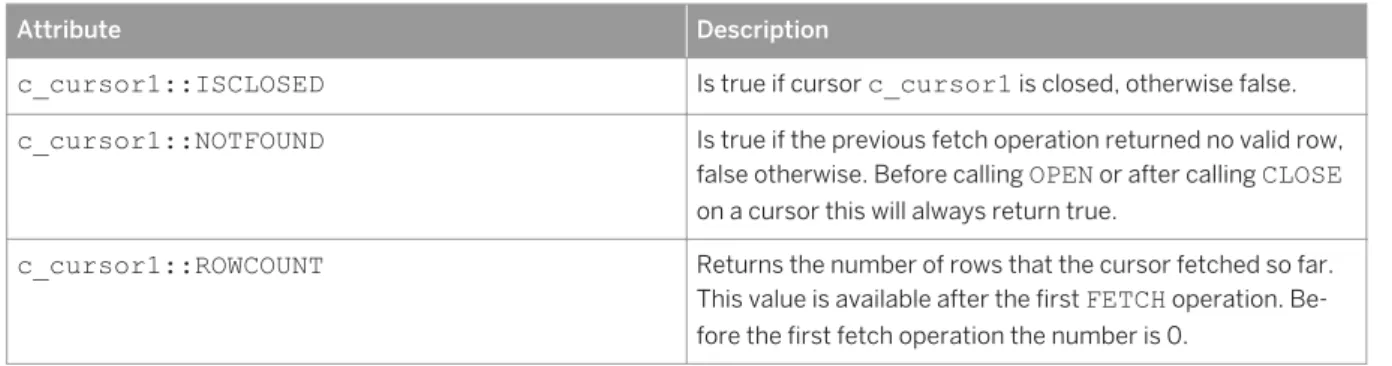
Attributes of a Cursor. . . 79
Looping over Result Sets. . . .80
7.5 Autonomous Transaction. . . 81
7.6 COMMIT and ROLLBACK. . . 83
7.7 Dynamic SQL. . . .85
EXEC. . . .86
EXECUTE IMMEDIATE. . . .86
APPLY_FILTER. . . 87
7.8 Exception Handling. . . .88
DECLARE EXIT HANDLER. . . 88
DECLARE CONDITION. . . .90
SIGNAL and RESIGNAL. . . 91
Exception Handling Examples. . . .93
7.9 ARRAY. . . 95
DECLARE ARRAY-TYPED VARIABLE. . . .96
SET AN ELEMENT OF AN ARRAY. . . 97
RETURN AN ELEMENT OF AN ARRAY. . . .97
UNNEST. . . .98
ARRAY_AGG . . . 99
TRIM_ARRAY. . . 100
CARDINALITY. . . 101
CONCATENATE TWO ARRAYS. . . 101
7.10 Index based cell access for table variables. . . .102
7.12 SQL Injection Prevention Functions. . . 103
7.13 Explicit Parallel Execution for DML. . . .106
8 Calculation Engine Plan Operators. . . .108
8.1 Data Source Access Operators. . . .110
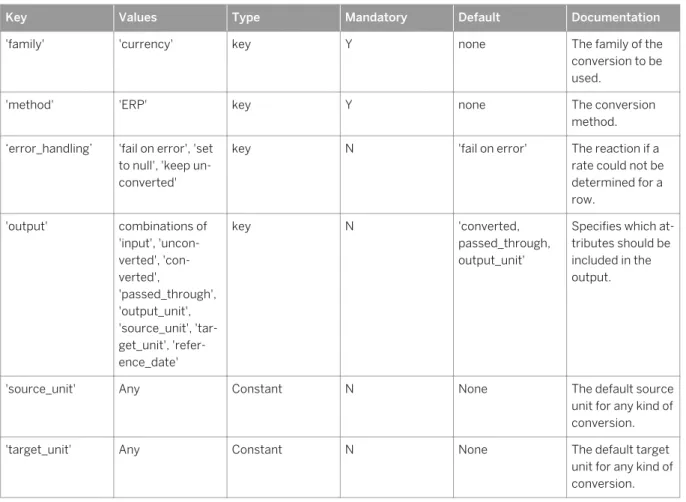
CE_COLUMN_TABLE. . . 110 CE_JOIN_VIEW. . . .111 CE_OLAP_VIEW. . . .112 CE_CALC_VIEW. . . .113 8.2 Relational Operators. . . 113 CE_JOIN. . . 113 CE_LEFT_OUTER_JOIN. . . .114 CE_RIGHT_OUTER_JOIN. . . .114 CE_PROJECTION. . . .115 CE_CALC. . . .116 CE_AGGREGATION. . . 120 CE_UNION_ALL. . . .122 8.3 Special Operators. . . .122 CE_VERTICAL_UNION. . . 123 CE_CONVERSION. . . 123 TRACE. . . 125
9 Procedure and Function Headers. . . . 127
10 HANA Spatial Support. . . . 130
11 System Variables. . . . 132
11.1 ::CURRENT_OBJECT_NAME and ::CURRENT_OBJECT_SCHEMA. . . 132
11.2 ::ROWCOUNT. . . .133
12 Supportability. . . .135
12.1 M_ACTIVE_PROCEDURES. . . .135
13 Best Practices for Using SQLScript. . . . 138
13.1 Reduce Complexity of SQL Statements . . . 138
13.2 Identify Common Sub-Expressions. . . .139
13.3 Multi-level Aggregation. . . 139
13.4 Understand the Costs of Statements . . . .140
13.5 Exploit Underlying Engine. . . 140
13.6 Reduce Dependencies. . . .141
13.7 Avoid Mixing Calculation Engine Plan Operators and SQL Queries. . . 141
14 Developing Applications with SQLScript. . . .145
14.1 Handling Temporary Data. . . 145
14.2 SQL Query for Ranking. . . 145
14.3 Calling SQLScript From Clients. . . 146
Calling SQLScript from ABAP. . . 146
Calling SQLScript from Java. . . .149
Calling SQLScript from C#. . . 150
15 Appendix. . . .152
15.1 Example code snippets. . . 152
1
About SAP HANA SQLScript
SQLScript is a collection of extensions to the Structured Query Language (SQL). The extensions are:
● Data extension, which allows the definition of table types without corresponding tables.
● Functional extension, which allows the definition of (side-effect free) functions which can be used to express and encapsulate complex data flows.
● Procedural extension, which provides imperative constructs executed in the context of the database process.
2
Backus Naur Form Notation
This document uses BNF (Backus Naur Form) which is the notation technique used to define programming languages. BNF describes the syntax of a grammar using a set of production rules using a set of symbols.
Symbols used in BNF
Table 1:
Symbol Description
< > Angle brackets are used to surround the name of a syntactic element (BNF non-terminal) of the SQL language.
::= The definition operator is used to provide definitions of the element appeared on the left side of the operator in a production rule.
[ ] Square brackets are used to indicate optional elements in a formula. Optional elements may be specified or omitted.
{ } Braces group elements in a formula. Repetitive elements (zero or more elements) can be speci fied within brace symbols.
| The alternative operator indicates that the portion of the formula following the bar is an alterna tive to the portion preceding the bar.
... The ellipsis indicates that the element may be repeated any number of times. If ellipsis appears after grouped elements, the grouped elements enclosed with braces are repeated. If ellipsis ap pears after a single element, only that element is repeated.
!! Introduces normal English text. This is used when the definition of a syntactic element is not ex pressed in BNF.
BNF Lowest Terms Representations
Throughout the BNF used in this document each syntax term will be defined to one of the lowest term representations shown below.
<digit> ::= 0 | 1 | 2 | 3 | 4 | 5 | 6 | 7 | 8 | 9 <letter> ::= a | b | c | d | e | f | g | h | i | j | k | l | m | n | o | p | q | r | s | t | u | v | w | x | y | z | A | B | C | D | E | F | G | H | I | J | K | L | M | N | O | P | Q | R | S | T | U | V | W | X | Y | Z <string_literal> ::= <double_quote><string_content><double_quote> | <single_quote><string_content><single _quote>
<string_content> = { <letter> | <digit> }...
<identifier> ::= <letter> { <letter> | <digit> }... <password> ::= [{ <letter> | <digit> }...]
<sign> ::= + | -<period> ::= .
<unsigned_integer> ::= <digit>...
<signed_integer> ::= [<sign>] <unsigned_integer>
<signed_numeric_literal> ::= [<sign>] <unsigned_numeric_literal> <unsigned_numeric_literal> ::= <exact_numeric_literal> |
<approximate_numeric_literal>
<exact_numeric_literal> ::= <unsigned_integer> [<period> [<unsigned_integer>]] | <period> <unsigned_integer>
<approximate_numeric_literal> ::= <mantissa> E <exponent> <mantissa> ::= <exact_numeric_literal>
<exponent> ::= <signed_integer> <schema_name> ::= <unicode_name>
<cesu8_restricted_characters> ::= <double_quote> | <dollar_sign> |
<single_quote> | <sign> | <period> | <greater_than_sign> | <lower_than_sign> | <pipe_sign> | <left_bracket> | <right_bracket> | <left_curly_bracket> |
<right_curly_bracke>t | ( | ) | ! | % | * | , | / | : | ; | = | ? | @ | \ | ^ | `
<unicode_name> ::= !! CESU-8 string excluding any characters listed in <cesu8_restricted_characters>
3
What is SQLScript?
The motivation for SQLScript is to embed data-intensive application logic into the database. As of today, applications only offload very limited functionality into the database using SQL, most of the application logic is normally executed in an application server. This has the effect that data to be operated upon needs to be copied from the database into the application server and vice versa. When executing data intensive logic, this copying of data can be very expensive in terms of processor and data transfer time. Moreover, when using an imperative language like ABAP or JAVA for processing data, developers tend to write algorithms which follow a one tuple at a time semantics (for example looping over rows in a table). However, these algorithms are hard to optimize and parallelize compared to declarative set-oriented languages such as SQL.
The SAP HANA database is optimized for modern technology trends and takes advantage of modern
hardware, for example, by having data residing in main-memory and allowing massive-parallelization on multi-core CPUs. The goal of the SAP HANA database is to optimally support application requirements by leveraging such hardware. To this end, the SAP HANA database exposes a very sophisticated interface to the application consisting of many languages. The expressiveness of these languages far exceeds that attainable with OpenSQL. The set of SQL extensions for the SAP HANA database that allow developers to push data intensive logic into the database is called SQLScript. Conceptually SQLScript is related to stored procedures as defined in the SQL standard, but SQLScript is designed to provide superior optimization possibilities. SQLScript should be used in cases where other modeling constructs of SAP HANA, for example analytic views or attribute views are not sufficient. For more information on how to best exploit the different view types, see "Exploit Underlying Engine".
The set of SQL extensions are the key to avoid massive data copies to the application server and for leveraging sophisticated parallel execution strategies of the database. SQLScript addresses the following problems:
● Decomposing an SQL query can only be done using views. However when decomposing complex queries using views, all intermediate results are visible and must be explicitly typed. Moreover SQL views cannot be parameterized which limits their reuse. In particular they can only be used like tables and embedded into other SQL statements.
● SQL queries do not have features to express business logic (for example a complex currency conversion). As a consequence such a business logic cannot be pushed down into the database (even if it is mainly based on standard aggregations like SUM(Sales), etc.).
● An SQL query can only return one result at a time. As a consequence the computation of related result sets must be split into separate, usually unrelated, queries.
● As SQLScript encourages developers to implement algorithms using a set-oriented paradigm and not using a one tuple at a time paradigm, imperative logic is required, for example by iterative approximation algorithms. Thus it is possible to mix imperative constructs known from stored procedures with
declarative ones.
Related Information
3.1
SQLScript Security Considerations
You can develop secure procedures using SQLScript in SAP HANA by observing the following recommendations.
Using SQLScript, you can read and modify information in the database. In some cases, depending on the commands and parameters you choose, you can create a situation in which data leakage or data tampering can occur. To prevent this, SAP recommends using the following practices in all procedures.
● Mark each parameter using the keywords IN or OUT. Avoid using the INOUT keyword.
● Use the INVOKER keyword when you want the user to have the assigned privileges to start a procedure. The default keyword, DEFINER, allows only the owner of the procedure to start it.
● Mark read-only procedures using READS SQL DATA whenever it is possible. This ensures that the data and the structure of the database are not altered.
Tip
Another advantage to using READS SQL DATA is that it optimizes performance.
● Ensure that the types of parameters and variables are as specific as possible. Avoid using VARCHAR, for example. By reducing the length of variables you can reduce the risk of injection attacks.
● Perform validation on input parameters within the procedure.
Dynamic SQL
In SQLScript you can create dynamic SQL using one of the following commands: EXEC, EXECUTE IMMEDIATE, and APPLY_FILTER. Although these commands allow the use of variables in SQLScript where they might not be supported. In these situations you risk injection attacks unless you perform input validation within the procedure. In some cases injection attacks can occur by way of data from another database table. To avoid potential vulnerability from injection attacks, consider using the following methods instead of dynamic SQL:
● Use static SQL statements. For example, use the static statement, SELECT instead of EXECUTE IMMEDIATE and passing the values in the WHERE clause.
● Use server-side JavaScript to write this procedure instead of using SQLScript.
● Perform validation on input parameters within the procedure using either SQLScript or server-side JavaScript.
Escape Code
You might need to use some SQL statements that are not supported in SQLScript, for example, the GRANT
statement. In other cases you might want to use the Data Definition Language (DDL) in which some <name>
elements, but not <value> elements, come from user input or another data source. The CREATE TABLE
To avoid potential vulnerability from injection attacks, consider using the folowing methods instead of escape code:
● Use server-side JavaScript to write this procedure instead of using SQLScript.
● Perform validation on input parameters within the procedure using either SQLScript or server-side JavaScript.
Related Information
SAP HANA Security Guide
SAP HANA SQL and System Views Reference
3.2 SQLScript Processing Overview
To better understand the features of SQLScript, and their impact on execution, it can be helpful to understand how SQLScript is processed in the SAP HANA database.
When a user defines a new procedure, for example using the CREATE PROCEDURE statement, the SAP HANA database query compiler processes the statement in a similar way to an SQL statement. A step by step analysis of the process flow follows below:
● Parse the statement - Detect and report simple syntactic errors.
● Check the statements semantic correctness - Derive types for variables and check their use is consistent.
● Optimize the code - Optimization distinguishes between declarative logic shown in the upper branch and imperative logic shown in the lower branch. We discuss how the SAP HANA database recognizes them below.
When the procedure starts, the invoke activity can be divided into two phases: 1. Compilation
○ Code generation - For declarative logic the calculation models are created to represent the dataflow defined by the SQLScript code. It is optimized further by the calculation engine, when it is instantiated. For imperative logic the code blocks are translated into L nodes.
○ The calculation models generated in the previous step are combined into a stacked calculation model. 2. Execution - The execution commences with binding actual parameters to the calculation models. When
the calculation models are instantiated they can be optimized based on concrete input provided. Optimizations include predicate or projection embedding in the database. Finally the instantiated calculation model is executed using any of the available parts of the SAP HANA database.
With SQLScript one can implement applications both using imperative orchestration logic and (functional) declarative logic, and this is also reflected in the way SQLScript processing works for both coding styles. Imperative logic is executed sequentially and declarative logic is executed by exploiting the internal architecture of the SAP HANA database utilizing its potential for parallelism.
3.2.1 Orchestration-Logic
Orchestration logic is used to implement data flow and control flow logic using imperative language constructs such as loops and conditionals. The orchestration logic can also execute declarative logic that is defined in the functional extension by calling the corresponding procedures. In order to achieve an efficient execution on both levels, the statements are transformed into a dataflow graph to the maximum extent possible. The compilation step extracts flow oriented snippets out of the orchestration logic and maps them to data-flow constructs. The calculation engine serves as execution engine of the resulting datadata-flow graph. Since the language L is used as intermediate language for translating SQLScript into a calculation model, the range of mappings may span the full spectrum – from a single internal L-node for a complete SQLScript script in its simplest form, up to a fully resolved data-flow graph without any imperative code left. Typically, the dataflow graph provides more opportunities for optimization and thus better performance.
To transform the application logic into a complex data flow graph two prerequisites have to be fulfilled:
● All data flow operations have to be side-effect free, that is they must not change any global state either in the database or in the application logic.
● All control flows can be transformed into a static dataflow graph.
In SQLScript the optimizer will transform a sequence of assignments of SQL query result sets to table
variables into parallelizable dataflow constructs. The imperative logic is usually represented as a single node in the dataflow graph, and thus it will be executed sequentially.
3.2.1.1
Example for Orchestration-Logic
CREATE PROCEDURE orchestrationProc LANGUAGE SQLSCRIPT READS SQL DATA
AS BEGIN
DECLARE v_id BIGINT;
DECLARE v_name VARCHAR(30); DECLARE v_pmnt BIGINT; DECLARE v_msg VARCHAR(200);
DECLARE CURSOR c_cursor1 (p_payment BIGINT) FOR SELECT id, name, payment FROM control_tab WHERE payment > :p_payment
ORDER BY id ASC; CALL init_proc(); OPEN c_cursor1(250000);
FETCH c_cursor1 INTO v_id, v_name, v_pmnt;
v_msg = :v_name || ' (id ' || :v_id || ') earns ' || :v_pmnt || ' $.'; CALL ins_msg_proc(:v_msg);
CLOSE c_cursor1; END
This procedure features a number of imperative constructs including the use of a cursor (with associated state) and local scalar variables with assignments.
Related Information
ins_msg_proc [page 152]
3.2.2 Declarative-Logic
Declarative logic is used for efficient execution of data-intensive computations. This logic is internally
represented as data flows which can be executed in parallel. As a consequence, operations in a dataflow graph have to be free of side effects. This means they must not change any global state either in the database or in the application. The first condition is ensured by only allowing changes on the dataset that is passed as input to the operator. The second condition is achieved by only allowing a limited subset of language features to express the logic of the operator. Given these prerequisites, the following kinds of operators are available:
● SQL SELECT Statement
● Custom operators provided by SAP
Logically each operator represents a node in the data flow graph. Custom operators have to be manually implemented by SAP.
4 Datatype Extension
Besides the built-in scalar SQL datatypes, SQLScript allows you to use and define user-defined types for tabular values.
4.1 Scalar Datatypes
The SQLScript type system is based on the SQL-92 type system. It supports the following primitive data types:
Table 2:
Numeric types TINYINT SMALLINT INT BIGINT DECIMAL SMALL DECIMAL REAL DOUBLE
Character String Types VARCHAR NVARCHAR ALPHANUM
Datetime Types TIMESTAMP SECONDDATE DATE TIME
Binary Types VARBINARY
Large Object Types CLOB NCLOB BLOB
Spatial Types ST_GEOMETRY
Note
This is the same as for SQL statements, excluding the TEXT and SHORTTEXT types.
See SAP HANA SQL and System Views Reference, Data Types section, for further details on scalar types.
4.2 Table Types
SQLScript's datatype extension also allows the definition of table types. These table types are used to define parameters for a procedure that represent tabular results.
4.2.1 CREATE TYPE
Syntax
CREATE TYPE <type_name> AS TABLE (<column_list_definition>)
Syntax Elements
<type_name> ::= [<schema_name>.]<identifier>
Identifies the table type to be created and, optionally, in which schema the creation should take place.
<column_list_definition> ::= <column_elem>[{, <column_elem>}...] <column_elem> ::= <column_name> <data_type>[<column_store_data_type>] [<ddic_data_type>]
<column_name> ::= <identifier>
Defines a table column.
<data_type> ::= DATE | TIME | SECONDDATE | TIMESTAMP | TINYINT | SMALLINT | INTEGER | BIGINT | SMALLDECIMAL | DECIMAL
| REAL | DOUBLE | VARCHAR | NVARCHAR | ALPHANUM | SHORTTEXT | VARBINARY | BLOB | CLOB | NCLOB | TEXT
<column_store_data_type> ::= CS_ALPHANUM | CS_INT | CS_FIXED | CS_FLOAT | CS_DOUBLE | CS_DECIMAL_FLOAT | CS_FIXED(p-s, s)
| CS_SDFLOAT | CS_STRING | CS_UNITEDECFLOAT | CS_DATE | CS_TIME | CS_FIXEDSTRING | CS_RAW
| CS_DAYDATE | CS_SECONDTIME | CS_LONGDATE | CS_SECONDDATE
<ddic_data_type> ::= DDIC_ACCP | DDIC_ALNM | DDIC_CHAR | DDIC_CDAY | DDIC_CLNT | DDIC_CUKY | DDIC_CURR | DDIC_D16D
| DDIC_D34D | DDIC_D16R | DDIC_D34R | DDIC_D16S | DDIC_D34S | DDIC_DATS | DDIC_DAY | DDIC_DEC
| DDIC_FLTP | DDIC_GUID | DDIC_INT1 | DDIC_INT2 | DDIC_INT4 | DDIC_INT8 | DDIC_LANG | DDIC_LCHR
| DDIC_MIN | DDIC_MON | DDIC_LRAW | DDIC_NUMC | DDIC_PREC | DDIC_QUAN | DDIC_RAW | DDIC_RSTR
| DDIC_SEC | DDIC_SRST | DDIC_SSTR | DDIC_STRG | DDIC_STXT | DDIC_TIMS | DDIC_UNIT | DDIC_UTCM
| DDIC_UTCL | DDIC_UTCS | DDIC_TEXT | DDIC_VARC | DDIC_WEEK
The available data types. For more information on data types, see Scalar Datatypes [page 14]
Description
The syntax for defining table types follows the SQL syntax for defining new tables. The table type is specified using a list of attribute names and primitive data types. For each table type, attributes must have unique names.
Example
You create a table type called tt_publishers.
CREATE TYPE tt_publishers AS TABLE ( publisher INTEGER,
name VARCHAR(50), price DECIMAL, cnt INTEGER);
You create a table type called tt_years.
CREATE TYPE tt_years AS TABLE ( year VARCHAR(4),
price DECIMAL, cnt INTEGER);
4.2.2 DROP TYPE
Syntax
DROP TYPE <type_name> [<drop_option>]
Syntax Elements
<type_name> ::= [<schema_name>.]<identifier>
The identifier of the table type to be dropped, with optional schema name.
<drop_option> ::= CASCADE | RESTRICT
When <drop_option> is not specified, a non-cascaded drop will be performed. This will drop only the specified type, dependent objects of the type will be invalidated but not dropped.
Description
The DROP TYPE statement removes a user-defined table type.
Example
You create a table type called my_type.
CREATE TYPE my_type AS TABLE ( column_a DOUBLE );
You drop the my_type table type.
5
Logic Container
In SQLScript there are two different logic containers, Procedure and User Defined Function. The User Defined Function container is separated into Scalar User Defined Function and Table User Defined Function.
The following sections provide an overview of the syntactical language description for both containers.
5.1
Procedures
Procedures allows you to describe a sequence of data transformations on data passed as input and database tables.
Data transformations can be implemented as queries that follow the SAP HANA database SQL syntax by calling other procedures. Read-only procedures can only call other read-only procedures.
The use of procedures has some advantages compared to using SQL:
● The calculation and transformations described in procedures can be parameterized and reused in other procedures.
● The user is able to use and express knowledge about relationships in the data; related computations can share common sub-expressions, and related results can be returned using multiple output parameters.
● It is easy to define common sub-expressions. The query optimizer decides if a materialization strategy (which avoids recomputation of expressions) or other optimizing rewrites are best to apply. In any case, it eases the task to detect common sub-expressions and improves the readability of the SQLScript code.
● Scalar variables or imperative language features are also available and can be used if they are required.
5.1.1 CREATE PROCEDURE
You use this SQL statement to create a procedure.
Syntax
CREATE PROCEDURE <proc_name> [(<parameter_clause>)] [LANGUAGE <lang>] [SQL SECURITY <mode>] [DEFAULT SCHEMA <default_schema_name>]
[READS SQL DATA ] AS
BEGIN [SEQUENTIAL EXECUTION] <procedure_body>
Syntax Elements
<proc_name> ::= [<schema_name>.]<identifier>
The identifier of the procedure to be created, with optional schema name.
<parameter_clause> ::= <parameter> [{,<parameter>}...]
The input and output parameters of the procedure.
<parameter> ::= [<param_inout>] <param_name> <param_type>
A procedure parameter with associated data type.
<param_inout> ::= IN|OUT|INOUT
Default: IN
Each parameter is marked using the keywords IN/OUT/INOUT. Input and output parameters must be explicitly typed (i.e. no un-typed tables are supported).
<param_name> ::= <identifier>
The variable name for a parameter.
<param_type> ::= <sql_type> | <table_type> | <table_type_definition>
The input and output parameters of a procedure can have any of the primitive SQL types or a table type. INOUT parameters can only be of scalar type.
<sql_type> ::= DATE | TIME| TIMESTAMP | SECONDDATE | TINYINT | SMALLINT | INTEGER | BIGINT | DECIMAL | SMALLDECIMAL | REAL | DOUBLE
| VARCHAR | NVARCHAR | ALPHANUM | VARBINARY | CLOB | NCLOB | BLOB
The data type of the variable. For more information on data types see Data Types in the SAP HANA SQL and System Views Reference.
<table_type> ::= <identifier>
A table type previously defined with the CREATE TYPE command, see CREATE TYPE [page 15].
<table_type_defintion> ::= TABLE (<column_list_definition>) <column_list_definition> ::= <column_elem>[{, <column_elem>}...] <column_elem> ::= <column_name> <data_type>
<column_name> ::= <identifier>
A table type implicitly defined within the signature.
LANGUAGE <lang>
<lang> ::= SQLSCRIPT | R
Defines the programming language used in the procedure. It is good practice to define the language in all procedure definitions.
SQL SECURITY <mode>
<mode> ::= DEFINER | INVOKER
Default: DEFINER
Specifies the security mode of the procedure.
DEFINER
Specifies that the execution of the procedure is performed with the privileges of the definer of the procedure.
INVOKER
Specifies that the execution of the procedure is performed with the privileges of the invoker of the procedure.
DEFAULT SCHEMA <default_schema_name> <default_schema_name> ::= <unicode_name>
Specifies the schema for unqualified objects in the procedure body. If nothing is specified, then the current_schema of the session is used.
READS SQL DATA
Marks the procedure as being read-only, side-effect free i.e. the procedure does not make modifications to the database data or its structure. This means that the procedure does not contain DDL or DML statements, and that the procedure only calls other read-only procedures. The advantage of using this parameter is that certain optimizations are available for read-only procedures.
SEQUENTIAL EXECUTION
This statement will force sequential execution of the procedure logic. No parallelism takes place.
<procedure_body> ::= [<proc_decl_list>] [<proc_handler_list>] <proc_stmt_list>
Defines the main body of the procedure according to the programming language selected.
<proc_decl_list> ::= <proc_decl> [{<proc_decl>}…]
<proc_decl> ::= DECLARE {<proc_variable>|<proc_table_variable>|<proc_cursor>| <proc_condition>} ;
<proc_table_variable> ::= <variable_name_list> {<table_type_definition>| <table_type>}
<proc_variable>::= <variable_name_list> [CONSTANT] {<sql_type>|<array_datatype>} [NOT NULL][<proc_default>]
<variable_name_list> ::= <variable_name>[{, <variable_name}...]
<column_list_elements> ::= (<column_definition>[{,<column_definition>}...]) <array_datatype> ::= <sql_type> ARRAY [ = <array_constructor> ]
<array_constructor> ::= ARRAY (<expression> [ { , <expression> }...] ) <proc_default> ::= (DEFAULT | '=' ) <value>|<expression>
<value> !!= An element of the type specified by <type> or an expression <proc_cursor> ::= CURSOR <cursor_name> [ ( proc_cursor_param_list ) ] FOR <subquery> ;
<proc_cursor_param_list> ::= <proc_cursor_param> [{,<proc_cursor_param>}...] <variable_name> ::= <identifier>
<proc_cursor_param> ::= <param_name> <datatype>
<proc_condition> ::= <variable_name> CONDITION | <variable_name> CONDITION FOR <sql_error_code>
Condition handler declaration.
<proc_handler_list> ::= <proc_handler> [{, <proc_handler>}...]
<proc_handler>::= DECLARE EXIT HANDLER FOR <proc_condition_value_list> <proc_stmt> ;
Declares exception handlers to catch SQL exceptions.
<proc_condition_value_list> ::= <proc_condition_value> {,<proc_condition_value>}...]
One or more condition values.
<proc_condition_value> ::= SQLEXCEPTION
| <sql_error_code> | <condition_name>
You can use a specific error code number or condition name declared on condition variable.
<proc_stmt_list> ::= {<proc_stmt>}... <proc_stmt> ::= <proc_block> | <proc_assign> | <proc_single_assign> | <proc_multi_assign> | <proc_if> | <proc_loop> | <proc_while> | <proc_for> | <proc_foreach> | <proc_exit> | <proc_continue> | <proc_signal> | <proc_resignal> | <proc_sql> | <proc_open> | <proc_fetch> | <proc_close> | <proc_call> | <proc_exec> | <proc_return>
Procedure body statements.
<proc_block> ::= BEGIN <proc_block_option> [<proc_decl_list>] [<proc_handler_list>] <proc_stmt_list> END ;
<proc_block_option> ::= [SEQUENTIAL EXECUTION ]| [AUTONOMOUS TRANSACTION] | [PARALLEL EXECUTION]
Sections of your procedures can be nested using BEGIN and END terminals.
<proc_assign> ::= <variable_name> = { <expression> | <array_function> } ; | <variable_name> '[' <expression> ']' = <expression> ;
Assign values to variables. An <expression> can be either a simple expression, such as a character, a date, or a number, or it can be a scalar function or a scalar user-defined function.
<array_function> = ARRAY_AGG ( :<table_variable>.<column_name> [ ORDER BY <sort_spec_list> ] ) | CARDINALITY ( :<array_variable_name>) | TRIM_ARRAY ( :<array_variable_name> , <array_variable_name>) | ARRAY ( <array_variable_name_list> ) <table_variable> ::= <identifier> <column_name> ::= <identifier> <array_variable_name> ::= <identifier>
The ARRAY_AGG function returns the array by aggregating the set of elements in the specified column of the table variable. Elements can optionally be ordered.
The CARDINALITY function returns the number of the elements in the array, <array_variable_name>. The TRIM_ARRAY function returns the new array by removing the given number of elements, <numeric_value_expression>, from the end of the array, <array_value_expression>.
The ARRAY function returns an array whose elements are specified in the list <array_variable_name>. For more information see the chapter ARRAY [page 95].
<proc_single_assign> ::= <variable_name> = <subquery> | <variable_name> = <proc_ce_call> | <variable_name> = <proc_apply_filter> | <variable_name> = <unnest_function>
<proc_multi_assign> ::= (<var_name_list>) = <function_expression>
Assign values to a list of variables with only one function evaluation. For example, <function_expression>
must be a scalar user defined function and the number of elements in <var_name_list> must be equal to the number of output parameters of the scalar UDF.
<proc_ce_call> ::= TRACE ( <variable_name> ) ;
| CE_LEFT_OUTER_JOIN ( <table_variable> , <table_variable> , '[' <expr_alias_comma_list> ']' [ <expr_alias_vector>] ) ;
| CE_RIGHT_OUTER_JOIN ( <table_variable> , <table_variable> , '[' <expr_alias_comma_list> ']' [ <expr_alias_vector>] ) ;
| CE_FULL_OUTER_JOIN ( <table_variable> , <table_variable> , '[' <expr_alias_comma_list> ']' [ <expr_alias_vector>] );
| CE_JOIN ( <table_variable> , <table_variable> , '[' <expr_alias_comma_list> ']' [<expr_alias_vector>] ) ;
| CE_UNION_ALL ( <table_variable> , <table_variable> ) ; | CE_COLUMN_TABLE ( <table_name> [ <expr_alias_vector>] ) ; | CE_JOIN_VIEW ( <table_name> [ <expr_alias_vector>] ) ; | CE_CALC_VIEW ( <table_name> [ <expr_alias_vector>] ) ; | CE_OLAP_VIEW ( <table_name> [ <expr_alias_vector>] ) ; | CE_PROJECTION ( <table_variable> , '['
<expr_alias_comma_list> ']' <opt_str_const> ) ;
| CE_PROJECTION ( <table_variable> <opt_str_const> ) ; | CE_AGGREGATION ( <table_variable> , '[' <agg_alias_comma_list> ']' [ <expr_alias_vector>] ); | CE_CONVERSION ( <table_variable> , '[' <proc_key_value_pair_comma_list> ']' [ <expr_alias_vector>] ) ; | CE_VERTICAL_UNION ( <table_variable> , '[' <expr_alias_comma_list> ']' <vertical_union_param_pair_list> ) ;
| CE_COMM2R ( <table_variable> , <int_const> , <str_const> , <int_const> , <int_const> , <str_const> ) ;
For more information about the CE-Operators, see Calculation Engine Plan Operators [page 108].
<proc_apply_filter> ::= APPLY_FILTER ( {<table_name> | :<table_variable>}, <variable_name> ) ;
APPLY_FILTER defines a dynamic WHERE condition <variable_name> that will be applied during runtime. For more information about see the chapter APPLY_FILTER [page 87].
<unnest_function> ::= UNNEST ( <variable_name_list> ) [ WITH ORDINALITY ] [<as_col_names>] ;
<variable_name_list> ::= :<variable_name> [{, :<variable_name>}...]
The UNNEST function returns a table including a row for each element of the specified array.
WITH ORDINALTIY
Appends an ordinal column to the return values.
<as_col_names> ::= AS [table_name] ( <column_name_list> ) <column_name_list> ::= <column_name>[{, <column_name>}...] <column_name> ::= <identifier>
Specifies the column names of the return table.
<proc_if> ::= IF <condition> THEN [SEQUENTIAL EXECUTION][<proc_decl_list>] [<proc_handler_list>] <proc_stmt_list>
[<proc_elsif_list>] [<proc_else>] END IF ;
<proc_elsif_list> ::= ELSEIF <condition> THEN [SEQUENTIAL EXECUTION] [<proc_decl_list>] [<proc_handler_list>] <proc_stmt_list>
<proc_else> ::= ELSE [SEQUENTIAL EXECUTION][<proc_decl_list>] [<proc_handler_list>] <proc_stmt_list>
You use IF - THEN - ELSE IF to control execution flow with conditionals.
<proc_loop> ::= LOOP [SEQUENTIAL EXECUTION][<proc_decl_list>] [<proc_handler_list>] <proc_stmt_list> END LOOP ;
You use loop to repeatedly execute a set of statements.
<proc_while> ::= WHILE <condition> DO [SEQUENTIAL EXECUTION][<proc_decl_list>] [<proc_handler_list>] <proc_stmt_list> END WHILE ;
You use while to repeatedly call a set of trigger statements while a condition is true.
<proc_for> ::= FOR <column_name> IN [ REVERSE ] <expression> [...] <expression> DO [SEQUENTIAL EXECUTION][<proc_decl_list>] [<proc_handler_list>] <proc_stmt_list>
END FOR ;
You use FOR - IN loops to iterate over a set of data.
<proc_foreach> ::= FOR <column_name> AS <column_name> [<open_param_list>] DO [SEQUENTIAL EXECUTION][<proc_decl_list>] [<proc_handler_list>] <proc_stmt_list>
END FOR ;
You use FOR - EACH loops to iterate over all elements in a set of data.
<proc_exit> ::= BREAK ;
Terminates a loop.
<proc_continue> ::= CONTINUE ;
Skips a current loop iteration and continues with the next value.
<proc_signal> ::= SIGNAL <signal_value> [<set_signal_info>] ;
You use the SIGNAL statement to explicitly raise an exception from within your trigger procedures.
<proc_resignal> ::= RESIGNAL [<signal_value>] [<set_signal_info>] ;
You use the RESIGNAL statement to raise an exception on the action statement in an exception handler. If an error code is not specified, RESIGNAL will throw the caught exception.
<signal_value> ::= <signal_name> | <sql_error_code> <signal_name> ::= <identifier>
<sql_error_code> ::= <unsigned_integer>
You can SIGNAL or RESIGNAL a signal name or an SQL error code.
<set_signal_info> ::= SET MESSAGE_TEXT = '<message_string>' <message_string> ::= <any_character>
You use SET MESSAGE_TEXT to deliver an error message to users when specified error is thrown during procedure execution. <proc_sql> ::= <subquery> | <select_into_stmt> | <insert_stmt> | <delete_stmt> | <update_stmt> | <replace_stmt> | <call_stmt> | <create_table> | <drop_table> | <truncate_statement>
For information on <insert_stmt>, see INSERT in the SAP HANA SQL and System Views Reference. For information on <delete_stmt>, see DELETE in the SAP HANA SQL and System Views Reference. For information on <update_stmt>, see UPDATE in the SAP HANA SQL and System Views Reference. For information on <replace_stmt> and <upsert_stmt>, see REPLACE and UPSERT in the SAP HANA SQL and System Views Reference.
For information on <truncate_stmt>, see TRUNCATE in the SAP HANA SQL and System Views Reference.
<select_into_stmt> ::= SELECT <select_list> INTO <var_name_list> <from_clause >
[<where_clause>] [<group_by_clause>] [<having_clause>]
[<limit>] ;
<var_name_list> ::= <var_name>[{, <var_name>}...] <var_name> ::= <identifier>
<var_name> is a scalar variable. You can assign selected item value to this scalar variable.
<proc_open> ::= OPEN <cursor_name> [ <open_param_list>] ; <proc_fetch> ::= FETCH <cursor_name> INTO <column_name_list> ; <proc_close> ::= CLOSE <cursor_name> ;
Cursor operations
<proc_call> ::= CALL <proc_name> (<param_list>) ;
Calling a procedure; for more information, see CALL - Internal Procedure Call [page 31]
<proc_exec> ::= {EXEC | EXECUTE IMMEDIATE} <proc_expr> ;
You use EXEC to make dynamic SQL calls.
<proc_return> ::= RETURN [<proc_expr>] ;
Return a value from a procedure.
Description
The CREATE PROCEDURE statement creates a procedure using the specified programming language <lang>.
Example
Example - Creating a Procedure
You create an SQLScript procedure with the following definition.
CREATE PROCEDURE orchestrationProc LANGUAGE SQLSCRIPT AS
BEGIN
DECLARE v_id BIGINT;
DECLARE v_name VARCHAR(30); DECLARE v_pmnt BIGINT; DECLARE v_msg VARCHAR(200);
DECLARE CURSOR c_cursor1 (p_payment BIGINT) FOR SELECT id, name, payment FROM control_tab WHERE payment > :p_payment ORDER BY id ASC; CALL init_proc();
OPEN c_cursor1(250000);
FETCH c_cursor1 INTO v_id, v_name, v_pmnt; v_msg = :v_name || ' (id ' || :v_id || ') earns ' || :v_pmnt || ' $.';
CALL ins_msg_proc(:v_msg); CLOSE c_cursor1;
The procedure features a number of imperative constructs including the use of a cursor (with associated state) and local scalar variables with assignments.
5.1.2 DROP PROCEDURE
Syntax
DROP PROCEDURE <proc_name> [<drop_option>]
Syntax Elements
<proc_name> ::= [<schema_name>.]<identifier>
The name of the procedure to be dropped, with optional schema name.
<drop_option> ::= CASCADE | RESTRICT
When <drop_option> is not specified, a non-cascaded drop will be performed. This will only drop the specified procedure, dependent objects of the procedure will be invalidated but not dropped.
The invalidated objects can be revalidated when an object that has same schema and object name is created.
CASCADE
Drops the procedure and dependent objects.
RESTRICT
Drops the procedure only when dependent objects do not exist. If this drop option is used and a dependent object exists an error will be thrown.
Description
Examples
You drop a procedure called my_proc from the database using a non-cascaded drop.
DROP PROCEDURE my_proc;
5.1.3 ALTER PROCEDURE
You can use ALTER PROCEDURE if you want to change the content and properties of a procedure without dropping the object.
ALTER PROCEDURE <proc_name> [(<parameter_clause>)] [LANGUAGE <lang>] [DEFAULT SCHEMA <default_schema_name>]
[READS SQL DATA] AS
BEGIN [SEQUENTIAL EXECUTION] <procedure_body>
END
For more information about the parameters please refer to CREATE PROCEDURE [page 18].
For instance, with ALTER PROCEDURE you can change the content of the body itself. Consider the following procedure GET_PROCEDURES that returns all procedure names on the database.
CREATE PROCEDURE GET_PROCEDURES(OUT procedures TABLE(schema_name NVARCHAR(256), name NVARCHAR(256)))
AS BEGIN
procedures = SELECT schema_name AS schema_name, procedure_name AS name FROM PROCEDURES;
END;
The procedure GET_PROCEDURES should now be changed to return only valid procedures. In order to do so, we will use ALTER PROCEDURE:
ALTER PROCEDURE GET_PROCEDURES( OUT procedures TABLE(schema_name NVARCHAR(256), name NVARCHAR(256)))
AS BEGIN
procedures = SELECT schema_name AS schema_name, procedure_name AS name FROM PROCEDURES WHERE IS_VALID = 'TRUE';
END;
Besides changing the procedure body, you can also change the language <lang> of the procedure, the default schema <default_schema_name> as well as change the procedure to read only mode (READS SQL DATA).
Note
Please note that the following properties cannot be changed with ALTER PROCEDURE:
● procedure owner
● security mode (INVOKER, DEFINER)
● parameter signature (parameter name, parameter type, default value)
If you need to change these properties you have to drop and re-create the procedure by using DROP PROCEDURE and CREATE PROCEDURE.
Note that if the default schema and read only mode are not explicitly specified, they will be removed. Language will be defaulted to SQLScript.
Note
Note that you need the ALTER privilege for the object you want to change.
5.1.4 ALTER PROCEDURE RECOMPILE
Syntax
ALTER PROCEDURE <proc_name> RECOMPILE [WITH PLAN]
Syntax Elements
<proc_name> ::= [<schema_name>.]<identifier>
The identifier of the procedure to be altered, with optional schema name.
WITH PLAN
Specifies that internal debug information should be created during execution of the procedure.
Description
The ALTER PROCEDURE RECOMPILE statement manually triggers a recompilation of a procedure by
generating an updated execution plan. For production code a procedure should be compiled without the WITH PLAN option to avoid overhead during compilation and execution of the procedure.
Example
You trigger the recompilation of the my_proc procedure to produce debugging information.
ALTER PROCEDURE my_proc RECOMPILE WITH PLAN;
5.1.5 Procedure Calls
A procedure can be called by a client on the outer-most level, using any of the supported client interfaces, or within the body of a procedure.
Recommendation
SAP recommends that you use parameterized CALL statements for better performance. The advantages follow.
● The parameterized query compiles only once, thereby reducing the compile time.
● A stored query string in the SQL plan cache is more generic and a precompiled query plan can be reused for the same procedure call with different input parameters.
● By not using query parameters for the CALL statement, the system triggers a new query plan generation.
5.1.5.1
CALL
Syntax
CALL <proc_name> (<param_list>) [WITH OVERVIEW]
Syntax Elements
<proc_name> ::= [<schema_name>.]<identifier>
The identifier of the procedure to be called, with optional schema name.
Specifies one or more procedure parameters.
<proc_param> ::= <identifier> | <string_literal> | <unsigned_integer> | <signed_integer>| <signed_numeric_literal> | <unsigned_numeric_literal> | <expression>
Procedure parameters. For more information on these data types, see Backus Naur Form Notation [page 7]
and Scalar Datatypes [page 14].
Parameters passed to a procedure are scalar constants and can be passed either as IN, OUT or INOUT parameters. Scalar parameters are assumed to be NOT NULL. Arguments for IN parameters of table type can either be physical tables or views. The actual value passed for tabular OUT parameters must be`?`.
WITH OVERVIEW
Defines that the result of a procedure call will be stored directly into a physical table.
Calling a procedure WITH OVERVIEW will return one result set that holds the information of which table contains the result of a particular table's output variable. Scalar outputs will be represented as temporary tables with only one cell. When you pass existing tables to the output parameters WITH OVERVIEW will insert the result set tuples of the procedure into the provided tables. When you pass '?' to the output parameters, temporary tables holding the result sets will be generated. These tables will be dropped automatically once the database session is closed.
Description
Calls a procedure defined with CREATE PROCEDURE [page 18].
CALL conceptually returns a list of result sets with one entry for every tabular result. An iterator can be used to iterate over these results sets. For each result set you can iterate over the result table in the same way as for query results. SQL statements that are not assigned to any table variable in the procedure body will be added as result sets at the end of the list of result sets. The type of the result structures will be determined during compilation time but will not be visible in the signature of the procedure.
CALL when executed by the client the syntax behaves in a way consistent with the SQL standard semantics, for example, Java clients can call a procedure using a JDBC CallableStatement. Scalar output variables will be a scalar value that can be retrieved from the callable statement directly.
Note
Unquoted identifiers are implicitly treated as upper case. Quoting identifiers will respect capitalization and allow for using white spaces which are normally not allowed in SQL identifiers.
Examples
For the examples, consider the following procedure signature:
OUT valid integer) AS
BEGIN … END;
Calling the proc procedure:
CALL proc (1000, 'EUR', ?, ?);
Calling the proc procedure in debug mode:
CALL proc (1000, 'EUR', ?, ?) IN DEBUG MODE;
Calling the proc procedure using the WITH OVERVIEW option:
CALL proc(1000, 'EUR', ?, ?) WITH OVERVIEW;
It is also possible to use scalar user defined function as parameters for procedure call:
CALL proc(udf(),’EUR’,?,?);
CALL proc(udf()* udf()-55,’EUR’, ?, ?);
In this example, udf() is a scalar user-defined function. For more information about scalar user-defined functions, see CREATE FUNCTION [page 42]
5.1.5.2
CALL - Internal Procedure Call
Syntax:CALL <proc_name > (<param_list>)
Syntax Elements:
<param_list> ::= <param>[{, <param>}...]
Specifies procedure parameters.
<param>::= <in_table_param> | <in_scalar_param> |<out_scalar_param> | <out_table_param>
Parmeters can be of table or scalar type.
<in_table_param> ::= <read_variable_identifier>|<sql_identifier>
<in_scalar_param>::=<read_variable_identifier>|<scalar_value>|<expression>
<in_param> ::= :<identifier>
Note
Please note the use of a colon in-front of the identifier name.
<out_param> ::= <identifier>
Specifies a procedure input parameter.
Description:
For an internal procedure, where one procedure calls another procedure, all existing variables of the caller or literals are passed to the IN parameters of the callee and new variables of the caller are bound to the OUT
parameters of the callee. That is to say, the result is implicitly bound to the variable that is given in the function call.
Example:
CALL addDiscount (:lt_expensive_books, lt_on_sale);
When procedure addDiscount is called, the variable <:lt_expensive_books> is assigned to the function and the variable <lt_on_sales> is bound by this function call.
Related Information
CALL
5.1.5.3
Call with Named Parameters
You can call a procedure passing named parameters by using the token =>. For example:
CALL myproc (i => 2)
When you use named parameters you can ignore the order of the parameters in the procedure signature. Run the following commands and you can try some examples below.
create type mytab_t as table (i int); create table mytab (i int);
insert into mytab values (0); insert into mytab values (1); insert into mytab values (2); insert into mytab values (3); insert into mytab values (4); insert into mytab values (5);
create procedure myproc (in intab mytab_t,in i int, out outtab mytab_t) as begin
outtab = select i from :intab where i > :i; end;
Now you can use the following CALL possibilities:
call myproc(intab=>mytab, i=>2, outtab =>?);
or
call myproc( i=>2, intab=>mytab, outtab =>?)
Both call formats will produce the same result.
5.1.6 Procedure Parameters
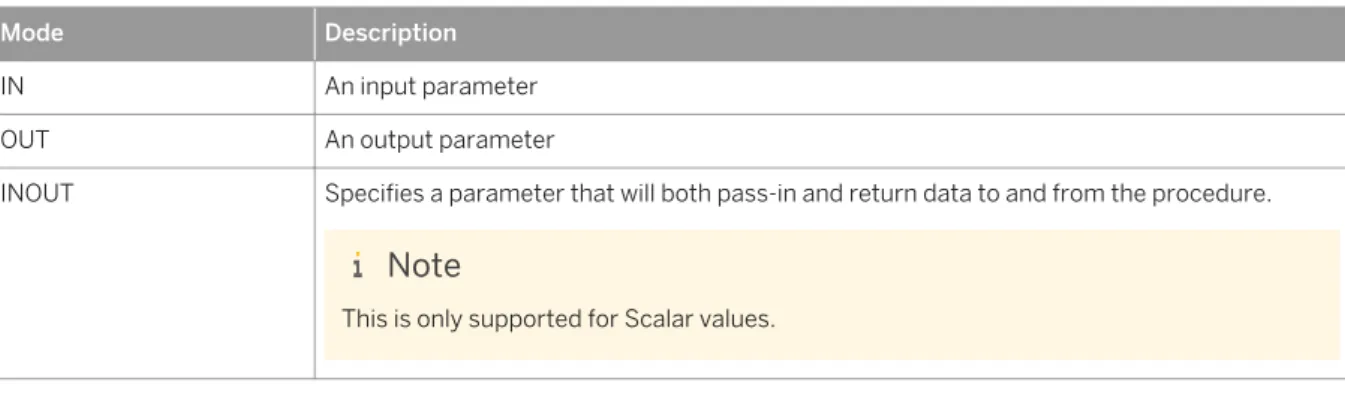
Parameter ModesThe following table lists the parameters you can use when defining your procedures.
Table 3: Parameter modes
Mode Description
IN An input parameter
OUT An output parameter
INOUT Specifies a parameter that will both pass-in and return data to and from the procedure.
Note
This is only supported for Scalar values.
Supported Parameter Types
Both scalar and table parameter types are supported. For more information on datatypes, see Datatype Extension
Related Information
Datatype Extension [page 14]
5.1.6.1
Value Binding during Call
Scalar ParametersConsider the following procedure:
CREATE PROCEDURE test_scalar (IN i INT, IN a VARCHAR) AS
SELECT i AS "I", a AS "A" FROM DUMMY; END;
You can pass parameters using scalar value binding:
CALL test_scalar (1, 'ABC');
You can also use expression binding.
CALL test_scalar (1+1, upper('abc'))
Table parameters
Consider the following procedure:
CREATE TYPE tab_type AS TABLE (I INT, A VARCHAR); CREATE TABLE tab1 (I INT, A VARCHAR);
CREATE PROCEDURE test_table (IN tab tab_type) AS
BEGIN
SELECT * FROM :tab; END;
You can pass tables and views to the parameter of this function.
CALL test_table (tab1)
Note
Implicit binding of multiple values is currently not supported.
You should always use sql special identifiers when binding a value to a table variable.
CALL test_table ("tab1")
Do not use the following syntax:
CALL test_table ('tab')
5.1.6.2
Default Values for Parameters
In the signature you can define default values for input parameters by using the DEFAULT keyword:
IN <param_name> (<sql_type>|<table_type>|<table_type_definition>) DEFAULT (<value>|<table_name>)
The usage of the default value will be illustrated in the next example. Therefore the following tables are needed:
CREATE COLUMN TABLE NAMES(Firstname NVARCHAR(20), LastName NVARCHAR(20)); INSERT INTO NAMES VALUES('JOHN', 'DOE');
CREATE COLUMN TABLE MYNAMES(Firstname NVARCHAR(20), LastName NVARCHAR(20)); INSERT INTO MYNAMES VALUES('ALICE', 'DOE');
The procedure in the example generates a FULLNAME by the given input table and delimiter. Whereby default values are used for both input parameters:
CREATE PROCEDURE FULLNAME(
IN INTAB TABLE(FirstName NVARCHAR (20), LastName NVARCHAR (20)) DEFAULT NAMES, IN delimiter VARCHAR(10) DEFAULT ', ',
OUT outtab TABLE(fullname NVarchar(50)) )
AS BEGIN
outtab = SELECT lastname||:delimiter|| firstname AS FULLNAME FROM :intab;
END;
For the tabular input parameter INTAB the default table NAMES is defined and for the scalar input parameter
DELIMITER the ‘,’ is defined as default. To use the default values in the signature, you need to pass in
parameters using Named Parameters. That means to call the procedure FULLNAME and using the default value would be done as follows:
CALL FULLNAME (outtab=>?);
The result of that call is:
FULLNAME ---DOE,JOHN
Now we want to pass a different table, i.e. MYNAMES but still want to use the default delimiter value, the call looks then as follows:
CALL FULLNAME(INTAB=> MYNAMES, outtab => ?)
And the result shows that now the table MYNAMES was used:
FULLNAME ---DOE,ALICE
Note
Please note that default values are not supported for output parameters.
Related Information
5.1.6.3
DEFAULT EMPTY for Tabular Parameters
For tabular IN and OUT parameter the keyword EMPTY can be used to define an empty input table as a default:
(IN|OUT) <param_name> (<table_type>|<table_type_definition>) DEFAULT EMPTY
Whereas the general default value handling is only supported for input parameters, the DEFAULT EMPTY is supported for both, tabular IN and OUT parameters.
In the following example we use the DEFAULT EMPTY for the tabular output parameter to be able to declare a procedure with an empty body.
CREATE PROCEDURE PROC_EMPTY (OUT OUTTAB TABLE(I INT) DEFAULT EMPTY) AS
BEGIN END;
Creating the procedure without DEFAULT EMPTY would lead to the error that OUTTAB is not assigned. The procedure PROC_EMPTY can be called as usual and returns an empty result set:
call PROC_EMPTY (?);
The next example illustrate the usage for a tabular input parameter.
CREATE PROCEDURE CHECKINPUT (IN intab TABLE(I INT ) DEFAULT EMPTY, OUT result NVARCHAR(20)
) AS
BEGIN
IF IS_EMPTY(:intab) THEN result = 'Input is empty'; ELSE
result = 'Input is not empty'; END IF;
END;
Calling the procedure without passing an input table
call CHECKINPUT(result=>?)
leads to the following result:
OUT(1)
---'Input is empty'
Note
5.1.7 Procedure Metadata
When a procedure is created, information about the procedure can be found in the database catalog. You can use this information for debugging purposes.
The procedures observable in the system views vary according to the privileges that a user has been granted. The following visibility rules apply:
● • CATALOG READ or DATA ADMIN – All procedures in the system can be viewed.
● • SCHEMA OWNER, or EXECUTE – Only specific procedures where the user is the owner, or they have execute privileges, will be shown.
Procedures can be exported and imported like tables, see the SQL Reference documentation for details. For more information see Data Import Export Statements.
The system views for procedures are summarized below:
Related Information
SAP HANA SQL and System Views Reference
5.1.7.1
SYS.PROCEDURES
Available stored procedures
Structure
Table 4:
Column name Data type Description
SCHEMA_NAME NVARCHAR(256) Schema name of the stored procedure
PROCEDURE_NAME NVARCHAR(256) Name of the stored procedure
PROCEDURE_OID BIGINT Object ID of the stored procedure
DEFAULT_SCHEMA_NAME NVARCHAR(256) Schema name of the unqualified ob jects in the procedure
INPUT_PARAMETER_COUNT INTEGER Input type parameter count
Column name Data type Description
INOUT_PARAMETER_COUNT INTEGER In-out type parameter count
RESULT_SET_COUNT INTEGER Result set count
IS_UNICODE VARCHAR(5) Specifies whether the stored procedure
contains Unicode or not: 'TRUE', 'FALSE'
DEFINITION NCLOB Query string of the stored procedure
PROCEDURE_TYPE VARCHAR(10) Type of the stored procedure
READ_ONLY VARCHAR(5) Specifies whether the procedure is
read-only or not: 'TRUE', 'FALSE'
IS_VALID VARCHAR(5) Specifies whether the procedure is
valid or not. This becomes 'FALSE' when its base objects are changed or dropped: 'TRUE', 'FALSE'
5.1.7.2
SYS. PROCEDURE_PARAMETERS
Parameters of stored procedures
Structure
Table 5:
Column name Data type Description
SCHEMA_NAME NVARCHAR(256) Schema name of the stored procedure
PROCEDURE_NAME NVARCHAR(256) Name of the stored procedure
PROCEDURE_OID BIGINT Object ID of the stored procedure
PARAMETER_NAME NVARCHAR(256) Parameter name
DATA_TYPE_ID SMALLINT Data type ID
DATA_TYPE_NAME VARCHAR(16) Data type name
Column name Data type Description
SCALE INTEGER Scale of the parameter
POSITION INTEGER Ordinal position of the parameter
TABLE_TYPE_SCHEMA NVARCHAR(256) Schema name of table type if
DATA_TYPE_NAME is TABLE_TYPE
TABLE_TYPE_NAME NVARCHAR(256) Name of table type if
DATA_TYPE_NAME is TABLE_TYPE
PARAMETER_TYPE VARCHAR(7) Parameter mode: 'IN', 'OUT', 'INOUT'
HAS_DEFAULT_VALUE VARCHAR(5) Specifies whether the parameter has a default value or not: 'TRUE', 'FALSE'
IS_NULLABLE VARCHAR(5) Specifies whether the parameter ac
cepts a null value: 'TRUE', 'FALSE'
5.1.7.3
SYS.OBJECT_DEPENDENCIES
Dependencies between objects, for example, views which refer to a specific table
Structure
Table 6:
Column name Data type Description
BASE_SCHEMA_NAME NVARCHAR(256) Schema name of the base object
BASE_OBJECT_NAME NVARCHAR(256) Object name of the base object
BASE_OBJECT_TYPE VARCHAR(32) Type of the base object
DEPENDENT_SCHEMA_NAME NVARCHAR(256) Schema name of the dependent object DEPENDENT_OBJECT_NAME NVARCHAR(256) Object name of the dependent object
Column name Data type Description
DEPENDENCY_TYPE INTEGER Type of dependency between base and
dependent object. Possible values are:
● 0: NORMAL (default)
● 1: EXTERNAL_DIRECT (direct de pendency between dependent ob ject and base object)
● 2: EXTERNAL_INDIRECT (indirect dependency between dependent object und base object)
● 5: REFERENTIAL_DIRECT (foreign key dependency between tables)
5.1.7.3.1
Object Dependencies View Examples
In this section we explore the ways in which you can query the OBJECT_DEPENDENCIES system view. You create the following database objects and procedures.
CREATE SCHEMA deps;
CREATE TYPE mytab_t AS TABLE (id int, key_val int, val int); CREATE TABLE mytab1 (id INT PRIMARY KEY, key_val int, val INT); CREATE TABLE mytab2 (id INT PRIMARY key, key_val int, val INT);
CREATE PROCEDURE deps.get_tables(OUT outtab1 mytab_t, OUT outtab2 mytab_t) LANGUAGE SQLSCRIPT READS SQL DATA AS
BEGIN
outtab1 = SELECT * FROM mytab1; outtab2 = SELECT * FROM mytab2; END;
CREATE PROCEDURE deps.my_proc (IN val INT, OUT outtab mytab_t) LANGUAGE SQLSCRIPT READS SQL DATA
AS BEGIN
CALL deps.get_tables(tab1, tab2); IF :val > 1 THEN
outtab = SELECT * FROM :tab1; ELSE
outtab = SELECT * FROM :tab2; END IF;
END;
Object dependency examination
Firstly you will find all the (direct and indirect) base objects of the procedure DEPS.GET_TABLES. You execute the following statement.
SELECT * FROM OBJECT_DEPENDENCIES WHERE dependent_object_name = 'GET_TABLES' and dependent_schema_name = 'DEPS';
The result obtained is as follows: Table 7: BASE_SCHEM A_NAME BASE_OB JECT_NAME BASE_OB JECT_TYPE DEPEND ENT_SCHEMA _NAME DEPEND ENT_OB-JECT_NAME DEPEND ENT_OB-JECT_TYPE DEPEND ENCY_TYPE SYSTEM MYTAB_T TABLE DEPS GET_TABLES PROCEDURE 1
SYSTEM MYTAB1 TABLE DEPS GET_TABLES PROCEDURE 2 SYSTEM MYTAB2 TABLE DEPS GET_TABLES PROCEDURE 2
DEPS GET_TABLES PROCEDURE DEPS GET_TABLES PROCEDURE 1
Let’s examine the DEPENDENCY_TYPE column in more detail. As you obtained the results in the table above via a select on all the base objects of the procedure, the objects show include both persistent and transient objects. You can distinguish between these object dependency types using the DEPENDENCY_TYPE column, as shown below:
1. EXTERNAL_DIRECT: base object is directly used in the dependent procedure. 2. EXTERNAL_INDIRECT: base object is not directly used in the dependent procedure.
Now you will obtain only the base objects that are used in DEPS.MY_PROC. You execute the following statement.
SELECT * FROM OBJECT_DEPENDENCIES WHERE dependent_object_name = 'MY_PROC' and dependent_schema_name = 'DEPS' and dependency_type = 1;
The result obtained is as follows:
Table 8: BASE_SCHEM A_NAME BASE_OB JECT_NAME BASE_OB JECT_TYPE DEPEND ENT_SCHEMA _NAME DEPEND ENT_OB-JECT_NAME DEPEND ENT_OB-JECT_TYPE DEPEND ENCY_TYPE
SYSTEM MYTAB_T TABLE DEPS MY_PROC PROCEDURE 1
DEPS GET_TABLES PROCEDURE DEPS MY_PROC PROCEDURE 1
Finally you find all the dependent objects that are using DEPS.MY_PROC. You execute the following statement.
SELECT * FROM OBJECT_DEPENDENCIES WHERE base_object_name = 'GET_TABLES' and
base_schema_name = 'DEPS' ;
The result obtained is as follows:
Table 9: BASE_SCHEM A_NAME BASE_OB JECT_NAME BASE_OB JECT_TYPE DEPEND ENT_SCHEMA _NAME DEPEND ENT_OB-JECT_NAME DEPEND ENT_OB-JECT_TYPE DEPEND ENCY_TYPE
5.2 User Defined Function
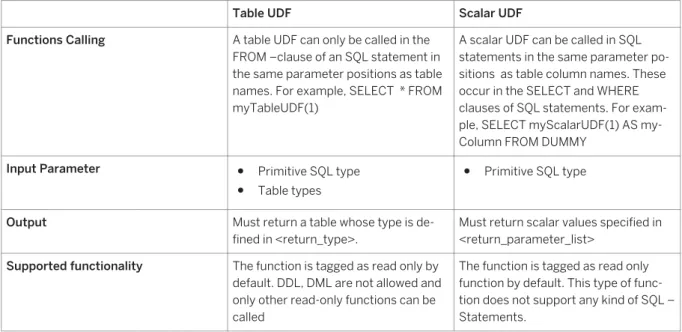
There are two different kinds of user defined functions (UDF): Table User Defined Functions and Scalar User Defined Functions. They are referred to as Table UDF and Scalar UDF in the following table. They differ by input/output parameters, supported functions in the body, and the way they are consumed in SQL statements.
Table 10:
Table UDF Scalar UDF
Functions Calling A table UDF can only be called in the FROM –clause of an SQL statement in the same parameter positions as table names. For example, SELECT * FROM myTableUDF(1)
A scalar UDF can be called in SQL statements in the same parameter po sitions as table column names. These occur in the SELECT and WHERE clauses of SQL statements. For exam ple, SELECT myScalarUDF(1) AS my Column FROM DUMMY
Input Parameter ● Primitive SQL type
● Table types
● Primitive SQL type Output Must return a table whose type is de
fined in <return_type>.
Must return scalar values specified in <return_parameter_list>
Supported functionality The function is tagged as read only by default. DDL, DML are not allowed and only other read-only functions can be called
The function is tagged as read only function by default. This type of func tion does not support any kind of SQL – Statements.
5.2.1 CREATE FUNCTION
This SQL statement creates read-only user defined functions that are free of side-effects. This means that neither DDL nor DML statements (INSERT, UPDATE, and DELETE) are allowed in the function body. All functions or procedures selected or called from the body of the function must be read-only.
Syntax
CREATE FUNCTION <func_name> [(<parameter_clause>)] RETURNS <return_type> [LANGUAGE <lang>] [SQL SECURITY <mode>][DEFAULT SCHEMA <default_schema_name>] AS
BEGIN
<function_body> END
Syntax Elements
<func_name > ::= [<schema_name>.]<identifier>
The identifier of the function to be created, with optional schema name.
<parameter_clause> ::= <parameter> [{,<parameter>}...]
The input parameters of the function.
<parameter> ::= [IN] <param_name> <param_type>
A function parameter with associated data type.
<param_name> ::= <identifier>
The variable name for a parameter.
<param_type> ::= <sql_type> | <table_type> | <table_type_definition>
Scalar UDF only supports primitive SQL types as input, whereas Table UDF also supports table types as input. Currently the following primitive SQL types are allowed in scalar UDF:
<sql_type> ::= DATE | TIME | TIMESTAMP | SECONDDATE | TINYINT | SMALLINT | INTEGER | BIGINT | DECIMAL | SMALLDECIMAL | REAL | DOUBLE | VARCHAR | NVARCHAR | VARBINARY | ST_GEOMETRY
Table UDF allows a wider range of primitive SQL types:
<sql_type> ::= DATE | TIME | TIMESTAMP | SECONDDATE | TINYINT | SMALLINT | INTEGER | BIGINT | DECIMAL | SMALLDECIMAL | REAL | DOUBLE | VARCHAR | NVARCHAR | ALPHANUM | VARBINARY | CLOB | NCLOB | BLOB | ST_GEOMETRY
<table_type> ::= <identifier>
To look at a table type previously defined with the CREATE TYPE command, see CREATE TYPE [page 15].
<table_type_defintion> ::= TABLE (<column_list_definition>) <column_list_definition > ::= <column_elem>[{, <column_elem>}...] <column_elem> ::= <column_name> <data_type>
<column_name> ::= <identifier>
A table type implicitly defined within the signature.
<return_type> ::= <return_parameter_list> | <return_table_type>
Table UDF must return a table whose type is defined by <return_table_type>. And scalar UDF must return scalar values specified in <return_parameter_list>.
<return_parameter_list> ::= <return_parameter>[{, <return_parameter>}...] <return_parameter> ::= <parameter_name> <sql_type>
Defines the output parameters