Chapter 20: Database Programming
This chapter will show how BASIC-256 can connect to a simple relational database and use it to store and retrieve useful information.
What is a Database:
A database is simply an organized collection of numbers, string, and other types of information. The most common type of database is the "Relational Database". Relational Databases are made up of four major parts: tables, rows, columns, and relationships (see Table 9).
Table A table consists of a predefined number or columns any any number of rows with information about a specific object or subject. Also known as a relation.
Row Also called a tuple.
Column This can also be referred to as an attribute.
Relationship A reference of the key of one table as a column of another table. This creates a connection between tables.
Table 9: Major Components of a Relational Database
The SQL Language:
Most relational databases, today, use a language called SQL to actually extract and manipulate data. SQL is actually an acronym for Structured Query Language. The original SQL language was developed by IBM in the 1970s and has become the primary language used by relational databases.
SQL is a very powerful language and has been implemented by dozens of software companies, over the years. Because of this complexity there are many different dialects of SQL in use. BASIC-256 uses the SQLite database engine. Please see the SQLite web-page at http://www.sqlite.org for more information about the dialect of SQL shown in these examples.
Creating and Adding Data to a Database:
The SQLite library does not require the installation of a database sever or the setting up of a complex system. The database and all of its parts are stored in a simple file on your computer. This file can even be copied to another computer and used, without problem.
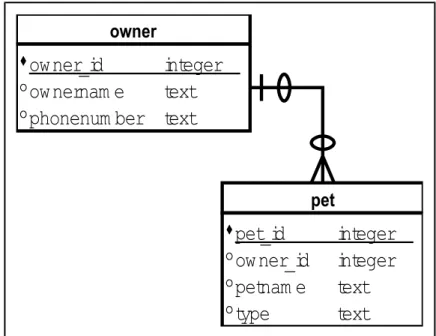
The first program (Program 125: Create a Database) creates a new sample database file and tables. The tables are represented by the Entity
Relationship Diagram (ERD) as shown in Illustration 39.
Illustration 39: Entity Relationship Diagram of Chapter Database owner
owner_id
integer
ownernam e
text
phonenum ber text
pet
pet_id
integer
owner_id
integer
petnam e
text
type
text
1 # c20_createpetsdb.kbs
2 # create the "pets.sqlite" data base
3
4 # delete old database if it exists
5 file$ = "pets.sqlite3"
6 if exists(file$) then kill(file$)
7
8 # open database file
9 dbopen file$
10
11 stmt$ = "CREATE TABLE owner (owner_id INTEGER, ownername TEXT, phonenumber TEXT, PRIMARY KEY (owner_id));"
12 print stmt$
13 dbexecute stmt$
14
15 stmt$ = "CREATE TABLE pet (pet_id INTEGER, owner_id INTEGER, petname TEXT, type TEXT, PRIMARY KEY
(pet_id), FOREIGN KEY (owner_id) REFERENCES owner (owner_id));"
16 print stmt$
17 dbexecute stmt$
18
19 dbclose
20 print file$ + " created."
21 end
Program 125: Create a Database
CREATE TABLE owner (owner_id INTEGER, ownername TEXT, phonenumber TEXT, PRIMARY KEY
(owner_id));
CREATE TABLE pet (pet_id INTEGER, owner_id INTEGER, petname TEXT, type TEXT, PRIMARY KEY (pet_id), FOREIGN KEY (owner_id) REFERENCES owner (owner_id));
pets.sqlite3 created. Sample Output 125: Create a Database
So far you have seen three new database statements: dbopen – will open a database file and create it if it does not exist, dbexecute – will execute an SQL statement on the open database, and dbclose – closes the open database file.
dbopen filename
Open an SQLite database file. If the database does not exist then create a new empty database file.
dbexecute sqlstatement
Perform the SQL statement on the currently open SQLite database file. No value will be returned but a trappable runtime error will occur if there were any problems executing the statement on the database.
dbclose
Close the currently open SQLite database file. This statement insures that all data is written out to the database file.
These same three statements can also be used to execute other SQL
statements. The INSERT INTO statement (Program 126) adds new rows of data to the tables and the UPDATE statement (Program 127) will change an existing row's information.
1 # c20_addpetsdb.kbs
2 # add rows to the database
3
4 file$ = "pets.sqlite3"
5 dbopen file$
6
7 call addowner(1, "Jim", "555-3434")
8 call addpet(1, 1, "Spot", "Cat")
9 call addpet(2, 1, "Fred", "Cat")
10 call addpet(3, 1, "Elvis", "Cat")
11
12 call addowner(2, "Sue", "555-8764")
13 call addpet(4, 2, "Alfred", "Dog")
14 call addpet(5, 2, "Fido", "Cat")
15
16 call addowner(3, "Amy", "555-4321")
17 call addpet(6, 3, "Bones", "Dog")
18
19 call addowner(4, "Dee", "555-9659")
20 call addpet(7, 4, "Sam", "Goat")
22 # wrap everything up
23 dbclose
24 end
25
26 subroutine addowner(owner_id, ownername$, phonenumber$)
27 stmt$ = "INSERT INTO owner (owner_id, ownername, phonenumber) VALUES (" + owner_id + "," + chr(34) + ownername$ + chr(34) + "," + chr(34) + phonenumber$ + chr(34) + ");" 28 print stmt$ 29 try 30 dbexecute stmt$ 31 catch
32 print "Unbale to add owner " + owner_id + " " + lasterrorextra
33 end try
34 end subroutine
35
36 subroutine addpet(pet_id, owner_id, petname$, type$)
37 stmt$ = "INSERT INTO pet (pet_id, owner_id,
petname, type) VALUES (" + pet_id + "," + owner_id + "," + chr(34) + petname$ + chr(34) + "," + chr(34) + type$ + chr(34) + ");" 38 print stmt$ 39 try 40 dbexecute stmt$ 41 catch
42 print "Unbale to add pet " + pet_id + " " + lasterrorextra
43 end try
44 endsubroutine
Program 126: Insert Rows into Database
INSERT INTO owner (owner_id, ownername, phonenumber) VALUES (1,"Jim","555-3434");
INSERT INTO pet (pet_id, owner_id, petname, type) VALUES (1,1,"Spot","Cat");
INSERT INTO pet (pet_id, owner_id, petname, type) VALUES (2,1,"Fred","Cat");
INSERT INTO pet (pet_id, owner_id, petname, type) VALUES (3,1,"Elvis","Cat");
INSERT INTO owner (owner_id, ownername, phonenumber) VALUES (2,"Sue","555-8764"); INSERT INTO pet (pet_id, owner_id, petname, type) VALUES (4,2,"Alfred","Dog");
INSERT INTO pet (pet_id, owner_id, petname, type) VALUES (5,2,"Fido","Cat");
INSERT INTO owner (owner_id, ownername, phonenumber) VALUES (3,"Amy","555-4321"); INSERT INTO pet (pet_id, owner_id, petname, type) VALUES (6,3,"Bones","Dog");
INSERT INTO owner (owner_id, ownername, phonenumber) VALUES (4,"Dee","555-9659"); INSERT INTO pet (pet_id, owner_id, petname, type) VALUES (7,4,"Sam","Goat");
Sample Output 126: Insert Rows into Database
1 # c20_updatepetsdb.kbs
2 # update a database row
3
4 dbopen "pets.sqlite3"
5
6 # create and populate
7 s$ = "UPDATE owner SET phonenumber = " + chr(34) + "555-5555" + chr(34) + " where owner_id = 1;"
8 print s$
9 dbexecute s$
10 dbclose
UPDATE owner SET phonenumber = "555-5555" where owner_id = 1;
Sample Output 127: Update Row in a Database
Retrieving Information from a Database:
So far we have seen how to open, close, and execute a SQL statement that does not return any values. A database would be pretty useless if we could not get information out of it.
The SELECT statement, in the SQL language, allows us to retrieve the desired data. After a SELECT is executed a "record set" is created that contains the rows and columns of data that was extracted from the database. Program 128 shows three different SELECT statements and how the data is read into your BASIC-256 program.
1 # c20_showpetsdb.kbs
2 # display data from the pets database
3
4 dbopen "pets.sqlite3"
5
6 # show owners and their phone numbers
7 print "Owners and Phone Numbers"
8 dbopenset "SELECT ownername, phonenumber FROM owner ORDER BY ownername;"
9 while dbrow()
10 print dbstring(0) + " " + dbstring(1)
11 end while
12 dbcloseset
13
14 print
15
16 # show owners and their pets
18 dbopenset "SELECT owner.ownername, pet.pet_id, pet.petname, pet.type FROM owner JOIN pet ON
pet.owner_id = owner.owner_id ORDER BY ownername, petname;"
19 while dbrow()
20 print dbstring(0) + " " + dbint(1) + " " + dbstring(2) + " " + dbstring(3) 21 end while 22 dbcloseset 23 24 print 25
26 # show average number of pets
27 print "Average Number of Pets"
28 dbopenset "SELECT AVG(c) FROM (SELECT COUNT(*) AS c FROM owner JOIN pet ON pet.owner_id = owner.owner_id GROUP BY owner.owner_id) AS numpets;"
29 while dbrow() 30 print dbfloat(0) 31 end while 32 dbcloseset 33 34 # wrap everything up 35 dbclose
Program 128: Selecting Sets of Data from a Database
Owners and Phone Numbers Amy 555-9932
Dee 555-4433 Jim 555-5555 Sue 555-8764 Owners with Pets Amy 6 Bones Dog Dee 7 Sam Goat Jim 3 Elvis Cat Jim 2 Fred Cat
Jim 1 Spot Cat Sue 4 Alfred Cat Sue 5 Fido Dog
Average Number of Pets 1.75
Sample Output 128: Selecting Sets of Data from a Database
dbopenset sqlstatement
Execute a SELECT statement on the database and create a "record set" to allow the program to read in the result. The "record set" may contain 0 or more rows as extracted by the SELECT.
dbrow or dbrow ()
Function to advance the result of the last dbopenset to the next row. Returns false if we are at the end of the selected data. You need to advance to the first row, using dbrow, after a dbopenset statement before you can read any data.
dbint ( column ) dbfloat ( column ) dbstring ( column )
These functions will return data from the current row of the record set. You must know the zero based numeric column number of the desired data.
dbint Return the cell data as an integer. dbfloat Return the cell data as a floating point
number.
dbstring Return the cell data as a string.
dbcloseset
Close and discard the results of the last dbopenset statement.
The big program this chapter creates a single program that creates, maintains, and lists phone numbers stored in a database file.
Pay special attention to the quote$ function used in creating the SQL statements. It wraps all strings in the statements in single quotes after changing the single quotes in a string to a pair of them. This doubling of quotes inside quotes is how to insert a quotation mark in an SQL statement.
1 # c20_rolofile.kbs
2 # a database example to keep track of phone numbers
3 4 dbopen "rolofile.sqlite3" 5 call createtables() 6 7 do 8 print
9 print "rolofile - phone numbers"
10 print "1-add person"
11 print "2-list people"
12 print "3-add phone"
13 print "4-list phones"
14 input "0-exit >", choice
15 print
16
17 if choice=1 then call addperson()
18 if choice=2 then call listpeople()
19 if choice=3 then call addphone()
20 if choice=4 then call listphone()
21 until choice = 0
22 dbclose
23 end
24
25 function quote$(a$)
26 # wrap a string in single quotes (for a sql statement)
27 # if it contains a single quote double it
28 return "'" + replace(a$,"'","''") + "'"
29 end function
30
31 function inputphonetype$()
32 do
33 input "Phone Type (h-home, c-cell, f-fax, w-work) > ", type$
34 until type$ = "h" or type$ = "c" or type$ = "f" or type$ = "w"
36 end function
37
38 subroutine createtables()
39 # includes the IF NOT EXISTS clause to not error if the
40 # table already exists
41 dbexecute "CREATE TABLE IF NOT EXISTS person (person_id TEXT PRIMARY KEY, name TEXT);"
42 dbexecute "CREATE TABLE IF NOT EXISTS phone
(person_id TEXT, phone TEXT, type TEXT, PRIMARY KEY (person_id, phone));"
43 end subroutine
44
45 subroutine addperson()
46 print "add person"
47 input "person id > ", person_id$
48 person_id$ = upper(person_id$)
49 if ispersononfile(person_id$) or person_id$ = "" then
50 print "person already on file or empty"
51 else
52 input "person name > ", person_name$
53 if person_name$ = "" then
54 print "please enter name"
55 else
56 dbexecute "INSERT INTO person (person_id, name) VALUES (" + quote$(person_id$) + "," + quote$ (person_name$) + ");"
57 print person_id$ + " added."
58 end if
59 end if
60 end subroutine
61
62 subroutine addphone()
63 print "add phone number"
64 input "person id > ", person_id$
65 person_id$ = upper(person_id$)
66 if not ispersononfile(person_id$) then
68 else
69 input "phone number > ", phone$
70 if phone$ = "" then
71 print "please enter a phone number"
72 else
73 type$ = inputphonetype$()
74 dbexecute "INSERT INTO phone (person_id, phone, type) values (" + quote$(person_id$) + "," + quote$(phone$) + "," + quote$(type$) + ");"
75 print phone$ + " added."
76 end if
77 end if
78 end subroutine
79
80 function ispersononfile(person_id$)
81 # return true/false whether the person is on the person table
82 onfile = false
83 dbopenset "select person_id from person where person_id = " + quote$(person_id$)
84 if dbrow() then onfile = true
85 dbcloseset
86 return onfile
87 end function
88
89 subroutine listpeople()
90 dbopenset "select person_id, name from person order by person_id" 91 while dbrow() 92 print dbstring("person_id") + " " + dbstring("name") 93 end while 94 dbcloseset 95 end subroutine 96 97 subroutine listphone()
98 input "person id to list (return for all) > ", person_id$
100 stmt$ = "SELECT person.person_id, person.name, phone.phone, phone.type FROM person LEFT JOIN phone ON person.person_id = phone.person_id"
101 if person_id$ <> "" then stmt$ += " WHERE person.person_id = " + quote$(person_id$) 102 stmt$ += " ORDER BY person.person_id" 103 dbopenset stmt$ 104 while dbrow() 105 print dbstring("person_id") + " " + dbstring("name") + " " + dbstring("phone") + " " + dbstring("type") 106 end while 107 dbcloseset 108 end subroutine
Exercises:
y p z t c e l e s o x x d
e l i b a m l n a x x t b
t q x h o o e t g n e d i
a s t p s t l n e s t f n
e e a e a n i f n t t s t
r q t d s r o e b m a d r
c n p u t e p i n d b m e
i u e s c o s m t c l u s
d q b p b e u o l a e y n
b d u d o l x o l z l f i
r m o e o b s e p c w e m
o x h c r e d t b o b y r
w c g h t y j c r d s d m
column, create, dbclose, dbcloseset, dbexecute, dbfloat, dbint, dbopen, dbopenset, dbrow, dbstring, insert, query, relationship, row, select, sql, table, update
20.1. Take the “Big Program” from this chapter and modify it to create an application to keep track of a student's grades for several classes. You will need the following menu options to allow the user to:
• Enter a class code, assignment name, possible points, score
on an assignment and store this information into a database table.
• Create a way for the student to see all of the grades for a
single class after they enter the class code.
• Create an option to see a list of all classes with total points
possible, total points scored, and percentage of scored vs. possible.