EXPLORING WEB ATTRIBUTES RELATED
TO IMAGE ACCESSIBILITY AND THEIR
IMPACT ON SEARCH ENGINE INDEXING
EXPLORING
WEB
ATTRIBUTES
RELATED
TO
IMAGE
ACCESSIBILITY
AND
THEIR
IMPACT
ON
SEARCH
ENGINE
INDEXING
Reinaldo FerrazCentro de Estudos sobre Tecnologias na Web (CeWeb.br) – Núcleo de Coordenação de Informação do Ponto Br (NIC.br) – Comitê Gestor da Internet no Brasil (CGI.br)
EXPLORING WEB ATTRIBUTES RELATED TO IMAGE ACCESSIBILITY AND THEIR IMPACT ON SEARCH ENGINE INDEXING
ABSTRACT
The purpose of this study is to analyze how search engines index web content inserted in image attributes for alternative/complementary texts that favor web page accessibility. The study discussed the importance of optimizing websites to improve search tool indexing and explored how these engines index image attributes. We conducted empirical observations of tests carried out in a controlled environment, representing a typical image publishing website. The basis of the experiment lay in observing how content inserted in ALT attributes in elements of web page images was indexed. Data were collected first by observing the indexing of a page without any declared attributes. Then, we analyzed a page with all the properly declared attributes. The experiments were conducted using popular web search engines, such as Google, Yahoo, Bing and DuckDuckGo. We also used Search Engine Optimization (SEO) online verification tools for analyzing criteria relevant to search engine indexing. The hypothesis for this paper is that the ALT attribute is relevant to SEO, whereas the TITLE attribute is not. At the end of the study, we present details on how some search engines indexed content specific to alternative/complementary for images.
INTRODUCTION
The web has evolved from simple HTML pages full of text and hyperlinks to a rich repository of connected information. Such information goes far beyond online texts. Pictures and multimedia archives are common on the web of today and are increasingly used as technology evolves. Simply varying text-only to rich media sites is no longer enough for today’s web. The purpose of a web page is not merely to present information, but to enable participation in the learning community [1].
In this context, web accessibility is an extremely important theme. However, it tends to be placed in the background when developers, companies and institutions have tight deadlines or budgets. They frequently consider the accessibility of their page to be unimportant, unaware of the extent to which improving page coding can interfere with important issues such as performance and indexing in the main search engines.
One item that is of utmost important to accessibility is the proper description of website images. Such descriptions allow individuals who cannot see the image to receive alternative and/or complementary information about the figure or picture. As this type of activity requires the description and manual validation of such resources, texts tend to be set aside or misused within the code.
In order to demonstrate that the importance of appropriate image description transcends issues related to web accessibility, the main purpose of this paper is to present how ALT and TITLE attributes are indexed by search engines and how they can be used to improve accessibility to both published images and pages indexed by search engines.
HYPOTHESIS AND METHODOLOGY
The hypothesis for this work is that the ALT attribute is relevant to SEO, because its use refers to the alternative text of the image, while the TITLE attribute should not be relevant because it has an advisory role, as will be investigated in this paper.For the theoretical part of this article, a literature review was conducted and discussions on the concept of web accessibility were analyzed. The methodology used for the empirical part of the study consisted of conducting observations of web content publishing, focusing on search engine content indexing and automatic SEO verification. The publishing process was conducted in two steps:
• Publishing images without the declared ALT attributes; • Publishing images with the declared ALT attributes.
The results were gathered after indexing the images found in the two prior publishing steps, using search engines and automatic SEO checker tools:
• Collecting and analyzing results of indexing without declared ALT attributes;
• Collecting and analyzing results of indexing with declared ALT and TITLE attributes.
These steps were necessary for analyzing how search engines index content with properly declared ALT and TITLE attributes.
The test environment used for this experiment was Reinaldo Ferraz’ personal blog (http://www.reinaldoferraz.com.br/) and an article on the
World Wide Web Consortium (W3C) Brazil website
(http://www.w3c.br/Noticias/AgenciaGeniaParticipaDeWorkshopNoW3c Brasil). The first is a public Linux-based web environment, with WordPress and the robots.txt file configured so that search engines can index the
website’s content. The second environment is a FosWiki under a Free BSD platform.
All the tools used in the test are available online and require no installation. We used Google (http://www.google.com/) as the main search engine for the test, as it is the most accessed website in the world, according to the Alexa ranking of March 2015 [2]. Other search engines used in this
experiment were: Yahoo (http://www.yahoo.com/), Bing
(http://www.bing.com/) and DuckDuckGo (http://www.duckduckgo.com/). The SEO verification tools used are also available online. They were:
Site Analyser (http://www.site-analyzer.com/), WooRank
(https://www.woorank.com/) and SEO Workers
(http://www.seoworkers.com/tools/analyzer.html). These validation tools were chosen at random and there was no intention of promoting or recommending their use. The only criterion for the choice of the tools was to perform SEO evaluation also based on the images on the website.
ACCESSIBLE IMAGES ON THE WEB
The accessibility of images on the web is one of the biggest challenges for the visually impaired, as most images do not have proper captions or text nearby. One of the greatest barriers to web accessibility is the lack of explanatory descriptions of images [3].
A gallery of pictures with no descriptions of what is depicted makes it impossible for people with visual disabilities to access the content of the images. Descriptions placed nearby can help them understand the context of the pictures, but more often, it is impossible to identify the meaning when the proper content for the images is not provided.
The most common technique for guaranteeing that there will be a brief description of an image on a web page is using the ALT attribute. This attribute consists of a short description embedded in an image and that allow users of assistive technologies or individuals who do not use visual browsers for some reason to identify the elements present in the image [1]. Other techniques exist for describing images, as recommended by the
World Wide Web Consortium (W3C), such as techniques for providing long, detailed image descriptions, for instance the use of LONGDESC attribute, or descriptions of the image’s content in a nearby text, or a separate web page solely for this purpose.
ALT AND TITLE ATTRIBUTES
The ALT attribute is used to provide alternative text to images. According to the W3C, the ALT attribute is very important and requires that authors carefully consider how to make it appropriate to the context in which it will appear [4]. The Web Content Accessibility Guidelines [5] are very clear regarding the use of the ALT attribute to provide text alternatives for any non-text content.
The use of the ALT attribute allows visually impaired individuals to access the content of non-text elements (images). The content of this attribute is normally accessed using assistive technologies, such as screen reader programs that read the page code and make the alternative content available to the user in audio format. Users who use browsers in text-only mode also use this attribute to access image information, and even the most popular browsers display such content when images are not loaded for technical reasons, such as low Internet speed or even a broken image URL.
The role of the TITLE attribute is advisory and complementary [6]. When embedded in images, it may be the photo credits or a description of the image. HTML5 W3C standard discourage its use due to the inconsistency of its implementation by user agents [7].
The TITLE attribute has little or almost no impact on web page accessibility, as its main function is to provide complementary information dependent on mouse interaction so that the information can be displayed via a tooltip. Not all assistive technologies access this context by default, and often, specifically setting up software so that it can read this attribute’s content is necessary.
In most browsers, the content information inside the ALT attribute is not visually displayed when the image is properly loaded, while the content of the TITLE attribute is displayed in the form of a tooltip that appears when users set the mouse over the image.
Studies on SEO recommend that authors declare the use of the ALT attribute, because search engine robots cannot read images [8]. This attribute must include at least a brief description of the image so that the system can identify the meaning of the figure. This technique is extremely important, as search engines use this text in place of the link text that normally would be used to this end [9]. Images can be compared on the web, but their meaning still depends on the insertion of relative content.
SEARCH ENGINE OPTIMIZATION
The technique of developing websites in a way that they are search-engine friendly is called Search Engine Optimization (SEO). This technique consists of a group of technical strategies used to increase the number of visitors to a website by obtaining a high-ranking position in the search engine results page [10].
Search engine optimization is based on making small modifications to parts of websites. When this optimization is conducted directly on the page, it is called On-Page Optimization. This means updating the contents of the website each time that factors associated with indexing are related to any of the website’s structural elements [10]. Its use is directly related to web accessibility, as it affects both the content accessed by users who use browsers or screen readers and the content that will be indexed by search engines.
Search engines have significant weight in the way people find content on the web. Most browsers have incorporated search engines in their web address bars, thus making it unnecessary to access the site to begin a search. The browser’s address bar permits this search, saving the user’s time. The most recent versions of Google Chrome, Mozilla Firefox, Microsoft Internet Explorer and Opera are some examples of browsers that have incorporated a search engine directly in the web address bar.
Even though many developers have applied SEO techniques directed at a single search engine (usually Google), best practices benefit indexing content by a good selection of search engines, such as Yahoo, Bing,
DuckDuckGo, etc. Currently, there are several free and paid online and offline tools that help developers verify items on their page, as presented in this paper, that can be modified to obtain improved search engine ranking and indexing. These tools are popularly called SEO checkers.
The relationship between accessibility and SEO goes beyond alternative/complementary image texts. Providing proper heading structures, avoiding mouse-dependent interaction, and including descriptive text in links are other resources that benefit both accessibility and content indexing by search engines [11]. In the present study, we conducted an in-depth analysis focused on the relationship between alternative/complementary texts on image <IMG> elements.
EXPLORING THE ALT ATTRIBUTE
The first test was conducted to explore the ALT attribute on image (IMG) elements and its effect on search engine content indexing. The test consisted of publishing three images without declared ALT attributes and waiting for the search engines to index them. Then, the researcher tried to find the images on the site using search engine tools and conducted verification with automatic SEO checkers. After this first verification, the ALT attribute was properly declared and filled and the test was repeated. The three images consisted of a picture of a loaf of bread on a white plate, a picture of an hourglass, and a picture of a map of the São Paulo Zoo.
During the first phase of testing, the three images were published on the blog http://www.reinaldoferraz.com.br, without the declared ALT attributes. The images were published on February 24, 2014 using the following HTML code.
<img src="http://www.reinaldoferraz.com.br/wp-content/uploads/2014/02/tr47ujhtt767.png">
<img src="http://www.reinaldoferraz.com.br/wp-content/uploads/2014/02/aswe98jdk93.png">
<img src="http://www.reinaldoferraz.com.br/wp-content/uploads/2014/02/yjjl9675yp.png">
A few days later, after the content was indexed by search engines, a search for ALT attribute content using web search engines was made. Subsequently, the page was scanned by three automatic SEO checker tools.
The image below shows the Google search result(s) page for the
word “pão” (“bread” in Portuguese) within the
<http://www.reinaldoferraz.com.br> website. No matches were found using the words related to the images. This search was conducted on March 6, 2014.
Fig. 1. Screen capture of the Google search results page with the word “pão” (bread) on the website http://www.reinaldoferraz.com.br.
The figure above shows that zero matches were returned when searching for the word “pão” on the http://www.reinaldoferraz.com.br website using Google search. The SEO verification was conducted only within the environment of the http://www.reinaldoferraz.com.br blog (it was not conducted on the W3C Brazil website). Automatic SEO verification was carried out on March 7, 2014, and Site Analyser was the first tool used.
In this regard, the image below displays a screen capture of the Site Analyzer tool results after scanning the page. The results show that the lack of the ALT attribute in the images affected the results according to the criteria analyzed by the SEO tool, indicating a low percentage of multimedia elements (48.82%) and highlight it in red.
Fig. 2. Screen capture of the Site Analyser tool results page for http://www.reinaldoferraz.com.br/explorando-atributo-alt/. The results
page shows an alert regarding the lack of alternative texts for images, which affect the tool score for multimedia elements (48.82%)
Figure 2 shows that the tool provided warnings as to the use of the ALT attribute and its effect on multimedia elements. The score in red shows that only 48.82% of the multimedia elements were being benefitted by the SEO techniques used on the website.
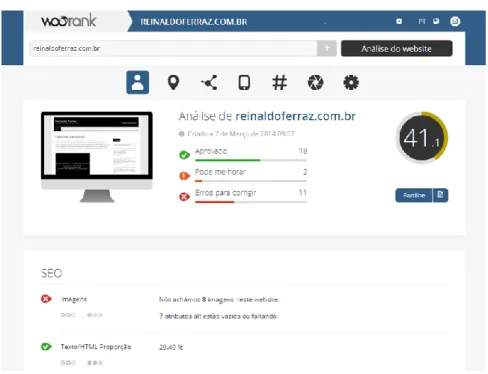
The second test was conducted with the WooRank tool, using the same criteria as the previous test. The results also indicate that the lack of the ALT attribute in certain images affected the website’s SEO criteria. The score provided by the tool was 41.1 and 11 errors to fix.
Fig. 3. Screen capture of the WooRank tool results page for
http://www.reinaldoferraz.com.br/explorando-atributo-alt/. The page
results alert about problems in images. Seven of them are images without an ALT attribute.
Figure 3 shows that the score obtained by the tool for the page without the declared ALT attribute was 41.1. The warning provided by the
tool indicates that seven of the eleven errors are related with images without ALT attributes that may be either missing or unspecified.
The third test was conducted using SEO Workers, and also indicated that the lack of the ALT attribute was something that needed fixing on the page. According to the figure below, the results page also presented information on how to fix the problem, providing links to documents and videos about the importance of the ALT attribute.
Fig. 4. Screen capture of the SEO Workers results page for http://www.reinaldoferraz.com.br/explorando-atributo-alt/. The results page shows information about images on the web and the importance of ATL attribute.
Figure 4 displays the tool’s warning regarding the lack of the ALT attribute in images. The results page informs users about the importance of the ALT attribute and shows links to articles and videos on using the ALT attribute.
A few days after conducting the initial tests, the second phase of the experiment was initiated. The images had their ALT attributes properly
declared, as seen below, according to the following HTML codes. The images’ descriptions are in Portuguese:
<img
src="http://www.reinaldoferraz.com.br/wp-content/uploads/2014/02/tr47ujhtt767.png" alt="Foto de um pão francês em um prato branco" >
<img src="http://www.reinaldoferraz.com.br/wp-content/uploads/2014/02/aswe98jdk93.png" alt="Foto de uma ampulheta" >
<img
src="http://www.reinaldoferraz.com.br/wp-content/uploads/2014/02/yjjl9675yp.png" alt="Foto de uma placa com o mapa do zoológico de São Paulo" >
Furthermore, the chosen image on the W3C Brazil site was a picture with the Gênia Agency team, also with the description in Portuguese:
<img
src="http://www.w3c.br/pub/Noticias/AgenciaGeniaParticipaDeWorksho pNoW3cBrasil/foto-agencia-genia.jpg" alt="Foto com a equipe da Agência Gênia">
The tests were repeated on March 11, 2014, using the same tools as in the previous phase. The results were satisfactory, because the Google search engine returned the texts in ALT attributes in the search results. All images obtained the same results, as shown in the figure below.
Fig 5. Screen capture of Google search results page for the word “pão” (bread), “ampulheta” (hourglass) and “mapa” (map) on the website http://www.reinaldoferraz.com.br. One result was found with the three words in the same block of text.
Figure 5 shows that one match was found, containing the words: “pão,” “ampulheta,” and “mapa” (“bread,” “hourglass,” and “map,” respectively).
Fig.6 Screen capture of the Google search results page using the phrase “Foto com a equipe da Agência Gênia,” on the W3C website.
Figure 6 shows that two results were found when searching for the phrase “Foto com a equipe da Agência Gênia” (“Picture with the Gênia Agency team”).
The next step was to repeat the SEO scans, using the same tools as in the previous test. The results were also satisfactory, as all presented increased individual scores with the inclusion of the properly specified ALT attributes in the images.
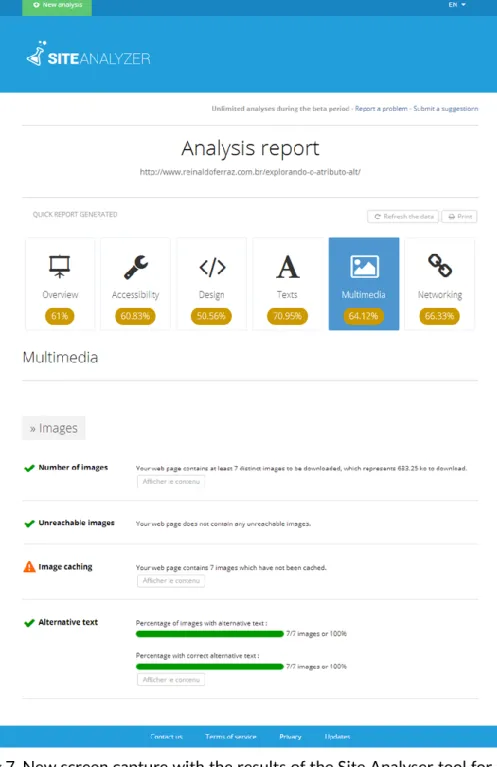
The new scan conducted by the Site Analyser tool produced a better percentage regarding multimedia, which increased from 48.82% to 64.12% with the inclusion of the ALT attribute (and no more highlighted numbers in red).
Fig.7. New screen capture with the results of the Site Analyser tool for the page http://www.reinaldoferraz.com.br/explorando-atributo-alt/. When the ALT attributes are correctly filled, the tool presented improved scores for multimedia content (increasing from 48.82% to 64.12%).
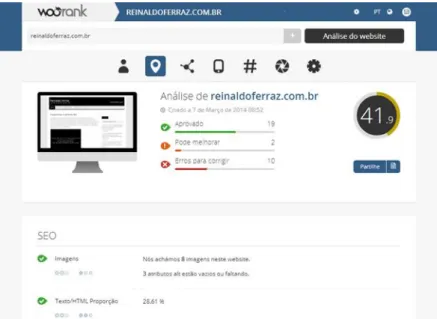
Figure 8 shows that the score given by WooRank jumped from 41.1 to 41.9 when the ALT attribute was inserted in the images.
Fig.8. New screen capture of the results of the WooRank tool for the page http://www.reinaldoferraz.com.br/explorando-atributo-alt/.
The figure above shows that by properly filling the ALT attributes, the score increased from 41.1 to 41.9. The SEO Workers tool did not detect any mistakes or warnings and included the ALT attribute of the images in its report.
Fig. 9. New screen capture of the SEO Works tool results page for http://www.reinaldoferraz.com.br/explorando-atributo-alt/. No warnings or errors are found.
Figure 9 shows that with the properly filled ALT attributes, the tool did not show any warnings and displayed the content of each ALT attribute in the images. The experiment showed that using the ALT attribute to describe images improved the SEO criteria adopted by several tools. In particular, Google indexed and presented the ALT attribute in its search results.
The experiment with the ALT attribute was repeated with other
search engines: Yahoo (http://www.yahoo.com), Bing
(http://www.bing.com) and DuckDuckGo (http://www.duckduckgo.com). None of these search engines indexed the ALT attribute. A simple search using the string “foto de uma ampulheta” (text inside ALT attribute in an image) in each search engine shows no results. Searching for “foto da ampulheta”, which refers to other page of the blog, brings some results. Only Google shows the ALT attribute content in images in its search results.
EXPLORING THE TITLE ATTRIBUTE
The second experiment verified how the content of the TITLE attribute affected search results and analyzed its significance to web accessibility. The page was submitted to the same tests used to explore the ALT attribute. The three automatic SEO verification tools used in this test did not identify any differences between the existence and absence of the TITLE attribute on the page.
The test was conducted using Google search to locate some of the content on the page was also fruitless. We searched for the bread image, which contained within its TITLE attribute the phrase “A foto do pão é a primeira a utilizar o atributo TITLE nesse post” (“The picture of the loaf of bread is the first to use the TITLE attribute in this post”). The term used in the search was “primeiro a utilizar” (first to use) in quotation marks. Google search results showed that no matches were found.
Fig.10. Screen capture of the Google search results page using the phrase “primeira a utilizar” (first to use) for http://www.reinaldoferraz.com.br.
As shown in Figure 10, no matches were found. The same test was repeated with the other images. The image with the TITLE attribute “A foto da ampulheta é de autoria de Reinaldo Ferraz” (“The picture of the hourglass is of Reinaldo Ferraz’ authorship”) did not appear in the search results when using the word “autoria”(“authorship”), part of the phrase in the image’s TITLE attribute. The same result was returned for the picture of the map. The search for the expression “desta foto” (“this photo”) in quotations, in an attempt to locate the image with the TITLE attribute, “Crédito desta foto: Reinaldo Ferraz” (“Credits for this photo: Reinaldo Ferraz”) did not return any matches on Google search.
Regarding the accessibility of the page using the TITLE attribute, some tests were conducted with screen readers, such as JAWS and Internet Explorer browser and NVDA and Mozilla Firefox on Windows operational system and the screen reader VoiceOver with Safari browser on the IOs environment of an iPad.
The first barrier to accessibility was that none of the content in the TITLE attributes was keyboard accessible without screen readers. Accessing the content was only possible using a mouse via the browser’s tooltip. Tooltips are activated when a mouse cursor moves over the image. Users who navigate using a keyboard cannot access this information without a mouse, and mouse navigation is not commonly used by individuals who rely on assistive technologies such as screen readers.
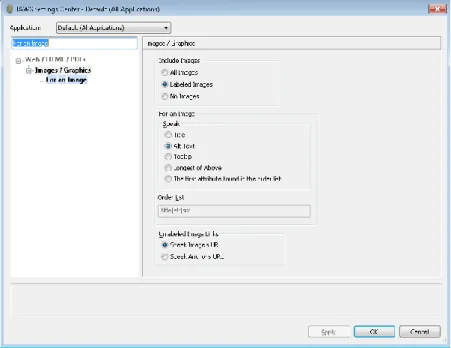
The JAWS 15 software (http://www.freedomscientific.com/Downloads/ProductDemos/#JAWS) does not read TITLE attributes in images. By default, it only reads such content in links and forms. In order for the software to read TITLE attributes in images, it must be configured manually, as shown in the system settings dialog box below. To change the settings, users must access the general settings area and select the application for web/HTML/PDF documents, followed by images / graphics. This area allows users to select whether the reading will be carried out using the TITLE, ALT, or LONGDESC attribute, among others. The initial default setting marks the ALT attribute radio button, as shown in the image below.
Fig. 11. Screen capture of JAWS screen reader settings, displaying radio buttons for reading text in images (ALT, TITLE, tooltip, etc.).
In the case of NVDA version 2014.4
(http://www.nvaccess.org/download/), the navigation test conducted on the page read the ALT attribute and then proceeded to read the TITLE attribute content. However, the screen reader was not able to distinguish between the end of one attribute and the beginning of the next (it read them as if they were a single alternative text).
The VoiceOver screen reader read all of the ALT and TITLE attribute text in the image. First, the ALT attribute content was read, followed by a few seconds of silence, and then the TITLE attribute was read. However, it did not mention the difference between alternative texts and complementary information. This shows the inconsistency of its implementation by user agents as discussed earlier.
The present study was concluded successfully, regarding the present paper’s hypothesis. The results showed that the ALT attribute, which is of utmost importance for the accessibility of web images, was indexed by the currently most popular search engines. Furthermore, this study demonstrated the low impact of the TITLE attribute on web search engines and how it behaves in some assistive technology scenarios.
CONCLUSION
Web accessibility is essential to allow individuals who cannot see images on websites to do so through other means of access, such as assistive technologies (screen readers). The ALT attribute plays an important role in describing images on a web page.
The purpose of the experiment with the ALT attribute was to demonstrate how attribute texts are indexed by search engines and how they help search for information that is filled only in the images’ elements. The results of the tests were satisfactory, as we were able to verify how Google indexes ALT attributes.
The ALT attribute is crucial to web accessibility, since it describes non-text content in an image element. The text declared in the attribute is of great importance to semantics, as it contributes to the description of non-text elements and to SEO. Moreover, Google indexes the content of the ALT attribute, providing new ways to access the content on the page.
On the other hand, the results of the tests conducted with the TITLE attribute showed that the attribute did not benefit SEO and accessibility. The role of the TITLE attribute is to complement the information presented,
different from the ALT attribute. The TITLE attribute in images is not useful for SEO, as its content in images is not indexed.
In terms of accessibility, the TITLE attribute creates more problems than solutions. It is not keyboard-accessible, and has not been implemented in the main available screen reading programs in a standardized manner, which can hinder content comprehension.
Not every search engine indexed the ALT attribute content in the images. In this experiment, only Google indexed this attribute. Yahoo, Bing and DuckDuckGo did not return the attribute content in their search results.
REFERENCES
1. Slatin, J. M.: The art of ALT: toward a more accessible web.
University of Texas at Austin, Austin, TX 78712, USA; 2001. p. 73,77. Available at
http://www.thaicyberu.go.th/courseware/acc01/pdfs/Art%20of%20ALT.p df. Retrieved: March 12, 2015.
2. Alexa top 500 Global Sites. Available at
http://www.alexa.com/topsites. Retrived: March 12, 2015.
3. von Ahn, L., Ginosar, S., Kedia, M., Liu, R. & Blum, M.:
Improving Accessibility of the web with a Computer Game. Computer Science Department, Carnegie Mellon University; 2006. P. 79. Available at https://www.cs.cmu.edu/~biglou/Phetch.pdf. Retrieved: March 12, 2015.
4. Hickson, I., Berjon, R., Faulkner, S., Leithead, T., Navara, E.
D., O'Connor, Ed. & Pfeiffer, S.: Requirements for providing text to act as an alternative for images. 2014. Available at
http://www.w3.org/TR/html5/embedded-content-0.html#alt. Retrieved: January 10,2015
5. Caldwell, B., Cooper, M., Reid, L. G. & Vanderheiden, G.:
Web Content Accessibility Guidelines (WCAG) 2.0. 2008. Available at http://www.w3.org/TR/WCAG/. Retrieved: January 10,2015
6. Cooper, M., Kirkpatrick, A. & O Connor, J.: Techniques for WCAG 2.0. H37: Using alt attributes on img elements. 2014. Available at
http://www.w3.org/TR/2014/NOTE-WCAG20-TECHS-20140916/H37.html. Retrieved: January 10,2015
7. Hickson, I., Berjon, R., Faulkner, S., Leithead, T., Navara, E.
D., O'Connor, E. & Pfeiffer, S.: HTML5 A vocabulary and associated APIs for HTML and XHTML. 2014. Available at
http://www.w3.org/TR/html5/dom.html#attr-title. Retrieved: January 10,2015
8. Davis, H.: Search Engine Optimization - Building Traffic and
Making Money with SEO. O'Reilly Media; 2006, p.23
9. Kumar, A.: Search Engine Optimization (SEO): Technical
Analysis Concepts. A.P, Department of CSE, Vira College of Engineering, Bijnor; 2013. P. 124. Available at
http://www.ijetae.com/files/Volume3Issue3/IJETAE_0313_19.pdf. Retrived: March 12, 2015.
10. Parikh, A. & Deshmukh, S.: Search Engine Optimization.
NMIMS University, Mumbai., INDIA; 2013 p. 3146. Available at http://www.ijert.org/view-pdf/6593/search-engine-optimization. Retrieved: March 12, 2015.
11. Smith, J.: Web Accessibility and SEO, 2011. Available at
http://webaim.org/blog/web-accessibility-and-seo/. Retrieved: December 13, 2014.