Testing Advanced Web Interfaces
Master’s Thesis
Testing Advanced Web Interfaces
THESIS
submitted in partial fulfillment of the requirements for the degree of
MASTER OF SCIENCE
in
COMPUTER SCIENCE
by
Justin Boekestijn born in Delft, the Netherlands
Software Engineering Research Group Department of Software Technology
Faculty EEMCS, Delft University of Technology Delft, the Netherlands
TOPdesk Martinus Nijhofflaan 2 Delft, the Netherlands
c
Testing Advanced Web Interfaces
Author: Justin Boekestijn Student id: 1047205
Email: [email protected]
Abstract
AJAX-based Web applications have gained massive popularity in the last few years, but tool-assisted testing of their user interfaces is an area lagging behind thus far. While these interfaces show similarities with other UI technologies, unique aspects of this architecture necessitate research into approaches suitable to create an automated testing framework. In this report, an attempt is made at implementation of a tool proto-type, designed in support of a specific AJAX-based interface toolkit; this tool is based upon the concept of controls as implemented in this type of toolkit. Its prototype is used to test a part of an application built upon this toolkit, then generalized to be able to support other toolkits.
Thesis Committee:
Chair: Prof. Dr. Arie van Deursen, Faculty EEMCS, TU Delft University supervisor: Ir. Ali Mesbah, Faculty EEMCS, TU Delft
Preface
I would like to thank several people for their cooperation in this project. First of all, my company supervisor Roel Spilker and university supervisor Ali Mesbah, for guiding me through the project. Then, the people I interviewed at TOPdesk while gathering require-ments: testing team members Mark Rotteveel and Marc de Hoop, developer Vincent Zorge and Mango developer Robert Amesz. Finally, I want to thank everyone who took my tool for a test drive: TOPdesk’s testing team members, and especially my personal software tester, Manon Boekestijn.
Justin Boekestijn De Lier, the Netherlands December 16, 2008
Contents
Preface iii
Contents v
List of Figures vii
1 Introduction 1
1.1 Problem statement . . . 1
1.2 Motivation and goals . . . 2
1.3 Research questions . . . 2
1.4 About TOPdesk development . . . 3
2 Related Work 5 2.1 Testing aspects . . . 5
2.2 Procedural approaches . . . 5
2.3 Testing of other GUI technologies . . . 6
2.4 Web interface toolkits . . . 8
3 Requirements 11 3.1 Decisions based on related work . . . 11
3.2 Involved parties . . . 11 3.3 Use cases . . . 14 3.4 Breakdown by importance . . . 16 4 Tool selection 19 4.1 Derived requirements . . . 19 4.2 Tool candidates . . . 22
4.3 Limitations of existing tools . . . 26
4.4 Selection . . . 28
Contents Contents
5.1 Features . . . 31
5.2 Extension support . . . 32
5.3 AJAX support . . . 32
5.4 Project extensions . . . 34
6 Tool implementation for Mango 37 6.1 Structure and hierarchy of Mango . . . 37
6.2 Connecting Mango to Arsenic . . . 39
6.3 In practice: TOPdesk . . . 45
6.4 A case study: Incident management . . . 48
7 Generalization 55 7.1 Preparation . . . 55
7.2 Google Web Toolkit . . . 56
7.3 Echo . . . 57
8 Conclusions and Future Work 61 8.1 Contributions . . . 61
8.2 Conclusions . . . 62
8.3 Discussion/Reflection . . . 63
8.4 Future work . . . 64
Bibliography 65 A Getting started with Arsenic IDE 69 A.1 Automated user interface testing . . . 69
A.2 Installation . . . 70
A.3 Launching the IDE . . . 70
A.4 Recording a script . . . 71
A.5 Adding verifications . . . 71
A.6 Executing the script . . . 72
A.7 Common pitfalls . . . 73
A.8 Further reading . . . 75
List of Figures
4.1 Recording interaction with a Mango card in Badboy . . . 23
4.2 SWEA’s recording interface . . . 24
5.1 Adding a ”typeRepeated” action to Selenium (taken from Selenium documen-tation) . . . 32
5.2 Adding a ”valuerepeated” locator to Selenium (taken from Selenium documen-tation) . . . 33
5.3 Adding an ”assertTextLength” action to Selenium (taken from Selenium doc-umentation) — assert actions are automatically added for each defined ”get” method . . . 33
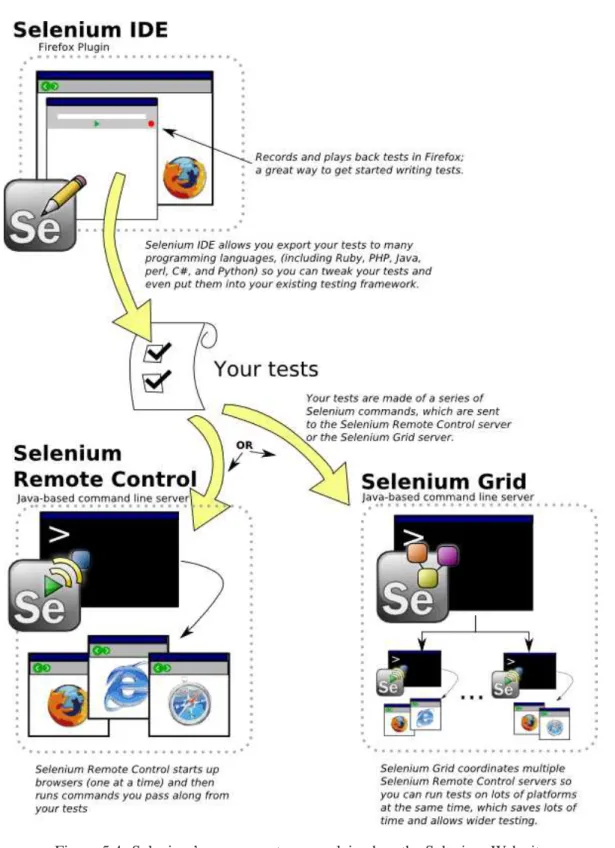
5.4 Selenium’s components, as explained on the Selenium Web site . . . 35
6.1 ”Memo fields” (text areas) having multiple identical icons . . . 41
6.2 A check box implemented as a native widget . . . 44
6.3 A check box implemented as a set of images representing different states . . . . 44
6.4 Suggestions generated by Arsenic IDE . . . 45
6.5 An example control type definition, as used by Arsenic . . . 46
6.6 Typing text into the text-completing selection control . . . 47
6.7 Opening the text-completing selection control option list . . . 47
6.8 Recording interaction with a Mango card in Selenium IDE . . . 48
6.9 Recording interaction with a Mango card in Arsenic IDE . . . 49
6.10 Selenium’s TestRunner interface, running a Mango test . . . 49
6.11 A TOPdesk incident . . . 50
6.12 An incident’s ”time taken” field . . . 52
6.13 Part of a dialog showing ”default text” available for insertion . . . 52
7.1 Tags added to a GWT module configuration to support Arsenic testing . . . 58
A.1 The initial Arsenic IDE interface . . . 70
Chapter 1
Introduction
The Web has been evolving ever since its inception, with one of its more recent achieve-ments the set of technologies and techniques dubbed AJAX, Asynchronous JavaScript And XML [16]. For the last few years, AJAX has transformed the Web platform from an in-terconnected information medium to a part of a serious application platform. These ap-plications, in most cases using little more than a Web browser as their client platform, are becoming a serious competition to classic applications built on a specific OS or virtual machine architecture. AJAX technologies have aided this process by fronting these appli-cations with interfaces equaling or surpassing the richness of classic appliappli-cations. Complex as they are getting, serious user interface testing needs to be done to ensure their quality; to improve efficiency, this process can be supported by automated testing tools. As of yet, tools to accomplish this goal are not suited for use with this relatively new type of graphical user interface. Particularly, current tools are focused on testing semi-static HTML Web sites rather than complex Web application interfaces relying on single-page interaction instead of URL-based interaction.
1.1
Problem statement
Testing tools for classic applications1 have been around for years, supporting all sorts of programming languages and development interfaces. Although tools also exist for Web applications with a technically more limited user interface, these are generally focused on testing whether certain input sequences to forms and hyperlink clicks generate errors on the server side of the application. As for our object of interest — rich, JavaScript-ridden interfaces — no widely adopted options seem to exist if one wants to automate testing in a robust manner. Changing this is by no means a trivial task; but current research looks promising, and because Web interface development is becoming a more structured activity when using tools such as interface builders with an extensive set of interface components, it seems very well possible to build an interface testing tool capable of handling structured AJAX-based applications.
1.2 Motivation and goals Introduction
1.2
Motivation and goals
One interface toolkit in particular has sparked interest in researching this problem: Mango, currently in development by Delft-based company TOPdesk for their eponymous service management application. Over the last few years, TOPdesk has been transformed into a pure Web application, incorporating AJAX-inspired features in its interface. This transformation has culminated in the search for a fitting interface toolkit to further aid development of TOPdesk. After evaluating several existing toolkits, some of which are discussed in this report, TOPdesk’s development team decided to develop their own kit, which they have dubbed Mango. At the time of writing, Mango has entered a phase in which some sections of TOPdesk’s interface have been reimplemented as Mango pages, with more conversions planned for each future release. Their desire is to have a functional regression testing tool able to interact with any Mango-based application, to be used by developers building these applications. Points of focus and requirements set by TOPdesk are treated in chapter 3.
1.2.1 Scope
I will try to keep this research as general as possible regarding the range of interfaces which may be tested with an AJAX testing tool. Most of it will assume a well-defined interface toolkit has been used to develop the application under test, to be able to keep an analogy with classic applications. However, like every classic interface toolkit is different, AJAX toolkits range widely in their features and approaches, which will result in some concessions regarding generalization — I will discuss this in more detail in chapter 7.
1.3
Research questions
A variety of aspects needs to be researched before being able to set up design and imple-mentation of a generalized AJAX testing tool. First of all, a demarcation needs to be made regarding the definition of interface testing. Will functional testing be the only thing con-sidered, or might performance and perhaps usability testing be incorporated in the same tool? Then, investigation must be done in testing philosophies and methods. Which ap-proaches have been used within the world of software testing? Much may be derived from classic interface testing and ”regular” Web interface testing, also with regard to technical approaches: how will this tool fit into the development and build environment, how will it interact with the application? And although current tools may be inadequate for AJAX needs, some might be promising enough to build the desired tool upon. This leads to a next question, important in selection of a suitable tool to extend: which features need to be included in the tool? Last but not least, how will a testing tool designed for use with Mango be able to cope with other interface toolkits? All in all, a lot of aspects needed to be researched, leading to this report.
Introduction 1.4 About TOPdesk development
1.4
About TOPdesk development
While TOPdesk’s last incarnation, still in use by many of the company’s clients, was built in FoxPro exclusively for the Windows platform, the application’s latest major version has been designed as a pure Web application. This gradual transformation started by develop-ing a Web interface for the application’s most widely used features in support of the FoxPro client. This Web interface was built upon the Jetty Web server2 using Java servlets and JSPs. After many features of the Windows application had been incorporated into the Web interface, work started on a TOPdesk version which could operate completely indepen-dent from FoxPro and Windows. This Web application has been built upon the same Java technologies as its predecessor, but supports storage in several popular database types like Microsoft SQL Server and Oracle. Its user interface has also been completely redesigned, adding many AJAX-related features to improve the perception of working with a regular application.
1.4.1 Current state of testing at TOPdesk
At the moment, a quality assurance team of about fifteen employees ensures the number of software bugs in TOPdesk is reduced to a minimum. Apart from these human testing efforts, unit tests are performed regularly to perform regression testing, and nightly builds are generated from the source code repository to make sure everything compiles properly. Although the QA team is a valued asset of the company, the development team is constantly researching options to improve and expand automated testing procedures. Interface testing is one of some less explored aspects of these procedures.
Chapter 2
Related Work
2.1
Testing aspects
Testing encompasses a wide variety of procedures and activities to ensure and improve soft-ware quality. The majority of related research with respect to graphical user interfaces has focused on three particular aspects: functional, performance, and usability testing. Func-tional testing, also known as black-box testing or specification-based testing [19], is the most fundamental part of testing, that verifies whether an application works as specified by its design. Performance testing is used to measure whether these application features execute within a reasonable amount of time; functional test cases may be reused in this pro-cedure, although these do not generally cover every detail of performance testing [23]. Both of these aspects are a subject of increasing automation, and are interesting to automate in an AJAX interface context. The third aspect, usability testing, is largely dependent on human interface guidelines and user input; automation of certain elements of usability testing is possible, such as evaluation of experiment results [10]. Most other elements require input from users other than developers, as their approaches to usage of an application differ in most cases [24], making them a valuable source of usability assessment data.
2.1.1 Focal points
Because of the crucial importance of functional testing, it will be the main point of interest in this research. Performance testing may be implemented as a future extension, when Mango has reached a maturity level at which the time is ready to tweak its performance. Usability testing is a completely different aspect, and will be left out for the remainder of this report.
2.2
Procedural approaches
Functional testing may be executed using several different approaches, most of which are also applicable to AJAX interfaces. One widely known approach, also used in testing of HTML pages [18], is static analysis. Although this is a useful method for testing static interfaces, the dynamic nature of AJAX and the variety of programming languages used
2.3 Testing of other GUI technologies Related Work
to implement this type of interface make static analysis unsuitable for testing AJAX-based interfaces. Other methods can be roughly divided into two categories, referring to their ap-proach to achieving test coverage: methods related to record-and-playback expand coverage by creating tests on a case-by-case basis manually, while methods based upon finite state machines start by automatically exploring every possible path through an application, and manually filtering out cases considered irrelevant.
Record-and-playback, alternatively known as capture-and-replay, is a popular and intu-itive approach to functional UI testing, which requires a programmer or QA employee to define test cases by interacting with the application’s user interface, while being monitored by a tool recording the corresponding test scripts [7]. This technique suffers from several issues: the degree of possible automation is limited due to the requirement of user interac-tion while recording scripts; manual effort is also needed in tweaking recorded scripts to match intended interaction, and in adding verification steps to check whether actual results match expected results. Also, because these scripts are created manually, coverage may be limited to the imagination of the script writers. These issues may be partially solved by capturing actual user sessions [20] to generate test scripts from; manual effort will then primarily consist of filtering useful test cases from these sessions.
On the other hand, methods based on finite state machines focus more on automation of achieving maximum coverage by using a tool to extract every possible interface state from the application [1] [2]. Several techniques for state extraction have been defined in related research, based on concepts such as plan generation [13], GUI ripping [12], and UML diagrams [22]. Manual effort is still needed in limiting the input space to relevant states, as well as defining verification steps; however, plugin interfaces are available for some FSM-based tools, allowing reuse of generalized verification actions which are not specific to the application under test.
The oracle verification issue has also been the topic of a great amount of research, dig-ging into requirements for consistent and complete validation of an application, along with methods to automate insertion of verification steps at appropriate moments. Issues encoun-tered during this research are related to, among other aspects, keeping test results consistent while changing case execution order [6], changing execution context [9], concurrent script execution, and nondeterministic application features [21].
2.3
Testing of other GUI technologies
Existing research on automation of user interface testing in applications focuses mainly on classic applications — those built for a specific operating system or virtual machine — while research on Web interface testing is aimed largely at Web sites, be they static or dynamic, other than those used to front applications. Some parallels can be drawn between testing classic application interfaces and Web application interfaces with respect to methods used; the differences between the building blocks used to assemble these interfaces are the most important obstacle in comparison of these technologies.
The original set of Web programming and markup languages have never been intended to be used to replace traditional applications [17]; attempts to develop new Web standards
Related Work 2.3 Testing of other GUI technologies
for creating Web application user interfaces [4] have failed, possibly due to the popularity of current standards and their extensions. Web developers have therefore been forced to build one or more layers upon HTML and JavaScript in order to facilitate application develop-ment; however, these layers are not yet used by any testing tool [3], instead referring directly to DOM elements as components to test. A challenge lies in creating a tool which is able to abstract away from the DOM, referring to virtual controls introduced by the UI toolkit layer used to implement the application interface; this is particularly difficult, because most Web UI toolkits generate client code not directly retraceable to this control layer. However, this type of tool is desireable because the control concepts used in generated test cases cor-respond to both concepts used in interface development and visual elements, as presented to the user. The availability of a hybrid tool, capable of handling both controls and custom HTML used in the interface, is also desireable, as most Web interface toolkits allow de-velopers to insert arbitrary HTML between sections of controls; this code also needs to be tested thoroughly.
2.3.1 Extending an existing tool
Web interfaces have evolved in a way where existing technologies are used while intro-ducing new techniques rather than employing new browser features. Most existing testing tools, however, are designed with Web 1.0 in mind, supporting only a limited set of scripted interface automation. Nevertheless, it should be possible to extend an existing Web inter-face testing tool to support more sophisticated scripted interinter-faces. And while Web 2.0, with all its AJAX beauty, appears to be a set of completely new technologies, it is still based on Web 1.0. Thus, features available in Web 1.0 testing tools are still very useful to build upon, although it should be kept in mind that the evolution of the Web from an information platform to an application platform [8] has also shifted the focus on testing needs.
2.3.2 Current Web testing tools
The open nature of Web technologies allow for a wide variety of methods to use these technologies in application interface development. Testing methods used for Web interfaces also show a broad variation, of which three options tend to be the most popular among test tool developers. One of these methods uses a HTTP proxy to monitor or manipulate interaction between the client interface at the browser and the application code executing at the server side. This method, seen in tools such as TestMaker1 and Sahi2, is limited in its inspection and interaction capabilities because it is in direct contact with neither server nor client, and is useful mostly for testing static Web sites. Another widely implemented approach uses a browser emulator to maximize aforementioned capabilities; this method has been used in Canoo WebTest3, based on the HtmlUnit emulator. Although emulators have full control over the client interface, this approach is unsuitable for testing complex AJAX applications, as the emulator will fail to detect application errors caused by quirks found
1http://www.pushtotest.com/ 2http://sahi.co.in/
2.4 Web interface toolkits Related Work
in popular browser implementations. Testing methods relying on manipulation of actual browser instances are therefore much more interesting to employ in an AJAX interface context; implementors of this approach either embed an automated instance of a browser in their tool, such as Badboy4and Watir5, or embed their tool into the browser as a plugin, such as Selenium6, specifically its IDE component. A disadvantage of these methods is the fact that different implementations are needed to support different browsers; however, this issue is favored over the interaction limitation found in proxies and the additional browser introduced by an emulator.
All of the tools mentioned above operate by executing test scripts defined by a user, providing either a custom scripting language or an API to their test execution engine for test case definition. In some cases, a test recorder is included to complete the capture-and-replay paradigm. However, current research also examines methods requiring less input from users in test creation. For instance, a tool named Atusa [15] has been developed, which is able to verify correctness of an AJAX user interface by feeding interface states to a plugin mechanism. These interface states are determined by crawling the application with a specialized tool, Crawljax [14]. Plugins are defined manually, and are meant to verify invariants instead of application-specific features.
2.4
Web interface toolkits
As with classic applications, a variety of toolkits is available to implement AJAX GUIs. Each has its own approach with regard to, among other aspects, division of code execution at the client and the server, division of responsibility and integration with back-end code. They have one thing in common: all of them have been developed for, to quote Google, ”developers who don’t speak browser quirks as a second language”7.
One of the research-wise most challenging issues in developing an AJAX testing tool, but also one of the most desirable features, is the ability to deploy this tool for as many dif-ferent toolkits as possible. As these kits are largely heterogeneous, some concessions will have to be made to keep the project feasible. A pluggable framework will probably be the most intuitive solution for tool implementation; toolkit components should be defined on a plugin interface, specifiying their methods of interaction with the outside world. After tool implementation for Mango, generalization of the testing tool will be based on several toolk-its currently in general use; they are either interesting because of their reputation or because a testing tool is already available for them. In particular, Google Web Toolkit8 and Echo9 will be used for implementation. Details on these toolkits and this phase are explained in chapter 7; for now, an explanation of a toolkit already supported by a customized testing tool is in order. 4http://www.badboy.com.au/ 5http://wtr.rubyforge.org/ 6http://www.openqa.org/selenium/ 7http://code.google.com/webtoolkit/ 8http://gwt.google.com/ 9http://www.nextapp.com/platform/echo2/echo/ 8
Related Work 2.4 Web interface toolkits
2.4.1 TIBCO
TIBCO10features a fully-fledged IDE, built using its own toolkit, to enable developers to de-fine their GUI by implementing JavaScript and dragging together interface elements. Gener-ated code includes wrapper elements specifying user-defined component labels along with generated ids and classes; these identification attributes are used by GITAK11, TIBCO’s testing tool based on Selenium, to recognize and reference components used in test scripts. This method of locating elements sketches the ideal situation for a GUI testing tool: identification by a label chosen by a developer is unambiguous and less error-prone than using generated id’s. Readability of test scripts is also improved, as are reusability and maintainability.
10http://www.tibco.com/software/rich_internet_application/general_interface/ 11http://www.tibco.com/devnet/gi/product_resources_gitak1.jsp
Chapter 3
Requirements
3.1
Decisions based on related work
An important requirements-related decision that needs to be taken with regard to tool imple-mentation is one for which options have already been mentioned in section 2.3. Research of literature and existing tools has shown an unexplored area in AJAX testing with this regard: a shift of focus in creation of a testing tool from directly exposing the HTML layer of an application to the user to usage of a more abstract layer of virtual controls, as they appear in Mango and other toolkits. Using this concept will result in a tool comparable to regular application UI testing tools, which also focus on interface components, rather than their underlying implementation. To explore this path is therefore the focus of further research in this report.
3.2
Involved parties
The most important stakeholders involved in successful development of a testing tool are obvious: the entire development department shares an interest in more efficient regression testing. When the interface toolkit is being developed in-house, these developers may be divided into two categories: those developing the toolkit itself, and those developing code using this toolkit. However, other parties may also benefit from the achieved automation, parties more directly involved with clients; at TOPdesk, these include the bespoke work department and the help desk. Interviews conducted with selected members of these teams have resulted in a list of requirements used in selecting a testing tool to extend, and in implementation of the tool extension.
3.2.1 Development
For a developer, it is necessary to be able to know as soon as possible whether a change or addition made to program code will break existing functionality; at the moment, most of these issues are discovered during test cycles performed by the quality assurance team. Be-ing able to quickly run some regression tests after any significant code modification would enable developers to fix these problems sooner: after all, a bug discovered sooner is more
3.2 Involved parties Requirements
easily retraceable to a recent change in code. At the moment, TOPdesk developers perform interface testing in a purely manual way, followed by a request to the software testing team to do some more manual testing. Automation has been carried out in back end testing by means of a collection of JUnit test cases, maintained by developers, which are executed daily.
Because Mango is developed in-house, developers share a responsibility with regard to ensuring application tests can be set up in a convenient way. Keeping in mind the fact that the testing tool should be extendible to suit other interface toolkits, for which source code or even modifications in support of this convenience are not available, it seems rational to keep Mango toolkit developers out of the loop in development of the testing tool. However, see-ing as both developers and end users would benefit from code more suitable for automated testing, it is more practical to also have Mango toolkit developers influence requirements used for the testing tool.
Mango development
A view expressed by one of Mango’s developers is significantly different from other opin-ions on the necessity of a Mango testing tool. Its deviation is mainly based on the assump-tion that it is not necessary to test the entire Web applicaassump-tion from user interface to business logic and data integrity with a single tool and set of test scripts. Instead one could test the application starting at the layer directly below the user interface through a Web services interface, and test only the components used in generated HTML-based interfaces sepa-rately. Because these components are tested one at a time, an abstraction layer would not be needed.
However, the downside to this approach is the lack of testing done on the actual appli-cation interface: the aggregate of a set of user interface controls backed by business logic. While components themselves may be bug-free, their use within a user interface introduces different bugs, among which are those caused by components interfering in ways over-looked while testing the user interface toolkit itself. For this, the component abstraction layer forms a welcome addition.
On a side note, an assurance from the Mango development team has been made that Mango is easily extendible to provide more component information to the testing tool. This would in practice mean traversal of several layers of Mango’s implementation to retrieve desired information.
3.2.2 Quality assurance
The majority of TOPdesk’s testing activities are performed manually by a team mainly made up of students. Automation of these tasks has been attempted on several aspects, but these efforts have concentrated on back end testing. A significant part of a software tester’s time at TOPdesk is spent doing regression testing by clicking through the application interface. This valuable time can be saved by having a tool perform these tasks on a daily basis. Recently, one of the team members has started development of an interface testing tool based on image recognition in his spare time. Although this approach has the advantage of
Requirements 3.2 Involved parties
independence from application implementation details, this method of abstraction yields a tool also lacking the fine-grained control needed to interact with and inspect an advanced application interface.
One of the most important criteria for a testing tool used by TOPdesk’s testing team is its ease of use: the average team member has only a basic understanding of programming, which means creation and maintenance of test scripts should be kept as simple as possi-ble. The current implementation of the image recognition tool mentioned above does not adhere to this requirement, instead providing a programming interface for Java. A more suitable solution would be the inclusion of a basic scripting language, supplemented by a test recorder which is able to generate test scripts in this language. Another option would be to leave interface test automation to developers, as is already the case with the set of JUnit tests currently in use. Tool selection will also depend on available feedback features. The testing team has expressed a need for detailed feedback in case of test failure, also when these tests are run unsupervised.
These software testers are the main reason for selecting a particular automated test-ing paradigm: due to their unfamiliarity with complex software engineertest-ing concepts, a rational choice would be to go with the most intuitive approach. This approach, record-and-playback, is unsurprisingly also the most popular method of automated user interface testing, when counted by tools available. Although this means recording and maintaining test scripts still involves a certain amount of manual effort, it is undoubtedly an improve-ment compared to purely testing a Mango interface by hand. This manual effort stems in part from the need to define scenario-specific verifications for each script created; because this is an aspect difficult to automate — which is discussed in further detail in section 6.2.3 — the advantage of creating scripts by means of state graph generation is lost when adding these application-specific verifications. Also, this project aims to reduce maintenance effort by using a script syntax designed to be more robust combined with AJAX toolkits such as Mango; without this addition, testing Mango interfaces aided by tools would be impossible due to its generated HTML code, an issue that will be further highlighted in section 6.2.2.
3.2.3 Bespoke work
Many of TOPdesk’s clients have requested some addition or customization to their instal-lation, which in turn has been implemented by TOPdesk’s bespoke work department. A major issue with regard to maintenance of these customizations is the fact that they may break, whenever a new version of the software is installed at the client. Ever since this bespoke work was introduced, a more proactive approach has been desired to prevent such breakage. However, because of the nature of current bespoke work implementation being very irregular, it is infeasible to have each customization tested automatically.
The introduction of Mango will hopefully streamline implementation methods, and cre-ate a more structured set of client-requested customizations. As a result, it should be easier to execute a test suite verifying that each piece of bespoke work interface still functions as expected after a change to TOPdesk code. If something breaks, a solution may be found in a fix to this code, before a new version is released to the client.
3.3 Use cases Requirements
itself to interact with customized Mango controls. Although bespoke work implementation on Mango has not yet begun, past experience has shown that custom controls are often needed to suit client demands. This issue is also related to extension of the tool to other interface toolkits.
3.2.4 Help desk
As a support department to clients, bug reports are frequently submitted to the help desk. It is their job to reproduce these bugs and to notify developers whenever a bug is reproducible. A testing tool may facilitate this process by allowing the help desk employee to record a reproduction script, in order to send this to developers. This saves time at the help desk used to describe these reproduction steps verbosely in a bug report. Because this type of use is only of secondary importance, and because of the fact that the number of people involved in requirements gathering should be limited, no requirements inventory has been done with help desk employees.
3.3
Use cases
The component-based interface testing tool will most likely be implemented as an extension to an existing tool. This more or less restricts use cases to a listing existing uses of these tools, because the aim of this project is not to significantly alter interface testing procedures. Instead, the abstraction layer introduced is meant to create more robust and comprehensible test scripts; use cases listed here are mostly deducted from existing tool features. In all relevant cases, the assumption is made that the server hosting the application under test is already running.
3.3.1 Creation of a new test script
The use case is initiated by a test suite maintainer starting a Web browser and its test script recording extension. By starting the recorder, any page navigation and in-page action done by the user will be recorded into a new test script. The user then navigates to the URL used to access the application under test and interacts with the application. When all desired interactions have been executed, the user orders the script recorder to stop recording by clicking the appropriate button on its interface. At this point, the user inserts assertions to check the user interface state after some of the recorded actions. To verify its correctness, the user has the recording extension run the resulting test script. If the user’s expectations with regard to test execution are satisfied, he saves the script to disk. Otherwise, the process of modifying an existing test script, as described below, may be followed until results are satisfactory.
3.3.2 Modification of an existing test script
This use case is similar to creation of a new test script; actors are identical and actions involved are comparable. The scenario again starts with a test suite maintainer opening
Requirements 3.3 Use cases
a Web browser and test recorder window. The user then opens a previously saved test script. He instructs the recorder to stop test execution at a certain instruction by placing a breakpoint at the appropriate location. The user then orders the recorder to run the test script; it will halt execution when the breakpoint has been reached. At this point, the user starts recording actions by clicking the record button, then interacting with the application under test; the script recorder inserts new actions at the breakpoint location. When the user has finished these interactions, he clicks the record button once again to stop recording. The user may also insert new assertions between any two script actions. Also, script actions themselves may be modified manually. Once modifications are done, the user saves the script to disk.
3.3.3 Writing a test script in a higher order language
A script maintainer initiates this use case from one of two starting points: either a script will be written from scratch, or an existing test script, written in the regular test script definition language, will be extended. The first option is essentially a pure programming task, which needs no further detail in this use case. The second option is aided by a conversion tool. The user loads an existing script into the conversion tool, after which he is presented with a select set of programming languages to which the script may be converted. After choosing one of these languages, the loaded script is converted into source code suitable for the selected language; this code uses an API provided by the testing tool, which is able to control the test runner engine. The generated code may be altered at will, but this is again a pure programming task.
3.3.4 Manual execution of a test suite
The test suite maintainer is the actor in this case; this person may or may not be a script maintainer. The use case is initiated by starting the test runner application. After the user loads the test suite into the test runner, the test suite is ready to be executed. The user presses the run button to start the test suite; the test runner reports failure and success messages for each test script executed.
3.3.5 Scheduled execution of a test suite
This use case involves a test suite maintainer and either an external scheduling or a con-tinuous integration service. The most basic approach consists of the user instructing the scheduling service, such as cron or Windows’ Scheduled Tasks, to run a certain command at a specified time. Execution of this command launches the test runner, which then runs the configured test suite unsupervised for each browser platform supported and requested by the user. Reports on test failure and success are stored or forwarded by the test runner for later inspection.
A more advanced approach adds test execution to the continuous integration cycle of the software. This alleviates the tasks of scheduling test execution and processing separately provided test results from the user; the use case changes into a one-off activity of performing the integration of the testing tool with the continuous integration framework.
3.4 Breakdown by importance Requirements
3.4
Breakdown by importance
3.4.1 Must have
When focusing on the average test team employee as an end user — one of two user groups deemed most relevant, alongside developers — an absolute necessity with regard to tool features is its ease of use. To aid these users in creation and maintenance of test cases, the tool must have an intuitive script recording interface which uses a test case definition language comprehensible by non-developers. This interface and language must also provide extensive capabilities for specifying assertions, needed by end users to verify test execution correctness. Where applicable, error messages generated by these assertions must adhere to the terms and metaphors introduced by the component abstraction layer.
Furthermore, in order to be able to integrate automated interface tests into a company’s nightly building and testing process, support is needed for completely unsupervised test execution. To achieve this, two criteria need to be met: one must be able to schedule test execution running in a form that does not require user intervention, and one must have the opportunity to read detailed test results after execution at any time, preferrably also at any place. One particularly elegant and versatile approach to satisfy both requirements is to integrate test execution and feedback with the continuous integration cycle in use for the application under test. Another approach to satisfy the second criterium is allowing the user to specify an URL for the testing tool to call whenever a test result is available, to which the tool appends some parameters; this URL should point to a script processing the provided test results in a way specified by the user.
A requirement which is also valid for user interface toolkits themselves is the extendibil-ity of the tool to support custom interface controls. This requirement is related to the prob-lem of extending the tool to facilitate support for completely different Web user interface toolkits; the layer placed on top of the layer responsible for HTML and JavaScript interac-tion must be sufficiently extendible, so that interface toolkit developers are able to define the interaction models needed for their components.
3.4.2 Should have
While developers are also able to use a simple test case definition language, their demands with regard to test case complexity may soon exceed what is possible without a fully-featured programming language. Therefore, there should be a way for developers to de-scribe more elaborate test cases. Ideally, this would be implemented by providing an API to the testing engine in an existing language. In practice, most tools provide either an API or a definition language, making this requirement conflict with the ”must have” of a tool that is easy to use.
3.4.3 Could have
The first feature that would be nice to have is an extension to both the script recorder and the extendibility of the tool itself. To further ease the process of adding recognition of new interface components to the tool, a wizard could be developed to generate component
Requirements 3.4 Breakdown by importance
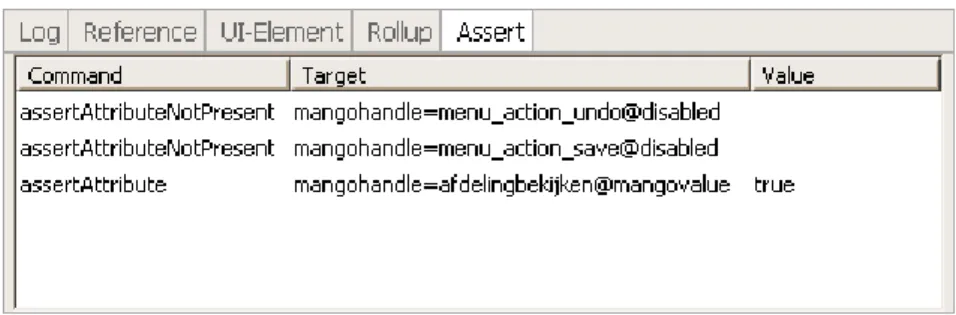
definitions for use by the testing tool. This wizard would ask the user to point out the custom component in a live application environment, followed by a possibility for the user to execute some actions upon the component and name these actions according to suitable terminology. For example, if a user wants to add a definition for a date selection component, he would first be asked to identify component elements by clicking them, then be allowed to specify actions such asclickNextMonthby executing and naming them. The feasibility of the implementation of this wizard is largely dependent on implementation details for the component layer itself.
Streamlining user interface testing with other automated testing activities would also be a welcome addition to the feature set. Some tools implement this integration by providing a task for frameworks such as Ant or NAnt to execute test cases. Others, in particular those tools designed to be programmed directly from an existing language, are easily integrated into the unit testing framework already used for other testing purposes.
3.4.4 Won’t have
Features the tool will not have primarily belong in the category of features not usually associated with the capture-and-replay paradigm. These include the traversal of state graphs and involvement of GUI models in test case generation.
Chapter 4
Tool selection
4.1
Derived requirements
4.1.1 Extendibility
If a tool is to be extended at all, the extension options available within the original tool should be the primary criterium in tool selection. A significant amount of modification will be needed in order to achieve the goal of a component-based Web interface testing tool. This implies that a completely modifiable open-source solution is preferred over a proprietary tool which provides a limited API.
Also, TOPdesk has expressed a desire to release the testing tool as an open source project. This means that a solution already supported by the open source community is preferred, in order to increase the odds of the extension being picked up by the community.
4.1.2 Browser support
The aspect of browser support can be satisfied in at least two ways, either by writing a sepa-rate tool for each supported browser or by building a single tool which includes code to take care of special cases applicable to a specific browser. TOPdesk guarantees compatibility with a limited number of browsers: specifically, Microsoft Internet Explorer 6 and up and Mozilla Firefox 1.5 and up are supported. At the time of writing, both of these browser versions have already been superseded by version 7 and 3.0, respectively; support for these older browser versions in a testing tool is therefore not a requirement per se, but rather a feature that would be nice to have.
The first implementation option, supporting each browser with a separate tool, is not just a tedious task for the tool developer, but also for the test maintainer. Therefore, finding a tool that already supports multiple browsers is preferrable. This criterium eliminates many tools only suitable for testing applications with Internet Explorer, the browser with the largest market share at time of writing. A suitable framework would support not just Firefox and Internet Explorer, but also browsers that might be added to TOPdesk’s compatibility list in the future, such as Apple’s Safari.
4.1 Derived requirements Tool selection
4.1.3 Ease of use
Like with every piece of software, a balance needs to be found between tool versatility and simplicity. This balance is largely dependent on the target audience, which in this case is a diverse group. Testing personnel is not necessarily proficient at programming, which means scripting of test cases should be as simple as possible. On the other hand, developers usually have enough knowledge of programming to be able to implement test cases in a fully-fledged programming language. The majority of current testing tools is limited to use either a scripting language developed specifically for the tool itself, or to provide an API for one or more existing languages. However, there are some exceptions to this rule: these tools generally provide a very simple test case definition language, that includes commands for interaction with the application, along with assertions for inspection of the application state. More advanced test programming support is then offered through a library disclosing these commands.
4.1.4 Automation
When selecting capture-and-replay as the automated testing approach, one will need to put considerable effort into creation of test cases. This project aims to reduce this effort by improving test script syntax to be more robust, and improving test script recorders to capture intended user interaction. As a requirement shared with the extendibility argument, the tool needs to be selected on extendibility of both syntax and recorder. Another aspect of script recording which allows for (at least partial) automation is the inclusion of assertions and verifications to recorded scripts; while this phase of script writing is still a matter of selecting relevant checks to add, the tool should be able to at least offer suggestions based on recorded actions and monitored page content changes.
Apart from enhancing test creation, the tool also needs to support automation of test execution; more specifically, tests need to be executed unsupervised, and test results need to be available afterwards. Unsupervised execution may be achieved in several ways: one option is to keep a service process running continuously, executing the test suite whenever a signal is received through a predefined protocol. Another, simpler option is to start the tool through a special command, which makes it run its test suite automatically; this command can be added to a scheduling service to execute tests on a periodical basis. Implementations of this second option can be found in nearly every testing tool, which makes this requirement less of a worry when eliminating candidates for tool extension.
Communicating test results for later use can be done in a multitude of ways. The most basic way of saving test results is of course done by providing a log file containing these results after execution, which may then be analyzed manually or by external tools. A tool may also provide an option to automatically send these test results through email or, gen-eralizing this concept, through a script written by the user, providing a much more flexible solution for result processing. Another option is the inclusion of special reporting actions within scripts, providing a means to store test results selectively. All of these issues are, to an extent, only applicable to stand-alone tools; those integrated into other testing frame-works and those consisting purely of a browser automation API can shift responsibilities
Tool selection 4.1 Derived requirements
regarding both execution and feedback to the encapsulating framework, such as JUnit or NUnit.
A related point of attention is the level of detail incorporated into test results. Saving detailed failure information is a valuable aspect of automated testing, especially when appli-cation states resulting in test failure are not easily retrievable. Although showing the number or a list of passed and failed tests is a start, useful test results also show information regard-ing application state and error messages at time of failure. In case of a Web application, the state information should contain at least a dump of the DOM tree; values of JavaScript vari-ables and a screen capture of the application interface may also aid investigation into test failure. Error messages should be propagated from corresponding messages produced by the application itself, where possible, supplemented by messages generated by the testing tool; these messages should indicate point of failure and a reason for failure.
4.1.5 Testing approach
The ease of use criterium also partially determines the choice of tool by filtering candidates based on their testing approach: although both capture-and-replay and FSM tools require manual effort to create and tweak sensible test cases, FSM tools tend to require input from users with a large amount of expertise in the field of computer science. The tool requested by TOPdesk is to be used by their current software testing personnel; a capture-and-replay tool will suit their level of expertise better than an FSM tool.
Otherwise, the approach chosen is of minor importance, as goals set for this project are relevant for both methods. Improving robustness of test case definition is an issue relevant whenever a highly dynamic application is involved, while automation of the introduction of verification steps is an idea applicable to any testing tool.
4.1.6 Legal issues
In order for the extended tool to be deployed in a commercial environment, licensing issues need to be taken into account. These issues are twofold: first, a license for use of the original tool is needed; a tradeoff between license cost and feature richness will have to be found. Second, the desire to release the extended tool into the open source community also influences the decision taken with regard to the end user license: most commercial licenses do not allow redistribution of the program code. This leads to a preference towards extension of a community-backed open source solution, an option also favored with regard to the extendibility criterium; being able to modify the entire tool has its advantages over the limitation of building upon a provided API.
Choosing an open source solution does not narrow down license issues sufficiently, though. If, for instance, the tool used has been released under the GPL, the license used for derived software cannot place extra restrictions upon distribution terms. Because the extended testing tool is intended to be released as an open source project anyway, this is not really an issue; related software, such as the interface toolkits it is able to test and the applications tested with the tool, is not affected by these license terms. Nevertheless,
4.2 Tool candidates Tool selection
license terms for each tool should be studied to ensure any extension may be legally used and distributed.
4.2
Tool candidates
Having gathered and prioritized the list of requirements, a selection can be made of tools suiting this list. Candidates have been filtered on their availability for use in a project such as this; most commercial products have therefore been left out due to their lack of (legal) extendibility, and more importantly, their purchase cost.
4.2.1 Badboy
One of the commercial products considered, Badboy1 is a closed-source application which is able to automate testing for Microsoft Internet Explorer. These aspects are the most im-portant disadvantages of this tool; its extendibility and browser support are limited. How-ever, Badboy does provide a script recorder and automation of test execution by providing command-line options to start a selected test suite automatically. Also, feedback from test runs may be requested by including special actions in test scripts, which are able to save log files to disk or forward messages by email.
Badboy Software offers another tool, named Wave Test Manager, as a controller to Badboy. WTM allows users to trigger execution of test cases on several computers at a time, which enables simultaneous testing on different platforms — although the use of this feature is questionable, as Badboy will only be able to test different versions of Internet Explorer at the same time. The test manager uses a Web-based interface, which allows for centralized maintenance; also, WTM aids in integration of test execution with the development cycle.
Although the available features are nice, Badboy does not meet the requirements needed to extend it to a component-based testing tool. License terms are unfavorable as well, a paid license being needed to use the tool within organizations having more than five users, and redistribution of the tool itself being prohibited — no mention is made of redistribution of extensions to the tool, although it is assumed this is legal.
4.2.2 SWExplorerAutomation
The other commercial tool included in this inventory is SWExplorerAutomation2 by We-bius. It is similar to Badboy, also solely supporting Microsoft Internet Explorer and being closed-source. Its license prohibits redistribution, except for included libraries, which is a good opportunity to use SWEA as a basis for extension. SWEA features a script recorder, which is able to convert scripts to C# or VB.NET; this balance between ease of use and the power of creating test cases through a true programming language is a desireable feature. This integration with the .NET framework is extended by providing support for NUnit test cases, which is great if one is developing in a .NET-based environment. However, because
1http://badboy.com.au/ 2http://webiussoft.com/
Tool selection 4.2 Tool candidates
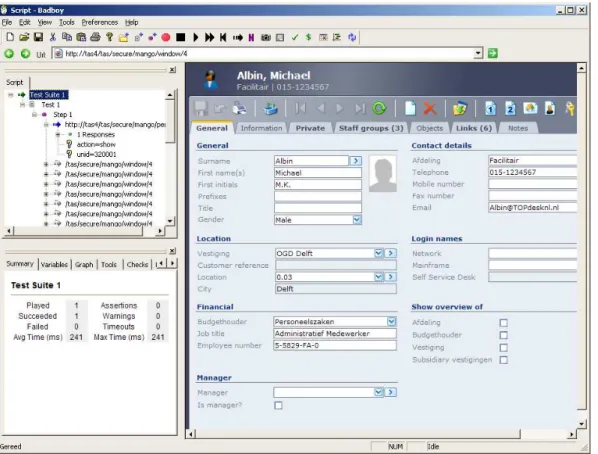
Figure 4.1: Recording interaction with a Mango card in Badboy
TOPdesk develops its software in Java, choosing SWEA as a basis for their testing tool would be irrational.
4.2.3 HtmlUnit-based tools
HtmlUnit3 is an open-source project released under an ”Apache-style license”, which is very permissive with regard to redistribution and modification of code. It consists of a Java API to a browser emulator, written specifically for purposes needing automated browser behavior. Although it includes the Mozilla Rhino JavaScript engine to provide JavaScript support, it has been argued before that emulating a browser will never find bugs introduced by real browser quirks. The HtmlUnit developers also admit that complex JavaScript-based applications will probably not function correctly in HtmlUnit, making this an undesirable candidate for extension.
HtmlUnit is not a testing tool per se, although its Java API makes it easy to integrate into other testing frameworks on a variety of platforms. Tools such as Canoo WebTest4and
3http://htmlunit.sourceforge.net/ 4http://webtest.canoo.com/
4.2 Tool candidates Tool selection
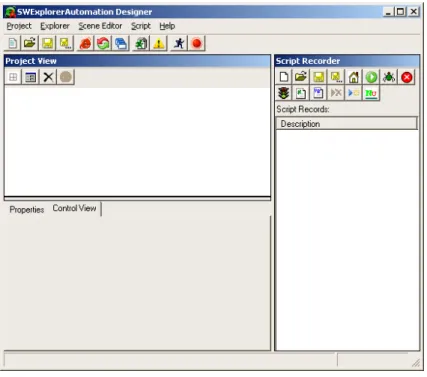
Figure 4.2: SWEA’s recording interface
JWebUnit5 use HtmlUnit for browser automation; the latter has been relicensed under the GPL. Both tools take advantage of other existing Java tools: WebTest uses a script format compatible with Apache Ant, while JWebUnit has been built as an extension to JUnit. They are also similar with regard to assertion capabilities, providing content checking functions found in nearly every other tool. However, WebTest also comes with a script recorder, which is able to create Ant scripts on the fly. Another advantage of WebTest over JWebUnit is the inclusion of more extensive reporting capabilities. Overall, the only downside to usage of a HtmlUnit-based solution is its emulation approach.
4.2.4 Watij
Watij6 is a Java API to Microsoft Internet Explorer based on its Ruby equivalent Watir. It shares its advantages of being an open-source Java API with HtmlUnit-based tools; Watij has been released under the GPL, while Watij uses a license based on the BSD license. It is also limited to automation of a single, though real life, Web browser. Plans have been made to extend support to Mozilla Firefox and Apple’s Safari; at the moment, ports of Watir are already available for this purpose. This flexibility makes it a good candidate for extension, but because of its lack of a simple scripting interface and the current implementation only having multiple browser support in Ruby, it is infeasible to implement Watij or Watir for
5http://jwebunit.sourceforge.net/ 6http://watij.com/
Tool selection 4.2 Tool candidates
use at TOPdesk’s QA team. Watij also lacks a script recording interface; Watir and another derived project, WatiN, created in support of .Net development, do include a recorder.
An effort at developing an easy to use interface to Watir has already been attempted in Ruby and C# as WET7, the Watir Extension Toolkit. WET developers claim to have improved the script recorder principle with their ”proxied UI” mechanism. Their recorder does not monitor user actions performed in a browser window, but allows the user to specify actions to be executed in the browser by WET. In this manner, recorded test scripts always reflect the scenario intended by the end user. This approach is not as big a revolution as the developers claim it to be, though: using a regular script recorder and manually tweaking the draft version of the script through the recorder yields the same results as creating the entire script semi-manually. Also, WET does not solve the limitation of only supporting Internet Explorer; altogether, WET does not provide many additional features not found in Watij or Watir, which makes it one of the less likely choices for tool extension.
4.2.5 Selenium
As an open-source project with a large support base, Selenium8 is a likely candidate for extension. This support base has also created many of the features required to adhere to TOPdesk’s requirements, including integration with other testing frameworks, the availi-bility of both an easy to learn scripting language and several API’s to other programming languages, and support for a wide range of browser and operating system platforms. These features have been implemented by creating several Selenium components, ranging from a test recorder extension for Mozilla Firefox to a test execution controller able to direct test runners for different platforms concurrently. All of these components have been re-leased under the Apache 2.0 license, which is favorable in case the AJAX extension is to be released to the community. Java developers may benefit from Ant, JUnit and Maven integration provided by user-contributed extensions. This wide variety of components and integration options also make Selenium a very scalable solution. Another example of the flexibility of Selenium is its approach to communicating feedback; test results are posted to a Web page defined by the user, which is then able to further process this data.
One of the few downsides to Selenium stems from its JavaScript-based nature, com-bined with cross-site scripting security included in any decent Web browser. It necessitates the inclusion of Selenium’s code on the same Web server as the application under test, or at least a simulation of this setup by introducing a proxy which is able to trick the browser into believing Selenium is running on the same server. The fact that Selenium is largely based on JavaScript also influences test execution speed, which may be an issue when an application’s test suite becomes very large.
7http://wet.qantom.org/ 8http://selenium.openqa.org/
4.3 Limitations of existing tools Tool selection
4.2.6 Windmill
Windmill9 is a Web test automation project, written by a group of developers who were dissatisfied with Selenium. Its implementation in Python consists of a script recording IDE, a command shell, and several API’s, developed to write test scripts in Python, JavaScript or JSON notation. The IDE satisfies the requirement of having an easy to use script writing interface. The API’s satisfy the requirement for inclusion of a simple test definition lan-guage, alongside a complete programming language. Its extension API is somewhat limited compared to that of Selenium; at the moment, it is only possible to add custom assertions. However, Windmill being an open source tool, it may be modified and extended in any way with a bit more effort.
A big plus of Windmill is its support for Internet Explorer, Firefox and Safari, one of the most important requirements set in tool selection. Another requirement, integration in the application’s build cycle, is currently implemented by providing a command-line interface to execute a test suite unsupervised. Windmill has been released under the Apache 2.0 license, a favorable option, considering extension release. However, at the moment, the project is still very young, and this immaturity makes it less desirable to implement in a production environment.
4.3
Limitations of existing tools
4.3.1 Recognition of user events
Most of the tools available follow the browser controller approach, either through a browser plugin or an embedded browser. While they all implement playback of predefined scripts, only a small subset includes a script recorder; others rely on the user to completely write their test scripts himself. Even the most promising tools only support scripted JavaScript interaction in its most basic form: the execution ofonclickevents. Their focus is mainly set on filling out basic forms and checking for dead hyperlinks.
On an AJAX page, however, users generally trigger more events than are currently captured by any tool. This is caused by the fact that tools assume interaction only with certain elements, such as hyperlinks and form inputs. In an AJAX page, each element is theoretically an event source, from layout elements like span and divto the entire page body. Although these events are not captured, they could just as easily be, by recording events executed by the browser’s JavaScript engine. Afterwards, they could be regenerated when executing a test case.
4.3.2 Recognition of page events
Classic Web pages basically trigger only one event not directly initiated by user activity, which is the onloadevent. Support for capturing this event is therefore included in most testing tools; however, AJAX Web pages have been built specifically on the concept of loading a page just once, and using lightweight interaction with the Web server to exchange
9http://windmill.osafoundation.org/
Tool selection 4.3 Limitations of existing tools
data from that point onwards. Although this interaction might be faster than loading an entire page for each request, there is still some delay involved, and onload style events should be recognized by an AJAX testing tool.
Most of this interaction stems from the usage of theXMLHttpRequest object, which has its own event model based on theonReadyStateChange event, the ideal candidate for notifying tools when a request has been completed. Another cause of delay, overlooked by testing tools, although heavily used even before the AJAX era, is the JavaScript collection of timer functions. These functions are used, for instance, in rollover style navigation menus; since navigation elements are essential in any application, there should definitely be some support for delays introduced by menu scripts.
4.3.3 Recognition of and interaction with custom UI elements
The most important aspects of user interface testing are executing actions on interface ele-ments and inspecting their state. To be able to write and run tests, there needs to be some method of identifying interface elements, whether on generated code level in order to ex-ecute a test, or on interface definition level in order to write a test. Within HTML, the DOM and JavaScript, there are several identification methods available; either a specific tag attribute is added to HTML elements representing UI controls, or JavaScript object ref-erences are added to thewindow object. This attribute might be the standard idorname
attribute, or a custom attribute unsupported by the HTML standard, in most cases silently ignored by the browser after being added to the page DOM. Both the HTML attribute and JavaScript option would make accurate widget references possible using very little code, although some additions to regular code generation by the interface toolkit would be nec-essary. This is actually an advantage compared to classic application testing tools, which usually lack the convenience of id’s in element definitions.
To provide scripted interaction, components should expose their interaction methods to the testing tool. In most cases this will be trivial, due to JavaScript’s lack of member access control. However, toolkit developers should also keep this into account, by making sure object methods and attributes are sufficiently accessible without the need for code unavailable to the test executor.
In a broader sense, a similar concept has been introduced as ”built-in test” (BIT) wrap-pers [5]. These are code snippets added to components for testing purposes and may be removed before executing the final application build. As an addition, these snippets may include extra pre- and post-conditions for method calls, something not absolutely necessary in the AJAX testing tool. In fact, including testing code into the components themselves may introduce unwanted clutter. Keeping in mind the amount of referencing needed by the interface itself, this referencing code is probably already present in most interface toolkits. Also, automatically generating these wrappers as a HTML container element will be pos-sible in some cases, alleviating the need for a developer to manually insert code to support testing.
In some cases, it might be possible to extract identification information from the inter-face definition files. Since user interinter-face toolkits do not use a unified method of representing user interface designs and availability of these designs while testing is not guaranteed, this
4.4 Selection Tool selection
method is more of a backup when identification through generated code is not possible. Another question pops up from this analysis: does the interface toolkit need to conform to the testing application’s rules, or is it the other way around? The answer lies somewhere in the middle: the interface toolkit needs to provide enough hooks for the test suite to be able to automate interface events and read interface states, while the test suite needs some way of knowing about these hooks. Due to different interpretations and implementations of UI controls between toolkits, there is no way of creating a unified testing tool; there will always be toolkits unable to fit into the tool’s framework.
4.4
Selection
Summarizing the list of evaluated tools, one can see most are very similar in their approach of test automation. Even tools that are being developed by the open source community have many features in common, which raises the question of why these communities do not unify their efforts at a single UI test automation suite. Most of these open source tools are therefore limited in their features, due to their small support base; however, Selenium sets itself apart from this group, supporting a wide range of features and tool components.
Then, there are tools developed as commercial products. These tools tend to be more complete in their feature set, which is obviously necessary in order to be commercially successful, but they restrict other developers in their ability to write extensions such as a component-based testing tool. Their license terms are also unfavorable in case of release of the extension as an open source project. This basically eliminates any commercial solutions from tool selection.
Dividing the list of tools by another criterium, browser support, one finds that most tools support a single browser. Unsurprisingly, this browser happens to be the one with the largest market share by far: Microsoft Internet Explorer. While testing applications in MSIE is important, testing just for this browser does not meet the requirements set. The emulation-based tools are also unsuitable for AJAX testing, because they introduce their own browser engine, ignoring real browsers. This leaves three testing frameworks: Watir, Selenium, and Windmill. Although the first claims additional support for Mozilla Firefox and Apple’s Safari, this support has been implemented as separate ports. Selenium’s browser support10, which extends beyond the three implementations of Watir, is largely achieved by integrated pieces of JavaScript-code, which is easier to maintain than separate tools. Windmill claims to support the same browsers as Watir does, but in one integrated solution. Additionally, Watir is based on Ruby, and Windmill has been implemented in Python, while Selenium is Java- and JavaScript-oriented; because TOPdesk’s developers generally know a lot more about Java and JavaScript than Ruby or Python, Selenium is again favored over other solutions. Finally, Selenium’s maturity is favored over the relatively new Windmill.
In practice, the requirement of test integration with the application’s build cycle is inter-preted differently by each tool. Some tools provide nothing more than a command-line
in-10It should be noted that Squish, a commercial tool priced at around 2500 EUR, also supports a list of
browsers comparable to that of Selenium.