for Service Excellence
Journey Builder for Apps
A Step-by-Step Guide on Using Journey Builder
to Create 1:1 Customer Journeys With Mobile Apps
Written by Ian Murdock Quinton Wall
With contributions from Kelly Andrews Benjamin Dean Dave Helms Dale McCrory Dan Sheehan Ryan Williams Doug Wilson
Version 1.0.1
Last updated 10/2/2014Chapter 1: The App Revolution
. . . .
1The Eight Stages of Successful App Journeys
. . . .
2Discovery
. . . .
2 Start. . . .
3 Context. . . .
3 First Interaction. . . .
3 Fulfillment. . . .
4 Abandonment. . . .
4 Nurture. . . .
5 Share. . . .
5A For App Strategy
. . . .
5Chapter 2: How Is This Book Structured?
. . . .
7Salesforce1 Platform
. . . .
7ExactTarget Marketing Cloud
. . . .
8Journey Builder
. . . .
9ExactTarget Fuel
. . . .
9Chapter 3: An Introduction to Customer Touchpoints
. . . .
11Relevancy Drives Engagement
. . . .
11Data Drives Relevancy
. . . .
12Every Event Improves Relevancy
. . . .
12The Importance of Permission
. . . .
13Apps as New Customer Touchpoint
. . . .
14Chapter 4: Sending Your First Email
. . . .
17Logging in to the ExactTarget Marketing Cloud
. . . .
17Defining the Subscriber Data Model
. . . .
18Creating a List
. . . .
19Adding a Subscriber to the List
. . . .
20Creating an Email
. . . .
21Viewing Tracking Event Data
. . . .
25Going Further with Data Extensions
. . . .
26Chapter 5: Setting Up Your Development Environment
. . . .
29Code@ExactTarget
. . . .
29Fuel Client Libraries
. . . .
29App Center
. . . .
30Connect your App to an Account
. . . .
32Give your App Access to Account Features
. . . .
32Get your App’s OAuth Credentials
. . . .
33Chapter 6: Using the API to Populate the Data Extension
. . . .
35Using a Client Library
. . . .
35Using the API Directly
. . . .
39Getting an Access Token
. . . .
39Refreshing the Access Token
. . . .
40Important considerations when using the API directly
. . . .
40Chapter 7: Creating Your First Interaction
. . . .
41Journey Builder Basic Concepts
. . . .
42Creating Your Content in the Email App
. . . .
42Setting Up the Contact Model Using Contact Builder
. . . .
44Creating your First Interaction in Journey Builder
. . . .
47Defining the trigger
. . . .
48Adding activities to the canvas
. . . .
49Activating the overall interaction
. . . .
51Testing the Interaction
. . . .
51Chapter 8: Engaging with the Customer in the Mobile App
. . . .
53Sending Push Messages
. . . .
53Using Location within Push Messages
. . . .
54Sample Journey Builder for Apps Workflow
. . . .
54Journey Builder for Apps SDK Configuration
. . . .
55Create production and development versions of your app in App Center:
. . . .
55Review and download the Journey Builder for Apps SDK:
. . . .
59Journey Builder for Apps SDK Versions
. . . .
59SDKs
. . . .
59Provision the app to use Apple or Google push messaging services:
. . . .
60iOS:
. . . .
60How to Bootstrap the Journey Builder for Apps SDK in your iOS Mobile App
. . . .
68How to Implement Analytics in your iOS Mobile App
. . . .
70How to Implement Tags in your iOS Mobile App
. . . .
71How to Implement Attributes in your iOS Mobile App
. . . .
71How to Implement Message Notifications in your iOS Mobile App
. . . .
71How to Add Audio to your iOS Mobile App
. . . .
72How to Manage Badge Count in your iOS Mobile App
. . . .
72How to Implement OpenDirect functionality in your iOS Mobile App
. .
73How to Process Custom Keys in your iOS Mobile App
. . . .
73How to Implement Location Capabilities in your iOS Mobile App
. . . . .
74How to Add iOS 8 Support for Push in your iOS Mobile App
. . . .
74Android:
. . . .
76How to Provision your Android Mobile App
. . . .
77How to Provision Your Amazon Android Mobile App
. . . .
82How to Bootstrap the Journey Builder for Apps SDK in your Android Mobile App
. . . .
87How to Implement Analytics in your Mobile App
. . . .
90How to Implement Tags in your Mobile App
. . . .
92How to Implement Attributes in your Mobile App
. . . .
93How to Implement Message Notifications in your Mobile App
. . . .
93Launch an Activity to Handle the Notifcation Tap
. . . .
93Specify an Action and URI for the Launch Intent When Notification Receives a Tap
. . . .
94Implement Full Customization of Intent and PendingIntent
. . . .
94How to Add Audio to your Mobile App
. . . .
95How to Implement OpenDirect functionality in your Mobile App
. . . . .
97How to Process Custom Keys in your Mobile App
. . . .
98How to Implement Location Capabilities in your Mobile App
. . . .
98How to Implement the EventBus in your Mobile App
. . . .
100Integrate the Journey Builder for Apps SDK and any additional functionality into your mobile app:
. . . .
102Background Push (push content to your mobile app without notifications, such as a subscription to a newsletter)
. . . .
102How to Send Background Push Messages
. . . .
102Why Use the Cordova Plug-In?
. . . .
102How to Use the Cordova Plug-In
. . . .
103How to Bootstrap for iOS
. . . .
104How to Bootstrap for Android
. . . .
106Creating a MobilePush Message in the ExactTarget Marketing Cloud
. . . .
107Welcome Message
. . . .
108Location-Based Message
. . . .
109Integrate your MobilePush messages with Journey Builder
. . . .
110API Calls
. . . .
111Epilogue: The Future Of Marketing Is Now
. . . .
113Additional Resources
. . . .
115We live in the midst of an app revolution. Every industry, from healthcare to manufacturing to retail and more, has been disrupted. The explosion of smartphones and tablets over the past several years may have been the catalyst of this revolution, but it is not the technology that is the disruptor—it is you, the customer behind every app.
The world’s leading brands are increasingly using technology to build stronger, more personal relationships with their customers. And they are doing so by understanding that each of those customers is in a unique journey with their brand. Their goal is to take what they know about each customer and guide the customer through that journey step by step, from discovery to initial engagement, to repeat business, and beyond.
Apps play an increasingly critical role in nurturing the relationship between brand and customer. Yet customer journeys rarely start with the app—they start with initial discovery. For years, marketers have known the importance of discovery on a mass media level, blasting out one-size-fits-all messages via billboards, radio, and television. It is through the app revolution, however, that marketing can truly become personal. The smart marketer knows this and thinks in terms of customer journeys, not batch and blast.
Until now, there has been no easy way for marketers to plan this journey and incorporate it in an app. Journey Builder changes everything. Journey Builder solves the problem of disconnected customer journeys and engaging apps. Journey Builder gives you a revolutionary tool to define a series of paths to interact with a customer directly through the app. We call these paths journeys. Marketers can define journeys that consist of activities such as emails or mobile push events to reach out to the customer without a single line of code, and they can define interactions that require more complex solutions that developers must implement.
Journey Builder is not a solution disconnected from the rest of your business. It sits atop the ExactTarget Marketing Cloud, and integrates seamlessly with the Salesforce1 Platform for developers to create custom interactions in any language they like. By building atop the world’s leading platform, marketers and developers can deliver highly personal and engaging apps faster than ever before.
In this chapter … • The Eight Stages
of Successful App Journeys • A For App Strategy
2
The Eight Stages of Successful App Journeys
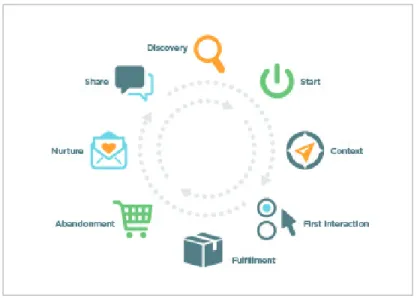
So why do we need a book about building journeys for apps? Because you need to make your journeys move beyond discovery and build apps that create sustainable relationships between your customer and your brand. Journeys make your customer feel important. To create this relationship, marketers and developers must understand the stages of highly successful app journeys.
Figure 1: The Eight Stages of Successful App Journeys
Discovery
Most app journeys start with discovery in some form, such as a friend’s recommendation or an advertisement. Generally, brand discovery occurs via a mass medium. This process probably includes personal information, and it might include emails and promotions that include generic preferences. For existing customers, journeys should include activities and products based on personal preferences (such as size and any previous order history) to make new products more easily discoverable.
Journey Builder, and the ability to leverage the Salesforce1 platform, makes it possible for you to define a interaction that retrieves customer information from Force.com (such as past order history and integration with backend ERP systems). Journey Builder can also integrate easily with user preferences (using many leading customer-facing apps developed on Heroku) to create highly personalized interactions automatically triggered when new products are received in the warehouse.
Start
As soon as a customer chooses to participate in your Journey (via the installation of the app, or logging into a website), marketers should begin a “getting started” journey to help nurture the customer through the various steps of engagement. Personal driver apps like Lyft or Uber do a great job implementing this “getting started” journey. A start journey would walk you through the one-time process of adding your credit card details to get you ready for the next step, for example. Other apps provide a quick tutorial where the customer swipes through a few introductory steps to orient themselves with the features of the app.
Journey Builder can help your “getting started” experience become much more personal by establishing an interaction based on how the customer uses the app. For example, a customer uses an app like Trunk Club where personal stylists select clothes. The customer signs up, fills out the basic profile information, and starts using the app. Marketers can use a customized communication to follow up with the customer with personalized messages about the benefits of completing additional profile information, such as favorite color. As the app collects more personal preference information, marketers can provide a more personalized journey. In our Trunk Club example, you now know the customer’s favorite color and can help the stylist select clothes the customer would more likely select. Marketers can subtly change the communications to include these personal color preferences.
Context
The rise of geo-location and mobile apps provides incredible opportunities to interact more frequently and proactively with your customers, moving them further along the journey the marketing team has established. FourSquare, for example, uses contextual stages very effectively to promote products based on both geo-location and past purchase history.
Once a journey has been created within Journey Builder triggers are established (based on location, for example), developers can quickly create an implementation on Heroku using any language to integrate events raised from the app (customer location changed), and third-party services (FourSquare APIs indicate the customer is within 200 feet of a coffee shop) and send this information back to Journey Builder. Once the app fires an event to Journey Builder, associated interactions can begin to engage with customers via push notification activities with a few clicks of the interface.
First Interaction
The customer’s first engagement with your app represents an important milestone, one worthy of a highly personal interaction in the customer journey. This first interaction may involve placing an order, taking the first ride, downloading a song, or any other initial action. A customer has indicated that they trust your business and your brand. First interactions present an excellent example of the importance of marketers and app developers working closely together. Journey Builder allows marketers to define the journey and app interaction points. It is these app interaction points that developers must implement as part of their app.
4
The app revolution resulted in an incredible growth of modern languages, frameworks, and platforms. The Salesforce1 platform, and especially the Journey Builder for Apps SDK, make it possible for
developers to build engagement directly into their app with a few lines of code. These apps—previously disconnected with marketing - can now play pivotal roles in the overall customer journey.
Fulfillment
Fulfillment refers to the step in a customer’s app journey when their interaction completes. This step may include when a package is delivered, a ride is completed, a course is finished, or a service case is created. However, fulfillment does not always represent a specific point of time. Fulfillment often covers an extended period of time during which existing business processes complete. Journeys must consider the interactions with the customer during this period. The majority of customer complaints with companies occur due to poor communication during the fulfillment cycle.
From a developer perspective, fulfillment often represents the most complicated phase of app
development. This phase typically requires integration with third-party systems, partners, and suppliers. These integrations are made more complex by the fact that a company may not maintain direct control of these systems. Marketers should expose Journey Builder actions to take into account the multiple steps required to co-ordinate fulfillment logistics and establish actions for developers to implement as events occur. This process will result is a higher level of customer communication and visibility throughout the fulfillment phase.
Abandonment
A perfect journey where customers are highly engaged and feel personally connected to a brand via apps would translate to little or no abandonment of interactions, such as adding items to shopping carts. Unfortunately, this concept is not entirely realistic. Highly successful brands plan for abandonment and establish a journey to nurture the customer through to fulfillment. The best customer experience goes even further by offering additional features within the app to support the way customers want to work. For example, Amazon provides a wish list feature where customers can add items they are not ready to buy just yet. Pinterest’s model of pinning items to a virtual scrapbook allows customers to organize and share their inspirations, and then allows marketers to sell to customers.
Effective marketers can utilize Journey Builder to create multiple journeys for their customers. These journeys may span multiple apps to support the growing trend of smaller, more focused apps, as demonstrated with Facebook Messages, FourSquare Swarm, and SalesforceA. A Journey Builder for Apps strategy, discussed in more detail throughout this book, enables marketers to create a vision for the entire customer engagement lifecycle, and enable the developer to create the killer app for the optimal experience.
Nurture
Highly engaging apps keep customers coming back with a combination of app stickiness and intelligent nurturing. Depending on the type of app, this line between app and nurture blurs.
Consider apps like Farmville or Candy Crush. These highly addictive consumer games nurture activities focused on competing with friends. We see a similar stickiness in the enterprise with Salesforce1 and Chatter that offer nurture activities by following records and supporting approvals and actions directly within the social feed.
Marketers can utilize Journey Builder to create independent nurture journeys based on how the customer interacts with the brand. Sticky apps where users regularly log in can nurture users via in-app push notifications. Apps users utilize as required may require email promotions or contextual app notification, such as geo-location triggers.
Share
Just as a customer journey begins prior to ever using an app, customer perception of an organization’s brand continues long after that customer close down the app. Make it easy for customers to share their experiences across social networks. Smart marketers even incent customers to do so by using reward points, leaderboards, badges, and other gamification strategies.
When creating journeys with Journey Builder, marketers can create actions for developers to implement the ability to share experiences to Twitter, Facebook, Pinterest, and other social networks. In addition, marketers can create employee-facing apps that track this influence to ensure that marketers reward highly supportive customers.
A For App Strategy
Journey Builder for Apps helps marketers and developers get started creating highly personal and engaging apps. Journey Builder provides an incredibly powerful tool for building customer journeys, and the for Apps part represents an even more fundamental concept to the success of every organization of the future.
Tomorrow’s marketing plans must recognize the important role apps play in customer engagement and provide marketing-orientated services and hooks for developers to extend their apps for seamless interactions. As the app revolution continues, we will continue to see the level of abstraction of services for apps rise to a point where marketers can define entire activities within a customer journey and consume business activities (including joining a customer community or requesting real-time support) provided by multiple apps and cloud app platforms. We have already seen the incredible productivity improvement higher levels of abstract offer in PaaS versus IaaS. Journey Builder, and a solid app strategy, signals the next wave of abstraction for business services and app composition.
Every journey starts at the beginning. Your journey to building amazing customer apps starts right now. We hope you enjoy reading this book as much as we enjoyed writing it.
This book introduces you to the ExactTarget Marketing Cloud and Journey Builder and helps you more deeply engage with your customers through mobile apps. We assume no previous knowledge of the ExactTarget Marketing Cloud, Journey Builder, and a typical developer’s level of marketing knowledge. If you are already familiar with the basic operation of the ExactTarget Marketing Cloud, you can skip ahead to Setting Up Your Development Environment.
Salesforce1 Platform
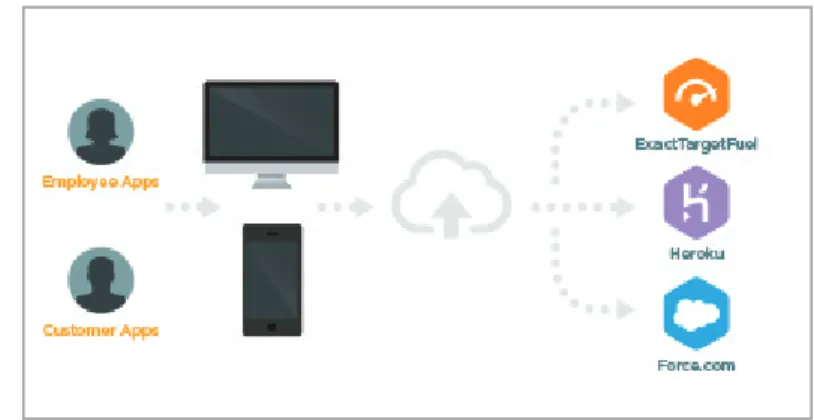
The Salesforce1 Platform provides a comprehensive suite of services and APIs for customers, partners, admins, developers, and business users to create employee-facing and customer facing-apps.
Figure 2: The Salesforce1 Platform
The Salesforce1 Platform consists of the following core services: • Force.com: Force.com provides highly productive visual builders,
powerful programatic tools and runtimes, and standards-based identity services for creating employee apps fast. Apps developed on force.com become instantly mobile via the Salesforce1 enterprise mobile app and allow organizations to run their business on their phone. Force.com includes a massively scalably multi-tenant database service that many of the world’s largest brands rely on to create a single view of their customers.
In this chapter … • Salesforce1 Platform • ExactTarget Marketing Cloud • Journey Builder • ExactTarget Fuel
8
• Heroku: Heroku provides the leading cloud app platform for developers to build customer-facing apps in any language using integrated git-based workflow, and automated scaling. It also includes a rich ecosystem for third-party add-ons, such as caching, databases, and more. Using HerokuConnect (an additional service available on Heroku) developers can now synchronize customer data from force.com in near real-time effectively, eliminating data silos between customer and employee apps. • ExactTarget Fuel: ExactTarget Fuel, described in further detail below, provides the ability for
developers to embed customer touchpoints directly into the apps and use this information to drive deeper, more personal engagement with the app user.
• Platform API & UI Services: Sitting atop the three core services of Force.com, Heroku, and ExactTarget Fuel, the Salesforce1 Platform provides powerful APIs for connecting to anything using standards-based RESTful interfaces. The Salesforce1 platform also offers revolutionary UI services for composing mobile and desktop apps.
Marketers and developers receive a unique and comprehensive view of customer data and engagement activities when you create apps on the Salesforce1 Platform and compose them using the core services, platform APIs, and UI services. Salesforce1 platform apps remain highly targeted and relevant to the user without complicated integration processes, which often result from disconnect services and technologies.
ExactTarget Marketing Cloud
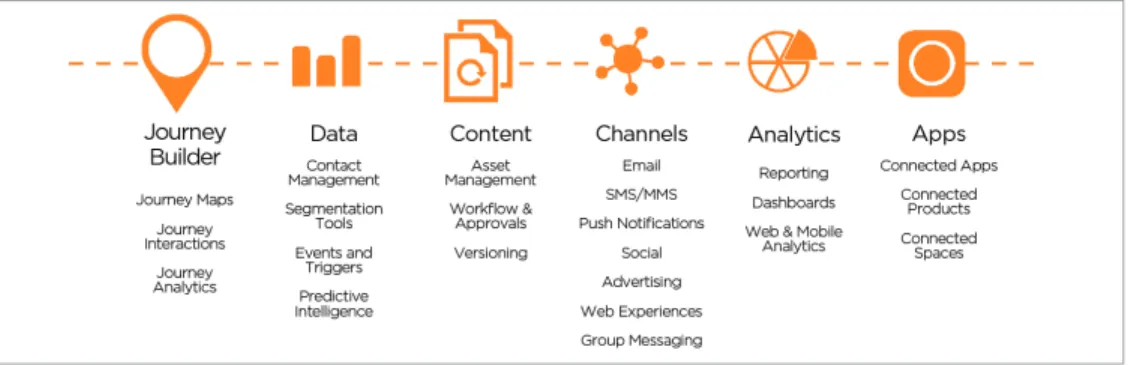
The ExactTarget Marketing Cloud is a platform for marketers to create, manage, and automate customer journeys. The ExactTarget Marketing Cloud includes a digital marketing platform designed to empower the businesses to listen and engage with customers across every channel, including email, mobile, social media, and the web.
You can automate and manage every campaign, publish content, analyze results, and optimize as you go to deliver just the right message at just the right moment. The ExactTarget Marketing Cloud delivers marketing services for apps allowing you to embed and integrate customer interactions wherever they occur. Throughout this book, we will refer to the ExactTarget Marketing Cloud (and a primary product set of Journey Builder and ExactTarget Fuel) as the tool for creating comprehensive and highly personalized customer journeys.
Figure 3: The ExactTarget Marketing Cloud
Journey Builder
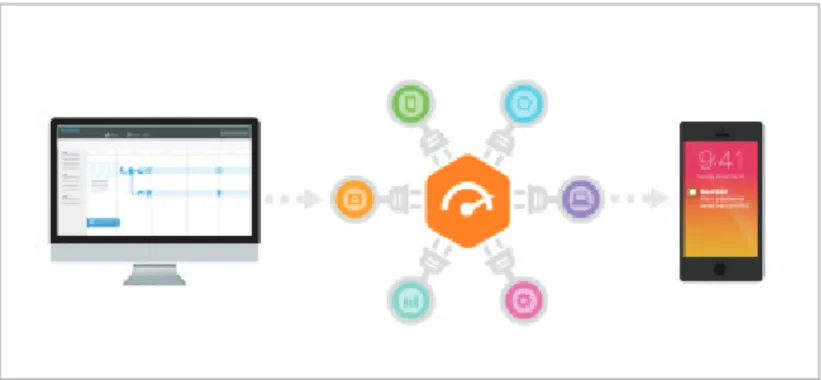
Journey Builder provides a revolutionary tool for engaging customers throughout the marketing, sales, and services life-cycle. Think of Journey Builder as your control panel for creating a roadmap for customer success. We designed Journey Builder with apps in mind. Marketers can create interaction points (often referred to as customer touchpoints) for developers to implement in their custom apps via the the ExactTarget Fuel APIs.
Figure 4: Implementing a Journey Builder For Apps Strategy
ExactTarget Fuel
The foundation of the ExactTarget Marketing Cloud, ExactTarget Fuel opens the Marketing Cloud to third-party development, enabling our customers and partners to customize, extend, and integrate with the industry’s leading 1:1 digital marketing platform. Key components of ExactTarget Fuel include: • APIs: Fuel provides both SOAP and REST APIs to support both cloud and enterprise development
scenarios.
• Client Libraries: Fuel includes client libraries for Java, .NET, Node.js, and PHP that enable developers to integrate with Fuel’s APIs using native language constructs.
• Fuel UX: Fuel UX is the user interface toolkit used by the Marketing Cloud and ExactTarget’s Marketing Cloud apps. Based on leading open-source JavaScript technologies including Bootstrap, jQuery, and RequireJS, Fuel UX makes it easy to build apps that deeply integrate with the look and feel of the Marketing Cloud.
• Data extensions: Data extensions are flexible tables of almost any type of data and can be used for personalization, segmentation, or as a sending data source. Data extensions can be thought of as cloud-based, relational marketing databases.
10
• Contacts: Contacts represent a single view of your customers, consolidating information gathered from multiple sources into a single place and making that information actionable in your customer journeys. You can associate any type of data with a contact, including contact information that spans multiple channels, interests and preferences, engagement history, and data from third-party sources. • AMPscript: AMPscript is the Marketing Cloud’s content scripting language and can be used to
programmatically personalize the content of an email, SMS message, or landing page. AMPscript can interact with data extensions, so you can read data from data extensions in your messages and write data to data extensions in your landing pages.
• Single sign-on: Fuel provides a single sign-on environment for the Marketing Cloud and its applications secured by multiple technologies including two-factor authentication, IP whitelisting, IP blocking, and real-time alerting and monitoring.
What can you do with ExactTarget Fuel? As a customer, you can use Fuel to automate entire marketing campaigns, customize the Marketing Cloud to your exact needs, or integrate the Marketing Cloud with a variety of CRM, analytics, and other business software. As a partner, you can use Fuel to build or extend marketing applications and take those applications to market via one of our platform-related partner programs.
In this book, we’re going to focus on how to use Journey Builder for Apps to more deeply engage with your customers through mobile apps. We’ll be playing the role of a fictional wearable device company wanting to drive post-purchase customer engagement by encouraging new customers to download our mobile app and, once installed, encourage consistent usage of it. We’ll show how to use both push notifications and in-app features like geolocation and geofencing to drive engagement. In the process, we’ll highlight key ExactTarget Marketing Cloud and Journey Builder concepts, as well as ExactTarget Fuel tools and techniques, that you can apply to this use case and beyond.
Before we begin, though, you need to understand a few basic concepts, starting with the concept of a “customer touchpoint”.
Every email sent, every SMS delivered, and every notification is different— the message could be a simple receipt or shipping notification, or it could be just a single component of a sophisticated multi-channel marketing campaign designed to sell an automobile. Yet as different as they are, all messages have something in common: they all touch customers, either existing or prospective. As such, you should think of every message as a customer touchpoint— an opportunity to influence your customers and prospects.
Unfortunately, these opportunities are often lost—managing customer touchpoints at scale is, after all, a very complex business. Even worse, if you’re not careful, you can manage to negatively influence your customers and prospects.
The ExactTarget Marketing Cloud helps marketers take maximum advantage of customer touchpoints. This section discusses the keys to maximizing the impact of each customer touchpoint from a developer’s perspective. Those keys revolve around permission, personalization, and maximizing the value of each interaction.
Relevancy Drives Engagement
Your customers are inundated with messages of all types—email in the inbox, printed material in the mailbox, billboards on highways, SMS and push messages on mobile devices. To be effective, your marketing campaigns have to stand out, and to stand out, they have to be highly-targeted and relevant.
Highly-targeted, relevant communication is as much a technology problem as it is a marketer’s dilemma—the most successful marketing campaigns involve highly sophisticated interactions across multiple channels driven by data from multiple sources tied to precise audience segments, all designed to deliver just the right message at just the right moment. As such, marketers routinely require technical help to accomplish their goals, giving developers the opportunity to innovate alongside them.
Chapter 3:
Customer Touchpoints
In this chapter … • Relevancy Drives
Engagement • Data Drives
Relevancy
• Every Event Improves Relevancy
• The Importance of Permission • Apps as New
12
Data Drives Relevancy
To help marketers build more relevant communications, the ExactTarget Marketing Cloud enables large amounts of data to be synchronized across multiple systems through a flexible data model called data extensions and multiple integration methods. This data from multiple sources can be used at the point of customer interaction using AMPscript—the Marketing Cloud’s scripting language for messaging— to create unique messages for each customer. For example, you might create a data extension that maps zip codes to city names and use that mapping dynamically in your communications via the following AMPscript:
%%=Lookup(“PostalCode”,”City”,”PostalCode”,postalcode)=%%
We’ll say much more about data extensions in the section Going Further with Data Extensions.
Every Event Improves Relevancy
Event-driven architectures are critical for scaling real-time systems and applications, especially as we enter the era of the Internet of Things. Each event, whether generated by a server, a web browser or a mobile application, represents an opportunity to interact with a customer and provides insight into that customer through his or her response to the event—insight that can be used to make later interactions more relevant and timely.
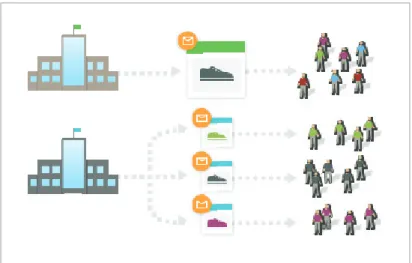
Figure 5: The more targeted the email, the more effective the campaign
What could a marketer do with additional insight on customer interactions? A customer event like Requested More Information might lead directly to a specific message being sent to the customer. Or a customer event like Purchased a Product might represent an opportunity to move the customer to the next ideal step in his or her journey with the company based on what the company knows about the customer and all customers collectively (e.g., when product A is purchased, customers often purchase product B shortly thereafter).
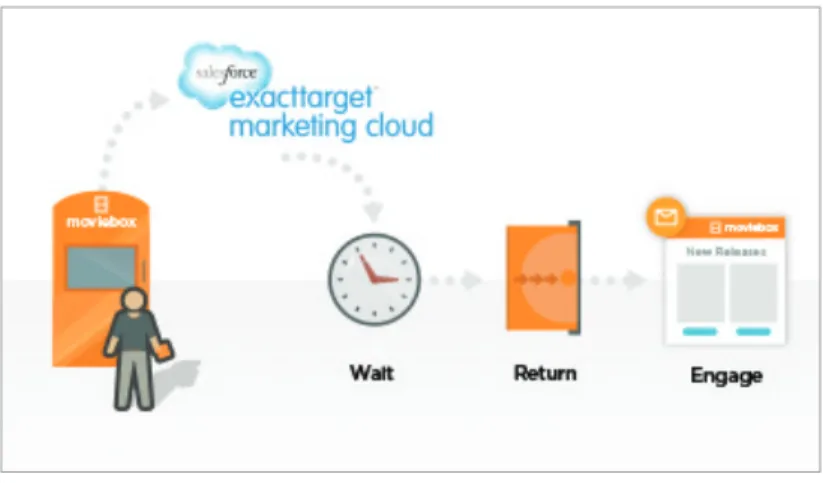
Figure 6: An interaction in a customer journey
For example, a movie rental service might send receipts to customers that also asks them to rate the movie they just returned or provides incentives to rent another movie. Using ExactTarget Fuel, this action might trigger a Returned Movie event in Journey Builder with an associated activity to send an email receipt to the customer. The customer’s interaction with that email receipt (opened it, clicked on a link in it, rated the movie, rented another movie) might trigger a number of other events, all designed to take that customer along the next ideal step of that customer’s journey.
The Importance of Permission
If you’re not careful about how you manage your customer touchpoints, your email could be considered unsolicited commercial email—a.k.a. spam.
In the United States, CAN-SPAM is a law passed in 2003 that mandates the addition of an unsubscribe mechanism to all emails and requires the sender to comply with customer opt-out requests within ten days. Many other countries have similar laws in place to protect consumers.
CAN-SPAM draws a distinction between commercial email (email designed to advertise or promote a commercial product or service) and transactional email (email triggered as the result of an event or that contains information about a specific transaction, such as password reset emails and purchase confirmation emails).
14
A common mistake companies make is sending commercial email to a list of email addresses they have either accumulated over time or been purchased. If that list is old or includes a large number of subscribers who flag your message as spam because it is not relevant to them, your ability to send email successfully in the future will be impeded by a negative reputation applied to your sending IP address. The key to successfully managing your customer touchpoints is permission. The ExactTarget Marketing Cloud helps you manage the complexity of permission by persisting communication preferences associated with customers (e.g., whether they have opted in or opted out to a particular communication) and allowing message sends to be specified as commercial or transactional. If the type of send is commercial, the Marketing Cloud will validate your email content for opt-out links to ensure that subscribers have a way to express their desire to opt-in or opt-out of future communications as required by CAN-SPAM.
For all the possibilities for technology and marketing to intersect using the ExactTarget Marketing Cloud, you should always focus on the customer and how to successfully manage customer touchpoints within the constraints of permission. The Marketing Cloud allows you to innovate in critical ways to build and retain customers or create systems that help others do the same thing.
The technologies exposed through ExactTarget Fuel, in conjunction with the ExactTarget Marketing Cloud and its applications, enable developers to innovate and add value to their organization at the individual customer level. The technologies exposed reach out to customers and are accessible by marketers allowing the Marketing Cloud to be a conduit for business growth and innovation.
Apps as New Customer Touchpoint
All of the above could have been written five or ten years ago—indeed, all of the above has been core to ExactTarget’s approach to digital marketing since the company was founded in 2001. What’s different today?
The app revolution. The explosion of smartphones in recent years has resulted in customers being more connected than ever before. Now, along with email and other traditional customer touchpoints, marketers must recognize the importance of apps as a new customer touchpoint. Arguably, apps are now the primary customer touchpoint.
Think about it. Uber and Lyft are apps that happen to have highly coordinated networks of drivers behind it ready to respond to your in-app request for a ride at a moment’s notice. Delta (or your favorite airline) is an app that happens to have a fleet of aircraft behind it where you book tickets, check in, get notifications about flight delays, scan your boarding pass, and otherwise interact with the Delta brand. Your bank is an app where you check your balance and pay your bills without ever having to write a check. And on and on.
With the ExactTarget Marketing Cloud, marketers and developers can participate in the app revolution by ensuring their marketing campaigns include “for app” touchpoints. A typical “for app” strategy might include the following touchpoints:
For App Touchpoint Marketing Strategy For App Opportunity
First sign-in • Send welcome note • Use in-app message to display Credit card stored • Incentivize customer to make
their first purchase •
Connect app with payment system like square or Visa and offer $5 credit
Order placed • Begin personalized
fulfillment communications •
Add track my order feature in app with push notifications on updates
Customer needs support • Provide real-time support • Implement SOS-type functionality within app to reach a representative in real-time
Reschedule delivery • Put the customer first on
delivery preferences •
Allow customer to change delivery address by dropping a pin on map and integrating directly with FedEx/UPS APIs Arriving at a venue • Exceptionally personalized
customer service •
Geo-location allows highly personalized and contextual message such as alerting venue staff of a VIP arrival
This book is all about how to use the ExactTarget Marketing Cloud and Journey Builder to implement your own “for apps” strategy. Before we begin, though, let’s start with the basics: How to create your first customer touchpoint using ExactTarget Email.
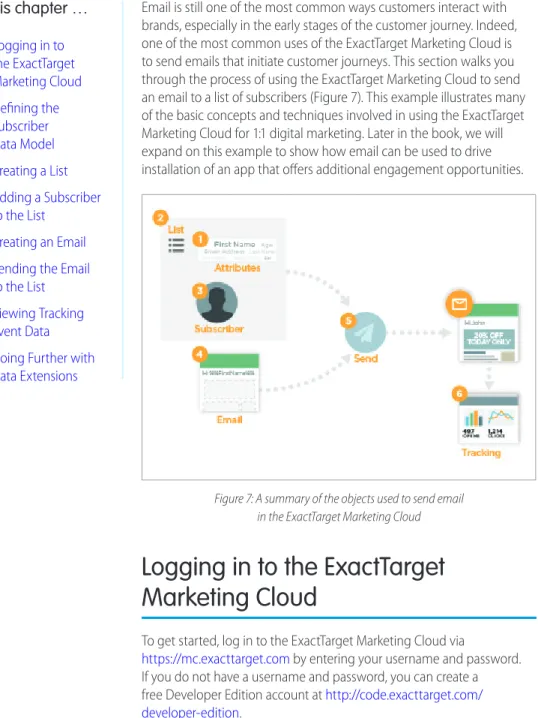
Email is still one of the most common ways customers interact with brands, especially in the early stages of the customer journey. Indeed, one of the most common uses of the ExactTarget Marketing Cloud is to send emails that initiate customer journeys. This section walks you through the process of using the ExactTarget Marketing Cloud to send an email to a list of subscribers (Figure 7). This example illustrates many of the basic concepts and techniques involved in using the ExactTarget Marketing Cloud for 1:1 digital marketing. Later in the book, we will expand on this example to show how email can be used to drive installation of an app that offers additional engagement opportunities.
Figure 7: A summary of the objects used to send email in the ExactTarget Marketing Cloud
Logging in to the ExactTarget
Marketing Cloud
To get started, log in to the ExactTarget Marketing Cloud via
https://mc.exacttarget.com by entering your username and password. If you do not have a username and password, you can create a free Developer Edition account at http://code.exacttarget.com/ developer-edition. In this chapter … • Logging in to the ExactTarget Marketing Cloud • Defining the Subscriber Data Model • Creating a List • Adding a Subscriber to the List • Creating an Email • Sending the Email
to the List • Viewing Tracking
Event Data • Going Further with
18
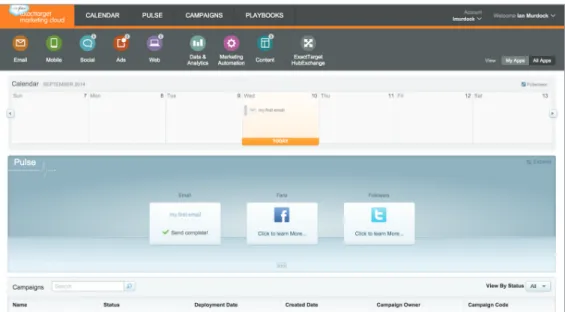
Once you are logged in, you should see a screen similar to that shown in Figure 8.
Figure 8: The ExactTarget Marketing Cloud
The ExactTarget Marketing Cloud is an application container for all Marketing Cloud apps that provides a set of services to those apps, including common calendaring, campaign management, and analytics (Pulse). Take a minute to look around, then launch the ExactTarget Email app. You can get back to the app menu at any time by hovering your mouse over the ExactTarget Marketing Cloud logo.
Defining the Subscriber Data Model
In ExactTarget Email, customers are represented by subscribers. Subscribers have an email address and status (active, held, or unsubscribed). If a subscriber is active, the Marketing Cloud will allow email to be sent to that email address. If a subscriber is unsubscribed, the Marketing Cloud will prevent email from being sent to that email address. A held subscriber indicates that previous attempts to send email to that email address bounced.
In addition to email address and status, ExactTarget Email allows marketers to extend the subscriber data model through profile attributes. Profile attributes are arbitrary key/value pairs associated with each subscriber. For example, you might use a profile attribute to store the subscriber’s first name so you can personalize email to the subscriber in a salutation (e.g., “Dear Marc”). Profile attributes apply to all lists. You can create up to 200 profile attributes in an account.
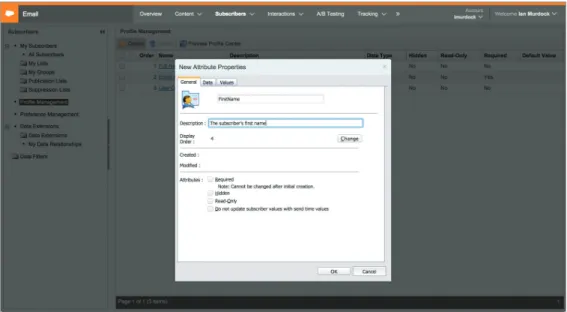
Figure 9: Creating a profile attribute to hold the subscriber’s first name
Our first task is to define the subscriber data model. To do that, navigate to Profile Management under Subscribers.
As you can see, ExactTarget Email includes several system-defined profile attributes, including the email address and full name. To extend the subscriber data model, add a profile attribute for the subscriber’s first name so you can personalize email to the subscriber. To do that, click Create and name your new profile attribute FirstName (Figure 9).
Creating a List
Our next task is to create a list. Lists contain subscribers and are the simplest way to send email to multiple subscribers.
To create a list, navigate to Lists under Subscribers; then, click Create, name the list, and specify an external key. The ExactTarget Marketing Cloud includes this property on every object, and you can use it to attach your own identifier to the object. This identifier makes it easier to integrate the Marketing Cloud with your existing infrastructure. You will use external key in later chapters to reference the list when you use the API (Figure 10).
20
Figure 10: Creating a list
Note the area labeled Campaign Association. Campaigns allow you to group items from across the ExactTarget Marketing Cloud together for tracking and analytics purposes. Campaign management is beyond the scope of this book, so campaign associations can be ignored for now.
Adding a Subscriber to the List
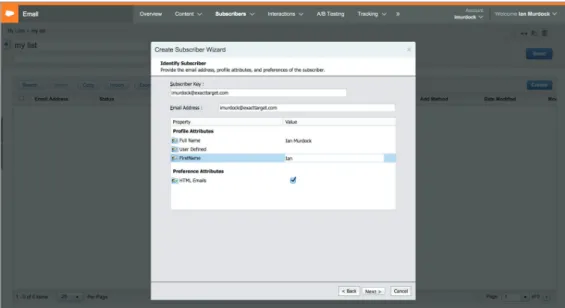
Our next task is to add a subscriber to the list we just created. To do that, click on the list name, then click Create and add yourself to the list using the wizard (Figure 11).
Figure 11: Adding a subscriber to the list
Creating an Email
Now that we’ve set up our subscriber data model, created a list, and added ourselves to the list, we are ready to create the email to send to the list. To do that, navigate to Emails under Content, then click Create and select HTML Paste from the dropdown menu. Then, specify an email name and subject and click Save (Figure 12).
Note that the email subject in our example contains the text %%FirstName%%. ExactTarget Email replaces this substitution string with the value of the profile attribute specified between the percent symbols. Substitution strings represent just one of the ways you can personalize email subject lines using ExactTarget Email and can help drive engagement.
22
Figure 12: Creating an email
Finally, paste the following in as the email body and click Save:
<html> <body> <p> Hello, %%FirstName%%! </p> <small>
<p>This email was sent by:</p> <p>
%%Member _ Busname%% <br />
%%Member _ Addr%% <br />
%%Member _ City%%, %%Member _ State%% %%Member _ PostalCode%% <br />
%%Member _ Country%% </p>
<a href=”%%profile _ center _ url%%”>Profile Center</a> </small>
<custom name=”opencounter” type=”tracking”> </body>
</html>
Note that the email body contains additional substitution strings beyond the %%FirstName%%
substitution string we included in our email subject. In addition to user-defined substitution strings like
%%FirstName%%, ExactTarget Email automatically resolves system-defined substitution strings to help ensure your email complies with CAN-SPAM laws for commercial sending.
To help marketers comply with CAN-SPAM, ExactTarget requires that every email contain the following substitution strings: %%Member _ Busname%% %%Member _ Addr%% %%Member _ City%% %%Member _ State%% %%Member _ PostalCode%% %%Member _ Country%%
These substitution strings contain the elements of the sending organization’s physical address as required by CAN-SPAM. The ExactTarget Marketing Cloud automatically fills in these strings based on the account information.
In addition, ExactTarget requires every email to contain a link to a profile center that manages subscription preferences, including whether the recipient of the email would like to opt out of future communications. The ExactTarget Marketing Cloud builds and hosts these profile centers. To comply with CAN-SPAM, just include the following substitution string:
%%profile _ center _ url%%
Finally, a customer opening an email represents an important touchpoint. To allow ExactTarget Email to track when customers open HTML email, we’ve added the following tag to the email body:
<custom name=”opencounter” type=”tracking”>
Once the subscriber opens your email, the content of the email will determine whether or not the recipient will engage (e.g. buy a product) or disengage (e.g. unsubscribe).
In addition to substitution strings, ExactTarget provides many features to help you innovate and make your content more relevant, including the AMPscript content scripting language, HTTPGet content scraping, and sophisticated dynamic content functionality (see Code@ExactTarget for additional details). Also note that ExactTarget Email provides a number of tools for you to preview and validate your content before sending it. These tools include the ability to send a test email, preview the email against a sending data source, and validate the email against a number of criteria including whether or not the email contains the information required by CAN-SPAM.
Sending the Email to the List
We are now ready to send our first email! From the Emails screen, select Guided Send from the Send dropdown menu (Figure 13).
24
Figure 13: Sending the email to the list
Walk through the wizard, selecting the list we just created as the recipient and accepting the defaults for the other steps (exclusion and suppression lists, send options, etc.). On the Send Email step, choose Immediately, verify the information is correct, then click Send. If all goes well, you should receive your email shortly (Figure 14).
Figure 14: Your first email!
Viewing Tracking Event Data
Retrieving tracking event data from the ExactTarget Marketing Cloud allows you to measure the success of each of your customer touchpoints. The ExactTarget Marketing Cloud captures a variety of tracking events for each send.
Delivery events related to the send enable you to know if you provided good quality data. These events include the following statistics:
• SentEvent indicates whether the ExactTarget Marketing Cloud rendered and sent the email • BounceEvent indicates that the email bounced (did not send successfully) either synchronously or
asynchronously.
Engagement events related to the send enable you to know how a customer engaged with your email content. These events include the following statistics:
• OpenEvent indicates the recipient opened the email. Note that this method only works for HTML emails that include the tracking pixel mentioned previously and after the subscriber allows images to be loaded.
• ClickEvent indicates the recipient clicked on a link in the emai. Note that this only works if ExactTarget wraps the links.
• UnsubEvent indicates the recipient unsubscribed from the list either by spam complaint, reply mail management (sending a response to an email with an unsubscription request), or the profile center. You can access tracking data by navigate to Emails under Content, then selecting the send from the list (Figure 15).
26
In this case, you can see that I have opened the email twice, that only one of those is unique (because I opened it twice), and that there have been no link clicks.
Going Further with Data Extensions
Congratulations! You just sent your first email using the ExactTarget Marketing Cloud! While it might not feel like a huge accomplishment, you actually took the first step of your first customer journey, and you did so in a measurable way that tells you something about your customers through how they interacted with your email (opened it, clicked on a link in it, etc.).
Now that you started the journey, you can extend that journey by leveraging what you just learned to more deeply engage with those customers. Think of emails as the first sentence in a conversation— these messages set the tone and begin a dialogue. As described in Data Drives Relevancy, you can use what you learn about your customers during each step of the journey to tailor that dialogue to their unique interests and preferences.
In order to go further, we need to introduce some more advanced ExactTarget Marketing Cloud concepts. You can easily set up and use lists and profile attributes, which is why we used them to send your first email. However, that simplicity makes them inherently limited. For example, lists and profile attributes can only hold subscriber data, and they use a flat structure that cannot express the complex relationships between data sets often found in more involved scenarios.
The Marketing Cloud offers a powerful construct called a data extension that can store arbitrary data of almost any type. You can use this data for personalization, segmentation, or as a sending data source much like a list. Data extensions can be thought of as cloud-based, relational marketing databases. Those familiar with Force.com will find data extensions very similar to custom objects.
Let’s duplicate your subscriber data model in a data extension. This first step moves toward building a common view of our customers, which we will extend in later chapters to include additional channels beyond email.
To create your data extension, follow the steps below: 1. Navigate to Data Extensions under Subscribers. 2. Click Create and select Standard Data Extension.
3. Give your data extension the name and external key “subscribers”.
4. Ensure your data extension is marked Is Sendable?. As the name implies, sendable data extensions can be used like lists to send email.
5. Click Next.
6. Specify no data retention policy in the second step of the wizard. This ensures the data extension keeps all data until you explicitly delete it.
7. Click Next.
8. Add the following fields to your data extension (Figure 16): • EmailAddress
EmailAddress, primary key • FullName Text, nullable • FirstName Text, nullable • LastName Text, nullable • HasAppInstalled Boolean, nullable
9. Set Send Relationship to map EmailAddress to Subscriber Key (this step enables you to use the email address as a unique identifier for the subscriber).
10. Click Create. This step will take you back to the main data extensions screen.
Figure 16: Creating a data extension
Finally, we need to add a subscriber to our data extension. You can perform this action in several ways, including importing from a CSV file uploaded via FTP (see Additional Resources) or using the API. Since this is a book for developers, we’ll use the API and take advantage of that opportunity to show you how the API works. Before we can make any API calls, though, we need to set up our development environment.
Developers can consume and provide marketing services using any runtime and development environment they choose by using Fuel’s APIs. Because ExactTarget Fuel is a part of the Salesforce1 Platform, developers will find Force.com and Heroku ideal environments to implement these marketing services. This section shows you how to set up your developer environment for working with ExactTarget Fuel.
Code@ExactTarget
First and foremost, you should familiarize yourself with Code@ ExactTarget (http://code.exacttarget.com), the home of ExactTarget Fuel API and other developer documentation as well as client libraries, SDKs and other developer tools. In addition, our Developer Advocates regularly monitor and offer help at the popular StackExchange site (http://salesforce.stackexchange.com/tags/exacttarget). Code@ExactTarget, along with Salesforce Developers
(http://developer.salesforce.com), presents a vibrant resource for anyone building apps or looking for support.
Fuel Client Libraries
To get started, download the Fuel client library for your preferred programming language from http://code.exacttarget.com/apis-sdks/ fuel-sdks/.
Fuel’s client libraries provide wrappers around Fuel’s APIs that enable developers to integrate with those APIs using native language
constructs. There are currently client libraries for Java, .NET, Node.js, and PHP with others maintained by the ExactTarget developer community. The client libraries provide protocol agnostic interfaces across Fuel’s SOAP and REST APIs as well as automated token management and other features designed to reduce development time. Our SOAP API is our oldest and most comprehensive API, but its functionality is limited to the ExactTarget email application, and, like all SOAP APIs, it is fairly heavyweight. Our REST API is newer and less comprehensive, but it exposes a broader set of Marketing Cloud capabilities and is much more lightweight and easy to use (and is getting more comprehensive with every release).
Chapter 5:
Development Environment
In this chapter … • Code@ ExactTarget • Fuel Client Libraries • App Center • Connect your App
to an Account • Give your App
Access to Account Features • Get your App’s
30
By using the client libraries, you get the best of both worlds, and, in most cases, it is possible to accomplish the same task with far less code using the client libraries. For that reason, and because we have coded common patterns and best practices directly into the client libraries, we highly recommend using a client library if one is available for your preferred environment.
If there’s not a client library available for your preferred environment, or if you’d rather not use a client library, don’t worry—you can always use the APIs directly. We’ll show you a few examples of how to do that (see Using the API Directly), but we won’t be able to be comprehensive. You can find much more information about how to use the APIs directly at Code@ExactTarget.
App Center
Next, you should create an App Center account and log in to that account. App Center
(https://appcenter.exacttarget.com) provides the central development console for using Fuel’s APIs and building Marketing Cloud apps.
Each app in App Center represents an application connected to ExactTarget Fuel. If you are familiar with connected apps in Force.com, you will find the concept of connected apps in Fuel familiar. App Center currently offers four types of connected apps (Figure 17):
• API Integrations are secure, API-based server-to-server integrations. An API Integration should be created when you want to use Fuel’s APIs to automate tasks or integrate business systems. API Integrations utilize an OAuth2 client credentials flow to acquire access tokens directly from Fuel’s authentication service.
• Marketing Cloud Apps are full-screen apps that live within the ExactTarget Marketing Cloud and are launched via the Marketing Cloud’s app menu. Marketing Cloud apps can be custom apps built by your organization or apps installed from the ExactTarget HubExchange marketplace. Marketing Cloud apps utilize a JSON Web Token (JWT) to acquire access tokens on behalf of logged in users. • Marketing Cloud App Extensions are lightweight extensions to other apps that extend that app’s
native capabilities and experience. Examples of Marketing Cloud app extensions include Journey Builder activities, Automation Studio activities, and Cloud Editor gears.
• Mobile Apps are apps built for the iOS, Android, or Blackberry mobile platforms that use the Journey Builder Apps SDK to interact with their users via push or in-app messages. Mobile apps are classified as consumer-grade applications and utilize long-lived limited access tokens.
Figure 17: App Center
To get started, create an API Integration with the Marketing Cloud by following the steps below: Navigate to App Center (https://appcenter.exacttarget.com/appcenter).
Click API Integration.
Give the connection a name and description.
Give the connection a package (packages are identifiers that uniquely identify the connection or app in ExactTarget Fuel):
32
Connect your App to an Account
Next, connect your app to an ExactTarget Marketing Cloud account. Your app will access this account when it makes API calls:
The first time you connect an app to an account, you need to select New… from the dropdown menu. App Center saves account references, so if you want to use the same account for future apps, you can select that account from the dropdown menu rather than connecting to a new one.
When you connect an account, you need to tell App Center what type of account it is: • A Production ExactTarget Account is what most developers have access to and use for
development purposes. If you are using a Developer Edition account, you should select Production ExactTarget Account.
• A Sandbox ExactTarget Account exists as a special type of account that some organizations purchase for use in conjunction with a production account for testing.
If you’re not sure which type of account to choose, you should choose Production ExactTarget Account. After you have selected what type of ExactTarget account you want to connect your app to, click the Link to Account button. A new browser window will open and display the ExactTarget Marketing Cloud login screen asking for a username and password.
Note:Don’t confuse the username and password you used to log into App Center with ExactTarget Marketing Cloud credentials—they are different!
Give your App Access to Account Features
Once you log in, you move to the next step of the wizard. In this step, you need to tell App Center what account features your app will need to access to function properly. Your app will receive access to only those account features you specify here. For other app types, like Marketing Cloud apps, the users of your app must have access to these features to use your app in their Marketing Cloud accounts.
Your app will need to create and modify emails, lists, subscribers, and data extensions, as well as send email and retrieve tracking event data, so you will need to give your app access to the following account features and operations:
• Channels – Email Read, Write, Send
• Contacts – List and Subscribers Read, Write
• Data - Data Extensions Read, Write
• Data – Tracking Events Read
Get your App’s OAuth Credentials
After completing this step of the wizard, you will see a summary screen. If everything looks good, click Finish to complete the wizard.
34
Among other things, the summary screen shows you the connected app’s OAuth client credentials, which you will use with the Fuel authentication service to get OAuth tokens that will authenticate your app with other Fuel APIs:
Also note the Courtesy Limit. The Courtesy Limit is a soft capped limit on the number of API calls your app can make. If your app needs to make more than 50,000 API calls per day, it will not be prevented from making them. However, ExactTarget monitors the API usage of each app and can rate limit or throttle apps that are either intentionally or accidentally abusing Marketing Cloud resources.
Note:The connected app’s OAuth client credentials represent pre-authorized access to the account granted through the authorization step of the App Center wizard. You should never expose the client secret on the client side via JavaScript, and you should always take steps to store the client secret securely in your application, as knowledge of the client secret will give anyone full access to the linked account!
You can navigate back to the app summary screen at any time from the App Center main window:
Now your application connects to a Marketing Cloud account, and you received OAuth credentials to that account. Let’s write some code!
You can populate the data extension you created in Going Further with Data Extensions in two ways via ExactTarget Fuel: Using a client library, and using the API directly. In this chapter, we will cover how to do both. You can use this chapter not only as a guide to populating the data extension, but also as a guide on how to use Fuel’s APIs and client libraries.
Using a Client Library
The preferred method of using ExactTarget Fuel is via a client library. In our examples, we will use the PHP client library, though you can easily adapt our examples to the other client libraries as they all follow similar patterns and expose the same objects and properties.
To get started, install the PHP client library in a subdirectory of your workspace called sdk. Make sure you install all dependencies as described in the README of the client library.
To configure the client library, you need to add your OAuth credentials from App Center to config.php (the client library contains a template file you can use to create config.php). Note that you can safely include your OAuth credentials in config.php because config.php is hosted server-side and not exposed to the client:
<?php
return array(
‘appsignature’ => ‘none’,
‘clientid’ => ‘YOUR _ CLIENT _ ID _ FROM _ APP _ CENTER’,
‘clientsecret’ => ‘YOUR _ CLIENT _ SECRET _ FROM _ APP _ CENTER’,
‘defaultwsdl’ => ‘https://webservice.exact target.com/etframework.wsdl’
); ?>
Chapter 6:
the Data Extension
In this chapter … • Using a Client
Library
36
After the client library is configured, you initialize it by instantiating an ET_Client object:
<?php
require(‘sdk/ET _ Client.php’); $client = new ET _ Client(); ?>
The ET _ Client object is the central object in all Fuel client libraries and performs a number of tasks for you automatically, including acquiring and refreshing OAuth access tokens using the client credentials you specify in config.php.
After initializing the client library, you can add a row to the data extension we created using the following code:
<?php
require(‘sdk/ET _ Client.php’); $client = new ET _ Client();
$deRow = new ET _ DataExtension _ Row(); $deRow->authStub = $client;
// specify the name of the data extension $deRow->CustomerKey = “subscribers”;
// specify the values of the data extension row
$deRow->props = array(“EmailAddress” => “YOUR _ EMAIL _ ADDRESS”, “FirstName” => “YOUR _ FIRST _ NAME”);
$response = $deRow->post(); print _ r($response);
?>
The following steps outline a typical interaction with a Fuel client library object and highlight the patterns common to all Fuel client libraries:
• Instantiate the object you want to interact with (in this case, ET _ DataExtension _ Row). • Supply the ExactTarget Marketing Cloud account context via the authStub property on the object
($deRow->authStub = $client). (In some client libraries, this is automatically handled for you.) • Identify the object you want to interact with, typically via a unique ID or key. In our case,
CustomerKey is the API equivalent of the External Key value we specified in Going Further with Data Extensions when we created the data extension.
• Set the appropriate properties that govern the operation (in this case, you are creating a data extension row with the “EmailAddress” column set to your email address and the “FirstName” column set to your first name).
• Perform a REST-like operation (GET, POST, PATCH, or DELETE) on the object depending on whether you want to retrieve, create, update, or delete it. In the example above, you create a data extension row, so you perform a POST.
When you load the PHP file in your browser, you will see the following output: ET _ Post Object ( [status] => 1 [code] => 200 [message] => [results] => Array ( [0] => stdClass Object ( [StatusCode] => OK
[StatusMessage] => Created DataExtensionObject [OrdinalID] => 0
[NewID] => 0
[Object] => stdClass Object (
[PartnerKey] => [ObjectID] =>
[CustomerKey] => subscribers [Properties] => stdClass Object ( [Property] => Array ( [0] => stdClass Object ( [Name] => EmailAddress [Value] =>
YOUR _ EMAIL _ ADDRESS
)
[1] => stdClass Object (
[Name] => FirstName [Value] => YOUR _ FIRST _ NAME
) ) ) ) ) ) [request _ id] => [moreResults] => )
This output displays a typical response to a PHP client library operation. For now, just note that the call succeeded as indicated by StatusCode and StatusMessage.
38
Go back to the Email application and verify the row added successfully by navigating to the Data Extensions screen and clicking the data extension. Click the Records tab to view the data (Figure 18).
Figure 18: Adding a row to the data extension via the PHP client library
To highlight the similar patterns employed by the different client libraries, the following Java code is equivalent to the PHP code we used to add the row to the data extension:
public class DataExtensionAddRow { public static void main(String args[]) throws ETSdkException
{
ETClient client = new ETClient();
ETFilter filter = new ETSimpleFilter(“CustomerKey”,
ETFilterOperators.EQUALS, “subscribers”);
ETDataExtension dataExtension = client.retrieveDataExtension (filter);
ETDataExtensionRow row = new ETDataExtensionRow(); row.setColumn(“EmailAddress”, “YOUR _ EMAIL _ ADDRESS”); row.setColumn(“FirstName”, “YOUR _ FIRST _ NAME”);
dataExtension.insert(row); }
}
Using the API Directly
If you are using a language or platform for which a client library is not available or a client library is otherwise not a viable solution, you can use the API directly rather than going through a client library. This section shows you how to do that.
Getting an Access Token
The first step in any API-based integration is getting an access token you will use to authenticate other API calls. To get an access token, use the Fuel authentication service. The code sample below demonstrates how to use an HTTP POST request to acquire an access token:
POST https://auth.exacttargetapis.com/v1/requestToken Content-Type: application/json
{
“clientId”: “YOUR _ CLIENT _ ID _ FROM _ APP _ CENTER”,
“clientSecret”: “YOUR _ CLIENT _ SECRET _ FROM _ APP _ CENTER” } 200 OK { “accessToken”: “p3sygbfr3t7z94f7wv4czxtw”, “expiresIn”: 3600, “refreshToken”: “hu3kyjqt4r7wpwrkbkjvpwpu” }
The access token is returned in the accessToken property. You can use this token to authenticate other API calls by specifying this value via the Authorization header field with the Bearer HTTP authorization scheme:
GET https://www.exacttargetapis.com/platform/v1/endpoints Accept: application/json
Authorization: Bearer p3sygbfr3t7z94f7wv4czxtw
You can use Fuel access tokens to authenticate with the ExactTarget SOAP API as well. The following example use the same access token to authenticate with the SOAP API:
<s:Envelope xmlns:s=”http://schemas.xmlsoap.org/soap/envelope/”> <s:Header> <h:fueloauth xmlns=”http://exacttarget.com” xmlns:h=”http://exacttarget.com”> p3sygbfr3t7z94f7wv4czxtw </h:fueloauth> </s:Header> [...] </s:Envelope>
40
Refreshing the Access Token
Note the expiresIn and refreshToken properties in the HTTP response to the requestToken API call. Fuel access tokens expire one hour after they are issued. If you attempt to use an expired token, you will receive a 401 Unauthorized HTTP response. If this happens, you will need to refresh your access token. To do that, add the refresh token from your initial call to your next call:
POST https://auth.exacttargetapis.com/v1/requestToken Content-Type: application/json
{
“clientId”: “YOUR _ CLIENT _ ID _ FROM _ APP _ CENTER”,
“clientSecret”: “YOUR _ CLIENT _ SECRET _ FROM _ APP _ CENTER”, “refreshToken”: “hu3kyjqt4r7wpwrkbkjvpwpu”
}
Important considerations when using the API directly
There are two important considerations to keep in mind if you use the API directly and do your own OAuth token management rather than using the SDKs.
First of all, you should NOT request a new token for every API call you make—each token is good for an hour and should be reused. Making two API calls for every one operation is inefficient and may result in throttling.
Secondly, and we cannot say this enough, be careful where you store your client secret. In particular, you should NOT store your client secret in a mobile application because a mobile device is not a secure environment; it is recommended that you utilize an Authorization Code or Implicit Grant OAuth flow instead.