Towards PLEs through Widget Spaces in Moodle
Evgeny Bogdanov1, Carsten Ullrich2, Erik Isaksson3,
Matthias Palmer3, and Denis Gillet1
1
Ecole Polytechnique F´ed´erale de Lausanne 1015 Lausanne, Switzerland
{evgeny.bogdanov,denis.gillet}@epfl.ch 2
Shanghai Jiao Tong University 200030 Shanghai, China
ullrich [email protected] 3
Uppsala University Box 256, 751 05 Uppsala, Sweden
{erikis,matthias}@kth.se
Abstract. Bringing flexibility and extensibility into Learning Management Sys-tems is crucial because it gives teachers and students a free choice of technologies and educational materials they want to use for their courses. This paper presents a solution by enabling widgets (OpenSocial apps) within Moodle. Our first Moo-dle plugin allows teachers to freely choose a set of tools they want to use in their courses, although students cannot change widgets proposed by teachers. Addition-ally, the plugin enables the flexible interaction interfaces inside Moodle and im-proves the interoperability of Moodle with other Web platforms. The environment was evaluated with students within several courses. Even though the environment was perceived as useful by students, they lacked their own personalization. The second Moodle plugin described tackles this problem.
Keywords:widgets, opensocial, learning management systems, personal learning environments, flexible education
1.
Introduction
them and they are reluctant to learn (migrate to) new environments. This paper argues that instead of offering PLEs as an alternative environment to LMSs [17, 11] they should be seen as a complementary technology [8, 10] that would augment the current capabilities of LMSs by providing more flexibility and personalization to their users, which would shrink the gap between the two competing worlds.
This paper discusses how the main PLE components can be brought into LMSs via widgets that are portable Web applications implemented using HTML, CSS and JavaScript. Several different standards exist for widgets. We adopted the OpenSocial apps specifica-tion for our work4. However, other standards can be used in a similar manner (OpenSocial apps and widgets are used interchangeably in the paper). Our main goal was to bring the benefits of PLE to students and teachers but, at the same time, decrease as much as pos-sible the amount of new things/environments they will have to learn or interact with – a requirement from several teachers. With widgets, students and teachers become flexible in personalizing their environments and can bring much more functionality into LMSs than is available there by default. We refer to platform plasticity as a measure of a Web platform’s ability to let users customize the UI and aggregate (or share) Cloud content. For this task, we developed two plugins for a popular LMS - Moodle, that both target to increase the Moodle plasticity.
The remainder of this paper is organized as follows. In section 2 we introduce in more details the Moodle platform, describe the limitations it has and show how our solution tackles these limitations. In sections 3 and 4 we describe how the plugin was used in the university courses and how students perceived it. Section 5 shows how the visual in-teraction can be changed in the spaces of the Moodle plugin. Section 6 describes how interoperability with other Web platforms is enabled by the plugin. Section 7 highlights possible improvements of the existing plugin and introduces a new plugin that encom-passes these improvements. Section 8 provides an overview of related work and section 9 concludes the paper.
2.
OpenSocial Moodle Plugin
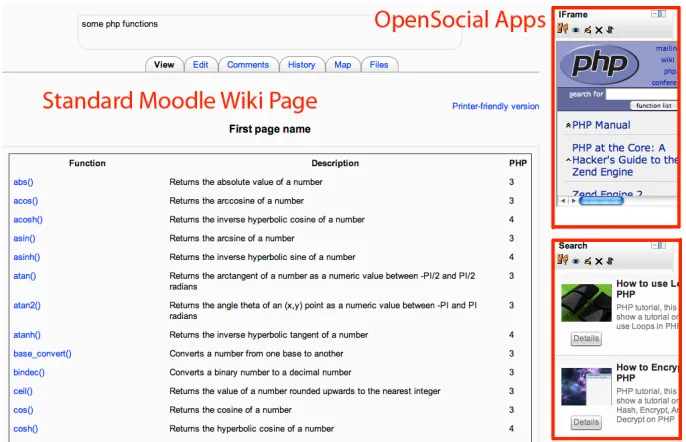
Moodle is a popular LMS to manage courses that is the de-facto standard among many educational institutions. It is a plugin-based PHP application that can be extended by installing additional modules. These modules have to be installed on a Moodle server by a system administrator. The Moodle view, as shown to students and teachers, consists of a main, center area and a rather narrow right column with blocks (Fig. 1). The center area contains main course resources, such as a wiki page, a forum, a lesson, a quiz, etc. The right block contains some helper plugins that a teacher can add to every page, e.g., a calendar, upcoming events, latest news, a recent activity, etc. These are used to extend and enrich the functionality of all of the pages.
Moodle’s flexibility and adaptability is achieved via visual themes and server-side plugins, thus an intervention by system administrators is required every time a change is to be done. Teachers and students are not involved in the process of the customization. Teachers, for example, cannot add or remove plugins on their own. Different from Moodle plugins, widgets are client-side applications that can be added to a system without server-side installation, which makes them easy to add.
4
Fig. 1: Widgets as blocks on the right
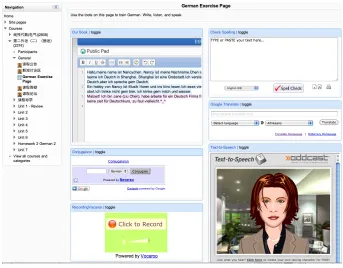
The OpenSocial plugin for Moodle consists of two parts. The first part adds a new module to Moodle, which is similar to the standard pages module5. Once it is installed to Moodle, a teacher can add a “Widget space” to the course, specify a set of widgets for it, and choose whether 1, 2 or 3 column view should be used for widget display (Fig. 2). The resulting outcome (as displayed to students) is a page with widgets displayed on a grid, where students can work with several widgets simultaneously (Fig. 3). Widgets can func-tion as a mashup by interacting with each other. This can offer better user experience by allowing a smoother flow of activities across widgets, increasing the amount of possible activities, and strengthening widget quality due to widget development becoming more specialized when common tasks can be delegated. For example, the widget providers can rely on the OpenApp library [9] and common vocabularies to achieve inter-widget munication. In this case, the teachers do not have to pre-configure widgets for the com-munication. The second part of the plugin adds a new block to Moodle6. The teacher can add widgets to the right column for already existing Moodle wiki pages, lessons, forums, etc. (Fig. 1).
One of the main benefits of this plugin is the big pool of available widgets that can be used by teachers. Thus, once the OpenSocial plugin is installed in Moodle, a teacher can achieve the needed functionality without bothering system administrators with server-side plugin installation. The plugin enhances the flexibility in choosing the resources and tools according to the course specifics: teachers can easily add and remove widgets as needed for a course, develop their own ones, etc. Widgets can be found in the existing widget repositories (iGoogle Directory, ROLE Widget Store, etc.). Teachers can re-use existing
5
https://github.com/vohtaski/shindig-moodle-mod
6
Fig. 2: A teacher creates a space with widgets for a course
educational resources and learning objects from external websites. Depending on the de-sired integration level, teachers can either use aniframewidget that simply integrates a website URL or develop their own widgets that provide a deeper integration.
From the implementation perspective, the plugin consists of two main components. The first component is an engine that renders OpenSocial apps on a page. For this, we em-ploy Apache Shindig7 which is a reference open-source implementation of the OpenSo-cial specification. The second component is a PHP module that is responsible for the configuration of a page with widgets, adding and removing them to/from the page and gluing Moodle with Shindig. The OpenSocial API provides a standardized way to re-trieve and exchange information between different Moodle installations and other social networks, which improves data portability and interoperability. More specifically, widgets can query Moodle for data via Shindig: they can retrieve the currently logged in user, the current course, its participants as well as save and get arbitrary data. Privacy and security are managed via Shindig engine and are in the full control of university administrators. However, a widget installed within a course runs on behalf of the teacher who added it and can retrieve/update information that teachers can normally do in their courses. Thus, teachers are responsible for checking the trustfulness of a widget, before adding it into their environments. The ability to retrieve a course’s information and its participants is achieved via the OpenSocial Space extension8that allows widgets to adapt to the specific
context of the course (contextual widgets). For example, a wiki widget can save data in the context of a course and restrict access to people engaged in this course. The same wiki widget will behave differently if it is added to another course: it will have a different wiki history and a different list of participants.
3.
Usage at the Online College of Shanghai Jiao Tong University
The Moodle plugin has been used at the distance university of Shanghai Jiao Tong Uni-versity (SJTU School of Continuing Education, SOCE). SOCE students are adult learners who study for an associate or bachelor degree [15]. The college implements blended learn-ing, i.e., students can come to classrooms in person to attend live lectures or watch the lectures live through the Web. All lectures are recorded and available for subsequent non-live view. Teaching and learning follows a traditional pattern and is very teacher-centric, with most students watching the lectures rather passively. Within the ROLE project9, we
investigated how to use existing technologies and tools to provide a larger amount of op-portunities for interaction and creation. For instance, tools like Voice Recorders and Text-to-Speech allow foreign language students to practice their pronunciation by recording themselves and comparing their speech to the “original” one. Other tools, such as collab-orative text editors enable students to work on joint texts in an easier manner than by using forums. A large percentage of the widgets used in SOCE are existing Web pages that train very specific domain knowledge, such as the usage of German articles and French verbs, or visualize data structures such as linked lists.
The Moodle plugin has been used at SOCE since August 2011 to add ROLE tech-nology via widgets to a number of courses in the domain of foreign languages as well
7http://shindig.apache.org 8
http://docs.opensocial.org/display/OSD/Space+Proposal
9
as computer science. The precise courses are “Business English”, “English Newspaper Reading”, “Data Structures”, “German” and “French”. Fig. 3 contains screenshots of a Moodle page. In the lectures “Business English” and “English Newspaper Reading” the teacher used the ROLE approach in several ways. First, and in a similar manner to the other lectures, by converting existing resources into widgets suitable for use in training students for various aspects of business English, such as writing CVs, business emails, etc. Second, in order to make the course more realistic, the teachers used a role-play scenario in which students set up fictitious companies and products. Students were then instructed to create a Web page for their company and a slide set presenting their products. The re-sources were uploaded in Moodle and students used a rating widget to assess rere-sources authored by their peers.
In the German and Computer Science courses, the teachers used the PLE (during the courses we referred to the plugin within Moodle as PLE and we will use this naming in this paper) in order to provide additional exercises, and during the semester also to offer training opportunities, but ostensibly the PLE was utilised by the students mostly for exam preparation. The teachers converted existing Web resources consisting of exercises train-ing various aspects of German grammar and visualizations of data structure algorithms to aid the students to understand and enhance their learning opportunities.
The usage of ROLE technology makes it possible to extend the widgets and embedded tools with functionality helpful for the overall learning process. For instance, the users’ interaction with the tools is captured and used in a visualization which allows teachers and students to see how often they interacted with the resources and to compare their activi-ties to those of their peers. Without ROLE technology, these activiactivi-ties would have been much more difficult to implement in Moodle. While the integration of external exercises is possible with link lists, this approach does not allow for the collection of interaction data about how often the students actually used the exercises.
One major problem regarding ROLE adoption at SJTU was the limited number of widgets available. Widgets are difficult and time consuming to author and require techni-cal skills that only few teachers possess. Therefore, we developed a set of software that makes it possible to integrate existing Web resources into ROLE widget spaces by trans-forming them into widgets. These integrated resources not only run within ROLE spaces, but also offer additional functionality possible thanks to the ROLE technology and thus illustrating ROLE potential.
SJTU also created an authoring widget that allows teachers without expertise in Web technology to generate widgets from existing Web applications. Users input the URI of the Web application and add some metadata. Then, the authoring tool generates and uploads the XML file representing the widget to a server. Integration with the ROLE Moodle widget space enables users to create widgets without having to leave the Web environment that they are used to.
The proposed solution has permitted SJTU to generate substantial amount of widgets very efficiently. About 370 widgets were created semi-automatically by using the script-based approach, with a manual upload to a widget server. This process requires a technical support team, as the uploading cannot be done manually by a teacher. The newly created authoring-tool based approach will enable teachers to perform the complete process on their own.
4.
Evaluation
The current section describes the results of a questionnaire that was conducted with stu-dents who were using the described plugin in the courses at SJTU. Our main goals were to find out whether students see a value in using PLE components brought via the OpenSo-cial apps and whether they look for more flexibility, i.e., that they can manage widgets on their own.
20 students responded to the questionnaire with approximately half of the students coming from the French course and the other half from the German course. In general, students perceived the PLE to be useful for their learning tasks (Fig. 4). They found it helpful to learn in an independent manner, to accomplish work more effectively and they would like to use it in the future.
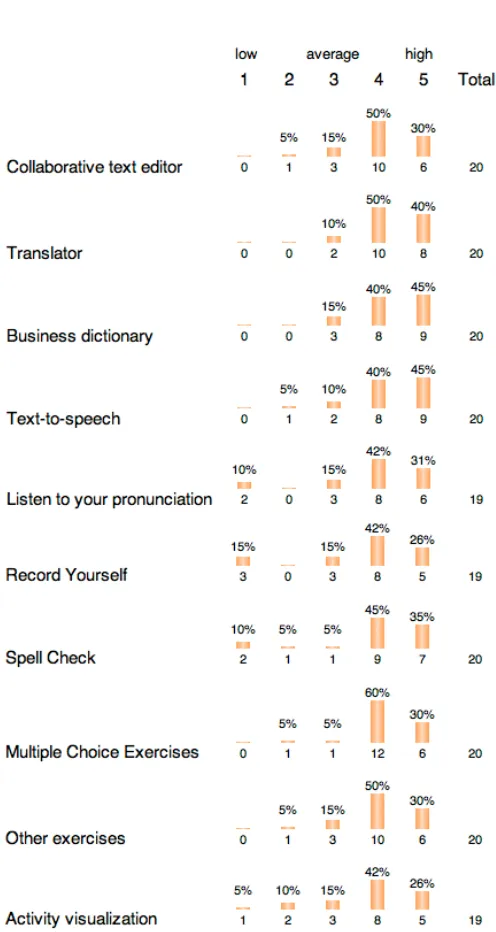
We also wanted an answer as to whether students are looking for more personaliza-tion and flexibility. The quespersonaliza-tionnaire showed that students feel comfortable in organizing their own environment for learning by customizing the list of widgets offered by teachers, assembling their own sets of widgets for their learning tasks and to search for existing sets of tools (Fig. 4). In Fig. 5 one can see how students rated the tools that were offered by teachers in the PLE. Even though the majority of widgets were useful for students, a number of them (Listen to your pronunciation, Record yourself, Spell check, Activity vi-sualization) were not highly appreciated by several students. This indirectly confirms the fact that students were looking for more flexibility: they would prefer not to have some widgets at all or probably replace them with other alternatives. It seems as the functional-ity to remove/hide some widgets on the page or to replace them would be appreciated by some students.
believe the low initial uptake despite perceived usefulness is due to several reasons. First, students quickly become overtaxed. The concept of a PLE is unfamiliar, the embedded services are new to them, and they have only limited experience in Web 2.0 in general. Second, students often do not see the value in learning how to use these tools. They feel it distracts from learning grammar and vocabulary, and does not prepare them for the exam. Thirdly, most of the students (and teachers as well) are not intrinsically motivated to use Web services, and the majority of our students feel that the time could be spent more ef-fectively. Thus, the task of the teacher is to demonstrate and highlight the advantages of a PLE, and guide them through it, so that the students can arrive at an understanding of what a PLE offers.
Second, uptake of ROLE was significantly hindered since only few domain-specific widgets were available. The teachers were less interested in general-purpose widgets, but asked for widgets covering very specific domain knowledge. Content available in existing Learning Object Repositories was not used in a single case, since these resources were too different from the specific needs of the teachers. For instance, existing learning ob-jects about French were too dependent of the original course book, and not usable in the SJTU courses due to too different vocabulary. Yet, teachers did find usable resources on Websites not available in learning object repositories. The teachers who were using PLEs in their classes during the evaluation have brought over their PLE spaces into the course Moodle sites of the new semesters. Also, new teachers have expressed their interest in cre-ating their own widgets during the presentations of the authoring tool. One teacher from the Social Science department created widgets of Web games about different political topics.
5.
Flexible Interaction Interfaces
Functional skins (introduced in [2]) allow users to easily personalize their interaction with spaces and improve end-user experiences. A functional skin is a client-side interaction plugin for a space implemented as a meta-widget, that can retrieve space metadata and space content via OpenSocial APIs and provide users with visual and functional features alternatives to its Web platform.
As a demonstration of the concept, we consider a course that the teacher created for the students. This course has several widgets that are shown in Fig. 3. In addition to the widgets, the course has some educational resources. With the OpenSocial Moodle plugin the teacher has a view with several widgets displayed on a grid and the default Moodle views. The personalization possibilities end here. However, the functional skin concept allows the teacher and students to further personalize their interaction with the Moodle platform.
Fig. 6: Functional skin – Aggregation view
Fig. 7: Functional skin – Resource view
The introduction of functional skins into the Moodle plugin increases the Moodle plasticity and the space personalization becomes very flexible. Through functional skins, the students and teachers can tune their spaces according to their own needs. Skins can be easily shared among users, so people with no programming skills are able to discover useful skins. In addition to all the benefits of functional skins described in [2], the Moodle plugin has two problems to which the functional skin concept represents a direct solution. The first problem concerns app management. In the most recent version of the plugin, adding a new app is still a cumbersome process. Moreover, apps cannot be removed from the space. This feature requires additional implementation efforts. The problem deterio-rates Moodle plasticity, since teachers cannot easily aggregate and remove apps in their spaces. An app management functional skin providing support for adding and removing apps in a space is a reusable solution for this problem and is currently being developed.
The second problem is the management of the app layout in Moodle. Again, it be-comes a problem because users are not able to arrange apps in spaces according to their preferences. For the Moodle plugin, we created a special interface that showed apps in a grid of 1, 2 or 3 columns (Fig. 3). This involved a relatively high effort of implement-ing the server-side PHP component to retrieve apps for a space and then JavaScript and HTML components to render them on the page. Still, at the moment the Moodle plugin does not allow a teacher to change the app order or resize apps. Support for this feature requires relatively high implementation costs. However, with the support for functional skins in the Moodle plugin, one could easily reuse the existing functional skin created for the Graasp platform10 that enables the required features. This functional skin can be easily added by the teacher into Moodle. Then teachers could resize the apps in a space and change the order at their will.
6.
Moodle Plugin and Interoperability
Interoperability of LMSs with other social and educational platforms was shown to be an important issue [6]. The Moodle plugin tackles the problem via the OpenSocial specifica-tion in the following manner. Since the Moodle plugin uses the OpenSocial specificaspecifica-tion, its data format and APIs are standardized, which enables data exchange and interoper-ability between different Web platforms. With the OpenSocial Space extension mentioned previously, the data set that can be extracted is very rich. There are two ways to enable interoperability with the Moodle plugin: data sharing and data migration.
For the data sharing scenarios, apps in Moodle can access the data from other Web platforms through the set of standardized OpenSocial APIs. An OpenSocial app can show information about a course, its participants, its resources, etc. OpenSocial-compliant plat-forms can access this information and display information about courses from Moodle. Similarly, apps in Moodle can access and display information about third-party courses.
Different from the sharing scenario, where data stays in its initial Web platform, in the migration scenario data is physically moved from one platform to another. The scenario is as follows. A teacher decides to migrate her Moodle course space into another platform. The course contains several apps and resources. The teacher wants to have a space in the new platform with the same name, description, apps and resources as in Moodle. There are several ways to achieve it with OpenSocial.
10
The first approach is based on using OpenSocial APIs. In this case the data is re-trieved from Moodle by the destination platform via OpenSocial APIs, then the destina-tion platform saves the received data again via OpenSocial APIs into the new platform storage. The important detail is that there is no conversion between data formats, since both platforms “understand” OpenSocial’s data structures. However, in order to simplify the development of migration scenarios, additional tools are needed. A tool enabling data migration should allow the user to 1) specify from which Web platform data is to be taken from, 2) login to the external platform, 3) specify which APIs are to be used for data extraction (Person, Space, etc.), 4) choose which fields are to be included during the mi-gration process. This tool can be implemented as a special library for Web platforms or as a Migration widget.
Both require the management of multiple OAuth end-points within an OpenSocial app (which is not possible at the moment in Apache Shindig). The user should be able to dynamically change the OAuth end-points or the OpenSocial specification should support the definition of multiple OAuth end-points in theModulessection of an app. Addition-ally, a possibility to change a domain address for OpenSocial API calls would be a helpful step towards enabling the migration. This can be accomplished as a feature for Shindig that changes the domain names of OpenSocial RPC requests.
The second case helps to achieve migration via JSON serialization, where a file with data is moved from one place to another instead of accessing OpenSocial APIs. Since OpenSocial data is served in a JSON format, it can be serialized as a JSON file. This file can be later passed to another platform, that can extract the needed data. Since OpenSocial APIs already follow the OpenSocial JSON format, it would be beneficial to reuse them for this task. A new migration tool should be able to parse JSON files and find the blocks that can be directly mapped to the corresponding OpenSocial API. Afterwards, the data is saved to the new platform via these mapped APIs.
7.
Embedded PLE Moodle Plugin
The plugin described earlier in this paper takes several steps forward in turning Moodle into a PLE. We will now describe a future plugin that brings in an actual PLE into Moodle, from a PLE installation running side-by-side with Moodle, while maintaining integration with Moodle through its Web services (Fig. 9).
The embedded PLE has enhanced personal aspects. Students can add widgets (from an integrated widget store) alongside those chosen by the teacher, which is difficult to enable in the existing plugin because Moodle requires additional access rights, which students normally do not have. Students can also change the preferences of any widget, configuring it to their needs, overriding the teacher’s preferences. Furthermore, widgets can be rearranged and resized.
Fig. 9: The embedded PLE plugin realized as a Moodle activity module
This provides a ubiquitos (cross-organizational) access to the PLE for students which is an important part of lifelong learning [19].
This new plugin does not integrate with Moodle’s database. Instead, the plugin re-trieves a token that it passes on to the PLE, allowing the PLE to access Moodle Web services [5] on the authenticated user’s behalf. In this way, the embedded PLE is able to access information such as course metadata and participants, and make that information available to widgets. The PLE augments this with support for widgets to store data within the context of a course, similar to the App Data and Media Items of OpenSocial, and other functionality that would not be available from Moodle alone, such as real-time commu-nication. The interface provided to widgets is generic rather than Moodle-specific, and it is possible to implement similar integration that offers the same widget interface also for other LMSs.
As the PLE installation is actually running side-by-side with Moodle, it is possible to access it without Moodle. While it is desirable to keep everything within the same Website (which the embedding of the PLE achieves), it is in some cases better to access the PLE separately. The UI overhead of Moodle page layout is avoided, leaving more screen real estate for the widgets. Additionally, it is possible that the standalone PLE (in this case without the full access rights to the course) could be used as a means to attract students to the course, by giving a taste of what the course is about.
in-stallation if it only integrates with Moodle through its provided interfaces. As this simul-taneously reduces the dependency on Moodle, it could also be the first step in leaving the world of LMSes completely, making a PLE-only solution possible.
Recently, we have made several advances towards realizing this plugin. An early ver-sion of the plugin can be added as a Moodle activity, and it simply embeds a space by means of aniframe, with no further integration. The space is, however, provided with the user’s Moodle token which could be used for integrating authentication and accessing Moodle services. We have also added LTI support to our implementation of spaces, which means that a space can be added as an LTI-based tool to any LMS that supports LTI, such as Moodle (from version 2.2 onwards, where such a tool is referred to as an “External tool”). These implementations are still preliminary, but as prototypes, they already show the promise of the approach described in this paper.
8.
Related Work
This section compares the described Moodle plugins with six related approaches. The ear-lier work of the authors [15] investigated the usage of a PLE in a similar setting (a French course at SOCE), but with significant differences. First, the PLE was implemented in an external system (Liferay11) which was not integrated into the school LMS, thus
introduc-ing an additional layer of complexity due to the different user interface and additional log in for students. Also, the ROLE technology used was still in a very early stage.
A similar approach is to use iGoogle as an eLearning platform with OpenSocial apps [7]. The authors provide a set of widgets suitable for different roles: student, teacher and teacher’s assistant. People with different roles can personalize their sets of widgets according to their specific needs. Since the environment is separated from the school LMS, we foresee the same problems that were found in the approach relying on Liferay.
[1] investigates the applicability of social media platforms within an academic con-text. More specifically, the social media platform Graasp was used to serve as a stand-alone PLE to augment and enrich the offering of learning tools provided by universities. Through the notion of a space it allowed learners to aggregate and organize both institu-tional and external resources within different contexts and to conduct learning activities in these contexts. It should be noted that widget usage was not limited to the language learning scenarios. The widget approach is used for teaching chemistry, programming, etc. For example, widgets are used to conduct remote control labs [3].
The authors in [10] see a compromise between PLEs and LMSs as a Web platform ag-gregating both local, institutional and cloud resources across different partner universities catalogs. The platform should be easily extendable with relevant tools (i.e., with widgets or browser plugins). It should offer an ePortfolio providing a continuum between formal and informal environments and ensuring the interoperability and data mobility from one system to another. The resulting Web platform should integrate a dashboard-like feature to deal with different tools and platforms.
Apache Wookie is a project allowing a Web platform to host W3C widgets. The Apache Wookie plugin12 brings W3C widgets into Moodle. Similar to the OpenSocial
11
http://liferay.com
12
plugin, widgets can be added inside Moodle. However widgets can only be added into the blocks area (similar to Fig. 1) which is a big limitation because widgets serve only as an addition for existing in Moodle wiki pages, lessons, etc. Nonetheless, it is a parallel step in bringing PLE functionalities into Moodle.
Another development for bringing external tools into Moodle is the Learning Tools In-teroperability (LTI) specification. The main benefit of this approach compared to OpenSo-cial is the fact that the database to Web Services mapping (via LTI) is already done by many LMSs supporting LTI (for example, Moodle13) and it is relatively easy to add sup-port for LTI to new LMSs for external tools integration. Unfortunately, the LTI approach provides limited access to the rich underlying APIs of the LMS. For instance, there is no way to get a list of participants of a course which makes tools that support collaboration appear somewhat constrained.
9.
Conclusion
The paper presented an approach to extend the existing LMS Moodle with a plugin en-abling OpenSocial apps to run within Moodle. Introducing these apps makes it possible to bring PLE functionalities to LMSes, specifically, flexibility in managing tools used by people for their learning goals and aggregation of external resources from the Web. The first version of the plugin allows teachers to freely choose a set of tools for their courses. We showed how the functional skin concept can be useful to change the interaction in-terfaces in Moodle plugin spaces. Additionally, we discussed how the interoperability be-tween Moodle and other Web platforms can be achieved with OpenSocial and the Moodle plugin. Our plugin was used within several courses by students and the questionnaire showed that students find this environment useful, however they still look for more per-sonalization where they can manage apps themselves. The second plugin that is currently under development is planned to tackle this problem. Thus, our future plans are to finalize the new plugin, introduce it to teachers and students and to evaluate it.
Acknowledgments.The research work described in this paper is partially funded through the ROLE Project, part of the Seventh Framework Programme for Research and Technological Development (FP7) of the European Union in Information and Communication Technologies.
References
1. Bogdanov, E., Limpens, F., Li, N., El Helou, S., Salzmann, C., Gillet, D.: A Social Media Platform in Higher Education. In: Global Engineering Education Conference (EDUCON). pp. 1–8. IEEE (2012)
2. Bogdanov, E., Salzmann, C., Gillet, D.: Contextual Spaces with Functional Skins as OpenSo-cial Extension. In: 4th International Conference on Advances in Computer-Human Interactions. pp. 158–163 (2011)
3. Bogdanov, E., Salzmann, C., Gillet, D.: Widget-Based Approach for Remote Control Labs. In: 9th IFAC Symposium on Advances in Control Education. pp. 189–193 (2012)
4. Bogdanov, E., Ullrich, C., Isaksson, E., Palmer, M., Gillet, D.: From LMS to PLE: A Step Forward through OpenSocial Apps in Moodle. In: Advances in Web-Based Learning - ICWL. Lecture Notes in Computer Science, vol. 7558, pp. 69–78. Springer Berlin Heidelberg (2012)
13
5. Conde, M.A., Aguilar, D.A.G., Pozo de Dios, A., Penalvo, F.J.G.: Moodle 2.0 Web Services Layer and Its New Application Contexts. In: Technology Enhanced Learning. Quality of Teach-ing and Educational Reform. pp. 110–116. Communications in Computer and Information Sci-ence, Springer Berlin Heidelberg (2010)
6. Forment, M.A., Guerrero, M.J.C.n., Gonz´alez, M.A.C., Pe˜nalvo, F.J.G., Severance, C.: Interop-erability for LMS: The Missing Piece to Become the Common Place for Elearning Innovation. In: Visioning and Engineering the Knowledge Society. Lecture Notes in Computer Science, vol. 5736, pp. 286–295. Springer (2009)
7. Gonzalez-Tato, J., Llamas-Nistal, M., Caeiro-Rodriguez, M., Alvarez-Osuna, J.: Towards a Collection of Gadgets for an iGoogle e-Learning Platform. In: Global Engineering Education Conference (EDUCON), 2012 IEEE. pp. 1–9 (2012)
8. Henri, F., Charlier, B., Limpens, F.: Understanding PLE as an Essential Component of the Learning Process. In: Proceedings of World Conference on Educational Multimedia, Hyper-media and Telecommunications. pp. 3766–3770. AACE, Vienna, Austria (June 2008) 9. Isaksson, E., Palm´er, M.: Usability and Inter-widget Communication in PLEs. In: Fifth
Eu-ropean Conference on Technology Enhanced Learning (EC-TEL10), The 3rd Workshop on Mash-Up Personal Learning Environments (MUPPLE10) (2010)
10. Moccozet, L., Benkacem, O., Ndiaye, B., Ahmeti, V., Roth, P., Burgi, P.Y.: An Exploratory Study for the Implementation of a Techno-pedagogical Personal Learning Environment. In: Proceedings of the PLE Conference (2011)
11. Moedritscher, F., Neumann, G., Garcia-Barrios, V.M., Wild, F.: A Web Application Mashup Approach for eLearning. In: OpenACS and LRN Conference. pp. 105–110 (2008)
12. Schmitz, H.C., Kirschenmann, U., Niemann, K., Wolpers, M.: Contextualized Attention Meta-data. In: Human Attention in Digital Environments. pp. 186–209. Cambridge University Press (2011)
13. Severance, C., Hardin, J., Whyte, A.: The Coming Functionality Mash-up in Personal Learning Environments. In: Interactive Learning Environments. vol. 16, pp. 47–62. Routledge (2008) 14. Soylu, A., M¨odritscher, F., Wild, F., De Causmaecker, P., Desmet, P.: Mashups by
Orchestra-tion and Widget-based Personal Environments: Key Challenges, SoluOrchestra-tion Strategies, and an Application. In: Electronic Library and Information Systems. vol. 46, pp. 383–428. Emerald Group Publishing Limited (2012)
15. Ullrich, C., Shen, R., Gillet, D.: Not Yet Ready for Everyone: An Experience Report about a Personal Learning Environment for Language Learning. In: Advances in Web-Based Learning-–ICWL. pp. 269–278. Springer (2010)
16. Van Harmelen, M.: Personal Learning Environments. In: Sixth IEEE International Conference on Advanced Learning Technologies ICALT06. vol. 16, pp. 815–816. IEEE (2006)
17. Van Harmelen, M.: Design Trajectories: Four Experiments in PLE Implementation. In: Inter-active Learning Environments. vol. 16, pp. 35–46. Routledge (2008)
18. Wild, F., Ullmann, T., Scott, P., Rebedea, T., Hoisl, B.: Applicability of the Technology Accep-tance Model for Widget-based Personal Learning Environments. In: 1st Workshop on Explor-ing Fitness and Evolvability of Personal LearnExplor-ing Environments. pp. 39–48 (2011)
19. Wilson, S., Liber, O., Johnson, M., Beauvoir, P., Sharples, P., Milligan, C.: Personal Learn-ing Environments: ChallengLearn-ing the Dominant Design of Educational Systems. In: Journal of eLearning and Knowledge Society. vol. 2, pp. 173–182. Citeseer (2007)
Evgeny Bogdanovis a post-doctoral researcher in Computer Science at REACT group of Ecole Polytechnique Federal de Lausanne (EPFL) in Switzerland. He received his Ph.D. degree in Computer Science from EPFL in august 2013. His research interests are in the area of widgets and widget bundles with focus on portability and interoperability. He is currently involved in the European Go-Lab project that started in December 2012.
Carsten Ullrichis a principal researcher at the German Research Center for Artificial Intelligence (DFKI GmbH). He received his PhD in Computer Science at Saarland Uni-versity in 2007. From 2007 to 2011, he was an associate researcher at Shanghai Jiao Tong University. His research interests are in Artificial Intelligence for Education, technology-enhance learning and mobile learning.
Erik Isakssonhas a Master of Science degree in Information and Communication Tech-nology from the Royal Institute of TechTech-nology (KTH), Stockholm, Sweden. After gradu-ating in 2009, he has worked within the Knowledge Management Research (KMR) group as a research engineer at Uppsala University, Sweden, primarily with Web technologies and Linked Data, and how these can be applied to Technology Enhanced Learning (TEL). Currently, he works within KMR, now at KTH, in projects related to TEL as well as Cultural Heritage. Research interests include metadata, the Web, information systems, se-curity and, in particular, how these can be integrated with usability and interoperability in mind.
Matthias Palmerreceived his PhD in media technology from Royal Institute of Tech-nology (KTH) with a focus on techTech-nology enhanced learning and semantic web. After graduating from KTH in 2012 Matthias co-founded the company MetaSolutions which has a focus on how modern web architecture and linked open data can be used to cre-ate services and web applications for collaborative information management. Previously Matthias worked for Uppsala University as the technical lead of the development of the Uppsala University Student Portal. Matthias is an active developer and continues to be involved in the design and development of several open source projects.
Denis Gilletis an Associate Professor (MER) of Engineering at the Swiss Federal In-stitute of Technology in Lausanne (EPFL), where he received his PhD in Information Systems in 1995. His research interests include technologies enhanced learning (TEL), human-computer interaction (HCI), and engineering education. His current research fo-cus is on personal learning environments with applications to online engineering educa-tion and knowledge management. He is the Associate Editor of the IEEE Transaceduca-tions on Learning Technologies (TLT) and of the International Journal of Technology Enhanced Learning.