4070
Application Of Time-Based One Time Password
(TOTP) Algorithm For Human Resource E-Leave
Tracking Web App
Irma T. Plata, Jomar L. Calpito
Abstract— The Time-based One Time Password (TOTP) algorithm is one of the most used two-factor authentication algorithms. It was applied in the development of the Human Resource e-Leave tracking web App to improve the security and authentication process of accessing the App. It provides an additional security feature that even the user password is stolen or compromised; an attacker cannot gain access on that account without the passcode generated by the TOTP, which changes every 30 to 60 seconds. The conceptual framework of the study was designed based on Multi-Factor Authentication, notably the TOTP algorithm, The Rapid Application Development model - the prototyping cycles served as basis in the system development process. The study has three major components, the development of the e-Leave tracking web App, testing the functionalities in terms of user's authentication and accounts recovery, and the technical evaluation in terms of compatibility, reliability, and security. The web app showed that the TOTP algorithm is laudable in terms of user authentication, recovery, and security.
Index Terms— e-Leave, Rapid Application Development, Time-based One Time Password Algorithm, Two-factor Authentication, Web Application —————————— ——————————
1 INTRODUCTION
1.1.Background of the Study
The main highlight of the study is the application of the Time-based One Time Password (TOTP) algorithm as the basis of authentication on Human Resource e-Leave tracking web App developed with various modules and functionalities. The pilot implementation is with the Human Resource and Development office of the Southern Isabela College of Arts and Trades (SICAT), a TESDA government training institution offering TVET programs. The execution of authentication processes incorporate additional security features like the implementation of restrictions in terms of login attempts; the prohibition of users' from logging into the App on more than one workstation at the same time with the same user identification; and the App sets to automatically log a user off/out after predefined period of inactivity. The functionalities of the App were tested in terms of user’s authentication and accounts recovery. Also, the conduct of evaluation on the technical aspect in terms of compatibility, reliability, and security. Furthermore, a pre-survey with the 31 employees of SICAT assessing their readiness in terms of availability of mobile devices and the usability of mobile devices based on its specifications. Their mobile devices had been categorized from low (not the internet-capable device), mid (internet-capable, low specs) to high class (top of the line) gadgets. The survey reveals that 100% of the employees had mobile devices and are capable of accessing the Internet. Hence, the implementation of the web application is practical and convenient.
1.2 Human Resource Leave Management System
Management of human resources in an organization should be efficient and effective since it affects human resource behavior and, consequently, the performance of the organization as a whole [1]. Also, to attain the goal of the organization, efforts of others are needed since HR management deals with the strategic, target-oriented composition, regulations, and development of all areas that affect human resources in the organization [2].
Leave management is one of the simplest yet crucial HR activities that often consumes a significant portion of the HR personnel time. Organizations must recognize the need for employees not to report from their work, taking time away to consider and fulfill personal, family, social obligations, and other necessities, thus may file different leave privileges [3]. Taking annual leave is a right of an employee but subject to the right of the head of the office to schedule time at which leave may be made. While a leave of absence is a right granted to employees not to report to work with or without pay, leave policies must be complied in accordance or provided by the law. The HR personnel must see to it that there are available sufficient workers at all times and that employees are satisfied with the working environment [4].
1.3 Authentication Methods
1.3.1 Single Factor Authentication (SFA)
Single Factor Authentication (SFA) is a process of securing access to a system like a network or a website that identifies the party requesting access through only one category of credentials. The use of passwords is an example of SFA despite identified security issues [5]. Thus, the development of password meters aid users in creating stronger passwords [6]. However, phishing, for instance, is a significant weakness of SFA in electronic communication where it attempts to obtain sensitive information like username and passwords acting as a trustworthy entity, however frequently for malicious reasons. [7], [8]. Hence, relying on usernames and passwords as a security measure is now not recommended because of that attack.
————————————————
Irma T. Plata is an Associate Professor at the College of Computing Studies, Information and Communication Technology (CCSICT), Isabela State University, Philippines. E-mail: [email protected] Jomar L. Calpito is an Instructor at the Southern Isabela College of
4071 1.3.2 Multi-factor Authentication (MFA)
The multi-factor authentication is a method of confirming grants to user access when two or more pieces of evidence/factors are presented successfully to an authentication mechanism [9]. The use of a password is an example of an authentication factor that includes the knowledge factors that consist of knowledge of a secret to authenticate. Many multi-factor authentication techniques rely on password as one factor of authentication [10]. The most popular possession factors are the One-Time Password (OTP). An OTP is a password that is valid for only one login session or transaction on a computerized system. SMS OTP is an example of OTP and used as an additional factor in a multi-factor authentication system. Users are required to enter an OTP after logging in with a user name and password [11]. However, this heavily relies on the cellular network and thus cannot be used if there is no signal. The Asia-Pacific Network Information Center (APNIC) uses TOTP to authenticate users in their online voting and certification. Other entities like Microsoft, SalesForce, and Google also used the TOTP algorithm for their authentication process [12], [13]. On account recovery, Google provides users ways to recover their data. The Gmail password recovery is easy enough to recover if a particular user provided the required security information during account registration [14]. Microsoft implemented an account recovery system that will be disabled once the user turns on the 2-step verification feature on their accounts [12].
1.4 Time-based One Time Password Algorithm
The Time-based One Time Password (TOTP) algorithm is a variant of the HMAC One Time Password (HOTP) algorithm. The basis of HOTP is on the increase in counter value, both the client and server have a counter value. The server generates the password for using the counter. If both passwords match, the server authenticates the user and updates the counter (increment/ decrement the counter) [15]. The TOTPis a temporary passcode generated by an algorithm in MFA for use in authenticating access to computer systems. It can aid the web application to add an extra layer of security aside from the traditional username and password approach, thus even potential attackers have your password. It is not accessible for them unless they have the passcode. Passcodes generated from TOTP are "short-lived," preventing users from reusing passcodes once expired or used [16]. For comparison, the basis of the HOTP algorithm is on an increasing counter value and static symmetric key known only to the token and the validation service. Also, HOTP provides passwords that are valid for a long time as the basis of the algorithm is on counters, and potential attackers can attack a key generated by HOTP. If they figured how the algorithm generate keys, then they can predict the next password that is generated. On the other hand, TOTP provides short-lived passwords eliminating the risk of stolen passcodes, and it is nearly impossible to predict the next password generated by the TOTP algorithm due to its rapid-changing characteristics. Hence, in the study, consideration is TOTP. The establishment of authentication starts on the application (validator). It must generate a secret, usually in the form of a key or a QR code for convenience. If scanned by end-users (generator), their credentials (username and password) and devices will be linked to the secret. Decoding the QR code information results in the following link as output shown in Fig. 1.
Fig. 1. QR code generated by the Web Application
otpauth://totp/[email protected]?secret=yc42tocu3xmjgd7qLi sting 1:OTPAuth URL
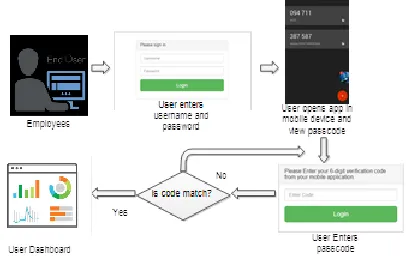
Choosing the manual entry method results in the same secret key, and the generation of the key is one time. It will never be retrieved through the browser if the authentication process has been completed. Potential attackers can just scan the QR code while it is displayed on the victim's screen. Otherwise, there's no way to get the secret. The highlight of the authentication process is the generation of time-based tokens/ passcodes on the user's devices, which is associated with the user credentials on the web application. These devices store secrets to generate TOTP codes to generate verification codes, even without the internet. Thus, maximizing accessibility. In conjunction with the TOTP algorithm, the diagram presented in Fig. 2 illustrates the process of authentication. The App prohibits users from logging in to the application on more than one device. Hence, users/employees must log out their accounts on their last used device before logging in to another. If a user fails to logout on its previously used device, the App automatically logs off a user of the application after a predefined period of inactivity, thus eliminating problems if a user is using its account on its home device and forgets to log off. The app also protects user accounts during authentication using setting predetermined login attempts for potential attackers. Besides, passwords are encrypted even to the system administrator to prevent unauthorized access to the user accounts. Once a user has a secret, the App validates a specific user by a layer of verifications.
Fig. 2. Authentication Process
1.5 Objectives of the Study
4072 and security.
2
PROCEDURES
AND
METHODS
2.1 Conceptual Framework of the Study
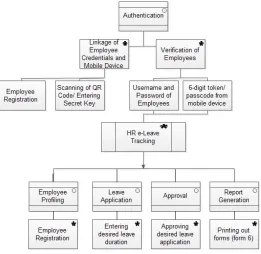
The conceptual framework was developed based on Single-Factor Authentication, Multi-Single-Factor Authentication, TOTP algorithm, development of e-leave tracking App, ISO 25010 standards, and the leave of absence guidelines released by the Civil Service Commission. The basis of the Authentication module framework is the TOTP Algorithm developed by the Internet Engineering Task Force (IETF) that has been implemented on the HR e-Leave Tracking App as shown in Fig. 3.
Fig. 3. The conceptual framework of the study
The initial process is linking the employee's credentials/record to his/her mobile device by registering the employee information, including its user credentials on the system. Afterward, the employee is required to scan the QR code or entering the secret key provided to link his device to his user credentials for passcode generation, thus accomplishing the linking process. Next is the verification of an employee's identity; this involves requiring an employee to provide a username, password, and passcode/token generated by the mobile device to access the App.
To summarize the Two-Factor Authentication applying the TOTP algorithm, the following are performed before accessing the App;
Linkage of Employee Credentials and Mobile Device oEmployee/ Account Registration
oScanning of Quick Response Code/ Entering Secret Key
Verification of Employees
oUsername and Password of Employees o6-digit token/ passcode from a mobile device
Features that can be triggered before access
oMAC Filtering – checks if the account credentials entered are still used on other devices.
oPredetermined Login Attempts – restricts unauthorized users to access the account if they failed to give the right user credentials on predetermined attempts.
oPassword Policy – upon registration, the application filters the password entered by the user to determine if it is a strong password or not.
oPIN Expiration – each pin generated by the user's device, and the server has set to expire within 30 seconds due to the implementation of the TOTP algorithm.
While during the access to the App, the following features can be triggered;
Features triggered during access
oEncrypted Passwords – users with a high level of access (Administrator) will never see user passwords for security.
oIdle Detection – the application has been set to automatically log a user off after a predefined period of inactivity.
2.2 Time-Based One-Time Password (TOTP) Algorithm as a Basis of Two-Factor Authentication
The Time-Based One-Time Password (TOTP) algorithm can ensure data privacy through authentication and security processes. The TOTP provides short-lived passwords, eliminating the risk of stolen passcodes. It is nearly impossible to predict the next password generated by TOTP due to its rapid-changing characteristics. Based on the diagram presented in Fig. 4, the Validator (Web Application) generates a secret (k) and can be shared using a QR code. Once scanned by the Generator, usually an application on a mobile device (e.g., Google Authenticator), the device generates a token (6 digits in length) regularly every 30 seconds. Since the algorithm is based on device time, the validator creates several tokens to account for time drift (e.g., new time zones). The token provided by the generator and one of the tokens generated by the validator must be the same to gain access to a specific module.
Fig. 4. Time-based One Time Password (TOTP) as a basis in the development of the HR e-Leave Tracking Web App
2.3 System Development Process
4073 includes (1) requirements analysis and quick design; (2) the
prototype cycles of developing, demonstration, and refinement; (3) App testing; and (4) App evaluation, as shown in Fig. 5.
Fig. 5. Rapid Application Development methodology asa basis in the development of the HR e-Leave tracking web App
2.3.1 Requirements Analysis and Quick Design
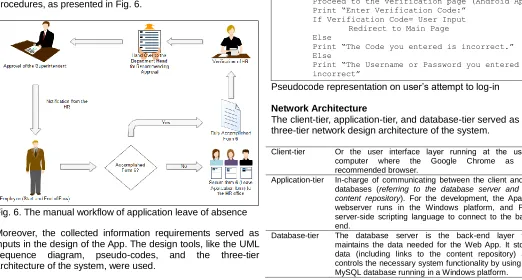
The determination and analysis of information requirements came for the end-users. The user, system, functional, and non-functional requirements were gathered and analyzed as a basis for the design and development of the App. Different data collection methods like studying the existing leave credit system, review of the Civil Service Commission guidelines on leave of absence, collecting leave forms, and sample leave credit ledgers. Also, analyzing the process flow by illustrating the current workflow diagram of the leave application manual procedures, as presented in Fig. 6.
Fig. 6. The manual workflow of application leave of absence
Moreover, the collected information requirements served as inputs in the design of the App. The design tools, like the UML sequence diagram, pseudo-codes, and the three-tier architecture of the system, were used.
Sequence diagram
The design of the overall system workflow is presented using the sequence diagram, where the system Administrator adds an employee. Then the employee can log in on the App using the credentials provided. Afterward, employees can apply for their available leave. Then the department heads and the head of the institution approve the leave application, as shown in Fig. 7.
Fig. 7. Sequence diagram of the overall flow of the e-leave tracking App
Pseudocode representation on user’s attempt to log-in Part of the design stage is the pseudo-code representation of the user's attempt to login. It explains that if a particular individual log in to the App using the correct username and password, it will automatically generate a verification code associated with the user account that is synced on the user’s mobile App and will prompt the user to enter the verification code. Else, a notification will show, incrementing the login counter. Failure to provide correct credentials results in the disablement of user account.
If Username & Password = User Input
Proceed to the verification page (Android App) Print “Enter Verification Code:”
If Verification Code= User Input Redirect to Main Page Else
Print “The Code you entered is incorrect.” Else
Print “The Username or Password you entered is incorrect”
Pseudocode representation on user’s attempt to log-in
Network Architecture
The client-tier, application-tier, and database-tier served as the three-tier network design architecture of the system.
Client-tier Or the user interface layer running at the user’s computer where the Google Chrome as the recommended browser.
Application-tier In-charge of communicating between the client and its databases (referring to the database server and the content repository). For the development, the Apache webserver runs in the Windows platform, and PHP server-side scripting language to connect to the back-end.
4074 Fig. 8. The three-tier network architecture of the HR e-leave
tracking Web App
2.3.2 Web App development using the Prototype Cycle The prototyping involves the following activities of developing, demonstration, and refinement done in a cycle to build the functional system. The development tools like the Notepad++ as the source code editor in windows platform. The XAMPP for running Apache HTTP Server and the MySQL Database. The PHP as the scripting language in conjunction with the HTML (Hypertext Mark-up Language) for the server-side of the App. HTML, JavaScript, and Cascading Style Sheets (CSS) to build the interfaces and functionalities of the App. Moreover, Apache is used as the webserver and MySQL for database repository since it runs on all platforms. The design of the interface adjusting to all devices based on screen resolution with the help of the bootstrap framework. It consists of icons, buttons, text boxes, labels, and tables. It has minimal graphics design for faster loading time. Also, AJAX technology for a more rapid response rate. More, the system provides a dashboard for the system administrator to add, modify, and delete information. It allows the end-users to modify data such as employee information as well as applicant information and the overall contents.
2.3.3 Web App Testing
The testing ensures the web app is working accordingly in terms of its functional requirements set. The GUI is tested on various devices, ensuring every component of the interface is displayed on all different types of devices and sizes of screens. More importantly, the testing provides correct user authentication and account recovery.
2.3.4 Web App Evaluation
The technical aspect of the App was evaluated using the ISO 25010 standards, considering the following criteria on compatibility, reliability, and security. The evaluation of the technical aspects of the developed web App involves the participation of faculty and staff of the Southern Isabela College of Arts and Trades, a TESDA Training Institution located in Santiago City, Isabela.
3
RESULTS
AND
DISCUSSION
3.1 Development of the HR e-Leave Tracking Web App applying TOTP Algorithm
The development of the HR e-Leave tracking web App using the TOTP Algorithm considered the two-factor authentication process to provide greater security to end-users in accessing the App online using their laptop connected on the Internet and even their mobile devices. In the authentication process,
users/employees must still provide a username and password. However, they must provide the 6-digit passcode generated by their mobile devices to complete the authentication process. If a user successfully enters the right credentials, the user will be redirected to his/her respective dashboard, as shown in Fig. 9.
Fig. 9. User dashboard of the HR e-leave tracking App
The system involves three main end-users, the department head, the HR manager who acts as the App Administrator, and the employees with a level of access and authorization. The department heads have access to the following: the pending application module, leave module, and the summary of leave application module that enables the department head to approve or disapprove the application for leave, process application of employees, and to track employee leave credits. For the employees, the web App contains the Leave Module that enables them to apply online for leave of absence. For the assigned system administrator, it includes the leave module for leave applications, a summary of applications, and employees' module that enables to add, modify, and delete employee profiles as deemed necessary.
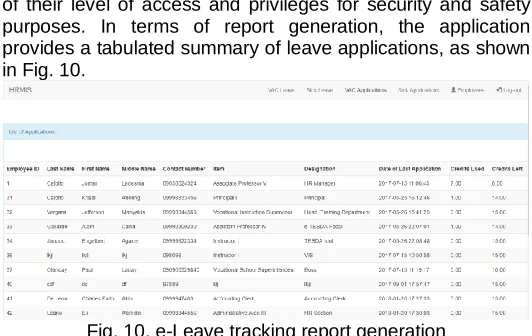
Overall, the developed App covers the employee’s records and information details, application of leave of absence, online processes of application for leave; computation of leave credits, and reporting of leave credits — also, the identification of their level of access and privileges for security and safety purposes. In terms of report generation, the application provides a tabulated summary of leave applications, as shown in Fig. 10.
Fig. 10. e-Leave tracking report generation
3.2 Testing the functionalities of the HR e-leave tracking App in terms of user authentication and accounts recovery
4075 that if credential matches, the process is completed, and the
user is granted authorization to access the web App. On the other hand, account recovery testing provides risk management actions whenever needed to recover the user's account. It is convenient since employees are accessing the App and, at the same time keeping their passcodes on their mobile devices, ensuring that passcodes are with them anytime and anywhere.
The administrator can change
the passcodes in case of lost devices. The first step of
authentication in the framework is the linkage of user
accounts and mobile devices. The mobile application
must be installed on the employee's mobile phone
before registration on the web application, as shown
in Fig. 11.
Fig. 11. Mobile Application (Authy, Google Authenticator, etc.) on employee’s device
In the developed web application, employees or administrators must fill out the form provided and then scanning the QR code using the app on the mobile device, as shown in Fig. 12.
Fig. 12. QR code embedded on the registration form
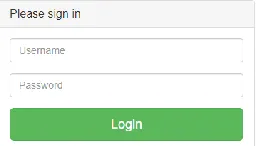
With that, the registered account credentials are now associated with the tokens generated by the app on mobile devices. These tokens are only valid for 30 seconds and then changes. In case of missing devices or forgotten passwords, users must scan the QR code again on their profile to recover their accounts. As usual, employees must enter their username and password, as shown in Fig. 13.
Fig. 13. HR e-Leave tracking login form
However, the web application will require employees to enter the six-digit token generated on their mobile devices, as shown in Fig. 14, and Fig. 15.
Fig. 14. 6-digit verification code requirement of the web application
Fig. 15. 6-digit token/ passcode from the mobile application
If the user entered the code from the app on its mobile device, the web application then redirects employees to their respective dashboards. Else, if they reached the predefined maximum login attempts, the user account will be locked temporarily. If the user successfully enters the right credentials, the user is redirected to their respective dashboards of the HR e-leave tracking App.
3.3 Evaluation of the technical aspect of the App in terms of compatibility, reliability, and security
The ISO/IEC 25010 standard served as a basis in evaluating the App’s technical aspects in terms of compatibility, reliability, and security. In terms of compatibility, the results revealed that the web app could perform required functions efficiently, and it can generate similar passcodes simultaneously in real-time, as presented in Table 1. The overall mean of 3.79 implies that the web app is highly compatible in terms of co-existence and interoperability criteria.
TABLE 1
Compatibility Evaluation Results
Criteria Computed
Mean
Descriptive Interpretation Co-existence. The web App can
perform its required functions efficiently.
3.80 Very Good
Interoperability. The web app generates similar passcodes simultaneously in a real-time manner.
3.77 Very Good
Overall Mean 3.79 Very Good
Table 2 presents the reliability results of the evaluation and reveals that the web app is reliable under normal operations, and when in use, it can be accessible and operational. Also, the performance of the primary function despite faults in its hardware and software components, and recovery is available when data is affected. The overall mean of 3.85 implies the web app is highly reliable.
TABLE 2
Reliability Evaluation Results
Criteria Computed
Mean
4076 Maturity. The web App meets the
needs for reliability under normal operation.
3.90 Very Good
Availability. The web App is operational and accessible when required for use.
3.89 Very Good
Fault Tolerance. The web app operates as intended despite the presence of hardware or software faults.
3.71 Very Good
Recoverability. In the case of anomalies, the web App can recover the data directly affected (e.g., passwords and passcodes) and re-establish the desired state of the system.
3.91 Very Good
Overall Mean 3.85 Very Good
Table 3 presents the security evaluation results and reveals that the web app is accessible to those given authority, and it prevents unauthorized access or modifications of data. Also, it includes activity logs to record actions or events being performed and ensures that actions can be traced. More, in terms of authenticity, the identity of the user can be proved to be the one claimed because of the TOTP implementation. The overall mean of 3.90 implies the web app is secured.
TABLE 3
Security Evaluation Results
Criteria Computed
Mean
Descriptive Interpretation Confidentiality. The web App
ensures that data are accessible only to those authorized to have access.
3.88 Very Good
Integrity. The web app prevents unauthorized access to or
modification of computer programs or data.
3.90 Very Good
Non-repudiation. The web App provides activity logs to ensure that actions or events can be proven to have taken place so that the functions or actions cannot be repudiated later.
3.90 Very Good
Accountability. With logs, the web App ensures that the actions of an entity can be traced uniquely to the entity.
3.89 Very Good
Authenticity. With the
implementation of the TOTP,the identity of a subject or resource can be proved to be the one claimed.
3.91 Very Good
Overall Mean 3.90 Very Good
4.
CONCLUSION
The application of the TOTP algorithm in the development of e-leave tracking web app protects the end-users by improving the authentication and security concerns by disallowing intruders to access their accounts, thus protecting the safety of the employees’ information. The TOTP addressed issued on user authentication and accounts recovery needed in the process of accessing the web app. And overall, the develop web app is highly acceptable by users since and issues on compatibility, reliability, and security were addressed.
ACKNOWLEDGMENT
The authors acknowledge the active participation of the employees and staff of Southern Isabela College of Arts and Trades (SICAT), Santiago City. To the Isabela State University for the support in this kind of research work.
REFERENCES
[1] A. Andreas and E. Biesalski, ―Human resource management with ontologies," Springer Berlin /Heidelberg, pg. 32, 2004.
[2] G. Dessler N.D. Cole and V.L. Sutherland, ―Human resources management," 7th
Edition Prentice-Hall Canada Inc, page 20, 1999.
[3] Policy directory (Uvapolicy) Retrieved https://uvapolicy.virginia.edu/policy/HRM-038, 2019
[4] Deskera, ―HR software, HRMS‖ Retrieved https://www.deskera.com/hrms/ 2019.
[5] E. De Cristofaro, H. Du, J. Freudiger, and G. Norcie, ―Two-factor or not two-factor? A comparative usability study of two-factor
authentication,", USEC.
10.14722/usec.2014.23025, 2013.
[6] B. Ur, P. Kelly, S. Komanduri, J. Lee, M. Maass, M. Mazurek, T. Passaro, R. Shay, T. Vidas, L. Bauer, N. Christin, and L. Cranor, ―How does your password measure up? The effect of strength meters on password creation‖, In Proc. USENIX Security, 2012.
[7] Z. Ramzan, "Phishing attacks and countermeasures." In Stamp, Mark & Stavroulakis, Peter. Handbook of Information and Communication Security. Springer ISBN 978-3-642-04117-4, 2010.
[8] V. De Merwe, A.J. Loock, and M. Dabrowski, "Characteristics and responsibilities involved in a phishing attack," Winter International Symposium on Information and Communication Technologies, Cape Town, 2005.
[9] ―Two-Factor Authentication – How and Why to use it? – CTNET Retrieved from https://www.cnet.com/how-to/how-and-why-to-use-two-factor-authentication, 2018.
[10] ―SecurEnvoy - The Inventor of Tokenless Two-Factor Authentication‖, Retrieved https://www.securenvoy.com /en-us/about, 2019. [11] J. Lee, P. Minho, and S. Jung, ―OTP-Based
Transaction Verification Protocol Using PUFs," The Journal of Korea Information and Communications Society. 38B. 492-500. 10.7840/kics.2013.38B.6.492, 2013.
[12] Microsoft Authenticator, ―Securely Access and Manage your Online Accounts," Retrieved https://www.microsoft. com/en-us/account/authenticator, 2019.
[13] Google Inc., "Secure your passwords," Retrieved https://support.google.com/accounts/answer/1066
447?co=GENIE.Platform%3DAndroid&hl=en,
2019.
4077
https://www.
cleverfiles.com/howto/google-account-recovery.html, 2019.
[15] S. Lee, J. Lee, M. Leek, S. Lee, D. Choi, and D. Kim, "Low-Power Design of Hardware One-Time Password Generators for Card-Type OTPs," ETRI Journal, Volume 33, Number 4, 2011.
[16] D. M’Raihi, Verisign, Inc., S. Machani, Diversinet Corp., M. Pei, Symantec, J. Rydell, Portwise, Inc. –―TOTP: Time-Based One-Time Password
Algorithm," Retrieved