5176
Development And Implementation Of Web-Based
Pupils’ FORM 137-E Information System To
Primary Elementary Schools
Irma T. Plata
Abstract—The goal of the study is to improve the processes involved in the manual system of storing and retrieving pupils’ FORM 137-E. The tangible outputs are a fully operational Web-based Pupils’ FORM 137-E and centralized e-repository of pupils’ permanent academic reports. The study was pilot tested and implemented at the Santiago South Central School in Santiago City, a public primary school under the DepED with at least 2,700 pupils and 70 teachers. The study was fully implemented in the Department of Education, Schools Division Office, Santiago City from year 2016 to year 2019 to 11 primary schools with 310 trained teachers and 25 trained ICT coordinators. The system development process was based on the System Development Life Cycle (SDLC) model with few alterations considering the present system workflow and the technical workflow of the new system. The system passed the set usability criteria, and overall, the system is acceptable for implementation which the participants considered another milestone in the attainment of school’s Information and Communication Technology for Education (ICT4E) goal of providing innovative tool in the delivery of services to their pupils.
Index Terms— Department of Education, FORM 137-E, Information system, Primary education, Web-based system
—————————— ——————————
1 INTRODUCTION
Information is a vital asset in an organization which requires attention in its management particularly on capturing, storing, retrieval, utilization, and sharing [1]. It has changed and improved processes in business, industry, government, and education sectors. We value information since it affect our decision-making, performance, or results. The accuracy of information in records, its timeliness, being specific and organized should provide meaning and relevance leading to an improved in understanding and lessen ambiguity [2]. Accordingly, the different components of information systems working as one to collect, process and disseminate information is interrelated supporting decision making, analysis, and coordination in an organization [3]. Information system goal is the transformation of data into information and be used as organizational knowledge [4]. THE DEPARTMENT OF EDUCATION (DEPED), the government arm providing basic education, is finding ways to create an ICT-enabled learning environment specifically on infrastructure, content, teacher education and training, and technical support. The DepED ICT4E Strategic Plan is anchored in its overall vision of providing “21st Century Education for All Filipinos, Anytime, Anywhere” where ICT plays a major role in creating a new and improved model of teaching and learning [5]. The DepED vision is to use ICT to create new knowledge and products that will be realized by means of establishing the necessary ICT Infrastructure and applications [5]. The DepED FORM 137-E, known as the Permanent Record contains the learner’s profile and historical academic record. School authorities request for the release of FORM 137-E of Grades 1 to 6 learners who transfer to another school or transition from elementary to secondary [6].
At present, the tasks involved in preparing FORM 137-E are
characteristically tedious, error prone, occasional lost and missing documents, not easily shareable, hard to keep track of who used or copied which paper documents which might lead to higher labor and overhead costs. Also, physical storage problems of finding and retrieving a document is time-consuming which may cause client dissatisfaction. Thus, the development and implementation of the Web-based DepED Pupils’ FORM 137-E has been instrumental in addressing the issues and concerns of the present procedures of producing FORM 137-E. The new system is an ICT tool benefiting the end-users, the Department of Education and an innovative way to transfer technology in the management of information of the pupils.The study aims to develop and implement a Web-based Pupils’ FORM 137-E system and evaluate the technical component of the system and the acceptability of the system in terms of usability. A fully operational Web-based Pupils’ FORM 137-E and centralized e-repository of pupils’ permanent academic reports are the tangible outputs to be produced. The DepED’s Saligan 2022+ roadmap on appropriate technologies through the DepED Computerization Program (DCP) [7]; the UNESCO report on the integration of ICT in the Philippines' educational system promoting the use of appropriate and innovative technologies in education and training [8]; and the DepED ICT4E of 2008 [5] were used as basis for this study.
2 PROCEDURES AND METHOD
2.1 Locale and Participants of the Study
There were eleven (11) schools involved in the implementation of the study. A total of 310 teachers participated in the trainings conducted and 25 ICT coordinators were trained as technical support to efficiently and effectively implement the system in their respective schools. The system was initially piloted in Santiago South Central School then eventually implemented to 10 more schools as shown in Table 1.
————————————————
5177 TABLE 1
Number of Teacher Participants
Cluster Name of School Number of
Participants
South Santiago South Central School 67 Calaocan Elementary School 20 Rosario Elementary School 18
North Santiago North Central School 59 East Mabini Elementary School 17 Salvador Elementary School 8 San Andres Elementary School 13
Santiago East Central School 37 West Dubinan Elementary School 23
Patul Elementary School 22
Santiago West Central School 26
Total Number of Participants 310
2.2 Technical Framework of the System
Fig. 1. Technical Framework of the System: Web-based DepED Pupils’ FORM 137-E
As presented in Fig. 1, the FORM 137-E system is uploaded into a web server connected into a database server. Users requests data from the web server by accessing the system from their computers which are connected to the internet.. The user will send requests to the server, then the server verifies the request of the user, after verification, the server sends the request into the database server, then the database server sends back the information requested into the web server then the web server sends back the data to the users.
2.3 Pseudo code Generating Pupils’ FORM 137-E Report The pseudo code in generating pupils’ FORM 137-E report is presented as follows:
1. Input pupil’s LRN Number
2. Send SQL queries to the Database Server A. Verify the inputted pupil’s LRN number B. If pupil’s LRN number is existing/valid
i.Retrieve basic information of the pupil from the database server
ii. Check if the pupil has grades stored in the database iii. If there are records
a. Retrieve the school year, school attended, subjects enrolled, grade in each subject, remark of each subject and the general weighted average grade of the pupil
iv. If there is no record
a. Proceed to Step #3 C. If pupil’s LRN Number is invalid
i. A message will appear notifying the user that LRN number is not valid
ii. Go back to Step #1 3. The system will generate report
A. Display the report header
B. Display the basic information of the pupil
C. Display the grades including the School Year, school attended, subjects enrolled, remarks and the General Weighted Average Grade of the pupil per School Year.
2.4 Description of the Present System
The teachers are in-charge of preparing FORM 137-E following procedures to accomplish the tasks as shown in Fig. 2. First is the data entry which include recording and editing of raw data. Second, during the data processing, data are subjected to calculation, comparison, sorting, classification, and summarization producing the information/output which is the printing of FORM 137-E. Last is the storage and archival of records and reports in an organized manner.
Fig. 2. Present System Workflow in Preparing FORM 137-E
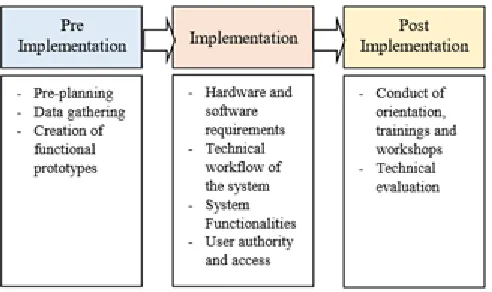
2.5 System Development and Implementation Process The development of the web-based system was based on the System Development Life Cycle (SDLC. It was divided into pre-implementation, implementation, and post implementation phases as presented in Fig. 3.
Fig. 3. System Development and Implementation Process
2.5.1.Pre Implementation Pre-planning phase
The pre-planning phase is where study goals, objectives, its scope and limitations, availability of resources, timeline of activities, and manpower requirements were initially set.
5178 Data gathering
Several data gathering techniques like meetings with the teachers, interview, review of documents, and use of the Internet were used in determining the problems encountered in the present system and in the conceptualization of the system’s process flow and design.
Creation of functional prototypes
The prototype intends to present the process flow of the system, the design, and reports the system generate. As part of data gathering, a functional prototype was created and presented to teachers. Identifying additional requirements, specifications, and functionalities of the system were collected. Likewise, suggestions and recommendations were recorded and accepted for further improvement of the system.
2.5.2 Implementation
The implementation phase covers the system development and the system testing. The development of the system involves the identification of hardware and software requirements, construction of databases, user and system interfaces which were based from the functional prototype created. System testing was conducted to ensure system is working properly and works correctly.
Hardware and Software Requirements
For the system development requirements, Apache web server; PHP version 5.3.2; MySQL version 5.0.25; and Dreamweaver were used. For the implementation, at least Windows XP; Anti-virus software; and Microsoft Excel must be installed. The hardware requirements includes: Computer Set, Printer, 1 TB external hard disk, DVD, and flash drive.
Technical Workflow of the Web-based System
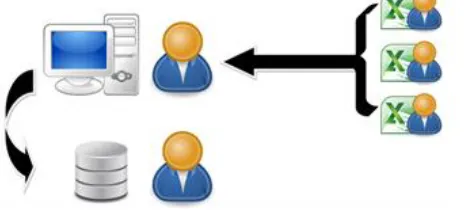
In the actual utilization of the web-based system as shown in Fig. 4, teachers encode the pupils’ grade into a spreadsheet application, producing the e-file for submission to the designated system administrator. The system administrator uploads the e-file into the system. The system will verify the file imported and store the data into the database server ( e-repository). The system generates reports including the FORM 137-E from the data stored in the database.
Fig. 4. Technical Workflow of the Web-based Pupils’ FORM 137-E
System Functionalities
The functionalities of the system include: searching records; generating FORM 137-E and other reports; assigning/classifying class sections; adding, editing, deleting,
and viewing of teachers, pupils and class list records; and storing, retrieving and archiving of FORM 137-E records. The summary of the features and functionalities of the system are the following:
Log-in form. For authentication to allow authorized users to login the system
System home page. Access to main page/main menu
Main menu. The “Select a Task” menu has four (4) sub menus: Pupils’ records, Teachers’ records, Class lists, and Update account
1.Pupils’ Records Form. The user can view the list of all pupils enrolled for a particular School Year. A search box is provided for searching of pupil’s record. Adding new record, viewing, editing, deleting and saving of records are also included. The Add/Edit Pupil Record Form is where user may input/edit pupil’s basic information creating the pupils’ masterfile.
2.Teachers’ Records Form. The user can view the list of all teachers. A search box is provided for searching of teacher’s record. Adding new record, viewing, editing, deleting, and saving of records are some functionalities. The Add/Edit Teacher Record Form is where user may input/edit basic information of the teacher creating the teachers’ masterfile.
3.Class Lists Form. The user can view the list of classes created and available. A search box is provided for searching of a class. Adding, viewing, deleting, and saving records are some functionalities. The Add/Edit Class Form is where user may input/edit basic information of a class creating the class masterfile.
3.1. Class Details Form. The user can view all the list of pupils enrolled in a particular class. Details of the class such as the description of the class, grade level, section, school year, and adviser of the class are available.
3.2. Select Student for a Class Form. The user may select and assign pupils’ record to a certain class by choosing the Select link. A search box is provided for searching of pupil’s record.
4.Update User Account Form. In this form, user can update default username and password.
Import Records Main Menu Form. A unique feature of preparing the e-reports using pre-designed templates in spreadsheet and uploading/importing the e-records in the system simplify the process of using the system. The system has five modules: new students; faculty records; class lists; students per class; and students per class.
1. Upload Students’ Record Form. Import records of the pupils. The Browse Pupils’ Record form is used to search file to be imported in the system and the Save button is used to save records into the database.
5179 Save button is used to save records into the
database.
3. Upload Classes Form. Import the classes (grade level, section, school year, and name of adviser) created. The Browse Classes Form is a dialog box for searching file to be imported.
4. Upload Students per Class Form. Select the class where the file will be imported then click the Browse Button. The Browse Pupils per Class Form is a dialog box for searching the file to be imported into the system.
5. Upload Grade Form. Select the Class where the file will be imported; start by clicking the browse button. Records are now ready to be imported into the system; to save the record into the database, click the Save Button.
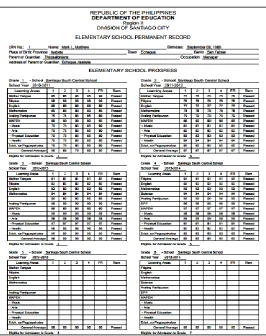
Pupils’ FORM 137-E. Sample report generated by the system.
User’s Authority and Access
For the teacher, a computer or laptop and an account are required. A user name and password is provided by the system administrator. The system administrator accesses the system on the computer where the system is installed with an Administrator account.
Resource Requirements
Prior to the deployment of the system, the following resource requirements (hardware, software, and manpower) were identified, prepared, and organized. A dedicated computer, a printer, external hard drive for backup, and UPS were set-up. Installation of an anti-virus software is recommended to protect the records stored in the system.
For the manpower requirements, the school’s ICT coordinator acts as the technical support. He is responsible for maintaining the system, including but not limited to monitoring users’ registration, class registration and maintaining system security; periodically reviews system content accuracy, currency and appropriateness; and periodically conducts data back-up. The school’s record officer serves as assistant technical support. He facilitates uploading of teachers’ masterlist, pupils’ masterlist, class list, and pupils’ grade; and prints copy of the FORM 137-E. The school staff serves as data encoder and data verifier. He assists teachers in the verification process of inputted grades. The teacher prepares e-record like pupils’ master list and pupil’s grades.
2.5.3 Post Implementation
In the post implementation, a conversion plan was prepared, orientation and training to end-users, provision of user’s manual; installation of database, anti-virus software, and back-up plans were conducted. Also, conversion of the old system database to the new system adopting parallel conversion was put in place. More, technical evaluations were conducted to assess the technical acceptability and usability of the system.
Conduct of orientation, trainings, and workshops
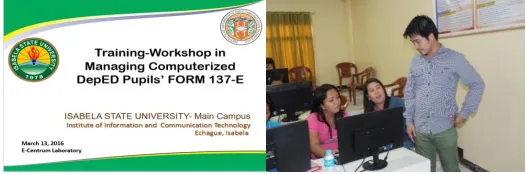
An orientation, training and workshop on how to use the system was conducted to 310 teachers of SSCS as shown in Fig. 5. The end-result of the workshop was the uploading/importing of available e-reports (class masterlist, pupils’ grade per grading period, list of teachers, list of classes) prepared by the teachers right after the workshop proper.
Fig. 5. During the system orientation and workshop in using spreadsheet application to organize the submission of e-reports.
ICT coordinators were trained through orientation, individual coaching, discussion, facilitation, and technical assistance. The end-goal was to provide technical know-how and hands-on training hands-on the implementatihands-on, management and maintenance of the system. The orientation allows them to determine their roles and duties as technical support.. The hands-on component allowed them to master the workflow of the system. Others like resource requirements, (computer, external hard drive, flash drive, UPS and printer) conversion plan, back-up plans and security plans were discussed and put in place.
Fig. 6. During the training workshop in managing the system with the ICT coordinators
Technical Evaluation
The practical acceptability evaluation of the system as to “technical support and update process” was intended for the designated technical support assigned to manage the system. The instrument was adopted from the work of Elissavet and Economides [9] using the Likert scale, 5 being the highest which means “Strongly Agree”, and 1 being the lowest which means “Strongly Disagree”. In the same manner, the acceptability evaluation by teachers assessing the acquired learning process acceptability particularly on the usability aspect of the system was adopted from the work of Ellisavet and Economides [9]. The Likert scale was used, 5 being the highest which means “Very Good” and 1 the lowest means “Very Poor”.
3
R
ESULTS ANDD
ISCUSSION5180 The Web-based Pupils’ FORM 137-E was conceptualized
based on the process flow of the current system procedures, requirements, and functionalities. For instance, the FORM 137-E as report is the same as the actual report used and submitted by the teachers. In order to maintain the reliability, integrity, and accuracy of the e-records stored in the system, a verification process is performed after uploading the data. Verification is performed by counter checking the printed copy of FORM137-E against the class record/grading report of the teacher. Some system screenshots below describes the system. Fig. 7 is the Main/home page of the Web-based Pupils’ FORM137-E.
Fig. 7. System Home Page
Fig. 8 is the Add/Edit Pupil Record form. In this form, users edit pupil information creating the pupils’ masterlist. Different fields like ID number, name (lastname, firstname, and middle name), date of birth, place of birth, parents/guardian name, occupation, address and curriculum need to be supplied.
Fig. 8.Add/edit pupil record
Fig. 9 is the Import Records Main Menu Form, an alternate feature of preparing the e-reports using pre-designed templates in spreadsheet and uploading/importing the e-records into the system to simplify the whole process. The system has five modules namely:
[1] Upload New Students,
[2] Upload Faculty Records, a module to upload new record of teachers
[3] Upload Class Lists, a module to upload newly created classes (which include grade level and section and name of adviser)
[4] Upload Students per Class, a module to upload pupils’ record per class, and
[5] Upload Grade per Class, a module to upload the grades of the pupils per class.
Fig. 9.Import records menu form
The Fig. 10 is a sample report generated by the system.
Fig. 10.Sample FORM137-E generated by the system
3.2 Acceptability Evaluation of the System as to “Technical Support and Update Process”
The practical acceptability of the system relative to “technical support and update process” was evaluated after a training intended for the designated technical support. The results of the evaluation garnered a grand mean of 4.68, “Strongly Agree”, which shows that overall the developed system was able to comply the technical requirements and processes involved in preparing FORM 137-E. This supports the roadmap of DepED in attaining their goal of using ICT to create new knowledge and products by means of establishing infrastructure and application [5]. Table 2 shows the acceptability evaluation results as to the technical support and update process.
TABLE 2
5181 Update Process
Description Weighted
Mean
Qualitative Interpretation 1 The system* has durability over
time.
4.20 Strongly Agree
2 The system* can be updated. 5.00 Strongly Agree 3 Technical requirements were
met.
5.00 Strongly Agree
4 The system* can be used in different platforms.
4.00 Strongly Agree
5 Technical requirements for software and hardware needed are documented.
5.00 Strongly Agree
6 System installation and use guideline are available.
5.00 Strongly Agree
7 Average users can easily follow the updating, modifying and adding procedures.
4.00 Strongly Agree
8 The system* provides printing capabilities.
5.00 Strongly Agree
9 The system* allows to keep/save every step of the activities.
4.60 Strongly Agree
10 Overall, the system* is acceptable for implementation.
5.00 Strongly Agree
Grand Mean 4.68 Strongly Agree *system – refers to Web-based FORM 137-E
3.3 Acceptability Evaluation of the System in Terms of Usability as Perceived by Teachers
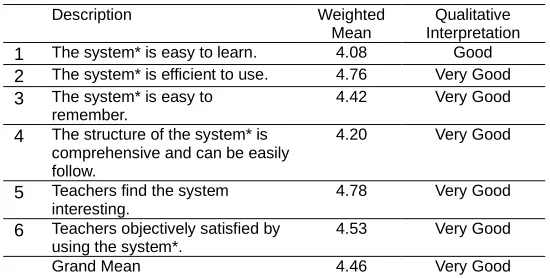
After the conduct of teachers’ orientation and training-workshop, acceptability evaluation was conducted to assess the acquired learning process on the usability aspect of the system. The result of the evaluation from the 80% of teachers gained a grand mean of 4.46 which implies that the system passed the set usability criteria. Teachers found the system interesting while ease in learning the system got the lowest rating. This indicates that non-IT personnel would require longer time mastering the work flow of a system. Table 3 shows the results of evaluation.
TABLE 3
Evaluation on the Acceptability Evaluation on the Learning Process Particularly the Usability of the System
Description Weighted
Mean
Qualitative Interpretation 1 The system* is easy to learn. 4.08 Good 2 The system* is efficient to use. 4.76 Very Good 3 The system* is easy to
remember.
4.42 Very Good
4 The structure of the system* is comprehensive and can be easily follow.
4.20 Very Good
5 Teachers find the system interesting.
4.78 Very Good
6 Teachers objectively satisfied by using the system*.
4.53 Very Good
Grand Mean 4.46 Very Good
*system – refers to Web-based FORM 137-E
4
CONCLUSION
The Web-based DepED FORM 137-E was created following the SDLC software process model, present system workflow, and technical workflow of the developed system as its frameworks. The DepED ICT4E Strategic Plan has also been instrumental in this study. The results of the evaluation on the technical and support process supports the roadmap of the
DepED (DepED ICT4E, 2008) in attaining their goal of using ICT to create new knowledge and products by means of establishing infrastructure and application. The results of the evaluation on acceptability reveal that non-IT personnel would need longer time to master the work flow of the system. This can be addressed by regular use of computers as a tool in teaching and performing other administrative related tasks. Overall, the system is highly appreciated and is sustainable as being implemented to the cooperating schools and to the Department of Education as a whole.
5
RECOMMENDATION
A planned enhancement to the system is the inclusion of secondary schools’ FORM 137-E and the development of a “Proposed Consolidated Grade Reporting System” which will incorporate the preparation and production of the two main records of pupils, the FORM 138 report card and the FORM 137-E permanent report are highly recommended.
ACKNOWLEDGEMENT
The author acknowledge the active participation of the Department of Education Schools Division of Santiago City for approving and allowing the conduct the study. The eleven (11) public elementary schools of the Division who willingly and actively participated in the implementation phase and to the Santiago South Central School, as the pilot school prior to implementation to other schools. To the City Government Unit of Santiago for providing financial support in this kind of endeavor and to the Isabela State University for supporting the conduct of this study.
REFERENCES
[1] R. Mugyenyi, “Analysing Information Systems Security in Higher Learning Institutions of Uganda”, International Journal of Scientific and Technology Research vol. 6, issue 10, October 2017. ISSN: 2277-8616
[2] Business Dictionary, “Information” http://www.business
dictionary.com/definition/information.html, 2016.
[3] Prentice-Hall, Management Information Systems, twelfth
edition. 2012.
[4] D. T. Bourgeois, “Information Systems for Business and Beyond”, https://bus206.pressbooks.com/chapter/
chapter-1/Evaluation of Information Systems Security
Awareness in Higher Education: An Empirical Study of Kuwait University, 2014.
[5] Department of Education, “Five-Year Information and
Communication Technology for Education Strategic Plan (DepED ICT4E Strategic Plan)” http://planipolis.iiep. unesco.org/upload/Philippines/Philippines_ICT4E_Strategic_ Plan_summary.pdf, 2016.
[6] Professional Learning Online Community of Teachers and for
Teachers, “Guidelines on the Request and Transfer of
Learner’sSchoolRecords”,https://www.teacherph.com/guideli
nes-request-transfer-learners-school-records/, 2019.
[7] Department of Education, “Guidelines on the Implementation
of the DepED Computerization Program”,
DepartmentOrder78s.2010.https://www.deped.gov.ph/2010/0
6/10/do-78-s-2010-guidelines-on-the-implementation-of-the-deped-computerization-program-dcp/, 2019.
[8] UNESCO ICT Competency Framework for Teachers Version
3”, UNESCO 2018. Published by the United Nations Educational, Scientific and Cultural Organization, 7, place de Fontenoy, 75352 Paris 07 SP, France. ISBN
5182
openlearncreate/pluginfile.php/306820/mod_resource/content /2/UNESCO%20ICT%20Competency%20Framework%20V3. pdf, 2019.
[9] G. Elissavet, and A.A. Economides, “An Evaluation
Instrument for Hypermedia Courseware”, Educational