ELECTRONIC DOCUMENT MANAGEMENT SYSTEMS
VUKMIROVIC Dragan, (SCG) – KOSTIC Miroljub, (SCG) – DJOKIC Dragan, -BUDIMIR Jelena, (SCG)
ABSTRACT
In this paper we studied the problems that appear in large business system and relate to document management. We proposed the ways for overcoming these problems by applying modern technologies and tools. As the final solution we presented the Electronic document management system (EDMS).
KEY WORDS
document management, protection, web portal, access rights INTRODUCTION
In the 21st century the right information in the right time is invaluable capital. The way an organization manages the documents determines whether the information is right and timely. The document management in large-size organizations is one the most interesting fields, which is fast developing and influences the business world, while at the same time it gradually becomes a burning issue just due to its complex nature. Organizations increasingly recognize the importance of this problem.
Worldwide the growth of information volume is exponential. The researches showed that once in three years the volume is double increased and only 0.5% of the total electronic information in the world are available online. On one side, the expansion is due to simple electronic-form documents make and inexpensive paper-print costs, and on the other side it is the result of growing requirements because of which organizations produce an ever increasing number of documents.
Together with the growth of documents volume, the problem of their storage and location is more notable. The basis of the electronic document management system is to provide efficient document searching and management in order that the employees may quickly and easily find and use information.
Electronic document management system provides the tools for the creation, storage, finding, management and distribution of electronic documents within an organization.
OUTSTANDING ISSUES FOR ELECTRONIC DOCUMENT MANAGEMENT SYSTEM
There is a series of obstacles that are encountered when implementing an efficient solution for document management. Some of them are the following:
1. Organization of documents storage
2. Time required for document finding, i.e. document availability 3. Joint operations over the same document and information update 4. Right to document access
1. Organization of document storage may be a great problem itself if the organizational structure, growth and development of companies are not observed and the employees are faced with versatile information sources that they cannot handle, i.e. where they cannot find required information. The means of document organization and storage determine efficient document management. Documents are to be organized and stored so to facilitate access to the required information. For this purpose metadata and hierarchical structures of directories are used. Unsustainable document organization causes difficulties in finding documents. The required data safety and the practice of the access right are significantly endangered.
2. Fast finding of the respective information is the prerequisite for every EDMS. The main methods of documents finding are viewing and searching. Viewing anticipates that user locates documents by moving through hierarchical directory structure, while searching means that user finds documents by specifying certain properties (name of author, size, time of creation, etc.). Some of the basic problems of finding required information are the following: excessive or insufficient searching results; a variety of information sources and various formats that make comparability impossible; documents found are out-of-date; long system response time.
3. The employees in companies may have problems in joint operations over the same document, in determining the right of access and in providing documents available to wider circle of employees. One of numerous temptations for EDMS is the requirement that information are updated. Employees within expert teams create the documents and they use information that are constantly changing. The information changes appear both in the sources used for document creation and in the document itself. A good quality EDMS observes all these changes. It is important to be advised when the document was updated, deleted, sent to another place or appears for the first time.
4. Few companies allow all their employees to have access to all company’s documents and data. Usually there exits a set of procedures that determine the access to information. Most companies feature security system with defined rights of access that allow access to authorized persons and deny access to the persons without respective rights. Security system ought to provide several ways of accessing document, for example to grant the right to read only or the right to create new documents. Security system also has to provide the tools required for the management of the rights of access at administrative level.
5. After successful EDMS implementation, the system over which EDMS was installed is gradually growing, with both the number of documents and the number of users increasing. The increased number of employees results in an increased number of documents and processes defining access rights, i.e. security. EDMS and the respective hardware limits face us with the situation that soon enough the response time becomes unacceptably long. Therefore it is of utmost importance to obtain a flexible system that can maintain quality in spite of the environment changes.
MAIN PREREQUISITES FOR EFFICIENT EDMS
Business systems feature large set of business activities that precede a document creation. In order to be sufficiently efficient, the processes and procedures of business activities have to be uniformly declared and prescribed at the whole business system level.
In this part of the paper we deal with the introduction of standards, rules, procedures and software tools in the subsystems for the creation, storage, location, verification and distribution of electronic documents. This is expected to improve quality in the areas of business communication, correspondence and electronic document processing.
To facilitate efficient and improved operations of the system, the prerequisites are to introduce standards and prescribed procedures.
Standard marking – naming of computers, directories and documents Computer naming
Computer naming is necessary to be standardized in order that the names may in a simple and single-meaning way indicate computer location, organizational properties and purpose. Through the system of identification and classification, to find the information stored at certain locations is made easier.
It is necessary to make uniform the names of all computers in business function, according to the following model
__ _____ _ _ __
1 2 3 4 5 Figure 1: Computer naming
Explanations:
1. City mark – indicates territory:
BG – Belgrade, SD – Smederevo, VA – Valjevo 2. Code of organization unit – indicates organizational property:
Code of organization units as registered 3. Computer kind marking – indicates purpose of usage:
S – server, W – workstation
4. Computer type mark – within computer kind group, indicates function: a) If computer kind is S (server):
C – communication, M – mail, D – development, B – business (file-archive server with documents connected to various business levels and various organization unities)
b) If computer kind is W (work station)
B – business LAN, T – technological LAN
5. Ordinal category number (1+2+3+4) indicates computer order number. Directory (folder) naming
It is necessary to introduce standardized folder and document naming in order the names should indicate the document storage place and document contents for easier and more efficient storage and searching.
At workstations, folders are to be named by task groups within the profile of certain user, in order to facilitate the access to document.
At file – archive servers, folders are to be named according to organization, function or combined principle and that is expected to facilitate the finding of document.
Document naming
Within defined folders, document naming is expected to be single meaning and to indicate the document contents. With respect to the nature of contents, names are specified along with document version index.
Standard software
Unified and uniform operating system and application software anticipate the existence of a standard platform that facilitate work with a large number of computers installed in a system, uniform training for users and more simple maintenance of stable computer operations.
Operating system
At business LAN workstations, the operating system of Microsoft workstation platform is to be installed, the version depending upon computer generation, i.e. hardware capacities. At business LAN servers, server operating system is to be installed, according to computer purpose and features.
Application software
The software installed at workstations mostly depends upon computer hardware. The compulsory software (that all computers should feature) includes: office package, web searching, mail client, anti-virus program, multimedia presentation program, multimedia communication program and data archive software.
Standard document as basis for business correspondence
By introducing standard document, we expect to have uniform layout, records format and also the contents of metadata (attributes) of each official document of a company. When standard document and the usage of electronic certificate (signature, certification) are introduced, it is possible to prescribe uniform procedures and rules for the business exchange of electronic documents.
Record format anticipates the defining of uniform regional adjustment, code distribution, font kind and size and margin size also.
Metadata (attributes) of standard document, i.e. file properties are the data that are required to be entered in order to facilitate document finding and updating (version maintenance): document title and number (if applicable), author, keywords (those best describing document contents), etc.
Electronic signature (certificate) is necessarily introduced for the purpose of electronic document certification. This is to ensure universal and simple document certification and step to electronic document exchange in the whole company.
File server
The purpose of file – archive servers is to provide the centralized storage and filing of the documents of certain organizational subsystem. They provide continual daily (24 h) and undisturbed (from any net point) access to certain document. By defining the access rights, determined are the roles in the document life cycle.
Here listed are the advantages of centralized document storage:
- Data availability, from any computer in the net, according to defined access rights - Easy data location, i.e. finding (e.g. by using advanced Indexing Services)
- Safe data access, according to in-advance defined user rights
- Simplified administration, i.e. delegating administrative rights to authorized person - Safe data storage (regular backup)
- Fast and efficient document exchange, from the lowest to the highest organizational levels
- Possible creation of dislocated project groups for joint project execution.
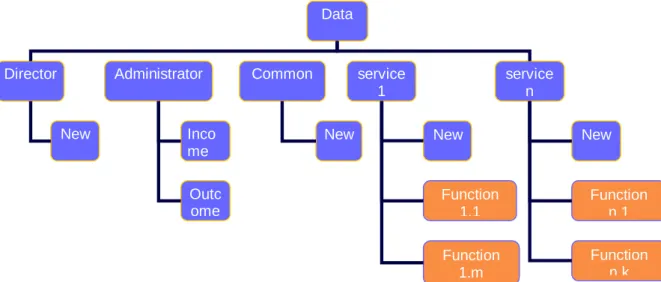
Figure 2: Folder organization at file server, example
3.5 Implementation tools
Since platform at any workstation and server is a version of Microsoft operating system and the basic software package in everyday use is Microsoft Office and Internet Explorer,
Microsoft line is logically further assumed in selecting the following program packages: - MS Exchange,
- Microsoft Office - MS Outlook,
- MS Internet Information Server,
- MS NetMeeting Microsoft Exchange Server
Microsoft Exchange Server is a groupware package (of software), primarily envisaged for teamwork and not only for e-mail messages exchange. It is a system for electronic messages management, pursuant to three-level architecture principles. It makes possible joint scheduling, mutual cooperation and presents a platform for the creation of modern business
Data
Director service
1
service n Common
Administrator
New Inco
me Outc ome
New New
Function 1.1
New
Function n.1 Function
1.m
Function n.k
applications needed for joint work and encompassed knowledge. This system features scalable, reliable and safe infrastructure that is easily managed and maintained. Scalable infrastructure means that the system was designed so that it may function in a way equally reliable, safe and efficient when serving a few users, as in the cases of several thousands or even hundreds of thousands of users. Therefore it presents a solution for companies of all sizes, from small-size companies to multinational enterprises (Exchange Enterprise Server). Apart from largely relying on the Internet technologies, the Exchange Server program makes very close integration with the operating system MS Windows Sever, i.e. with the service
Active directory, which provides centralized administration even in very complex and dispersed surroundings.
Exchange Server features
- Web Storage System of cooperation among users and applications - Simple access to information
- Leading integration with Office
- Anytime and anywhere communication - Access to information from anywhere - Instant message exchange
- Joint operations by data and image exchange through conferencing system (Microsoft Exchange Conferencing Server required)
Microsoft Outlook
Microsoft Outlook is the system for message mailing, time and business information organization that combined with Exchange Server in business surroundings can facilitate meeting scheduling, tasks and contacts plans and makes message handling easier. The maximum output and full applicable value of all options available are gained exclusively through coupling and cooperation with MS Exchange Server. It is a composite part of MS Office software package.
Microsoft NetMeeting
Microsoft NetMeeting as a standard part of Windows operating system provides complete Internet interactive conferencing solution and communication with one or several participants that are logged in respective ILS servers. Rounded and simple usage places this program within the few top software packages for interactive communication. Its applicable values are specially noted in coupling with local ILS server and also offer a complete solution at the Intranet level.
Applicable values of implementation tools
- Increased operational efficiency
- Better operational organization and coordination
- Fast and efficient document exchange by vertical and horizontal hierarchical and organizational structure
- Creation of dispersed project teams for joint project execution - Time, resources and money saving
WEB PORTALS AS EDMS SOLUTION
Modern approach to the problems of document management, with a lot of information existing, anticipates the use of web portals. The advantages of web portals are that information are easily located, analyzed and organized, all in accordance with business demands and objectives. By categorizing the contents, the portals facilitate information location. Uniform customer interface is applied at the same time both for information presentation and interaction with user. Their strength is confirmed by the capacity to organize and present a large volume of mutually non-coherent information.
The key technologies that make portal within EDMS solution are WEBDAV and indexing service.
WebDAV technology
WebDAV technology is mostly considered an evolutionary descendant of the File Server
conception. Apart from the basic function of data storing, it provides simple positioning and teamwork over common documents (collaboration), contents searching according to various criteria and publishing through Web.
Web Distributed Authoring and Versioning (WebDAV) presents the extension of the
HTTP 1.1 protocol and enables the clients to publish, lock, unlock and administrate the contents both on Intranet and Internet. It is integrated in Internet Information Server (IIS), starting from 5.0 version and offers the following to clients:
- Contents updating in WebDAV folders at server. The users with respective authorization may copy, send or delete documents in the same way as they do with the local disk documents.
- Documents properties are possibly modified. Namely user may read all properties of certain document at server and then, if access rights allow so, user may change e.g. the document author.
- Documents locking and unlocking so that several users can read document at the same time, but at a moment only one user can change the document contents. This secures that the changes that a user entered are not deleted intentionally or unintentionally by another user.
- Different document versions that appear due to joint operations over the same document are saved and available to users. This function provides for the chronological development of document and easy step back to the previous version, if this version is determined to have been better than the existing one. - Searching: document contents and properties in WebDAV directory.
WebDAV directory is accessible by any client that supports industrial standard WebDAV.
Microsoft implemented the support for this technology in the following produce:
- Windows clients (Windows 2000 and later): By adding URL address in My Network Places list, WebDAV directory is presented as any other local or net
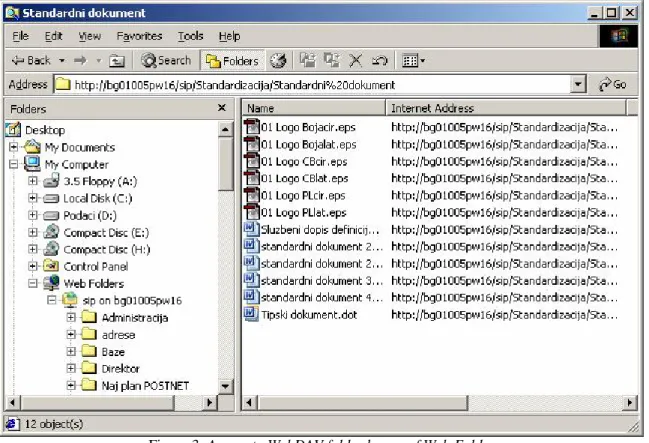
resource. Upon the connections were made, you can, copy, delete, create documents, change their properties, all in accordance with the gained rights. Figure 3 illustrates an example of access to a folder at archive server.
Figure 3: Access to WebDAV folder by use of Web Folder
- Internet Explorer (versions 5.0 and 6.0): By opening location in Web folder
mode, target directory is used as in the case of access of Windows clients (Figure 4).
Figure 4: Access to WebDAV folder by use of Internet Explorer
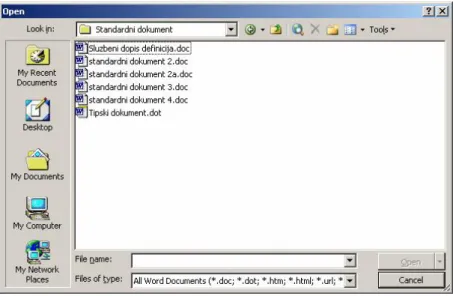
- Microsoft Office products (Office 2000, Office XP and Office 2003): provide for possible document creation, storage or change directly in WebDAV directory, from any Office application (Figure 5).
Figure 5: Access to WebDAV folder by use of MS Office
Soon upon connecting to WebDAV directory, you can efficiently search directory contents or document properties. For example, it is possible to find all documents featuring the word ‘table’ that have been created by certain John Smith in the last six months. WebDAV security system is integrated in the existing security system of Windows operating system and therefore features all advantages of NTFS file system. Only the clients with the respective NTFS access rights may use the resources of WebDAV directory. In this way the data confidentiality is secured.
All the stated advantages make WebDAV an excellent EDMS basis. Indexing service
Starting from Windows 2000 version, Microsoft has introduced Indexing service as a standard service. This service extracts data from document group and organizes them in the way to be quickly and easily accessible. The data of the document contents are collected, as well as the parameters and properties relative to the document (so called document Properties), e.g. author or the time of last change.
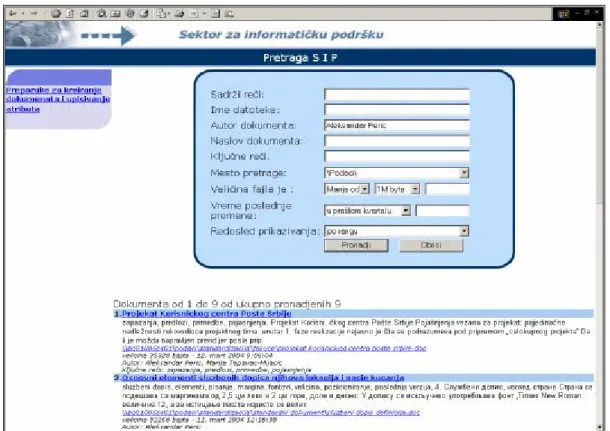
Figure 6: Application for searching archive server contents, example
The contents found are then indexed and classified according to the envisaged criteria. The criteria for classification are determined pursuant to the company’s business policy. The collected data are organized into units, i.e. catalogues. Once a catalogue is created it is possibly searched by key words, phrases or properties of documents. For example, it is possible to have the list of all documents featuring the phrase ‘mailing costs payment’ that created certain John Smith.
For contents indexing, Indexing service applies filters that are specially created for each document type. Initially it is possible to index: all documents created in MS Office package, electronic mail, HTML, text files and all documents for which the respective filter is provided (e.g. Adobe PDF filter).
User can search all catalogues by the use of Web applications created for this purpose specially. An example of this application is the searching (of the contents) of the archive server at the PTT - IT Department, within SIP portal (figure 6).
Business logic
The frame of a portal at Microsoft platform makes Internet Information server, i.e. production web server. Its function is to present data pursuant to user requirements and in accordance with the implemented business logic. Here we store complete business logic that is necessary for data processing, documents handling, etc. The required data are obtained from various sources, such as corporation databases (Oracle, MS SQL) or documents stored at archive servers.
Modern portals are designed modularly. The most frequently used modules in EDMS are: tasks distribution and monitoring, reporting, contents searching and special purpose modules.
Significant are the special purpose modules that are designed for dynamic presentation of data interesting to company’s business management.
CONCLUSION
In the 21st century, the right information obtained in the right time is a capital of precious value.
The introduction of electronic document management system provides for efficient knowledge management and the access to required information for employees in companies. The prerequisites of EDMS introduction are the following:
- Strategy in favor of applying Microsoft company solutions;
- Provided computer and communication equipment, with adequate hardware performance;
- Provided licensed software;
- Adequate professional, i.e. staff structure; - Permanent education of employees;
- Cooperation with reference organizations specialized in the area; also experience exchange with the companies that have already implemented these or similar solutions.
EDMS introduction anticipates the following operations:
- To provide approval, support and initiative by company’s management;
- To appoint the team that is internally in charge of the project execution, conduction and implementation and servicing;
- Phase introduction of system modules;
- Strict commitment to and implementation of the envisaged procedures and standards at all computers in the Intranet;
- Permanent education for all computer users in the company
By implementing and developing Electronic document management system through own staff recruitment, any company can increase the capital, both in the sense of knowledge and information and in the sense of less wasting for the purchase of turnkey solutions from other software companies.
LITERATURE
1. AIIM International Europe - User Access and Information Protection CONTACT ADDRESS
Dragan Vukmirovic, Phd, [email protected], Statistical Office of The Republic of Serbia, Address: Milana Rakica 5, 11000 Belgrade, Serbia and Montenegro