SAP
®PART I Basic Principles of Risk Management and IT Security ... 31
1 Risk and Control Management ... 33
2 Enterprise Risk Management Strategy ... 49
3 Requirements ... 79
4 Security Standards ... 101
5 IT Security ... 127
PART II Security in SAP NetWeaver and Application Security ... 153
6 Enterprise Risk Management (ERM) Navigation Control Map ... 155
7 Web Services, Enterprise Services, and Service-Oriented Architectures ... 175
8 GRC Solutions in SAP Business Objects ... 197
9 SAP NetWeaver Application Server ... 257
10 SAP NetWeaver Business Warehouse ... 309
11 BI Solutions in SAP Business Objects ... 325
12 SAP NetWeaver Process Integration ... 347
13 SAP Partner Connectivity Kit ... 383
14 Classic SAP Middleware ... 391
15 SAP NetWeaver Master Data Management ... 423
16 SAP NetWeaver Portal ... 439
17 SAP NetWeaver Mobile ... 505
18 SAP Auto-ID Infrastructure ... 527
19 SAP Solution Manager ... 537
20 Authorizations in SAP ERP ... 555
21 SAP ERP Human Capital Management and Data Protection ... 599
22 SAP Strategic Enterprise Management ... 619
23 SAP Customer Relationship Management ... 625
24 SAP Supply Chain Management ... 639
25 SAP Supplier Relationship Management ... 647
26 Industry-Specific SAP Solution Portfolios ... 667
27 Database Server ... 677
Preface by Wolfgang Lassmann ... 19
Preface by Monika Egle ... 21
Preface by Jose Estrada ... 23
Introduction ... 25
PART I Basic Principles of Risk Management and IT Security 1 Risk and Control Management ... 33
1.1 Security Objectives ... 34
1.2 Company Assets ... 36
1.2.1 Types of Company Assets ... 38
1.2.2 Classification of Company Assets ... 39
1.3 Risks ... 40 1.3.1 Types of Risks ... 41 1.3.2 Classification of Risks ... 44 1.4 Controls ... 45 1.4.1 Types of Controls ... 45 1.4.2 Classification of Controls ... 46
2 Enterprise Risk Management Strategy ... 49
2.1 Status Quo ... 51 2.2 Components ... 52 2.2.1 General Framework ... 56 2.2.2 Strategy ... 57 2.2.3 Methods ... 58 2.2.4 Best Practices ... 59 2.2.5 Documentation ... 59
2.3 Best Practices of an SAP Security Strategy ... 60
2.3.1 Procedure ... 60
2.3.2 Principle of Information Ownership ... 68
3 Requirements ... 79
3.1 Legal Requirements ... 79
3.1.1 Sarbanes-Oxley Act (SOX) ... 80
3.1.2 SOX Implementation in Japan ... 89
3.1.3 Principles for IT-Supported Accounting Systems ... 90
3.1.4 International Financial Reporting Standards ... 92
3.2 Industry-Specific Requirements ... 93
3.2.1 Food and Pharmaceutical Industry and Biomedical Engineering ... 93
3.2.2 Finance and Banking Industry — Basel (I, II, III) ... 94
3.2.3 Chemical Substances and Environmental Protection ... 98
3.3 Internal Requirements ... 99
4 Security Standards ... 101
4.1 International Security Standards ... 102
4.1.1 ISO/IEC 27002:2005 ... 102
4.1.2 CobiT ... 107
4.1.3 ITIL ... 110
4.1.4 COSO ... 112
4.2 Country-Specific Security Standards ... 116
4.2.1 NIST Special Publication 800-12 ... 117
4.2.2 IT Baseline Protection Manual ... 120
4.2.3 PIPEDA ... 122
5 IT Security ... 127
5.1 Cryptography ... 127
5.1.1 Symmetric Encryption Procedure ... 128
5.1.2 Asymmetric Encryption Procedure ... 129
5.1.3 Elliptic Curve Cryptography ... 130
5.1.4 Hybrid Encryption Procedure ... 131
5.1.5 SSL Encryption ... 133
5.1.6 Hash Procedures ... 134
5.1.7 Digital Signature ... 135
5.2 Public Key Infrastructure ... 137
5.3 Authentication Procedures ... 140
5.3.1 User Name and Password ... 140
5.3.4 Secure Token ... 142
5.3.5 Digital Certificate ... 143
5.3.6 Biometric Procedures ... 143
5.4 Basic Principles of Networks and Security Aspects ... 144
5.4.1 OSI Reference Model ... 144
5.4.2 Overview of Firewall Technologies ... 150
PART II Security in SAP NetWeaver and Application Security 6 Enterprise Risk Management (ERM) Navigation Control Map ... 155
6.1 SAP Applications ... 163
6.2 SAP NetWeaver Components ... 165
6.3 Security Technologies ... 167
6.3.1 Authorizations, Risk and Change Management, and Auditing ... 168
6.3.2 Identity Management ... 169
6.3.3 Secure Authentication and SSO ... 171
6.3.4 Technical Security ... 172
6.4 Influencing Factors ... 173
7 Web Services, Enterprise Services, and Service-Oriented Architectures ... 175
7.1 Introduction and Technical Principles ... 177
7.2 Security Criteria for Web Services ... 181
7.2.1 Security and Risk Management for Service-Oriented Architectures ... 186
7.2.2 SAP Enterprise Services ... 187
7.2.3 Security Guidelines for SAP Enterprise Services ... 190
7.3 Service-Oriented Architectures and Governance ... 193
8 GRC Solutions in SAP Business Objects ... 197
8.1 Introduction and Functions ... 197
8.1.1 Goals of the GRC Solutions in SAP Business Objects ... 198
8.1.2 Methods of the GRC Solutions in SAP Business Objects ... 199 8.1.3 Planning the Deployment of GRC Solutions in
8.1.4 Overview of the GRC Solutions in SAP Business Objects ... 201
8.2 SAP Business Objects RM ... 205
8.2.1 Main Components ... 205
8.2.2 Phases ... 206
8.2.3 Responsibilities ... 212
8.2.4 Reporting ... 214
8.3 SAP Business Objects Access Control ... 214
8.3.1 General Requirements on the SAP Authorization System ... 214
8.3.2 Main Components ... 221
8.4 SAP Business Objects Process Control ... 229
8.4.1 My Home ... 232 8.4.2 Compliance Structure ... 233 8.4.3 Evaluation Setup ... 234 8.4.4 Evaluation Results ... 234 8.4.5 Certification ... 235 8.4.6 Report Center ... 236 8.4.7 User Access ... 238
8.5 SAP Business Objects Global Trade Services (GTS) ... 238
8.5.1 Compliance Management ... 241
8.5.2 Customs Management ... 243
8.5.3 Risk Management ... 245
8.5.4 Electronic Compliance Reporting ... 247
8.5.5 System Administration ... 247
8.6 SAP Environment, Health, and Safety (EHS) Management ... 248
8.6.1 Overview ... 248
8.6.2 Chemical Safety ... 250
8.6.3 Environment, Health, and Safety ... 252
8.6.4 Compliance with Product-Related Environmental Specifications ... 252
8.6.5 Compliance and Emission Management ... 253
8.7 SAP Business Objects Sustainability Performance Management .... 255
9 SAP NetWeaver Application Server ... 257
9.1 Introduction and Functions ... 257
9.2 Risks and Controls ... 260
9.3 Application Security ... 269
9.3.1 Technical Authorization Concept for Administrators ... 269
9.3.2 Authorization Concept for Java Applications ... 277
9.4.1 Introducing an SSO Authentication Mechanism ... 287
9.4.2 Connecting the SAP NetWeaver AS to a Central LDAP Directory ... 289
9.4.3 Changing the Default Passwords for Default Users ... 291
9.4.4 Configuring Security on the SAP Gateway ... 291
9.4.5 Restricting Operating System Access ... 293
9.4.6 Configuring Important Security System Parameters ... 294
9.4.7 Configuring Encrypted Communication Connections (SSL and SNC) ... 296
9.4.8 Restricting Superfluous Internet Services ... 301
9.4.9 Secure Network Architecture for Using the SAP NetWeaver AS with the Internet ... 303
9.4.10 Introducing an Application-Level Gateway to Make Internet Applications Secure ... 304
9.4.11 Introducing Hardening Measures on the Operating System Level ... 304
9.4.12 Introducing a Quality Assurance Process for Software Development ... 305
9.4.13 Security and Authorization Checks in Custom ABAP and Java Program Code ... 307
10 SAP NetWeaver Business Warehouse ... 309
10.1 Introduction and Functions ... 309
10.2 Risks and Controls ... 310
10.3 Application Security ... 313
10.3.1 Authorizations ... 314
10.3.2 Analysis Authorizations ... 318
10.3.3 Other Concepts ... 319
10.4 Technical Security ... 323
11 BI Solutions in SAP Business Objects ... 325
11.1 Introduction and Functions ... 326
11.2 Risks and Controls ... 327
11.3 Application Security ... 332
11.3.1 Authorization Concept for SAP Business Objects ... 332
11.3.2 Application Examples for Authorization Concepts ... 339
11.3.4 Configuring Password Rules ... 342
11.3.5 Application Authorizations ... 343
11.4 Technical Security ... 344
11.4.1 External Authentication and SSO ... 344
11.4.2 Using the Audit Function ... 345
11.4.3 Network Communication via SSL and CORBA Services ... 346
12 SAP NetWeaver Process Integration ... 347
12.1 Introduction and Functions ... 348
12.2 Risks and Controls ... 350
12.3 Application Security ... 357
12.3.1 Authorizations for Enterprise Services Builder ... 357
12.3.2 Passwords and Authorizations for Technical Service Users ... 359
12.3.3 Authorizations for Administrative Access to SAP NetWeaver PI ... 360
12.3.4 Password Rules for Administrators ... 361
12.4 Technical Security ... 361
12.4.1 Definition of Technical Service Users for Communication Channels at Runtime ... 362
12.4.2 Setting Up Encryption for Communication Channels ... 363
12.4.3 Digital Signature for XML-Based Messages ... 371
12.4.4 Encryption of XML-Based Messages ... 376
12.4.5 Network-Side Security for Integration Scenarios ... 376
12.4.6 Audit of the Enterprise Services Builder ... 377
12.4.7 Securing the File Adapter at the Operating System Level ... 379
12.4.8 Encrypting PI Communication Channels and Web Services ... 380
12.4.9 Security for Web Services ... 380
13 SAP Partner Connectivity Kit ... 383
13.1 Introduction and Functions ... 383
13.2 Risks and Controls ... 384
13.3 Application Security ... 388
13.4 Technical Security ... 388
13.4.1 Separate Technical Service User for Every Connected Partner System ... 389
13.4.4 Network-Side Security for Integration Scenarios ... 389
13.4.5 Audit of the Message Exchange ... 389
13.4.6 Securing the File Adapter at the Operating System Level ... 390
14 Classic SAP Middleware ... 391
14.1 SAP Web Dispatcher ... 391
14.1.1 Introduction and Functions ... 392
14.1.2 Risks and Controls ... 392
14.1.3 Application Security ... 395
14.1.4 Technical Security ... 395
14.2 SAProuter ... 403
14.2.1 Introduction and Functions ... 403
14.2.2 Risks and Controls ... 404
14.2.3 Application Security ... 405
14.2.4 Technical Security ... 405
14.3 SAP Internet Transaction Server (ITS) ... 407
14.3.1 Introduction and Functions ... 408
14.3.2 Risks and Controls ... 410
14.3.3 Application Security ... 413
14.3.4 Technical Security ... 415
15 SAP NetWeaver Master Data Management ... 423
15.1 Introduction and Functions ... 423
15.2 Risks and Controls ... 424
15.3 Application Security ... 429
15.3.1 Identity Management and Authorizations ... 429
15.3.2 Revision Security ... 436
15.4 Technical Security ... 436
15.4.1 Communication Security ... 436
15.4.2 Important Additional Components ... 437
16 SAP NetWeaver Portal ... 439
16.1 Introduction and Functions ... 439
16.1.1 Technical Architecture ... 441
16.3 Application Security ... 456
16.3.1 Structure and Design of Portal Roles ... 456
16.3.2 Authorizations for the UME ... 463
16.3.3 Portal Security Zones ... 464
16.3.4 Authentication Check for iView Access ... 470
16.3.5 Standard Portal Roles and Delegated User Administration ... 470
16.3.6 Synchronization of Portal Roles with ABAP Roles ... 473
16.3.7 Change Management Process for New Portal Content ... 480
16.4 Technical Security ... 481
16.4.1 Connecting SAP NetWeaver Portal to a Central LDAP Directory or SAP System ... 481
16.4.2 Implementation of an SSO Mechanism Based on a One-Factor Authentication ... 484
16.4.3 Implementation of an SSO Mechanism Based on an Integrated Authentication ... 487
16.4.4 Implementation of an SSO Mechanism Based on a Person-Related Certificates ... 489
16.4.5 Configuration for Anonymous Access ... 491
16.4.6 Secure Initial Configuration ... 492
16.4.7 Secure Network Architecture ... 493
16.4.8 Introducing an Application-Level Gateway to Make Portal Applications Secure ... 496
16.4.9 Configuration of Encrypted Communication Channels ... 500
16.4.10 Implementation of a Virus Scan for Avoiding a Virus Infection ... 502
17 SAP NetWeaver Mobile ... 505
17.1 Introduction and Functions ... 505
17.2 Risks and Controls ... 508
17.3 Application Security ... 515
17.3.1 Authorization Concept for Mobile Applications ... 515
17.3.2 Authorization Concept for Administration ... 518
17.3.3 Restricting the Authorizations of the RFC User to Back-End Applications ... 519
17.4 Technical Security ... 520
17.4.1 Setting Up Encrypted Communications Connections ... 520
17.4.2 Securing the Synchronization Communication ... 521
17.4.3 Deactivating Unnecessary Services on the SAP NetWeaver Mobile Server ... 523
17.4.5 Monitoring ... 524
17.4.6 Secure Program Code ... 525
18 SAP Auto-ID Infrastructure ... 527
18.1 Introduction and Functions ... 527
18.2 Risks and Controls ... 529
18.3 Application Security ... 533
18.3.1 Authorization Concept for SAP Auto-ID Infrastructure .... 533
18.3.2 Authorization Concept for Administration ... 533
18.3.3 Restricting the Authorizations of the RFC User to Back-End Applications ... 534
18.3.4 Authentication, Password Rules, and Security ... 534
18.4 Technical Security ... 535
18.4.1 Setting Up Encrypted Communication Connections ... 535
18.4.2 Deactivating Unnecessary Services on the Server ... 535
18.4.3 Secure Network Architecture ... 535
19 SAP Solution Manager ... 537
19.1 Introduction and Functions ... 537
19.2 Risks and Controls ... 540
19.3 Application Security ... 544
19.4 Technical Security ... 550
19.4.1 Security Measures for User Access ... 550
19.4.2 System Monitoring Function ... 551
19.4.3 RFC Communication Security ... 551
19.4.4 Data Communication Security ... 552
19.4.5 Important Components of SAP NetWeaver ... 553
20 Authorizations in SAP ERP ... 555
20.1 Introduction and Functions ... 555
20.2 Risks and Controls ... 556
20.3 Application Security ... 563
20.3.1 Authentication ... 563
20.3.2 Authorizations ... 563
20.3.3 Other Authorization Concepts ... 578
21 SAP ERP Human Capital Management and Data Protection ... 599
21.1 Introduction and Functions ... 599
21.1.1 Data Protection in Human Resources ... 599
21.1.2 Technical and Organizational Measures ... 600
21.2 Risks and Controls ... 602
21.3 Application Security ... 609
21.3.1 HR Master Data Authorizations ... 610
21.3.2 Applicant Authorizations ... 612
21.3.3 Personnel Planning Authorizations ... 613
21.3.4 Reporting Authorizations ... 613
21.3.5 Structural Authorizations ... 613
21.3.6 Authorizations for Personnel Development ... 614
21.3.7 Tolerance Periods for Authorizations ... 614
21.3.8 Authorizations for Inspection Procedures ... 614
21.3.9 Customized Authorization Checks ... 614
21.3.10 Indirect Role Assignment through the Organizational Structure ... 615
21.3.11 Additional Transactions Relevant to Internal Controls ... 615
21.4 Technical Security ... 617
22 SAP Strategic Enterprise Management ... 619
22.1 Introduction and Functions ... 619
22.2 Risks and Controls ... 620
22.3 Application Security ... 622
22.4 Technical Security ... 623
23 SAP Customer Relationship Management ... 625
23.1 Introduction and Functions ... 625
23.2 Risks and Controls ... 626
23.3 Application Security ... 628
23.3.1 Authorizations in SAP CRM ... 629
23.3.2 Authorizations for Portal Roles ... 635
23.4 Technical Security ... 636
23.4.1 Technical Protection of the Mobile Application ... 636
24.1 Introduction and Functions ... 639
24.2 Risks and Controls ... 640
24.3 Application Security ... 641
24.3.1 Authorizations for the Integrated Product and Process Engineering (iPPE) Workbench ... 642
24.3.2 Authorizations for Supply Chain Planning ... 642
24.3.3 Authorizations for SAP Event Management ... 643
24.4 Technical Security ... 644
25 SAP Supplier Relationship Management ... 647
25.1 Introduction and Functions ... 647
25.2 Risks and Controls ... 649
25.3 Application Security ... 651
25.3.1 Important Authorizations ... 651
25.3.2 Rules-Based Security Checks Using Business Partner Attributes ... 659
25.3.3 User Management ... 663
25.4 Technical Security ... 664
25.4.1 Security Environment Based on SAP NetWeaver ... 664
25.4.2 Security Environment for RFC Communication ... 665
26 Industry-Specific SAP Solution Portfolios ... 667
26.1 Introduction and Functions ... 668
26.2 Risks and Controls ... 668
26.3 Application Security ... 671
26.3.1 SAP MaxSecure Support ... 671
26.3.2 SAP Role Manager ... 672
26.4 Technical Security ... 675
27 Database Server ... 677
27.1 Introduction and Functions ... 677
27.2 Risks and Controls ... 678
27.3 Application Security ... 681
27.4.2 Removing Unnecessary Database Users ... 686
27.4.3 Limiting Database Access ... 686
27.4.4 Creation and Implementation of a Database Backup Concept ... 686
27.4.5 Filtering Database Queries ... 687
27.4.6 Creation and Implementation of an Upgrade Concept .... 688
28 User Interfaces ... 689
28.1 SAP GUI ... 689
28.1.1 Introduction and Functions ... 689
28.1.2 Risks and Controls ... 690
28.1.3 Application Security ... 693
28.1.4 Technical Security ... 698
28.2 Web Browser ... 701
28.2.1 Introduction and Functions ... 702
28.2.2 Risks and Controls ... 702
28.2.3 Application Security ... 704
28.2.4 Technical Security ... 704
28.3 Mobile Devices ... 706
28.3.1 Introduction and Functions ... 706
28.3.2 Risks and Controls ... 707
28.3.3 Application Security ... 712 28.3.4 Technical Security ... 712 Appendices ... 717 A Bibliography ... 717 B The Authors ... 719 Index ... 721
tions. Where data is exchanged, however, security aspects assume a critical role; these are explained in this chapter.
SAP NetWeaver Process Integration
12
With SAP NetWeaver PI, SAP provides an enhanced integration platform for pro cesses within distributed business applications. The objective is to integrate both SAP and nonSAP applications via a central platform using flexible web services or via interfaces. Thus, the number of required direct interfaces between individ ual applications can be reduced considerably. So SAP NetWeaver PI increasingly assumes the role of a powerful SAP middleware that not only enables integration using traditional interfaces but also lays the foundation for serviceoriented archi tectures (SOAs) (see Chapter 7, Web Services, Enterprise Services, and Service Oriented Architectures) and thus for process integration within and between com panies based on an Enterprise Service Bus (ESB).
SAP NetWeaver PI relies on existing standards like web services (Simple Object Access Protocol (SOAP)), Remote Function Call (RFC), File Transfer Protocol (FTP), and other available protocols. It can also use interfaces (called connectors in the PI context) to Enterprise Application Integration (EAI) standards like RosettaNet or the chemical integration standard, Chemistry Industry Data eXchange (CIDX). SAP NetWeaver PI is predestinated for deployment in serviceoriented architec tures: The current release, Release 7.1, contains the Enterprise Services Repository, which serves as a structured directory for enterprise services.
Because SAP NetWeaver PI can run on both the ABAP stack and the Java stack of SAP NetWeaver Application Server (AS) (AS ABAP usage type, AS Java usage type, JEE5 for SAP NetWeaver PI), the security of “traditional” PI functions from Release 3.0 (SAP Exchange Infrastructure (XI)) and security characteristics and risks of new functions must be considered.
Introduction and Functions
12.1
SAP NetWeaver PI supports three communication variants, two of which are con trolled directly by the PI architecture and its components:
Communication via the PI Integration Server E
E
The PI Integration Server controls the forwarding of a message or web service integration between sender and recipient or provider and consumer. The com munication partners are determined statically or dynamically using the map ping or routing functions of the integration server.
Communication using the PI Advanced Adapter Engine E
E
If communication is supposed to be performed via the PI Advanced Adapter Engine, sender, recipient, their connectors, and the communication protocol already need to be defined in the configuration phase. The mapping function of the Advanced Adapter Engine then only statically controls the exchange of mes sages between the predefined connectors of the communication partners, which increases performance.
Direct communication bypassing the PI Integration Server E
E
SAP NetWeaver PI also dynamically supports web service communication directly between the WS provider and the consumer without PI Integration Server or the Advanced Adapter Engine. This option is configured in the PI Integration Directory and allows for an increased message throughput.
To describe the preceding PI components, the following sections provide further information on the logical technical PI architecture. If SAP NetWeaver PI is used, three phases are supported: the design phase, the configuration phase, and the runtime phase (see Figure 12.1).
Design time E
E
During the design phase, the Enterprise Services Builder/Integration Builder is used to define, design, and store the integration components and web services in the Enterprise Services Repository or Services Registry. The Services Registry corresponds to Universal Description, Discovery and Integration (UDDI) Stan dard 3.0 and plays a central role in provisioning web services. The Integration Directory is used to model the ApplicationtoApplication (A2A) and Business toBusiness (B2B) communication processes.
Configuration time E
E
The configuration phase involves further configuration of the integration sce nario as defined in the Integration Directory. During this phase, communica tion partners, communication components, and communication channels are configured in communication profiles as defined in the Integration Directory. This includes controls, such as the mapping of senders/recipients, the routing
Integration Engine, and Advanced Adapter Engine, which support process inte gration for the runtime, are the essential Integration Server components.
SAP Application Third-Party Application Third-Party Middleware Component Marketplace/ Business Partner Integration Server
System Landscape Directory (SLD) Business Process Engine
Advanced Adapter Engine
Runtime Workbench/ SAP NetWeaver Administrator Enterprise Services Builder/
Integration Builder Integration Directory Integration Engine Enterprise Services Repository
Design Time Configuration Time
Implementation Phases in SAP NetWeaver PI
Figure 12.1
Runtime E
E
At runtime, the communication profiles and integration rules as defined in the Integration Directory are used for process integration by the Integration Server components (Business Process Engine, Integration Engine, and Advanced Adapter Engine). The Integration Engine is responsible for the control, process ing, and monitoring of web services, and the Advanced Adapter Engine pro vides numerous connectors for supporting the direct integration of communi cation between heterogeneous applications. This often requires a conversion of the communication protocols through the Advanced Adapter Engine. The Busi ness Process Engine implements the process integration at runtime, controls the business process flow, and supports the monitoring processes.
The System Landscape Directory (SLD) stores all metadata that describes the nec essary components, adapter versions, and so on. This data is read and updated at runtime, if necessary, by the other PI components, such as the Enterprise Services Repository, Integration Directory, and Integration Server.
From a security validation perspective, the following aspects are therefore particu larly essential:
A direct interaction of a user with SAP NetWeaver PI only takes place during E
E
the design and configuration time. Afterward, the processes run automatically in the runtime environment and must be monitored appropriately via monitor ing processes. The configuration data stored in the SLD, Enterprise Services Repository, and Integration Directory is only accessed by authenticated admin istration users during the design and configuration phase.
The security level to be achieved at runtime, particularly the security of E
E
exchanged messages by digital signature and encryption, is specified in the col laboration agreements. This is achieved by receiver agreements specifying that a message is to be encrypted and signed before it can be sent to the final recipi ent. In the same manner, the sender agreements can define that a signature of an inbound message needs to be validated before the message can be processed further. This holds true whether an application is a sender, or a recipient is always determined by the respective communication partner and not in SAP NetWeaver PI. An application sending a message to the PI system is therefore a sender.
SAP NetWeaver PI consists of numerous components exchanging information E
E
with each other. Mutual authentication is implemented via onefactor authen tications based on technical users. Process integration, on the basis of the enter prise service bus using web services, requires that security criteria like authen tication, authorization checks, data integrity, and data protection can be used for serviceoriented architectures. To meet these criteria and control objectives, the corresponding security concepts are available for web services.
Risks and Controls
12.2
SAP NetWeaver PI runs on the SAP NetWeaver AS and uses it at runtime. The two usage types, ABAP and Java, involve similar risks that can also be mastered with the same controls.
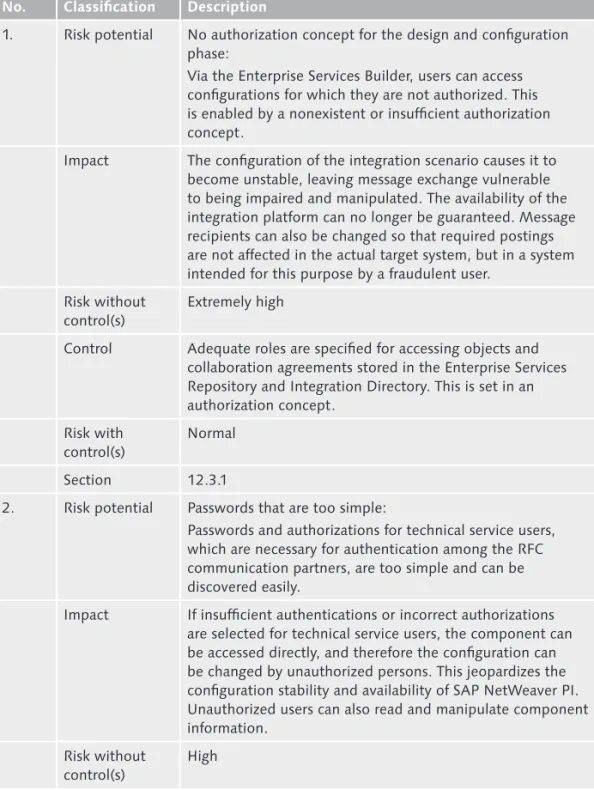
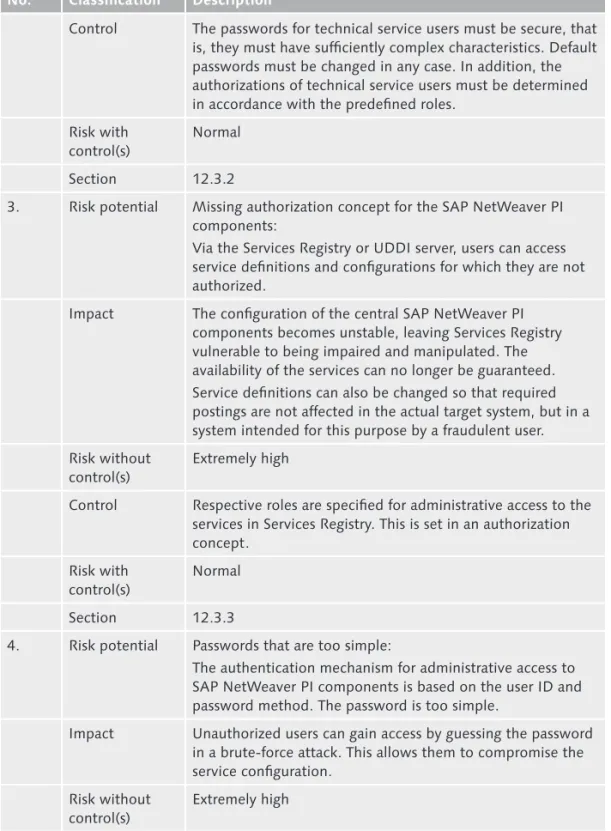
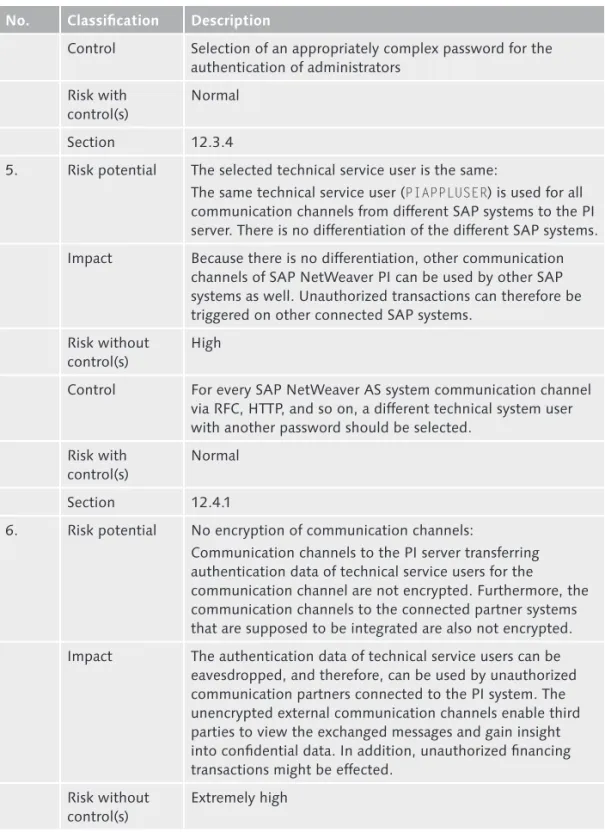
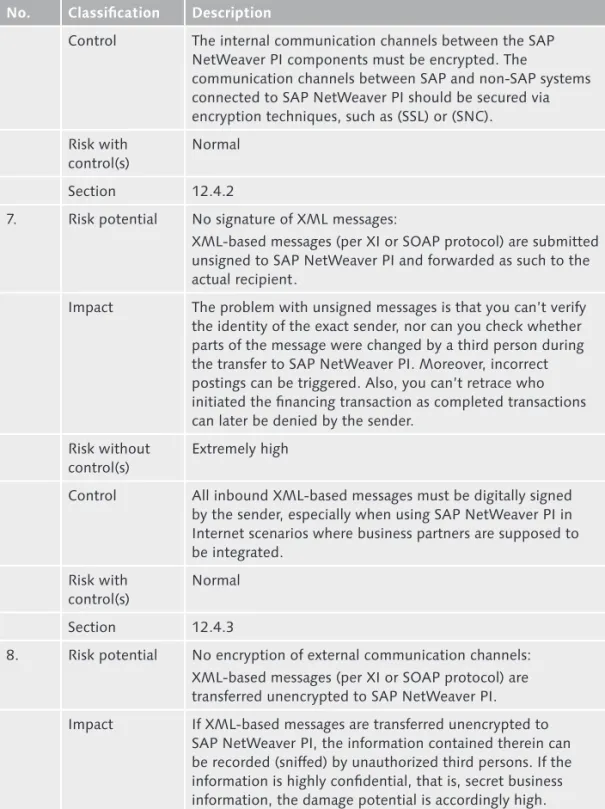
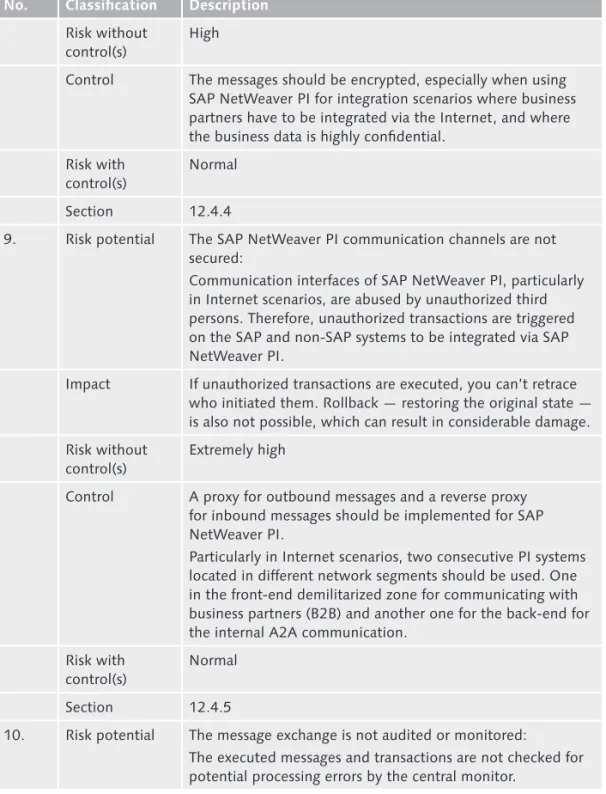
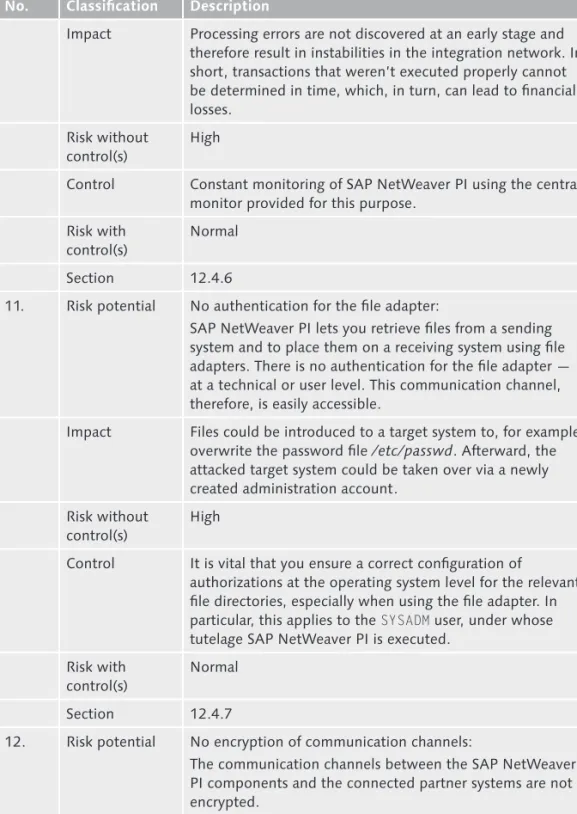
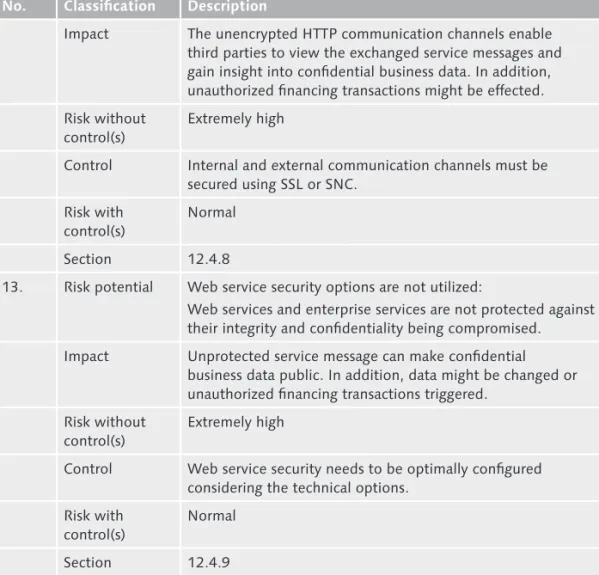
In this section, we use a simplified version of the risk analysis methodology described in Chapter 1, Risk and Control Management, to identify the main secu rity risks and the necessary controls for SAP NetWeaver PI (see Table 12.1). The controls are then discussed in more detail in the following sections and illustrated using examples.
No. Classification Description
1. Risk potential No authorization concept for the design and configuration phase:
Via the Enterprise Services Builder, users can access configurations for which they are not authorized. This is enabled by a nonexistent or insufficient authorization concept.
Impact The configuration of the integration scenario causes it to become unstable, leaving message exchange vulnerable to being impaired and manipulated. The availability of the integration platform can no longer be guaranteed. Message recipients can also be changed so that required postings are not affected in the actual target system, but in a system intended for this purpose by a fraudulent user.
Risk without control(s)
Extremely high
Control Adequate roles are specified for accessing objects and collaboration agreements stored in the Enterprise Services Repository and Integration Directory. This is set in an authorization concept.
Risk with control(s)
Normal
Section 12.3.1
2. Risk potential Passwords that are too simple:
Passwords and authorizations for technical service users, which are necessary for authentication among the RFC communication partners, are too simple and can be discovered easily.
Impact If insufficient authentications or incorrect authorizations are selected for technical service users, the component can be accessed directly, and therefore the configuration can be changed by unauthorized persons. This jeopardizes the configuration stability and availability of SAP NetWeaver PI. Unauthorized users can also read and manipulate component information.
Risk without control(s)
High
Risks and Controls for SAP NetWeaver PI
Table 12.1
No. Classification Description
Control The passwords for technical service users must be secure, that is, they must have sufficiently complex characteristics. Default passwords must be changed in any case. In addition, the authorizations of technical service users must be determined in accordance with the predefined roles.
Risk with control(s)
Normal
Section 12.3.2
3. Risk potential Missing authorization concept for the SAP NetWeaver PI components:
Via the Services Registry or UDDI server, users can access service definitions and configurations for which they are not authorized.
Impact The configuration of the central SAP NetWeaver PI components becomes unstable, leaving Services Registry vulnerable to being impaired and manipulated. The availability of the services can no longer be guaranteed. Service definitions can also be changed so that required postings are not affected in the actual target system, but in a system intended for this purpose by a fraudulent user. Risk without
control(s)
Extremely high
Control Respective roles are specified for administrative access to the services in Services Registry. This is set in an authorization concept.
Risk with control(s)
Normal
Section 12.3.3
4. Risk potential Passwords that are too simple:
The authentication mechanism for administrative access to SAP NetWeaver PI components is based on the user ID and password method. The password is too simple.
Impact Unauthorized users can gain access by guessing the password in a brute-force attack. This allows them to compromise the service configuration.
Risk without control(s)
Extremely high
No. Classification Description
Control Selection of an appropriately complex password for the authentication of administrators
Risk with control(s)
Normal
Section 12.3.4
5. Risk potential The selected technical service user is the same:
The same technical service user (PIAPPLUSER) is used for all communication channels from different SAP systems to the PI server. There is no differentiation of the different SAP systems. Impact Because there is no differentiation, other communication
channels of SAP NetWeaver PI can be used by other SAP systems as well. Unauthorized transactions can therefore be triggered on other connected SAP systems.
Risk without control(s)
High
Control For every SAP NetWeaver AS system communication channel via RFC, HTTP, and so on, a different technical system user with another password should be selected.
Risk with control(s)
Normal
Section 12.4.1
6. Risk potential No encryption of communication channels:
Communication channels to the PI server transferring authentication data of technical service users for the communication channel are not encrypted. Furthermore, the communication channels to the connected partner systems that are supposed to be integrated are also not encrypted. Impact The authentication data of technical service users can be
eavesdropped, and therefore, can be used by unauthorized communication partners connected to the PI system. The unencrypted external communication channels enable third parties to view the exchanged messages and gain insight into confidential data. In addition, unauthorized financing transactions might be effected.
Risk without control(s)
Extremely high
No. Classification Description
Control The internal communication channels between the SAP NetWeaver PI components must be encrypted. The
communication channels between SAP and non-SAP systems connected to SAP NetWeaver PI should be secured via encryption techniques, such as (SSL) or (SNC).
Risk with control(s)
Normal
Section 12.4.2
7. Risk potential No signature of XML messages:
XML-based messages (per XI or SOAP protocol) are submitted unsigned to SAP NetWeaver PI and forwarded as such to the actual recipient.
Impact The problem with unsigned messages is that you can’t verify the identity of the exact sender, nor can you check whether parts of the message were changed by a third person during the transfer to SAP NetWeaver PI. Moreover, incorrect postings can be triggered. Also, you can’t retrace who initiated the financing transaction as completed transactions can later be denied by the sender.
Risk without control(s)
Extremely high
Control All inbound XML-based messages must be digitally signed by the sender, especially when using SAP NetWeaver PI in Internet scenarios where business partners are supposed to be integrated.
Risk with control(s)
Normal
Section 12.4.3
8. Risk potential No encryption of external communication channels: XML-based messages (per XI or SOAP protocol) are transferred unencrypted to SAP NetWeaver PI. Impact If XML-based messages are transferred unencrypted to
SAP NetWeaver PI, the information contained therein can be recorded (sniffed) by unauthorized third persons. If the information is highly confidential, that is, secret business information, the damage potential is accordingly high.
No. Classification Description
Risk without control(s)
High
Control The messages should be encrypted, especially when using SAP NetWeaver PI for integration scenarios where business partners have to be integrated via the Internet, and where the business data is highly confidential.
Risk with control(s)
Normal
Section 12.4.4
9. Risk potential The SAP NetWeaver PI communication channels are not secured:
Communication interfaces of SAP NetWeaver PI, particularly in Internet scenarios, are abused by unauthorized third persons. Therefore, unauthorized transactions are triggered on the SAP and non-SAP systems to be integrated via SAP NetWeaver PI.
Impact If unauthorized transactions are executed, you can’t retrace who initiated them. Rollback — restoring the original state — is also not possible, which can result in considerable damage. Risk without
control(s)
Extremely high
Control A proxy for outbound messages and a reverse proxy for inbound messages should be implemented for SAP NetWeaver PI.
Particularly in Internet scenarios, two consecutive PI systems located in different network segments should be used. One in the front-end demilitarized zone for communicating with business partners (B2B) and another one for the back-end for the internal A2A communication.
Risk with control(s)
Normal
Section 12.4.5
10. Risk potential The message exchange is not audited or monitored:
The executed messages and transactions are not checked for potential processing errors by the central monitor.
No. Classification Description
Impact Processing errors are not discovered at an early stage and therefore result in instabilities in the integration network. In short, transactions that weren’t executed properly cannot be determined in time, which, in turn, can lead to financial losses.
Risk without control(s)
High
Control Constant monitoring of SAP NetWeaver PI using the central monitor provided for this purpose.
Risk with control(s)
Normal
Section 12.4.6
11. Risk potential No authentication for the file adapter:
SAP NetWeaver PI lets you retrieve files from a sending system and to place them on a receiving system using file adapters. There is no authentication for the file adapter — at a technical or user level. This communication channel, therefore, is easily accessible.
Impact Files could be introduced to a target system to, for example, overwrite the password file /etc/passwd. Afterward, the attacked target system could be taken over via a newly created administration account.
Risk without control(s)
High
Control It is vital that you ensure a correct configuration of
authorizations at the operating system level for the relevant file directories, especially when using the file adapter. In particular, this applies to the SYSADM user, under whose tutelage SAP NetWeaver PI is executed.
Risk with control(s)
Normal
Section 12.4.7
12. Risk potential No encryption of communication channels:
The communication channels between the SAP NetWeaver PI components and the connected partner systems are not encrypted.
No. Classification Description
Impact The unencrypted HTTP communication channels enable third parties to view the exchanged service messages and gain insight into confidential business data. In addition, unauthorized financing transactions might be effected. Risk without
control(s)
Extremely high
Control Internal and external communication channels must be secured using SSL or SNC.
Risk with control(s)
Normal
Section 12.4.8
13. Risk potential Web service security options are not utilized:
Web services and enterprise services are not protected against their integrity and confidentiality being compromised. Impact Unprotected service message can make confidential
business data public. In addition, data might be changed or unauthorized financing transactions triggered.
Risk without control(s)
Extremely high
Control Web service security needs to be optimally configured considering the technical options.
Risk with control(s)
Normal
Section 12.4.9
Table 12.1 Risks and Controls for SAP NetWeaver PI (Cont.)
Application Security
12.3
This section describes in more detail the risks and controls that are outlined in Table 12.1 with regard to application security.
Authorizations for Enterprise Services Builder 12.3.1
SAP NetWeaver PI does not involve direct interaction with the users in the depart ments at runtime. SAP NetWeaver PI is pure middleware or backend infrastruc ture that transports messages from one SAP or nonSAP system to another target system. Using appropriate mapping rules, messages can be converted and trans
lated so that they’re understood by the receiving system. SAP NetWeaver PI there fore fulfills the function of a central integration hub for all applications connected via connectors.
The only interaction between SAP NetWeaver PI and users, except for monitoring, takes place during the design and configuration phase. Using the Enterprise Ser vices Builder/Integration Builder, these administrative users access the Enterprise Services Repository, Integration Directory, and SLD. A part of the user authori zation is performed on the AS ABAP and can therefore be defined via the ABAP authorization system. The Enterprise Services Builder is a Java application where access to single objects of the Integration Directory can be authorized.
SAP delivers the following standard roles for administration (design and configura tion phase) that can be used in this respect:
SAP_XI_DISPLAY_USER
E E
This role only grants the user read access to the information contained in the Enterprise Services Repository and Integration Directory (integration objects, communication interfaces, and so on).
SAP_XI_DEVELOPER
E E
This role can create, delete, and change the integration components in the Enterprise Services Repository.
SAP_XI_CONFIGURATOR
E E
This role can create, delete, and change integration scenarios in the Integration Directory.
SAP_XI_CONTENT_ORGANIZER
E E
This role can create, delete, and change the contents in the SLD.
SAP_XI_MONITOR
E E
This role can monitor all SAP NetWeaver PI components and all messages that were processed using SAP NetWeaver PI.
SAP_XI_ADMINISTRATOR
E E
This role includes all roles mentioned and is thus a master role for SAP NetWeaver PI administration.
Access to the individual object types within the Enterprise Services Repository and Integration Directory can, as mentioned earlier, be designed in a more detailed way. To do this, the following conditions must be met:
The J2EE parameter in the Exchange profile, E
E
com.sap.aii.ib.server.lock-auth.activation, found at http://<server>:<HTTP port>/exchangeProfile, must be set to true.
assigned to the administrator, because it grants access to the Enterprise Services Builder role configurator, which is available in the Enterprise Services Builder menu. This ABAP role must therefore be granted in a very restrictive way. Using this role configurator, accesses within the Enterprise Services Builder to the object types can be limited in both the Enterprise Services Repository and in the Integration Directory. In the Enterprise Services Repository, access to indi vidual software component versions, name ranges, and repository object types (software components, integration scenario objects, interface objects, mapping objects, adapter objects, and imported objects) can be limited. The authorizations to Create, Change, and Delete can be granted.
In the Integration Directory, the access to the object types Interface Determination, Recipient Determination, Receiver Agreement, Configuration Scenario, and Special Agreement can be restricted. To do this, the authorizations to Create, Change, and Delete are also available. In general, read access is granted using the SAP_XI_DIS-PLAY_USER ABAP role.
If new roles are created for the Enterprise Services Builder, the corresponding roles are physically stored in the UME (see Chapter 9, SAP NetWeaver AS). These UME roles for the Integration Repository then start with XIRep_*, or XIDir_* for the Integration Directory. In the UME, they can either be assigned directly to the existing administrator or to a user group.
Note
Please remember: The UME group name is identical to the name of the ABAP role. There-fore, if you assigned a specific role in the AS ABAP to a specific person group, this ABAP role can be addressed as a group in the UME. In the same way, the defined Enterprise Services Builder UME roles can be assigned to the same ABAP users.
Passwords and Authorizations for Technical Service Users 12.3.2
The various SAP NetWeaver PI components listed previously, like Enterprise Ser vices Repository, Integration Directory, Integration Server, and so on, must access one another during the design, configuration, and runtime phases, for example, to read or write information. During this access, a component; for example, the Integration Directory accessing the Integration Server, reads the relevant technical service user data from the Exchange profile, in this case PIISUSER, and then uses it to authenticate itself to the Integration Server. The service user data is read from PIISUSER via the PILDUSER service user that knows every component.
The following technical service users are used to access the respective component:
Exchange profile and System Landscape Directory E
E
Access via the technical service user
PILDUSER using the ABAP role SAP_BC_AI_LANDSCAPE_DB_RFC. Enterprise Services Repository
E E
Access via the technical service user
PIREPUSER using the ABAP role SAP_XI_IR_SERV_USER. Integration Directory
E E
Access via the technical service user PIDIRUSER using the ABAP role SAP_XI_ID_SERV_USER.
(Advanced) Adapter Engine E
E
Access via the technical service user PIAFUSER using the ABAP role SAP_XI_AF_SERV_USER_MAIN.
Integration Server E
E
Access via the technical service user PIISUSER using the ABAP role SAP_XI_IS_SERV_USER_MAIN.
Runtime Workbench (cache at runtime) E
E
Access via the technical service user PIRWBUSER using the ABAP role SAP_XI_RWB_SERV_USER_MAIN.
These technical service users are set up during the SAP NetWeaver PI installation and are automatically configured. The passwords need to be chosen during the installation, and it is critical that they are sufficiently complex. The following rules should be applied:
Password length to be a minimum of eight characters E
E
At least one special character E
E
At least one letter E
E
At least one number E
E
Authorizations for Administrative Access to SAP NetWeaver PI 12.3.3
SAP NetWeaver PI can be considered middleware that only administrative employ ees need to access for configuration or monitoring tasks. Although access is there fore granted to a limited number of people, an authorization concept that assigns appropriate and restrictive authorizations needs to be documented and used.
predefined ABAP roles of which — according to Best Practices — copies are adapted to the specific requirements and assigned to the administrative user. The following rules are available for the three components:
Enterprise E
E Services Repository
SAP_XI_ADMINISTRATOR_J2EE
E
E (administrative access to the AS Java)
Enterprise E
E Services Registry
SERVICES_REGISTRY_READ_ONLY
E
E (readonly access to the Services Registry)
SERVICES_REGISTRY_READ_WRITE
E
E (read access to all classifications and write
access to classifications that are not predefined or technical) SERVICES_REGISTRY_BUSINESS_ADMINISTRATOR
E
E (read access to all classifica
tions and write access to classifications that are not technical) SERVICES_REGISTRY_TECHNICAL_ADMINISTRATOR
E
E (read and write access)
Universal Description, Discovery, Integration (UDDI) server E
E
UDDI_Admin
E
E (object administration, access to user information)
UUDI_TierN
E
E (object administration, no access to user information)
UDDI_Tier1
E
E (service administration, no access to user data)
Password Rules for Administrators 12.3.4
It is important that administrators have separate, individual user names and pass words for SAP NetWeaver PI. This is an administrator’s individual responsibility. Password rules should be generally applicable and specify that passwords need to be sufficiently complex:
Password length to be a minimum of eight characters E
E
At least one special character E
E
At least one letter E
E
At least one number E
E
Technical Security
12.4
This section describes in more detail the risks and controls that are outlined in Table 12.1 with regard to technical security.
Definition of Technical Service Users for Communication 12.4.1
Channels at Runtime
At runtime, there are different communication channels that are used to access SAP NetWeaver PI. For these communication channels, an authentication is per formed using technical service users.
Scenario 1: Communication between Sending System and Integration Server via the XI Protocol
In one important scenario, the sender is an SAP NetWeaver AS (Release 6.20 or higher). In this case, an ABAP application can send a message via the ABAP proxy using the XI protocol. A service user PIAPPLUSER then needs to be set up on the Integration Server that enables the SAP NetWeaver AS to log on to the Integration Server. In the ABAP stack, it has the SAP_XI_APPL_SERV_USER role.
For every SAP NetWeaver AS that is logged on, a separate technical service user, PIAPPLUSER, needs to be configured. The technical service user PIAPPLUSER is also used when the sending SAP NetWeaver AS connects to the Integration Server via RFC or IDocs. Communication with the recipient (SAP NetWeaver AS) via the XI protocol requires a technical service user as well.
Scenario 2: Communication between Sending System and Integration Server via the Adapter Engine and Various Adapters
For Communication between a sending SAP and nonSAP system via an adapter, the authentication scheme that is necessary for the relevant adapter type is used — usually via technical service users. When using a file, database, or Java Message Service (JMS) adapter, PIAFUSER is used. The Adapter Engine (either central or decentralized) communicates with the Integration Server using the technical ser vice user PIISUSER via the XI protocol. The technical service user PIISUSER must be assigned the ABAP role SAP_XI_APPL_SERV_USER_Main as well. For communication between the Integration Server and the Adapter Engine, the initial authentication is performed using PIAFUSER, which must be assigned the role SAP_XI_APPL_SERV_ USER_Main for this purpose. The subsequent communication to the final recipient depends on the respective adapter.
Changing the Passwords for Service Users
The passwords used for the technical service users must be changed regularly, at least once a year. This is critical to support password security and to make sure that attempts at decrypting the password are not successful. You make this change
exchangeProfile.
The password must be changed in the corresponding entry com.sap. aii.<component>.serviceuser.pwd (for example, com.sap.aii.integration_ directory.serviceuser.pwd for the Integration Directory). This must also be done in the corresponding entry in the AS ABAP for the technical service user as well using Transaction SU01.
Setting Up Encryption for Communication Channels 12.4.2
As mentioned earlier, SAP NetWeaver PI lets you distinguish between the internal communication based on technical service users and the external communica tion to the connected partner systems. The internal communication among the components takes place via HTTP, which can be secured using SSL (or HTTPS, respectively).
When securing the external communication channels, the encryption type depends on the adapter. For adapters where the protocol used for communication is also based on HTTP, HTTPS can be implemented as well. For communication interfaces based on RFC, SNC can be used.
In general, an encrypted SSL or SNC communication can be configured in the same way as the SAP NetWeaver AS, because SAP NetWeaver PI is built on this techni cal runtime environment. As a general prerequisite for using SSL, the necessary cryptographic program libraries (for example, SAPCRYPTOLIB for ABAP and the IAIK security package for J2EE) must be installed in both AS ABAP and AS Java. In both cases, the appropriate digital certificates (according to X.509 standard) must be requested by a Certificate Authority (CA). Because SSL is also used for techni cally authenticating two communication partners, it can be configured so that the server not only authenticates itself to the client but that the client also authenti cates itself to the server. In internal PI communication, the components partially function as client and server.
The SSL (HTTPS) communication must therefore be configured for both stacks (AS ABAP and AS Java):
For AS ABAP, Transaction STRUST E
E must be used to configure the SAP NetWeaver
AS for SSL and used for SAP NetWeaver PI; this is where the digital certificate mentioned must be imported. In addition, an appropriate HTTPS service with one port must be set up for the ICM (Transaction SMICM, services).
For the AS ABAP to function as a client as well, the digital certificate must be E
E
imported in the client Personal Security Environment (PSE) using Transaction STRUST. This can be the same client that was used for the server as well. Oth erwise, the HTTPS port of the respective server must be used for all destinations (Transaction SM59) where HTTPS with client authentication is to be used. In addition, AS Java must be adequately configured as an HTTPS server. This is E
E
done using the Visual Administrator. The requested certificate must be imported into the key store service_ssl under the Key Storage provider. Also, the certifi cate must be assigned to the HTTPS service in the SSL provider, and the port for HTTPS must be configured and activated.
In order for AS Java to act as a client, in addition to importing the server certifi E
E
cate to the service_ssl key store, it must also be imported to the TrustedCAs key store if selfsigned certificates will be used.
Configuration of the Internal PI Communication
To change the entire internal communication to SSL (HTTPS), you must set the fol lowing parameters in the Exchange profile:
The E
E com.sap.aii.connect.secure_connections parameter must be set to all. The parameters defining the HTTPS communication ports (for example, E
E com.
sap.aii.connect.integrationserver.httpsport) must be set to the port that has been defined for the HTTPS service — either AS ABAP or J2EE, depending on the technical runtime environment of the component.
More information about configuring a secure internal PI communication can be found in SAP Note 766215.
Configuration of External Communication
For the external communication of messages via the communication channels defined in the Integration Directory, the implementation depends on the relevant carrier protocol. If it is the commonly used HTTP, you can select the corresponding secure equivalent HTTPS in the Integration Directory (provided that the appropri ate HTTPS service has been activated on the sender or receiving system, respec tively, as already described). Otherwise, it depends on the adapter. For RFC adapt ers, the secure SNC protocol can be used instead of SSL.
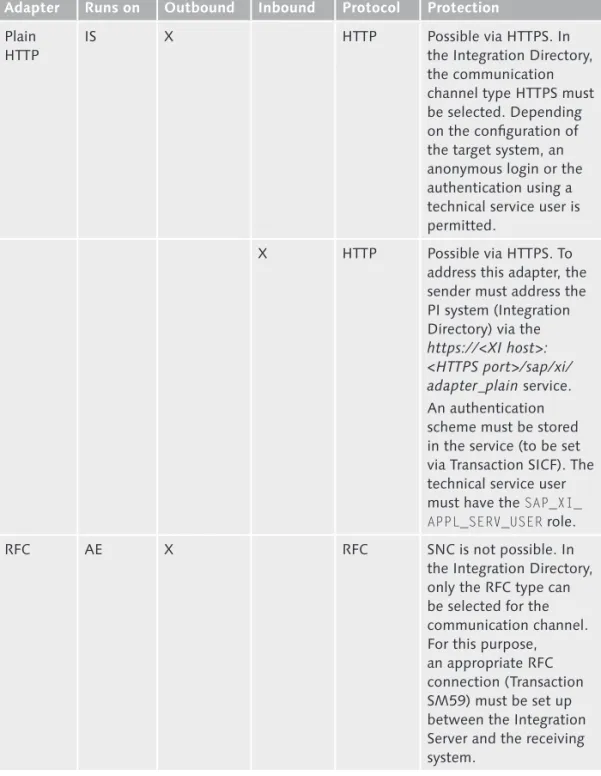
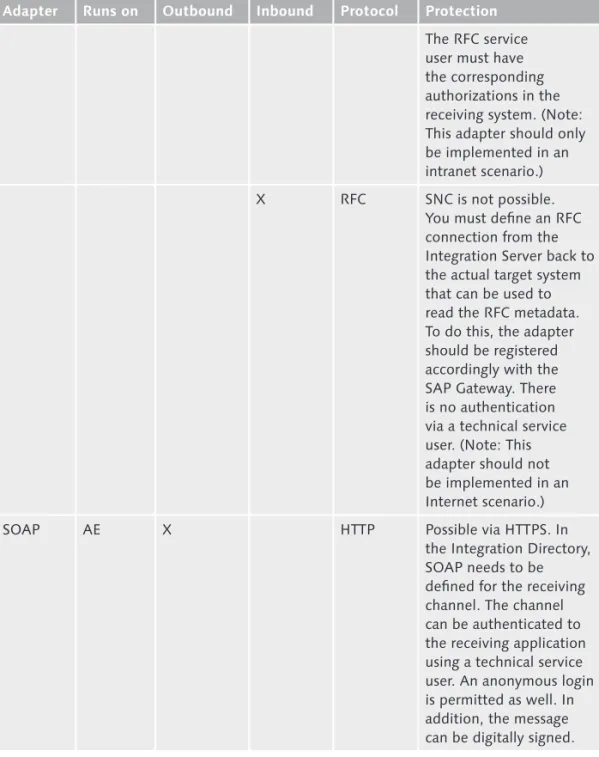
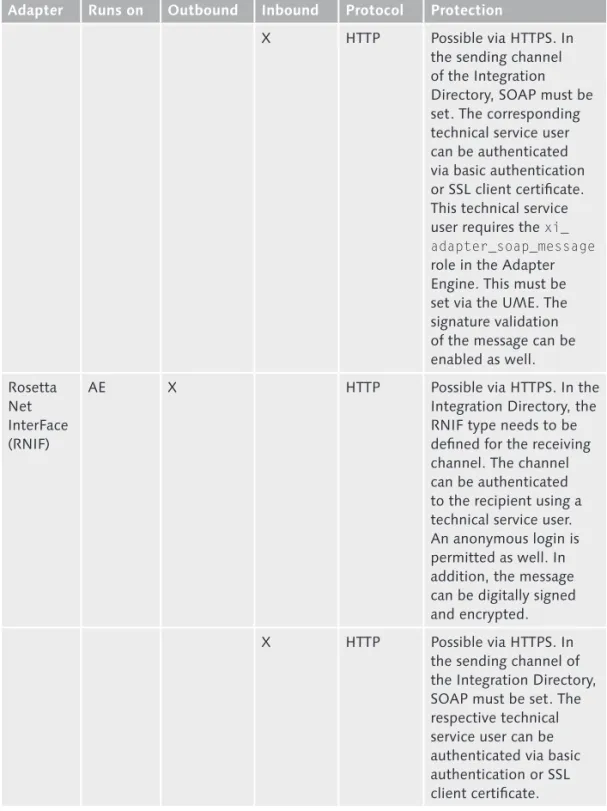
Table 12.2 contains information about the most commonly used adapters and their protection options.
Adapter Runs on Outbound Inbound Protocol Protection
XI IS X HTTP Possible via HTTPS.
This is achieved with the selection via the encrypted communication channel in the Integration Directory.
X HTTP Possible via HTTPS. This is achieved with the selection via the encrypted communication channel in the Integration Directory.
IDoc IS X tRFC Possible via SNC. The
connection must be defined with a technical service user as a communication channel of the IDoc type. The channel must reference an appropriate RFC connection (type 3) between SAP NetWeaver PI and the receiving system (IDoc). The technical service user in the receiving system (IDoc) must have the corresponding IDoc authorizations.
X Possible via SNC. The
connection must be defined as a type-3 RFC destination on the sending IDoc system. The technical service user must have the SAP_XI_ APPL_SERV_USER role in SAP NetWeaver PI. External Adapters and Encryption Possibilities for the Relevant Communication
Table 12.2
Adapter Runs on Outbound Inbound Protocol Protection
Plain HTTP
IS X HTTP Possible via HTTPS. In
the Integration Directory, the communication channel type HTTPS must be selected. Depending on the configuration of the target system, an anonymous login or the authentication using a technical service user is permitted.
X HTTP Possible via HTTPS. To address this adapter, the sender must address the PI system (Integration Directory) via the
https://<XI host>: <HTTPS port>/sap/xi/ adapter_plain service. An authentication scheme must be stored in the service (to be set via Transaction SICF). The technical service user must have the SAP_XI_ APPL_SERV_USER role.
RFC AE X RFC SNC is not possible. In
the Integration Directory, only the RFC type can be selected for the communication channel. For this purpose, an appropriate RFC connection (Transaction SM59) must be set up between the Integration Server and the receiving system.
Table 12.2 External Adapters and Encryption Possibilities for the Relevant Communication Protocols (Cont.)
Adapter Runs on Outbound Inbound Protocol Protection
The RFC service user must have the corresponding authorizations in the receiving system. (Note: This adapter should only be implemented in an intranet scenario.)
X RFC SNC is not possible.
You must define an RFC connection from the Integration Server back to the actual target system that can be used to read the RFC metadata. To do this, the adapter should be registered accordingly with the SAP Gateway. There is no authentication via a technical service user. (Note: This adapter should not be implemented in an Internet scenario.)
SOAP AE X HTTP Possible via HTTPS. In
the Integration Directory, SOAP needs to be defined for the receiving channel. The channel can be authenticated to the receiving application using a technical service user. An anonymous login is permitted as well. In addition, the message can be digitally signed.
Table 12.2 External Adapters and Encryption Possibilities for the Relevant Communication Protocols (Cont.)
Adapter Runs on Outbound Inbound Protocol Protection
X HTTP Possible via HTTPS. In the sending channel of the Integration Directory, SOAP must be set. The corresponding technical service user can be authenticated via basic authentication or SSL client certificate. This technical service user requires the xi_ adapter_soap_message role in the Adapter Engine. This must be set via the UME. The signature validation of the message can be enabled as well. Rosetta
Net InterFace (RNIF)
AE X HTTP Possible via HTTPS. In the
Integration Directory, the RNIF type needs to be defined for the receiving channel. The channel can be authenticated to the recipient using a technical service user. An anonymous login is permitted as well. In addition, the message can be digitally signed and encrypted. X HTTP Possible via HTTPS. In
the sending channel of the Integration Directory, SOAP must be set. The respective technical service user can be authenticated via basic authentication or SSL client certificate.
Table 12.2 External Adapters and Encryption Possibilities for the Relevant Communication Protocols (Cont.)
Adapter Runs on Outbound Inbound Protocol Protection
The technical service user requires the SAP_XI_ APPL_SERV_USER role in AS ABAP. A signature validation of the message can be enabled as well. In addition, the message can be decrypted. Chemical Industry Data Exchange (CIDX)
AE X HTTP Possible via HTTPS. Use
the same options as for the RNIF adapter.
X HTTP Possible via HTTPS. Use the same options as for the RNIF adapter. File
system
AE X NFS There are security options
only at the operating system level. For the SYSADM technical user that runs the PI instance, access to operating system directories must be restricted. There are no encryption options. Using this adapter is not recommended in scenarios with very high security requirements. X NFS There are security options
only at the operating system level. For the SYSADM technical user that runs the PI instance, the access to operating system directories must be restricted. There are no encryption options. Using this adapter is not recommended in scenarios with very high security requirements.
Adapter Runs on Outbound Inbound Protocol Protection
FTP AE X FTP Secure FTP is not
possible. Apart from that, you can also use technical service users for FTP authentication. We do not recommend using FTP for integration scenarios with high security demands.
X FTP Secure FTP is not
possible. Apart from that, you can also use technical service users for FTP authentication. We do not recommend using FTP for integration scenarios with high protection needs.
JDBC AE X JDBC Depending on
the manufacturer, database access might be encrypted. The authentication is again implemented using technical service users at the database level. We do not recommend using JDBC for integration scenarios with high protection needs.
X JDBC Depending on
the manufacturer, database access might be encrypted. The authentication is again implemented using service users at the database level We do not recommend using JDBC for integration scenarios with high protection needs.
Table 12.2 External Adapters and Encryption Possibilities for the Relevant Communication Protocols (Cont.)
Adapter Runs on Outbound Inbound Protocol Protection
Mail AE X IMAP4,
POP3, SMTP
Possible via SSL. Except for IMAP4, S/MIME, that is, the signature and encryption option for emails, can be implemented as well.
X IMAP4,
POP3, SMTP
Possible via SSL. Except for IMAP4, S/MIME, that is, the signature and encryption option for emails, can be implemented as well.
Table 12.2 External Adapters and Encryption Possibilities for the Relevant Communication Protocols (Cont.)
In general, the protection needs for the integration scenario should be determined based on SAP NetWeaver PI when selecting possible adapters. For high protection needs — for example, when connecting systems that are processing highly confi dential information and information with high integrity demands — you should only implement those adapters that support digital signatures (high integrity) and encryption (high confidentiality) at the message level.
Digital Signature for XML-Based Messages 12.4.3
XMLbased messages, like those used for the XI protocol, SOAP, RNIF, and CIDX adapters, can be signed. By digitally signing a message, you can achieve the fol lowing security objectives:
The sender of a message can be unambiguously authenticated at the message E
E
level. It is not necessary to rely on the authentication of the communication channel via technical service users, because it may have been compromised by an attacker. In a purely technical authentication, it is impossible to retrace the sender in a legally binding way.
Using a digital signature, the integrity of the message can be unambiguously E
E
determined. An unauthorized change to the message carried out by an attacker at a later stage can be discovered. If the message was changed by an attacker, SAP NetWeaver PI can refuse to process it further.
A digital signature attests the originality of the message. A sender cannot dis E
E
card sending the message at a later stage. This is particularly important if busi ness orders are digitally processed. However, you must consider the legal
up a legalproof contract, the signature must comply with the policies of the Electronic Signatures in Global and National Commerce Act. Naturally, this can be circumvented if the business partners have not made any other previous agreements.
Using the XI protocol, you can digitally sign the SAP manifest (part of the XI pro tocol with information on the processing of the message, and logistic information) and the payloads (that is the actual message), in addition to the SAP main header (similar to the SOAP header in web services). Using SOAP, however, you can only sign the SOAP body (the message only). The RNIF connector uses S/MIME, and CIDX uses the PKCS#7 signature standard.
In SAP NetWeaver PI, messages can be signed using the certificates existing in the certificate store of AS Java (key storage provider) in the PI runtime environment of the underlying SAP NetWeaver AS. The certificate store of AS ABAP is not used in this case. The Integration Server using AS ABAP as the technical runtime environ ment implements an internal web service for addressing the signature functions of AS Java.
For digital signatures, you must consider the trust model to be applied. There are two variants that can be implemented in this respect:
There is a direct trust model that does not use a certificate authority: The public E
E
keys (certificates) of the sender and the recipient (of the business partners or internal systems) must be exchanged beforehand. In this case, a new key store can be created on the J2EE Engine of SAP NetWeaver PI, where all public cer tificates of the possible senders are stored. This key store can be freely chosen. A public key infrastructure is used: In this case, there is a trust relationship E
E
between the business partners that is confirmed by one or more trustworthy certificate authorities. All implemented certificates of the business partners must be digitally signed by these root certificate authorities. The relevant public certificates of the CAs must be stored in the TrustedCAs key store of AS Java. However, SAP NetWeaver PI does not support multilevel hierarchical trust rela tionships. Therefore, the certificates must have been signed directly by the trustworthy certificate authorities. A multilevel certificate hierarchy is not supported.
In order for the access to the key storage provider of AS Java to function correctly, you must assign the appropriate J2EE roles in AS Java (see Chapter 9) to the tech nical service user (RFC user), which is used by the web service (HTTP carrier pro tocol) to log on to the Integration Server. This is done using the Security Provider service in the Visual Administrator and affects the following roles:
On the Policy Configuration tab, the E
nal web service to log on to the Integration Server (HTTP connection type). If a new key store has been generated for storing the external business partner E
E
system certifi cates, the aforementioned RFC service user must be assigned to the J2EE role KeystoreAdministrator, which is included in the keystore-view.<name of the created key store> component.
To use the J2EE security functions, the IAIK cryptography components fi rst need to be implemented in AS Java. This is done using the software deployment tool. The collaboration agreements for communication partners that have been stored in the Integration Directory defi ne whether it’s necessary to use digital signatures and specify the validation of a signature.
Receiver Agreement — Signature of a Message in the Case of an XI Protocol
Figure 12.2
The receiver agreement (see Figure 12.2) in the Integration Directory defi nes whether a message is signed before it is forwarded to the recipient in SAP
the corresponding signature certifi cate (private certifi cate of the Integration Server). As a prerequisite, either the XI protocol or SOAP (or RNIF or CIDX, respectively) must have been chosen for the communication channel with the recipient. In the communication channel, Message Security should be set for the XI protocol, for example, Message_to_XI. In the key store, you specify the Key Store Name, and the key store entry contains the actual certifi cate. In the communication chan nel, the Message Security checkbox must be selected (see Figure 12.3) to enable a digital signature in the receiver agreement.
Message Security Option for the Communication Channel of the XI Protocol
Figure 12.3
The sender agreement (see Figure 12.4) in the Integration Directory specifi es the public certifi cate of the sender to be used for validating the signed message in SAP NetWeaver PI. For selfsigned certifi cates, the public certifi cates must have been imported into the key storage of AS Java. The selfsigned public certifi cate must also have been imported to the TrustedCAs key store. The same applies to the pub lic certifi cate of the certifi cate authority that signed the business partner system