Guide
for
Timekeeping
August 5, 1998 Updated March 2005
U.S. Department of Health and Human Services Program Support Center
Office of Human Resources Service Systems Design and Analysis Division
ABOUT THIS GUIDE
Introduction This guide replaces the Department of Health and Human Services
(DHHS) Timekeeping Manual for Timekeepers/Supervisors, 1993 version.
Caution The guide addresses Departmental policy which is on occasion modified at the Operating Division Level. When discrepancies between the two occur, consult your payroll liaison for clarification or guidance.
Use The Guide for Timekeeping is intended to be used in conjunction with the User Manual for the automated timekeeping system you are using. It covers the rules, regulations, and Department policy for leave, time and attendance, whereas the User Manual for the automated system you are using provides detailed procedures for the use of the software to record, certify, and transmit time and attendance data.
To Obtain
Copies
Individual requests for the Guide for Timekeeping may be directed to your payroll liaison. Payroll liaisons may obtain copies through the Office of Human Resources Service Helpdesk at the following address:
Department of Health and Human Services Program Support Center
HRS Helpdesk
8455 Colesville Road - Suite 700 Silver Spring, MD 20910
(Internet address: [email protected])
Important As many authorities have been delegated down to the Operating Division (OPDIV) levels, it is important that you have a copy of your OPDIVs policy to use in conjunction with this guide. We recommend that you file a copy of your OPDIVs policy with your copy of the guide.
Be sure to read the first two chapters of this guide before looking at the rest of it. Many of the concepts and definitions which you need to
understand before you can learn the rules of timekeeping are presented in these two chapters.
Contents
Chapter 1. Timekeeping Responsibilities
Timekeeper ... 1-1 Others Involved in Timekeeping ... 1-3 Prohibited Timekeeping Procedures ... 1-7 Forms Used by Timekeepers ... 1-8 The Administrative Time and Leave Record (HHS-564)... 1-9 Maintaining the Time and Attendance File ... 1-15
Chapter 2. Basic Timekeeping Information
General Terms... 2-1 Paid and Unpaid Status ... 2-3 Types of Appointments... 2-5 Types of Tours and Schedules ... 2-7 Types of Employees... 2-9 Pay Plan Table ... 2-12 The Fair Labor Standards Act (FLSA) ... 2-14 New Employees ... 2-15 Employee Separates or Transfers ... 2-16 Detail to Another Office ... 2-18 Errors and Omissions... 2-19 The Leave and Earnings Statement - Sample ... 2-20
Chapter 3. Regular Hours
Overview... 3-1 General Schedule Employees ... 3-2 Federal Wage System Employees... 3-2 Meal Breaks ... 3-3 Fractions... 3-3 Daylight Savings Time ... 3-3
Chapter 4. Paid Leave and Holidays
Overview... 4-1 Holiday Not Worked... 4-2 Application for Leave - The SF-71... 4-3 Sick Leave... 4-5 Accrual... 4-5
Loss of Accrual ... 4-5 Rules ... 4-6 Use ... 4-7 The Federal Employees Family Friendly Leave Act (FFLA)... 4-8 Advanced Sick Leave ... 4-10 Annual Leave ... 4-12 Accrual... 4-12 Appointments Less Than 90 Days ... 4-13 Loss of Accrual ... 4-13 Special Accrual (Leave Category 6) ... 4-13 Change in Leave Category... 4-13 Maximum Carryover... 4-14 Advanced Annual Leave... 4-15 Restored Annual Leave - Introduction... 4-15 Conditions for Consideration... 4-16 Exigency ... 4-16
Extended Exigency ... 4-18 Time Limit for Use ... 4-19 Procedures for Requesting ... 4-20 Documents Required... 4-21 Forms ... 4-25 Changing Annual Leave to Sick Leave and Vice Versa... 4-27 Military Leave - Introduction ... 4-28 Regular Military Leave ... 4-29 Special Military Leave... 4-31 Military Leave for Parades and Encampments ... 4-31 Leave Without Pay - Military ... 4-31 Military Leave - Quick Reference Table ... 4-32
Chapter 4. Paid Leave and Holidays (cont.)
Administrative Leave... 4-33 Administrative Leave Situations... 4-33 Bone-Marrow or Organ Donors... 4-33 Official Time... 4-34 Court Leave... 4-35 Jury Duty... 4-36 Witness Duty... 4-36 Court Order ... 4-36 Certificate of Attendance ... 4-37 Fees and Expense Money ... 4-37
Court Leave - Quick Reference Table ... 4-38 Funeral Leave ... 4-39 Funerals - Law Enforcement Officers/Firefighters... 4-39 Home Leave ... 4-40 Time Off Award... 4-42 The Family and Medical Leave Act (FMLA)... 4-43
Chapter 5. Unpaid Leave
Overview... 5-1 Unpaid Leave and Holidays... 5-2 Leave Without Pay... 5-3 Extended Leave Without Pay... 5-4 Absence Without Leave... 5-5 Suspension ... 5-6 Furlough... 5-7 Substituting Overtime for Unpaid Leave... 5-8
Chapter 6. Continuation of Pay
Introduction... 6-1 Requirements ... 6-2 Day of Injury... 6-3 Charging COP... 6-3 COP Depleted ... 6-3 Medical Visits/Certificates ... 6-5
Chapter 7. Religious Compensatory Time
Introduction... 7-1 Rules ... 7-1 Requesting Religious Compensatory Time ... 7-2 Evaluating Requests... 7-2 Employee Separates ... 7-3
Chapter 8. Compensatory Time Off for Travel
Introduction... 8-1 Eligibility ... 8-1 Rules ... 8-2 OPM Examples ... 8-4
Chapter 9. Temporary Closing of the Workplace
Introduction... 9-1 Definitions ... 9-1 Rules ... 9-2 Special Situations... 9-3 Tables (Charging Leave or Excusing Absence) ... 9-4 Alternative Work Schedules ... 9-6
Chapter 10. Premium Pay and Differentials for General Schedule Employees
Overview... 10-1 Overtime ... 10-2 Regularly Scheduled Overtime ... 10-7 Unscheduled Irregular or Occasional Overtime ... 10-8 Preshift and Postshift Activities... 10-9 Callback Overtime ... 10-10 Administratively Uncontrollable Overtime ... 10-11 Regularly Scheduled Standby Duty ... 10-12 PL85-580 Overtime ... 10-15 Law Enforcement Availability Pay... 10-16 Compensatory Time... 10-17 Holiday Worked... 10-20 Night Differential... 10-22 Sunday Premium Pay ... 10-29 Two Tours on Sunday... 10-33 Hazard Differential ... 10-34
Chapter 11. Premium Pay and Differentials for Federal Wage System Employees
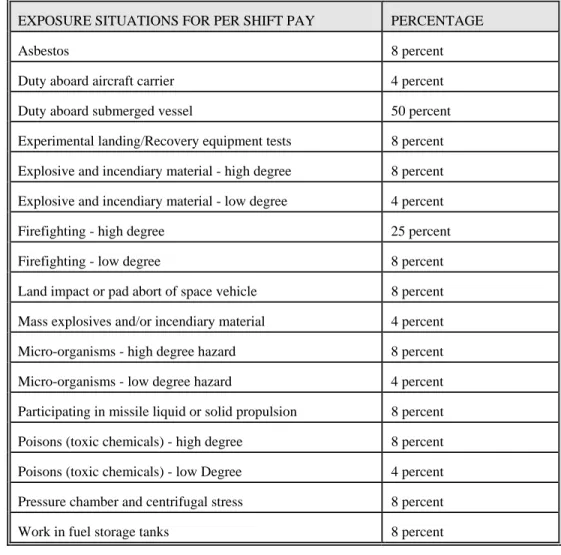
Overview... 11-1 Overtime ... 11-2 Night Differential... 11-5 Temporary or Substitute Tour... 11-10 Sunday Premium Pay ... 11-15 Two Separate Tours ... 11-18 Environmental Differential ... 11-21 Tables of Exposure Categories and Percentages ... 11-23 Computing EDP Rates ... 11-25 Actual Exposure - Rules ... 11-27 Per Shift Basis - Rules ... 11-31
Chapter 12. Other Employees
Part-time Employees... 12-1 Additional Hours and Overtime... 12-2 Differentials ... 12-4 Holiday Not Worked... 12-5 Holiday Worked... 12-7 Paid Leave... 12-10 Unpaid Leave ... 12-18 Compensatory Time... 12-19
Religious Compensatory Time ... 12-19 Time Off Award... 12-19 Military Leave... 12-20 Continuation of Pay ... 12-23 Alternative Work Schedules ... 12-25 Intermittent Employees... 12-27 Student Educational Employment Program... 12-28 Temporary Employees ... 12-30 Appointments Less Than 30 Days ... 12-30 1040-Hour Appointments ... 12-30 Experts/Consultants ... 12-32
Firefighters... 12-36 Law Enforcement Officials... 12-43
Chapter 13. Title 38 (Baylor/Non-Baylor/Physician Special Pay)
Overview... 13-1 Non-Baylor ... 13-3 Baylor Plan ... 13-8 Physician Special Pay ... 13-24
Chapter 14. Alternative Work Schedules
Overview... 14-1 Compressed Work Schedules - Overview ... 14-2 Regular Hours ... 14-3 Overtime and Compensatory Time ... 14-4 Night Differential... 14-6 Sunday Premium Pay ... 14-7 Holiday Worked... 14-8 Leave... 14-9 Holiday Not Worked... 14-10
Military Leave... 14-14 Continuation of Pay ... 14-16 Religious Compensatory Time ... 14-17 Home Leave ... 14-19 Time Off Award... 14-20 Flexible Work Schedules - Overview ... 14-21 Credit Hours... 14-23 Holiday Not Worked... 14-26 Leave... 14-28 Overtime ... 14-31 Compensatory Time... 14-33 Night Differential... 14-34
Sunday Premium Pay ... 14-35 Holiday Worked... 14-36
Chapter 15. FLSA Non-Exempt Employees
The Fair Labor Standards Act... 15-1 The Federal Employees Pay Comparability Act... 15-1
Chapter 16. Voluntary Leave Transfer Program
Overview... 16-1 Leave Recipient ... 16-5 Keeping Track of VLTP ... 16-8 VLTP Log (Blank)... 16-11/12 Leave Donor... 16-13 Interagency Transfers ... 16-14 Medical Emergency Ends ... 16-15
Appendix A ………Payroll Letters
Chapter 1. Timekeeping Responsibilities
TIMEKEEPER
Introduction As the timekeeper, you are in charge of keeping track of the time worked and leave used for each employee assigned to you. You are also
responsible for the maintenance of the Time and Attendance (T&A) file. At the end of each pay period, a Time and Attendance Record for each Department of Health and Human Services (DHHS) employee is prepared, certified, and electronically transmitted for processing through the
Defense Finance and Accounting Services (DFAS) payroll system. Timely submission of the T&A Record is very important since it impacts the employees' pay. The T&A record should be updated daily and closed on the last day of the pay period. Timecards should be completed and certified by 11 p.m. Eastern time Saturday the last day of pay period for transmission to payroll. All timecards must be received by DHHS no later than 6 p.m., Eastern Time, on the Monday following the last day of the pay period.
Timekeeper The Timekeeper Signature Card (form HHS-420) is no longer required by Signature the Department. Each OPDIV determines local policies and practices for Card ensuring that timekeepers are properly trained and proficient, and that
their performances are periodically reviewed.
Important You must keep accurate time and attendance (T&A) records because DFAS uses the information given to compute employee's pay and accrued leave. In addition, the T&A records can be required by courts for legal proceedings. Accuracy is therefore critical.
It is just as important to be accurate with the recording of leave as it is with time worked. Leave translates into money if the employee uses leave, resigns, retires, or separates.
Timekeeping Responsibilities/1-1
TIMEKEEPER
Introduction The automated timekeeping system contains the official daily record of an employee's hours of work and absence. This record is required by the General Accounting Office.
Important In order to perform your timekeeping duties, you need to know how to access your automated system. You also need to know the pay period number and year for which you will be entering data.
Information about each employee assigned to you is available from the employee's supervisor or from your Servicing Personnel Office (SPO). This information includes the employee's name, Social Security number, tour information, pay plan, service computation date, leave category, and pay basis.
Daily Duties Timekeepers must be well versed in the rules of Timekeeping and particularly any special conditions that affect the employee’s time they manage.
Timekeepers must be aware of the work schedules and hours absent for
employees for whom they are responsible in order to ensure the reliability of time and attendance data. If an employee is absent part of the day, they must have an approved leave slip (SF-71) or equivalent indicating times of absence and the type of leave approved and used. If overtime hours are worked, you must have written approval for the hours, as well as a record of the dates and hours worked. You must review documentation daily to ensure that you have the proper authorizations and approvals for absences and overtime.
You must enter employee T&A data for each day of the pay period, if appropriate. (For exception based systems, this will not apply.) Employees are paid based on the 2-week pay period.
_____________________________________________________________ Pay Day
Duties
You must perform these duties for each employee:
1. Must have T&A records available based on the scheduled required by their T&A transmission coordinators.
2. Maintain each employee's time and attendance file and keep for 6 years.
3. Resolve employee’s leave/pay difference on time and attendance record and that of his/her Civilian Payroll record.
4. Notify employees in changes or system down time that will affect their access.
OTHERS INVOLVED IN TIMEKEEPING
Introduction In addition to timekeepers, other people involved in timekeeping functions include:
Pay Services Division (PSD)
Defense Finance and Accounting System(DFAS)/Defense Civilian Pay System (DCPS)
Servicing personnel officers
System Administrators/Administrative Officer/ITAS Coordinator Payroll liaisons Employees Supervisors/Approving officials Payroll Services Division
PSD is the principal HHS point of contact for payroll services and advisor to it clients.
• Customer Services Representative (CSR) advises and consults with client organization
• Coordinates system updates to DFAS/Defense Civilian Pay System (DCPS) for VLTP, Military, COP, Advanced Sick Leave, Time-Off-Awards, etc.
• Coordinates HHS systems changes based on DFAS releases, enhancements, new directives
• Coordinates global and systemic issues. _ __________________________________________________________ Defense Finance and Accounting Services(DFAS) /Defense Civilian Pay System (DCPS)
DFAS/Defense Civilian Pay System is responsible for:
1. Computing salary payments, lump-sum payments and cash awards payments.
2. Maintaining official pay and leave records;
3. Withholding monies as authorized by employees or regulations; 4. Establishing procedures for keeping time and leave accounts; and 5. Ensuring that timekeeping procedures and regulations are
followed.
____________________________________________________________
OTHERS INVOLVED IN TIMEKEEPING______________________________
Servicing Personnel Officer
Servicing personnel officers are responsible for:
1. Advising timekeeper and/or Payroll Liaison of new employees.
2. Counseling employees and supervisors on leave policies and regulations; and
3. Reminding timekeepers and leave-approving officials of their responsibilities at least once a year.
Payroll Liaison
Payroll liaisons are responsible for:
1. Providing liaison between timekeepers, payroll, and personnel;
2. Providing guidance and answering questions about timekeeping and time and attendance errors and/or omissions;
3. Reporting critical errors to PSD/Customer Service Team;
4. Receiving and processing reports of missing salary payments, as well as requesting reissue of salary checks when necessary and monitoring progress of the action;
5. Requests and, receives necessary paper documentation to support, special pay/leave request, Advance Sick, Leave Transfer Program, military leave, COP, etc.
6. Prepares necessary Peregrine Ticket in order for Payroll Customer Service Team to update employee’s DCPS pay/leave record.
7. Informing timekeepers of updates to employee’s pay/leave record so special pay/leave request can be process on the timecard.
8. Keeping timekeepers informed of policy/procedure changes and ensuring that all memoranda from PSD and/or DFAS/DCPS are distributed to timekeepers;
9. Providing information and assistance to managers and employees for requesting Special Pay.
10. Providing new timekeepers with a copy of the Guide for Timekeeping, related instructional materials, and other necessary information, as well as distributing revisions or new information and materials to
timekeepers. Providing instructions on use of timekeeping guide to new timekeepers.
We also recommend that Payroll Liaisons perform random reviews of timekeeper records and practices to ensure compliance with OPDIV and Department policies and procedures.
OTHERS INVOLVED IN TIMEKEEPING________________________________________ System Administrator/ Administrator Officer/ITAS Coordinator
Provides assistances and answers day-to-day questions about the automated timekeeping system that you are using. The system administrator assures that T&A data is transmits to the Defense Civilian Pay System collection point at the end of each pay period.
Employee HHS employees are responsible for keeping supervisors informed about their time, attendance, and leave, as well as for ensuring that they have sufficient leave to cover all requests.
Plan, apply for, and obtain approval in advance for all anticipated leave.
Provide appropriate supporting documents for requested leave when requested by Approving Official or as required by regulations.
They are also responsible for verifying the accuracy of their earnings and leave statements and reporting any errors or omissions.
_
________________________________________________________________ Supervisor As used here, the term "supervisors" includes managers and approving officials.
An important duty of supervisors is to certify that the hours recorded by timekeepers reflect the employee's actual attendance and entitlement to pay and leave.
Supervisors are responsible for:
1. Ensuring that all employees’ timecards are accurate and approved in timely matter.
2. Reviews timecards to ensure that information in the record are accurate and complete
3. Answering questions about work and leave; must be well versed in the rules of timekeeping and particularly any special conditions that effect the employees’ time they manage.
4. Advising timekeepers:
• When new employees are entering on duty or when employees are leaving;
• What tour/work schedule employees are on;
• What kind of leave to charge;
• When overtime and other premium pay should be entered;
• Whether employees are covered by the Fair Labor Standards Act;
OTHERS INVOLVED IN TIMEKEEPING________________________________________
Supervisor continue
5. Ensuring that all employees are informed of the procedures they must follow for requesting and using leave.
6. Obtaining leave-supporting documents from employees
7. Ensuring that employees have a sufficient leave balance prior to approving leave requests;
8. Notify employees that they must submit leave request before start of the third pay period before the end of the leave year each year, in order to avoid forfeiture of Use or Lose annual leave.
9. Ensuring that overtime, compensatory time, credit hours, etc. are authorized in advance in writing, performed, and properly recorded; 10. Ensuring that employee basic tour hours do not exceed 80 for full
time employee or 8 hours per day;
11. Ensuring that the timekeeper submits the T&A data to them so they will have plenty of time to review and certify the records prior to the transmission time.
12. Ensuring that new timekeepers are trained before beginning duties; 13. Reviewing timekeeper performance regularly;
Notifying the Payroll Liaison of the addition of new timekeepers or any timekeeper changes.
PROHIBITED TIMEKEEPING PROCEDURES
Introduction Timekeepers are responsible for the prompt and accurate reporting of T&A information. This has a positive and direct effect on the financial welfare and morale of all employees.
Supervisors have a direct responsibility to oversee and ensure the integrity of the T&A reporting.
Rules To help ensure the separation of timekeeping responsibilities:
• Timekeepers
- Are prohibited from keeping their own official T&A records;
- Cannot modify employee T&A data after supervisor Certification; and
- Are prohibited from certifying timecards ● Approving Officials/Supervisors
- Are prohibited from keeping or approving their own official T&A records;
- May permit temporary employees (appointments of 90 days or less) to perform timekeeper duties; and
- May permit non-Federal employees to perform timekeeping duties;
- Are expected to periodically examine the time and attendance records of all employees, especially those of employees associated with time and leave reporting. _
___________________________________________________________ Important Employees who violate timekeeping procedures may be subject to official
reprimand, suspension, or termination.
Employees who deliberately prepare or transmit false data may be subject to termination or criminal penalties including fines or imprisonment.
FORMS USED BY TIMEKEEPERS
Introduction Timekeepers should keep a supply of all forms. Forms may be obtained from PSD or ordered through normal supply channels.
_
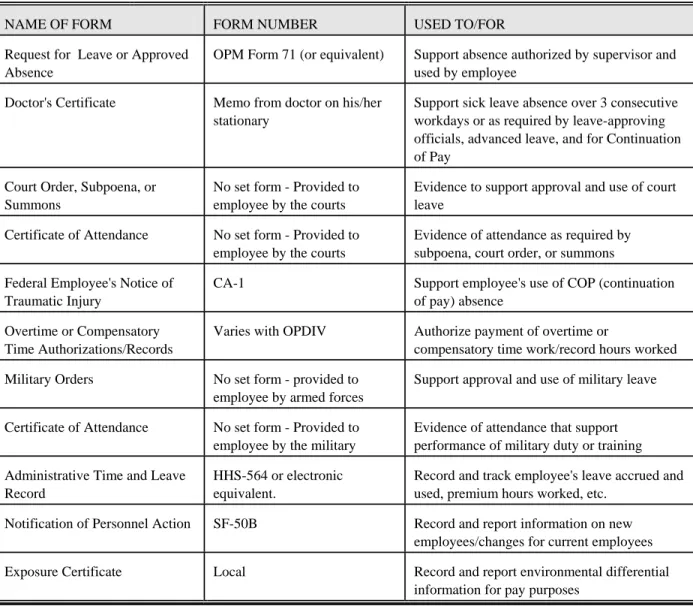
__________________________________________________________ Table The following table contains a list of forms used, copies of which must be
maintained in time and attendance files and kept for 6 years.
NAME OF FORM FORM NUMBER USED TO/FOR Request for Leave or Approved
Absence
OPM Form 71 (or equivalent) Support absence authorized by supervisor and used by employee
Doctor's Certificate Memo from doctor on his/her stationary
Support sick leave absence over 3 consecutive workdays or as required by leave-approving officials, advanced leave, and for Continuation of Pay
Court Order, Subpoena, or Summons
No set form - Provided to employee by the courts
Evidence to support approval and use of court leave
Certificate of Attendance No set form - Provided to employee by the courts
Evidence of attendance as required by subpoena, court order, or summons Federal Employee's Notice of
Traumatic Injury
CA-1 Support employee's use of COP (continuation of pay) absence
Overtime or Compensatory Time Authorizations/Records
Varies with OPDIV Authorize payment of overtime or
compensatory time work/record hours worked Military Orders No set form - provided to
employee by armed forces
Support approval and use of military leave
Certificate of Attendance No set form - Provided to employee by the military
Evidence of attendance that support performance of military duty or training Administrative Time and Leave
Record
HHS-564 or electronic equivalent.
Record and track employee's leave accrued and used, premium hours worked, etc.
Notification of Personnel Action SF-50B Record and report information on new employees/changes for current employees Exposure Certificate Local Record and report environmental differential
information for pay purposes
THE ADMINISTRATIVE TIME AND LEAVE RECORD (HHS-564)
Introduction All payroll systems require the maintenance of a detailed record of data submitted to the payroll system. For DHHS, the Administrative Time and Leave Record, form HHS-564 (blank form on following page) is this detailed record. The HHS-564 must be kept in the time and attendance file for each employee. OPDIVs may use a paper form or an electronic form similar to the HHS-564, as long as it contains the same detailed data.
If an electronic form is used, a hard copy must be placed in the time and attendance file at the end of each leave year.
In addition to providing details of annual and sick leave, LWOP, AWOL, etc., the HHS-564 is used to keep track of any other types of leave and pay including, but not limited to:
• Premium pay
• Religious compensatory hours earned and used
• Compensatory hours earned and used
• Credit hours earned and used
• Sick leave used under the Family Friendly Leave Act (FFLA)
• Leave used under the Family Medical Leave Act (FMLA)
• Military leave
• Court leave
• Leave received and used under the Voluntary Leave Transfer Program (VLTP)
• Continuation of Pay (COP) leave for work related injuries
• Compensatory travel hours earned and used
A completed, current HHS-564 must be submitted as supporting documentation with any requests for leave adjustments. It is also a valuable tool which may be used by supervisors to verify leave balances before approving leave, and by timekeepers to verify that their records match official records in the payroll system. The HHS-564 is a history record which is used by auditors when auditing time and attendance records.
Part-Time
Employees
For details on completing the HHS-564 for part-time employees, see Chapter 12.
Important All leave or premium hours should be shown on the HHS-564 on the day they were actually used or earned, not when they were recorded
r transmitted on the time and attendance record. o
2/22/2005 Timekeeping Responsibilites/1-10
THE ADMINISTRATIVE TIME AND LEAVE RECORD (HHS-564)
Completing the HHS-564
At the beginning of each new leave year, or when new employees enter on duty, prepare an HHS-564 for each employee.
1. Complete the employee identification section, filling in the employee's name, Social Security Number, service computation date (SCD), leave category, timekeeper number, and tour information in the blanks provided. Note: If the timekeeper changes during the year, the new timekeeper number is noted in the second box, and the dates that each timekeeper maintained the HHS-564 during that year should be recorded in each box.
2. The year, pay period and leave period numbers and dates, and Federal holidays have been pre-printed on the HHS-564. Start each record on the date the employee first enters on duty (EOD date), or at the
beginning of the leave year, whichever applies. If the employee starts in the middle of the leave year, note the EOD date on the record.
Note: The pay period and leave period numbers usually are not the same. Pay period 1 may start in the old leave year.
3. Because most employees earn and use annual and sick leave, these sections are more detailed. In each of these sections, there are four columns headed:
• E (earned this pay period);
• U (used this pay period);
• UTD (used year to date); and
• BAL (balance at the end of this pay period).
At the top of each section for annual and sick leave on both sides of the HHS-564, there are blank spaces under the UTD and BAL columns. On the front side, in the blank spaces under the headings:
UTD - the space is always left blank. Remember, this is a "year to date" column and at the beginning of the leave year, no leave has been used.
BAL - record the balance shown on the HHS-564 at the end of the last pay period for the previous leave year.
THE ADMINISTRATIVE TIME AND LEAVE RECORD (HHS-564)
Completing the HHS-564 (cont.)
3. (cont.)
Once the front side of the HHS-564 is completed, the balances shown at the end of pay period 13 are transferred to the back side of the HHS-564, to these blank spaces.
Tip: Before transferring numbers to the back side of the HHS-564, be sure that totals and balances on the front side are correct. To do this:
a. Start with the beginning balance at the top of the column (on the front side);
b. Add the number of hours earned during the first 13 pay periods; and
c. Subtract the balance shown in the UTD column for pay period 13.
The total of a, b, and c must match the number shown in the BAL column for pay period 13. If it does not, there is an error
somewhere in the columns on the front side. Errors must be corrected prior to transferring the figures to the reverse side, or you'll begin the last half of the leave year with errors.
4. Record leave/pay data on the HHS-564 at the end of each pay period, if not done daily. Use the "Key" located on the lower left corner of the HHS-564 to determine the abbreviation of the type of leave/pay used or earned for each day of the pay period.
Record the number of leave hours used, premium hours earned, and/or any other hours as needed, and the abbreviation for each type indicated, in the appropriate blocks under the correct day.
It is not necessary to daily record, or make any notation for, regular hours worked if the employee works a regularly scheduled tour. Since the number of hours is the same each day, each week, only absences or premium pay must be noted. If, however, a check mark (or other mark or abbreviation) to indicate regular hours helps, the timekeeper should use one. He/she should note the abbreviation or mark, and a description of what it identifies, in the space provided in the "Key".
THE ADMINISTRATIVE TIME AND LEAVE RECORD (HHS-564)
Completing the HHS-564 (cont.)
4. (cont.)
For example: Jenny is a timekeeper who found that it helped her to put a check mark in each appropriate block on the HHS-564 to indicate that an employee worked his/her regular hours that day. In the "Key" on the HHS-564, she noted, "check mark = regular tour hours worked" and used the check mark only to indicate exactly that.
5. Once the pay period has ended, total all annual and sick leave hours used during the pay period, record each total in the space provided (under the U columns), and update the current leave balances. To update the current balances:
a. Start with the ending balance of the previous pay period; b. Add the number of hours earned during the current pay period
(under the E column); and
c. Subtract the total hours used during the current pay period (under the U column).
The total of a + b minus c is the new "current balance" and is recorded under the BAL column for the current pay period.
Note: The UTD (used year to date) column is not used to update current balances. However, it should be totaled each pay period, adding the total hours used (under the U column) in the current pay period to the total in the UTD column for the previous pay period. The UTD column is used to balance the HHS-564 and it provides at a quick glance, the total number of hours the employee has used to date in the current year.
6. Record the totals of the other types of leave used in the current pay period and update the balances. There are specific columns for
AWOL or LWOP, Credit Hours, and Part-Time Hours, plus two blank columns. Use the blank columns for any other leave (i.e.,
compensatory hours, VLTP, FFLA, FMLA, COP, etc.)
___________________________________________________________
THE ADMINISTRATIVE TIME AND LEAVE RECORD (HHS-564)
Tips For Timekeepers
Record the leave and/or pay data at the end of each pay period, if not done daily. It takes only a few minutes when recording at the end of each pay period, but if timekeepers wait until several pay periods later, or until an audit is required, it is much more time consuming and difficult. It also increases the possibility of errors.
The HHS-564 is the timekeeper's record and it must be complete at the end of each pay period in order to verify balances.
The less unnecessary writing on the HHS-564, the better. For instance, if leave is not used, you are not required to put 0 (zero) in the daily column or in the "Used" column for that pay period. Just leave it blank - unless it helps you in some way to have it there. Be sure, however, to keep the UTD columns up to date each pay period. If the UTD does not change in a pay period, you may leave it blank as long as you are sure to pick up the previous total when it does change.
Remember, this is an officialtime and leave record. Be neat, concise, and accurate. Note anything that will help you or an auditor determine what the employee did during the leave year. Keep this record in the time and attendance file with all supporting documentation for leave use, paid overtime, etc.
Begin each new year with (0) zero balance in the "Used Year To Date" (UTD) columns. Remember, this is a year to date total, not forever. Before recording annual and sick leave earned during a pay period, and before posting holiday pay for an employee, be sure to total any hours in an unpaid status (AWOL/LWOP/Suspension). If the total unpaid hours in a pay period equals 80, or any multiple of 80 (i.e., 160, 240, 320, etc.), the employee does not accrue leave that pay period. If the employee was in an unpaid status immediately before a holiday and immediately after a holiday, he/she is not entitled to holiday pay.
For details on the effect of an unpaid status on annual and sick leave accruals, see Chapters 4 and 5.
_________________________________________________________
THE ADMINISTRATIVE TIME AND LEAVE RECORD (HHS-564) - SAMPLE
MAINTAINING THE TIME AND ATTENDANCE FILE
Introduction Time and attendance source records, or the documentation upon which leave input data is based, must be completed and maintained in the individual time and attendance file for each employee. Generally, this responsibility falls upon the time and attendance clerk, or timekeeper. The General Records Schedule identifies records which must be kept for 3 years, 6 years, or until after an audit by the General Accounting Office, whichever is sooner. However, rather than going through each individual file to destroy some documents after 3 years and others after 6 years, maintain time and attendance files for 6 years.
Purpose The time and attendance file contains the employee's record of attendance and leave use. It should be kept orderly and easy to use:
• For auditing a disputed or unbalanced record;
• As a history; or
• For preparing amended time and attendance records. _
_______________________________________________________ Supporting
Documents
Source records which must be kept in the time and attendance file include, but are not limited to:
• Administrative Time and Leave Records (HHS-564) or equivalent forms
• SF-71 (leave request) or equivalent forms
• Supporting documentation for jury duty or court leave
• Military orders for military leave
• Doctor's certificates for continuation of pay leave, sick leave (as required), and advanced sick leave
• Federal Employee's Notice of Traumatic Injury (form CA-1) for continuation of pay leave
• Exposure certificates
• Authorizations for earning or using religious compensatory time Authorizations for premium pay, overtime, or compensatory time must be maintained at the duty post for 6 years.
Chapter 2. Basic Timekeeping Information
GENERAL TERMS
Administrative Workweek
The administrative workweek consists of 7 consecutive calendar days which run from 12:01 a.m. Sunday to 12:00 midnight Saturday.
Basic Workweek
The basic workweek consists of the days and hours within the administrative workweek which make up the employee's regularly scheduled workweek.
For full-time employees who work a regular tour, the basic workweek is the 40-hour week.
For part-time employees, the basic workweek means the officially prescribed days and hours within the administrative workweek during which the employee is scheduled to be on duty.
Pay Period A pay period is a 2-week period beginning at 12:01 a.m. on Sunday and ending two weeks later on Saturday at 12:00 midnight. A pay period covers 2 administrative workweeks. There are usually 26 pay periods in a pay year, but there are 27 pay periods in some pay years.
Leave Year A leave year begins with the first day of the first complete pay period in a calendar year and ends with the day immediately before the first day of the first complete pay period in the following calendar year.
A leave year is divided into 26 leave periods which do not coincide with pay periods. There are always 26 leave periods in a leave year.
Core Hours Also referred to as core time, core hours are those hours during the workday, workweek, or pay period during which an employee is required to be present for work. If an employee is absent during core hours, he/she must account for the hours with appropriate leave. Core hours are
established by each OPDIV.
PAID AND UNPAID STATUS
Introduction Employees are either:
• Working;
• On paid leave;
• On unpaid leave;
• Absent without leave;
• Suspended; or
• Furloughed.
Time in a Pay Status
Time in a pay status is time for which employees are paid. This includes time when employees are working regular hours or overtime, absent on paid leave or holidays, taking compensatory time or religious
compensatory time off, or using credit hours.
Employees are not in a pay status when they are absent on unpaid leave (LWOP), absent without leave (AWOL), suspended, or furloughed.
Time Absent Time absent is time when employees are normally scheduled to be at work, but are not at work. This includes time on paid leave and unpaid leave. If the absence is for less than a full day, you must record when the absence began and when it ended.
Regular Hours Regular hours are hours of work that are paid at the employee's base rate of pay.
Leave Leave is approved time off from work which may be paid or unpaid. Not every employee is eligible for every type of paid leave.
_
________________________________________________________ Unpaid Leave Unpaid leave (also called non-pay status) is time away from the job for
which employees do not get paid. Types of unpaid leave include:
Leave without pay (LWOP) - approved unpaid leave;
Absence without leave (AWOL) - unapproved unpaid leave; Furlough - unpaid leave due to lack of work or funds; and
Suspension - unpaid leave taken as a result of a disciplinary action. For more information about unpaid leave, see Chapter 5.
PAID AND UNPAID STATUS
Paid Leave Paid leave is time away from the job, for which employees receive their base rate of pay. Types of paid leave include:
• Holidays (time off for national holidays);
• Annual leave (for vacations, etc.);
• Sick leave (for illness, injury, or medical/dental appointments);
• Military leave (for Reserve or National Guard duty);
• Funeral leave (only granted to an employee in connection with the funeral of, or memorial service for, an immediate relative who died as a result of wounds, disease, or injury incurred while serving as a member of the armed forces in a combat zone);
• Excused Absence or Administrative leave (approved time away from the job that is not charged to any other category);
• Court leave (to be a juror or, in some cases, a witness);
• Voting leave (to allow time to vote or to register to vote);
• Home leave (for overseas employees); and
• Time off incentive award (when an employee is granted time off from duty without loss of pay as an incentive award in recognition of superior accomplishment).
For more information about paid leave, see Chapter 4.
Credit Hours Only employees on a flexible work schedule may earn and use credit hours. Credit hours are hours of work performed within a flexible time band, at the employee's option and with the approval of the supervisor, in excess of the basic work requirements. Employees may then use the credit hours they have earned to take time off later.
SES employees are not eligible to earn Credit Hours.
Employees on Compressed Work Schedule are not eligible to earn Credit Hours.
For more information about credit hours, see Chapter 14.
____________________________________________________________
____________________________________________________________
PAID AND UNPAID STATUS
Compensatory Time
Compensatory time (comp time) is compensation for overtime work on the basis of time off equal to the number of hours of overtime work
performed. Instead of being paid for overtime hours worked, extra hours worked are accrued for later use by the employee as a type of leave. Compensatory hours must be worked before they may be used.
General Schedule employees may choose to earn compensatory time rather than overtime. Federal Wage System employees may not earn compensatory time unless they are on a compressed or flexible work schedule. (Do not confuse regular compensatory time with religious compensatory time.) For more information about compensatory time, see Chapters 10 and 11.
Religious Compensatory Time
Religious compensatory time is time off for a religious holiday. Subject to supervisory approval, all employees may elect to work additional time in order to take time off to accommodate religious beliefs. Employees may work the additional time either before or after taking religious
compensatory time off. For more information about religious compensatory time, see Chapter 7.
Compensatory Travel compensatory time is compensation for time in a travel status away Time - Travel from the employee’s official duty station when travel time is not otherwise
compensable. For more information about travel compensatory time see chapter 8.
Continuation Continuation of pay (COP) is time off for disabilities due to on-the-job of Pay injuries. COP provides for continuation of an employee's regular pay for
up to 45 calendar days. For more information about COP, see Chapter 6. Premium Pay Premium pay is extra pay for overtime, Sunday work, night work, holiday
work, standby duty, or administratively uncontrollable overtime work.
Exception: For Federal Wage System employees, night work is not considered to be premium pay. For more information about premium pay, see Chapters 10 and 11.
Differentials Differentials are differences in the rates paid to equal employees doing the same work because of differing conditions, such as work at night or work involving hazardous conditions. For more information about differentials, see Chapters 10 and 11.
TYPES OF APPOINTMENTS
Full-Time Most full-time employees are scheduled to work 40 hours a week, 80 Employees hours a pay period. Some have tours of more than 80 hours a pay period.
Part-Time Employees
Part-time employees have a regular tour that is 32 to 64 hours a pay
period. Part-time employees are entitled to night differential. They do not receive Sunday premium pay (except for Title 38 employees). For more information about part-time employees, see Chapter 12.
Employees appointed under the Student Educational Employment Program (formerly the Stay-in-School Program) receive the same treatment as other part-time employees except during school vacation periods. They may work full-time during a school vacation period. See Chapter 12.
Intermittent Employees
Intermittent employees (also referred to as when actually employed or WAE employees) have no regular tour. They are on call and come in at the discretion of the supervisor. These employees do not earn annual leave or sick leave and are not paid for holidays. They are, however, entitled to COP. Intermittent employees are entitled to night differential. They do not receive Sunday premium pay (except for Title 38 employees). For more information, see Chapter 12
Temporary Employees may be appointed on temporary appointments for specified Employees periods up to a year. The appointment can be extended in 1-year
increments for a maximum of 3 additional years.
Employees with appointments of less than 90 days may earn and use sick leave, but may not earn annual leave. If and when an appointment is extended beyond 90 days, or is changed to a permanent appointment, employees may at that time earn annual leave. They may not use annual leave unless they have accrued annual leave which was transferred from another appointment. See Chapter 12.
TYPES OF APPOINTMENTS
Seasonal-On-Call
Employees
Seasonal employees may be full-time or part-time. They earn leave for partial pay periods when coming on or going off a job.
__________________________________________________________ 1040-Hour
Employees
Some temporary employees may have a 1040-hour appointment. Keep track of all their hours worked, including overtime, so that these
employees do not work beyond the hours in their appointments. In every other way, record data for them as you would other temporary employees. See Chapter 12..
____________________________________________________________ Experts or
Consultants
An expert or consultant is usually a specialist from outside HHS appointed to serve by giving advice to individuals or departments or to perform difficult and challenging tasks. Experts and consultants are either intermittent or temporary employees, and they are paid on a daily or an hourly pay basis. See Chapter 12.
TYPES OF TOURS AND SCHEDULES
Tour of Duty A tour of duty (also called a tour) describes the hours of a day (a daily tour of duty) and the days of an administrative workweek (a weekly tour of duty) that constitute an employee's regularly scheduled administrative workweek. A tour of duty is scheduled in advance and the employee is expected to perform work during the tour on a regularly occurring basis.
Standard Tour A standard tour is one that generally consists of 40 hours a week or 80 hours a pay period. Employees with standard tours may work a regular work schedule or may participate in an alternative work schedule, if so allowed by their OPDIV.
The most common regularly scheduled tour is 8 hours a day, 5 days a week (Monday through Friday), which is 80 hours a pay period.
Regular Work Schedule
A regular (or normal) work schedule is a fixed schedule consisting of 8 hours a day, five days a week, generally Monday through Friday. The days of the week and the beginning and ending hours of the day are set. There is no flexibility in the regular work schedule.
Alternative
Work Schedule
There are two types of work schedules jointly referred to as alternative work schedules(AWS). They are the compressed work schedule (CWS) and the flexible work schedule (FWS). Either of these schedules is
available to employees upon approval from their Operating Division head or Regional Director.
See information on AWS, see Chapter 14.
Compressed Work Schedules
A compressed work schedule (CWS) is one of the alternative work schedules in which an employee's basic work requirement for each pay period is scheduled by the Agency for less than 10 days. An Agency may have more than one CWS from which an employee may select his/her preferred schedule.
Compressed work schedules are always fixed schedules. They are not flexible in any way.
TYPES OF TOURS AND SCHEDULES
Compressed Work Schedules (cont.)
Full-time employees on CWS schedules are scheduled to work more than 8 regular hours on some days. They complete their required 80 hour tours in less than 10 days in a bi-weekly pay period.
Part-time employees on CWS schedules may be scheduled to work more than 8 hours on some days in order to work the number of hours required to complete their tours in less than 10 workdays during the bi-weekly pay period.
See Chapter 14 for more information on CWS.
Flexible Work Schedules
A flexible work schedule includes designated hours (core hours) and days when an employee must be present for work. It also includes designated hours during which an employee may elect to work in order to complete the employee's basic (non-overtime) work requirement.
Flexible hours - Flexible hours (also referred to as flexible time bands, flexitime, or flextime) are the hours during the workday, workweek, or pay period within the tour of duty during which an employee covered by a flexible work schedule may choose to vary his or her times of arrival to and departure from the worksite, consistent with the duties and
requirements of the position. The flexible time bands are established by the OPDIV. Do not confuse flexitime with flexitour.
Employees on flexible work schedules may earn and use credit hours.
For more information on flexible work schedules, see Chapter 14. _
________________________________________________________ Non-Standard
Tours
Some employees work unusual or non-standard tours. They are:
• Title 38 (Baylor and Non-Baylor Plans)
• Tours worked with hours in excess of 8 hours a day or 40 hours a week (e.g., firefighters and law enforcement employees).
For example, some firefighters work 24-hour shifts, for a total of 112 hours or 144 hours per pay period. For more information on Title 38, see Chapter 13. For more information on firefighters and law enforcement employees, see Chapter 12.
TYPES OF EMPLOYEES
Introduction A pay plan is the pay system or pay schedule under which an employee's rate of basic pay is determined. One way of classifying employees is by pay plan.
General Most HHS employees are General Schedule (GS) employees, paid
Schedule according to:
• Title 5 of the U.S. Code
• Fair Labor Standards Act Federal Wage
System
Federal Wage System (FWS) employees are paid according to rates set by local Wage Boards to correspond to pay scales for non-government employees in the same area doing the same work.
FWS employees work on shifts and tend to have blue collar and trade positions. They are also called "prevailing rate employees" because their salaries are based on what private sector employees receive in the
prevailing area. For example, the pay of an FWS electrician would depend on the area of the country in which he worked.
Title 38 Title 38 compensation is applied to clinical center nurses (pay plan GN) and allied health professionals (pay plans GS, GM). Although
compensated in accordance with Title 38, these employees are appointed under Title 5. Your servicing personnel office (SPO) can inform you which employees follow Title 38 premium pay provisions and it will also be noted on the SF-50.
Baylor Plan - Title 38 also authorizes the use of a Weekend Alternative Schedule, an unusual tour of duty referred to as the Baylor Plan.
For information on Title 38 employees, see Chapter 13.
Experts/ Experts and consultants are usually hired to work on special projects or Consultants jobs. They are paid by the day or by the hour. For more information, see
Chapter 12.
TYPES OF EMPLOYEES
Senior Executive Service
The Senior Executive Service (SES) consists of employees under pay plan ES who are:
• Paid through a compensation system designed to attract and retain competent senior executives; and
• In a position above GS-15 or the equivalent.
The SES includes both general positions and career-reserved positions. HHS determines which positions are included. Qualification Review Boards must certify the qualifications of a candidate before a career appointment can be made. To be eligible for payment of a performance award, an employee's performance rating must be "fully successful" or higher.
SES employees may:
• Earn and use religious compensatory time; and
• Accrue annual leave at a rate of 1 day (8 hours) for each full biweekly pay period with a maximum carryover limit of 90 days (720 hours) when a new leave year begins. Annual leave accumulated prior to SES appointment may be carried into the SES appointment. However, annual leave accumulated prior to movement to the SES that is in excess of the maximum allowed for the former position must be used by the end of the leave year in which appointed to the SES or it is subject to forfeiture.
Example: Jan had a balance of 300 hours in her annual leave
account at the time she moved from a non-SES position into an SES position. In the former non-SES position, the maximum annual leave carryover limit was 240 hours. Jan has 60 hours more than the maximum carryover allowed in her former non-SES position. She must use the excess 60 hours by the end of the leave year in which she is appointed to the SES position or it is subject to forfeiture.
• If an SES employee moves to a position outside the SES, any annual leave accumulated while serving in the SES may be carried over into the new position. If he/she has more than 720 hours accumulated, the personal carryover ceiling remains at 720 hours. However, once the balance is reduced below 720 hours, the lower amount becomes the new ceiling.
TYPES OF EMPLOYEES
Senior Executive Service (cont.)
Example: Jim is an SES employee who moves into a non-SES position with an annual leave balance of 730 hours. He must use 10 of these hours or they will be forfeited at the end of the SES appointment year. The new position has a maximum carryover amount of 240 hours.
Jim uses his annual leave until the balance drops to 690 hours. His new personal ceiling is 690 hours and remains at 690 hours until the balance drops lower.
The following leave year, Jim uses annual leave until the balance drops to 500. His new personal ceiling is now 500 hours and remains at that number until it drops lower.
Should his leave balance ever drop to the maximum carryover for his newer position, 240 hours, Jim's carryover maximum reduces to and remains at that maximum carryover amount of 240 hours for the balance of his government career (unless he moves into a position with a higher carryover).
SES employees may not:
• Receive premium pay or earn compensatory time;
• Earn and use credit hours; and/or
• Participate in a compressed work tour such as a 5-4-9 schedule unless the entire work unit closes on the same workday(s) every pay period. ____________________________________________________________
TYPES OF EMPLOYEES - Pay Plan Table
TYPE OF EMPLOYEE PAY PLAN CODE EARN LEAVE
PREMIUM PAY Judges AL Administrative Law Judge yes* yes** Other Specialized Plans AD Administrative Determined
ST Scientific and Professional SL Senior Level
RS Senior Biomedical Research Service
yes* yes** Experts/ Consultants ED Expert (5 USC 3109) EE Expert (other) EF Consultant (5 USC 3109) EG Consultant (other)
EH Advisory Committee Member (5 USC 3109) EI Advisory Committee Member
only if FLSA
non-exempt**
Executives ES Senior Executive Service - - - EX Executive Pay yes* - - - no (Absence may be excused by the Secretary of HHS. no - - - no
General Schedule GG Graded Similar to General Schedule GS General Schedule
yes* yes**
Managers GM Performance Management and Recognition System
yes* yes**
Special Nurses GN General Nurse (Title 38/Baylor Plan)
yes* yes**
Volunteers SV Student Volunteer
ZZ Volunteer Service (WOC – Without Compensation)
no no
Federal Wage System WD Production Facilitating Nonsupv-Federal Wage System
WG Nonsupv-Federal Wage System WL Leader-Federal Wage System
WN Production Facilitating Supv-Federal Wage System
WS Supv-Federal Wage System
WT Apprentices and Shop Trainees-Federal Wage System
yes* yes**
Production Facility (Federal Wage System)
XD Nonsupv Production Facilitating Jobs*** XL Leader Jobs***
XN Supv Production Facilitating Jobs*** XP Nonsupv Jobs***
XS Supv Jobs***
KEY:
* All employees (except intermittent employees) regardless of length of appointment earn sick leave. Appointments of less than 90 days do not earn annual leave.
** Yes, unless employee's biweekly pay, including locality and special pay rates, exceeds the pay of the maximum rate of GS-15, Step 10 (i.e., the general aggregate biweekly limitation of the maximum rate for GS-15, Step 10).
*** Printing and Lithographic in designated areas.
THE FAIR LABOR STANDARDS ACT (FLSA)
Introduction Another way of categorizing employees is whether or not they are covered by the Fair Labor Standards Act (FLSA). FLSA is a law that regulates the hours of work and pay for certain federal employees.
Employees are classified as:
FLSA non-exempt (covered by FLSA); or
FLSA exempt (not covered by FLSA).
The servicing personnel offices determine who is covered by FLSA. Both GS and FWS employees can be either non-exempt or exempt.
For Additional Information
For more information on FLSA, refer to Chapter 15 and also: 5 CFR, Part 551, Subpart A
HHS-Instructions
NEW EMPLOYEES
Enter on Duty Date
The date on which a new federal employee completes the necessary paperwork and is sworn in as an employee is referred to as that employee's entry on duty (EOD) date (also referred to as enter on duty).
New employees do not always start work on the effective date of their appointments. For example, if a new federal employee is appointed on a Sunday and is scheduled to work Monday through Friday, then that employee is appointed effective on Sunday, but actually starts work and is sworn in on Monday. Monday is the EOD date.
Holidays New federal employees working Monday through Friday do not enter on duty on Monday when Monday is a holiday. They enter on duty on Tuesday, the day they start work and are sworn in.
If a person has accepted an appointment, the effective date of which is a Sunday before a Monday holiday and the employee is sworn in on the day following the holiday, the employee is paid for the holiday.
If the effective date of appointment is on the Tuesday following the holiday, the employee is not paid for the holiday. His appointment is not effective until after the holiday.
Federal employees who transfer from another agency or within HHS on Sunday when the following Monday is a holiday are paid for the holiday as usual.
EMPLOYEE SEPARATES OR TRANSFERS
Introduction When an employee separates from HHS, the timekeeper must document the separation. An employee may separate by:
• Resigning;
• Retiring;
• Transferring to another Federal agency;
• Termination of appointment;
• Termination for other reason; or
• Death.
Note: In the event of the death of an employee, there are specific procedures which must be followed. Procedures follow in this section.
Separations For any separation, the timekeeper should verify that all leave balances are correct and that they match those in the payroll system (shown on the Earnings and Leave Statement). The time and attendance file should be complete and up to date through the date of separation.
On the final time and attendance record for the employee, a remark stating the reason for separation (Retired, Resigned, Transferred, etc.) and the date of separation (COB mm/dd/yy) must be recorded.
Transfers
Within HHS
For transfers to another office within your OPDIV, follow the policies set by your OPDIV for details, reassignments, or transfers.
For transfers within HHS, the losing timekeeper should send a copy of employee profile information and a copy of the HHS-564 to the new timekeeper. For assistance, contact your OPDIVs’ Payroll Liaison. _
__________________________________________________________ Separation
Due to Death
If an employee dies, do not wait until the end of the pay period to report his or her hours.
Immediately complete a record for the pay period and enter a remark ("mm/dd/yy Died"). Have the supervisor certify the record. Print a copy of the record and give it to your Servicing Personnel Office (SPO), along with a copy of the HHS-564. Each SPO will forward the report along with all required death claim forms to the Payroll Services Division (PSD) marked "ATTN: Death Claims."
EMPLOYEE SEPARATES OR TRANSFERS
Separation Due to Death (cont.)
If death occurs while in a pay status (i.e., working or on paid leave), the employee is entitled to compensation up to and including the date of death, regardless of the time of day that death occurs. Hours on the day of death are reported as regular hours, not as any type of leave.
If the employee was in a pay status on the last scheduled workday before death and dies on the next scheduled workday, the employee is paid regular pay for the date of death.
Example: Bob works a regular tour, Monday through Friday. He dies on Monday after being out on sick leave the preceding Friday. He was in a pay status (sick leave) on the last scheduled workday before death (Friday) and is paid regular pay for Monday.
If death occurs while in a non-pay status (i.e., a non-work day, or while on unpaid leave), employees are not compensated for the day of death. They are charged appropriately for the day (i.e., LWOP, AWOL, or
Suspension).
DETAIL TO ANOTHER OFFICE
Introduction Sometimes employees work in other workplaces temporarily. This is called a detail. The table below gives information about timekeeping for an employee who has been detailed to another office.
DETAILS 60 DAYS OR MORE DETAILS LESS THAN 60 DAYS
Timekeeping is done at temporary duty station. Timekeeping is done at home station.
If timekeeping is done at the home station, be sure to keep the timekeeper informed of all leave used and time and attendance information.
ERRORS AND OMISSIONS
Introduction Errors occur if you report hours incorrectly or if you do not record hours or premium pay. If there are errors or omissions, you must amend the Time and Attendance (T&A) record, following the procedures outlined in the User Manual for the timekeeping system used by your OPDIV.
Examples: You reported 8 hours of annual leave that should have been leave without pay or you failed to report overtime worked.
Corrections to previous pay period T&A records will be transmitted to DFAS as amended T&A along with regular T&A data. The amended T&A records will be processed through the DFAS retro system in the same pay period they are received.
Note: For errors considered critical (i.e., Employee is not paid but you submitted a correct record, employee receives incorrect pay, etc.), contact your Payroll Liaison immediately.
_
__________________________________________________________ Non-Receipt
of Salary Payments
When an employee reports that a biweekly salary payment was not received, the Payroll Liaison or designee must verify that the salary was due and not issued. This verification is necessary prior to notifying the Payroll Services Division (PSD) regarding non-receipt of salary payment. The Payroll Liaison or designee must
• Check the Impact Master to ensure that an EFT payment or hard copy check does not exist. If payment does not exist:
- Check to see if the proper authorization was submitted, i.e. time and attendance data updated;
- Check to see if the accession SF-50, and/or EFT authorization, updated properly;
- Check to see if the EFT authorization information on the form (routing number and account number) match the information in EHRP;
- Check to see if the address is in the record and if it is correct.
● After verify that no payment was issued and the supporting documents (time and attendance, EFT authorization, address information and/or SF-50) properly updated, a Peregrine ticket must be created to request Special Pay. Follow procedures outline in Payroll Services Letter PS-05-XX – Subject: Non- Receipt of Salary Payment and Special Pay. See Appendix A
THE LEAVE AND EARNINGS STATEMENT - SAMPLE
DEPARTMENT OF DEFENSE
CIVILIAN LEAVE AND EARNINGS STATEMENT
3. NAME DOE JANE Q 4. PAY PLAN/GRADE/STEP GS12 / 02 5. HOURLY/DAILY RATE 22.16 6. BASIC OT RATE 25.25
7. BASIC PAY + LOCALITY ADJ = ADJUSTED BASIC PAY 43876.00 + 23788 = 46254.00 8. SOCIAL SEC NO 417-64-5556 9. LOCALITY % 5.42 10. FLSA CATEGORY E 11. SCD LEAVE 12/02/88
12. MAX LEAVE CARRY OVER 240
14. FINANCIAL INSTITUTION - NET PAY AMSOUTH BANK OF FLORIDA
15. FINANCIAL INSTITUTION - ALLOTMENT #1
PEN AIR FEDERAL CREDIT UNION
16. FINANCIAL INSTITUTION - ALLOTMENT #2 WARRINGTON BANK 17. TAX MARITAL EXEMPTIONS ADD'L
STATUS FED S 1 AL S P1/D10
GA S 1 10
18. TAX MARITAL EXEMPTIONS ADD'L TAXING AUTHORITY STATUS
100003 S 11 MOBILE NR
100006 S 1 LILLIAN
19. CUMULATIVE RETIREMENT
21. CURRENT YEAR TO DATE
GROSS PAY 1810.68 27751.80
TAXABLE WAGES 1668.86 26358.40 NONTAXABLE WAGES
TAX DEFERRED WAGES 235.39 1393.40
DEDUCTIONS 934.35 12267.97 AEIC NET PAY 876.15 15493.83 22. TSP DATA 13% CURRENT EARNINGS
TYPE HOURS/DAYS AMOUNT TYPE HOURS/DAYS AMOUNT TYPE HOURS/DAYS A
REGULAR 80.00 1772.80
RETROACTIVE EARNINGS
TYPE HOURS/DAYS AMOUNT TYPE HOURS/DAYS AMOUNT TYPE HOURS/DAYS A
OVERTIME 1.50 37.88
DEDUCTIONS
TYPE CODE CURRENT YEAR TO DATE TYPE CODE CURRENT YEAR TO DATE
ALLOTMENTS.SV (1) 175.00 2675.00 FEGLI C 8.09 123.48
MEDICARE 26.25 402.40 RETIRE, FERS K 14.18 216.78
CHARITY AA 3.00 48.00
FEHB 104 23.22 369.04 OASDI 112.26 1720.61
TAX, FEDERAL 288.42 4518.52 TAX, LOCAL 100003 16.18 263.58
TAX, LOCAL 100006 10.00 TAX, STATE AL 21.58 351.44
TAX, STATE GA 10.79 175.72 TSP SAVINGS 235.39 1487.61
LEAVE
TYPE PRIOR YR ACCRUED ACCRUED USED USED DONATED/ CURRENT
USE-LOSE/
BALANCE PAY PD YTD PAY PD YTD RETURNED BALANCE
TERM DATE ANNUAL 177.00 6.00 90.00 1.00 59.50 207.50 37.50 SICK 47.25 4.00 60.00 4.00 32.00 75.25 HOLIDAY 32.00 ADMIN 12.00 REMARKS SEND YOUR EMPLOYMENT/LOAN VERIFICATIONS TO YOUR HUMAN RESOURCE OFFICE. TSP DEDUCTION PERCENT OR AMOUNT CHANGED
THE LEAVE AND EARNINGS STATEMENT
Introduction The Leave and Earnings Statement (LES) also known as the pay slip, is a printed statement issued to every employee which documents the
employee's:
• Earnings and deductions;
• Leave earned and used;
• Pay adjustments for each pay period; and
• The year to date totals to that date.
The LES confirms the employee's rate of pay and explains deductions. The employee is responsible for verifying the data on the LES.
There are 6 main areas on the Leave and Earnings Statement: 1. Employee information 2. Current Earnings 3. Retroactive Earnings 4. Deductions 5. Leave information 6. Remarks
A detailed description of each section of the Leave and Earnings Statement follows.