Flux Manual
Java Job Scheduler
File Transfer
Workflow
Business Process Management
Flux 7.7, January 20, 2009
Copyright © 2000-2009 Flux Corporation. All rights reserved.No part of this document may be copied without the express written permission of Flux.
Flux is a registered trademark of Flux Corporation.
Questions? Our Technical Support department is here to help you.
1 Introduction to Flux. . . 13
1.1 Features . . . 14
2 Technical Specifications . . . 18
2.1 Java Archive (JAR) Files Utilized by Flux . . . 20
2.1.1 JDBC Database Drivers. . . 21
2.2 Performance Metrics . . . 22
2.3 Flux 7.7 Performance Metrics . . . 22
2.4 Java Version End-of-life Information . . . 23
3 Background. . . 24
3.1 Architecture. . . 24
3.1.1 Flux Clients . . . 25
3.1.2 Flux with J2SE . . . 25
3.1.2.1 Flux with In-Memory Databases . . . 26
3.1.3 Flux with J2EE . . . 27
3.1.4 The Cycles and States of the Flux Engine . . . 27
3.1.5 Traversing Firewalls . . . 29
4 Flow Chart Runs . . . 31
5 Creating and Initializing Flux . . . 32
5.1 Creating Flux . . . 32
5.2 Creating Flux Using a Database . . . 33
5.3 Creating Flux Using a Data Source . . . 33
5.4 Creating Flux as an RMI Server . . . 34
5.5 Looking up a Flux RMI Server Instance . . . 34
5.6 Creating Flux Using a Configuration Object . . . 35
5.7 Looking Up a Remote Flux Instance Using a Configuration Object. . . 35
5.8 Creating Flux from a Configuration File . . . 35
5.9 Looking Up a Remote Flux Instance from a Configuration File. . . 36
Table of Contents
6 XML Wrapper . . . 36
7 Creating Flow Charts . . . 37
7.1 Flow Charts. . . 37
7.1.1 Listener Class Path . . . 37
7.2 Triggers . . . 38
7.3 Actions . . . 39
7.3.1 Java Action . . . 39
7.3.2 Sub Flow Chart Action . . . 40
7.4 Trigger and Action JavaBean Properties . . . 41
7.5 Flow Charts that Start with an Action . . . 41
7.6 Flows . . . 41
7.6.1 Conditional Flows . . . 45
7.6.1.1 Conditional Flow Syntax . . . 46
7.6.2 Else Flows . . . 47
7.6.3 Error Flows . . . 47
7.6.4 Looping Flows . . . 48
7.7 Default Flow Chart Error Handlers . . . 49
7.8 Runtime Data Map Properties for Triggers and Actions . . . 50
7.9 Substitution . . . 51
7.9.1 Global Substitution . . . 52
7.9.2 Date Substitution. . . 53
7.9.3 Runtime Configuration Substitution . . . 54
8 Running Flow Charts. . . 54
8.1 Adding Flow Charts to the Engine . . . 55
8.2 Adding Flow charts at a High Rate of Speed . . . 55
8.3 Flow Chart Order of Execution . . . 56
8.3.1 Order of Execution Examples. . . 57
8.3.1.1 Execution Time and Priority . . . 57
8.3.1.2 Timestamps. . . 57
9 Modifying Flow Charts . . . 58
10 Core Triggers and Actions. . . 60
10.1 Timer Trigger . . . 60 10.1.1 One-Shot Timer. . . 60 10.1.2 Recurring Timer . . . 60 10.1.3 Business Interval . . . 60 10.2 Delay Trigger . . . 61 10.3 Java Action . . . 61
10.4 Dynamic Java Action. . . 62
10.5 RMI Action . . . 62
10.6 Dynamic RMI Action . . . 63
10.7 Process Action . . . 63
10.7.1 Error Condition Syntax . . . 64
10.7.2 Destroy On Signal . . . 64
10.7.3 Process Actions and Agents . . . 65
10.7.4 Running Process Action Commands as a Different User . . . 65
10.8 For Each Number Action . . . 66
10.9 Console Action . . . 67
10.10 Manual Trigger . . . 67
10.11 Null Action . . . 67
10.12 Decision. . . 68
10.13 Error Action . . . 68
11 File Triggers and Actions . . . 68
11.1 File Criteria . . . 68 11.1.1 Include . . . 69 11.1.2 Exclude. . . 71 11.1.3 Regex Filter . . . 71 11.1.4 Base Directory . . . 72 11.1.5 Network Hosts . . . 72 11.1.5.1 Ftp Hosts . . . 72 11.1.5.2 Secure FTP Host . . . 73
11.1.5.3 FTP Over SSL . . . 73
11.1.5.4 Supported FTP Servers in Flux. . . 73
11.1.5.5 Universal Naming Convention . . . 74
11.2 Zip File Criteria . . . 74
11.3 File Triggers . . . 74
11.3.1 File Exist Trigger . . . 74
11.3.2 File Modified Trigger . . . 74
11.3.3 File Not Exist Trigger . . . 74
11.4 File Trigger Properties . . . 75
11.4.1 Polling Delay. . . 75
11.4.2 Stable Period . . . 75
11.4.3 Active Window . . . 75
11.4.3.1 Effect of Active Window on Polling Delay. . . 75
11.5 Sort Order . . . 76
11.6 File Trigger Results . . . 76
11.7 File Actions . . . 77
11.7.1 File Copy Action . . . 77
11.7.1.1 Renamer . . . 77
11.7.1.2 Preserve Directory Structure . . . 77
11.7.2 File Move Action . . . 78
11.7.3 File Create Action. . . 78
11.7.4 File Delete Action . . . 78
11.7.5 File Rename Action . . . 78
11.7.6 For Each Delimited Text File Action. . . 78
11.7.7 File Transform Action . . . 78
11.7.8 For Each Collection Element Action . . . 79
11.7.9 File Action Results . . . 80
12 Custom Triggers and Actions. . . 80
12.1 Adapter Factories . . . 80
12.2 Custom Triggers . . . 81
12.3 Custom Actions. . . 82
12.5 Using Custom Triggers and Actions . . . 84
12.5.1 In the Flux standalone or Web-based Designer . . . 84
13 J2EE Actions . . . 85
13.1 EJB Session Action . . . 85
13.2 Dynamic EJB Session Action . . . 86
13.3 EJB Entity Action . . . 86
13.4 Dynamic EJB Entity Action . . . 86
13.5 JMS Action . . . 86
14 Mail Action . . . 87
15 Prescripts and Postscripts on Triggers and Actions . . . 88
15.1 Overriding Action Results with Postscripts . . . 88
. . . 89
. . . 89
15.2.2 Classes. . . 89
Checkpoints . . . 89
16.1 Publishing Styles . . . 90
16.2 Message Data and Properties. . . 91
16.3 Message Selectors . . . 91
16.4 Job Dependencies and Job Queuing . . . 92
16.5 Translating JMS Messages into Flux Messages. . . 93
17 Coordinating Actions Using Signals . . . 93
18 Timeouts . . . 95
19 Complex Dependencies and Parallelism with Splits and Joins . . . 96
19.1 Multiple Start Actions . . . 97 1 5 . 2 P r e d e f i n e d V a r i a b l e s a n d C l a s s e s
1 5 . 2 . 1 V a r i a b l e s
19.2 Complex Dependencies. . . 97
19.3 Join Points. . . 97
19.4 Conditional Join . . . 97
19.5 Splits . . . .101
19.6 Transaction Breaks . . . .102
20 Business Process Management . . . 103
20.1 Modeling a Business Process . . . .103
20.2 Business Process Engine . . . .104
20.3 Login to the Business Process Engine. . . .104
21 Flux Agent Architecture . . . 104
21.1 Flux Engine - Agent Relationship. . . .105
21.2 Creating a Flux Agent. . . .106
21.3 States of a Flux Agent . . . .107
21.4 Agents and the Flux Operations Console . . . .108
22 Exception Handling . . . 110
22.1 Controlling when the Database Exception Action Runs . . . .111
22.2 Exception Condition Syntax . . . .111
23 Security . . . 112
23.1 The Definition of Groups, Roles, and Users. . . .113
23.2 Securing a Local Flux Engine . . . .114
23.3 Securing a Local Flux Engine for Remote Access. . . .114
23.4 Using a Secured Remote Flux Engine . . . .114
24 Runtime Configuration . . . 114
24.1 Tree of Configuration Properties. . . .115
24.2 Concurrency Throttles . . . .115
24.3 Flow Chart Priority . . . .115
24.4 Default Flow Chart Error Handler. . . .117
25 Scheduling Options . . . 117
25.1 Concurrency Throttles . . . .118
25.1.1 Different Concurrency Throttles for Different Kinds of Jobs . . . 119
25.1.2 Concurrency Throttles Based on Other Running Jobs. . . 120
25.1.3 Pinning Jobs on Specific Flux Instances . . . 120
25.2 Pausing and Resuming Jobs . . . .122
26 Time Expressions. . . 122
26.1 Cron-style Time Expressions. . . .122
26.1.1 "Or" Constructs . . . 127
26.1.2 For Loops . . . 127
26.1.2.1 Using For-Loops to Condense Multiple Timer Triggers . . . 128
26.1.2.2 Using the Cron Helper Object to Create For-Loops. . . 129
26.2 Real World Examples from our Technical Support Department . . . .130
26.3 Relative Time Expressions . . . .131
26.4 More Examples . . . .134
26.5 Another Real World Example from our Technical Support Department . . . .135
27 Business Intervals . . . 136
28 Forecasting. . . 137
29 Caching . . . 138
29.1 Local Caching . . . .138 29.2 Networked Caching . . . .138 29.3 Enabling Caching . . . .138 29.4 Cache Size . . . .13929.5 Updating JBoss Cache. . . .139
29.6 Caching Performance . . . .139
29.6.1 Throughput Performance. . . 140
29.6.2 Flow Chart Retrieval Performance . . . 140
29.6.3 Split Performance . . . 141
30 Databases and Persistence . . . 142
30.1 Database Deadlock . . . .142
30.2 Database Properties . . . .143
30.2.1 Initializing Database Connections . . . 143
30.2.2 Oracle Notes . . . 143 30.2.2.1 Oracle LOBs . . . 144 30.2.3 DB2 Notes. . . 144 30.2.3.1 DB2 Troubleshooting Tips . . . 144 30.2.4 SQL Server Notes . . . 145 30.2.5 Sybase Notes. . . 145
30.2.6 MySQL Mappings and Settings. . . 145
30.2.7 HSQL Mappings and Settings . . . 145
30.2.8 PostgreSQL Mappings and Settings . . . 146
30.2.9 Informix Mappings and Settings . . . 146
30.2.10 Oracle Rdb Mappings and Settings . . . 146
30.2.11 Database Properties Summary . . . 147
30.3 Database Indexes . . . .149
30.3.1 Oracle . . . 149
30.3.2 DB2 . . . 149
30.4 Persistent Variables. . . .149
30.4.1 Rules for Persistent Variables . . . 151
30.4.2 Pre-defined Persistent Variables. . . 153
30.4.3 Persistent Variable Lifecycle Event Callbacks . . . 153
30.5 Database Failures and Application Startup . . . .153
31 Transactions . . . 154
31.1 J2SE Client Transactions . . . .156
31.2 J2EE Client Transactions . . . .156
33 Application Servers . . . 158
33.1 WebLogic . . . .159
33.1.1 Deploying the Flux WebARchive (WAR) File in WebLogic . . . 159
33.1.2 Integrating Flux Security with WebLogic . . . 159
33.2 WebSphere. . . .159
33.2.1 Running WebSphere 5.x on the J2EE 1.3 Architecture . . . 161
33.3 JBoss . . . .161
33.3.1 Deploying the Flux JMX MBean on JBoss . . . 162
33.3.2 Configuring the Flux JMS Action to run with JBoss. . . 162
33.3.3 Starting a Secure Engine in JBoss . . . 163
33.4 Tomcat . . . .165
33.5 Oracle9i (OC4J) . . . .166
33.6 Orion . . . .166
33.7 Sybase EAServer. . . .166
34 Embedding the Web-based Designer. . . 166
35 Logging and Audit Trail. . . 169
35.1 Six Different Loggers Defined in Flux . . . .169
35.2 Using Different Logging Tools with Flux. . . .171
35.3 Creating Audit Trail Listeners . . . .172
35.4 Multiple Loggers . . . .173
35.5 Heartbeat . . . .173
36 Best Practices . . . 175
36.1 Design Best Practices . . . .175
36.2 Performance Best Practices. . . .175
36.3 Frequently Asked Questions . . . .176
37 JMX MBean . . . 178
38 Flux Command Line Interface . . . 178
38.2 Obtaining Help. . . .179
38.3 Creating a Flux Server . . . .179
38.4 Creating a Flux Server from a Configuration File. . . .180
38.5 Starting, Stopping, and Shutting Down a Server . . . .180
38.6 Running the Flux Designer . . . .180
38.7 Starting a Flux Agent . . . .181
39 Flux Designer. . . 181
39.1 Creating, Editing, Removing, Controlling, and Monitoring Jobs . . . .181
39.2 Using Flux Designer Components in your own GUI . . . .181
40 Flux Operations Console. . . 182
40.1 Installing the Flux Operations Console . . . .182
182 . . . 182
. . . 182
40.3 Deploying Custom Classes to the Flux Operations Console . . . .183
40.4 Flux Tag Library . . . .183
41 Troubleshooting. . . 183
42 Examples. . . 189
43 Upgrading from Flux 3.1 . . . 189
43.1 Packages. . . .189
43.2 Initial Context Factory . . . .189
43.3 SchedulerSource . . . .190
43.4 Job . . . .190
43.5 Job Listeners . . . .190
43.6 Scheduling a Job . . . .190 40.2 Configuring the Flux Operations Console to Run with a Custom Flux Engine .
40.2.1 Running the Operations Console with a Custom Flux Engine
to Flux 3.5 and Higher . . . 190
45 Flux API Documentation . . . 192
46 Trigger and Action Properties (JavaBeans Documentation) . . . 193
47 Typical Flux Activities . . . 193
47.1 Starting the Flux Designer . . . .193
47.2 Creating a Flow Chart . . . .194
47.2.1 Defining a Flow Chart’s Properties . . . 195
47.2.2 Adding Triggers and Actions. . . 196
47.2.3 Cleaning Up the Flow Chart . . . 198
47.2.4 Setting Action Properties. . . 199
47.2.5 Verifying the Flow Chart. . . 201
47.3 Running the Flow Chart . . . .202
47.4 Watching The Flow Chart Run . . . .203
47.5 Shutting Down your Flux Engine . . . .203
48 Engine Configuration File . . . 203
48.1 Connecting to a Database Using Encrypted Passwords . . . .204
48.2 Database Tables . . . .204
48.3 Database Properties . . . .205
48.4 Clustering and Failover . . . .205
49 Database Migration from Flux 5 to Flux 6 . . . 205
50 Trigger and Action Results . . . 206
50.1 Action Results . . . .206
50.2 Trigger Results . . . .210
51 Runtime Data Map Type Conversion Support . . . 214
44 Migrating Collections in Persistent Variables from Flux 3.2, 3.3, and 3.4
52 Integrating Flux Security with WebLogic . . . 215
52.1 Setup Flux configuration . . . .215
52.2 Setup WebLogic Login Module . . . .215
52.3 Define and Map Flux-WebLogic Permissions . . . .215
52.4 Sample WebLogic Startup class. . . .216
53 Change Logs . . . 218
Figures
Sample Flow Chart or Job Diagram 14 Flux Engine Architecture 25
Flux on the J2SE platform 26
Flux J2SE Architecture with an Embedded Database 26 Flux Running with J2EE Architecture 27
Flux Cycle 28 Flux States 28
Simple Flux Firewall Traversal 30 IP Tunneling 31
Transaction Behavior with Error Flows 48 Destroy on Signal 65
Polling Delay Restarts in an Active Window 76 Polling Delay is Larger than Active Window 76 Using Signals to Form Dependencies 94 A Signal affecting a Join Point 95
Splits are Implicit Transaction Breaks 99 The Abort Scenario 100
Flow Context Behavior with Splits and Join Points 102 Flux Agent Architecture 105
Engine - Agent Relationship 106 Agent State Diagram 108
Agents Page With One Registered Agent 109 The Agent Details Page 109
Effect of Caching on Throughput Performance 140 Effect of Caching on Flow Chart Retrieval Time 141 Effect of Caching on Split Performance 141
Effect of Caching on Sub Flow Chart Performance 142 Flux XA Transactions 155
Main Screen 194 New Flow Chart 195
Viewing the Flow Chart Properties 195 Laying Out the Flow Chart 197
Adding the Flow 198 1-1 3-1 3-2 3-3 3-4 3-5 3-6 3-7 3-8 7-1 10-1 11-1 11-2 17-1 17-2 19-1 19-2 19-3 21-1 21-2 21-3 21-4 21-5 29-1 29-2 29-3 29-4 31-1 47-1 47-2 47-3 47-4 47-5
Tables
1 Introduction to Flux
Flux is a software component for performing enterprise job scheduling. Job scheduling is a traditional function that executes different tasks at the right time or when the right events occur.
Flux can be used in any Java environment, including J2EE, XML, client-side, and
server-side applications. Jobs can be scheduled to run on specific dates, certain days of the week, at certain times, and on a recurring basis. Jobs can also be scheduled to run when certain events occur, such as when a different software system performs some action. The Flux engine persists its scheduling data in a relational database so that once scheduling begins, Flux can be stopped and restarted without rescheduling jobs.
Flux integrates with Java by calling user-defined callbacks when a job is ready for execution. Furthermore, once a job becomes ready to fire, Flux integrates with J2EE applications by invoking EJB session beans, sending JMS messages, and invoking Message-Driven Beans.
Flux models jobs using a traditional flow chart. Flux flow charts, like most, consist of triggers, actions, and flows. These triggers, actions, and flows can be combined to create flow charts that are as simple or as complex as your specific needs require.
Redesigned Flow Chart 199
The Timer Trigger's Action Properties 200 Selecting the Verify Button 201
Errors Discovered During Verification 202 Disabling Verification Alerts 202
Adding a New Engine 202
JAR File Names 20
Flow Chart Runs Methods 31
Conditional Expression / Message Selector Syntax 46 Date Formatter Symbols 54
Available File Wildcards 70
Conditional join expression syntax using Action names 100 Conditional join expression syntax using numbers 101 Example Database Table - Claims 110
Cron Style Time Expressions 123 Relative Time Expression Syntax 132 Recognized Units 133
Relative Time Expression Examples 134 Supported Database property syntax 147 Java to SQL Type Conversions 152 Variable Table Fields 192
Action Results 206 Trigger Results 210
Runtime Data Map Type Conversion 214 47-6 47-7 47-8 47-9 47-10 47-11 2-1 4-1 7-1 7-2 11-1 19-1 19-2 22-1 26-1 26-2 26-3 26-4 30-1 30-2 44-1 50-1 50-2 51-1
Throughout this document, the terms flow chart, workflow, and business process are used interchangeably. In general, actions and triggers are referred to as nodes or flow chart nodes.
Figure 1-1 illustrates how Flux defines a job using a common flow chart. This job fires from 7:45 am through 3:15 pm, every 20 minutes. Each time the job fires, a program called MyProgram.exe is executed.
1.1 Features
Flux provides the following features.
on company holidays. Other triggers may respond to activities that occur in other software systems in the enterprise, such as financial settlement engines,
messaging systems, and email servers. You can use the triggers built into Flux or write your own and plug them into Flux.
• An action performs some function such as updating a database, calling into a J2EE application, communicating with another software system, and so on. Flux itself comes with a suite of actions, but you can write your own custom actions and plug them into Flux.
• A flow connects a trigger or action to another trigger or action. For example, after a trigger has fired, a flow may guide execution into the next appropriate action. Flows can be conditional or unconditional: for example, when an email trigger fires, execution may unconditionally flow into a database action. On the other hand, it may be appropriate for execution to branch to different actions depending on the e-mail's sender. In those cases, conditional flows ensure that the
appropriate action is taken.
Figure 1-1: Sample Flow Chart or Job Diagram
• Simple Configuration, Lightweight, Small Footprint, and Zero
Administration. Flux is simple to configure. Flux runs right out of the box. There
are no complex setups. Flux is lightweight, has a small footprint, and can be embedded comfortably in server-side and client-side applications. Flux requires zero administration. Multiple Flux instances can be created and configured in applications with a few lines of Java code.
• Suitable as a Standalone Job Scheduler and a Job Scheduling Software Component. Flux can be used both as a standalone job scheduler and an
embeddable software component.
• Standalone Graphical User Interface. A standalone desktop application that
provides a drag-and-drop, point-and-click graphical user interface (GUI) to view, edit, create, remove, control, and monitor flow charts with a point-and-click GUI. No programming required.
• Time-based Scheduling. You can create flow charts that perform different actions
at the right time and on the right day.
• Event-based Scheduling. You can create flow charts that perform certain actions
when the right events occur, such as a significant event occurring in an external software system.
• File-driven Flow charts. File-driven flow charts allow applications to come to life
when files are created, deleted, or modified, either on the local file system or on remote FTP servers. Using short and powerful expressions to describe large sets of files, you can create, delete, copy, move, and rename files and directories on the local file system, on remote FTP servers, or between the two.
By combining File-driven Flow charts with Flux's time-based and event-driven
scheduling, you can create scheduled file transfers to move your business files where you need them at the right times and when the right events occur.
• 42 Built-in Triggers and Actions. By using the 42 built-in triggers and actions in
your workflows and flow charts, you can assemble flow charts to perform tasks as time and events dictate. Or you can write your own custom triggers and actions using the Flux API and plug them into your flow charts.
• One-shot Job Scheduling. A single flow chart is scheduled to execute at a
specified time. For example, a flow chart might be scheduled to run at 4 am, July 4th, 2007, or a flow chart might be scheduled to run 90 days from the current time. • Recurring Job Scheduling. A flow chart is scheduled to execute periodically. The
flow chart runs indefinitely, until an ending date, or for a fixed number of
repetitions. For example, a flow chart might be scheduled to run at 6 am on the second Tuesday of every month. Another flow chart might be scheduled to run at 8:15 am and 5:15 pm, Mondays through Fridays. Additionally, a flow chart might be scheduled to run every 750 milliseconds.
• Flow Chart Dependencies. Flow chart actions can be set to execute after certain
other actions have already finished execution. For example, in this manner, flow chart actions A, B, and C can be configured to execute one after the other. You can also configure entire flow charts to be dependent on other flow charts. More powerful than flow chart chaining, Flux’s flow chart dependencies allow you to configure one set of flow charts to execute after a first set of flow charts has reached a certain milestone or has finished running. These dependencies support conditional processing, so that a dependent flow chart will not run until the right flow chart finishes with the right result.
• Conditional Job Scheduling. Actions can be set to execute only if previous
particular result, action B may execute. But if a different result is generated, action C executes.
• Flow Chart Listeners. Flow chart listeners provide an additional mechanism that
allows you to perform certain activities when the Flux engine performs certain tasks. For example, when the Flux engine is stopped, a flow chart listener can observe that event and take appropriate action.
• Workflow. Flux uses a workflow model for creating and executing flow charts.
Workflow allows you to create flow charts that accurately model your application requirements. Flux can create flow charts that contain arbitrary sequencing, branching, looping, decision points, splits, and joins (parallelism). With these workflow features, you can design more realistic and sophisticated flow charts that exactly model your business processes.
• Split and Join. Flux’s workflow flow chart model also supports the ability to split
(fork) a flow of execution into multiple, parallel flows of execution. These parallel flows can be joined together at a later point in the flow chart.
• Flow Chart Queuing and Producer/Consumer Processing. You can configure a
set of flow charts that "produce" data and a second set of flow charts that "consume" that data.
• Tree of Flow Charts. Flow charts are stored in a tree. You can perform
scheduling operations on entire branches of the tree or just individual flow charts. • Transactions. Flow charts run using database transactions, preserving data
integrity even if computer systems or flow charts fail.
• Clustering and Failover. Multiple instances of Flux can work together to schedule
flow charts. Should any instance go down or become inaccessible, the remaining Flux instances recover and continue scheduling flow charts.
• Time Zones. Flow charts can be assigned to run in any time zone. For example, a
client in New York can schedule a flow chart on the server in London to run at 9 AM Singapore time.
• Java, J2EE, XML, and Web Services Integration. Flux naturally integrates with
Java, J2EE, XML, and Web Services applications through an extensive API. Flux can be used as a software component in any Java, J2EE, XML, or Web Services application to meet flow chart scheduling requirements.
• Holiday and Business Calendar Support. Schedules can be created that are
sensitive to local holidays and other days and times that need to be treated specially. For example, a payroll flow chart can be executed every other Friday, unless that Friday is a holiday, in which case the flow chart should be run on the previous business day. Flux's Business Calendars have millisecond resolution and can be combined with other Business Calendars.
The point of saying that Flux's Business Calendars have millisecond resolution is not to say that Flux is a real-time scheduler, which it's not.
The point is to say that Flux's Business Calendars are not simply day oriented. You can create a Business Calendar that is oriented to what makes sense for your business, such as blacking out a period of time from 10 PM until 2:45 AM the next morning, Monday through Friday.
• Web User Interface. A web user interface can be used to monitor and control flow
charts from a web browser.
• JSP Tag Library. By using the Flux JSP tag library, web designers can create web
pages that interact with Flux without writing Java code.
• Standalone Graphical User Interface. A standalone graphical user interface
(GUI) can be used to view, edit, create, remove, and control flow charts with a point-and-click GUI. No programming required.
• JMX MBean Support. Flux is available as a JMX MBean for deployment in a JMX
Management Console. System administrators can deploy the Flux JMX MBean in application servers for managing and administering Flux from a JMX management console.
• Persistence. If desired, flow charts can be persisted in a relational database.
Flow charts do not need to be re-scheduled if Flux is restarted.
• Concurrency Throttles. Different concurrency throttles allow different kinds of
flow charts to get more, or less, running time within the scheduler. For example, if you have "heavyweight" and "lightweight" flow charts, you can configure your scheduler so that at most two heavyweight flow charts can run at the same time, but up to 10 lightweight flow charts can run concurrently.
Concurrency throttles can be set on individual Flux engines as well as across the entire cluster. Cluster-wide concurrency throttles allow you to limit the number of flow charts that can run throughout the entire system, regardless of the number of individual Flux engines that may be running.
Adjusting concurrency throttles, depending on the kind of flow chart being executed, allows flow chart scheduling performance to be tuned and system resources to be conserved.
For example, suppose a reporting system needs to limit the number of Transaction Report flow charts across the flow chart scheduling cluster to 32. This throttle prevents the report servers from being overwhelmed, regardless of how many Flux engines are added to the cluster. Plus, for other kinds of reports, there is still report generation capacity left available for other kinds of report flow charts.
• Pinning flow charts on specific Flux instances. A Flux cluster can be
configured so that certain kinds of flow charts must run on certain Flux instances. For example, if only one of the machines in a Flux cluster has report generation
software installed on it, you can specify that all of your reporting flow charts have to be executed on that machine only.
In general, you can specify that a particular Flux instance will, or will not, run certain kinds of flow charts.
By pinning certain flow charts on certain machines, you can make sure that your flow charts run on the machines that have the resources that those flow charts need.
• Pause, Resume, Interrupt, Expedite, Modify Across a Cluster of Schedulers.
Flow charts can be paused and later resumed. Running flow charts can be interrupted. Flow charts can be expedited for immediate execution. Flow charts can be modified while they are running. All of these actions can take place on an individual Flux scheduler instance or across an entire cluster of Flux scheduler instances.
• Time Expressions. Flow charts can be scheduled using simple string
expressions to indicate when a flow chart should run, such as on the second Tuesday of every other month. Full Cron-style Time Expressions are supported to allow flow chart scheduling in the same way as Unix Cron but with millisecond precision. A helper interface is also available to calculate Time Expressions programmatically.
• Error Handling. If flow charts fail, corrective action can be taken. By default, Flux
automatically retries failed flow charts after a delay. Flow charts that repeatedly fail are stopped and are flagged for further inspection. Moreover, Flux's error handling capabilities can be completely customized, including adding in custom notification mechanisms.
In Flux, an error handler itself is a flow chart, so error handlers can use the same workflow model as regular Flux flow charts. Furthermore, you can define different error handlers for different classes of flow charts. This kind of customization allows you to completely customize your error handling to perform appropriate corrective steps for different kinds of flow charts.
• Logging. At various points during the Flux engine's execution, you can receive
logging messages. These logging messages can be configured to include varying degrees of detail. Flux logging optionally integrates with Log4j, the JDK 1.4+
logger, or Jakarta Commons logging. Logging is especially useful for programmers and administrators who want to monitor Flux's behavior at a low level of detail. • Audit Trail. The audit trail publishes messages that describe what important
activities are taking place within the Flux engine, which can be viewed by external observers to determine who performed what activities. The audit trail is useful for non-technical personnel who need to know how high level Flux engine activities were initiated.
2 Technical Specifications
• Pure Java. Flux is written in pure Java.
• JDK 1.4 or Greater. JDK 1.4 or greater is required to run Flux. Flux has been te
sted with JDK 1.4, JDK 5, and JDK 6 from Sun Microsystems and JRockit 1.4, 5 from BEA Systems.
• Optional J2EE. The J2EE features are optional. They do not need to be used.
• Optional EJB 1.1 or JMS 1.1. If Flux's J2EE features are used, minimum
requirements are EJB version 1.1 or JMS version 1.1.
• Optional JDBC. Optionally, Flux can store flow chart information to a relational
database using your JDBC driver. Or Flux can store flow charts in memory.
• Optional Web User Interface. If you choose to deploy the optional Flux web user
interface, the Flux Operations Console, it requires Java Servlets version 2.3 and JavaServer Pages 1.2.
• Optional Web Services. If you use Flux’s Web Service Action, it requires Apache
• Tested Platforms. Flux has been designed to work with any database that has a
stable JDBC driver and any application server that supports EJB 1.1 or JMS 1.1. Flux has been tested specifically on the following platforms:
• WebLogic Server 9.2, 9.1, 8.1, 7.0, and 6.1 • WebSphere 6.1, 6.0, 5.1, 5.0, and 4.0 • Oracle 10, 9, and 8
• JBoss 4.1, 4.0 and 3.2 • Tomcat 5.5 and 5.0
• IBM DB2 9.1, 9.0, 8.1 and 7.2
• SQL Server 2005 with row versioning enabled using the Microsoft JDBC driver • Sybase ASE 12.5 using the jConnect 5.5 JDBC driver
• Sybase ASA 9.0 using the jConnect 5.5 JDBC driver
• MySQL 4.1 using the com.mysql.jdbc.Driver JDBC driver with InnoDB table support
• MySQL 5.0 using the com.mysql.jdbc.Driver JDBC driver with InnoDB and MyISAM table support
• HSQL 1.8.0. When configuring engines with the HSQL database, do not use HSQL for clustering under any circumstances. HSQL is not robust enough for clustering use. It is an error to cluster engines using HSQL.
• Clustering and Failover Platforms. Clustering and Failover for Flux does not
require an application server. It requires only a database server. Clustering and Failover has been specifically tested on the following databases.
• Oracle 10, 9, and 8
• IBM DB2 9.5, 9.1, 9.0, 8.1 and 7.2
• SQL Server 2005 with row versioning enabled using the Microsoft JDBC driver • Sybase ASE 12.5 using the jConnect 5.5 JDBC driver.
• Other Platforms. Although formal testing procedures have not been undertaken,
customers have reported success when using Flux on the following platforms. • Oracle9i Application Server (OC4J)
• Sybase ASE 12.0 and 11.9.2 • Sybase EAServer 4.1
• Sun ONE Application Server 7 (iPlanet 7.0) • Informix
• PostgreSQL
• Oracle Rdb (Oracle for OpenVMS platforms) • Mckoi SQL Database
• Resin
• Operating Systems. Flux is known to work on Windows, Solaris, HP-UX, AIX,
Linux, AS/400, and OpenVMS systems. Other systems with a JVM are likely to work as well.
• Flux Migration Policy. All upgrades to newer versions of Flux with the same
minor version number are drop-in replacements. There are no database schema changes, removed API methods, or API methods whose behavior has changed.
For example, upgrading from Flux 5.2.0 to Flux 5.2.1 is a drop-in
replacement. However, when upgrading to a version of Flux with a higher major or minor version number (i.e., from Flux 5.3 to Flux 6.0, or from Flux 6.2 to 6.3), there may be database or API changes, and a migration will be necessary.
However, you can always count on Flux to support and maintain Flux version 3, 4, 5, 6, etc. until the very last customer using that version has upgraded. Once you start using a particular major version of Flux, you can stick with it as long as you like. Of course, you will not have access to new features, but you will receive full support and maintenance as long as you are a current Flux customer with the proper licensing.
Flux Corporation takes a long-term view of software. We expect you to be running Flux for years, decades, even centuries. Don't laugh. Java Virtual Machines may be around for many, many, years - therefore, so can your Flux software. COBOL has been around for decades, why not Java and Flux?
2.1 Java Archive (JAR) Files Utilized by Flux
Java Archives, or JAR files, are compressed packages of Java classes that provide the user with certain functionality. For example, in order to use the Flux APIs, a flux.jar file is provided for a user to access Flux Engines, Flow Charts, and other core features. Some features require additional JAR files, other than the
flux.jar file. For example, if you wish to use the scripting functionality inside of
Flux, you must include the bsf.jar and bsh.jar files in your engine's class path.
Table 2-1 below contains a complete list of the JAR files included with Flux. All
JAR files listed are located in the lib directory under the Flux installation directory.
Table 2-1: JAR File Names
JAR File Name Functionality Provided
activation.jar Required when using Flux mail actions and triggers. Required by the Desktop Designer.
batik.jar Required by the Flux Desktop Designer and Operation Console to export flow charts as SVG files.
bsf.jar Required for scripting support.
commons-logging.jar Required for logging if logger type is set to "commons_logging" or when caching, agents, or real-time monitoring is enabled.
concurrent.jar Required when caching is enabled.
hsqldb.jar Required only if running Flux using an in-memory database.
i4jruntime.jar Required by Windows installer.
installer.jar Required by Windows installer.
j2ee.jar Required when using EJB's and JMS actions. Also required by the Designer.
jbosscache.jar Required when caching, agents, or real-time flow chart monitoring is used.
jettyforflux.jar Required when using the Jetty web server.
jettystart.jar Required when using the Jetty web server.
jgroups.jar Required when caching, agents, or real-time flow chart monitoring is used.
log4j.jar Required for logging if the logger type is set to "log4j". Also required when using cluster networking.
mail.jar Required when using mail actions and triggers. Also required by the Designer.
smack.jar Required for instant message functionality. Also required by the Designer.
xerces.jar Required by the Flux Desktop Designer and Engine for importing and creating flow charts.
All of these JAR files will be automatically included in the Java class path by starting the Flux Designer and/or Flux engine from the provided batch or shell files. If you are executing the Desktop Designer and/or engine from a custom batch or shell file or the Command Line Interface, you will need to add the appropriate above JAR files into your Java class path manually. For assistance with manually adding JAR files into your class path, see Chapter 38 “Flux Command Line Interface” .
Two tasks must be done for updating the JAR files Flux provides. First, remove the outdated JAR file from the lib directory within the Flux installation directory. Second, add the updated JAR file to the class path.
2.1.1 JDBC Database Drivers
To add database functionality to Flux, a configuration file will need to be
constructed and the appropriate JAR files for the database JDBC driver will need to be added to the class path. The syntax relative to the Flux installation directory is as follows:
java –classpath .;flux.jar;<the path to the database JAR files here> \
flux.Main server -cp <the path to the Flux configuration file here> start
Detailed step-by-step instructions can be found in the Database Quick Start Guide
1.
2.2 Performance Metrics
2.3 Flux 7.7 Performance Metrics
HSQL MYSQL Oracle SQL Server
2005 DB2 Average job submission time 57 ms 110 ms 126 ms 64 ms 277 ms Jobs submitted per day 1,515,789 785,454 685,714 1,350,000 311,913 Jobs submitted per hour 63,157 32,727 28,571 56,250 12,996 Average job firing time 2667 ms 1412 ms 1369 ms 3737 ms 3077 ms Jobs fired per day 32,395 61,189 63,111 23,120 28,079 Jobs fired per hour 1,349 2,549 2,629 963 1,169 Average job retrieval time 5 ms 71 ms 135 ms 128 ms 142 ms Jobs retrieved per day 17,280,000 1,216,901 640,000 675,000 608,450 Jobs retrieved per hour 720,000 50,704 26,666 28,125 25,352 Average job modification time 76 ms 366 ms 382 ms 430 ms 682 ms Jobs modified per day 1,136,842 236,065 226,178 200,930 126,686
2.4 Java Version End-of-life Information
The table below contains information on Java's end-of-life policy, including the dates at which Sun will cease to provide support for each version. Because Flux runs in a Java environment, we encourage you to take proactive measures to ensure that Flux is not running in an obsolete software environment.
More information on the Java end-of-life policy can be found at java.sun.com/products/archive/eol.policy.html2. Jobs modified per hour 47,368 9,836 9,424 8,372 5,278 Average job listing time 7 ms 16 ms 21 ms 20 ms 17 ms Jobs listed per day 12,342,857 5,400,000 4,114,285 4,320,000 5,082,352 Jobs listed per hour 514,285 225,000 171,428 180,000 211,764 Average message publishing time 63 ms 195 ms 69 ms 43 ms 158 ms Messages published per day 1,371,428 443,076 1,252,173 2,009,302 546,835 Messages published per hour 57,142 18,461 52,173 83,720 22,784 Average message consumption time 2366 ms 4302 ms 3252 ms 8348 ms 6412 ms Messages consumed per day 36,517 20,083 26,568 10,349 13,474 Messages consumed per hour 1,521 836 1,107 431 561
Release Family End of Life Notification End of Support Life
1.4 December, 2006 October 30, 2008
5.0 April, 2008 October 30, 2009
Notes
1. quick_start_guides/quick_start_database/general-database-setup.pdf 2. http://java.sun.com/products/archive/eol.policy.html
3 Background
Flux is a sophisticated Java software component. Flux performs flow chart scheduling and flow chart queuing functions in J2EE and Java applications. Flow charts are application-defined tasks that execute appropriate actions. Flux ensures that these tasks are executed at the right time and in the right order.
Using sophisticated Time Expressions, you can schedule any number of flow charts to execute at various times with precision down to the millisecond. Flow charts can be scheduled to run once, repeatedly, a fixed number of times, or until an ending date. Flow charts are sensitive to user-defined company holidays and business calendars.
Flux is small, so it can be embedded in applications. Flux is thread-safe, so it can work in multi-threaded applications. Flux is tuned to integrate tightly with J2EE application servers or standalone programs. The component is designed to work within a single virtual machine or cooperate in a network of virtual machines.
Flux is application server and database independent. It runs on a variety of environments available from different vendors.
3.1 Architecture
Before beginning to program using Flux, you should become familiar with Flux's architecture. Flux is a software component. It becomes a part of your enterprise or standalone Java application. It gives your application advanced workflow, scheduling, and business process management capabilities in a small package.
Flux interacts with your J2EE or Java application, application server, and database. Interactions with application servers and databases are optional. If you don't need them, you don't have to use them. Enterprise applications, almost by definition, make use of application servers and databases.
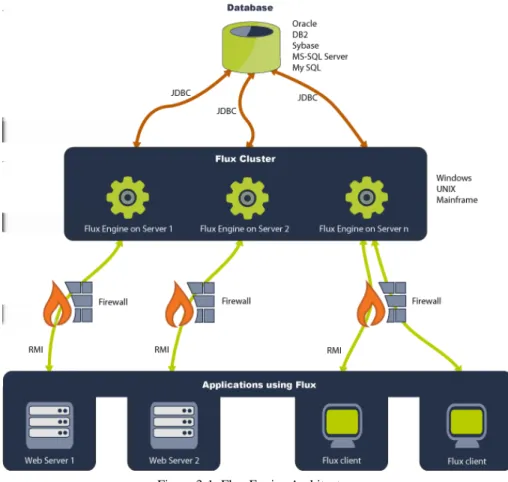
The Flux engine is based on a peer-to-peer architecture in which each Flux engine in the cluster is capable of failing over and clustering flow charts. A Flux engine can be run on platforms like Windows, UNIX, Solaris, IBM mainframes, or any other operating systems with support for JDK 5 and above. For a complete list of operating systems and platforms known to work with Flux, refer to Chapter 2 “Technical Specifications” . See Figure 3-1 below for an accurate depiction of the behavior of the Flux engine.
Flux can be used with databases like Oracle, DB2, Sybase, MySQL, and MS-SQLServer to store flow chart structure and data. An in-memory HSQL
implementation is provided for applications that do not need or have persistent storage. For a complete list of databases supported by Flux, refer to Chapter 2 “Technical
Specifications” .
3.1.1 Flux Clients
Flux clients run the Flux software. These clients create instances of Flux that will work with the client’s servers and networks to share information and flow charts created and run by Flux. The protocol used for client-engine communication is RMI.
A Flux client may be:
3.1.2 Flux with J2SE
The Java 2 Platform, Standard Edition (J2SE) gives you a complete environment for doing applications development on desktops and servers. It also acts as the base for the Java 2 Platform, Enterprise Edition (J2EE) and Java Web Services.
Figure 3-1: Flux Engine Architecture
• A Web client (Web User Interface) • A standalone GUI (JDK 1.4+) • The Command Line Interface (CLI) • Application code using Flux APIs • The Flux Business Process Dashboard • The Flux JSP tag library
3.1.2.1 Flux with In-Memory Databases
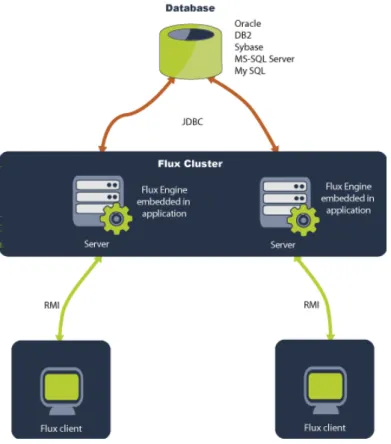
You can use Flux with its embedded, in-memory database to create a fast and simple environment for Flux to run in.
Figure 3-3 below displays the architecture of Flux using the J2SE platform with its embedded database.
Figure 3-2: Flux on the J2SE platform
3.1.3 Flux with J2EE
The Java 2 Platform, Enterprise Edition (J2EE) is the standard for developing multi-tier enterprise applications. The J2EE platform can simplify enterprise applications by basing them on standardized, modular components; by providing a set of services to those components; and by automatically handling details of application behavior; all without complex programming. If you are running Flux on a J2EE platform, it is
suggested that you do not depend on the J2EE JAR files that are packaged with Flux, as these files could be out of date. Instead, we recommend you use the EJB and JMS JAR files that are distributed with your application server.
Figure 3-4 below illustrates Flux running on the J2EE platform.
3.1.4 The Cycles and States of the Flux Engine
Like other components and objects, Flux is created, initialized, started, and later disposed. During initialization, you provide information to Flux so that it can
communicate with your database and application server. Once it is initialized, you can interact with Flux. However, scheduled flow charts will not fire until the component is started. Once started, the component can be stopped and restarted indefinitely. When the component is stopped, flow charts do not fire. Finally, when your application is ready to shut down, the component is disposed. Once disposed, the component cannot be re-used.
The sequence diagram in Figure 3-5 below illustrates this sequence of steps. Flux is created, initialized, started and used, then disposed.
As has been explained, Flux can be in one of three states: Stopped, Running, and
Disposed. When Flux is first created and initialized, it enters the Stopped state. From
this state, you can fully interact with Flux. However, any scheduled flow charts do not fire. From the Stopped state, you can proceed to the Running state. In the Running state, scheduled flow charts fire. Flux may go back and forth between the Running and
Stopped states indefinitely. You may wish to re-enter the Stopped state from the Running state in order to temporarily prohibit flow charts from firing.
Finally, when your application is ready to shut down, Flux transitions into the Disposed state. Once the Disposed state has been entered, you cannot interact with Flux, nor will flow charts fire, until a new Flux instance is created, initialized, and started.
These three Flux states are shown below in Figure 3-6.
As explained in greater detail below, you create jobs as flow charts. All flow charts have a start action, which is the first function to be performed. In many situations, the start action is a Timer Trigger. Timer triggers wait for a particular time and date. These times and dates are calculated using Time Expressions, which are simple strings that
succinctly describe when, and how often, a timer should fire, with precision down to the millisecond.
Continuing this example, once a timer trigger fires, flow of control transfers to another action in the flow chart. Typically, this subsequent action notifies a listener in your application. Listeners can be Java objects, EJB session beans, EJB message driven beans, or JMS message listeners. J2EE applications, for example, find it convenient to use EJB session beans and JMS message listeners as flow chart listeners. The kind of listener you choose depends on your application's architecture.
Because Flux models jobs as flow charts, after a listener action executes, control can flow to other actions. Possible actions include File actions for writing files, Email actions for sending email, Messaging actions for sending messages to other applications in the enterprise. Besides actions, control can flow into other triggers. Flux includes a
sophisticated timer trigger that waits for certain times and dates. Other triggers are possible, including File triggers that wait for a file to be created or modified, Email triggers that wait for incoming email to arrive, messaging triggers that wait for inbound
Figure 3-5: Flux Cycle
messages from other software systems in the enterprise. You can create your own triggers and actions to plug into the Flux scheduler. Your custom triggers and actions should make it easy to create new flow charts that tightly interact with your application. Scheduled flow charts can be in different states. Each flow chart has a super-state and a sub-state.
The super-state can be either Normal or Error. A flow chart in the Normal super-state runs in the usual way. However, a flow chart in the Error super-state is being handled by Flux’s default error handling mechanism, which provides a very flexible way to recover from flow chart errors.
The sub-state can be one of several possible states:
• Waiting:A flow chart in the Waiting sub-state is eligible for execution at a specific
time in the future. For example, active timer triggers exist in the Waiting sub-state as they wait for their scheduled firing time to arrive.
• Firing: A flow chart in the Firing state is executing.
• Triggering: A flow chart in the Triggering sub-state is waiting for an event to occur.
For example, active message triggers, business process triggers, and manual triggers exist in the Triggering sub-state as they wait for an event to occur or to be expedited.
• Paused: Paused flow charts do not execute or fire triggers until they are explicitly
resumed.
• Joining: A flow chart in the Joining sub-state is involved in a split-and-join flow
chart structure. A split forks a flow chart into multiple, parallel flows of execution. These parallel flows can be joined together at a later point in the flow chart, which is where the Joining sub-state is used.
• Failed: A flow chart in the Failed sub-state has failed to recover from an error and
is waiting for some kind of external intervention. The Failed sub-state is legal only if the super-state is Error. A flow chart in the Failed sub-state is temporarily
prevented from executing.
• Finished: A flow chart in the Finished sub-state is done executing and is ready to
be deleted by the Flux Engine.
The Flux architecture described in Section 3.1 provides an accurate, high-level view of how applications interact with the Flux flow chart scheduling component. In the
Examples section, there are complete, working code examples that show how to get started developing your application with Flux.
3.1.5 Traversing Firewalls
A firewall is software that helps to protect your network from unauthorized access outside of your network. Flux is engineered to traverse firewalls in a secure manner to ensure that your firewall stays intact and Flux still runs properly.
Flux can traverse firewalls in two ways: simple traversal and IP tunneling.
In a simple Flux firewall traversal, you open a port on the firewall to allow access to the Flux engine. The Flux engine must then be configured to use the open port. This can be set using the registry_port configuration option in your engine configuration file, or programmatically through the Configuration.setRegistryPort() method.
A Flux client obtains a reference to the engine using the Factory.lookupRmiEngine() method. Once this reference is obtained, the client uses it to communicate with the Flux server. This client-server communication is handled through a random port by default. You can specify the port that the Flux engine will use to communicate with the client by setting the rmi_port configuration option, or through the Configuration.setRmiPort() method as demonstrated below. Java's RMI subsystem multiplexes many RMI objects onto one port, so only a single port needs to be configured.
NOTE: If the rmi_port configuration option is set to a different port than the
registry_port, you will need to ensure that both are open on the firewall. Factory factory = Factory.makeInstance();
Configuration config = factory.makeConfiguration(); // creates an RMI registry on port 1099
config.setRegistryPort(1099);
// specifies port 1099 as the client-server communication port config.setRmiPort(1099);
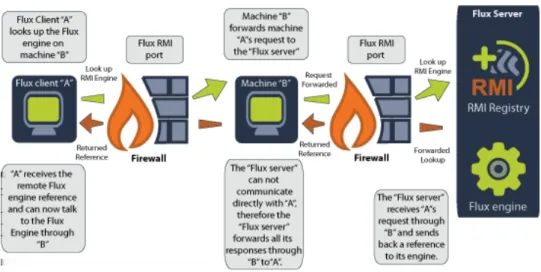
Refer to Figure 3-7 below for a detailed diagram of Flux using simple firewall traversal.
When using IP tunneling, you will have to set the JVM property
-Djava.rmi.server.hostname to the IP address of the first host in the tunnel on your Flux server. The default value of this property is the IP address of the local host in
"dotted-quad" format.
-Djava.rmi.server.hostname="Host.IP.Adress"
Suppose you have three computers in your IP tunnel; A, B, and C. A can only
communicate with B, B can communicate with A and C, and C can only communicate with B. A sends a Flux engine lookup request to B on port 1099. B forwards the lookup request to C. C finds the engine and returns a reference to that engine back to A using
B as an intermediary. A can now talk to the engine on C through B. Refer to Figure 3-8 for a detailed diagram of how Flux traverses firewalls using IP tunneling.
4 Flow Chart Runs
Several methods are available for working with flow chart runs. Most of the methods are provided in theflux.NonStreamableinterface which is implemented by
flux.Engine. Some of the flow chart run related methods are shown below in Table 4-1.
Variations of the above methods which accept date ranges are also defined in flux.NonStreamable.
Figure 3-8: IP Tunneling
Table 4-1: Flow Chart Runs Methods
Method Description
long getAverageRuntime(String) Returns the average length of execution time in milliseconds for all runs in the specified namespace.
long getLongestRuntime(String) Returns the runtime in milliseconds of the longest flow chart run in the specified namespace.
long getOpenRunCount(String) Returns the total number of flow chart runs which have not completed in the specified namespace which occurred within the lower and upper date boundaries.
long getRunCount(String) Returns the total number of flow chart runs in the specified namespace.
FlowChartRunIterator getRuns(St
ring, Date, Date) Returns all runs in the specifiednamespace which occurred within the lower and upper date boundaries. long getUnsuccessfulRunCount(St
ring) Returns the total number of unsuccessfulflow chart runs in the specified namespace.
5 Creating and Initializing Flux
In order to create Flux, you must first decide how you are going to use Flux. The Flux engine component can be used as a purely local Java object or as an RMI server. If Flux is created as an RMI server, you can access it remotely from another Java virtual machine.
Create Flux as a local Java object if you do not need to contact the engine from a different virtual machine. On the other hand, if you are running an application across a cluster of computers and need to communicate with Flux from different virtual machines, you will need to start Flux as an RMI server.
When Flux is created, it is optionally initialized with information from your database. If you choose to persist flow charts in your relational database, Flux must be told how to communicate with your database. By default, Flux uses an in-memory database, HSQL. Running Flux in this configuration makes it easy to get started with Flux programming. Later, when you are more proficient in Flux, you can instruct Flux to store its flow chart information in your database.
You can perform this initialization work in your Java code. Alternately, to make it simpler, you can initialize your engine from a configuration file. The configuration includes
information on how to access your database and other tunable parameters. The Flux configuration file can be either a properties file or an XML file. ForStringproperties that have defaults, such as "username", you can explicitly set that property to an empty value by using the reserved word nullin the properties configuration file, or XML configuration file. In general, however, not setting a property will give it a default value. If there is no default value, it takes anullvalue. If you explicitly want to set anullvalue and there is a default value set already, use the reserved word null.
As described in the following sections, there are a myriad number of ways to create Flux engine instances and to look up remote Flux instances. Do not be overwhelmed by the choices. Simply look for a solution that works for you and your application and stick with it.
5.1 Creating Flux
The base class you will be working with in the Flux API is the Factory class. From this object, almost all of Flux components are manufactured, or can be produced from objects manufactured from it. The Factory object can be instantiated as follows:
import flux.*;
Factory fluxFactory = Factory.makeInstance();
Once you have created this Flux factory object, you can create all manner of different Flux instances. You can also lookup remote Flux instances running in other Java virtual machines.
To create a rudimentary Flux engine with no configuration options set, the following syntax is valid:
Engine engine = fluxFactory.makeEngine();
When using this technique to create a Flux engine instance, an HSQL in-memory database is used under the covers. When using the HSQL in-memory database in Flux,
flow charts are not stored beyond the lifetime of a Flux engine instance. When using the HSQL database, you will be unable to configure a Flux engine for clustering or failover.
5.2 Creating Flux Using a Database
Later, once you have gained proficiency with Flux, you will want to have Flux store its flow chart information to your database. There are two basic ways to do this. First, you can supply Flux with your JDBC driver class name, along with other information, so Flux can contact your database. Here is an example using Oracle.
engine = fluxFactory.makeJ2seRmiEngine(DatabaseType.ORACLE, "oracle.jdbc.driver.OracleDriver",
"jdbc:oracle:thin:@127.0.0.1:1521:orcl", "username",
"password",
5 /* Maximum number of database connections */, "FLUX_" /* Table prefix */,
"Flux" /* Engine bind name */, 1099 /* Engine registry port */, true /* Create registry option */);
The above code example provides the connection information to communicate with an Oracle database running on the local host. In this example, Flux will create up to five database connections to Oracle. Flux’s database table names are prefixed with the string "FLUX_" so that the table names are guaranteed to be unique. These tables must be created manually using the appropriate Flux database creation script located within the doc directory below the Flux installation directory. In this case the Flux oracle.sql script would be used.
Using this pattern, you can substitute your own JDBC driver and other database connection information to communicate with your database. Flux assumes your
database tables are created correctly; therefore, if you have any problems while trying to run Flux with your database tables, check your tables to ensure they are all there and complete.
Flux refers to J2SE engines when a JDBC driver is used to connect to a database. On the other hand, Flux refers to J2EE engines when an application server’s data source is used to connect to a database.
J2SE engines are responsible for committing and rolling back all transactions, however, J2EE engines behave differently.
5.3 Creating Flux Using a Data Source
You can also initialize Flux to use database connections from your application server’s database connection pool. Here is an example.
engine = fluxFactory.makeJ2eeEngine("initial.context.factory", "iiop://myserver",
The above code provides information to communicate with an application server’s database connection pool. For many application server scenarios, you do not need to specify the initial context factory or the provider URL (the first two arguments). In typical situations, this information has already been set by the application server and does not need to be repeated.
Sometimes database connections timeout or are closed automatically by the database server. To respond to this situation, your application server may need to be configured to periodically refresh database connections in its connection pool.
Before Flux can use your data source, it must first lookup a "user transaction" from your application server. There are two user transaction JNDI lookup names that must be configured in your Flux configuration. One is for use from inside the Flux engine: DATA_SOURCE_USER_TRANSACTION_SERVER_JNDI_NAME
The other is for use from a client accessing the Flux engine: DATA_SOURCE_USER_TRANSACTION_CLIENT_JNDI_NAME
Both of these configuration properties default to java:comp/UserTransaction. Change this JNDI lookup string if your application server requires a different lookup string.
On the J2EE platform, the Java Transaction API (JTA) links a transaction manager to the parties involved in a distribution transaction system. Specifically, Flux, the transaction manager, is tied together with many actions into one bundle. When a transaction break occurs in Flux, the bundle of transactions is committed.
You can configure this behavior by setting theDATA_SOURCE_USER_TRANSACTION configuration option. By default, this configuration is set to false, meaning that Flux will assume responsibility for committing and rolling back its own transactions. If you set this option totrue, Flux will use a User Transaction object to coordinate the commitment of transactions with the database.
5.4 Creating Flux as an RMI Server
The simplest way to create Flux as an RMI server is with the following code. engine = fluxFactory.makeRmiEngine();
The above code is good for initial testing until you become more proficient with Flux programming. Later, you may want to create Flux as an RMI server with database connection information, as described above. The appropriate methods to call are shown below.
engine = fluxFactory.makeJ2seRmiEngine(…); // J2SE
and
engine = fluxFactory.makeJ2eeRmiEngine(…); // J2EE
5.5 Looking up a Flux RMI Server Instance
Once you have created Flux as an RMI server, it is simple to look it up from the same Java virtual machine or a different one, given that you have specified your RMI host server.
remoteEngine = fluxFactory.lookupRmiEngine("my_remote_host");
The above code looks up an RMI server on the machine "my_remote_host", which was created using default arguments.
5.6 Creating Flux Using a Configuration Object
If you choose, you can also collect all the configuration information into a configuration object and then create an engine instance using that configuration object.
Configuration config = fluxFactory.makeConfiguration(); config.setDriver("oracle.jdbc.driver.OracleDriver"); . . . // Set other configuration settings.
engine = fluxFactory.makeEngine(config);
By using a configuration object, you can modularize Flux’s initialization data.
There are many configuration properties that can be used. For complete details, see the flux.Configuration Javadoc documentation.
5.7 Looking Up a Remote Flux Instance Using a Configuration Object
You can also use the same configuration object to lookup a remote Flux instance.config.setHost("my_remote_host");
engine= fluxFactory.lookupRmiEngine(config);
5.8 Creating Flux from a Configuration File
Sometimes it is easier to set the configuration information in a properties or XML file. This way, for example, a database password does not have to be hard-coded in your application.
// Properties configuration file Configuration propsConfig = fluxFactory.makeConfigurationFromProperties(myPropsFile); engine = fluxFactory.makeEngine(propsConfig); // XML configuration file Configuration xmlConfig = fluxFactory.makeConfigurationFromXml(myXmlFile); engine = fluxFactory.makeEngine(xmlConfig);
Using either of the above methods, a configuration file is read, converted to a
Configuration object, and then used to create an engine instance. The configuration file is a simple file name. To find the configuration file, or the XML DTD file that an XML configuration file references, Flux first looks in the system class path. Next, the current class loader’s class path is searched. Finally, the current directory (user.dir) is checked. The XML DTD file that describes Flux’s XML configuration file is
Sample configuration files and examples can be found in the
examples/software_developers/config and examples/software_developers/xml_config
directories in the Flux package.
All the configuration properties that can be configured are listed in the flux.Configuration Javadoc documentation.
5.9 Looking Up a Remote Flux Instance from a Configuration File
Similarly, a configuration file can be used to lookup a remote Flux instance.// Properties configuration file Configuration propsConfig = fluxFactory.makeConfigurationFromProperties(myPropsFile); engine = fluxFactory.lookupRmiEngine(propsConfig); // XML configuration file Configuration xmlConfig = fluxFactory.makeConfigurationFromXml(myXmlFile); engine = fluxFactory.lookupRmiEngine(xmlConfig)
6 XML Wrapper
You can interact with the scheduler using XML APIs. These XML APIs form a wrapper around a Flux scheduler instance. Starting withflux.xml.XmlFactory, you can make instances ofXmlEngineandXmlEngineHelperobjects. The behavior is analogous to the behavior offlux.Factory.
Once you have created anXmlEngine, you can interact with it much like a normal Engineobject. However, some methods are streamable. For example, the
XmlEngine.put()method accepts an input stream containing an XML document. That XML document contains definitions of flow charts. Each of these flow charts is read and added to the scheduler.
Similarly, the XmlEngine.get()methods write flow charts from the scheduler to an output stream. You can define the output stream to be a file or any object that extends java.io.OutputStream.
When anXmlEngine reads an XML file, an XML DTD file may be referenced. To find that XML DTD file, Flux first looks in the system class path. Next, the current class loader’s class path is searched. Finally, the current directory (user.dir) is checked. The XML DTD file that describes streamable flow charts used by Flux’s XML APIs is
flow-charts-5-0.dtd.
XML wrapper examples can be found in the examples/xml directory in the Flux package. Note that beginning with Flux 5.0, the XML file format changed. However, in Flux 5, there are still XML APIs to read and write the old Flux 4.2 XML flow chart file format as well as new XML APIs to read and write the new Flux XML flow chart file format. By default, the Flux 5.0 XML file formats are used.
Note that as of Flux 6.0, support for the old Flux 4.2 XML flow chart file format was removed. If you have XML flow chart files in the Flux 4.2 format, use the Flux 5 APIs to convert any them to the Flux 5.0 format, which is the current XML flow chart file format used in Flux 5 and Flux 6.
7 Creating Flow Charts
Flux models jobs using traditional flow charts. Flux’s flow charts are as expressive and powerful as a finite state machine. By using a flow chart to model your job, your job can be arbitrarily complex. For example, your job may not contain any timing elements at all. It may simply execute actions A, B, and C in order.
On the other hand, if your application requirements dictate that you execute actions A, B, and C in order, and then wait for a certain time to occur, followed by actions D, E, and F, then a flow chart is powerful enough to model that job.
7.1 Flow Charts
To create a flow chart, you must create a flow chart object. To create a flow chart object, you need a helper object calledEngineHelper.
EngineHelper helper = fluxFactory.makeEngineHelper();
FlowChart flowChart = helper.makeFlowChart("My Flow Chart");
Flow charts must have names. In the example above, the name of the flow chart is "My Flow Chart". Flow chart names must not contain any of the following characters: "*", "?", "%", "_", ".", or "$".
Flow chart name can be hierarchical. For example, the names "/my flow chart",
"/heavyweights/my big job", and "/lightweights/my little job" are hierarchical and form a tree. The "/" symbol is the separator character that defines the different branches in the hierarchical tree. Collectively, all flow chart names form a hierarchical flow chart
namespace, that is, a tree of flow charts.
If a flow chart name is incomplete, because it refers to a directory in the namespace and not an actual flow chart name, the engine automatically generates and returns a unique, fully-qualified flow chart name. For example, if the flow chart name is null, empty, or "/", then the engine generates a unique name such as "/392" and returns it. Similarly, if the flow chart name is "/heavyweights/", then the engine returns a name such as
"/heavyweights/72939".
7.1.1 Listener Class Path
Flux's listener class path feature is intended to allow you to install new versions of your Java Action and Dynamic Java Action listeners without having to restart your JVM. The listener class path is set on a flow chart or in the runtime configuration tree. By default, listener class paths are disabled. To enable them, you must enable the
LISTENER_CLASS_LOADER_ENABLED engine configuration property.
The listener class path is designed to reload only Java Action and Dynamic Java Action listener classes. It is not designed to reload tens or a hundred or more supporting jar files on which a listener class depends. In most cases, you should put these listener class jar file dependencies on the system class path. Any class loaded through the system class loader cannot be reloaded.
If a flow chart's listener class path property set tonull, the class path from the runtime configuration tree is used instead. By default, this property is set to null. The listener class path is either a list of directories and JAR files, or a single HTTP URL that points to one JAR file on the network.
In the following example, assume we have a file, database_listener.jar, which is located in the directory C:\action_listeners (or /action_listeners on Unix environments). To add this file to our listener class path, we would use the following code in a Windows environment:
FlowChart flowchart = engineHelper.makeFlowChart("Flow Chart"); flowchart.setListenerClasspath("action_listeners/databaseListener.ja r");
The listener class path may also accept in its argument a path to a directory. If a directory is specified, any JAR files under that directory are automatically included in alphabetical order in the listener class path as well