Flipped Classroom Strategies
Using Online Videos
Mary Lou Maher
Software and Information
Systems
UNC Charlotte
[email protected]
Heather Lipford
Software and Information
Systems
UNC Charlotte
[email protected]
Vikash Singh
Software and Information
Systems
UNC Charlotte
[email protected]
ABSTRACT
The basic principles of a flipped classroom teaching method are to deliver instruction online and to move active learning into the classroom. There are many strategies for delivering the instruction online, such as, preparing online lectures by the course instructors, wrapping the course around a MOOC, and collecting online videos from various sources. There are also many strategies for including active learning in the classroom. In this paper we describe our strategies for a flipped classroom using online videos: selecting videos from various sources, integrating the critique and selection of videos as part of the learning experience, and organizing in class learning around scaffolding skills development and identifying misconceptions. The course content includes design and layout for web pages as well as applications development for interactivity. This paper contributes a set of strategies to consider for online instruction and active learning of skills and concepts for programming courses. Through course evaluations and student surveys we present the distribution of students’ positive and negative responses to our strategies.
Categories and Subject Descriptors
D.3.3 [Programming Languages]
General Terms
Languages, Education
Author Keywords
Flipped classroom, web applications, online video, strategies for active learning
1. INTRODUCTION
A flipped classroom teaching method has two components: deliver instruction online and move active learning into the classroom1. In
developing a flipped classroom teaching method, strategies for these two components are varied and flexible. There are at least 3 strategies for sourcing online instruction:
1. Record and deliver your own lectures online
2. Include the online instruction from an existing Massive Open Online Course (MOOC)
3. Collect and critique a selection of online videos for each topic in the course
The first strategy involves preparation of the instructor’s own online video lectures. This can be time consuming and may require updates each year if the technology in the course is changing quickly.
1 http://www.knewton.com/flipped-classroom/
The second strategy works well when there is a MOOC that covers all or most of the topics that are in a course on campus. This has been referred to as “wrapping a MOOC” [1].
The third strategy allows a course to be tailored towards the needs of the specific curriculum and the online instruction is selected and inserted at appropriate times in the semester.
This paper describes how we have developed the third strategy to take advantage of the significant existing resources in web application development tutorials and videos. In addition to taking advantage of the extensive selection of available videos, this strategy provides the students with a rich resource for online instruction that can be tailored to their specific level of understanding. We describe how we build on the online video instruction with in class activities by dividing the activities into two kinds of learning: skills development and concept learning.
2. BACKGROUND
Since the earliest attempt to use a flipped classroom method to teach an economics course [7], educators have used this teaching method in many courses including Mathematics [8], Biology [10], Business Management [12], Industrial Engineering [13] and Computer Science [4]. The flipped classroom teaching method has been used in both small courses of around 40 students as well as in large courses with hundreds of students. In large classrooms however, the students were divided into smaller groups when they were working on class activities [12].
Flipped courses require students to come to the class after viewing the required materials so that they can participate in the class activities. These learning materials such as lectures and presentations are delivered to students through an alternate medium such as podcasts or video-on-demand services [12, 13]. Students can view these materials on their own time prior to coming to the class where they then engage in various class activities.
Active learning is thus the other important component of this teaching method. Students spend time in the classroom working on activities, such as solving problems, writing code, or discussing concepts with their peers. This creates a learning environment where students learn by collaborating with their peers. Many studies have shown that working with peers in class activities such as programming exercises improves overall learning, increases confidence in students and makes coding fun [4, 5]. Classroom quizzes have also been used as an effective mode of instructor-student interaction and many new technologies including ‘Clickers’ have successfully been used to foster learning by questioning in classrooms [9].
Developing material for flipped classrooms is a challenging task and different instructors have used different approaches. Some
institutions and instructors are already recording their lectures for the purpose of distance education, which makes it easy for these instructors to leverage the same resources in their flipped classes. In these cases, the instructors have generally used their own recorded lectures for this purpose [3, 4, 13]. The amount of time required to prepare for a flipped class depends on the amount of content to be provided to the students. Some instructors have reported 35 hours of work to create an hour of lecture material [6], while others have reported less [2]. Besides lectures, instructors are also required to develop in class learning activities and quizzes. The amount of time required for grading also increases as weekly learning activities need to be evaluated regularly [3]. Students generally find the flipped model to be a more enjoyable learning experience. However, videotaped lectures are not liked by all students as many reported that sometimes the lectures were too long and not suited for difficult course materials [3]. Most students preferred short videos and suggested that optimal length of video lectures should be 15-30 minutes [4, 13].
In this paper we add to this literature with a focus on the strategies appropriate for learning both skills and concepts associated with programming courses, specifically for the design and implementation of interactive web applications. We present alternatives to the online instruction that include collecting resources from a variety of sources rather than one source or one instructor. Through student critiques of the online video lectures we identify several advantages and distinctions for moving the instruction from the in class lecture to online video. Through our development of strategies for in class activities, we propose a distinction between learning skills and concept development. In the following sections we describe how we have flipped a specific course and the students’ responses to these teaching methods.
3. FLIPPING A WEB APPLICATIONS
DEVELOPMENT COURSE
We describe our experience in an introductory Web applications course in an undergraduate degree, which we flipped for the first time in Spring 2013, and are offering again in Fall 2013. In Spring 2013 there were 2 instructors and 2 sections with 45 students each. In Fall 2013 there is 1 instructor for 90 students: 2 sections of 45 for each lab activity and 90 students in the weekly quiz activity. Teaching a web applications course is in many ways similar to teaching a programming course. Recent teaching methods for programming courses typically include the traditional lecture followed by lab sessions. The topics learned for our course include various languages, as well as design and layout considerations. The languages include: html, css, javascript, php, and jquery. There is not a MOOC style course on this topic at this time, but there are a very large number of YouTube videos that cover each of these topics, at many different levels of expertise. For this reason, and the fact that the language standards change often making many videos out of date a few years after they are made, we decided to collect videos for online instruction rather than wrap the course around a MOOC or make our own.
Not only have we flipped the classroom so that instruction takes place outside the classroom and class time is used for student activities, we have also flipped the order in which students are learning concepts: students engage with the online material and in class activities for learning specific skills in the beginning of each topic week and finish with an in class session that develops the students’ understanding of the concepts that they learned through the skills development.
4. COLLECTING ONLINE VIDEOS AND
CRITIQUES
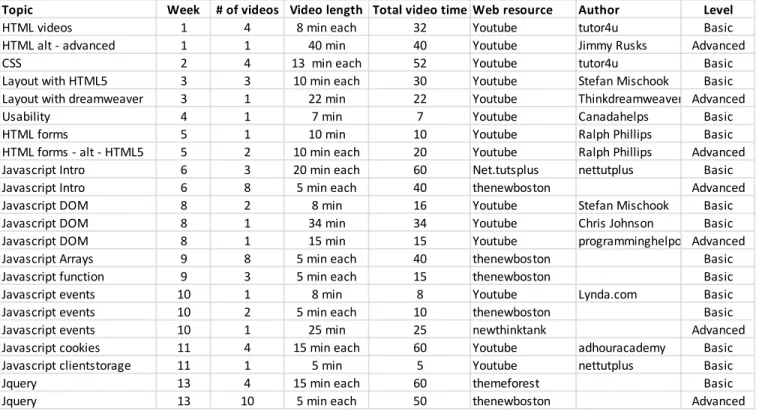
For each topic, we identified online videos and each week the students provided critiques of the videos. The students’ critiques gave us insight into what aspects of the video instruction they understood and what they liked and disliked about online instruction. Table 1 lists the videos we used for each topic along with some data about the video length, source, etc. In this section we describe the video content and the students’ recommendations, comments, and critiques of the videos. Through the critique, the students articulated their understanding of the role of the video instruction and how it contributes to their learning. Since this critique was submitted by the students on a weekly basis rather than at the end of the semester in a survey of the whole course, it became part of their learning experience and appreciation of the flipped classroom teaching method.
Although we used video resources for this course from many websites, two primary resources were YouTube and thenewboston.org websites. The thenewboston.org website has efficiently categorized videos in different tutorials that make it easy to search for videos by subject. However, on YouTube the primary mode of finding videos was to search by topic and select videos that have good content, were easy to understand, and at a suitable pace for introductory students. Most of the time we recommended two sets of videos (see Table 1): one with basic information on that week’s topic for students who were not familiar at all with the topic and the second set with some advanced information presented at a faster pace for students who were familiar with some of the concepts of web development. We used around 60 different videos throughout the course ranging from 5 minutes to 35 minutes in length. For some topics the online videos were divided into parts. On average students were required to view 60 minutes of video for each topic. Unlike a traditional lecture, most of the videos showed a computer screen, with the author typing and narrating a code example. While we used several videos from the same author so that the content directly built on the previous video, we selected videos from a variety of people in order to cover the course syllabus.
Each week students shared their opinions about the content of videos, whether they preferred the basic or advanced videos, and suggested videos that they found that were not included in our list of videos. For the HTML and CSS videos, students who had prior knowledge of some of the concepts found the videos with a faster pace to be more informative while the basic videos were boring and too slow. One student said:
“I thought the first videos entitled HTML Tutorial for Beginners have some very good information within them but I found them a bit boring, although I do have a little, (and I mean very little) prior knowledge of basic HTML so that is why I found them boring...”
Many students who had no prior knowledge of HTML found the basic videos easy to understand and good for beginners. One student said:
“I don't have any previous HTML knowledge … first set of videos were very helpful for me as it gave me some good insight into what to expect. The second videos were helpful as well, but they went a little fast for me.”
Students utilized the videos differently than a lecture. They commented that they were able to follow along with the code on their own, and pause, rewind, and replay as needed. Presenting such examples inside a classroom, with students following along on their own computers, is much more difficult. One student said:
“The good thing about videos is you can pause/play as you please and rewind/fastforward when necessary,…”
“Everything (especially JavaScript) made a lot more sense to me after watching this because of the cause-and-effect setup of his video. I find those kinds of videos to be the most helpful because it is very literal and you can see exactly what each line of code does to the page.”
The use of videos by a variety of authors demonstrated the large variety of resources that exist on the Internet to help teach and provide examples of code and programming concepts. We believe that diversity in resources promoted self-exploration to students, which they demonstrated later in their homework. Many referred back to the video tutorials while completing their homework, something that is not possible if the lecture is only available live in class. One student posted:
“As I am finishing up my final website, I am going back over the video tutorials for last minute help and ideas. They are much easier to understand at the end of the semester!”
It is not possible for the instructors, and even the textbook, to cover every language construct and option for the multiple languages covered in the course. Students learned to search for videos from favorite authors to learn additional topics. Several also mentioned using some of the same resource sites for other programming classes.
However, a disadvantage of these videos was that they did not always present a topic at a conceptual level, nor were they tailored
to the common misunderstandings or challenges that students in a particular class have. Students often described situations in which the author of the video didn’t do a good job.
“I thought these videos were very unhelpful. The guy just seems to be putting code on the screen and keeps saying "we will get to that later" and just continues to build his website.”
Other student said about the same video:
“I felt like the videos assumed a lot. I would have liked it if the instructor in the video actually explained what he was doing rather than just adding more code, particularly when he uses the float properties.”
This is one disadvantage of watching videos and performing lab activities prior the quiz and discussion where we conceptual aspects of the week’s topic were covered in greater detail. For some topics, such as basic HTML and CSS, this worked well. However, this was more challenging for topics such as the Javascript DOM and cookies. We attempted to provide a brief high level conceptual explanation during a preview a week prior to each topic. However, some students reported this was not sufficient and they would have appreciated more conceptual information prior to the lab activity. We may consider adding our own short conceptual lecture videos, introducing the week’s topics and the videos.
5. THE ROLE OF IN CLASS LAB
ACTIVITIES VS HOMEWORK
For the online instruction, students work at home, at their own pace, and select the instruction that best matches their knowledge and skill level. In contrast, the in class activities take place in a classroom with other students, have to be completed within a fixed time, and all students do the same activities. We prepared two kinds of in class activities each week, and on different days: lab Topic Week # of videos Video length Total video time Web resource Author Level
HTML videos 1 4 8 min each 32 Youtube tutor4u Basic
HTML alt -‐ advanced 1 1 40 min 40 Youtube Jimmy Rusks Advanced
CSS 2 4 13 min each 52 Youtube tutor4u Basic
Layout with HTML5 3 3 10 min each 30 Youtube Stefan Mischook Basic
Layout with dreamweaver 3 1 22 min 22 Youtube Thinkdreamweaver Advanced
Usability 4 1 7 min 7 Youtube Canadahelps Basic
HTML forms 5 1 10 min 10 Youtube Ralph Phillips Basic
HTML forms -‐ alt -‐ HTML5 5 2 10 min each 20 Youtube Ralph Phillips Advanced
Javascript Intro 6 3 20 min each 60 Net.tutsplus nettutplus Basic
Javascript Intro 6 8 5 min each 40 thenewboston Advanced
Javascript DOM 8 2 8 min 16 Youtube Stefan Mischook Basic
Javascript DOM 8 1 34 min 34 Youtube Chris Johnson Basic
Javascript DOM 8 1 15 min 15 Youtube programminghelporgAdvanced
Javascript Arrays 9 8 5 min each 40 thenewboston Basic
Javascript function 9 3 5 min each 15 thenewboston Basic
Javascript events 10 1 8 min 8 Youtube Lynda.com Basic
Javascript events 10 2 5 min each 10 thenewboston Basic
Javascript events 10 1 25 min 25 newthinktank Advanced
Javascript cookies 11 4 15 min each 60 Youtube adhouracademy Basic
Javascript clientstorage 11 1 5 min 5 Youtube nettutplus Basic
Jquery 13 4 15 min each 60 themeforest Basic
Jquery 13 10 5 min each 50 thenewboston Advanced
activities in which students worked in pairs and quiz activities in which students worked in small groups or as a larger group. The lab activities were defined to contrast the homework assignments. While both the lab activities and the homework provided the making and doing experience of learning programming languages, the lab activity is the scaffolding and the homework is the development and demonstration of learned knowledge and skills.
5.1. In Class Lab Activities
The in class lab activities involve writing code to practice doing what the students had seen in the online instruction videos and read in the text book. This activity was timed: the students completed as much as they could within the 75 minute class period. Students worked in pairs, where one student was asked to play the role of reading the instructions and telling the other student what to do, and the second student executed the instructions to complete the tasks. The instructors grouped the students into predefined pairs, so that a student was paired with a different student each week. The purpose of changing the pairs each week is to help the students to get to know a larger number of students in their class and to make sure that students don’t play the same role with the same person each week.
The in class lab activity has two components: the instructions for what the students were to do, and a set of files that gave the students an incomplete web page and code. Typically, students were asked to edit and extend existing html, css, or javascript files, add their own images and code, and validate the resulting web pages on a public server. The tasks covered a set of specific skills and language constructs each week. The instructions were grouped into 2 parts: the minimum required to get credit for doing the lab activity and extra effort to get a higher grade for the lab activity. The purpose of providing these two groups was to ensure that the students gain a minimal understanding of the topic so they can use it in their homework projects and to allow students to do extra work for more credit. These two levels also provided excitement and incentive to complete the extra effort part for a higher grade. The use of pair programming was successful, and seemed to encourage students to work both with their partner, and over time with other students, to answer questions and learn new techniques. Alternating the pairs was also important, as the skill and knowledge level of students was quite varied, with some having years of web design experience and others having none. However, the students were initially anxious over these labs and getting sufficient credit. Assignments need to be carefully constructed so that students who come prepared could regularly complete the basic tasks and get what they felt was sufficient credit. The anxiety subsided as students became accustomed to the course, and we got better at creating in-class lab activities that could be completed in the time allocated.
5.2 Homework
Over the course of the semester, each student worked on a significant web application development project as a focus for individual homework assignments. In contrast to the lab activities, the homework assignments were open ended: defined by the goals and functions of the development effort rather than by the instructions on how to achieve the goals and functions. Submissions were staged to allow formative as well as summative assessment. The staged submissions comprised different components of the total application: project proposal, web site design and layout, interactive forms, gallery and slide show, final application. Each individual assignment was graded and feedback
provided for changes to be included in the final application. Students submitted their final application four weeks before the final submission for additional critique so improvements could be made before final submission.
We found that the open ended homework encouraged creativity. Students were required to choose a project that had a customer in mind, either real or potentially real, and many created a site they intended to use outside of the course. Students were also encouraged to find inspiration and examples from the Web, as long as they were documented. Thus, in comparison to previous semesters where all students completed the same programming assignment, the sites were much more polished and professional, and included more functionality. As each site was unique, students were also more able to help each other and cheating was less of a problem. We had a session for project presentations, which were not just a demonstration of some of the students’ websites, but discussions with students asking how certain functionality was accomplished and what the challenges were, and providing suggestions for how the site could be improved or enhanced. However, this homework also required a careful rubric, and more time spent giving individual feedback and challenging grading as compared with previous semesters.
6. ACTIVE LEARNING THROUGH
QUIZZES
One classroom session a week is an activity around a quiz. While the quiz is the incentive for the student to attend the classroom session, it is also used as a focus for active learning. Using the quiz as a learning activity is based on the finding that retrieving from memory improves long term retention [11]. The quiz is the last activity of the week, after students have watched videos, read the text book, and completed the lab activity. The quiz comprised primarily multiple choice questions selected from the text book and the video content associated with the topic of the week. In contrast to the lab activity, the quiz tests and reinforces conceptual knowledge where the lab develops programming skills.
Throughout the semester, different techniques were used to make the quiz a classroom activity that encouraged peer learning and the discovery and clarification of misconceptions. One technique is to give the students the quiz on paper, on which they identify themselves by an ID number rather than name. After completing the quiz, the papers are collected and redistributed to the students so that they are grading a quiz that is not their own and they do not know the name of the student. The students sign their name after grading a quiz and tick a box that they have graded the quiz correctly. The instructor directs the peer grading of the quiz by going over each question, discussing what answers the students have on the quiz they are grading, and creating a dialogue about why an answer is right or wrong. In this way, the students get immediate feedback on what they get right and wrong, and the class discusses why the wrong answers are wrong. A mini lecture is given when a particular question has highlighted that there is a common misconception on a particular topic or when a question on the quiz is indicative of a general concept that will help the students understand similar situations.
We developed and tried several strategies for student interaction that encourage peer instruction around quizzes:
1. Students complete the quiz on their own, and then are asked to compare and discuss their answers with the students sitting near them until all students sitting near each other have the same answers. Each student’s quiz is graded separately.
2. Students form groups and each group completes a quiz, again, ensuring that the answers are the consensus of the group. All students in a group get the same grade.
3. Students complete the quiz on their own. Then students form a group and complete a group quiz. Each student gets the grade that is the higher of their individual and group grade. 4. Students complete the quiz using clickers rather than paper and the results of the class are aggregated on the screen in front of the room. Various game-like methods are used to create competition.
In all variations on the way the quiz was administered, the quiz provided the focus for the peer learning, the discovery of misconceptions, and the mini-lectures on topics for reinforcement. Students also had initial anxiety over the quizzes, as they could miss many questions designed to find their misconceptions. This anxiety also decreased over time as they understood how their quiz scores impacted their overall grade. They liked the active learning components, but we found that we also needed to explain our goals for the quizzes as a learning activity to alleviate their concern over their scores. Different quiz methods seemed to work better for different kinds of topics, and we are still experimenting with these.
7. STUDENT EVALUATIONS AND
PERCEPTIONS
We evaluated the Spring 2013 course using the standard course evaluation as well as a survey specific to the effectiveness of flipped classroom teaching.
The standard student evaluation forms administered at the end of the semester typically start with statements about the instructor. For example “My instructor displays a clear understanding of the course topics.” “My instructor has an effective style of presentation.” This creates an impression that the quality of the course depends on how much the instructor knows rather than on how much the student learned. While it may be appropriate to evaluate the quality of the instructor, we wanted a survey that primed students to think about the quality of the learning experience rather than about how much the instructor knows. Thus, we administered our own survey to gather student perceptions about the flipped classroom teaching method. These questions included a statements about the online videos, the in class activities, and peer learning. Each statement requested a response on a 7 pt Likert scale, with 7 being a very positive response and 1 being a very negative response. Sixty-one students completed the survey. The survey had the following groups of statements/questions:
• Comparing this course to more traditional lecture based courses
• Questions about how much they learned from online videos,
textbook, quizzes, in class lab activities, lectures/discussions. These questions were repeated for CSS/HTML and
Javascript.
• Statements about working in pairs or groups.
Here is a sample of the survey responses:
“How helpful were the online videos for learning HTML/CSS?
• 11 responses below 4: Not helpful,
• 50 responses 4 and above: Helpful.
“How helpful were the in class lab activities for learning Javascript?”
• 9 responses below 4: Not helpful, • 52 responses 4 and above: Helpful.
“How helpful were the quizzes for learning HTML/CSS?”
• 21 responses below 4: Not helpful,
• 40 responses 4 and above: Helpful.
“Working with a partner during lab activities generally helped me to understand the code better. “
• 13 responses below 4: disagree,
• 48 responses 4 and above: agree.
Of the 13 who responded that they disagreed that working with a partner helped, 11 responded in agreement with: “I generally helped my partner to understand the code better when we were working on lab activities.”
Thus, the overall response to our strategies for online instruction and in class activities was positive, with 65% of the respondents providing a positive response in the worst case and 80% providing a positive response in the best case.
While the students were initially concerned with a lack of lectures in the classroom, most students’ perceptions changed by the end of the semester when we had them complete the survey and had positive responses to learning concepts from online videos. However, there was still a small percentage of students at the end of the semester with concerns about this approach to teaching:
“We were graded on topics not covered then lectured after.”
This shows that even at the end of the semester, this student had not figured out that the content provided in the online instruction and the textbook was part of the learning experience. We are responding to this by reflecting on how we can better communicate our expectations and planning for student learning as we also incorporate overview lectures before students are exposed to specific skills development.
As many others have found with a flipped classroom teaching method, the students were positive about receiving specific and personal help inside the classroom. Yet, the perception of instructors not spending sufficient time on teaching students is important to address, particularly when this method can take as much or more preparation time for instructors than a traditional classroom strategy.
8. CONCLUSIONS
This paper presents strategies for a flipped classroom teaching method that uses various sources for online video instruction and shows how that decision to incorporate many sources of video leads to several strategies for active learning: video critique and recommendations become part of the learning experience, video instruction precedes skills development and concept learning, in class lab activities scaffold for open ended homework projects, and in class quizzes lead to discovery of misconceptions. We have shown how these strategies were implemented for a web applications development course and how student perceptions are generally very positive about the learning experience. In the future we plan to collect data on the effect of this teaching method on the distribution of grades and the drop, withdraw, and fail rates for this course.
ACKNOWLEDGMENTS
REFERENCES
[1] Bruff, D., Fisher, D., McEwen, K. and Smith, B. 2013. Wrapping a MOOC: Student perceptions of an experiment in blended learning. Journal of Online Learning and Teaching. 9, 2 (Accepted 2013). [2] Day, J.A. and Foley, J.D. 2006. Evaluating a Web
Lecture Intervention in a Human ndash;Computer Interaction Course. IEEE Transactions on Education. 49, 4 (2006), 420–431.
[3] Gannod, G.C., Burge, J.E. and Helmick, M.T. 2008. Using the inverted classroom to teach software engineering. ACM/IEEE 30th International Conference on Software Engineering, 2008. ICSE ’08 (2008), 777–786.
[4] Gehringer, E.F. and Peddycord,III, B.W. 2013. The inverted-lecture model: a case study in computer architecture. Proceeding of the 44th ACM technical symposium on Computer science education (New York, NY, USA, 2013), 489–494.
[5] Hanks, B. 2006. Student attitudes toward pair programming. Proceedings of the 11th annual SIGCSE conference on Innovation and technology in computer science education (New York, NY, USA, 2006), 113–117.
[6] Kaner, C. and Fiedler, R. 2005. Inside Out: A Computer Science Course Gets a Makeover. (2005). [7] Lage, M.J., Platt, G.J. and Treglia, M. 2000.
Inverting the Classroom: A Gateway to Creating an Inclusive Learning Environment. The Journal of Economic Education. 31, 1 (Jan. 2000), 30–43.
[8] Lockwood, K. and Esselstein, R. 2013. The inverted classroom and the CS curriculum. Proceeding of the 44th ACM technical symposium on Computer science education (New York, NY, USA, 2013), 113–118. [9] Mayer, R., Stull, A., Almeroth, K., Bimber, B., Chun,
D., Bulger, M., Campbell, J., Knight, A. and Zhang, H. Using Technology-Based Methods to Foster Learning in Large Lecture Classes: Evidence for the Pedagogic Value of Clickers.
[10] Moravec, M., Williams, A., Aguilar-Roca, N. and O’Dowd, D.K. 2010. Learn before lecture: A strategy that improves learning outcomes in a large introductory biology class. CBE life sciences education. 9, 4 (2010), 473–481.
[11] Roediger, H.L. and Karpicke, J.D. 2006. Test-enhanced learning: taking memory tests improves long-term retention. Psychological science. 17, 3 (Mar. 2006), 249–255.
[12] Schullery, N.M., Reck, R.F. and Schullery, S. 2011. Toward solving the high enrollment, low engagement dilemma: A case study in introductory business. International Journal of Business, Humanities and Technology. 1, 2 (2011), 1–9.
[13] Toto, R. and Nguyen, H. 2009. Flipping the work design in an industrial engineering course. Proceedings of the 39th IEEE international conference on Frontiers in education conference (Piscataway, NJ, USA, 2009), 1066–1069.