SAS/ACCESS
®9.1
Supplement for
Microsoft SQL Server
SAS/ACCESS for Relational Databases
The correct bibliographic citation for this manual is as follows: SAS Institute Inc. 2004. SAS/ACCESS®9.1 Supplement for Microsoft SQL Server (SAS/ACCESS for Relational Databases). Cary, NC: SAS Institute Inc.
SAS/ACCESS®9.1 Supplement for Microsoft SQL Server (SAS/ACCESS for Relational Databases)
Copyright © 2004, SAS Institute Inc., Cary, NC, USA ISBN 1-59047-248-9
All rights reserved. Produced in the United States of America. No part of this publication may be reproduced, stored in a retrieval system, or transmitted, in any form or by any means, electronic, mechanical, photocopying, or otherwise, without the prior written permission of the publisher, SAS Institute Inc.
U.S. Government Restricted Rights Notice. Use, duplication, or disclosure of this software and related documentation by the U.S. government is subject to the Agreement with SAS Institute and the restrictions set forth in FAR 52.227–19 Commercial Computer Software-Restricted Rights (June 1987).
SAS Institute Inc., SAS Campus Drive, Cary, North Carolina 27513. 1st printing, January 2004
SAS Publishing provides a complete selection of books and electronic products to help customers use SAS software to its fullest potential. For more information about our e-books, e-learning products, CDs, and hard-copy books, visit the SAS Publishing Web site atsupport.sas.com/pubsor call 1-800-727-3228.
SAS®and all other SAS Institute Inc. product or service names are registered trademarks or trademarks of SAS Institute Inc. in the USA and other countries. ®indicates USA
registration.
Other brand and product names are registered trademarks or trademarks of their respective companies.
Contents
Chapter 1
4
SAS/ACCESS for Microsoft SQL Server
1
Introduction to the SAS/ACCESS Interface to Microsoft SQL Server 1 LIBNAME Statement Specifics for Microsoft SQL Server 1
Data Set Options for Microsoft SQL Server 5
Pass-Through Facility Specifics for Microsoft SQL Server 6 DBLOAD Procedure Specifics for Microsoft SQL Server 8 Passing SAS Functions to Microsoft SQL Server 9 Locking in the Microsoft SQL Server Interface 10 Naming Conventions for Microsoft SQL Server 11 Data Types for Microsoft SQL Server 11
Appendix 1
4
Recommended Reading
15
Recommended Reading 15
Glossary
17
Index
23
1
C H A P T E R
1
SAS/ACCESS for Microsoft SQL
Server
Introduction to the SAS/ACCESS Interface to Microsoft SQL Server 1 LIBNAME Statement Specifics for Microsoft SQL Server 1
Arguments 2
Microsoft SQL Server LIBNAME Statement Examples 5 Data Set Options for Microsoft SQL Server 5
Pass-Through Facility Specifics for Microsoft SQL Server 6 CONNECT Statement Examples 7
Connection To Component Examples 7
DBLOAD Procedure Specifics for Microsoft SQL Server 8 Examples 9
Passing SAS Functions to Microsoft SQL Server 9 Locking in the Microsoft SQL Server Interface 10 Naming Conventions for Microsoft SQL Server 11 Data Types for Microsoft SQL Server 11
Microsoft SQL Server Null Values 12
Introduction to the SAS/ACCESS Interface to Microsoft SQL Server
This document includes detailsonlyabout the SAS/ACCESS interface to Microsoft SQL Server. It should be used as a supplement to the generic SAS/ACCESSdocumentation,SAS/ACCESS for Relational Databases: Reference.
The SAS/ACCESS interface to Microsoft SQL Server under UNIX hosts has been tested and certified against Data Direct Technologies Connect ODBC and Data Direct Sequelink ODBC products.
LIBNAME Statement Specifics for Microsoft SQL Server
This section describes the LIBNAME statement as supported in the SAS/ACCESS interface to Microsoft SQL Server. For a complete description of this feature, see the LIBNAME statement section inSAS/ACCESS for Relational Databases: Reference. The Microsoft SQL Server specific syntax for the LIBNAME statement is:
2 Arguments 4 Chapter 1
Arguments
libref
is any SAS name that serves as an alias to associate SAS with a database, schema, server, or group of tables and views.
sqlsvr
is the SAS/ACCESS engine name for the interface to Microsoft SQL Server.
connection-options
provide connection information and control how SAS manages the timing and concurrence of the connection to the DBMS. There are multiple ways that you can connect to Microsoft SQL Server when using the LIBNAME statement. Use only one of the following methods for each connection since they are mutually exclusive:
3 specify USER=, PASSWORD=, and DATASRC= 3 specify COMPLETE=
3 specify NOPROMPT= 3 specify PROMPT= 3 specify REQUIRED=.
The connection options are defined as follows: USER=<’>user-name<’>
enables you to connect to Microsoft SQL Server with a user ID that is different from the default ID.
USER= is optional. UID= is an alias for this option. PASSWORD=<’>password<’>
specifies the Microsoft SQL Server password that is associated with your user ID.
PASSWORD= is optional. PWD= is an alias for this option. DATASRC=<’>SQL-Server-data-source<’>
specifies the Microsoft SQL Server data source to which you want to connect. For PC platforms, data sources must be configured by using the Microsoft SQL Server icon in the Windows Control Panel. For UNIX platforms, data sources must be configured by modifying the .ODBC.ini file.
DSN= is an alias for this option that indicates that the connection is attempted using the ODBC SQLConnect API, which requires a data source name. Optionally, a user ID and password can be used in conjunction with DSN=. This API is guaranteed to be present in all drivers.
COMPLETE=<’>SQL-Server-connection-options<’>
specifies connection options for your data source or database. Separate multiple options with a semicolon. When a successful connection is made, the complete connection string is returned in the SYSDBMSG macro variable.
If you do not specify enough correct connection options, you are prompted with a dialog box that displays the values from the COMPLETE= connection string. You can edit any field before you connect to the data source.
See your driver documentation for more details. NOPROMPT=<’>SQL-Server-connection-options<’>
specifies connection options for your data source or database. Separate multiple options with a semicolon.
If you do not specify enough correct connection options, an error is returned. No dialog box is displayed to help you with the connection string.
SAS/ACCESS for Microsoft SQL Server 4 Arguments 3 PROMPT=<’>SQL-Server-connection-options<’>
specifies connection options for your data source or database. Separate multiple options with a semicolon. When a successful connection is made, the complete connection string is returned in the SYSDBMSG macro variable.
PROMPT= does not immediately attempt to connect to the DBMS. Instead, it displays a dialog box that contains the values that you entered in the PROMPT= connection string. You can edit values or enter additional values in any field before you connect to the data source.
REQUIRED=<’>SQL-Server-connection-options<’>
specifies connection options for your data source or database. Separate multiple options with a semicolon. When a successful connection is made, the complete connection string is returned in the SYSDBMSG macro variable.
If you do not specify enough correct connection options, a dialog box prompts you for the connection options. REQUIRED= allows you to modify only required fields in the dialog box.
The following Microsoft SQL Server connection options are not supported on UNIX: REQUIRED=
BULKCOPY= PROMPT= COMPLETE=
LIBNAME-options
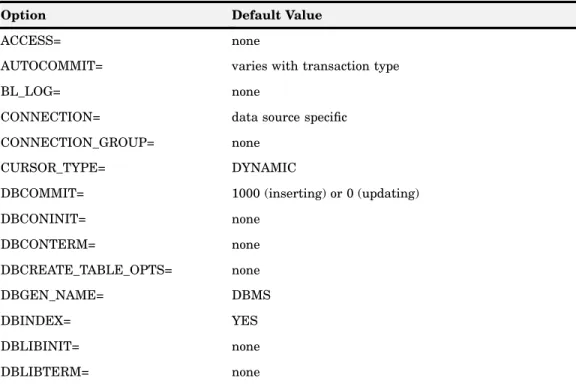
define how DBMS objects are processed by SAS. Some LIBNAME options can enhance performance; others determine locking or naming behavior. The following table describes the LIBNAME options that are supported for Microsoft SQL Server, and presents default values where applicable. See the section about the SAS/ACCESS LIBNAME statement inSAS/ACCESS for Relational Databases: Referencefor detailed information about these options.
Table 1.1 SAS/ACCESS LIBNAME Options for Microsoft SQL Server
Option Default Value
ACCESS= none
AUTOCOMMIT= varies with transaction type
BL_LOG= none
CONNECTION= data source specific CONNECTION_GROUP= none
CURSOR_TYPE= DYNAMIC
DBCOMMIT= 1000 (inserting) or 0 (updating)
DBCONINIT= none DBCONTERM= none DBCREATE_TABLE_OPTS= none DBGEN_NAME= DBMS DBINDEX= YES DBLIBINIT= none DBLIBTERM= none
4 Arguments 4 Chapter 1
Option Default Value
DBMAX_TEXT= 1024 DBNULLKEYS= YES DBPROMPT= NO DBSLICEPARM= THREADED_APPS,2 or 3 DEFER= NO DELETE_MULT_ROWS= NO DIRECT_EXE= none DIRECT_SQL= YES IGNORE_ READ_ONLY_COLUMNS= NO INSERT_SQL= YES INSERTBUFF= 1 KEYSET_SIZE= 0 MULTI_DATASRC_OPT= NONE
PRESERVE_COL_NAMES= see “Naming Conventions for Microsoft SQL Server” on page 11
PRESERVE_TAB_NAMES= see “Naming Conventions for Microsoft SQL Server” on page 11
QUALIFIER= none QUERY_TIMEOUT= 0
QUOTE_CHAR = none
READBUFF= 0
READ_ISOLATION_LEVEL= RC (see “Locking in the Microsoft SQL Server Interface” on page 10) READ_LOCK_TYPE= ROW REREAD_EXPOSURE= NO SCHEMA= none SPOOL= YES STRINGDATES= NO TRACE= NO TRACEFILE= none
UPDATE_ISOLATION_LEVEL= RC (see “Locking in the Microsoft SQL Server Interface” on page 10)
UPDATE_LOCK_TYPE= ROW UPDATE_MULT_ ROWS= NO
SAS/ACCESS for Microsoft SQL Server 4 Data Set Options for Microsoft SQL Server 5
Option Default Value
USE_ODBC_CL= NO UTILCONN_TRANSIENT= NO
Microsoft SQL Server LIBNAME Statement Examples
In following example, USER= and PASSWORD= are connection options. libname mydblib sqlsvr user=testuser password=testpass;
In the following example, the libref MYDBLIB connects to a Microsoft SQL Server database using the NOPROMPT= option.
libname mydblib sqlsvr noprompt="uid=testuser; pwd=testpass;
dsn=sqlservr;" stringdates=yes;
proc print data=mydblib.customers; where state=’CA’;
run;
Data Set Options for Microsoft SQL Server
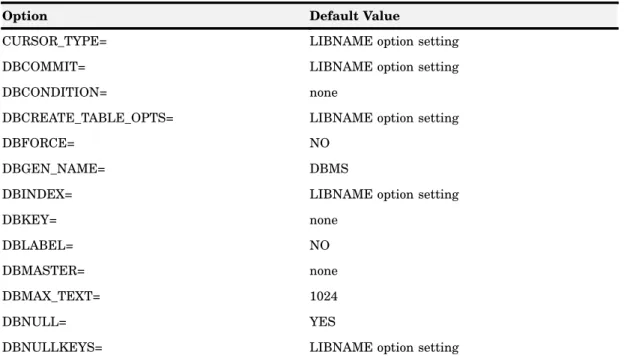
The following table describes the data set options that are supported for the Microsoft SQL Server under UNIX hosts interface, and provides default values where applicable. See the section about data set options inSAS/ACCESS for Relational Databases: Referencefor detailed information about these options.
Table 1.2 SAS/ACCESS Data Set Options for Microsoft SQL Server
Option Default Value
CURSOR_TYPE= LIBNAME option setting DBCOMMIT= LIBNAME option setting
DBCONDITION= none
DBCREATE_TABLE_OPTS= LIBNAME option setting
DBFORCE= NO
DBGEN_NAME= DBMS
DBINDEX= LIBNAME option setting
DBKEY= none
DBLABEL= NO
DBMASTER= none
DBMAX_TEXT= 1024
DBNULL= YES
6 Pass-Through Facility Specifics for Microsoft SQL Server 4 Chapter 1
Option Default Value
DBPROMPT= LIBNAME option setting
DBSASTYPE= see “Data Types for Microsoft SQL Server” on page 11
DBSLICE= none
DBSLICEPARM= THREADED_APPS,2 or 3
DBTYPE= see “Data Types for Microsoft SQL Server” on page 11
ERRLIMIT= 1
IGNORE_ READ_ONLY_COLUMNS= NO
INSERT_SQL= LIBNAME option setting
INSERTBUFF= LIBNAME option setting KEYSET_SIZE= LIBNAME option setting
NULLCHAR= SAS
NULLCHARVAL= a blank character PRESERVE_COL_NAMES= LIBNAME option setting
QUALIFIER= LIBNAME option setting
QUERY_TIMEOUT= LIBNAME option setting READBUFF= LIBNAME option setting READ_ISOLATION_LEVEL= LIBNAME option setting
READ_LOCK_TYPE= LIBNAME option setting
SASDATEFMT= none
SCHEMA= LIBNAME option setting UPDATE_ISOLATION_LEVEL= LIBNAME option setting
UPDATE_LOCK_TYPE= LIBNAME option setting UPDATE_SQL= LIBNAME option setting
Pass-Through Facility Specifics for Microsoft SQL Server
See the section about the Pass-Through Facility inSAS/ACCESS for Relational Databases: Referencefor general information about this feature.
The Pass-Through Facility specifics for Microsoft SQL Server under UNIX hosts are as follows:
3 Thedbms-nameisSQLSVR.
3 The CONNECT statement is required.
3 PROC SQL supports multiple connections to Microsoft SQL Server. If you use multiple simultaneous connections, you must use thealiasargument to identify the different connections. If you do not specify an alias, the default alias is used. The functionality of multiple connections to the same Microsoft SQL Server data source might be limited by the particular data source’s driver.
3 The CONNECT statementdatabase-connection-argumentsare identical to its LIBNAME statement connection options.
SAS/ACCESS for Microsoft SQL Server 4 Connection To Component Examples 7 3 The following LIBNAME options are available with the CONNECT statement:
AUTOCOMMIT= CURSOR_TYPE= KEYSET_SIZE= QUERY_TIMEOUT= READBUFF= READ_ISOLATION_LEVEL= TRACE= TRACEFILE= USE_ODBC_CL=
3 TheDBMS-SQL-query argument can be a DBMS-specific SQL EXECUTE statement that executes a DBMS stored procedure. However, if the stored procedure contains more than one query, only the first query is processed.
CONNECT Statement Examples
The following examples connect to a data source that is configured under the data source nameUser’s Datausing the alias USER1. The first example uses the
connection method that is guaranteed to be present at the lowest level of conformance. Note that DATASRC= names can contain quotation marks and spaces.
proc sql;
connect to sqlsvr as user1
(datasrc="User’s Data" user=testuser password=testpass);
The following example uses the connection method that represents a more advanced level of Microsoft SQL Server ODBC conformance. It uses the input dialog box that is provided by the driver. The DSN= and UID= arguments are within the connection string and are not parsed by the Pass-Through Facility. Instead, they are passed to the ODBC driver manager.
proc sql;
connect to SQLSVR as user1
(required = "dsn=User’s Data; uid=testuser");
The following example enables you to select any data source that is configured on your machine. The example uses the connection method that represents a more
advanced level of Microsoft SQL Server ODBC conformance, Level 1. When a successful connection is made, the connection string is returned in the SQLXMSG and
SYSDBMSG macro variables and can be stored if this method is used to configure a connection for later use.
proc sql;
connect to SQLSVR (required);
The following example prompts you to specify the information that is required to make a connection to the DBMS. You are prompted to supply the data source name, user ID, and password in the dialog boxes that are displayed.
proc sql;
connect to SQLSVR (prompt);
Connection To Component Examples
The following example sends Microsoft SQL Server 6.5 (configured under the data source name "SQL Server") an SQL query for processing. The results from the query
8 DBLOAD Procedure Specifics for Microsoft SQL Server 4 Chapter 1
serve as a virtual table for the PROC SQL FROM clause. In this example, MYDB is the connection alias.
proc sql;
connect to SQLSVR as mydb
(datasrc="SQL Server" user=testuser password=testpass); select * from connection to mydb
(select CUSTOMER, NAME, COUNTRY from CUSTOMERS
where COUNTRY <> ’USA’); quit;
The following example returns a list of the columns in the CUSTOMERS table. proc sql;
connect to SQLSVR as mydb
(datasrc = "SQL Server" user=testuser password=testpass); select * from connection to mydb
(ODBC::SQLColumns (, , "CUSTOMERS")); quit;
DBLOAD Procedure Specifics for Microsoft SQL Server
See the section about the DBLOAD procedure inSAS/ACCESS for Relational Databases: Referencefor general information about this feature.
The Microsoft SQL Server under UNIX hosts interface supports all of the DBLOAD procedure statements (except ACCDESC=) in batch mode. The Microsoft SQL Server interface specifics for the DBLOAD procedure are as follows:
3 The DBLOAD step DBMS= value isSQLSVR.
3 PROC DBLOAD uses the following database description statements: DSN= <’>database-name<’>;
specifies the name of the database in which you want to store the new
Microsoft SQL Server table. Thedatabase-nameis limited to eight characters. The database that you specify must already exist. If the database name contains any of the following special characters (_,$,@,#), you must enclose the database name in quotation marks. However, the Microsoft SQL Server standard recommends against using special characters in database names. USER= <’>username<’>;
enables you to connect to a Microsoft SQL Server database with a user ID that is different from the default ID.
USER= is optional in the interface to Microsoft SQL Server. If you specify USER=, you must also specify PASSWORD=. If USER= is omitted, your default user ID is used.
PASSWORD=<’>password<’>;
specifies the Microsoft SQL Server password that is associated with your user ID.
PASSWORD= is optional in the interface to Microsoft SQL Server because users have default user IDs. If you specify USER=, you must specify
PASSWORD=.
Note: If you do not wish to enter your SQL Server password in clear text on this statement, see PROC PWENCODE for a method to encode it. 4
SAS/ACCESS for Microsoft SQL Server 4 Passing SAS Functions to Microsoft SQL Server 9
Examples
The following example creates a new Microsoft SQL Server table,
TESTUSER.EXCHANGE, from the DLIB.RATEOFEX data file. You must be granted the appropriate privileges in order to create new Microsoft SQL Server tables or views.
proc dbload dbms=SQLSVR data=dlib.rateofex; dsn=sample; user=’testuser’; password=’testpass’; table=exchange; rename fgnindol=fgnindollars 4=dollarsinfgn;
nulls updated=n fgnindollars=n dollarsinfgn=n country=n; load;
run;
The following example only sends a Microsoft SQL Server SQL GRANT statement to the SAMPLE database and does not create a new table. Therefore, the TABLE= and LOAD statements are omitted.
proc dbload dbms=SQLSVR; user=’testuser’; password=’testpass’; dsn=sample;
sql grant select on testuser.exchange to dbitest;
run;
Passing SAS Functions to Microsoft SQL Server
The interface to Microsoft SQL Server passes the following SAS functions to the data source for processing (if the DBMS server supports the function). See the section about optimizing SQL usage inSAS/ACCESS for Relational Databases: Referencefor
information. ABS ARCOS ARSIN ATAN AVGCEIL COS EXP FLOOR LOG LOG10 LOWCASE MIN
10 Locking in the Microsoft SQL Server Interface 4 Chapter 1 MAX SIGN SIN SQRT TAN UPCASE SUM COUNT
Locking in the Microsoft SQL Server Interface
The following LIBNAME and data set options enable you to control how the interface to Microsoft SQL Server under UNIX hosts handles locking. See the section about the LIBNAME statement inSAS/ACCESS for Relational Databases: Referencefor
additional information about these options.
READ_LOCK_TYPE= ROW | TABLE | NOLOCK UPDATE_LOCK_TYPE= ROW | TABLE | NOLOCK READ_ISOLATION_LEVEL= S | RR | RC | RU | V
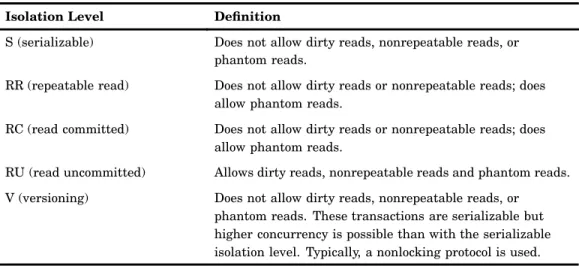
The Microsoft SQL Server ODBC driver manager supports the S, RR, RC, RU, and V isolation levels that are defined in the following table:
Table 1.3 Isolation Levels for Microsoft SQL Server
Isolation Level Definition
S (serializable) Does not allow dirty reads, nonrepeatable reads, or phantom reads.
RR (repeatable read) Does not allow dirty reads or nonrepeatable reads; does allow phantom reads.
RC (read committed) Does not allow dirty reads or nonrepeatable reads; does allow phantom reads.
RU (read uncommitted) Allows dirty reads, nonrepeatable reads and phantom reads.
V (versioning) Does not allow dirty reads, nonrepeatable reads, or phantom reads. These transactions are serializable but higher concurrency is possible than with the serializable isolation level. Typically, a nonlocking protocol is used.
The terms in the table are defined as follows:
3 Dirty read— A transaction that exhibits this phenomenon has very minimal isolation from concurrent transactions. In fact, the transaction can see changes that are made by those concurrent transactions even before they commit.
For example, if transaction T1 performs an update on a row, transaction T2 then retrieves that row, and transaction T1 then terminates with rollback. Transaction T2 has then seen a row that no longer exists.
SAS/ACCESS for Microsoft SQL Server 4 Data Types for Microsoft SQL Server 11 3 Nonrepeatable read— If a transaction exhibits this phenomenon, it is
possible that it might read a row once and, if it attempts to read that row again later in the course of the same transaction, the row might have been changed or even deleted by another concurrent transaction. Therefore, the read is not necessarily repeatable.
For example, if transaction T1 retrieves a row, transaction T2 updates that row, and transaction T1 then retrieves the same row again. Transaction T1 has now retrieved the same row twice but has seen two different values for it. 3 Phantom reads— When a transaction exhibits this phenomemon, a set of
rows that it reads once might be a different set of rows if the transaction attempts to read them again.
For example, if transaction T1 retrieves the set of all rows that satisfy some condition. If transaction T2 then inserts a new row that satisfies that same condition, and if transaction T1 now repeats its retrieval request, it sees a row that did not previously exist, a “phantom.”
UPDATE_ISOLATION_LEVEL= S | RR | RC | V
The Microsoft SQL Server ODBC driver manager supports the S, RR, RC, and V isolation levels that are defined in the preceding table.
Naming Conventions for Microsoft SQL Server
The PRESERVE_COL_NAMES= and PRESERVE_TAB_NAMES= options determine how the interface to Microsoft SQL Server under UNIX hosts handles case sensitivity, spaces, and special characters. The default value for both of these options is YES for Microsoft Access, Microsoft Excel, and Microsoft SQL Server; NO for all others.
See the section about the LIBNAME statement inSAS/ACCESS for Relational Databases: Referencefor additional information about these options.
The Microsoft SQL Server interface supports table and column names up to 32 characters long. If the DBMS table names or column names are longer than 32 characters, they are truncated to 32 characters. If truncating a name results in
identical names, then SAS generates unique names by replacing the last character with a number.
Data Types for Microsoft SQL Server
Every column in a table has a name and a data type. The data type tells the DBMS how much physical storage to set aside for the column and the form in which the data is stored.
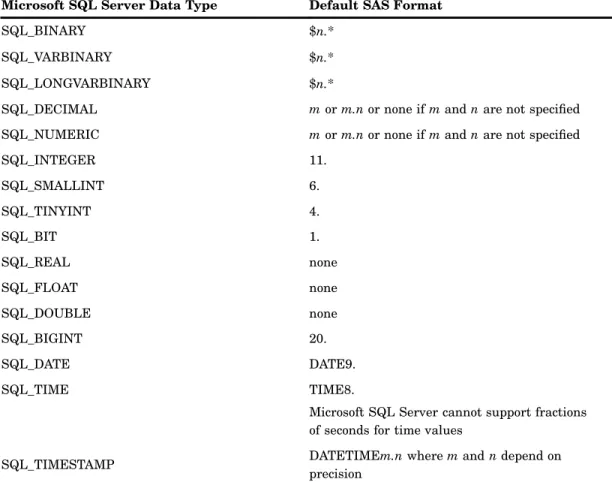
The following table shows all of the data types and default SAS formats that are supported by the interface to Microsoft SQL Server under UNIX hosts.
Table 1.4 Microsoft SQL Server Data Types and Default SAS Formats
Microsoft SQL Server Data Type Default SAS Format
SQL_CHAR $n
SQL_VARCHAR $n
12 Microsoft SQL Server Null Values 4 Chapter 1
Microsoft SQL Server Data Type Default SAS Format
SQL_BINARY $n.*
SQL_VARBINARY $n.*
SQL_LONGVARBINARY $n.*
SQL_DECIMAL morm.nor none ifmandnare not specified SQL_NUMERIC morm.nor none ifmandnare not specified
SQL_INTEGER 11. SQL_SMALLINT 6. SQL_TINYINT 4. SQL_BIT 1. SQL_REAL none SQL_FLOAT none SQL_DOUBLE none SQL_BIGINT 20. SQL_DATE DATE9. SQL_TIME TIME8.
Microsoft SQL Server cannot support fractions of seconds for time values
SQL_TIMESTAMP DATETIMEm.nwheremandndepend on precision
* Because the Microsoft SQL Server driver does the conversion, this field is displayed as though the $HEXn. format were applied.
The following table shows the default data types that the interface to Microsoft SQL Server uses when creating tables.
Table 1.5 Default Microsoft SQL Server Output Data Types
SAS Variable Format Default Microsoft SQL Server Data Type
m.n SQL_DOUBLE or SQL_NUMERIC usingm.nif
the DBMS allows it
$n. SQL_VARCHAR usingn
datetime formats SQL_TIMESTAMP
date formats SQL_DATE time formats SQL_TIME
The interface to Microsoft SQL Server allows nondefault data types to be specified with the DBTYPE= data set option.
Microsoft SQL Server Null Values
Microsoft SQL Server has a special value called NULL. A Microsoft SQL Server NULL value means an absence of information and is analogous to a SAS missing value.
SAS/ACCESS for Microsoft SQL Server 4 Microsoft SQL Server Null Values 13 When SAS/ACCESS reads a Microsoft SQL Server NULL value, it interprets it as a SAS missing value.
Microsoft SQL Server columns can be defined as NOT NULL so that they require data (they cannot contain NULL values). When a column is defined as NOT NULL, the DBMS will not add a row to the table unless the row has a value for that column. When creating a DBMS table with SAS/ACCESS, you can use the the DBNULL= data set option to indicate whether NULL is a valid value for specified columns.
For more information about how SAS handles NULL values, see inSAS/ACCESS for Relational Databases: Reference.
Note: To control how SAS missing character values are handled by Microsoft SQL Server, use the NULLCHAR= and NULLCHARVAL= data set options. 4
15
A P P E N D I X
1
Recommended Reading
Recommended Reading 15Recommended Reading
Here is the recommended reading list for this title: 3 SAS/ACCESS for Relational Databases: Reference
3 SAS Language Reference: Concepts
3 SAS Language Reference: Dictionary
3 Base SAS Procedures Guide
3 SAS Companion that is specific to your operating environment
For a complete list of SAS publications, see the currentSAS Publishing Catalog. To order the most current publications or to receive a free copy of the catalog, contact a SAS representative at
SAS Publishing Sales SAS Campus Drive Cary, NC 27513
Telephone: (800) 727-3228* Fax: (919) 677-8166
E-mail: [email protected]
Web address: support.sas.com/pubs
* For other SAS Institute business, call (919) 677-8000.
17
Glossary
This glossary defines SAS software terms that are used in this document as well as terms that relate specifically to SAS/ACCESS software.
access descriptor
a SAS/ACCESS file that describes data that is managed by a data management system. After creating an access descriptor, you can use it as the basis for creating one or more view descriptors. See also view and view descriptor.
browsing data
the process of viewing the contents of a file. Depending on how the file is accessed, you can view SAS data either one observation (row) at a time or as a group in a tabular format. You cannot update data that you are browsing.
bulk load
to load large amounts of data into a database object, using methods that are specific to a particular DBMS. Bulk loading enables you to rapidly and efficiently add multiple rows of data to a table as a single unit.
client
(1) a computer or application that requests services, data, or other resources from a server. (2) in the X Window System, an application program that interacts with the X server and can perform tasks such as terminal emulation or window management. For example, SAS is a client because it requests windows to be created, results to be displayed, and so on.
column
in relational databases, a vertical component of a table. Each column has a unique name, contains data of a specific type, and has certain attributes. A column is analogous to a variable in SAS terminology.
column function
an operation that is performed for each value in the column that is named as an argument of the function. For example, AVG(SALARY) is a column function. commit
the process that ends a transaction and makes permanent any changes to the database that the user made during the transaction. When the commit process occurs, locks on the database are released so that other applications can access the changed data. The SQL COMMIT statement initiates the commit processs.
18 Glossary
DATA step view
a type of SAS data set that consists of a stored DATA step program. Like other SAS data views, a DATA step view contains a definition of data that is stored elsewhere; the view does not contain the physical data. The view’s input data can come from one or more sources, including external files and other SAS data sets. Because a DATA step view only reads (opens for input) other files, you cannot update the view’s underlying data.
data type
a unit of character or numeric information in a SAS data set. A data value represents one variable in an observation.
data value
in SAS, a unit of character or numeric information in a SAS data set. A data value represents one variable in an observation.
database
an organized collection of related data. A database usually contains named files, named objects, or other named entities such as tables, views, and indexes database management system (DBMS)
an organized collection of related data. A database usually contains named files, named objects, or other named entities such as tables, views, and indexes editing data
the process of viewing the contents of a file with the intent and the ability to change those contents. Depending on how the file is accessed, you can view the data either one observation at a time or in a tabular format.
engine
a component of SAS software that reads from or writes to a file. Each engine enables SAS to access files that are in a particular format. There are several types of engines. file
a collection of related records that are treated as a unit. SAS files are processed and controlled by SAS and are stored in SAS data libraries.
format
a collection of related records that are treated as a unit. SAS files are processed and controlled by SAS and are stored in SAS data libraries. In SAS/ACCESS software, the default formats vary according to the interface product.
index
(1) in SAS software, a component of a SAS data set that enables SAS to access observations in the SAS data set quickly and efficiently. The purpose of SAS indexes is to optimize WHERE-clause processing and to facilitate BY-group processing. (2) in other software vendors’ databases, a named object that directs the DBMS to the storage location of a particular data value for a particular column. Some DBMSs have additional specifications. These indexes are also used to optimize the processing of WHERE clauses and joins. Depending on the SAS interface to a database product and how selection criteria are specified, SAS may or may not be able to use the indexes of the DBMS to speed data retrieval.
Depending on how selection criteria are specified, SAS might use DBMS indices to speed data retrieval.
informat
a pattern or set of instructions that SAS uses to determine how data values in an input file should be interpreted. SAS provides a set of standard informats and also enables you to define your own informats.
Glossary 19
interface view engine
a SAS engine that is used by SAS/ACCESS software to retrieve data from files that have been formatted by another vendor’s software. Each SAS/ACCESS interface has its own interface view engine, which reads the interface product data and returns the data in a form that SAS can understand (that is, in a SAS data set). SAS
automatically uses an interface view engine; the engine name is stored in
SAS/ACCESS descriptor files so that you do not need to specify the engine name in a LIBNAME statement.
libref
a name that is temporarily associated with a SAS data library. The complete name of a SAS file consists of two words, separated by a period. The libref, which is the first word, indicates the library. The second word is the name of the specific SAS file. For example, in VLIB.NEWBDAY, the libref VLIB tells SAS which library contains the file NEWBDAY. You assign a libref with a LIBNAME statement or with an operating system command.
member
a SAS file in a SAS data library. member name
a name that is given to a SAS file in a SAS data library. member type
a SAS name that identifies the type of information that is stored in a SAS file. Member types include ACCESS, DATA, CATALOG, PROGRAM, and VIEW. missing value
in SAS, a term that describes the contents of a variable that contains no data for a particular row or observation. By default, SAS prints or displays a missing numeric value as a single period, and it prints or displays a missing character value as a blank space.
observation
a row in a SAS data set. All of the data values in an observation are associated with a single entity such as a customer or a state. Each observation contains one data value for each variable. In a database product table, an observation is analogous to a row. Unlike rows in a database product table or file, observations in a SAS data file have an inherent order.
Pass-Through Facility
a group of SQL procedure statements that send and receive data directly between a relational database management system and SAS. The Pass-Through Facility includes the CONNECT, DISCONNECT, and EXECUTE statements, and the CONNECTION TO component. SAS/ACCESS software is required in order to use the Pass-Through Facility.
PROC SQL view
a SAS data set (of type VIEW) that is created by the SQL procedure. A PROC SQL view contains no data. Instead, it stores information that enables it to read data values from other files, which can include SAS data files, SAS/ACCESS views, DATA step views, or other PROC SQL views. A PROC SQL view’s output can be either a subset or a superset of one or more files.
query
a set of instructions that requests particular information from one or more data sources.
20 Glossary
referential integrity
a set of rules that a DBMS uses to ensure that whenever a data value in one table is changed, the appropriate change is also made to any related values in other tables or in the same table. Referential integrity is also used to ensure that related data is not deleted or changed accidentally.
relational database management system
a database management system that organizes and accesses data according to relationships between data items. Oracle and DB2 are examples of relational database management systems.
rollback
in most databases, the process that restores the database to its state when changes were last committed, voiding any recent changes. The SQL ROLLBACK statement initiates the rollback processes. See also commit.
row
in relational database management systems, the horizontal component of a table. A row is analogous to a SAS observation.
SAS data file
a type of SAS data set that contains data values as well as descriptor information that is associated with the data. The descriptor information includes information such as the data types and lengths of the variables, as well as the name of the engine that was used to create the data. A PROC SQL table is a SAS data file. SAS data files are of member type DATA.
SAS data library
a collection of one or more SAS files that are recognized by SAS and that are referenced and stored as a unit. Each file is a member of the library.
SAS data set
a file whose contents are in one of the native SAS file formats. There are two types of SAS data sets: SAS data files and SAS data views. SAS data files contain data values in addition to descriptor information that is associated with the data. SAS data views contain only the descriptor information plus other information that is required for retrieving data values from other SAS data sets or from files whose contents are in other software vendors’ file formats.
SAS data view
a file whose contents are in one of the native SAS file formats. There are two types of SAS data sets: SAS data files and SAS data views. SAS data files contain data values in addition to descriptor information that is associated with the data. SAS data views contain only the descriptor information plus other information that is required for retrieving data values from other SAS data sets or from files whose contents are in other software vendors’ file formats.
SAS/ACCESS views
See view descriptor and SAS data view. server
in a network, a computer that is reserved for servicing other computers in the network. Servers can provide several different types of services, such as file services and communication services. Servers can also enable users to access shared
resources such as disks, data, and modems. Structured Query Language (SQL)
the standardized, high-level query language that is used in relational database management systems to create and manipulate database management system objects. SAS implements SQL through the SQL procedure.
Glossary 21
table
a two-dimensional representation of data, in which the data values are arranged in rows and columns.
trigger
a type of user-defined stored procedure that is executed whenever a user issues a data-modification command such as INSERT, DELETE, or UPDATE for a specified table or column. Triggers can be used to implement referential integrity or to maintain business constraints.
variable
a column in a SAS data set. A variable is a set of data values that describe a given characteristic across all observations.
view
a definition of a virtual data set. The definition is named and stored for later use. A view contains no data; it merely describes or defines data that is stored elsewhere. SAS data views can be created by the ACCESS and SQL procedures.
view descriptor
a file created by SAS/ACCESS software that defines part or all of the database management system (DBMS) data or PC file data that is described by an access descriptor. The access descriptor describes the data in a single DBMS table, DBMS view, or PC file.
wildcard
a file created by SAS/ACCESS software that defines part or all of the database management system (DBMS) data or PC file data that is described by an access descriptor. The access descriptor describes the data in a single DBMS table, DBMS view, or PC file.
Index 23
Index
A
access descriptors 17
B
browsing data, defined 17 bulk loading 17
C
client, defined 17 commit, defined 17
COMPLETE= option, LIBNAME statement Microsoft SQL Server 2
CONNECT statement, SQL procedure options, Microsoft SQL Server 7
CONNECTION TO component, SQL SELECT statement
Microsoft SQL Server 7
D
data files defined 20
data libraries, defined 20 data set options
Microsoft SQL Server specifics 3 data sets defined 20 DATA step views, defined 18 data types 18 Microsoft SQL Server 11 data views, defined 20 databases, defined 18
DATASRC= option, LIBNAME statement Microsoft SQL Server 2
DBLOAD procedure
Microsoft SQL Server specifics 7 DBMS data 17
DBMS (database management systems), de-fined 18
dirty reads 10 DSN= option
LIBNAME statement 2 PROC DBLOAD statement 8
E
editing data, defined 18 engine, defined 18
F
files, defined 18I
indexes 18 informats, defined 18interface view engine, defined 19
L
LIBNAME statement
Microsoft SQL Server specifics 1 librefs
defined 19 locking data, handling
Microsoft SQL Server interface 10
M
Microsoft SQL Server, interface to 1 CONNECT statement options (SQL
proce-dure) 7 data set options 3 data types 11 DBLOAD procedure 7 LIBNAME statement 1 locking in 10 naming conventions 11 Pass-Through Facility 6 passing SAS functions to 9 missing values defined 19
N
naming conventions Microsoft SQL Server 11 nonrepeatable reads 11NOPROMPT= option, LIBNAME statement Microsoft SQL Server 2 NULL values Microsoft SQL Server 12
O
observations 19P
Pass-Through Facility 19Microsoft SQL Server specifics 6 PASSWORD= option, LIBNAME statement
Microsoft SQL Server 2
PASSWORD= option, PROC DBLOAD statement Microsoft SQL Server 8
phantom reads 11
PROMPT= option, LIBNAME statement Microsoft SQL Server 3
Q
queries, SQL defined 19
R
RDMS (relational database management sys-tem) 20
READ_ISOLATION_LEVEL= option Microsoft SQL Server interface 10 READ_LOCK_TYPE= option
Microsoft SQL Server interface 10 referential integrity, defined 20
REQUIRED= option, LIBNAME statement Microsoft SQL Server 3
rollbacks, defined 20 rows, table
24 Index
S
SAS/ACCESS data set options Microsoft SQL Server specifics 3 SAS data views, defined 20 SAS SQL functions
passing to Microsoft SQL Server 9 SAS variables
definition of 21 names and formats 18 SAS views
defined 20
SELECT statement (SQL)
CONNECTION TO component, Microsoft SQL Server 7
servers, defined 20 SQL_ data types
Microsoft SQL Server 11 SQL SELECT statement
CONNECTION TO component, Microsoft SQL Server 7
SQL views defined 19
SQL/y1 (Structured Query Language)/y0 20
T
tables, defined 21 triggers 21U
UPDATE_ISOLATION_LEVEL= option 11 UPDATE_LOCK_TYPE= optionMicrosoft SQL Server interface 10 USER= option
PROC DBLOAD statement 8
USER= option, LIBNAME statement Microsoft SQL Server 2
V
variable names and formats 18 variables definition of 21 view descriptors definition of 21 views, SQL definition of 21
W
wildcards, defined 21Your Turn
If you have comments or suggestions aboutSAS/ACCESS®9.1 Supplement for
Microsoft SQL Server, please send them to us on a photocopy of this page, or send us electronic mail.
For comments about this book, please return the photocopy to SAS Publishing
SAS Campus Drive Cary, NC 27513
E-mail: [email protected]
For suggestions about the software, please return the photocopy to SAS Institute Inc.
Technical Support Division SAS Campus Drive
Cary, NC 27513