ABSTRACT
WESLEY, RAVINAND ISAAC. Expertiza as a Support System for Collaborative Learning. (Under the direction of Dr. Edward Gehringer)
The thesis of the Expertiza project is that peer review can be used as a vehicle to produce learning objects but it can be viewed in other ways as well. For students, it can be seen as a workflow associated with the peer review process, and for instructors, it can be seen as a decision support system providing all the info they need to evaluate student contributions and assign grades.
Expertiza as a Support System for Collaborative Learning
by
Ravinand Isaac Wesley
A thesis submitted to the Graduate Faculty of
North Carolina State University
in partial fulfillment of the
requirements for the Degree of
Master of Science
Computer Science
Raleigh, North Carolina
2008
APPROVED BY:
__________________________ ___________________________
Dr. Laurie A. Williams Dr. Thomas L. Honeycutt
________________________________
Dr. Edward F. Gehringer
Dedication
B
iography
Ravinand Wesley was born on April 11, 1984 in Hyderabad, India. He obtained his
bachelor’s degree in Computer Science and Engineering at PRRM Engineering College, an
affiliate of the Jawaharlal Nehru Technological University, in July, 2005. Since then, he has
been a master’s student, majoring in Computer Science, at North Carolina State University,
A
cknowledgments
I would like to thank Dr. Edward Gehringer under whose guidance the thesis was
possible. I am grateful to my family, friends at Providence and at WRRI who have always
been a great support to me. My time at NC State was smooth and pleasurable because I had
Table of Contents
List of Figures ...vi
List of Tables ...vii
Introduction ... 1
1.1 Nature of the problem ... 1
1.2 Collaborative Learning ... 2
1.4 Thesis Organization... 3
Related work ... 4
2.1 Current work on collaborative learning ... 4
2.2 Our solution to the collaborative learning experience ... 7
System Architecture ... 11
3.1 Technology used ... 11
3.2 Content Management in Expertiza ... 12
2.3 Components of Expertiza ... 12
New Support Features in Expertiza ... 17
4.1 Communication between users... 20
4.2 Ease of use ... 25
4.3 Notification... 28
Conclusion ... 32
List of Figures
Figure 1: Formal v/s Informal learning ...1
Figure 2: Expertiza components and interaction between them ...13
Figure 3: A screen for new review...21
Figure 4: Screens for feedback...22
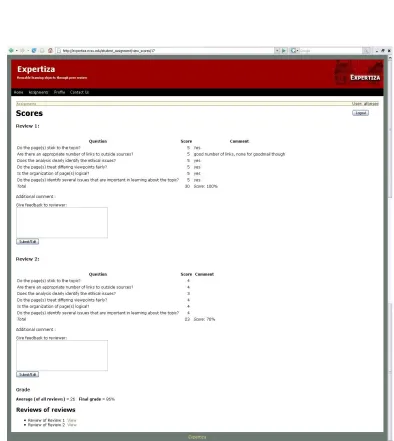
Figure 5: Screen to view scores...24
Figure 6: Handling outliers...27
List of
Tab
l
e
s
Table 1: Classes, views and databases involved in feedback...23
Table 2: Classes, views and databases involved in e-mail review...26
Chapter 1
Introduction
1.1 Nature of the problem
Students don't usually learn a lot by just studying on a certain topic. Unfortunately,
the learning methods normally used aren't effective enough. Most organizations focus on
formal learning methods such as classes, meetings and eLearning courses. However, 75% of
the learning that takes place in organizations is through informal learning methods. Informal
learning methods are ones that are not traditional or follow a structured pattern. This type of
learning typically includes learning
from the community, performing
activities and teaming with others for
common work. Marcia Conner in her
paper talks about how unexpected
learning through informal means is
much more effective to formal
intentional learning [1]. Figure 1: Formal v/s Informal learning
Students need to do some practical work on the subject to gain a better understanding
of it. One of the most effective ways to learn is to have students work together in a group
should work actively in the area in a way such that the work helps them understand the area
better. They need to integrate new material with what they already know or reorganize what
they thought they knew based on the new material [14]. Active exchange of ideas within
small groups increases interest and promotes critical learning. We propose to use
collaborative learning software for better teaching and learning. Collaborative learning
exercises among small groups have been very successful and have yielded good results [13].
1.2 Collaborative Learning
Collaborative learning is a teaching method wherein students team up in small groups
and work toward a common goal helping each other to be successful [2]. In some
collaborative learning settings, students are required to create a clearly delineated product; in
others the students are required to participate in a process and respond to each other’s work
[7]. Collaborative learning fosters student analysis skills, critical thinking and originality, and
it also helps in idea generation [6]. A few ways in which collaborative learning can be
helpful to students are listed below:
- Collaborative learning gives students constructive feedback on their work. Other
students try to help their peers rather than competing with them.
- While reviewing a submission, the students learn much about a project.
1.3 Role of Computer Science in this project
The proposed system can be thought of as a content-management system where the
goal is to present the right information to the right person. We need to devise workflow
strategies to allow each user—submitter, reviewer, instructor, to handle his tasks efficiently.
The information entering the system gets processed through various stages and metadata is
modified at each stage of the processing. We need to make sure the metadata and also the
actual data is managed properly.
A system such as this will require good use of software design principles to make
sure all project requirements are met. The system will require extensive web development;
thus we need to decide on an architecture that will enable us to extend and modify the system
quickly and efficiently. Considerable o-o design knowledge is required to design and develop
this system.
1.4 Thesis Organization
In Chapter 2 we discuss related work and also talk about how our system is different
from the already existing systems. Chapter 3 talks about the architecture of the system and
the various components involved. Chapter 4 describes the new features being added in detail
Chapter 2
Related work
The success and advantages of collaborative learning systems have generated
significant interest in corporate training environments as well as academia. Much work has
been done so far to enable collaborative learning. We look at few such works to detect any
possible enhancements to our system. As we proceed, we also explain why we haven’t used
an existing system for our purpose.
2.1 Current work on collaborative learning
The work done in the field of collaborative learning can be divided into the following fields:
Groupware
Groupware is software that allows users who are located remotely to work
collectively. The services offered by groupware include sharing of calendars, collective
writing, email handling, shared database access, electronic meetings, group contact and task
management, threaded discussions, text chat, data conferencing and audio and
videoconferencing and other such activities. A fundamental component of groupware is
E-mail messages include live links to databases, intranets and the Internet. Instant messaging
(IM) is also widely used [3]. Examples of groupware include LotusNotes by IBM, Microsoft
Sharepoint, etc.
E-mail is a fundamental component of groupware, because it is used to notify team
members, obtain responses and send alerts. E-mail messages include live links to databases,
intranets and the Internet. Instant messaging (IM) is also widely used [4]. We have adopted
this feature of groupware in our system.
Learning management systems
Learning management software is typically used for planning, implementing and
assessing a learning process. It allows an instructor to manage users, roles, courses,
instructors, and facilities and generate reports. A learning management system provides
services such as course calendar, learner messaging and notifications, assessment/testing
capable of handling student pre/post testing, display of scores and transcripts, grading of
coursework and roster processing, including waitlisting, web-based or blended course
delivery [5].
Notifications are an attractive feature of these systems. We will be implementing this feature
Discussion forums
One of the earliest forms of online communication in courses was threaded discussion
forums. Discussion forums are web applications which allow users to hold discussions. They
can also be used as common “meeting spaces,” where students are free to introduce
themselves and discuss material not related to the course. One can start a new discussion on
a forum and others can get involved in the discussion [12].
Users can usually register themselves for a forum. While some discussion forums
allow only registered members to post and access information, others have the option for
users to post information anonymously. Discussion forums give users a very easy way to
share information quickly. However, discussion forums have their limitations. They do not
make it easy to organize material; do not offer support for teams; and usually don’t support
enforcement of deadlines. Thus we need a better system than this to serve our needs.
Peer review
The basic idea of peer review is to have students review each other’s work and make
suggestions on how to improve it. Peer review increases the student's involvement in the
subject and helps the student get a holistic idea of a topic. Discussion forums can be used for
peer review, but only awkwardly. Usually, students can see all other students’ comments, so
they have a lot to read or to sort through. Moreover, there is no anonymity, so students may
Besides being a great method to educate, a dedicated peer-review system can also
reduce the amount of time spent on grading assignments by the instructors and the teaching
staff, as students take on some of the work of assessment. The instructor can spend this saved
time on teaching and other activities.
According to William Wolfe of California State University-Channel Islands, through
peer review: Students learn from their peers, receive more feedback than just one instructor
and feel more comfortable in the role of a critical reviewer[5].
However, peer review has its own pitfalls. It is very hard to get the students to do a
good job at reviewing. Many problems arise during the peer review phase due to cronyism,
inclination toward a particular idea, lack of knowledge on the topic etc.
2.2 Our solution to the collaborative learning experience
Expertiza is a peer review based system which uses active learning exercises to
produce reusable learning resources. Students choose an exercise or a problem from a list.
Once they finish work on the problem, they submit it for review using an electronic peer
review system. The submitted work will be reviewed by other students who will offer
We found peer review and learning management systems to be very successful in
getting students involved in the subject through group activities. We need to add tools which
make use of both learning management systems and peer-review systems and also avoid the
drawbacks of. Few tools have the following facilities:
Author-feedback
Many times, the author might not be able to express a valid point effectively. This
might cause the reviewer to misunderstand the content and in turn give a lower score to the
submission. Since the review process is double blinded, the author of the submission has no
way to get back to the reviewer and explain his/her point of view.
Good author-feedback functionality will allow the author to communicate with the
reviewer and explain anything that is unclear. The reviewer, on the other hand, can now get
back to the author with specific suggestions to improve the submission.
Deadline enforcement mechanisms
It is essential to have deadlines to organize the review and resubmission process. In
order for the review process to move forward on schedule, some mechanism is needed to set
and enforce deadlines. If this is not built into the tool, enforcement will be sporadic, and
students will not do their work on time. They may forget to do it at all. . It reduces
confusion; both the reviewer and the author can check for a submission update or feedback
Wiki assessments
Wikis are very helpful for team work. They have superior editing capabilities and it is
very easy for multiple users to make changes to a single object in an organized manner [12].
By integrating wiki support into a peer-review system, we can expand the possibilities for
collaboration among students.
Team support
A considerable number of course projects are team projects. Thus to integrate the peer
review system into a normal curriculum, we need to incorporate team support into it. The
system should behave similarly irrespective of the assignment being a team assignment or an
individual assignment. One interesting possibility is for teams to submit, but individuals to
review. Then each team profits from more separate reviews than an individual performs.
For example, if each student reviews two submissions, and three-member teams submit, each
team will receive approximately six reviews.
Contests
One more way to generate more interest in the students is by making the review
process competitive. We can give some incentive to the students for being better reviewers.
The reward can be in the form of extra points or some other kind. This will benefit both the
resources. Also, the students will learn more because they will be reviewing the work more
Chapter 3
System Architecture
This chapter discusses the architecture of the Expertiza system. The chapter describes
the design of the system and the different components involved.
3.1 Technology used
We used Ruby on Rails as the programming platform to develop this system. We
selected Ruby on Rails because we wanted a standard web framework so that we can use the
system on any type of server. Also, concise coding and dynamic language provided by Ruby
on Rails makes it faster to program. Ruby on Rails is strongly based on the
model/view/controller (MVC) architecture. The model defines all the domain objects and the
relationships between them. The view contains everything relevant to the user interface. It
provides a way to interact with the model. The controller binds the model and the view
together. It receives and processes requests and makes changes to the model if necessary.
Ruby on Rails also provides database persistence through active record. The Active Record
approach is used to access data in a database. Active Record connects business objects and
database tables to create a persistable domain model where logic and data is presented in one
wrapping. Using active record provides us benefits such as the database transactions are
3.2 Content Management in Expertiza
Expertiza can be thought of as a content management system which is used to manage
educational material. The system will have to take care of collecting the material of
information from different sources, storing the material, refining and improving the material,
archiving the material in such a way that it can be retrieved easily at a later stage.
Collection of information is an important step in content management. We have to
make sure that we are able to collect information from all possible sources and in all different
forms. The different sources that we can think of in our domain are wikis, external web pages
and the users themselves. We have to make sure that information from all these sources is
collected and is handled similarly. One of the main goals of Expertiza is to generate reusable
learning resources. To generate reusable resources, we need to process the information so
that it will be useful at a later stage. The review resubmission re-review cycle refines
and the material and improves the content. The final step will be archiving all the good
submissions in the Conoscenza database.
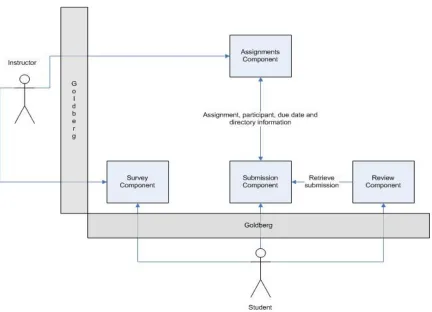
2.3 Components of Expertiza
Expertiza is mainly composed of the assignment component, the review component
components to handle surveys and maintain the course hierarchy. The user interface and
authentication is managed by an external plugin called Goldberg. We discuss more about the
Goldberg plugin later in this chapter.
Figure 2: Expertiza components and interaction between them
Goldberg Component
Goldberg is a Ruby on Rails generator that provides solutions for security, site
navigation and content management. Generators are machines that produce ruby code. They
authentication and help with menus. We can associate controllers to menu items and
associate appropriate actions to those.
Assignments Component
The assignment component deals with management of due dates for assignment and
review submission, deadline rights (which define what operations can be performed by a user
between two specific deadlines).
The different operations that the assignment component handles are assignment
creation and editing, adding participants to a particular assignment, and management of
assignments. Management of assignments includes managing due dates for submitting work
and reviews on work; late policies, deadline rights, viewing reports, etc.
A late policy basically defines the action to be taken in case of late submission of
work or review of work. The policy defines how many points are to be deducted at each
stage, the maximum points that can be deducted for a certain assignment etc.
Deadline rights specify if the action to which it is applied can be performed after its
deadline has been passed. It can also specify if penalty can be imposed if the action is
An instructor can add courses to the system. However, the creation of courses
is optional but is useful if you want to have common settings for all assignments of a
particular course. The instructor can also add all the students of the course to the system and
associate them to a course created on the system. Using this feature, the instructor can avoid
adding participants each time a new assignment is created. The courses can be associated
with different institutions. This way, two instructors can have courses with same names on
the system. This component is helpful to organize assignments and submissions into courses
and institutions thus simplifying the work of the instructor.
This component basically provides the instructor features that help him manage an
assignment. Other components interact with this component for assignment specific
information such as deadlines, directories where the submissions to the assignment are saved.
Review Component
The review component provides the users functionality to review other's work as well
as reviews. It enables the instructor to create review mappings which are explained below. It
is responsible for the entire review process. The review process includes review of the
author's work, viewing reviews of reviews to other's work, viewing feedback on ones own
review, editing a review on the reviewers side and viewing a review, giving feedback to a
Submissions component
The submission component handles the operations concerning the submission of work
and other documents to the system. It also connects to other systems such as wiks and forums
and presents those to the users of the system. Currently, the system supports three kinds of
submissions using files, wikis and URLs. Submitting files is one of the most popular ways to
submit to a peer review system. Expertiza allows users to submit their work as files. The user
can also create directories and organize files into different directories. Wikis are a fast
catching up as an effective way for groups to work together. We have implemented a
functionality that will spider a wiki and fetch all entries in the wiki where the user being
reviewed has made a contribution. Another way to submit work is via URLs. Users can
provide links to their work that has been saved at some other location. This can also be used
to provide references and additional materials which will help the reviewer understand the
author's work better. However, the user has to compromise on anonymity by using this
feature as one can guess the authors identity through the URL.
I was involved in the development of the assignment component and the review
Chapter 4
New Support Features in Expertiza
This chapter discusses in detail the new features that have been added or will be
added to the system to make it better support collaborative learning. We discuss why a the
feature is required, and how it will help the system achieve its goal—to support instructors
and students perform their roles efficiently so that they produce better material out of their
study. It helps the instructor monitor the performance and work of students in his course
As we have discussed earlier, we want the system to produce the best possible
products. Users can do so more efficiently if we minimize and simplify the work done by a
user and provide a channel of communication between the users. Thus users can put forth
their ideas in the best way possible and also be able to clarify their position when required.
The new features can be categorized into three categories which are: better communication,
ease of use, detection and notification of outliers and inconsistencies.
Better communication
Using the new communication features, a student can be informed that a review of his
or her work has been done as soon as someone reviews his or her submission. An instructor
can communicate with a reviewer of a submission and give him or her more instructions on
might also want to communicate with each other and try to explain why they made certain
decisions thus creating much better submissions.
Ease of use
In the Expertiza system as it exists today, users are responsible for keeping track of
work and deadlines. When they log in, they see a list of current assignments, and the next
pending deadline for each. But they are not automatically notified when a deadline is
approaching. This leads to many students missing deadlines, particularly in later phases of
review. Similarly, students (and instructors) need to be told when they have work to do. This
could be either a posting of a review of their work, or a resubmission of work that they have
reviewed. The Java servlet version of the peer-review software supported this, and it has
very recently been added to the Ruby on Rails version.
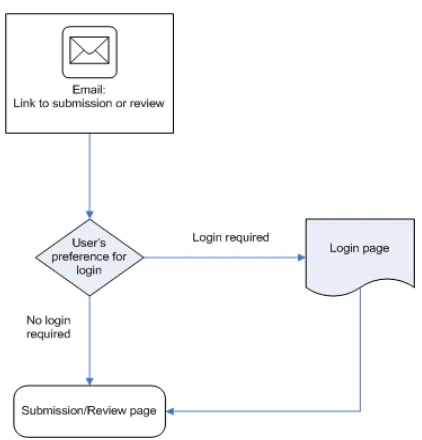
To streamline the review process through automatic notification, each e-mail
informing the user of a pending task would contain a link to the system that, after login,
would take the user directly to a page where the task could be performed. The user would no
longer have to navigate through the system to get to the right page. Because it would now be
easier for users to perform their assigned tasks, we would expect them to do so more quickly
Automatic detection of inconsistencies
Given our experience with the system, we know that certain situations arise again and
again, and require manual intervention. One of these is inconsistencies in review scores
between reviewers. An outlier is basically a score that is inconsistent with other scores
assigned to the same submission. While inconsistent reviews can sometimes be justifiable,
usually it is the case that the reviewer submitting the outlier has not carefully read the
submission. As it now stands, inconsistent scores are entered, and remain in the system until
either the student brings them to the attention of the instructor, or a TA notices them when
entering grades. Either of these methods of detection is distinctly suboptimal because of the
time lag: reviewer and author do not find out about the inaccuracy until it is too late for the
reviewer to do anything about it.
Thus, it is a good idea to bring such inconsistencies to the attention of the instructor
as soon as they are entered into the database. The instructor can then inform one (or more) of
the reviewers to reconsider their review. We will also convert the instructor's View Report
page into a monitoring tool where inconsistent reviews can be highlighted in different colors,
depending on their deviation from the norm of reviews for this submission.
Common terminology
We use the following terms often in this section. Here we give a brief description of
review_mapping: A review mapping is an assignment of a specific user to review a
specific submission.
author_id: This is the user ID of the author of the concerned submission.
reviewer_id: This is the user ID of the reviewer of the submission being reviewed
assignment_id: The id of the assignment to which the submissions that are being
reviewed belong.
wiki_helper: A Ruby helper function that performs all the wiki-related actions.
4.1 Communication between users
Authors and reviewers often misunderstand each other. If a reviewer misunderstands
an author, the author may see the reviewer’s feedback as useless, impertinent, or hostile.
However, if the author can ask the reviewer what is meant, and the reviewer respond to that
query, then a conversation can develop that will clarify the issues for both author and
reviewer. Similarly, a reviewer may misunderstand the topic of the assignment, and
downgrade a submission for reasons that are impertinent or irrelevant. If given the
opportunity for feedback, reviewer and author can arrive at a mutual understanding. Thus,
our goal is to permit frequent interactions between author and reviewer.
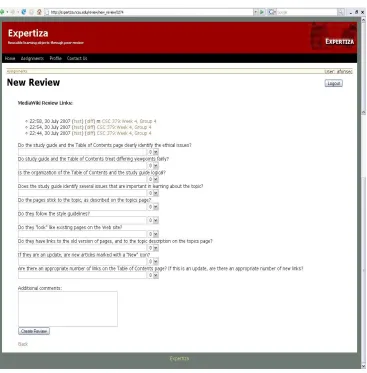
While reviewing, the review form provides space for comments underneath each
review rubric question. The screenshot below shows a page for a new review. The comments
scores, these comments are displayed as well. After the last rubric question, a textbox is
provided for the reviewer to add additional comments.
Figure 3: A screen for new review
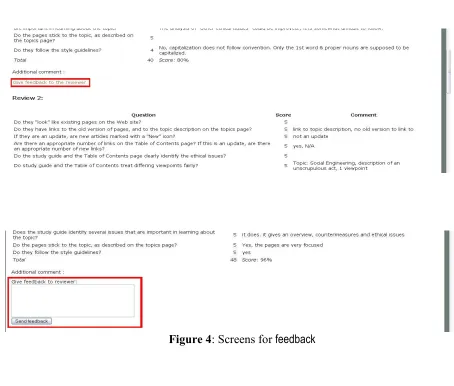
The author can give feedback to the reviewer. In the current system, the feedback
consists of a single text message. However, in the near future, author feedback will be based
author feedback, as well as the rubric for review. The reviewer will be able to see the
author’s feedback on the Edit Review page.. The figure below shows the view scores screen
through which the author of a submission can give feedback to the reviewer.
Implementation
This feature can be accessed by a link below each review. Once the link is
clicked,using Javascript a box is displayed where the link was. This is done using Javascript.
These are shown in the figure below.
If a feedback for a particular review already exists, that feedback text is shown in the
box that appears when one clicks the link. The text can be edited and re-sent.
The feedback will be sent using AJAX. This way the whole page need not refresh
each time some feedback has been sent. Using AJAX, extra data can be requested from the
server and loaded in the background without interfering with the display and behavior of the
existing page
The feedback is saved in the database table review_feedback. The review feedback
table also stores references to the review, the user who gave the feedback, the assignment and
the time when the feedback was given.
The display for this feature is handled by the views used for review. The requests are
processed by the review_feedback_controller. The review_feedback model communicates
with the database using rails active record.
Table 1: Classes, views and databases involved in feedback
Classes involved controllers/review_feedback_controller.rb, models/review_feedback.rb
Table 1 Continued. Database tables involved
review_feedbacks ( used to store the feedback), reviews (used to get
the review information), review_mappings (used to get the author and
reviewer information)
4.2 Ease of use
4.2.1 Accessing the system via links in email
We will be implementing a feature by which users can access a review or submit their
work directly via an email link an email. The link will contain a unique id that points to a
particular review of a particular author (or team) by a particular reviewer. This unique id is
almost impossible to guess for the following reasons: i) If not specified by the instructor or
the teaching staff, the review mapping is generated automatically and is not based on any of
author_id, review_id or assignment_id which can be guessed; (ii) the reviews are double
blind. Thus no student should know the reviewer/author correspondence. This allows the
reviewer to skip the login step when accessing the system using this link. The user’s
password can even be encrypted into the link. Since the links will be emailed only to the
users who will be accessing the relevant pages and since the links cannot be guessed by other
users, it is safe to skip the login step. However, if the user feels more comfortable logging in
before performing an activity, (s)he can indicate that in the profile settings and the system
will then refrain from sending e-mail allowing access without that user’s login.
Implementation
To embed a link inside an email, we need information about which page we want to
display, which user is the link being sent to, the id of the entity that is being sent. The entity
The emails are triggered automatically and are sent using Expertiza’s mailer interface
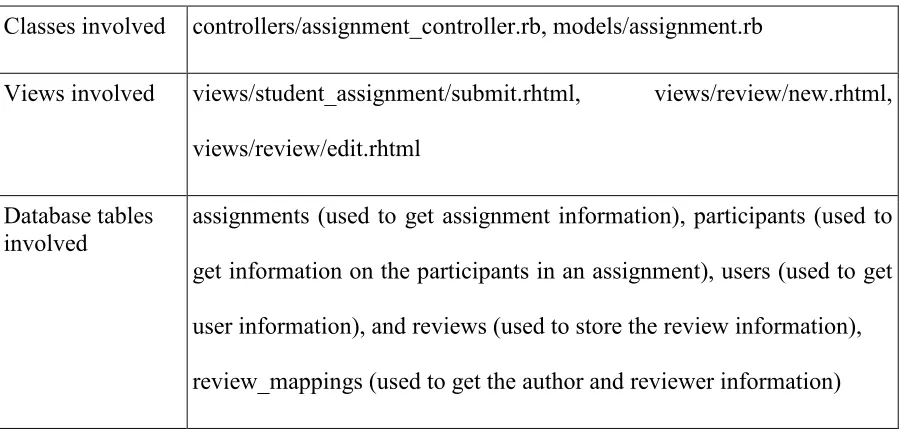
Table 2: Classes, views and databases involved in e-mail review
Classes involved controllers/assignment_controller.rb, models/assignment.rb
Views involved views/student_assignment/submit.rhtml, views/review/new.rhtml,
views/review/edit.rhtml
Database tables involved
assignments (used to get assignment information), participants (used to
get information on the participants in an assignment), users (used to get
user information), and reviews (used to store the review information),
review_mappings (used to get the author and reviewer information)
4.2.2 Wiki assessments
Wikis are great for team work. They have superior editing capabilities and a wiki is
very easy for multiple users to make changes to a single object in an organized manner [14].
We have included support for wikis in our system. Users will be able to submit their work to
a wiki and get reviews through Expertiza.
The reviewers see the work done by the team or author they are reviewing
Implementation
The functionality to integrate wikis with Expertiza is done with the help of
wiki_helper. Wiki_helper spiders through a wiki and extracts all entries made by a specified
author. These entries are displayed as links in the review page instead of files.
The assignments table has a field which indicates what type an assignment is of. This
field can be set through the new or edit screens of assignment. Based on the type of
assignment, the system performs tasks related to those types.
Apart from displaying the links to the wiki, all other functions concerned with
reviews are handled by the same controller that handles reviews in other types of
assignments.
4.3 Notification
Authors and reviewers can be emailed about activity whenever a submission is made
or updated, when a submission is reviewed, or when the author gives feedback to a reviewer.
The email will contain a link to the appropriate page: the review page if the email is sent to
the reviewer and the View feedback page if the email is sent to the author of the submission.
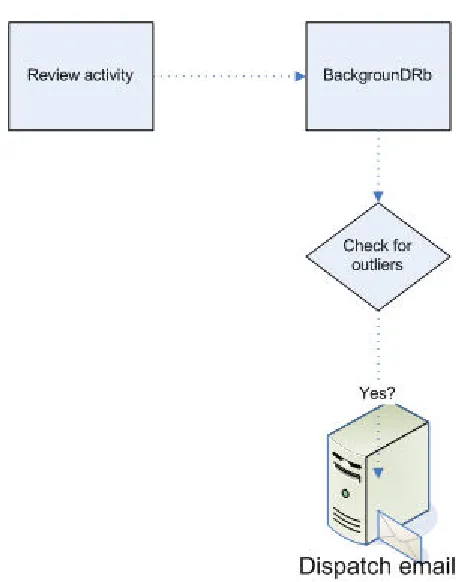
The instructor or TA should be notified of outliers—reviews that appear inconsistent
with other reviews.. We need to decide on what triggers the dispatch of these emails. The
strategy we propose is to run the algorithm to identify an outlier each time there is any
any delay. We intend to use BackgrounDrb to perform this operation. BackgrounDRb is a
Ruby job server and scheduler which is typically used for offloading long-running tasks on
Ruby on Rails applications [13]. It runs background tasks in a separate process, thus
decoupling the background tasks from the request-response cycles. The tasks can either be
run periodically or they can be triggered by an event [13].
The next feature we discuss is the tool to monitor reviews. This is basically a
modification to the instructor's View report screen. We assign different shades of red, green
and yellow to different deviations from the average score. If the color of a cell is closer to
green it means that the review represented by that cell is more consistent with the average
and it is more likely to be correct. If the color of a cell is closer to red, it means that the
review represented by that cell is inconsistent with the remaining reviews. Using this screen,
the instructor can easily identify reviews which might be inconsistent and then have a closer
look at just those reviews. This feature highlights the reviews that have a higher probability
Figure 7: Screen to monitor reviews
Implementation
The detection is done by an algorithm which runs as a separate thread each time one submits
a review. The algorithm is discussed later in this section.
Once the outliers are detected, the emails are sent using the mailer interface. The
email to the instructor will have a link to a new screen specially meant for the instructor. This
screen will display the reviewer’s information, the author’s information, the submission and
assignment_controller is the appropriate place for this because the screen is concerned with
that particular assignment.
The other feature we discussed was the report monitoring tool. This tool is integrated into
the view_report screen. To implement this, we need to modify the view_report screen to
color its cells depending on how consistent each review’s score is with the average. The
screen already has the functionality to let the instructor edit any review that has been made
for an assignment.
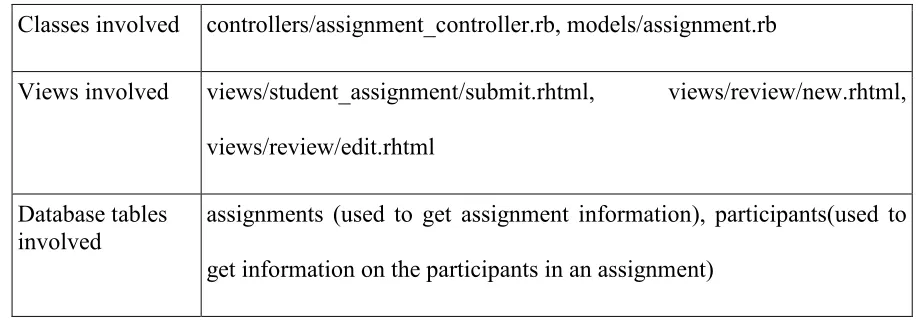
Table 3: Classes, views and databases involved in notifications
Classes involved controllers/assignment_controller.rb, models/assignment.rb
Views involved views/student_assignment/submit.rhtml, views/review/new.rhtml,
views/review/edit.rhtml
Database tables involved
assignments (used to get assignment information), participants(used to
Chapter 5
Conclusion
Electronic peer review systems are often seen as an intrusion by students because
they think it takes a lot of their time. Our goal in this work is to change intrusions into work
flow and inform the students when there is work to do and take them directly to the
appropriate webpage without having to navigate through the website. As it becomes easier
for users to do their tasks, they tend to do them more faithfully and better. These new
features will go a long way toward making Expertiza an effective support system for
References
[1] Conner,Marcia L., “Informal Learning”, http://agelesslearner.com/intros/informal.html[2]
“Brief Overview of Collaborative Learning,”
http://collaborativelearning.pbwiki.com/CollaborativeLearningOverview
[3] Leinonen, Teemu; Viratenen, Otso; Hakkarainen, Kai; Kligyte, Gidre, “Collaborative
Discovering of Key Ideas in Knowledge building,”
http://www2.uiah.fi/~tleinone/codi/two_page_codi_cscl.pdf
[4] http://www.answers.com/topic/groupware?cat=biz-fin
[5] http://searchcio.techtarget.com/sDefinition/0,,sid182_gci798202,00.html
[6] Bonk, Curtis J., “Collaborative Tools for eLearning”,
http://www.clomedia.com/content/templates/clo_feature.asp?articleid=41&zoneid=30
[7] Collaborative Learning Tools,
http://www.e-learningcentre.co.uk/eclipse/Resources/choosing-collab.htm
[8] http://searchdomino.techtarget.com/sDefinition/0,,sid4_gci212217,00.html
[9] Shapiro, Kam, “Electronic Peer Review Management”,
http://spo.umdl.umich.edu/monthly/peerreview.html
[10] http://wiki.rubyonrails.org/rails/pages/ActiveRecord
[11] http://en.wikipedia.org/wiki/Ruby_on_Rails
[13] Introduction to BackgrounDRb - Ezra Zygmuntowicz,
http://www.infoq.com/articles/BackgrounDRb
[14] http://www.scienceofspectroscopy.info/edit/index.php?title=Using_wiki_in_education
[15] Smith, Barbara Leigh and MacGregor, Jean T., “What is Collaborative Learning”
[16] Gokhale, Anuradha A., “Collaborative learning enhances critical Learning”
[17] Gehringer, Edward F.; Ehresman, Luke M.; Wagle, Prasad; “Expertiza: Reusable
learning objects and active learning for distance education”